





16 Popular Chrome Insider Posts to Help You Simplify Browser Deployments

4437
Of your peers have already read this article.
1:00 Minutes
The most insightful time you'll spend today!
We launched the Chrome Insider blog in 2019 to share tips and best practices with IT admins so they could better deploy, manage, and secure Chrome browser. Since then, the series has covered everything from supporting legacy browsers to protecting enterprise credentials to simplifying deployments. To make it even easier to find and browse the series, we’ve pulled together all the posts to date here so you can read them all in one place or bookmark them for later.
Managing Chrome tips and tricks
- Understanding Policy Precedence for Chrome browser
- Protecting enterprise credentials with Password Alert
- Managing Chrome browser in a controlled environment
- Simplifying Chrome deployments on macOS
- Configuring Chrome browser in your VDI environment
- Know your options for Modern Enterprise Browser Management
- Managing policies and extensions across operating systems in Chrome Browser
Improving extension management and reporting
- Improving Chrome browser extension management through permissions
- Publishing custom extensions for the enterprise
- Enhanced extension reporting with Chrome Browser’s Takeout API
Ensuring your organization is secure
- Managing BeyondCorp Enterprise’s threat and data protection capabilities in Chrome
- A primer on enterprise private browsing modes
Increasing your organization’s productivity
- Ready, set, Chrome—Improvements and polices to make Chrome more performant
- Troubleshooting with Chrome Browser
- Preparing your enterprise for Flash deprecation
- Apps from the past? Fear not with legacy browser support in Chrome Enterprise
Although the series is 16 posts strong, there are plenty more Chrome Insider posts to come. You can read these posts and more on our Chrome Enterprise channel.
Partner Delivery Excellence: Empowering Partners Deliver Customer value with Google Cloud

975
Of your peers have already read this article.
3:30 Minutes
The most insightful time you'll spend today!
With growing demand for Google Cloud, customers are increasingly expecting more reliable advisory and implementation skills from Google Cloud Systems Integrator (SI) Partners. Our model for professional services remains differentiated, with a heavy co-dependence on our SI Partner ecosystem to drive success for our customers. Therefore, enabling and nurturing strong delivery capabilities in our Partners is a responsibility we take seriously. The Google Cloud Global Services Delivery and Global Partner Ecosystem & Channels team jointly made significant investments earlier this year to underscore our commitment in this area. That’s why we’ve created the expanded Partner Delivery Excellence portfolio, a rich set of resources to help Google Cloud Partners deliver high-quality Google Cloud projects. Whether you’re a Partner just getting started with Google Cloud or have prior experience, we have the resources you need to succeed and we’ll meet you where you are in this journey.
Here are some of the key offerings in the Partner Delivery Excellence portfolio:

Stage: Building delivery skills | Pre-engagement
- Delivery Readiness Index (DRI): a framework that enables SI Partners to receive customized, individual level delivery enablement recommendations based on each consultant’s delivery readiness, assessed across training, certifications, delivery skills validation and prior delivery experience.
- Delivery Navigator (coming soon): A delivery management platform consisting of delivery methods, work management tools, and dashboards that enables Google PSO and Partners to drive a high-quality, globally consistent project experience. You’ll hear more about this in an upcoming blog post.
Stage: Develop delivery expertise | Preparing for a delivery project
- Delivery Runbooks: Workload-level detailed delivery guides which include reference architectures, detailed migration steps, validation guidelines, common troubleshooting tips and more.
- Delivery Bootcamps: In-person or hybrid mode multi-day sessions conducted by experienced Google Cloud Consultants and customizable to the specifics of a Google Cloud project for a customer.
- Use case learning: Self-paced learning in the form of bite-sized lectures to build foundational delivery skills at the workload level, with quiz based assessment to validate knowledge gained.
- Delivery labs: Hands-on labs, hosted on our Qwiklabs platform, that complement use-case learning to build and test core delivery skills through a series of practical delivery scenario challenges.
Stage: Leverage Google delivery SMEs | During active project delivery
- Onboarding accelerator: Enables Partners with advisory services to onboard customers on Google Cloud foundations and migrate the first workload quickly and efficiently, by imparting knowledge and best practices from the Technical Onboarding Center. Supported workloads span Infrastructure & Application modernization, Analytics & AI and Databases.
- Delivery Helpdesk: In-the-moment implementation support for Partners during a live Google Cloud project through a standard case management process. Google Global Services Delivery teams well versed in the technology area will advise and help Partners resolve the issue at hand.
- Delivery Assurance Services: Project-level safeguarding services that are delivered in the context of an active Partner-led customer project.
Stage: Leverage Google delivery expertise independent of projects | Build, scale and optimize Google Cloud practices
- Tooling advisory: Assessment of Partner tools with detailed recommendations to enhance tools architecture for better scale, security, ease of use and, where applicable, pointers to Google Cloud open-source tools and best practices.
- Resident Experts: We are selectively introducing this offering of specialists from Google Cloud Consulting teams embedded with Partners for a fixed period of time and with defined scope and deliverables. Partners can leverage these experts to build core delivery capabilities in new areas like generative AI, sharpen existing Google Cloud capabilities in adjacent solution areas like Data & Analytics or have access to expertise to define a comprehensive automation strategy for Google Cloud migration practices.
We are confident that the Partner Delivery Excellence portfolio brings forth much of what’s needed for our Partners to not only deliver high-quality services but also profitably grow their Google Cloud services business quickly and efficiently.
To learn more about the portfolio or to share your feedback or suggestions, please contact your Google Cloud Partner representative.
If you are attending Partner Summit during Google NEXT in August, we look forward to seeing you in the breakout series where we have a dedicated session on this topic.
Thank you for reading. And thank you for your partnership!

1222
Of your peers have already downloaded this article
3:30 Minutes
The most insightful time you'll spend today!
Small and medium-sized businesses are increasingly adopting cloud solutions, with Google Cloud Platform offering significant benefits. IDC interviews reveal that SMBs using Google Cloud Platform experience improved performance, reliability, and scalability while reducing costs. Key findings include:
- Empowering application development teams with infrastructure agility and scalability
- Enabling business growth by addressing and expanding revenue opportunities
- Maximizing IT staff time through automation and embedded technologies
- Optimizing IT infrastructure costs with features like autoscaling and Google Kubernetes Engine
IDC estimates that these benefits translate to an average value of $1.09 million per interviewed SMB, demonstrating the value of Google Cloud Platform in driving business success.
Transitioning to Hybrid Environment with Chrome Browser

4082
Of your peers have already read this article.
3:00 Minutes
The most insightful time you'll spend today!
It’s been quite a year. In general, and for work. Just the other day, I read a new study from Pew Research that shows 71% of people are currently working from home, and 50% of employees say they want to continue working from home at least three days a week. That’s more than half of people wanting to be remote over half the time!
As we’ve been navigating our own return to the office here at Google, one thing has become more clear than ever: the browser is no longer just a portal to the internet—it’s one of the most critical components of our tech stack. And we know we’re not alone in this. As our organization, and other organizations of all sizes, transition to a more hybrid way of working, it’s absolutely key to have a modern browser that’s built to support both admins and end users.
The good news is, Chrome is made for this! Literally. It’s purpose-built for flexible work—and as the future unfolds and businesses’ needs continue to evolve, we’re committed to making sure our browser is even easier to manage, even more secure, and even more helpful, so all of us can be more productive.
What’s next for Chrome
As we design and build Chrome to be a stronger asset for the enterprise, we are focused on these key areas:
- Simple management
- Modernized security
- Productivity enhancements
- Helpful integrations
We’ve already made great strides in all four areas, with more exciting releases to come soon. Let’s take a closer look at what’s new and available right now, what to look forward to, and how each feature is equipping Chrome browser-based businesses (and their users) for what’s next.
When it comes to simple management there have been a lot of exciting developments—Chrome Browser Cloud Management is built for this new hybrid reality, giving IT teams the advantage of powerful and flexible management capabilities both in the cloud and on premises, so they always have the visibility and insights they need to make more informed decisions, quickly.
With recent new releases admins can:
- Track all versions of Chrome from one place. Our new daily version report allows IT teams to see all versions, including minor versions, in a single report to support compliance and make it easier to see and manage their entire deployment.
- Report on apps and extensions across the organization. A new Apps & Usage report provides helpful visibility into all installed extensions, Progressive Web Apps (PWAs), Chrome apps, and Android apps. You can see versions and permissions for each individual app and even force install or block, right from the report.
- Remotely troubleshoot and clear browser data. This is one of my favorites because not only is it incredibly helpful, it was created from customer requests! Admins (and a lot of service desk employees) told us how useful it would be if they could clear an end user’s browsing data, cookies, and cache remotely – and our team made it happen.
- Extension management improvements. Coming this summer: extension request workflow will empower admins to change the behavior of Chrome Web Store so that end users request extensions and admins then approve or deny the installations from a centralized list in Admin Console. Another new release is extension details, where admins can now find out exactly what extensions are installed where, who makes them, what resources they’re using, and all other extension-related details – also right from the Admin console.
Of all of our priorities, modernized security often feels most urgent. In a recent security report, 65% of US and UK employees said they received a phishing email during the remote working period initiated by COVID-19. Further, a study by the Ponemon Institute found that 41% of responding organizations had dealt with an attack involving the compromise of employees’ passwords, costing an average of $267,408 per organization. Between the regular emergence of new threats and the increase in targeted mobile attacks, our new ways of working definitely demand a fresh approach to security.
- BeyondCorp Enterprise, our new modern zero trust solution, enables secure access to critical apps and services with integrated threat and data protection, all delivered through Chrome browser, was introduced in January 2021. Its agentless approach simplifies the admin and end-user experience. We also just launched BeyondCorp Enterprise protected profiles to help organizations protect their extended workforce, including contractors, frontline workers, and anyone working from home who needs to securely access corporate resources from shared or unmanaged devices.
To learn more about Google’s approach to modernizing security, tune into the Wall Street Journal’s Advancing Security in the New Business Environment event tomorrow from 10:35 am – 10:55 am EST, with very own Parisa Tabriz (Head of Chrome Engineering, Product Management and UX) and Phil Venables (CISO of Google Cloud).
When it comes to productivity enhancements, I’m proud to share that we’re consistently releasing features that support users no matter where they’re working. Now that the browser is where so much of our day-to-day work happens, it’s more important than ever before to build in new ways to save time and work together while apart.
Recently released productivity-boosting features include:
- A faster way to take action right from the address bar. Chrome Actions is a feature we launched last year, where you can simply type in commands such as “clear browsing data ” or “open incognito window”and get down to business in just a few clicks. We’re excited to announce new Chrome Actions are now available through our beta channel! Try one of these actions to check it out: “ Run Chrome safety check,” “Create doc,” and “Manage Google Account.”
- Link directly to highlighted text. If you like to share snippets and quotes from articles or websites with your colleagues, you’re in luck. Now, instead of sharing the URL link from the address bar, you can take advantage of the new “link to highlight” feature in Chrome to point to the specific content. Simply choose the content you want to share, right click, select “Copy link to highlight,” and then send the link – to the exact part of the page you want people to see. It’s available for desktop and Android now, and coming soon for iOS.
- Decreased Chrome CPU usage. This means more battery life, less heat coming off of your device, and less fan noise. 🎉 🙌🏻
- And there’s more! To explore additional productivity features, check out this blog post.
Our final area of focus is all about giving Chrome customers more choice with helpful integrations. We’re actively partnering with best-of-breed organizations to bring integrations —and your favorite tools— into Chrome, to create a more seamless and productive experience across the board. Stay tuned on this as we’ll have more to share later this year. In the meantime, hear from our Modern Computing Alliance partners, such as Box, HP, RingCentral, Okta and VMware, as they explore many of the most important questions about returning to the office.
We’re constantly thinking about how we can help people and organizations adapt and thrive as they begin to return to the office. See below for three events from the team that cover how to make the transition to hybrid easier for your team, be sure to check them out.
Modernizing Your Approach to Security session at the Wall Street Journal’s Advancing Security in the New Business Environment event
- Tomorrow June 2, 2021
- 10:35 – 10:55 AM EST
- Register here
Chrome Insider: Browser tips & tricks for IT admins
- June 10, 2021
- 10:00 AM – 11:15 PT
- Register here
Google Cloud’s Suite of DevOps Speeds Up ForgeRock’s Development

5690
Of your peers have already read this article.
3:00 Minutes
The most insightful time you'll spend today!
Editor’s note: Today we hear from ForgeRock, a multinational identity and access management software company with more than 1,100 enterprise customers, including a major public broadcaster. In total, customers use the ForgeRock Identity Platform to authenticate and log in over 45 million users daily, helping them manage identity, governance, and access management across all platforms, including on-premises and multicloud environments.
Operating at that kind of scale isn’t easy. In this blog post, ForgeRock Engineering Director, Warren Strange discusses the three things that help make their developers efficient and productive, and the Google Cloud tools they use along the way.
At ForgeRock, we’ve been an early adopter of Kubernetes, viewing it as a strategic platform. Running on Kubernetes allows us to drive multicloud support across Google Kubernetes Engine (GKE), Amazon (EKS), and Azure (AKS). So no matter which cloud our customers are running on, we are able to seamlessly integrate our products into customers’ environments.
Making it easier for ForgeRock’s developers and operators to build, deploy and manage applications has been crucial in our ability to continually provide high quality solutions for our customers. We’re always looking for tools to improve productivity and keep our developers focused on coding instead of configuration. Google Cloud’s suite of DevOps tools have streamlined three specific practices to help keep our developers productive:
1. Make developers productive within IDEs
Developer productivity is core to the success of any organization, including ForgeRock. Since developers spend most of their time within their IDE of choice, our goal at ForgeRock has been to make it easier for our developers to write Kubernetes applications within the IDEs they know and love. Cloud Code helps us precisely with that: it makes the process of building, deploying, scaling, and managing Kubernetes infrastructure and applications a breeze.
In particular, working with the Kubernetes YAML syntax and schema takes time, and a lot of trial and error to master. Thanks to YAML authoring support within Cloud Code, we can easily avoid the complicated and time consuming task of writing YAML files at ForgeRock. With YAML authoring support, developers save time on every bug. Cloud Code’s inline snippets, completions, and schema validation, a.k.a. “linting,” further streamline working with YAML files.
The benefits of Cloud Code extend to local development as well. Iterating locally on Kubernetes applications often requires multiple manual steps, including building container images, updating Kubernetes manifests, and redeploying applications. Doing these steps over and over again can be a chore. Cloud Code supports Skaffold under the hood, which tracks changes as they come and automatically rebuilds and redeploys—reducing repetitive development tasks.
Finally, developing for Kubernetes usually involves jumping between the IDE, documentation, samples etc. Cloud Code reduces this context switching with Kubernetes code samples. With samples, we can get new developers up and running quickly. They spend less time learning about configuration and management of the application—and spend more time on writing and evolving the code.
2. Drive end-to-end automation
To further improve developer productivity, we’ve focused on end-to-end automation: from writing code within IDEs, to automatically triggering CI/CD pipelines and running the code in production. In particular, Tekton, Cloud Build, Container Registry, and GKE have been critical to Forgerock as we streamline the flow of code, feedback and remediation through the build and deployment processes. The process looks something like this:
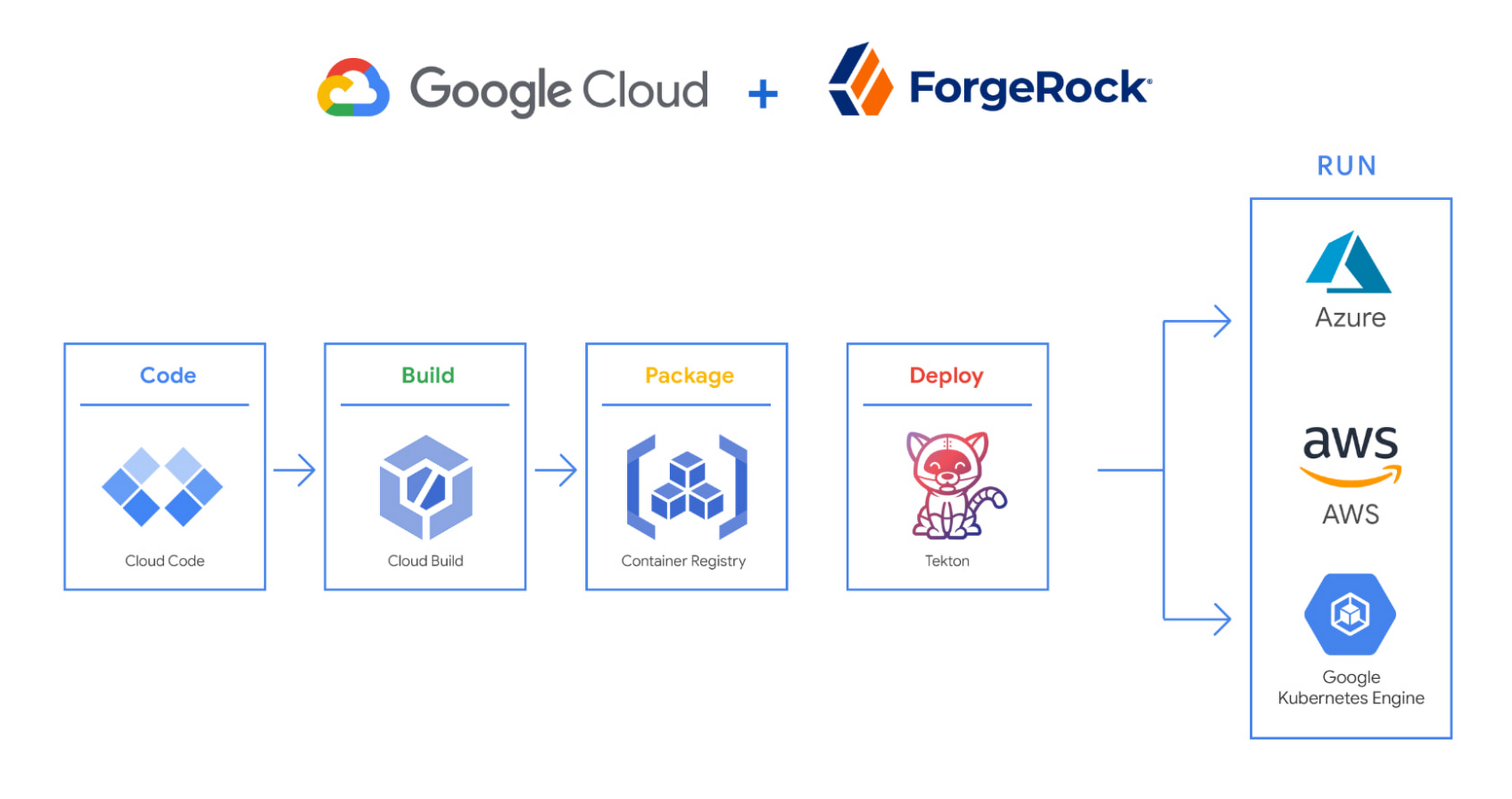
We begin by developing Kubernetes manifests and dockerfiles using Cloud Code. Then we use Skaffold to build containers locally, while Cloud Build helps with continuous integration (CI). The Cloud Build GitHub app allows us to automate builds and tests as part of our GitHub workflow. Cloud Build is differentiated from other continuous integration tools since it is fully serverless. It scales up and scales down in response to load, with no need for us to pre-provision servers or pay in advance for additional capacity. We pay for the exact resources we use.
Once the image is built by Cloud Build, it is stored, managed, and secured in Google’s Container Registry. Just like Cloud Build, Container Registry is serverless, so we only pay for what we use. Additionally, since Container Registry comes with automatic vulnerability scanning, every time we upload a new image to Container Registry, we can also scan it for vulnerabilities.
Next, a Tekton pipeline is triggered, which deploys the docker images stored in Container Registry and Kubernetes manifests to a running GKE cluster. Along with Cloud Build, Tekton is a critical part of our CI/CD process at ForgeRock. Most importantly, since Tekton comes with standardized Kubernetes-native primitives, we can create continuous delivery workflows very quickly.
After deployment, Tekton triggers a functional test suite to ensure that the applications we deploy perform as expected. The test results are posted to our team Slack channel so all developers have instant access and insights about each cluster. From there, we are able to provide our customers with their finished product request.
3. Leverage multicloud patterns and practices
The industry has seen a shift towards multicloud. Organizations have adopted multicloud strategies to minimize vendor lock-in, take advantage of best-in-class solutions, improve cost-efficiencies, and increase flexibility through choice.
At ForgeRock, we’re big proponents of multicloud. Part of that comes from the fact that our identity and access management product works across Google Cloud, AWS, and Azure. Developing products using open-source technologies such as Kubernetes has been particularly helpful in driving this interoperability.
Tekton has been another critical project that has allowed us to prevent vendor lock-in. Thanks to Tekton, our continuous delivery pipelines can deploy across any Kubernetes cluster. Most importantly, since Tekton pipelines run on Kubernetes, these pipelines can be decoupled from the runtime. Like Tekton and Kubernetes, both Cloud Build and Container Registry are based on open technologies. Community-contributed builders and official builder images allow us to connect to a variety of tools as a part of the build process. And finally, with support for open technologies like Google Cloud buildpacks within Cloud Build, we can build containers without even knowing Docker.
Making it easier for developers and operators to build, deploy and manage applications is critical for the success of any organization. Driving developer productivity within IDEs, leveraging end-to-end automation, and support for multi-cloud patterns and practices are just some of the ways we are trying to achieve this at ForgeRock. To learn more about ForgeRock, and to deploy the ForgeRock Identity Platform into your Kubernetes cluster, check out our open-source ForgeOps repository on GitHub.
Partnering with Google Cloud is the Key Behind Recent Healthcare Innovations

8843
Of your peers have already read this article.
2:00 Minutes
The most insightful time you'll spend today!
It’s simply amazing to witness how some of our systems integrators employ Google Cloud solutions to drive innovation in ways we at Google may never have considered—especially in healthcare. According to analyst firm MarketsandMarkets, the market for the Cloud in healthcare is projected to grow 43% between 2020 and 2025 to nearly $65 billion, fueled by the need for better technology infrastructures and faster digital transformation.
Healthcare and life sciences communities are looking to Google Cloud and its Service engagement model partners to improve collaboration and activate the power of medical data. These transformations deliver robust data analytics and bring a much deeper perspective into health epidemics like COVID-19 to help save lives.
In the healthcare and life sciences industry, our Google Cloud partners and customers provide constant energy and inspiration–and are the magic in some key healthcare innovations globally.
Let me show you how they are solving real-world business challenges.
Improving collaboration in Healthcare
Cloudbakers and Comanche County Memorial Hospital transitioned 2,000 employees to Google Workspace to improve collaboration, reduce costs, and increase security. By implementing a system that requires less maintenance while enabling mobile access to data and true collaboration, Comanche County Memorial Hospital saves $175,000 annually on licenses and helps medical professionals spend more time with patients.
“We chose Google Workspace because it cost a quarter of what we were paying previously, offers the kind of modern features that healthcare facilities need, and gave us data security and peace of mind.” —James Wellman, CIO, Comanche County Memorial Hospital
Accessing previously locked down medical data
Google Cloud and Quantiphi supported advances in cloud-based machine learning services to reduce infrastructure costs, unlock new paths of treatment, and dramatically reduce the amount of time it takes to evaluate scanned imagery following a stroke. John Hopkins University BIOS Division has been working on medical imaging to accelerate insights from scans on approximately 500 patients from 2,500 hours to 90 minutes, and lead to more accurate decision-making for brain injury patients that will ultimately improve medical outcomes.
“We’ve aligned closely with the goal of showing that a cloud-based, AI-driven approach is robust and that it can be performed while protecting personal PHI. In terms of costs, the cloud has definitely reduced some of the traditional financial demands of our research.” —Daniel F. Hanley, Jr., M.D., Director, Johns Hopkins University BIOS Division
Improving data access with the flexibility of Google Cloud
With the help of MediaAgility, TRIARQ migrated to Google Cloud to modernize their platform, build new applications, and expand their global footprint. With BigQuery, TRIARQ can now consolidate all transactional data, past and present, into a single location to report on specific insights and predict future data from e-prescriptions to complex revenue-cycle data and value-base analysis.
“The future of this industry will need to be a global one, and we can no longer be stuck in legacy systems if we want to survive. Having a team that is passionate about supporting us in this journey is definitely a plus point.”—Yaw Kwakye, Co-founder and Chief Architect, TRIARQ
Increasing visibility to COVID-19 outbreaks for actionable insights
As part of its response to the COVID-19 pandemic, HCA Healthcare chose to work with Google Cloud and SADA to create a national portal that increases visibility into outbreaks in 3,100 counties across the country in just 8 weeks. Now, the portal generates 30,000 new analytical views each day that can help inform private and public sector decision making for reopenings, closures, hot spots, and many other population health management activities.
“This project required deep knowledge of AI, and consumer-facing platforms, as well as healthcare. Google brought together the ideal combination of product, people, and partners. Google Cloud’s healthcare-specific products along with SADA’s expertise in the healthcare IT space made this partnership the perfect choice to move quickly and intelligently.”—Dr. Edmund Jackson, Chief Data Officer, HCA Healthcare
We’re committed to building the technology, resources, and services through Partner Advantage to help our partners address this opportunity. Looking for a solution focused partner in your region who has achieved Expertise and/or Specialization in your industry? Search our Global Partner Directory. Not yet a Google Cloud partner? Visit Partner Advantage and learn how to become one today!
More Relevant Stories for Your Company

IT Team Figures Out Easiest Way to Build Data Pipelines and Create ML Models
Building a strong brand in today's hyper-competitive business environment takes vision. It also requires a flexible, easily managed approach to digital asset management (DAM), so marketing professionals and other stakeholders can easily share, store, track, and manipulate assets to build the brand. Many of today's leading companies, including JetBlue, Slack,

Google Products Helps HMH’s Healthcare Staff Work from Anywhere Efficiently and Securely!
Hackensack Meridian Health (HMH) executive Mark Eimer explains how an ambitiously-timed rollout of a comprehensive suite of Google products helped the entire organization—from doctors to IT staff—achieve better security, cultivate a more equitable work environment, and ultimately, improve patient outcomes. How does a recently merged, 17-hospital healthcare system fast-track a platform migration

Vodafone Turns to Google Maps Platform to Expand and Improve its Network
Vodafone India had a manual, labor-intensive process for determining network capabilities and reach. The company sent field operatives to every customer location to conduct a feasibility study. These feasibility studies help Vodafone determine whether they can provide connectivity and services to customers based on the infrastructure at that location. Everyone




PwC uses Connected Sheets to scale data insights
It’s important for teams across the business to understand customer adoption of products and services, whether it’s the product team tracking usage of a newly released feature or the support team trying to anticipate incoming service requests. Similarly, IT teams need to analyze the adoption of an organization’s internal applications
