





Siemens: What Smarter New Age Recruiting Looks Like

3171
Of your peers have already read this article.
4:30 Minutes
The most insightful time you'll spend today!
Siemens aims to shape the future—and has the scale, culture, and know-how to realize its ambitions. The Germany-headquartered industrial manufacturing business operates in more than 120 countries and focuses on electrification, automation, and digitalization. Siemens’ extensive portfolio includes industrial production digitalization and automation technologies, diagnostic and therapeutic imaging for healthcare, and building automation and management technologies.
“All our solutions are united by the fact they impact the way people live their lives,” says Stephanie Morton, Siemens’ Global Talent Acquisition Manager: Strategy, Technology & Talent Relationship Management.
“‘Engineered for life’ is one of our brand claims.”
Hiring “future makers”
Hiring thinkers, dreamers, and doers hungry to transform businesses, industries, and lives is key to Siemens’ success. The business calls its people “future makers” and employs more than 370,000 of them worldwide.
Recruiting for a workforce this size is no easy task. Siemens’ global jobs and careers website has about 5,000 open positions at any one time, and the organization receives 2 million applications to fill 35,000 positions per year.
However, by 2017, the website was experiencing problems that hampered the talent acquisition team’s efforts to fill roles promptly with the right candidates. Its standard keyword matching technology could not optimize the results provided to job seekers, frustrating potential candidates and increasing the workload for recruiters.
“With Cloud Talent Solution, we saw a 30 percent uplift in candidate conversions from search to application.”
—Stephanie Morton, Global Talent Acquisition Manager: Strategy, Technology & Talent Relationship Management, Siemens
“We found the language we used about our jobs internally was often not the same language job seekers used,” explains Morton. “For example, we may have an engineering position open for our MindSphere cloud-based IoT operating system. We would post this on our jobs and careers website as ‘MindSphere engineer.’ Unfortunately, a job seeker using more general terms such as ‘IoT engineer’ may miss this advertisement.”
In addition, without intelligence and context, the keyword matching technology could not determine job seeker search intentions from misspelled terms. This became more of a problem as job seekers increasingly used mobile devices to conduct searches.
With keyword searches also generating pages and pages of results, job seekers often succumbed to the temptation to apply for every position returned. This left the talent acquisition team drowning in messages and applications.
“We experienced issues around seniority as well—for example, people looking for senior legal roles were receiving irrelevant results for internships or junior roles,” says Morton.
Change needed
These problems could not persist for a team charged with continuously improving candidate experiences. The team opened discussions with Jibe, a recruitment platform provider that operated Siemens’ external career websites. Jibe had collaborated with Google to integrate Cloud Talent Solution—a solution that uses machine learning to better understand job content and job seeker intent—into its platform.” Jibe offered the integrated solution to Siemens as one of its most forward-thinking customers,” says Morton.
Morton’s team reviewed Cloud Talent Solution and was immediately excited by its potential to quickly make a profound difference in its recruitment activities—without requiring recruiters and other team members to invest considerable time and effort. Cloud Talent Solution could enable the website to understand the broad intent of a job seeker—including synonymous positions—and deliver considerably more relevant results.
“We can authoritatively say Cloud Talent Solution is improving the experience for job seekers; they are conducting more searches, those searches are more effective, and more of them are converting to job applications.”
—Stephanie Morton, Global Talent Acquisition Manager: Strategy, Technology & Talent Relationship Management, Siemens
After Cloud Talent Solution expanded to encompass more than 100 languages—enabling Siemens to offer a consistent experience to candidates from a range of countries and backgrounds—Morton’s team gave Jibe and Google the green light to proceed.
“We had two key issues to address during the implementation,” says Morton. “The first was to make sure Google Cloud was aware of any Siemens-specific recruitment terms. For example, we have German-language posts that include terms commonly used internally regarding internships and junior positions. We worked closely with our partners to make sure these terms were represented in the algorithm to complement the vast constellation of already-mapped job titles in Cloud Talent Solution.”
Siemens also needed to quantify Cloud Talent Solution benefits to sell the service internally within the business and win support to proceed beyond a pilot. “Because Cloud Talent Solution was effectively an invisible layer behind our website, we had to test its impact,” says Morton.
A 30 percent uplift
Working with Jibe, Siemens conducted A/B testing. Five percent of candidates in the test group used the keyword-based search experience and 95 percent of candidates the search experience powered by Cloud Talent Solution. The testing accommodated changes in candidate queries over time and context.
“With Cloud Talent Solution, we saw a 30 percent uplift in conversions from search to application,” says Morton.
“We can authoritatively say Cloud Talent Solution is improving the experience for job seekers; they are conducting more searches, those searches are more effective, and more of them are converting to job applications,” she adds. “Anecdotally, recruiters are seeing fewer applications from job seekers who have applied to long lists of positions returned from search queries.”
“Partnering with market-leading providers like Google Cloud can help us stay one step ahead of the competition over the journey.”
—Stephanie Morton, Global Talent Acquisition Manager: Strategy, Technology & Talent Relationship Management, Siemens
In the longer term, Siemens plans to monitor the impact of Cloud Talent Solution on metrics such as candidate retention rates and manager satisfaction.
With Cloud Talent Solution well established within the business, Siemens is now working with Google Cloud to add new features—including voice assistants—to enhance the candidate experience. “Helping candidates laser in on the right positions and make successful connections is something we’re doing everything we can to make happen,” says Morton.
More broadly, Cloud Talent Solution and Jibe are helping Siemens’ talent acquisition and the rest of its human resources function build its reputation and execute its strategy. “We are becoming a function driven by delivering amazing technology-based solutions to our employees and our candidates,” says Morton. “People within Siemens are very impressed to see human resources leading the way in working with Google Cloud to deliver a solution like this at a global scale.”
“The more light-touch exercises like this we can do, the fewer big, expensive, time-consuming initiatives we need to take,” she says. “Furthermore, partnering with market-leading providers like Google Cloud can help us stay one step ahead of the competition over the journey.”
10530
Of your peers have already watched this video.
2:15 Minutes
The most insightful time you'll spend today!
The True Story of How HotStar Broke a World-Record–Thanks to Firebase and Google BigQuery
Hotstar, India’s largest video streaming platform with 150 million monthly active users around the world, provides live-streaming of TV shows, movies, sports, and news on the go.
By using a combination of Firebase products together, Hotstar safely rolled out new features to its watch screen during a major live-streaming event without disrupting users, sacrificing stability, or releasing a new build. They also used Firebase with BigQuery to analyze their event data and reduce app startup time.
“We have an ambitious mission, but our engineering team is only a fraction of the size of most of our competitors. But we are still keeping up, and we are doing it with the help of Firebase,” says Ayushi Gupta, Android Engineer, Hotstar.
4546
Of your peers have already watched this video.
31:00 Minutes
The most insightful time you'll spend today!
How Google Secures its Data Centers: Watch Video
Security is in the DNA of Google Cloud’s dozens of data centers, complex network and workloads scattered the globe. Take a tour to the nucleus of data center’s six layers of physical security designed to keep unauthorized access at bay, and also learn about Google Cloud’s security fundamentals to leverage the same philosophy on Google Cloud. Watch now!
Reasons to Leverage Vertex AI Custom Training Service

2950
Of your peers have already read this article.
6:00 Minutes
The most insightful time you'll spend today!
At one point or another, many of us have used a local computing environment for machine learning (ML). That may have been a notebook computer or a desktop with a GPU. For some problems, a local environment is more than enough. Plus, there’s a lot of flexibility. Install Python, install JupyterLab, and go!
What often happens next is that model training just takes too long. Add a new layer, change some parameters, and wait nine hours to see if the accuracy improved? No thanks. By moving to a Cloud computing environment, a wide variety of powerful machine types are available. That same code might run orders of magnitude faster in the Cloud.
Customers can use Deep Learning VM images (DLVMs) that ensure that ML frameworks, drivers, accelerators, and hardware are all working smoothly together with no extra configuration. Notebook instances are also available that are based on DLVMs, and enable easy access to JupyterLab.
Benefits of using the Vertex AI custom training service
Using VMs in the cloud can make a huge difference in productivity for ML teams. There are some great reasons to go one step further, and leverage our new Vertex AI custom training service. Instead of training your model directly within your notebook instance, you can submit a training job from your notebook.
The training job will automatically provision computing resources, and de-provision those resources when the job is complete. There is no worrying about leaving a high-performance virtual machine configuration running.
The training service can help to modularize your architecture. As we’ll discuss further in this post, you can put your training code into a container to operate as a portable unit. The training code can have parameters passed into it, such as input data location and hyperparameters, to adapt to different scenarios without redeployment. Also, the training code can export the trained model file, enabling working with other AI services in a decoupled manner.
The training service also supports reproducibility. Each training job is tracked with inputs, outputs, and the container image used. Log messages are available in Cloud Logging, and jobs can be monitored while running.
The training service also supports distributed training, which means that you can train models across multiple nodes in parallel. That translates into faster training times than would be possible within a single VM instance.
Example Notebook
In this blog post, we are going to explain how to use the custom training service, using code snippets from a Vertex AI example. The notebook we’re going to use covers the end-to-end process of custom training and online prediction. The notebook is part of the ai-platform-samples repo, which has many useful examples of how to use Vertex AI.
Custom model training concepts
The custom model training service provides pre-built container images supporting popular frameworks such as TensorFlow, PyTorch, scikit-learn, and XGBoost. Using these containers, you can simply provide your training code and the appropriate container image to a training job.
You are also able to provide a custom container image. A custom container image can be a good choice if you’re using a language other than Python, or are using an ML framework that is not supported by a pre-built container image. In this blog post, we’ll use a pre-built TensorFlow 2 image with GPU support.
There are multiple ways to manage custom training jobs: via the Console, gcloud CLI, REST API, and Node.js / Python SDKs. After jobs are created, their current status can be queried, and the logs can be streamed.
The training service also supports hyperparameter tuning to find optimal parameters for training your model. A hyperparameter tuning job is similar to a custom training job, in that a training image is provided to the job interface. The training service will run multiple trials, or training jobs with different sets of hyperparameters, to find what results in the best model. You will need to specify the hyperparameters to test; the range of values to explore for those hyperparameters; and details about the number of trials.
Both custom training and hyperparameter tuning jobs can be wrapped into a training pipeline. A training pipeline will execute the job, and can also perform an optional step to upload the model to Vertex AI after training.
How to package your code for a training job
In general, it’s a good practice to develop your model training code that is self-contained when especially executing them inside containers. This means the training codebase would operate in a standalone manner when executed.
Below is a template of such a self-contained, heavily-commented Python script that you can follow for your own projects too.
# Imports go hereimport tensorflow_datasets as tfdsimport tensorflow as tf…# Define the hyperparameters and constants like epochs, batch size, number of GPUs, etcparser = argparse.ArgumentParser()parser.add_argument('--lr', dest='lr',default=0.01, type=float,help='Learning rate.')parser.add_argument('--epochs', dest='epochs',default=10, type=int,help='Number of epochs.')...args = parser.parse_args()...# Prepare data loadersdef make_datasets_unbatched():# Scaling CIFAR10 data from (0, 255] to (0., 1.]def scale(image, label):image = tf.cast(image, tf.float32)image /= 255.0return image, labeldatasets, info = tfds.load(name='cifar10',with_info=True,as_supervised=True)return datasets['train'].map(scale).cache().shuffle(BUFFER_SIZE).repeat()# Build our model, compile, and train itmodel = [define your model]model.compile(loss=..., optimizer=..., metrics=...)model.fit(...)# Serialize our modelmodel.save(MODEL_DIR)
Note that the MODEL_DIR needs to be a location inside a Google Cloud Storage (GCS) bucket. This is because the training service can only communicate with that and not with our local system. Here is a sample location inside a GCS Bucket to save a model: gs://caip-training/cifar10-model where caip-training is the name of the GCS bucket.
Although we are not using any custom modules in the above code listing, one can easily incorporate them as we would normally inside a Python script. Refer to this document if you want to know more. Next up, we will review how to configure the training infrastructure, including the type and number of GPUs to use, and submit a training script to run inside the infrastructure.
How to submit a training job, including configuring which machines to use
To train a deep learning model efficiently on large datasets, we need hardware accelerators that are suited to run matrix multiplication in a highly parallelized manner. Distributed training is also common when it comes to training a large model on a large dataset. For this example, we will be using a single Tesla K80 GPU. Vertex AI supports a range of different GPUs (find out more here).
Here is how we initialize our training job with the Vertex AI SDK:
job = aiplatform.CustomTrainingJob(display_name=JOB_NAME,script_path="task.py",container_uri=TRAIN_IMAGE,requirements=["tensorflow_datasets==1.3.0"],model_serving_container_image_uri=DEPLOY_IMAGE,)
(aiplatform is aliased as from google.cloud import aiplatform)
Let’s review the arguments:
display_namerefers to a unique identifier to the training job used for easily locating it.script_pathrefers to the path of the training script to run. This is the script we discussed in the section above.container_urirefers to the URI of the container that will be used to run our training script. For this, we have several options to choose from. For this example, we will usegcr.io/cloud-aiplatform/training/tf-gpu.2-1:latest. We will use this same container for deployment as well but with a slightly changed container URI. You can find the containers available for model training here and the containers available for deployment purposes can be found here.requirementslet us specify any external packages that might be required to run the training script.model_serving_container_image_urispecifies the container URI that would be used during deployment.
Note: Using separate containers for distinct purposes like training and deployment is often a good practice, since it isolates the relevant dependencies for each purpose.
We are now all set up to submit a custom training job:
model = job.run(model_display_name=MODEL_DISPLAY_NAME,args=CMDARGS,replica_count=1,machine_type=TRAIN_COMPUTE,accelerator_type=TRAIN_GPU.name,accelerator_count=TRAIN_NGPU)
Here, we have:model_display_name that provides a unique name to identify our trained model. This comes in handy later down the pipeline when we would deploy it using the prediction service. args are our command-line arguments typically used to specify things like hyperparameter values.replica_count denotes the number of worker replicas to be used during training. machine_type specifies the type of base machine to be used during training. accelerator_type denotes the type of accelerator to be used during training. If we are interested in using a Tesla K80, then TRAIN_GPU should be specified as aip.AcceleratorType.NVIDIA_TESLA_K80. (aip is aliased as from google.cloud.aiplatform import gapic as aip.)accelerator_count specifies the number of accelerators to use. For a single host multi-GPU configuration, we would set the replica_count to 1 and then specify the accelerator_count as per our choice depending on the resource available under the corresponding compute zone.
Note that model here is a google.cloud.aiplatform.models.Model object. It is returned by the training service after the job is completed.
With this setup, we can actually start a custom training job that we can monitor. After we submit the above training pipeline, we should see some initial logs resembling this:
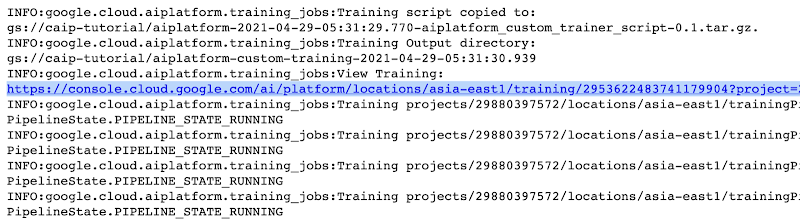
The link highlighted in Figure 2 will redirect to the dashboard of the training pipeline which looks like so:
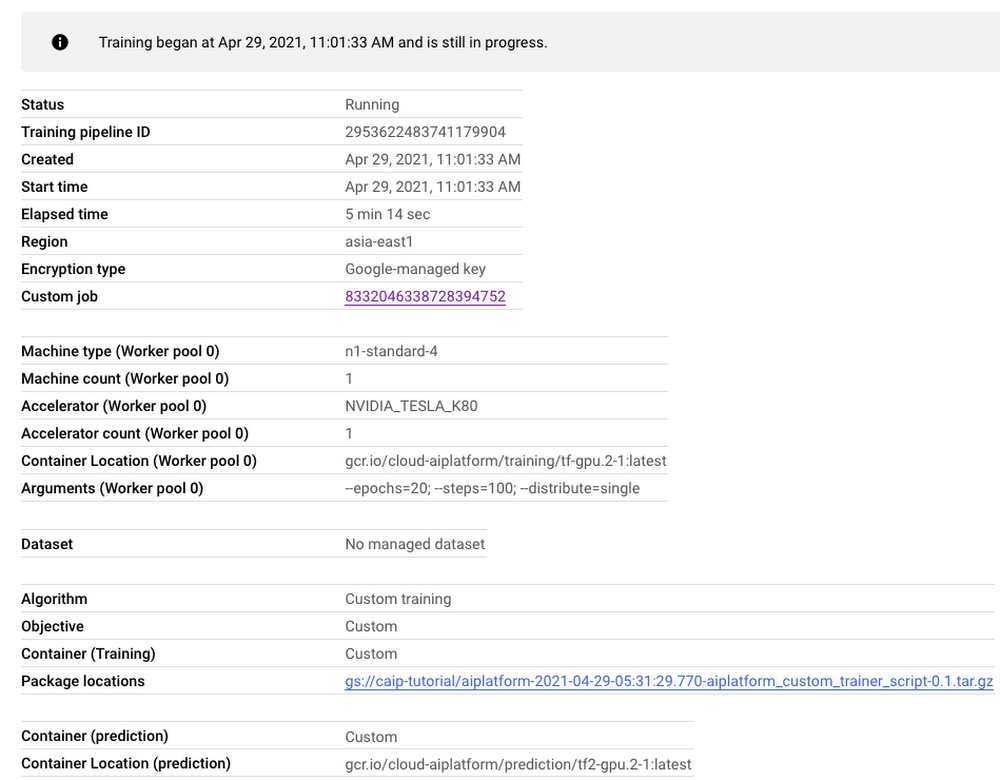
As seen in Figure 3, the dashboard provides a comprehensive summary of all the necessary artifacts related to our training pipeline. Monitoring your model training is also very important especially to catch any early training bugs. To view the training logs, we need to click the link beside the “Custom job” tab (refer to Figure 3). There also we are presented with roughly similar information as shown in Figure 3 but this time it includes the logs as well:
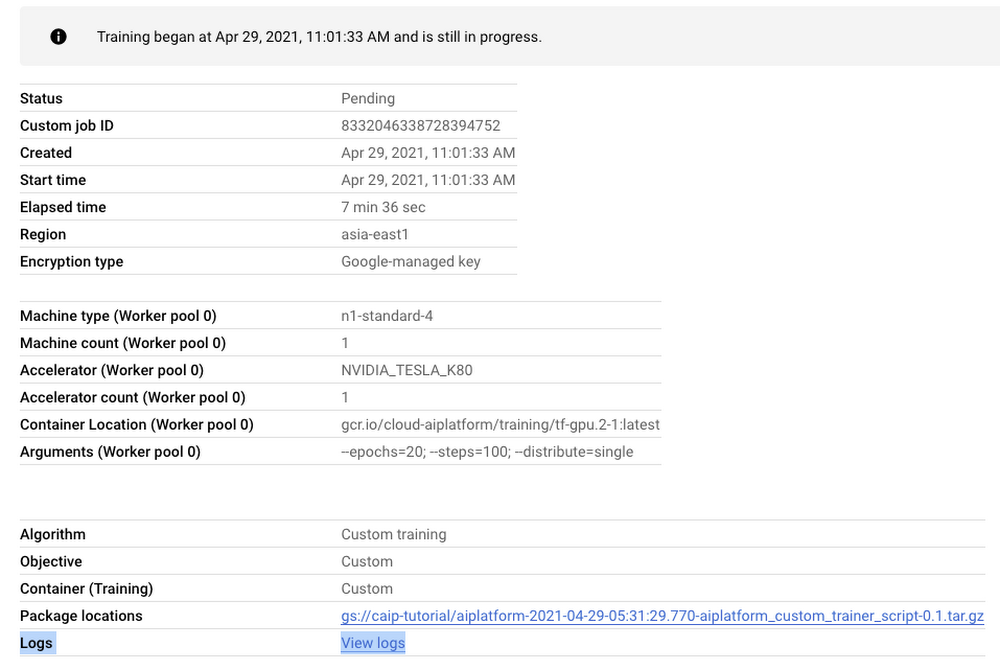
Note: Once we submit the custom training job, a training pipeline is first created to provision the training. Then inside the pipeline, the actual training job is started. This is why we see two very similar dashboards above but they have different purposes. Let’s check out the logs (which is maintained using Cloud Logging automatically):
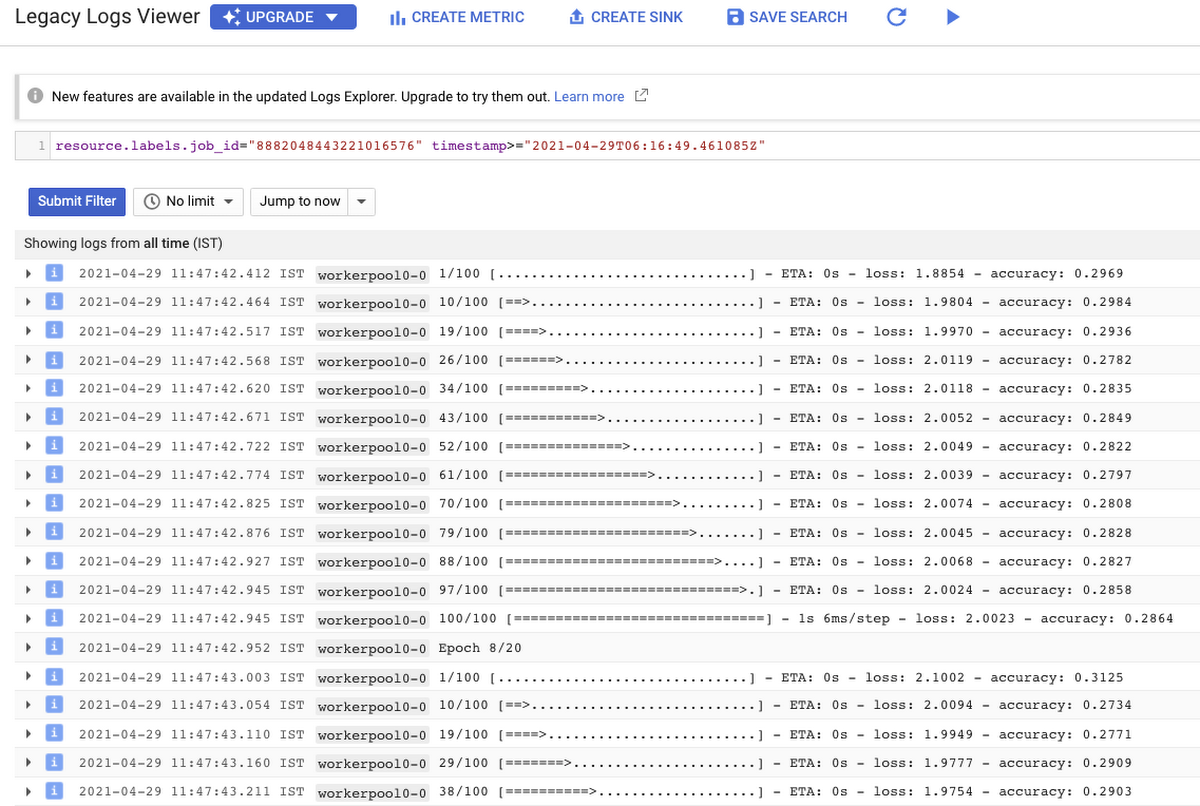
With Cloud Logging, it is also possible to set alerts on the basis of different criteria. For example, alerting the users when the training job fails or completes so that some immediate action could be taken. You can refer to this post for more details.
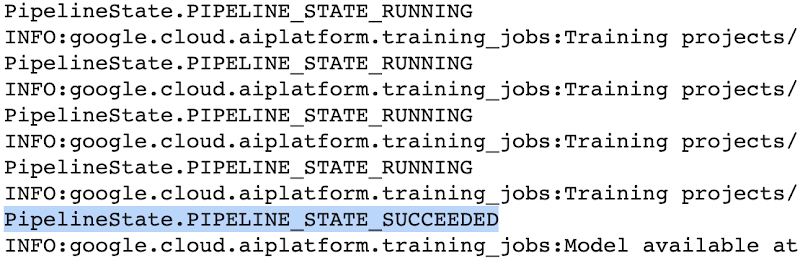
After the training pipeline is completed, on your end, you will notice the success status:
Accessing the trained model
Recall that we had to serialize our model inside a GCS Bucket in order to make it compatible with the training service. So, after the model is trained, we can access it from that location. We can even directly load it using the following line of code:
model = tf.keras.models.load_model('gs://[your-bucket-name]/[model-name]')
Note that we are referring to the TensorFlow model that resulted from training. The training service also maintains a similar “model” namespace to help us manage these models. Recall that the training service returns a google.cloud.aiplatform.models.Model object as mentioned earlier. It comes with a deploy() method that allows us to deploy our model programmatically within minutes with several different options. Check out this link if you are interested in deploying your models using this option.
Vertex AI also provides a dashboard for all the models that have been trained successfully and it can be accessed with this link. It resembles this:
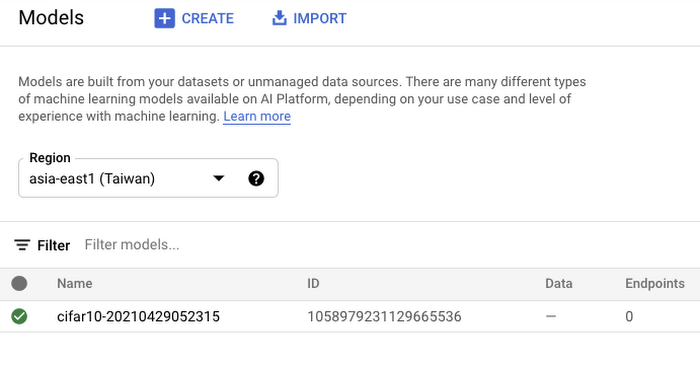
If we click the model as listed in Figure 7, we should be able to directly deploy from the interface:
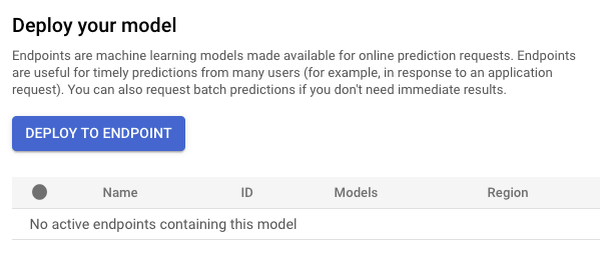
In this post, we will not be covering deployment, but you are encouraged to try it out yourself. After the model is deployed to an endpoint, you will be able to use it to make online predictions.
Wrapping Up
In this blog post, we discussed the benefits of using the Vertex AI custom training service, including better reproducibility and management of experiments. We also walked through the steps to convert your Jupyter Notebook codebase to a standard containerized codebase, which will be useful not only for the training service, but for other container-based environments. The example notebook provides a great starting point to understand each step, and to use as a template for your own projects.
NCR’s Emerald Leverages Google Cloud to Help Grocers Boost Operational Agility

8261
Of your peers have already read this article.
3:00 Minutes
The most insightful time you'll spend today!
In recent years, the grocery industry has had to shift to facilitate a wider variety of checkout journeys for customers. This has meant ensuring a richer transaction mix, including mobile shopping, online shopping, in-store checkout, cashierless checkout or any combination thereof like buy online, pickup in store (BOPIS).
What’s more, in the past year and a half alone grocers have had to enable consumers new ways to shop for essentials. This has included needing to rapidly integrate or build on-demand delivery apps, offer curbside pickup with near-instant fulfillment as well as support touchless and cashless checkout experiences. Searches on Google Maps for retailers in the US with curbside pickup options have increased by 9000% since March 2020, and we believe these trends from 2020 will continue to define the future of grocery shopping.
The future of grocery will require agility and openness
Firstly, the need to rapidly adapt to changing consumer habits will be the new normal. Grocers will increasingly look to digitally transform legacy retail systems and modernize point of sale (POS) platforms to deliver and scale omnichannel experiences as quickly as possible. This necessitates a more agile and open architectural approach to technology – one built on microservices and leverages APIs so that new applications and experiences can be built, integrated and delivered faster.
Automation and data-driven retailing will be table stakes
In order for retailers to blend what they’re offering in the store with digital experiences more efficiently, they will also need to automate more. For example, with automation and business intelligence, grocers can take labor that might have been tied up with tender operations and checkout and redistribute those resources to restocking shelves, curbside pick-up or improving customer experiences.
Automation and access to real-time in-store inventory & supply chain data can also help grocers avoid the supply chain challenges seen in the early days of COVID-19. Grocers will need to find ways to leverage automation to ingest, organize, and analyze data from physical store networks, digital channels, distribution centers to better forecast demand and manage future fluctuations.
How NCR and Google Cloud are helping grocers adapt to disruption with operational agility
Helping grocers improve operational agility to address changing consumer shopping habits and to thrive during times of disruption is something that NCR and Google Cloud have teamed up to do. NCR has over 135 years of experience in retail, having invented the cash register and are continuing to help grocers innovate. NCR Emerald builds upon the company’s leadership in POS software and has turned it into a unified platform that helps grocers operate the entire store from front to back. The solution supports cashier-led checkout, self-checkout, integrated payments, merchandising, and enables regional managers and corporate employees access to the analytics and tools needed to optimize loyalty programs and promotions.

NCR has invested in a comprehensive, agile, and API-led retail architecture that lets grocers continually innovate and design new experiences as customers and the industry evolve. By running Emerald on Google Cloud, NCR can offer the solution on a subscription basis, helping grocers lower upfront capital expenditures and ensuring scalability. What’s more, NCR can tap into Google Cloud’s strength in data, analytics, and openness to deliver three key imperatives. Let’s take a look at each of these below.
Run the way grocers need to while leveraging Google Cloud as a single source of logic
Traditionally the POS system lived in the store. If disaster strikes, people still need access to food and essentials so the grocery store still needs to operate. It hardly gets more mission-critical than that. NCR Emerald is built on microservices, leveraging Kubernetes for front-of-house compute, and VMs (See graphic 1 below). This makes it easy to support lightweight clients accessible by store employees via any range of mobile devices, computer terminals, self-service kiosks, peripheral devices like receipt printers as well as legacy applications.
What’s unique is that because Emerald runs on Google Cloud, it supports all those in-store and digital touchpoints mentioned above, but also allows grocers to run lean. Emerald leverages Google Cloud as a single source of truth and operates a lot of what it does out of logic. Every sales transaction coming from every channel, including e-commerce, can be logged via NCR’s Hosted Service and centralized in BigQuery and Bigtable as a transaction data master. This enables the grocer to manage any transactional use case very consistently, whether it e supporting customers who want to purchase in one store and return in another, offering digital receipts or the ability to exchange online purchases in store. Emerald on Google Cloud can help retailers extend capabilities through the power of the cloud but not need to live exclusively in the cloud. In other words, the solution allows grocers the ability to run the way they need to.

Enable data-driven and real-time decision making for grocers
Store managers, regional managers, category managers, and others all require different cuts of the data to do their jobs effectively. However, data silos persist and how data is formatted and arranged can still remain pretty static. Therefore allowing users with different roles the ability to view and analyze that data quickly and in different ways continues to be a challenge.
As mentioned above, Emerald leverages Google Cloud data management solutions as the central repository for transactional, behavioral, and merchandising data. Every transaction from every store and every channel can be stored via NCR Hosted Service on BigQuery and Bigtable. NCR Analytics then harnesses the advanced analytical and data visualization capabilities of Looker to help grocers get a consolidated view of their business across all channels and then allow employees to slice and dice the data they way they need to. NCR Analytics also leverages the power of Google Cloud AI and machine learning to add another level of intelligence to the retailer’s data. For example, store managers can visualize how well they’re using their real estate and see how productive lanes 1-3 are compared with 7-10 or compare self-service versus manned lanes. By mapping to the retailer’s own catalog, they can also break down category-level performance and trends.

NCR Analytics takes advantage of Google Cloud’s data pipeline to reduce processing time, with scaling and resource management provided out of the box. By letting the cloud store and process the data, NCR is providing the ability for retailers to analyze their data in near real-time across all platforms – a real game changer in the grocery business.
Open APIs let grocers continually enrich the retail experience
Finally, Emerald is built on an API-first architecture managed through Apigee. It uses the power of Apigee as an open API platform to expose how Emerald can work with other NCR applications like loyalty and promotions, and third party applications like mobile ordering and order delivery to enrich the grocery experience for employees and customers. Every API that Emerald uses is available on Apigee, allowing them to share code samples and giving developers the ability to run scripts. This approach can allow retailers the ability to innovate in a fraction of the time and cost, speeding up 3rd party integrations up front and as businesses grow.
Take, for example, Northgate Market, a chain of 40 stores in California, that were able to transform its digital operations and enable experiences that set it apart from competitors – quickly and simply with Emerald. It took less than 6 months to go from contract to live deployment in the first store. Since then, Northgate Market has been able to extend their intelligence by leveraging the power of Looker and NCR Analytics.
Learn more about how NCR has been able to leverage an open, cloud-enabled architecture to help customers innovate across the retail, hospitality, and banking industries on the webinar “Role of APIs in Digital Transformation”. You can also learn more about how Northgate uses e-commerce to transform customer experience and gain consumer insights.
5675
Of your peers have already watched this video.
56:20 Minutes
The most insightful time you'll spend today!
How Real Companies Are Innovating with AI Today—and the Benefits They’re Seeing
What do you get when you mix Target, women’s swim wear, and AI? “Joy!” says Mike McNamara, CIO and CDO, Target.
McNamara is just one of the many stories of real businesses conquering old challenges, and new disruptive industry challenges, with artificial intelligence.
McNamara, Nick Rockwell, CTO, The New York Times, Larry Colagiovanni, VP New Product Development, eBay, and Dirk John, CIO, LATAM Airlines, demonstrate how AI solutions allow businesses to find opportunity in chaos, innovation under tough conditions, and revenue in the most unlikely of places.
AI at Target
McNamara shows how AI is being applied to solve some of the most basic, yet critical, challenges that retailers like Target–and any business with large inventories—face. (start at 4:04)
AI at The New York Times
Nick Rockwell, CTO, The New York Times, shares how AI and big data tools are being used to leverage old assets and drive business ideas from them. (start at 12:18)
AI at eBay
Larry Colagiovanni, VP New Product Development, eBay, talks about how AI is helping eBay drive conversational commerce, help buyers sift through 1.1 billion items, and personalize the shopping experience.(start at 28:07)
AI at LATAM Airlines
Dirk John, CIO, LATAM Airlines, discusses how LATAM Airlines adopted advanced analytics tools in just a few weeks to accelerate the company’s understanding of their customers’ needs.(start at 35:58)
More Relevant Stories for Your Company




Ulta Beauty: Transforming the Beauty Industry with Digital Technology and Google Cloud
As the largest U.S. beauty retailer with more than 1,200 stores across all 50 states, guests flock to Ulta Beauty for its impressive selection of beauty favorites. Ulta Beauty revolutionized the shopping experience by bringing all things beauty, all in one place. It’s enhancing the beauty experience again with technology

CCAI Platform goes GA: Deliver World-class CX and Accelerating Time-to-value with AI
Customers reach out to contact centers for help in moments of urgent need, but due to increasing demands, new channels, peak times, and operational pressures, contact centers often struggle to provide timely help. To bridge this gap, enterprises are increasingly investing in AI-driven solutions that balance addressing customer expectations with
Google Cloud Next ’22 to Commence in October: Block Your Calendar!
We’re excited to announce that Google Cloud Next returns on October 11–13, 2022. Join us for keynotes from industry luminaries and engage live with Google developers. Explore dynamic content across various learning levels, and dive deep into technologies and solutions spanning the Google Cloud and Google Workspace portfolios. Participate in breakout sessions,

Beany’s Cloud-Based Accounting Solutions Transform Small Business Finance
Many people start a small business that aligns with their passions, but soon discover the day-to-day running of a business is very different than anticipated. Dealing with accounting, finance, and other daily activities can quickly overwhelm even the most promising of new businesses. Recognizing the unique challenges facing small businesses,
