





What Users and System Designers Must Learn from Google’s Best Practices for Password Management

5275
Of your peers have already read this article.
3:00 Minutes
The most insightful time you'll spend today!
Updated for 2021: This post includes updated best practices including the latest from Google’s Best Practices for Password Management whitepapers for both users and system designers.
Account management, authentication and password management can be tricky. Often, account management is a dark corner that isn’t a top priority for developers or product managers. The resulting experience often falls short of what some of your users would expect for data security and user experience.
Fortunately, Google Cloud brings several tools to help you make good decisions around the creation, secure handling and authentication of user accounts (in this context, anyone who identifies themselves to your system—customers or internal users). Whether you’re responsible for a website hosted in Google Kubernetes Engine, an API on Apigee, an app using Firebase, or other service with authenticated users, this post lays out the best practices to follow to ensure you have a safe, scalable, usable account authentication system.
1. Hash those passwords
My most important rule for account management is to safely store sensitive user information, including their password. You must treat this data as sacred and handle it appropriately.
Do not store plaintext passwords under any circumstances. Your service should instead store a cryptographically strong hash of the password that cannot be reversed—created with Argon2id, or Scrypt. The hash should be salted with a value unique to that specific login credential. Do not use deprecated hashing technologies such as MD5, SHA1 and under no circumstances should you use reversible encryption or try to invent your own hashing algorithm. Use a pepper that is not stored in the database to further protect the data in case of a breach. Consider the advantages of iteratively re-hashing the password multiple times.
Design your system assuming it will be compromised eventually. Ask yourself “If my database were exfiltrated today, would my users’ safety and security be in peril on my service or other services they use?” As well as “What can we do to mitigate the potential for damage in the event of a leak?”
Another point: If you could possibly produce a user’s password in plaintext at any time outside of immediately after them providing it to you, there’s a problem with your implementation.
If your system requires detection of near-duplicate passwords, such as changing “Password” to “pAssword1”, save the hashes of common variants you wish to ban with all letters normalized and converted to lowercase. This can be done when a password is created or upon successful login for pre-existing accounts. When the user creates a new password, generate the same type of variants and compare the hashes to those from the previous passwords. Use the same level of hashing security as with the actual password.
2. Allow for third-party identity providers if possible
Third-party identity providers enable you to rely on a trusted external service to authenticate a user’s identity. Google, Facebook, and Twitter are commonly used providers.
You can implement external identity providers alongside your existing internal authentication system using a platform such as Identity Platform. There are a number of benefits that come with Identity Platform, including simpler administration, a smaller attack surface, and a multi-platform SDK. We’ll touch on more benefits throughout this list.
3. Separate the concept of user identity and user account
Your users are not an email address. They’re not a phone number. They’re not even a unique username. Any of these authentication factors should be mutable without changing the content or personally identifiable information (PII) in the account. Your users are the multi-dimensional culmination of their unique, personalized data and experience within your service, not the sum of their credentials. A well-designed user management system has low coupling and high cohesion between different parts of a user’s profile.
Keeping the concepts of user account and credentials separate will greatly simplify the process of implementing third-party identity providers, allowing users to change their username, and linking multiple identities to a single user account. In practical terms, it may be helpful to have an abstract internal global identifier for every user and associate their profile and one or more sets of authentication datavia that ID as opposed to piling it all in a single record.
4. Allow multiple identities to link to a single user account
A user who authenticates to your service using their username and password one week might choose Google Sign-In the next without understanding that this could create a duplicate account. Similarly, a user may have very good reason to link multiple email addresses to your service. If you’ve properly separated user identity and authentication, it will be a simple process to link several authentication methods to a single user.
Your backend will need to account for the possibility that a user gets part or all the way through the signup process before they realize they’re using a new third-party identity not linked to their existing account in your system. This is most simply achieved by asking the user to provide a common identifying detail, such as email address, phone, or username. If that data matches an existing user in your system, require them to also authenticate with a known identity provider and link the new ID to their existing account.
5. Don’t block long or complex passwords
NIST publishes guidelines on password complexity and strength. Since you are (or will be very soon) using a strong cryptographic hash for password storage, a lot of problems are solved for you. Hashes will always produce a fixed-length output no matter the input length, so your users should be able to use passwords as long as they like. If you must cap password length, do so based on the limits of your infrastructure; often this is a matter of memory usage (memory used per login operation * potential concurrent logins per machine), or more likely—the maximum POST size allowable by your servers. We’re talking numbers from hundreds of KB to over 1MB. Seriously. Your application should already be hardened to prevent abuse from large inputs. This doesn’t create new opportunities for abuse if you employ controls to prevent credential stuffing and hash the input as soon as possible to free up memory.
Your hashed passwords will likely already consist of a small set of ASCII characters. If not, you can easily convert a binary hash to Base64. With that in mind, you should allow your users to use literally any characters they wish in their password. If someone wants a password made of Klingon, Emoji, and ASCII art with whitespace on both ends, you should have no technical reason to deny them. Just make sure to perform Unicode normalization to ensure cross-platform compatibility. See our system designers whitepaper (PDF) for more information on Unicode and supported characters in passwords.
Any user attempting to use an extreme password is probably following password best practices (PDF) including using a password manager, which allows the entry of complex passwords even on limited mobile device keyboards. If a user can input the string in the first place (i.e., the HTML specification for password input disallows line feed and carriage return), the password should be acceptable.
6. Don’t impose unreasonable rules for usernames
It’s not unreasonable for a site or service to require usernames longer than two or three characters, block hidden characters, and prevent whitespace at the beginning and end of a username. However, some sites go overboard with requirements such as a minimum length of eight characters or by blocking any characters outside of 7-bit ASCII letters and numbers.
A site with tight restrictions on usernames may offer some shortcuts to developers, but it does so at the expense of users and extreme cases will deter some users.
There are some cases where the best approach is to assign usernames. If that’s the case for your service, ensure the assigned username is user-friendly insofar as they need to recall and communicate it. Alphanumeric generated IDs should avoid visually ambiguous symbols such as “Il1O0.” You’re also advised to perform a dictionary scan on any randomly generated string to ensure there are no unintended messages embedded in the username. These same guidelines apply to auto-generated passwords.
7. Validate the user’s identity
If you ask a user for contact information, you should validate that contact as soon as possible. Send a validation code or link to the email address or phone number. Otherwise, users may make a typo in their contact info and then spend considerable time using your service only to find there is no account matching their info the next time they attempt login. These accounts are often orphaned and unrecoverable without manual intervention. Worse still, the contact info may belong to someone else, handing full control of the account to a third party.
8. Allow users to change their username
It’s surprisingly common in legacy systems or any platform that provides email accounts not to allow users to change their username. There are very good reasons not to automatically release usernames for reuse, but long-term users of your system will eventually come up with significant reasons to use a different username and they likely won’t want to create a new account.
You can honor your users’ desire to change their usernames by allowing aliases and letting your users choose the primary alias. You can apply any business rules you need on top of this functionality. Some orgs might limit the number of username changes per year or prevent a user from displaying or being contacted via anything but their primary username. Email address providers are advised to never re-issue email addresses, but they could alias an old email address to a new one. A progressive email address provider might even allow users to bring their own domain name and have any address they wish.
If you are working with a legacy architecture, this best practice can be very difficult to meet. Even companies like Google have technical hurdles that make this more difficult than it would seem. When designing new systems, make every effort to separate the concept of user identity and user account and allow multiple identities to link to a single user account and this will be a much smaller problem. Whether you are working on existing or greenfield code, choose the right rules for your organization with an emphasis on allowing your users to grow and change over time.
9. Let your users delete their accounts
A surprising number of services have no self-service means for a user to delete their account and associated PII. Depending on the nature of your service, this may or may not include public content they created such as posts and uploads. There are a number of good reasons for a user to close an account permanently and delete all their PII . These concerns need to be balanced against your user experience, security, and compliance needs. Many if not most systems operate under some sort of regulatory control (such as PCI or GDPR), which provides specific guidelines on data retention for at least some user data. A common solution to avoid compliance concerns and limit data breach potential is to let users schedule their account for automatic future deletion.
In some circumstances, you may be legally required to comply with a user’s request to delete their PII in a timely manner. You also greatly increase your exposure in the event of a data breach where the data from “closed” accounts is leaked.
10. Make a conscious decision on session length
An often overlooked aspect of security and authentication is session length. Google puts a lot of effort into ensuring users are who they say they are and will double-check based on certain events or behaviors. Users can take steps to increase their security even further.
Your service may have good reason to keep a session open indefinitely for non-critical analytics purposes, but there should be thresholds after which you ask for password, 2nd factor, or other user verification.
Consider how long a user should be able to be inactive before re-authenticating. Verify user identity in all active sessions if someone performs a password reset. Prompt for authentication or 2nd factor if a user changes core aspects of their profile or when they’re performing a sensitive action. Re-authenticate if the user’s location changes significantly in a short period of time. Consider whether it makes sense to disallow logging in from more than one device or location at a time.
When your service does expire a user session or requires re-authentication, prompt the user in real time or provide a mechanism to preserve any activity they have not saved since they were last authenticated. It’s very frustrating for a user to take a long time to fill out a form, only to find all their input has been lost and they must log in again.
11. Use 2-Step Verification
Consider the practical impact on a user of having their account stolen when choosing 2-Step Verification (also known as two-factor authentication, MFA, or 2FA) methods. Time-based one-time passwords (TOTP), email verification codes, or “magic links” are consumer-friendly and relatively secure. SMS 2FA auth has been deprecated by NIST due to multiple weaknesses, but it may be the most secure option your users will accept for what they consider a trivial service.
Offer the most secure 2FA auth you reasonably can. Hardware 2FA such as the Titan Security Key are ideal if feasible for your application. Even if a TOTP library is unavailable for your application, email verification or 2FA provided by third-party identity providers is a simple means to boost your security without great expense or effort. Just remember that your user accounts are only as secure as the weakest 2FA or account recovery method.
12. Make user IDs case-insensitive
Your users don’t care and may not even remember the exact case of their username. Usernames should be fully case-insensitive. It’s trivial to store usernames and email addresses in all lowercase and transform any input to lowercase before comparing. Make sure to specify a locale or employ Unicode normalization on any transformations.
Smartphones represent an ever-increasing percentage of user devices. Most of them offer autocorrect and automatic capitalization of plain-text fields. Preventing this behavior at the UI level might not be desirable or completely effective, and your service should be robust enough to handle an email address or username that was unintentionally auto-capitalized.
13. Build a secure auth system
If you’re using a service like Identity Platform, a lot of security concerns are handled for you automatically. However, your service will always need to be engineered properly to prevent abuse. Core considerations include implementing a password reset instead of password retrieval, detailed account activity logging, rate-limiting login attempts to prevent credential stuffing, locking out accounts after too many unsuccessful login attempts, and requiring two-factor authentication for unrecognized devices or accounts that have been idle for extended periods. There are many more aspects to a secure authentication system, so please see the further reading section below for links to more information.
Further reading
There are a number of excellent resources available to guide you through the process of developing, updating, or migrating your account and authentication management system. I recommend the following as a starting place:
- Our Modern Password Security for System Designers whitepaper (PDF)
- The related Modern password security for users whitepaper (PDF)
- NIST 800-063B covers Authentication and Lifecycle Management
- OWASP continually updates their Password Storage Cheat Sheet
- OWASP goes into even more detail with the Authentication Cheat Sheet
- Google Cloud Identity Platform is a multi-protocol customer identity and access management solution, with robust authentication features
- Google’s Firebase Authentication site has a rich library of guides, reference materials and sample code
3245
Of your peers have already watched this video.
3:00 Minutes
The most insightful time you'll spend today!
Why CISOs Need to Know This to Protect Users From Unsafe Websites
Unsafe web resources include social engineering sites—such as phishing and deceptive sites—and sites that host malware or unwanted software. For CISOs and their teams, this can quickly become an insurmountable challenge if it’s not nipped in the bud.
But there’s a way to enable companies to find unsafe URLs before their users do, identify phishing and deceptive sites, as well as sites that host malware or unwanted software.
Google Cloud’s Web Risk API was built to help admins protect users from unsafe websites. If a URL is known to be unsafe, Web Risk API responds with the threat type and the amount of time during which the website should be considered unsafe.
The Web Risk API can be integrated into both cloud-based and on-premises hosted applications and websites.
Watch this three-minute video to find out how Web Risk APIs can break the chain of malicious attacks and protect the data of your customers and users.
Gmail’s BIMI Increases Confidence about Security and Delivers Immersive Email Experiences

5457
Of your peers have already read this article.
3:00 Minutes
The most insightful time you'll spend today!
Creating a secure-by-default experience based on robust defenses has always been a core design principle for Gmail. That’s why we’ve established a strong baseline of security in Gmail, with built-in protections to help automatically filter out potentially malicious messages. While these defenses help keep Gmail users safe, email functions as part of a large, complex, interconnected ecosystem that we continually invest in and work to protect. After first announcing Gmail’s Brand Indicators for Message Identification (BIMI) pilot last year, today we’re announcing that over the coming weeks we’re rolling out Gmail’s general support of BIMI, an industry standard that aims to drive adoption of strong sender authentication for the entire email ecosystem. BIMI provides email recipients and email security systems increased confidence in the source of emails, and enables senders to provide their audience with a more immersive experience.


“Bank of America has a wide range of security measures in place to support our customers, and we constantly evolve our program to deliver best in class protection. Part of this effort is our partnership with Google on BIMI, which provides an easy way to validate if correspondence is from us.” — Bank of America
BIMI enables organizations that authenticate their emails using Domain-based Message Authentication, Reporting, and Conformance (DMARC)—a standard for providing strong sender authentication that allows security systems to perform better filtering, separating legitimate messages from potentially spoofed ones—to validate ownership of their logos and securely transmit them to Google. BIMI is designed to be easy: for organizations with DMARC in place, validated logos display on authenticated emails from their domains and subdomains.
Here’s how it works: Organizations who authenticate their emails using Sender Policy Framework (SPF) or Domain Keys Identified Mail (DKIM) and deploy DMARC can provide their validated trademarked logos to Google via a Verified Mark Certificate (VMC). BIMI leverages Mark Verifying Authorities, like Certification Authorities, to verify logo ownership and provide proof of verification in a VMC. Once these authenticated emails pass our other anti-abuse checks, Gmail will start displaying the logo in the existing avatar slot.
“Gmail’s support of BIMI is a win for email authentication, brand trust, and consumers alike. BIMI gives organizations the opportunity to provide their customers with a more immersive email experience, strengthening email sender authentication across the entire email ecosystem.” — Seth Blank, Chair of the AuthIndicators Working Group
This is just the start for BIMI. The standard expects to expand support across logo types and validators. For logo validation, BIMI is starting by supporting the validation of trademarked logos, since they are a common target of impersonation. Today, Entrust and DigiCert support BIMI as Certification Authorities, and in the future the BIMI working group expects this list of supporting validation authorities to expand further. To learn more about BIMI and see the latest news, visit the working group’s website.
To take advantage of BIMI, ensure that your organization has adopted DMARC, and that you have validated your logo with a VMC. For Gmail users, no action is required. We’re proud to be one of the leading members in both establishing and supporting the BIMI standard and will continue to support efforts that contribute to security for the entire email ecosystem.
Predicting Cyber Attacks: Security Command Center Introduces Attack Path Simulation

1160
Of your peers have already read this article.
3:30 Minutes
The most insightful time you'll spend today!
To help secure increasingly complex and dynamic cloud environments, many security teams are turning to attack path analysis tools. These tools can enable them to better prioritize security findings and discover pathways that adversaries can exploit to access and compromise cloud assets such as virtual machines, databases, and storage buckets.
Other attack path tools rely on static, point-in-time snapshots of an organization’s cloud footprint, which often contain sensitive data about their environment, how it is configured, and where the most sensitive data resides.
At Google Cloud, we are taking a different approach. We are excited to announce today at the Google Cloud Security Summit that we are adding attack path simulation to Security Command Center, our built-in security and risk management solution for Google Cloud. This new risk management capability automatically analyzes a customer’s Google Cloud environment to pinpoint where and, importantly, how vulnerable resources may be attacked, so security teams can stay one step ahead of adversaries.
We expect attack path simulation capabilities to be available in Security Command Center Premium later this summer.
Unlike some third-party security products, Security Command Center continuously scans an organization’s cloud environment gathering near real-time data about cloud resources and security vulnerabilities. Our attack path simulation engine uses this information to automatically generate and render high-risk attack paths, without the hands-on toil of having to repeatedly run manual queries.
A different approach to attack path analysis
Other attack path analysis tools involve significant operational toil. The static, point-in-time snapshots that these tools generate have to be sent to an external provider, which can add risk. Then security teams have to follow up with complex queries before they can identify likely attack paths.
Google Cloud’s advanced attack simulation engine leverages our first-party, agentless visibility of Google Cloud assets, the relationships between assets, and the current state of defenses. Attack path simulation is fully automated with no need to manually run queries. Simulations run in the Google Cloud environment, and do not send snapshots outside your environment, avoiding exposure of sensitive information.
See what attackers can see
Effective attack path analysis should mimic how a real-world attacker can reach and compromise high value resources. This is why Security Command Center simulates how attackers try many different ways to infiltrate a cloud environment. SCC then generates attack path graphs to give defenders insight into how adversaries could exploit a single security weakness or various combinations of security vulnerabilities to access valuable assets. SCC also provides detailed information on how to remediate issues and shore up defenses based on its findings
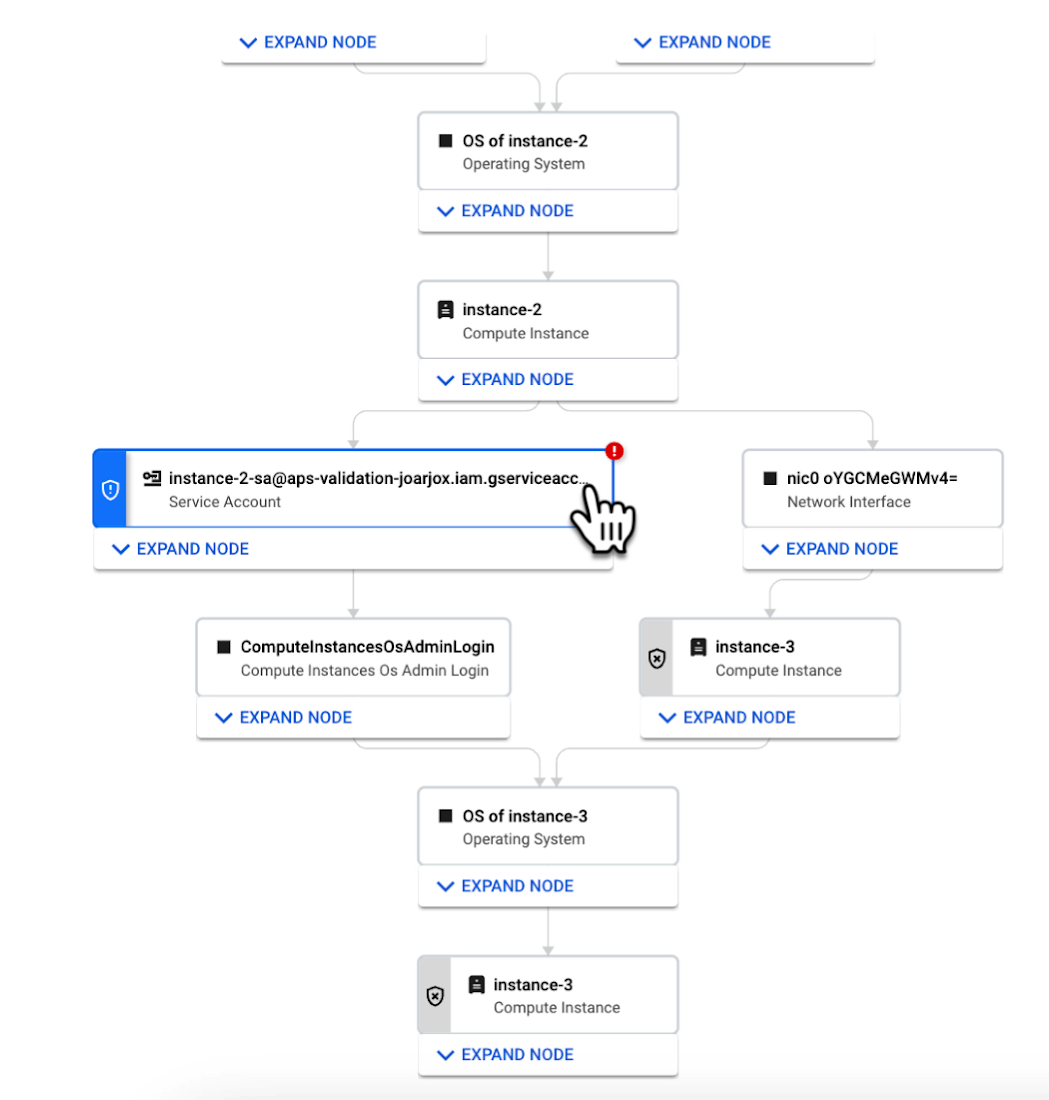
We are delivering combined attack path simulation and analysis as a managed service. There are no agents to install or manage. Results automatically reflect changes in your organization’s Google Cloud environment. Because our attack path simulations are conducted on models of an organization’s cloud resources, there is no performance or operational impact to the live production environment.
Better security prioritization
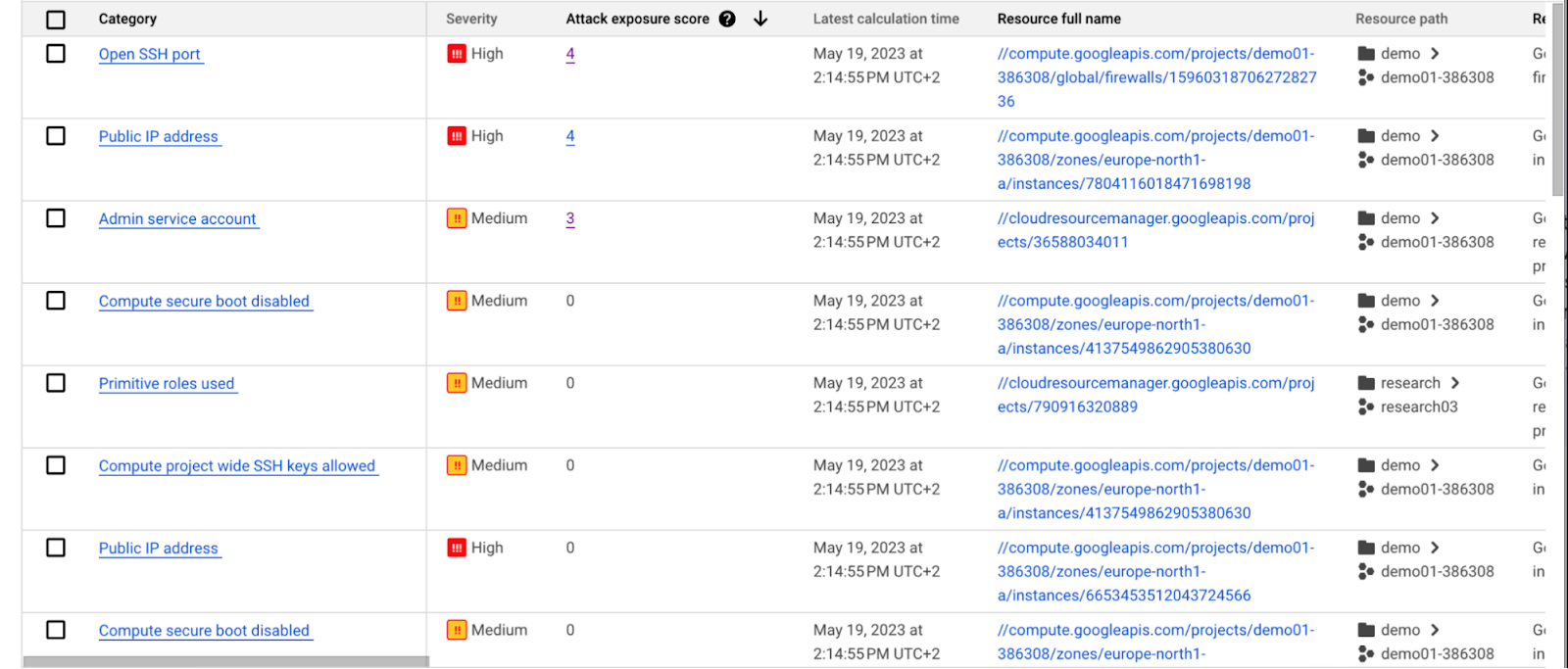
Security Command Center automatically computes an attack exposure score for misconfigurations and vulnerabilities that expose valuable resources to attackers. The score is a measure of cyber risk. It takes into account how exposed valued resources are, and the paths of least resistance for attackers to reach those resources.
Security teams can use these scores to prioritize remediation efforts and improve their overall risk posture.
How attack path analysis has already reduced risk for customers
Dozens of customers have already used our attack path capabilities in private Preview to improve their security posture and reduce their operational risk.
Security Command Center alerted one customer to a finding with a high attack exposure score. The finding was related to a service account whose keys were not being rotated. After reviewing the attack paths related to this finding, the cloud security manager discovered that even though the service account was named “test,” it provided access to storage buckets outside of the test environment.
If an attacker had been able to steal the credentials for this test account, they could have easily accessed production data. The security manager removed administrator privileges on the account. The attack path simulation enhanced their understanding of the severity of the finding, and helped convince them to make it a high-priority fix.
Another customer using attack path simulation needed to assess which security findings created the greatest risk. Two findings related to the same service account with high exposure scores rose to the top of the list. The attack paths revealed that the service account had access to more than 500 storage buckets. If an attacker were to gain access to this account they would be able to read, write, or delete data across any of those buckets, many of which contained sensitive business data and confidential customer information.
Using Security Command Center’s attack path results, the security team remediated the risk by limiting permissions to the storage buckets needed for that specific role.
Next steps
Attack path simulation capabilities are planned for availability later this summer. We expect forthcoming enhancements to use Security AI Workbench to translate complex attack graphs to human-readable explanations of attack exposure, including impacted assets and recommended mitigations.
You can learn more about Nordnet Bank’s experience using attack path simulation at our Security Summit session. To get started with Security Command Center today, please go to the Google Cloud console.
Confidential GKE Nodes: Now Available on Compute Optimized C2D VMs

1247
Of your peers have already read this article.
1:30 Minutes
The most insightful time you'll spend today!
Today, we are happy to announce that Confidential GKE Nodes are available on compute optimized C2D VMs.
Many companies have adopted Google Kubernetes Engine (GKE) as a key component in their application infrastructure. In some cases, the advantages of using containers and Kubernetes can surpass those of traditional architectures, but migrating to and operating apps in the cloud often requires strategic planning to reduce risk and prevent data breaches. This is where Confidential GKE Nodes can be utilized to enhance the security of your GKE clusters or node pools.
Confidential GKE Nodes leverage specialized hardware to encrypt data in-use and are ideal for organizations processing sensitive data in the cloud. To make it easier to start using Confidential GKE Nodes, GKE standard workloads you run today can run as confidential GKE workloads without code changes on your end.
Security underpinnings of Confidential GKE Nodes
As we expand the Confidential Computing product portfolio from Confidential VMs to Confidential GKE Nodes to Confidential Dataproc, ensuring high performance is key. Confidential GKE Nodes are built on the same technology foundation as Confidential VM and utilize the Secure Encrypted Virtualization (SEV) capability of AMD EPYC™ processors. This feature allows you to keep data encrypted in memory with node-specific, dedicated keys that are generated and managed by the processor. The keys are generated in hardware during node creation and reside solely within the processor, making them unavailable to Google Cloud or other nodes running on the host.
Combined with the high performance of C2D VMs
Previously, Confidential GKE Nodes were generally available only on general purpose N2D VMs, but now they’re also available on compute optimized C2D VMs. The C2D machine series provides VM sizes ranging from 2 vCPUs to 112 vCPUs, offers up to 896 GB of memory, and are suited for performance-intensive workloads. C2D standard and C2D high-CPU machines serve compute-bound workloads including high-performance web servers and media transcoding. C2D high-memory machines serve specialized workloads such as high-performance computing (HPC) and electronic design automation (EDA), which require more memory.
Confidential GKE Nodes on compute-optimized C2D VMs could be a fit for use cases that require high performance and security. You can achieve encryption in-use for data processed inside your GKE cluster or just on specific node pools, without significant performance degradation. This is relevant for industries such as financial services, healthcare, retail, blockchain, and telecommunications, which often have sensitive data or personally identifiable information (PII) that requires additional security measures.
How MATRIXX used Confidential GKE Nodes
MATRIXX Software chose Confidential GKE Nodes to provide transparent encryption for data in-use to supplement encryption for data at-rest to secure personal subscriber data as required by privacy regulations.
MATRIXX Digital Commerce Platform (DCP) is a real-time 5G monetization for the communications industry, serving many of the world’s largest operator groups, regional carriers, and emerging digital service providers. MATRIXX used Google Cloud Confidential GKE Nodes to deliver a cloud-first digital commerce solution that enables commercial and operational agility for current and new telco business models.
A whitepaper titled “Protecting Your 5G Revenue Stream in the Cloud,” described how when MATRIXX DCP is deployed with Confidential Computing on Google Cloud, “its subscriber data, account balances, network events and charges/revenue streams are encrypted in use without making any code changes to the application or compromising on performance.”
Confidential GKE Nodes are globally available
At Google Cloud, we’re committed to investing in Confidential Computing, so we’ve expanded our support to VM families like C2D VMs. Confidential GKE Nodes running on C2D VMs are available in regions across the globe, including us-central1 (Iowa), asia-southeast1 (Singapore), us-east1 (South Carolina), us-east4 (North Virginia), asia-east1 (Taiwan), and europe-west4 (Netherlands). Note that Confidential GKE Nodes are available where C2D or N2D machines are available.
Pricing for Confidential GKE Nodes
There is no additional cost to deploy Confidential GKE Nodes, other than the costs of Compute Engine and Confidential VM pricing.
Try out Confidential GKE Nodes for cluster-level enablement
- First, go to the Google Kubernetes Engine page in the Google Cloud console. In the top navigation bar, click Create. In the Create Cluster modal, choose ‘Standard: You manage your cluster’ and click Configure.
- Next, from the left navigation pane, under Cluster, click Security. Select the ‘Enable Confidential GKE Nodes’ checkbox.
- Then, from the left navigation pane again, under Node Pools, click Nodes. Under Machine Configuration and Machine family, select the Compute-optimized tab, and choose a C2D machine type.
Configure the rest of the cluster as desired and click Create.
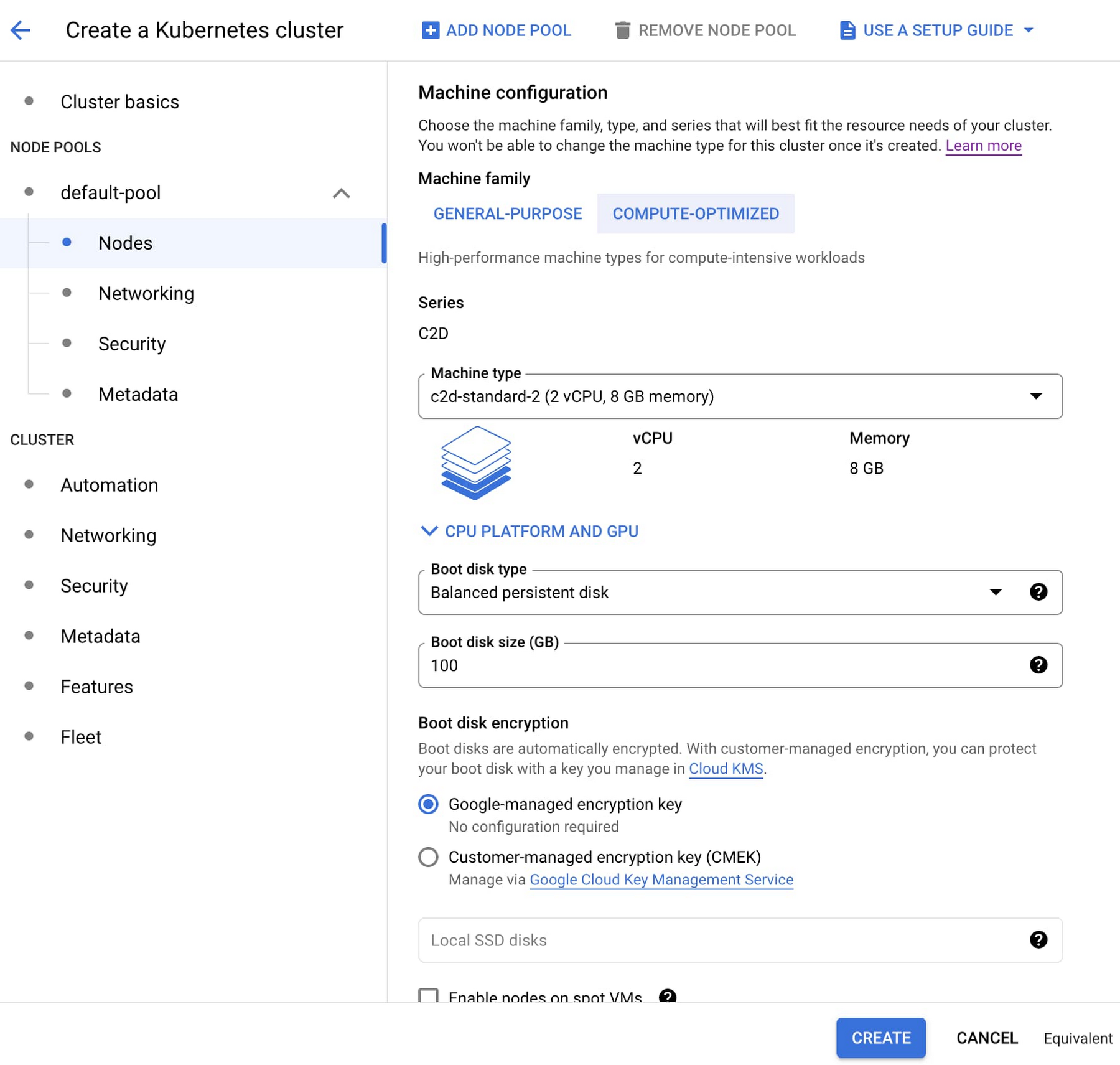
Making secure design choices should be easy, especially when the workloads involve high-performance processing of sensitive data. You can help protect your sensitive applications and data today by adding Confidential GKE Nodes to your GKE workloads. Learn more about Confidential Computing here.
Google’s BeyondCorp to Accelerate U.S. Govt’s Zero Trust Journey

3009
Of your peers have already read this article.
3:00 Minutes
The most insightful time you'll spend today!
In May, the White House issued an Executive Order aiming to improve the nation’s cybersecurity defenses and requiring US Federal agencies to develop plans to implement Zero Trust architectures in alignment with National Institute of Standards and Technology National Institute of Standards and Technology (NIST) guidance. This Executive Order also calls on agencies to accelerate cloud adoption, with a preference for cloud capabilities that implement or advance the adoption of Zero Trust.
Zero Trust moves front and center
The White House guidance is timely and necessary given the surge of ransomware and other cyber attacks over the past year targeting remote workers and VPNs, software supply chains, identity infrastructure and email, and various critical infrastructure sectors. These attacks have raised concerns about cyber-risk across the board, including pervasive IT monocultures that persist, unquestioned, despite their exploitability by attackers.

This order ties together multiple strands of US cybersecurity best practices and policy that have evolved over the past decade, including stronger identity and access controls, expanded use of encryption and authentication, increased monitoring and visibility, and prioritizing high-value IT assets. Yet the urgent challenge of cybersecurity requires more than simply adding to the existing proliferation of cyber tools or ratcheting up traditional measures around hygiene and compliance. The Administration’s focus on Zero Trust marks a critical shift to prioritizing architectures in which the strategic coordination of layered cyber defenses drives improved cyber outcomes.
In many ways then, the demand for accelerating the adoption of Zero Trust in federal IT is not a new requirement, as departments and agencies are already implementing many of the core technical components that can contribute to achieving the goals laid out in the executive order.
What is new, however, is the fact that Zero Trust, when done right, is primarily an outcomes-oriented approach to security. Successfully implementing Zero Trust can drive down cyber risk, transform the daily security experience of users, reduce management complexity and toil for IT managers, and improve the overall productivity of the workforce.
Outcomes, not just technology
Successfully implementing Zero Trust is not about the individual technology components and inputs themselves. Instead, what matters most is how security components are integrated and orchestrated to achieve and enforce a simple set of core principles:
- Connecting from a particular network must not determine which services you can access
- Access to services and data is granted based on what we know about you and your device
- All access to services must be authenticated, authorized and encrypted.
Using this set of principles as our north star, Google began our Zero Trust journey, with BeyondCorp, over a decade ago, under similar circumstances to those driving federal cybersecurity policy now. Google had been targeted by nation-state cyber attacks (Operation Aurora), and in the aftermath, we recognized that providing remote access with VPNs was not sustainable or efficient for business performance, especially at a time when Google’s global workforce was growing rapidly. Something had to change.
To improve our security posture and user experience, we had to reimagine our infrastructure and production networks. This ultimately drove innovations in how we protect our supply chains and resulted in a complete rethinking of the scale, analytics and visibility needed to fully modernize and transform enterprise security. The journey forced us to consolidate redundant systems, understand usage patterns better, and transform how people experience security day to day.

A shift in technology and a change in mindset
When we developed BeyondCorp, we had to reimagine our infrastructure and production networks in order to affect a better security posture and user experience. This ultimately drove innovations in how we protect our supply chains and resulted in a complete rethinking of the scale, analytics and visibility needed to fully modernize and transform enterprise security.
Moving to a Zero Trust approach drastically changed how Google’s end users did business and reduced the toil on both individual users and IT professionals to do their part to secure the enterprise, further fostering the innovation, architectures, operational integrations and best practices we see today. Now, the layered defenses and invisible security our users experience have been incorporated into Google’s secure cloud offerings, so our customers can experience the same benefits and provide their users with a secure and productive work environment.
Leadership for a cross-team journey
Of course, change isn’t trivial, especially in government. A shift in behavior, user experience, collaboration, tools and infrastructure requires planning, change management, and executive support. To make the Zero Trust journey a success, organizations need the long-term focus and vision of leadership to drive meaningful change. For traditional security and technology leaders, accelerating the journey to Zero Trust will require them to think less tactically and and act more strategically, in order to focus more on outcomes and less on inputs, and to integrate, harmonize, orchestrate and automate what were previously standalone IT and security efforts. For non-technology leaders, their engagement and leadership is essential – and much more likely – given the visible benefits to collaboration, culture, and the business from what could otherwise be seen as a technology-centric initiative.
Done right, Zero Trust brings a sea change from how most people experience security. The crossroads of the Zero Trust journey present organizations with two clear choices: stick with an old and not-so-secure security model that’s clunky and burdensome, or adopt a new model that’s more intuitive, easy, and secure.
Jump start your own journey
Today, the same opportunity exists to transform government security, operations, and organizational models by implementing Zero Trust. By sharing lessons learned from Google’s BeyondCorp journey and building core security capabilities into many of our cloud products, our goal is to help government agencies accelerate their own Zero Trust journey, transforming the security posture of their highest value and most-critical applications and data.
To learn more, watch our on-demand sessions from the Google Cloud Government Security Summit,
About the authors
Dan Prieto previously served in the White House as Director for Cybersecurity Policy on the staff of the National Security Council. He also served as CTO and Director of the Defense Industrial Base Cybersecurity Program in the Office of the Department of Defense CIO.
Max Saltonstall tells stories about Google Cloud, how we use similar Cloudy tools inside Google, and what diverse solutions Cloud’s many customers have created. At Google he’s worked within DoubleClick, Corporate Engineering, Staffing and the Cloud CTO Office.
More Relevant Stories for Your Company

Improving Your Security Posture: Integrating Cloud DLP with Security Command Center
Our Cloud Data Loss Prevention (Cloud DLP) discovery service can monitor and profile your data warehouse to bring awareness of where sensitive data is stored and processed. Profiling is also useful for confirming that data is not being stored and processed where you don’t want it. But how can you

reCAPTCHA & Cloud Armor: Helping Organizations Adopt Bot Management Strategies
Unwelcome web traffic from bots has proliferated, becoming a significant contributor to business and operational risk. The motivations of bot controllers range from disruption of business through DDoS attacks to fraud such as credential stuffing, denial of inventory, scraping, and fraudulent card use. Google is well positioned to help detect

Embracing Confidential Computing: Secure Your Data in the Cloud
As one of the most trusted cloud platform providers, Google is committed to providing our clients secure and reliable environments for their workloads. Google believes the future of computing will increasingly shift to private, encrypted services where users can be confident that their data is not being exposed to cloud

Best Practices for Cost Optimization in the Cloud
When customers migrate to Google Cloud Platform (GCP), their first step is often to adopt Compute Engine, which makes it easy to procure and set up virtual machines (VMs) in the cloud that provide large amounts of computing power. Launched in 2012, Compute Engine offers multiple machine types, many innovative features, and is available in
