





Google Launches Open Saves To Power Gaming Platforms Scale to User Demands

5483
Of your peers have already read this article.
1:30 Minutes
The most insightful time you'll spend today!
Many of today’s games are rich, immersive worlds that engage the audience in ways that make a gamer a part of a continuing storyline. To create these persistent experiences, numerous storage technologies are required to ensure game data can scale to the standards of gamers’ demands. Not only do game developers need to store different types of data—such as saves, inventory, patches, replays, and more—but they also must keep the storage system high-performing, available, scalable, and cost-effective.
Enter Open Saves, a brand-new, purpose-built single interface for multiple storage back ends that’s powered by Google Cloud and developed in partnership with 2K. Now, development teams can store game data without having to make the technical decisions on which storage solution to use, whether that’s Cloud Storage, Memorystore, or Firestore.
“Open Saves demonstrates our commitment to partnering with top developers on gaming solutions that require a combination of deep industry expertise and Google scale,” said Joe Garfola, Vice President of IT and Security at 2K. “We look forward to continued collaboration with Google Cloud.”
Game development teams can save game data against Open Saves without having to worry about the optimal back-end storage solution, while operations teams can focus on needed scalability and storage options. Here’s how it looks in practice:
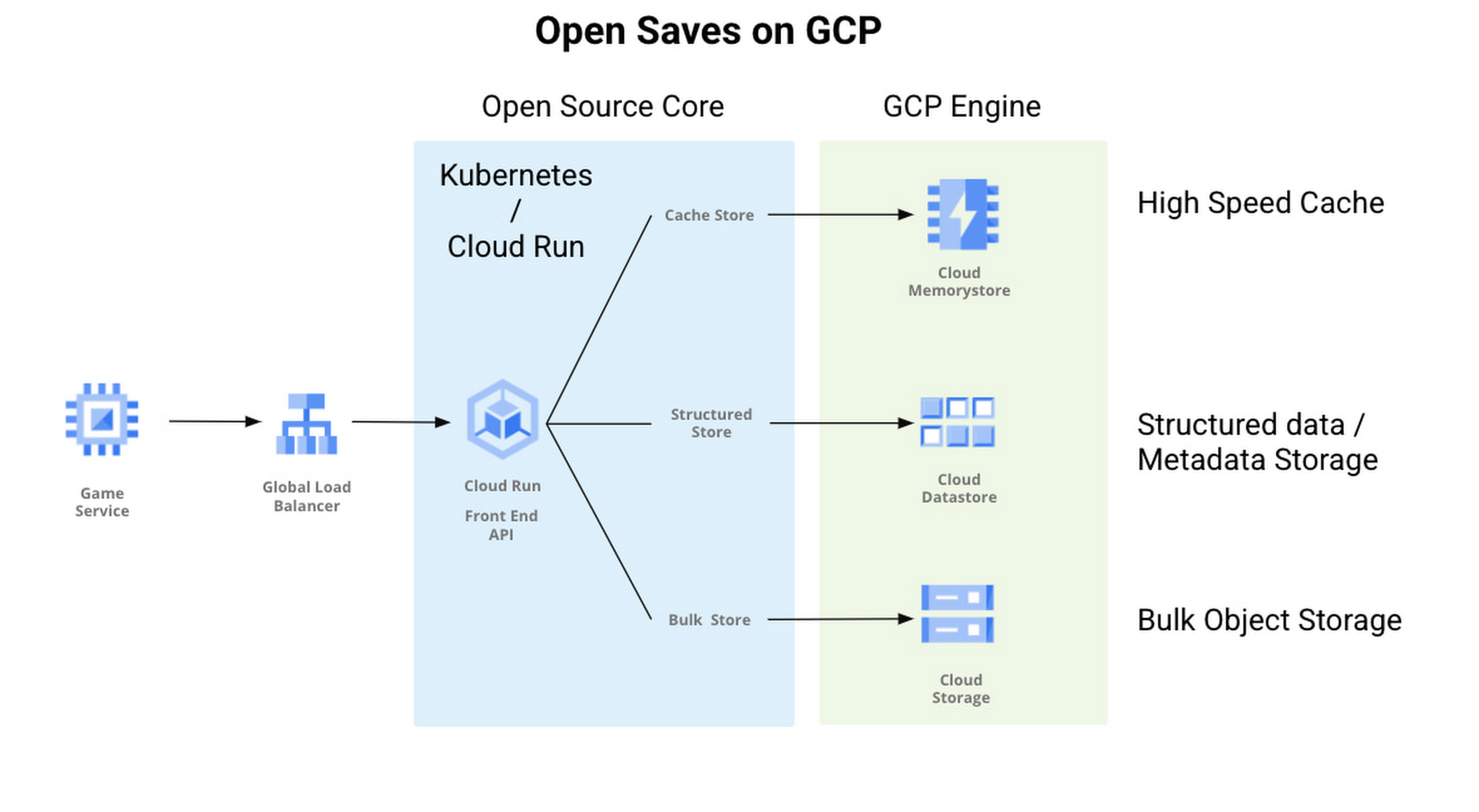
With Open Saves, game developers can run a cloud-native game storage system that is:
- Simple: Open Saves provides a unified, well-defined gRPC endpoint for all operations for metadata, structured, and unstructured objects.
- Fast: With a built-in caching system, Open Saves optimizes data placements based on access frequency and data size, all to achieve both low latency for smaller binary objects and high throughput for big objects.
- Scalable: The Open Saves API server can run on either Google Kubernetes Engine or Cloud Run. Both platforms can scale out to handle hundreds of thousands of requests per second. Open Saves also stores data in Firestore and Cloud Storage, and can handle hundreds of gigabytes of data and up to millions of requests per second.
Open Saves is designed with extensibility in mind, and can be integrated into any game—whether mobile or console, multiplayer or single player—running on any infrastructure, from on-prem to cloud or a hybrid. The server is written in Go, but you can use many programming languages and connect from client or server since the API is defined in gRPC.
Writing to and reading from Open Saves is as simple as the following code:
// To writerecord := &pb.Record{Key: uuid.New().String(),Tags: []string{"tag1", "tag2"},OwnerId: "owner",}createReq := &pb.CreateRecordRequest{StoreKey: storeKey,Record: record,}_, err := client.CreateRecord(ctx, createReq)if err != nil {t.Fatalf("CreateRecord failed: %v", err)}// To readgetReq := &pb.GetRecordRequest{StoreKey: storeKey, Key: recordKey}response, err := client.GetRecord(ctx, getReq)if err != nil {t.Errorf("GetRecord failed: %v", err)}
We are actively developing Open Saves in partnership with 2K Games, and would love for you to come join us on GitHub. There are a few ways to get involved:
- Install and deploy your Open Saves service
- Check out the API reference
- Read the development guide and start contributing
- Join the open-saves-discuss mailing list
Know Your Org’s Carbon Emission Per Workload with Active Assist

3435
Of your peers have already read this article.
3:00 Minutes
The most insightful time you'll spend today!
Last year, we analyzed the aggregate data from all customers across Google Cloud, and found over 600,000 gross kgCO2e in seemingly idle projects that could be cleaned up or reclaimed — which would have a similar impact to planting almost 10,000 trees1. Today, we’re making it easy for you to identify if any of those idle workloads are yours, with new Active Assist sustainability recommendations.
Active Assist is a part of Google Cloud’s AIOps solution that uses data, intelligence, and machine learning to reduce cloud complexity and administrative toil. Under the Active Assist portfolio, we have products and tools like Policy Intelligence, Network Intelligence Center, Predictive Autoscaler, and a collection of Recommendations for various Google Cloud services — all focused on helping you achieve your operational goals. Today, we are broadening the scope of Active Assist to help you achieve your sustainability targets and reduce the carbon footprint of your workloads.
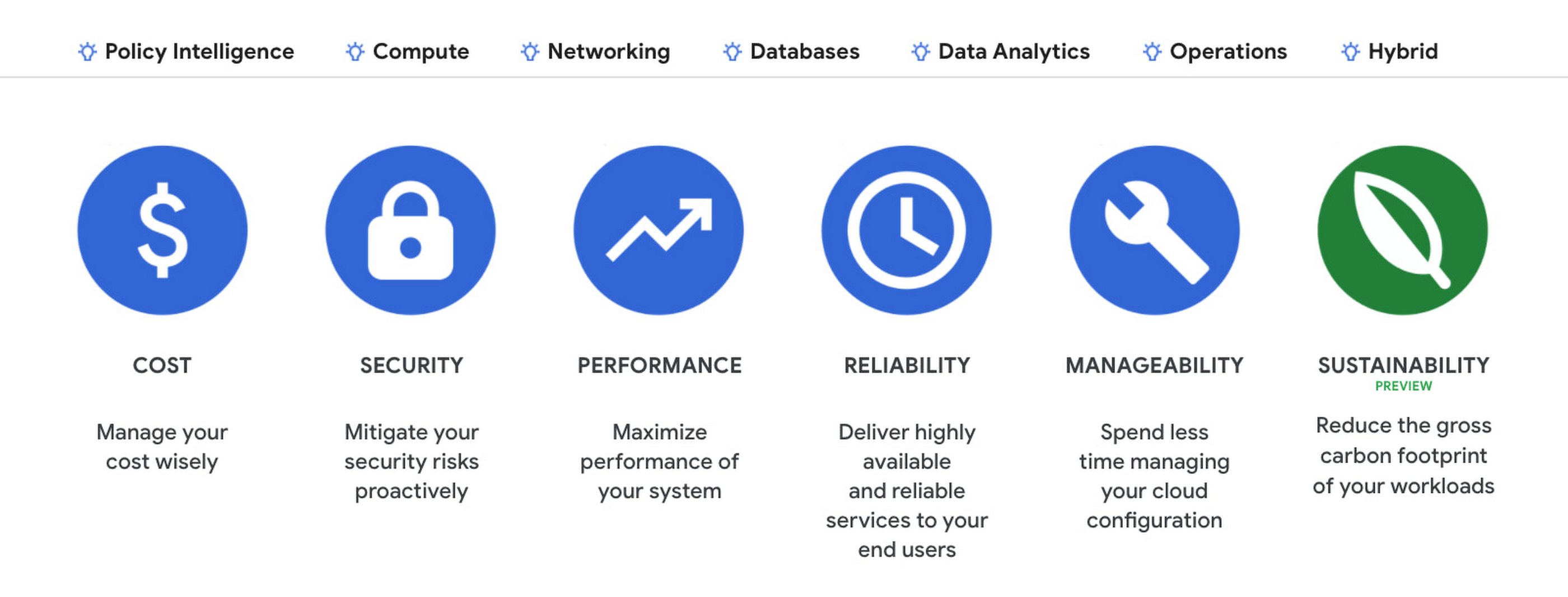
The carbon emissions associated with your cloud infrastructure can be a big part of your overall environmental footprint. Choosing to run on Google Cloud is a great first step — we’ve matched the energy used by our data centers with 100% renewable energy since 2017, and are committed to running our operations on carbon-free energy 24/7 by 2030. But once you’re running on Google Cloud, if you want to reduce the gross carbon emissions of your workload you can take action to optimize your usage.
Assessing the gross carbon impact of unattended projects
You can now estimate the gross carbon emissions you’ll save by removing these idle projects with Active Assist Unattended Project Recommender, which provides rich utilization insights for all the projects in your organization, and uses machine learning to identify ones that are idle and most likely unattended. The data points Active Assist surfaces as a part of its utilization insights now include the carbonFootprintDailyKgCO2 field, which allows you to estimate carbon emissions associated with any given project. Recommendations also estimate the impact of removing an idle project in terms of kilograms of CO2 reduced per month. The capability is available via the Recommender API, Recommendation Hub, the Carbon Footprint dashboard, and BigQuery export of recommendations, making it easy for you to integrate with your company’s existing tools and workflows.

Introducing the Carbon Sense suite
Increasing the sustainability of digital applications and infrastructure is a priority for 90% of global IT leaders2, and we’ll be continuing to invest across a number of product areas in Google Cloud, including AIOps features like Active Assist’s recommendations, to help you make progress towards your sustainability goals. To make it easy for you to find and consume these new features, we’re bundling our existing and future product work into the Carbon Sense suite — a collection of features that makes it easy to accurately report your carbon emissions, and reduce them. Active Assist joins products like Carbon Footprint, which provides you with the ability to understand and measure the gross carbon emissions of your Google Cloud usage, and our low-carbon signals, which help users choose cleaner regions to run their workloads, in the Carbon Sense suite. Stay tuned for more updates on Carbon Sense in the coming months.
Getting started with sustainability recommendations
To get started with Active Assist sustainability recommendations, check the Carbon Footprint dashboard and Recommendation Hub to review projects that may be idle and assess the carbon emissions associated with them. See recommendations in Google Cloud Console.
To view the recommendations, you will need IAM permissions for Unattended Project Recommender itself and permissions to view resources in a given organization.
You can also automatically export the recommendations from your Organization to BigQuery and then investigate any idle projects with DataStudio or Looker. Or, you can use Connected Sheets to use Google Workspace Sheets to interact with the data stored in BigQuery without having to write SQL queries.
As with any other Recommender, you can choose to opt out of data processing for your organization or your projects at any time by disabling the appropriate data groups in the Transparency & Control tab under Privacy & Security settings.
We hope you use Unattended Project Recommender to reduce the carbon footprint associated with your idle cloud resources, and can’t wait to hear your feedback and thoughts about this feature! Please feel free to reach us at active-assist-feedback@google.com. We also invite you to sign up for our Active Assist Trusted Tester Group if you would like to get early access to new features as they are developed.
1. https://www.epa.gov/energy/greenhouse-gas-equivalencies-calculator
2. https://inthecloud.withgoogle.com/it-leaders-research-21/sustainability-dl-cd.html
4051
Of your peers have already watched this video.
45:00 Minutes
The most insightful time you'll spend today!
CFO Watch: Easily Control Your Cloud Costs with the Google Toolkit
With businesses increasingly making the shift from on-premises to cloud, it’s more important than ever to put financial governance policies in place to control cloud costs. However, this is easier said than done as companies constantly struggle to control costs, which is evident from the fact that 35% of customer cloud spend is wasted, according to the 2018 State of the Cloud report by Rightscale.
What companies need are financial governance controls like quotas, permissions, and budgets that help prevent unexpected cost overruns. In addition, programmatic notifications can help take automated actions to control and cap the cloud usage and costs.
Since there is no one size that fits all for financial governance needs, Google Cloud provides a tool kit which helps organizations easily set-up and manage their financial governance in the cloud.
Watch this video to understand how this toolkit works and how you can use it to control your cloud costs.
3415
Of your peers have already watched this video.
1:30 Minutes
The most insightful time you'll spend today!
Google Cloud Cortex Framework: Innovate on Cloud with Less Risk, Cost and Complexity!
Google Cloud Cortex Framework is a comprehensive approach to cloud innovation that enables users to accelerate value with less risk, complexity and cost! The Cortex Framework includes a comprehensive tools and know-how to build, design and deploy cloud solutions to address business challenges and achieve desired outcomes. Watch the video to get started with Google Cloud Cortex Framework.
2022 is a Big Year for the Gaming Industry!

3851
Of your peers have already read this article.
2:00 Minutes
The most insightful time you'll spend today!
Editor’s note: This post was originally published in TechPulse Belgium, where Jack Buser, Google Cloud’s Director of Game Industry Solutions, shared his trends for the industry this year.
The year 2022 will hold many surprises (with a few already dropping!), but there’s one near certainty: By this time next year there will be millions more gamers worldwide. It’s thanks to the industry’s little-noted technology growth drivers, which are getting stronger.
Games are no longer a niche hobby; it’s global, mainstream entertainment. There were 3.1 billion gamers worldwide in 2020. It’s estimated that by 2024 there will be another 500 million. With a global population of 7.7 billion, that’s nearly half the planet. Revenues in 2021 may reach $175 billion—likely more than movies, music, and books combined.
It’s a strength unique to the games industry, driven by the way its creators deploy new technology. Advances we see in everything from pricing and emerging markets, to backend computing and delivery suggests it will grow from here, on things like artificial intelligence and planet-scale networks.
Games forever, game better
It’s no surprise that videogames have become a huge business. Playing games is one of our deepest human expressions. There is a 4,500 year old board game that people still play, a testimony to the human love of testing cleverness, honing reactions, building trust, or just enlivening a day.
Video games do all that and for decades game makers have taken the most cutting-edge computing tech to make things better. We’ve seen electronic ping pong become shooting asteroids, to simple (yet iconic) 2D sprites evolve into believable, expressive 3D characters, all leading to today’s immersive worlds hosting tens of millions of players worldwide.
There’s more to come. I work at technology’s cutting edge for games, offering the world’s leading game creators access to powerful cloud computing, a low-latency global network, Machine Learning and AI, and much more. As usual, game innovators are taking up all these tools, building new narratives, new ways to play, new markets, and new jaw-dropping moments.
And game creators aren’t just thinking about players; they’re also thinking about viewers. More and more people are watching eSports, and creators are using the games medium to engage their viewers in increasingly immersive ways.
Streaming like never before
AI and ML are sharpening games and attracting new players in other ways. These technologies increasingly power everything from network performance to global player matching. The delicate but essential work of encouraging newcomers and discouraging bad actors, optimizing monetization, or building and scaling up new player environments.
Another important area we’re seeing cloud tools being put to use is in coordinating the workflows of global teams of developers. It’s not just a question of building faster anymore, but of collaborating and responding more effectively. The distributed work trends that featured so strongly during the pandemic had already featured in much of the game industry, increasingly it’s an industry standard. This will likely mean even faster and more diverse game development, addressing the needs of new markets where we’re seeing double-digit growth.
Tools like cloud streaming, 5G, and edge computing are likely to accelerate the use of Game Streaming, Augmented Reality, and other types of immersive gameplay. If my metaverse doesn’t have games, count me out! We’re looking at some exciting new developments in coming months with some major industry players. Stay tuned.
A big year for the games industry
As a premier provider of solutions, tools and services to games companies, our engineering job is complex and global. Fortunately, our mission is simple: Help game companies transform to meet new global opportunities with planet scale solutions. Technology has brought the gaming industry to astonishing heights, and is the perfect compliment to great storytelling and creative ingenuity.
As a decades-long industry veteran, I’ve never been more impressed with what technology can do for our industry. Looking past 2022, when we’ll see more compute, more AI, more AR, and more innovation around healthy and exciting game play, there is just one near certainty: More growth.
Answering the 4 Common FAQs on Compute Engine

3859
Of your peers have already read this article.
1:30 Minutes
The most insightful time you'll spend today!
Compute Engine lets you create and run virtual machines (VMs) on Google’s infrastructure, allowing you to launch large compute clusters with ease. When it comes to getting started with Compute Engine, our customers have lots of questions—but some questions come up more often than others.
We looked at an internal list of the most popular Compute Engine documentation pages over a 30-day period to find out what topics were explored by users again and again. Here are the top four questions users have about Compute Engine, in order.
1. What are the different machine families
Compute Engine lets you select the right machine for your needs. You can choose from a curated set of predefined virtual machine (VM) configurations optimized for specific workloads, ranging from small-level purpose to large-scale use cases or create a machine type customized to your needs with our custom machine type feature.
Compute Engine machines are categorized by machine family, including:
- General-purpose: Best price-performance ratio for a variety of standard and cloud-native workloads
- Compute-optimized: Highest performance per core for compute-intensive workloads, such as ad serving or media transcoding
- Memory-optimized: More compute and memory per core than any other family for memory-intensive workloads, such as SAP HANA or in-memory data analytics
- Accelerator-optimized: Designed for your most demanding workloads, such as machine learning (ML) or high performance computing (HPC)
Read the documentation to learn more about each machine family category.
2. How to connect to VMs using advanced methods
In general, we recommend using the Google Cloud Console and the gcloud command-line tool to connect to Linux VM instances. However, some of our customers want to use third-party tools, or require alternative connection configurations.
In these cases, there are several methods that might fit your needs better than the standard connection options:
- Connecting to instances using third-party tools (e.g. Windows PuTTY, Chrome OS Secure Shell app), or MacOS or Linux local terminal)
- Connecting to instances without external IP addresses
- Connecting to instances as the root user Manually connecting between instances and running commands as a service account
Read the documentation to learn about advanced methods for connecting Linux VMs.
3. How to set up OS Login
OS Login lets you use IAM roles and permissions to manage access and permissions to VMs.
OS Login is the recommended way to manage users across multiple instances or projects. OS Login provides:
- Automatic Linux account lifecycle management
- Fine-grained authorization using Google IAM without having to grant broader privileges
- Automatic permissions updates to prevent unwanted access
- Ability to import existing Linux accounts from Active Directory (AD) and Lightweight Directory Access Protocol (LDAP)
You can also add an extra layer of security by setting up OS Login with two-factor authentication or manage organization access by setting up organization policies.
Read the documentation to learn how to configure OS login and connect to your instances.
4. How to manage SSH keys in metadata
Compute Engine allows you to manually manage SSH keys and local user accounts by editing public SSH key metadata.
You can add public SSH keys to instance and project metadata using:
- The Google Cloud Console The gcloud command-line tool
- API methods from the Google Cloud Client Libraries
Read the documentation to learn how to manually manage SSH keys and local user accounts in metadata.
Don’t see your question here? Check out the Compute Engine documentation for all of our recommended guides, tutorials, and resources.
More Relevant Stories for Your Company

Why Indian Enterprises Need to Embrace The Cloud-First Imperative to Accelerate Digital Transformation
Digital transformation is rewriting the rules of business both in India and worldwide. Digital customer experiences deliver easy, effective, and emotional touchpoints that focus operations on what the customers value. Around half of Indian decision makers prioritize the improvement of CX and the simplification of operations, as top priorities in

AWS to Google Cloud Translator: Which AWS Database Service Is Equal to Google Cloud Database?
There are multiple reasons a growing number of database administrators, enterprise architects, application developers and other technology practitioners are moving to Google Cloud’s various database services. Some are being driven by missing features in offering from other providers such as AWS. In Gartner’s Magic Quadrant for Operational Database Management Systems,

Google’s New Climate Innovation Challenge to Fight Energy Crisis and Build Climate Resilience
At Google, we believe that when it comes to solving a problem as big and urgent as climate change, we get more done when we collaborate. From beekeepers in Germany to urban foresters in Los Angeles, we support the work of nonprofits, scientists, and organizations that are working to mitigate

How 20th Century Fox Uses Machine Learning to Gauge the Financial Performance of a Movie
Success in the movie industry relies on a studio’s ability to attract moviegoers—but that’s sometimes easier said than done. Moviegoers are a diverse group, with a wide variety of interests and preferences. Historically, movie studios have relied heavily on experience when deciding to invest in a particular script—but this can
