





10139
Of your peers have already watched this video.
1:00 Minutes
The most insightful time you'll spend today!
Predict User Churn on Gaming Apps with Google Analytics Data using BigQuery ML
User retention can be a major challenge for mobile game developers. According to the Mobile Gaming Industry Analysis in 2019, most mobile games only see a 25% retention rate for users after the first day. To retain a larger percentage of users after their first use of an app, developers can take steps to motivate and incentivize certain users to return. But to do so, developers need to identify the propensity of any specific user returning after the first 24 hours.
In this blog post, we will discuss how you can use BigQuery ML to run propensity models on Google Analytics 4 data from your gaming app to determine the likelihood of specific users returning to your app.
You can also use the same end-to-end solution approach in other types of apps using Google Analytics for Firebase as well as apps and websites using Google Analytics 4. To try out the steps in this blogpost or to implement the solution for your own data, you can use this Jupyter Notebook.
Using this blog post and the accompanying Jupyter Notebook, you’ll learn how to:
- Explore the BigQuery export dataset for Google Analytics 4
- Prepare the training data using demographic and behavioural attributes
- Train propensity models using BigQuery ML
- Evaluate BigQuery ML models
- Make predictions using the BigQuery ML models
- Implement model insights in practical implementations
Google Analytics 4 (GA4) properties unify app and website measurement on a single platform and are now default in Google Analytics. Any business that wants to measure their website, app, or both, can use GA4 for a more complete view of how customers engage with their business. With the launch of Google Analytics 4, BigQuery export of Google Analytics data is now available to all users. If you are already using a Google Analytics 4 property, you can follow this guide to set up exporting your GA data to BigQuery.
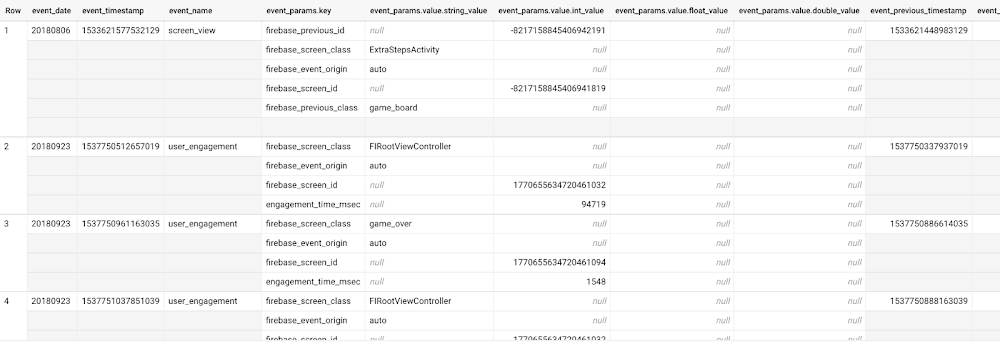
Once you have set up the BigQuery export, you can explore the data in BigQuery. Google Analytics 4 uses an event-based measurement model. Each row in the data is an event with additional parameters and properties. The Schema for BigQuery Export can help you to understand the structure of the data.
In this blogpost, we use the public sample export data from an actual mobile game app called “Flood It!” (Android, iOS) to build a churn prediction model. But you can use data from your own app or website.
Here’s what the data looks like. Each row in the dataset is a unique event, which can contain nested fields for event parameters.
SELECT *FROM `firebase-public-project.analytics_153293282.events_*`TABLESAMPLE SYSTEM (1 PERCENT)
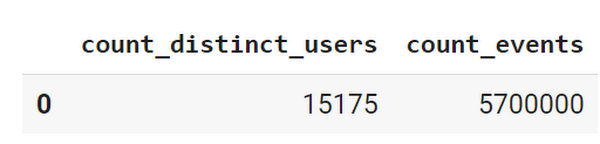
This dataset contains 5.7M events from over 15k users.
SELECTCOUNT(DISTINCT user_pseudo_id) as count_distinct_users,COUNT(event_timestamp) as count_eventsFROM`firebase-public-project.analytics_153293282.events_*
Our goal is to use BigQuery ML on the sample app dataset to predict propensity to user churn or not churn based on users’ demographics and activities within the first 24 hours of app installation.
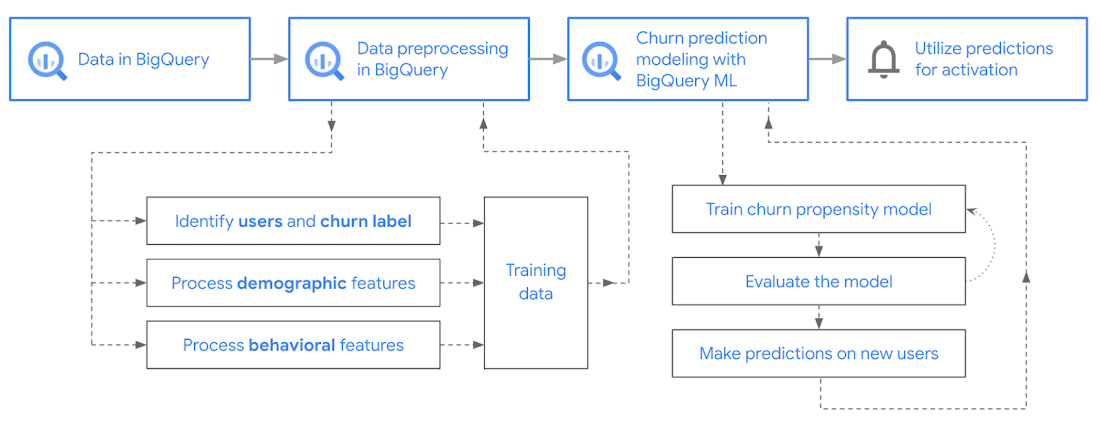
In the following sections, we’ll cover how to:
- Pre-process the raw event data from GA4
- Identify users & the label feature
- Process demographic features
- Process behavioral features
- Train classification model using BigQuery ML
- Evaluate the model using BigQueryML
- Make predictions using BigQuery ML
- Utilize predictions for activation
Pre-process the raw event data
You cannot simply use raw event data to train a machine learning model as it would not be in the right shape and format to use as training data. So in this section, we’ll go through how to pre-process the raw data into an appropriate format to use as training data for classification models.
This is what the training data should look like for our use case at the end of this section:
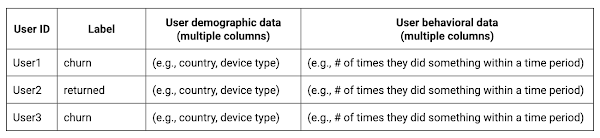
Notice that in this training data, each row represents a unique user with a distinct user ID (user_pseudo_id).
Identify users & the label feature
We first filtered the dataset to remove users who were unlikely to return the app anyway. We defined these ‘bounced’ users as ones who spent less than 10 mins with the app. Then we labeled all remaining users:
- churned: No event data for the user after 24 hours of first engaging with the app.
- returned: The user has at least one event record after 24 hours of first engaging with the app.
For your use case, you can have a different definition of bounce and churning. Also you can even try to predict something else other than churning, e.g.:
- whether a user is likely to spend money on in-game currency
- likelihood of completing n-number of game levels
- likelihood of spending n amount of time in-game etc.
In such cases, label each record accordingly so that whatever you are trying to predict can be identified from the label column.
From our dataset, we found that ~41% users (5,557) bounced. However, from the remaining users (8,031), ~23% (1,883) churned after 24 hours:
SELECTbounced,churned,COUNT(churned) as count_usersFROMbqmlga4.returningusersGROUP BY 1,2ORDER BY bounced
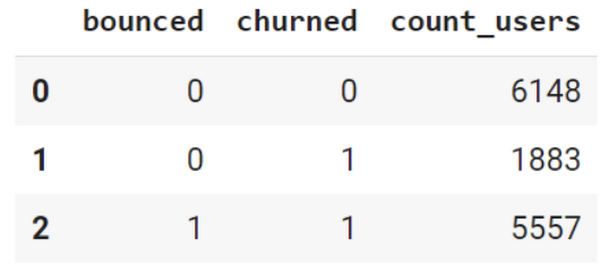
To create these bounced and churned columns, we used the following snippet of SQL code.
...#churned = 1 if last_touch within 24 hr of app installation, else 0IF (user_last_engagement < TIMESTAMP_ADD(user_first_engagement,INTERVAL 24 HOUR),1,0 ) AS churned,#bounced = 1 if last_touch within 10 min, else 0IF (user_last_engagement <= TIMESTAMP_ADD(user_first_engagement,INTERVAL 10 MINUTE),1,0 ) AS bounced,...
You can view the Jupyter Notebook for the full query used for materializing the bounced and churned labels.
Process demographic features
Next, we added features both for demographic data and for behavioral data spanning across multiple columns. Having a combination of both demographic data and behavioral data helps to create a more predictive model.
We used the following fields for each user as demographic features:
geo.countrydevice.operating_systemdevice.language
A user might have multiple unique values in these fields — for example if a user uses the app from two different devices. To simplify, we used the values from the very first user engagement event.
CREATE OR REPLACE VIEW bqmlga4.user_demographics AS (WITH first_values AS (SELECTuser_pseudo_id,geo.country as country,device.operating_system as operating_system,device.language as language,ROW_NUMBER() OVER (PARTITION BY user_pseudo_id ORDER BY event_timestamp DESC) AS row_numFROM `firebase-public-project.analytics_153293282.events_*`WHERE event_name="user_engagement")SELECT * EXCEPT (row_num)FROM first_valuesWHERE row_num = 1 #first engagement);
Process behavioral features
There is additional demographic information present in the GA4 export dataset, e.g. app_info, device, event_params, geo etc. You may also send demographic information to Google Analytics through each hit via user_properties. Furthermore, if you have first-party data on your own system, you can join that with the GA4 export data based on user_ids.
To extract user behavior from the data, we looked into the user’s activities within the first 24 hours of first user engagement. In addition to the events automatically collected by Google Analytics, there are also the recommended events for games that can be explored to analyze user behavior. For our use case, to predict user churn, we counted the number of times the follow events were collected for a user within 24 hours of first user engagement:
user_engagementlevel_start_quickplaylevel_end_quickplaylevel_complete_quickplaylevel_reset_quickplaypost_scorespend_virtual_currencyad_rewardchallenge_a_friendcompleted_5_levelsuse_extra_steps
The following query shows how these features were calculated:
WITHevents_first24hr AS (SELECTe.*FROM`firebase-public-project.analytics_153293282.events_*` eJOINbqmlga4.returningusers rONe.user_pseudo_id = r.user_pseudo_idWHERETIMESTAMP_MICROS(e.event_timestamp) <= r.ts_24hr_after_first_engagement)SELECTuser_pseudo_id,SUM(IF(event_name = 'user_engagement', 1, 0)) AS cnt_user_engagement,# ... repeated for all behavior data ...SUM(IF(event_name = 'use_extra_steps', 1, 0)) AS cnt_use_extra_steps,FROMevents_first24hrGROUP BY1
View the notebook for the query used to aggregate and extract the behavioral data. You can use different sets of events for your use case. To view the complete list of events, use the following query:
SELECTevent_name,COUNT(event_name) as event_countFROM`firebase-public-project.analytics_153293282.events_*`GROUP BY 1ORDER BYevent_count DESC
After this we combined the features to ensure our training dataset reflects the intended structure. We had the following columns in our table:
- User ID:
user_pseudo_id
- Label:
churned
- Demographic features
countrydevice_osdevice_language
- Behavioral features
cnt_user_engagementcnt_level_start_quickplaycnt_level_end_quickplaycnt_level_complete_quickplaycnt_level_reset_quickplaycnt_post_scorecnt_spend_virtual_currencycnt_ad_rewardcnt_challenge_a_friendcnt_completed_5_levelscnt_use_extra_stepsuser_first_engagement
At this point, the dataset was ready to train the classification machine learning model in BigQuery ML. Once trained, the model will output a propensity score between churn (churned=1) or return (churned=0) indicating the probability of a user churning based on the training data.
Train classification model
When using the CREATE MODEL statement, BigQuery ML automatically splits the data between training and test. Thus the model can be evaluated immediately after training (see the documentation for more information).
For the ML model, we can choose among the following classification algorithms where each type has its own pros and cons:
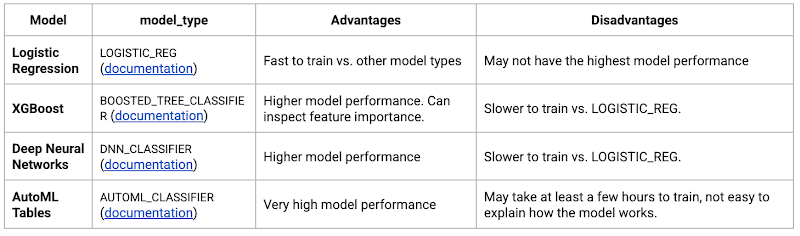
Often logistic regression is used as a starting point because it is the fastest to train. The query below shows how we trained the logistic regression classification models in BigQuery ML.
CREATE OR REPLACE MODEL bqmlga4.churn_logregTRANSFORM(EXTRACT(MONTH from user_first_engagement) as month,EXTRACT(DAYOFYEAR from user_first_engagement) as julianday,EXTRACT(DAYOFWEEK from user_first_engagement) as dayofweek,EXTRACT(HOUR from user_first_engagement) as hour,* EXCEPT(user_first_engagement, user_pseudo_id))OPTIONS(MODEL_TYPE="LOGISTIC_REG",INPUT_LABEL_COLS=["churned"]) ASSELECT*FROMbqmlga4.train
We extracted month, julianday, and dayofweek from datetimes/timestamps as one simple example of additional feature preprocessing before training. Using TRANSFORM() in your CREATE MODEL query allows the model to remember the extracted values. Thus, when making predictions using the model later on, these values won’t have to be extracted again. View the notebook for the example queries to train other types of models (XGBoost, deep neural network, AutoML Tables).
Evaluate model
Once the model finished training, we ran ML.EVALUATE to generate precision, recall, accuracy and f1_score for the model:
SELECT*FROMML.EVALUATE(MODEL bqmlga4.churn_logreg)

The optional THRESHOLD parameter can be used to modify the default classification threshold of 0.5. For more information on these metrics, you can read through the definitions on precision and recall, accuracy, f1-score, log_loss and roc_auc. Comparing the resulting evaluation metrics can help to decide among multiple models.Furthermore, we used a confusion matrix to inspect how well the model predicted the labels, compared to the actual labels. The confusion matrix is created using the default threshold of 0.5, which you may want to adjust to optimize for recall, precision, or a balance (more information here).
SELECTexpected_label,_0 AS predicted_0,_1 AS predicted_1FROMML.CONFUSION_MATRIX(MODEL bqmlga4.churn_logreg)
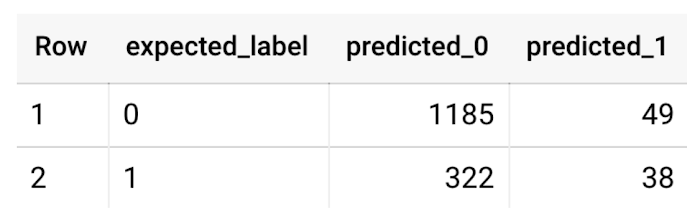
This table can be interpreted in the following way:

Make predictions using BigQuery ML
Once the ideal model was available, we ran ML.PREDICT to make predictions. For propensity modeling, the most important output is the probability of a behavior occurring. The following query returns the probability that the user will return after 24 hrs. The higher the probability and closer it is to 1, the more likely the user is predicted to return, and the closer it is to 0, the more likely the user is predicted to churn.
SELECTuser_pseudo_id,returned,predicted_returned,predicted_returned_probs[OFFSET(0)].prob as probability_returnedFROMML.PREDICT(MODEL bqmlga4.churn_logreg,(SELECT * FROM bqmlga4.train)) #can be replaced with a proper test dataset
Utilize predictions for activation
Once the model predictions are available for your users, you can activate this insight in different ways. In our analysis, we used user_pseudo_id as the user identifier. However, ideally, your app should send back the user_id from your app to Google Analytics. In addition to using first-party data for model predictions, this will also let you join back the predictions from the model into your own data.
- You can import the model predictions back into Google Analytics as a user attribute. This can be done using the Data Import feature for Google Analytics 4. Based on the prediction values you can Create and edit audiences and also do Audience targeting. For example, an audience can be users with prediction probability between 0.4 and 0.7, to represent users who are predicted to be “on the fence” between churning and returning.
- For Firebase Apps, you can use the Import segments feature. You can tailor user experience by targeting your identified users through Firebase services such as Remote Config, Cloud Messaging, and In-App Messaging. This will involve importing the segment data from BigQuery into Firebase. After that you can send notifications to the users, configure the app for them, or follow the user journeys across devices.
- Run targeted marketing campaigns via CRMs like Salesforce, e.g. send out reminder emails.
You can find all of the code used in this blogpost in the Github repository:
What’s next?
Continuous model evaluation and re-training
As you collect more data from your users, you may want to regularly evaluate your model on fresh data and re-train the model if you notice that the model quality is decaying.
Continuous evaluation—the process of ensuring a production machine learning model is still performing well on new data—is an essential part in any ML workflow. Performing continuous evaluation can help you catch model drift, a phenomenon that occurs when the data used to train your model no longer reflects the current environment.
To learn more about how to do continuous model evaluation and re-train models, you can read the blogpost: Continuous model evaluation with BigQuery ML, Stored Procedures, and Cloud Scheduler
More resources
If you’d like to learn more about any of the topics covered in this post, check out these resources:
- BigQuery export of Google Analytics data
- BigQuery ML quickstart
- Events automatically collected by Google Analytics 4
- Qwiklabs: Create ML models with BigQuery ML
Or learn more about how you can use BigQuery ML to easily build other machine learning solutions:
- How to build demand forecasting models with BigQuery ML
- How to build a recommendation system on e-commerce data using BigQuery ML
Let us know what you thought of this post, and if you have topics you’d like to see covered in the future! You can find us on Twitter at @polonglin and @_mkazi_.Thanks to reviewers: Abhishek Kashyap, Breen Baker, David Sabater Dinter.
Transforming Canadian Healthcare and Medical Research with Google Cloud

908
Of your peers have already read this article.
2:30 Minutes
The most insightful time you'll spend today!
Is Cloud an option for Canadian Healthcare healthcare and medical research organizations?
Yes, Canadian healthcare and medical research organizations are moving to the cloud. The cloud market is expected to grow in Canada significantly through 2027.
There are several reasons why Canadian healthcare and medical research organizations are moving to the cloud.
- Reduce costs by eliminating the need to invest in and maintain on-premises infrastructure.
- Enable the healthcare research community to drive their research more expediently to clinical outcomes
- Improve patient satisfaction by making it easier for patients to access their health information and communicate with their providers.
- Improve the quality of care by providing access to patient data and records from anywhere in the country.
Overall, the transition to the cloud is a positive development for Canadian healthcare and medical research organizations.
Canadian healthcare providers face many challenges before they can move to the cloud, such as addressing security and privacy concerns, data sovereignty issues, and ensuring interoperability. To help them overcome these challenges, it is important to provide Healthcare Data Custodians, Infrastructure Architects, and Research Leads with clear guidance on how the cloud can align with Canadian Healthcare Regulations. This will allow them to have a practical understanding of what is required to enhance their cloud journey and facilitate a smoother transition to the cloud.
iSecurity and MD+A Health are actively assisting Canadian healthcare and medical research organizations in comprehending the risks and exploring pathways to embrace the cloud. Through extensive research and analysis, iSecurity and MD+A Health have evaluated Google Cloud as a suitable platform for healthcare. Their diligent efforts have resulted in the production of comprehensive documents that detail their findings via a Threat Risk Assessment (TRA) and a Privacy Impact Report (PIA).
Why a Threat Risk Assessment?
A threat risk assessment is a process of identifying and evaluating threats to an organization and then determining the likelihood and impact of those threats. The goal of a threat risk assessment is to identify the most serious threats and develop mitigation strategies to reduce the likelihood and impact of those threats.
A threat risk assessment typically involves the following steps:
- Identify threats: The first step is to identify all potential threats to the organization. This can be done by brainstorming, interviewing experts, or reviewing historical data.
- Evaluate threats: Once the threats have been identified, they need to be evaluated in terms of their likelihood and impact. The likelihood of a threat is the probability that it will occur, while the impact of a threat is the severity of the consequences if it does occur.
- Prioritize threats: The threats need to be prioritized based on their likelihood and impact. The most serious threats should be addressed first.
- Develop mitigation strategies: Once the threats have been prioritized, mitigation strategies need to be developed to reduce the likelihood and impact of those threats. Mitigation strategies can include things like implementing security controls, training employees, and developing contingency plans.
- Implement mitigation strategies: The mitigation strategies need to be implemented and tested to ensure that they are effective.
- Monitor and review: The threat risk assessment should be monitored and reviewed regularly to ensure that it is still effective.
Why a Privacy Impact Assessment?
A Privacy Impact Assessment (PIA) is a process that organizations use to identify and assess the privacy risks associated with a new or changed information technology (IT) system or project. The goal of a PIA is to help organizations protect the privacy of individuals whose personal information is collected, used, or disclosed by the IT system or project.
PIAs typically include the following steps:
- Identifying the purpose of the IT system or project and the types of personal information that will be collected, used, or disclosed.
- Identifying the privacy risks associated with the IT system or project.
- Assessing the likelihood and severity of the risks.
- Developing and implementing controls to mitigate the risks.
- Monitoring the effectiveness of the controls.
PIAs are an important tool for organizations to help them follow privacy laws and regulations. They can also help organizations build trust with their patients, employees and the research community by demonstrating their commitment to protecting privacy.
The benefits of conducting a PIA:
- Helps organizations identify and assess privacy risks
- Helps organizations develop and implement controls to mitigate privacy risks
- Helps organizations comply with privacy laws and regulations
- Helps organizations build trust with customers and employees
Why Google Cloud?
Google Cloud is committed to providing Canadian healthcare organisations with an environment to expand both their clinical and research environments. Google Cloud has invested significant resources into building out a cloud environment based on best practices coming from Google’s experience running some of the world’s largest platforms.
Some highlights include:
- Built-in security features that help protect your data and applications from unauthorized access, use, disclosure, disruption, modification, or destruction.
- A comprehensive security management platform that helps you assess, prioritize, and address security risks across your organization.
- A team of security experts who can help you design, implement, and manage your security solutions.
- A wide range of security training and resources to help you learn about and stay up-to-date on the latest security threats and best practices.
6352
Of your peers have already watched this video.
1:30 Minutes
The most insightful time you'll spend today!
How Bloomberg uses Google Translate to Share Breaking News with the World
Bloomberg uses Google Translate to instantly share news with customers in more than 170 countries. Financial markets can move within seconds of a story breaking, so speed matters. With Google’s automated translation Bloomberg can quickly disseminate breaking financial news to customers around the world in 40 different languages.
Making Mothers’ Day Special: How Google Cloud Migration for 1-800-FLOWERS.COM, Inc Impacts CX

6815
Of your peers have already read this article.
2:30 Minutes
The most insightful time you'll spend today!
Editor’s note: In honor of Mother’s Day, we look at how 1-800-FLOWERS.COM, Inc. migrated to Google Cloud as part of its digital transformation to quickly deploy seamless and convenient customer experiences across multiple brands on Mother’s Day and every day.
As a leading provider of gifts designed to help customers express, connect, and celebrate, 1-800-FLOWERS.COM, Inc. has embraced cloud technologies to grow and transform its business through constant innovation. As part of our digital transformation, we recently completed the migration of our ecommerce platform and other services to Google Cloud. We’ve transitioned from a monolithic to a microservices platform, moved many workloads from our on-premises data centers to our Google Cloud environment, and scaled both horizontally and vertically.
Since our migration, we’ve developed efficient processes to launch new brands, improved the customer experience across all brands, and seen significantly increased site traffic.
Nurturing a more delightful customer journey
Customer delight is at the core of everything we do. Whether it be with a flower bouquet, a sweet treat, or a personalized keepsake, our mission is to deliver smiles. With the rise of the COVID-19 pandemic, we’ve all been challenged to find unique and safe ways to continue honoring the special connections in our lives and celebrating occasions with loved ones. Our customers have adapted by doing things such as sending gifts to isolated loved ones, sharing the same meal together virtually, or using video to engage with others through group activities like flower arranging and building charcuterie boards.
The customer experience is a top priority for us, and we constantly look for innovative ways to enhance the customer journey across our ecommerce platform of more than a dozen brands. As a result, we’ve continued to see a rise in demand as customers enjoy the ease and convenience of our site and discover our full family of brands.
Migrating to a cloud-first mindset
As we’ve continued to innovate and iterate on the customer experience, we knew we wanted to evolve our platform. We wanted to shift to a microservices platform, which would allow our team the opportunity to release updates to our site more often and set up the right continuous integration/continuous deployment (CI/CD) practices.
Working with Google Cloud, we were able to move our ecommerce platform to the cloud and standardize our site and brand deployment by building one release that could then be repeated across all of our brands. We built everything in a modular fashion, including microservices and code libraries, so that sites could be easily constructed and replicated for each brand. And because of this, we were able to launch Shari’s Berries extremely quickly after we acquired the brand in 2019.
Moving our platform to a completely homegrown solution of microservices was a daunting task. But our team handled it beautifully through load-testing, stress-testing, and building new monitoring tools. And with Google Cloud supporting us all along the way, managing the migration process was simple and easy from start to finish.
Arranging a better bouquet of services
Currently, we’ve migrated every customer-facing touchpoint for all of our brands to Google Cloud—whether it’s on the web or mobile, our AI bots, or our chat interfaces.
- We run on Google Kubernetes Engine and Istio.
- We have nearly 200 microservices built to help power our entire ecommerce stack across several cloud services running on Google Cloud.
- We’re utilizing BigQuery for our offline intelligence.
Results are coming up roses
Our new stack on Google Cloud has benefits for both us and our customers. We moved from a session-based to a token-based system, which provides enhanced security as well as a consistent, convenient experience across all our brands. Using service workers and a single-page app, we are able to download all the relevant site content to the browser in under two seconds to create an instant-click experience for each and every customer. We also use Google Analytics to measure our user interactions and provide personalized results to each customer. Our hope is that with this new system, we can learn from customer behavior to offer gift givers a more personalized shopping experience during each visit.
The benefits of our new tech stack have not only helped us enhance the solutions we offer to customers today, they’ve also enabled us to offer new ones at lightning speed. With our legacy system, we used to release new code once a week or once a month. Now, even during our peak periods, we’re able to release 10 to 15 times a day and can deploy and pivot quickly to create new microservices and microsites on the fly—often without having to touch any code.
Efficiencies abound
The benefits of moving our platform to Google Cloud have extended to our internal teams as well. Before the migration, we had only two environments for developing and testing, which made it time-consuming to test updates before they went into production. Now with Google Cloud, we have several different journey teams—which are made up of developers, product owners, and technical owners—all working in several different environments, solving problems, and creating new solutions together.
Everyone is now empowered to be self-sufficient, developing and releasing microservices on their own when they’re ready. This has given our developers more time to take part in continued development and learning opportunities. For example, we offer lunch-and-learn sessions as well as other resources for everyone to take advantage of so they can continue to learn and refine their skills.
Planting the seeds for future growth
As we look to the future and think about how we help our customers express, connect, and celebrate, we’ll continue to collaborate across teams to deliver solutions that spread smiles. Specifically, we’re exploring additional use of AI to help us better serve our customers across all our brands.
We’ve enjoyed the ongoing support we’ve received from the Google Cloud team as they help us build new solutions and design a road map for the future. Their support has helped the 1-800-FLOWERS.COM, Inc. team to realize the power of the cloud and bring the very best experience to our customers.
Learn more about 1-800-FLOWERS.COM, Inc., or check out our recent blog about cloud migration for the real world.
Transformation Cloud: A New Wheel of Innovation and Digital Transformation

3359
Of your peers have already read this article.
1:30 Minutes
The most insightful time you'll spend today!
Looking back on the past year, I see challenges—but also reinvention. Reinvention in how children are educated. Reinvention in how medical professionals provide care. Reinvention in how customers purchase products. This reinvention was made possible by all of the IT leaders around the world who had a vision about what could be possible with technology.
Technology has allowed people to work and complete critical activities safely outside of their standard locations. But, it has also enabled transformation in ways we have not seen before: in how people collaborate, in how businesses operate, and most important to me, in how organizations innovate.
Rethinking what it means to transform
The leading indicator for organizations that are accelerating their innovation during this time is how they are thinking about transformation. Instead of asking infrastructure questions about where their apps and services should run, they are asking transformation questions about how to build an environment that enables every person, process, and technology to adapt in order to bring the highest level of innovation to the business.
Innovative companies have moved beyond migrating their data centers to the cloud, changing not only where their business is done but, more importantly, how it is done. For example, Papa John’s recently announced they are building a digital platform that looks at real-time data across the business to improve its loyalty programs, website, and customer and partner experiences. Albertsons Companies is transforming itself by reinventing grocery shopping, both the digital and physical aisle, through shoppable maps, AI-powered conversational commerce, and predictive grocery list building. Airbus is reimagining their work environment to embrace the hybrid work reality. And Siemens is partnering with Google Cloud to reinvent industrial manufacturing with AI to empower employees, automate mundane tasks, and improve product quality.
Here, transformation is made possible with technologies that enable new innovations for their customers versus decisions about where infrastructure should be run. And this aligns with a recent study by Forrester that states the top two IT initiatives for the next 12 months are to increase innovation and to invest in technology that helps employees do their jobs better.1
Some of the best conversations I’ve had with customers are focused on how to:
- Accelerate transformation while also maintaining the freedom to adapt to market needs.
- Make every employee—data scientists to sales associates—smarter with real-time data to make the best decisions.
- Bring people together and enable them to communicate, collaborate, and share with each other when they can not meet in person.
- Protect everything that matters to us—our people, our customers, our data, our customers’ data, and each transaction we undertake.
This new customer thinking is driving new technology requirements—requirements that can be solved through a transformation cloud. A transformation cloud accelerates an organization’s digital transformation through app and infrastructure modernization, data democratization, people connections, and trusted transactions. The result is an organization – and its workers – that can take advantage of all of the benefits of cloud computing to drive innovation.
The new requirements for innovation
Organizations want to work with multiple cloud providers to choose the best technology for each of their apps and services while also mitigating against inevitable cloud outages and vendor lock in. They value the flexibility of open source based solutions and look to our multicloud platforms like Google Kubernetes Engine and Anthos to instill freedom in how they innovate and drive differentiated customer experiences. It is no surprise that, in a recent Google-commissioned IDG research study, 78% of Global IT leaders stated that multi/hybrid cloud support is a major consideration when selecting a cloud provider and 74% preferred open source cloud solutions.2 Customers like MLB, DenizBank, and Macquarie Bank understand the necessity of a multicloud strategy and are taking advantage of Google Cloud’s open, hybrid architecture to give them the maximum flexibility to run their business how and where they want.
These organizations also want to use data to better understand their customers, enhance their products, and improve inventory accuracy in order to make real-time decisions—and bring it together into a cohesive data cloud. They value how analytics solutions democratize access to data for all employees and how embedded AI helps them predict and automate the future. The Forrester study mentioned above also shows that companies focused on improving their use of data for better decision-making, are taking actions to improve data self-service capabilities and make access to data and insights more democratic.3 Customers like Twitter, PayPal, The Home Depot, HSBC, and Stanford Medicine, unify their data across their organizations to power deeper AI-driven business insights, make better real-time decisions, and build and run their data-driven applications.
And while technology is driving many of the transformations we see, so are an organization’s people. Workers are finding new ways to strengthen human connections, deepen their impact, and serve customers while transforming how work happens—as shown in the fact that 59% of organizations in the IDG study accelerated or newly introduced remote working and collaboration capabilities in 2020.4 Customers like Kia Motors, Cambridge Health Alliance, and PwC are using Google Workspace to enable teams of all sizes to connect, create, collaborate, and to drive innovation from any device, and any location.
Finally, the innovation that we see in every digital transaction is matched with new ways to protect and secure the business. Organizations want to protect their employees, customers, and partners against emerging threats, analyze massive amounts of data to secure infrastructure, and build a long term strategy for strategic governance of their assets regardless of their location. Getting this right is essential as organizations see security as a top pain point impeding innovation.5 Customers like Equifax and Evernote are using Google Cloud’s secure platform and security products to extend customer confidence anywhere their systems may operate.
Google Cloud technologies are already powering customers’ transformation clouds
Supporting our customers’ reinventions are our top priority and we believe that together, we can pave the way for what is next. With our investments in multicloud and AI/ML, to sustainable infrastructure, industry solutions, and technology that improves our communities, such as COVID-19 vaccine distribution, we are proud that our customers trust Google Cloud solutions to digitally transform their business.
We have lots more to tell you about in the coming months, starting with our Data Cloud Summit on May 26th. Between this event, and the multiple other events we have this summer, you will learn about how our industry leadership and collaboration with our partners are enabling our customers to build powerful transformation clouds to support their continued reinvention.
1. Forrester Analytics Business Technographics® Priorities And Journey Survey, 2021
2. IDG Communications, Inc: “No Turning Back: How the Pandemic Has Reshaped Digital Business Agendas”, 2021
3. Of the companies that prioritize data in decision making, 37% are improving data self-service capabilities and 30% are making access to data and insights more democratic (Forrester Analytics Business Technographics® Priorities And Journey Survey, 2021)
4. IDG Communications, Inc, “No Turning Back: How the Pandemic Has Reshaped Digital Business Agendas”, 2021
5. 33% of organizations stated Security risks & concerns as a top pain point impeding innovation (IDG Communications, Inc, “No Turning Back: How the Pandemic Has Reshaped Digital Business Agendas”, 2021)
ShareChat Builds its Diverse, Hyperlocal Social Network. Thanks to Google Cloud

9225
Of your peers have already read this article.
3:00 Minutes
The most insightful time you'll spend today!
Editor’s note: Today’s guest post comes from Indian social media platform ShareChat. Here’s the story of how they improved performance, app development, and analytics for serving regional content to millions of users using Google Cloud.
How do you create a social network when your country has 22 major official languages and countless active regional dialects? At ShareChat, we serve more than 160 million monthly active users who share and view videos, images, GIFs, songs, and more in 15 different Indian languages. We also launched a short video platform in 2020, Moj, which already supports over 80 million monthly active users.
Connecting with people in the language they understand
As mobile data and smartphones have become more affordable in India, we noticed a large new segment of people, many in rural areas, being welcomed onto the internet. However, many of them didn’t speak English, and when it comes to accessing content and information—language plays a significant role. Instead of joining other social media sites where English reigned supreme, new internet users chose to join language or dialect-specific Whatsapp groups where they felt more comfortable instead.
So, we set out to build a platform where people can share their opinions, document their lives, and make new friends, all in their native language. ShareChat simplifies content and people discovery by using a personalized content newsfeed to deliver language-specific content to the right audience.
Given the high-intensity data and high volume of content and traffic, we rely heavily on IT infrastructure. On top of that, a large number of our users rely on 2G networks to post, like, view, or follow each other. Our platform needs to deliver great experiences to people who are spread out across the country and different networks without any reduction in performance.
The right cloud partner to support future growth
ShareChat was born in the cloud—we already knew how to scale systems to serve a large customer base with our existing cloud provider. But like many companies, we struggled with over-provisioning compute and storage to accommodate unpredictable traffic and avoid running out of storage. With demand rising for local language content and an increase in online interactions in response to the COVID-19 crisis, we realized that we would need a more efficient way to scale dynamically and allocate resources as needed.
Google Cloud was a natural choice for us. We wanted to partner with a technology-first company that would make it easy (and cost-effective) to manage a strong technology portfolio that would allow us to build whatever we wanted. Google is at the forefront of technology innovation and provided everything we needed to build, run, and manage our applications (including creating an efficient DevOps pipeline to fix and release new features quickly).
We had a few issues in mind at the start of discussions with the Google Cloud team, but over time, as we got information and support from them, we realized that these were the partners we wanted in our corner when it came time to tackle our most challenging problems. In the end, we decided to take our entire infrastructure to Google Cloud.
To support millions of users, we deploy and scale using Google Kubernetes Engine. While we analyze our data using a combination of managed data cloud services, such as Pub/Sub for data pipelines, BigQuery for analytics, Cloud Spanner for real-time app serving workloads, and Cloud Bigtable for less-indexed databases. We also rely on Cloud CDN to help us distribute high-quality and reliable content delivery at low latency to our users.
We now use just half the total core consumption of our legacy environment to run ShareChat’s existing workloads.
Google Cloud delivers better outcomes at every level
By moving to Google Cloud, we saw major benefits in several key areas:
Zero-downtime migration for users
At the time of migration, we had over 70 terabytes of data, consisting of 220 tables—some of which were up to 14 terabytes with nearly 50 billion rows. Due to our data’s interdependencies, moving services over one at a time wasn’t an option for us.
Even though we were migrating such large volumes of data, we didn’t want to impact any of our customers. Latency spikes for out-of-sync data might affect message delivery. For instance, if a message or notification was delayed, we didn’t want to risk a bad user experience causing someone to abandon ShareChat.
To prepare for the move, we ran a proof-of-concept cluster for over four months to test database performance in a real-world scenario for handling more than a million queries per second. Using an open-source API gateway, we replicated our legacy data environment into Google Cloud for performance testing and capacity analysis. As soon as we were confident Google Cloud could handle the same traffic as our previous cloud environment, we were ready to execute.
Using wrappers, we were able to migrate without having to change anything in our existing application code. The entire migration of 60 million users to Google Cloud took five hours—without any data loss or downtime. Today, ShareChat has grown to 160 million users, and Google Cloud continues to give us the support we need.
Scaling globally to meet unexpected demand
We rely on real-time data to drive everything on ShareChat by tracking everything that goes on in our app—from messages and new groups to content people like or who they follow. Our users create more than a million posts per day, so it’s critical that our systems can process massive amounts of data efficiently.
We chose to migrate to Spanner for its global consistency and secondary index. Unlike our legacy NoSQL database, we could scale without having to rethink existing tables or schema definitions and keep our data systems in sync across multiple locations. It’s also cost-effective for us—moving over 120 tables with 17 indexes into Cloud Spanner reduced our costs by 30%.
Spanner also replicates data seamlessly in multiple locations in real time, enabling us to retrieve documents if one region fails. For instance, when our traffic unexpectedly grew by 500% over just a few days, we were able to scale horizontally with zero lines of code change. We were also launching our Moj video app simultaneously, and we were able to move it to another region without a single issue.
Simplifying development and deployment
On average, we experience about 80,000 requests per second (RPS) –nearly 7 billion RPS per day. That means daily push notifications sent out to the entire user base about daily trending topics can often result in a spike of 130,000 RPS in just a few seconds.
Instead of over-provisioning, Google Kubernetes Engine (GKE) enables us to pre-scale for traffic spikes around scheduled events, such as holidays like Diwali, when millions of Indians send each other greetings.
Migrating to GKE has also enabled us to adopt more agile ways of work, such as automating deployment and saving time with writing scripts. Even though we were already using container-based solutions, they lacked transparency and coverage across the entire deployment funnel.
Kubernetes features, such as sidecar proxy, allows us to attach peripheral tasks like logging into the application without requiring us to make code changes. Kubernetes upgrades are managed by default, so we don’t have to worry about maintenance and stay focused on more valuable work. Clusters and nodes automatically upgrade to run the latest version, minimizing security risks and ensuring we always have access to the latest features.
Low latency and real-time ML predictions
Even though many of our users may be accessing ShareChat outside of metropolitan areas, it doesn’t mean they’re more patient if the app loads slowly or their messages are delayed. We strive to deliver a high-performance experience, regardless of where our users are.
We use Cloud CDN to cache data in five Google Cloud Point of Presence (PoP) locations at the edge in India, allowing us to bring content as close as possible to people and speeding up load time. Since moving to Cloud CDN, our cache hit ratio has improved from 90% to 98.5%—meaning our cache can handle 98.5% of content requests.
As we expand globally, we’d like to use machine learning to reach new people with content in different languages. We want to build new algorithms to process real-time datasets in regional languages and accurately predict what people want to see. Google Cloud gives us an infrastructure optimized to handle compute-intensive workloads that will be useful to us both now—and in the future.
The confidence to build the best platform
Our current system now performs better than before we migrated, but we are continuously building new features on top of it. Google’s data cloud has provided us with an elegant ecosystem of services that allows us to build whatever we want, more easily and faster than ever before.
Perhaps the biggest advantage of partnering with Google Cloud has been the connection we have with the engineers at Google. If we’re working to solve a specific problem statement and find a specific solution in a library or a piece of code, we have the ability to immediately connect with the team responsible for it.
As a result, we have experienced a massive boost in our confidence. We know that we can build a really good system because we not only have a good process in place to solve problems—we have the right support behind us.
More Relevant Stories for Your Company

A Record Breaking Calculation: 100 Trillion Digits of π on Google Cloud!
Records are made to be broken. In 2019, we calculated 31.4 trillion digits of π — a world record at the time. Then, in 2021, scientists at the University of Applied Sciences of the Grisons calculated another 31.4 trillion digits of the constant, bringing the total up to 62.8 trillion

VMware Engine’s Exciting New Updates: A Google Cloud Journey
IT leaders today are being asked to simultaneously support their company’s infrastructure, find opportunities for growth, and meet their goals with fewer resources and smaller budgets than before. Recently we highlighted three customers who are leveraging Google Cloud VMware Engine to achieve these goals while lowering their TCO and transforming their organization.

Why Now Moving to Cloud is Great for Media and Broadcasting Companies
The broadcasting industry has gone through many evolutions since its inception. From linear over-the-air (OTA) to digital & personalized, to standard to ultra high definition, these evolutions were driven by increased demand from viewers who want more choices. The next evolution is happening now, driven by the emergence in cloud

Being Cloud-native Means Sustainability and Growth-native for Nuuly!
They say black never goes out of style. It’s something the team at Nuuly, URBN’s digital rental and resale business, know well. And it’s not just true of the company’s garments but their gadgets, too. “I was having an offhand conversation with a UX designer recently,” Rebecca Sandercock, Nuuly’s strategy
