





Apigee: Unlock Innovation by Managing APIs for SAP Workloads
3658
Of your peers have already read this article.
3:00 Minutes
The most insightful time you'll spend today!
Businesses migrating their SAP environments to Google Cloud do so for a number of reasons. Most cite the agility, scalability and security advantages of migrating SAP workloads to Google Cloud; many also focus on improved uptime and performance.
At some point, most businesses also want to explore the idea that there’s a fortune locked up in their business data—and that the cloud holds the key. But leveraging the cloud to transform data into dollars is a process that involves special challenges—and specialized tools to address these challenges. For businesses running SAP environments in the cloud, most of which maintain a significant stake in legacy systems and data stores, the challenges tend to get even bigger.
The promises and pitfalls of APIs
This is where Google Cloud’s advanced data analytics, machine learning and AI capabilities, especially our API (application programming interface) management tools, come into play. Our Apigee API Management Platform is emerging as a star player for many of our SAP customers because it can open the door to innovation and opportunity for SAP systems and data stores.
API management speaks directly to what it really means to get value from business data. By connecting the right data sets with people willing and able to monetize that data, your business can benefit both indirectly (for example, by generating insights that lead to increased sales or better customer experiences) and directly (such as by selling access to your data to another business).
APIs have emerged as a pillar of modern digital business practices because they facilitate precisely these types of transactions. Today, every mobile device, website and application uses APIs to access connected services and data sources. APIs provide connection points between apps, platforms and entire application ecosystems. And by using de-facto standards such as REST (representational state transfer), businesses can utilize APIs to build and deploy innovative applications quickly.
3 reasons legacy systems and modern APIs don’t mix
Google Cloud customers running SAP environments may be ready to find the value in their data, but their SAP systems and data, as well as legacy APIs that don’t adhere to REST or other modern approaches, may not quite be up to the task. This is because:
- Balancing accessibility, usability and security is a tough task—and the stakes are high. Opening up access to business-critical systems to third-party as well as internal developers could raise significant risks. Even for SAP teams with a high focus on security, the process of providing dependable, programmatic access to legacy SAP systems often involves significant time and effort. And while limiting access and API functionality are both valid ways to mitigate security risk, employing these tactics can slow the pace of innovation and very quickly undermine the reasons for starting this process in the first place.
- Managing APIs across legacy SAP applications and other data stores can be complex, costly and technically challenging. There’s a fundamental mismatch between the “how and why” of modern APIs and the types of programmatic access for which legacy systems were designed. Modern apps, for example, typically deliver API requests in far greater numbers; that’s true for client-side single-page applications as well as for more traditional server-side apps running on modern, elastically scaled app servers. There are also disparities in the size and structure of data payloads between what modern apps were designed to use and what legacy systems were designed to serve.
These examples boil down to the same issue: If your business is running legacy SAP systems or is in the process of migrating away from them, you’ll have serious work to do to make your data accessible for modern use cases and integrations. And asking third-party developers to adjust their methods and skill sets to consume your legacy systems is going to be a very tough sell.
- Monetizing API access presents another set of technical and practical challenges. For many companies, the name of the data game is monetization: actually charging developers for the privilege of accessing your high-value data sources. Getting this right isn’t just a matter of putting a virtual turnstile in front of your existing APIs. Any monetization strategy lives or dies based on its pricing—and this means understanding exactly who’s using your data, when they access it and how they’re using it. Even if you are not charging your developers for API calls, there are also some valuable insights to be gained from more advanced types of analysis, right up to having a unified view of every data flow and data interaction related to your organization’s API traffic. Overall, API monetization demands that APIs be built in a modern style, designed and maintained for developer consumption rather than just, per legacy methods, for exposing a system.
It probably comes as no surprise that an SAP environment, whether or not it’s considered legacy, was designed to focus on SAP system data and not designed to open the data inside an SAP system to other applications. And since these tools don’t build themselves, the question becomes, who will build them?
Apigee: Bridging the gaps with API management
An API management solution such as Apigee can help IT organizations tackle these issues more efficiently. In practice, companies are turning to Apigee for help with three primary SAP application modernization patterns, all of which speak to the challenges of using APIs to create value:
1. Modernizing legacy services. One of Apigee’s most important capabilities involves placing an API “wrapper” around legacy SAP interfaces. Developers then get to work with feature-rich, responsive, thoroughly modern APIs, and the Apigee platform handles the process of translating and optimizing incoming API calls before passing the requests through to the underlying SAP environment.
This approach to API management also gives IT organizations some useful capabilities. Apigee simplifies the process of designing, implementing and testing APIs that can add more functionality on top of legacy SAP interfaces; and it helps manage where, how and when developers work with APIs. This is also the basis for Apigee’s API monitoring and metrics—essential capabilities that would involve significant effort for most IT teams to build themselves.
2. Abstracting APIs from source systems. By providing an abstraction layer between SAP legacy systems and developers, the Apigee platform also ensures a consistent, reliable and predictable developer experience. Through this decoupling of APIs from the underlying source systems, Apigee can adjust to changes in the disposition and availability of systems while carrying on business as usual with developers using its APIs. In this way, SAP enterprises can package and market their API offerings—for example, publishing APIs through a developer portal—and lets them monitor API consumption by target systems.
Decoupling the source system from the developer entry points also shields connected applications from significant backend changes like a migration from ECC to S/4HANA. As you make backend changes to your services, apps continue to call the same API without any interruption. The migration may also provide opportunities for consolidating multiple SAP and non-SAP implementations into S/4HANA or cleaning up core SAP systems by moving out some of the functionality to cloud-native systems. Because Apigee abstracts consuming applications from changes to underlying systems and creates uniformity across these diverse systems, it can de-risk the migration from ECC to S/4HANA or similar consolidation projects.
3. Creating cloud-native, scalable services. Apigee also excels at bridging the often wide gap between SAP applications and modern, distributed application architectures in which microservices play an essential role. In addition to repackaging SAP data as a microservice and providing capabilities to monetize this data, Apigee takes on some essential performance, availability and security functions: handling access control, authentication, security monitoring and threat assessment plus throttling traffic when necessary to keep backend systems running normally while providing applications with an endpoint that can scale to suit any of your workloads.
Needless to say, Apigee’s security capabilities are absolutely essential no matter how you’re using API management tools. But because Apigee also offers performance, analytics and reliability features, it can position companies to jump into a fully mature API monetization strategy. At the same time, it can give IT teams confidence that opening their SAP systems to innovation does not expose mission critical systems to potential harm.
Conrad Electronic and Apigee: using APIs to drive innovation
We’re seeing quite a few businesses using Apigee to create value from legacy SAP environments in ways that didn’t seem possible before. For an example of how Apigee and the rest of Google Cloud work together to open new avenues for innovation for SAP users, consider Conrad Electronic.
Conrad Electronic combines many years of history as a successful German retailer with a progressive approach to innovation. The company has digitally transformed itself by leveraging an existing, legacy SAP environment alongside Google BigQuery, which provides a single repository for data that once resided in dozens of disparate systems. Conrad Electronic is using Apigee to amplify the impact and value of its transformation on two levels.
First, it’s using Apigee to manage data exchanges with shipping companies and with the procurement systems of its B2B customers, giving these companies an improved retail experience and reducing the friction and potential for error that come with traditional transaction environments.
At the same time, Conrad Electronic uses Apigee to give its own developers a modern set of tools for innovation and experimentation. A small development team ran with the idea, building an easy-to-use tool that gives in-store staff and visitors access to key product, service and warranty information, using their own tablets and other devices.
“APIs give people the freedom and independence to implement their ideas quickly and effectively,” said Aleš Drábek, Conrad Electronics’ Chief Digital and Disruption Officer. “As an effective API management solution, Apigee enables us to harness the power of APIs to transform how we interact with customers and how we transfer data with our B2B customers.”
Explore the possibilities with API management
To learn more about how Apigee can solve the challenges that come with opening up your SAP systems to new business models and methods for innovation, see here. Also for more information on Google Cloud solutions for SAP customers, see here.
11256
Of your peers have already watched this video.
1:30 Minutes
The most insightful time you'll spend today!
Indian Retailer Figures Optimizes Hyperlocal Delivery to Increase Customer Experience
Anyone who follows the Indian e-commerce scene knows that one of the largest challenges these companies face is hyperlocal delivery.
That was a problem facing Wellness Forever, a retail chain of pharmacies with 150-plus stores across India.
“Exactly a year ago, we started our journey of hyperlocal deliveries. This optimization was a big time challenge for us to understand how to optimize this,” Palani Subbiah, CTO, Wellness Forever.
The problem in front of Wellness Forever was to identify which customer could can be sold from which store, so that a delivery could be made within 90 minutes.
“We handle a large amount of customer data and we wanted to use insights to help and improve the customer satisfaction index,” says Subbiah.
To do that Wellness Forever leveraged Google Big Query to run massive amount of data to come up with the operational insights. They also used Firebase and Google Maps.
“By 2021, we are going to have about 450 stores. Those stores are going to be not only a physical store, which is a digital store.
Leverage Apigee X to Access API Backends with Multiple VPCs

4236
Of your peers have already read this article.
4:00 Minutes
The most insightful time you'll spend today!
API gateways are a critical component of a modern architecture. Apigee X is Google Cloud’s API management platform. It also allows users of the legacy Apigee Edge product to leverage Virtual Private Cloud (VPC) products and features, like Cloud Armor and Load Balancers. With these new security and availability advantages come a new set of challenges. The biggest challenge is accessing API backends in multiple VPCs. This introduces VPC peering transitivity restrictions. Only two VPCs can be peered in sequence, but the Apigee X Runtime already consumes one peering connection. This blog post discusses overcoming transitivity limits, with an eye on future managed services that solve the problem.
VPC Peering Transitivity Limits
The main challenge with Apigee X is that customers have backend servers in multiple distinct VPCs. This means that Apigee X Runtime traffic must traverse multiple VPC peering connections. However, peering transitivity limits VPC networking to only one sequential VPC hop.
In the past (Apigee Edge / SaaS) customers did not need to worry about securing their backend APIs across multiple VPCs. Apigee X networking is a new feature, compared to the original Apigee SaaS product.
VPC Connectivity Options
VPC peering is the easiest option. The restriction is that connectivity wise, only one peering hop is allowed, which is already consumed by a connection to the Apigee X Runtime. The Apigee X Runtime resides in a Google managed VPC.
Internal Global Load Balancers (ILBs) with Managed Instance Group (MIG) backends is the second option. This peering solution is complex though.
The open internet is the most parsimonious solution. Apigee X facilitates this, but it would violate the security mandates of many Google Cloud customers.
The final option is Cloud VPN. Cloud VPN supports transitivity across multiple VPC network hops. As well the implementation steps are relatively simple. Traffic does not traverse the open internet for VPCs within Google Cloud.
Apigee X Networking Explained
ApigeeX is a Private Service Access (PSA) based service that is deployed and managed in a tenant project. A tenant project is a project that is tied to the Apigee X Runtime, in a one-to-one relationship. The Apigee X deployment natively manages a load balancer in the customer’s VPC for ingress traffic. By default, egress to non-private routes from Apigee X is through Cloud NAT in the tenant project. The default Apigee X deployment is more suitable for non hub-and-spoke network design.
Single VPC Hub Design
Figure 3 demonstrates the API request flow. External API requests come from the internet and first encounter the XLB. The XLB has the Apigee X Runtime as a backend, using Network Endpoint Group to contain the Apigee X Environment Group domain name. From here the Apigee X Runtime sends the API request over the VPC peering connection to apigee-x-project.
Google Cloud VPN connections allow Virtual Private Clouds (VPCs) to reference each other’s internal resources, with the help of Google Cloud Routers. Cloud Routers advertise each VPCs’ IP address ranges. This enables traffic over the Cloud VPN tunnels to reference resources via their private IP addresses. Additionally, Google Cloud DNS peering facilitates a consumer VPC to reference hostnames in a producer VPC.
From the apigee-x-vpc (consumer), the API request references a backend-project-a-vpc (producer) resource hostname, via DNS peering. This would be the backend identified in an Apigee X API proxy. The request itself does not traverse the DNS peering connection. Instead, the API request goes through a Cloud VPN tunnel. In this way, Cloud VPN is used as a substitute for VPC peering.
Shared VPC Hub Design
A more advanced example is a shared VPC hub project, illustrated in Figure 4. The general idea is the same; use Cloud VPN connections instead of peering connections, advertise routes using Cloud Router and use DNS peering to reference any compute resources by their hostnames.
What is interesting is the idea that the apigee-x-project can use a subnet in a shared VPC, independently of the hub-project, which is in the same shared VPC. Shared VPC subnets do not violate the VPC peering transitivity limit (only two peered VPCs in sequence). This architecture pattern can be scaled to connect multiple shared VPCs via VPN tunnels. This is analogous to cascading hub-and-spoke architecture pattern: the inner hub-and-spoke is the shared VPC (with the apigee-x-project) and the outer hub-and-spoke is the VPN connected backend-projects.
Fixing VPC Peering with Private Service Connect
Private Service Connect (PSC) allows private consumption of services across VPC networks. This feature is coming to Apigee X in the first half of 2022. Private Services Access (PSA) is what enables you to reach services’ internal IP addresses. Apigee X is a PSA service, hence its ability to connect to backends by their internal IP addresses. PSC is the missing piece that will natively support Apigee X backends in other VPCs.
What Next?
Try it out for yourself! We built and shared a working Terraform example in our Github repository. Apigee X opens up users to the products and features of Google Cloud VPCs. VPC transitivity limits do require some work to overcome. Private Service Connect (PSC) will solve Apigee X VPC peering challenges later in 2022. A great next step would be to implement a “wheel” architecture pattern. This is an evolution of the hub-and-spoke design, where spoke VPCs peer to each other. Cloud VPN makes this possible and PSC makes a wheel more feasible to implement. The advantage of a wheel is that spokes no longer rely on a hub VPC; for example productizing APIs in a multi-tenant environment. More details are available in the following ebook: The API Product Mindset
Resources
You can find the Terraform code in the Github repository.
Chrome OS’s Hybrid Work Model Powers Google’s Return to Work Strategy

7512
Of your peers have already read this article.
1:30 Minutes
The most insightful time you'll spend today!
The pandemic continues to deeply affect our lives around the globe. In some places, new cases are surging and returning to work is the last thing on people’s minds. In other areas, conditions are improving and companies are starting to think about transitioning their workforce back to the office.
Exactly when and how to do this remains complex and varies by country, industry, and company. What’s certain is that hybrid work will become an essential part of the business world moving forward. And finding solutions that bridge the gap between “in-person” and “somewhere else” are crucial.
At Google, we’ve been focused on what the hybrid transformation means for us. To prepare for hybrid work, using modern solutions is a key enabler.
Chrome OS: Supporting Google’s return to office strategy
At Google, we’ll move to a hybrid work week where most Googlers spend approximately three days in the office and two days wherever they work best. It’s no surprise that as the modern, secure, cloud-first platform, Chrome OS is playing a key role in our transition to a hybrid work model. Because Chrome OS devices can easily be shared, more flexible working models and spaces are now possible. And with user profiles stored in the cloud and collaboration solutions like Google Workspace, employees can log in to any Chrome OS device, access what they need and pick up where they left off.
Here are just a few ways we are using Chrome OS and its tools to support the return to the office:
- In select office locations, Googlers can reserve desks through an internal booking tool set up with a high-performance Chromebox, keyboard, mouse, and monitor. Employees can log in to the Chromebox which syncs their cloud profile, and start working with the same environment they have on all their Chrome OS devices.
- We’re announcing new docking stations that are designed for Chrome OS devices and allow employees to bring in their Chromebook from home, connect to the dock with one USB-C cable, and use a monitor, keyboard, and mouse for a full desktop experience.
- Every Chrome OS device enables a zero-trust security working model with BeyondCorp Enterprise providing our workforce with simple and secure access to applications while providing additional security controls for IT.
- We’ve deployed the new Chrome OS Readiness Tool to our extended workforce to identify employees that are able to switch to Chrome OS. This allows us to expand the latest security, deployment, and manageability benefits to more of the workforce.
Additional ways Chrome OS is helping organizations with return to office
We aren’t the only ones supporting our return to office and hybrid work strategy with Chrome OS. We’ve heard more ways our customers are using Chrome OS to make the transition as smooth as possible. These include:
- Streamlining deployment and management of Chrome OS devices using zero-touch enrollment which allows devices to automatically enroll into a corporate domain without IT configuration.
Grab & Go Chromebooks being used for frontline and hybrid information workers, allowing employees to grab a Chromebook from a cart and get to work right away. - Parallels Desktop for Chrome OS being deployed to allow employees to access Windows or legacy apps locally on their Chrome OS devices.
- Existing Windows and Mac devices being modernized and repurposed to run a Chrome OS experience using CloudReady. (Google is currently offering a CloudReady promotion. Learn more here.)
While the Chrome OS team has been working towards making remote working as seamless as possible for IT, we’ve also made advancements in supporting traditional technology that’s required in the office.
- In October, we announced Chrome Enterprise Recommended: a collection of identity, printing, productivity, communications, and virtualization solutions that are verified to run great on Chrome OS.
- With the increased usage of video conferencing on Chrome OS devices, we’ve made improvements to Google Meet and Zoom performance including camera and video improvements to reduce any unnecessary processing and features that intelligently adapt to your device, your network, and what you are working on.
- For improved access to Windows and legacy apps, VMware Horizon introduced multi-monitor support and USB redirection and Citrix Workspace released a tech preview with webcam enhancements and Microsoft Teams optimizations.
- We integrated with the Okta Workflows platform, so IT administrators can include Chrome OS in it’s access logic and deploy quickly without code. Recently, we’ve added the ability to require users to reauthenticate on their Chrome OS device once Okta has detected that the user has changed their password. Try out this new capability by signing up for our Trusted Tester program.
- We’ve increased our support for direct IP printing with additional printer models since the beginning of 2020. In addition, we have made improvements to management features, including support for multiple print servers and launched policy APIs to provide a better IT admin experience.
Join us for a digital event with Modern Computing Alliance and its newest member HP
Last year we announced the launch of the Modern Computing Alliance—a collaboration of industry leaders including Box, Chrome Enterprise, Citrix, Dell, Google Workspace, Imprivata, Intel, Okta, RingCentral, Slack, VMware, and Zoom aim to create the pioneering solutions that businesses need. We are thrilled to introduce HP, who brings their innovative hardware and enterprise hardware expertise to the Modern Computing Alliance and has been working closely with the alliance to ensure true silicon-to-cloud innovation.
As an alliance, we’ve been deeply engaged in the hybrid work shift. We invite you to join us for a digital event where we discuss questions about returning to work. Like how product design can encourage participation and collaboration regardless of where employees are, important security issues to keep in mind, and what factors businesses should consider to support a safe, working environment.
Home. Heading back. Hybrid.
Hear from the experts on hybrid work and return to office.
Date: May 20th, 2021
Register here.
If you are ready to try Chrome OS today, it’s easy to get started. You can contact us to get connected to a partner, sign up for a free 30-day trial of Chrome Enterprise Upgrade to start managing Chrome OS devices, or deploy the Chrome OS Readiness Tool to identify employees that are ready to switch to Chrome OS.POSTED IN:
The Future of Workloads: Google Cloud’s Purpose-Built Infrastructure Evolution

3834
Of your peers have already read this article.
3:30 Minutes
The most insightful time you'll spend today!
For far too long, cloud infrastructure has focused on raw speeds and feeds of building blocks such as VMs, containers, networks, and storage. Today, Moore’s law is slowing, and the burden of picking the right combination of infrastructure components increasingly falls on IT.
At Google Cloud we are committed to removing that burden. We’ve engineered golden paths from silicon to the console, with a recipe of purpose-built infrastructure, prescriptive architectures, and an ecosystem to deliver workload-optimized infrastructure. And at this year’s Google Cloud Next, we made some exciting new announcements across key workloads.
In this post, we will put the new Google Cloud releases and capabilities in the context of popular workloads: From AI/ML to high performance computing and data analytics, to SAP, VMware, and mainframes.
Powering AI/ML workloads
No single technology has the potential to drive more transformation than AI and ML. At Next, we announced several new AI-based services: Translation Hub and DocAI services, and the OpenXLA Project, an open-source ecosystem of ML compiler technologies co-developed by a consortium of industry leaders.
To build these innovative services, you also need a powerful infrastructure platform. Today, we announced the following additions to our compute offerings:
- Cloud TPU v4 Pods – Now in General Availability (GA), Google’s advanced machine learning infrastructure is based on the world’s largest publicly available ML hub in Oklahoma and offers up to 9 exaflops of peak aggregate compute. Developers and researchers can use TPU v4 to train increasingly sophisticated models to power workloads such as large-scale natural language processing (NLP), recommendation systems, and computer vision algorithms in a cost effective and sustainable way. In June 2022, Cloud TPU v4 recorded the fastest training times on five MLPerf 2.0 benchmarks, with up to 80% better performance and up to 50% lower cost of training than the next best available alternative.
- A2 Ultra GPU VM instances – Now GA, you can use A2 Ultra GPU VM instances with Compute Engine, Google Kubernetes Engine and Deep Learning VMs. A2 Ultra GPUs have the largest and fastest GPU memory of the Google Cloud portfolio and are optimized for large AI/ML and HPC workloads with use cases such as AI assistants, recommendation systems, and autonomous driving. Powered by NVIDIA A100 Tensorcore GPU with 80 GBs of GPU memory, A2 Ultra delivers 25% higher throughput on inference and 2x higher performance on HPC simulations than original A2 machine shapes.
Learn more about A2 Ultra and hear how you can accelerate your ML development and learn from our customers Uber and Cohere in breakout session MOD300.
Boost HPC and data-intensive workloads
Customers rely on Google Cloud to help them run data-intensive workloads such as HPC and Hadoop. The new C3 machine series (currently in Preview) is the first in the public cloud to include the new 4th Gen Intel Xeon processor and Google’s custom Intel Infrastructure Processing Unit that enables 200Gbps, low-latency networking. Learn more about top HPC best practices in breakout session MOD106.
You can pair the C3 with Hyperdisk (currently in Private Preview), our new generation block storage, which offers 80% higher IOPS per vCPU for high-end database management system (DBMS) workloads when compared to other hyperscalers. Data workloads such as Hadoop and databases may no longer need oversized compute instances to benefit from high IOPS. Learn more about Hyperdisk in breakout session MOD206.
Enable new streaming experiences
Media and entertainment customers want streaming optimized workloads that build on our innovation in edge and our global network. Here are some new developments to support streaming use cases:
- Cloud CDN, our original content delivery networking offering, now offers Dynamic compression to reduce the size of responses transferred from the edge to a client, significantly helping to accelerate page load times and reduce egress traffic.
- Media CDN, introduced earlier this year, now supports the Live Stream API to ingest and package source content into HTTP-Live Streaming and DASH formats for optimized live streaming. We are also enabling two new developer-friendly integrations in Preview for Media CDN: Dynamic Ad Insertion with Google Ad Manager, which provides customized video ad placements, and third-party Ad Insertion using our Video Stitcher API for personalized ad placement. With these options, content producers can introduce additional monetization and personalization opportunities to their streaming services.
- For advanced customization, we are introducing the Preview of Network Actions for Media CDN, a fully managed serverless solution based on open-source web assembly that enables programmability for customers to deploy their own code directly in the request/response path at the edge.
With Media CDN, customers like Paramount+ are able to deliver a high-quality experience on the same Google infrastructure we’ve tested and tuned to serve YouTube’s 2 billion users globally.
“Streaming is one of the key growth areas for Paramount Global. When we migrated traffic onto Media CDN, we observed consistently superior performance and offload metrics. Partnering with Google Cloud enables us to provide our subscribers with the highest quality viewing experience.” — Chris Xiques, SVP of Video Technology Group, Paramount Global
Bringing Google Cloud to your workloads
For customers in regulated markets and in countries with strict sovereignty laws, Google Cloud has a spectrum of offerings to help them achieve varying degrees of sovereignty. Sovereign Controls by T-Systems is now GA, and Local Controls by S3NS, the Thales-Google partnership, is now available in Preview. You can expect more region and market announcements in the coming months. And for the most stringent sovereignty needs, we offer Google Distributed Cloud Hosted for a disconnected Google Cloud footprint deployed at the customer’s chosen site.
We are also expanding functionality for existing offerings to give you even more options to run your cloud where you want, how you want.
- Anthos, our cloud-centric container platform to run modern apps anywhere consistently at scale, now has a more robust user interface and an upgraded fleet management experience. Create, update, and reconfigure your Anthos clusters the same way from one dashboard or command-line interface, wherever your clusters run. New fleet management capabilities let you manage growing fleets of container clusters across clouds, on-premises, and at the edge and for different use cases (isolate dev from prod, apply fleet-specific security controls, enforce configurations fleet-wide). And we are pleased to announce the GA of virtual machine support on Anthos clusters for retail edge environments. Learn more about how Anthos can help you run modern applications anywhere in breakout session MOD208.
- Google Distributed Cloud Edge GPU-Optimized Config, is now GA in server-rack form factors powered by 12 Nvidia T4 GPUs. GDC Edge is designed to enable low-latency and high-performance hybrid workloads as a complement to your primary Google Cloud environment or as an independent edge deployment. We’re seeing early adoption by customers and partners for workloads such as augmented reality and retail self-checkout. In addition, software partners such as 66degrees are taking advantage of GDC Edge GPU optimization to provide real-time insights on in-store product availability, while Ipsotek is using machine intelligence at the edge to perform crowd and foot-traffic analysis in large locations such as malls, airports and railway stations. Learn more about GDC Edge and new partner validated solutions here, or watch breakout session MOD207 to hear how you can modernize your data center and accelerate your edge.
Infrastructure building blocks for cloud-first workloads
For most new projects, developers prefer them to be cloud-first optimized workloads, and nearly half of all developers use containers today. Google Kubernetes Engine (GKE) is the most automated and scalable container management service on the market today, and when you use GKE Autopilot, developers can get started faster than other leading cloud providers. At Next ‘22, we’re excited to unveil:
- A new workshop to help you discover how to unlock efficiency and innovation with a GKE Autopilot — sign up to get started.
- A new security posture management dashboard in GKE that provides opinionated guidance on Kubernetes security along with bundled tools to expertly help improve the security posture of your Kubernetes clusters and workloads.
When building scalable web applications or running background jobs that require lightweight batch processing, developers are increasingly turning to serverless technologies. We’re helping developers choose serverless with numerous updates to Cloud Run, our managed serverless compute service.
- With new Cloud Run integrations, Cloud Run and Google Cloud services work together smoothly. For example, configuring domains with a Load Balancer or connecting to a Redis Cache is now as easy as a single click, with more scenarios on the way.
- Cloud Run customized health checks for services is now available in Preview, providing user-defined HTTP and TCP Startup probes at the container level. This capability allows Cloud Run users to define criteria as to when their application has started and is ready to start serving traffic, and is particularly useful for applications that might require additional startup time on their first initialization.
- To make continuous deployment easier for our customers, we added an integration between Cloud Deploy, our fully managed continuous deployment service, and Cloud Run. With this integration in place, you can do continuous deployment through Cloud Deploy directly to Cloud Run, with one-click approvals and rollbacks, enterprise security and audit, and built-in delivery metrics. Learn more on Cloud Deploy web page.
Learn more about how to build next-level web applications with Cloud Run in breakout session BLD203.
You also need confidence in the building blocks that make up your workloads from the outset. To help get you started, we introduced Software Delivery Shield, which provides a comprehensive suite of tools offering a fully managed, end-to-end solution that helps protect your software supply chain. The Software Delivery Shield launch also included the following announcements:
- Cloud Workstations, currently in Preview, provides fully-managed development environments built to meet the needs of security-sensitive enterprises. With Cloud Workstations, developers can access secure, fast, and customizable development environments via a browser anytime and anywhere, with consistent configurations and customizable tooling. To learn more about Cloud Workstations, please visit the web page and check out breakout session BLD100.
- A new partnership with JetBrains provides fully managed Jetbrains IDEs as part of Cloud Workstations. This integration can give developers access to several popular IDEs with minimal management overhead for their admin teams.
Read more about Software Delivery Shield.
Open source and open standards are an important part of building applications. With that, we are excited to announce that Google has joined the Eclipse Adoptium Working Group, a consortium of leaders in the Java community working to establish a higher quality, developer-centric standard for Java distributions. Also, we are making Eclipse Temurin available across Google Cloud products and services. Eclipse Temurin provides Java developers a higher quality developer experience and more opportunities to create integrated, enterprise-focused solutions, with the openness they deserve.
Pioneering new technology with Web3 optimized infrastructure
It’s incredible to see the energy in Web3 right now and the focus on developing the broader benefits, use cases, and core capabilities of blockchain. We are helping customers with scalability, reliability, security, and data, so they can spend the bulk of their time on innovation in the Web3 space — unlocking deep user value and building the next app to attract a billion users to the ecosystem.
Companies like Near, Nansen, Solana, Blockdaemon, Dapper Labs & Sky Mavis use Google Cloud’s infrastructure. Yesterday, we announced a strategic partnership with Coinbase to better serve the growing Web3 ecosystem.
“We could not ask for a better partner to execute our vision of building a trusted bridge into the Web3 economy and accelerating broader growth and adoption of blockchain technology. I started Coinbase with a desire to create a more accessible financial system for everyone, and Google’s history of supporting open source and decentralized ecosystems made this a natural fit. Our partnership marks a major inflection point and, together, we are removing barriers to blockchain adoption and accelerating innovation.” — Brian Armstrong, CEO, Coinbase
Lift and transform traditional workloads
Not all workloads were born in the cloud — or have completed their journey to it. Google Cloud offers a variety of programs and capabilities to help optimize traditional workloads for a new cloud era, regardless of whether you’re looking to migrate it as-is, do light optimizations, or fully modernize and transform:
- Migration Center – Now in Preview. For organizations looking to migrate to the cloud and transform their businesses, Migration Center can reduce the complexity, time, and cost by providing an integrated migration and modernization experience. It brings together our assessment, planning, migration, and modernization tooling in one centralized location with a shared data platform so you can proceed faster, more intelligently, and more easily through your journey. Learn more at the Migration Center webpage.
- Google Cloud VMware Engine – Google Cloud is the first VMware partner to market with VMware Cloud Universal support, simplifying the migration of on-premises VMware VMs to VMware Engine in the cloud. With a cloud market-leading 99.99% availability SLA in a single site, VMware Engine is helping large organizations like Carrefour move to Google Cloud.
- Dual Run for Google Cloud – Now in Preview, this first-of-its-kind solution helps eliminate many of the common risks associated with mainframe modernizations by letting customers simultaneously run workloads on their existing mainframes and their modernized version on Google Cloud. This means customers can perform real-time testing and quickly gather data on performance and stability with no disruption to their business. Once satisfied that the performance of the two systems is functionally equivalent, the customer can make the Google Cloud environment the system of record, and operate the existing mainframe system as needed, typically as a backup. Learn more about Dual Run in this press release or on our Mainframe Modernization webpage.
- Google Cloud Workload Manager – Now in Preview for SAP workloads, and available in the Google Cloud console, Workload Manager provides automated analysis of your enterprise systems on Google Cloud to help continuously improve system quality, reliability, and performance. Google Cloud Workload Manager evaluates your SAP workloads by detecting deviations from documented standards and best practices to help proactively prevent issues, continuously analyze workloads, and simplify system troubleshooting.
Learn more about how organizations like Global Payments and Loblaw Technology have migrated with ease and speed in breakout session MOD104.
Protect all your workloads
The foundation of any workload is storage, and this year we expanded the number of supported regions with our Cloud Storage dual-region buckets (GA), so you can ensure that your workloads are protected. In the event of an outage, your application can easily access the data in the alternate region. You can add Turbo replication (GA) with your dual-region buckets. Turbo replication is backed by a 15-minute Recovery Point Objective (RPO) SLA.
Also, we recently announced Google Cloud’s Backup and DR Service (GA). This service is a fully integrated data-protection solution for critical applications and databases that lets you centrally manage data protection and disaster recovery policies directly within the Google Cloud console, and fully protect databases and applications with a few mouse clicks.
Learn more about Storage best practices in breakout session MOD206.
Migrate, observe, and secure network traffic
We also announced many new capabilities and enhancements to the Cloud Networking portfolio that help customers migrate, modernize, secure, and observe workloads traveling to and in Google Cloud:
- Private Service Connect helps simplify migrations by giving more control to users and integrations with 5 new partners.
- Network Intelligence Center can monitor the network for you with enhanced capabilities like the Performance Dashboard that will give you latency visibility between Google Cloud and the Internet.
- We expanded our Cloud Firewall product line and introduced two new tiers: Cloud Firewall Essentials and Cloud Firewall Standard.
For more information on what’s new with networking, read this blog and check out breakout session MOD205.
Optimize costs
Our customers’ workloads also require technical and commercial options that can deliver the best return on their investments. Here are some new enhancements that can help:
- Flex CUDs – GA coming soon, Flexible Committed Use Discounts help you save up to 46% off on-demand Compute Engine VM pricing, in exchange for a one- or three-year commitment. Like standard CUDs, you can apply Flex CUDs across projects within the same billing account, to VMs of different sizes, and across operating systems. Learn more.
- Batch – Now GA, Batch is a fully managed service that helps you run batch jobs easily, reliably, and at scale. Without having to install any additional software, Batch dynamically and efficiently manages resource provisioning, scheduling, queuing, and execution, freeing you up to focus on analyzing results. There’s no charge for using Batch, and you only pay for the resources used to complete the tasks.
Learn more about how you can optimize for cost savings with Google Cloud in MOD103.
Optimize for sustainability
Any new workloads you develop should have the smallest possible carbon footprint. Google Cloud Carbon Footprint helps you measure, report, and reduce your cloud carbon emissions, and is now GA. Since introducing Carbon Footprint last year, we added features that cover Scope 1, 2 and 3 emissions, and provided role-based access to other users such as sustainability teams. Active Assist’s carbon emissions estimates related to removing unattended projects are also now GA. Learn how to build a more sustainable cloud with lower carbon emissions in MOD103, and start using Carbon Footprint today.
“At Box, we’re focused on reducing our carbon footprint and we’re excited for the visibility and transparency the Carbon Footprint tool will provide as we continue our work to operate sustainably.” — Corrie Conrad, VP Communities and Impact and Executive Director of Box.org at Box
“At SAP we’re working to achieve net-zero by 2030, making it crucial to measure carbon emissions all along our value chain. Collaborating with Google Cloud on Carbon Footprint ensures that accurate emissions data is available in a timely manner, helping our many Solution Areas make more sustainable decisions.” — Thomas Lee, SVP and Head of Multicloud Products and Services at SAP
Designed around your workloads
These are only a few examples of the many golden paths we are enabling for your workloads. We strive to be the ‘open infrastructure cloud’ that is the most intuitive to consume because everything is designed around your workloads, providing tremendous TCO benefits.
To get even more information on all of this and more check out the Modernize breakout session track and these “What’s New” sessions available on demand at Next ’22:
- MOD105 to learn about new infrastructure solutions for enterprise architects and developers.
- BLD106 to learn what’s new to help developers build, deploy, and run applications.
- OPE100 to learn about the biggest announcements for DevOps teams, sysadmins, and operators.
How PLAID’S Multi-cloud Approach with Anthos Clusters on AWS Drives Higher Business Growth

5451
Of your peers have already read this article.
3:00 Minutes
The most insightful time you'll spend today!
Editor’s note: Today’s post comes from Naohiko Takemura, Head of Engineering, and Kosukex Oya, Engineer, both from Japanese customer experience platform PLAID. The company runs its platform in a multicloud environment through Anthos clusters on AWS and shares more on its experiences and best practices.
At PLAID, our mission is to maximize the value of people through data, and we are developing a range of products that focus on improving customer experience. Our core product is a customer experience platform, KARTE, that can analyze the behavior and emotions of website visitors and application users, enabling businesses to deliver relevant communications in real time. We make KARTE available as a service to functions such as human resources and industries such as real estate and finance, and run the platform in a multicloud environment to achieve high-speed response and meet availability requirements. This is where Anthos comes in.
We introduced KARTE in 2015 and updated the system configuration in line with the addition of new functions and the need to increase scale. Our multicloud configuration is optimized through Anthos clusters on AWS, which give us access to the capabilities of Google Kubernetes Engine (GKE).
KARTE runs in two groups of server instances in each cloud; one group runs the management screens used by clients, and the other provides content for visitors to our website. In Google Cloud, the management system runs in GKE and content is delivered through Compute Engine.
We initially developed and operated the core of our services on another provider and from 2016 began to transition to Google Cloud due to its strong data processing capabilities. The products that handled big data, such as Cloud Bigtable and BigQuery, were attractive because they could handle data in real time and were compatible with KARTE. Now most functions, including peripheral aspects, run in Google Cloud, because we thought if we built a system centered on these products, it would become efficient to build other parts on Google Cloud.
While we considered migrating everything to Google Cloud, we decided to leverage its strengths alongside those of our existing provider, AWS. We felt a multicloud approach could create more opportunities and deliver higher growth than a mono-cloud environment.
We completed our move to a multicloud environment in 2017 and found that by building systems with almost the same content on two cloud services to leverage the strengths of each, we could reduce costs and improve performance and availability.
However, as KARTE grew, and the content of the service increased in complexity, we began to experience new problems. The increased load on the system due to an influx of in-house engineers from 2018 onwards impacted the scalability and development speeds of our conventional monolithic architecture running in virtual machines. We opted for an approach based on microservices and containerization, excluding the components that enabled real-time analysis as these had been modernized since initially being deployed in 2016, and the management screens, as the infrastructure running these did not require crisp tuning. Our key priority was to improve the ability of our engineers to deliver quickly.
From 2019, we turned to promoting microservices that make full use of container technology. When deciding to move from a target built on virtual machines to containerization, we evaluated the ease of use of GKE and decided to build in Google Cloud. At the same time, the number of systems with strict service level obligations was increasing, so to ensure higher availability, we considered running these in a multi cloud environment. The announcement of Anthos clusters on AWS at Google Cloud Next ‘19 in San Francisco provided an answer.
We had been wondering how to achieve the equivalent smooth operation of GKE in our AWS environment, and welcomed the Anthos clusters on AWS announcement. We consulted with a Google Cloud customer engineer through an early access program and quickly gained an opportunity to work with this version of Anthos. This allowed us to provide feedback and requests for improvement, and this paved the way for us to implement the product to take advantage of its functionality and future enhancements. With Google Cloud, we have been able to continue to interact closely with the development team to understand and provide input into the product roadmap.
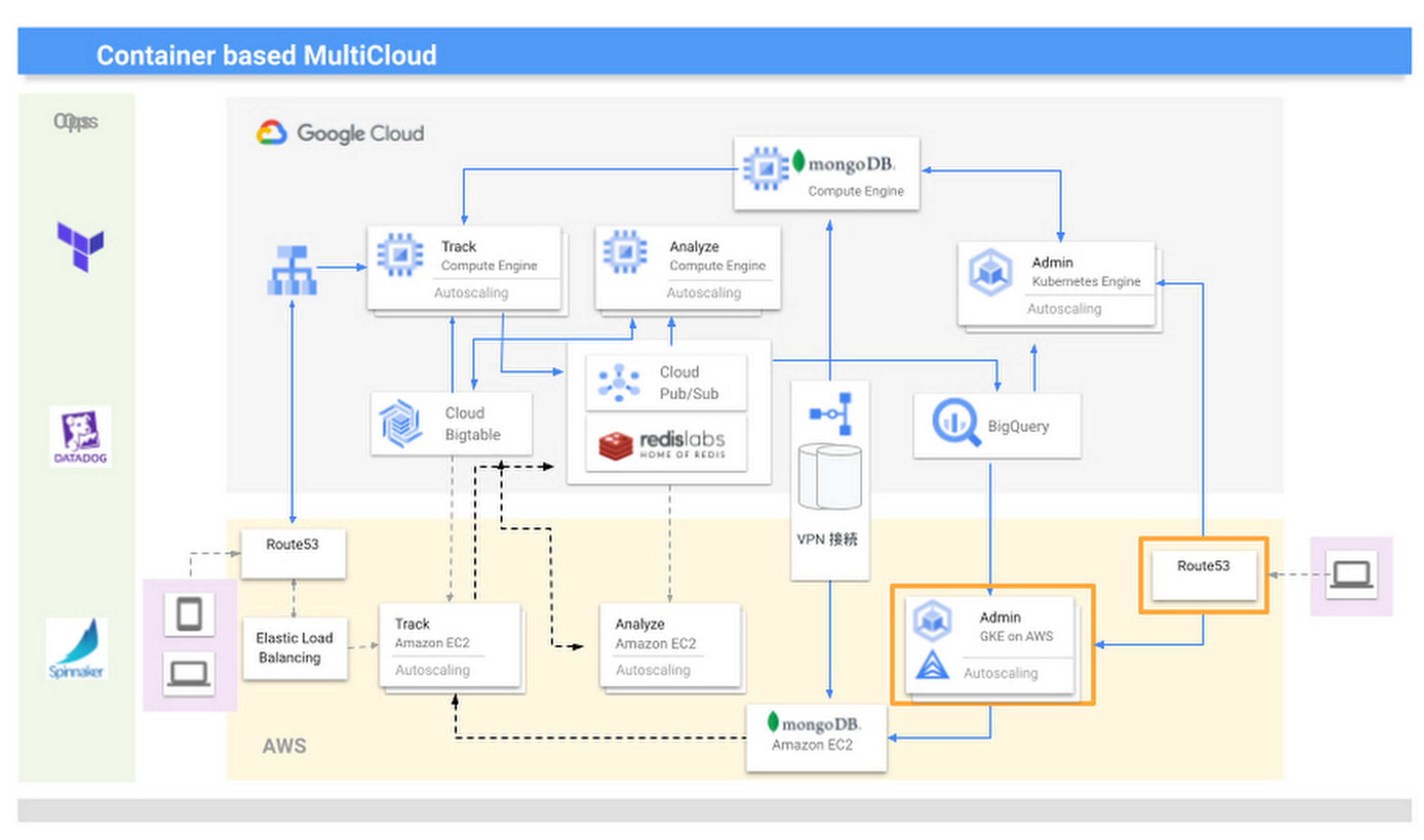
We are now realizing the benefits of multicloud, including faster development speeds and higher availability. For businesses in general, we recommend they take a thoughtful approach to multicloud—while for us, multicloud is a useful mechanism that enables us to provide large-scale data analysis in real time, other businesses should consider whether multicloud is right for them and if so, the role of a technology like Anthos. They should also start small before ramping up. Moving forward, we are keen to see what other products Google Cloud is creating that can help drive our business to a higher level.
More Relevant Stories for Your Company

Target Leverages Google Cloud to Create Market-defining Online Experience
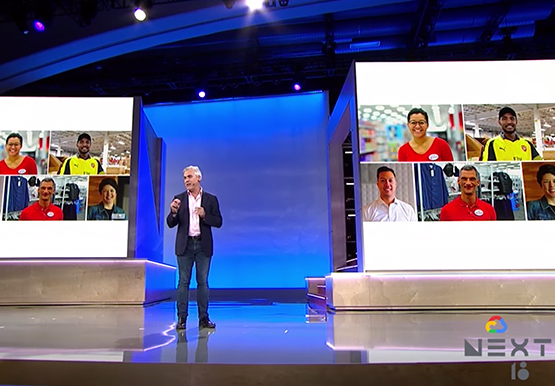
In the hyper-competitive world of online retail sales, ease-of-use and transaction speed can make or break business outcomes. However, a few years ago US Retail giant Target was going through a period of uncertainty. While the company had over 1800 stores across the US with an estimated 85% of US

Enterprises can Push the Limits of Edge Even Further!
Whether with the cloud or within their own data centers, enterprises have undergone a period of remarkable consolidation and centralization of their compute resources. But with the rise of ever more powerful mobile devices, and increasingly capable cellular networks, application architects are starting to think beyond the confines of the

Project to Platform: Financing Digital Transformation
Financing digital transformation poses a significant problem for many enterprises we work with. It’s not because the C-suite doesn’t support it: the need to become more agile, digital, and data-driven is nearly ubiquitous in executive public pronouncements. But most large organizations look at IT investment in a way that’s ineffective
A Winner’s Story of Optimizing IT Operations for Informed Business Decisions with Google Cloud
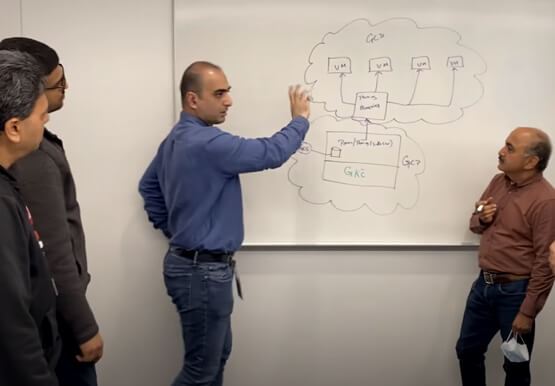
An award-winning leader in the enterprise software industry, Broadcom Software is known for modernizing, securing and optimizing the most complex and largest hybrid environments. It's broad portfolio of industry-leading, enterprise infrastructure and security software built on different tech stack and vision of tech leaders, are run on on-prem, private and
