





New ways Google Workspace works with tools you already use

4046
Of your peers have already read this article.
6:30 Minutes
The most insightful time you'll spend today!
Looking back on 2020, it’s clear that the ways we work have rapidly transformed—from the rise of remote work and increasingly digitized processes, to balancing time across work and personal responsibilities. But one thing hasn’t changed—businesses still rely on a staggering number of applications to get work done. Working from home and the associated pressures on productivity have only emphasized the need for fewer tools that do more, are easy to use from anywhere, and seamlessly integrate with other software.
Google Workspace helps you get more done—with communication and collaboration tools known and loved by billions of users, thoughtfully connected together. And while billions of users choose our apps, we recognize that they also need to effectively collaborate with partners, customers, and even teammates that might use other tools. In particular, we know that many people work with a mix of Google Workspace and Microsoft applications—for example, while migrating to Google Workspace or collaborating with external vendors or clients. That’s why we make it easy for you to use Google Workspace with Microsoft Office and Office 365, helping you collaborate productively from any device with anyone, regardless of what tools you use.
Save time with helpful intelligence and faster workflows in Google Workspace
Creating and collaborating on content is at the heart of getting work done. When working with content received from customers, partners, or teammates, employees shouldn’t lose time converting files or working in unfamiliar tools.
With Google Drive, you can store and share over 100 different file types and formats, including Microsoft Word, Excel, and PowerPoint files, as well as PDFs, images, and videos. And by using intelligent features like Priority and Quick Access in Drive, you can find files nearly 50% faster.
With Office editing, users can also easily edit Microsoft Office files in Google Docs, Sheets, and Slides without converting them, with the added benefit of layering on Google Workspace’s enhanced collaborative and assistive features. From assigning action items via comment, to writing faster with Smart Compose, to accelerating data entry with Sheets Smart Fill, Office editing brings Google Workspace functionality to your Office files. And we recently extended Office editing to the Docs, Sheets, and Slides mobile apps as well, so you can easily work on Office files on the go.
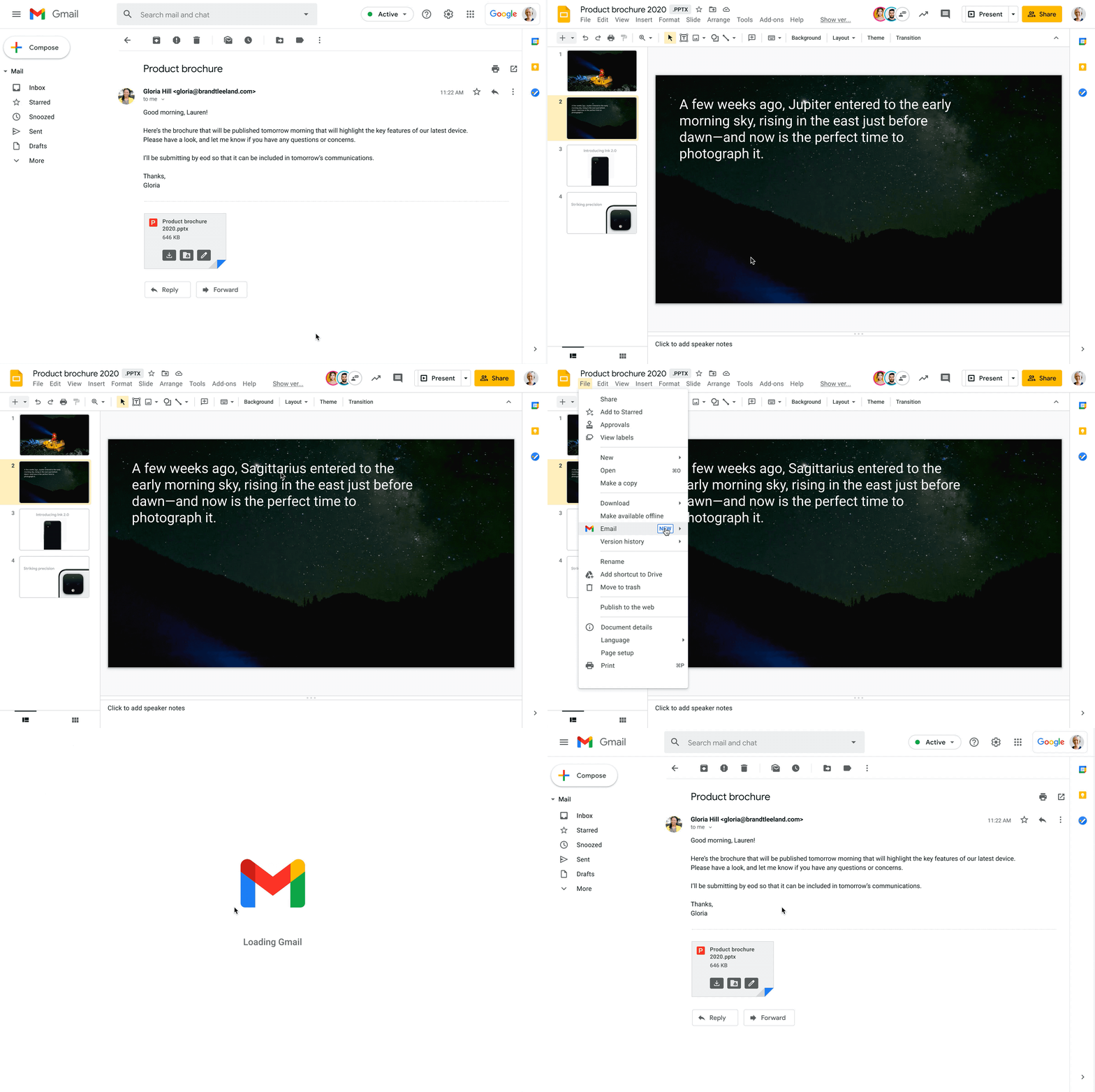
Starting today, you can also open Office files for editing directly from a Gmail attachment, further simplifying your workflows. For example, when you receive a Word document as an email attachment, you can open it and start editing in Docs with a single click while still preserving the Word file format. Then you can respond to the original email thread and include the updated file, right from Docs—saving you time by eliminating steps like downloading the file to edit, or searching for the relevant email to reattach it to.
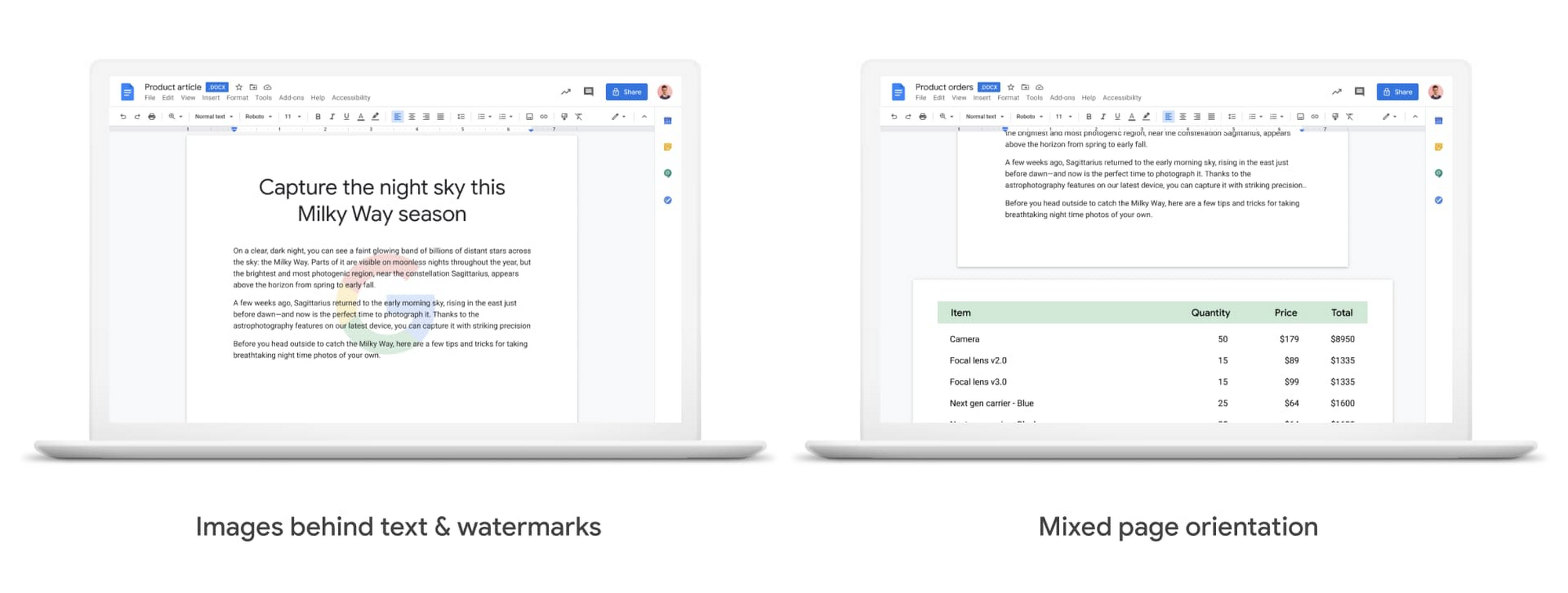
We also know it’s important that your Office files look consistent when opened in Docs, Sheets, and Slides, so we continue to support additional formatting options used in Office files. Today, we’re announcing mixed page orientation support in Docs, so you can create Docs or edit Word files with mixed landscape and portrait pages. And next year, we’ll add support for inserting images behind text and watermarks, to give you further flexibility.
Finally, when it comes to spreadsheets, we know that many organizations maintain both Excel and Sheets, especially when relying heavily on macros that have been built over time to automate processes. In Sheets, it’s easy for anyone to record macros, without having to write any code. And to make it easier for teams to transition from Excel to Sheets or support co-existence of these tools, we have also launched a new Macro Conversion add-on that helps users migrate macros from Excel to Sheets. This way, teams can save time through automation, without having to start from scratch.https://www.youtube.com/embed/CUKAUFoa86M
Stay connected with others, wherever you are
Business growth is fueled by people connecting and generating ideas together, whether they are working from the same office or dispersed around the globe. Google Workspace makes it easy to schedule time and meet with others, helping you maintain a connection with your collaborators and accomplish more together, from any device, anywhere.
To make and maintain these connections, people need an easy way to schedule time with others, regardless of which calendaring system they are using. Some organizations run mixed calendaring environments, for example, during a migration to Google Workspace or merger, where one company is not on Google Workspace. To help in such scenarios, the Google Calendar Interop tool makes it easy for people to schedule and book resources regardless of which system they’re on. With Calendar Interop, teams across systems can see each other’s free/busy status, event details, and book shared resources, so that they don’t need an endless exchange of chats or emails to land on a time that works for both parties.
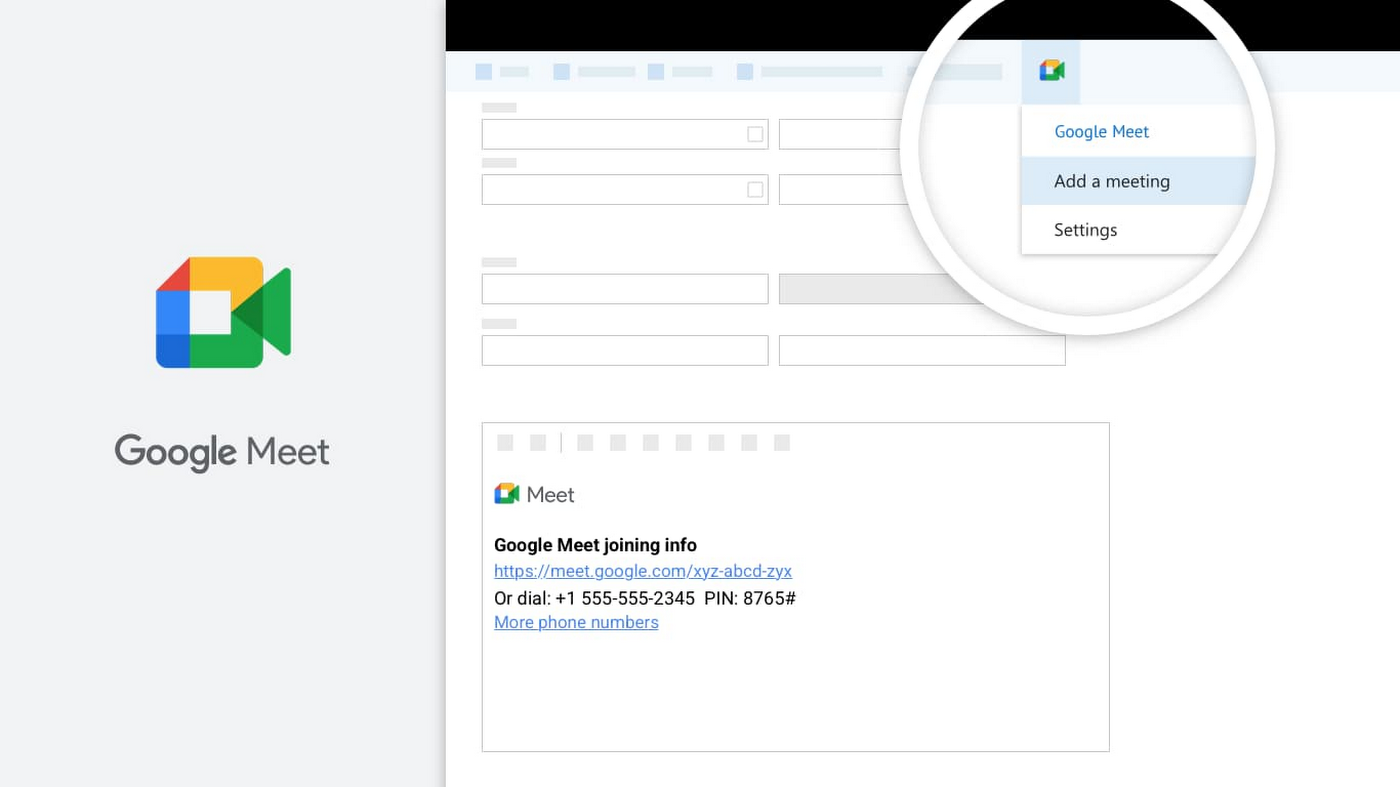
Google Meet is another powerful tool for keeping employees connected, wherever they are. With Meet, it’s easy for teams to connect via secure, enterprise-grade video conferencing from any device—laptop, mobile, or even dial-in via phone. Google Workspace customers can invite anyone to join a Meet call, including people using Outlook who don’t have a Google Account. Or if using Outlook to schedule events, users can easily add Meet video conferencing details using the Google Meet add-in for Microsoft Outlook. With a simple tap of the meeting link in your email or calendar, you can easily connect face-to-face with your collaborators, helping maintain that human connection that drives work forward.
Be productive from anywhere with custom solutions
Often, certain tasks and processes require employees to develop custom applications to manage them. Understanding how to code can be a huge barrier for employees faced with this challenge, but Google Cloud’s AppSheet enables anyone to build applications without having to write code. AppSheet is available to all Google Workspace users and has a number of tight integrations that make it easy to build custom apps on top of Google Workspace apps, like Google Sheets.
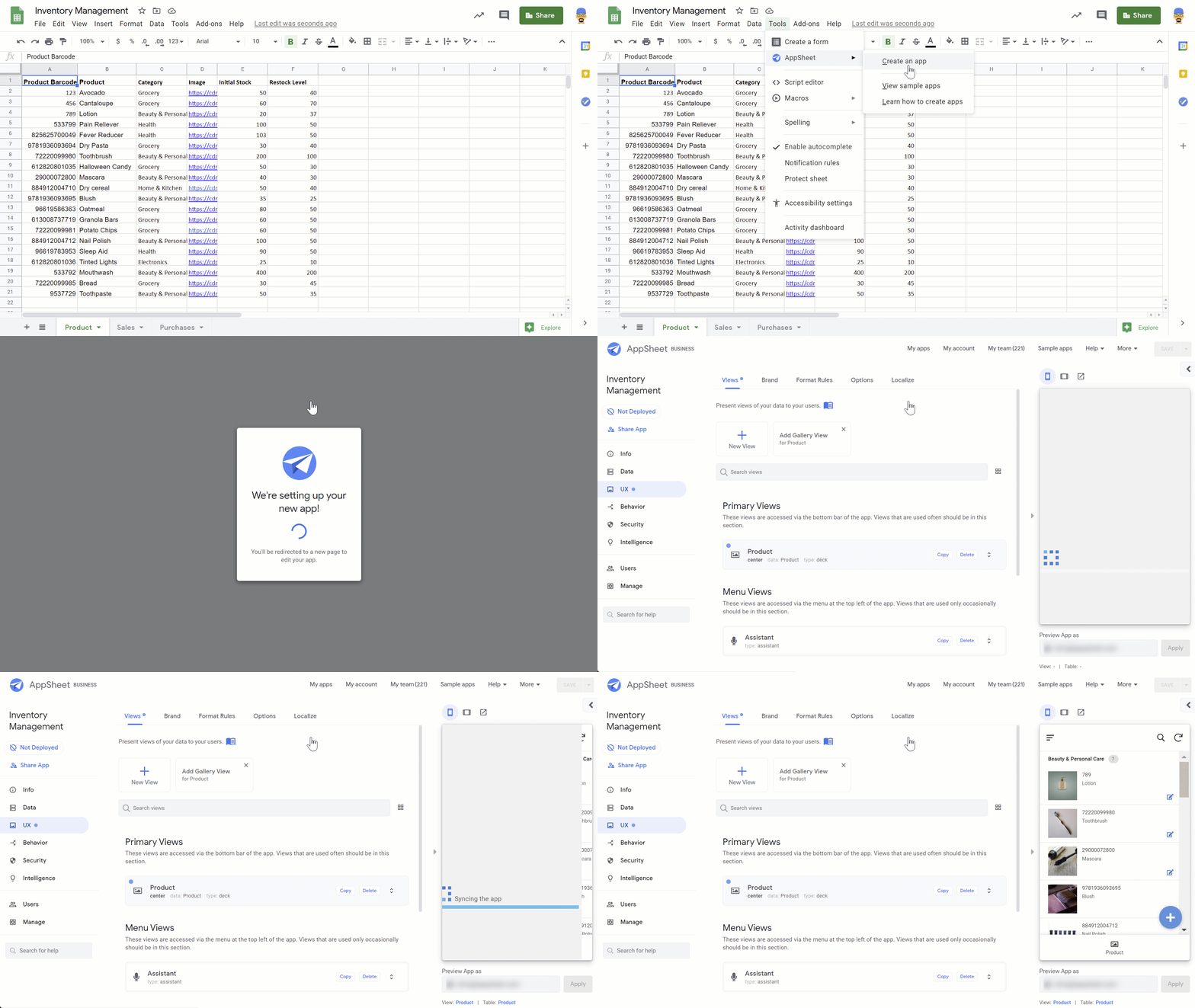
AppSheet is designed to work on any device and can connect to your data and spreadsheets, wherever they live. While AppSheet and Google Workspace are tightly integrated, AppSheet also easily connects to O365 data sources such as Excel spreadsheets stored in OneDrive or SharePoint. AppSheet creates a bridge between environments—custom apps and automations can connect to Google Workspace and Microsoft Office apps simultaneously, so that teams and processes split between environments can be managed more seamlessly. Plus, with AppSheet, even Microsoft users can easily incorporate Google’s leading AI and machine learning capabilities, like optical character recognition and sentiment analysis, into their apps.
Flexibility is important when it comes to effective collaboration, and we’ll continue to invest in the many ways Google Workspace can work seamlessly with the rest of the tools you use—helping you accomplish more, faster. Visit our learning center for more info on topics like working with Office files in our apps, or check out these helpful switching guides if your organization is currently transitioning from Microsoft Office to Google Workspace.
IT Leaders are Prioritizing Organizations’ Sustainability Goals: Study Finds

5148
Of your peers have already read this article.
2:00 Minutes
The most insightful time you'll spend today!
The global-wide interruptions of the coronavirus pandemic provided the opportunity for businesses to take a closer look at how we work, learn, live, and consume. With work stoppages and quarantine orders in place, carbon emissions and pollution levels saw significant reductions, highlighting how business and environmental sustainability are linked. As the world returns to work, businesses need to adjust to the new reality and make decisions that will ensure the continuing sustainability of our planet.
Understanding the need for sustainability
A recent Google-commissioned study by IDG, based on a global survey of more than 2,000 IT decision-makers, illustrated the importance of sustainability for organizations’ IT departments while also revealing that significant work is needed before businesses meet their sustainability goals. The good news is that ninety percent say that sustainability is a priority of their IT department and as more organizations consider the benefits of digital transformation and cloud migration, 75% report that sustainability is a “must-have” or “major consideration” when evaluating cloud providers.LEARN MOREIT Leaders Research ReportWhat are the biggest IT priorities in 2021? Explore insights from a survey of 2,000 Senior IT leaders conducted by IDG, in collaboration with Google Cloud.
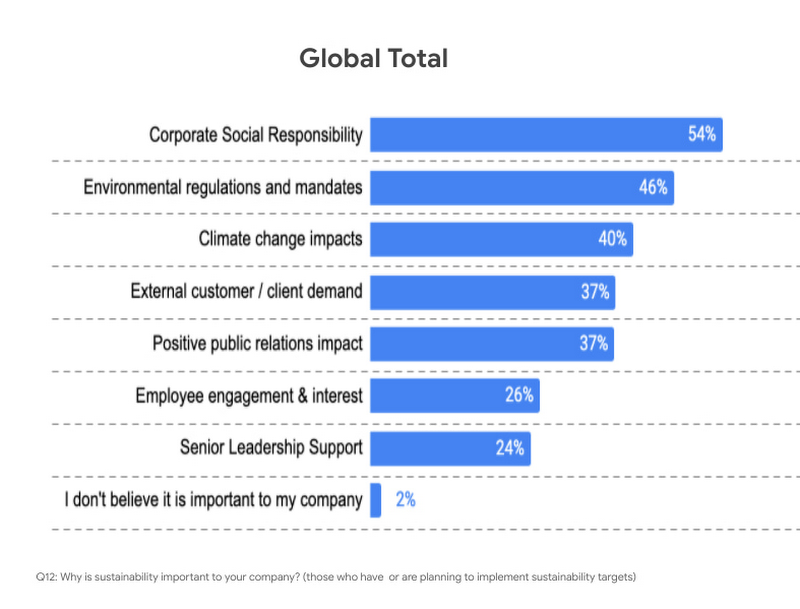
Businesses face both internal and external pressures to reform their practices and processes to meet new targets around sustainability, and IT leaders have an important role to play in that effort. Specifically, 54% said sustainability initiatives were important to their companies because of corporate social responsibility, 46% said it was because of environmental regulations and mandates, and 40% said it was due to the climate change impacts.
The research also examined the areas where IT leaders are looking to make positive changes for sustainability in their organizations. Not surprisingly, 62% said in their IT infrastructure and data centers, 53% their supply chain, and 46% in their facilities and building operations.
Facing the obstacles to progress
However, for many organizations, behaviors lag intent. Only 67% actually have environmental sustainability targets in place. The gap between behavior and intent widens when looking at digitally forward vs. digitally conservative organizations. For the purposes of the study, digitally forward companies were defined as either digital natives or those with a digital strategy and implementation in place. Digitally conservative organizations either have no strategy in place, or are in the process of considering or planning digital transformations, but haven’t reached the stage of implementation.
The study revealed that digital natives embracing cloud solutions were more likely than more conservative organizations to demonstrate a commitment to sustainability. Twenty percent of digital natives are implementing IT initiatives to reduce emissions to become more environmentally sustainable, while only 10% of digitally conservative organizations have done so.
When considering the effects of the COVID-10 pandemic, 20% of respondents from digital conservative organizations delayed or cancelled initiatives around reducing emissions to become more environmentally sustainable compared to only 12% for digitally forward respondents.
Sustainability is in our DNA
Sustainability has been a core value for Google since our inception. We were the first major company to become carbon neutral in 2007 and we were the first major company to match our energy use with 100 percent renewable energy in 2017 — and have continued to do so every year since. We are proud to operate the cleanest global cloud in the industry, and we’re the world’s largest corporate purchaser of renewable energy. It is this commitment that makes Google the leading choice for organizations with sustainability initiatives.
To learn more about the IDG findings and how IT leaders are implementing sustainable solutions, download the full report.
Interested in how Google Cloud’s commitment to providing sustainable solutions can help IT leaders and their organizations meet their own sustainability targets?
Google is focused on enhancing our products to help billions of people take action to reduce their environmental footprint.
- Google creates tools and invests in technology that will foster a carbon-free future for everyone and reduce carbon footprints.
- Google Cloud is the only major cloud provider to purchase enough renewable energy to cover our entire operations, enabling us to operate the cleanest cloud in the industry.
- When running on Google Cloud, an organization’s usage is net carbon neutral, and the electricity used to power workloads is matched 100% with renewable energy.
Looking for more? Check out our blog that introduces the Google Cloud Region Picker, which helps organizations choose a Google Cloud region based on carbon footprint, price, and latency.
Business Messages drives 85% CSAT scores for Levi Strauss

4284
Of your peers have already read this article.
3:30 Minutes
The most insightful time you'll spend today!
Founded in 1853, clothing company Levi Strauss & Co. gained fame for their Levi’s® denim jeans. Over 150 years later, Levi’s is a globally-recognized brand that sells jeans and other apparel in more than 3,100 retail stores across 110 countries.
The summary
During the COVID-19 pandemic, Levi’s saw that their shoppers were investing more time in pre-purchase research. They realized that being able to provide customers with information around the clock in an easily accessible way could greatly improve interest, engagement, and eventually purchase behavior. In June 2020, Levi’s partnered with customer experience automation provider Linc Global to integrate Google’s Business Messages into Levi’s customer experience (CX) strategy and cross-channel chat experiences. Business Messages soon brought in customer satisfaction (CSAT) scores of over 85 percent, and drove 30x more store-related questions than Levi’s onsite web chat. In addition, most Business Messages conversations occurred outside store hours, allowing Levi’s to respond to inquiries more quickly.
The challenge
Levi’s knows customers want to drive these interactions on their own terms and timelines— and on their own preferred communications channel. With store hours often impacted by the pandemic, the company needed 24/7 service to answer the 30% increase in off-hours shoppers. Google’s Business Messages allowed customers to connect with Levi’s without visiting the website, going to a store or making a phone call. Anisa Kumar, VP Global DTC says, “Rolling out CX automation on web chat provided a new way for customers to find answers to their pre purchase and other questions that regularly resulted in a call to customer service. Launching with Google’s Business Messages was the logical next step in providing our customers with a best-in-class customer experience.”
The approach
Levi’s worked with Linc Global, a CX automation platform, to set up Google’s Business Messages on Google Maps for five, then 50, stores, before expanding to more than 200 stores. “Customers can message us through Google Maps even after stores are closed. They can search for products and see product information and availability at their local store, plus get details about hours and COVID-19 related updates to make shopping easier,” said Kumar. The company then added Business Messages on Google Search for a rich messaging experience that synchronized with their regular webchat channel. “Consumers can have their entire messaging experience be on Google—and then visit our website or a physical store to complete a purchase recommended to them in Business Messages,” says Rico Arrastia, VP Product & Experience at Levi Strauss & Co.
The results
Two months after launching Google’s Business Messages, Levi’s CSAT scores for the channel surpassed 85%. And four months after launch, Levi’s found that this new channel drove 30x more store-related questions than web chat.
Additionally, Levi’s noted that 31% of Business Messages conversations were product-related, indicating that shoppers preferred targeted engagement to unstructured browsing. For Levi’s, Business Messages helps cross-sell or suggest products to customers based on an individual’s past purchases, personal information, and behaviors.
Levi’s is now a big proponent of Business Messages as a way to meaningfully engage with customers and stand out from other brands. Arrastia shares, “Business Messages not only creates a stronger customer experience but also enables us to do a much better job at ‘hearing’ shoppers.”
Jeni’s Splendid Ice Creams

3992
Of your peers have already read this article.
2:30 Minutes
The most insightful time you'll spend today!
At Jeni’s Splendid Ice Creams, Jeni and her staff are all passionate about ice cream and sharing that passion with the world by creating ice creams that you can fall madly in love with. To do this every day, requires incredible teamwork and collaboration, and Google Workspace is helping support the cause from tracking inventory to managing quality control.
Jeni’s Splendid Ice Creams began small but had big dreams. Jeni Britton Bauer opened her first ice cream shop in Grandview Heights, Ohio in 2002, and turned to Google Workspace to help her manage everything from ingredients to employee scheduling. Today, Jeni has grown the business to 10 stores throughout Ohio and Tennessee and has a booming online shipping business, and she depends on Google Workspace to help her manage it all.
Google Docs helps Jeni’s Splendid Ice Creams employees share information from the kitchen with the planning teams on the ground at each location. And it gives her access to real-time information to ensure they have the ice cream, packaging, and manpower to handle spikes in online orders. Stores are also able to give feedback about each home-made batch of ice cream through a Google Docs form. So if there aren’t enough pecans in the Whiskey Pecan Ice Cream, Jeni’s team can add more in the next batch. Jeni even wrote her best-selling cookbook using Google Docs.
*Google Workspace was formerly known as G Suite
6605
Of your peers have already watched this video.
8:00 Minutes
The most insightful time you'll spend today!
Hospitals Can Offer Interconnected Patient Experiences Using Google’s Natural Language Services
Machine Learning (ML) in healthcare helps extract data from conversations, medical records, forms, research reports, insurance claims and other documents across the care value-chain to help care providers have a holistic view of their patients to draw insights for diagnoses and treatments. With Natural Language Processing(NLP), healthcare organizations can program computers and systems to process and analyse large volumes of human communication in form of spoken texts, written documentation and utterances. Watch the video to learn how the healthcare community can leverage Google’s NLP services to process structured and unstructured data to offer interconnected experiences for patients.

Google Workspace is a Highly Robust and Functional Collaboration Platform: Study Confirms
DOWNLOAD INFOGRAPHIC3462
Of your peers have already downloaded this article
3:00 Minutes
The most insightful time you'll spend today!
A recent IDC study on Google Workspace observed the productivity and economic benefits of the collaboration platform on many organizations. The findings revealed that 14 percent increase in daily productivity among Google Workspace users, 412 percent 3-year ROI and payback period of 11 months! Transform your teams’ productivity goals, enhance workplace communication and collaboration as well as experience operational gains with productivity and collaboration tools designed for the modern, hybrid workforce.
Download the infographics to read up more from IDC study on the Business Value of Google Workspace now!
More Relevant Stories for Your Company

Google Launches Product Locator and Gives Store Locator Plus an Upgrade to Expand Retail Offerings
We all experienced, first hand, how Covid-19 has impacted the world and our communities. Last year, store closures, reduced hours, and social-distancing requirements drove people to adopt more e-commerce options, which, according to eMarketer, grew 27.6% worldwide in 2020. Meanwhile, consumer desires to shop locally also grew with Google searches for

Go Green with Google’s Latest Tool and Pick the Most Sustainable Cloud Region
As a Google Cloud customer, your carbon footprint is already carbon neutral: Google first achieved carbon neutrality in 2007, and has been purchasing enough solar and wind energy to match 100% of its global electricity consumption since 2017. Now, Google is targeting a new sustainability goal: operating on carbon-free energy (CFE) 24/7,



How Bloomberg uses Google Translate to Share Breaking News with the World
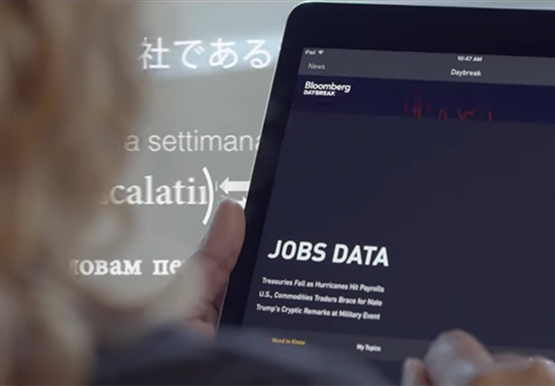
Bloomberg uses Google Translate to instantly share news with customers in more than 170 countries. Financial markets can move within seconds of a story breaking, so speed matters. With Google's automated translation Bloomberg can quickly disseminate breaking financial news to customers around the world in 40 different languages.

Snap and Google Cloud Team Up to Upskill Teams Worldwide
Snap inc., the developer of the Snapchat platform, has become a global leader in the social media industry. Snap runs its business on Google Cloud, and relies on Premium Support to optimize its cloud business imperatives. Snap sought new ways to extract business value from their cloud data, so turned
