





City of San Jose Ensures Critical Services Reach Community Using AI Translation

5167
Of your peers have already read this article.
1:30 Minutes
The most insightful time you'll spend today!
San José is one of the most diverse U.S. cities, with residents speaking more than 100 languages. Several years ago, we set out to improve city community interactions through more equitable service management and delivery. This demanded a new approach to automating the intake of requests from a majority population whose first language is not English.
We first created the 311 portal and app, which was an important step as we effectively separated resident service requests from emergencies. The way we describe it to our citizens, you call 311 for a burning question, and 911 for a burning building. In the last fiscal year, San José 311 received nearly 210,000 contacts by phone and an additional 211,000 service requests through the SJ 311 app.
Through the portal and app, we gave citizens an omnichannel experience enabling them to interact with the city to request improvements, access useful information, and get emergency help when they need it.
In order to truly serve our diverse communities, we recognized language translation services would be required to offer truly equitable services to everyone. That’s when we started working closely with SpringML, Google Cloud, and other partners with involvement from our Mayor and City CIO.
Building public services with community engagement in mind
When we first rolled out the My San José website and mobile app, we used an out-of-the-box translation service that ended up not working. It had poor accuracy and did not meet our needs to provide all citizens with coherent services. After looking at many other options, we decided to partner with SpringML and Google Cloud to leverage the AutoML Translation with other technologies such as our virtual agent.
SpringML was selected through an open RFP process, and helped us to build and optimize our integrations, interfaces, and more between several systems, making the app and website more intuitive to manage. SpringML delivered the product we needed on time and up to specifications, and additional value came from the training sessions they provided to our team. This enabled us to understand everything we could do with AutoML and opened the door to other enhancements such as simplifying the vernacular used with our residents, making government access easier to navigate regardless of natural language spoken.
After establishing the My San José app’s translation capabilities using AutoML, SpringML also helped us incorporate Dialogflow virtual agents. Dialogflow also positions us to make modifications with our own staffing practices – something that has become increasingly important amid the frequent changes in service levels from COVID-19 response in the past year.
Responding to community needs
With the app up-and-running, our next step was to bring in community members to help with testing, improvements, and more. We wanted the app and the website to not just be something we provided to the community, but rather something they helped us build so they would readily adopt it.
Thanks to the greater accuracy of translation supported by Google Cloud services, we were able to leverage the expertise of a small pool of community members to evaluate translations. AutoML Translation and Glossary proved to be a powerful combination that pushed us closer to our goals.
Our primary targets were Spanish and Vietnamese translations. We are now seeing 90 percent accuracy in automated Spanish translations while Vietnamese translations continue to improve. We continue to work to simplify the language used in these services, which makes a big difference in terms of ensuring optimal language accessibility.
This work includes best serving our community members who primarily use phones to get in touch with us through 311 services. Using Google Cloud Contact Center AI, we have been able to effectively manage the calls we receive 24×7 and communicate with residents who speak Spanish as well as English. No matter which channel one of our residents choose to use to reach out, we can serve them efficiently.
A well-timed release
We’re proud of the work we’ve done. We’ve made many government services available to our community 24 hours a day, 7 days a week — accessible through many channels. Regardless of a person’s native language, the consistency of experiences enjoyed by everyone is improving every day thanks to AI. We’re also actively incorporating more language translation capabilities to better serve more people.
While we began this process several years ago, the recent integration of machine learning language translation with our customer relationship management system in late 2020 was very well-timed because we were able to incorporate this into our COVID-19 pandemic response.
We’re also beginning to work with other municipalities across the U.S. to share some of the lessons we’ve learned and success we’ve seen in hopes of furthering more equitable citizen services far beyond our City limits.
We are excited to continue working with SpringML, Google Cloud, and other partners to improve our city and the equity and quality of services that our residents enjoy.
Learn more about how you can work with a Google Cloud Partner here.
Leverage ML to Spot Anomalies in Real-time Forex Data

3103
Of your peers have already read this article.
6:00 Minutes
The most insightful time you'll spend today!
Let’s say you are a quantitative trader with access to real-time foreign exchange (forex) price data from your favorite market data provider. Perhaps you have a data partner subscription, or you’re using a synthetic data generator to prove value first. You know there must be thousands of other quants out there with your same goal. How will you differentiate your anomaly detector?
What if, instead of training an anomaly detector on raw forex price data, you detected anomalies in an indicator that already provides generally agreed buy and sell signals? Relative Strength Index (RSI) is one such indicator; it is often said that RSI going above 70 is a sell signal, and RSI going below 30 is a buy signal. As this is just a simplified rule, it means there could be times when the signal is inaccurate, such as a currency market correction, making it a prime opportunity for an anomaly detector.
This gives us the following high level components:

Of course, we want each of these components to handle data in real time, and scale elastically as needed. Dataflow pipelines and Pub/Sub are the perfect services for this. All we need to do is write our components on top of the Apache Beam sdk, and they’ll have the benefit of distributed, resilient and scalable compute.
Luckily for us, there are some great existing Google plugins for Apache Beam. Namely, a Dataflow time-series sample library that includes RSI calculations, and a lot of other useful time series metrics; and a connector for using AI Platform or Vertex AI inference within a Dataflow pipeline. Let’s update our diagram to match, where the solid arrows represent Pub/Sub topics.
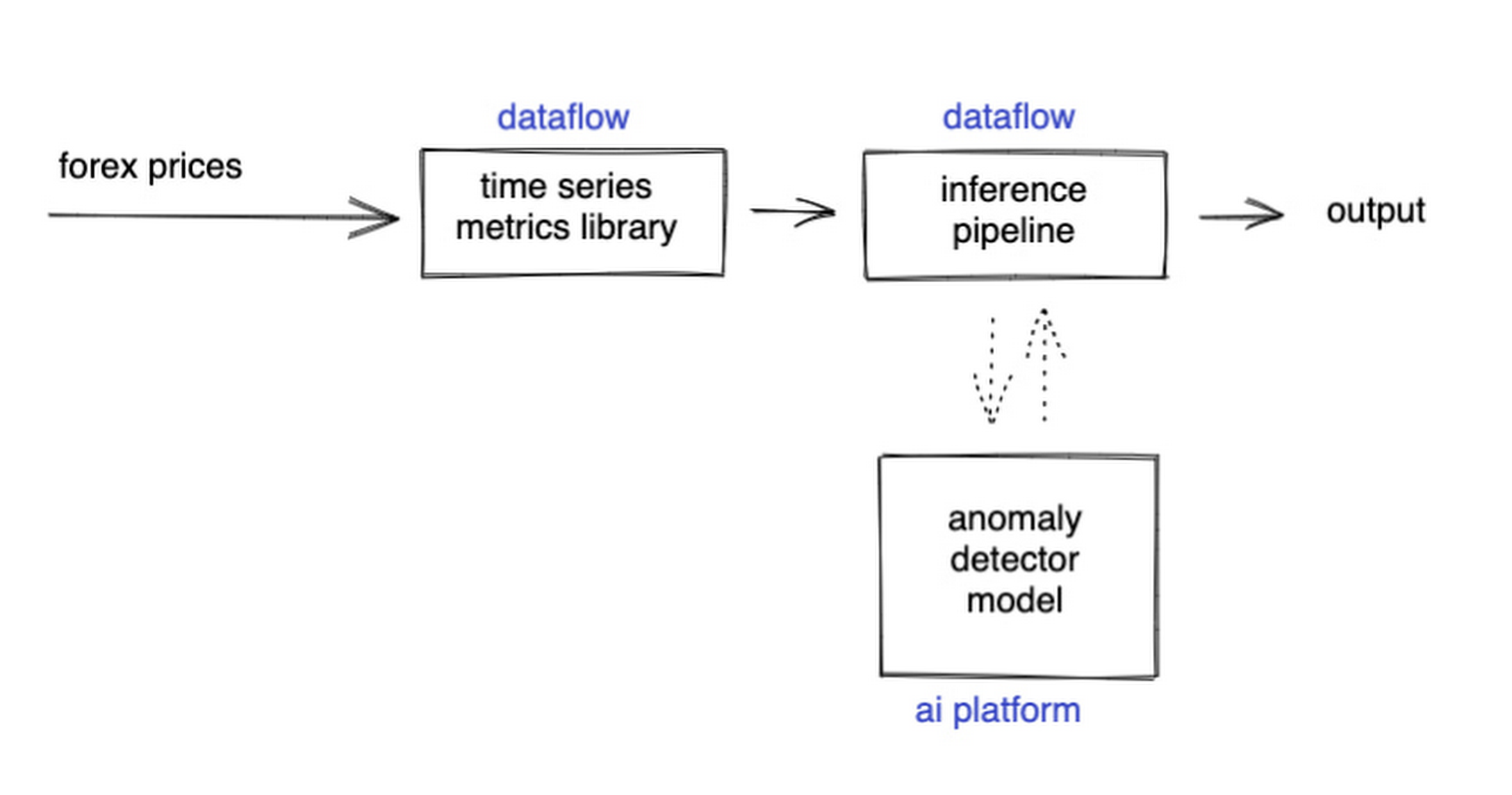
The Dataflow time-series sample library also provides us with gap-filling capabilities, which means we can rely on having contiguous data once the flow reaches our machine learning (ML) model. This lets us implement quite complex ML models, and means we have one less edge case to worry about.
So far we’ve only talked about the real time data flow, but for visualization and continuous retraining of our ML model, we’re going to want historical data as well. Let’s use BigQuery as our data warehouse, and Dataflow to plumb Pub/Sub into it. As this plumbing job is embarrassingly parallelizable, we wrote our pipeline to be generic across data types and share the same Dataflow job, such that compute resources can be shared. This results in efficiencies of scale both in cost savings and time required to scale-up.

Data Modeling
Let’s discuss data formats a bit further here. An important aspect of running any data engineering project at scale is flexibility, interoperability and ease of debugging. As such, we opted to use flat JSON structures for each of our data types, because they are human readable and ubiquitously understood by tooling. As BigQuery understands them too, it’s easy to jump into the BigQuery console and confirm each component of the project is working as expected.
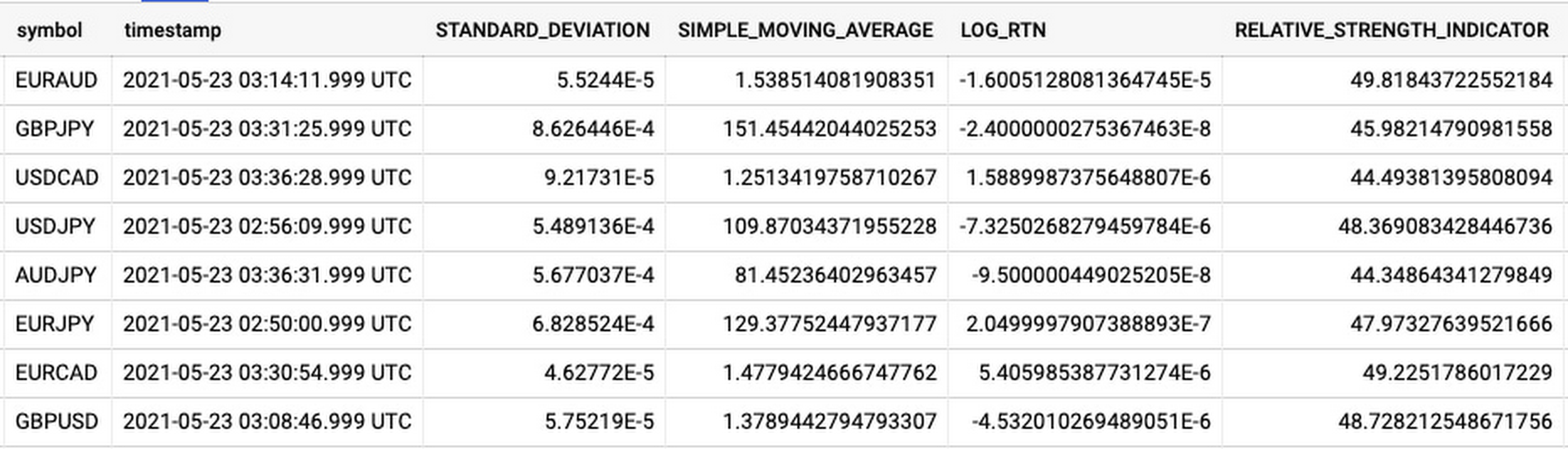
As you can see, the Dataflow sample library is able to generate many more metrics than RSI. It supports generating two types of metrics across time series windows, metrics which can be calculated on unordered windows, and metrics which require ordered windows, which the library refers to as Type 1 metrics and Type 2 metrics, respectively. Unordered metrics have a many-to-one relationship, which can help reduce the size of your data by reducing the frequency of points through time. Ordered metrics run on the outputs of the unordered metrics, and help to spread information through the time domain without loss in resolution. Be sure to check out the Dataflow sample library documentation for a comprehensive list of metrics supported out of the box.
As our output is going to be interpreted by our human quant, let’s use the unordered metrics to reduce the time resolution of our flow of real time data to one per second, or one hertz. If our output was being passed into an automated trading algorithm, we might choose a higher frequency. The decision for the size of our ordered metrics window is a little more difficult, but broadly determines the amount of time-steps our ML model will have for context, and therefore the window of time for which our anomaly detection will be relevant. We at least need it to be larger than our end-to-end latency, to ensure our quant will have time to act. Let’s set it to five minutes.
Data Visualization
Before we dive into our ML model, let’s work on visualization to give us a more intuitive feel for what’s happening with the metrics, and confirm everything we’ve got so far is working. We use the Grafana helm chart with the BigQuery plugin on a Google Kubernetes Engine (GKE) Autopilot cluster. The visualisation setup is entirely config-driven and provides out-of-the-box scaling, and GKE gives us a place to host some other components later on.
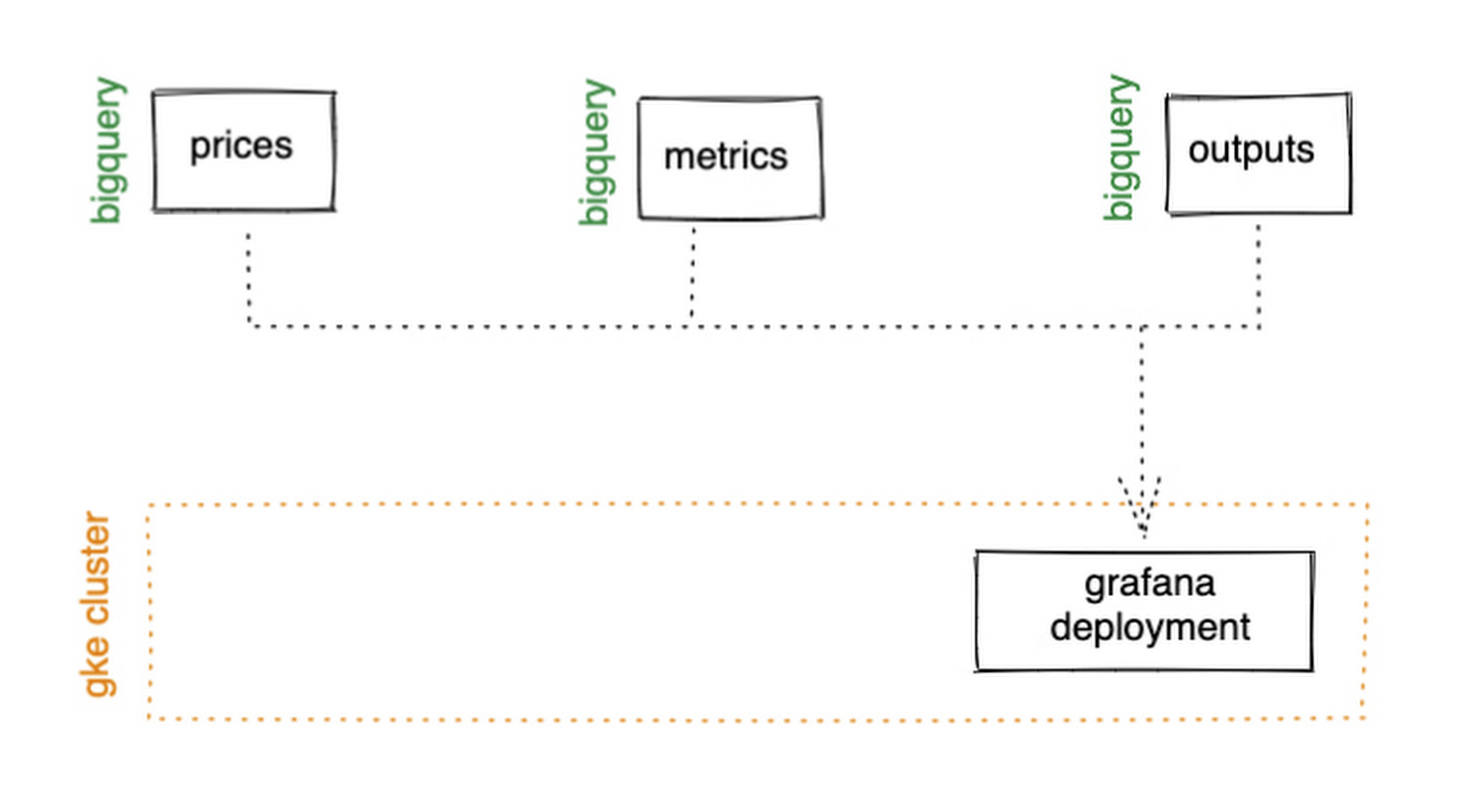
GKE Autopilot has Workload Identity enabled by default, which means we don’t need to worry about passing around secrets for BigQuery access, and can instead just create a GCP service account that has read access to BigQuery and assign it to our deployment through the linked Kubernetes service account.
That’s it! We can now create some panels in a Grafana dashboard and see the gap filling and metrics working in real time.

Building and deploying the Machine Learning Model
Ok, ML time. As we alluded to earlier, we want to continuously retrain our ML model as new data becomes available, to ensure it remains up to date with the current trend of the market. TensorFlow Extended (TFX) is a platform for creating end-to-end machine learning pipelines in production, and eases the process around building a reusable training pipeline. It also has extensions for publishing to AI Platform or Vertex AI, and it can use Dataflow runners, which makes it a good fit for our architecture. The TFX pipeline still needs an orchestrator, so we can host that in a Kubernetes job, and if we wrap it in a scheduled job, then our retraining happens on a schedule too!

TFX requires our data be in the tf.Example format. The Dataflow sample library can output tf.Examples directly, but this tightly couples our two pipelines together. If we want to be able to run multiple ML models in parallel, or train new models on existing historical data, we need our pipelines to only be loosely coupled. Another option is to use the default TFX BigQuery adaptor, but this restricts us to each row in BigQuery mapping to exactly one ML sample, meaning we can’t use recurrent networks.
As neither of the out-of-the-box solutions met our requirements, we decided to write a custom TFX component that did what we needed. Our custom TFX BigQuery adaptor enables us to keep our standard JSON data format in BigQuery and train recurrent networks, and it keeps our pipelines loosely coupled! We need the windowing logic to be the same for both training and inference time, so we built our custom TFX component using standard Beam components, such that the same code can be imported in both pipelines.
def window_elements(pipeline: beam.Pipeline,window_length: int,drop_irregular_windows: bool = True,sort_windows_by: str = "timestamp",):"""Window elements into regular windows of a given size.Assumes elements flow at a fixed rate of 1Hz."""def _sort_windows(window: Iterable[Dict[Text, Any]]) -> List[Dict[Text, Any]]:sorted_window = sorted(window, key=lambda e: e[sort_windows_by])return sorted_windowwindowed_elements = (pipeline| "AddConstantKey" >> beam.Map(lambda item: (0, item))| "WithSlidingWindow">> beam.WindowInto(beam.transforms.window.SlidingWindows(window_length, 1),trigger=beam.transforms.trigger.AfterCount(window_length),accumulation_mode=beam.transforms.trigger.AccumulationMode.DISCARDING,)| "CombineWindow" >> beam.GroupByKey()| "GetValues" >> beam.Values())if drop_irregular_windows:windowed_elements = windowed_elements | "EnforceWindowLengths" >> beam.Filter(lambda w: len(w) == window_length).with_output_types(List[Dict[Text, Any]])if sort_windows_by is not None:windowed_elements = windowed_elements | "Sort" >> beam.Map(_sort_windows).with_output_types(List[Dict[Text, Any]])return windowed_elements
With our custom generator done, we can start designing our anomaly detection model. An autoencoder utilising long-short-term-memory (LSTM) is a good fit for our time-series use case. The autoencoder will try to reconstruct the sample input data, and we can then measure how close it gets. That difference is known as the reconstruction error. If there is a large enough error, we call that sample an anomaly. To learn more about autoencoders, please consider reading chapter 14 from Deep Learning by Ian Goodfellow, Yoshua Bengio, and Aaron Courville.
Our model uses simple moving average, exponential moving average, standard deviation, and log returns as input and output features. For both the encoder and decoder subnetworks, we have 2 layers of 30 time step LSTMs, with 32 and 16 neurons, respectively.
In our training pipeline, we include z score scaling as a preprocessing transformer – which is usually a good idea when it comes to ML. However, there’s a nuance to using an autoencoder for anomaly detection. We need not only the output of the model, but also the input, in order to calculate the reconstruction error. We’re able to do this by using model serving functions to ensure our model returns both the output and preprocessed input as part of its response. As TFX has out-of-the-box support for pushing trained models to AI Platform, all we need to do is configure the pusher, and our (re)training component is complete.
Detecting Anomalies in real time
Now that we have our model in Google Cloud AI Platform, we need our inference pipeline to call to it in real time. As our data is using standard JSON, we can easily apply our RSI rule of thumb inline, ensuring our model only runs when needed. Using the reconstructed output from AI Platform, we are then able to calculate the reconstruction error. We choose to stream this directly into Pub/Sub to enable us to dynamically apply an anomaly threshold when visualising, but if you had a static threshold you could apply it here too.
with beam.Pipeline(options=pipeline_options) as pipeline:(pipeline| "ReadFromPubSub">> beam.io.ReadFromPubSub(topic=input_metrics,timestamp_attribute=timestamp_key,)| "DeserialiseJSON" >> beam.Map(pubsub_serialiser.to_json)| "FilterSymbol" >> beam.Filter(lambda m: m["symbol"] == symbol)| "FilterRSIThreshold">> beam.Filter(lambda m: m["RELATIVE_STRENGTH_INDICATOR"] > rsi_upper_thresholdor m["RELATIVE_STRENGTH_INDICATOR"] < rsi_lower_threshold)| "WindowElements" >> window_elements(window_length)| "RunAutoencoder">> run_windowed_inference(gcp_project_id,model_name,window_length,{f: "FLOAT" for f in feature_metrics},)| "CalcReconError" >> beam.Map(calc_reconstruction_err)| "ToJSON">> beam.Map(lambda re: {"symbol": symbol, "reconstruction_error": re})| "SerialiseJSON" >> beam.Map(pubsub_serialiser.from_json)| "WriteToPubSub">> beam.io.WriteToPubSub(topic=output_alerts,timestamp_attribute=timestamp_key,))
Summary
Here’s what the wider architecture looks like now:

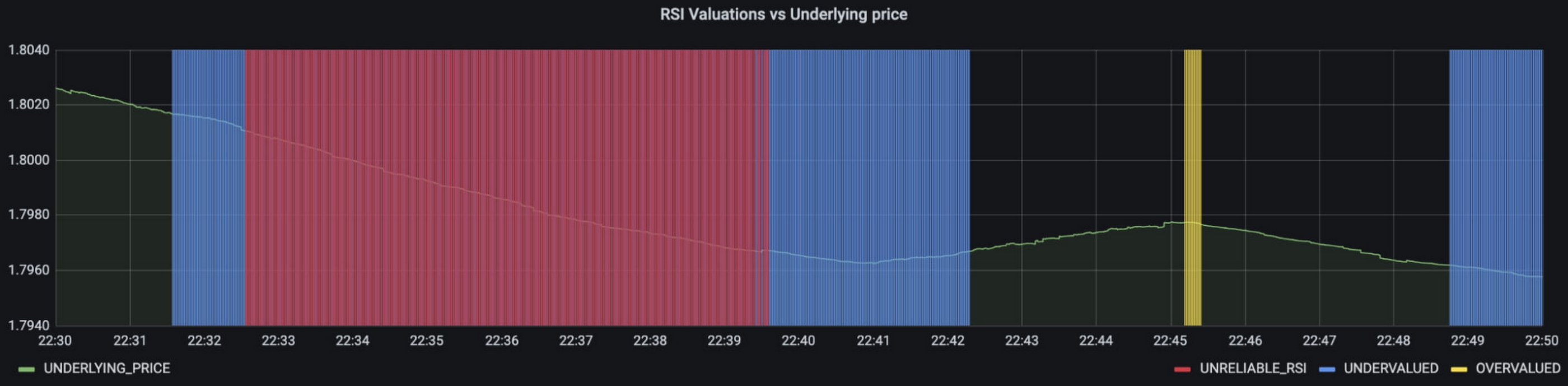
More importantly though, does it fit for our use case? We can plot the reconstruction error of our anomaly detector against the standard RSI buy/sell signal, and see when our model is telling us that perhaps we shouldn’t blindly trust our rule of thumb. Go get ‘em, quant!
In terms of next steps, there are many things you could do to extend or adapt what we’ve covered. You might want to explore with multi-currency models, where you could detect when the price action of correlated currencies is unexpected, or you could connect all of the Pub/Sub topics to a visualization tool to provide a real-time dashboard.
Give it a try
To finish it all off, and to enable you to clone the repo and set everything up in your own environment, we include a data synthesizer to generate forex data without needing access to a real exchange. As you might have guessed, we host this on our GKE cluster as well. There are a lot of other moving parts – TFX uses a SQL database and all of the application code is packaged into a docker image and deployed along with the infra using Terraform and cloud build. But if you’re interested in those nitty gritty details, head over to the repo and get cloning!
Feel free to reach out to our teams at Google Cloud and Kasna for help in making this pattern work best for your company.
Boost Your ML Training Speed with GKE’s NCCL Fast Socket

887
Of your peers have already read this article.
1:30 Minutes
The most insightful time you'll spend today!
Large Machine Learning (ML) models – such as large language models, generative AI, and vision models – are dramatically increasing the number of trainable parameters and are achieving state-of-the-art results. Increasing the number of parameters results in the model being too large to fit on a single VM instance thus demands distributed compute to spread the model across multiple nodes. Google Kubernetes Engine (GKE) has built-in support for NCCL Fast Socket, to help improve the time to train large ML models with distributed, multi-node clusters.
Enterprises are looking for faster and cheaper performance to train their ML models. With distributed training, communicating gradients across nodes is a performance bottleneck. Optimizing inter-node latency is critical to reduce training time and costs. Distributed training uses collective communication as a transport layer over the network between the multiple hosts. Collective communication primitives such as all-gather, all-reduce, broadcast, reduce, reduce-scatter, and point-to-point send and receive are used in distributed training in Machine Learning.
The NVIDIA Collective Communication Library (NCCL) is commonly used by popular ML frameworks such as TensorFlow and PyTorch. It is a highly optimized implementation for high bandwidth and low latency between NVIDIA GPUs. Google developed a proprietary version of NCCL called NCCL Fast Socket to optimize performance for deep learning on Google Cloud.
NCCL Fast Socket uses a number of techniques to achieve better and more consistent NCCL performance.
- Use of multiple network flows to attain maximum throughput. NCCL Fast Socket introduces additional optimizations over NCCL’s built-in multi-stream support, including better overlapping of multiple communication requests.
- Dynamic load balancing of multiple network flows. NCCL can adapt to changing network and host conditions. With this optimization, straggler network flows will not significantly slow down the entire NCCL collective operation.
- Integration with Google Cloud’s Andromeda virtual network stack.This increases overall network throughput by avoiding contentions in virtual machines (VMs).
We tested (NVIDIA NCCL tests) the performance of NCCL Fast Socket vs NCCL on various machine shapes with 2 node GKE clusters.
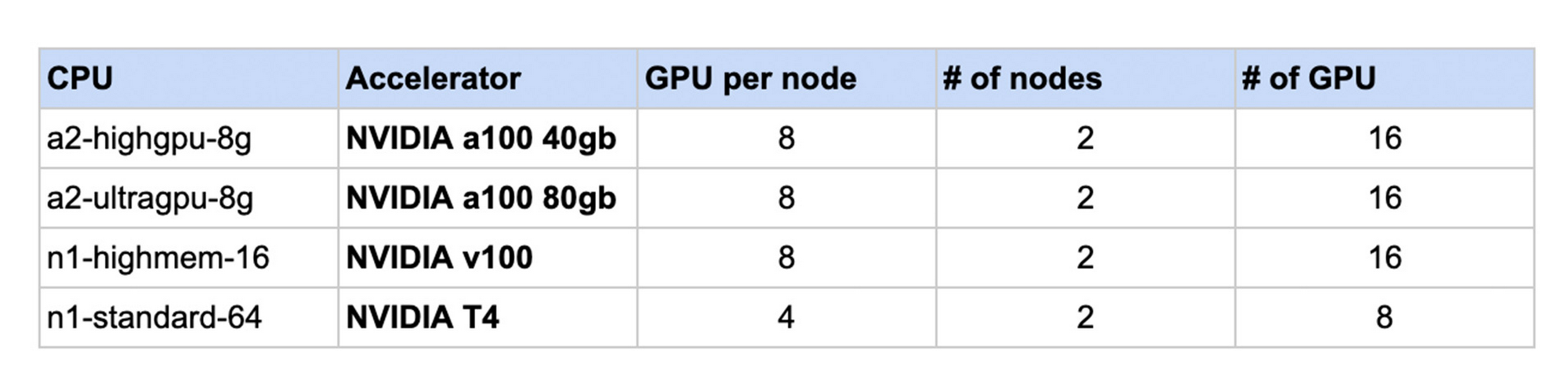
The following chart shows the results. For each machine shape, the NCCL performance without Fast Socket is normalized to 1. In each case, using NCCL Fast Socket demonstrated increased performance in a range of 1.3 to 2.6 times faster internetwork communication speed.

As a built-in feature, GKE users can take advantage of NCCL Fast Socket without changing or recompiling their applications, ML frameworks (such as TensorFlow or PyTorch), or even the NCCL library itself. To start using NCCL Fast Socket, create a node pool that uses the plugin with the --enable-fast-socket and --enable-gvnic flags. You can also update an existing node pool using gcloud container node-pools update.
gcloud container node-pools create NODEPOOL_NAME \
    --accelerator type=ACCELERATOR_TYPE, count=ACCELERATOR_COUNT \
    --machine-type=MACHINE_TYPE \
    --cluster=CLUSTER_NAME \
    --enable-fast-socket \
    --enable-gvnic
To achieve better network throughput with NCCL, Google Virtual NICs (gVNICs) must be enabled when creating VM instances. For detailed instructions on how to use gVNICs, please refer to the gVNIC guide.
To verify that NCCL Fast Socket has been enabled, view the kube-system pods:
kubectl get pods -n kube-system
And the output should b similar to:
NAME                         READY   STATUS    RESTARTS   AGE
fast-socket-installer-qvfdw  2/2     Running   0          10m
fast-socket-installer-rtjs4  2/2     Running   0          10m
fast-socket-installer-tm294  2/2     Running   0          10m
To learn more visit GKE NCCL Fast Socket documentation. We look forward to hearing how NCCL Fast Socket improves your ML Training experience on GKE.
3068
Of your peers have already watched this video.
26:00 Minutes
The most insightful time you'll spend today!
Measuring and Improving Speech-to-Text Accuracy
Google Cloud’s Speech-to-Text API has a large number of uses including making customer service teams more effective and increasing their ability to improve customer experience.
Google Cloud’s Speech-to-Text API provides incredible accuracy out of the box. What many might not know is that it also has new tools for enhancing accuracy and customizing the model for your industry, domain, or use case.
In this video, Calum Barnes, Product Manager, Google Cloud, offers an overview of Google Cloud’s Speech-to-Text abilities, then he talks about how you can measure the accuracy of speech to text on your own data. He also discusses what you can do using Google Cloud tools to improve your Speech-to-Text accuracy levels.
Come learn how Google measures accuracy and how you can use its tools to customize your model and improve accuracy. Barnes will walk you through the basic concepts and introduce a lab that you can complete later on your time.
2859
Of your peers have already watched this video.
16:00 Minutes
The most insightful time you'll spend today!
Conversational AI in Search, Maps and Online Shopping!
Did you know about 77 percent of customers are likely to make a purchase from a brand they can message with? Direct interaction with the brand to gather product information shortens buyers’ journey and personalizes it with appropriate messages. To helps businesses add speed, simplicity and convenience in brand-customers interaction, Google’s Business Messages helps add chat feature in Search, Maps or other mediums.
Watch the video to learn to integrate conversational AI based on Google’s superior AI and ML features and build interactive and connected chat automation using Google Cloud’s suite of tools and products!
Marks & Spencer Aims to Bring a Third of business Online and Google Contact Center AI is Key to its Success

5785
Of your peers have already read this article.
6:20 Minutes
The most insightful time you'll spend today!
“Hello, Marks & Spencer. How may we help you?”
As one of the biggest and best-loved retail brands in the UK, Marks & Spencer (M&S) is known for the personalized service it provides to its 30 million loyal customers. For 135 years and in 57 countries around the world, M&S has worked to meet and exceed customer expectations for quality and service. Since the advent of the telephone, this has meant cheerfully servicing customers who call in to M&S branches or into their contact centers, no matter what their request might be.
“Retail is in a state of flux and M&S is transforming to better serve our customers so that we can compete and win. Automating calls into our stores with Google voice recognition gives us every opportunity to get things right for our customers and keep them coming back again and again.”
—Akash Parmar, Enterprise Architect (Digital Customer Engagement), Marks & Spencer
The company now has a goal of bringing one third of its business online by 2022. In order to engage more customers online, it has opened a new voice channel hosted on Google Cloud.
The company previously had switchboards in 13 different stores across the UK and Ireland (UKI), handling up to nine million calls a year. But as its retail offering evolved across multiple channels, it was becoming increasingly difficult to quickly and effectively answer customer service requests using an outdated switchboard model.
Customers might call in to order an outfit they had seen in a store, to inquire about returning a dress they bought online, or to recover a lost umbrella in a food hall. Each of these different requests required a different routing response from staff, and if the company didn’t act soon, it knew that the cost of managing the increase in call volume would lead to a significant cost impact. M&S decided it was time to make a technological leap forward to meet customers’ expectations in the new, omnichannel retail environment.
“Retail is in a state of flux and M&S is transforming to better serve our customers so that we can compete and win,” says Akash Parmar, Enterprise Architect for Digital Customer Engagement at M&S. “Automating calls into our stores with Google voice recognition gives us every opportunity to get things right for our customers and keep them coming back again and again.”
Boosting opportunities for customer engagement with voice recognition
M&S customers were used to dealing with their local store for anything they needed. But as stores were completely separate from the online business, customers weren’t able to purchase something they’d seen online by calling stores because the store staff didn’t have access to platforms needed to place an online order securely. For a company that places a very high importance on customer experience, this was unacceptable.
Akash Parmar, Enterprise Architect for Customer Engagement, was set a the goal by Chris McGrath, M&S Programme Manager, to ensure that the right channel and the right level of assistance was available to customers at any point before, during, or after purchase. Akash set himself the challenge of building a platform that could adapt to all of these channels and scale very quickly.
“We didn’t have the resources to build a speech recognition platform. DVELP removed that obstacle. It understood what we wanted to achieve and how Google Voice APIs and Twilio could get us there. Whatever we want, DVELP builds it for us. DVELP always presents options, never problems.”
—Akash Parmar
In 2018, Akash reached out to Google Cloud partner DVELP, one of the UK’s leading experts on the Twilio programmable contact center platform and Google speech recognition technology. DVELP recommended a Google Cloud-based natural language speech recognition platform that leverages the audio stream intent detection functionality in the Contact Center AI solution, Dialogflow, as the heart of an inbound-call-handling strategy. This strategy was designed to improve routing accuracy, give customers more self-service options, and increase analyst visibility into customer journeys.
“We didn’t have the resources to build a speech recognition platform. DVELP removed that obstacle,” says Akash. “They understood what we wanted to achieve and how Google Cloud Voice APIs and Twilio could get us there. Whatever we want, DVELP builds it for us. DVELP always presents options, never problems.”
Using Google speech recognition to improve customer experience
M&S wanted to use natural language to enable customers to speak and state what help they required rather than choose from a list of options. This would help them answer the millions of calls coming in and figure out what customers needed quickly.
In order to do that, DVELP needed to consider how best to address tying customer intent to actions, while maintaining flexibility. DVELP recommended the unconventional choice of not referencing intent in the application layer, but mapping the available actions to the information required to perform them. These actions were then used to build a “declarative dictionary” for the customer service team.
By focusing on actions rather than intents, the solution enables the customer services team to configure actions to intents in virtually any combination of key-value pairs. Leveraging the fact that Dialogflow can detect and respond to customer intents in real time, M&S has already reached 92% accuracy in translating customer declarations to actionable intents.
“With Google Cloud speech recognition and Contact Center AI solutions such as Dialogflow, there’s no information that we can’t make sense of. No matter where you call from, who you are, your age, your gender: you speak, and we understand.”
—Akash Parmar
Akash recalls that once customers became comfortable with the prompt, “in a few words, how may we help you?” they started providing simple, concise responses, and the customer learning curve quickly leveled out. At that point, Google Cloud speech recognition and Dialogflow took over. “The technology worked perfectly and the result was like magic,” says Akash.
“With Google Cloud speech recognition and Contact Center AI solutions such as Dialogflow, there’s no information that we can’t make sense of,” he says. “No matter where you call from, who you are, your age, your gender: you speak, and we understand.”
Enabling self-service contact center improvements with Dialogflow
It was important to M&S that contact center employees be self-sufficient in updating the platform to reflect changes in demand. They needed to be able to easily react to a spike in inquiries about a special offer, for example, without relying on the engineering team. At the same time, neither Akash nor the DVELP team wanted the staff to have to learn error-prone JSON inside contexts, or write responses in order to get necessary information from customers.
DVELP’s creative solution was to fill out the “Action and parameters” section of every intent. This is usually reserved for collecting information from customer declarations, but was also easily adapted to implementing custom key-value pairs. This is particularly helpful in making sure that the contact center is ready to handle new promotions as they arise. As sales and special events are communicated to the contact center from the head office, staff can program specific vocabulary directly into Dialogflow, thanks to Contact Center AI, ensuring that the M&S system is immediately ready to handle related customer calls.
Rolling out the platform to the UK and Ireland
In just a few months after going live, calls are being efficiently routed to the contact center and its existing customer service platform. At the contact center, staff can quickly and easily respond to customer requests, place orders, and process returns. Thanks to the natural language capabilities of Google Cloud, a simple customer request like “order the red children’s dress in the Bath high street window in size six” not only gets correctly routed, but provides data points for future personalized interactions.
Being able to accurately recognize customer intent 92% of the time after less than four months since deployment is an important milestone for M&S. With a concurrent 89% voice-to-text accuracy rate for Dialogflow transcriptions, M&S has rolled out the successful speech recognition platform to all of its stores in UK and Ireland and customer service contact centers.
Akash is so pleased with the performance of the new Google Cloud platform that he’s focusing on what new functionality he can add next to improve customer experience even more.
“We’re working on collecting product codes from customers using natural language so we can give them stock availability details,” he shares. “We also want to use Google Cloud to enable a more conversational experience when customers are searching for help or FAQs on our website. At the same time, we’re looking at Contact Center AI and Dialogflow to provide a virtual assistant experience for our webchat journey. Thanks to our new voice solution, we can clearly understand the key issues that our customers face on a day-to-day basis; the aim now is to start solving these issues through self-service and automation.”
More Relevant Stories for Your Company

How Generative AI is Reshaping the Telecom Sector
Communication service providers (CSPs) are at an inflection point. From stagnating revenues, to network strain in meeting the demands of 5G, to challenges in delivering innovative customer experiences, there’s enormous pressure on the telecommunications industry to transform. Over the past few years, CSPs around the globe have turned to artificial

Custom Voice Feature Can Help Brands Tweak IVR for Better Customer Experiences
With the rise of digital assistants and conversational interfaces, people have grown accustomed to hearing and speaking to synthetic voices. But what do those voices sound like? Often, pretty repetitive. We’re all familiar with the Google Assistant voice, for example. That’s why we are excited to announce the general availability

Reasons to Leverage Vertex AI Custom Training Service
At one point or another, many of us have used a local computing environment for machine learning (ML). That may have been a notebook computer or a desktop with a GPU. For some problems, a local environment is more than enough. Plus, there's a lot of flexibility. Install Python, install

How Google Cloud Helps SAP Admins Create Scalable, Secure Networks
SAP forms the critical backbone of thousands of enterprises, supporting critical business functions such as finance, supply chain, warehouse management, and more. Google Cloud provides a highly scalable and resilient infrastructure to run such workloads and offers tools, such as Smart Analytics and Machine Learning that can accelerate your organization’s digital transformation. In fact, a
