





3349
Of your peers have already watched this video.
25:30 Minutes
The most insightful time you'll spend today!
Building Globally Scalable Services with Istio and ASM
Building distributed applications is hard! Building globally scalable distributed applications is harder. Maintaining and growing these services as your business grows is even harder.
Learn how to create a globally scalable platform for your business on Google Cloud using service meshes. See how to build a platform on Google Cloud from the ground up.
ANZ Bank Trusts Apigee to Deliver Secure and Compliant API Strategy

3053
Of your peers have already read this article.
3:30 Minutes
The most insightful time you'll spend today!
ANZ Bank is one of Australia’s top four banks and the largest bank in New Zealand by market capitalization. Headquartered in Melbourne, Victoria, we operate in more than 32 markets across Australia, New Zealand, Asia, Pacific, Europe, America and the Middle East. Our Payment team deals with all payment transaction types by providing highly secure, mission critical payment services to retail, institutional and international customers. The core payment platform is based on microservices architecture to support discreet payment processing requirements such as continuous volume growth, industry service level agreement (SLA) and complex payment orchestration and more. The API platform leverages APIs to perform specific business functions under the payment orchestration layer, which need to be resilient, scalable and heavy on security controls.
Simplifying our technology landscape
At ANZ, our mission is to improve the financial wellbeing and sustainability of our customers through reliable payment services. Over the past 12 months, we looked to simplify our technology landscape, to free up time so we could focus on implementing more customer-focused banking services. We needed an API management solution that would align to our API-first strategy, while also maintaining our high performance, security, and regulatory standards.
Specifically, the solution needed to:
- Simplify channel interactions with our platform;
- Improve developer experience and enable self-service;
- Ensure resilient fault tolerance;
- Improve our payment API security posture;
- Enable API-first digital enablement for both our internal and external payments customers;
- Have a scalable and transparent pricing model that ensured sustainable API programme growth.
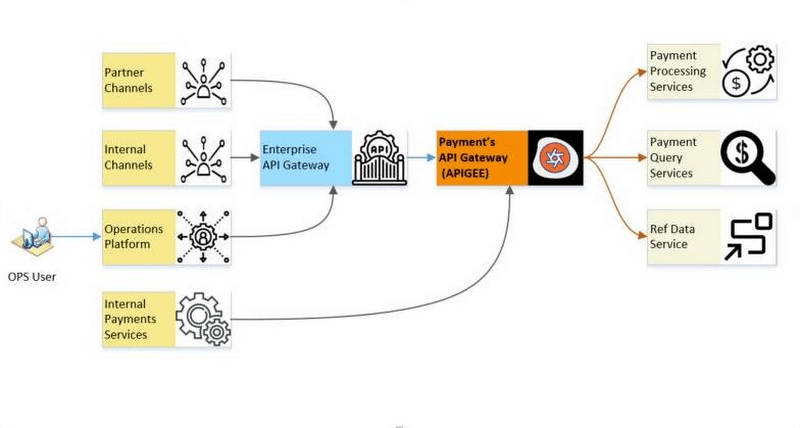
Core focus on security and compliance
To meet our security and regulatory compliance standards an API solution would need to offer functionality including:
- Providing coarse-grained and fine-grained authorization and domain specific entitlements for API requests;
- Bundling APIs based on the nature of the channel;
- Integrating easily with established identity providers;
- Establishing patterns for connecting trusted upstream and downstream systems;
- Providing support for the industry standard OAuth 2.0 authorization protocol as per enterprise security standards.
We reviewed Apigee against other API management solutions and gateways, and determined it was the best fit for our needs. Not only did Apigee deliver on all our mission-critical requirements, but it also provided strong ease of use, feature-completeness and support for multiple coding languages.
Enabling smooth developer onboarding, processes and troubleshooting
Using Apigee has greatly improved developer onboarding and reduced the tedious steps involved in knowledge transfer and upskilling. The platform is easy for developers to use, and is backed by great documentation and video resources. These resources provide clear guidance about how to execute certain processes and troubleshoot as needed.
Overall, Apigee has delivered the features we need to manage the publication and consumption of APIs efficiently. We are now running eighteen APIs in production, including two APIs that enable payments through connection to our transaction database, and others that enable supporting services in the payment services platform team.
Our engineers and testers have found it easy to use the interface and Apigee API Management to deploy and test proxies. In addition, out of the box policies allow for fine-grained access control to handle and build proxies of varying degrees of complexity. These policies allow us to control security, manage traffic, mediate transformations and implement custom functionality via scripts.
We can now implement our fine-grained entitlement-based access control requirements, onboard new customers to the cloud and streamline payment channel onboarding. With Apigee, we are also integrating with other API management tools at the bank, in part to enable self-service for API providers and consumers by building a developer portal.
Thanks to Apigee, we are well positioned to adopt a decentralized API team model that will see different teams within payments and beyond create APIs, and ramp up to full production of our API-centric model in the near future. This is a key component of the bank’s broader cloud and API-first strategy that is designed to help ANZ become a more agile and adaptive technology organization. With the right components in place, can we help ANZ create opportunities and propositions that colleagues and customers love, ultimately helping ANZ realize its vision across Australia, New Zealand and international markets.
Cutting Costs and Accelerating Development with API Management

3516
Of your peers have already read this article.
3:00 Minutes
The most insightful time you'll spend today!
Google Cloud Results
- Reduced API management costs 34%
- Develops new features in days versus months
- Fixes issues quickly by writing code
- Manages 15B API calls per month without outages
Austin, Texas-based Bazaarvoice switched to Apigee for its API platform because of its competitive pricing and feature set. But another benefit soon became apparent to Bazaarvoice engineers: the ability to write code on the Apigee platform and “own our destiny,” says Kurtis White, Senior Development Manager in Research and Development for Bazaarvoice.
Bazaarvoice specializes in consumer-generated content marketing solutions that connect brands, retailers, and consumers. APIs do the heavy lifting in making those connections. For example, the Conversations API, the heart of the Bazaarvoice platform, lets the company’s retail clients aggregate and leverage users’ product reviews and ratings. With the Conversations API, API keys are passed along in each query string and enable Bazaarvoice customers to access the relevant customer data.
APIs are essential to the Bazaarvoice platform. During its early days the company didn’t use APIs, relying instead on direct communication links to connect its customers to what consumers were saying about them. “That approach just didn’t scale,” says White. “Without reliable APIs, it would be almost impossible for us to be in business today.”
Eight years ago, Bazaarvoice switched to APIs. From about 2013 to 2017, the company relied upon the same API management SaaS solutions provider. But the company was growing. The call volume that its APIs generated was expanding at a rapid pace, too—especially during the busy year-end shopping season. For example, in early October 2016, Bazaarvoice APIs generated nearly 9 billion calls, compared to about 12 billion calls in early December 2016.
Unfortunately, along with the pace of API calls, the costs associated with Bazaarvoice’s existing API solutions provider were also escalating—increasing 74% from early 2016 to early 2017. To keep rising expenses from stifling its own growth, and to continue offering its reliable, high-performing SaaS solution, the company’s IT team decided it was to time to find a different API solutions provider.
In April 2017, Bazaarvoice migrated to the Apigee API platform because of its feature set and, in particular, its competitive pricing. By switching to Apigee, Bazaarvoice reduced its API spend by 34%, White says.
A ticking clock
Migrating from its previous API provider to Apigee involved importing 66,000 API keys—an arduous task. Apigee engineers and business leaders worked directly with their Bazaarvoice counterparts to help ensure a successful transition. “Everyone at Apigee was very responsive to our needs,” White says. “If a problem came up, the Apigee team owned it and worked through it to give us a great experience.”
During the migration, there was a clock ticking in the background. Bazaarvoice wanted to shift 100% of its API calls to Apigee before the contract with its existing API provider came up for renewal. “I wasn’t sure we could make the deadline,” says White. “But we did, and I give a big credit to the Apigee technical team. They provided 24-hour support to our team. And once we went live, our platform was handling 15 billion API calls a month with no outages.”
Following the migration, Apigee support continues to “knock it out of the park,” he added. “Apigee is a great partner to have.”
Controlling destiny
The Bazaarvoice IT team didn’t specifically choose Apigee because of the ability to write code on the platform—but they quickly came to appreciate the feature.
“Our previous API provider was like a black box to us,” says White. “They had written some custom code for us that we depended upon. But we didn’t own that code. And if we needed changes, we had to pay them to do it for us.”
“Apigee allows us to write our own code that runs on the platform and looks at all of the API calls,” White continues. “We can put the code into a virtual control system. We can update it whenever we want to add a feature. Because of how important APIs are to our business, the ability to write code on Apigee lets us control our own destiny. It’s the Apigee number one benefit, in my opinion.” This also accelerates the time it takes Bazaarvoice to bring new features to market.
“Apigee gives us the flexibility to do things we wouldn’t have even tried before,” says White. “We can test new things easily, without getting locked into a service agreement with an external party. Before, it might have taken months to develop new product functionalities. Now it takes days.”
In addition, writing code on the Apigee platform enables the IT team to quickly address any problems that may arise. “If someone notices a problem, we can write the code to fix it right away,” White says.
“Because Apigee lets us iterate and fix problems quickly, our innovation has gone to the next level,” White added. “Before, if you had an idea, you’d wonder if you really wanted to invest $30,000 and three months in it. Probably not. Now, with Apigee, the investment is maybe one day and zero dollars.”
Experimentation pays off for Bazaarvoice and its customers. For example, during the 2017 holiday season, Bazaarvoice was able to give all its customers the capacity to handle twice the number of API calls.
“With our previous API solutions provider, it would have been such a long process to make that happen, it wouldn’t have been worth it,” says White. “But it was really easy to write the code in Apigee. Plus, we made our customers happy and kept them running smoothly during the peak holiday season—with little effort on our part.”
Personalization and monetization
Apigee has played a key role in enabling Bazaarvoice to develop new products, too. In March 2018, Bazaarvoice released a new personalization data product for its customers, built on top of an Apigee-powered API. The new product enables Bazaarvoice retail customers to recommend relevant products to their online shoppers. The products are personalized to the shoppers’ interests, based on their past behavior and what they’re shopping for.
Apigee is also serving as a strategic business advisor, helping Bazaarvoice determine the best way to price its offerings as its API call volumes continue to increase.
“We’re working with Apigee to build an industry-leading model for monetizing our APIs,” says White. “Apigee is the ideal advisor in this regard. We’re handling such large volume, the volume is continuing to grow, and Apigee enables us to power it.”
3363
Of your peers have already watched this video.
24:40 Minutes
The most insightful time you'll spend today!
A Guide to Anthos: the App Modernization Platform for Hybrid and Multi-cloud Deployments
Anthos gives you a consistent platform for all your application deployments, both legacy as well as cloud native, while offering a service-centric view of all your environments.
You can build enterprise-grade containerized applications faster with managed Kubernetes on cloud and on-premises environments. Create a fast, scalable software delivery pipeline with cloud-native tooling and guidance.
It also helps leverage a programmatic, outcome-focused approach to managing policies for apps across environments, and enable greater awareness and control with a unified view of your services’ health and performance.
Tune in to this brief explainer video for an overview of Anthos, deployment examples, and explore options to get started illustrated through a demo with Bradley Wong, Product Manager at Google Cloud. Learn to make the best first step in your journey of application modernization and gain a clear understanding of the value of Anthos for your hybrid and multi-cloud workloads.
Budget-Friendly Log Management: Four Steps to Cost Optimization in Google Cloud

1220
Of your peers have already read this article.
4:30 Minutes
The most insightful time you'll spend today!
As part of our ongoing series on cost management for observability data in Google Cloud, we’re going to share four steps for getting the most out of your logs while on a budget. While we’ll focus on optimizing your costs within Google Cloud, we’ve found that this works with customers with infrastructure and logs on prem and in other clouds as well.
Step 1: Analyze your current spending on logging tools
To get started, create an itemized list of what volume of data is going where and what it costs. We’ll start with the billing report and the obvious line items including those under Operations Tools/Cloud Logging:
- Log Volume – the cost to write log data to disk once (see our previous blog post for an explanation)
- Log Storage Volume – the cost to retain logs for more than 30 days
If you’re using tools outside Cloud Logging, you’ll also need to include any costs related to these solutions. Here’s a list to get you started:
- Log vendor and hardware costs — what are you paying to observability vendors? If you’re running your own logging solution, you’ll want to include the cost of compute and disk.
- If you export logs within Google Cloud, include Cloud Storage and BigQuery costs
- Processing costs — consider the costs for Kafka, Pub/Sub or Dataflow to process logs. Network egress charges may apply if you’re moving logs outside Google Cloud.
- Engineering resources dedicated to managing your logging tools across your enterprise often are significant too!
Step 2: Eliminate waste — don’t pay for logs you don’t need
While not all costs scale directly with volume, optimizing your log volume is often the best way to reduce spend. Even if you are using a vendor with a contract that locks you into a fixed price for a period of time, you may still have costs in your pipeline that can be reduced by avoiding wasteful logs such as Kafka, Pub/Sub or Dataflow costs.
Finding chatty logs in Google Cloud
The easiest way to understand which sources are generating the highest volume of logs within Google Cloud is to start with our pre-built dashboards in Cloud Monitoring. To access the available dashboards:
- Go to Monitoring -> Dashboards
- Select “Sample Library” -> “Logging”
This blog post has some specific recommendations for optimizing logs for GKE and GCE using prebuilt dashboards.
As a second option, you can use Metrics Explorer and system metrics to analyze the volume of logs. For example, type “log bytes ingested” into the filter. This specific metric corresponds to the Cloud Logging “Log Volume” charge. There are many ways to filter this data. To get a big picture, we often start with grouping by both “resource_type” and “project_id”.
To narrow down the resource type in a particular project, add a “project_id” filter. Select “sum” under the Advanced Options -> Click on Aligner and select “sum”. Sort by volume to see the resources with the highest log volume.
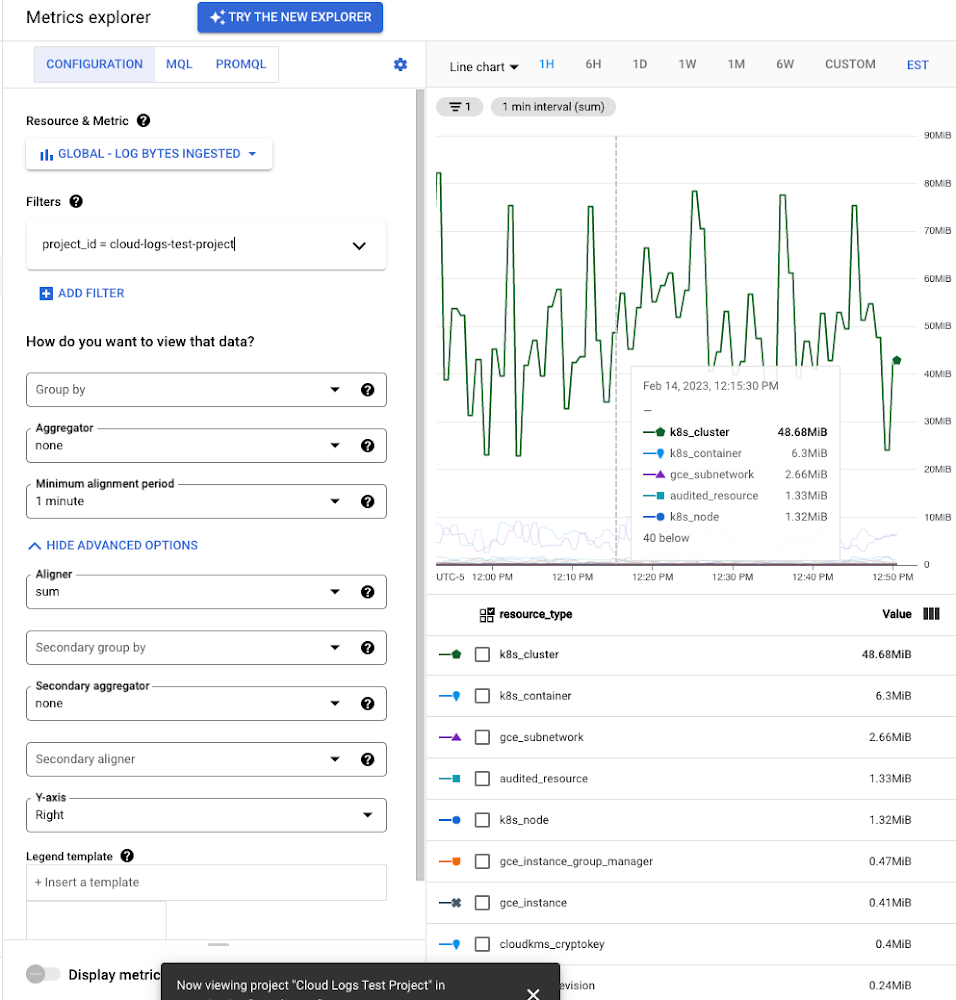
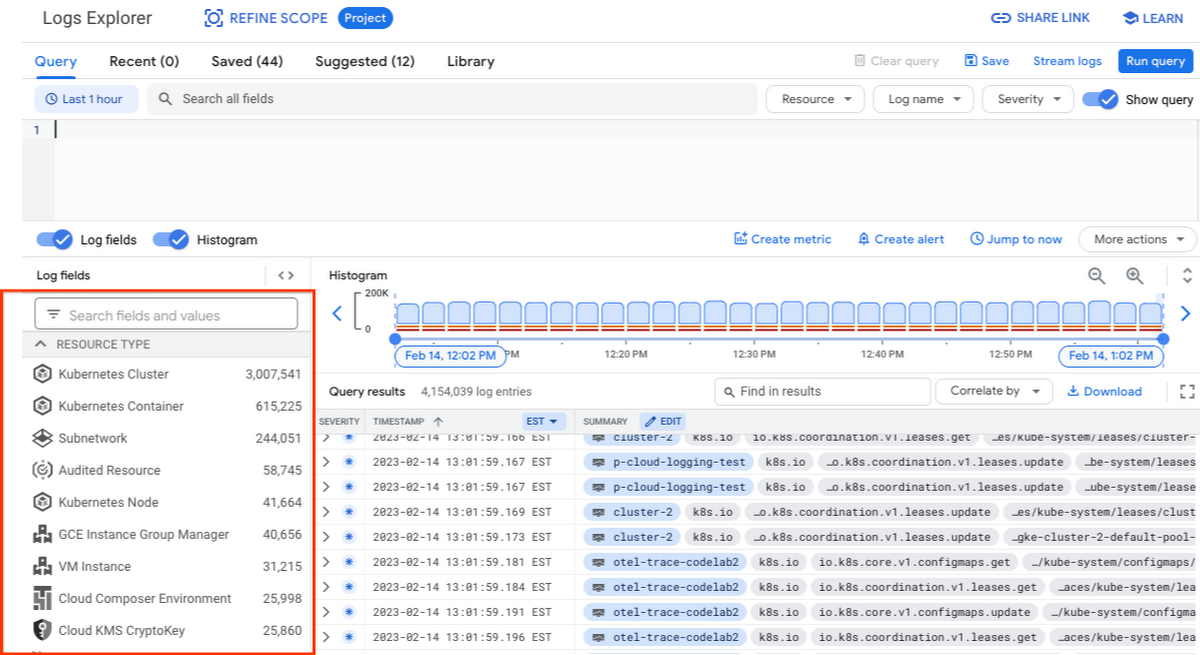
While these rich metrics are great for understanding volumes, you’ll probably want to eventually look at the logs to see whether they’re critical to your observability strategy. In Logs Explorer, the log fields on the left side help you understand volumes and filter logs from a resource type.
Reducing log volume with the Logs Router
Now that we understand what types of logs are expensive, we can use the Log Router and our sink definitions to reduce these volumes. Your strategy will depend on your observability goals, but here are some general tools we’ve found to work well.
The most obvious way to reduce your log volume is not to send the same logs to multiple storage destinations. One common example of this is when a central security team uses an aggregated log sink to centralize their audit logs but individual projects still ingest these logs. Instead, use exclusion filters on the _Default log sink and any other log sinks in each project to avoid these logs. Exclusion filters also work on log sinks to BigQuery, Pub/Sub, or Cloud Storage.
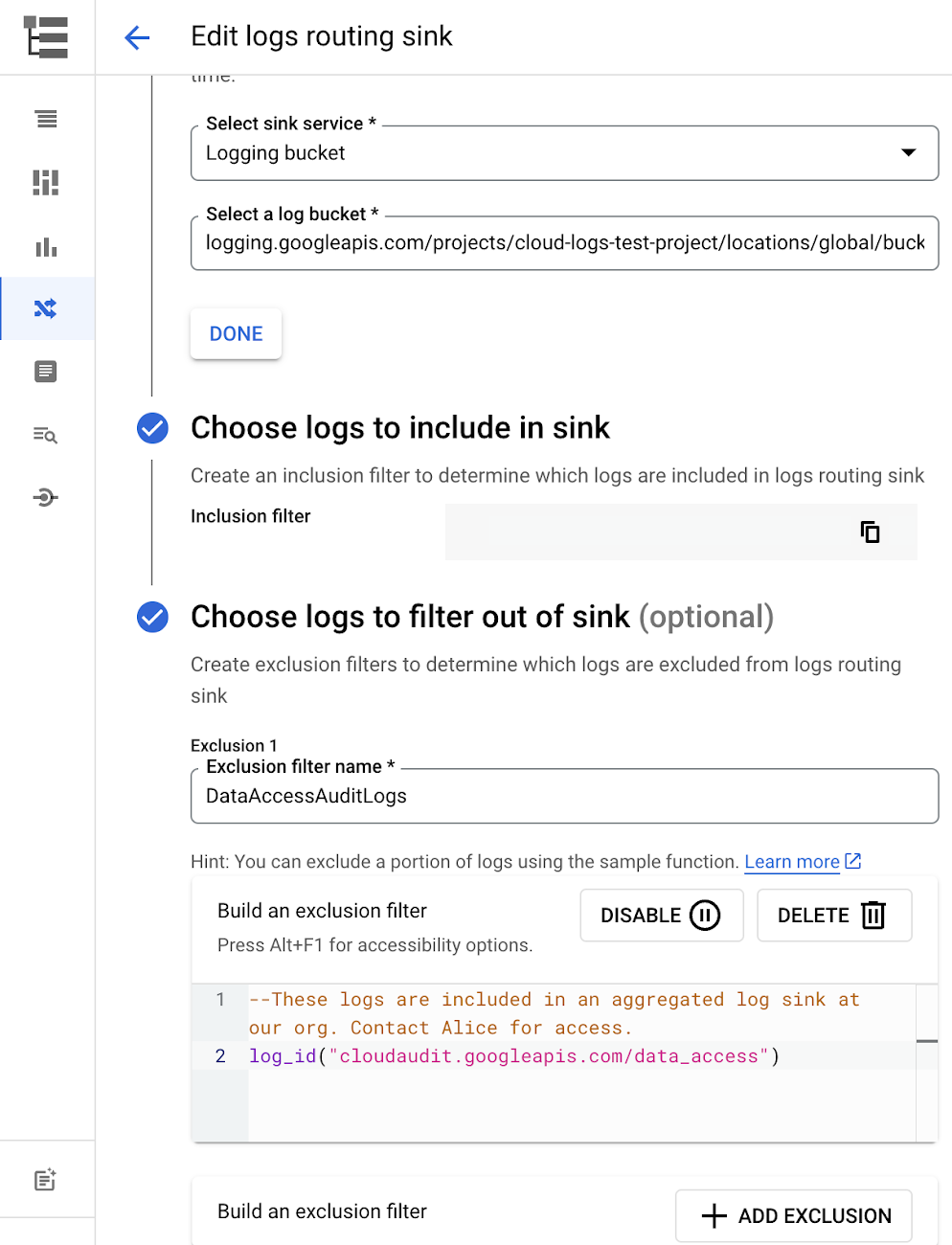
Similarly, if you’re paying to store logs in an external log management tool, you don’t have to save these same logs to Cloud Logging. We recommend keeping a small set of system logs from GCP services such as GKE in Cloud Logging in case you need assistance from GCP support but what you store is up to you, and you can still export them to the destination of your choice!
Another powerful tool to reduce log volume is to sample a percentage of chatty logs. This can be particularly useful with 2XX log balancer logs, for example. This can be a powerful tool, but we recommend you design a sampling strategy based on your usage, security and compliance requirements and document it clearly.
Step 3: Optimize costs over the lifecycle of your logs
Another option to reduce costs is to avoid storing logs for more time than you need them. Cloud Logging charges based on the monthly log volume retained per month. There’s no need to switch between hot and cold storage in Cloud Logging; doubling the default amount of retention only increases the cost by 2%. You can change your custom log retention at any time.
If you are storing your logs outside of Cloud Logging, it is a good idea to compare the cost to retain logs and make a decision.
Step 4: Setup alerts to avoid surprise bills
Once you are confident that the volume of logs being routed through log sinks fit in your budget, set up alerts so that you can detect any spikes before you get a large bill. To alert based on the volume of logs ingested into Cloud Logging:
- Go to the Logs-based metrics page. Scroll down to the bottom of the page and click the three dots on “billing/bytes_ingested” under System-defined metrics.
- Click “ Create alert from metric”
- Add filters (For example: use resource_id or project_id. This is optional).
- Select the logs based metric for the alert policy.
You can also set up similar alerts on the volume for log sinks to Pub/Sub, BigQuery or Cloud Storage.
Conclusion
One final way to stretch your observability budget is to use more Cloud Operations. We’re always working to bring our customers the most value possible for their budget such as our latest feature, Log Analytics, which adds querying capabilities but also makes the same data available for analytics, reducing the need for data silos. Many small customers can operate entirely on our free tier. Larger customers have expressed their appreciation for the scalable Log Router functionality available at no extra charge that would otherwise require an expensive event store to process data. So it’s no surprise that a 2022 IDC report showed that more than half of respondents surveyed stated that managing and monitoring tools from public cloud platforms provide more value compared to third-party tools. Get started with Cloud Logging and Monitoring today.
6903
Of your peers have already watched this video.
14:21 Minutes
The most insightful time you'll spend today!
How Anthos Helps Organizations Implement Multi and Hybrid Cloud Strategy
Organizations have become increasingly focused on using modernization solutions to build competitive advantage, for faster time to market, serve customers better and seamlessly operate in hybrid and multi-cloud environments. Anthos by Google Cloud, a managed application platform plays an important role in application modernization and also in empowering customers to deploy a hybrid or multi-cloud strategy with opensource technologies and platforms like Kubernetes.
Watch the video to refer to the real use-cases of Anthos for application modernization and hybrid/multi cloud deployment across retail, digital natives, banking and manufacturing space.
Also, explore the latest tool, Migrate for Anthos if you are a traditional enterprise looking to skip rewriting of applications and lift-and-shift process!
More Relevant Stories for Your Company

Ease Your Migration and Modernization Journey with Microsoft and Windows on Google Cloud Demo Center
If you’re looking to migrate and modernize your Microsoft and Windows workloads, Google Cloud is your premiere destination. No matter what migration strategy you’ve selected or what value you’re looking to achieve, with Google Cloud you’re able to: simplify your migration and modernization journeyreduce your on-prem footprint and increase agilityoptimize license

The Ultimate Guide to Planning for a Multi-Cloud World
One of the great opportunities of cloud technology is the ability to combine and integrate different tools, services, and platforms. But, the question of which cloud tools and platforms to use—and how to ensure they work together seamlessly and securely still persists. According to recent research, 82 percent of enterprises

Held Back by Database Scalability, This Financial Services Company Switches to Google Cloud and Cloud Spanner
Azimut Group operates an international network of companies handling investment and asset management, mutual funds, hedge funds, and insurance. Founded in Milan, Italy in 1988, Azimut Group today has branches in fifteen countries, including Brazil, China, and the USA. “We have subsidiaries and manage funds all over the world,” explains Simone

A CIO’s Guide to Application Modernization
Even before the current crisis, IT organizations saw pressure to be more agile and innovative. Customer demographics and expectations are changing. Competition is emerging faster and from unexpected sources. Business models are being reinvented. Digital technology was at the heart of many of these challenges, and its adoption was key
