





How Ather Energy is leveraging the Cloud to build and scale smart mobility solutions for India

8383
Of your peers have already read this article.
8:30 Minutes
The most insightful time you'll spend today!
In 2013, long before the world was discussing clean energy and sustainable practices, two IIT Madras graduates — Swapnil Jain and Tarun Mehta — had an idea to develop India’s first-ever electrical scooter.
This was at a time when auto manufacturers were still focusing on fossil-fuel-driven vehicles and ‘eco-friendly’ mobility solutions were more a trendy alternative catering to a niche market.
The duo founded Ather Energy in 2013 and launched their first fully-electric scooter, the Ather S340, in Bengaluru in 2016. Since then, the company has released several new models into the market and is planning to expand to eight more cities by the end of the year.
To support the smooth running of their vehicles, lower costs, improve time to market, and create great customer experience, Ather turned to Google Cloud.
Read the Full Story on YourStory
Answering the 4 Common FAQs on Compute Engine

3864
Of your peers have already read this article.
1:30 Minutes
The most insightful time you'll spend today!
Compute Engine lets you create and run virtual machines (VMs) on Google’s infrastructure, allowing you to launch large compute clusters with ease. When it comes to getting started with Compute Engine, our customers have lots of questions—but some questions come up more often than others.
We looked at an internal list of the most popular Compute Engine documentation pages over a 30-day period to find out what topics were explored by users again and again. Here are the top four questions users have about Compute Engine, in order.
1. What are the different machine families
Compute Engine lets you select the right machine for your needs. You can choose from a curated set of predefined virtual machine (VM) configurations optimized for specific workloads, ranging from small-level purpose to large-scale use cases or create a machine type customized to your needs with our custom machine type feature.
Compute Engine machines are categorized by machine family, including:
- General-purpose: Best price-performance ratio for a variety of standard and cloud-native workloads
- Compute-optimized: Highest performance per core for compute-intensive workloads, such as ad serving or media transcoding
- Memory-optimized: More compute and memory per core than any other family for memory-intensive workloads, such as SAP HANA or in-memory data analytics
- Accelerator-optimized: Designed for your most demanding workloads, such as machine learning (ML) or high performance computing (HPC)
Read the documentation to learn more about each machine family category.
2. How to connect to VMs using advanced methods
In general, we recommend using the Google Cloud Console and the gcloud command-line tool to connect to Linux VM instances. However, some of our customers want to use third-party tools, or require alternative connection configurations.
In these cases, there are several methods that might fit your needs better than the standard connection options:
- Connecting to instances using third-party tools (e.g. Windows PuTTY, Chrome OS Secure Shell app), or MacOS or Linux local terminal)
- Connecting to instances without external IP addresses
- Connecting to instances as the root user Manually connecting between instances and running commands as a service account
Read the documentation to learn about advanced methods for connecting Linux VMs.
3. How to set up OS Login
OS Login lets you use IAM roles and permissions to manage access and permissions to VMs.
OS Login is the recommended way to manage users across multiple instances or projects. OS Login provides:
- Automatic Linux account lifecycle management
- Fine-grained authorization using Google IAM without having to grant broader privileges
- Automatic permissions updates to prevent unwanted access
- Ability to import existing Linux accounts from Active Directory (AD) and Lightweight Directory Access Protocol (LDAP)
You can also add an extra layer of security by setting up OS Login with two-factor authentication or manage organization access by setting up organization policies.
Read the documentation to learn how to configure OS login and connect to your instances.
4. How to manage SSH keys in metadata
Compute Engine allows you to manually manage SSH keys and local user accounts by editing public SSH key metadata.
You can add public SSH keys to instance and project metadata using:
- The Google Cloud Console The gcloud command-line tool
- API methods from the Google Cloud Client Libraries
Read the documentation to learn how to manually manage SSH keys and local user accounts in metadata.
Don’t see your question here? Check out the Compute Engine documentation for all of our recommended guides, tutorials, and resources.
Confidential Computing: Google Cloud Security, Project Zero and AMD Come Together to Secure Sensitive Workloads

4562
Of your peers have already read this article.
3:00 Minutes
The most insightful time you'll spend today!
At Google Cloud, we believe that the protection of our customers’ sensitive data is paramount, and encryption is a powerful mechanism to help achieve this goal. For years, we have supported encryption in transit when our customers ingest their data to bring it to the cloud. We’ve also long supported encryption at rest, for all customer content stored in Google Cloud.
To complete the full data protection lifecycle, we can protect customer data when it’s processed through our Confidential Computing portfolio. Confidential Computing products from Google Cloud protect data in use by performing computation in a hardware isolated environment that is encrypted with keys managed by the processor and unavailable to the operator. These isolated environments help prevent unauthorized access or modification of applications and data while in use, thereby increasing the security assurances for organizations that manage sensitive and regulated data in public cloud infrastructure.
Secure isolation has always been a critical component of our cloud infrastructure; with Confidential Computing, this isolation is cryptographically reinforced. Google Cloud’s Confidential Computing products leverage security components in AMD EPYC™ processors including AMD Secure Encrypted Virtualization (SEV) technology.
Building trust in Confidential Computing through industry collaboration
Part of our mission to bring Confidential Computing technology to more cloud workloads and services is to make sure that the hardware and software used to build these technologies is continuously reviewed and tested. We evaluate different attack vectors to help ensure Google Cloud Confidential Computing environments are protected against a broad range of attacks. As part of this evaluation, we recognize that the secure use of our services and the Internet ecosystem as a whole depends on interactions with applications, hardware, software, and services that Google doesn’t own or operate.
The Google Cloud Security team, Google Project Zero, and the AMD firmware and product security teams collaborated for several months to conduct a detailed review of the technology and firmware that powers AMD Confidential Computing technology. This review covered both Secure Encrypted Virtualization (SEV) capable CPUs, and the next generation of Secure Nested Paging (SEV-SNP) capable CPUs which protect confidential VMs against the hypervisor itself. The goal of this review was to work together and analyze the firmware and technologies AMD uses to help build Google Cloud’s Confidential Computing services to further build trust in these technologies.
This in-depth review focused on the implementation of the AMD secure processor in the third generation AMD EPYC processor family delivering SEV-SNP. SNP further improves the posture of confidential computing using technology that removes the hypervisor from the trust boundary of the guest, allowing customers to treat the Cloud Service Provider as another untrusted party. The review covered several AMD secure processor components and evaluated multiple different attack vectors. The collective group reviewed the design and source code implementation of SEV, wrote custom test code, and ran hardware security tests, attempting to identify any potential vulnerabilities that could affect this environment.
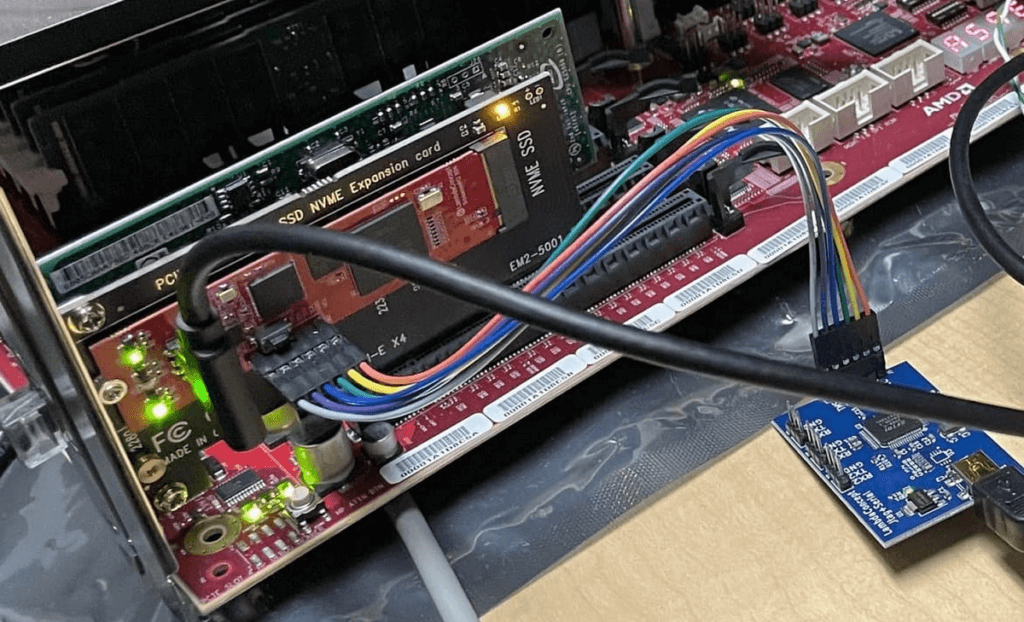
Working on this review, the security teams identified and confirmed potential issues of varying severity. AMD was diligent in fixing all applicable issues and now offers updated firmware through its OEM channels. Google Cloud’s AMD-based Confidential Computing solutions now include all the mitigations implemented during the security review.
“At Google, we believe that investing in security research outside of our own platforms is a critical step in keeping organizations across the broader ecosystem safe,” said Royal Hansen, vice president of Security Engineering at Google. “At the end of the day, we all benefit from a secure ecosystem that organizations rely on for their technology needs and that is why we’re incredibly appreciative of our strong collaboration with AMD on these efforts.”
“Together, AMD and Google Cloud are continuing to advance Confidential Computing, helping enterprises to move sensitive workloads to the cloud with high levels of privacy and security, without compromising performance,” said Mark Papermaster, AMD’s executive vice president and chief technology officer. ”Continuously investing in the security of these technologies through collaboration with the industry is critical to providing customer transformation through Confidential Computing. We’re thankful to have partnered with Google Cloud and the Google Security teams to advance our security technology and help shape future Confidential Computing innovations to come.”
Reviewing trusted execution environments for security is difficult given the closed-source firmware and proprietary hardware components. This is why research and collaborations such as this are critical to improve the security of foundational components that support the broader Internet ecosystem. AMD and Google believe that transparency helps provide further assurance to customers adopting Confidential Computing, and to that end AMD is working toward a model of open source security firmware.
With the analysis now complete and the vulnerabilities addressed, the AMD and Google security teams agree that the AMD firmware which enables Confidential Computing solutions meets an elevated security bar for customers, as the firmware design updates mitigate several bug classes and offer a way to recover from vulnerabilities. More importantly, the review also found that Confidential VMs are protected against a broad range of attacks described in the review.
Google Cloud’s Confidential Computing portfolio
The Google Cloud Confidential VMs, Dataproc Confidential Compute, and Confidential GKE Nodes have enabled high levels of security and privacy to address our customers’ data protection needs without compromising usability, performance, and scale. Our mission is to make this technology ubiquitous across the cloud. Confidential VMs run on hosts with AMD EPYC processors which feature AMD Secure Encrypted Virtualization (SEV). Incorporating SEV into Confidential VMs provide benefits and features including:
Isolation: Memory encryption keys are generated by the AMD Secure Processor during VM creation and reside solely within the AMD Secure Processor. Other VM encryption keys such as for disk encryption can be generated and managed by an external key manager or in Google Cloud HSM. Both sets of these keys are not accessible by Google Cloud, offering strong isolation.
Attestation: Confidential VMs use Virtual Trusted Platform Module (vTPM) attestation. Every time a Confidential VM boots, a launch attestation report event is generated and posted to customer cloud logging, which gives administrators the opportunity to act as necessary.
Performance: Confidential Computing offers high performance for demanding computational tasks. Enabling Confidential VM has little or no impact on most workloads.
The future of Confidential Computing and secure platforms
While there are no absolutes in computer security, collaborative research efforts help uncover security vulnerabilities that can emerge in complex environments and help to prevent Confidential Computing solutions from threats today and into the future. Ultimately, this helps us increase levels of trust for customers.
We believe Confidential Computing is an industry-wide effort that is critical for securing sensitive workloads in the cloud and are grateful to AMD for their continued collaboration on this journey.
To read the full security review, visit this page.
Acknowledgments
We thank the many Google security team members who contributed to this ongoing security collaboration and review, including James Forshaw, Jann Horn and Mark Brand.
We are grateful for the open collaboration with AMD engineers, and wish to thank David Kaplan, Richard Relph and Nathan Nadarajah for their commitment to product security. We would also like to thank AMD leadership: Ab Nacef, Prabhu Jayanna, Hugo Romero, Andrej Zdravkovic and Mark Papermaster for their support of this joint effort.
3 Important Factors to Consider for Moving Large-scale On-prem Data to Cloud with Storage Transfer Service

3525
Of your peers have already read this article.
1:30 Minutes
The most insightful time you'll spend today!
Organizations have been moving their on-premises data and applications to the cloud for the past several years, driven by reasons as varied as application modernization and content delivery to archival. In particular, we have seen migration momentum pick up in sectors like media and entertainment, where customers are rethinking how they monetize and store their valuable historical content, often while exploring Google Cloud’s many analytical and AI solutions.
Many of these customers are interested in moving their unstructured data from on-premises appliances to Google’s Cloud Storage. Over the past year, we’ve noticed an uptick in larger migrations, where customers move tens of petabytes or more of on-premises file data to Google’s flexible, secure object storage.
For customers like Telecom Italia/TIM Brasil, Google’s fully managed Storage Transfer Service played a key role in making this transformation possible by moving data from on-premises filesystems to extensible, low-cost Cloud Storage over the network.
“Storage Transfer Service helped us move petabyte-scale data from on-premises filesystem to Google Cloud in a highly performant and fully-managed way,” said Auana Mattar, CIO at Telecom Italia/TIM Brasil. “Setting up the transfer pipeline required performing some tests to figure out the ideal number of agents and networking settings in our on-prem environment. Once the initial setup was done, transferring data was seamless, and the service was able to saturate a 20 Gbps Partner Interconnect link.”
While large-scale cloud migrations can be intimidating, there are a number of actions that customers can take to ensure that a multi-petabyte data transfer goes as smoothly as possible. In the past, we’ve shared general architectural guidance for customers new to their cloud journey. And for customers looking for options, Google has multiple paths to move on-premises file data to the cloud, including our fully offline Transfer Appliance.
In this blog post, we’ll provide an updated perspective focused on how to use Storage Transfer Service to move data from on-prem to the cloud. Specifically, we’ll look at three different factors to consider prior to moving large amounts of data from your on-premises filesystem to Cloud Storage with our Storage Transfer Service.
Understanding the source files and filesystem
If you are moving data from an on-premises filesystem, you should be aware of how your source files, and your source filesystem, can impact transfer performance.
Each copy you make to Cloud Storage incurs some overhead from associated operations like metadata transfer, checksumming, and encryption. This means that, for a given amount of storage, transferring large numbers of very small files will take longer. As a rule of thumb, Storage Transfer Service will be most performant when moving files that are 16 MB or larger.
If you have a large number of smaller files, you may choose to batch them using tools like tar and upload as a single object. This will improve transfer performance but will limit how you can use those files in Cloud Storage. It’s an option best considered for use cases like archival storage, where the data transferred to Google Cloud may not be managed or accessed regularly. Our Nearline, Coldline, and Archive archival tiers offer excellent performance should you ever need to retrieve the archived data.
The source filesystem may also slow down transfer performance, particularly if the filesystem has limited read throughput. Tools like Fio can be used to test read throughput. We’ve included a command below to run a series of 1MB sequential read operations in Fio and to generate a report:
#Install fio> sudo apt install -y fio#Create a new directory fiotest> TEST_DIR=/mnt/mnt_dir/fiotest> sudo mkdir -p $TEST_DIR#Test read throughput> sudo fio --directory=$TEST_DIR --direct=1 --rw=randread --randrepeat=0 --ioengine=libaio --bs=1M --iodepth=8 --time_based=1 --runtime=180 --name=read_test --size=1G
Fio will then generate a report. The final line labeled ‘bw’ represents the total aggregate bandwidth of all threads, and it can be used as a proxy for read throughput. In general, you should strive for read throughput (‘bw’) that is 1.5x of your desired upload throughput or speed. (And one easy way to increase read throughput is to ensure that the filesystem itself is not imposing any limits on maximum throughput.)
Optimizing Storage Transfer Service resources
Within the Storage Transfer Service, there are a few settings that we can adjust ahead of time to ensure optimal performance for a larger workload.
First, we should ensure that we have the right number of transfer agents for our source data. We would advise that, for any transfer job larger than 1 GB, you start with at least three agents in separate VMs, with each agent assigned at least 4 vCPU and 8 GB of RAM. In addition to providing a foundation for performant data transfer, this architecture also ensures that the transfer is fault tolerant should one agent machine become unavailable.
Google Cloud supports up to 100 concurrent agents for a given Google Cloud project. To help you identify the right number of agents to support your workload, you should start your larger transfer first, then wait three minutes after adding each agent to ensure that throughput has stabilized.
In general, each agent can facilitate roughly 1 Gbps of throughput for up to 10 agents, at which point it may be necessary to add more agents for a very large amount of network bandwidth. For example, in one larger migration, a customer with 20 Gbps of dedicated network capacity ran ~30 agents at once. These numbers illustrate what was required at one enterprise data center. Across all of your environments, it is important to test and monitor your throughput via Cloud Monitoring to ensure you have the right configuration for your transfer goals.
Another area to optimize is where and how you install your agents. As we mentioned earlier, agents should be installed in separate VMs, and each host machine should dedicate at least 4 vCPUs and 8 GB of memory per agent. This is a starting off point, and larger, long-running transfers may require additional CPU or memory. For those longer jobs, we advise that you monitor CPU utilization and unused memory closely to ensure optimal performance. You should provision more CPUs when utilization exceeds 70%. Similarly, you should be ready to provision additional memory when the agent has less than 1GB of unused memory.
Preparing your network for large-scale data transfer
The third and final area to consider is your network connectivity. While it can be easy to reduce this to the bandwidth between the source filesystem and the Google Cloud bucket, the network includes two other components that can be easier to configure: first, the network interface from the on-premises agents to the WAN; and second, the agents’ connection to the on-premises filesystem.
For the first component, the network interface from the on-premises agents to the WAN, the general guidance is to not let this become a bottleneck. Specifically, you should ensure that this interface is greater than or equal to the bandwidth you require to read from the filesystem, plus the upload bandwidth to write to Google Cloud. In other words, if you plan on moving 10 Gbps of data from on-premises to Google Cloud, you will need 20 Gbps of bandwidth between the on-premises agents to the WAN: 10 Gbps to read from the networked filesystem, and 10 Gbps to transfer and write to Google Cloud.
On-premises filesystems, and on-premises networks, come in many flavors. For the second component, how the agents connect to an on-premises filesystem, our general rule is to be mindful of latency and to test regularly. It is essential to ensure that agents run on machines that can access a networked filesystem with very low latency.
Finally, if you are trying to maximize transfer performance, make sure you’ve configured your network to avoid bandwidth restrictions between on-premises filesystem and Google Cloud that might impact transfer speed. Storage Transfer Service will allow you to cap the bandwidth used by transfer, making it easy to minimize any impact on other production applications. Consider using tools like lperf3, tcpdump, and gsutil to measure the network bandwidth available to upload to Cloud Storage.
In particular, gsutil is worth some additional detail. Gsutil is a Python tool that can help you perform a number of object storage management tasks in Google Cloud, including checking your agent’s connection to the Cloud Storage APIs. It can be installed via the Google Cloud SDK, or separately. In this case, you should also ensure that gsutil is available in the same on-premises VM as the Storage Transfer Service agent.
If you’d like to use gsutil to test connectivity to Google Cloud, here’s the command:
gsutil cp test.txt gs://my-bucketReplace:my-bucket with the name of your Cloud Storage bucket.
CP is a copy command that lets you copy data from on-premises to the cloud. In this case, gsutil is copying a test document, test.txt, to ensure that you have a connection with the Google Cloud APIs. You will need to create a test document before running this command.
Test twice, transfer once
One overarching theme across all factors is that testing can help you understand performance. For many customers, a large-scale data transfer from an on-premises filesystem to Google Cloud is an unusual event. And as with any unusual event in enterprise IT, it is a great idea to make sure that each party – from network administrators to filesystem and storage experts to cloud architects – is able to test their domain multiple times, to ensure the event will proceed seamlessly.
As you fine tune your testing in advance of a data transfer, you may want to learn more about your options for obtaining more network bandwidth, orchestrating transfer from SMB filesystems, or even how to make the right choices to save money on object storage. And we plan to share more in our blog about how customers have used our transfer offerings in the months ahead. Advanced agent setup | Cloud Storage Transfer Service Documentation
For more information about Storage Transfer Service and how to get started, please take a look at our documentation or get started via the Google Cloud console.
Know the Leaders of Google Cloud Public Sector Community

5019
Of your peers have already read this article.
1:30 Minutes
The most insightful time you'll spend today!
At Google Cloud, being a strategic partner is part of our DNA. Whether it’s listening closely to our customers, helping to build team skills for innovation or simply being there (since we know the cloud is 24/7), we get excited about working hands-on with customers to deliver new solutions.
As we look to solve decades-old challenges with new technologies in workforce productivity, cybersecurity, and artificial intelligence/machine learning, we know that we are only as good as the people behind the technology. Today, we’re proud to spotlight a few of the inspiring folks behind Google Cloud Public Sector and celebrate their recognition in the industry.
Melissa Adamson, Head of Government Channels at Google Cloud, has been named to the highly respected Women of the Channel list for 2021. This annual list recognizes the unique strengths, leadership and achievements of female leaders in the IT channel. The women honored this year pushed forward with comprehensive business plans, marketing initiatives and innovative ideas to support their partners and customers.
Melissa was brought on to build the Public Sector channel from scratch. The initial focus was building the channel for the US government team and has since expanded to include education, Canada and Latin America.
Having a career background at both Microsoft and Accenture, Melissa leveraged her extensive professional network to build the organic partnerships needed to accelerate the Public Sector partner ecosystem. This helped her drive two key wins (US Postal Service and PTO) and personally recruit top cloud partners in the industry. Melissa loves card games and is learning a new language.
Todd Schoeder, Director of Global Public Sector Digital Strategy, was recently featured in the “Top 20 Cloud Executives to Watch in 2021” by Wash Exec. Recognized for his work in helping customers navigate through the impact of COVID-19 and developing innovative solutions to meet mission challenges, he says: “New partnerships are required to solve for the problems of the future. Challenges that were previously thought of as insurmountable, too risky or expensive, are actually quite the opposite — as long as you have the right partner that is working in your best interest with you.”
Josh Marcuse, Head of Strategy & Innovation, received his second Wash100 Award for leading a digital transformation team that works to drive the development of public sector solutions, including cyber defense, smart cities, and public health.
Josh has launched services to support collaborative team operations including Workspace for Government and an artificial intelligence-based customer service platform to support remote work needs. His work also includes leading Google Cloud’s partnerships with organizations to improve data sharing in the public health community, contact tracing activities, and supporting research efforts across national laboratories.
Like Melissa, Josh was brought on to build a new team dedicated to strategy and innovation. This team’s purpose is to bring an intense focus to public sector mission outcomes and the public servants who own them. Josh spent a decade pushing digital modernization and workforce transformation at the U.S. Department of Defense, and co-founded the Federal Innovation Council at the Partnership for Public Service, and now brings that domain expertise to supporting government workers who are driving digital transformation.
Join us in celebrating these folks for their leadership and contributions!
3484
Of your peers have already watched this video.
1:30 Minutes
The most insightful time you'll spend today!
How Carrefour is Building the Future of Retail on Google Cloud
Multinational retailer Carrefour was facing the challenge of meeting increasing customer expectations and realized that it needed to innovate faster. That’s when the company decided to move its SAP workloads to Gooogle Cloud.
As a result, Carrefour transformed over 1,000 stores and redesigned its back office management with SAP on Google Cloud. Not just that, it also realized the added benefits of flexibility, agility, and disaster recovery.
Watch this video as Carrefour executives explain why they decided to move SAP to Google Cloud and the benefits the company derived.
More Relevant Stories for Your Company

Trading and Investment Companies will Increase Consumption of Cloud Services: Study Confirms
While some traditional financial services companies have more slowly transitioned to the cloud, capital markets firms have embraced cloud computing across their entire value chains — front-, middle-, and back-office. We wanted to understand the dynamics behind this rapid adoption, the most common use cases, and the types of technology
A Step-by-Step Guide to Lift-and-Shift a Line of Business Application onto Google Cloud
Want to move an existing business application to the Cloud? Want to make sure that the process is painless, easy, reliable, and provides the necessary cost benefits? Well, it’s not as complex as many technology professionals think. On the contrary, by understanding the various steps involved in the process, identifying



Confused about Cloud? Here is a Primer to get all Your Doubts Answered
When you have decided on moving workloads to the cloud, the task of choosing the right cloud platform can be a tough one with many questions looming in your mind. From which specific product to choose from the plethora of options available to how and where to store your data

Rebel Foods Improves Accuracy of Forecast Time by 60% by Using Google Cloud
Google Cloud Results Enables accurate allocation of marketing spend to underserved areasSupports expansion into international marketsHelps ensure accurate forecasting of inventory levelsImproves accuracy of forecasted delivery times by at least 60% Operating in India since 2011, Rebel Foods has grown from a brick-and-mortar business that provided wraps to customers to
