





3144
Of your peers have already watched this video.
18:45 Minutes
The most insightful time you'll spend today!
Reduce Costs, Increase Profits by Modernizing Your Mainframe Applications with Google Cloud
Mainframe powers much of global commerce and for decades—with its proprietary platform and legendary lock-in—was resistant to effective competition. Even years after most organizations began adopting public cloud, migrating off the mainframe remains too complex for many organizations to undertake.
Google Cloud brings a unique, automated approach to modernization enabling customers to go from mainframe to containers.
Gain operational efficiency
Escape capital-intensive mainframe refresh cycle with Google cloud. Move to a modern cloud-based model to reduce operational cost and improve maintainability.
Deliver agile services
You can also evolve software capabilities for faster and frequent updates. Use cloud-native technologies such as GKE alongside your on-premises workloads and accelerate time to market.
Mitigate risk and get access to talent
Also, eliminate the dependency on scarce skills. Gain access to top engineering talent and avoid vendor lock-in by modernizing to open software languages.
Watch this video where Travis Webb, Cloud Solutions Architect for Enterprise at Google Cloud, takes you through the challenges of modernizing mainframe and the key technical aspects of this solution that make it possible.
Rhode Island’s VCC Platform Built on GCP Helps Jobseekers Get Back to Work!

3255
Of your peers have already read this article.
5:00 Minutes
The most insightful time you'll spend today!
2020 brought many challenges, especially as in-person operations were shut down, and many were left vulnerable to unemployment.
The State of Rhode Island responded to these challenges, by modernizing their workforce development operations and moving completely to a custom online platform called the Virtual Career Center, also nicknamed “the VCC.”
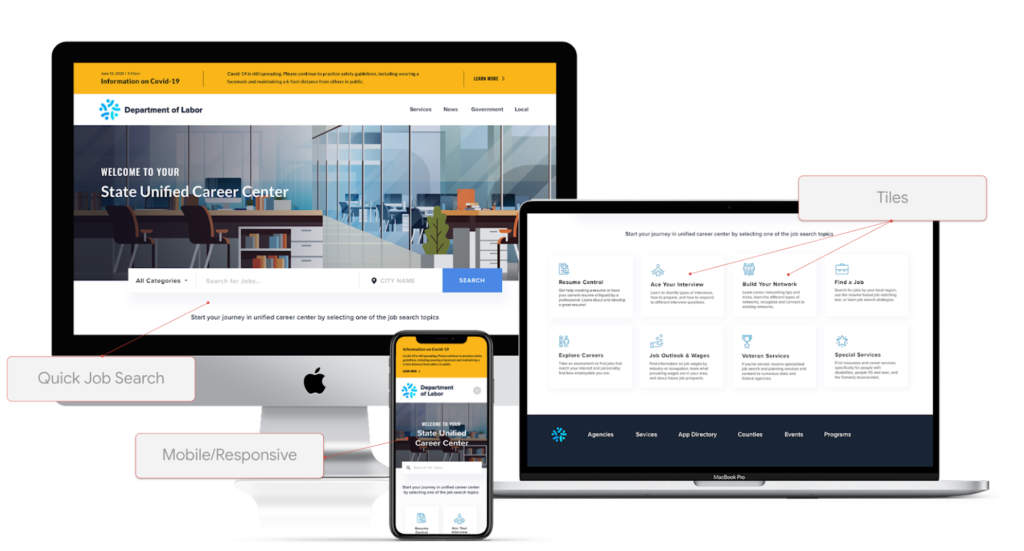
It was developed in partnership with Google Cloud and a nonprofit called “Research Improving People’s Lives” (RIPL), and was fully built by Google Cloud partner Maven Wave, which helps a wide array of organizations, including public sector customers, with many types of cloud initiatives.
In this episode of Architecting with Google Cloud, we interviewed Joel Osman, head of Digital Experience & Custom Applications at MavenWave who shared a lot of insights such as:
“We looked at how we can apply leading edge emerging technologies to help people get back to work and use them as tools in such a way that we can augment the personal one to one interactions that agencies had been using with job seekers, to help them get back to work.”
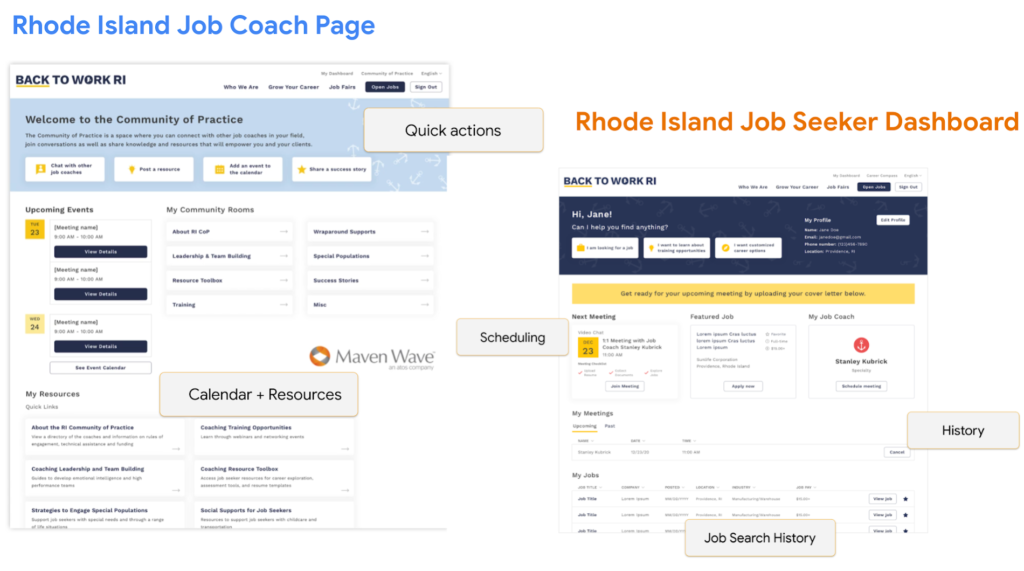
One of those key benefits is enabling job seekers to find coaches that are specialized in their respective community. During the in-person walk-in model, applicants were paired on a first come first serve basis with any available coach on site. Meanwhile online scheduling has enabled a greater opportunity to match veterans, college graduates, non-English speakers, etc with coaches with prior experience in that specific area.
How the VCC was built
This VCC web app was built on Angular. It has a custom frontend built on top of 2 key Google Cloud products. The first is Workspace, which includes functionality such as video conferencing, documents, slides, chat, file storage, etc. And the other is Google Cloud computing resources. Here’s a view of the architecture:
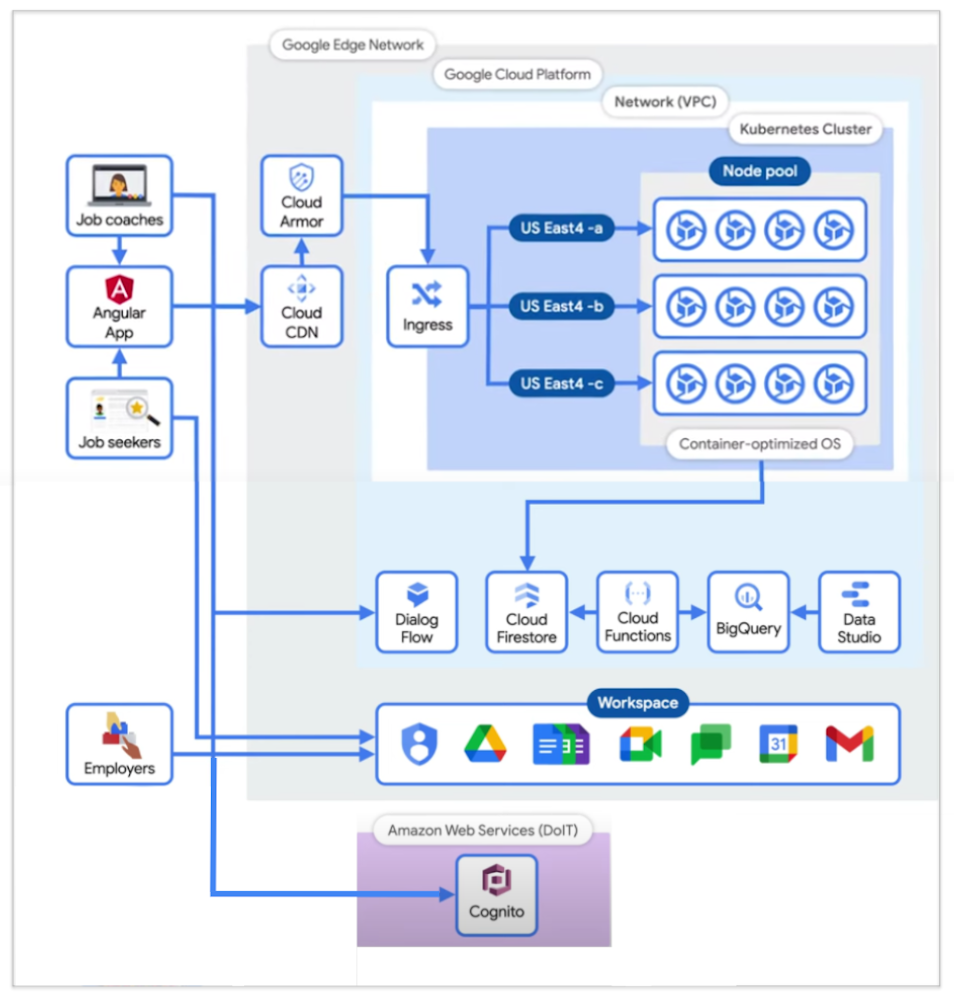
There are 3 main types of users at this time, and that’s job coaches, job seekers, and employers.
- 👩🔧 Job Coaches all have Google IDs in the Google Workspace domain, and therefore authenticate against the Google identity repository.
- 🕵️♂️ Job Seekers are authenticated through a Cognito-based process maintained by the nonprofit I mentioned earlier (RIPL), the Rhode Island infrastructure team, and the Department of Information Technology (DoIT). Cognito was an identity repository setup prior to this project for users interacting with the State, and remained as their form of authentication.
- 🧭 Employers participate directly with Google Meet, and, to an extent, Google Calendar; but not the Angular app. There’s also a focus on building a future dashboard to see how the center has helped employers with applicants.
The specific Google Cloud components used are the following:
- Firestore: realtime Database that keeps data in sync across client apps.
- BigQuery: serverless warehouse for data.
- Data Studio: is used to build filterable dashboards over BigQuery
- Cloud Functions: which serve as triggers to keep scheduling and data workflows in sync.
- Kubernetes cluster: runs & autoscales the server-side code in a single-region deployment, with a minimum of four nodes per zone across three zones of the US East region.
- Cloud Armor: protects applications and websites from attacks, and sets NIST-compliant policies.
- Google’s Content Distribution Network (CDN): content is accessed and cached.
To manage the lifecycle of the infrastructure, a Terraform script is used, which is an open source tool, and is structured into 5 folder environments:
- Admin
- Dev
- QA & UAT
- Networks
- Prod
- Shared Services (for CI/CD pipelines between Dev & Prod).
Adoption outcomes
A universal fear we technical practitioners may have is:
“Will our tool be loved and adopted by our intended audiences?”
Joel mentioned Job Coaches at the time were not used to working from home, and the team was concerned that they would potentially feel overwhelmed with a lot of new technology.
As a rewarding surprise, when Job Coaches were presented the proof of concept, it was received with positivity.
“95% of Job Coaches rated the VCC as a valuable solution and 87% reported to find it very or extremely effective.”
This alignment was thanks to designing the tool with the users in mind, and performing user research since the beginning of the journey, which helped address their day to day needs.
Additional innovation for the future
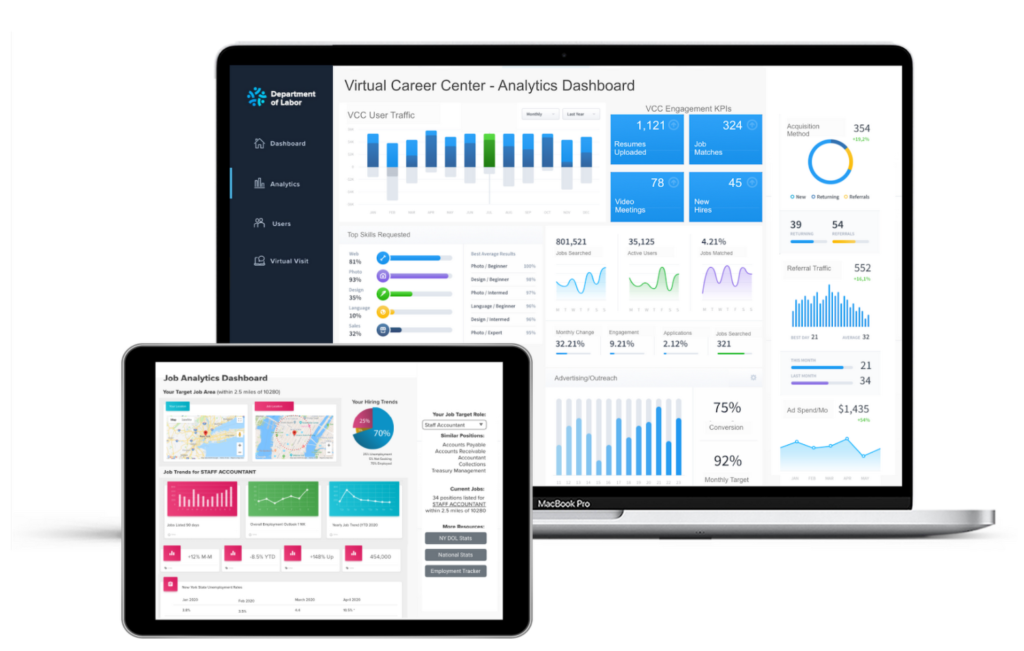
After creating a centralized hub and moving operations to a digital format, many more benefits also arise. For example, there can now be an integrated data analytics view which enables meaningful dashboards that can be customized for different audiences such as job applicants, coaches, program stakeholders, or state agencies.
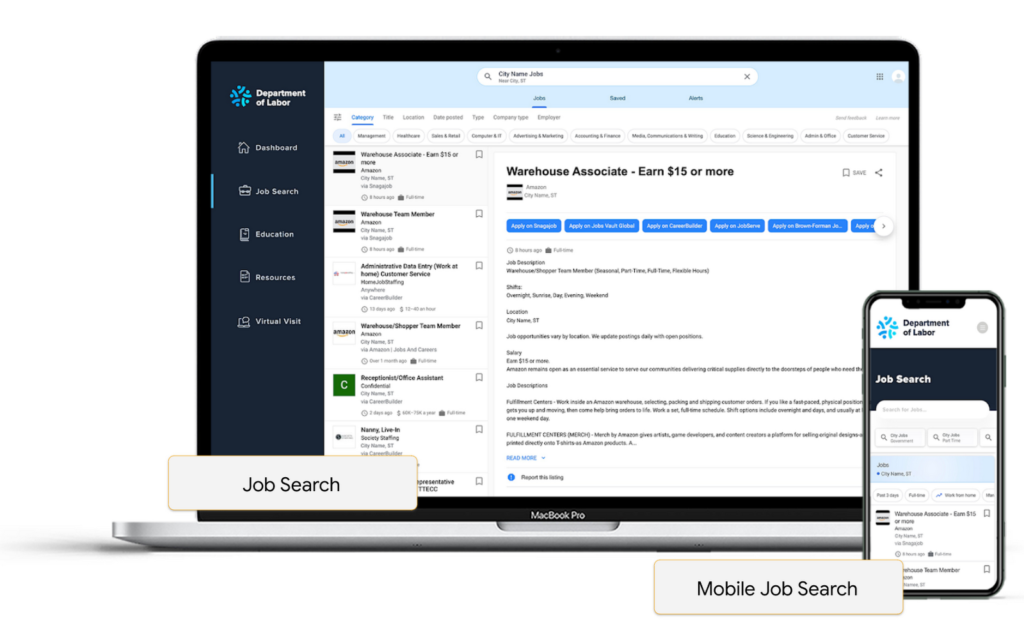
There can be improved job searchability by integrating machine learning, helping with resume building and parsing that take keywords out of a resume and match them to a variety of relevant job clusters, rather than just performing raw keyword searches.
Embedding chat bots can also help reduce the load of call centers in states, as they utilize natural language processing as well to help guide job seekers with prompt answers.

Conclusion
The State of Rhode Island’s Virtual Career Center is an amazing success story. By having worked with an experienced partner to move their operations to a digital format, they were able to respond to their citizen’s needs in a time where in-person operations were not possible. They also unlocked opportunities such as better matching and reporting along that journey.
For any organization whether they are in the public sector, university, private sector, etc; anyone can take advantage of this platform and customize it to their needs as Maven Wave shared that they offer a menu of options, where you can pick and choose functionality based on your requirements, IT resources, and budget.
Securing apps using Anthos Service Mesh

3983
Of your peers have already read this article.
1:30 Minutes
The most insightful time you'll spend today!
Hi there! I’m David Challoner from Access Site Reliability Engineering (SRE), here with Anthony Bushong from Developer Relations to talk about how Corp Eng is adopting Anthos Service Mesh internally at Google.
Corp Eng is Google’s take on “Enterprise IT”. A big part of the Corp Eng mission is running the first and third party software that powers internal business processes – from legal and finance to floor planning and even the app hosting our cafe menus – all with the same security or production standards as any of Google’s first party applications.
Googlers need to access these applications, which sometimes then need to access other applications or other Google Cloud services. This traffic can cross different trust boundaries which can trigger different policies.
Access SRE runs the systems that mediate this access, and we implemented Anthos Service Mesh as part of our solution to secure the way Googlers access these applications.
But why?
You can probably tell, but the applications Corp Eng is responsible for have disparate requirements. This often means that certain applications are tied to disparate infrastructure due to legal, business or technical reasons – which can be challenging when those infrastructures work and operate differently.
Enter Anthos. Google Cloud built Anthos to provide a consistent platform interface unifying the experience of working with apps on these varying underlying infrastructures, with the Kubernetes API at its foundation.
So when searching for the right tool to build a common authorization framework to mediate access to CorpEng services, we turned to Anthos – specifically Anthos Service Mesh, powered by the open-source project, Istio. Whether these services were deployed in Google Cloud, in Corp Eng data centers, or at the edge onsite at actual Google campuses, Anthos Service Mesh delivered a consistent means for us to program secure connectivity.
To frame the impact ASM had on our organization, it’s helpful to introduce the roles of the folks who manage and use it:
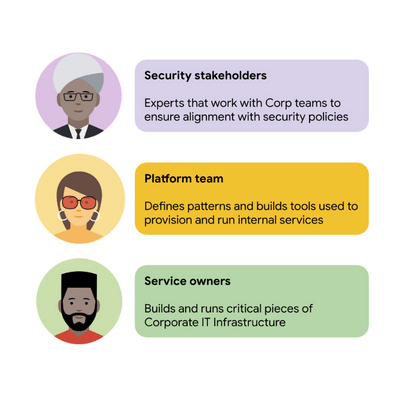
For security stakeholders, ASM provides an extensible policy enforcement point running next to each application capable of provisioning a certificate based on the identity of the workload and enforcing mandatory fine-grained application-aware access controls.
For platform operators, ASM is delivered as a managed product, which reduces operational overhead by providing out-of-the-box release channels, maintenance windows, and a published Service Level Objective(SLO).
For service owners, ASM enables the decoupling of their applications from networking concerns, while also providing features like rate limiting, load shedding, request tracing, monitoring, and more. Features like these were typically only available for applications that ran on Borg, Google’s first-party cluster manager that ultimately inspired the creation of Kubernetes.
In sum, we were able to secure access to a plethora of different services with minimal operational overhead, all while providing service owners granular traffic control.
Let’s see what this looks like in practice!
The architecture
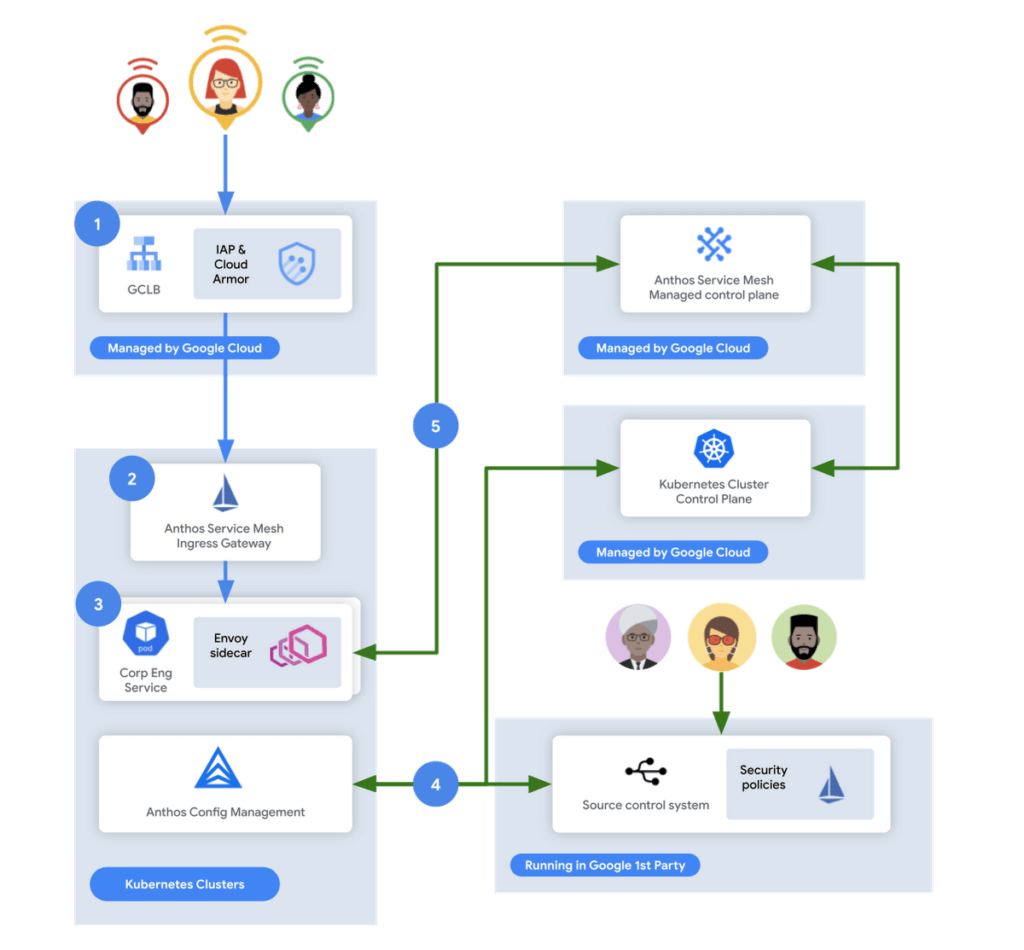
In this flow, user access first reaches the Google Cloud Global Load Balancer [1], configured with Identity Aware Proxy (IAP) and Cloud Armor. IAP is the publicly available implementation of Google’s internal philosophy of BeyondCorp, providing an authentication layer that works from untrusted networks without the need for a VPN.
Once a user is authenticated, their request then flows to the Ingress Gateway provided by Anthos Service Mesh [2]. This provides additional checks that traffic flows to services only when the request has come through IAP, while also enforcing mutual TLS (mTLS) between the Anthos Service Mesh Gateway to the Corp services owned by various teams.
Finally, additional policies are enforced by the sidecar running in every single service Pod [3]. Policies are pulled from source control using Anthos Config Management[4], and are propagated to all sidecars by the managed control plane provided by Anthos Service Mesh[5].
Managing the mesh
If you’re not familiar with how Istio works, it follows the pattern of a control plane and a data plane. We talked a little bit about the data plane – it is made up of the sidecar containers running alongside all of our service Pods. The control plane, however, is what’s responsible for updating these sidecars with the policies we want to enforce:
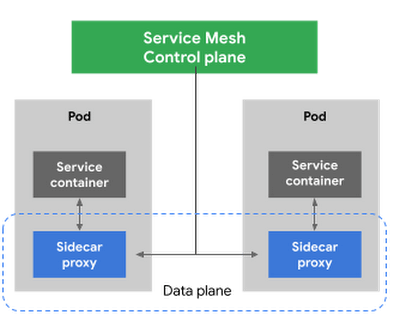
Figure 3 – High-level architecture for Istio
Thus, it is critical for us to ensure that the control plane is healthy. This is where Anthos Service Mesh gives our platform owners a huge advantage with its support for a fully-managed control plane. To provision cloud resources, like many other companies, our organization uses Terraform, the popular open-source infrastructure as code project. This gave us a declarative and familiar means for provisioning the Anthos Service Mesh control plane.
First, you enable the managed control plane feature for GKE by creating the google_gke_hub_feature resource below using Terraform.
resource "google_gke_hub_feature" "feature_asm" {
name = "servicemesh"
location = "global"
provider = google-beta
}
Keep in mind that at publication time, this is only available via the google-bet provider in Terraform.
Once created, we then provision a ControlPlaneRevision custom resource in a GKE cluster to spin up a managed control plane for ASM in that cluster:
apiVersion: mesh.cloud.google.com/v1alpha1
kind: ControlPlaneRevision
metadata:

name: asm-managed

namespace: istio-system
spec:

type: managed_service

channel: regular
Using this custom resource, we are able to set the release channel for the ASM managed control plane. This allows for our platform team to define the pace of upgrades in accordance with our team’s needs.
In addition to managing the control plane, ASM also provides management functionality around the data plane to ensure each sidecar Envoy is kept up to date with the latest security updates and is compatible with the control plane – one less thing for service operators to worry about. It does this using Kubernetes Mutating Admission Webhooks and Namespace labels to modify our Pod workload definitions to inject the appropriate sidecar proxy version.
Syncing mandatory access policies
With the core Anthos Service Mesh components in place, our security practitioners can define consistent, mandatory security policies for every single GKE cluster, using Istio APIs.
For example, one policy is enforcing strict mTLS between Pods using automatically provisioned workload identity certificates. Earlier, we talked about how this is enforced between the Istio Gateway; that same policy enforces mTLS between all Pods in our cluster.

Another policy we implement is denying all egress traffic by default, requiring service teams to explicitly declare their outbound dependencies. The following is an example of using an Istio Service Entry to allow granular access to a specific external service – in this case, Google. This helps prevent unintended access to external services.
apiVersion: networking.istio.io/v1alpha3

kind: ServiceEntry
metadata:

name: google
spec:

hosts:
  - www.google.com

ports:
  - number: 443

name: https

protocol: HTTPS

resolution: DNS

location: MESH_EXTERNAL
EOF
These policies are automatically synced to all service mesh namespaces in each cluster using Anthos Config Management. By using our internal source control system as a source of truth, Anthos Config Management can sync and reconcile policies across all of our GKE clusters, ensuring that these policies are in place for every single one of our services. You can find more details about our implementation of Anthos Config Management here.
With this in place, our team plans on eventually migrating away from security automation that operates solely based on explicit IP, port and protocol policies.
Integration with Identity-aware Proxy
The publicly available version of the BeyondCorp proxy used by CorpEng is called Identity-aware Proxy (IAP), which offers an integration with Anthos Service Mesh. IAP allows you to authenticate users trying to access your services and apply Context-Aware-Access policies. This integration comes with two main benefits:
- Ensuring that user traffic to services in the service mesh only come through Identity-aware Proxy
- Enforcing Context-aware access (CAA) trust levels for devices, defined by multiple device signals we collect
Identity-aware Proxy allows us to capture this information in a Request Context Token (RCToken), which is a JSON Web Token (JWT) created by Identity-aware Proxy that can be verified by ASM. IAP inserts this JWT into the Ingress-Authorization header. Using Istio Authorization Policies similar to the following policy, any requests without this JWT are denied:
apiVersion: security.istio.io/v1beta1
kind: AuthorizationPolicy
metadata:
name: iap-gateway-require-jwt
namespace: istio-system
spec:
selector:
matchLabels:
app: istio-iap-ingressgateway
action: DENY
rules:
- from:
- source:
notRequestPrincipals: ["*"]
Here is an example policy that requires a fullyTrustedDevice access level – this might be a device in your organization that is known to be corporate-owned, fully-updated, and running an IT-approved configuration :
apiVersion: security.istio.io/v1beta1
kind: AuthorizationPolicy
metadata:
  name: require-fully-trusted-device
  namespace: fooService
spec:
  selector:
    matchLabels:
      app: fooService
  action: ALLOW
  rules:
  - from:
    - source:
       requestPrincipals: ["*"]
    when:
    - key: request.auth.claims[google.access_levels]
      values: ["accessPolicies/$orgId/accessLevels/fullyTrustedDevice"]
This allows our security team to not only secure service to service communications, or outbound calls from services, but also specifically require incoming requests come from trusted devices and authenticated users using a trusted device.
Enabling service teams
As an SRE, one of our priorities is ensuring Service-level indicators (SLIs), SLOs, and Service-level agreements (SLAs) exist for services. Anthos Service Mesh helps us empower service owners to do this for their services, as it exposes horizontal request metrics like latency and availability to all services in the mesh.
Before Anthos Service Mesh, each application had to export these separately (if at all). With ASM service owners can easily define their Service’s SLOs in the cloud console or via terraform using these horizontally exported metrics. This then allows us to integrate SLOs into our higher-level service definitions so we can enable SLO monitoring and alerting by default. You can see the SRE book for more details on SLOs and Error budgets.
The takeaway
ASM is a powerful tool that enterprises can use to modernize their IT infrastructure. It provides:
- A shared environment-agnostic enforcement point to manage security policy
- A unified way to provision identities, describe application dependencies
This also enables previously unheard of operational capabilities such as distributed tracing or incremental canary rollouts – which were difficult to find in the typical enterprise application landscape.
Because it can be incrementally adopted and composed with existing authorization systems to close gaps – barriers to adoption are low and we recommend you start evaluating it today!
SoFi Stadium Personalizes Fan Experiences with Game-changing App Built on Google Cloud and Deloitte

3203
Of your peers have already read this article.
2:00 Minutes
The most insightful time you'll spend today!
Editor’s note: Engineers from SoFi Stadium, Google Cloud, and Deloitte built a fan-ready Personal Concierge app that uses advanced analytics to tailor game-day experiences for every visitor. SoFi’s 10-year partnership with Google Cloud not only pumps up the fans. Advanced analytics also enable stadium employees to securely store, analyze, and action analytics data, and seamlessly collaborate through tools and services included in Google Cloud Workspace.
SoFi Stadium, an industry-leading, outdoor-indoor events facility and home of the Los Angeles Rams and Los Angeles Chargers, is the centerpiece of Hollywood Park, a near 300-acre sports and entertainment destination. With the capacity to host up to 100,000 spectators across a range of luxury and premium seating options, the 3.1 million square-foot SoFi Stadium is the largest in the NFL. Completed in September 2020, it has already secured a global reputation—scheduled to host Super Bowl LVI in 2022, the College Football National Championship Game in 2023, and the Opening and Closing Ceremonies of the Olympic Games in 2028. Under the same roof canopy as the stadium is the 2.5-acre American Airlines Plaza and the 6,000-seat performance venue, YouTube Theater.
Through a long-term partnership with Google Cloud, SoFi Stadium is personalizing fan experiences, enabling a more fulfilling, collaborative, and productive work experience for employees, and delivering game-changing technology to the event space.
Personalizing the experience for every fan
Sports fans are known for their fierce loyalty and camaraderie. While they come to game day ready to cheer with fellow fans, each spectator has a different vision for what will make for a memorable event. SoFi Stadium is helping customers choose their game day flow by extending a personalized, streamlined experience to every stadium goer through several new digital innovations powered by Google Cloud.
First there’s the Personal Concierge App. Powered by Google Cloud and built by Deloitte, this personalized navigation and security tool may be the game day MVP that sports fans have always dreamed of. Hours of precious viewing time can be lost navigating a stadium campus for seating, parking, food, access, and amenities. This application enables fans to quickly locate available parking locations, select the ideal transportation for game day through real-time Google Maps routing, and discover SoFi Stadium events all from their mobile device. Event-goers can also receive digital credentials through the app, enabling them to bypass lines and accelerate their access to luxury viewing suites.
The advanced data analytics accrued from multiple sources and processed through Google Cloud products such as Cloud Scheduler, App Engine, Dataflow, BigQuery, Looker, Firebase, and more, enable SoFi Stadium to anticipate spectator tastes. These Google Cloud tools can remember preferences and provide attendees with real-time personal recommendations around the clock.
Performing at the top of their game with Workspace
Advanced data analytics enhance employee experiences, too. Credentialed team members can securely store and analyze data from multiple sources, create operational dashboards with real-time data, track key performance indicators after events, and better forecast attendance, revenue by product, and other important business metrics.
In addition to deploying a number of Google Cloud solutions including Compute Engine, Kubernetes Engine, Cloud CDN, BigQuery, and others to power the Personal Concierge App, SoFi Stadium is empowering its employees by fully migrating to Google Cloud’s Workspace. Workspace streamlines the stadium’s business operations by fostering fast and seamless access to collaboration and performance tools. Built-in software—including Gmail for business, Docs, Drive, Calendar, and Meet—will help employees work smarter and meet securely from anywhere.
“We couldn’t have picked a better partner to help manage our technology needs,” said Skarpi Hedinsson, Chief Technology Officer, SoFi Stadium and Hollywood Park. “Incorporating Google’s solutions into critical areas of our business ensures we can usher in a new era of innovation in sports and entertainment, raising the bar on what the ultimate fan experience looks like globally.”
Making the big-game even bigger
As Hollywood Park combines the expertise of its team and Google Cloud engineers to power the future of sports and live events, SoFi Stadium prepares to welcome a product of this collaboration with the Infinity Screen by Samsung, the largest video board in sports. With 80 million pixels, weighing 2.2 million pounds, and boasting 120-yards in length, the Infinity Screen by Samsung leverages Google Cloud-based media workflows and optimization technology to power its game-changing screen.
Through its partnership with Google Cloud, SoFi Stadium is actively developing new media streaming and high-speed wireless solutions. In addition, SoFi Stadium has the world’s first 4K/HDR live production facility. These digital innovations are powering a new standard for sports fans and opening a path to redefine what can take game day from good to great.
Learn About Kf: How it Helps Move Existing Cloud Foundry Workloads to Kubernetes

3429
Of your peers have already read this article.
1:30 Minutes
The most insightful time you'll spend today!
While many companies are writing brand-new Kubernetes-based applications, it’s still quite common to find companies who want to migrate existing workloads. A common source platform for these applications is Cloud Foundry. However, getting an existing Cloud Foundry application running on Kubernetes can be non-trivial, especially if you want to avoid making code changes in your applications, or taking on big process changes across teams. That is, if you’re not using Kf to do a lot of that heavy lifting for you.
Kf is a Google Cloud service that allows you to easily move existing Cloud Foundry workloads to Kubernetes with minimal disruption to your existing processes.
Kf features a command line interface (CLI) also named kf, that replaces the existing Cloud Foundry cf command line utility. The kf CLI implements the most commonly used cf functionality, including the ability to manage bindings, services, apps, routes and more.
For example, to deploy an existing application you would simply issue the kf push command.
On the server side Kf is built on several open source technologies. In some cases these technologies are also the Google Cloud implementation. For instance GKE is our managed Kubernetes offering, and provides the platform for managing and running the applications. Routing and ingress is handled by Anthos Service Mesh, Google Cloud’s managed Istio-based service mesh. Finally, Tekton provides on-cluster build functionality for Kf. Developers don’t have to worry about any of those technologies, as Kf abstracts them away.
Kf primitives such as spaces, bindings and services are implemented as custom Kubernetes resources and controllers. The custom resources effectively serve as the Kf API and are used by the kf CLI to interact with the system. The controllers use Kf’s CRDs to orchestrate the other components in the system.
The beauty of this approach is that developers who are familiar with existing workflows can largely replicate those workflows with the kf CLI. On the other hand, platform operators who are more familiar with Kubernetes can use kubectl to interact with the CRDs and controllers.
For instance if you wanted to list the apps running on your Kf cluster you could issue either of the following commands:
kf appskubectl get apps -n space-name
Notice that CF / Kf spaces get mapped one to one to Kubernetes namespaces.
To get a list of all the custom resources you can examine the api-resources in the kf.dev API group.
kubectl api-resources --api-group=kf.devNAME SHORTNAMES APIGROUP NAMESPACED KINDapps kf.dev true Appbuilds kf.dev true Buildclusterservicebrokers kf.dev false ClusterServiceBrokerroutes kf.dev true Routeservicebrokers kf.dev true ServiceBrokerserviceinstancebindings kf.dev true ServiceInstanceBindingserviceinstances kf.dev true ServiceInstancespaces kf.dev false Space
With Kf developers can continue to work with a familiar interface and platform operators can use declarative Kubernetes practices and tooling such as Anthos Config Management to manage the cluster. It’s really the best of both worlds if you’re looking to manage your existing Cloud Foundry applications on Kubernetes.
If you’d like to learn more about Kf check out the video I just released on YouTube. It reviews some of the concepts discussed here, and includes a short demo. If you’d like to get hands on, try the quick start. And, of course, you can always read the documentation.
Shifting Down: A New Way to Cloud for Developers

912
Of your peers have already read this article.
4:30 Minutes
The most insightful time you'll spend today!
Application developers are the backbone of the modern cloud economy. The role of developers is felt in the seen and the unseen, from the smartphone apps we use every day to the network optimization that is powering a sustainable future. Given your importance in transforming so many fundamental aspects of society and industry, you’re facing more pressure than ever to remain innovative in the face of changing markets and industries. With limited time, shrinking budgets, increasingly complex environments, and compounding operational responsibilities, it’s no wonder that one of our most popular developer sessions last year at Next was focused on burnout.
Google remains a consistent advocate and ally of developers, from our ongoing contributions to open source projects like TensorFlow and Kubernetes to our free learning paths and certifications. The Application Developer spotlight session at Next ‘23 will lay out our aspiration to build a new way to cloud for developers. We favor “shifting down” instead of “shifting left,” to give you a cloud experience that is easy, fast, and secure.
An easy way to get started — with a trial at no charge for new users
Whether you’re just starting to create a new application, or laying the groundwork for your burgeoning developer career, navigating a new platform and its services can pose formidable challenges. Key details, like the more suitable Google Cloud service for running a dynamic website or estimating the cost of an application, may seem elusive. Moreover, as you transition from design to execution, it’s crucial to understand functional aspects like which APIs should be enabled or the IAM roles necessary for managing your services.
Today, we’re thrilled to announce the general availability of Jump Start Solutions to streamline your introduction to Google Cloud. These application and infrastructure solutions shift many of the tasks at the initial learning and researching phase down to the platform. Jump Start Solutions adhere to best practice principles and can be launched with a single click. Plus, new Google Cloud customers can take advantage of the $300 credit sign up trial. Whether you’re looking to explore, learn, or find a launching pad for creating production-ready applications, Jump Start Solutions are an easy starting point. Each solution comes with an estimated cost, comprehensive reference architecture, and tutorials.
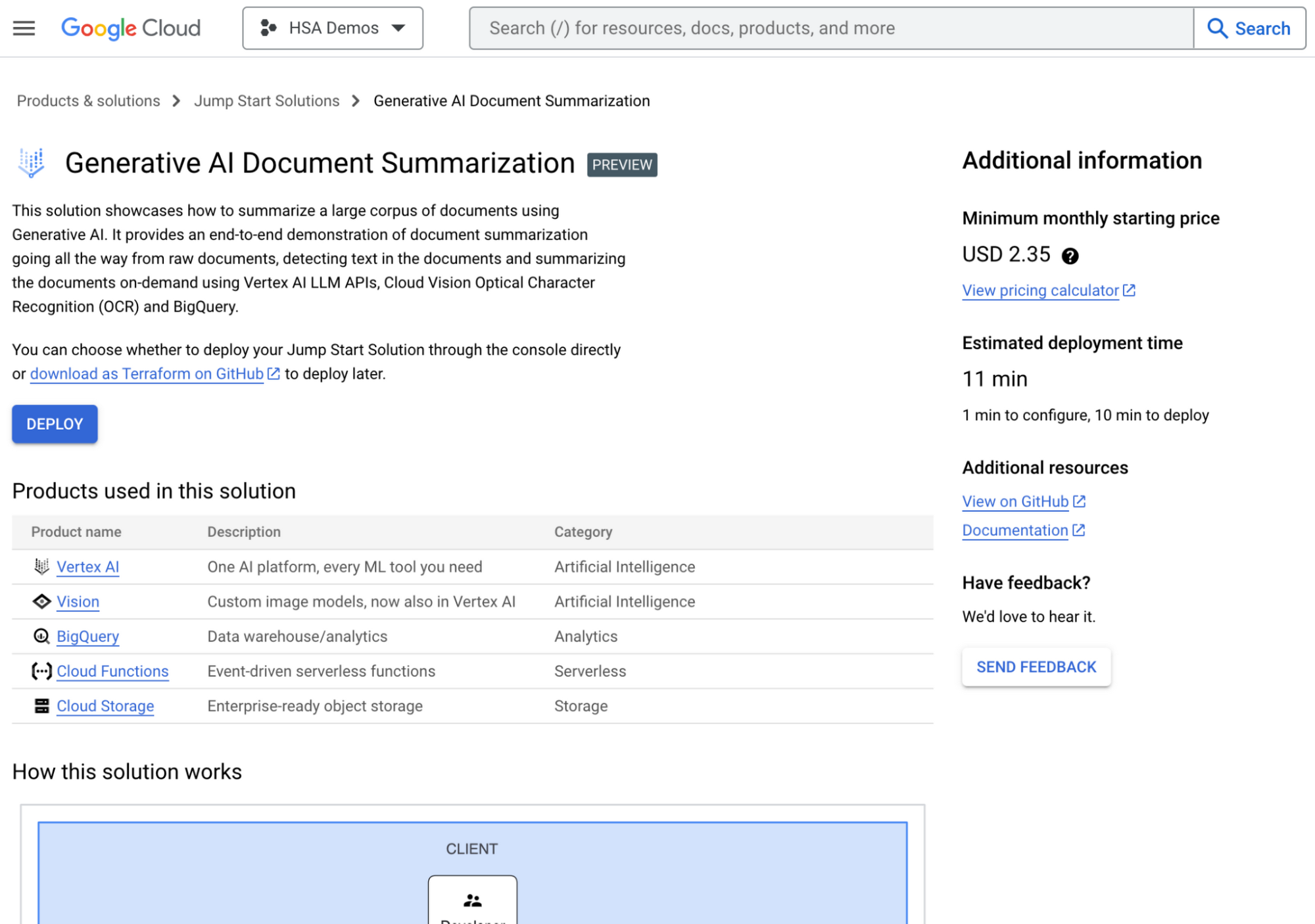
The Generative AI document summarization solution in the Google Cloud Console
Some of our 14 solutions available today include a generative AI-powered document summarization app and an AI-powered image processing app. These are just the beginning of a wide range of solutions which help you lay a secure and stable foundation from which to build, innovate, and grow.
Speeding up your development with AI and automation
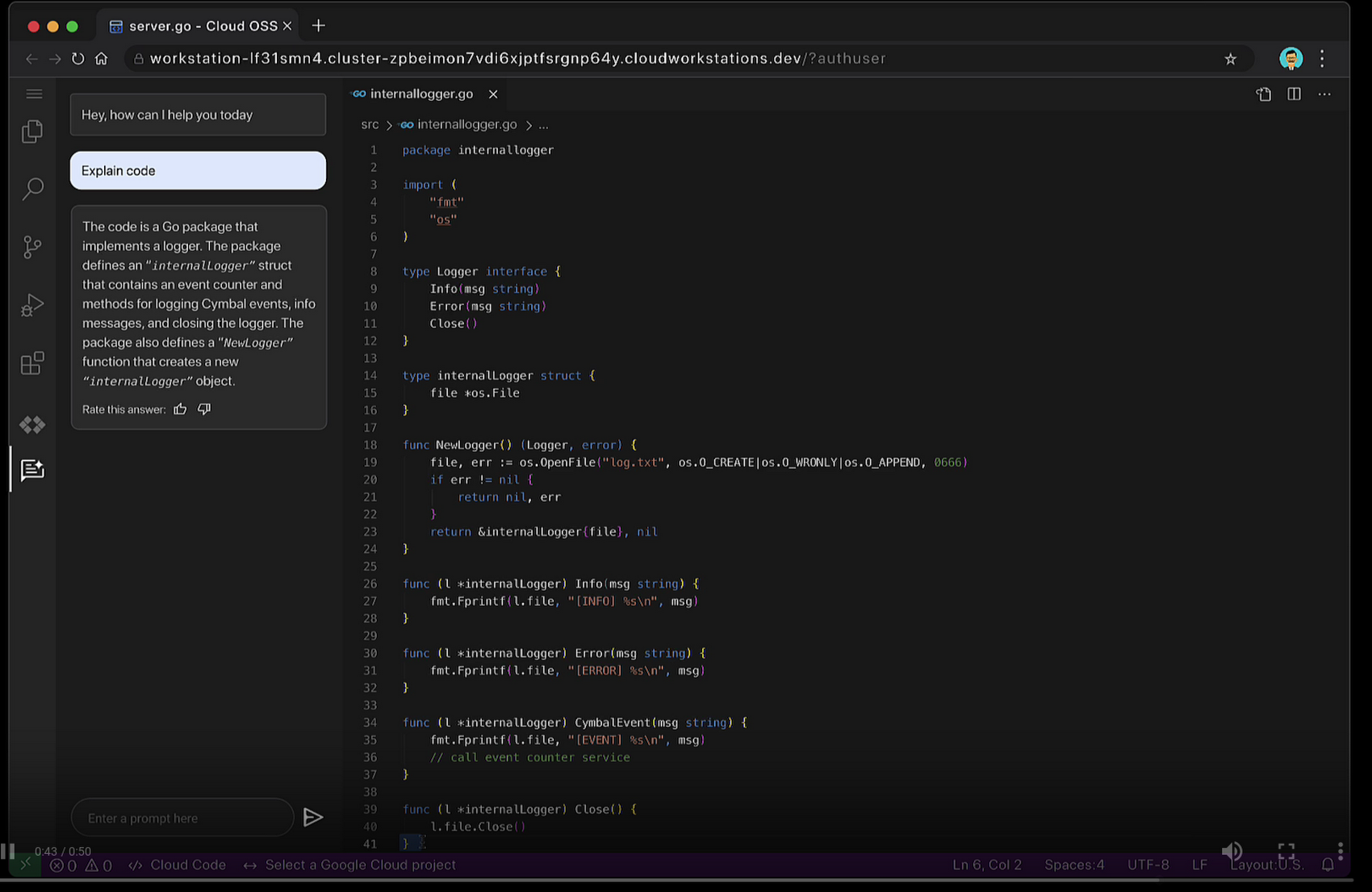
Imagine training a generative AI model using the best practices, documentation, and architecture guidance of Google Cloud and applying that to your coding experience. No longer will you have to leave your IDE to research how to complete a coding task, no more repeating low-value manual tasks, and no more hunting for expert guidance.
Duet AI is now in preview across many services in Google Cloud to help shift the burden of researching, coding, and testing, down to the platform. A few of the ways developers can use Duet AI include:
- Code Completion and Code generation in your IDEs. You get recommendations as you type for full functions and code blocks based on comments, fixes for errors found in the code, and generation of unit tests for code directly in your IDE.
- Chat assistance so you can use natural language to ask questions about code bases and APIs, and retrieve coding best practices. Chat assistance is available across many Google Cloud products, such as in the Cloud Console, Cloud Workstations, BigQuery, Spanner, and Apigee.
Duet AI in Google Cloud supports 20+ programming languages such Go, Java, Javascript, Python, and SQL. Thanks to Cloud Code, you can use Duet AI with many popular IDEs such as VSCode, and JetBrains IDEs like IntelliJ, PyCharm, GoLand, and Webstorm. And, with Duet AI’s source citations, suggestions provided by Duet AI are automatically flagged when directly quoting at length from a source to help you comply with any license requirements.
Enterprise companies like Wayfair who are committed to enhancing developer productivity are already using Duet AI, and are excited about how it makes life easier for their developers.
“At Wayfair, developer productivity is top of mind for us. We are excited to incorporate Duet AI in our efforts to have developers across Wayfair build applications incredibly fast! With Duet AI, we can increase developer productivity, and joy at the same time.” – Mark Quigley, Director of Engineering Enablement, Wayfair
Shifting down interoperability
Modern application development stacks are a mosaic of in-house creativity and essential third-party applications such as CRM, ERP, or payment systems. What is the lifeblood linking these siloed pieces? Integration. Building integrations demands time-consuming development work, niche skills, and deep understanding of third party systems like SAP or Salesforce. These compounding complexities can delay delivery and increase budget costs. We envision a world where platforms shoulder the burden of integration, liberating developers to innovate with their regained time.
Today, we’re pleased to announce the general availability of Application Integration – a no-code integration platform as a service (iPaaS) designed to empower you to weave together your applications. Its intuitive drag-and-drop interface transforms the complex task of integration into a simple point-and-click journey. With 75+ pre-built connectors you can link Google Cloud services like BigQuery, Cloud Storage with third-party applications like Salesforce, MongoDB, Oracle, and SAP.
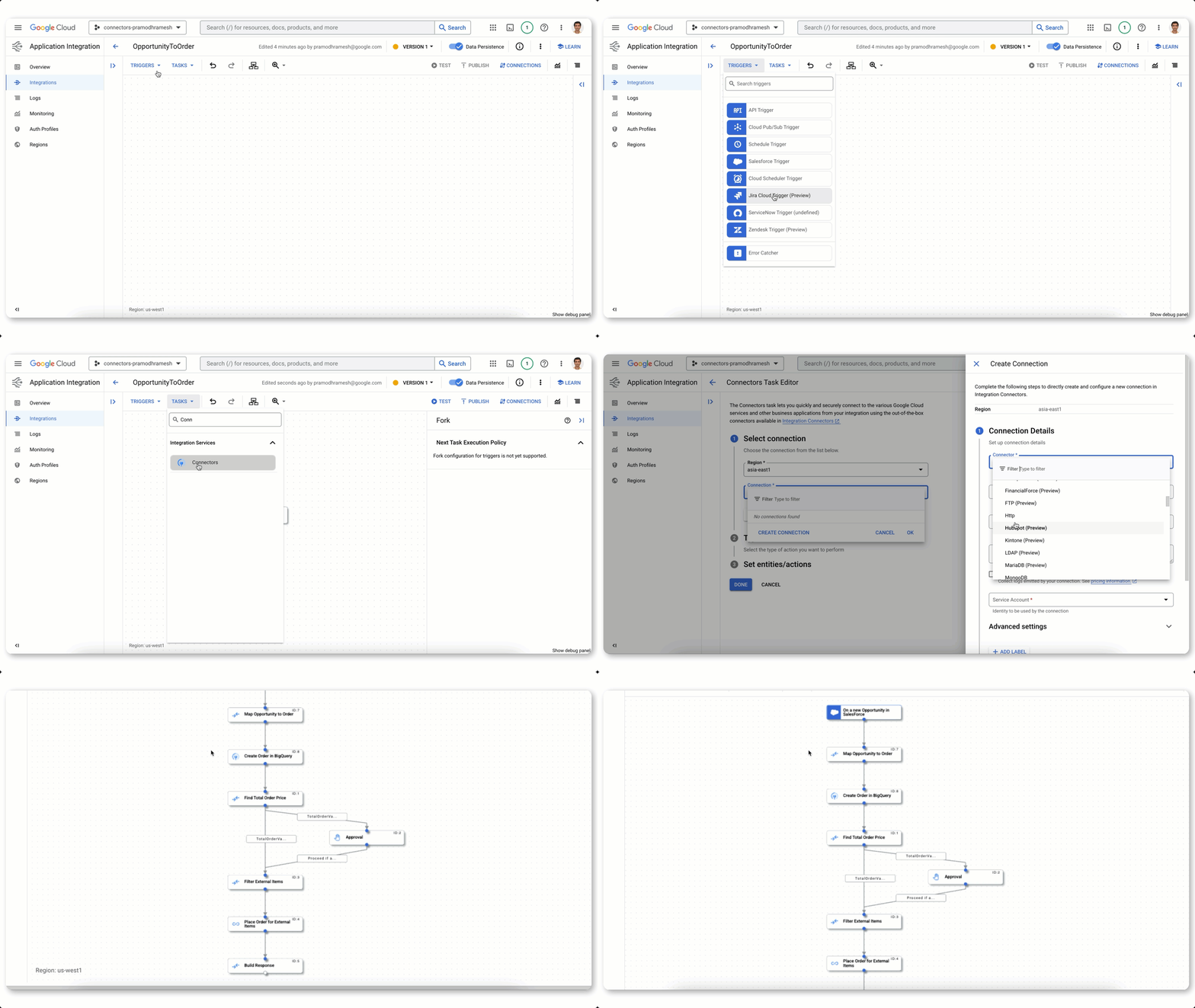
Building an integration flow using connectors, visual designer, and automated triggers
Further, Duet AI in Application Integration can shift even more work away from you and onto the platform. Using natural language, you can generate a recommended list of integration flows. Because Duet AI pulls context from your environment, it generates flows using your existing APIs and assets. To further harden your integration flows, Duet AI automatically generates documentation and test cases in a single click.
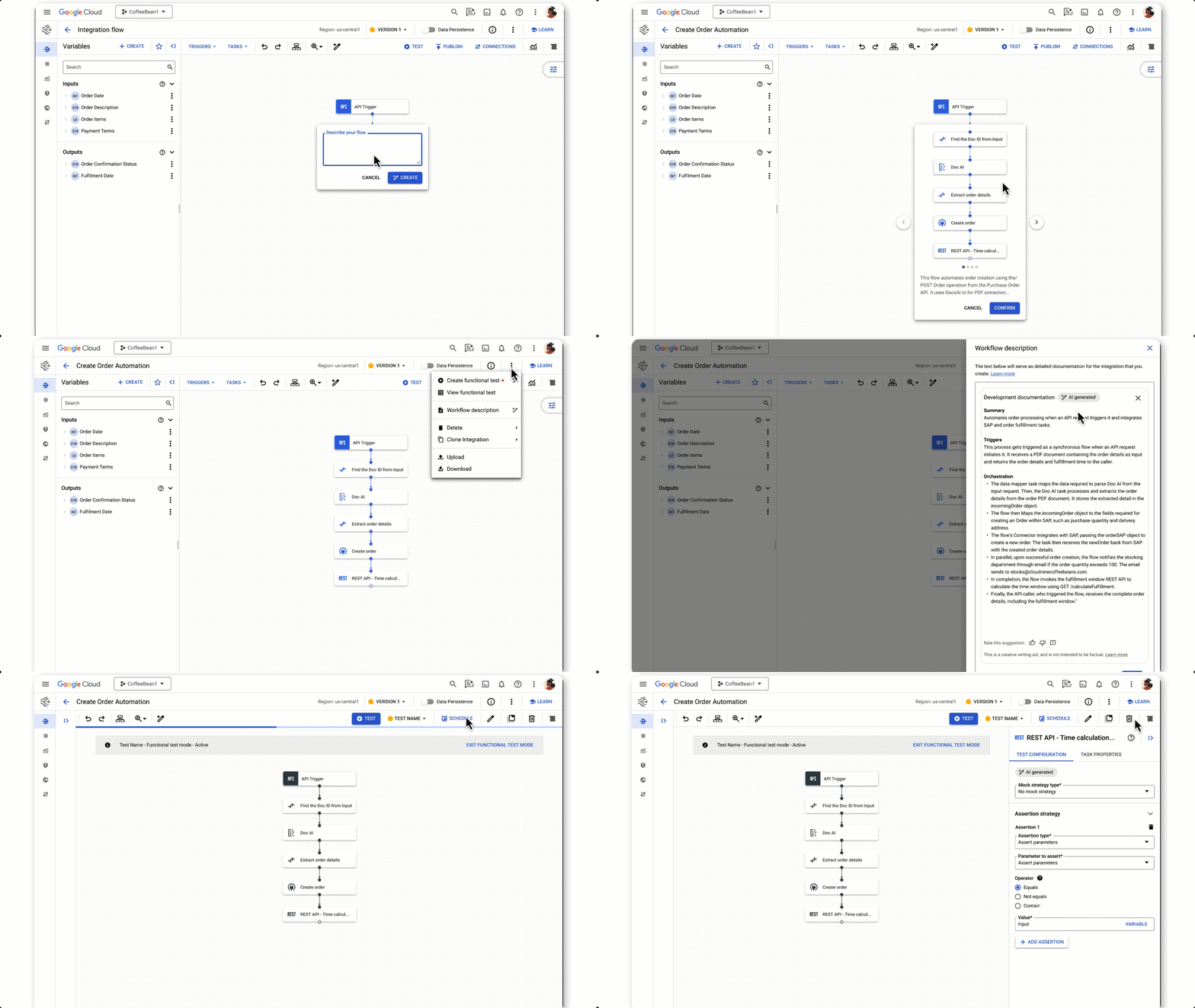
Using Duet AI to build integration flows, documentation, and tests with natural language
Secure, platform-driven application development
With the world’s attention on how AI will shape the future, the challenges created by distributed workforces continue to be felt. Developer teams need help with onboarding, access to consistent tools and libraries, and development environments powerful enough for today’s workloads.
We recently announced the general availability of Cloud Workstations, powerful, secure and customizable development environments available anywhere, using a browser, local IDE, or terminal. Cloud Workstations can shift the burden of provisioning, scaling, managing and securing developer environments down to the platform. And like many other services across Google Cloud, you can use Duet AI in Cloud Workstations to help make you more efficient with everything from writing code to implementing best practices.
While the reality of geographically dispersed and rapidly growing development teams highlights the need to address traditional concerns, such as platform and data security, even greater scrutiny is placed on the software supply chain.
An expanded partnership with GitLab for secure DevOps
Google Cloud continues to grow at a fast pace and that means we are constantly welcoming many new developers to our platform. We know the tools you choose for software development are an important factor in your success. We want to make it easy to use the tools you love. Today we announced that Google Cloud and GitLab are partnering to offer a secure DevOps solution that can shift the work to connect our technologies down to the platform while giving you integrated source management, artifact management, CI/CD, and enhanced security features.
Developers already using Google Cloud gain access to GitLab’s comprehensive AI-powered DevSecOps platform and GitLab customers gain access to Google Cloud’s Secure Software Supply Chain technologies like Supply-chain Levels for Software Artifacts (SLSA), software bill of materials (SBOM), and Binary Authorization policies.
We can help you gain value from Google Cloud faster with deeply integrated partner tooling. That’s exactly what we are doing with our expanded GitLab partnership. Learn more on GitLab’s blog. You can also sign up to stay informed about the latest partnership developments.
Start shifting down with Google Cloud
At the heart of Google Cloud is a simple, yet powerful idea: to empower you to do what you excel at — coding exceptional software. In the fast-paced era of digital transformation, we understand the mounting pressures that developers face, which is why we believe it’s the responsibility of platforms to shoulder the burdens hindering your creative process. We’re helping you by streamlining your onboarding experience, optimizing your coding efficiency, and shifting the weight of security from you to the platform. We’re not alone in this journey; we’re collaborating with partners like Gitlab at our side. So if you’re an application developer, check out Google Cloud. It’s the new way to cloud on the cloud platform that’s designed to make your life easier.
More Relevant Stories for Your Company

How to Decide Whether to Run a Database on Kubernetes
Today, more and more applications are being deployed in containers on Kubernetes—so much so that we’ve heard Kubernetes called the Linux of the cloud. Despite all that growth on the application layer, the data layer hasn’t gotten as much traction with containerization. That’s not surprising, since containerized workloads inherently have

Start-up Paves Way for More Inclusive Clinical Research: Honoring Black Founders of Acclinate with Google Cloud
Editor’s note: February is Black History Month—a time for us to come together to celebrate the diverse set of experiences, perspectives and identities that make up the Black experience. Over the next few weeks, we will highlight Black-led startups and how they use Google Cloud to grow their businesses. Today’s

Cutting Costs and Accelerating Development with API Management
Google Cloud Results Reduced API management costs 34%Develops new features in days versus monthsFixes issues quickly by writing codeManages 15B API calls per month without outages Austin, Texas-based Bazaarvoice switched to Apigee for its API platform because of its competitive pricing and feature set. But another benefit soon became apparent to Bazaarvoice engineers: the

Google Cloud named a Leader in API Management Solutions in The Forrester Wave
The right API strategy is a key element of your digital business success, so choosing the best API management solution is critical - but often challenging. Organizations like yours need to address a wide range of criteria to support an effective digital business strategy, and that requires a robust API
