





4950
Of your peers have already watched this video.
21:10 Minutes
The most insightful time you'll spend today!
Learn Modern App Development Practices to Ship Software Faster
Cloud-native, Kubernetes, Serverless have been the hottest and most widely discussed topics given the velocity and agility benefits.
Learn more about how you can leverage these modern app development practices to ship software faster, while reducing costs and improving security and compliance.
Learn how Google Cloud lets you modernize existing applications at your own pace using these technologies. Regardless of where you are in your app modernization journey, watch this video to learn how to improve the developer experience and deliver software faster.
Three Reasons Why Enterprises Must Think Next-gen Serverless

4922
Of your peers have already read this article.
2:00 Minutes
The most insightful time you'll spend today!
As we reflect on the past year, Heraclitus’ phrase “The only constant in life is change” has never rang more true. With the pandemic, companies had to shift operations, launch new products and adapt to extreme demand patterns, sometimes within a matter of weeks.
To respond to customer needs faster and more efficiently, many companies turned to serverless technology, designing applications with real-time signals and intelligence built in. From apps and sites for healthcare appointments and vaccinations, public-sector employment benefits, contact tracing, retail logistics, curbside delivery, hotel and travel booking—you name it, companies built it with serverless.
Redefining serverless
The world changed, the market changed, our lives changed and we here at Google Cloud also changed, introducing new products to meet our customers’ needs and grow with them.
Serverless technology, in particular, has changed a lot since it was first introduced. Google first launched serverless compute in 2008 with the launch of App Engine, helping customers scale their applications faster and seamlessly. We then added the ability to run Functions as a Service with Cloud Functions, giving customers a simple developer experience with integrated telemetry and observability. In parallel, we also introduced innovations to the container market with Kubernetes. Pretty soon, customers started asking us if we could combine the awesome serverless attributes of auto-scaling and developer experience with the flexibility of containers.
Enter Cloud Run, the next generation of serverless. Serverless is now no longer just about event-driven programming or microservices. It’s also about running complex workloads at scale while still preserving a delightful developer experience. In fact, serverless with Cloud Run is about having a true developer platform with the flexibility to run any language, any library, any binary.
There are three capabilities that make Cloud Run the next-generation of serverless, and not the same ‘serverless’ you find elsewhere:
- A great developer-centric experience
- Versatility: expanding to a broader set of containerized apps
- Built-in DevOps and security
Let’s take a look at the attributes in greater depth.
A great developer experience
Being developer-centric comes from having fully-managed self-operating infrastructure and a great developer experience. We want everyone to be able to develop smart applications and for that we have to make it easy. We also want to be sure we are bringing your technical talent closer to where you generate your business value.
To make things easy, last year we introduced buildpacks, which creates container images directly from source code. No need to learn Docker or containers. Although there are containers underneath, they’re transparent to the developer.
To simplify things further, we also introduced a single “gcloud run deploy” command to build and deploy code to Cloud Run. These types of features are some of the reasons why 98% of Cloud Run users deploy an application on their first try in less than 5 minutes.
In fact, in the past year alone, we added over 25 new features and services to our serverless stack, making development of complex apps easier. One of our main launches was Workflows, which lets you combine Cloud Run with any Google Cloud product or any HTTP-based API service. As a developer, this is very useful when automating complex processes, or integrating GCP’s analytic services across a variety of systems.
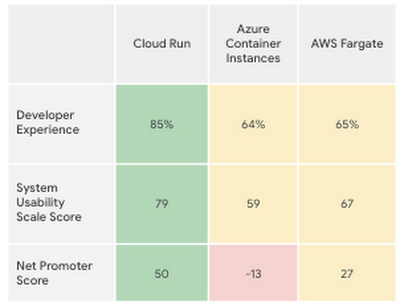
Taken together, all these new features make the Cloud Run developer experience far easier than its competitors’, according to a recent report by User Research International.
Versatility
Next-generation serverless is also about versatility. It supports a wider variety of applications and caters to enterprise requirements. Functions and web apps of course, but also heavyweight applications, and in the fullness of time, also brownfield and third-party containerized apps. This versatility is enabled by the container primitive, which removes restrictions on languages, run times, and hardware.
Being able to run a greater variety of apps on our serverless stack means you can optimize for predictable usage. Today, we announced new spend-based committed use discounts for Cloud Run. Enterprises with stable, steady-state, and predictable usage can now purchase committed use contracts directly in the billing UI. There are no upfront payments, so these discounts are a perfect way to reduce your spend by as much as 17%. RELATED ARTICLEMaximize your Cloud Run investments with new committed use discountsCommitted use discounts in Cloud Run enable predictable costs—and a substantial discount!
Another way we provide versatility is with support for WebSockets and gRPC in Cloud Run. With these new additions, you get the benefits of serverless infrastructure to build responsive, high-performance applications. We also added the use of min instances with Cloud Run. This feature allows you to cut cold-start times and run latency-sensitive applications on Cloud Run! At the same time, you can still scale to zero, or keep a minimum amount of compute available, for example when running brownfield Java applications.
Built-in DevOps
Serverless doesn’t just make it faster for developers to set up their apps—it also helps once the application is up and running, taking a big management load off of operations teams. Notably, serverless systems take care of “scaling” an application up or down. That means that if your application suddenly starts fielding a lot of traffic, the serverless platform automatically spins up more resources to handle the load. No more dreaded timeouts, wheels or hourglasses—or work for your operations team. Likewise, as soon as demand goes down, the platform takes care of decommissioning resources, i.e., scaling down, so that you’re not paying for resources that you no longer need. Want to run your service globally with low latency, without an operations team, and zero stranded costs? Cloud Run takes care of global load balancing and autoscaling to zero for you in every Google Cloud region.
Further, features like support for gradual rollouts and rollbacks allow developers to experiment and test ideas quickly, as well as sophisticated traffic management in Cloud Run. Likewise, Cloud Run provides access to distributed tracing with no setup or configuration, allowing developers to find performance bottlenecks in production.
Next up: serverless security
As part of DevOps best practices, we build in security for your serverless applications at every layer: deployment time, runtime and networking. For example, built-in vulnerability scanning ensures you only deploy artifacts you trust.
Today, we are announcing Cloud Run support for Google Secret Manager and customer-managed encryption keys (CMEK), making it easy to protect data at rest and store sensitive data. We’re also integrating Cloud Run with Binary Authorization, which lets you enforce specific policies to make sure only verified images make it to production. And finally, we added a new integration with Identity-Aware Proxy, support for VPC-SC, and egress controls that you can use to enforce a security perimeter, limiting both who can access specific services and what resources can be accessed when these services run in production. You can read more about these security enhancements here. RELATED ARTICLE4 new features to secure your Cloud Run servicesWe’re improving the security of your Cloud Run environment with things like support for Secret Manager and Binary Authorization.
In summary, the next generation of serverless combines the best of serverless with containers to run a broad spectrum of apps, with no language, networking or regional restrictions. The next generation of serverless will help developers build the modern applications of tomorrow—applications that adapt easily to change, scale as needed, respond to the needs of their customers faster and more efficiently, all while giving developers the best developer experience. Learn more by attending The Power of Serverless, a two-hour virtual event where we’ll lay out our vision for serverless compute, and where serverless subject matter experts will present on in-depth serverless development topics. Hope to see you there!
Want to learn even more about serverless and cloud-native application development? Check out the upcoming Modern App Dev & Delivery workshop, and our Ask the Experts roundtable.
Managed containers: An enterprise standard at Colgate-Palmolive
932
Of your peers have already read this article.
3:30 Minutes
The most insightful time you'll spend today!
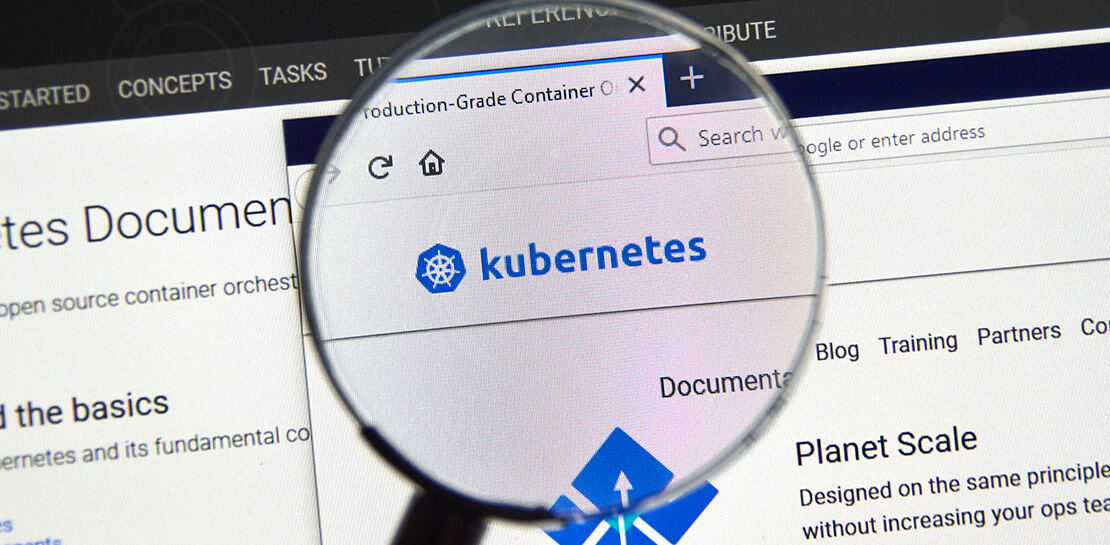
Kubernetes is an increasingly key part of the application deployment strategies at large organizations, and one of the most recommended options for the teams we work with. An idea brought to life at Google, organizations throughout the world use containers and Kubernetes on-premises, in Google Cloud, or in a multi-cloud scenario, and it has emerged as a leading application deployment platform. And because it’s open source, anyone can pop the hood, so to speak, to see how each component of it works, creating a trusted, verifiable framework that users can rely on.
Customers begin their Kubernetes and containerization journeys using various offerings in our product portfolio. Some, like Colgate, started their modernization journey with Kubernetes. Colgate is an $18B global consumer products company with ~34,000 diverse and dedicated people serving over 200 countries and territories. Through science-led innovation, they drive growth and reimagine a healthier future for all people, their pets, and our planet.
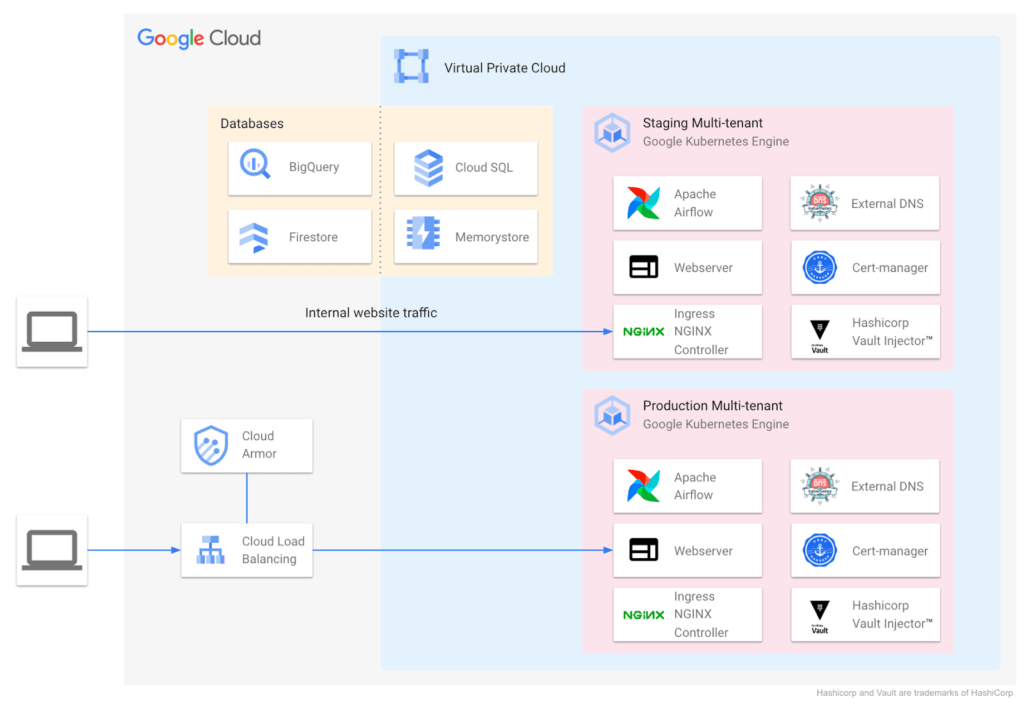
During ideation, they talked through various considerations: What technology strengths does their organization have? What skills do their teams need? What will this initiative look like a decade from now? They implemented the following Kubernetes-focused architecture:
Supporting a variety of use cases and teams
Google Cloud also helped Colgate break new ground over the years, especially in the areas of cloud-native networking, security, monitoring, pub/sub, managed containerization, and multi-tenant environments.
Over time Colgate began to leverage Google’s managed container portfolio, which includes Cloud Run. Cloud Run lets you run containers on top of a serverless platform, unlocking workload possibilities for public websites, private services, APIs and batch jobs and eliminating a lot of the time spent on infrastructure management. Cloud Run also requires no prior knowledge of Kubernetes or containers.
Simplified enterprise-level management
Many teams have found that they prefer the serverless, hands-off approach that Cloud Run provides, and Colgate now evaluates Google Cloud’s serverless solutions alongside GKE for any applications destined for the cloud. At the same time, Cloud Run lets them continue to leverage their investment in workloads based on the Open Container Initiative.
For example, Cloud Run is designed for Kubernetes compatibility with consistent management capabilities such as the ability to manage resources using kubectl via the config controller, and the ability to browse logs and metrics from both platforms in Cloud Logging and Monitoring. Cloud Run and GKE data planes are also interoperable, allowing Cloud Run and GKE services to be exposed behind a VPC behind private IPs using an internal load balancer. Cloud Run as an option has contributed to faster innovation, allowing Colgate to bring smiles to many more faces globally.
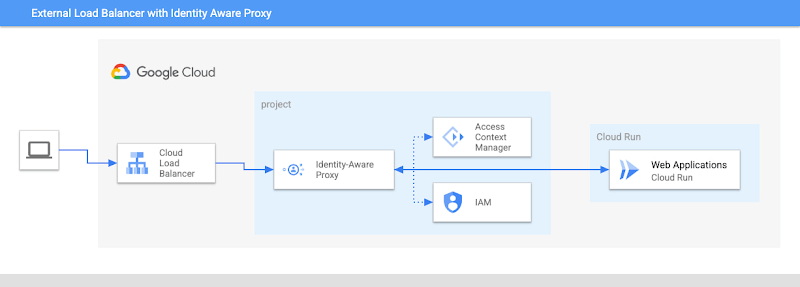
Google’s managed container offerings provide a composable and comprehensive set of solutions for customers’ applications. At Colgate, container-based managed services are used across the stack: on the front-end, where they use Identity-Aware Proxy to manage authentication and External Load Balancers to handle incoming traffic with high availability and low latency; at the application layer, where they can choose from Cloud Functions, Cloud Run, or GKE, depending on the level of control they need over the application; and at the internal load balancing level where NGINX® controllers serve internal applications. Together, these managed services ensure that Colgate has the flexibility to choose the right toolchain and maximize their goals for each use case.
Colgate wanted to build internal applications on Cloud Run in a way that complied with their organization’s policies while maximizing developer productivity. They were able to use new features like the Cloud Run Identity Aware Proxy GA to build a secure, serverless deployment for their applications.
A great partnership with Google Cloud
Colgate and Google Cloud have enjoyed a deep partnership for many years, engaging across many technologies, teams, and design patterns.
They’ve engaged with Product and Engineering across compute, networking, Kubernetes, and serverless as they brought this new way of thinking to their users.
For Colgate and many of our customers looking to address the needs of the modern user, Google’s managed container offerings are a breath of fresh air. Its reliability, scalability, and control offer the flexibility to build applications that meet the demands of both internal and external consumers. In addition, the variety of container offerings available on Google Cloud — GKE and Cloud Run — allow customers to make app deployment decisions based on the amount of Day 2 operations the users are willing to take on. Platform administrators appreciate the reduced management effort, users enjoy reduced downtime, and developers can simply deploy.
Google Cloud contributors: Rex Orioko, Rachel Tsao
Colgate-Palmolive contributors: Matthew Tattoli, Nicholas Farley, and David Wiser
Harnessing the Power of AI with Google Cloud: What Every IT Pro Needs to Know

962
Of your peers have already read this article.
4:30 Minutes
The most insightful time you'll spend today!
As an IT architect or IT professional, you are essential to the success of your organization, responsible for designing, building, and maintaining the IT systems that your businesses and governments rely on. As if that wasn’t enough, you’ve also got to constantly learn and adapt to keep up with the demand of an ever-changing IT landscape — especially when technologies like generative AI suddenly emerge and become a crucial part of your business. Did you know that 77% of companies are using or plan to use AI in the future? And that’s growing year over year. Then there are the constant firedrills, a contributing factor in 40% of IT professionals being at risk of burnout. So, the fundamental question you’re asking yourself is: how can I do my job successfully, but with less toil and stress?
Well, we come with good news! First, Google Cloud has a plethora of ways to help you evolve your IT landscape quickly, easily, and effectively. And second, our upcoming event, Google Cloud Next ‘23 from August 29th to 31st, is exactly what you need to learn more about capitalizing on those opportunities. But if you’re still on the fence about going, let’s power through five scenarios that might be on your plate right now, and how Next ‘23 can help you
#1 — Architect infrastructure for AI workloads
Chances are good that you’ve been asked to spin up new resources to run emerging AI-based applications on. At Next ‘23, we’ll show you how you can innovate, scale and optimize workloads quickly, safely, and cost effectively with purpose-built infrastructure that has AI efficiencies baked-in. Google is an AI-first company, so our AI-optimized infrastructure is built to deliver the global scale and performance demanded by our own products such as YouTube, Gmail, Google Maps, Google Play, and Android, all of which serve billions of users. It’s also designed for intensive workloads like training and serving large language models like PaLM 2, the basis of generative AI features and tools Bard and the PaLM API.
Google’s deep experience in AI and cloud computing means that Google Cloud is uniquely positioned to present one of the strongest AI infrastructure offerings on the market. Here’s a few ways you can learn about our AI infrastructure during Next ‘23:
- Watch our exciting spotlight session “What’s next for architects and IT professionals,” where our GMs will explore what’s coming for infrastructure and AI/ML.
- Attend our “Build your organization’s future on Google AI and machine learning infrastructure” breakout session, or check out dozens of others on AI/ML.
- Visit our AI Innovation pavilion within our Demo Showcase.
- Get hands on (literally!) with some of our AI infrastructure at our Hardware-verse.
- Upgrade your AI/ML skillsets with our live training workshops at the Innovators Hive.
#2 — Build and run modern container-based applications quickly and securely
Your org has no doubt been using containers and Kubernetes for years, but are they Google Cloud containers and Kubernetes? Google Cloud provides one of the best places to run modern containerized workloads, packaging more than a decade’s worth of experience launching several billion containers per week into our offerings, so that developers and businesses of many sizes can tap the latest in container innovation.
IT pros who are building modern, container-based applications often choose Google Cloud because of its managed services and range of database options, so developers can quickly build applications securely and at scale. For these types of use cases, here’s where you should spend some time during Next ‘23:
- Watch our GM Spotlight session “What’s next for IT operations,” which will dive deep into everything from containers to AI.
- Learn how legendary gaming company CAPCOM is running Street Fighter 6 on Google Cloud in this breakout session “The future of modern enterprise applications with Google Kubernetes Engine,” and browse all our other great container sessions.
- Come and mingle with your friends and peers in our Innovators Hive Community Hub.
- Watch our Innovator Hive Lightning Talk “How to run ML workloads in GKE with Cloud TPU and GPU.”
- Visit our Containers area at the Demo Showcase.
#3 — Boost traditional enterprise applications with high reliability, scale, and price-performance
Cloud-native workloads are great and all, but traditional enterprise workloads such as ERP, databases, web apps, and mainframes continue to be the lifeblood of the organization. These workloads will likely not disappear. They are evolving into more modern versions of themselves — often with major opportunities for modernization using data analytics and AI. Now more than ever, CIOs have to ensure these workloads are healthy and thriving.
Google Cloud ensures that our platform design and choices are centered on real-world workloads like SAP and VMware. We simplify the migration and modernization decision-making process so customers can get to the cloud confidently with an intuitive set of options and prescriptive solutions that deliver better reliability, security, scale, performance, and cost. At Next ‘23, there are a ton of ways to learn more about solving these challenges:
- No matter what you’re looking to deploy or migrate, we’ve got a breakout session for you. For starters, check out “How Sabre migrated their apps and data centers to Google Cloud with speed and ease,” “Accelerate innovation with SAP on Google Cloud,” or any of these others.
- Explore how our customer ADT successfully migrated their VMware estate to Google Cloud by visiting their interactive story in our Demo Showcase.
- Click through Migration Center, our unified service for end-to-end migration and modernization, as well as other demos at our Architect’s Corner of Innovators Hive.
#4 – Run on high performance, distributed infrastructure
Google Cloud’s infrastructure isn’t limited to what we run in our data centers. If your business or government needs infrastructure designed for sovereignty, scale, security, and high-intensity compute workloads, we’ve got exactly what you need:
- For governments and highly regulated businesses, we have unique offerings and services including Google Distributed Cloud Hosted and Google Cloud Sovereign Solutions for organizations with specific sovereignty and security needs.
- For Telecommunications, we have purpose-built telecom offerings to help Communication Service Providers (CSPs) digitally transform their networks with hybrid cloud principles and identify new revenue opportunities. In addition, we have Google Distributed Cloud Edge which provides an open, Kubernetes-based offering tuned for telecom network workloads.
- Telecoms should also be sure to check out “How Google Cloud helps shape and transform Telecom Network deployment and monetization models” and live on the edge at the Demo Showcase.
- And for Distributed Cloud, make sure you attend “Running AI at the edge to deliver modern customer experiences” and “Mind the air gap: How cloud is addressing today’s sovereignty needs”, or visit our area at the Demo Showcase.
#5 — Save money and help meet sustainability ambitions
Everyone knows that AI can help you do more, faster, but did you know that our AI-assisted recommendations and cost optimization tools can help you save money and to plan for strong financial resiliency? Take control of your cloud spending and optimize costs through APIs, Cloud Scheduler, and with Committed Use Discounts (CUDs). Complementary to these cost optimization capabilities, we’ve also built a collection of tools to help you accurately report on the carbon emissions associated with your Google Cloud usage and take action to reduce your carbon footprint and costs. Looking to learn more at Next ‘23, here’s what you need to explore:
- For sustainability, register for our “GreenOps: Drive carbon and cost efficiencies with a new wave of developer tools” breakout session.
- And for cost savings, check out “Creating a FinOps culture change through cloud automation” and “Unlock cloud value for everyone with Google Cloud FinOps tools”, and also visit our cost optimization area at the Demo Showcase.
So, what do you think: are any of those challenges on your plate right now? If they are, we hope you’ll join us at Next ‘23 starting on August 29th, so that we can show you how we live up to your motto: your cloud, your way. See you soon!
Google Maps’ Cloud-based Styling Features Betters UX, Control and Flexibility
3369
Of your peers have already read this article.
2:00 Minutes
The most insightful time you'll spend today!
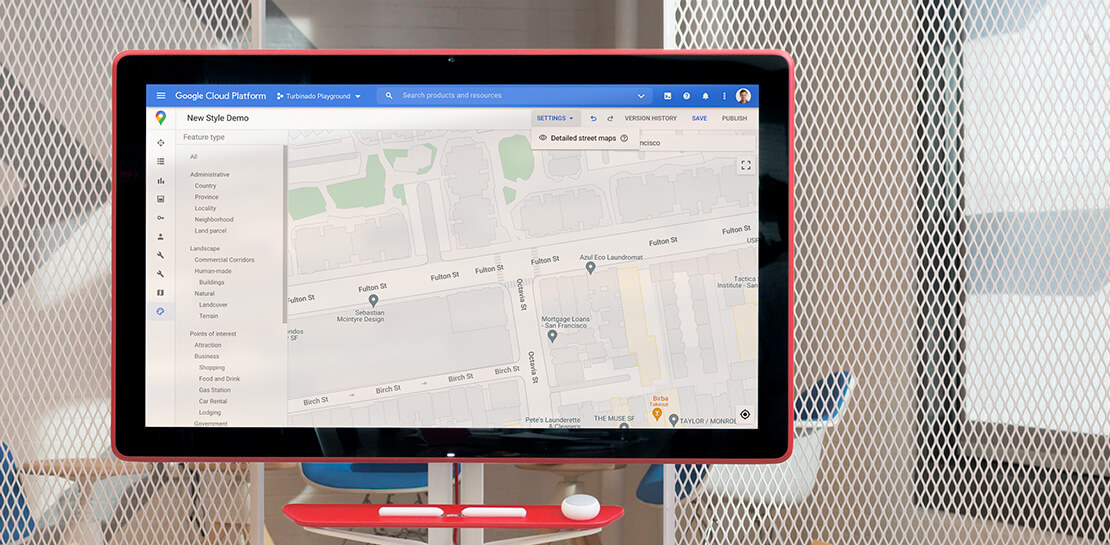
This year at Google I/O, we announced the general availability of Cloud-based maps styling for the Maps JavaScript API. In an effort to provide you with more options and more control to help create the best experience for your users, today we’re releasing new features to Cloud-based maps styling. You may already be familiar with these features from the consumer Google Maps web and mobile apps—Landmarks and Building Footprints. We’re also releasing updates to our industry optimized map styles to provide even more map details while providing the flexibility to craft the best experience for your users. Let’s take a look.
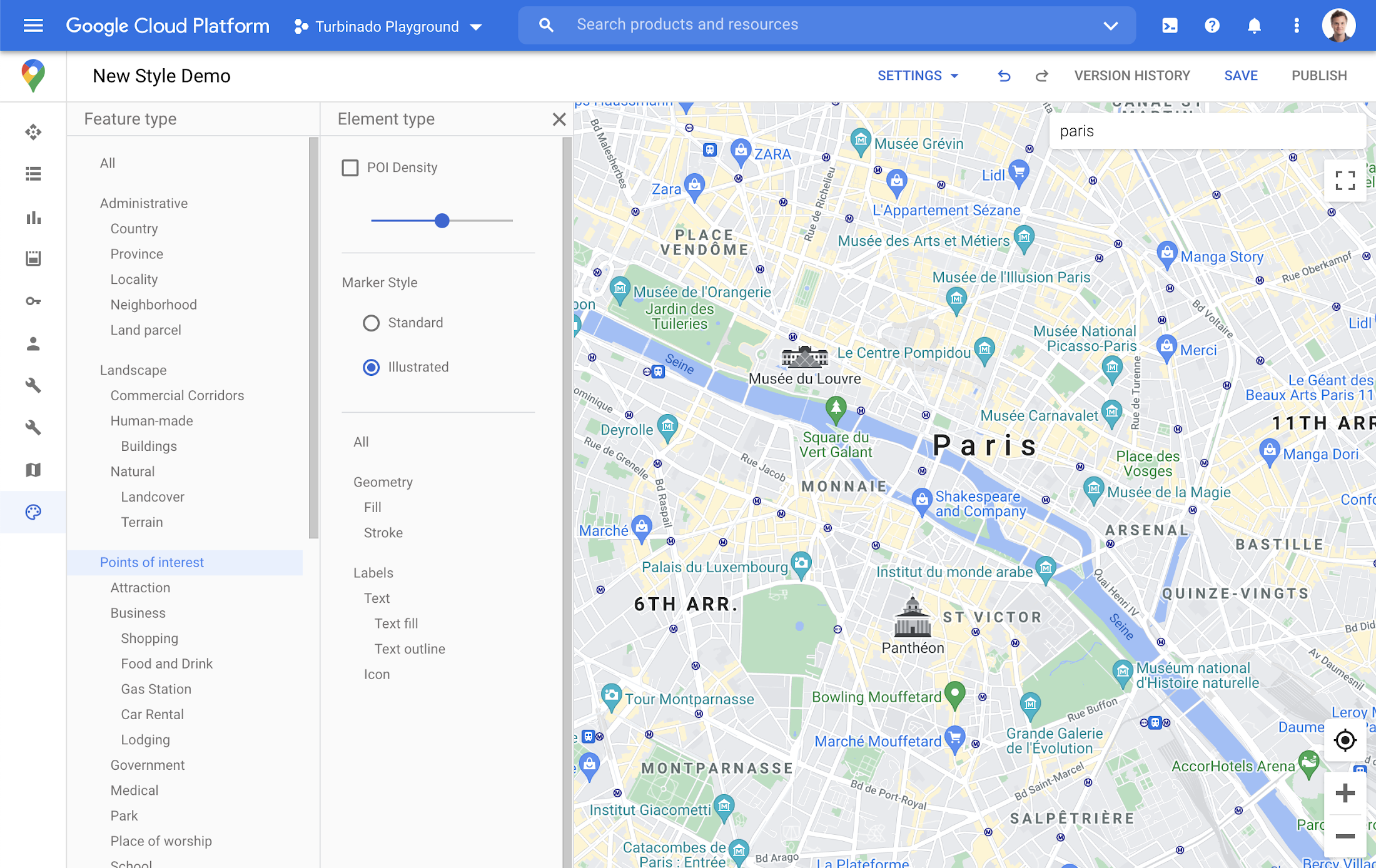
Help users quickly scan and orient themselves with Landmarks
You may have noticed some enhancements for prominent places in the consumer Google Maps web and mobile apps, these landmarks help show your users points of interest that help them orient and navigate cities they are exploring or visiting.

You now have the ability to bring this same experience to your users by creating maps using Cloud-based maps styling. This feature is available in 100 cities globally including New York, Dubai, Paris, Mumbai, and Singapore. To enable landmarks for your map, log into the Cloud console and in our style editor navigate to the Points of interest feature type and select ‘Illustrated’ under Marker Style.
Simplify maps features by switching to Building Footprints
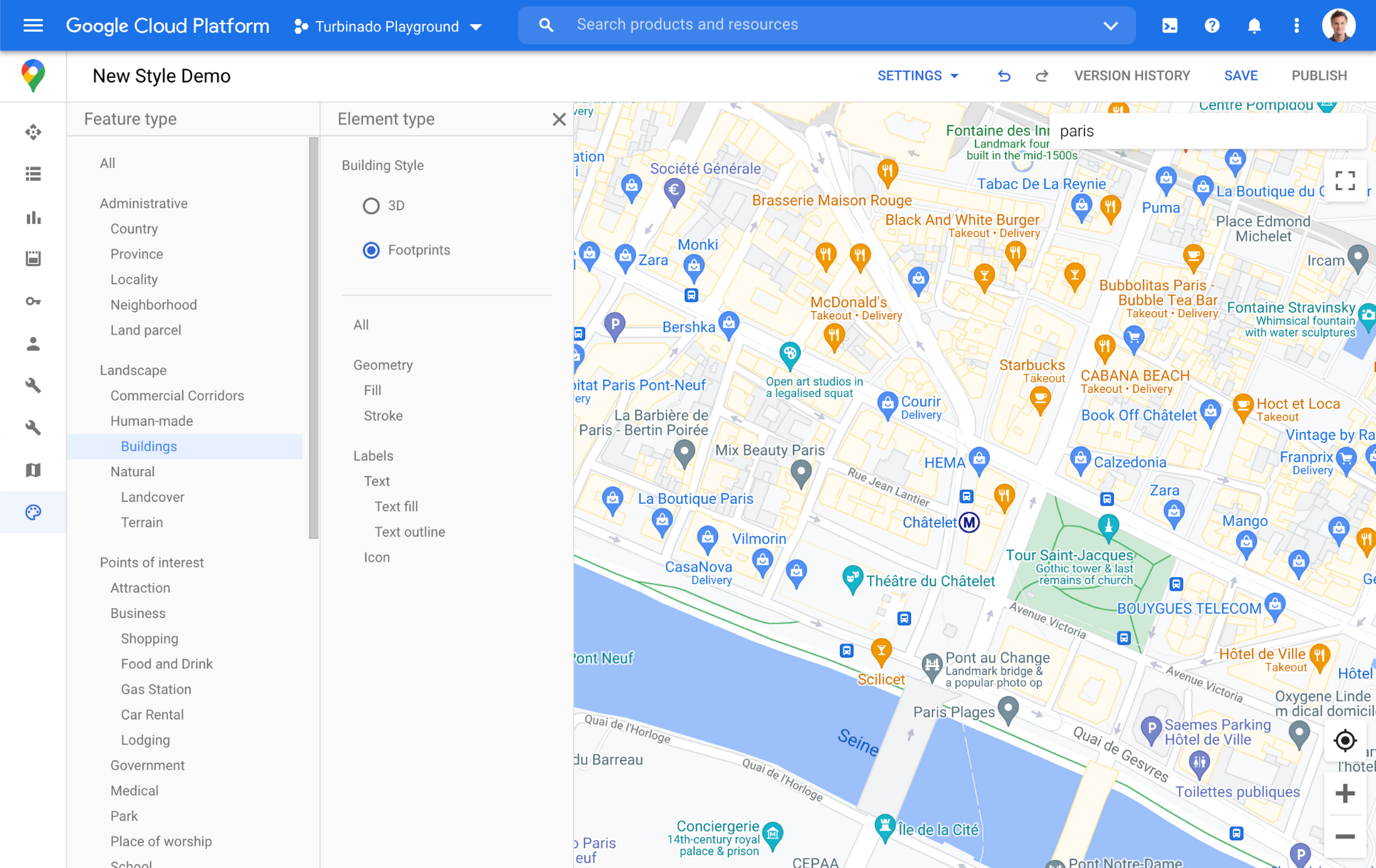
Sometimes less is more. In dense, highly vertical cities, showing 3D building heights can add cognitive load for users. Now, in addition to 3D buildings, we offer building footprints as an option in the style editor. Building footprints can provide a strikingly different basemap balance and composition to better support use cases that may not benefit from the added complexity that 3D buildings can present.

Fill and stroke geometries can also be styled independently to support various color themes. To enable Building Footprints, log into the Cloud console and in our style editor navigate to Buildings and choose ‘Footprints’ under building style.
Industry Optimized Map Styles now include Landmarks and Building Footprints, plus Detailed Street Maps
In January of this year we launched Industry Optimized Map Styles for the travel, real estate, retail, and logistics industries, providing customers with pre-styled map configurations, available via Cloud-based maps styling. Landmarks are now included in all of our Industry Optimized Map Styles and we have turned on Building Footprints in the travel style map. If you are already an Industry Optimized Map Styles user, these new features will be applied to your map with no action needed from you. If you would like to disable these changes, you can use the style editor to turn off these features.
For Industry Optimized Map Styles only, we are also excited to enable Detailed Street Maps. You may have seen these features in our consumer products at Google I/O, released back in August of 2020 for the consumer Google Maps web and mobile apps. Detailed Street Maps are available in San Francisco, New York, London, and Tokyo, and we are targeting expansion to 50 new cities by the end of 2021.
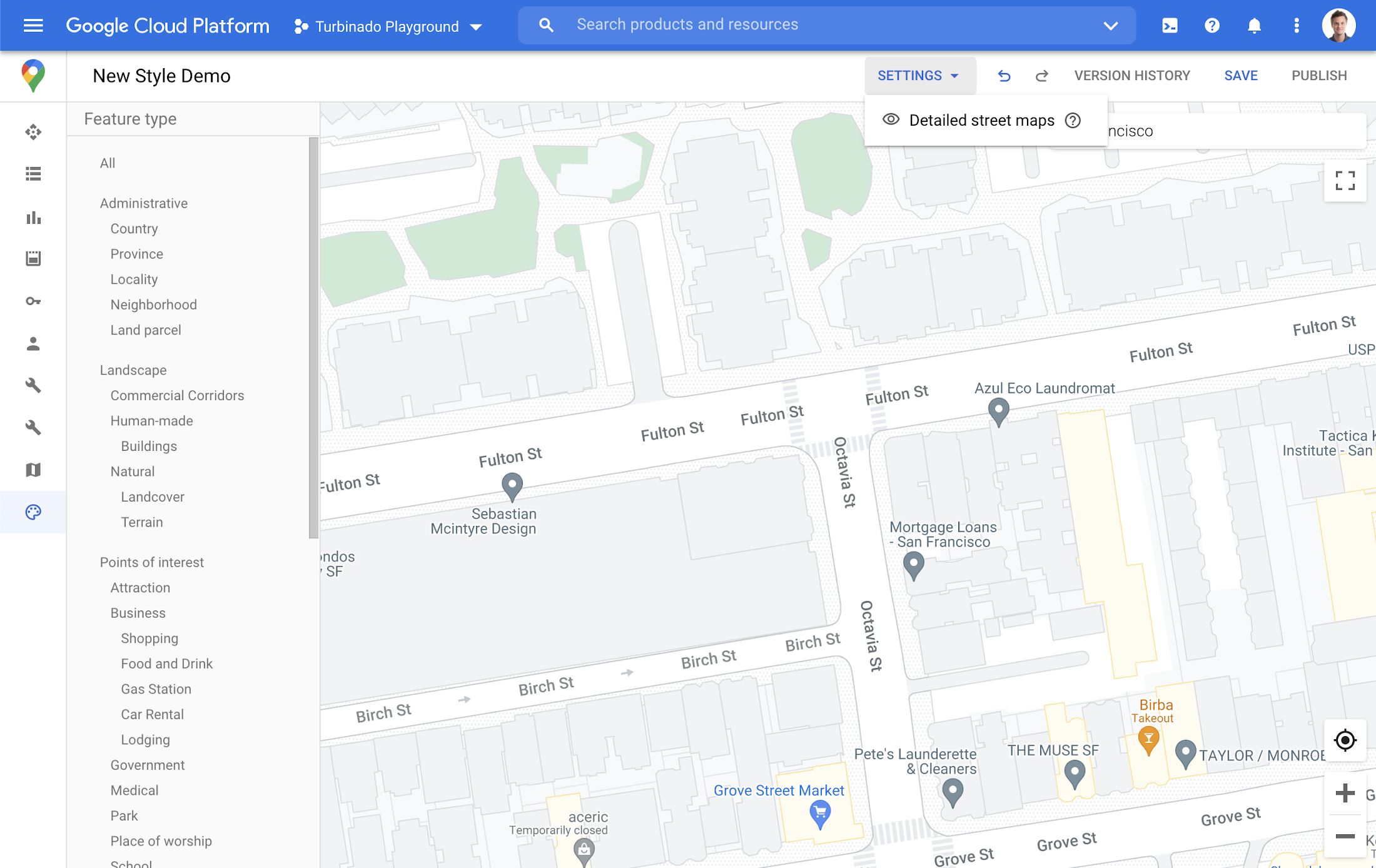
Detailed Street Maps are on by default for all Industry Optimized Map Styles and we created a new settings menu to change the visibility, as needed. We are working on bringing the full styling capability for Detailed Street Maps features to all Cloud-based maps styles in the future.
Landmarks and Building Footprints as well as the updates to Industry Optimized Map Styles are only available via Cloud-based map styling in the Google Cloud Console and are included in Google Maps Platform pricing. Learn more about how to use Landmarks and Building Footprints and Industry Optimized Map Styles. To get started with Cloud-based map styling, check out our documentation for JavaScript.
For more information on Google Maps Platform, visit our website.
GCP Launches Datastream, A Serverless Change Data Capture and Replication Service

5611
Of your peers have already read this article.
1:30 Minutes
The most insightful time you'll spend today!
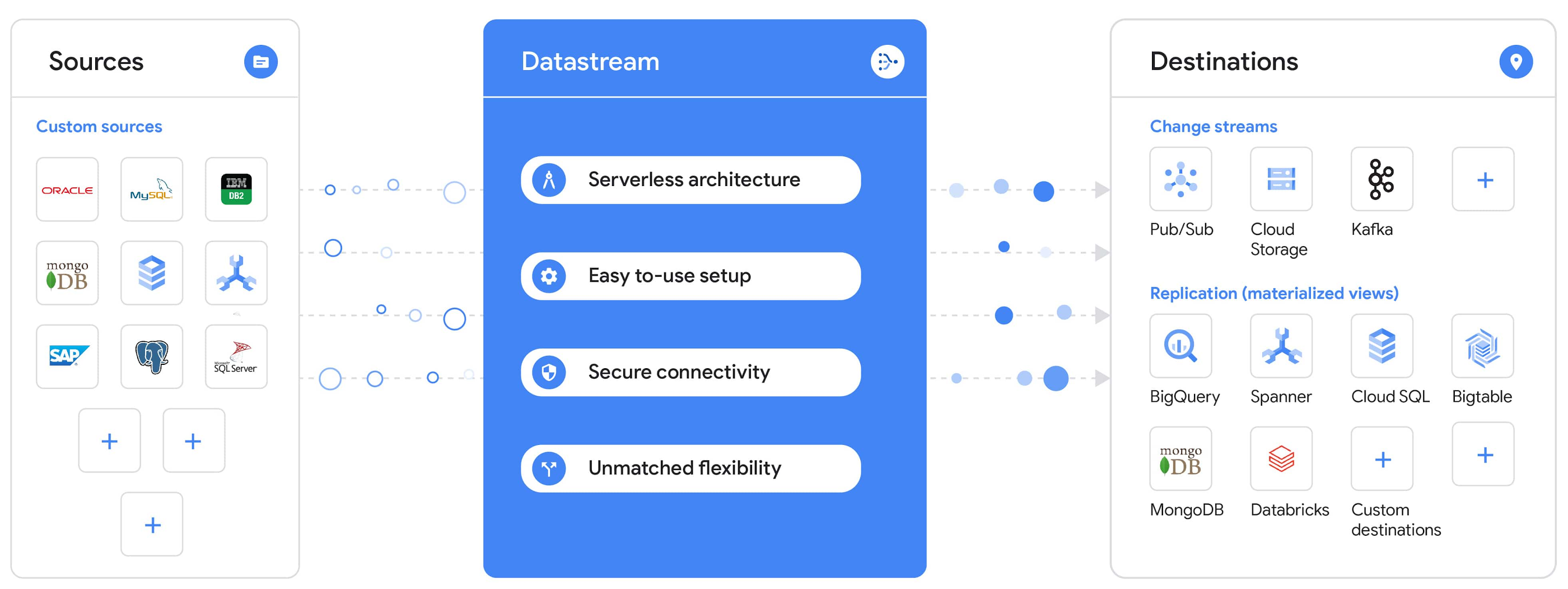
Today, we’re announcing Datastream, a serverless change data capture (CDC) and replication service, available now in preview. Datastream allows enterprises to synchronize data across heterogeneous databases, storage systems, and applications reliably and with minimal latency to support real-time analytics, database replication, and event-driven architectures. You can now easily and seamlessly deliver change streams from Oracle and MySQL databases into Google Cloud services such as BigQuery, Cloud SQL, Google Cloud Storage, and Cloud Spanner, saving time and resources and ensuring your data is accurate and up-to-date.
“Global companies are demanding change data capture to provide replication capabilities across disparate data sources, and provide a real-time source of streaming data for real-time analytics and business operations,” says Stewart Bond, Director, Data Integration and Intelligence Software Research at IDC.
However, companies are finding it difficult to realize these capabilities because commonly used data replication offerings are costly, cumbersome to set up, and require significant management and monitoring overhead to run flexibly or at scale. This leaves customers with a difficult-to-maintain and fragmented architecture.
Datastream’s differentiated approach
Datastream is taking on these challenges with a differentiated approach. Its serverless architecture seamlessly and transparently scales up or down as data volumes shift in real time, freeing teams to focus on delivering up-to-date insights instead of managing infrastructure. It also provides the streamlined customer experience, ease of use, and security that our customers have come to expect from Google Cloud, with private connectivity options built into the guided setup experience.
Datastream integrates with purpose-built and extensible Dataflow templates to pull the change streams written to Cloud Storage, and create up-to-date replicated tables in BigQuery for analytics. It also leverages Dataflow templates to replicate and synchronize databases into Cloud SQL or Cloud Spanner for database migrations and hybrid cloud configurations.
Datastream also powers a Google-native Oracle connector in Cloud Data Fusion’s new replication feature for easy ETL/ELT pipelining. And by delivering change streams directly into Cloud Storage, customers can leverage Datastream to implement modern, event-driven architectures.
Customers tell us about the benefits they’ve found using Datastream. That includes Schnuck Markets, Inc., “Leveraging Datastream, we’ve been able to replicate data from our on-premises databases to BigQuery reliably and with little impact to our production workloads. This new method replaced our batch processing and allowed for insights to be leveraged from BigQuery quicker,” says Caleb Carr, principal technologist from Schnuck Markets. “Furthermore, implementing Datastream removed the need for our analytics group to reference on-premises databases to do their work and support our business users.”
Cogeco Communications, Inc. used Datastream to also realize the value of low-latency data access. “Datastream unlocked new customer interaction opportunities not previously possible by enabling low-latency access in BigQuery to our operational Oracle data.” says Jean-Lou Dupont, Senior Director, Enterprise Architecture, Cogeco Communications, Inc. “This streamlined integration process brings data from hundreds of disparate Oracle tables into a unified data hub. Datastream enabled us to achieve this with 10X time and effort efficiency.”
In addition, Major League Baseball (MLB) used Datastream’s replication capabilities to migrate their data from Oracle to Cloud SQL for PostgreSQL. “As we’re modernizing our applications, replicating the database data reliably out of Oracle and into Cloud SQL for PostgreSQL is a critical component of that process,” says Shawn O’Rourke, manager of technology at MLB. “Using Datastream’s CDC capabilities, we were able to replicate our database securely and with low latency, resulting in minimal downtime to our application. We can now standardize on this process and repeat it for our next databases, regardless of scale.”
Our partner HCL has worked with many organizations looking to get more out of their data and plan for the future. “HCL customers across every industry are looking for ways to extract more value out of their vast amounts of data,” says Siva G. Subramanian, Global Head for Data & Analytics at HCL Google Business Unit. “CDC plays a big part in the solutions we offer to our customers using Google Cloud. Datastream enables us to deliver a secure and reliable solution to our customers that’s easy to set up and maintain. CDC is a key and integrated part of Google Cloud Data Solutions.”
“Google Cloud’s new CDC offering, Datastream, is a differentiator for Google among hyperscale cloud service providers, by supporting replication of data from Oracle and MySQL databases into the Google Cloud environment using a serverless cloud-native architecture, which removes the burden of infrastructure management for organizations, and provides elastic scalability to handle real-time workloads,” says Stewart Bond, Director, Data Integration and Intelligence Software Research at IDC.
Datastream under the hood
Datastream reads CDC events (inserts, updates, and deletes) from source databases, and writes those events with minimal latency to a data destination. It leverages the fact that each database source has its own CDC log—for MySQL it’s the binlog, for Oracle it’s LogMiner—which it uses for its own internal replication and consistency purposes. Using Google-native, agentless, high-scale log reader technology, Datastream can quickly and efficiently generate change streams populated by events based on the database’s CDC log while minimizing performance impact on the source database.
Each generated event includes the entire row of data from the database, with the data type and value of each column. The original source data types, whether it’s, for example, an Oracle NUMBER type or a MySQL NUMERIC type, are normalized into Datastream unified types. The unified types represent a lossless superset of all possible source types, and the normalization means data from different sources can easily be processed and queried downstream in a source-agnostic way. Should a downstream system need to know the original source data type, it can perform a quick API call to Datastream’s Schema Registry, which stores up-to-date, versioned schemas for every data source. This also allows for in-flight downstream schema drift resolution as source database schemas change.
The generated streams of events, referred to as “change streams,” are then written as files, either in JSON or Avro format during preview or in other formats like Parquet in the future, into a Cloud Storage bucket organized by source table and event times. Files are rotated as table schemas change, so events in a single file always have the same schema, as well as on a configurable file size or rotation frequency setting. This way customers can find the best balance between the speed of data availability and the file size that makes the most sense for their business use case.
Through its integration with Dataflow, Datastream powers up-to-date, replicated tables for analytics over BigQuery, and for data replication and synchronization to Cloud SQL and Spanner. Datastream refers to these constantly updated tables as “materialized views.” They are kept up-to-date via Dataflow template-based upserts into Cloud SQL or Spanner, or through consolidations into BigQuery. The consolidations, performed as part of the Dataflow template, take the change streams that are written into a log table in BigQuery, and push those changes into a final table, which mirrors the table from the source.

Datastream offers a variety of secure connectivity methods to sources, so your data is always safe in transit. And with its serverless architecture, Datastream can scale up and down readers and processing power to seamlessly keep up with the speed of data and ensure minimal latency end to end. As data volumes decrease, Datastream automatically scales back down—the result is a “pay for what you use” pricing model, where you never have to pay for idle machines or worry about bottlenecks and delays during data peaks.
Get started with Datastream
Datastream, now available in preview, supports streaming change data from Oracle and MySQL sources, hosted either on-premises or in the cloud, into Cloud Storage. You can start streaming your data today for $2 per GB of data processed by Datastream.
To get started, head over to the Datastream area of your Google Cloud console, under Big Data, and click Create Stream. There you can:
- Initiate stream creation, and see what actions you need to take to set up your source and destination for successful streaming.
- Define your source and destination, whose connectivity information is saved as connection profiles you can re-use for other streams. Sources support multiple connectivity options, with both private and public connectivity options to suit your business needs.
- Select the source data you’d like to stream, and which you’d like to exclude.
- Test your stream to ensure it will be successful when you’re ready to go.
Start your stream and your database’s CDC data will start to flow to your Cloud Storage bucket! From there you can integrate with Dataflow templates to load data into BigQuery, Spanner, or Cloud SQL. Datastream’s preview is supported in us-central1, europe-west1, and asia-east1, with additional regions coming soon.https://www.youtube.com/embed/FZG4w4Vbj38?enablejsapi=1&
Datastream will become generally available later this year, and will soon expand its support to also include PostgreSQL and SQL Server as sources, as well as out-of-the-box integration with BigQuery for easy delivery of up-to-date replicated tables for analytics, and message queues like Pub/Sub for real-time change stream access.
For more resources to help get you started with change streaming, check out the Datastream documentation.
More Relevant Stories for Your Company

Creation of Go applications on Google Cloud Made Easy
Go is the world’s leading programming language for cloud-based development, used by millions of developers to build and scale their cloud applications and business-critical cloud infrastructure. Whether it's building CLIs, web applications, or cloud and network services, developers find Go easy to learn, easy to maintain, and packed with useful features

Google Maps Platform Helps BungkusIT Fulfil its Promise of Deliveries in One Hour!
Editor’s note: Today's post is written by Hatim M, Chief Commercial Officer at BungkusIT. The on-demand delivery service delivers packages within the hour for one million customers across Malaysia and uses Google Maps Platform to create a seamless end-to-end delivery experience for its customers. Imagine it's the end of a

Memorystore for Redis Read Replicas to Scale App Read Requests by 6X
Modern applications need to process large-scale data at millisecond latency to provide experiences like instant gaming leaderboards, fast analysis of streaming data from millions of IoT sensors, or real-time threat detection of malicious websites. In-memory datastores are a critical component to deliver the scale, performance, and availability required by these

BPAY: Uncovering New Business Opportunities with APIs
Editor's note: Today we hear from Jon White and Angela Donohoe from BPAY Group. BPAY Group is best known for BPAY, the leading electronic bill payment system in Australia, handling one-third of the market. Learn how BPAY Group is positioning the organization for the future by using APIs to streamline workflows
