






3917
Of your peers have already downloaded this article
1:30 Minutes
The most insightful time you'll spend today!
Canadian Bank’s SAP Workload Moved to BigQuery Helps Unlock New Business Opportunities

7374
Of your peers have already read this article.
2:00 Minutes
The most insightful time you'll spend today!
When ATB Financial decided to migrate its vast SAP landscape to the cloud, the primary goal was to focus on things that matter to customers as opposed to IT infrastructure. Based in Alberta, Canada, ATB Financial serves over 800,000 customers through hundreds of branches as well as digital banking options. To keep pace with competition from large banks and FinTech startups and to meet the increasing 24/7 demands of customers, digital transformation was a must. To support this new mandate, in 2019, ATB migrated its extensive SAP backbone to Google Cloud. In addition to SAP S/4 HANA, ATB runs SAP financial services, core banking, payment engine, CRM and business warehouse on Google Cloud.
In parallel, changes were needed to ATB’s legacy data platform. The platform had stability and reliability issues and also suffered from a lack of historical data governance. Analytics processes were ad hoc and manual. The legacy data environment was also not set up to tackle future business requirements that come with a high dependency on real-time data analysis and insights.
After evaluating several potential solutions, ATB chose BigQuery as a serverless data warehouse and data lake for its next-generation, cloud-native architecture. “BigQuery is a core component of what we call our data exposure enablement platform, or DEEP,” explains Dan Semmens, Head of Data and AI at ATB Financial. According to Semmens, DEEP consists of four pillars, all of which depend on Google Cloud and BigQuery to be successful:
- Real-time data acquisition: ATB uses BigQuery throughout its data pipeline, starting with sourcing, processing, and preparation, moving along to storage and organization, then discovery and access, and finally consumption and servicing. So far, ATB has ingested and classified 80% of its core SAP banking data as well as data from a number of its third-party partners, such as its treasury and cash management platform provider, its credit card provider, and its call center software.
- Data enrichment: Before migrating to Google Cloud, ATB managed a number of disconnected technologies that made data consolidation difficult. The legacy environment could handle only structured data, whereas Google Cloud and BigQuery lets the bank incorporate unstructured data sets, including sensor data, social network activity, voice, text, and images. ATB’s data enrichment program has enabled more than 160 of the bank’s top-priority insights running on BigQuery, including credit health decision models, financial reporting, and forecasting, as well as operational reporting for departments across the organization. Jobs such as marketing campaigns and month-end processes that used to take five to eight hours now run in seconds, saving over CA$2.24 million in productivity.
- Self-service analytics: Data for self-service reporting, dashboarding, and visualization is now available for ATB’s 400+ business users and data analysts. Previously, bringing data and analytics to the business users who needed it while ensuring security was burdensome for IT, fraught with recurrent data preparation and other highly manual elements. Now, ATB automates much of its data protection and governance controls through the entire data lifecycle management process. Data access is not only open to more team members but it is faster and easier to acquire without compromising security. And it’s not just raw data that users can access. ATB uses BigQuery to define its enterprise data models and create what it calls its data service layer to make it easier for team members to visualize their data.
- AI-assisted analytics and automation: Through Google Cloud and BigQuery, ATB has been able to publish data and ML models that provide alerts and notifications via APIs to customer service agents. These real-time recommendations allow customer service agents to provide more tailored service with contextualized advice and suggested new services. So far, the company has deployed more than 40 ML models to generate over 20,000 AI-assisted conversations per month. Thanks to improved customer advocacy and less churn, the bank has realized more than CA$4 million in operating revenue. During the ongoing COVID crisis, the system was also able to predict when business and personal banking customers were experiencing financial distress so that a relationship manager could proactively reach out to offer support, such as payment deferral or loan restructuring. The AI tools provided by BigQuery are also helping ATB detect fraud that previously evaded rules-based fraud detection by using broader sets of timely and accurate data.
Thanks to the speed and ease of moving data from SAP to BigQuery, ATB is using artificial intelligence (AI) and machine learning (ML) to do things it previously hadn’t thought possible, including sophisticated fraud prevention models, product recommendations, and enriched CRM data that improves the customer experience.
Using the power of Google Cloud and BigQuery, ATB Financial has been able to draw more value from its SAP data while lowering cost and improving security and reliability. Speed to provide data sets and insights to internal team members has improved 30%. The bank also has seen a 15x reduction in performance incidents while improving data governance and security. Dan Semmens projects that the digital transformation strategy built on Google Cloud and BigQuery has both saved millions compared to its on-premises environment and has also realized millions in new business opportunities.
Semmens is looking toward the future that includes initiatives like Open Banking and greater ability to provide real time personalized advice for customers to drive revenue growth. “We see our data platform as foundational to ATB’s 10-year strategy,” he says. “The work we’ve undertaken over the past 18 months has enabled critical functionality for that future.”
Learn more about how ATB Financial is leveraging BigQuery to gain more from SAP data. Visit us here to explore how Google Cloud, BigQuery, and other tools can unlock the full value of your SAP enterprise data.
The Power of Two: Best Practices for Mergers & Acquisitions on Google Cloud

3391
Of your peers have already read this article.
3:00 Minutes
The most insightful time you'll spend today!
Congratulations! Your company just acquired or merged with another organization, beginning an important new chapter in its history. But like with many business deals, the devil is in the details — particularly when it comes to integrating the two companies’ cloud domains and organizations. In this blog post, we look at how to approach mergers and acquisitions (M&A) from the perspective of Google Cloud. These are the best practices that your Google Cloud Technical Account Managers follow — or that we recommend you follow if you plan to perform the integration yourself.
Although there are various M&A scenarios, here are the two most common ones we will focus on:
- Both entities engaged in the M&A have some presence on Google Cloud and are looking for some level of integration
- Only one of the entities has a presence on Google Cloud, and is looking at best ways to work together
Depending on your situation, your approach to integrating the two companies will vary substantially.
When both companies have a Google Cloud presence
In the first scenario, let’s assume company A is acquiring company B. Prior to the M&A, both companies have their own Google Cloud Organizations — the top level structures in the Google Cloud resource hierarchy — and have one or more billing accounts associated with them. There are also various Folders and Projects below each Google Cloud Organization. In this scenario, here are the key questions to ask:
- How do you plan to integrate/consolidate two distinct Google Cloud Organizations?
- How do you plan to organize the billing structure?
- How do you handle Projects under the two Organizations?
- What is the identity management strategy for the two Organizations?
For each of these key questions, go ahead and formulate a detailed plan of action. If you have access to the Technical Account Manager service through Google Cloud Premium Support, you can reach out to them to further develop this plan.
Understanding Google Cloud Organizations
From an organizational integration standpoint, when each entity in an M&A has its own Google Cloud Organization, you have various options: no integration, partial, or full.
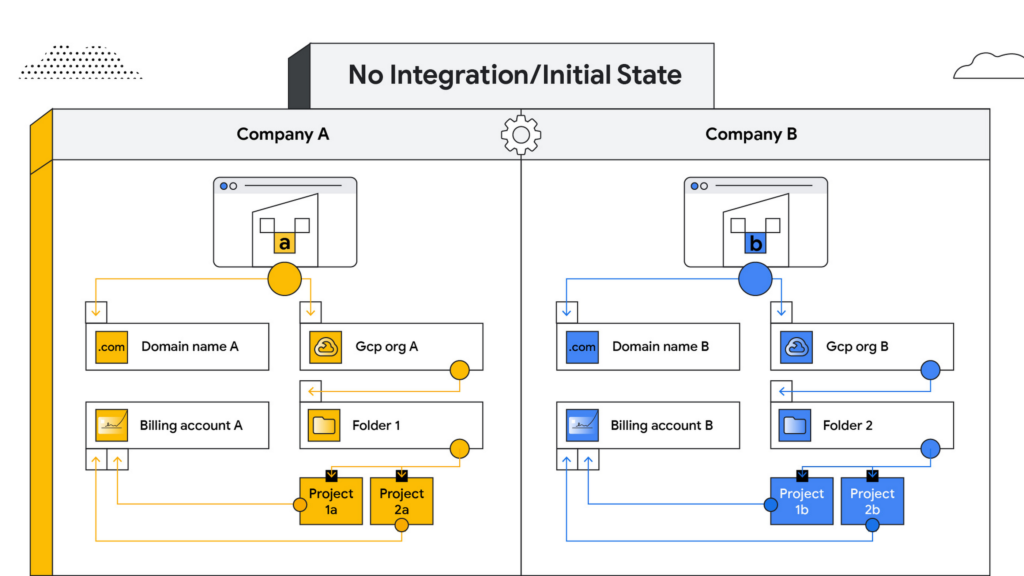
No integration – When company B operates as an independent entity from company A, no migration is required. One caveat is if company A has negotiated better pricing terms/discounts and support packages with Google Cloud. In that case, you can sign an affiliate addendum by working with your Google Cloud account team to help unlock the same benefits for company B.
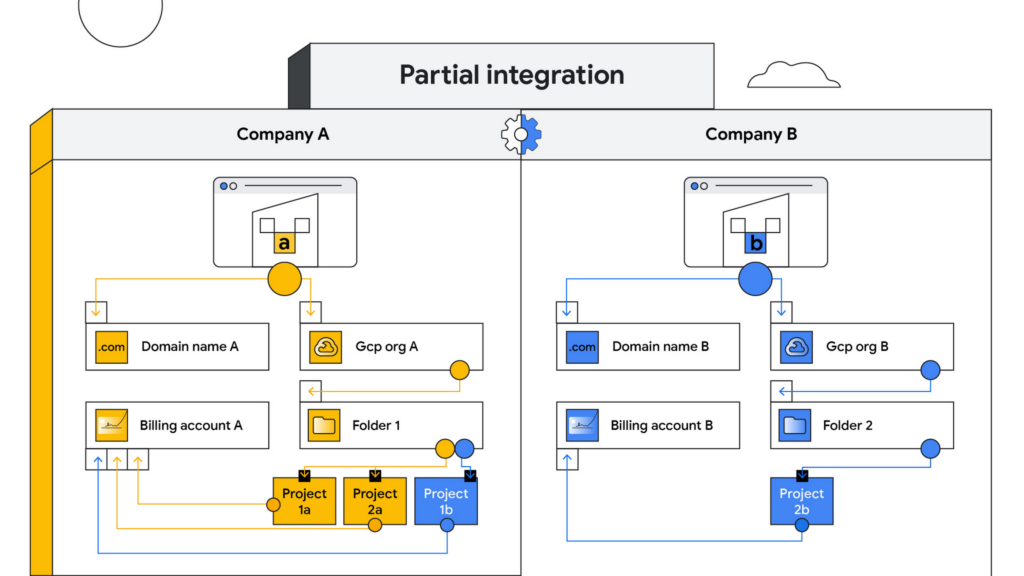
Partial integration – Some projects move over to company A from company B and others stay with Company B. There can be some shared access between the two companies and each of the organizations can continue to use their existing identity providers. This can be a self-serve or a paid services engagement with Google Cloud depending on the complexity of the two companies and how many project migrations need to take place between them.
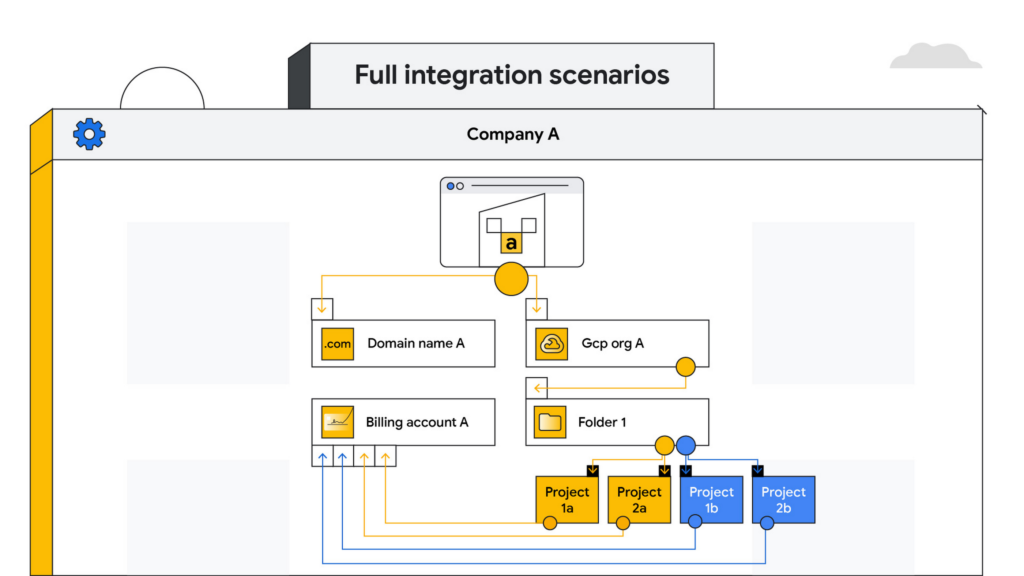
Full integration – Company B is fully incorporated into company A. This means you go through a full billing, Google Workspace identity and project migration from company B into company A. This can be a complex process and we highly recommend engaging your Google Cloud account teams to scope out a paid services engagement to go through this transition.
Planning your project migration
No matter what you want your end state to look like, project migration requires careful planning. Again, if you have an assigned Technical Account Manager, please reach out to them to ensure that you have a conversation around best practices before starting this migration.
If you’re taking a self-service approach, at a high level, we recommend leveraging the Resource Manager API to manage your project migrations. Do keep in mind that there are several prerequisites and required permissions documented here that need to be assigned before going down this path.
In addition, please be sure to read the billing and identity management considerations below to ensure that you are covering all of the bases associated with such a migration, as your choices can fundamentally alter your Google Cloud footprint.
Billing considerations
When deciding how to structure your Organizations and billing accounts, our recommendation is to always limit the number of Organization nodes and use the Folder structure to manage departments/teams within it. Creating additional Organization nodes is only advised in cases where you require a level of isolation for certain Projects from central administration for a specific business reason, for example, if the company being acquired already has their own Organization node and there is a business justification to let it operate as a standalone entity.
Warning: If you have multiple Organization nodes, be aware that you will not have central visibility across all your organizational resources, and that policy management across different Organization nodes can be cumbersome. You will also have to manage multiple Workspace accounts and manage identities across them, which can be difficult, especially when operating at scale.
From a billing account management perspective, our recommendation is to create one central billing account that lives within the Organization node with tags and labels incorporated for additional granularity. However, there are a few business cases which warrant the creation of additional billing accounts such as:
- You need to split charges for legal or accounting purposes
- Invoices are paid in multiple currencies
- You need to segregate usage to draw down on a Google Cloud promotional credit
- Subsidiaries need their own invoice
Keep in mind that committed-use and spend-based discounts and promotional credits cannot be shared across billing accounts and are provisioned on a per-billing-account basis. As such, more billing accounts can make it harder to leverage these discounts and credits.
Identity management
As you might expect, merging two entities has identity management implications. Cloud Identity is the solution leveraged by Google Cloud to help you manage your user and group identities. Even if the acquired company only uses the productivity products that are part of Google Workspace, the identities would still be managed by Cloud Identity.
Google Workspace considerations
To move large amounts of content into a Google Workspace domain, we recommend one of three options, depending on your end goal and data complexity:
- For general migrations: Leverage Google Workspace Migrate to move data into your Workspace domain from either another Workspace domain or a third-party productivity solution
- For manual migrations: Use the Export tool to move your organization’s data to a Cloud Storage archive so you can selectively download exported data by user and service
- For complex Google Workspace scenarios: Speak with your Google Cloud Technical Account Manager about the possibility of using a custom scoped engagement to merge two Google Workspace environments without business interruption
When only one company is on Google Cloud
Now, let’s consider the scenario where only company A has a presence on Google Cloud but company B does not. The approach you take to integrate the two organizations largely depends on your desired end state — full, partial or no integration.
If the plan is to eventually integrate company B into company A, your approach here will have a lot of similarities with the ‘full integration’ option mentioned above — just at a later point in time.
You may also run into a scenario where company B has a presence on an alternative cloud platform and you need to migrate resources into or out of Google Cloud. Again, similar to the partial integration option called out above, a paid engagement or a self-service exercise would be a good fit depending on the complexity of the desired end state.
Here to help
A merger or acquisition is an exciting milestone for any company, but one that needs to be managed carefully. Once you carefully review these considerations, develop a plan of action for your organization. You can also engage Google’s Professional Services for a paid engagement or Google’s Technical Account Management Service for a self-managed process to achieve the desired results.
If you are going through or considering going through M&A at your organization and have a different scenario than what we have discussed, please feel free to reach out to your account teams for guidance or contact us at https://cloud.google.com/contact.
Google’s New Climate Innovation Challenge to Fight Energy Crisis and Build Climate Resilience

3427
Of your peers have already read this article.
1:30 Minutes
The most insightful time you'll spend today!
At Google, we believe that when it comes to solving a problem as big and urgent as climate change, we get more done when we collaborate. From beekeepers in Germany to urban foresters in Los Angeles, we support the work of nonprofits, scientists, and organizations that are working to mitigate the impact of climate change globally, and increase communities’ resilience to its effects.
To this end, we are proud to launch the Climate Innovation Challenge, which will provide Google Cloud research credits to advance a better understanding of climate resilience and promising solutions to address urgent climate challenges. I’m excited about this launch. We need to get smarter about the inevitable impact of our changing climate and how it will reshape our lives, supply chains, and business. Sustainability is a business-critical agenda, and we need intelligent technologies, leadership, and collaboration to drive industry transformations and reach a net-zero world.
The innovation and scale required to solve the toughest climate challenges will come from technology. At Google Cloud, we’re working across industries to increase climate resilience, applying cloud technology to help solve key challenges in the fight against climate change. Nonprofits, scientists, and organizations will be key in developing new research and innovations that will help us better understand how we can accelerate action on climate.
Through the new program, individual climate researchers in higher education and not-for-profit research organizations can apply for Google Cloud credit grants of up to $100,000 to accelerate their projects with Google’s state-of-the-art, data analytics and artificial intelligence (AI) cloud services, from Google Earth Engine (EE) to Google Public Datasets like the one from the National Oceanographic and Atmospheric Administration (NOAA). We will work with specialist partners in environmental organizations, agriculture, and carbon reduction to help evaluate proposals and select participants. Our first partner is the National Science Foundation (NSF) AI Institute for Research on Trustworthy AI in Weather, Climate, and Coastal Oceanography (AI2ES). Alongside the cloud credits, we will also provide researchers with access to technical training and mentoring, to help jumpstart their work.
From idea to insight to impact
In 2021, researchers at 500 universities in 47 countries received Google Cloud research credit grants. Others received funding through the Google Cloud Research Innovators Program, which promotes collaboration among a global cohort of scientists and provides them with professional opportunities and technical expertise. Here are some of the Research Innovators who have already advanced their climate research with Google Cloud:
- At CalTech Tapio Schneider and his team built Climate Machine, a next-generation open-source Earth System Model that will integrate more earth and atmospheric data than ever before.
- At UCLA, Bo Zhou uses EE for remote sensor modeling to help bureaus of land management make conservation decisions.
- At the University of New England, James Brinkhoff conducts spatial and temporal analysis for agriculture crop modeling and water use with data from EE.
- At Natural Resources Canada (NRCan), Richard Fernandes is developing the LEAF toolbox to map and assess vegetation with satellite data from EE.
- At the University of Toronto, Yuhong He uses EE to map changes occurring in natural and managed ecosystems systems using remote sensing, machine learning, and ecosystem modelings.
- At UCLA, Henry Houskeeper uses machine learning with EE’s satellite imagery to automate detection of kelp forests.
- At the University of Hawaii at Manoa, Jonghyun Lee conducts numerical modeling for water resources with Google Colab.
- At Technical University in Dublin, Santos Fernández Noguerol runs functions to collect weather data from governmental agencies, then automatically stores them in Google Cloud Storage buckets for future spatial analysis.
- At the University of Colorado at Denver, Farnoush Banaei-Kashani conducts data science projects with applications for Intelligent Transportation and Earth Sciences.
To apply for a Climate Innovation Challenge grant, click here and include “Climate Innovation Challenge” as the first line of your proposal. We will announce additional focus areas, partnerships, and recipients throughout the year. Click here to learn more about Google Cloud sustainability.
3814
Of your peers have already watched this video.
8:00 Minutes
The most insightful time you'll spend today!
Target Leverages Google Cloud to Create Market-defining Online Experience
In the hyper-competitive world of online retail sales, ease-of-use and transaction speed can make or break business outcomes. However, a few years ago US Retail giant Target was going through a period of uncertainty.
While the company had over 1800 stores across the US with an estimated 85% of US consumers shopping at a Target store and over 25 million people visiting the Target website or using its app each month, it was still losing ground.
In spite of having millions of loyal customers, the company was dangerously late on digital and its technology wasn’t keeping pace with unstable systems to boot. The company faced the twin challenges of trying to operate today’s business as efficiently as possible and creating tomorrow’s business as quickly as possible. On the one hand it needed productivity and stability and on the other it wanted speed and disruption. Not an easy task to accomplish.
That’s when Target decided to use Google Cloud to solve its challenges. See how Target leveraged Google Cloud to create a market-defining online experience that has made customers happier and more loyal.
Ease Your Migration and Modernization Journey with Microsoft and Windows on Google Cloud Demo Center

8311
Of your peers have already read this article.
2:00 Minutes
The most insightful time you'll spend today!
If you’re looking to migrate and modernize your Microsoft and Windows workloads, Google Cloud is your premiere destination. No matter what migration strategy you’ve selected or what value you’re looking to achieve, with Google Cloud you’re able to:
- simplify your migration and modernization journey
- reduce your on-prem footprint and increase agility
- optimize license usage to reduce costs
- modernize to reduce single-vendor dependencies
- rely on enterprise-class support backed by Microsoft
Whether you’re looking to migrate applications running on Windows virtual machines, adopt Windows containers in Google Kubernetes Engine (GKE), convert SQL databases to Cloud SQL, or something else, Google Cloud offers you the first-class experience you need.
But we don’t want you to take our word for it. Try it out yourself with our new online Microsoft and Windows on Google Cloud Demo Center without any commitment or friction.

The demo center uses hands-on guided simulations to walk you through several scenarios for solving business critical challenges with Google Cloud’s Microsoft and Windows solutions. Because these are all simulated, you’ll see how it works without any deployment, configuration, or commitment. It’s a seamless way for you to see exactly how Google Cloud can help you.
Run dedicated hardware and optimize with sole tenant
Sometimes you might want to run your workloads on dedicated hardware (with oversubscription options) for compliance, licensing, and management. Google Cloud provides sole-tenant nodes that allow you to easily deploy your virtual machines onto dedicated machines to avoid “noisy neighbor” issues, address regulatory or licensing constraints, and optimize inter-VM communications.
Plus, the CPU Overcommit option allows oversubscribing sole-tenant node resources by up to 2x, therefore helping save on per-physical core licensing for many licensed workloads like SQL Server.
Learn how to set up a sole tenant group and node.
Optimize license costs with premium images & custom VMs
One of the easiest ways to optimize your cloud experience with virtual machines (VM) is to pick the right VM image. Google Cloud provides premium license-included VM images that are thoroughly tested and optimized, including SQL Server options with pay-as-you-go licensing. These are great for workloads that don’t need to run all the time or when you do not have spare licenses for bring your own license (BYOL).
Explore some Windows & SQL images and learn how CPU/Memory options can help optimize deployment and save on licensing.
Modernize your databases with Managed SQL Server
Sometimes you need to manage your SQL Server instance to achieve certain business or operational goals. But more often, managing SQL Server deployments can be undifferentiated: backups, high-availability, updates, and patching are just some of the many things you have to take care of when going the do-it-yourself route. One way to modernize your database tier is to migrate to a managed service like Cloud SQL, which is a fully managed Relational Database service for SQL.
Explore the process of creating an instance in just a few clicks!
Extract apps from VMs and move to containers in GKE with Migrate for Anthos
Many Windows workloads running on virtual machines such as Internet Information Services (IIS) are ideal candidates for migrating to containers without major changes like rewriting or rearchitecting. However, doing this migration manually can be tedious, which is why Migrate for Anthos can help easily re-platform a .NET app running on IIS into a container-based app.
Simulate intelligently extracting, migrating, and modernizing applications to run natively on containers in GKE and Anthos clusters.
Move .NET applications to GKE on Windows without code changes
When you’re looking to go fully cloud native, you can leverage Windows containers in GKE without rewriting your .NET applications. Simply create clusters with Windows nodes and deploy containerized Windows workloads in a few clicks, even alongside Linux containers. These deployments reduce operational overhead with features such as auto-upgrade, auto-repair, and release channels.
Learn how easy it is to build a GKE cluster with a Windows node and deploy an app.
Now that you’ve gotten a feel for what’s available, go check out the Demo Center. You can also visit us at Windows and Microsoft on Google Cloud to learn more.
More Relevant Stories for Your Company




Twitter Charts #HybridCloud Journey With Google Cloud
Social media giant Twitter needs no introduction. The 24/7 live platform, which crunches massive volumes of data every second, was using its data centers for a lot of its infrastructure and used the cloud for some of what it does. However, it needed ever more storage and compute resources and

Kohl’s Leverages Google Cloud Platform for Omnichannel Retail
Kohl’s is an omnichannel retailer focused on driving traffic, operational efficiency and delivering seamless omnichannel customer experiences. Ratnakar Lavu is Kohl’s Senior Executive Vice President and Chief Technology Officer. He, and Kohl’s, are at the forefront of retail technology innovation, focusing on a frictionless customer journey across digital, mobile and

Ulta Beauty: Managing Holiday Surges and Architecting Innovation
As we enter the holiday season, retailers are working behind the scenes to ensure they can provide the best experiences for customers, in store and online. Challenges in retail do not begin or end during the holiday season as sudden shifts in customer preferences, supply chain nuances, and overall demand



Case Study: How Texas’ Largest Grocery Chain Successfully Modernized its Legacy Mainframes
H-E-B, like many enterprises, is moving away from legacy mainframes in favor of microservices and public cloud infrastructure. With hundreds of applications powering their 100+ year-old grocery business (with more than 400 stores in Texas and Mexico), H-E-B needs to be confident that the platform they are building will provide
