





Protect Users in Apps with Multi-Factor Authentication

3368
Of your peers have already read this article.
1:30 Minutes
The most insightful time you'll spend today!
These days, using a password alone to secure user accounts containing sensitive, identifiable, or private information just isn’t sufficient. Passwords are often subject to reuse and can easily be phished and stolen.
With this in mind, we recently teamed up with researchers from New York University and the University of California, San Diego to find out just how effective basic account hygiene is at preventing account takeovers. The research showed that simply adding a SMS as a second factor to a Google account can block up to 100% of automated bots, 96% of bulk phishing attacks, and 76% of targeted attacks that occurred during our investigation.
To help you enhance the security of your apps and protect your users, Identity Platform now supports multi-factor authentication (MFA) with SMS in beta.
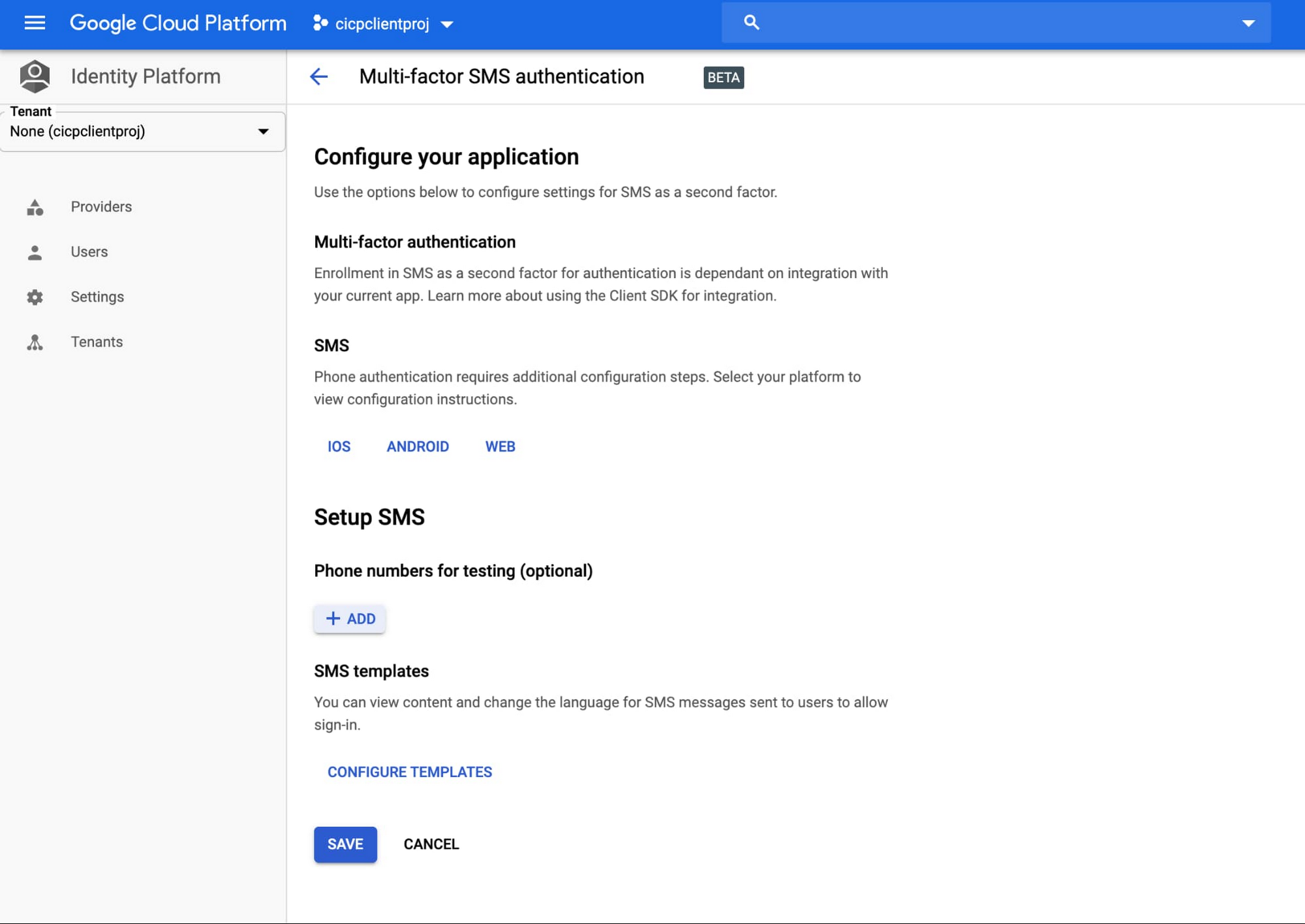
You can now configure Identity Platform to require users who attempt to login to your application to self-enroll in MFA—also known as two-factor authentication (2FA)—and register a device that is capable of receiving SMS messages. When users attempt to sign-in to your app with their first-factor credential (email/password, social login, SAML, OIDC), Identity Platform will require them to enter the six-digit authentication code that it sends via SMS to their registered devices before they can sign-in to your apps and services.
Getting started
You can learn more about this new feature by checking out the documentation page. To get started with Identity Platform, enable it in GCP Marketplace, watch our Cloud Next ‘19 presentation, and read the quickstart.
Protect Corporate Apps with BeyondCorp Enterprise

2680
Of your peers have already read this article.
2:30 Minutes
The most insightful time you'll spend today!
As part of our efforts to democratize Zero Trust, Google Cloud has designed our BeyondCorp Enterprise solution to be an extensible platform where customers can choose to integrate signals from other technology vendors and incorporate these into their Zero Trust access policies. Following our integrations announcements earlier this year, we are excited to announce a new BeyondCorp Enterprise integration with Microsoft Intune, now available in Preview.
This integration allows organizations to craft Zero Trust access policies and protect private applications and SaaS applications, including Office 365, based on data collected from the Intune graph API, including device posture and other trust signals. It can also be leveraged to configure context-aware access policies for Workspace applications.
These policies can be applied across end-user devices, no matter where they are located. The ability to leverage device information to make access decisions is a critical component of a Zero Trust approach. Intune is a widely used mobile device management (MDM) tool and many of our customers will be able to benefit from this integration to help ensure that their distributed workforce can appropriately access corporate resources.
The BeyondCorp Enterprise integration with Microsoft Intune collects data from Intune using the Microsoft Graph API. End-user device information collected by the connector is then fed into Access Context Manager, a component of BeyondCorp Enterprise, to gate access to resources based on policies and access levels.
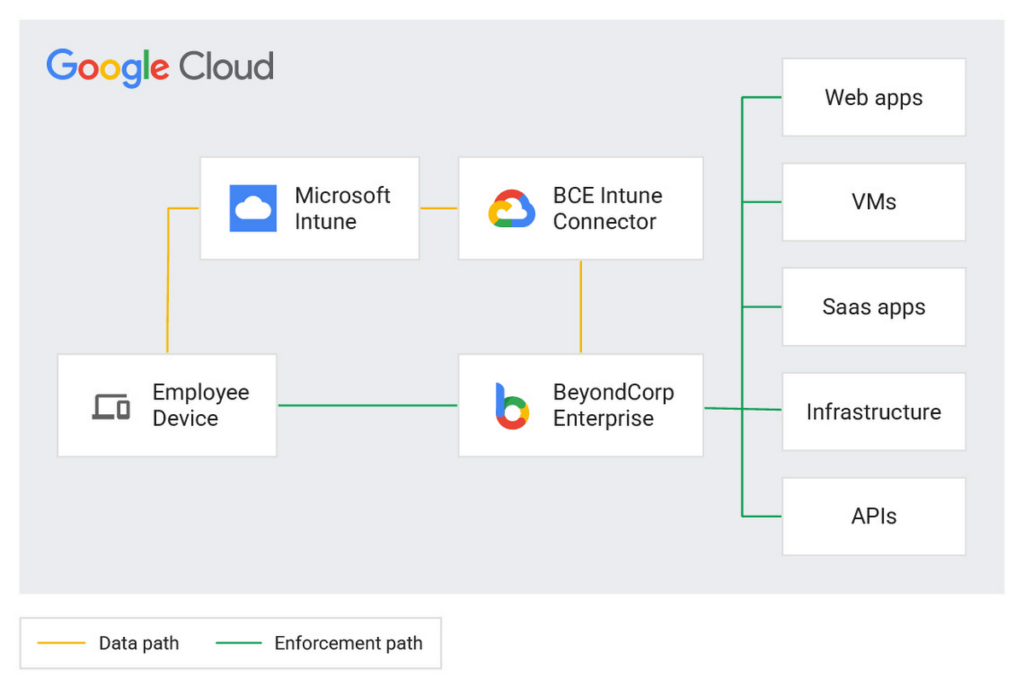
Customers are already seeing the benefits of the BeyondCorp Enterprise integration with Microsoft Intune. For example, one of our customers, a global ecommerce vendor, uses it to ensure their corporate-owned devices comply with internal policies before they are able to connect to corporate resources. With the Intune integration, they are then able to quickly and easily configure context-aware access policies with an attribute that company-owned devices must be in compliance in order to access the specific applications.
Previously, without the integration, they would need to set up a custom integration and manage both the code and the infrastructure where it was running. This integration not only alleviates the need to create custom code, but the customer has also seen a reduction in the time it takes to onboard new devices and build these policies.
If you’re interested in learning more or joining the preview, a full reference guide to the Intune integration can be found in our documentation here.
We believe that customers should be able to leverage their existing technology investments to build a more secure ecosystem. BeyondCorp Enterprise can help ensure that the right people have access to the right resources—only authorized users should be able to access only the resources that they have been approved for, based on their identity and device information. Google Workspace customers can also incorporate signal information from other vendors, including Intune, to create context-aware access policies for securing Workspace applications.
Earlier this year, we announced Netskope as a new member of the BeyondCorp Alliance to enable integration of a user’s risk score between Netskope Cloud Exchange and Google Cloud. We also announced new integrations with Jamf Pro for MacOS, which shares the Jamf-determined compliance state with BeyondCorp Enterprise so admins can incorporate this information into context-aware policies to restrict or allow access to protected applications.
You can learn more about BeyondCorp Enterprise integrations by registering for Google Cloud Next ‘22 on October 11-13, and attending the “What’s New in Zero Trust” session. Google Cloud will also be featured at the upcoming Jamf Nation User Conference (JNUC), September 27-29, to discuss BeyondCorp Enterprise integrations with Jamf.
Enhanced Risk Management: Google Cloud & CyberGRX’s Innovative Collaboration

1133
Of your peers have already read this article.
3:30 Minutes
The most insightful time you'll spend today!
Risk managers know there is one assessment type that’s foundational for every risk management program: the vendor risk assessment. Understanding the risk posture of your vendors and third parties, including your cloud providers, is an important part of an effective risk management program. While collecting and analyzing information can often be time-consuming for risk managers, Google Cloud collaborates with third-party risk management (TPRM) providers to make the process easier.
These TPRM organizations provide independent due diligence services and platforms to help automate vendor risk management based on their inspection of security, privacy, business continuity, and operational resiliency controls, aligned with industry standards and regulation compliance. The ultimate goal is to help our customers scale and accelerate their assessments of Google Cloud.
We enable trusted TPRM providers, like CyberGRX, to examine the CyberGRX controls (such as privacy, operational, and management) and operations. Based on their observations, CyberGRX provides a validated cyber risk assessment of Google Cloud’s security posture. Like assessments performed by individual customers, the CyberGRX assessment of Google Cloud details our adherence to industry standards and the security protocols built into our infrastructure.
Using a standardized approach like this, CyberGRX can quickly provide access to a security assessment of Google Cloud. CyberGRX’s validation process focuses on measuring the accuracy of a third party, such as Google Cloud’s assessment answers. CyberGRX analysts and partners evaluate evidence provided by Google Cloud to confirm we have implemented certain critical controls as indicated by their assessment. The assessment of Google Cloud is available to organizations via the CyberGRX website.
How Google Cloud stacks up
CyberGRX’s assessment covers more than 200 controls, and integrates Google Cloud’s responses with analytics, threat intelligence, and risk models. Additionally, CyberGRX’s Framework Mapper provides further functionality by mapping the cyber risk assessment of Google Cloud to more than 20 commonly used industry frameworks and standards. This enables our customers to view the cyber risk assessment of Google Cloud against customers’ specific, local compliance regime requirements including the MITRE ATT&CK framework.
CyberGRX’s Framework Mapper has broad standards and requirements coverage, including:
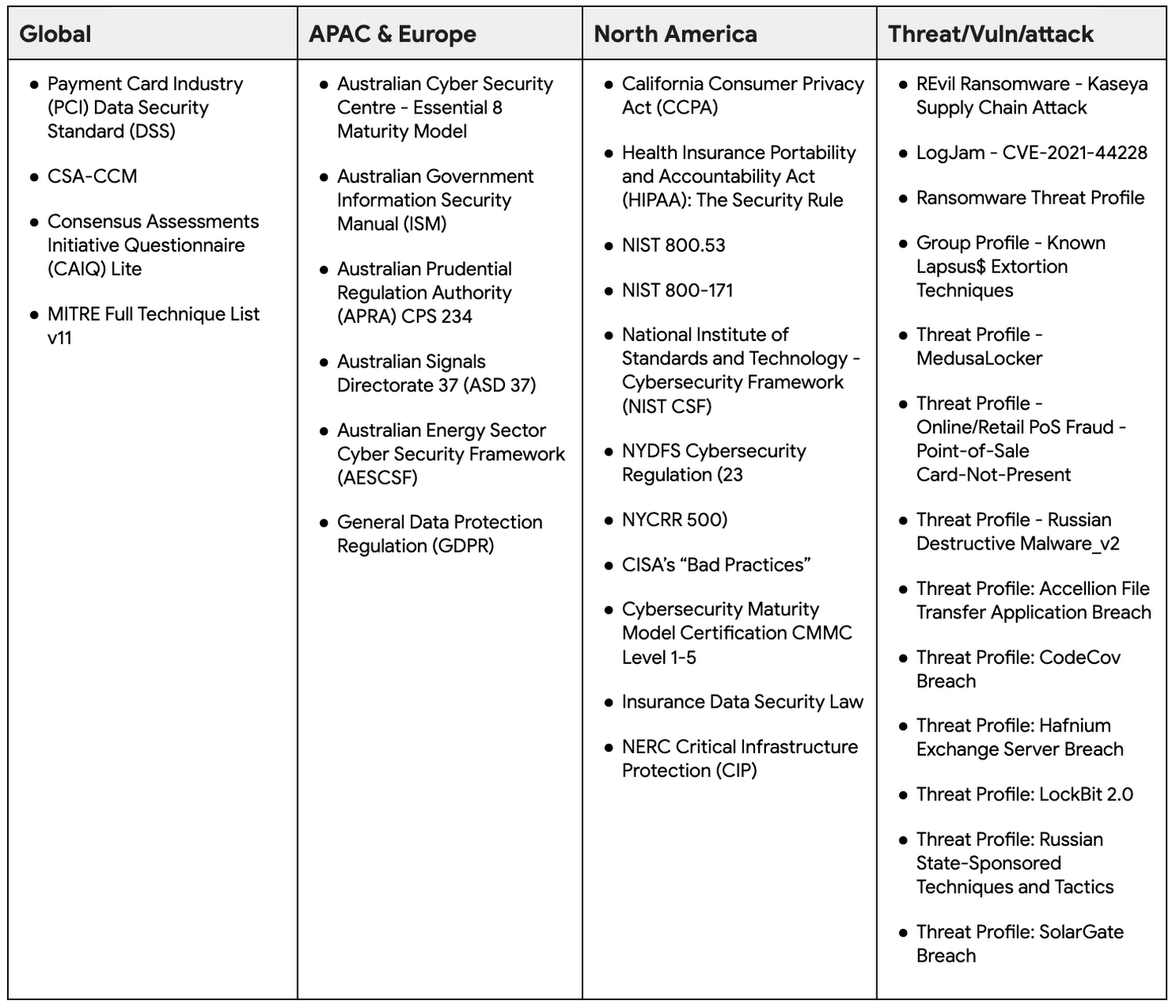
The CyberGRX mapping technology enables customers to see a mapping that is based on their specific needs, aggregated into a single assessment. This saves customers time and effort by eliminating the need for customers to create and repeatedly perform customized assessments of Google Cloud. Customers can now map the cyber risk assessment of Google Cloud to the frameworks they’re accustomed to using.
Integrating the MITRE ATT&CK™ framework
MITRE ATT&CK is a strongly-supported knowledge base that helps model security adversarial behavior, tactics, and techniques which currently includes 13 tactics and 192 techniques.
In June 2022, Google Cloud announced our support and investment in a research partnership with MITRE Engenuity Center for Threat-Informed Defense, which included facilitating the mapping of the MITRE ATT&CK framework to Google Cloud security capabilities.
CyberGRX also recognizes the value of the MITRE ATT&CK framework and maps their foundational assessment to the MITRE ATT&CK framework. This allows organizations to review their security controls and gain visibility into gaps in their defenses. Security leaders can rapidly and easily identify critical problems for remediation.
There are multiple benefits to using the MITRE ATT&CK framework when accessing Google Cloud’s risk assessment through CyberGRX, including:
- Uncovering previously unreported gaps by leveraging MITRE techniques to create kill chains or use cases.
- Integrating results into internal risk and threat management programs that already align with MITRE ATT&CK.
- Increasing credibility and defensibility to CyberGRX risk findings to support third-party decisions and relationships due to connection to MITRE-based analytics.
Take advantage of the Google Cloud and CyberGRX collaboration
CyberGRX’s independent security assessment of Google Cloud is available to Google Cloud customers, and is an easy way for organizations to scale and accelerate their cloud assessments. CyberGRX provides a comprehensive and objective view of Google Cloud’s security posture based on a number of local compliance regime requirements and the MITRE ATT&CK framework. CyberGRX’s centralized assessment supports our customers’ annual vendor risk management processes and reduces the review time.
What You Need to Know About Compute Engines

6555
Of your peers have already read this article.
1:30 Minutes
The most insightful time you'll spend today!
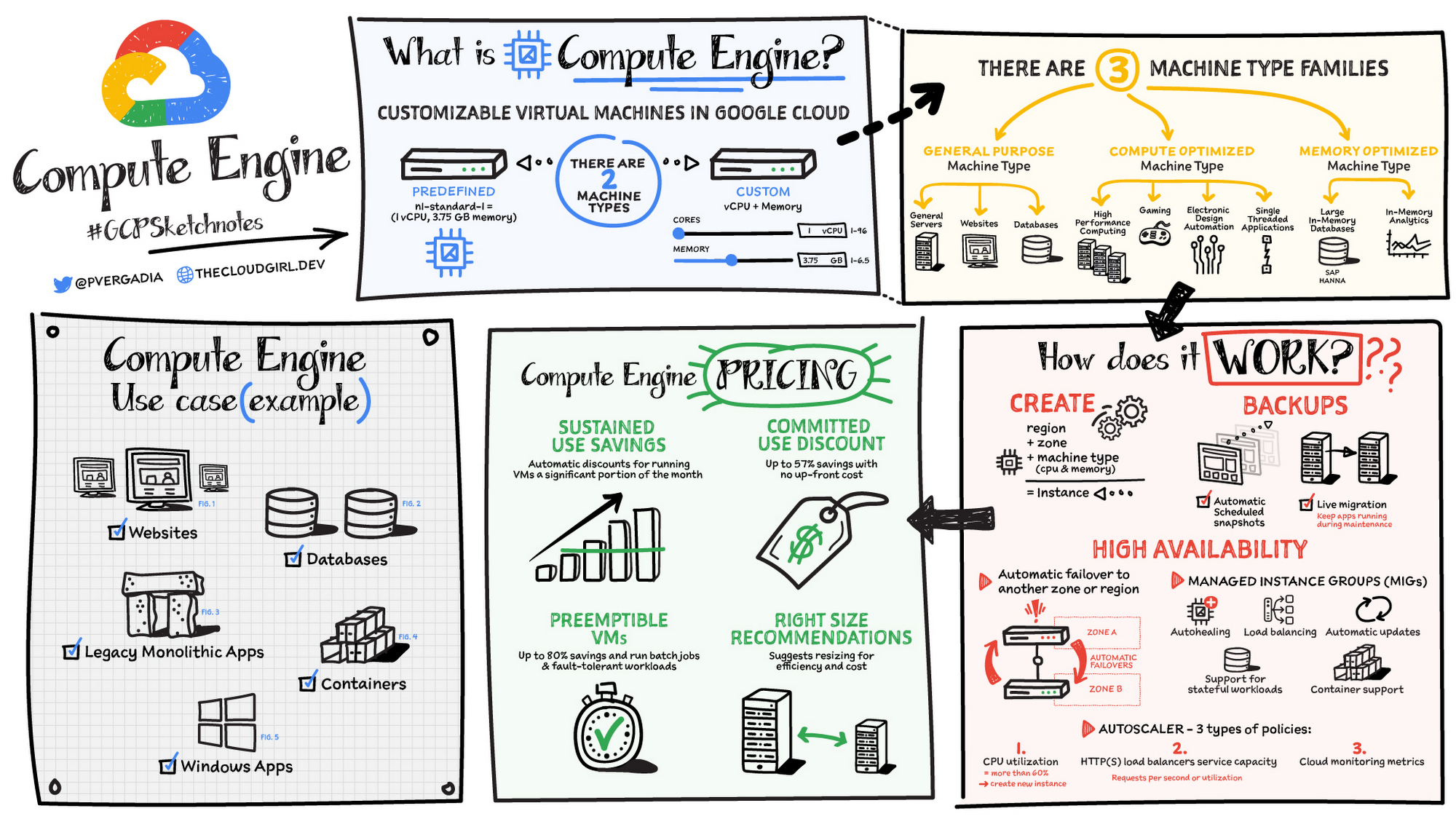
Compute Engine is a customizable compute service that lets you create and run virtual machines on Google’s infrastructure. You can create a Virtual Machine (VM) that fits your needs. Predefined machine types are pre-built and ready-to-go configurations of VMs with specific amounts of vCPU and memory to start running apps quickly. With Custom Machine Types, you can create virtual machines with the optimal amount of CPU and memory for your workloads. This allows you to tailor your infrastructure to your workload. If requirements change, using the stop/start feature you can move your workload to a smaller or larger Custom Machine Type instance, or to a predefined configuration.
Machine types
In Compute Engine, machine types are grouped and curated by families for different workloads. You can choose from general-purpose, memory-optimized, compute-optimized and accelerator-optimized families.
- General-purpose machines are used for Day-to-day computing at a lower cost and for balanced price/performance across a wide range of VM shapes. The use cases that best fit here are web serving, app serving, back office applications, databases, cache, media-streaming, microservices, virtual desktops, development environments.
- Memory-Optimized machine are recommended for ultra high-memory workloads such as in-memory analytics and large in-memory databases such as SAP HANA
- Compute-Optimized machines are recommended for ultra high performance workloads such as High Performance Computing (HPC), Electronic Design Automation (EDA), gaming, video transcoding, single-threaded applications.
- Accelerator-Optimized machines are optimized for high performance computing workloads such as Machine learning (ML), Massive parallelized computations and High Performance Computing (HPC)
How does it work?
You can create a VM instance using a boot disk image, a boot disk snapshot, or a container image. The image can be a public operating system (OS) image or a custom one. Depending on where your users are you can define the zone you want the virtual machine to be created in. By default all traffic from the internet is blocked by the firewall and you can enable the HTTP(s) traffic if needed.
Use snapshot schedules (hourly, daily, or weekly) as a best practice to back up your Compute Engine workloads. Compute Engine offers live migration by default to keep your virtual machine instances running even when software or hardware update occurs. Your running instances are migrated to another host in the same zone instead of requiring your VMs to be rebooted.
Availability
For High Availability (HA) Compute Engine offers automatic failover to other regions or zones in event of a failure. Managed instance groups (MIGs) help keep the instances running by automatically replicating instances from a predefined image. They also provide application based autohealing health checks. If an application is not responding on a VM, the auto healer automatically recreates that VM for you. Regional MIGs let you spread app load across multiple zones. This replication protects against zonal failures. MIGs work with load balancing services to distribute traffic across all of the instances in the group.
Compute Engine offers autoscaling to automatically add or remove VM instances from a managed instance group based on increases or decreases in load. Autoscaling lets your apps gracefully handle increases in traffic, and it reduces cost when the need for resources is lower. You define the autoscaling policy for automatic scaling based on the measured load, CPU utilization, requests per second or other metrics.
Active Assist’s new feature, predictive autoscaling, helps improve response times for your applications–When you enable predictive autoscaling, Compute Engine forecasts future load based on your Managed Instance Group’s (MIG) history and scales it out in advance of predicted load, so that new instances are ready to serve when the load arrives. Without predictive autoscaling, an autoscaler can only scale a group reactively, based on observed changes in load in real time. With predictive autoscaling enabled, the autoscaler works with real-time data as well as with historical data to cover both the current and forecasted load. That makes predictive autoscaling ideal for those apps with long initialization times and whose workloads vary predictably with daily or weekly cycles. For more information, see How predictive autoscaling works or check if predictive autoscaling is suitable for your workload, and to learn more about other intelligent features, check out Active Assist.
Pricing
You pay for what you use. But you can save cost by taking advantage of some discounts! Sustained use saving are automatic discounts applied for running instances for a significant portion of the month. If you know your usage upfront, you can take advantage of committed use discounts which can lead up to significant savings without any upfront cost. And by using short lived preemptive instances you can save up to 80%, they are great for batch jobs and fault tolerant workloads. You can also optimize resource utilization with automatic recommendations. For example if you are using a bigger instance for a workload that can run on a smaller instance you can save costs applying these recommendations.
Security
Compute Engine provides you default hardware security. Using Identity and Access Management (IAM) you just have to ensure that proper permissions are given to control access to your VM resources. All the other basic security principles apply, if the resources are not related and don’t require network communication amongst themselves, consider hosting them on different VPC networks. By default, users in a project can create persistent disks or copy images using any of the public images or any images that project members can access through IAM roles. You may want to restrict your project members so that they can create boot disks only from images that contain approved software that meet your policy or security requirements. You can define an organization policy that only allows Compute Engine VMs to be created from approved images. This can be done by using the Trusted Images Policy to enforce images that can be used in your organization.
By default all VM families are Shielded VMs. Shielded VMs are virtual machine instances that are hardened with a set of easily configurable security features to ensure that when your VM boots, it’s running a verified bootloader and kernel — is the default for everyone using Compute Engine, at no additional charge. For more details on Shielded VMs refer to the documentation here.
For additional security, you also have the option to use Confidential VM to encrypt your data in use, while it’s being processed in Compute Engine. For more details on Confidential VM refer to the documentation here.
Use cases
There are many use cases Compute Engine can serve in addition to running websites and databases. You can also migrate your existing systems onto Google Cloud, with Migrate for Compute Engine, enabling you to run stateful workloads in the cloud within minutes rather than days or weeks. Windows, Oracle or VMware applications have solution sets enabling a smooth transition to Google Cloud. To run windows applications either bring your own license leveraging Sole-tenant nodes or using the included licenced images.
Conclusion
Whatever your application use case may be, from legacy enterprise applications to digital native applications, Compute Engine’s families will fit it. For a more in-depth look into Compute Engine check out the documentation.
For more #GCPSketchnote, follow the GitHub repo. For similar cloud content follow me on Twitter @pvergadia and keep an eye out on thecloudgirl.dev
Embracing Confidential Computing: Secure Your Data in the Cloud

1229
Of your peers have already read this article.
1:30 Minutes
The most insightful time you'll spend today!
As one of the most trusted cloud platform providers, Google is committed to providing our clients secure and reliable environments for their workloads. Google believes the future of computing will increasingly shift to private, encrypted services where users can be confident that their data is not being exposed to cloud providers or their own insiders. Confidential Computing helps make this future possible by keeping data encrypted in memory, and elsewhere outside the CPU, while it is being processed.
Since our first Confidential Computing offering in 2018, Google has been a pioneer in making the technology widely available through our cloud, while also constantly adding new features that allow a wide range of organizations to benefit from it.
Expanding the Confidential Computing portfolio
Today at the RSA Conference 2023, we are announcing several exciting updates to our Confidential Computing portfolio.
We are expanding our portfolio with the next generation of our Confidential Computing VM instances that utilize AMD Infinity Guard technology, specifically AMD SEV-SNP (Secure Encrypted Virtualization-Secure Nested Paging). SEV-SNP adds additional new hardware-based security protections such as strong memory integrity protection and hardware rooted attestation. Confidential VMs on general purpose N2D VMs with SEV-SNP enabled are now in Private Preview. Learn more in our deep dive here.
“Advanced, hardware-based security features – such as AMD Infinity Guard built into AMD EPYC processors – are a crucial part of cloud offerings and the further expansion of cloud computing,” said Ram Peddibhotla, corporate vice president, Cloud Business, AMD. “Our work with Google Cloud delivers on the leadership security features our joint customers demand with nearly effortless implementation and minimal performance impact as more mission critical and business critical workloads move to the cloud.”
Google is committed to ensuring Confidential Computing technology is as secure as possible before releasing products to customers. We constantly evaluate various attack vectors to make certain that Google Cloud Confidential Computing environments are protected against a wide range of attacks.
Throughout last year, Google and Intel collaborated on a research project to identify potential security vulnerabilities in Intel’s new Confidential Computing technology, Trust Domain Extensions (TDX). We’ve recently released the full report and made it available in our blog here.
“We want to make it such that people don’t worry about the security and trustworthiness of their data,” said Anil Rao, vice president and general manager of systems architecture and engineering in the Office of the CTO at Intel. “Organizations use confidential computing to control their data and provide access to trusted parties in a manner that is verifiable, revocable and time sensitive – we have an obligation to make sure the technology is secure. Our early effort with Google solidifies our commitment to perform thorough analysis to address all potential vulnerabilities.”
Confidential Space is now in general availability. Confidential Space builds on Confidential Computing and provides a secure enclave, also known as a Trusted Execution Environment (TEE). Google Cloud customers can leverage the TEE for various privacy-focused use cases such as joint data analysis and machine learning (ML) model training, with trust guarantees that data can stay protected — including hardened protection against cloud service provider access.
Confidential Space allows for new privacy-preserving technologies to take shape, and one such technology is The Privacy Sandbox. This is a crucial step forward as Privacy Sandbox for the Web will phase out third-party cookies and limit covert tracking. By supporting a choice of trusted execution environments, including Confidential Space, the Privacy Sandbox will provide ad-techs with safer alternatives to existing technology, so they can continue building digital businesses while keeping user data private.
“Trusted Execution Environments (TEEs) are already in use across industries such as digital advertising to enable privacy preserving analytics, and we are excited to leverage Google Cloud’s built-in TEE called Confidential Space,” said Gaurav Bhaya, vice president and general manager, Google Ads Measurement.
Building on our history of innovation with Confidential Computing
Google has worked diligently with internal and external partners to validate, audit and publish the security assessment of the hardware, firmware, and software that underpins Confidential Computing.
Last year, a joint security effort between Google Project Zero, Google Cloud, and AMD led to more secure technology for the entire industry, regardless of what service provider you choose for your Confidential Computing deployment. You can learn more in our full report here.
Since then, we have continued to expand the portfolio of Confidential Computing products and services, including Confidential Virtual Machines (CVMs), Confidential GKE, Confidential Dataproc, and Confidential Space. These offerings give our customers more choice in their deployments.
Currently, our Confidential Computing services are widely available across 80% of Google Cloud regions and growing, and we recently added support for Compute-Optimized C2D VMs for Confidential GKE.
Organizations are now leveraging Confidential Computing for joint data analysis and machine learning (ML) model training with trust guarantees that the data they own stays protected and across various other industries by organizations, including AstraZeneca, Bullish, HashiCorp, Matrixx Software, MonetaGo and Yellowdog.
Confidential Computing has also proven to be a helpful additional control for organizations implementing digital sovereignty strategies, providing an encryption capability, and protection for data-in-use where encryption keys are not accessible by the cloud provider.
We can’t wait to see the possibilities this technology will open up for your organization. Check out our Confidential Computing page to learn more.
Introducing IAM Deny: Harden Your Security Posture at Scale the Easy Way

2644
Of your peers have already read this article.
1:30 Minutes
The most insightful time you'll spend today!
At Google Cloud, we’re focused on making it easy for organizations to build solutions quickly and securely. Identity and Access Management (IAM) is the core security control for establishing who has access to which cloud resources and making sure access permissions are aligned to your company’s business and security policies.
We are excited to announce the general availability of IAM Deny policies. This new capability helps you easily create access guardrails for Google Cloud resources. With IAM Deny policies, you can create rules that broadly restrict resource access. It provides a powerful, coarse-grained access control to help implement security policies at scale.
Control with IAM Policy – Allow and Deny
IAM Deny policies complement IAM Allow policies as you define access to your resources. Google Cloud’s IAM Allow policy lets you grant granular access to Google Cloud resources. The more coarse-grained Deny policies let you explicitly prohibit access to certain resources regardless of existing Allow rules. IAM Deny policies always supersede IAM Allow policies and override conflicting IAM Allow rules.
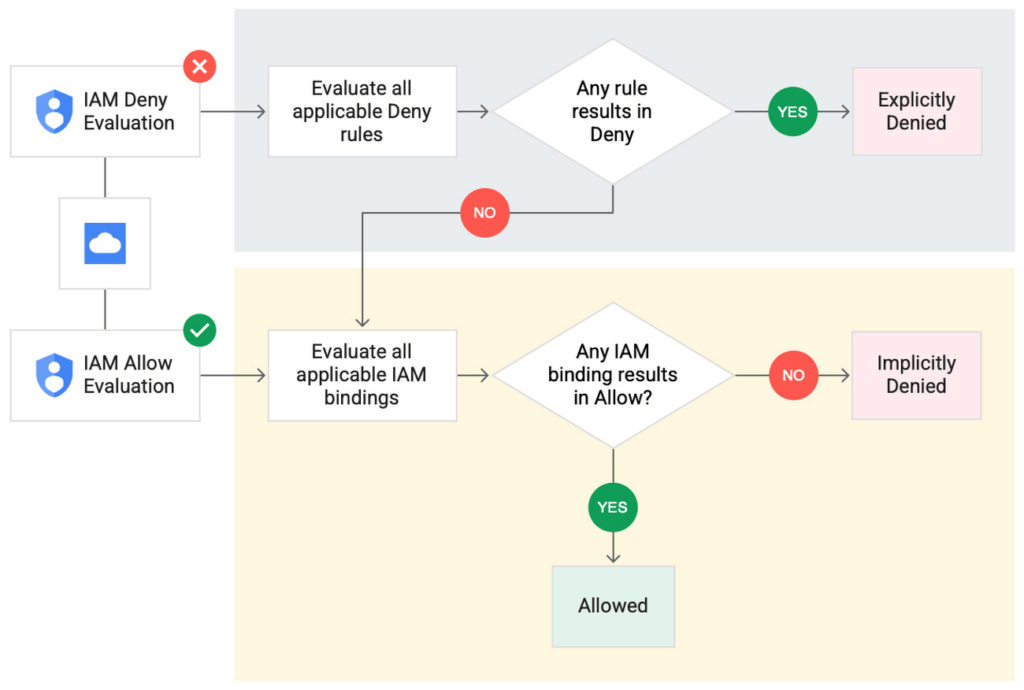
IAM Deny policies can be applied across many Google Cloud resources, such as Compute Engine, Cloud Storage, and Google Cloud Kubernetes Engine. These policies can help reduce toil on administrators as they can set up deny rules that will be enforced at scale without requiring reviews and changes of existing access rules. This makes resource governance simpler.
How to strengthen your security posture with IAM Deny
There are multiple use cases where IAM Deny policies can be used to help strengthen posture. Some of these are:
- Establish a default security baseline: IAM Deny can be used to set base policies at the organization level, folder level, and project level to deny access to resources. For example, you can attach a deny policy at the organization level to deny all users access to sensitive data storage buckets, making an exception for a specific user group.
- Prevent backdoors: IAM Deny rules override any IAM Allow rules. This can help you ensure that no “backdoor” access can be granted. For example, an organization that wants to ensure only central-admin can create projects in a folder can add an IAM Deny policy that restricts all users from creating projects except central-admin. This can help ensure no backdoor users will be added using allow policy rules.
- Prevent data exfiltration: Controlling access to data is a key measure to prevent exfiltration. For example, an organization that wants to restrict access to their personally identifiable information (PII) can set an IAM Deny policy on resources containing PII that denies access to all users except those in a group called PII-admin.
- Demonstrate compliance: Many industry regulations and compliance frameworks require organizations to demonstrate least-privilege access to sensitive resources. IAM Deny policies can create a baseline access restriction that always takes precedence when applied to resources.
Simplify IAM administration
IAM Deny can also help simplify common administrative tasks. It provides a list of permissions for Google Cloud services that you can readily use in your deny policies. Here are a few common situations where you can use IAM Deny to help streamline your access management.
- Centralize administrative privileges: You can use deny policies to restrict certain types of administrative activities to specific users or user groups. For example, if you want to limit custom role management to a single central team, you can create a deny rule that denies the permissions required for custom role management to all users, except users in the central-admin group. This will only let members of the central-admin group manage custom roles, even if other users have the required permissions.
- Create exceptions to access grants: You can use deny policies to deny inherited permissions. For example, you can grant a role at a high level in the resource hierarchy, and then deny the role’s permissions on individual lower-level resources if necessary.
- Block access based on tags: Google Cloud supports key-value based tags and you can use deny policies to deny permissions based on tags without adding an IAM Condition to every role grant. For example, you can create a rule to deny delete permissions for resources tagged as “production” for everyone except project-admins.
IAM Deny in action
The following example illustrates how a deny policy can be used to block all users from deleting projects unless the user is a member of a project-admins group or the project being deleted is tagged as a “test” project. Without a deny policy, you would have to manually track all members who have the permission to delete projects, and ensure that no undesired user has access to this permission. The deny policy makes it easy for the administrator to build this guardrail.
The below deny rule denies permission to everyone except project-admins@example.com for projects not tagged as test. Add this deny rule to a deny policy and attach the policy at the org level. That’s it!
(Note that project-admins@example.com is a security group. Using security groups is a best practice that should be followed to help keep your resources secure.)
{
"name": "policies/cloudresourcemanager.googleapis.com%2Fprojects%2F253519172624/denypolicies/limit-project-deletion",
"uid": "06ccd2eb-d2a5-5dd1-a746-eaf4c6g3f816",
"kind": "DenyPolicy",
"displayName": "Only project admins can delete projects.",
"etag": "MTc1MTkzMjY0MjUyMTExODMxMDQ=",
"createTime": "2021-09-07T23:15:35.258319Z",
"updateTime": "2021-09-07T23:15:35.258319Z",
"rules": [
{
"denyRule": {
"deniedPrincipals": [
"principalSet://goog/public:all"
],
"exceptionPrincipals": [
"principalSet://goog/group/project-admins@example.com"
],
"deniedPermissions": [
"cloudresourcemanager.googleapis.com/projects.delete"
],
"denialCondition": {
"title": "Only for non-test projects",
"expression": "!resource.matchTag('12345678/env', 'test')"
}
}
}
]
}
Getting started with IAM Deny Policies
With IAM Deny, you now have a powerful new capability to build security guardrails and more effectively control access to your Google Cloud resources. IAM Deny is now generally available for all customers through gCloud and APIs. We offer IAM Deny to Google Cloud customers at no additional cost. You can learn more about IAM Deny by visiting our documentation page.
More Relevant Stories for Your Company

What’s in Line for Google Cloud’s Europe Customers in Regards to the E.U.-U.S. Data Transfer Framework
Last week, the European Commission and U.S. Government agreed on a new E.U.-U.S. data transfer framework. Earlier today, Google shared that it welcomes these efforts by the U.S. government to enhance privacy protections for E.U. data and facilitate trusted transatlantic data flows. For our Google Cloud customers, we intend to

Macy’s Migration to Cloud: How Google Cloud NAT Upheld Security
Macy’s is well known for its high-end fashion worldwide. What is not as well known are the strong measures it takes to ensure its customers’ data remains secure. When Macy’s decided to move its infrastructure from on-premises to Google Cloud, it required the move be done without sacrificing security or degrading

Tips and Best Practices: Ensuring Cloud Configuration Compliance
Security is often seen as a zero-sum game between “go fast” or “stay secure.” We would like to challenge this school of thought and introduce a framework to change that paradigm to a “win-win game,” so you can do both—“go fast” and “stay secure.” Historically, application security tools have been

Confidential Computing: Google Cloud Security, Project Zero and AMD Come Together to Secure Sensitive Workloads
At Google Cloud, we believe that the protection of our customers’ sensitive data is paramount, and encryption is a powerful mechanism to help achieve this goal. For years, we have supported encryption in transit when our customers ingest their data to bring it to the cloud. We’ve also long supported
