





Cutting Costs and Accelerating Development with API Management

3510
Of your peers have already read this article.
3:00 Minutes
The most insightful time you'll spend today!
Google Cloud Results
- Reduced API management costs 34%
- Develops new features in days versus months
- Fixes issues quickly by writing code
- Manages 15B API calls per month without outages
Austin, Texas-based Bazaarvoice switched to Apigee for its API platform because of its competitive pricing and feature set. But another benefit soon became apparent to Bazaarvoice engineers: the ability to write code on the Apigee platform and “own our destiny,” says Kurtis White, Senior Development Manager in Research and Development for Bazaarvoice.
Bazaarvoice specializes in consumer-generated content marketing solutions that connect brands, retailers, and consumers. APIs do the heavy lifting in making those connections. For example, the Conversations API, the heart of the Bazaarvoice platform, lets the company’s retail clients aggregate and leverage users’ product reviews and ratings. With the Conversations API, API keys are passed along in each query string and enable Bazaarvoice customers to access the relevant customer data.
APIs are essential to the Bazaarvoice platform. During its early days the company didn’t use APIs, relying instead on direct communication links to connect its customers to what consumers were saying about them. “That approach just didn’t scale,” says White. “Without reliable APIs, it would be almost impossible for us to be in business today.”
Eight years ago, Bazaarvoice switched to APIs. From about 2013 to 2017, the company relied upon the same API management SaaS solutions provider. But the company was growing. The call volume that its APIs generated was expanding at a rapid pace, too—especially during the busy year-end shopping season. For example, in early October 2016, Bazaarvoice APIs generated nearly 9 billion calls, compared to about 12 billion calls in early December 2016.
Unfortunately, along with the pace of API calls, the costs associated with Bazaarvoice’s existing API solutions provider were also escalating—increasing 74% from early 2016 to early 2017. To keep rising expenses from stifling its own growth, and to continue offering its reliable, high-performing SaaS solution, the company’s IT team decided it was to time to find a different API solutions provider.
In April 2017, Bazaarvoice migrated to the Apigee API platform because of its feature set and, in particular, its competitive pricing. By switching to Apigee, Bazaarvoice reduced its API spend by 34%, White says.
A ticking clock
Migrating from its previous API provider to Apigee involved importing 66,000 API keys—an arduous task. Apigee engineers and business leaders worked directly with their Bazaarvoice counterparts to help ensure a successful transition. “Everyone at Apigee was very responsive to our needs,” White says. “If a problem came up, the Apigee team owned it and worked through it to give us a great experience.”
During the migration, there was a clock ticking in the background. Bazaarvoice wanted to shift 100% of its API calls to Apigee before the contract with its existing API provider came up for renewal. “I wasn’t sure we could make the deadline,” says White. “But we did, and I give a big credit to the Apigee technical team. They provided 24-hour support to our team. And once we went live, our platform was handling 15 billion API calls a month with no outages.”
Following the migration, Apigee support continues to “knock it out of the park,” he added. “Apigee is a great partner to have.”
Controlling destiny
The Bazaarvoice IT team didn’t specifically choose Apigee because of the ability to write code on the platform—but they quickly came to appreciate the feature.
“Our previous API provider was like a black box to us,” says White. “They had written some custom code for us that we depended upon. But we didn’t own that code. And if we needed changes, we had to pay them to do it for us.”
“Apigee allows us to write our own code that runs on the platform and looks at all of the API calls,” White continues. “We can put the code into a virtual control system. We can update it whenever we want to add a feature. Because of how important APIs are to our business, the ability to write code on Apigee lets us control our own destiny. It’s the Apigee number one benefit, in my opinion.” This also accelerates the time it takes Bazaarvoice to bring new features to market.
“Apigee gives us the flexibility to do things we wouldn’t have even tried before,” says White. “We can test new things easily, without getting locked into a service agreement with an external party. Before, it might have taken months to develop new product functionalities. Now it takes days.”
In addition, writing code on the Apigee platform enables the IT team to quickly address any problems that may arise. “If someone notices a problem, we can write the code to fix it right away,” White says.
“Because Apigee lets us iterate and fix problems quickly, our innovation has gone to the next level,” White added. “Before, if you had an idea, you’d wonder if you really wanted to invest $30,000 and three months in it. Probably not. Now, with Apigee, the investment is maybe one day and zero dollars.”
Experimentation pays off for Bazaarvoice and its customers. For example, during the 2017 holiday season, Bazaarvoice was able to give all its customers the capacity to handle twice the number of API calls.
“With our previous API solutions provider, it would have been such a long process to make that happen, it wouldn’t have been worth it,” says White. “But it was really easy to write the code in Apigee. Plus, we made our customers happy and kept them running smoothly during the peak holiday season—with little effort on our part.”
Personalization and monetization
Apigee has played a key role in enabling Bazaarvoice to develop new products, too. In March 2018, Bazaarvoice released a new personalization data product for its customers, built on top of an Apigee-powered API. The new product enables Bazaarvoice retail customers to recommend relevant products to their online shoppers. The products are personalized to the shoppers’ interests, based on their past behavior and what they’re shopping for.
Apigee is also serving as a strategic business advisor, helping Bazaarvoice determine the best way to price its offerings as its API call volumes continue to increase.
“We’re working with Apigee to build an industry-leading model for monetizing our APIs,” says White. “Apigee is the ideal advisor in this regard. We’re handling such large volume, the volume is continuing to grow, and Apigee enables us to power it.”
WebGL-powered Features to Build Next-generation Mapping Experience

3459
Of your peers have already read this article.
3:00 Minutes
The most insightful time you'll spend today!
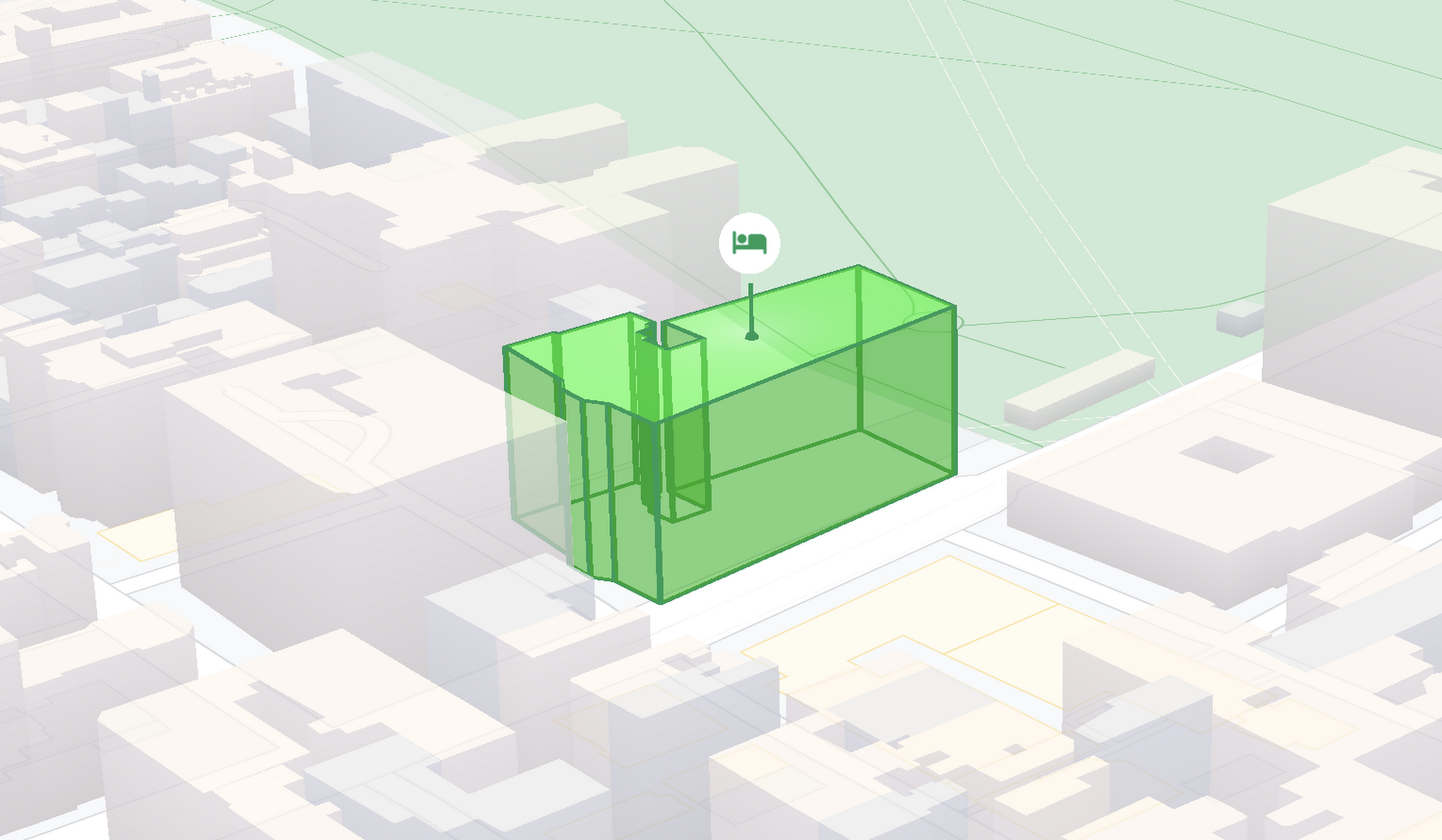
At Google I/O 2021, we announced the beta release of Tilt and Rotation, and Webgl Overlay View, which give you a fundamentally new way to build mapping experiences. You may be familiar with the existing Overlay View feature of the Maps JavaScript API that lets you render in a transparent layer that sits on top of the map. For years, developers have been using Overlay View to draw in two dimensions over the top of the map, but for as much as you can do with Overlay View, it only allows you to render on a transparent layer that effectively floats above the map.
In contrast, WebGL Overlay View gives you direct hooks into the lifecycle of the exact same WebGL rendering context we use to render the vector basemap. This means that for the first time ever, you can performantly render two and three dimensional objects directly on the map, enabling you to build experiences that were previously impossible with the Maps JavaScript API.https://www.youtube.com/embed/9eycQLef6iU?enablejsapi=1&
Today, we’re going to give you a quick overview of the new WebGL-powered features of the Maps JavaScript API, so that you have all the knowledge you need to get started creating next generation mapping experiences.
What is WebGL?
WebGL is a low-level browser API, originally authored by the Mozilla Foundation, that gives you access to the rendering and processing power of the graphics processing unit (GPU) on client devices, such as mobile phones and computers, in your web apps. On its own, the browser is not able to handle the heavy computation needed to render objects in 3D space, but using WebGL it is able to pass those processes off to be handled by the GPU, which is purpose built to handle such computations.
To learn more about WebGL, check out the documentation from the Khronos Group, the designers and maintainers of WebGL.
Requirements
To use WebGL Overlay View, you’ll need a Map ID with the vector map enabled. It’s also strongly recommended that you enable Tilt and Rotation when you create your Map ID, otherwise your map will be constrained to the default top-down view – in short, you won’t be able to move your map in three-dimensions.
To learn more about using Map IDs and the vector map, see the documentation.
Setting Tilt and Rotation
To load your map with a set tilt and rotation, you can provide a value for the `tilt` and `heading` properties when you create the map:
const mapOptions = {mapId: "15431d2b469f209e",tilt: 0,heading: 0,zoom: 17,center: {lat: -33.86957547870852,lng: 151.20832318199652}}const mapDiv = document.getElementById("map");const map = new google.maps.Map(mapDiv, mapOptions);
Tilt is specified as a number or float in degrees between 0 and 67.5, with 0 degrees being the default straight down view and 67.5 being the maximum tilt. The available maximum tilt also varies by zoom level.
The rotation is set in the heading property as a number or float between 0 and 360 degrees, where 0 is true north.
You can also change the tilt and rotation programmatically at runtime whenever you want by calling `setTilt` and `setHeading` directly on the map object. This is useful if you want to change the orientation of the map in response to events like user interactions.
map.setTilt(45);map.setHeading(180);
In addition, your users can manually control the tilt and rotation of the map by holding the <shift> key and dragging with the mouse or using the arrow keys.
For more information on Tilt and Rotation, see the documentation.
Adding WebGL Overlay View to the Map
WebGL Overlay View is made available in the Maps JavaScript API by creating an instance of `google.maps.WebglOverlayView`. Once an instance of the overlay is created, you simply need to call `setMap` on the instance to apply it to the map.
const webglOverlayView = new google.maps.WebglOverlayView;webglOverlayView.setMap(map);
To give you access to the WebGL rendering context of the map and handle any objects you want to render there, WebGL Overlay View exposes a set of five hooks into the lifecycle of the WebGL rendering context of the vector basemap.
Here’s a quick rundown:
- `onAdd` is where most of your pre-processing should be done, like fetching and creating intermediate data structures to eventually pass to the overlay. The reason to do all of that here is to ensure you don’t bog down the rendering of the map.
- `onRemove` is where you’ll want to destroy all intermediate objects, though it would be nice if you did it sooner.
- `onContextRestored` is called before the map is rendered and is where you should initialize, bind, reinitialize or rebind any WebGL state, such as shaders, GL buffer objects, etc.
- `onDraw` is where we actually render the map, as well as anything that you specify in this hook. You should try to execute the minimal set of draw calls to render your scene. If you try to do too much here you’ll bog down both the rendering of the basemap and anything you’re trying to do with WebGL, and trust me, no one wants that.
- `onContextLost` is where you’ll want to clean up any state associated with pre-existing GL state, since at this point the WebGL context will have been destroyed, so it’ll be garbage.
To implement these hooks, set them to a function, which the Maps JavaScript API will execute at the appropriate time in the WebGL rendering context lifecycle. For example:
webglOverlayView.onDraw = (gl,coordinateTransformer) => { //do somerendering }
For more information on using WebGL Overlay View and its lifecycle hooks, check out the documentation.
Creating Camera Animations
As part of the beta release of WebGL Overlay View, we’re also introducing `moveCamera`, a new integrated camera control that you can use to set the position, tilt, rotation, and zoom of the camera position simultaneously. Like `setTilt` and `setHeading`, `moveCamera` is called directly on the `Map` object.
By making successive calls to `moveCamera` in an animation loop you can also create smooth animations between camera positions. For example, here we are using the browser’s `requestAnimationFrame` API to change the tilt and rotation each frame:
const cameraOptions = {tilt: 0,heading: 0}function animateCamera () {cameraOptions.tilt += 1;cameraOptions.heading += 1;map.moveCamera(cameraOptions);}requestAnimationFrame(animateCamera);
Plus, all of these adjustments, including zoom, support floats, which means not only can you control the camera like never before, you can also do it with a high degree of precision.
For more information on `moveCamera`, see the documentation.
Give it a tryYou can try the new WebGL-powered features of the Maps JavaScript API right now by loading the API from the beta channel. We’ve got a new codelab, and documentation with all the details, as well as sample code and end-to-end example apps to help you get started. Also, be sure to check out our feature tour and travel demos to learn more and play with a real implementation of these features.
And let us know what you think by reporting through our issue tracker. We need your bug reports, your feature requests, and your feedback to help us test and improve the new WebGL-based map features.
Have fun building with the map in 3D—we can’t wait to see the amazing things you’ll build.
For more information on Google Maps Platform, visit our website.

3994
Of your peers have already downloaded this article
2:00 Minutes
The most insightful time you'll spend today!
Digital is disrupting every industry. From drugstore chains to banks to telcos, businesses are becoming software companies and adopting modern software practices. Why? If they don’t adapt to a new market reality, they will fail.
As the business context is changing so is the technology stack. Enterprise application architectures are evolving from integration-centric enterprise service bus (ESB) architectures to application-centric, microservices, platform-as-a-service (PaaS), multi-cloud, and API-driven architectures.
APIs are the lynchpin to the success of these digital businesses. All applications use APIs to access application services and data through APIs. These services can be microservices or cloud workloads or legacy SOAP services or IoT. To ensure that applications and developers can effectively use these services to build partner, consumer, and internal apps, companies need to deliver secure, scalable, easy-to-use modern APIs.
Over the last few years, we’ve participated in hundreds of enterprises’ API-led digital transformation initiatives. This guide distills our learnings from these customer engagements and shares best practices about managing APIs across the lifecycle.
Gartner found that 77% of app development supporting digital business will occur in-house. Seventy percent of organizations claim to be either using or investigating microservices, and nearly one-third currently use them in production, according to a report from NGINX.
Download the E-book to gain deeper insights into efficient API management.
Reactive Programming on Google Maps Platform: Watch Video to Learn

5311
Of your peers have already read this article.
1:30 Minutes
The most insightful time you'll spend today!
The Google Maps Platform Android SDK supports extensions for reactive programming, which helps you write code to handle asynchronous operations.
Write reactive and responsive mapping applications with Google Maps Platform
In mobile apps, asynchronous events can happen at any point in time: user touch events, waiting for network calls to complete, or receiving push notifications, to name a few. As an app developer, accounting for these events and composing them with other asynchronous events can be challenging. Reactive programming is an alternative to passing callbacks for different events and helps simplify the process of working with asynchronous events. In reactive programming, events are modeled as a stream, emitting items over time.
https://youtube.com/watch?v=1TmJvOZfBVQ%3Fenablejsapi%3D1%26
There are two libraries you can use to write reactive code: Kotlin Flows and RxJava. The next two videos show you how to use each one.
Writing reactive and responsive mapping applications using Kotlin
If you’re a Kotlin developer looking to use Coroutines and Flows, the KTX library allows you to use Kotlin Flows to receive events. The Maps KTX library includes extension functions that return Kotlin Flow objects, so you can listen to events in a reactive manner. Unlike suspending functions, which return a single value, Kotlin Flows can return several values over time. For example, you can use a Flow to receive camera event changes over time. To get started using Kotlin Flows in your app, include the Maps KTX library in the dependencies section in your build.gradle file.
https://youtube.com/watch?v=Cotx1ZmEYg8%3Fenablejsapi%3D1%26
Creating reactive maps on Android with RxJava
Integrate Google Maps Platform SDKs with popular Android library RxJava. RxJava is the Java implementation of Reactive Extensions, which is a library for composing asynchronous and event-based programs using observable sequences. One thing RxJava does is allows you to convert callback-based asynchronous code into a chain of transformations. Learn how this works and the other ways you can use RxJava in the third video in this series.
https://youtube.com/watch?v=AgGE7fAMrdA%3Fenablejsapi%3D1%26
We hope you learn more about reactive programming concepts to help you build responsive and reactive mobile apps in this three-part YouTube series. Have ideas for helpful videos you’d like to see on our channel? Leave a comment on any of our videos. And don’t forget to subscribe to our YouTube channel for the latest updates, tutorials, customer stories, and more.
For more information on Google Maps Platform, visit our website.
Custom Voice Feature Can Help Brands Tweak IVR for Better Customer Experiences

5131
Of your peers have already read this article.
1:30 Minutes
The most insightful time you'll spend today!
With the rise of digital assistants and conversational interfaces, people have grown accustomed to hearing and speaking to synthetic voices. But what do those voices sound like? Often, pretty repetitive. We’re all familiar with the Google Assistant voice, for example.
That’s why we are excited to announce the general availability of Custom Voice in our Cloud Text-to-Speech (TTS) API, a new feature that lets you train custom voice models with your own audio recordings to create unique experiences.
For businesses looking to build a strong brand identity, establishing a unique voice can help turn mobile app interactions or customer service based on interactive voice responses (IVR) into differentiated customer experiences. Our TTS API has included a speech synthesis service with a static list of voices for some time, but now, with Custom Voice, moving beyond these predefined options is easier than ever.
Custom Voice lets you simply submit your audio recordings to get access to the new voice directly in the TTS API. Custom Voice TTS includes guidance on the audio requirements to help make sure you generate a high quality custom TTS voice model. Once this new model is trained, all you have to do to start using the newly trained voice is reference the model ID in your calls to the Cloud TTS API.
At Google, we are committed to building safe and accountable AI products, not only because it’s the right thing to do, but because it is a critical step in ensuring successful use in production. As part of Google Cloud’s Responsible AI governance process, we conducted a deep ethical evaluation of Custom Voice TTS, and its relation to synthetic media, in order to surface and mitigate potential harms that it may create. If you are interested in Custom Voice TTS, there is a review process to help ensure each use case is aligned with our AI Principles and adequate voice actor consent is given.
Additionally, to verify that voice actors are actually the ones producing the audio, you will need to submit an audio file producing a sentence that Google Cloud chooses (for example: “I agree that my voice will be used to create a synthetic custom Text-to-Speech voice).
We’re looking forward to seeing this API help businesses solve problems in an easy, fast, and scalable way. TTS Custom Voice is now GA in these languages:
English (US)
English (AU)
English (UK)
Spanish (US)
Spanish (Spain)
French (France)
French (Canada)
Italian (Italy)
German (Germany)
Portugues (Brazil)
Japanese (Japan)
We plan to continue expanding this lineup in order to meet your needs. Ready to try for yourself? Contact your seller to get started on your use case evaluation today!
Serverless for Startups, the Best Way to Succeed: Expert Says

7042
Of your peers have already read this article.
1:30 Minutes
The most insightful time you'll spend today!
As Google Cloud has become a choice for more startups, I’ve experienced an increase in founders asking how they should think about cloud services. Though each startup is different and requirements may vary across industries and regions, I’ve seen a few core best practices that help startups to succeed—as well as several traps to avoid.
For example, If you go with a public cloud provider, you’re ideally not starting from ground zero like you would running your own data center, but it’s important not to introduce similar complexity in a virtualized environment. Just because you’re using public cloud infrastructure doesn’t mean you want to manage it.
Instead, you want to leverage platforms that abstract away complexity so your team can focus on delivering value to customers. That’s where serverless comes in. Serverless platforms are fully managed by the provider, offering automatic scaling for workloads, as well as provisioning, configuring, patching, and management of servers and clusters. Freed from these resource-intensive tasks, your technical talent can focus on the things that differentiate your business, not on IT curation.
This applies to not only running stateless applications, but also managing and analyzing data. You should be collecting data points about which features are most popular on your platform, what people are buying, the types of activities that help your customers get their jobs done, and so on. This information is essential to building and executing on a product roadmap that will serve your customers. However, it’s not enough to collect this data, you need to make your data accessible, secure, and easy for your team to analyze—so where do you run and host it?
On Google Cloud, this is where options like Spanner and Cloud SQL can play a large role, as can BigQuery for analysis. You won’t have to worry about standing up infrastructure or patching servers—you can just stream your data to our data management platforms, where it’s available whenever someone needs to run a query. By leveraging a serverless architecture, your startup can be data-driven without having to invest in the traditional complexity of database administration and management—and that can significantly change your playing field.
Serverless is just one of the factors you should consider as you build out your tech stack. To hear my thoughts on a range of other topics relevant to startups — such as security, cloud credits, and the differences among managed services — check out the below video or visit our Build and Grow page.
More Relevant Stories for Your Company



Enhancing Collaboration with Sheets, Python, and Google Cloud
See how you can enhance collaboration within your organization using Google Sheets. Watch to learn about a new set of tools to create custom functions that tap into the power of Python and to expose functions in a standardized fashion throughout your organization.

Google Maps Platform Helps BungkusIT Fulfil its Promise of Deliveries in One Hour!
Editor’s note: Today's post is written by Hatim M, Chief Commercial Officer at BungkusIT. The on-demand delivery service delivers packages within the hour for one million customers across Malaysia and uses Google Maps Platform to create a seamless end-to-end delivery experience for its customers. Imagine it's the end of a

DueDil Chooses Apigee to Leverage APIs for Customers’ Risk Monitoring with Better Insights
As their name reflects, DueDil provides due diligence services ranging from customer-specific risk evaluations and selections to customer onboarding and real-time risk monitoring for leading financial services, high-growth tech and insurance companies. Founded in 2009, the company helps more than 3,000 enterprise users from over 400 clients to not only understand with

Speeding Up Digital Transformation with Industry Solutions
Most large enterprises started with their own data centers and developed in-house solutions to meet their specific business needs, regulations, and industry specifications. These solutions were based on traditional applications from legacy vendors like Oracle and Microsoft — or even mainframes — and from key technology providers like SAP and
