





7 Tricks No One Will Tell You to Work Smarter and Grow Your Business Faster

7118
Of your peers have already read this article.
4:20 Minutes
The most insightful time you'll spend today!
We’re dedicated to creating products that are helpful for our users, including those in a business setting. G Suite helps companies of all sizes transform how they work by encouraging people to focus on what really matters, whether that be fostering a culture of collaboration like Iron Mountain or reducing IT and infrastructure costs like Nielsen.
Here’s how Google’s leading artificial intelligence (AI) can help people accomplish more in the workplace. First, Google Docs is packed with more assistive features to help you create high-quality work more quickly. In addition, the Google Assistant has been helping people get things done in their personal lives for the past few years. With remote working becoming the norm these days, Google Assistant has more features to help G Suite users work more efficiently and seamlessly.
Assistive writing features in Google Docs
AI-powered capabilities within Docs makes it faster and easier for people to create high-quality, error-free content.
- Write faster. Smart Compose in Google Docs uses Google AI to suggest complete sentences as they are created. Smart Compose has already saved people from typing more than 2 billion characters each week.
- Cut back on grammatical and spelling errors. To build on the intelligence, Docs is using cutting-edge, neural network technology to power grammar suggestions. The neural network approach has proven to help individuals catch even more errors in internal experiments. In addition, we’ve brought spelling autocorrect to Docs. Using the power of Google Search, this intelligent feature constantly learns new words or phrases that become part of the English language from search to inform spelling suggestions in documents, just as it does already in Gmail.
- Receive suggestions that are tailored to your business. Lastly, our machine-learning based spelling suggestions to recognize commonly used words from your business domain to inform recommendations is also a useful feature. For example, if your organization has an internal project name or acronym that’s commonly used, Docs will not only stop underlining such terms, but will also suggest corrections when these terms are misspelled.
Expanding the power of the Google Assistant for G Suite Businesses
You can accomplish more on the go with the Google Assistant when you’re logged into your G Suite account. We’ve also enabled remote workers with the Asus Hangouts Meet Hardware kit to respond to voice commands in meeting rooms.
- Manage your calendar while on the move. Whether you’re on your commute home or on the go between meetings, the Google Assistant can help you manage scheduling in Google Calendar. You can ask the Assistant to read your calendar, create events, cancel events, or even reschedule events.
- Send quick messages and dial into calls hands-free. Beyond managing your calendar, we know that sometimes you need to send messages and join calls on the go. You can say things like, “Hey Google, join my next meeting” or “Hey Google, send an email to my next meeting”.
- Have a more seamless meeting experience. Google Assistant is available in meeting rooms with Asus Hangouts Meet Hardware kit. Instead of clicking into meetings to join them, people can say voice commands to the Assistant to join a meeting, exit a meeting, or even make a phone call.
- Increase accessibility in meeting rooms. Another goal in bringing the Google Assistant into meeting rooms is to increase accessibility. People can say a voice command, like “Hey, Google, turn on spoken feedback,” to use accessibility features without having to find the button to turn them on.
How Google Meet Keeps Your Video Conferences Secure

6813
Of your peers have already read this article.
4:30 Minutes
The most insightful time you'll spend today!
All over the world, businesses, schools and users depend on G Suite to help them stay connected and get work done. Google designs, builds, and operates our products on a secure foundation, aimed at thwarting attacks and providing the protections needed to keep you safe. G Suite and Google Meet are no exception.
Google Meet’s security controls are turned on by default, so that in most cases, organizations and users won’t have to do a thing to ensure the right protections are in place. Here, we’ll summarize the key capabilities of Google Meet that help protect you.
Proactive protections to combat abuse and block hijacking attempts
Google Meet employs an array of counter-abuse protections to keep your meetings safe. These include anti-hijacking measures for both web meetings and dial-ins.
Google Meet makes it difficult to programatically brute force meeting IDs (this is when a malicious individual attempts to guess the ID of a meeting and make an unauthorized attempt to join it) by using codes that are 10 characters long, with 25 characters in the set. We limit the ability of external participants to join a meeting more than 15 minutes in advance, reducing the window in which a brute force attack can even be attempted. External participants cannot join meetings unless they’re on the calendar invite or have been invited by in-domain participants. Otherwise, they must request to join the meeting, and their request must be accepted by a member of the host organization.
In addition, we’re rolling out several features to help schools keep meetings safe and improve the remote learning experiences for teachers and students, including:
- Only meeting creators and calendar owners can mute or remove other participants. This ensures that instructors can’t be removed or muted by student participants.
- Only meeting creators and calendar owners can approve requests to join made by external participants. This means that students can’t allow external participants to join via video, and that external participants can’t join before the instructor.
- Meeting participants can’t rejoin nicknamed meetings once the final participant has left. This means if the instructor is the last person to leave a nicknamed meeting, students can’t join later without the instructor present.

Secure deployment and access controls for admins and end-users
To limit the attack surface and eliminate the need to push out frequent security patches, Google Meet works entirely in your browser. This means we do not require or ask for any plugins or software to be installed if you use Chrome, Firefox, Safari, or Microsoft Edge. On mobile, we recommend that you install the Google Meet app.
To help ensure that only authorized users administer and access Meet services, we support multiple 2-Step Verification options for accounts that are secure and convenient. These include hardware and phone-based security keys and Google prompt. Additionally, Google Meet users can enroll their account in our Advanced Protection Program (APP), which provides our strongest protections available against phishing and account hijacking and is specifically designed for the highest-risk accounts.
For G Suite Enterprise and G Suite for Education customers, we offer Access Transparency, which logs any Google access to Google Meet recordings stored in Drive, along with the reason for the access (support team actions that you might have requested, for example). Customers can also use data regions functionality to store select/covered data of Google Meet recordings in specific regions (i.e. US or Europe).
Secure, compliant, and reliable meeting infrastructure
In Google Meet, all data is encrypted in transit by default between the client and Google for video meetings on a web browser, on the Android and iOS apps, and in meeting rooms with Google meeting room hardware. Meet adheres to IETF security standards for Datagram Transport Layer Security (DTLS) and Secure Real-time Transport Protocol (SRTP). For every person and for every meeting, Meet generates a unique encryption key, which only lives as long as the meeting, is never stored to disk, and is transmitted in an encrypted and secured RPC (remote procedure call) during the meeting setup.
Security is an integral part of all our operations at Google. Our team of full-time security and privacy professionals supports our software engineering and operations to ensure that security is always a part of how we build and run our services. All of our Google Cloud and G Suite customers benefit from these capabilities, including:
- Secure-by-design infrastructure: Google Meet benefits from Google Cloud’s defense-in-depth approach to security, which utilizes the built-in protections and global-private network that Google uses to secure your information and safeguard your privacy.
- Compliance certifications: Our Google Cloud products, including Google Meet, regularly undergo independent verification of their security, privacy, and compliance controls, including validation against standards such as SOC, ISO/IEC 27001/17/18, HITRUST, and FedRAMP. We support your compliance requirements around regulations such as GDPR and HIPAA, as well as COPPA and FERPA for education.
- Incident management: We have a rigorous process for managing data and security incidents that specifies actions, escalations, mitigation, resolution, and notification of any potential incidents impacting customer data.
- Reliability: Google’s network is engineered to accommodate peak demand and handle future growth. Our network is resilient and engineered to accommodate the increased activity we’ve seen on Google Meet.
- Transparency: At Google Cloud, we’re clear about our commitments regarding customer data: we process customer data according to your instructions; we never use customer data for advertising purposes; and we publish the locations of our Google data centers, which are highly available, resilient, and secure.
During COVID-19 and beyond, we will continue to protect Google Meet users and their data, and keep innovating with new features to make our tools helpful, secure, and safe.
8365
Of your peers have already watched this video.
3:00 Minutes
The most insightful time you'll spend today!
Colgate-Palmolive: The Story of a Large Company Transforming Itself in 6 Months
What started as a small soap and candle company in 1806 in New York, has today transformed into a household name: Colgate-Palmolive. Over 200 years hence, the company has diversified into oral care, personal care, home care, and pet nutrition businesses and sells its products in over 200 countries across the world.
In order to stay competitive and quicken decision-making and time-to-market, the company knew it needed to find a better way to collaborate and communicate with teams spread across geographies—in real-time. It needed a cloud-based productivity suite.
Its employees wanted the ability to store files in a single location, conduct face-to-face video meetings, and minimize time spent logging into different tools.
The company decided to switch to G Suite, Google Cloud’s collaboration and productivity tool that brings together the power of Gmail, Docs, Drive, and Calendar—and more—all in one place.
“Some have said that moving to G Suite was unusual for a large enterprise company, but it worked well for Colgate,” says Mitch Cohen, Senior Manager Collaboration Services, Colgate-Palmolive. “As someone once said: Don’t skate to where the puck is, skate to where it’s going.”
You can too.
5025
Of your peers have already watched this video.
1:50 Minutes
The most insightful time you'll spend today!
Small Fish Farmer Shows Big Corporates How to Be More Efficient
Red Deer, Canada is known for a lot of things. It’s the first city in Canada, for example, to have had a court case to include female jurors.
But, more recently, it’s made headlines for something on the outskirts of the city.
Just 22 minutes out of Red Deer is the Smoky Trout Farm, a family-run fish farm business that also specializes in lake and pond water management.
What’s amazing is how this tiny operation is taking a leaf out of the IT strategy followed by large corporations, including the likes of Whirlpool, Usha Martin, and Salesforce.
Smoky Trout Farm, started out by supplying rainbow trout to owners of private ponds and lakes in 1998. The nature of the business, however, made time a precious commodity. By 2016, the father and son duo, Dan and Max Menard, who started the business, found themselves unable to do more because they didn’t have the time.
“It’s 24×7. If we have something happen, then you can start to lose your crop (of fish) in 15 minutes. Consequently, someone is always here (the Smoky Trout Farm HQ). It has its days,” says Dan.
That’s when Dan’s other son Ray Menard decided to pitch in. He introduced the business to G-Suite, ensuring they could collaborate better and be more efficient.
“I was trying to make it more efficient so that they’d have more time to do what they do best. Google was basically an instant solution,” says Ray.
Find out how Smoky Trout Farm bucked the trend and the benefits it achieved. Watch this two-minute video.
Google Workspace’s Single Connected Experience Makes Workplaces Hybrid-ready

4039
Of your peers have already read this article.
1:30 Minutes
The most insightful time you'll spend today!
Our collective understanding of work—where it takes place and how it gets done—has been transformed over the last year. As companies and organizations across the globe reimagine work, new challenges and opportunities are emerging. How do people working “somewhere else” stay connected and part of the same conversations as those in the office? And if hybrid work is the sum of all the places and ways that work happens, how do employees create a shared experience, better manage their time and attention, and build stronger connections along the way?
For well over a decade, we’ve been building the future of work with products and experiences that transform how teams of all sizes connect, create, and collaborate together—on any device, from any location. Last October, we launched Google Workspace as an integrated solution with a singular promise: everything you need to get anything done, now in one place. In March, we introduced a series of innovations to help people better manage their time and build deeper connections with each other as the future of work continues to evolve. And at Google I/O last month, we took our next big step in transforming collaboration with smart canvas, a new product experience in Google Workspace. And today, we’re delivering additional innovations that address the specific challenges and opportunities of the hybrid work world.
A dedicated space for teamwork and collaboration
Chat and video meetings have been an essential part of work during the last year, serving as a bridge for separated colleagues to collaborate in real time. As we reflect on the lessons of a year where many people were working remotely, we know that distributed teams need a new type of dedicated, shared space. A place in Google Workspace to bring projects to life by connecting the right content, people, and conversations in new and powerful ways.
With the introduction of Spaces, we’re evolving the Rooms experience in Google Chat into a dedicated place for organizing people, topics, and projects in Google Workspace. Over the summer, we’ll evolve Rooms to become Spaces and launch a streamlined and flexible user interface that helps teams and individuals stay on top of everything that’s important. Powered by new features like in-line topic threading, presence indicators, custom statuses, expressive reactions, and a collapsible view, Spaces will seamlessly integrate with files and tasks, becoming a new home in Google Workspace for getting more done—together.

Spaces can provide a place to fuel knowledge sharing and community building for teams of all sizes, where all the relevant information, conversations, and files for a project can be organized, and where topics—even at the organization level—can be intelligently moderated. With the ability to pin messages where everyone can see them, Spaces will play a crucial role in helping people stay connected and informed as hybrid work evolves.
As we transition from Rooms to Spaces in Google Chat this summer we’ll be delivering new features on a rolling basis. Customers can have their admins turn on Google Chat in Gmail so their organizations can start using Rooms today, ensuring a seamless path to Spaces when it becomes available.
Keeping everyone in the conversation during hybrid meetings
Collaboration equity—the ability to contribute equally, regardless of location, role, experience level, language, and device preference—is a cornerstone of Google Workspace. When teammates were fully remote during the last year, everyone experienced meetings in much the same way and had access to the same communication features. But what happens when some colleagues are in a conference room together while others are joining from living rooms, home offices, or a remote co-working space? How do they all participate equally in the same conversation?
At Google I/O, we previewed Companion Mode in Google Meet as a way of fostering collaboration equity in a hybrid work world. Companion Mode is designed to seamlessly connect those in the room with their remote teammates, giving everyone advanced features to participate, while leveraging the best of in-room audio and video conferencing capabilities.

Companion Mode gives every meeting participant, no matter where they are, access to interactive features and controls like screen sharing, polls, in-meeting chat, hand raise, Q&A, live captions, and more. Colleagues who are in the same meeting room together will enable Companion Mode on their personal devices, giving them their own video tile in Meet and helping them to stay connected with their remote teammates. Companion Mode will be available on the web and our upcoming progressive web app in September, and it will be coming soon to mobile.
To allow meeting organizers to better plan for hybrid meetings, invitees will soon be able to RSVP with their join location, indicating whether they’ll be joining in a meeting room or remotely.
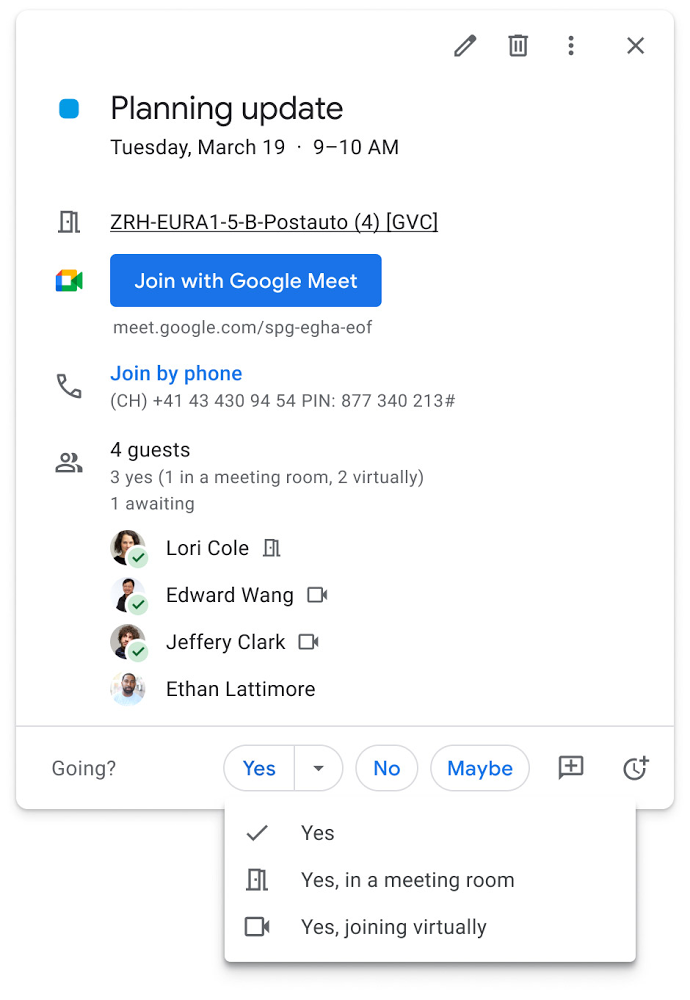
Updates to improve the in-room experience are also coming to Google Meet hardware in September, including the ability to see and use the hand-raise feature and receive notifications from polls and Q&As. The modular design of Meet’s Series One room kits can easily accommodate a variety of space layouts and be paired with an AV cart for optimum flexibility.
We’re also continually launching new controls to make meetings more safe and secure, including the ability for admins to set policies for who can join meetings, and how participants can engage within meetings. To help everyone stay focused in meetings without interruption, in the next few months we’ll introduce moderation controls for hosts, giving them the ability to prevent the use of in-meeting chat and prohibit presenting during meetings, as well as allowing them full control to mute and prevent participants from unmuting.
Together, these changes will make meetings a safer, more connected, and inclusive experience across all hybrid environments. Register today for our free webinar on how Google Workspace is enabling hybrid work and helping foster collaboration equity.
Trusted hybrid collaboration in Google Workspace
Security, data privacy, and trust continue to be the foundation that make anywhere, anytime collaboration possible. As organizations explore new ways for their teams to collaborate securely in a hybrid work world, we’re introducing several ways that we’re strengthening this foundation in Google Workspace.
Today, we’re announcing new security and privacy capabilities to help Google Workspace customers realize the full power of trusted, cloud-native collaboration. Google Workspace Client-side encryption will help customers strengthen the confidentiality of their data while addressing a range of data sovereignty and compliance needs. It will also strengthen meeting security when it comes to Google Meet this fall. Additionally, we’re rolling out a number of security enhancements for Google Drive, including trust rules for Drive that help control how files can be shared within and outside your organization; Drive labels that classify files and apply controls based on their sensitivity levels; and enhanced phishing and malware protections to help safeguard against insider threats and user error. For full details, please visit our security blog post.
A single, connected experience
As businesses move to a hybrid work environment, the importance of creating secure collaboration spaces and fostering human connection has never been more important. Because Google Workspace was designed to fuel anywhere, anytime collaboration, we’re now helping millions of organizations navigate the challenges and opportunities of the newly emerging work model. Our customers are using Google Workspace to rethink virtual meetings, provide people with modern tools to stay connected and manage their time and attention, and double down on security and privacy. In countless ways, Google Workspace was built for this moment.
See how we’re bringing Google Workspace to everyone. With this change, all of our 3 billion existing users across consumer, enterprise, and education now have access to the full Google Workspace experience, including Gmail, Chat, Calendar, Drive, Docs, Sheets, Meet and more.
How Swiggy’s UK Competitor Expanded to 14 Countries in Just Three Years

4552
Of your peers have already read this article.
1:30 Minutes
The most insightful time you'll spend today!
Deliveroo is the fastest-growing technology company in the United Kingdom, and the first-ever to win Deloitte’s UK Technology Fast 50 two years in a row. Founded in 2013, the food courier service achieved a three-year growth rate of over 15,000% to 2018, expanding beyond its London base to operate in 14 countries in Europe and the Asia-Pacific region, from Spain to Singapore, Hong Kong, and Taiwan.
“G Suite products work really well, with no steep learning curve. As a fast-growing company, our strategy is to go to G Suite tools first to find immediate, effective answers within one integrated solution.”
– Asif Akmal, Director of IT, Deliveroo
The company runs multiple offices in each of its 14 markets, manned by more than 2,500 full-time staff. “Around 2016, we made a clear decision,” says Asif Akmal, Director of IT at Deliveroo. “As the company was scaling, we needed a strategy for all our offices to scale with us, and we needed the right infrastructure to do that. We can’t afford to have downtime, or to have tools that confuse staff, rather than help them.”
Together with Google Cloud Premier Partner Netpremacy, Deliveroo created a strategy around G Suite that emphasizes the speed and efficiency the company needs to set up offices and train new staff.
“G Suite products work really well, with no steep learning curve,” says Asif. “As a fast-growing company, our strategy is to go to G Suite tools first to find immediate, effective answers within one integrated solution.”
Putting videoconferencing at the core of the business
Videoconferencing is central to the Deliveroo business model. “Many of our international offices rely on operational staff from headquarters, whether for daily one-to-ones or group meetings,” says Asif. “Some of our engineers are constantly present in remote offices on a permanent live video stream, with a screen at the desk where there would be a chair. That makes it mission critical for us to have the correct infrastructure in place in order to do videoconferencing.”
Because internet connectivity can be inconsistent at new offices, Deliveroo teams occasionally need to be able to dial into videoconferencing over the phone, as well as connect through the internet. Previously, Deliveroo used a separate videoconferencing solution in order to have this feature. Now, as G Suite Enterprise users, Deliveroo employees can use Hangouts Meet for the same dial-in functionality, higher quality reception, and up to 100 participants on each call.
“Videoconferencing is crucial. And with Hangouts Meet we can have just one AV person in the whole business setting up and overseeing the infrastructure in 14 countries.”
– Asif Akmal, Director of IT, Deliveroo
“It was a simple decision to switch to Hangouts Meet,” says Asif. “It came with the enterprise package that we were already on, so we made a substantial cost savings by stopping the other solution, which cost almost £15 a month per user. Financially, that made it a no-brainer, but Hangouts also works better from a technical and integration perspective.”
“One of the first things that we address as a company moving into a new office is: Where do we get the videoconferencing system in place so we can start doing calls straight away?” says Elliott Shafii, Google Technology Engineer at Deliveroo. That’s why Deliveroo has a blueprint for video conferencing rooms, specifying the equipment required and the size and acoustics of the rooms where they’ll be installed. Once the necessary Hangouts Meet hardware has been delivered, the Deliveroo AV Manager flies out to the location, installs the equipment in two days, signs off on it, and flies back.
“Videoconferencing is crucial,” says Asif. “And with Hangouts Meet we can have just one AV person in the whole business setting up and overseeing the infrastructure in 14 countries.”
Issuing new devices in one-tenth of the time
Deliveroo facilitates its exceptional growth rate by minimizing the time teams need to spend getting to grips with new tools. “With G Suite, users don’t have much that they need to learn,” says Asif. “That means we can deploy the solution in any country and be comfortable that people can walk into a room and connect to a meeting without problems.”
Asif and his team worked closely with Netpremacy to make training in G Suite tools efficient and accessible, for new starters and anyone who wants to learn. “Collaborating on Docs and Sheets, and using Drive to share files instead of sending attachments allows us to move more rapidly than any other business,” says Asif. “That’s why we have permanent staff in the IT team who concentrate exclusively on the onboarding process, so anyone can learn to use one of the G Suite products in just one hour.”
Introducing Pixelbooks is the latest step in Deliveroo’s pursuit of speed and efficiency. “Previously, it took an average of 50 minutes to set someone up on a laptop,” says Asif. “With Chrome devices, that induction period is down to five minutes. We just open the box, enroll the device, and hand it over.”
Creating a cloud-based company
“Our strong relationships with Netpremacy and Google Cloud product managers mean we can align our internal strategies with them. Working together, we can create the ideal environment for our culture of collaboration.”
– Asif Akmal, Director of IT, Deliveroo
Using G Suite, Deliveroo is building its ideal workplace to support a more mobile, agile approach to work. “By the end of next year, we should have the vast majority of new starters using Pixelbooks,” says Asif. “We expect that to increase the use of Docs and Sheets and other G Suite tools, in place of other applications. We want to see ourselves as a cloud-based company, and G Suite is ideal for reaching that goal.”
As part of the further deployment of G Suite tools, Deliveroo plans to roll out more Jamboards, in addition to the 14 already in use across the business. “Previously, we would take photographs of whiteboards and share those,” says Elliott. “I remember seeing someone wheeling a whiteboard back to his desk from a meeting, and thinking ‘That poor guy is going to have to sit at his desk and copy everything down.'”
“At that point, before Jamboards, we actually made a significant financial investment in another interactive whiteboard solution,” adds Asif. “Now that solution is collecting dust, because we’ve got Jamboards, which are much more cost-effective and work brilliantly within the G Suite system.”
“Our strong relationships with Netpremacy and Google Cloud product managers mean we can align our internal strategies with them,” says Asif. “Working together, we can create the ideal environment for our culture of collaboration.”
Embracing the cloud helps Deliveroo both to enable rapid collaboration and to minimize the maintenance and management of infrastructure: an ideal combination for a fast-growing technology company.
More Relevant Stories for Your Company
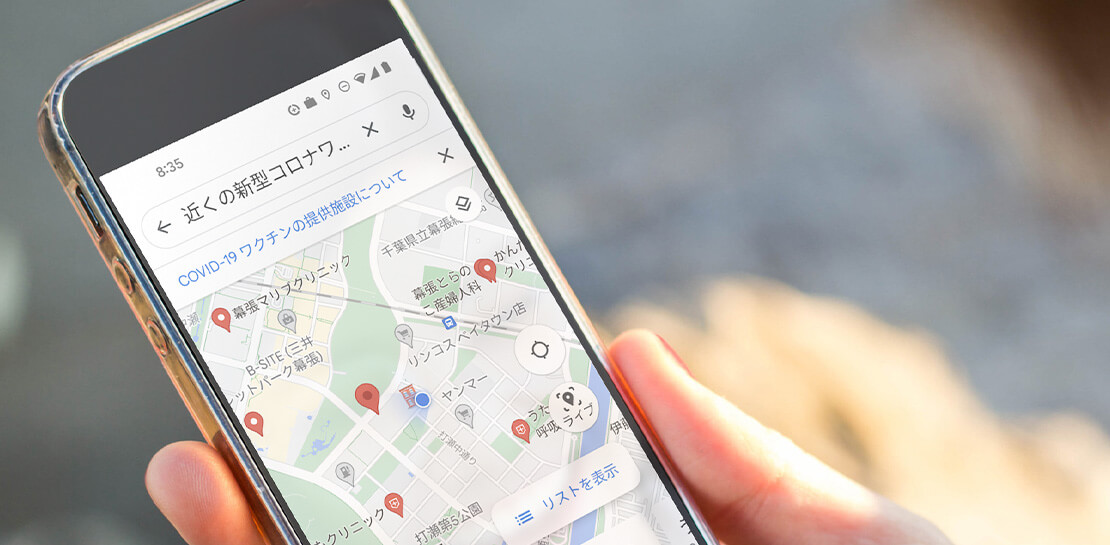
How Japan’s Vaccine Locator Platform Became A One-stop Shop for COVID-19 and Vaccination-related Information
Editor’s Note: David Moore, Founder and CEO of Navagis, shares his story of teaming up with the Google Maps Platform team to help people across Japan get vaccinated amid COVID-19 pandemic. The roots of Navagis go back to Hurricane Katrina, when I led an Army Corps of Engineers team that

Gmail Turns 18, Has 3 Billion Users! A Product Lead Breaks Down How Gmail Stays Interesting
This April, Gmail will be 18 years old. That’s a big milestone, given that email as a medium just turned 50. Launched in 2004—with its 1 GB free storage, conversation based grouping, and enhanced search capabilities—Gmail quickly became one of the most popular email services in the world. What started off

Google Cloud’s Suite of DevOps Speeds Up ForgeRock’s Development
Editor’s note: Today we hear from ForgeRock, a multinational identity and access management software company with more than 1,100 enterprise customers, including a major public broadcaster. In total, customers use the ForgeRock Identity Platform to authenticate and log in over 45 million users daily, helping them manage identity, governance, and access management across




The future of meetings in G Suite: Vision and roadmap
A study from MIT Sloan school in early April showed that 47% of US workers were already working from home. Compare that to just 13% before the pandemic. And these numbers are likely to be even greater today. Video meetings help us connect in a human way, whether it's for
