





5 Best Practices for Cloud Cost Optimization

5792
Of your peers have already read this article.
3:30 Minutes
The most insightful time you'll spend today!
When customers migrate to Google Cloud Platform (GCP), their first step is often to adopt Compute Engine, which makes it easy to procure and set up virtual machines (VMs) in the cloud that provide large amounts of computing power. Launched in 2012, Compute Engine offers multiple machine types, many innovative features, and is available in 20 regions and 61 zones!
Compute Engine’s predefined and custom machine types make it easy to choose VMs closest to your on-premises infrastructure, accelerating the workload migration process cost effectively. Cloud allows you the pricing advantage of ‘pay as you go’ and also provides significant savings as you use more compute with Sustained Use Discounts.
As Technical Account Managers, we work with large enterprise customers to analyze their monthly spend and recommend optimization opportunities. In this blog, we will share the top recommendations that we’ve developed based on our collective experience working with GCP customers.
Getting ready to save
Before you get started, be sure to familiarize yourself with the VM instance pricing page—required reading for anyone who needs to understand the Compute Engine billing model and resource-based pricing. In addition to those topics, you’ll also find information about the various Compute Engine machine types, committed use discounts and how to view your usage, among other things.
Another important step to gain visibility into your Compute Engine cost is using Billing reports in the Google Cloud Console and customizing your views based on filtering and grouping by projects, labels and more. From there you can export Compute Engine usage details to BigQuery for more granular analysis. This allows you to query the datastore to understand your project’s vCPU usage trends and how many vCPUs can be reclaimed. If you have defined thresholds for the number of cores per project, usage trends can help you spot anomalies and take proactive actions. These actions could be rightsizing the VMs or reclaiming idle VMs.
Now, with these things under your belt, let’s go over the five ways you can optimize your Compute Engine resources that we believe will give you the most immediate benefit.
1. Apply Compute Engine rightsizing recommendations
Compute Engine’s rightsizing recommendations feature provides machine type recommendations that are generated automatically based on system metrics gathered by Stackdriver Monitoring over the past eight days. Use these recommendations to resize your instance’s machine type to more efficiently use the instance’s resources. It also recommends custom machine types when appropropriate. Compute Engine makes viewing, resizing and other actions easier right from the Cloud Console as shown below.
Recently, we expanded Compute Engine rightsizing capabilities from just individual instances to managed instance groups as well. Check out the documentation for more details.

For more precise recommendations, you can install the Stackdriver Monitoring agent which collects additional disk, CPU, network, and process metrics from your VM instances to better estimate your resource requirements. You can also leverage the Recommender API for managing recommendations at scale.
2. Purchase Commitments
Our customers have diverse workloads running on Google Cloud with differing availability requirements. Many customers follow a 70/30 rule when it comes to managing their VM fleet—they have constant year-round usage of ~70%, and a seasonal burst of ~30% during holidays or special events.
If this sounds like you, you are probably provisioning resources for peak capacity. However, after migrating to Google Cloud, you can baseline your usage and take advantage of deeper discounts for Compute workloads. Committed Use Discounts are ideal if you have a predictable steady-state workload as you can purchase a one or three year commitment in exchange for a substantial discount on your VM usage.
We recently released a Committed Use Discount analysis report in the Cloud Console that helps you understand and analyze the effectiveness of the commitments you’ve purchased. In addition to this, large enterprise customers can work with their Technical Account Managers who can help manage their commitment purchases and work proactively with them to increase Committed Use Discount coverage and utilization to maximize their savings.
3. Automate cost optimizations
The best way to make sure that your team is always following cost-optimization best practices is to automate them, reducing manual intervention.
Automation is greatly simplified using a label—a key-value pair applied to various Google Cloud services. For example, you could label instances that only developers use during business hours with “env: development.” You could then use Cloud Scheduler to schedule a serverless Cloud Function to shut them down over the weekend or after business hours and then restart them when needed. Here is an architecture diagram and code samples that you can use to do this yourself.
Using Cloud Functions to automate the cleanup of other Compute Engine resources can also save you a lot of time and money. For example, customers often forget about unattached (orphaned) persistent disk, or unused IP addresses. These accrue costs, even if they are not attached to a virtual machine instance. VMs with the “deletion rule” option set to “keep disk” retain persistent disks even after the VM is deleted. That’s great if you need to save the data on that disk for a later time, but those orphaned persistent disks can add up quickly and are often forgotten! There is a Google Cloud Solutions article that describes the architecture and sample code for using Cloud Functions, Cloud Scheduler, and Stackdriver to automatically look for these orphaned disks, take a snapshot of them, and remove them. This solution can be used as a blueprint for other cost automations such as cleaning up unused IP addresses, or stopping idle VMs.
4. Use preemptible VMs
If you have workloads that are fault tolerant, like HPC, big data, media transcoding, CI/CD pipelines or stateless web applications, using preemptible VMs to batch-process them can provide massive cost savings. In fact, customer Descartes Labs reduced their analysis costs by more than 70% by using preemptible VMs to process satellite imagery and help businesses and governments predict global food supplies.
Preemptible VMs are short lived— they can only run a maximum of 24 hours, and they may be shut down before the 24 hour mark as well. A 30-second preemption notice is sent to the instance when a VM needs to be reclaimed, and you can use a shutdown script to clean up in that 30-second period. Be sure to fully review the full list of stipulations when considering preemptible VMs for your workload. All machine types are available as preemptible VMs, and you can launch one simply by adding “-preemptible” to the gcloud command line or selecting the option from the Cloud Console.
Using preemptible VMs in your architecture is a great way to scale compute at a discounted rate, but you need to be sure that the workload can handle the potential interruptions if the VM needs to be reclaimed. One way to handle this is to ensure your application is checkpointing as it processes data, i.e., that it’s writing to storage outside the VM itself, like Google Cloud Storage or a database. As an example, we have sample code for using a shutdown script to write a checkpoint file into a Cloud Storage bucket. For web applications behind a load balancer, consider using the 30-second preemption notice to drain connections to that VM so the traffic can be shifted to another VM. Some customers also choose to automate the shutdown of preemptible VMs on a rolling basis before the 24-hour period is over, to avoid having multiple VMs shut down at the same time if they were launched together.
5. Try autoscaling
Another great way to save on costs is to run only as much capacity as you need, when you need it. As we mentioned earlier, typically around 70% of capacity is needed for steady-state usage, but when you need extra capacity, it’s critical to have it available. In an on-prem environment, you need to purchase that extra capacity ahead of time. In the cloud, you can leverage autoscaling to automatically flex to increased capacity only when you need it.
Compute Engine managed instance groups are what give you this autoscaling capability in Google Cloud. You can scale up gracefully to handle an increase in traffic, and then automatically scale down again when the need for instances is lowered (downscaling). You can scale based on CPU utilization, HTTP load balancing capacity, or Stackdriver Monitoring metrics. This gives you the flexibility to scale based on what matters most to your application.
High costs do not compute
As we’ve shown above, there are many ways to optimize your Compute Engine costs. Monitoring your environment and understanding your usage patterns is key to understanding the best options to start with, taking the time to model your baseline costs up front. Then, there are a wide variety of strategies to implement depending on your workload and current operating model.
For more on cost management, check out our cost management video playlist. And for more tips and tricks on saving money on other GCP services, check out our blog posts on Cloud Storage, Networking and BigQuery cost optimization strategies. We have additional blog posts coming soon, so stay tuned!
Google Unveils Topaz, the New Subsea Cable Connecting Asia and Canada

3322
Of your peers have already read this article.
3:00 Minutes
The most insightful time you'll spend today!
There’s a new subsea cable in town: Topaz, the first-ever fiber cable to connect Canada and Asia.
Once complete, Topaz will run from Vancouver to the small town of Port Alberni on the west coast of Vancouver Island in British Columbia, and across the Pacific Ocean to the prefectures of Mie and Ibaraki in Japan. We expect the cable to be ready for service in 2023, not only delivering low-latency access to Search, Gmail and YouTube, Google Cloud, and other Google services, but also increasing capacity to the region for a variety of network operators in both Japan and Canada.
Google is spearheading construction of the project, joined by a number of local partners in Japan and Canada to deliver the full Topaz subsea cable system. Other networks and internet service providers will be able to benefit from the cable’s additional capacity, whether for their own use or to provide to third parties. And, similar to other cables we’ve built, with Topaz we will exchange fiber pairs with partners who have systems along similar routes. This is a longstanding practice in the industry that strengthens the intercontinental network lattice for network operators, for Google, and for users around the world.
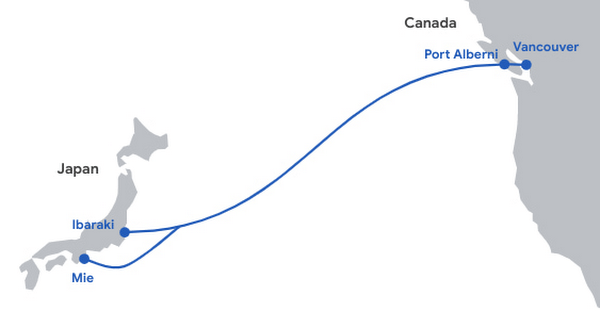
Network infrastructure investments like Topaz bring significant economic activity to the regions where they land. For example, according to a recent Analysys Mason study, Google’s historical and future network infrastructure investments in Japan are forecasted to enable an additional $303 billion (USD) in GDP cumulatively between 2022 and 2026.
The width of a garden hose, the Topaz cable will house 16 fiber pairs, for a total capacity of 240 Terabits per second (not to be confused with TSPs). It includes support for Wavelength Selective Switch (WSS), an efficient and software-defined way to carve up the spectrum on an optical fiber pair for flexibility in routing and advanced resilience. We’re proud to bring WSS to Topaz and to see the technology is being implemented widely across the submarine cable industry.
While Topaz is the first trans-Pacific fiber cable to land on the West Coast of Canada, it’s not the first communication cable to connect to Vancouver Island. In the 1960s, the Commonwealth Pacific Cable System (COMPAC) was a copper undersea cable linking Vancouver with Honolulu (United States), Sydney (Australia), and Auckland (New Zealand), expanding high-quality international phone connectivity. Today, COMPAC is no longer in service but its legacy lives on. The original cable landing station in Vancouver — the facility where COMPAC made landfall on Canadian soil — has been upgraded to fit the needs of modern fiber optics and will house the eastern end of the Topaz cable.
Traditional and treaty rights, and local communities, are deeply important to our infrastructure projects. The Topaz cable is built alongside the traditional territories of the Hupacasath, Maa-nulth, and Tseshaht, and we have consulted with and partnered with these First Nations every step of the way.
“Tseshaht is very proud of this collaboration and our partnership with Google, who has been very respectful and thoughtful in its engagement with our Nation. That’s how we carry ourselves and that’s how we want business to carry themselves in our territory.“ — Tseshaht First Nation – Elected Chief Councillor-Ken Watts
“The five First Nations of the Maa-nulth Treaty Society are pleased that we have concluded an agreement with Google Canada and have consented to the installation of a new, high-speed fiber optic cable through our traditional territories. This agreement, in which both Google Canada and our Nations benefit, is based on respect for our constitutionally protected treaty and aboriginal rights and enhances the process of reconciliation. We would also like to acknowledge the sensitivity that Google Canada expressed during our talks in regard to the pain and trauma experienced by our people as a result of residential school experience. We look forward to a long and mutually beneficial relationship with Google Canada.” —Chief Charlie Cootes, President of the Maa-nulth Treaty Society
“Google’s respect towards our Nation is appreciated and has good energy behind it.” —Hupacasath First Nation – Elected Chief Councilor – Brandy Lauder
With the addition of Topaz today, we have announced investments in 20 subsea cable projects. This includes Curie, Dunant, Equiano, Firmina and Grace Hopper, and consortium cables like Blue, Echo, Havfrue and Raman — all connecting 29 cloud regions, 88 zones, 146 network edge locations across more than 200 countries and territories. Learn about Google Cloud’s network and infrastructure on our website and in the below video.
AgroStar: Small farms in India getting big help from the cloud

13239
Of your peers have already read this article.
3:30 Minutes
The most insightful time you'll spend today!
AgroStar has launched a cloud-based mobile app that is helping to boost crop yields and encourage best practices for small farmers in India. Launched as an on-premises ecommerce platform selling farm tools in 2008, the firm turned to Google Cloud Platform (GCP) to expand its offering. It now uses cloud-based analytics and is deploying ML models to provide timely advice in five languages on everything from seed optimization, crop rotation, and soil nutrition to pest control.
A 2018 survey underscored the demand for agricultural planning for Indian farmers. While farming remains a dominant sector in India, employing half of its labor force, 70 percent of small farmers – those cultivating fewer than three acres – said their crops are damaged by unforeseen weather and pests. An even higher number – 74 percent – say they lack access to farming-related information.
Widening that gap is the relative lack of access to new, higher yield seeds and improved soil analyses for small farmers, who must otherwise rely on traditional methods. “It could take a few years for innovative information to trickle down from universities to small, grassroots farmers,” says Pritesh Gudge, AgroStar Software Engineer. “Today, just by clicking through our Android application, farmers learn about new, effective farming practices and receive advice customized to their crop and soil.”
Connecting a million farmers in the cloud
Operating in the Indian states of Gujarat, Maharashtra, Rajasthan, Orissa, Bihar, and Karnataka, AgroStar is closing the knowledge gap with a full-service, cloud-based SaaS solution – the only one of its kind in India. It combines agronomy, data science, and analytics to help farmers by providing a variety of resources.
AgroStar has reached over a million farmers through its Android app, the AgroStar Agri-Doctor. The mobile client is available as a web-based or full-featured native app. Both provide access to the firm’s knowledge base hosted on GCP, a Q&A forum that connects farmers to each other to help understand and better solve problems and to learn about innovative practices and products. Farmers can also click through to follow local and national market trends that help forecast crop prices.
In addition to the self-service knowledge base, AgroStar provides access to agronomy experts who use cloud-based analytics tools and historical data to provide season-and locale-specific advice to each farmer. “We are now tracking thousands of calls in 5 languages each day,” says Pritesh.
The AgroStar app also provides links to purchase and then track the delivery of farm tools and supplies such as cultivators and fertilizers. An in-house platform manages fulfillment centers and a doorstep delivery network simplifies the supply chain while giving farmers what they need, when they need it. By procuring directly from the manufacturers and primary distributors of farm supplies, Agrostar is achieving cost savings, which it passes on to farmers.
Build fast, pivot faster
From the start, the human and environmental variables of farming in India, not to mention the volume of AgroStar’s few hundred thousand monthly active users, made a highly scalable cloud-based solution inevitable. Farmers rely on the firm’s Agri-Doctor app to provide advice in multiple languages on topics that range widely throughout three growing seasons, each with distinct crop nutrition and rotation cycles and farm implementation requirements.
“For farmers, the focus keeps changing every month, and every season,” says Pritesh. “To serve our growing community, we needed a platform that could process images at high volume, fulfill tools and seed orders across thousands of miles, and respond to multilingual queries. We quickly moved away from spreadsheets and server-based solutions – we needed to build fast and pivot faster.”
Ending late-night deployments
The firm’s first cloud experience was with an AWS solution. At the time, AWS was the only cloud provider in India, but AgroStar wanted to find a solution that was easier to use and offered better integration with Android devices. “Deployment and processing costs were very high, and the developer tools and documentation were not as intuitive as we needed,” says Pritesh.
When GCP service arrived in India in October 2017, AgroStar embarked on a platform re-implementation that made possible dramatic changes in the way it developed and deployed its solution. Using Google Kubernetes Engine (GKE) for crop advice management and Compute Engine for its production application services, the firm built the backend for the Agri-Doctor discussion forum in only three weeks. The platform’s microservice architecture is implemented in Python and Golang and deployed on GCP.
AgroStar began to realize significant efficiencies in its build, deploy, and test cycles. “We previously needed to work overnight to deploy to production,” says Pritesh. “Now using Google for Kubernetes containers and a rolling update strategy, we can deploy during the day without any problems or interruptions to service.”
The move to GCP streamlined AgroStar’s stack. “We were running 12 independent instances on AWS,” says Pritesh. “With Google Kubernetes Engine, we are deployed on a single cluster at a cost savings of $1,300 per month and growing.”
Improving customer response times by 85 percent
With a managed deployment capability, AgroStar can devote more time and resources to executing on its platform and Agri-Doctor app development plan. A strategic goal was managing customer response times as the firm grew its base. GCP has helped the firm meet that goal, achieving an 85 percent improvement in customer response times even as traffic grew significantly.
“With our on-premises solution, we could handle around 100 customers daily, which took 30 to 50 minutes for each customer,” says Pritesh. “We now handle thousands of customers daily, taking only 4 to 5 minutes for each one.”
AgroStar used Firebase to implement its Agri-Doctor app. A real-time cloud database, Firebase provides an API that enables the Agri-Doctor advice forum to be synchronized across all its far-flung mobile clients, effectively sharing knowledge base updates with one million users in near real time.
Using cloud tools to manage and monitor
Cloud Pub/Sub, Kafka, and Cloud Dataflow manage data ingestion and queueing of event and transaction data to the analytics layer. BigQuery fetches and persists data to Cloud Storage. Cloud SQL and dashboards powered by Tableau deliver farmer crop and soil profiles within minutes.
Cloud IAM helps AgroStar control access to all its cloud resources. And Stackdriver, the integrated logging aggregation capability for GCP, helps monitor and speed debugging on every tier of the AgroStar solution.
Machine learning to enhance yields
AgroStar is developing a variety of ML components to improve responsiveness and extend its platform offerings.
To speed up the diagnosis of and treatment for crop blight, AgroStar is building a deep learning pipeline using TensorFlow. The pipeline relies on GoogLeNet models that use multi-layered convolutional visual pattern recognition. It will assess uploaded images to support a disease-detection capability on the mobile app. Based on the commercially successful AI algorithms that automated postal code processing, GoogLeNet offers improved performance and computational efficiencies by using a creative layering technique that distinguishes them from older, sequential recognition engines.
To improve its customer search experience, AgroStar is developing an ML pipeline that shrinks fetch times by suggesting tags mapped to stored data. Processed using TPUs, Cloud Natural Language and Video AI, the tags provide a metadata layer that supports queries in any of the ten natural languages that AgroStar farmers can use.
The AgroStar search pipeline consists of Long Short-Term Memory (LSTM) models of Recurrent Neural Networks. Recurrent networks exhibit “memory” through iterative processing and are distinguished from feedforward networks by a feedback loop connected to their past decisions, ingesting their own outputs moment after moment as input.
Implementing a recommendation engine
The firm is also adapting the Random Forests TensorFlow AI model to develop a crop and product recommendation engine. The model is trained by consuming numerical (rainfall, humidity, water availability per acre) and categorical (soil type, water sources) parameters to suggest appropriate products by season, region, and locale.
To simplify the product suggestion experience, AgroStar developers are testing Cloud Dialogflow, the Google Cloud conversational interface, to build a chatbot capability into its mobile app. The bot will track a farmer’s crop schedules and answer simple questions by linking to the recommendation engine.
AgroStar is also extending its analytics platform with AI-powered sales planning and forecasting. Using linear regression models implemented in TensorFlow and powered by Cloud ML Engine, the capability will enhance supply chain logistics as the company scales its operations across India.
To provide a credit on-demand offering for a range of seed-to-harvest cycle products, AgroStar is attempting to use Vision API to create an AI model that will convert uploaded photos of customer application records into standard data formats. The firm’s credit policy features a grace period in which farmers begin paying back loans after harvested crops go to market.
A versatile and friendly development ecosystem
AgroStar credits the convivial tools and documentation that GCP offers and its incremental, pay-as-you-go pricing model for both the firm’s success and its ability to manage growth.
“What Google Cloud offers is extremely good documentation and extremely simple-to-use tools and interfaces across all services,” says Pritesh. “It helped us initially deploy our platform and at every scale that we have required since then, and its cost effectiveness enabled us to staff up to meet new feature milestones.”
A New Milestone: Istio Comes Closer to Cloud-native Ecosystem

3450
Of your peers have already read this article.
2:00 Minutes
The most insightful time you'll spend today!
Today we are excited to announce that Google and the Istio Steering Committee have submitted the Istio project for consideration as an incubating project within the Cloud Native Computing Foundation (CNCF). This is a significant milestone for Istio and its community, and we are thrilled to reach this next step in the evolution of the project.
Google and Istio
Google originated the Istio project, which alongside Kubernetes and Knative, is a critical part of cloud-native infrastructure. The Istio project has found success and maturity in its current model — being adopted by hundreds of organizations and bringing in over 4,000 developers for IstioCon.
For over 20 years, Google has helped shape the future of computing with its open source contributions and has invested deeply to unlock innovation for our customers. Istio extends Kubernetes to establish a programmable, application-aware network using the Envoy service proxy. Istio works with both Kubernetes-based and traditional workloads, and brings standard, universal traffic management, telemetry, and security to complex deployments. Finding a home in the CNCF brings Istio closer to the cloud-native ecosystem and will foster continuing open innovation.
The Istio journey
We started to develop Istio in partnership with teams at IBM and Lyft in 2016 based on patterns that were being used to connect Google production applications. Google’s security focus complemented the traffic management focus of an open-source project published by IBM, and those two teams decided to collaborate on Istio directly. Istio was launched “fully formed” in May 2017, with the v0.1 release featuring sidecar-powered traffic control, observability and policy features — the things that today define a service mesh. Istio has been open source from the beginning, and has a governance structure that promotes continuous contribution and project engagement.
By the release of v0.3 a few months later there were users trusting it in production, seeing immediate benefits from its powerful features. The project reached v1.0 in July 2018, and was being used at scale by eBay and The Weather Company. Google led a major re-architecture with the release of v1.5, unifying the control plane into a single service. This change, based on user feedback, reduced administrative overhead, as was later written about in the IEEE Software journal. We also greatly simplified extensibility of the mesh by building support for WebAssembly plugins into Envoy.
Istio is now offered as a managed or hosted service by over 20 providers, including Anthos Service Mesh, a suite of tools that helps you monitor and manage a reliable service mesh on-premises or on Google Cloud.
The future of Istio as a project in the CNCF
At Google, we believe that using open source comes with a responsibility to contribute, sustain, and improve the ecosystem, and we are committed to improving critical cloud-native projects on behalf of our customers and the community at large. Google has made over half of all contributions to Istio and two-thirds of the commits, as measured by the CNCF DevStats.1 After deciding to adopt Envoy for Istio, Google rose to be Envoy’s number-one contributor.2
Istio is the last major component of organizations’ Kubernetes ecosystem to sit outside of the CNCF, and its APIs are well-aligned to Kubernetes. On the heels of our recent donation of Knative to the CNCF, acceptance of Istio will complete our cloud-native stack under the auspices of the foundation, and bring Istio closer to the Kubernetes project. Joining the CNCF also makes it easier for contributors and customers to demonstrate support and governance in line with the standards of other critical cloud-native projects, and we are excited to help support the growth and adoption of the project as a result.
Istio is key to the future of Google Cloud and if the project is accepted, Google will continue to strategically invest in Istio as a key maintainer and through ongoing investment in engineering for upstream contributions.
1. https://istio.teststats.cncf.io/d/5/companies-table?orgId=1
2. https://envoy.devstats.cncf.io/d/5/companies-table?orgId=1
5574
Of your peers have already watched this video.
1:30 Minutes
The most insightful time you'll spend today!
A Quick Guide to Cloud Monitoring
Cloud Monitoring is a tool that allows you to gain visibility into the performance, availability, and health of your applications and infrastructure. In this video, we show you what Cloud Monitoring is and how you can use it to custom define service-level objectives (SLOs), monitor application metrics, and the overall health of your applications infrastructure. Watch to learn how you can use Cloud Monitoring!

3333
Of your peers have already downloaded this article
10:00 Minutes
The most insightful time you'll spend today!
Any organization that has made a significant investments in Paas or IaaS capabilities requires a FinOps (financial operations) strategy. It involves linking their cloud migration business cases with value metrics, creating detailed cost visibility dashboards and having an automated expense control to ensure value realization from the cloud transformation journey. To fast-track your FinOps journey on Google Cloud, experts offer a detailed intro on the FinOps concept, the five Cloud FinOps pillars and important metrics for business value realization in this whitepaper.
To keep up with the digital transformations and demands of an ever-evolving virtual workforce, Google Cloud has distilled insights from several organizations that began their cloud migration journey and the FinOps Foundation community. Download the ‘Maximize Business Value with Cloud FinOps’ document to build a solid foundation for your organization’s cloud FinOps.
More Relevant Stories for Your Company
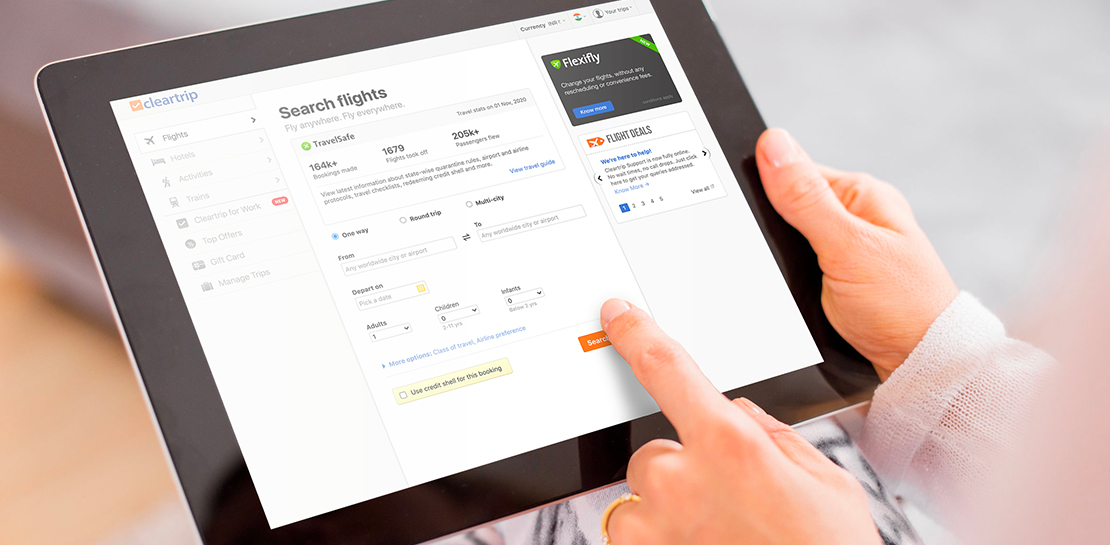
How Cleartrip.com is leveraging Google Cloud to survive the slump in the travel industry
With the novel coronavirus COVID-19 sweeping across continents and fatalities climbing every day, it was only a matter of time before countries closed their borders to contain its spread. In the wake of this decision, travel and tourism, the linchpins of many economies, were among the worst affected. According to

Simplify Your Modernization Journey from Windows
Microsoft and Windows on Google Cloud provides a first-class experience for Windows workloads. You can self-manage workloads or leverage managed services and use license-included images or bring your own licenses. Now, easily migrate, optimize, and modernize your Windows workloads for agility and scalability. Start with migration Migrate to increase IT

Thinking of a Multicloud Journey? Here’s What Our Experts Want You to Consider
Do you want to fire up a bunch of techies? Talk about multicloud! There is no shortage of opinions. I figured we should tackle this hot topic head-on, so I recently talked to four smart folks—Corey Quinn of Duckbill Group, Armon Dadgar of Hashicorp, Tammy Bryant Butow of Gremlin, and James Watters of VMware—about what multicloud is

The Journey ahead for Google Cloud and SAP
The partnership between Google Cloud and SAP is entering a new chapter. Over the years, our close partnership with SAP and our mutual dedication to customers has inspired us to do some of our most unique and innovative work—such as building Fast Restart and Memory Poisoning Recovery capabilities for S/4HANA workloads, offering real-time
