






Managing the API Lifecycle: Design, Delivery, and Everything in Between
READ FULL INTRODOWNLOAD AGAIN3990
Of your peers have already downloaded this article
2:00 Minutes
The most insightful time you'll spend today!
3882
Of your peers have already watched this video.
3:20 Minutes
The most insightful time you'll spend today!
Leveraging APIs to Deliver Connected Customer Experiences
What does the connected customer experience even mean? It’s not just about a checklist of assets like website and mobile but how those channels seamlessly work together with the physical world to give your customer great experiences with your brand.
Modern APIs enable companies to mask back-end complexities behind a predictable developer-friendly interface. These APIs create ways for developers to easily and securely connect legacy systems with all kinds of applications and devices. Well managed APIs give businesses the flexibility to adapt to changing the environment and bring new user experiences to the market easily.
Watch how APIs can help make this happen in this 3-minute video.
A Pro’s Tip on Choosing the Right Google Cloud Compute Options

5729
Of your peers have already read this article.
2:00 Minutes
The most insightful time you'll spend today!
Where should you run your workload? It depends…Choosing the right infrastructure options to run your application is critical, both for the success of your application and for the team that is managing and developing it. This post breaks down some of the most important factors that you need to consider when deciding where you should run your stuff!
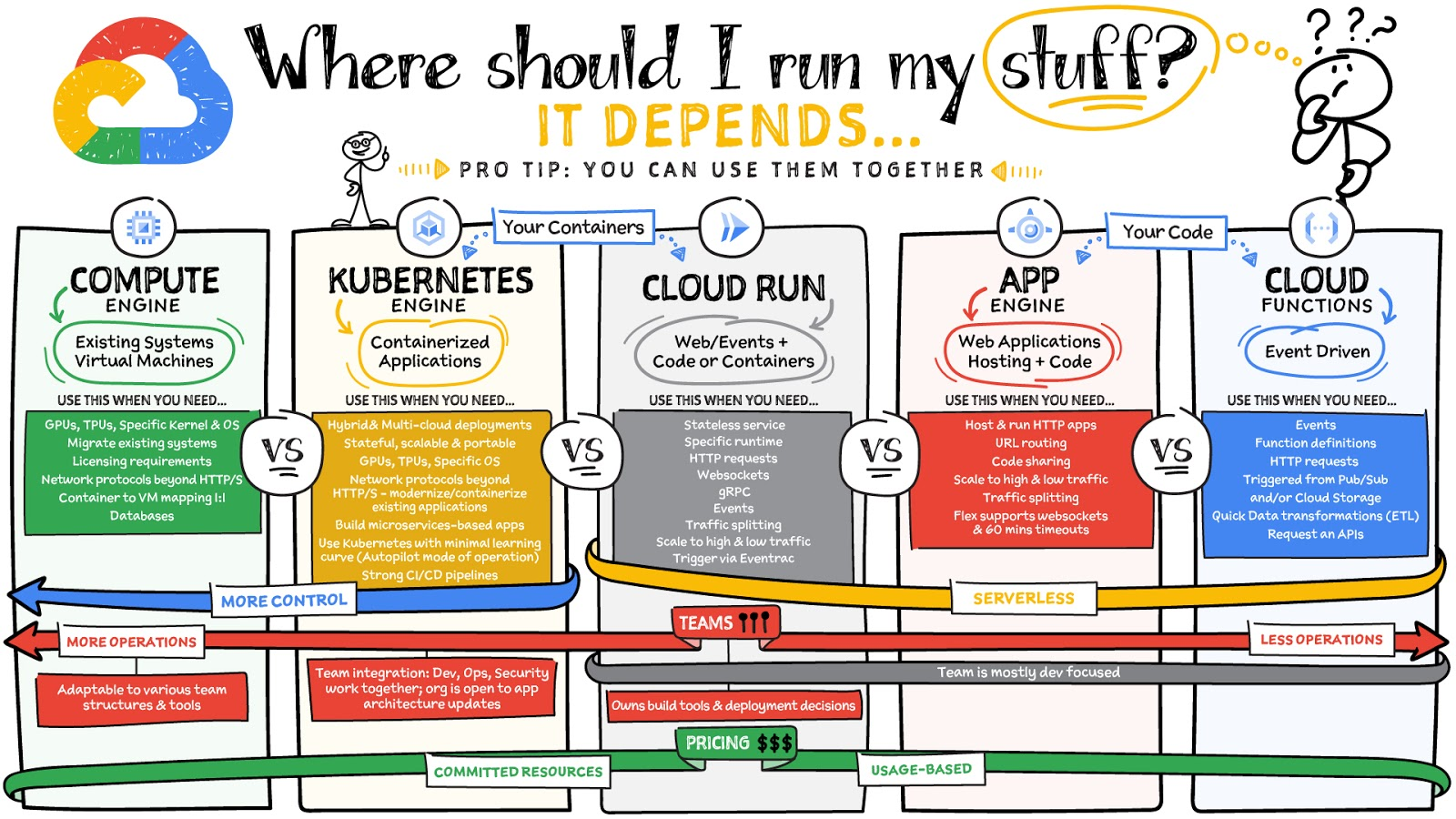
What are these services?
- Compute Engine – Virtual machines. You reserve a configuration of CPU, memory, disk, and GPUs, and decide what OS and additional software to run.
- Kubernetes Engine – Managed Kubernetes clusters. Kubernetes is an open-source system for automating deployment, scaling, and management of containerized applications. You create a cluster and configure which containers to run; Kubernetes keeps them running and manages scaling, updates and connectivity.
- Cloud Run – A fully managed serverless platform that runs individual containers. You give code or a container to Cloud Run, and it hosts and auto scales as needed to respond to web and other events.
- App Engine – A fully managed serverless platform for complete web applications. App Engine handles the networking, application scaling, and database scaling. You write a web application in one of the supported languages, deploy to App Engine, and it handles scaling, updating versions, and so on.
- Cloud Functions – Event-driven serverless functions. You write individual function code and Cloud Functions calls your function when events happen (for example, HTTP, Pub/Sub, and Cloud Storage changes, among others).
What level of abstraction do you need?
- If you need more control over the underlying infrastructure (for example, the operating system, disk images, CPU, RAM, and disk) then it makes sense to use Compute Engine. This is a typical path for legacy application migrations and existing systems that require a specific OS.
- Containers provide a way to virtualize an OS so that multiple workloads can run on a single OS instance. They are fast and lightweight, and they provide portability. If your applications are containerized then you have two main options.
- You can use Google Kubernetes Engine, or GKE, which gives you full control over the container down to the nodes with specific OS, CPU, GPU, disk, memory, and networking. GKE also offers Autopilot, when you need the flexibility and control but have limited ops and engineering support.
- If, on the other hand, you are just looking to run your application in containers without having to worry about scaling the infrastructure, then Cloud Run is the best option. You can just write your application code, package it into a container, and deploy it.
- If you just want to code up your HTTP-based application and leave the scalability and deployment of the app to Google Cloud then App Engine — a serverless, fully-managed option that is designed for hosting and running web applications — is a good option for you.
- If your code is a function and just performs an action based on an event/trigger, then deploying it with Cloud Functions makes sense.
What is your use case?
- Use Compute Engine if you are migrating a legacy application with specific licensing, OS, kernel, or networking requirements. Examples: Windows-based applications, genomics processing, SAP HANA.
- Use GKE if your application needs a specific OS or network protocols beyond HTTP/s. When you use GKE, you are using Kubernetes, which makes it easy to deploy and expand into hybrid and multi-cloud environments. Anthos is a platform specifically designed for hybrid and multi-cloud deployments. It provides single-pane-of-glass visibility across all clusters from infrastructure through to application performance and topology. Example: Microservices-based applications.
- Use Cloud Run if you just need to deploy a containerized application in a programming language of your choice with HTTP/s and websocket support. Examples: websites, APIs, data processing apps, webhooks.
- Use App Engine if you want to deploy and host a web based application (HTTP/s) in a serverless platform. Examples: web applications, mobile app backends
- Use Cloud Functions if your code is a function and just performs an action based on an event/trigger from Pub/Sub or Cloud Storage. Example: Kick off a video transcoding function as soon as a video is saved in your Cloud Storage bucket.
Need portability with open source?
If your requirement is based on portability and open-source support take a look at GKE, Cloud Run, and Cloud Functions. They are all based on open-source frameworks that help you avoid vendor lock-in and give you the freedom to expand your infrastructure into hybrid and multi-cloud environments. GKE clusters are powered by the Kubernetes open-source cluster management system, which provides the mechanisms through which you interact with your cluster. Cloud Run for Anthos is powered by Knative, an open-source project that supports serverless workloads on Kubernetes. Cloud Functions use an open-source FaaS (function as a service) framework to run functions across multiple environments.
What are your team dynamics like?
If you have a small team of developers and you want their attention focused on the code, then a serverless option such as Cloud Run or App Engine is a good choice because you won’t have to have a team managing the infrastructure, scale, and operations. If you have bigger teams, along with your own tools and processes, then Compute Engine or GKE makes more sense because it enables you to define your own process for CI/CD, security, scale, and operations.
What type of billing model do you prefer?
Compute Engine and GKE billing models are based on resources, which means you pay for the instances you have provisioned, independent of usage. You can also take advantage of sustained and committed use discounts.
Cloud Run, App Engine, and Cloud Functions are billed per request, which means you pay as you go.
Conclusion
It’s important to consider all the relevant factors that play a role in picking appropriate compute options for your application. Remember that no decision is necessarily final; you can always move from one option to another.
To explore these points in more detail, please take a look at the “Where Should I Run My Stuff?” video.
For more #GCPSketchnote, follow the GitHub repo & thecloudgirl.dev. For similar cloud content follow us on Twitter at @pvergadia and @briandorsey
Speeding up migrations to Google Cloud with migVisor by EPAM

3090
Of your peers have already read this article.
2:30 Minutes
The most insightful time you'll spend today!
Application modernization is quickly becoming one of the pillars of successful digital transformation and cloud migration initiatives. Many organizations are becoming aware of the dramatic benefits that can be achieved by moving legacy, on-premises apps and databases into cloud native infrastructure and services, such as reduced Total Cost of Ownership (TCO), elimination of expensive commercial software licenses, and improved performance, scalability, security and availability.
The complexity of applications and databases to a cloud-centric architecture requires a rapid, accurate, and customized assessment of modernization potential and identification of challenges. Addressing business and functional drivers, TCO calculations, uncovering technological challenges and cross-platform incompatibilities, preparation of migration, and rollback plans can be essential to the success and outcome of the migration.
These cloud migration initiatives are often divided into three high-level phases:
- Discovery: identifying and cataloging the source inventory. Output is usually an inventory of source apps, databases, servers, networking, storage, etc. The discovery of existing assets within a data center is usually straightforward and can often be highly automated.
- Pre-migration readiness: the planning phase. This includes the analysis of the current portfolio of the databases and applications for migration readiness, determining the target architecture, identifying technological challenges or incompatibilities, calculating TCO, and preparing detailed migration plans.
- Migration execution: where the rubber hits the road. During this phase of the migration process, database schemas are actively converted, the application data access layer is refactored, data is replicated from source to target, often in real-time, and the application is deployed in its determined compute platform(s).
Successful evaluation and planning phase as part of the pre-migration readiness phase can bolster confidence in investment towards modernization. Skipping or inaccurately completing the pre-migration phase can lead to a costly and sub-optimal result. Relying on manual pre-migration assessments can lead to long migration timelines, reduced success rates and poor confidence in the post-migration state, increased risk and total migration cost.
Some of the commonly asked question during pre-migration include:
- How compatible are my source databases, which are often commercial and proprietary in nature, with their open-source cloud-native alternatives? For example, how compatible are my Oracle workloads and usage patterns with Cloud SQL for PostgreSQL?
- What’s my degree of vendor lock-in with my current technology stack? Are proprietary features and capabilities being used that are incompatible with open-source database technologies?
- How tightly-coupled are my applications with my current database engine technology? Can my applications be deployed as-is, refactored for cloud readiness with ease, or will it be a big undertaking?
- How much effort will my migration require? How expensive will it be? What will be my run-rate in Google Cloud post-migration and my ROI?
- Can we identify quick-win applications and databases to start with?
There is a direct association between the accuracy and speed of the pre-migration phase and the outcome of the migration itself. The faster and more accurately organizations complete the required pre-migration analysis, the more cost efficient and successful the migration itself will usually be.
EPAM Systems, Inc., a leader in digital transformation, worked with Google Cloud as a preferred partner to accelerate cloud migrations beginning with pre-migration assessments. Leveraging EPAM’s migVisor for Google Cloud—a unique pre-migration accelerator that automates the pre-migration process—and EPAM’s consulting and support services, organizations can quickly generate a cloud migration roadmap for rapid and systematic pre-migration analysis. This approach has resulted in the completion of thousands of database assessments for hundreds of customers.
migVisor is agentless, non-intrusive, and hosted in the EPAM cloud. migVisor seamlessly connects to your source databases and runs SQL queries to ascertain the database configuration, code, schema objects and infrastructure setup. Scanning of source databases is done rapidly and without interruption to production workloads.
migVisor prepares customers to land applications in Google Cloud and its managed suite of databases services and platforms such as Cloud SQL, bare metal hosting, Spanner and Cloud Bigtable. migVisor supports re-hosting (lift-and-shift), re-platforming, and re-factoring.
“EPAM’s recent application assessment update to its migration tooling system, migVisor, will bring a new level of transparency to the entire application and database modernization process”, said Dan Sandlin, Google Cloud Data GTM Director at Google Cloud. “This enables organizations to make the most of digital technologies and provides a clear IT ecosystem transformation that allows our customers to build a flexible foundation for future innovation.”
Previously, migVisor focused on assessments of the source databases and the compatibility of customers’ existing database portfolio with cloud-centric database technologies. Coming this quarter, migVisor adds support for application assessments, augmenting its existing and class-leading capabilities in the database space.
The addition of application modernization assessment functionality in migVisor, combined with EPAM’s certification and specialization in Google Cloud Data Management and hands-on engineering experience, strengthens EPAM’s position as a leader for large-scale digital transformation projects and migVisor as a trusted product for cloud migration assessments to Google Cloud customers. EPAM provides customers an end-to-end solution for faster and more cost-effective migrations. Assessments that used to take weeks can now be completed in mere days.
Within minutes of registering for an account, anyone can start using migVisor by EPAM to automatically assess applications and application code. Visit the migVisor page to learn more and sign up for your account.
Swiggy: Delivering Local Food Within 40 Minutes

8809
Of your peers have already read this article.
1:30 Minutes
The most insightful time you'll spend today!
Founded in 2014, Swiggy started small, delivering food to a few neighborhoods in Bengaluru, India. As the company grew, the team wanted a mapping technology that could help expand the service throughout India.
Swiggy needed a scalable mapping platform that covered a wide geographic area and offered tools to help the company to build an efficient mobile app and website for customers and delivery staff.
Customers find restaurants and order from them using the Android app, iOS app, or the website. Swiggy worked with Google Maps Partner Media Agility and used a variety of Google Maps Platform APIs to develop web and mobile apps that incorporate relevant local restaurant details.
Google Maps Platform Results
- Built a hyper-local delivery service that is growing throughout India at a rate of 25 percent per month
- Deliveries are made quickly, resulting in higher customer satisfaction and retention—users have been so satisfied that nearly 80 percent of its orders are from repeat customers
- Drivers seamlessly handle tens of thousands of orders per day
In order to guarantee fast food delivery, Swiggy returns only restaurants within four to five kilometers of the customer’s location. The Directions API is used by drivers to easily route to restaurants and customers. The customer can track the progress of the delivery and estimated arrival time using a mobile app or the website.
“Google Maps provides the most accurate and reliable data, which is crucial for us because maps and location are central to our business. We also knew Google’s intuitive interface would provide a great customer experience with little to no learning curve… Google Maps’ ability to provide customer location and the distances of nearby restaurants is the backbone of our success, because it ensures a reliable, consistent customer experience,” said Aman Jain, Senior Product Manager, Swiggy.
Elevating SAP Operations: Cardinal Health Implements Google Cloud Bare Metal Solution

2006
Of your peers have already read this article.
1:30 Minutes
The most insightful time you'll spend today!
Over the past few years, Google Cloud has become the platform of choice for a growing number of SAP enterprise customers. That’s especially true for companies looking to migrate large and challenging SAP workloads, including those moving to S/4HANA systems as part of a cloud modernization strategy.
Google Cloud’s Bare Metal Solution (BMS) for SAP systems plays an important role in our success with these customers. Our BMS offerings are dedicated, single-tenant systems that combine uncompromising performance with the advantages of fully managed cloud infrastructure solutions. With SAP-certified BMS offerings available in North America and Europe, we’re offering SAP customers a set of high-end infrastructure capabilities.
Cardinal Health: Building for the future
Cardinal Health, Inc. is a distributor of pharmaceuticals, a global manufacturer and distributor of medical and laboratory products, and a provider of performance and data solutions for healthcare facilities. With operations in more than 30 countries and approximately 46,500 employees, Cardinal Health is a crucial link between the clinical and operational sides of healthcare. The company serves 90% of U.S. hospitals, more than 60,000 U.S. pharmacies and more than 10,000 specialty physician offices and clinics.
Over the past several years, a series of acquisitions drove a major expansion of Cardinal Health’s business. These acquisitions also created an increasingly complex and unwieldy IT environment that included a variety of ERP systems and dozens of other legacy applications, in addition to multiple ERP instances.
Cardinal Health’s technology modernization strategy will migrate its business away from these legacy systems to a single, modern digital platform. This includes leveraging the Google Cloud Large Memory Bare Metal Solution to modernize and consolidate its SAP application architecture within its Pharma segment with a single, massively scalable SAP S/4HANA system and BigQuery to unify SAP data with a fully managed enterprise data warehouse.
Scaling up to support SAP consolidation goals
Cardinal Health’s SAP modernization effort presented significant challenges. The migration process had to take place within a very narrow window and at 100% accuracy to avoid significant financial and operational impacts. Additionally, Cardinal Health’s strategy of consolidating its pharma business onto a single SAP HANA scale-up instance, with no performance or capacity issues, would require Google Cloud to scale its SAP-certified server systems beyond their previous 12TB upper limit.
Google Cloud raised the bar with its SAP-certified Bare Metal Solution server options—one that supports up to 672 vCPUs and 18TB of memory, and another with up to 896 vCPUs and 24TB of memory. Additionally, customers have multiple storage options, offering up to a maximum of 96TB and 400,000 IOPS per system. Both offerings, along with a high-performance storage SKU, are certified for SAP HANA online transaction processing (OLTP) and meet SAP standard sizing requirements.
Our work with Cardinal Health involved some of the first production deployments of Google Cloud Large Memory Bare Metal Solution 24TB VMs to run the company’s SAP HANA in-memory database. Cardinal Health got what it needed: modern, fully managed, and SAP-certified cloud infrastructure that can support a single, consolidated scale-up SAP HANA instance for the company’s pharma operations. Google Cloud BMS also ensures that Cardinal Health’s SAP environment can scale effortlessly to support its goals, including plans to transform and migrate 200+ million business records onto its HANA system.
In addition, Cardinal Health leveraged Google Cloud’s ability to run SAP application servers on virtualized systems alongside its SAP HANA instance running on a 24TB BMS server. This hybrid approach to SAP cloud infrastructure offered significant advantages in terms of efficiency and cost-effectiveness: Cardinal Health’s use of the BMS server played a big role in achieving significant improvements in reporting and decision-making efficiency, as well as millions in cost savings over the first five years of the effort.
On top of these quantitative improvements, Google Cloud delivered the SAP migration for Cardinal Health in a single weekend—without user impacts or business disruptions.
An even bigger future for bare metal on Google Cloud
Based on raw performance, the Google Cloud server offerings define the cutting edge for our SAP customers. In fact, SAP’s certification of our 24TB Bare Metal Solution configuration earned us a world-record SAP HANA benchmark for Intel-based servers of 892,270 SAPS. And customers that combine our BMS server and high-performance storage offerings can expect to reload even the biggest SAP HANA datasets, following a full system restart, in as little as 30 minutes—a fraction of the time required in the past for an SAP HANA “rehydration” procedure.
More SAP customers are facing the same challenges that drove Cardinal Health to embark upon its modernization efforts: rapid business growth, pressure to consolidate sprawling and often chaotic SAP environments, and SAP HANA systems that now routinely require multi-TB memory capacities to run efficiently. For Google Cloud Bare Metal Solution customers, these industry-leading benchmarks translate directly into success with real-world SAP cloud modernization and growth initiatives.
It probably won’t take long for today’s boundary-pushing 24TB Bare Metal Solution systems to become tomorrow’s mainstream SAP HANA infrastructure. What we know for sure is that Google Cloud will be ready with cutting-edge solutions for our biggest and most demanding SAP customers.
More Relevant Stories for Your Company

How APIs Help Financial Services Firms Enhance Digital CX and Increase Revenue
Faced with changing customer behaviors and demands, tightening margins, and increasing threat from digital competitors, financial services institutions (FSIs) will need to meet customers where they are, open up their services, and establish new ways to monetize their products. Doing so will also enable them to build a better profile

Beyond Traditional Learning: AI-based Online Learning Platform and Google Cloud Solutions Push Learners to Get Ahead
The combination of a vital need for IT experts among businesses and a digital skills gap is making lifelong learning increasingly critical. Beyond professional development, learning new skills offers additional rewards from building peer connections to boosting your creativity. That’s why in 2020 Krishna Deepak Nallamilli and I launched KIMO.ai to reimagine how people

Rollouts Made Simple: Cloud Deploy’s Deploy Hooks
Cloud Deploy is a fully managed continuous delivery platform that automates the delivery of your application. Recently, we’ve heard from users that they want Cloud Deploy to also perform self-defined pre- and post-deployment operations to reduce the amount of additional toil required for each rollout. Examples of such operations include database schema

New Visual Interface for Google Cloud’s Speech-to-Text API Makes API Easy to Use !
At Google Cloud, we’re committed to making artificial intelligence (AI) accessible to everyone and easier to harness for new use cases. That’s why we’re excited to announce the general availability of our intuitive, new visual user interface for Google Cloud’s Speech-to-Text (STT) API, right in Google Cloud Console, which makes the API
