






How The New York Times Increased Speed of Delivery by Using Kubernetes
READ FULL INTRODOWNLOAD AGAIN6171
Of your peers have already downloaded this article
2:40 Minutes
The most insightful time you'll spend today!
5174
Of your peers have already watched this video.
24:40 Minutes
The most insightful time you'll spend today!
Case Study: How Texas’ Largest Grocery Chain Successfully Modernized its Legacy Mainframes
H-E-B, like many enterprises, is moving away from legacy mainframes in favor of microservices and public cloud infrastructure. With hundreds of applications powering their 100+ year-old grocery business (with more than 400 stores in Texas and Mexico), H-E-B needs to be confident that the platform they are building will provide them the agility and security to continue to innovate for their customers.
In this session, the H-E-B engineering team provides details on how they’ve started breaking down their Curbside and Home Delivery monoliths into microservices, why they chose to make Kubernetes a first-class citizen, and why they’re leveraging Anthos as a hybrid cloud platform.
The grocer began to map out a two- to four-year modernization plan in 2017. Initially, the enterprise signed on with Google Cloud and used GKE to move toward a container-first approach to app delivery. Later, it decided to adopt Anthos. Today, Anthos gives H-E-B tighter control over compliance and better proximity to its retail data.
Join the discussion with Joe Rodriguez, Platform Engineering Manager for H-E-B, and. Justin Turner, Sr. Software Engineering Manager for Curbside and Delivery Fulfillment at H-E-B, to learn about the lessons that led to the company’s successful transformation. Find out how Anthos, when deployed on-premises, will expedite their journey to microservices. Learn about the challenges that come with adopting a hybrid modernization strategy and how Anthos plays a critical role in their success in this session.
How APIs Helped PWC Open New Revenue Streams Using Existing Data

4691
Of your peers have already read this article.
5.17 Minutes
The most insightful time you'll spend today!
PwC, one of the “Big Four” accounting firms, is well-known for professional services structured around auditing, insurance, tax, legal, and traditional management consulting. In Australia, the PwC Innovation and Ventures group has taken the global lead in building new, technology-based, turnkey lines of business outside of PwC’s traditional service areas. Applying its insights and knowledge base to the company’s vast amounts of existing data, PwC has uncovered new revenue models, distinct from its traditional, labor-intensive services.
Traditionally, people at PwC connected to critical data in response to scheduled tasks or crises in order to provide independent advice, often after the fact, when there’s little runway to make considered business decisions. The company wanted to move beyond the status quo, where people connected to static data and where benchmarking, deeper insights, and alerts were often an afterthought. Expertise gained from analyzing data and drawing valuable insights often was limited to individuals—it didn’t scale. PwC aimed to leap forward technologically and build utility and value for its customers through the development of a vibrant API-based ecosystem.
Innovation From Down Under
Australia is helping to lead the way at PwC from a software and development perspective. Early on, the Innovation and Ventures group decided to collaborate with PwC New Zealand, which leads the world in cloud general ledger adoption. The group represents the first with over 20% of its customer companies keeping their general ledgers in the cloud (that figure is currently around 35%), and serves as an early example of what can be achieved with APIs based on cloud general ledger data.
Accessing proprietary data (most significantly general ledger data), transforming it, and connecting it to an ecosystem of partners and clients via APIs, has quickly proved a winning formula for PwC, in the form of its Next platform, which combines multiple cloud accounting tools and integrated cloud applications in an open platform. It also includes customizable dashboards that provide a holistic view of a client’s entire portfolio, including business trends, in real time.
“By our very nature, we’re a people and services business, evolving into a data business. The biggest help that Apigee has provided in this transformation is in helping us expose core, rich data so that our people who provide services today can actually demonstrate value in the market tomorrow.”
— Trent Lund, PwC Australia
In developing the firm’s first technology products, PwC Australia’s Head of Innovation and Ventures Trent Lund was adamant that as an accounting firm, PwC never spend a dollar building something that technology professionals had already done better. That credo led Lund to select Google’s Apigee as PwC’s platform of choice for developing productized APIs.
Cloud-first Strategy
Increasingly, the datasets PwC wants to connect with are from public sources and open APIs coming from cloud providers. The Apigee toolset is perfectly positioned for Lund’s team’s focus on data connectivity—especially now that Apigee is part of Google, Lund says.
“The Apigee integration into Google is really helpful for us because we can connect in with that same ecosystem. Our team is relatively small by global standards, so we really don’t have time to try and foster multiple technology relationships,” Lund says. “We need to have deep, trusted relationships where we can get a level of sharing now and into the future, and that’s what we get with Apigee.”
PwC Australia continues to innovate and build the platform, but rather than continuing to pay for development from its local innovation fund, the platform is now funded globally so that it can be accelerated and shared across four countries. Australia, New Zealand, the United Kingdom, and the United States are simultaneously guiding the platform’s requirements and features as PwC develops with an awareness of each country’s individual regulations.
For example, compliance with the European Union’s General Data Protection Regulation (GDPR) and China’s data residency rules would be far more complicated without a single technology partner like Apigee that experiences the same global challenges as part of Google, Lund says.
Google Cloud’s Transfer Services Helps Move Nuro’s Petabytes of Data from Edge to the Cloud

5151
Of your peers have already read this article.
3:00 Minutes
The most insightful time you'll spend today!
Engineers that build last-mile delivery services belong to an elite order, a hallowed subcategory. Delivery customers are incredibly demanding when it comes to speed and convenience, and the services they use must take variables like increased traffic, road conditions, human error, and even driver availability into account every day.
Nuro is a company with a new approach to delivery services. Nuro has a fleet of autonomous vehicles designed to address many of the problems related to last-mile delivery. And every day, these vehicles — and their sensors — generate a lot of data before parking for the night. For Nuro engineers, that data can help them understand the impact of new on-road features, make improvements to their vehicles’ software, and ensure even better deliveries for their customers.
For Nuro, the key challenge is how to move petabytes of data as quickly, securely, and easily as possible from their edge environments, like vehicle depots, to Google’s Cloud Storage. For this delivery effort, Nuro selected Google’s Transfer Appliance with its new online transfer capability, now generally available.
Helping Nuro to speed up data delivery from the edge to the cloud
Like many Google Cloud customers, Nuro collects data from remote environments, like vehicle depots, that have different networking and storage capabilities when compared to a traditional data center. For a transfer solution to be effective moving unstructured data from these environments to the cloud, the solution needs to be easy to deploy and automate, while still providing similar performance as a more complicated alternative.
The Transfer Appliance was built for this use case. It arrives to customers as a physical appliance with a preconfigured version of Google’s Storage Transfer Service software already installed. Customers can move files to the appliance by using SFTP or SCP, or, alternately, can mount the appliance as an NFS share and copy target. Data can be stored locally on the appliance or transferred over the network, and secure encryption — at-rest and in-flight — is enabled by default.
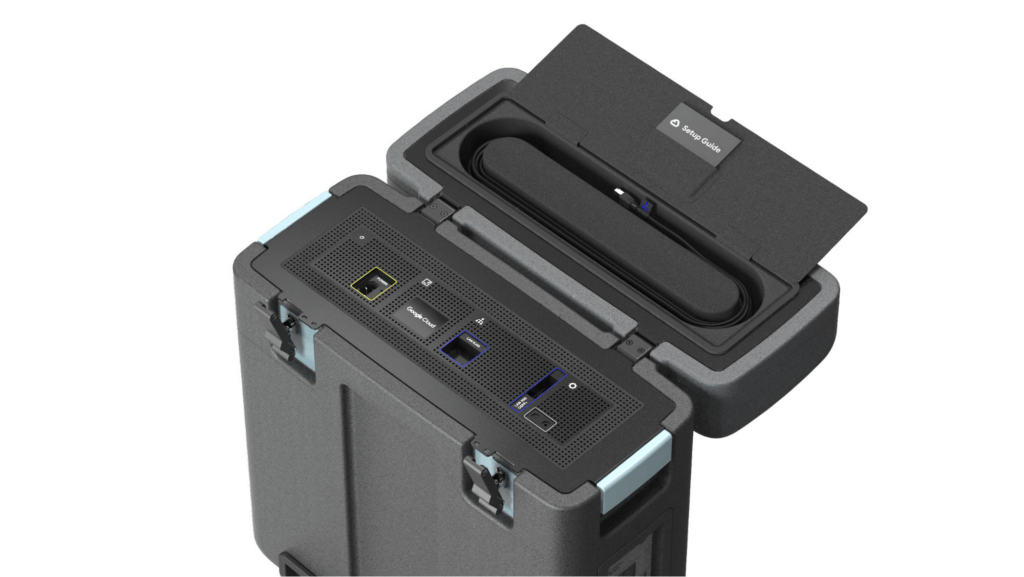
With these new appliances, Nuro will be able to automate much of their storage transfer needs. When their autonomous vehicles return to the depot, they can move data like software logs, LIDAR data, and sensor data — all ideal fits for Google’s Cloud Storage — from parked vehicles to the Transfer Appliance. Online transfers can then be performed throughout the day, ensuring a steady stream of valuable data in the cloud for developers to analyze and use in their nightly builds. All of this will help Nuro’s engineering leaders like Jie Pan to run more productive development teams with less operational overhead.
“Our autonomous vehicles generate a tremendous amount of useful data, and our goal is to get that data to our engineers as soon as possible,” said Jie Pan, Engineering Manager at Nuro. “When vehicles return to the depot, we can move data hourly into Cloud Storage over the network. We also have the flexibility to return the Transfer Appliance back to Google Cloud. Most importantly, this rapid transfer architecture gives a meaningful boost to engineering productivity and development velocity.”
Going the extra mile
Engineering and infrastructure leaders understand the value of delivering the right data to the right teams, as fast as possible. By adding preconfigured, over-the-network transfer into a turnkey Transfer Appliance, Google Cloud customers can more easily automate these data deliveries by scheduling regular migrations of on-premises files, objects, and other unstructured data to our Cloud Storage.
As Nuro continues to grow their manufacturing and testing footprint, they plan to use Transfer Appliances to further scale and simplify their data migration from on-premises to Google Cloud. Cutting the time to migrate their data by more than half will make for happier, more productive developers, and that will help Nuro bring us all the future of delivery a little faster.
If you’d like to learn more about Transfer Appliance and its new online transfer capability, click here or reach out to your Google Cloud account team.
Best Practices for Cost Optimization in the Cloud

5427
Of your peers have already read this article.
3:30 Minutes
The most insightful time you'll spend today!
When customers migrate to Google Cloud Platform (GCP), their first step is often to adopt Compute Engine, which makes it easy to procure and set up virtual machines (VMs) in the cloud that provide large amounts of computing power. Launched in 2012, Compute Engine offers multiple machine types, many innovative features, and is available in 20 regions and 61 zones!
Compute Engine’s predefined and custom machine types make it easy to choose VMs closest to your on-premises infrastructure, accelerating the workload migration process cost effectively. Cloud allows you the pricing advantage of ‘pay as you go’ and also provides significant savings as you use more compute with Sustained Use Discounts.
As Technical Account Managers, we work with large enterprise customers to analyze their monthly spend and recommend optimization opportunities. In this blog, we will share the top recommendations that we’ve developed based on our collective experience working with GCP customers.
Getting ready to save
Before you get started, be sure to familiarize yourself with the VM instance pricing page—required reading for anyone who needs to understand the Compute Engine billing model and resource-based pricing. In addition to those topics, you’ll also find information about the various Compute Engine machine types, committed use discounts and how to view your usage, among other things.
Another important step to gain visibility into your Compute Engine cost is using Billing reports in the Google Cloud Console and customizing your views based on filtering and grouping by projects, labels and more. From there you can export Compute Engine usage details to BigQuery for more granular analysis. This allows you to query the datastore to understand your project’s vCPU usage trends and how many vCPUs can be reclaimed. If you have defined thresholds for the number of cores per project, usage trends can help you spot anomalies and take proactive actions. These actions could be rightsizing the VMs or reclaiming idle VMs.
Now, with these things under your belt, let’s go over the five ways you can optimize your Compute Engine resources that we believe will give you the most immediate benefit.
1. Apply Compute Engine rightsizing recommendations
Compute Engine’s rightsizing recommendations feature provides machine type recommendations that are generated automatically based on system metrics gathered by Stackdriver Monitoring over the past eight days. Use these recommendations to resize your instance’s machine type to more efficiently use the instance’s resources. It also recommends custom machine types when appropropriate. Compute Engine makes viewing, resizing and other actions easier right from the Cloud Console as shown below.
Recently, we expanded Compute Engine rightsizing capabilities from just individual instances to managed instance groups as well. Check out the documentation for more details.

For more precise recommendations, you can install the Stackdriver Monitoring agent which collects additional disk, CPU, network, and process metrics from your VM instances to better estimate your resource requirements. You can also leverage the Recommender API for managing recommendations at scale.
2. Purchase Commitments
Our customers have diverse workloads running on Google Cloud with differing availability requirements. Many customers follow a 70/30 rule when it comes to managing their VM fleet—they have constant year-round usage of ~70%, and a seasonal burst of ~30% during holidays or special events.
If this sounds like you, you are probably provisioning resources for peak capacity. However, after migrating to Google Cloud, you can baseline your usage and take advantage of deeper discounts for Compute workloads. Committed Use Discounts are ideal if you have a predictable steady-state workload as you can purchase a one or three year commitment in exchange for a substantial discount on your VM usage.
We recently released a Committed Use Discount analysis report in the Cloud Console that helps you understand and analyze the effectiveness of the commitments you’ve purchased. In addition to this, large enterprise customers can work with their Technical Account Managers who can help manage their commitment purchases and work proactively with them to increase Committed Use Discount coverage and utilization to maximize their savings.
3. Automate cost optimizations
The best way to make sure that your team is always following cost-optimization best practices is to automate them, reducing manual intervention.
Automation is greatly simplified using a label—a key-value pair applied to various Google Cloud services. For example, you could label instances that only developers use during business hours with “env: development.” You could then use Cloud Scheduler to schedule a serverless Cloud Function to shut them down over the weekend or after business hours and then restart them when needed. Here is an architecture diagram and code samples that you can use to do this yourself.
Using Cloud Functions to automate the cleanup of other Compute Engine resources can also save you a lot of time and money. For example, customers often forget about unattached (orphaned) persistent disk, or unused IP addresses. These accrue costs, even if they are not attached to a virtual machine instance. VMs with the “deletion rule” option set to “keep disk” retain persistent disks even after the VM is deleted. That’s great if you need to save the data on that disk for a later time, but those orphaned persistent disks can add up quickly and are often forgotten! There is a Google Cloud Solutions article that describes the architecture and sample code for using Cloud Functions, Cloud Scheduler, and Stackdriver to automatically look for these orphaned disks, take a snapshot of them, and remove them. This solution can be used as a blueprint for other cost automations such as cleaning up unused IP addresses, or stopping idle VMs.
4. Use preemptible VMs
If you have workloads that are fault tolerant, like HPC, big data, media transcoding, CI/CD pipelines or stateless web applications, using preemptible VMs to batch-process them can provide massive cost savings. In fact, customer Descartes Labs reduced their analysis costs by more than 70% by using preemptible VMs to process satellite imagery and help businesses and governments predict global food supplies.
Preemptible VMs are short lived— they can only run a maximum of 24 hours, and they may be shut down before the 24 hour mark as well. A 30-second preemption notice is sent to the instance when a VM needs to be reclaimed, and you can use a shutdown script to clean up in that 30-second period. Be sure to fully review the full list of stipulations when considering preemptible VMs for your workload. All machine types are available as preemptible VMs, and you can launch one simply by adding “-preemptible” to the gcloud command line or selecting the option from the Cloud Console.
Using preemptible VMs in your architecture is a great way to scale compute at a discounted rate, but you need to be sure that the workload can handle the potential interruptions if the VM needs to be reclaimed. One way to handle this is to ensure your application is checkpointing as it processes data, i.e., that it’s writing to storage outside the VM itself, like Google Cloud Storage or a database. As an example, we have sample code for using a shutdown script to write a checkpoint file into a Cloud Storage bucket. For web applications behind a load balancer, consider using the 30-second preemption notice to drain connections to that VM so the traffic can be shifted to another VM. Some customers also choose to automate the shutdown of preemptible VMs on a rolling basis before the 24-hour period is over, to avoid having multiple VMs shut down at the same time if they were launched together.
5. Try autoscaling
Another great way to save on costs is to run only as much capacity as you need, when you need it. As we mentioned earlier, typically around 70% of capacity is needed for steady-state usage, but when you need extra capacity, it’s critical to have it available. In an on-prem environment, you need to purchase that extra capacity ahead of time. In the cloud, you can leverage autoscaling to automatically flex to increased capacity only when you need it.
Compute Engine managed instance groups are what give you this autoscaling capability in Google Cloud. You can scale up gracefully to handle an increase in traffic, and then automatically scale down again when the need for instances is lowered (downscaling). You can scale based on CPU utilization, HTTP load balancing capacity, or Stackdriver Monitoring metrics. This gives you the flexibility to scale based on what matters most to your application.
High costs do not compute
As we’ve shown above, there are many ways to optimize your Compute Engine costs. Monitoring your environment and understanding your usage patterns is key to understanding the best options to start with, taking the time to model your baseline costs up front. Then, there are a wide variety of strategies to implement depending on your workload and current operating model.
For more on cost management, check out our cost management video playlist. And for more tips and tricks on saving money on other GCP services, check out our blog posts on Cloud Storage, Networking and BigQuery cost optimization strategies. We have additional blog posts coming soon, so stay tuned!
APIs to Power the Future of Retail: Study Confirms

3553
Of your peers have already read this article.
1:30 Minutes
The most insightful time you'll spend today!
Today, retail customers have more digital-first, convenient ways of shopping than ever before. And APIs are one of the critical pieces of technology that have made this possible by giving retailers the ability to transform their systems and processes in an efficient and quick way.
APIs have allowed retailers to be more accessible to their remote customers with services such as order online and pick up in-store, curbside pickup, fulfilment of orders through delivery partners, and personalized recommendations while shopping online etc. These capabilities have been especially important over the last year, as the world has changed at a rapid pace. With many changes to customer interactions yet to come, APIs will continue to play a pivotal role in helping retailers to further personalize digital experiences and streamline their operations.
In Google Cloud’s State of API Economy 2021 report, 32% of organizations reported increasing their digital transformation investments, while 16% stated they would completely change their strategies to become digital-first companies. Moreover, by early 2021, online sales had already reached levels previously predicted for 2022, and APIs will become the foundation for business resilience and growth in retail over the next five years.
APIs are at the forefront of retail innovation
Retailers leverage APIs to experiment and connect teams for faster collaboration, helping them to use data for revolutionary experiences that increase customer engagement.
They allow retailers to innovate in new ways internally, externally, and across market borders. Modern digital experiences are built from a variety of data and functionality, throughout the entire supply chain, across multiple systems, and often belonging to a variety of services across distribution channels. APIs are the digital nervous system connecting everything together. They help retailers enhance internal efficiency, partner at scale, and leverage cutting-edge services such as machine learning—all because they make various kinds of technological value interoperable and easy for developers to access and reuse. In our research, 52% of retailers said APIs accelerate innovation by enabling partners to leverage digital assets at scale while 36% say they see APIs as strategic assets for creating business value.
Let’s take a look at some retail use cases and real world examples that are powered by APIs.
Deliver personalized customer experiences
Retailers are using APIs to create interactive and predictive personalized experiences.These range from “magic” mirrors that reflect personalized clothing, accessory, and even makeup suggestions; to smartphone alerts that encourage shoppers to check out special items while they’re browsing in the store; offers of coupons; and more. Behind the scenes APIs interconnect between the store and consumer data, business intelligence, and application security to bring these innovative experiences to life.
Streamline retail operations
APIs can help any retail business to operate more efficiently, from human resources, customer service, and distribution, to invoicing, marketing, and compliance. For example, APIs make it super easy and simple to onboard, manage and train employees and contractors. They can help connect various internal and external third-party systems for use cases like tracking real-time package status and gathering consumer shopping insights.
Conrad Electronic, German retailer of electronic products, demonstrates how API management can lead to enhanced efficiency. They used Apigee to build a tool that provides store employees and visitors with product, service, and warranty information on their mobile devices. The company was able to not only use data to enhance offers and services to their customers, but also streamline operations because more than 60% of their customers were using the API-enabled tool.
Power the future of retail with APIs
APIs are key to driving innovation across all areas of retail. They are enabling retailers to not only implement continuous digital transformation but also develop tools that navigate disruptions as they occur.
Retailers are already harnessing the power of APIs to prepare for:
- Borderless channels across markets that allow for the free flow of products and shopping experiences in the way consumers want them.
- Interactive and intelligent merchandising that evolves in realtime to predict consumer needs and bolsters buying decisions.
- Autonomous and virtual shopping experiences that develop deeper consumer interactions and product insights.
To learn more about how APIs can help drive innovation, download our latest eBook. In this eBook, you’ll find more retail-specific API use cases, detailed real world examples and insights into how APIs are shaping the future of retail.
Manage APIs effectively
As you grow your API program, and start powering business-critical applications and front-end experiences with APIs, you need an effective way to manage and scale them. This is where Google Cloud’s Apigee API management platform can help. Top retailers across the globe use Apigee to gain control over and insights into their APIs and enables them to manage end-to-end API lifecycle. Click here to learn more about Apigee.
More Relevant Stories for Your Company

Shifting Down: A New Way to Cloud for Developers
Application developers are the backbone of the modern cloud economy. The role of developers is felt in the seen and the unseen, from the smartphone apps we use every day to the network optimization that is powering a sustainable future. Given your importance in transforming so many fundamental aspects of

Cloud IoT Core Helps Businesses Leverage their IoT Data to Build a Competitive Edge
The ability to gain real-time insights from IoT data can redefine competitiveness for businesses. Intelligence allows connected devices and assets to interact efficiently with applications and with human beings in an intuitive and non-disruptive way. After your IoT project is up and running, many devices will be producing lots of

Building Unique Customer Experiences with Speed & Scale: Sprinklr & Google Cloud
Enterprises are increasingly seeking out technologies that help them create unique experiences for customers with speed and at scale. At the same time, customers want flexibility when deciding where to manage their enterprise data, particularly when it comes to business-critical applications. That’s why I’m thrilled that Sprinklr, the unified customer

How Cloud Networks Enable CSPs to Deliver 5G
Communication services providers (CSPs) are experiencing a period of disruption. Overall revenue growth is decelerating and is projected to remain below 1 percent per year, following a trend that started even before the pandemic.1 At the same time, driven by the pandemic, data consumption in 2020 increased by 30 percent relative
