





Maximizing Reliability, Minimizing Costs: Right-Sizing Kubernetes Workloads

943
Of your peers have already read this article.
3:30 Minutes
The most insightful time you'll spend today!
Do you know how much money you could save by adjusting workload requests to better represent their actual usage? If you’re not rightsizing your workloads, you might be overpaying for resources that your workloads aren’t even using or worse, putting your workloads at risk for reliability issues due to under provisioning.
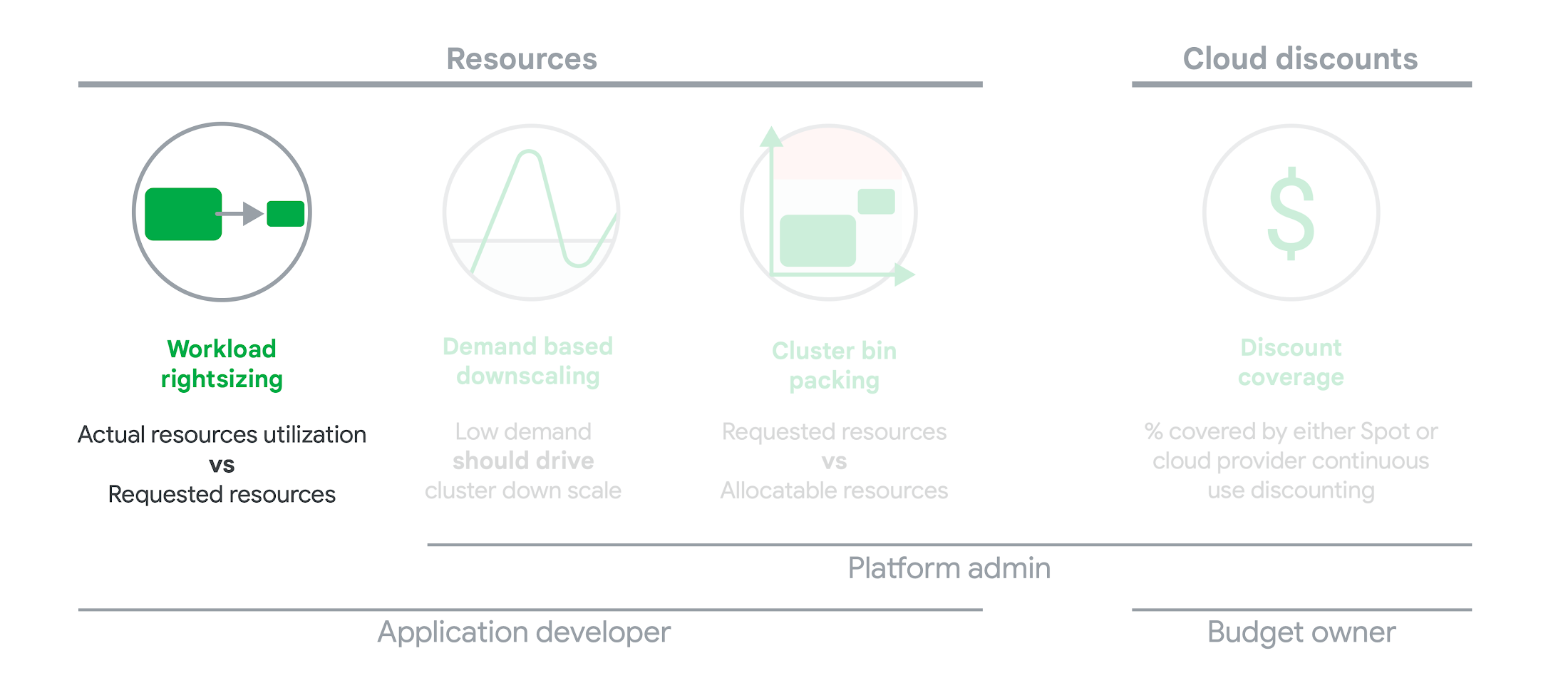
As we’ve previously discussed, setting the resources is the most important thing you can do to increase the reliability of your Kubernetes workloads. In this blog we will help you with the second key finding from the State of Kubernetes Cost Optimization report!
The research … found that workload rightsizing has the biggest opportunity to reduce resource waste.
State of Kubernetes Cost Optimization report
According to our research findings, workload rightsizing is the most important golden signal. Workload rightsizing measures the capacity of developers to properly use the CPU and memory they have requested for their applications.
Rightsizing is challenging
It can be quite difficult to predict the resource needs of your applications, which historically has not been a concern for developers in traditional data center environments.In traditional data center environments, resources were typically over-provisioned upfront to ensure capacity for peak demand and future growth, so developers didn’t need to focus on accurately predicting resource needs as they were covered by the excess capacity, whereas in cloud environments, resources are consumed on-demand. Finding a balance between efficiency and reliability can often feel like a delicate balancing act.
Tools for workload rightsizing
There are native tools in Cloud Monitoring and the GKE UI you can use to rightsize your workloads running on GKE.
Rightsizing in the console
The Workload Cost Optimization tab helps you identify workloads that can be optimized by displaying the resources used versus what’s requested.
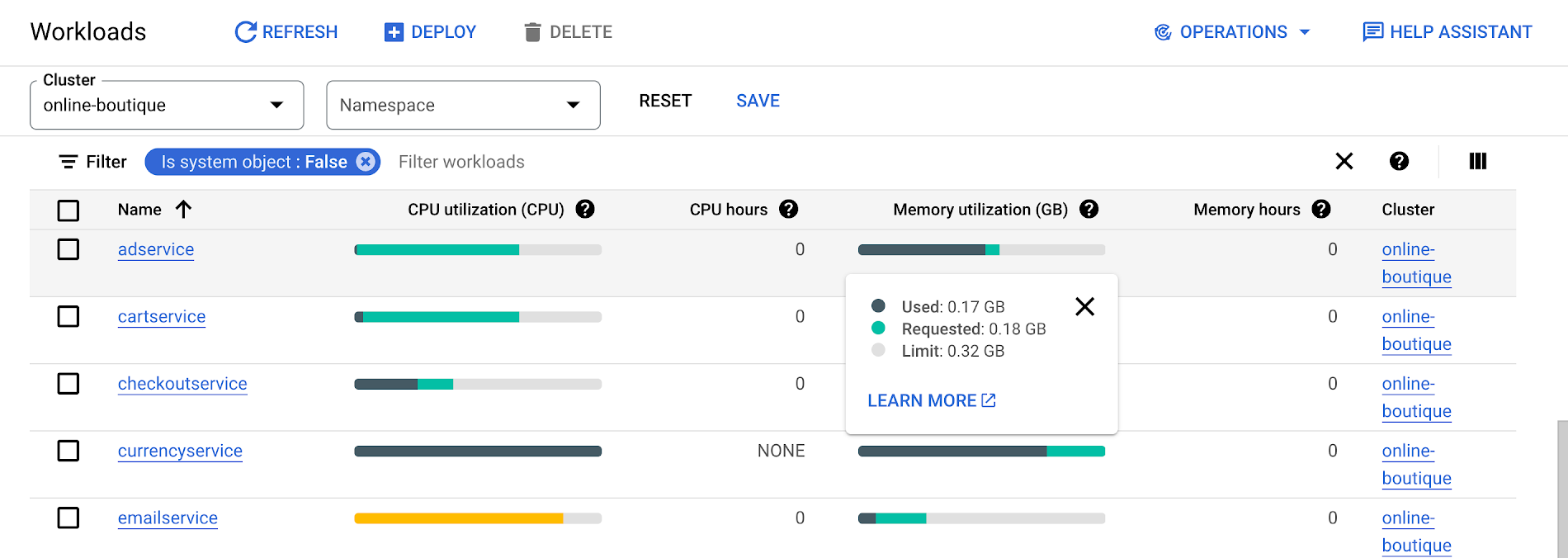
To take advantage of potential cost savings, you can drill into clusters to see workload level resource recommendations.
To view workload resource recommendations for Deployment objects only:
- In the GKE Cost Optimization.
- Select a cluster.
- Click Workloads > Cost Optimization.
- Select one Deployment workloads
- In the workload’s detail page, select Actions > Scale > Edit Resource Requests
Rightsizing with Cloud Monitoring
Cloud Monitoring provides built-in VPA scale recommendations metrics that you can use to monitor the performance of your workloads and to identify opportunities to rightsize them without the need to create VPA objects.
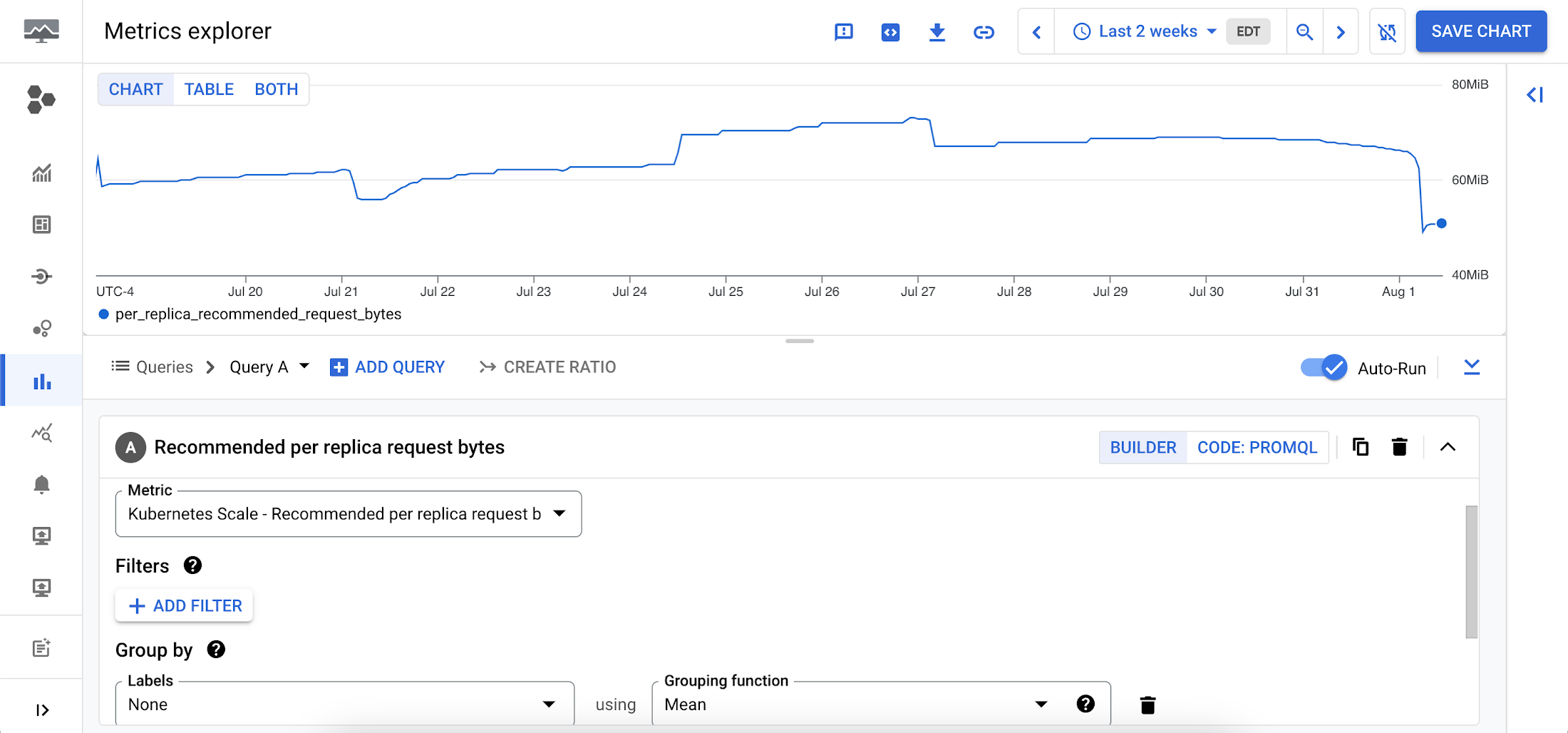
To view these metrics:
1. Go to the Cloud Monitoring > Metric Explore console.
2. In the Metric dropdown, select the metrics:
- Memory recommendations:
Kubernetes Scale > autoscaler > Recommended per replica request bytes - CPU recommendations:
Kubernetes Scale > autoscaler > Recommended per replica request cores
Rightsizing at scale
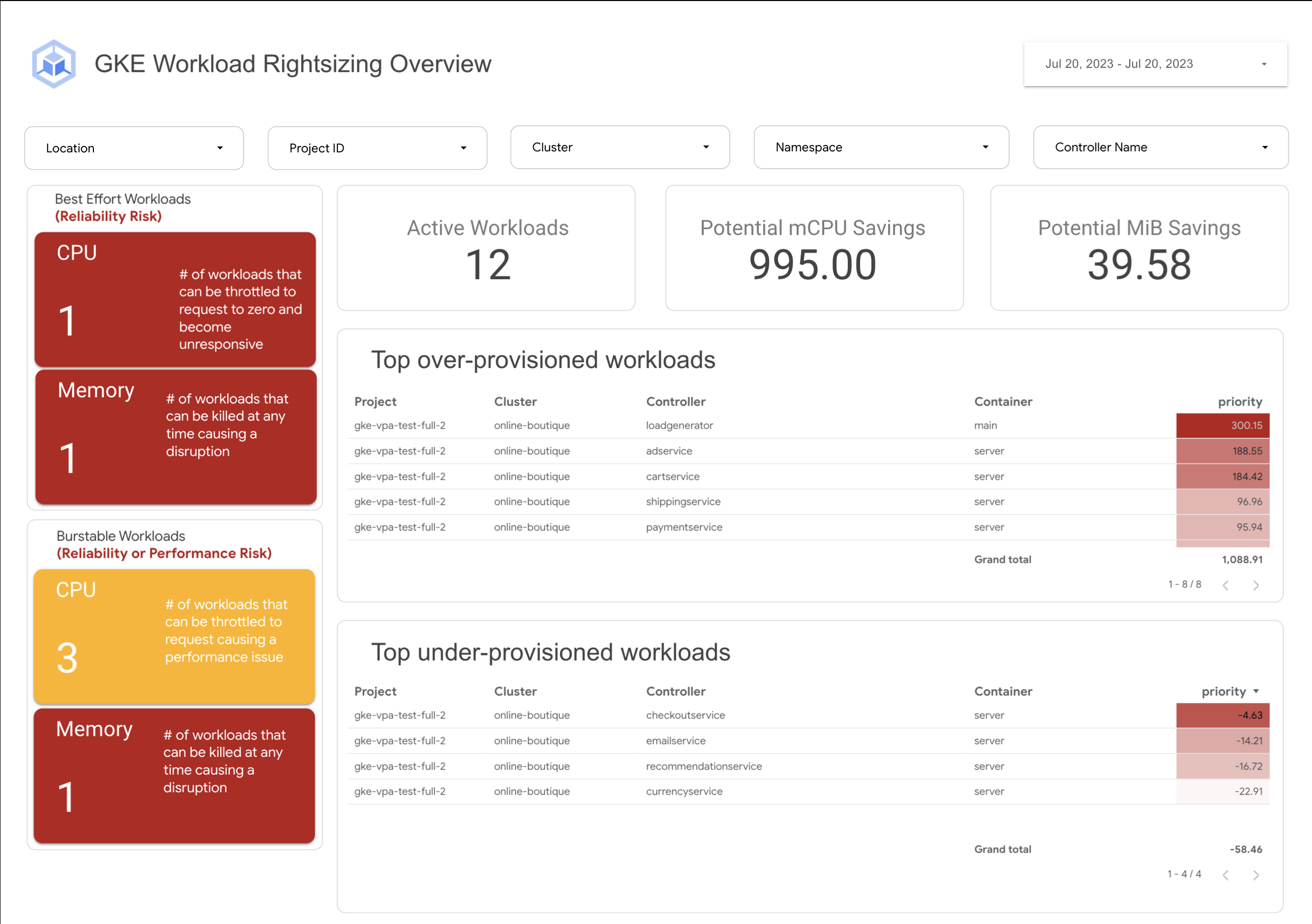
If you’re interested in viewing recommendations across clusters and projects, We’ve created a guide that you can use today to help you right-size your GKE workloads at scale. This solution leverages your actual cluster’s metric data and built-in workload recommendations provided by Cloud Monitoring. You can determine the resource requirements for all your workloads without having to create additional VPA autoscaler objects in each of your clusters. The guide walks you through deploying the solution.
In conclusion
In conclusion, rightsizing your workloads is essential for both cost savings and reliability. By following the tips in this blog, you can ensure that your workloads are using the right amount of resources, which will save you money and increase your workload’s reliability.
Links to the solution presented in this blog and other useful tools to help you optimize your cluster are listed below:
- The Right-sizing workloads at scale solution guide
- Setting resource requests: the key to Kubernetes cost optimization
- The simple kube-requests-checker tool
- An interactive tutorial to get set up in GKE with a set of sample workloads
Download the State of Kubernetes Optimization report, review the key findings, and stay tuned for our next blog post.
A Run-through of an Innovative 2021 with Apigee

3403
Of your peers have already read this article.
1:30 Minutes
The most insightful time you'll spend today!
Apigee is committed to continually innovating new capabilities and solutions for our customers, and 2021 saw new product launches, partnerships, and best practices for managing your expanding range of business-critical use cases. Here are some of our favorite stories from 2021.
Spotting the trends in APIs
Our State of API Economy 2021 Report surveyed over 700 IT leaders globally and identified five key API trends that emerged post-COVID. SaaS and hybrid cloud-based API deployments are increasing with half of all respondents reporting increases in these areas, and AI- and ML-powered API management is also gaining traction, with usage growing 230% year-over-year among Apigee customers. Business metrics like Net Promoter Score (NPS) and speed-to-market are API users’ preferred way to measure success, and API ecosystems are increasingly innovation drivers, with high-maturity organizations much more likely to focus on building a developer ecosystem or B2B partner ecosystem around their API. Finally, API security and governance is more important than ever, as research showed that increased investment in security and governance was a high priority. Check out the blog to explore these five trends in more detail.
Launching new capabilities with Apigee X
We announced Apigee X, our next-generation platform that brings the powerful scale of Google technologies to Apigee API Management and allows enterprises to power API programs for enhanced scale, security, and automation. Apigee X customers can harness the capabilities of Cloud CDN to maximize the availability and performance of APIs across the globe, deploying across more than two dozen Google Cloud regions and enhancing caching at over 100 locations. Apigee X customers can apply solutions like Cloud Armor web application firewall for enhanced API security and Cloud Identity and Access Management (IAM) for authenticating and authorizing access to the Apigee platform. Apigee X also enhances automation by applying Google Cloud’s AI and ML capabilities to historical API metadata to detect anomalies, predict traffic, and ensure compliance. To read more about these features, check out our blogs on Apigee X and Cloud Armor, Apigee X and Cloud CDN, and Apigee X and AI.
Making new connections with Apigee Integration
Apigee brought our successful API-first approach to integration this year with the release of Apigee Integration. This silo-busting solution lets customers connect existing data and applications, and surface them as easily accessible APIs. Apigee Integration brings together the best of API management and integration into one unified platform so IT teams can scale their operations, improve developer productivity, and increase the speed to market. The platform comes with built-in connectors to Salesforce, Cloud SQL (MySQL, PostgreSQL), Cloud Pub/Sub and BigQuery, with connectors for additional third-party applications and databases on their way. Advanced integration patterns also serve our customers with even more use cases. Check out our launch blog and our Next session video for more details.
Managing GraphQL APIs with Apigee
The exponential rise in digital services adoption among enterprises now generates petabytes of data every minute. You can harness the power of this data with query languages like GraphQL, accessing the data your app needs with one single request. The growing popularity of GraphQL APIs and their business-critical use cases mean it’s important to manage them with full life cycle capabilities, much like you manage your REST APIs. Last year we compared REST and GraphQL and introduced best practices for managing GraphQL APIs. You can also read our blog announcing Apigee’s support for the management of GraphQL APIs, and our partnership with StepZen to deliver these capabilities. To dive deeper into building GraphQL APIs, check out our Next session video.
Looking back at the year’s top stories
2021 was the year of the customer, and we published the following stories to show how API management helps enterprises modernize their applications, build digital ecosystems, and generate value for their customers and their own organizations:
- Telco:
- Retail:
- Financial services:
- Energy:
That’s a wrap for 2021! We hope you have a safe and happy holiday season, and we can’t wait to see what the new year brings for us. Stay tuned in 2022 for product launch announcements, partnerships, tips, and stories of how organizations like yours are innovating with Apigee.

3729
Of your peers have already downloaded this article
5:30 Minutes
The most insightful time you'll spend today!
Business needs for digital solutions have intensified the urgency for rapid application development and deployment. At the same time, widespread adoption of cloud computing has revolutionized the IT environment used by both enterprises and consumers.
In addition, the acceleration of digital transformation has increased the availability of developer tools and deployment environments. Besides, the vibrancy of the DevOps movement and the multiplicity of development tools and infrastructures mean that developers enjoy greater decision-making authority in the development of digital solutions.
As a result, developers not only confront the challenge of shipping software faster but also encounter competing challenges to ensure software quality and the appropriate mitigation of risks associated with rapid development and deployment.
Hence, to move quickly and with confidence, developers must use tools that automate the full software development life cycle and work across platforms and operating systems.
Developers need to adopt FaaS, a cloud platform that allows developers to develop, deploy, and manage event-driven applications without the responsibility of managing the infrastructure on which the applications run.
Rhode Island’s VCC Platform Built on GCP Helps Jobseekers Get Back to Work!

3264
Of your peers have already read this article.
5:00 Minutes
The most insightful time you'll spend today!
2020 brought many challenges, especially as in-person operations were shut down, and many were left vulnerable to unemployment.
The State of Rhode Island responded to these challenges, by modernizing their workforce development operations and moving completely to a custom online platform called the Virtual Career Center, also nicknamed “the VCC.”
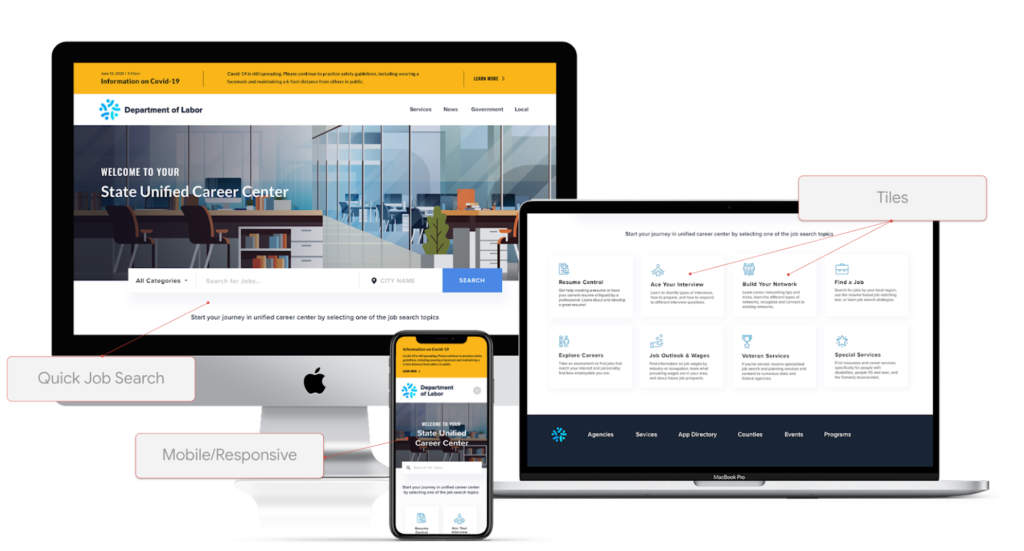
It was developed in partnership with Google Cloud and a nonprofit called “Research Improving People’s Lives” (RIPL), and was fully built by Google Cloud partner Maven Wave, which helps a wide array of organizations, including public sector customers, with many types of cloud initiatives.
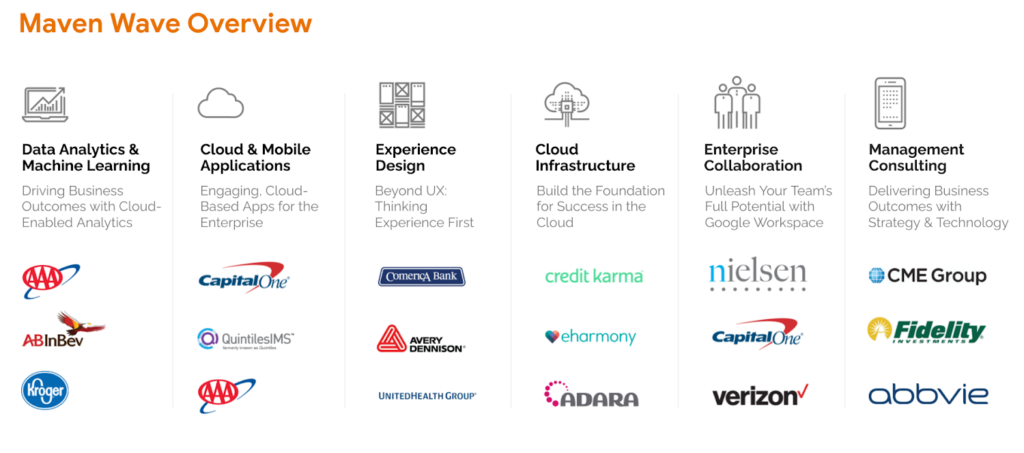
In this episode of Architecting with Google Cloud, we interviewed Joel Osman, head of Digital Experience & Custom Applications at MavenWave who shared a lot of insights such as:
“We looked at how we can apply leading edge emerging technologies to help people get back to work and use them as tools in such a way that we can augment the personal one to one interactions that agencies had been using with job seekers, to help them get back to work.”
One of those key benefits is enabling job seekers to find coaches that are specialized in their respective community. During the in-person walk-in model, applicants were paired on a first come first serve basis with any available coach on site. Meanwhile online scheduling has enabled a greater opportunity to match veterans, college graduates, non-English speakers, etc with coaches with prior experience in that specific area.
How the VCC was built
This VCC web app was built on Angular. It has a custom frontend built on top of 2 key Google Cloud products. The first is Workspace, which includes functionality such as video conferencing, documents, slides, chat, file storage, etc. And the other is Google Cloud computing resources. Here’s a view of the architecture:
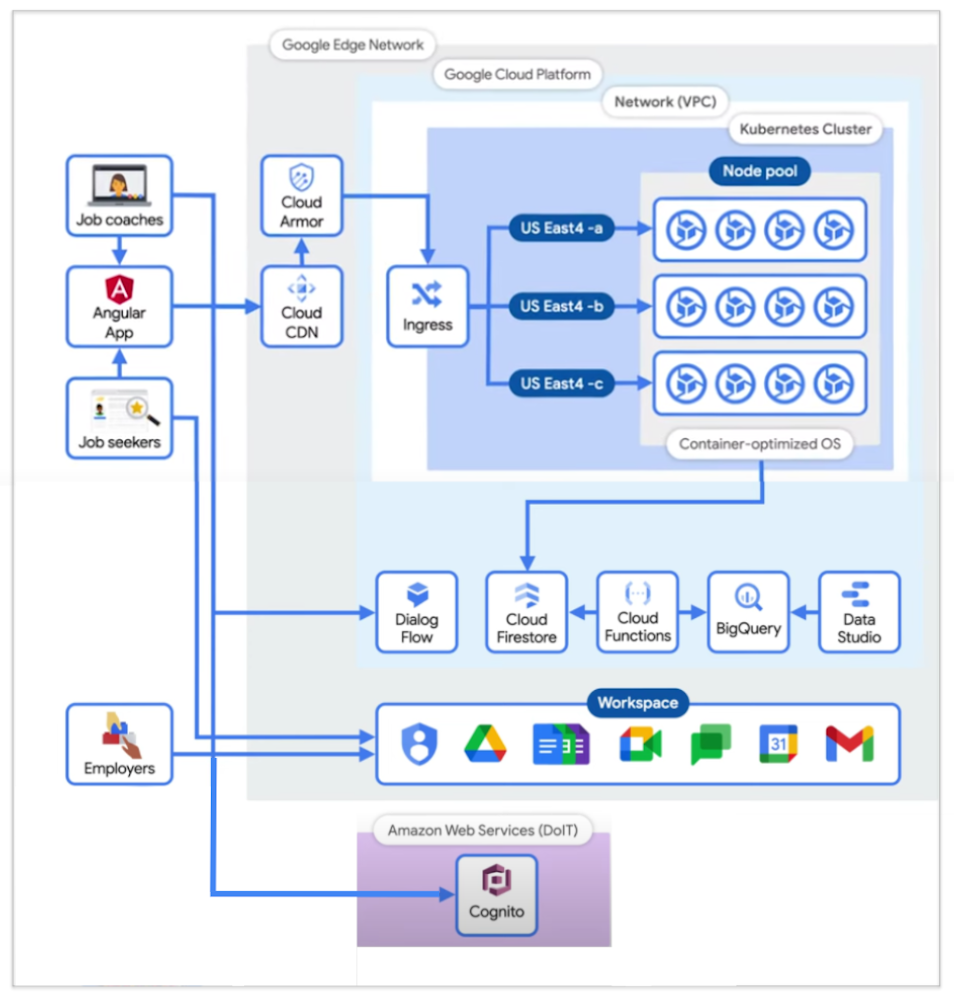
There are 3 main types of users at this time, and that’s job coaches, job seekers, and employers.
- 👩🔧 Job Coaches all have Google IDs in the Google Workspace domain, and therefore authenticate against the Google identity repository.
- 🕵️♂️ Job Seekers are authenticated through a Cognito-based process maintained by the nonprofit I mentioned earlier (RIPL), the Rhode Island infrastructure team, and the Department of Information Technology (DoIT). Cognito was an identity repository setup prior to this project for users interacting with the State, and remained as their form of authentication.
- 🧭 Employers participate directly with Google Meet, and, to an extent, Google Calendar; but not the Angular app. There’s also a focus on building a future dashboard to see how the center has helped employers with applicants.
The specific Google Cloud components used are the following:
- Firestore: realtime Database that keeps data in sync across client apps.
- BigQuery: serverless warehouse for data.
- Data Studio: is used to build filterable dashboards over BigQuery
- Cloud Functions: which serve as triggers to keep scheduling and data workflows in sync.
- Kubernetes cluster: runs & autoscales the server-side code in a single-region deployment, with a minimum of four nodes per zone across three zones of the US East region.
- Cloud Armor: protects applications and websites from attacks, and sets NIST-compliant policies.
- Google’s Content Distribution Network (CDN): content is accessed and cached.
To manage the lifecycle of the infrastructure, a Terraform script is used, which is an open source tool, and is structured into 5 folder environments:
- Admin
- Dev
- QA & UAT
- Networks
- Prod
- Shared Services (for CI/CD pipelines between Dev & Prod).
Adoption outcomes
A universal fear we technical practitioners may have is:
“Will our tool be loved and adopted by our intended audiences?”
Joel mentioned Job Coaches at the time were not used to working from home, and the team was concerned that they would potentially feel overwhelmed with a lot of new technology.
As a rewarding surprise, when Job Coaches were presented the proof of concept, it was received with positivity.
“95% of Job Coaches rated the VCC as a valuable solution and 87% reported to find it very or extremely effective.”
This alignment was thanks to designing the tool with the users in mind, and performing user research since the beginning of the journey, which helped address their day to day needs.
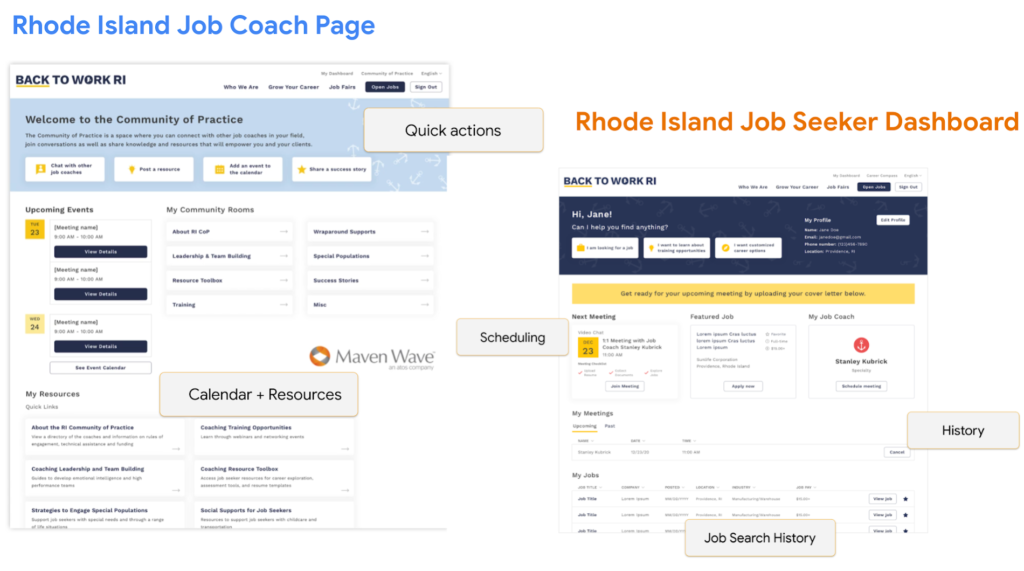
Additional innovation for the future
After creating a centralized hub and moving operations to a digital format, many more benefits also arise. For example, there can now be an integrated data analytics view which enables meaningful dashboards that can be customized for different audiences such as job applicants, coaches, program stakeholders, or state agencies.
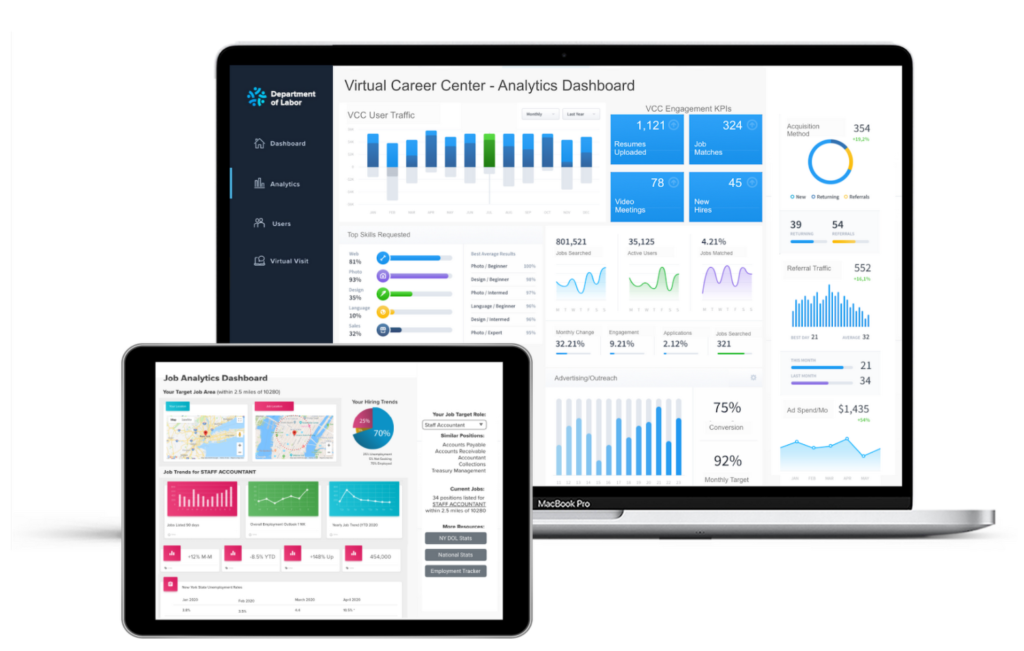
There can be improved job searchability by integrating machine learning, helping with resume building and parsing that take keywords out of a resume and match them to a variety of relevant job clusters, rather than just performing raw keyword searches.
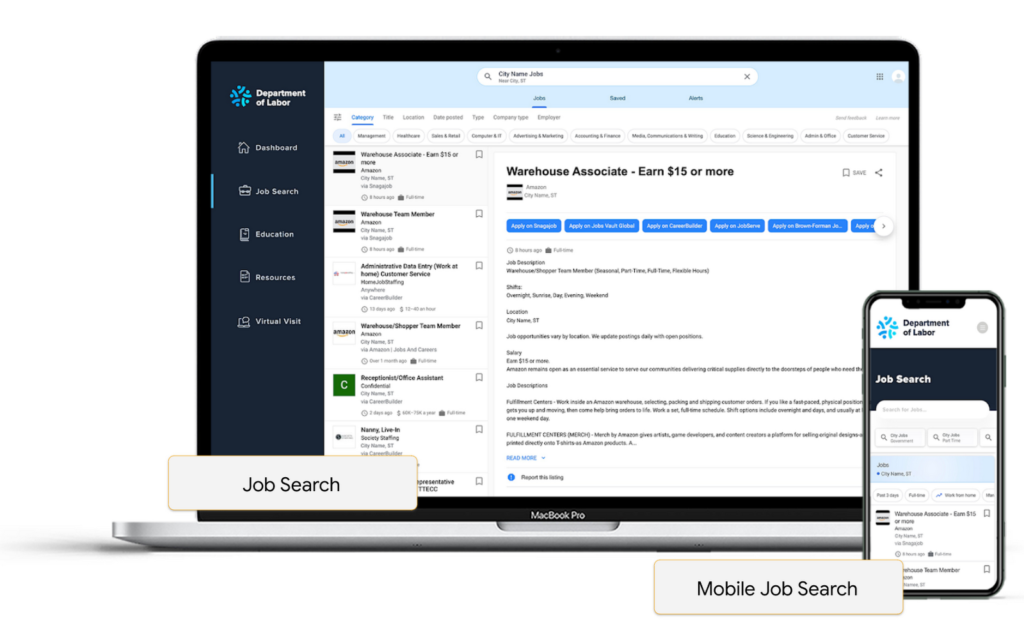
Embedding chat bots can also help reduce the load of call centers in states, as they utilize natural language processing as well to help guide job seekers with prompt answers.

Conclusion
The State of Rhode Island’s Virtual Career Center is an amazing success story. By having worked with an experienced partner to move their operations to a digital format, they were able to respond to their citizen’s needs in a time where in-person operations were not possible. They also unlocked opportunities such as better matching and reporting along that journey.
For any organization whether they are in the public sector, university, private sector, etc; anyone can take advantage of this platform and customize it to their needs as Maven Wave shared that they offer a menu of options, where you can pick and choose functionality based on your requirements, IT resources, and budget.
Google Cloud Partnership Helps Lowe’s SRE Team Achieve 20X More Releases Per Month
5549
Of your peers have already read this article.
2:00 Minutes
The most insightful time you'll spend today!
Editor’s note: Today we hear from the Lowe’s SRE team. They share about how they have been able to increase the number of releases they can support by adopting Google’s Site Reliability Engineering (SRE) framework and leveraging their partnership with Google Cloud.
At Lowe’s, we’ve made significant progress in our multiyear technology transformation. To modernize our systems and build new capabilities for our customers and associates, we leverage Google’s SRE framework and Google Cloud, which helps us meet their needs faster and more effectively. With these efforts, we’ve been able to go from one release every two weeks to 20+ releases daily—about 20X more releases per month.
Our SRE transformation didn’t happen overnight, though. Every step along the way brought some challenges. But looking back, we are excited to see how much we have accomplished for our customers as a result.
Back in 2018, before adopting SRE practices, we were more reactive than proactive, following an “eyes on glass” approach. On-call structures and incident management efficiency were not at optimal levels with too many repetitive and manual tasks, resulting in operational toil. Production concerns were not surfaced into the product roadmap, which resulted in delays in making fixes.
Bootstrapping SRE at Lowe’s
As we moved from on-prem to Google Cloud, we decided to move from a monolithic- to microservices-based architecture. And to better manage this new architecture, we embarked on an SRE journey.
Then as COVID-19 hit, we really had to accelerate this journey as customers increasingly moved to online ordering and delivery to meet their Total Home Improvement needs. To do so, we followed four key principles that allowed us to meet changing customer needs quickly and release fast and reliably.
- Automate away toil
As we moved from traditional Ops to an SRE ecosystem, our biggest opportunity was reducing toil, so that engineers can spend time on activities that drive business impact and customer outcomes. We think of toil as work that is manual, repetitive, tactical, devoid of enduring value—but automatable. So, to tackle toil, we focused on automating away the need for manual intervention. As an example, we made sure engineers were not the first point of contact for any alert. Any triage or resolution that an engineer can perform, a machine can be trained to do the same. We used supervised and unsupervised learning techniques to automate our toil. With a long-term goal of “no toil,” our SREs work on identifying and reducing toil to a manageable level across the organization. - Engineer alignment through roadmaps
Our goal is to maximize the engineering velocity of developer teams while keeping products reliable. We want an engagement model where product, SRE and development teams are closely aligned. A key way we’ve been able to create this alignment is by having our SREs embedded into domain and product teams. Each domain has an SRE, who is involved at the beginning stages of product development to ensure that the domain stakeholders are in alignment with the SRE initiatives. As such, SREs are able to improve the reliability, performance, scalability and launch velocity of the services throughout all phases of the service lifecycle. - Adopt one-touch releases
Our path to production used to contain many manual steps and validations, slowing the rate at which we released features. Additionally, we used to bulk all our releases together to deploy at once, which increased the risk of failure and created a longer feedback loop from production. To tackle this with an SRE mindset, we created a one-touch release process in which SREs review the product team’s pull requests. When approved, this triggers a DevSecOps pipeline that deploys the approved changes to production securely. This process created a safe, reliable and sustainable continuous delivery pipeline with quick feedback loops. Striking the right balance between speed, innovation and stability, we were able to increase our releases exponentially for the year, taking less than 30 minutes per release to deliver quality code, including various automated quality checks and processes, all in just one click. - Embrace capacity planning
To ensure our services have enough spare capacity to handle any surge in traffic patterns, our SREs emphasize capacity planning, making recommended capacity changes in the continuous delivery (CD) pipeline. They constantly monitor performance to make sure the service is robust, stable and available. And when there’s a sudden surge beyond the forecasted volume, SREs change the capacity on demand and document changes for the performance and domain teams.
Capacity planning is especially important for us during peak holiday times such as Black Friday and Cyber Monday (BFCM). We lay out our SRE stability plan three months in advance and surface into the domain team’s product roadmap. This way development teams are able to allocate sufficient engineering time to reliability. We do performance testing to ensure the environment is able to sustain increased load over long periods of time and also handle sudden surges in traffic. We also do region failover testing at a global scale to validate the automatic failover duration of service level agreements (SLAs), SRE and domain readiness. Additionally, we conduct Black Friday and Cyber Monday-specific destructive testing to validate customer experience, reliability and more.
Google Cloud’s Black Friday and Cyber Monday white-glove service played a key role in ensuring our success in both BFCM 2019 and BFCM 2020. This service included on-site visits from Google’s Customer Reliability Engineering (CRE) team who reviewed Lowe’s web architecture, capacity planning, operations practices for event risks, and presented workshops on topics such as incident response best practices.
Looking ahead
There is always room for improvement, and at Lowe’s we aim to continuously improve our SRE practices. One thing that has worked well for us, which we plan to continue, has been our road shows, where senior SRE leads present to other SREs and application domain teams on the latest SRE principles and best practices, and to get input in real-time from them.
Google’s tools and methodology have played an instrumental role in helping reshape our SRE practices and better serve our customers. We look forward to building on the momentum and partnership as we continue our SRE journey at Lowe’s.
If you want to learn more about how to adopt SRE best practices on Google Cloud, check out our documentation. If you want to learn more about Google SRE, visit our website. Stay tuned for the next blogs with Lowe’s discussing how they trained their engineering talent to adopt SRE practices and tooling, and how they improved MTTR using SRE principles.

3922
Of your peers have already downloaded this article
5:30 Minutes
The most insightful time you'll spend today!
The 2019 Accelerate State of DevOps Report confirms analyst reports that DevOps is crossing the chasm with the proportion of elite performers almost tripling compared to last year.
The report finds that delivering software quickly, reliably, and safely is at the heart of technology transformation and organizational performance. The report also finds that there’s a right way to handle the change approval process, and it leads to improvements in speed and stability and reductions in burnout.
Download this report and get:
- Insights on how to achieve elite performance in software development and delivery so you can deliver more value to your customers and stakeholders.
- Role of cloud computing in driving technology and organizational performance, with guidance on how to improve your use of the cloud.
- Smart ways to improve productivity and how the highest performers scale DevOps to maximize success.
More Relevant Stories for Your Company

Cloud and AI Paves the Future of Finance: Excerpts from FIA Boca 2022
Financial markets were among the first to adopt new technologies, and that has certainly been true of the derivatives markets, which were early adopters of electronic trading. Going forward, new capabilities will transform the way industry participants communicate, analyze, and trade. I sat down with Google Cloud’s Phil Moyer and

Why You Should Consider API-first Integration
Enterprises need to move faster than ever to gain a competitive advantage in today’s customer-focused environment. Time-to-market for products and services has shortened dramatically, from years to days. IT teams must move fast, react fast, and enable business strategies via constant innovation. All of this digital transformation is about more

Unlocking Efficient API Management with Apigee and CI/CD Pipelines
In modern software development, automating delivery using Continuous Integration and Continuous Deployment (CI/CD) pipelines draws parallels to automotive assembly lines that doubled the production while cutting down costs by 65%. According to a recent report from Postman, over 51% of respondents indicated that their organizations devote more than half of their development

Google Cloud expands availability of enterprise-ready generative AI
Generative AI continues to develop at a blistering pace, making it more important than ever that organizations have access to enterprise-ready capabilities to help them leverage this disruptive technology. Harnessing the power of decades of Google’s research, innovation, and investment in AI, Google Cloud continues to make generative AI available
