





Tackling Real-Time Bidding Challenges: Arpeely’s Fresh Approach with Google Cloud

1133
Of your peers have already read this article.
4:30 Minutes
The most insightful time you'll spend today!
At Arpeely, we’ve developed some of the world’s most advanced advertising technology. Our machine learning (ML) media acquisition platform and “win-win” business model enables customers to bring highly intentful users to their offerings with precision, peace of mind and minimal overhead.
Real-time bidding is a dynamic and intricate process that involves buying and selling ad impressions in milliseconds. Each time a user opens an app or website, advertisers or ad-tech companies acting on behalf of advertisers have milliseconds to bid on ad spaces in real-time auctions, and the highest bidder wins the opportunity to display their ad. This is where Arpeely comes in, leveraging advanced algorithms, innovative UX and funnels to optimize the bidding process and maximize performance for advertisers.
At Arpeely, we use various signals often not used by traditional competitors to outperform the market and zero-down on high-intent and soon-to-be loyal users. For example, in advertising a mobile app, we predict, based on real-time conditions and user context, the user’s likelihood to make an in-app purchase many weeks into the future.
As for the ads themselves, gone are the days of simple banners; today’s ads are “mini products” that captivate and engage users. We employ a wide range of ad formats that go beyond industry standards. Our ads can be immersive videos, compelling messages, interactive experiences like mini-games or mini-apps, or even a multi-step mixture of all of the above. By integrating logic and interactivity, Arpeely enables users to engage with the ad content seamlessly and gauge user intent without leaving their main activity.
Our business model dictates that we don’t get paid if our advertiser doesn’t get paid. We like to say that our algorithms, like water, can trickle into hidden market opportunities missed by the rest of the industry that uses less granular tools. These and other capabilities make Arpeely a strategic partner in the challenging space of media and user acquisition.
Innovation at the edges of data science and engineering
Today, we handle millions of impressions per second and over a billion ML predictions daily. We are directly connected to seven of the world’s largest real-time bidding exchanges, including Google AdX. We also work very closely with our clients, ranging from prominent startups to companies in the S&P Top 20.
Daily, we tackle complex engineering and data challenges on multiple fronts. On the engineering side, we ensure that every real-time auction receives a lightning-fast response within a strict 150ms timeframe. On the data side, we fire multiple ML predictions per auction and ingest TBs of data daily. On the user-serving front, we serve A/B-tested assets across a long tail of geos and devices, with even the slightest fluctuations in load speeds affecting business dramatically.
Right from the start, we knew we couldn’t do it alone when it came to building our technology stack. When you look at available platforms, it’s clear Google Cloud has a robust architecture that is easy to manage, use and scale, especially for our use cases. They also have reliability and feature completeness which are critical in our line of business.
Under the hood
Building upon Google Kubernetes Engine (GKE), we run multiple services that handle our main bidding flows. We utilize Golang for services that run at a large scale and Python for when we prioritize development speed, community and readability. All of these can reach an immensely high scale, which is managed and monitored automatically in GKE. Communication between these services and our Redis (our Google Cloud partner) cluster happens in sub-millisecond latency over Google Cloud’s strong network infrastructure and enables us to run complex real-time logic for every impression.
Once we have tackled the actual bidding, we are left with the challenge of streaming our data into BigQuery for analytics and model training. We utilize a mix of Cloud Pub/Sub, Memorystore and Cloud Storage to create a mechanism capable of ingesting many TBs per day in near real-time without compromising on cost. Real-time data is critical for a company like Arpeely to test and reiterate at a fast pace.
BigQuery is our data warehouse for operational analysis and is an essential part of our business. We use it both as a warehouse, for large-scale computations and in an operational capacity that closes the loop between production, data, and ML retraining. A team of two or three people can manage petabytes at scale with minimal maintenance.
On top of these, we’ve built a state-of-the-art in-house model pipeline suited specifically for ad-tech industry purposes. It allows us to effectively deploy complex solutions — on-the-fly calibration, flexible conversion steps, sampling of heavily imbalanced data sets, adjusting weights, and A/B-tested model deployment and more.
Google Cloud also offers us an entry point for several very useful built-in products that have become deeply embedded in our daily stack and routine. Among them are Operations Suite (formerly Stackdriver), Cloud Profiler, Cloud Storage, Cloud CDN, Cloud SQL, Memorystore, Cloud Scheduler, Error Reporting, and more.
In addition to all the technology, there’s also a human touch. Google’s skilled Customer Success team possesses a unique blend of technical expertise and business acumen, acting as strategic advertisers and opening doors we did not know existed.
Opening the door to the future of advertising
Standardizing on Google Cloud enables us to focus our resources on innovation and growth. Instead of having to research business solutions and invest time integrating disparate technologies, we can tap into a wide range of Google Cloud tools as needed. Thus, it is crucial that we set up a good technological foundation and prepare for future growth of the business.
Google Cloud enables us to focus our resources on innovation rather than our infrastructure. This means we can put more effort into finding ways to match clients with high-value customers and grow their revenues. Even though online advertising has been around for over 20 years and pioneered by Google itself, Google Cloud gives us the impetus to disrupt the market and deliver greater levels of value to our customers today and in the future.

If you want to learn more about how Google Cloud can help your startup, visit our page here to get more information about our program, and sign up for our communications to get a look at our community activities, digital events, special offers, and more.
Check out the Redis listing on Google Cloud Marketplace. Please give it a try and let us know what you think!

5328
Of your peers have already downloaded this article
7:30 Minutes
The most insightful time you'll spend today!
Sure, machine learning is becoming a business imperative, but how does it work in practice—and what are the benefits for IT managers?
That’s the subject of a new step-by-step guide to solving business and IT problems with artificial intelligence and ML, based on insights gathered by IDG Research Services.
Its publication comes at a time when technology departments face growing pressure to embrace these emerging technologies, yet many have questions about how to get started.
It has real-life examples such as the health services company that used ML to reduce support ticket-resolution time from 48 minutes to six.
In another section, a financial services VP explains that cloud-based ML services enable his company to avoid spending money on computing resources that sit idle.
The guide also includes concrete tips for new ML adopters. For example, a real-estate CIO recommends the use of third-party tools that rely on AI and ML technologies, while a financial services VP highlights the challenge and potential of incorporating unstructured data into ML initiatives.
Download the guide now!
Maximize Efficiency in Document Extraction Models with Document AI Workbench GA Release

1303
Of your peers have already read this article.
3:30 Minutes
The most insightful time you'll spend today!
Each day, more documents are created and used across companies to make decisions. However, the value in these documents is primarily expressed as unstructured data, which makes the value difficult and manually intensive to extract and use for business processes.
As the number and variety of documents used by businesses proliferate, machine learning (ML) solutions need to be more flexible to handle the broader set of use cases. That’s why we introduced the first Document AI Workbench model, Custom Document Extractor (CDE), in Public Preview at Google Cloud Next ‘22. CDE makes it fast and easy to apply ML to virtually any document-based workflow to extract structured data from unstructured document types, to automate business processes.
CDE lets developers and analysts use their own data to train models and extract fields from documents needed for the business. CDE lets organizations build models faster and with less data — thus accelerating time-to-value for processing and analysis of data in documents.
Today, we announce that Document AI Workbench is Generally Available (GA), open to all customers, ready for production use through APIs and the Google Cloud Console. Document AI Workbench is covered by the Document AI SLA — online and batch document prediction is supported with >=99.9% uptime. Furthermore, Document AI Workbench is now covered by Google Cloud’s GA product terms. For example, Google will notify customers at least 12 months before significantly modifying a customer-facing Google API in a backwards-incompatible manner.
In this blog post, we’ll explore ways customers are already using CDE and Document AI Workbench’s updated capabilities.
What users are saying about Workbench
Deliver higher model accuracy with Workbench
Users leverage Workbench to ultimately save time and money. A third party evaluated Document AI Workbench and concluded that it extracts data more accurately1 than several competing products for document types with variable layouts (e.g. invoice, receipt, bank statements, paystubs). Better accuracy drives higher automation rates, helping Workbench users save time and money.
Chris Jangareddy, managing director for Artificial Intelligence & Data at Deloitte Consulting LLP said, “Google Cloud Document AI is a leading document processing solution packed with rich features like multi-step classify and text extraction to automate sorting, classification, extraction, and quality assurance. By combining Document AI with Workbench, Google Cloud has created a forward-thinking and powerful AI platform for intelligent document processing that will allow for process transformation at an enterprise scale with predictable outcomes that can benefit businesses.”
Mansoor Khan, CEO of OneClinic said, “We help medical professionals scale their clinics through automation. We used Google’s Document AI Workbench to create a model to automatically extract data from patients’ insurance cards as part of our patient check-in software. Workbench is easy to use and we are really happy with the model accuracy — it extracts data more accurately than what we would expect from human data entry.”
Rajnish Palande, VP, Google Business Unit for BFSI, TCS said, “The Google Cloud Document AI Workbench leverages artificial intelligence (AI) to manage and glean insights from unstructured data. The Workbench brings together the power of classification, auto-annotation, page-number identification and multi-language support to help organizations rapidly deliver enhanced accuracy, improved operational efficiency, higher confidence in the information extract, and increased return on investment.”
Build production ready models faster with Workbench
Document AI Workbench helps users create machine learning models faster. For example, a third-party evaluation shows Document AI Workbench trains machine learning models up to 3x faster than a leading competitor. This is an important improvement which lowers total cost of ownership and increases value.
Dallas Dolen, Partner, Google Alliance Leader at PwC said, “Google Document AI Workbench helps to accelerate our custom parser models training as well as improves accuracy and performance using a custom document extractor with human in the loop. It helps us solve complex business problems for our clients in the financial services and healthcare industries.”
Ziang Jia, Senior DocAl Development Lead at Resultant, said, “Document AI Workbench has unlocked a brand-new machine learning development experience for information extraction solutions. Its simplicity and robustness enabled us to build models and deliver a highly accurate outcome in an agile way for a large government agency. We couldn’t be more impressed by its simplicity and robustness and are excited to see how the product will evolve in the future.”
Sean Earley, VP of Delivery Services of Zencore said, “Document AI Workbench allows us to develop highly accurate document parsing models in a matter of days. Our customers have automated tasks that formerly required significant human labor. For example, using Document AI Workbench, a team of two trained a model to split, classify and extract data from 15 document types to automate Home Mortgage Disclosure Act reporting. The mean trained model accuracy was 94%, drastically reducing the operational cost of our customer’s compliance reporting procedures.”
What’s new with Document AI Workbench
The latest Workbench capabilities make it even easier to train and deploy an extraction model:
- With Workbench’s public APIs, you can programmatically create, delete, train, evaluate and deploy models.
- Our updated dataset management tools automatically detect and create existing schema labels from your pre-annotated documents. They also provide you more flexibility when creating and managing schema.
- Our new DocAI Toolkit includes a labeled document converter so that you can easily convert your labeled documents to DocAI’s format and start training faster.
- We’ve reduced the cognitive load for labelers with efficiency enhancements to our Labeling UI.
- The revamped Processor Gallery helps you quickly identify the best model for your use case.
What’s next for Document AI Workbench
We continue to invest in Document AI Workbench to help you automate document processing. Here are a few things we’re working on that we’re excited about:
- Classify document types with the Custom Document Classifier (CDC), coming soon in public preview
- Copy processor versions across projects and processors to streamline managing development and production environments
- Support larger documents (e.g., longer than 50 pages) so you can process a wider array of documents
- Broader (non-latin) language support–equivalent to Document AI OCR
- And many more investments, using state of the art technology, to help you build world class models faster to automate document processing
Document AI Workbench is in GA and ready for production workloads. Learn more via Document AI Workbench documentation or try it out in the Google Cloud Console.
Acknowledgements: Tomas Moreno, Outbound Product Manager, Lukas Rutishauser, Software Engineering Manager, Michael Kwong, Software Engineering Manager, Rajagopal Janani, Software Engineering Manager, Michael Lanning, UX Designer.
1. When trained with 200+ documents
Google Cloud Platform Gives Us 5x the Processing Power to Analyze Physician Performance at 75% Lower Cost

6737
Of your peers have already read this article.
6:30 Minutes
The most insightful time you'll spend today!
Patients about to undergo a healthcare procedure understandably want the best medical professionals they can get. But how can they know which doctors have had the most experience and the best outcomes with that particular procedure? How can they make an informed decision about which doctor to select when the information they have is limited to the doctor’s practice area and subjective reviews from other patients?
MD Insider is working to solve that problem using machine learning (ML) to objectively analyze doctor performance. By analyzing data from thousands of institutions and millions of doctor-patient interactions and medical events, MD Insider identifies physician performance insights based on their experience and outcomes. Insights are then integrated into a triage engine, that enables consumers to search for and schedule appointments with providers who meet their clinical criteria and convenience preferences, such as insurances accepted, office hours, locations, and language.
MD Insider also offers robust data APIs to help health systems, health plans, and employers reduce costs and improve quality of care. Payers use the APIs to curate high-quality provider networks and manage provider directories. Examples of MD Insider’s data APIs include Provider Experience and Share of Practice metrics, Provider Quality and Outcomes, Network Modeling, Expert Clinical Search Taxonomy, Find a Provider, Acute-Care Hospital Quality, and Provider and Facility Metadata.
“We use Google Cloud Platform the way the cloud was supposed to be used. By comparison, other cloud providers feel like you’re renting somebody else’s data center.”
—Ed Holsinger, Lead Data Engineer and Head of Data Science, MD Insider
MD Insider is continuously ingesting the latest performance data about physicians and analyzing billions of rows of data. Requiring constant scalability, the company was born in the cloud; however, it had difficulty configuring server instances for the optimal balance of memory and CPU, and its Hadoop cluster had to be kept running 24/7. Network performance was often slow for no apparent reason. As a result, failure rates from node timeouts increased, and costs grew along with the data. MD Insider had to estimate its usage and pay up front, and received little financial benefit from sustained use commitments.
Knowing that data would continue to grow, MD Insider decided to move its data services — the most demanding and complex portion of its infrastructure — to Google Cloud Platform (GCP), and took advantage of GCP managed services for container management and big data analytics.
“One of the reasons we decided to move to Google Cloud Platform is because it feels like a unified, well-designed cloud architecture and pricing model,” says Ed Holsinger, Lead Data Engineer and Head of Data Science at MD Insider. “We use Google Cloud Platform the way the cloud was supposed to be used. By comparison, other cloud providers feel like you’re renting somebody else’s data center.”
“Moving to Google Cloud Platform and using Kubernetes Engine gave us 5x the processing power for analyzing physician performance at 75% less cost. Our data scientists have more power than ever before to generate insights for our customers.”
—Ed Holsinger, Lead Data Engineer and Head of Data Science, MD Insider
5x the performance, 75% less cost
MD Insider now uses Kubernetes Engine to automate container management and deploy clusters in minutes with just a few clicks. When hundreds of machines are required to analyze a large dataset, automation in Kubernetes Engine deploys ML models as containers, each of which manages the full lifecycle of its task, including scaling up resources, deploying results, and scaling back down when the task is finished. It’s easy for MD Insider to specify exactly how much CPU and memory each container needs, helping maximize performance while reducing costs.
“Moving to Google Cloud Platform and Kubernetes Engine gave us 5x the processing power for analyzing physician performance at 75% less cost,” says Ed. “Our data scientists have more power than ever before to generate insights for our customers. Data scoring jobs that used to take three business days now take four hours.”
Adds Galen Meurer, Senior Software Engineer at MD Insider: “Even if all Google Cloud Platform had to offer was Kubernetes Engine, I would still want to use it. Previously we spent up to 30% of our time managing our container infrastructure, which we can now use for product development.”
A foundation for data science
MD Insider was happy to find that GCP offers a wide variety of managed services. For example, the company is supplementing its Kubernetes Engine clusters with BigQuery for its big data masters and selection jobs, enabling scientists to analyze new and different types of data as well as analyze larger datasets in less time. MD Insider also uses Cloud Storage for big data staging and Cloud Dataproc to run managed Apache Spark clusters for data processing.
“Google Cloud Platform gives us an incredibly powerful cloud architecture for data engineering and data science,” says Eric Wilson, CEO of MD Insider. “That gives our scientists independence, they can do what they need to do without waiting and with no contention between them.”
A developer-friendly platform
Migrating its data services was such a success that MD Insider decided to move the rest of its infrastructure to GCP, including the front end for its web application. Since the migration, MD Insider has experienced no unplanned downtime on GCP, allowing it to easily meet the 99.5% uptime SLA it promises to customers. It’s also taking advantage of Build Triggers in Kubernetes Engine to automate container builds and reduce build times by more than 40%. Production code can be updated in seconds, with no impact to end users other than making new features available.
“GCP has simplified our workflow in so many ways, from intelligent load balancing to content delivery and automating builds,” says Matthew Frey, Software Engineer. “Everything on GCP is cohesive and developer friendly, with a superior UI and better network performance than other cloud providers.”
Ryan Beaini, Senior Software Engineer at MD Insider, agrees: “Since we moved to GCP, our developers are definitely happier. The pain and the headaches we experienced because of the limitations of our previous toolset all went away.”
“We’re a small company, but what we’re doing is incredibly important. We’re helping people make decisions about healthcare providers that could impact their lives and even be life-saving. Google Cloud Platform is helping us make our mission bigger, better, and brighter.”
—Eric Wilson, CEO, MD Insider
Securing billions of rows of clinical and non-clinical healthcare data
As a healthcare technology company, MD Insider processes billions of rows of clinical and non-clinical healthcare data. To control user access to GCP, it uses Identity & Access Management (IAM) along with Yubico YubiKeys for hardware-based two-factor authentication when logging into Google Workspace. MD Insider takes comfort that GCP encrypts data at rest by default, and encrypts and authenticates data in transit when data moves outside physical boundaries not controlled by Google or on behalf of Google.
“On GCP, everything that we need to be encrypted for compliance purposes is encrypted, which is fantastic,” says Eric. “When I tell our potential clients and partners about the resources that Google has dedicated to security, it gives them the confidence that their data will be protected.”
Transforming how teams work
As a growing company, MD Insider must collaborate seamlessly between offices in California, Colorado, and Illinois. It relies on Google Workspace for communication and productivity, using Docs, Sheets, and Slides to drive the business. Employee and team files are stored in Drive, and meetings are conducted via Google Meet with Chromebox for Meetings videoconferencing hardware kits. Google Workspace also helps MD Insider maintain information security by authenticating email domains with digital signatures in Gmail and scanning outgoing email using Gmail Data Loss Prevention (DLP).
“I use Google Workspace every day, and everyone else here does too,” says Eric. “Team Drives are a big time saver for us. We’ve let our previous office software expire, because there’s no need to pay for those licenses anymore.”
Promoting healthcare transparency
With GCP helping MD Insider increase velocity and momentum, the company is making exciting progress. For example, it has entered into a strategic partnership with Zelis Healthcare, which will use MD Insider’s API to provide insights for a next-gen analytics platform that will give health plans unprecedented transparency around physician performance.
“We’re a small company, but what we’re doing is incredibly important,” says Eric. “We’re helping people make decisions about healthcare providers that could impact their lives and even be life-saving. Google Cloud Platform is helping us make our mission bigger, better, and brighter.”
*Google Workspace was formerly known as G Suite prior to Oct. 6, 2020.
How a Mid-Sized Firm is Shrinking Inventory Carryovers 50% with AI

7453
Of your peers have already read this article.
5:30 Minutes
The most insightful time you'll spend today!
For more than 10 years, NMK Textile Mills has manufactured bed linens for major retailers in the United States and Canada. As e-commerce exploded, the company’s co-founder saw an opportunity to grow the business. So, in addition to manufacturing bed linens wholesale for retail customers, NMK Textile Mills reworked its complete supply chain to manufacture products for California Design Den, which became an e-commerce retailer selling its own fashion-forward products directly to consumers online.
With California Design Den’s push into e-commerce, it became apparent the SMB company (with about 250 global employees) faced the same tough supply chain questions as large retail customers, including maintaining enough inventory to meet customer demand in a timely, efficient way.
California Design Den depended upon a myriad of systems to track its complex forecasting and reordering processes. Team members typically planned inventory manually using desktop spreadsheet software, which could lead to excess inventory. Accurately forecasting demand and supply was essential to the company’s financial success—but it was also a challenge.
A couple years ago, California Design Den partnered with Pluto7, a technology solutions provider that offers a software as a service (SaaS) called Planning In A Box. Leveraging Google Cloud Platform machine learning and artificial intelligence, Planning In A Box intelligently helps predict demand and balances it with supply.
But that was just the beginning. “Along the way, we realized that to compete with larger retailers, make quicker decisions, and move faster, we needed to go further,” says Deepak Mehrotra, Co-founder and Chief Adventurer at California Design Den.
With guidance from Pluto7, California Design Den began migrating its database to Google Cloud Platform. Using Google BigQuery, Google Compute Engine, Google Cloud SQL, and Google Cloud Storage, and experimenting with Google Cloud Vision and Google Cloud AutoML, the company is reducing inventory carryovers by more than 50%, improving the accuracy of demand planning quarter over quarter, and gaining granular insights into how individual SKUs are performing.
“We would need an army of data scientists to make faster decisions on pricing and inventory levels. With Google Cloud Platform machine learning and artificial intelligence, we don’t need that. We can make much faster pricing decisions to optimize profitability and move inventory.”
—Deepak Mehrotra, Co-founder and Chief Adventurer, California Design Den
No need for army of data scientists
“Using Google Cloud Platform machine learning and AI was essential for California Design Den if it was to compete successfully with larger retailers,” Deepak says.
For example, tastes and fashions in bed linens can change quickly and consumer prices fluctuate. With more than 2,500 SKUs, it wasn’t possible for California Design Den’s team to continuously monitor product demand and experiment with competitive pricing in real time.
“We would need an army of data scientists to make faster decisions on pricing and inventory levels,” says Deepak. “With Google Cloud Platform machine learning and artificial intelligence, we don’t need that. We can make much faster pricing decisions to optimize profitability and move inventory.”
By integrating all its data onto Google Cloud Platform, California Design Den’s team gains deeper insights into product sales over time, which in turn helps the company improve demand planning by better determining which styles to manufacture and sell in the future.
“When experienced employees leave, their knowledge leaves with them. By having all data in one place, and with machine learning and AI, California Design Den can go back in its history, look at products made or sold years ago, and analyze product performance.”
—Deepak Mehrotra, Co-founder and Chief Adventurer, California Design Den
Merging visuals with data
Before Google Cloud Platform, team members had to dig through spreadsheets and run scenarios to get a sense of how particular products had sold. The next step was to perform keyword searches across the company’s photo library in the cloud to find each product’s image. From there, a team member would insert the product images into a presentation, along with relevant data points, to provide a report for stakeholders on how particular styles performed.
Today, California Design Den, with the help of Pluto7, is integrating its entire product image library with its database on Google Cloud Platform. Experimenting with Google Cloud Vision and Google Cloud AutoML, California Design Den is moving towards a day when team members can run sales scenarios and get deep background data on individual product performance while viewing images of the relevant products.
Merging product visuals with data will help designers and team members better understand sales patterns over time and in context. In the past, making correlations between things like which sheet colors sold well in California, compared to how the same sheet colors performed on the East Coast, was something that California Design Den employees primarily did in their heads.
“When experienced employees leave, their knowledge goes with them,” says Manjunath Devadas, Founder and CEO at Pluto7. “By having all data in one place, and with machine learning and AI, California Design Den can go back in its history, look at products made or sold years ago, and analyze product performance.”
“We are literally growing the complexity of our business on all levels, including designing, manufacturing, selling, reordering, inventory holding—everything.”
—Deepak Mehrotra, Co-founder and Chief Adventurer, California Design Den
Reimagining supply-demand balancing
Pluto7’s mission statement is to democratize supply demand balancing with machine learning and AI. California Design Den is a case in point, as the combination of Planning In A Box and Google Cloud Platform gives the company greater control over its destiny.
“Big retailers used to tell us what to manufacture and how much they would pay for it,” says Deepak. “That was our primary business, and if we didn’t accept the terms, a competitor would.” Today, in addition to continuing to make products for retailers, California Design Den can design, make, and sell a variety of designs for itself, including custom and limited-edition products, thanks to Google Cloud Platform and Pluto7 software offerings. The payoff is not only in having a more diversified business. California Design Den also receives more favorable profit margins by selling its own products.
“We are literally growing the complexity of our business on all levels, including designing, manufacturing, selling, reordering, inventory holding—everything,” Deepak says. “We can make smaller batches. We can connect directly with consumers. We can identify the missing pieces—what should we produce next, when, and how much? We otherwise couldn’t afford the level of talent it would take to do this.”
Cutting through the noise
Google and Pluto7 software helped California Design Den reduce inventory carryovers by more than 50%. Inventory tracking and distribution, along with insights and visibility into product sales, are faster, more efficient, and accurate. Google Cloud Platform flexible pricing, speed, reliability, security, and scalability enable California Design Den to stay relevant and be more competitive.
In addition to benefiting from Google Cloud Platform, California Design Den relies on G Suite—also part of Google Cloud—to enhance collaboration among its global teams. Previously, the company’s email server would sometimes crash, due to the heavy load of sharing product photos and other data. “Gmail and Google Drive handle the everyday demands on the business effortlessly and reliably,” Deepak says.
“Google machine learning and AI enable us to cut through all the noise from raw data, so we can see what’s important. We can focus on analytics to guide us to success today and in the future.”
—Deepak Mehrotra, Co-founder and Chief Adventurer, California Design Den
The company is exploring additional ways to leverage Google Cloud Platform in the near future. For example, one possibility is to import customer reviews from sites where products are sold into Google BigQuery, and to use that data to perform sentiment analysis via Google Cloud Natural Language. It could provide another valuable data source to help California Design Den’s team decide where to focus future designs.
“Google machine learning and AI enable us to cut through all the noise from raw data, so we can see what’s important,” Deepak says. “We can focus on analytics to guide us to success today and in the future.”
Leave the Tax Filing to ML: Lending Doc AI’s Automation Classifying and Parsing IT Documents

2994
Of your peers have already read this article.
3:00 Minutes
The most insightful time you'll spend today!
In the United States, Tax Season descends upon the country every April, requiring millions of Americans to spend hours deciphering cryptic documents and performing complex math just to figure out what they owe. Wouldn’t it be grand if there was a way for a computer to take all the relevant documents and extract out exactly what the IRS is looking for? Lending Document AI from Google Cloud supports common document types used for Income Tax Filing, such as W-2s and 1099s. These advancements in machine learning technology now makes it possible to alleviate some anxiety leading up to April 15th.
Lending Document AI is a Document Understanding solution that allows for classification and parsing of documents commonly used in the mortgage lending industry. The data in these unstructured files is then converted into a structured format, which can be stored in a database or used for analysis and calculations. You can read more about the product in the announcement blog post. For this tax filing use case, we will focus on automatically classifying and parsing the 2020 editions of the following forms:
W-2
1099-DIV
1099-INT
1099-MISC
1099-NEC
This sample application creates an automated pipeline where the user can bulk upload a collection of PDFs, the Lending Document Splitter & Classifier will classify each document and send each PDF to the appropriate specialized parser to extract the data, which can then be used to calculate an individual tax return and fill out a 1040 Form.
Overview
Let’s explore how this application works. You can check out the sample code in this GitHub Repository.
Here is an outline of the architecture of this application. As you can see, it utilizes Cloud Run and Firestore in Native Mode for the web application in addition to Document AI.
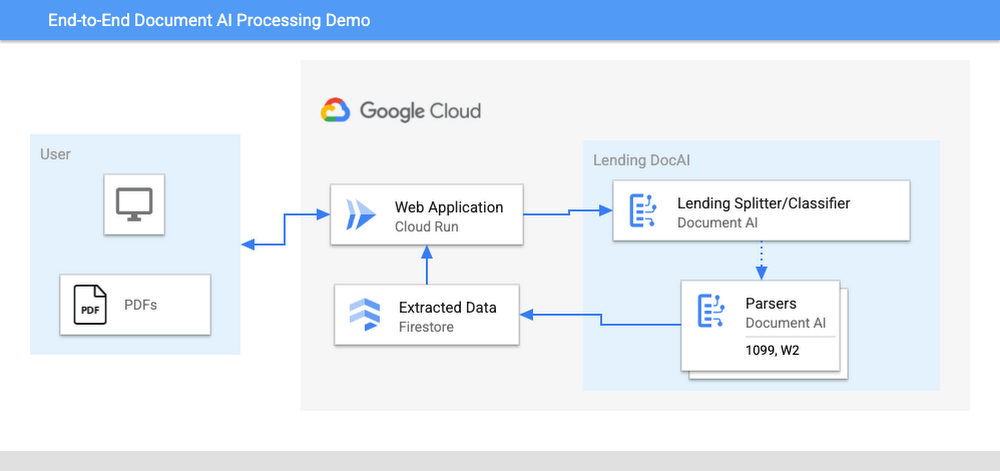
The User uploads multiple PDF files to the web application, hosted on Cloud Run.
An API call is made to the Lending Document Splitter & Classifier for each PDF file.
The output of the classifier (e.g. W-2, 1099-MISC, etc.) is then mapped to an appropriate specialized parser in the Google Cloud Project.
Each document file is sent to the appropriate specialized parser that matches the document type.
The entities are extracted by the parser processor and the data is written to Firestore.
The raw data is now retrieved from Firestore and displayed to the User showing the file classification and extracted values from each form.
The data values from all the forms are used together to calculate an individual income tax return.
The Calculated Tax Rates/Incomes/Deductions are displayed to the User in a Tabular Format matching the IRS Form 1040. The app also displays which form data was used for each field. (Some output fields use values from multiple forms, such as line 25b.)
Step-by-Step directions
Want to try this out for yourself? Here’s how you can deploy and run this application using a Google Cloud Project. You can run this in Cloud Shell (Quickstart) or on your local machine.
NOTE: The Lending Processors in this Demo are in Limited GA as of March 2022. If you have a business use case for these processors, you can fill out and submit the Document AI limited access customer request form.
Install dependencies
- Clone the GitHub Repository to get the sample code.
git clone https://github.com/GoogleCloudPlatform/document-ai-samples.git
- Enter the directory for the tax pipeline demo
cd document-ai-samples/tax-processing-pipeline-python
- Install Python and the Google Cloud SDK if they aren’t already installed.
- Install the python libraries:
pip install -r requirements.txt
- Create a new Google Cloud project, and enable billing if you don’t already have one.
- Enable the Document AI API:
gcloud services enable documentai.googleapis.com
- Setup application default credentials:
gcloud auth application-default login
Deploy demo application
- Edit the config.yaml file, adding your own Project Details docai_processor_location: us # Document AI Processor Location (us OR eu)
docai_project_id: YOUR_PROJECT_ID # Project ID for Document AI Processors
firestore:
collection: tax_demo_documents # Set with your preferred Firestore Collection Name
project_id: YOUR_PROJECT_ID # Project ID for Firestore Database - Run setup scripts to create the processors and Cloud Run app in your project. python3 setup.py
gcloud run deploy tax-demo –source . - Visit the Deployed Web Page (You should get a link from the deployment command)
Calculate Tax Returns Homepage
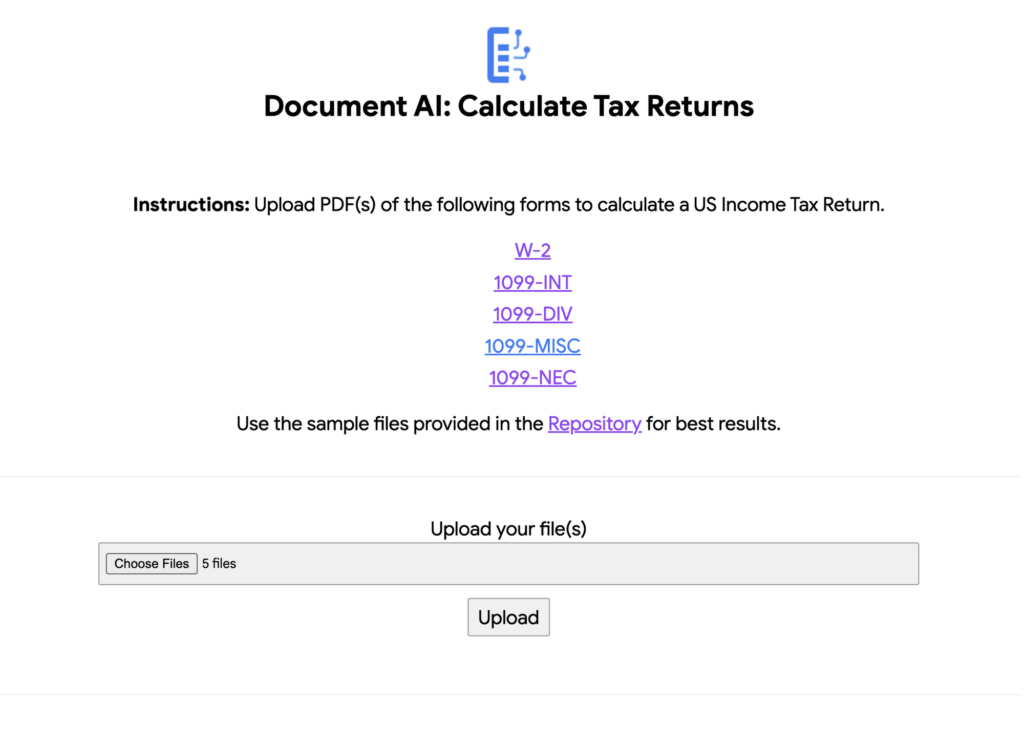
- Upload Documents. I created some sample documents you can download from the sample-docs folder of the repository.
This demo currently supports the following Document Types (2020 Editions)
W-2
1099-DIV
1099-INT
1099-MISC
1099-NEC
- Click “Upload” Button, wait for processing to complete.
The page will display the steps completed for each document file. These are also written to stdout for troubleshooting purposes.
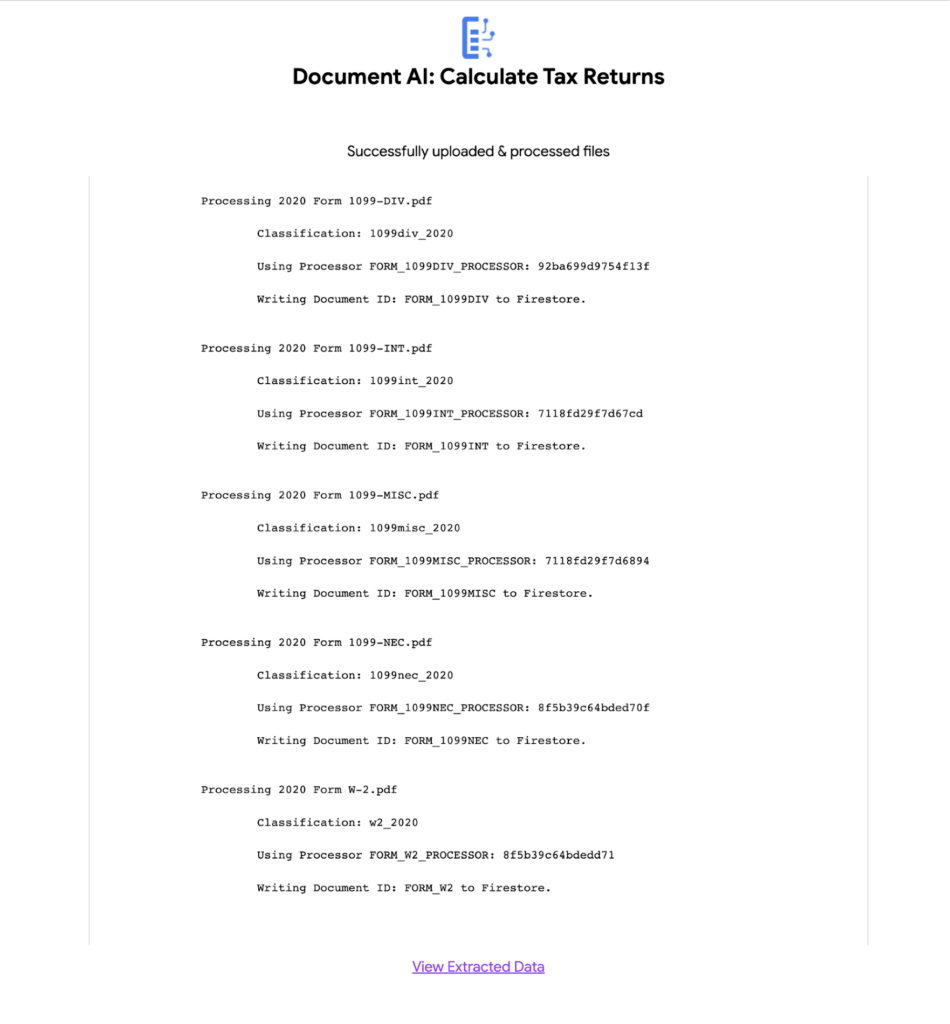
6. View the extracted values from each file.
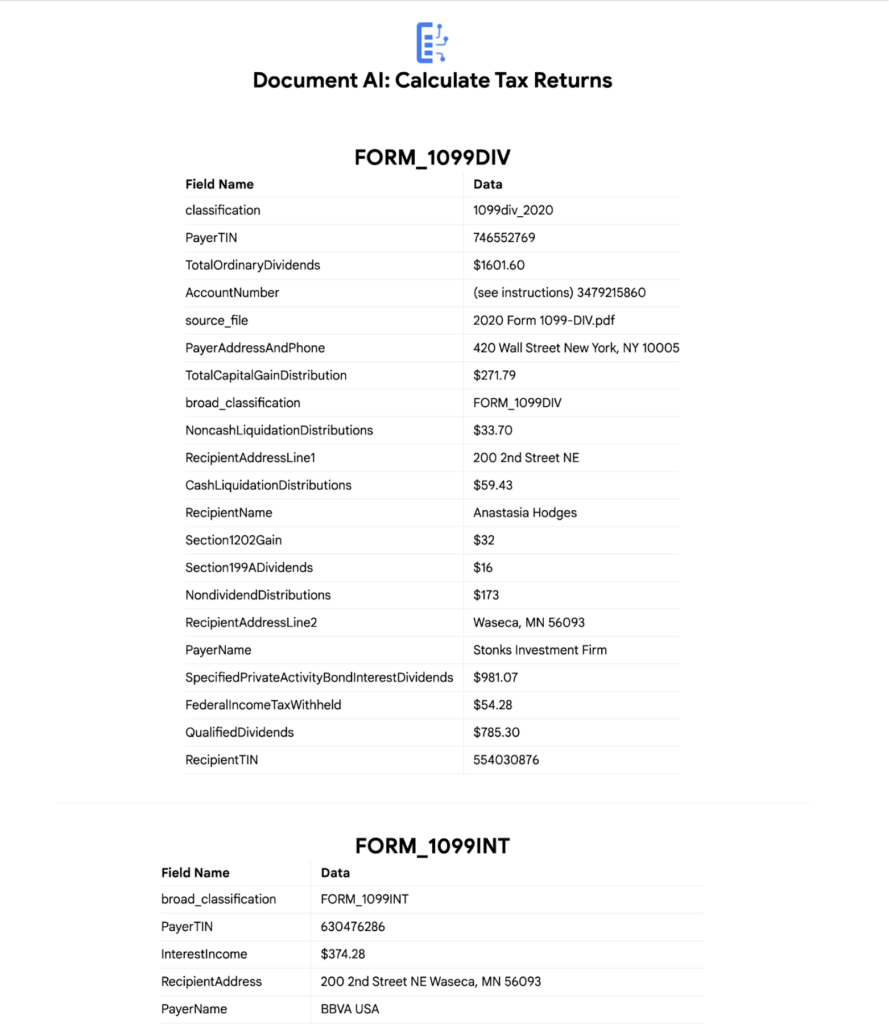
7. Click “Calculate Taxes” to see the tax calculation output
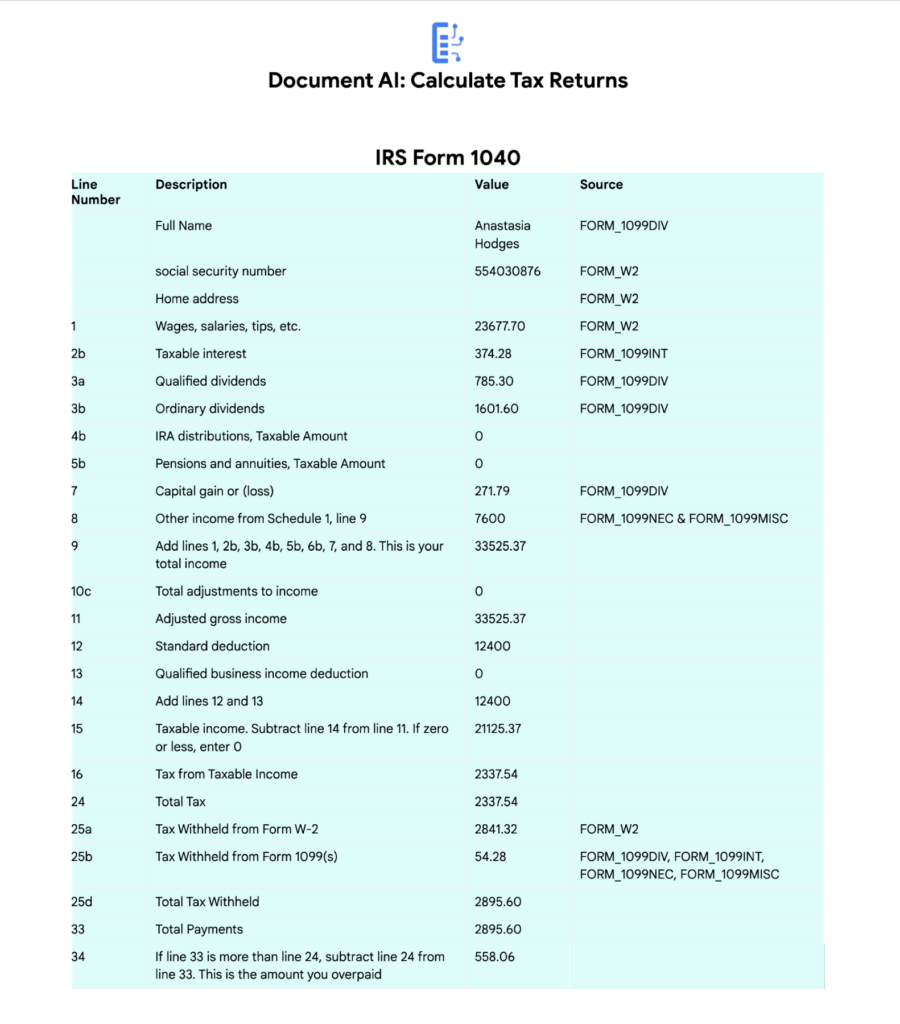
Conclusion
Warning: This is NOT financial advice, for educational purposes only.
Congratulations! You now have a fully functional tax processing application that can also be modified for use with other workflows that require data from multiple specialized documents.
The Document AI API is flexible and modular enough that most of the code in this example can be reused for any specialized processor.
Now tax returns can be filed with minimal manual effort!
If you want to learn more about Document AI, check out the Cloud Documentation and these videos:
- Getting started with the Document AI platform
- Process billions of pages and cut operational costs with DocAI
And if you want more hands-on experience, I recommend following these step-by-step codelabs to get started with the key features of Document AI:
More Relevant Stories for Your Company

Pay-as-you-go AI Management Platform Available on Google Cloud Marketplace
Editor’s note: Prevision.io has built the first ever pay-as-you-go AI management platform that simplifies the machine learning project lifecycle while offering powerful analytics capabilities. Now available exclusively on Google Cloud Marketplace, users can experiment, build, deploy, and manage AI projects in the cloud in weeks—without having extensive data science knowledge.


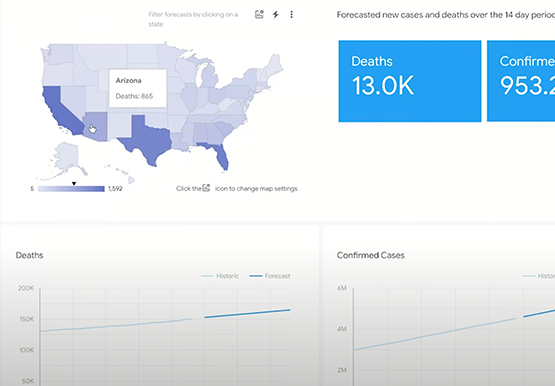

Driving Business Transformation in Healthcare Using Google Cloud and AI/ML
Before the COVID-19 pandemic, when you thought of healthcare and AI, a number of ideas sprang to mind. But the world, especially as it relates to healthcare has seen a completely different type of transformation as a result of COVID-19. This video is about how Google Cloud is helping organizations

TensorFlow: The Show-and-Tell Data Scientists Have Been Asking For
TensorFlow is among the most popular, if not, the most popular deep learning libraries today. According to one ranking, “TensorFlow is at least two standard deviations above the mean on all calculated metrics.” Watch as Lak Lakshmanan, Technical Lead, Machine Learning and Big Data, Google Cloud, walks through a development
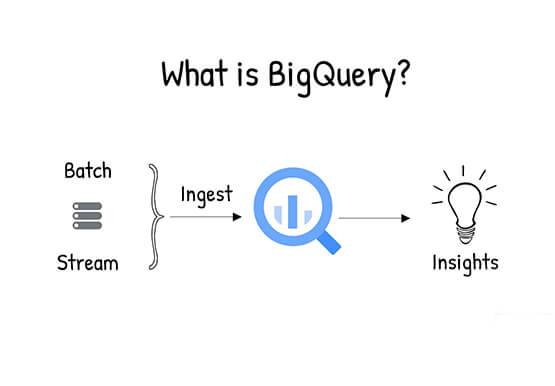
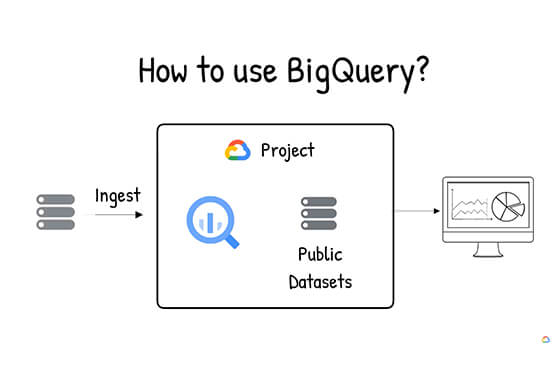
What is BigQuery?
BigQuery is Google Cloud's enterprise data warehouse designed to help you ingest, store, analyze, and visualize big data with ease. Organizations rely on data warehouses to aggregate data from disparate sources, process it, and make it readily available for data analysis that supports their strategic decision-making. You can ingest data
