





1122
Of your peers have already watched this video.
29:16 Minutes
The most insightful time you'll spend today!
Navigating the AI Landscape: The Future of AI for ML Engineers
A podcast-style video series exploring how AI is shaping our future and how to prepare for changes. Developer advocate, Arwen Hauzhenga, shares his 10+ years of experience in machine learning and generative AI. He discusses the evolution of the field from data mining to data science and large-scale machine learning.
The video contains:
✦ Key developments in AI witnessed over the years
00:00
✦ Democratization of AI is making it more accessible to non-specialists
03:58
✦ AI and ML are leading towards worry-free infrastructure for model training and deployment
08:11
✦ Key pointers for building responsible AI systems
11:53
✦ Identifying the right use case and leveraging capabilities are crucial for successful AI implementation
15:33
✦ Learning machine learning doesn’t require being an expert
19:04
✦ Identifying the right use case and aligning with stakeholders is key to successful AI implementation
22:22
✦ Interacting with technology is changing significantly with AI
25:37
Boost Your ML Training Speed with GKE’s NCCL Fast Socket

893
Of your peers have already read this article.
1:30 Minutes
The most insightful time you'll spend today!
Large Machine Learning (ML) models – such as large language models, generative AI, and vision models – are dramatically increasing the number of trainable parameters and are achieving state-of-the-art results. Increasing the number of parameters results in the model being too large to fit on a single VM instance thus demands distributed compute to spread the model across multiple nodes. Google Kubernetes Engine (GKE) has built-in support for NCCL Fast Socket, to help improve the time to train large ML models with distributed, multi-node clusters.
Enterprises are looking for faster and cheaper performance to train their ML models. With distributed training, communicating gradients across nodes is a performance bottleneck. Optimizing inter-node latency is critical to reduce training time and costs. Distributed training uses collective communication as a transport layer over the network between the multiple hosts. Collective communication primitives such as all-gather, all-reduce, broadcast, reduce, reduce-scatter, and point-to-point send and receive are used in distributed training in Machine Learning.
The NVIDIA Collective Communication Library (NCCL) is commonly used by popular ML frameworks such as TensorFlow and PyTorch. It is a highly optimized implementation for high bandwidth and low latency between NVIDIA GPUs. Google developed a proprietary version of NCCL called NCCL Fast Socket to optimize performance for deep learning on Google Cloud.
NCCL Fast Socket uses a number of techniques to achieve better and more consistent NCCL performance.
- Use of multiple network flows to attain maximum throughput. NCCL Fast Socket introduces additional optimizations over NCCL’s built-in multi-stream support, including better overlapping of multiple communication requests.
- Dynamic load balancing of multiple network flows. NCCL can adapt to changing network and host conditions. With this optimization, straggler network flows will not significantly slow down the entire NCCL collective operation.
- Integration with Google Cloud’s Andromeda virtual network stack.This increases overall network throughput by avoiding contentions in virtual machines (VMs).
We tested (NVIDIA NCCL tests) the performance of NCCL Fast Socket vs NCCL on various machine shapes with 2 node GKE clusters.
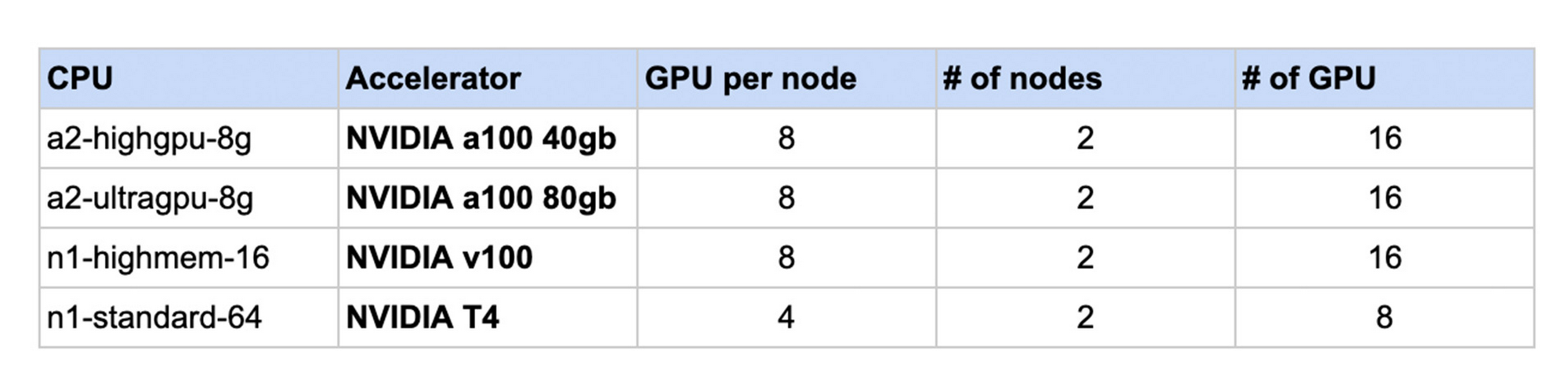
The following chart shows the results. For each machine shape, the NCCL performance without Fast Socket is normalized to 1. In each case, using NCCL Fast Socket demonstrated increased performance in a range of 1.3 to 2.6 times faster internetwork communication speed.

As a built-in feature, GKE users can take advantage of NCCL Fast Socket without changing or recompiling their applications, ML frameworks (such as TensorFlow or PyTorch), or even the NCCL library itself. To start using NCCL Fast Socket, create a node pool that uses the plugin with the --enable-fast-socket and --enable-gvnic flags. You can also update an existing node pool using gcloud container node-pools update.
gcloud container node-pools create NODEPOOL_NAME \
    --accelerator type=ACCELERATOR_TYPE, count=ACCELERATOR_COUNT \
    --machine-type=MACHINE_TYPE \
    --cluster=CLUSTER_NAME \
    --enable-fast-socket \
    --enable-gvnic
To achieve better network throughput with NCCL, Google Virtual NICs (gVNICs) must be enabled when creating VM instances. For detailed instructions on how to use gVNICs, please refer to the gVNIC guide.
To verify that NCCL Fast Socket has been enabled, view the kube-system pods:
kubectl get pods -n kube-system
And the output should b similar to:
NAME                         READY   STATUS    RESTARTS   AGE
fast-socket-installer-qvfdw  2/2     Running   0          10m
fast-socket-installer-rtjs4  2/2     Running   0          10m
fast-socket-installer-tm294  2/2     Running   0          10m
To learn more visit GKE NCCL Fast Socket documentation. We look forward to hearing how NCCL Fast Socket improves your ML Training experience on GKE.
Special Identity Parsers in Document AI eases Customer Verification and KYC Processes

2966
Of your peers have already read this article.
2:00 Minutes
The most insightful time you'll spend today!
If you’ve opened an account at a bank, applied for a government benefit, or provided a proof of age document on an ecommerce website, chances are you’ve had to share a physical or digital copy of a Driver’s License or a passport as proof of your identity. For businesses or public sector organizations that need this information to provide services, processing images of identity documents has long been a time- and resource-intensive process that requires extensive human intervention. Solutions exist to help digitally capture the data, but they require extensive human intervention that impacts the speed and cost of processing and ultimately the time to service customers.
The Google Cloud Document AI family of solutions has been designed to help solve some of the hardest problems for data capture at scale by extracting structured data from unstructured documents to help reduce processing costs and improve business speed and efficiency. Today, we’re announcing the general availability of identity parsers that bring the power of Document AI to customer verification, KYC, and other identity-based workflows.
With Document AI for Identity, businesses can leverage automation to extract information from identity documents with a high degree of accuracy, without having to bear the cost and turnaround time of manual tasks by a service provider. Document AI for Identity leverages artificial Intelligence to provide a set of pre-trained models that can parse identity and supports US driver’s licenses (generally available), US passports (generally available), French driver’s licenses (preview) and French National ID cards (preview), with more documents to be added from around the world over the coming months.
When our customers process high-volume workloads or complex workflows, they need a high degree of accuracy, since getting the first step wrong can derail the entire workflow. The introduction of special parsers for Identity processing can help solve one of the most commonly required document processing needs that our financial services and public sector customers face.
Along with the identity parsers, Google Cloud is also offering its “Human in the Loop” service, in which verification for a subset of identity documents can be automatically assigned to a pool of humans (internal or external) for manual review, based on confidence scores.
While there are multiple industries and applications that could benefit from Document AI for Identity, we’ve seen two main kinds of applications being adopted during the solution’s preview. One is around processing ID cards uploaded as unstructured images at scale, so that enterprises can have IDs on file. The second use case is to perform advanced checks on identity documents to validate their authenticity and / or to detect fraud. Google Cloud’s fraud detector API (which is currently in preview) can complement Document AI for Identity and apply an extra layer of normalization to help validate the identity as a government-issued ID by checking for suspicious words, image manipulation, and other common issues with forged identity documents. With new versions of driver’s licenses being frequently released, Document AI for identity uses specialized models and constantly-updated training data to help make sure the parsers can offer a high degree of accuracy. For all use cases, Document AI does not retain any customer data after completing the processing request (successfully or with an error).
Check out this demo and visit the Document AI for Identity landing page for more information on how Document AI can help solve your identity processing needs, and ask your Google Cloud account team to help you integrate Identity Document AI into your workflows.
For practitioners who’re interested in trying out Identity DocAI, check out our companion practitioner blog for step by step instructions on how to get started.
10527
Of your peers have already watched this video.
2:15 Minutes
The most insightful time you'll spend today!
The True Story of How HotStar Broke a World-Record–Thanks to Firebase and Google BigQuery
Hotstar, India’s largest video streaming platform with 150 million monthly active users around the world, provides live-streaming of TV shows, movies, sports, and news on the go.
By using a combination of Firebase products together, Hotstar safely rolled out new features to its watch screen during a major live-streaming event without disrupting users, sacrificing stability, or releasing a new build. They also used Firebase with BigQuery to analyze their event data and reduce app startup time.
“We have an ambitious mission, but our engineering team is only a fraction of the size of most of our competitors. But we are still keeping up, and we are doing it with the help of Firebase,” says Ayushi Gupta, Android Engineer, Hotstar.
Make Your Data Useful with Google Cloud Products and Services

3235
Of your peers have already read this article.
1:30 Minutes
The most insightful time you'll spend today!
While you likely know that data science is the practice of making data useful, you may not have a clear landscape around the tools that can aid each stage of the data science workflow as you use machine learning to tackle your challenges.
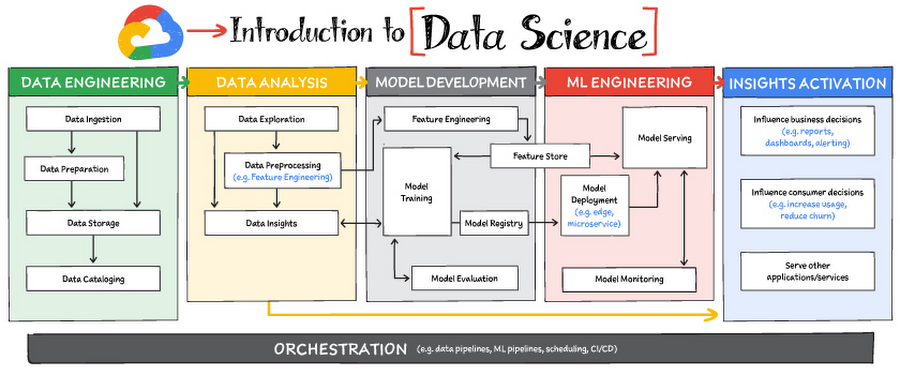
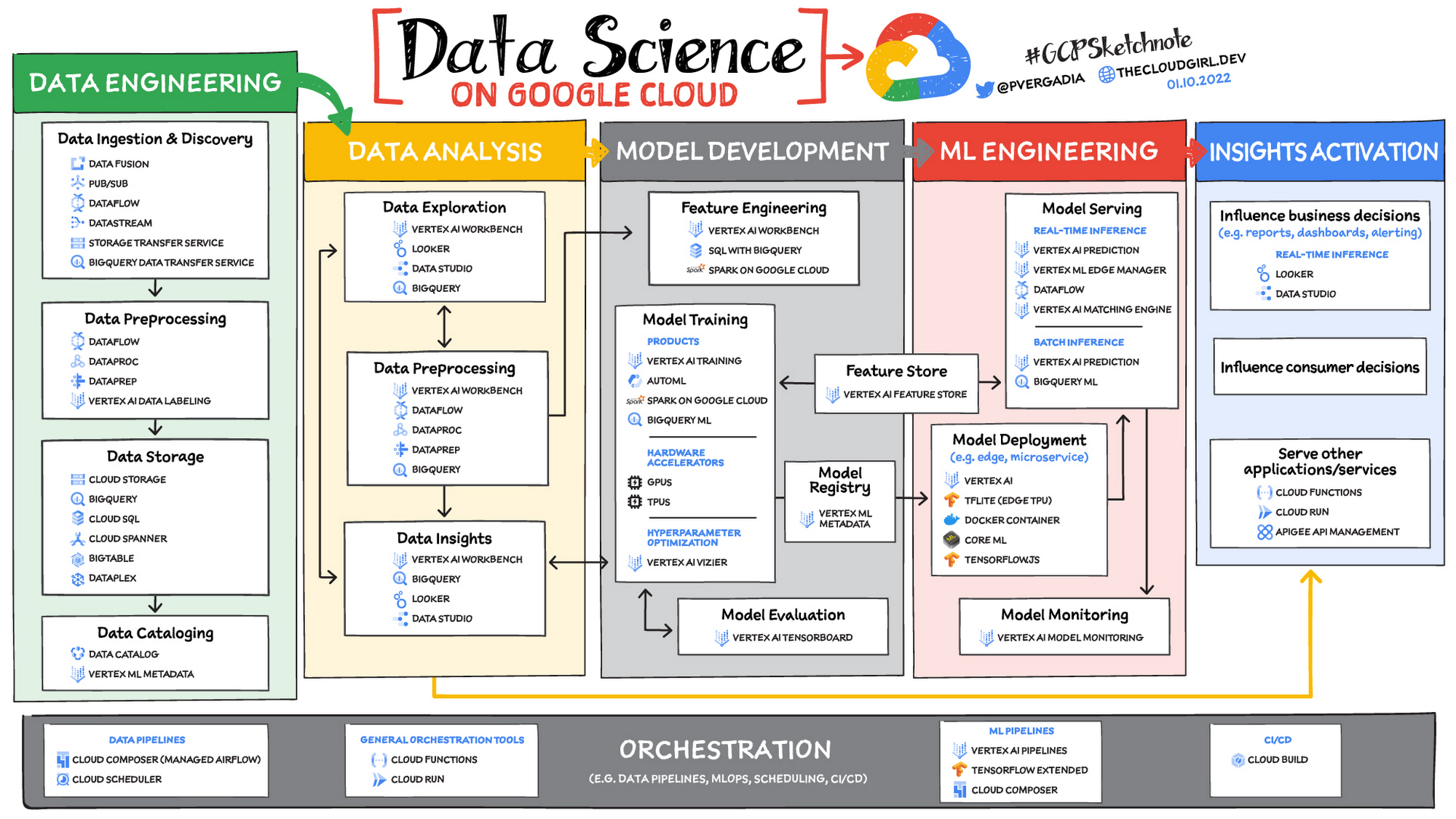
Read on to discover the six broad areas that are critical to the process of making data useful, and some corresponding Google Cloud products and services for those areas.
https://youtube.com/watch?v=EQvLUMjz-g4%3Fenablejsapi%3D1%26
Data engineering
Perhaps the greatest missed opportunities in data science stem from data that exists somewhere, but hasn’t been made accessible for use in further analysis. Laying the critical foundation for downstream systems, data engineering involves the transporting, shaping, and enriching of data for the purposes of making it available and accessible.
Data ingestion and data preprocessing on Google Cloud
Here we consider data ingestion as moving data from one place to another, and data preparation the process of transformation, augmentation, or enrichment prior to consumption. Global scalability, high throughput, real-time access, and robustness are common challenges in this stage. For scalable, real-time, and batch data processing, look into building data ingestion and preprocessing pipelines with Dataflow, a managed Apache Beam service. There’s a reason why Dataflow is called the backbone of analytics on Google Cloud.
If you’re looking for a scalable messaging system to help you ingest data, consider Cloud Pub/Sub, a global, horizontally scalable messaging infrastructure. Cloud Pub/Sub was built using the same infrastructure component that enabled Google products, including Ads, Search, and Gmail, to handle hundreds of millions of events per second.
If you want an easy way to automate data movement to BigQuery, a serverless data warehouse on Google Cloud, look into the BigQuery Data Transfer Service. For transferring data to Cloud Storage, take a look at the Storage Transfer Service. Or, for a no-code data ingestion and transformation tool, check out Data Fusion, which has over 150 preconfigured connectors and transformations. In addition to Dataflow and Data Fusion for data preparation, Spark users may want to look at related products and features for Spark on Google Cloud.
Data storage and data cataloging on Google Cloud
For structured data, consider a data warehouse like BigQuery, or any of the Cloud Databases (relational ones like Cloud SQL and NoSQL ones like Cloud BigTable and Cloud Firestore). For unstructured data, you can always use Cloud Storage. You may also want to consider a data lake. For data discovery, cataloging, and metadata management, consider Data Catalog. For a unified solution, take a look at Dataplex, which integrates a unified data management solution with an integrated analytics experience.
Learn more about data engineering on Google Cloud
- Explore the data engineering learning path
- Discover reference patterns
- Get certified by Google Cloud as a Professional Data Engineer
Data Analysis
From descriptive statistics to visualizations, data analysis is where the value of data starts to appear.
Data exploration, data preprocessing, and data insights
Data exploration, a highly iterative process, involves slicing and dicing data via data preprocessing before data insights can start to manifest through visualizations or simply via simple group-by, order-by operations. One hallmark of this phase is that the data scientist may not yet know which questions to ask about the data. In this somewhat ephemeral phase, a data analyst or scientist has likely uncovered some aha-moments, but hasn’t shared them yet. Once insights are shared, the flow enters the Insights Activation stage, where those insights become used to guide business decisions, influence consumer choices, or become embedded in other applications or services.
On Google Cloud, there are many ways to explore, preprocess, and uncover insights in your data. If you are looking for a notebook-based end-to-end data science environment, check out Vertex AI Workbench, which enables you to access, analyze, and visualize your entire data estate: from structured data at the petabyte-scale in SQL with BigQuery, to processing data with Spark on Google Cloud and its serverless, auto-scaling, and GPU acceleration capabilities. As a unified data science environment, Vertex AI Workbench also makes it easy to do machine learning with TensorFlow, PyTorch, and Spark, with built-in MLOps capabilities.
Finally, if your focus is on analyzing structured data from data warehouses and insight activation for business intelligence, you may want to also consider using Looker, with its rich interactive analytics, visualizations, dashboarding tools, and Looker Blocks to help you accelerate your time-to-insight.
Learn more about data analysis on Google Cloud
- Learn about Vertex AI Workbench for a Jupyter-based fully managed notebook environment
- Learn about how you can use BigQuery for petabyte-scale data analysis
- Learn about Spark on Google Cloud
- Discover the data analyst learning path
- Explore reference patterns for common analytics use cases
Model development
From linear regression to XGBoost, from TensorFlow to PyTorch, the model development stage is where machine learning starts to provide new ways of unlocking value from your data. Experimentation is a strong theme here, with data scientists looking to accelerate iteration speed between models without worrying about infrastructure overhead or context-switching between tools for data analysis and tools for productionizing models with MLOps.
To solve these challenges, once again, as a Jupyter-based fully managed, scalable, and enterprise-ready environment, Vertex AI Workbench makes it easy as the one-stop-shop for data science, combining analytics and machine learning, including Vertex AI services. Apache Spark, XGBoost, TensorFlow, and PyTorch are just some of the frameworks supported on Vertex AI Workbench. Vertex AI Workbench makes managing the underlying compute infrastructure needed for model training easy with the ability to scale vertically and horizontally, and with idle timeouts and auto shutdown capabilities to reduce unnecessary costs. Notebooks themselves can be used for distributed training and hyperparameter optimization, and they include Git integration for version control. Due to the significant reduction in context switching required, data scientists can build and train models 5x faster using Vertex AI Workbench than when using traditional notebooks.
With Vertex AI, custom models can be trained and deployed using containers. You can take advantage of pre-built containers or custom containers to train and deploy your models.
For low-code model development, data analysts and data scientists can use SQL with BigQuery ML to train and deploy models (including XGBoost, deep neural networks, and PCA), directly using BigQuery’s built-in serverless, autoscaling capabilities. Behind-the-scenes, BigQuery ML leverages Vertex AI to enable automated hyperparameter tuning, and explainable AI. For no-code model development, Vertex AI Training provides a point-and-click interface to train powerful models using AutoML, which comes in multiple flavors: AutoML Tables, AutoML Image, AutoML Text, AutoML Video, and AutoML Translation.
Learn more about model development on Google Cloud
- Learn about Vertex AI Workbench for a Jupyter-based fully managed notebook environment
- Learn more about Vertex AI
ML engineering
Once a satisfactory model is developed, the next step is to incorporate all the activities of a well-engineered application lifecycle, including testing, deployment, and monitoring. And all of those activities should be as automated and robust as possible.
Managed datasets and Feature Store on Vertex AI provide shared repositories for datasets and engineered features, respectively, which provide a single source of truth for data and promote reuse and collaboration within and across teams. Vertex AI’s model serving capability enables deployment of models with multiple versions, automatic capacity scaling, and user-specified load balancing. Finally, Vertex AI Model Monitoring provides the ability to monitor prediction requests flowing into a deployed model and automatically alert model owners whenever the production traffic deviates beyond user-defined thresholds and previous historical prediction requests.
MLOps is the industry term for modern, well engineered ML services, with scalability, monitoring, reliability, automated CI/CD, and many other characteristics and functions that are now taken for granted in the application domain. The ML engineering features provided by Vertex AI are informed by Google’s extensive experience deploying and operating internal ML services. Our goal with Vertex AI is to provide everyone with easy access to essential MLOps services and best practices.
Learn more about ML engineering and MLOps on Google Cloud
- Follow the guides, tutorials and documentation for Vertex AI
- Watch this video to learn more about Vertex AI
- Discover the data scientist/machine learning engineer learning path
- Get certified as a Professional ML Engineer
Insights activation
The insights activation stage is where your data has now become useful to other teams and processes. You can use Looker and Data Studio to enable use cases in which data is used to influence business decisions with charts, reports, and alerts.
Data can also influence customer decisions and as a result increase usage or decrease churn, for example. Finally, the data can also be used by other services to drive insights; these services can run outside Google Cloud, inside Google Cloud on Cloud Run or Cloud Functions, and/or using Apigee API Management as an interface.
Learn more about insights activation on Google Cloud
- Watch this video to learn about building interactive ML apps using Looker and Vertex AI
- Learn about Looker, and Looker solutions for eCommerce, Digital Media and more
- Discover a gallery of interactive dashboards created with Data Studio
- Watch this video to understand the difference between Cloud Run and Cloud Functions
Orchestration
All of the capabilities discussed above provide the key building blocks to a modern data science solution, but a practical application of those capabilities requires orchestration to automatically manage the flow of data from one service to another. This is where a combination of data pipelines, ML pipelines, and MLOps comes into play. Effective orchestration reduces the amount of time that it takes to reliably go from data ingestion to deploying your model in production, in a way that lets you monitor and understand your ML system.
For data pipeline orchestration, Cloud Composer and Cloud Scheduler are both used to kick off and maintain the pipeline.
For ML pipeline orchestration, Vertex AI Pipelines is a managed machine learning service that enables you to increase the pace at which you experiment with and develop machine learning models and the pace at which you transition those models to production. Vertex Pipelines is serverless, which means that you don’t need to deal with managing an underlying GKE cluster or infrastructure. It scales up when you need it to, and you pay only for what you use. In short, it lets you just focus on building your data science pipelines.
Learn more about orchestration on Google Cloud
- Read more about Cloud Composer for Airflow-based pipelines
- Try some example notebooks on Github with Vertex AI Pipelines
- Learn different ways to trigger Vertex AI Pipeline runs
- Read the whitepaper on Practitioners Guide to MLOps: A framework for continuous delivery and automation of machine learning
Summary
Google Cloud offers a complete suite of data management, analytics, and machine learning tools to generate insights from data. Want to learn more? Check out the following resources:
Special thanks to the following contributors to this blogpost: Alok Pattani, Brad Miro, Saeed Aghabozorgi, Diptiman Raichaudhuri, Reza Rokni.
Google Search Feature with Document AI Simplifies Document Extraction!

3022
Of your peers have already read this article.
1:30 Minutes
The most insightful time you'll spend today!
Google Cloud introduced Document AI to automate document processing and to streamline workflows with state-of-the-art machine learning models. With the deep neural networks, the models generalize the learning from seeing hundreds of thousands variations of the documents. But when information is missing or ambiguous on a document – like a missing address or entity name – a human may need to search for it…often on Google.
With Document AI, we are bringing the power of this “Google search” to help customers understand their documents. This means that the same Google knowledge graph technology that helps you find the name, address or phone number of your favorite restaurant can now enrich your document extraction with the right name, fully qualified address, and updated phone number.
Here is a sample payslip…

Imagine a bank employee entering this to capture a customer’s income to qualify them for a loan. When extracting information from this payslip, what employer name should she key in? She might take the time to go into Google and find the right correct legal entity name; or she might just guess and move on, potentially creating data reconciliation headaches down the line.
With Document AI, there is a better way. Our native integration with the knowledge graph means that we can deliver both the specific text from the payslip as well as Google’s best understanding of the actual name of the company that operates at this address. This is an important step to translate from “what has been said” on a document to “what does it mean”. By normalizing the value as you process millions of documents, you are improving accuracy and consistency at the beginning of the data processing workflow, making downstream integration, data analytics and business intelligence tasks at ease.
How EKG Enrichment Works
In a nutshell, Knowledge Graph is a knowledge base that uses a graph data model to integrate interlinked entities, including objects, events, processes or abstracted concepts. Google announced its Knowledge Graph in 2012 as a way to organize information from the Web and to enhance Search results. Different from Google Knowledge Graph, Cloud EKG (Enterprise Knowledge Graph) focuses on entities that are more relevant to enterprise customers, such as organization, product, people, locations, etc.
In EKG, every node is called an entity. Each entity in the graph represents an object, such as an organization. EKG aggregates all the information about a thing into a single entity, thus each entity represents a distinct and identifiable real world concept. The uniqueness of these entities in the graph is one of the reasons that make EKG useful. The edges between nodes are called relationships. When representing attributes, the relationships can be considered as properties, such as the name of a company, the price of a product, etc. When representing relationships, they connect entities in the graph, such as the CEO of a company, the seller of a product.

Entity linking, as its name suggests, is the task of assigning a unique identity to entities mentioned in text, images or videos. In the context of EKG, it connects the text mentions to entities in the graph. Under the hood, the recognition takes both the mention and its context information into consideration for linking to the best matching candidates in the graph.
Entity Enrichment, is essentially linking entities in EKG to documents, and using the attributes of linked entities to enrich the extracted information. The entity linking on documents is based on the understanding of both documents and the entities in the graph. First the document parser annotates entity mentions, which provides semantic meanings to the content of the document. Then Entity Linking selects a list of entities from EKG based on the types of these mentions, and matches to the best entity by comparing the attributes found in the document with the the relationships of the selected entities.
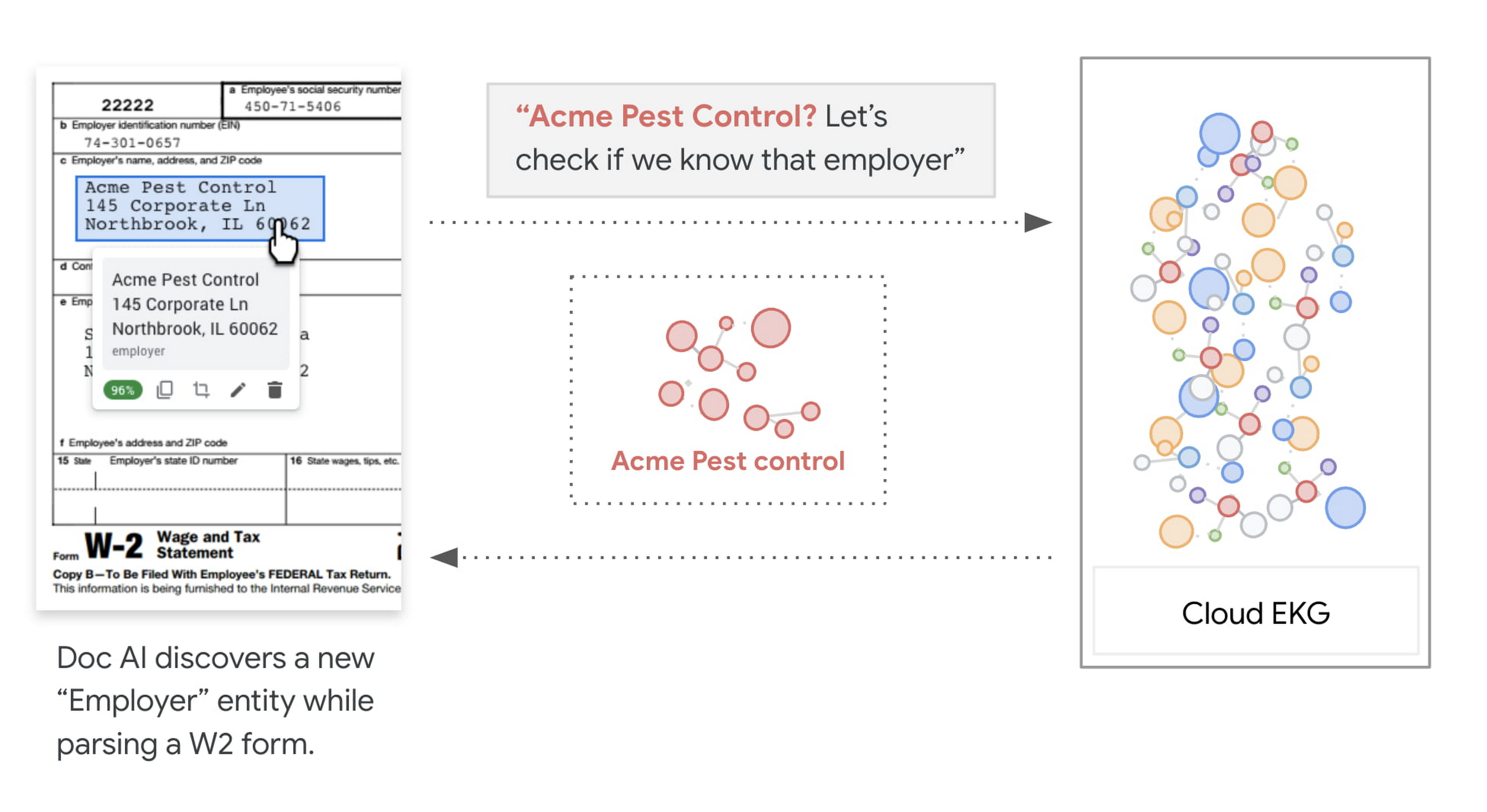
How to leverage the enrichment result
Knowledge graph enrichment is a built-in feature for Lending DocAI , Procurement DocAI and Contract DocAI today, and we are actively working on expanding it to cover more document types and parsers on the platform. To use the knowledge graph enriched values, look out for the entities fields under normalizedValue, returned by the API.
{entities: [{"textAnchor": {"content": "Google Singapore"},…."normalizedValue": {"text": "Google Asia Pacific, Singapore"}}]}
To learn more, check out the Document AI webpage, and EKG Enrichment page to see the list of supported parsers and fields.
More Relevant Stories for Your Company

Taking Maps Further: New Website Experience for Product Discovery, Budgeting and Access to Dev Documentation
For more than 15 years, developers have used Google Maps Platform to deliver location-based experiences to their end users and used location intelligence to optimize their businesses. Along this journey, we’ve made a variety of changes to better support our community as needs have changed and new industries and technologies

Google Cloud Modernized Wisconsin Department of Workforce Development to Process 150K+ Unemployment Claims Per Week
When confronted with challenges, resilient organizations adapt and innovate to address changing customer needs. Through its partnership with Google Cloud, the Wisconsin Department of Workforce Development exemplifies this evolutionary approach. Just a few months ago, challenges created by the antiquated unemployment insurance (UI) system threatened the agency's ability to serve

Data Leaders in 2021 and Beyond: How to Prepare
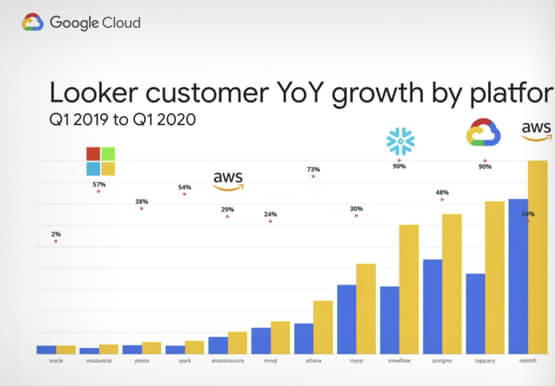
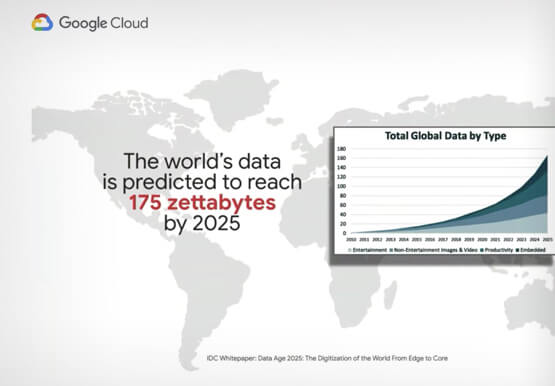
As technologies and workplace environments are quickly evolving, how people and businesses leverage data in their day-to-day workflow is also changing. Data leaders are an emerging force navigating and charting pathways forward towards new horizons for how people and organizations experience data. In this presentation, Pedro Arellano, Product Marketing Director,

Adapting Regulatory Frameworks to Manage AI/ML Risks in Financial Services
Advances in artificial intelligence (AI) and machine learning (ML) have led to increased adoption in the financial services sector. A prominent use for this technology is to assist in key compliance and risk functions, including the detection of fraud, money laundering, and other financial crimes and illicit finance, as well
