





Kaluza & Google Cloud: Committed to Powering Up 73 Million EVs by 2040

1225
Of your peers have already read this article.
4:00 Minutes
The most insightful time you'll spend today!
Electric vehicles already account for one in seven car sales globally, and with new gas and diesel cars being phased out across the world, global sales are forecast to reach 73 million units in 2040. But with power grids becoming increasingly dependent on variable energy sources such as wind and solar, rising demand from electric vehicles risks overstraining grids at peak times, potentially leading to power outages.
At Kaluza, we believe that our platform has a vital role to play in helping power grids and utility companies to stabilize their networks, while at the same time delivering more affordable, cleaner energy to the consumer. Powered by Google Cloud, the advanced algorithms behind our Kaluza Flex solution automatically charge electric vehicles when the power supply is at its cheapest and greenest, helping to accelerate the global transition towards a zero-carbon future.
Decarbonizing the grid with low-cost smart charging programs
Launched by OVO Energy in 2019, Kaluza has taken its deep understanding of the energy market to partner with some of the world’s major energy suppliers and vehicle manufacturers, including AGL in Australia, Fiat and Nissan in the UK, and Mitsubishi Corporation and Chubu in Japan, to launch smart charging programs that help customers save money while reducing their carbon footprint.
A good example of this is Charge Anytime, which we recently launched with OVO Energy in the UK. With this tariff, customers use Kaluza to smart-charge their electric vehicle, and pay just 10p per kWh — a third of their household electricity rate — to do so. This means that if the customer plugs in their vehicle to charge when they get home from work at, say, 6:00 p.m. — a time when both demand and the carbon intensity on the grid are at their highest — their vehicle will then be smartly charged at the lowest cost and greenest periods throughout the night, ready for when they need it in the morning.
This smart charging reduces the energy company’s costs by enabling them to take advantage of lower wholesale electricity prices. These savings are then passed on to the end customer through tariffs such as Charge Anytime, saving customers hundreds of pounds a year and reducing their carbon footprint. Meanwhile, the National Grid is able to reduce the strain on the network during peak hours, while simultaneously using up the excess renewable energy that might otherwise have gone to waste.
Optimized charging schedules, fueled by Google Cloud
Behind Kaluza’s smart charging solution lies some sophisticated technology, all of which is built on Google Cloud. Our core optimization engine gathers real-time data from a wide range of sources, including battery and charging data from the electric vehicles, and data from the energy suppliers and grid operators, such as the carbon intensity, and price forecasts.
After passing through our real-time data backbone, that data is stored in BigQuery where it’s used to train and validate our smart charging optimization models. These models are then deployed with Google Kubernetes Engine so that whenever a customer plugs in an electric vehicle, data from that vehicle passes in real-time through our optimization engine to calculate the ideal charging schedule for that vehicle, ensuring it uses the cheapest, least carbon-intensive energy available.
Customer interface: easy to use, simple to build
Of course, the customer isn’t aware of any of this complexity. All they need to do is open their charging app and use Kaluza’s intuitive interface to set what time they want their car to be ready and how much charge they want in their battery. Then they simply plug in their car, and our algorithms take care of the rest.
Customers can also use Kaluza to view breakdowns of how much carbon and money they’ve saved, along with insights around things like billing and battery life, all of which is backed by Cloud SQL.
With Google Cloud, we were able to roll out this end-user app very quickly. Instead of having to build a different version of the app for each operating system, we were able to build an OS-agnostic version using Flutter, which then builds the app for each platform, enabling us to get to market faster.
This has been a benefit of our architecture in general. With Google Cloud taking the complexity out of otherwise time-consuming development processes, we’ve been able to experiment with and validate propositions rapidly, and roll out new products and features at speed, to ensure that we remain at the vanguard of a rapidly evolving sector.
Giving energy companies full visibility with BigQuery and Looker
As for the grid operators and energy companies, the Kaluza platform allows them to visualize how many participating electric vehicles are plugged into the network at any one time. BigQuery and Looker Studio dashboards provide granular insights, such as how many vehicles are idle, how many are charging, and how well our optimization engine is working.
The platform also allows companies to view those vehicles on an aggregate level, and identify any issues. Google Cloud machine learning capabilities can even allow grid operators to use this aggregate view to forecast how much energy will be required at any one time, and dial the power generation up or down accordingly.
Ultimately, these insights help network operators and utility companies to optimize energy usage, and balance out the peaks and troughs of supply and demand, ensuring that excess renewable energy is captured, while carbon-intensive fuel use is reduced.
Feeding energy back into the grid with bidirectional charging
Vehicle-to-Grid (V2G), or bidirectional, charging is something that we are very excited about, and have begun rolling out in the UK, as we prepare to launch in other global markets. Built on the same Google Cloud architecture as the rest of Kaluza Flex, V2G not only enables smart charging, but allows electric vehicles to feed stored energy back into the grid.
Imagine an electric vehicle battery that can store 40 kWh of energy, but only uses 5 kWh a day. That leaves 35 kWh a day that can be charged to the battery during times of low demand, when energy is cheapest and greenest, then fed back into the network during peak periods, removing the need for more fossil fuels to be burned to meet demand.
Not only does V2G go further than conventional smart charging to make use of renewable energy when it’s abundant and support the balancing of the energy system, it also results in even lower energy prices for the customer, as they are effectively selling energy back to the grid. For example, as part of a large domestic V2G trial made in partnership with OVO and Nissan, Kaluza saved customers an average of £450 a year, with some customers saving up to £800/year by selling surplus energy back to the grid — transforming their homes into mini power stations.
With Kaluza Flex, we have a platform that offers benefits for all parties, from the grid operators, through to energy retailers and vehicle manufacturers, and all the way to the customer. Now, our aim is to bring this exciting offering to as many markets as possible, a goal which is made easier thanks to the scalable infrastructure and time-saving solutions of Google Cloud.
As more people make the switch to electric vehicles, our goal is to ensure that smart charging becomes standard practice, as we help to deliver on the potential of electric vehicles to contribute to a greener, decarbonized future.
Maximizing Reliability, Minimizing Costs: Right-Sizing Kubernetes Workloads

940
Of your peers have already read this article.
3:30 Minutes
The most insightful time you'll spend today!
Do you know how much money you could save by adjusting workload requests to better represent their actual usage? If you’re not rightsizing your workloads, you might be overpaying for resources that your workloads aren’t even using or worse, putting your workloads at risk for reliability issues due to under provisioning.
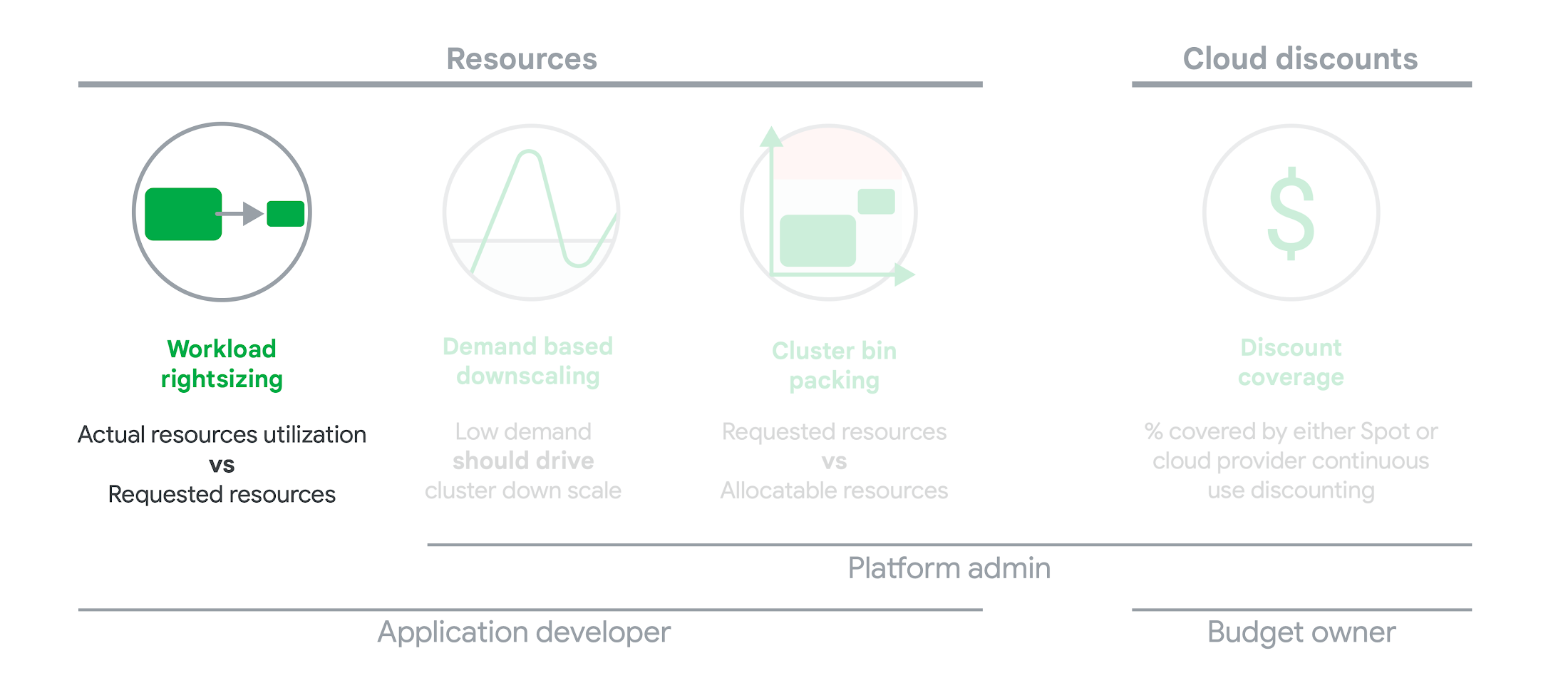
As we’ve previously discussed, setting the resources is the most important thing you can do to increase the reliability of your Kubernetes workloads. In this blog we will help you with the second key finding from the State of Kubernetes Cost Optimization report!
The research … found that workload rightsizing has the biggest opportunity to reduce resource waste.
State of Kubernetes Cost Optimization report
According to our research findings, workload rightsizing is the most important golden signal. Workload rightsizing measures the capacity of developers to properly use the CPU and memory they have requested for their applications.
Rightsizing is challenging
It can be quite difficult to predict the resource needs of your applications, which historically has not been a concern for developers in traditional data center environments.In traditional data center environments, resources were typically over-provisioned upfront to ensure capacity for peak demand and future growth, so developers didn’t need to focus on accurately predicting resource needs as they were covered by the excess capacity, whereas in cloud environments, resources are consumed on-demand. Finding a balance between efficiency and reliability can often feel like a delicate balancing act.
Tools for workload rightsizing
There are native tools in Cloud Monitoring and the GKE UI you can use to rightsize your workloads running on GKE.
Rightsizing in the console
The Workload Cost Optimization tab helps you identify workloads that can be optimized by displaying the resources used versus what’s requested.
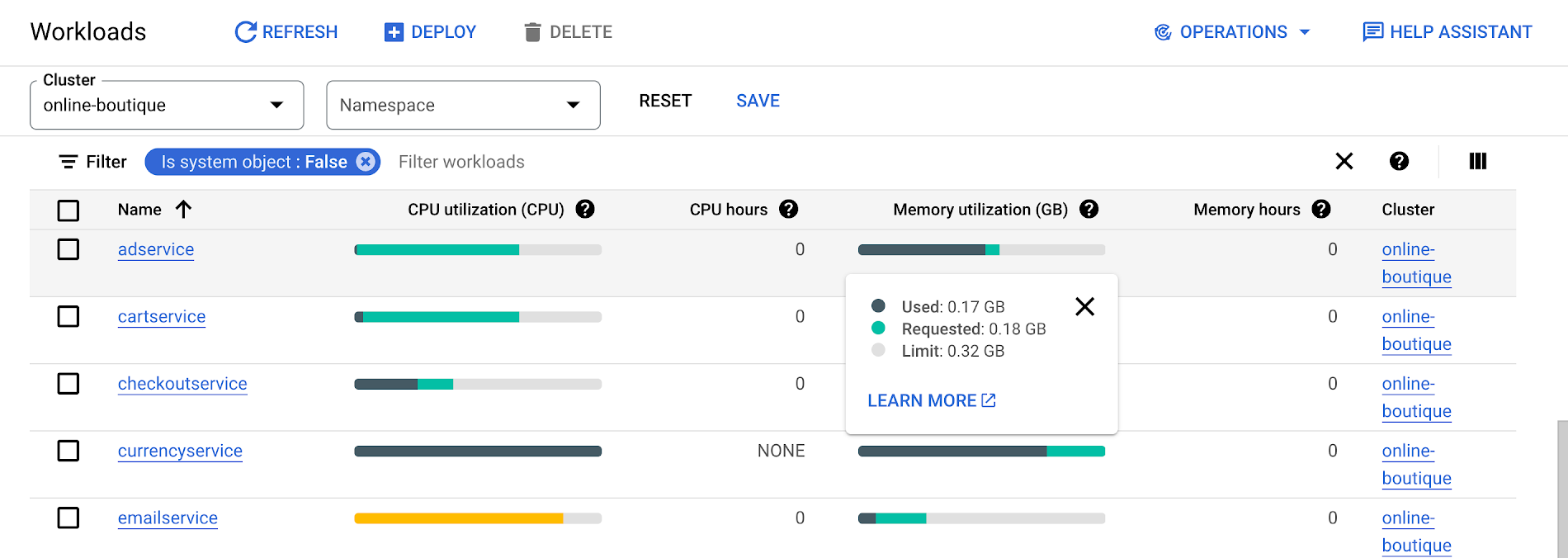
To take advantage of potential cost savings, you can drill into clusters to see workload level resource recommendations.
To view workload resource recommendations for Deployment objects only:
- In the GKE Cost Optimization.
- Select a cluster.
- Click Workloads > Cost Optimization.
- Select one Deployment workloads
- In the workload’s detail page, select Actions > Scale > Edit Resource Requests
Rightsizing with Cloud Monitoring
Cloud Monitoring provides built-in VPA scale recommendations metrics that you can use to monitor the performance of your workloads and to identify opportunities to rightsize them without the need to create VPA objects.
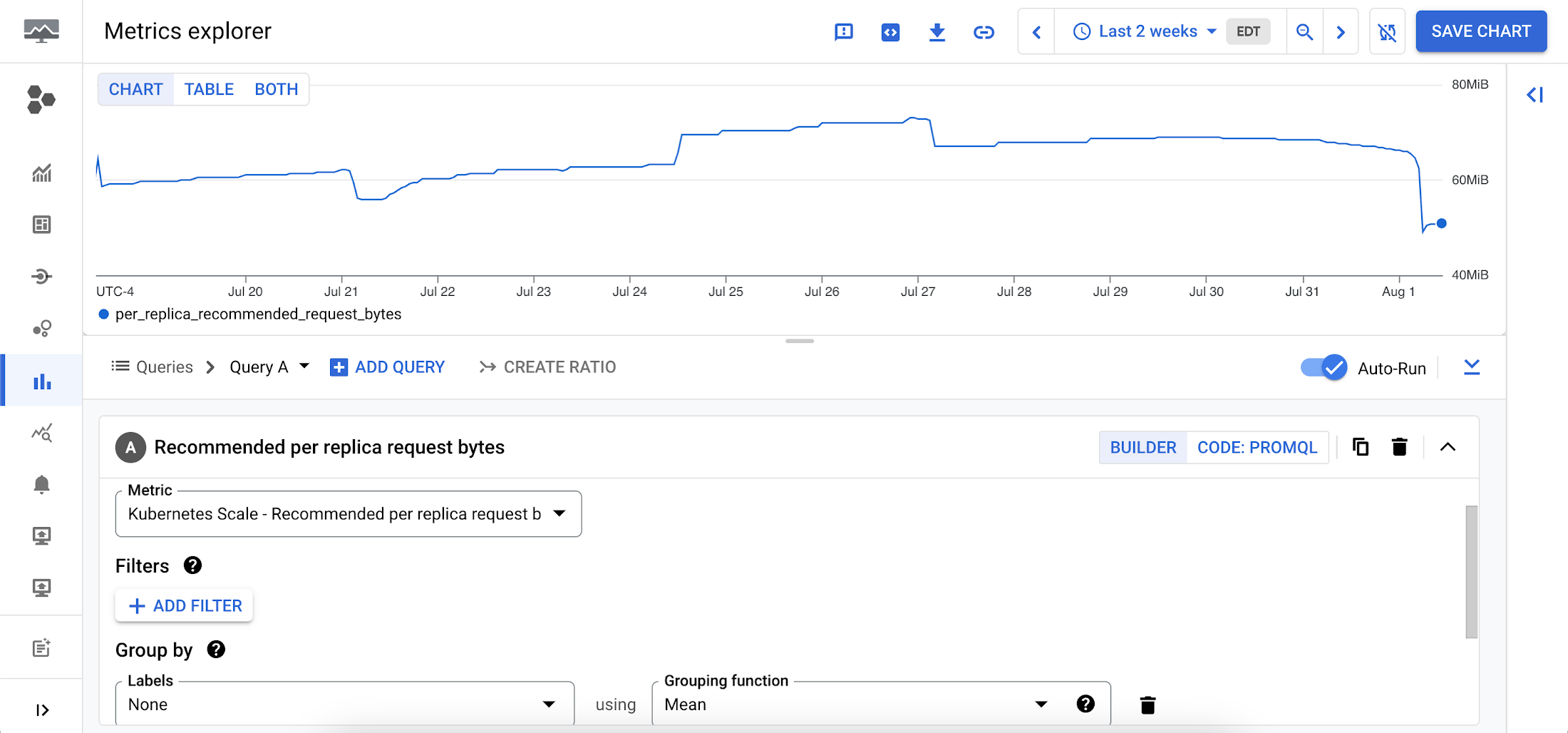
To view these metrics:
1. Go to the Cloud Monitoring > Metric Explore console.
2. In the Metric dropdown, select the metrics:
- Memory recommendations:
Kubernetes Scale > autoscaler > Recommended per replica request bytes - CPU recommendations:
Kubernetes Scale > autoscaler > Recommended per replica request cores
Rightsizing at scale
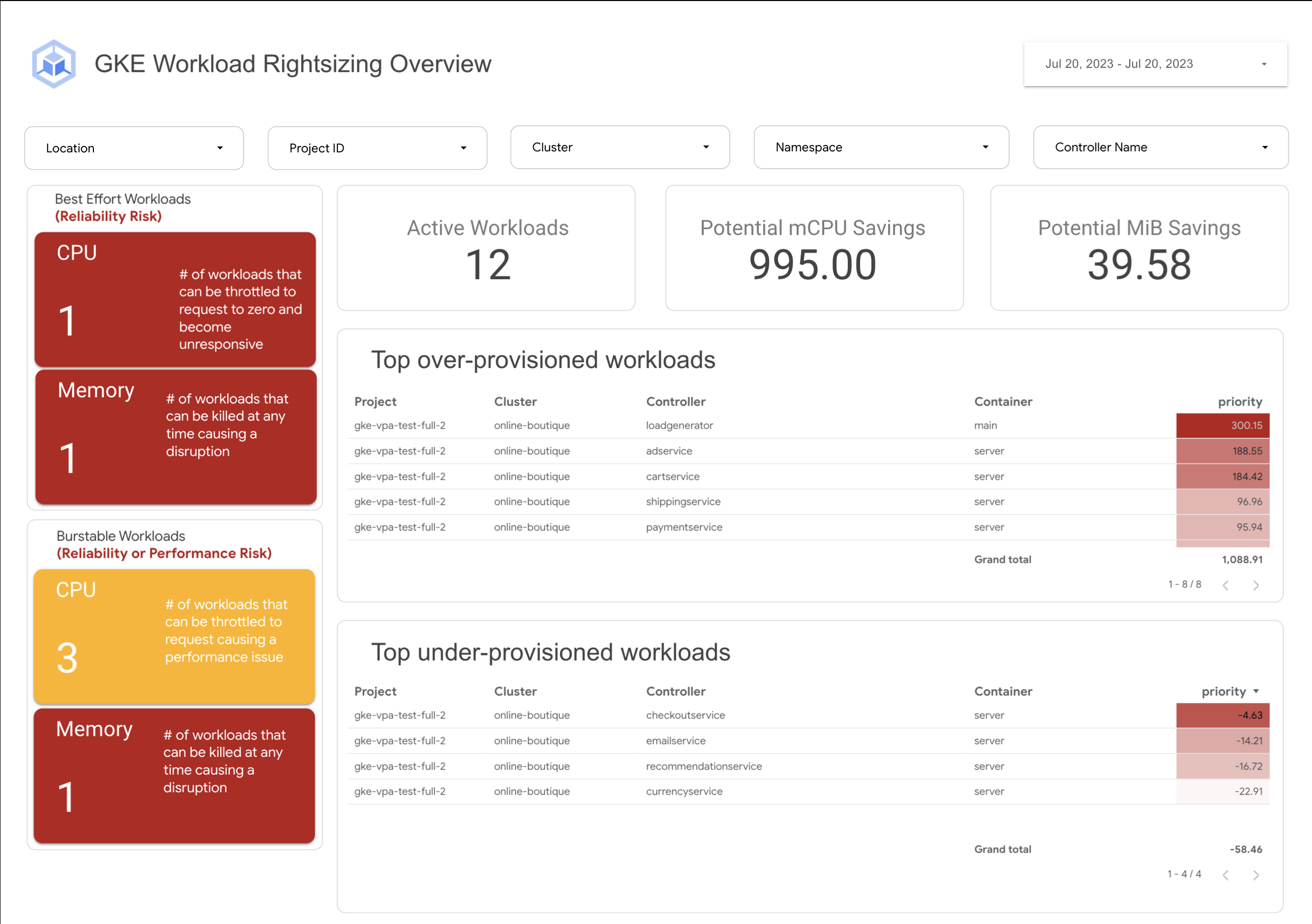
If you’re interested in viewing recommendations across clusters and projects, We’ve created a guide that you can use today to help you right-size your GKE workloads at scale. This solution leverages your actual cluster’s metric data and built-in workload recommendations provided by Cloud Monitoring. You can determine the resource requirements for all your workloads without having to create additional VPA autoscaler objects in each of your clusters. The guide walks you through deploying the solution.
In conclusion
In conclusion, rightsizing your workloads is essential for both cost savings and reliability. By following the tips in this blog, you can ensure that your workloads are using the right amount of resources, which will save you money and increase your workload’s reliability.
Links to the solution presented in this blog and other useful tools to help you optimize your cluster are listed below:
- The Right-sizing workloads at scale solution guide
- Setting resource requests: the key to Kubernetes cost optimization
- The simple kube-requests-checker tool
- An interactive tutorial to get set up in GKE with a set of sample workloads
Download the State of Kubernetes Optimization report, review the key findings, and stay tuned for our next blog post.

3689
Of your peers have already downloaded this article
2:30 Minutes
The most insightful time you'll spend today!
In today’s connected digital world, people expect their various applications to work together seamlessly. The key to making this happen is APIs. A robust library of APIs allows developers to connect applications and deliver new services quickly and easily. But to get the most out of APIs, companies need an API management platform that will deliver manageability and security.
However, as the Citrix team looked to quickly expand its API library, it realized that the company needed a leading API platform. “We researched every API platform and the clear leader was Apigee Edge,” says Adam Brancato, Senior Manager of Customer Applications at Citrix. “With Apigee Edge, we expanded our API support from 10 APIs to more than 50 APIs in a year.”
As a result, Citrix now supports a wide range of APIs for both internal and external use, including email, support cases, single sign- on, licensing, accounts, assets management, contacts, Salesforce integration, order validation, and more.
Download this case study to understand how the Citrix team leveraged Apigee to save time and boost productivity.
Want to Code for the Cloud? Get Started with the Native App Development Track

6740
Of your peers have already read this article.
2:00 Minutes
The most insightful time you'll spend today!
Earlier this year, we launched the Google Cloud skills challenge, which provides 30 days of free access to training to build your cloud knowledge and an opportunity to earn skill badges that showcase your Google Cloud competencies. Today, we’re adding a Native App Development track to the skills challenge, joining the Getting Started, Data Analytics, Kubernetes, Machine Learning (ML) and Artificial Intelligence (AI) tracks.
The Native App Development track is designed for cloud developers who want to learn to build serverless web apps and Google Assistant applications on Google Cloud using Cloud Run and Firebase. Specifically, you’ll have an opportunity to earn three skill badges in the Native App Dev track: Serverless Firebase Development, Serverless Cloud Run Development, and Build Interactive Apps with Google Assistant. To earn a skill badge, you complete a series of hands-on labs and take a final assessment challenge lab to test your skills.
Here’s an overview of each badge.
Serverless Firebase Development
To earn this skill badge, you’ll learn how to build serverless web apps, import data into a serverless database, and build Google Assistant applications using Firebase, Google’s backend-as-service platform for creating mobile and web applications.
Serverless Cloud Run Development
For this badge, you’ll discover how to use Cloud Run, a fully managed serverless platform, to connect and leverage data stored in Cloud Storage. You’ll learn how to use Cloud Run to build a resilient, asynchronous system with Pub/Sub, build a REST API gateway as well as build and expose services.
Build Interactive Apps with Google Assistant
To earn the final skills badge, you’ll build Google Assistant applications by creating a project in the Actions console, integrating Dialogflow, testing your action in the Actions simulator, and adding Cloud Translation API to your assistant application.
Ready to jump into the skills challenge? Sign up here.
You can also check out this quick video below to learn how to join the skills challenge.
3190
Of your peers have already watched this video.
1:30 Minutes
The most insightful time you'll spend today!
Start Your Serverless Expeditions Now!
Google Cloud’s fully managed serverless platform like Cloud Run helps build and run highly scalable containerized applications. In traditional scenarios, over or under-provisioning enterprise applications can result in outages and cost hurdles. Severless Experts at the Google Cloud succinctly breakdown what serverless means for an organization and how Engineering Managers and CTO can rest assured with the predictability, developer productivity, automated release process and infrastructure abstraction.
Watch the video to unravel the serverless journey with Cloud Run!
5333
Of your peers have already watched this video.
31:30 Minutes
The most insightful time you'll spend today!
Enhancing Collaboration with Sheets, Python, and Google Cloud
See how you can enhance collaboration within your organization using Google Sheets. Watch to learn about a new set of tools to create custom functions that tap into the power of Python and to expose functions in a standardized fashion throughout your organization.
More Relevant Stories for Your Company

Wunderkind Leverages Google Cloud to Address the Growing Needs of its Customer Base
Editor’s note: We’re hearing here how martech provider Wunderkind easily met the scaling demands of their growing customer base on multiple use cases with Cloud Bigtable and other Google Cloud data solutions. Wunderkind is a performance marketing channel and we mostly have two kinds of customers: online retailers, and publishers like

Apigee Helps Bank BRI Rewrite its Digital Future and Achieve Financial Inclusion
About Bank BRI Bank Rakyat Indonesia is one of the largest banks in Indonesia and is committed to increasing financial inclusions among un-banked Indonesians. Bank BRI specializes in using modern digital banking to facilitate microfinance lending across its network of over 10,000 branches and thousands of branchless agents. Google Cloud

Cloud and AI Paves the Future of Finance: Excerpts from FIA Boca 2022
Financial markets were among the first to adopt new technologies, and that has certainly been true of the derivatives markets, which were early adopters of electronic trading. Going forward, new capabilities will transform the way industry participants communicate, analyze, and trade. I sat down with Google Cloud’s Phil Moyer and

How Toyota’s Google Cloud-powered Voice Assistant Gives a Turboboost to Drivers’ Experience
Over the decades, technology has helped us organize large amounts of physical information in ways that are streamlined, efficient, and easily accessible. Rows upon rows of encyclopedias are no longer needed; simply punch in or speak a query into Google Search and find numerous results at your fingertips. There’s no
