





Google Cloud and StartEd Join Forces to Boost EdTech Startups

1329
Of your peers have already read this article.
2:00 Minutes
The most insightful time you'll spend today!
Over the past few years, as the education sector was going through transformative change, EdTech startups rose to meet the demand of learners and help address some of the biggest challenges in education. At Google Cloud, we’re inspired by how EdTech startups continue to solve challenges with agility, innovative technology, and determination. We’re proud to help EdTechs make learning more personal, safe, and accessible, and we’re working to connect EdTech startups with the right people, products, and best practices that will help them grow
Announcing a new partnership with StartEd
Google Cloud is excited to announce a partnership to offer mentor-based programming for EdTechs with StartEd — an organization that accelerates education innovators addressing Early Childhood, K-12, HigherEd, Workforce, and Adult Learning.
Founded by entrepreneurs nearly ten years ago, StartEd is on a mission to attract and develop a network of innovators working to ensure equitable, quality education and lifelong learning opportunities for all. The company trains and connects thousands of diverse entrepreneurs, educators, and investors at for-profit and not-for-profit organizations each year, working alongside corporations, foundations, and higher education institutions across the United States.
StartEd has helped grow more than 2,500 companies and built a mentor network of over 800 senior leaders with deep expertise in early-stage EdTech companies. The StartEd community now numbers more than 25,000 members.
“I am thrilled to embark on this transformative partnership with Google Cloud,” said Ash Kaluarachchi, StartEd CEO and managing director. “This alliance not only amplifies our mission to empower and nurture the world’s education innovators at every point in their journey, but it also unlocks unprecedented potential for the entire EdTech ecosystem. Together, we’re poised to redefine the future of education and work and to create lasting, positive impact for generations to come.”
Mentoring and networking opportunities for EdTech startups
Through this partnership, U.S.-based EdTech startups can apply to a new program, StartEd sponsored by Google Cloud. The program offers startups access to personal coaching, hands-on training, business support, and a large network of industry experts to help them accelerate their growth and transform education. Beyond the benefits from StartEd, startups will gain access to cloud credits, technical support from Google Cloud, and coaching from Google’s education leadership.
Google Unveils Topaz, the New Subsea Cable Connecting Asia and Canada

3314
Of your peers have already read this article.
3:00 Minutes
The most insightful time you'll spend today!
There’s a new subsea cable in town: Topaz, the first-ever fiber cable to connect Canada and Asia.
Once complete, Topaz will run from Vancouver to the small town of Port Alberni on the west coast of Vancouver Island in British Columbia, and across the Pacific Ocean to the prefectures of Mie and Ibaraki in Japan. We expect the cable to be ready for service in 2023, not only delivering low-latency access to Search, Gmail and YouTube, Google Cloud, and other Google services, but also increasing capacity to the region for a variety of network operators in both Japan and Canada.
Google is spearheading construction of the project, joined by a number of local partners in Japan and Canada to deliver the full Topaz subsea cable system. Other networks and internet service providers will be able to benefit from the cable’s additional capacity, whether for their own use or to provide to third parties. And, similar to other cables we’ve built, with Topaz we will exchange fiber pairs with partners who have systems along similar routes. This is a longstanding practice in the industry that strengthens the intercontinental network lattice for network operators, for Google, and for users around the world.
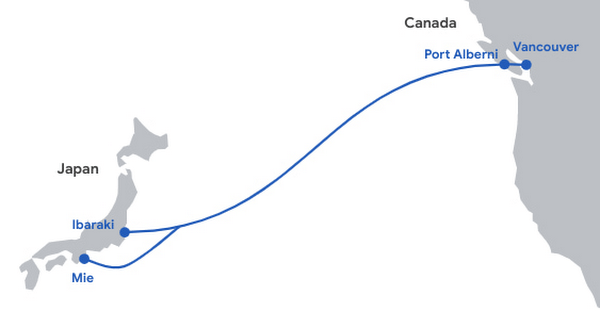
Network infrastructure investments like Topaz bring significant economic activity to the regions where they land. For example, according to a recent Analysys Mason study, Google’s historical and future network infrastructure investments in Japan are forecasted to enable an additional $303 billion (USD) in GDP cumulatively between 2022 and 2026.
The width of a garden hose, the Topaz cable will house 16 fiber pairs, for a total capacity of 240 Terabits per second (not to be confused with TSPs). It includes support for Wavelength Selective Switch (WSS), an efficient and software-defined way to carve up the spectrum on an optical fiber pair for flexibility in routing and advanced resilience. We’re proud to bring WSS to Topaz and to see the technology is being implemented widely across the submarine cable industry.
While Topaz is the first trans-Pacific fiber cable to land on the West Coast of Canada, it’s not the first communication cable to connect to Vancouver Island. In the 1960s, the Commonwealth Pacific Cable System (COMPAC) was a copper undersea cable linking Vancouver with Honolulu (United States), Sydney (Australia), and Auckland (New Zealand), expanding high-quality international phone connectivity. Today, COMPAC is no longer in service but its legacy lives on. The original cable landing station in Vancouver — the facility where COMPAC made landfall on Canadian soil — has been upgraded to fit the needs of modern fiber optics and will house the eastern end of the Topaz cable.
Traditional and treaty rights, and local communities, are deeply important to our infrastructure projects. The Topaz cable is built alongside the traditional territories of the Hupacasath, Maa-nulth, and Tseshaht, and we have consulted with and partnered with these First Nations every step of the way.
“Tseshaht is very proud of this collaboration and our partnership with Google, who has been very respectful and thoughtful in its engagement with our Nation. That’s how we carry ourselves and that’s how we want business to carry themselves in our territory.“ — Tseshaht First Nation – Elected Chief Councillor-Ken Watts
“The five First Nations of the Maa-nulth Treaty Society are pleased that we have concluded an agreement with Google Canada and have consented to the installation of a new, high-speed fiber optic cable through our traditional territories. This agreement, in which both Google Canada and our Nations benefit, is based on respect for our constitutionally protected treaty and aboriginal rights and enhances the process of reconciliation. We would also like to acknowledge the sensitivity that Google Canada expressed during our talks in regard to the pain and trauma experienced by our people as a result of residential school experience. We look forward to a long and mutually beneficial relationship with Google Canada.” —Chief Charlie Cootes, President of the Maa-nulth Treaty Society
“Google’s respect towards our Nation is appreciated and has good energy behind it.” —Hupacasath First Nation – Elected Chief Councilor – Brandy Lauder
With the addition of Topaz today, we have announced investments in 20 subsea cable projects. This includes Curie, Dunant, Equiano, Firmina and Grace Hopper, and consortium cables like Blue, Echo, Havfrue and Raman — all connecting 29 cloud regions, 88 zones, 146 network edge locations across more than 200 countries and territories. Learn about Google Cloud’s network and infrastructure on our website and in the below video.
Recommendations for Modelling SAP Data inside BigQuery

8394
Of your peers have already read this article.
4:00 Minutes
The most insightful time you'll spend today!
Over the past few years, many organizations have experienced the benefits of migrating their SAP solutions to Google Cloud. But this migration can do more than reduce IT maintenance costs and make data more secure. By leveraging BigQuery, SAP customers can complement their SAP investments and gain fresh insights by consolidating enterprise data and easily extending it with powerful datasets and machine learning from Google.
BigQuery is a leading cloud data warehouse, fully managed and serverless, and allows for massive scale, supporting petabyte-scale queries at super-fast speeds. It can easily combine SAP data with additional data sources, such as Google Analytics or Salesforce, and its built-in machine learning lets users operationalize machine learning models using standard SQL — all at a comparatively low cost.
If your SAP-powered organization is looking to supercharge its analytics with the strength of BigQuery, read on for considerations and recommendations for modeling with SAP data. These guidelines are based on our real-world implementation experience with customers and can serve as a roadmap to the analytics capabilities your business needs.
Considerations for data replication
Like most technology journeys, this one should start with a business objective. Keeping your intended business value and goals in mind is critical to making the right decisions in the early steps of the design process.
When it comes to replicating the data from an SAP system into BigQuery, there are multiple ways to do it successfully. Decide which method will work best for your organization by answering these questions:
- Does your business need real-time data? Will you need to time travel into past data?
- Which external datasets will you need to join with the replicated data?
- Are the source structures or business logic likely to change? Will you be migrating the SAP source systems any time soon? For instance, will you be moving from SAP ECC to SAP S/4HANA?
You’ll also need to determine whether replication should be done on a table-by-table basis or whether your team can source from pre-built logic. This decision, along with other considerations such as licensing, will influence which replication tool you should use.
Replicating on a table-by-table basis
Replicating tables, especially standard tables in their raw form, allows sources to be reused and ensures more stability of the source structure and functional output. For example, the SAP table for sales order headers (VBAK) is very unlikely to change its structure across different versions of SAP, and the logic that writes to it is also unlikely to change in a way that affects a replicated table.
Something else to consider: Reconciliation between the source system and the landing table in BigQuery is linear when comparing raw tables, which helps avoid issues in consolidation exercises during critical business processes, such as period-end closing. Since replicated tables aren’t aggregated or subject to process-specific data transformation, the same replicated columns can be reused in different BigQuery views. You can, for instance, replicate the MARA table (the material master) once and use it in as many models as needed.
Replicating pre-built logic
If you replicate pre-built models, such as those from SAP extractors or CDS views, you don’t need to build the logic in BigQuery, since you’re using existing logic. Some of these extraction objects have embedded delta mechanisms, which may complement a replication tool that can’t handle deltas. This will save initial development time, but it can also lead to challenges if you create new columns, or if customizations or upgrades change the logic behind the extraction.
It’s also important to note that different extraction processes may transform and load the same source columns multiple times, which creates redundancy in BigQuery and can lead to higher maintenance needs and costs. However, replicating pre-built models may still be a good choice, since doing so can be especially useful for logic that tends to be immutable, such as flattening a hierarchy, or logic that is highly complex.
How you approach replication will also depend on your long-term plans and other key factors — for example, the availability (and curiosity) of your developers, and the time or effort they can put into applying their SQL knowledge to a new data warehouse.
With either replication approach, bear in mind when designing your replication process that BigQuery is meant to be an append-always database — so post-processing of data and changes will be required in both cases.
Processing data changes
The replication tool you choose will also determine how data changes are captured (known as CDC – change data capture). If the replication tool allows for it (for example as SAP SLT does) the same patterns described in the CDC with BigQuery documentation also apply to SAP data.
Because some data, like transactions, are known to be less static than others (e.g., master data), you need to decide what should be scanned in real time, what will require immediate consistency, and what can be processed in batches to manage costs. This decision will be based on the reporting needs from the business.
Consider the SAP table BUT000, containing our example master data for business partners, where we have replicated changes from an SAP ERP system:

In an append-always replication in BigQuery, all updates are received as new records. For example, deleting a record in the source will be represented as a new record in BigQuery with a deletion flag. This applies to whether the records are coming from raw tables like BUT000 itself or pre-aggregated data, as from a BW extractor or a CDS view.
Let’s take a closer look at data coming particularly from the partners “LUCIA” and “RIZ”. The operation flag tells us whether the new record in BigQuery is an insert (I), update (U) or deletion (D), while the timestamps help us identify the latest version of our business partner.

If we want to find the latest updated record for the partners LUCIA and RIZ, this is what the query would look like:
SELECT partner,ARRAY_AGG(i1 ORDER BY i1.recordstamp DESC LIMIT 1) AS rowFROM SAP_ECC.but000 i1WHERE partner in ('LUCIA','RIZ')GROUP BY partner
With the following result:

After identifying stale records for “LUCIA” and “RIZ” business partners, we can proceed to deleting all stale records for “LUCIA” if we do not want to retain the history. In this example, we are using a different table to which the same replication has been done, for the purpose of comparison and to check that all stale records have been deleted for the selection made and that we only kept last updated records. For example:
DELETE SAP_HANA.but000 i1WHEREi1.recordstamp < TIMESTAMP_SUB(CURRENT_TIMESTAMP(), INTERVAL 3 HOUR) ANDi1.recordstamp < (SELECT MAX(recordstamp) FROM SAP_HANA.but000 i2WHEREi1.partner = i2.partnerand partner="LUCIA")
You can also use the following query to retrieve stale records for “LUCIA” partner before moving forward with deletion
SELECT partner, operation_flag, recordstamp FROM SAP_HANA.but000 i1WHEREi1.recordstamp < TIMESTAMP_SUB(CURRENT_TIMESTAMP(), INTERVAL 3 HOUR)ANDi1.recordstamp < (SELECT MAX(recordstamp) FROM SAP_HANA.but000 i2WHEREi1.partner = i2.partnerand partner="LUCIA")
Which produces all of the records, except the latest update:

Partitioning and clustering
To limit the number of records scanned in a query, save on cost and achieve the best performance possible, you’ll need to take two important steps: determine partitions and create clusters.
Partitioning
A partitioned table is one that’s divided into segments, called partitions, which make it easier to manage and query your data. Dividing a large table into smaller partitions improves query performance and controls costs because it reduces the number of bytes read by a query.
You can partition BigQuery tables by:
- Time-unit column: Tables are partitioned based on a “timestamp,” “date,” or “datetime” column in the table.
- Ingestion time: Tables are partitioned based on the timestamp recorded when BigQuery ingested the data.
- Integer range: Tables are partitioned based on an integer column.
Partitions are enabled when the table is created, as in the example below. A great tip is to always include the partition filter as shown on the left-hand side of the query.

Clustering
Clustering can be created on top of partitioned tables by applying the fields that are likely to be used for filtering. When you create a clustered table in BigQuery, the table data is automatically organized based on the contents of one or more of the columns in the table’s schema. The columns you specify are then used to colocate related data.
Clustering can improve the performance of certain query types — for example, queries that use filter clauses or that aggregate data. It makes a lot of sense to use them for large tables such as ACDOCA, the table for accounting documents in SAP S/4HANA. In this case, the timestamp could be used for partitioning, and common filtering fields such as the ledger, company code, and fiscal year could be used to define the clusters.

A great feature is that BigQuery will also periodically recluster the data automatically.
Materialized views
In BigQuery, materialized views are precomputed views that periodically cache the results of a query for better performance and efficiency. BigQuery uses precomputed results from materialized views and, whenever possible, reads only the delta changes from the base table to compute up-to-date results quickly. Materialized views can be queried directly or can be used by the BigQuery optimizer to process queries to the base table.
Queries that use materialized views are generally completed faster and consume fewer resources than queries that retrieve the same data only from the base table. If workload performance is an issue, materialized views can significantly improve the performance of workloads that have common and repeated queries. While materialized views currently only support single tables, they are very useful common and frequent aggregations like stock levels or order fulfillment.
Further tips on performance optimization while creating select statements can be found in the documentation for optimizing query computation.
Deployment pipeline and security
For most of the work you’ll do in BigQuery, you’ll normally have at least two delivery pipelines running — one for the actual objects in BigQuery and the other to keep the data staging, transforming, and updated as intended within the change-data-capture flows. Note that you can use most existing tools for your Continuous Integration / Continuous Deployment (CI/CD) pipeline — one of the benefits of using an open system like BigQuery. But, if your organization is new to CI/CD pipelines, this is a great opportunity to gradually gain experience. A good place to start is to read our guide for setting up a CI/CD pipeline for your data-processing workflow.
When it comes to access and security, most end-users will only have access to the final version of the BigQuery views. While row and column-level security can be applied, as in the SAP source system, separation of concerns can be taken to the next level by splitting your data across different Google Cloud projects and BigQuery datasets. While it’s easy to replicate data and structures across your datasets, it’s a good idea to define the requirements and naming conventions early in the design process so you set it up properly from the start.
Start driving faster and more insightful analytics
The best piece of advice we can give you is this: Try it yourself. Anyone with SQL knowledge can get started using the free BigQuery tier. New customers get $300 in free credits to spend on Google Cloud during the first 90 days. All customers get 10 GB storage and up to 1 TB queries/month, completely free of charge. In addition to discovering the massive processing capabilities, embedded machine learning, multiple integration tools, and cost benefits, you’ll soon discover how BigQuery can simplify your analytics tasks.
If you need additional assistance, our Google Cloud Professional Services Organization (PSO) and Customer Engineers will be happy to help show you the best path forward for your organization. For anything else, contact us at cloud.google.com/contact.
5530
Of your peers have already downloaded this article
1:30 Minutes
The most insightful time you'll spend today!
Security in public clouds differs intrinsically from customer-owned infrastructure because there is shared responsibility for security between the customer and the cloud provider.
Cloud Security is different from on-premises security because of the combination of the following:
- Differences in security primitives, visibility, and control points within the infrastructure, products
- and services.
- New cloud-native development methodologies like containerization and DevSecOps.
- The continued velocity and variety of new cloud products and services and how they can be
- consumed.
- Cultural shifts in how organizations deploy, manage, and operate systems.
Here is a Google Cloud Security Foundations Guide to help you develop a security blueprint for your cloud deployments.
RISE with SAP on Google Cloud is An Engine of Progress for Cloud Migrations!
3371
Of your peers have already read this article.
3:00 Minutes
The most insightful time you'll spend today!
The practical benefits of migrating SAP systems to the cloud aren’t lost on most businesses. Running SAP in the cloud lets companies simplify tasks, scale quickly, and reduce costs. But as a growing number of organizations are discovering, the cloud is more than the sum of improved processes and workflows. It offers unique and powerful ways to transform an enterprise.
That’s because the cloud is more than a technology. It’s a foundational layer for business and IT transformation. In the best scenario, it unleashes exponential gains that fundamentally change an enterprise. Organizations achieve greater agility and resilience, and they’re equipped to innovate and disrupt like never before.
RISE with SAP and Google Cloud sit at the intersection of these possibilities. RISE with SAP helps organizations embark on the cloud migration journey with minimal risk and on their own terms. Together with Google Cloud, it enables a more advanced framework for a move to the cloud. Think of RISE with SAP on Google Cloud as business-transformation-as-a-service.
Companies move their SAP systems to the cloud for very clear and compelling reasons: 44% say it fuels digital transformation, and 43% are looking to build out a modern IT infrastructure to lower costs and simplify processes. RISE with SAP on Google Cloud takes direct aim at these challenges.
MSC Industrial Supply Co., a premier North American distributor of metalworking and maintenance, repair, and operations products and services to industrial customers views RISE with SAP on Google Cloud as a way to make its IT systems and the business more flexible and scalable by expanding data access in the cloud. With approximately 2 million products and more than 6,500 associates, that’s no small task for the Melville, New York, company.
In June 2021, MSC successfully migrated to SAP S/4HANA Cloud, private edition, running on Google Cloud infrastructure. Through RISE with SAP, MSC adopted cloud resources that were both reliable and scalable, without any disruption to its business operations. Advanced data analytics, machine learning, and other AI capabilities are now available to MSC.
At the center of this transformation is BigQuery, with which MSC data scientists can pinpoint business insights among vast and complex data sets from diverse sources, including Ads, Maps, Shopping, or the Google Marketing Platform. The net effect is significantly less time needed to manage and analyze rich data sets.
Energizer Holdings Inc., a leading manufacturer and distributor of primary batteries (think Energizer Bunny), portable lights, and auto care products, has turned to RISE with SAP on Google Cloud to power its move to SAP S/4HANA. The company wants to automate essential business processes, improve customer service, and boost innovation. It had been using a private cloud solution but needed to gain flexibility while better containing costs.
After migrating through RISE with SAP on Google Cloud, Energizer is able to share data and intelligence to keep teams better informed. The framework has also helped contain costs and support business growth through reduced licensing costs and a more economical and efficient SaaS model.
Inchcape plc, the leading multi-brand automotive distributor for Toyota, Mercedes, BMW and others, is turning to RISE with SAP on Google Cloud to take its business-critical sales, marketing and operations systems, and data into the cloud. Doing so will allow the UK-based company to join a diverse range of datasets into a centralized, secure, and scalable platform for the first time.
With operations in over 40 markets and geographies, Inchcape has complex logistics requirements. Google Cloud supports and offers the types of advanced analytics and machine learning capabilities the company requires for today’s complex manufacturing environment.
GCP Applied Technologies Inc. (GCPAT) is dedicated to the development of high-performance products and the advancement in construction technologies, simplifying the complexities of construction worldwide and delivering value to its customers. As a part of their business transformation initiatives, the company was looking to move from an on-premise data center to a more modern framework that can keep up with evolving demands. GCPAT considered various solution options like non-cloud colocation, but ultimately opted to move to the cloud through RISE with SAP on Google Cloud.
The platform provides a resilient foundation for accelerating business process improvement and innovation while optimizing maintenance and licensing costs. With the ability to deliver transformative solutions across the enterprise, GCPAT is now well-positioned to handle the pace of business change.
Veolia is an international company with nearly 180,000 employees across the globe and activities in three main service and utility areas: water management, waste management and energy services. Veolia, which aims to become the benchmark company for ecological transformation, was looking to digitize its processes and operations with a modern, cloud-based enterprise management system. Fundamental to Veolia’s success is its ability to continually roll out new, digital services to its industrial and municipal clients, so the company needed an enterprise management system capable of adapting quickly as the company’s business model evolves.
Veolia Poland upgraded to S/4HANA Private Cloud Edition on Google Cloud through RISE with SAP. Not only has the company been able to take advantage of a simplified, fully managed, and shortened cloud implementation, it has also been able to extend its existing Google environment, including BigQuery, to place data at the center of its digitization strategy and develop predictive capabilities using Google Cloud AI.
4 steps to cloud success
These successful transformation stories share four key characteristics in common.
- Low-risk path: Each enterprise reduced its risk of migrating to the cloud while speeding up time-to-value. Subject matter experts from Google Cloud and its partners guided each enterprise through the transition, and they were able to take advantage of incentives to defray infrastructure costs through the Google Cloud Acceleration Program.
- Near-zero downtime: By increasing SAP application availability with Live Migration, our success stories dramatically reduced planned outages due to infrastructure and maintenance updates, down to less than 1 percent.
- Room to innovate: With advanced analytics, artificial intelligence, and machine learning capabilities, these enterprises are improving processes, reducing costs and driving new revenue streams. Additionally, they have the ability to experiment with modern applications faster and more securely using their SAP data with Apigee.
- IT sustainability: By moving SAP applications to smarter and more efficient data centers, these success stories instantly reduced their IT emissions, while eliminating guesswork. Now, they can set goals based on seamless, agentless assessments and track progress with Google Cloud tools, analytics and reporting capabilities.
The engine of progress for cloud migrations
RISE with SAP on Google Cloud delivers a modular and low-risk path to the cloud for organizations at various stages of the migration and transformation path by clearing roadblocks and using performance indicators and industry benchmarks to pinpoint the best place to start.
The result? Reporting that’s 100x faster, as well as embedded AI technology, real-time advanced analytics, streamlined data display, consumer-grade UX across devices, strong sustainability, and a 50% reduction in a company’s data footprint. In practical terms, all the numbers add up to a simple but profound conclusion: RISE with SAP on Google Cloud is an engine of progress for organizations looking to gain an advantage in today’s highly competitive business environment.
To learn more about RISE with SAP on Google Cloud click here.
FAQs: Everything Your Need to Know About Cloud Computing
6594
Of your peers have already read this article.
1:30 Minutes
The most insightful time you'll spend today!
There are a number of terms and concepts in cloud computing, and not everyone is familiar with all of them. To help, we’ve put together a list of common questions, and the meanings of a few of those acronyms. You can find all these, and many more, in our learning resources.
What are containers?
Containers are packages of software that contain all of the necessary elements to run in any environment. In this way, containers virtualize the operating system and run anywhere, from a private data center to the public cloud or even on a developer’s personal laptop. Containerization allows development teams to move fast, deploy software efficiently, and operate at an unprecedented scale. Read more.
Containers vs. VMs: What’s the difference?
You might already be familiar with VMs: a guest operating system such as Linux or Windows runs on top of a host operating system with access to the underlying hardware. Containers are often compared to virtual machines (VMs). Like virtual machines, containers allow you to package your application together with libraries and other dependencies, providing isolated environments for running your software services. However, the similarities end here as containers offer a far more lightweight unit for developers and IT Ops teams to work with, carrying a myriad of benefits. Containers are much more lightweight than VMs, virtualize at the OS level while VMs virtualize at the hardware level, and share the OS kernel and use a fraction of the memory VMs require. Read more.
What is Kubernetes?
With the widespread adoption of containers among organizations, Kubernetes, the container-centric management software, has become the de facto standard to deploy and operate containerized applications. Google Cloud is the birthplace of Kubernetes—originally developed at Google and released as open source in 2014. Kubernetes builds on 15 years of running Google’s containerized workloads and the valuable contributions from the open source community. Inspired by Google’s internal cluster management system, Borg, Kubernetes makes everything associated with deploying and managing your application easier. Providing automated container orchestration, Kubernetes improves your reliability and reduces the time and resources attributed to daily operations. Read more.
What is microservices architecture?
Microservices architecture (often shortened to microservices) refers to an architectural style for developing applications. Microservices allow a large application to be separated into smaller independent parts, with each part having its own realm of responsibility. To serve a single user request, a microservices-based application can call on many internal microservices to compose its response. Containers are a well-suited microservices architecture example, since they let you focus on developing the services without worrying about the dependencies. Modern cloud-native applications are usually built as microservices using containers. Read more.
What is ETL?
ETL stands for extract, transform, and load and is a traditionally accepted way for organizations to combine data from multiple systems into a single database, data store, data warehouse, or data lake. ETL can be used to store legacy data, or—as is more typical today—aggregate data to analyze and drive business decisions. Organizations have been using ETL for decades. But what’s new is that both the sources of data, as well as the target databases, are now moving to the cloud. Additionally, we’re seeing the emergence of streaming ETL pipelines, which are now unified alongside batch pipelines—that is, pipelines handling continuous streams of data in real time versus data handled in aggregate batches. Some enterprises run continuous streaming processes with batch backfill or reprocessing pipelines woven into the mix. Read more.
What is a data lake?
A data lake is a centralized repository designed to store, process, and secure large amounts of structured, semistructured, and unstructured data. It can store data in its native format and process any variety of it, ignoring size limits. Read more.
What is a data warehouse?
Data-driven companies require robust solutions for managing and analyzing large quantities of data across their organizations. These systems must be scalable, reliable, and secure enough for regulated industries, as well as flexible enough to support a wide variety of data types and use cases. The requirements go way beyond the capabilities of any traditional database. That’s where the data warehouse comes in. A data warehouse is an enterprise system used for the analysis and reporting of structured and semi-structured data from multiple sources, such as point-of-sale transactions, marketing automation, customer relationship management, and more. A data warehouse is suited for ad hoc analysis as well custom reporting and can store both current and historical data in one place. It is designed to give a long-range view of data over time, making it a primary component of business intelligence. Read more.
What is streaming analytics?
Streaming analytics is the processing and analyzing of data records continuously rather than in batches. Generally, streaming analytics is useful for the types of data sources that send data in small sizes (often in kilobytes) in a continuous flow as the data is generated. Read more.
What is machine learning (ML)?
Today’s enterprises are bombarded with data. To drive better business decisions, they have to make sense of it. But the sheer volume coupled with complexity makes data difficult to analyze using traditional tools. Building, testing, iterating, and deploying analytical models for identifying patterns and insights in data eats up employees’ time. Then after being deployed, such models also have to be monitored and continually adjusted as the market situation or the data itself changes. Machine learning is the solution. Machine learning allows businesses to enable the data to teach the system how to solve the problem at hand with machine learning algorithms—and how to get better over time. Read more.
What is natural language processing (NLP)?
Natural language processing (NLP) uses machine learning to reveal the structure and meaning of text. With natural language processing applications, organizations can analyze text and extract information about people, places, and events to better understand social media sentiment and customer conversations. Read more.
Learn more
This is just a sampling of frequently asked questions about cloud computing. To learn more, visit our resources page at cloud.google.com/learn.
More Relevant Stories for Your Company
Thinking of a Multicloud Journey? Here’s What Our Experts Want You to Consider
Do you want to fire up a bunch of techies? Talk about multicloud! There is no shortage of opinions. I figured we should tackle this hot topic head-on, so I recently talked to four smart folks—Corey Quinn of Duckbill Group, Armon Dadgar of Hashicorp, Tammy Bryant Butow of Gremlin, and James Watters of VMware—about what multicloud is
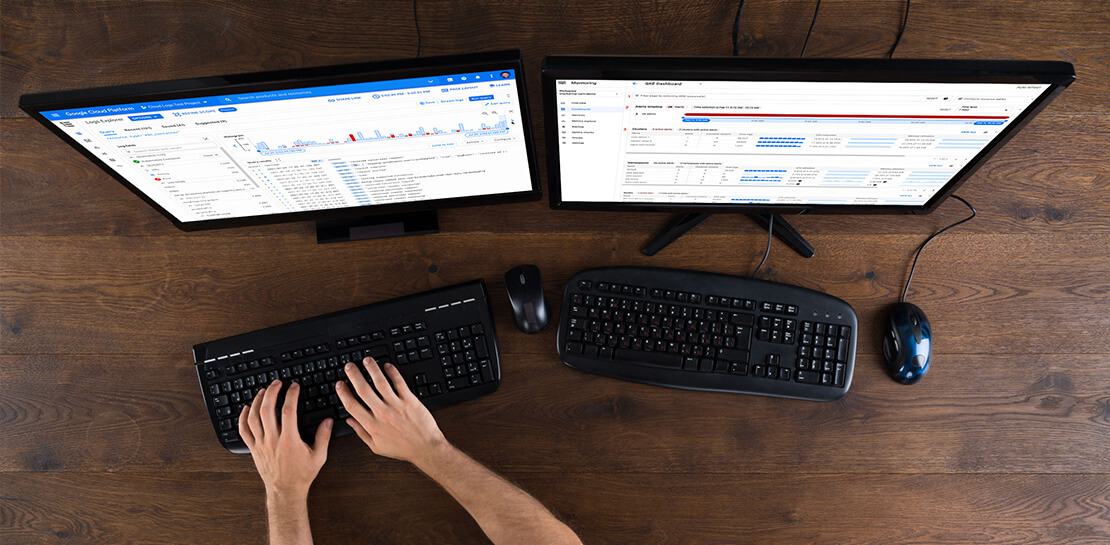
New Histogram Features in Cloud Logging Make it Easier to Track Log Volumes, Errors and Anomalies!
Visualizing trends in your logs is critical when troubleshooting an issue with your application. Using the histogram in Logs Explorer, you can quickly visualize log volumes over time to help spot anomalies, detect when errors started and see a breakdown of log volumes. But static visualizations are not as helpful as
Google is named a Leader in 2020 Magic Quadrant for Cloud Infrastructure and Platform Services
The capability gap between hyperscale cloud providers has begun to narrow; however, fierce competition for enterprise workloads extends to secondary markets worldwide. Infrastructure and operations leaders should evaluate cloud providers with a broad range of use cases and a wide market presence. Market Definition/Description Cloud computing is a style of



L’Oréal: Managing Big-data Complexity with Google Cloud
L’Oreal is a global company with a presence in 150 countries worldwide. Between managing all of its brands and requirements for different countries, L’Oreal looks to data to make insightful business decisions. How does L’Oreal unify its data across all its systems and databases? How does L’Oreal make the data
