





Maximize Efficiency in Document Extraction Models with Document AI Workbench GA Release

1314
Of your peers have already read this article.
3:30 Minutes
The most insightful time you'll spend today!
Each day, more documents are created and used across companies to make decisions. However, the value in these documents is primarily expressed as unstructured data, which makes the value difficult and manually intensive to extract and use for business processes.
As the number and variety of documents used by businesses proliferate, machine learning (ML) solutions need to be more flexible to handle the broader set of use cases. That’s why we introduced the first Document AI Workbench model, Custom Document Extractor (CDE), in Public Preview at Google Cloud Next ‘22. CDE makes it fast and easy to apply ML to virtually any document-based workflow to extract structured data from unstructured document types, to automate business processes.
CDE lets developers and analysts use their own data to train models and extract fields from documents needed for the business. CDE lets organizations build models faster and with less data — thus accelerating time-to-value for processing and analysis of data in documents.
Today, we announce that Document AI Workbench is Generally Available (GA), open to all customers, ready for production use through APIs and the Google Cloud Console. Document AI Workbench is covered by the Document AI SLA — online and batch document prediction is supported with >=99.9% uptime. Furthermore, Document AI Workbench is now covered by Google Cloud’s GA product terms. For example, Google will notify customers at least 12 months before significantly modifying a customer-facing Google API in a backwards-incompatible manner.
In this blog post, we’ll explore ways customers are already using CDE and Document AI Workbench’s updated capabilities.
What users are saying about Workbench
Deliver higher model accuracy with Workbench
Users leverage Workbench to ultimately save time and money. A third party evaluated Document AI Workbench and concluded that it extracts data more accurately1 than several competing products for document types with variable layouts (e.g. invoice, receipt, bank statements, paystubs). Better accuracy drives higher automation rates, helping Workbench users save time and money.
Chris Jangareddy, managing director for Artificial Intelligence & Data at Deloitte Consulting LLP said, “Google Cloud Document AI is a leading document processing solution packed with rich features like multi-step classify and text extraction to automate sorting, classification, extraction, and quality assurance. By combining Document AI with Workbench, Google Cloud has created a forward-thinking and powerful AI platform for intelligent document processing that will allow for process transformation at an enterprise scale with predictable outcomes that can benefit businesses.”
Mansoor Khan, CEO of OneClinic said, “We help medical professionals scale their clinics through automation. We used Google’s Document AI Workbench to create a model to automatically extract data from patients’ insurance cards as part of our patient check-in software. Workbench is easy to use and we are really happy with the model accuracy — it extracts data more accurately than what we would expect from human data entry.”
Rajnish Palande, VP, Google Business Unit for BFSI, TCS said, “The Google Cloud Document AI Workbench leverages artificial intelligence (AI) to manage and glean insights from unstructured data. The Workbench brings together the power of classification, auto-annotation, page-number identification and multi-language support to help organizations rapidly deliver enhanced accuracy, improved operational efficiency, higher confidence in the information extract, and increased return on investment.”
Build production ready models faster with Workbench
Document AI Workbench helps users create machine learning models faster. For example, a third-party evaluation shows Document AI Workbench trains machine learning models up to 3x faster than a leading competitor. This is an important improvement which lowers total cost of ownership and increases value.
Dallas Dolen, Partner, Google Alliance Leader at PwC said, “Google Document AI Workbench helps to accelerate our custom parser models training as well as improves accuracy and performance using a custom document extractor with human in the loop. It helps us solve complex business problems for our clients in the financial services and healthcare industries.”
Ziang Jia, Senior DocAl Development Lead at Resultant, said, “Document AI Workbench has unlocked a brand-new machine learning development experience for information extraction solutions. Its simplicity and robustness enabled us to build models and deliver a highly accurate outcome in an agile way for a large government agency. We couldn’t be more impressed by its simplicity and robustness and are excited to see how the product will evolve in the future.”
Sean Earley, VP of Delivery Services of Zencore said, “Document AI Workbench allows us to develop highly accurate document parsing models in a matter of days. Our customers have automated tasks that formerly required significant human labor. For example, using Document AI Workbench, a team of two trained a model to split, classify and extract data from 15 document types to automate Home Mortgage Disclosure Act reporting. The mean trained model accuracy was 94%, drastically reducing the operational cost of our customer’s compliance reporting procedures.”
What’s new with Document AI Workbench
The latest Workbench capabilities make it even easier to train and deploy an extraction model:
- With Workbench’s public APIs, you can programmatically create, delete, train, evaluate and deploy models.
- Our updated dataset management tools automatically detect and create existing schema labels from your pre-annotated documents. They also provide you more flexibility when creating and managing schema.
- Our new DocAI Toolkit includes a labeled document converter so that you can easily convert your labeled documents to DocAI’s format and start training faster.
- We’ve reduced the cognitive load for labelers with efficiency enhancements to our Labeling UI.
- The revamped Processor Gallery helps you quickly identify the best model for your use case.
What’s next for Document AI Workbench
We continue to invest in Document AI Workbench to help you automate document processing. Here are a few things we’re working on that we’re excited about:
- Classify document types with the Custom Document Classifier (CDC), coming soon in public preview
- Copy processor versions across projects and processors to streamline managing development and production environments
- Support larger documents (e.g., longer than 50 pages) so you can process a wider array of documents
- Broader (non-latin) language support–equivalent to Document AI OCR
- And many more investments, using state of the art technology, to help you build world class models faster to automate document processing
Document AI Workbench is in GA and ready for production workloads. Learn more via Document AI Workbench documentation or try it out in the Google Cloud Console.
Acknowledgements: Tomas Moreno, Outbound Product Manager, Lukas Rutishauser, Software Engineering Manager, Michael Kwong, Software Engineering Manager, Rajagopal Janani, Software Engineering Manager, Michael Lanning, UX Designer.
1. When trained with 200+ documents
How to Choose the Right ML Model for Your Applications
4890
Of your peers have already read this article.
2:00 Minutes
The most insightful time you'll spend today!
Many of our customers want to know how to choose a technology stack for solving problems with machine learning (ML). There are many choices for these solutions available, some that you can build and some that you can buy. We’ll be focusing on the build side here, exploring the various options and the problems they solve, along with our recommendations.
The best ML applications are trained with the largest amount of data
But first, keep in mind an important concept: the quality of your ML model improves with the size of your data. Dramatic ML performance and accuracy are driven by improvements in data size, as shown in the graph below. This is a text model, but the same principles hold for all kinds of ML models.
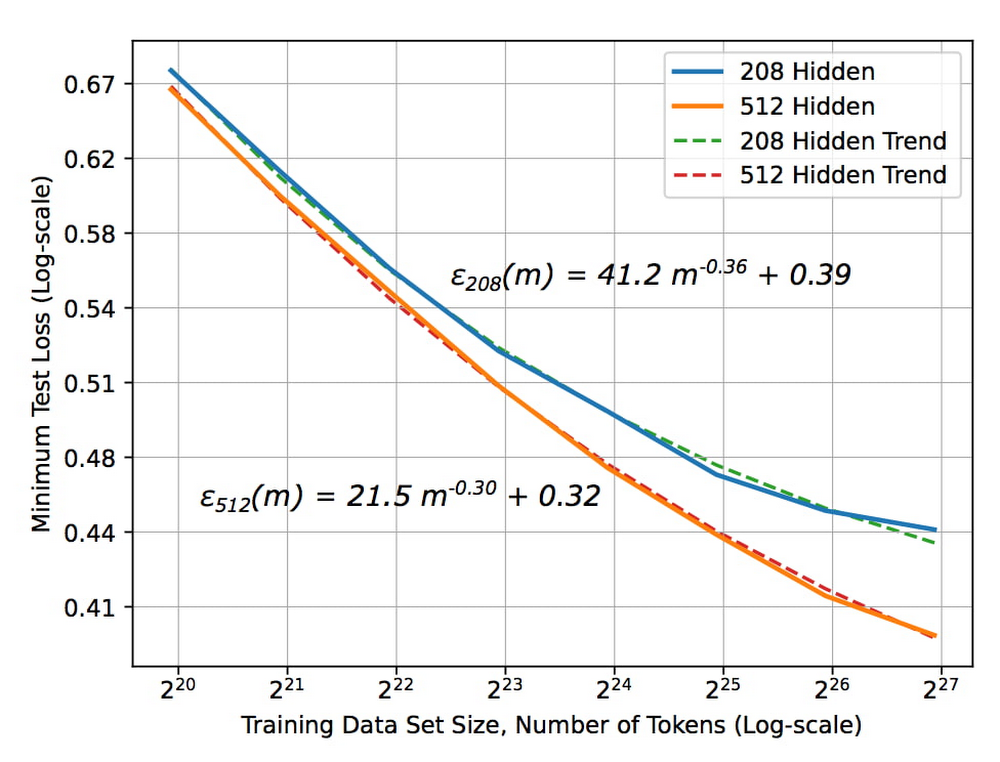
The X axis represents the size of the data set and the Y axis is the error rate. As the size of the data set increases, the error rate drops. But notice something critical about the size of the data set — the x-axis is2^20, 2^21, 2^ 22, etc. In other words, each new tic here is a doubling of the data set size. To get a linear decrease in your error rate you need to exponentially increase the size of your data set.
The blue curve in the graph represents a slightly more sophisticated ML model than the orange curve. Suppose you are deciding between two choices: create a better model or double the data set size. Assuming that these two choices cost the same, it’s better to keep gathering more data. It’s only when improvements due to data size increases start to plateau that it becomes necessary to build a better model.
Secondly, ML systems need to be retrained for new situations. For example, if you have a recommendation system in YouTube and you want to provide recommendations in Google Now, you can’t use the same recommendations model. You have to train it in the second instance on the recommendations you want to make in Google Now. So even though the model, the code, and the principles are the same, you have to retrain the model with new data for new situations.
Now, let’s combine these two concepts: you get a better ML model when you have more data, and an ML model typically needs to be retrained for a new situation. You have a choice of either spending your time building an ML model or buying a vendor’s off-the-shelf model.
To answer the question of whether to buy or whether to build, first determine if the buyable model is solving the same problem that you want to solve. Has it been trained on the same input and on similar labels? Let’s say you’re trying to do a product search, and the model has been trained on catalog images as inputs. But you want to do a product search based on users’ mobile phone photographs of the products. The model that was trained on catalog images won’t work on your mobile phone photographs, and you’d have to build a new model.
But let’s say you’re considering a vendor’s translation model that’s been trained on speeches in the European Parliament. If you want to translate similar speeches, the model works well as it uses the same kind of data.
The next question to ask: does the vendor have more data than you do? If the vendor has trained their model on speeches in the European Parliament but you have access to more speech data than they have, you should build. If they have more data, then we recommend buying their model.
Bottom line: buy the vendor’s solution if it’s trained on the same problem and has access to more data than you do.
Technology stack for common ML use cases
If you need to build, what is the technology stack you need? What are the skills your people need to develop? This depends on the type of problem you are solving. There are four broad categories of ML applications: predictive analytics, unstructured data, automation, and personalization. The recommended technology stack for each is slightly different.
Predictive analytics
Predictive analytics includes detecting fraud, predicting click-through rates, and forecasting demand.
Step one: build an enterprise data warehouse
Here, your data set is primarily structured data, so our recommended first step is to store your data in an enterprise data warehouse (EDW). Your EDW is a source of training examples and product histories tracked over time, and can break down silos and gather data from throughout your organization.
Step two: get good at data analytics
Next, you’d build a data culture, get skilled at data analytics, start to build dashboards, and enable data-driven decisions. At this point, you have all of the data and you know which pieces are trustworthy.
Step three: build ML
From your EDW, you can build your models using SQL pipelines. We recommend using BigQuery ML when doing ML with the data in your EDW. If you want to build a more sophisticated model, you can train TensorFlow/Keras models on BigQuery data. A third option is AutoML tables for state-of-the-art accuracy and for building online microservices.
Unstructured data
Examples of how our customers use ML to gain insights from unstructured data include annotating videos, identifying eye diseases, and triaging emails. Unstructured data can include videos, images, natural language, and text. Deep learning has revolutionized the way we do ML on unstructured data, whether you’re looking at language understanding, image classification, or speech-to-text.
For unstructured data, the models you use will employ deep learning. Here, the ROI heavily favors using AutoML. The amount of time that you’d spend trying to create a new ML model from scratch is almost never worth it. You can spend your money more effectively collecting more data than trying to get a slightly better model. Regardless of the type of unstructured data, our recommendation is to use AutoML for small and medium size data sizes.
But AutoML has a limit to scale. At some point, the size of your data set is going to be so large that architecture search is going to get really expensive. At that point, you may want to go to a best-of-breed model with custom retraining from TensorFlow Hub, for example. If you have data sets that are in the millions of examples, you can build your own custom neural network (NN) architectures. But determine if your data set size has started to plateau, by plotting a graph similar to the one at the top of this post. Build a custom NN architecture only after you’ve plateaued, where increasing amounts of data won’t give you a better model.
Automation
Some examples of how customers are using ML for automation include scheduling maintenance, counting retail footfall, and scanning medical forms. The key thing to keep in mind as you pick a technology stack for these problems is that you’re not building just one ML model. If you want to schedule maintenance orwant to reject transactions, for example, you’ll need to train multiple linked models.
Instead of individual models, think in terms of ML pipelines, which you can orchestrate using all of the technologies already mentioned. Then you have three choices for operationalizing, with three levels of sophistication.
- Vertex AI has turnkey serverless training and batch/online predictions. This is what is recommended for a team of data scientists. .
- Deep Learning VM Image, Cloud Run, Cloud Functions or Dataflow feature customized training and batch/online predictions. This is what is recommended if the team consists of data engineers and scientists.
- Vertex AI Pipelines are fully customizable and recommended for organizations with separate ML engineering and data science teams.
When doing automation, the individual models that you chain together into a pipeline will be a mix – some will be prebuilt, some will be customized, and others will be built from scratch. Vertex AI, by providing a unified interface for all these model types, simplifies the operationalization of these models.
Personalization
ML application examples of personalization include customer segmentation, customer targeting, and product recommendations. For personalization, we again recommend using an EDW, because customer segmentation uses structured marketing data. For product recommendations, you will similarly have prior purchases and web logs in your EDW., You can power clustering applications, or recommendation systems like matrix factorization, and create embeddings directly from your EDW for sophisticated recommendation systems.
For specific use cases, choose the technology stack based on your data size and scope. Start with BigQuery ML for its quick, easy matrix factorization approach. Once your application proves viable and you want a slightly better accuracy, then try AutoML recommendations. But once your data set grows beyond the capabilities of AutoML recommendations, consider training your own custom TensorFlow and Keras models.
To summarize, successful ML starts with the question, “Do I build or do I buy?” If an off-the-shelf solution exists that was trained with similar data and with access to more data than you have, then buy it. Otherwise build it, using the technology stack recommended above for the four categories of ML applications.
Learn more about our artificial intelligence (AI) and ML solutions and check out sessions from our Applied ML Summit on-demand.

Takeaways from Forrester’s Cloud Data Warehouse Q1 2021 Report
DOWNLOAD RESEARCH REPORTS5152
Of your peers have already downloaded this article
20:00 Minutes
The most insightful time you'll spend today!
Cloud data warehouse (CDW) solutions have transformed the delivery of modern analytics and are known to have the capabilities to provision data warehouse of any size in a matter of minutes, autotune queries, scale resources including compute and storage on demand and auto-upgrade to the latest version. As the need for integrated, real-time and self-service analytics scale, CDW vendors continue to focus on native integration with data lakes and object stores; self-service to simplify access and administration for larger and more complex warehouses; and advanced capabilities on parallel processing, compression, partitioning, indexing, query optimization, and dynamic resource provisioning. The most common CDW use cases include customer analytics, AI/machine learning (ML)-based analytics, vertical-specific analytics, and real-time analytics. Customers that are looking to select a CDW vendor need to consider couple of factors.
Download the report learn more 13 leading CDW providers in the Forrester Wave: Cloud Data Warehouse, Q1 2021 report and also explore Google Cloud’s BigQuery for data warehousing.
Google Cloud Helps Northwell Health to Boost Caregiver Productivity and Access to Right Care Using AI

7993
Of your peers have already read this article.
2:00 Minutes
The most insightful time you'll spend today!
Lung cancer is the leading cause of cancer death in the United States and like any cancer, early detection is crucial to survival. Screening at-risk populations is an important part of reducing mortality, and if concerning nodules are found on imaging, further testing may be required. Today, we’ll share how Northwell Health uses Google Cloud products such as Cloud Healthcare APIs and BigQuery to increase caregiver productivity and deliver better care for patients with findings that indicate potential development of lung cancer.
Northwell is New York’s largest healthcare provider
Northwell Health is New York’s largest healthcare provider with 23 hospitals and nearly 800 outpatient facilities. Northwell’s nearly 4,000 doctors care for millions of patients each year, and at this scale, there is an immense amount of healthcare data to manage. To better manage and leverage this data, Northwell Health partnered with Google Cloud starting in 2018.
Enabling caregivers to spend more time with patients
Nic Lorenzen, the lead developer of Northwell Emerging Technology and Innovation team, has a mission to put together data for caregivers in a way that makes sense. It is no secret that inefficient electronic health records systems have a negative impact on a physician’s ability to deliver quality care. Traditional EHRs have information distributed across many tabs, which forces caregivers to spend considerable time at the computer trying to find information. Moreover, speed of care matters. If care is delayed, patients may have to spend more time in the hospital and may suffer worse health outcomes.
To solve this problem, Nic’s team focused on giving caregivers the most relevant pieces of data at the right time by developing an intelligent clinician rounding app. The data needed to derive these insights can depend on the caregiver’s role–a nurse cares about different things than a cardiologist. This system aggregates multiple data sources, and provides patient-specific insights to caregivers.
This system would not have been possible before with traditional EHRs and data warehouses that have proprietary data models and rarely sync data in real time. Now with data easily accessible through Google Cloud’s Healthcare solutions, Nic’s team can deliver the right clinical information to the right people instantly. These days, Nic says, “instead of spending 75% of our time dealing with architecting the underlying platforms, we spend 75% of our time focused on higher value use cases for clinicians and patients. Google Cloud’s Healthcare solutions have greatly improved our developer productivity and time to value.”
Caregivers have found this new system to be a game changer.Before the implementation of this system, caregivers would spend, on average, seven to nine minutes finding the data needed to make medical decisions for one patient. Now, that aggregated information is delivered to a caregiver’s mobile device in less than a second.
Ensuring patients get the right care with the power of AI
There are a number of reasons why patients might not get the care that they need. For example, patients today can go to multiple hospitals and clinics settings, and coordinating care across multiple facilities is complex. Regional hospitals and clinics have their own siloed view of their data, so pertinent information gathered by one clinic might not be seen by another. These gaps in clinical data lead to gaps in patient care.
When a patient gets radiologic imaging, they may have findings unrelated to the reason they initially got the imaging. For example, a chest CT for a car accident might reveal an incidental lung nodule that could be cancerous. Unfortunately, research shows that a large portion of patients do not get follow up for these incidental findings because it isn’t the primary reason why the patient is seeing a doctor. Moreover, social determinants of health are a factor that affects which patients receive follow-up care. Identifying these patients and providing the necessary follow up care prevents adverse events related to delayed detection of cancer.

With Cloud Healthcare solutions, Northwell built an AI model to identify these patients so that oncologists can appropriately follow up with patients who have findings suspicious for lung cancer. The AI model detects incidental pulmonary nodules in radiology reports so that doctors can then contact the patients that need follow-up care. Nic says his team was able to build this system in a week: “Google Cloud did a lot of heavy-lifting for us and allowed us to get to the AI applications much faster. It allowed us to build a platform that just works.”
Healthcare systems can now rapidly generate healthcare insights with one end-to-end solution, Google Cloud Healthcare Data Engine. It builds on and extends the core capabilities of the Google Cloud Healthcare API to make healthcare data more immediately useful by enabling an interoperable, longitudinal record of patient data. Northwell Health uses Google Cloud as the core of their platform, enabling their developers to create solutions to the most pressing healthcare problems.
Special thanks to Kalyan Pamarthy, Product Management Lead on Cloud Healthcare and Natural Language APIs for contributing to this blog post.
3793
Of your peers have already watched this video.
2:30 Minutes
The most insightful time you'll spend today!
How e-Com Firm Bukalapak Achieved 5X ROAS With Machine Learning
In 2018, Indonesia accounted for 94% of SEA’s $23 billion e-commerce industry. Today, the country’s massive e-commerce sector continues to grow, along with the number of brands looking for innovative ways to compete for a piece of the pie.
As one of the largest e-commerce companies in the region, Bukalapak receives a high volume of website visitors via direct traffic, Shopping ads, Google Display Network ads, and YouTube ads.
But when the brand noticed too many potential customers were browsing its website without converting, it knew it had to reconsider its marketing strategy. In an effort to reach consumers who were more likely to buy its products, Bukalapak turned to Smart Shopping campaigns.
Experimenting with Automation
By combining standard shopping and dynamic remarketing campaigns, Smart Shopping campaigns use automated bidding and ad placement to promote products to users across Search, Display, and YouTube. The automated solution also allows brands to reach high-value users who have already seen its ads or visited its site directly but left without converting.
Always open to trying new strategies, Bukalapak launched a three-month Smart Shopping campaign focused on 5% of its Shopping ads traffic using a maximize conversion value bidding strategy. The rest of the brand’s traffic (95%) was assigned standard shopping and dynamic remarketing campaigns, and the results of these were measured against the automated alternative.
The team was able to launch the Smart Shopping campaign with little manual effort by:
- creating a separate campaign with a determined traffic split and a recommended daily budget.
- uploading the Bukalapak logo and image banner for responsive display ads.
- designating Indonesia as the country of sale.
The campaign combined the brand’s existing product feed with Google’s machine learning algorithm to serve more than 40 million products to potential customers across multiple channels — all while automating ad placement and bidding for maximum conversion value.
Smart Shopping Campaign Saves Time, Boosts ROAS
The Smart Shopping campaign achieved 5X higher ROAS than the standard shopping effort while also driving 4X more conversions and 300% growth in conversion value, leading to 2.5X more new customers.
“The automation not only allowed the team to focus less on manual campaign optimization but also helped them boost relevance among high-value users,” said Tushar Bhatia, associate vice president of growth at Bukalapak.

The impressive results encouraged Bukalapak to increase its investment in Smart Shopping campaigns by 27X over the past year. The brand plans to remain at the forefront of innovation by continually testing new products and further optimizing its campaign strategies.
3108
Of your peers have already watched this video.
48:30 Minutes
The most insightful time you'll spend today!
Responsible AI: From Theory to Practice
In less than 10 years, AI will be the number one driver of global GDP growth. And organizations that achieve AI absorption will be the leaders of the global economy.
But as fast as AI is progressing, it also requires more care and attention from a responsibility standpoint. A more accurate and powerful vision AI technology, for example, when used in a harmful way can lead to harmful and intentional misuse, unintentional failure modes, and loss of personal privacy contributing to severe, real-life consequences for individuals.
Listen to Tracy Frey, Director, Product Strategy & Operations, Cloud AI – Google Cloud discuss implementing AI Principles into well-known products. Hear approaches in place for applying AI Principles in the product development process, including user research, product design, product reviews, testing, documentation, and marketing.
More Relevant Stories for Your Company

Recommendations for Modelling SAP Data inside BigQuery
Over the past few years, many organizations have experienced the benefits of migrating their SAP solutions to Google Cloud. But this migration can do more than reduce IT maintenance costs and make data more secure. By leveraging BigQuery, SAP customers can complement their SAP investments and gain fresh insights by consolidating enterprise

What Interests Baseball Fans? Unravel with Google’s Data Science Tools and ML
The game of baseball has no shortage of statistics -- from batting average to exit velocity, strikeouts to wins above replacement. Among all sports, Major League Baseball (MLB) arguably contains the most analytical and data-driven participants and fan base. Subconsciously or viscerally, players and managers on the field and those

Case Study: Twitter is Taking Their CX to The Next Level with AutoML
Editor’s note: Since launching its Spaces feature, Twitter has demonstrated that hearing people’s voices can bring conversations on Twitter to life in a completely new way. Next, it aimed to make it easier for customers to join and listen to live conversations they personally care about. In this blog, we

BigQuery ML for Sentiment Analysis: How to Make the Most of Your Data
Introduction We recently announced BigQuery support for sparse features which help users to store and process the sparse features efficiently while working with them. That functionality enables users to represent sparse tensors and train machine learning models directly in the BigQuery environment. Being able to represent sparse tensors is a
