





Groww’s Google Cloud-Powered Platform: The Key to Secure and Successful Investing

2936
Of your peers have already read this article.
4:00 Minutes
The most insightful time you'll spend today!
Groww makes investments simple and accessible, using Google Kubernetes Engine to ensure a reliable platform for customers, and makes data-backed decisions to grow its business with BigQuery.
About Groww
Headquartered in Bangalore, Groww is India’s fast-growing online investment platform that offers a simple and easy way to invest in stocks, direct mutual funds, IPOs, ETFs, and digital gold. Its mission is to make investing as intuitive and accessible as ecommerce.

Google Cloud results
- Reduces hardware costs with Preemptable Virtual Machines
- Enables a lean DevOps team with Google Cloud
- Analyzes data effectively and quickly for agile business growth
Investing is one way to ensure financial security. However, the thought of it can be a daunting one, especially for people without any prior experience. With a mission to make investment simple for digital natives in India, Groww was launched in 2016.
“We noticed that many people were on social media, booking cabs, and ordering food online, but the same people were not investing, despite having the means to do so,” says Singh. This observation led to a lightbulb moment for the team, and they realized that in order to appeal to the millennial, mobile-savvy generation, they had to create an investment platform that was as easy to use as an ecommerce platform.
Managing unpredictable spikes with Google Kubernetes Engine
As with any platform, there are bound to be peak and non-peak hours when it comes to traffic. For Groww, regular spikes take place in the early mornings, or in the evenings when people are more relaxed having come home from work. But the nature of the fintech industry is a volatile one. Investors are only human, and their investment decisions can be swayed quickly by the news. As such, spikes in traffic can happen at the most unpredictable times. To cope with this unpredictability, Groww uses Google Kubernetes Engine to scale up and down automatically to meet the required capacity around the clock. This also helps the company save costs, as it pays only for what is needed.
“No matter how much of an expert you are, you can never predict when traffic on the platform will be heavy,” says Singh. “Google Kubernetes Engine helps ensure that we never run out of capacity, without overspending on infrastructure cost.”
More recently, the investment company started using Preemptible Virtual Machines, which run at one third of its hardware cost. It also leverages Anthos to monitor and manage its backend infrastructure and to have better workload visibility. Singh shares, “We are very open to adopting new technologies, and our team is always eager to learn if we can do things better. We believe that technology is always evolving and it’s our responsibility to learn and make use of what’s available out there.”
Despite having so much running in the background, Singh explains that the company keeps a very lean DevOps team. “We’ve only got four or five people in DevOps, and that’s only possible because Google Cloud products are already able to run on their own.”
Making swift, data-backed business decisions
Infrastructure is only part of the equation for a successful business. Outside of operations, the ability to analyze data effectively is arguably the most important component for a startup to thrive. Groww leverages BigQuery to make decisions quickly and efficiently. “With BigQuery, we have a place where we can put all data, fire queries, and build dashboards almost instantly, allowing us to make business decisions quickly,” explains Singh.
The team also uses Looker Studio to clearly visualize the information generated through charts and graphs. The best part? Groww doesn’t need to spend additional time and resources setting up a large data team, since BigQuery does most of the work and in a shorter period of time. The resources saved also enables the team to focus on addressing functional requirements, rather than managing and sizing the data platform.
“From a startup perspective, BigQuery is really helpful because often setting up your own data lake can be very costly, and a distraction when the team is also busy focusing on setting up an infrastructure,” adds Singh.
Ensuring security and compliance with Google Cloud
As a fintech company, security and compliance continue to be top priorities for Groww. It chose Google Cloud as its preferred cloud provider because there are three data center replication zones in Mumbai, which means it adheres to financial regulations for keeping its user data within borders.
Moving forward, Groww plans to evolve its platform alongside its users. Singh says, “As we gain more users with different wants and needs, it will be a natural progression that the company evolves. I believe that with Google Cloud, we are well equipped to pave the way to the future.”

3723
Of your peers have already downloaded this article
5:30 Minutes
The most insightful time you'll spend today!
Business needs for digital solutions have intensified the urgency for rapid application development and deployment. At the same time, widespread adoption of cloud computing has revolutionized the IT environment used by both enterprises and consumers.
In addition, the acceleration of digital transformation has increased the availability of developer tools and deployment environments. Besides, the vibrancy of the DevOps movement and the multiplicity of development tools and infrastructures mean that developers enjoy greater decision-making authority in the development of digital solutions.
As a result, developers not only confront the challenge of shipping software faster but also encounter competing challenges to ensure software quality and the appropriate mitigation of risks associated with rapid development and deployment.
Hence, to move quickly and with confidence, developers must use tools that automate the full software development life cycle and work across platforms and operating systems.
Developers need to adopt FaaS, a cloud platform that allows developers to develop, deploy, and manage event-driven applications without the responsibility of managing the infrastructure on which the applications run.
Accelerate Developer Productivity with Google Workspace

5771
Of your peers have already read this article.
3:30 Minutes
The most insightful time you'll spend today!
The software development process requires complex, cross-functional collaboration while continuously improving products and services. Our customers who build software say that they value Google Workspace for its ability to drive innovation and collaboration throughout the entire software development life cycle. Developers can hold standups and scrums in Google Chat, Meet, and Spaces, create and collaborate on requirements documentation in Google Docs and Sheets, build team presentations in Google Slides, and manage their focus time and availability with Google Calendar.
Development teams also use many other tools to get work done, like tracking issues and tasks in Atlassian’s Jira, managing workloads with Asana, and incident management in PagerDuty. One of the benefits of Google Workspace is that it’s an open platform tailored to improve the performance of your tools by seamlessly integrating them together. We’re constantly expanding our ecosystem and improving Google Workspace, giving you the power to push your software development even further.
Make software development more agile
Google Workspace gives you real-time visibility into project progress and decisions to help you ship quality code fast and stay connected with your stakeholders, all without switching tools and tabs. By leveraging applications from our partners, you can pull valuable information out of silos, making collaborating on requirements, code reviews, bug triage, deployment updates, and monitoring operations easy for the whole team. This allows your teams to stay focused on their priorities while keeping everyone aligned, ensuring collaborators are always in the loop.
Plan and execute together
When combined with integrations, Google Workspace makes the software development planning process more collaborative and efficient. For example, many organizations use Asana—a leading work management platform—to coordinate and manage everything from daily tasks to cross-functional strategic initiatives. To make the experience more seamless, Asana built integrations so users can always have access to their tasks and projects with Google Drive, Gmail, and Chat. With these integrations for Google Workspace, you can turn your conversations into action and create new tasks in Asana—all without leaving Google Workspace.
“We’ve seen exceptional, heavy adoption of tasks being created from within the Gmail add-on. Our customers and community have also shown very strong interest in future development work, which is something we’ll continue to prioritize.” Strand Sylvester, Product Manager, Asana
To date, users have installed the Asana for Gmail add-on over 2.5 million times, as well as over 3.8 million installs of the Asana for Google Workspace add-on for Google Drive.

Start coding quickly
Google Workspace makes it easy for product managers, UX designers, and engineers to agree on what they’re building and why. By bringing all stakeholders, decisions, and requirements into one place—whether it’s a Gmail or Google Chat conversation, or a document in Google Docs, Sheets, or Slides—Google Workspace removes friction, helping your teams finalize product specifications and get started right away.
Integrations like GitHub for Google Chat make the entire development process fit easily into a developer’s workflow. With this integration, teams can quickly push new commits, make pull requests, do code reviews, and provide real-time feedback that improves the quality of their code—all from Google Chat.

Speed up testing
Integrations like Jira for Google Chat accelerate the entire QA process in the development workflow. The app acts as a team member in the conversation, sending new issues and contextual updates as they are reported to improve the quality of your code and keep everyone informed on your Jira projects.

Ship code faster
Developers use Jenkins—a popular open-source continuous integration and continuous delivery tool—to build and test products continuously. Along with other cloud-native tools, Jenkins supports strong DevOps practices by letting you continuously integrate changes into the software build.
With Jenkins for Google Chat, development and operations teams can connect into their Jenkins pipeline and stay up to date by receiving software build notifications directly in Google Chat.

Proactively monitor your services
Improving the customer experience requires capturing and monitoring data sources to improve application and infrastructure observability. Google Workspace supports DevOps teams and organizations by helping stakeholders collaborate and troubleshoot more effectively. When you integrate Datadog with Google Chat, monitoring data becomes part of your team’s discussion, and you can efficiently collaborate to resolve issues as soon as they arise.
The integration makes it easy to start a discussion with all the relevant teams by sharing a snapshot of a graph in any of your Chat spaces. When an alert notification is triggered, it allows you to notify each Chat space independently, precisely targeting your communication to the right teams.

Improve service reliability
Orchestrating business-wide responses to interruptions is a cross-functional effort. When revenue and brand reputation depends on customer satisfaction, it’s important to proactively manage service-impacting events. Google Workspace supports response teams by ensuring that urgent alerts reach the right people by providing teams with a central space to discover incidents, find the root cause, and resolve them quickly.
PagerDuty for Google Chat empowers developers, DevOps, IT operations, and business leaders to prevent and resolve business-impacting incidents for an exceptional customer experience—all from Google Chat. See and share details with link previews, and perform actions by creating or updating incidents. By keeping all conversations in a central space, new responders can get up to speed and solve issues faster without interrupting others.

Accelerate developer productivity
Integrating your DevOps tools with Google Workspace allows your development teams to centralize their work, stay focused on what’s important—like managing their work—build code quickly, ship quality products, and communicate better during service impacting incidents. For more apps and solutions that help centralize your work so you and your teams can connect, create, and get things done, check out Google Workspace Marketplace, where you’ll find more than 5,300 public applications that integrate directly into Google Workspace.
Investing for Future: Why Shifting Security Left Helps Your Bottom Line

4485
Of your peers have already read this article.
3:30 Minutes
The most insightful time you'll spend today!
The concept of “shifting left” has been widely promoted in the software development lifecycle. The concept is that introducing security earlier, or leftwards, in the development process will lead to fewer software-related security defects later, or rightwards, in production.
Shifting cloud security left can help identify potential misconfigurations earlier in the development cycle, which if unresolved can lead to security defects. Catching those misconfigurations early can improve the security posture of production deployments.
Why shifting security left matters
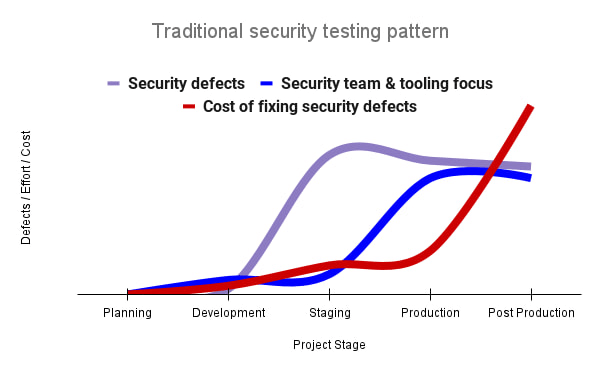
Google’s DevOps Research and Assessment (DORA) highlights the importance of integrating security into DevOps in the 2016 State of DevOps Report. The report discussed the placement of security testing in the software development lifecycle. The survey found that most security testing and tool usage happened after the development of a release, rather than continuously throughout the development lifecycle. This led to increased costs and friction because remediating problems found in testing may involve big architectural changes and additional integration testing, as shown in Figure 1. For example, security defects in production can lead to GDPR violations, which can carry fines up to 4% of global annual revenue.
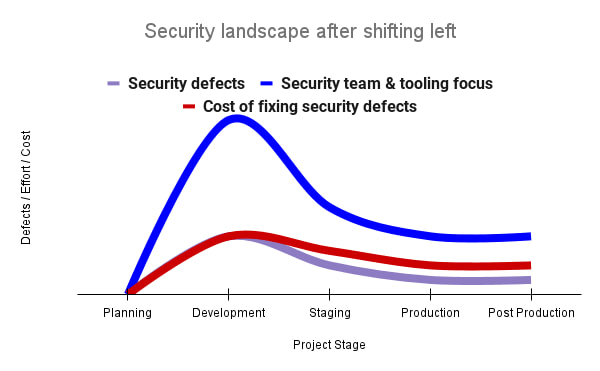
By inserting security testing into the development phase, we can identify security defects earlier and perform the appropriate remediation sooner. This results in fewer defects post-production and reduces remediation efforts and architectural changes. Figure 2 shows us that integrating security earlier in the SDLC results in overall decreases in security defects and associated remediation costs.
The 2021 State of DevOps Report expands the work of the 2016 report and advocates for integrating automated testing throughout the software development lifecycle. Automated testing is useful for continuously testing development code without the need for additional skills or intervention by the developer. Developers can continue to iterate quickly while other stakeholders can be confident that common defects are being identified and remediated.
From code to cloud
The DORA findings with regard to code security can also be applied to cloud infrastructure security. As more organizations deploy their workloads to the cloud, it’s important to test the security and configurations of cloud infrastructure. Misconfigurations in cloud resources can lead toward security incidents that could lead to data theft. Examples of such misconfigurations include overly permissive firewall rules, public IP addresses for VMs, or excessive Identity and Access Management (IAM) permissions on service accounts and storage buckets.
We can and should leverage different Google Cloud services to identify these misconfigurations early in the development process and prevent such errors from emerging in production to reduce the costs of future remediation, potential legal fines, and compromised customer trust.
The key tools in our toolshed are Security Command Center and Cloud Build. Security Command Center provides visibility into misconfigurations, vulnerabilities, and threats within a Google Cloud organization. This information is critical when protecting your cloud infrastructure (such as virtual machines, containers, web applications) against threats, or identifying potential gaps from compliance frameworks (such as CIS Benchmarks, PCI-DSS, NIST 800-53, or ISO 27001.
Security Command Center further supports shifting security left by allowing visibility of security findings at the cloud project level for individual developers, while still allowing global visibility for Security Operations. Cloud Build provides for the creation of cloud-native CI/CD pipelines. You can insert custom health checks into a pipeline to evaluate certain conditions (such as security metrics) and fail the pipeline when irregularities are detected. We will now explore two use cases that take advantage of these tools.
Security Health Checker
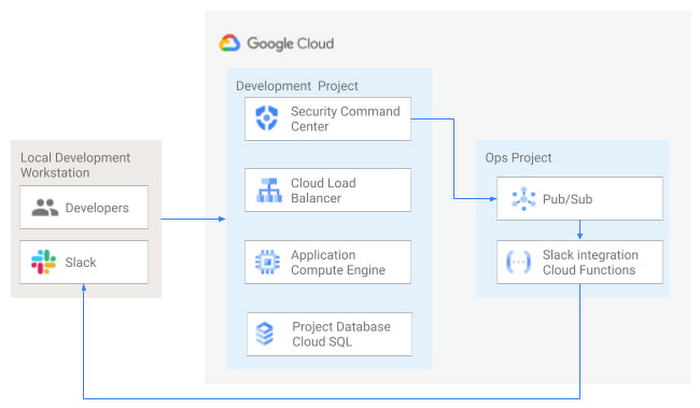
Security Health Checker continuously monitors the security health of a Google Cloud project and promptly notifies project members of security findings. Figure 3 shows developers interacting with a Google Cloud environment with network, compute, and database components. Security Command Center is configured to monitor the health of the project.
When Security Command Center identifies findings, it sends them to a Cloud Pub/Sub topic. A Cloud Function then takes the findings published to that topic and sends them to a Slack channel monitored by infrastructure developers. Just like a spell checker providing quick feedback on misspellings, Security Health Checker provides prompt feedback on security misconfigurations in a Google Cloud project that could lead to deployment failures or post-production compromises. No additional effort is required on the part of developers.
Security Pipeline Checker
In addition to using Security Command Center for timely notification of security concerns during the development process, we can also integrate security checks into the CI/CD pipeline by using Security Command Center along with Cloud Build as shown in Figure 4.
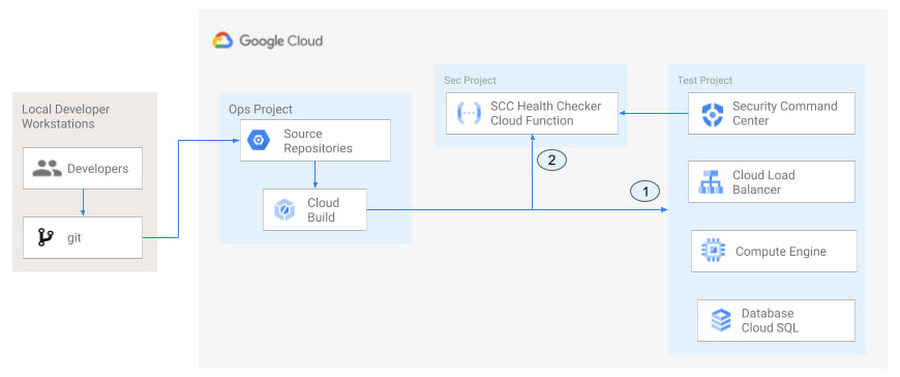
The pipeline begins with a developer checking code into a git repository. This repository is mirrored to Cloud Source Repositories. A build trigger will begin the build process. The build pipeline will include a short waiting period of a few minutes to give Security Command Center a chance to identify security vulnerabilities. A brief delay may appear undesirable at first, but the analysis that takes place during that interval can result in the reduction of security defects post-production.
At the end of the waiting period, a Cloud Function serving as a Security Health Checker will evaluate the findings from Security Command Center (Connector 1 in Figure 4). If the validator determines that unacceptable security findings exist, the validator will inject a failure indication into the pipeline to terminate the build process (Connector 2 in Figure 4). Developers have visibility into the failure triggers and remediate them before successfully deploying code to production. This is in contrast to the findings in the 2016 State of DevOps Report wherein organizations that didn’t integrate security into their DevOps processes spent 50% more time remediating security issues than those who “shifted left” on security.
Closing thoughts
DORA’s 2016 State of DevOps report called out the need for “shifting left” with security, introducing security earlier in the development process to identify security vulnerabilities early to reduce mitigation efforts post-production. The report also advocated for automated testing throughout the software development lifecycle.
We looked at two ways of achieving these objectives in Google Cloud. The Security Health Checker provides feedback to developers using Security Command Center and Slack to notify developers of security findings as they pursue their development activities. The Security Pipeline Checker uses Security Command Center as part of a Cloud Build pipeline to terminate a build pipeline if vulnerabilities are identified during the build process. To implement the Security Heath Checker and the Security Pipeline Checker, check out the GitHub repository. We hope these examples will help you to “shift left” using Google Cloud services. Happy coding!
This article was co-authored with Jason Bisson, Bakh Inamov, Jeff Levne, Lanre Ogunmola, Luis Urena, and Holly Willey, Security & Compliance Specialists at Google Cloud.
3331
Of your peers have already watched this video.
23:30 Minutes
The most insightful time you'll spend today!
Ship Faster, Spend Less by Going Multi-Cloud with Anthos
Today’s success depends more than ever on making the most of both on-premises investments and the various cloud offerings available to you.
Learn about how Google Cloud is bringing simplified operations everywhere to help ensure success in a world of hybrid, multi cloud and edge scenarios that could otherwise threaten to fragment your deployment. Use Anthos to take an uncompromising stand on quality infrastructure everywhere for your applications.
Leverage Apigee X to Access API Backends with Multiple VPCs

4227
Of your peers have already read this article.
4:00 Minutes
The most insightful time you'll spend today!
API gateways are a critical component of a modern architecture. Apigee X is Google Cloud’s API management platform. It also allows users of the legacy Apigee Edge product to leverage Virtual Private Cloud (VPC) products and features, like Cloud Armor and Load Balancers. With these new security and availability advantages come a new set of challenges. The biggest challenge is accessing API backends in multiple VPCs. This introduces VPC peering transitivity restrictions. Only two VPCs can be peered in sequence, but the Apigee X Runtime already consumes one peering connection. This blog post discusses overcoming transitivity limits, with an eye on future managed services that solve the problem.
VPC Peering Transitivity Limits
The main challenge with Apigee X is that customers have backend servers in multiple distinct VPCs. This means that Apigee X Runtime traffic must traverse multiple VPC peering connections. However, peering transitivity limits VPC networking to only one sequential VPC hop.
In the past (Apigee Edge / SaaS) customers did not need to worry about securing their backend APIs across multiple VPCs. Apigee X networking is a new feature, compared to the original Apigee SaaS product.
VPC Connectivity Options
VPC peering is the easiest option. The restriction is that connectivity wise, only one peering hop is allowed, which is already consumed by a connection to the Apigee X Runtime. The Apigee X Runtime resides in a Google managed VPC.
Internal Global Load Balancers (ILBs) with Managed Instance Group (MIG) backends is the second option. This peering solution is complex though.
The open internet is the most parsimonious solution. Apigee X facilitates this, but it would violate the security mandates of many Google Cloud customers.
The final option is Cloud VPN. Cloud VPN supports transitivity across multiple VPC network hops. As well the implementation steps are relatively simple. Traffic does not traverse the open internet for VPCs within Google Cloud.
Apigee X Networking Explained
ApigeeX is a Private Service Access (PSA) based service that is deployed and managed in a tenant project. A tenant project is a project that is tied to the Apigee X Runtime, in a one-to-one relationship. The Apigee X deployment natively manages a load balancer in the customer’s VPC for ingress traffic. By default, egress to non-private routes from Apigee X is through Cloud NAT in the tenant project. The default Apigee X deployment is more suitable for non hub-and-spoke network design.
Single VPC Hub Design
Figure 3 demonstrates the API request flow. External API requests come from the internet and first encounter the XLB. The XLB has the Apigee X Runtime as a backend, using Network Endpoint Group to contain the Apigee X Environment Group domain name. From here the Apigee X Runtime sends the API request over the VPC peering connection to apigee-x-project.
Google Cloud VPN connections allow Virtual Private Clouds (VPCs) to reference each other’s internal resources, with the help of Google Cloud Routers. Cloud Routers advertise each VPCs’ IP address ranges. This enables traffic over the Cloud VPN tunnels to reference resources via their private IP addresses. Additionally, Google Cloud DNS peering facilitates a consumer VPC to reference hostnames in a producer VPC.
From the apigee-x-vpc (consumer), the API request references a backend-project-a-vpc (producer) resource hostname, via DNS peering. This would be the backend identified in an Apigee X API proxy. The request itself does not traverse the DNS peering connection. Instead, the API request goes through a Cloud VPN tunnel. In this way, Cloud VPN is used as a substitute for VPC peering.
Shared VPC Hub Design
A more advanced example is a shared VPC hub project, illustrated in Figure 4. The general idea is the same; use Cloud VPN connections instead of peering connections, advertise routes using Cloud Router and use DNS peering to reference any compute resources by their hostnames.
What is interesting is the idea that the apigee-x-project can use a subnet in a shared VPC, independently of the hub-project, which is in the same shared VPC. Shared VPC subnets do not violate the VPC peering transitivity limit (only two peered VPCs in sequence). This architecture pattern can be scaled to connect multiple shared VPCs via VPN tunnels. This is analogous to cascading hub-and-spoke architecture pattern: the inner hub-and-spoke is the shared VPC (with the apigee-x-project) and the outer hub-and-spoke is the VPN connected backend-projects.
Fixing VPC Peering with Private Service Connect
Private Service Connect (PSC) allows private consumption of services across VPC networks. This feature is coming to Apigee X in the first half of 2022. Private Services Access (PSA) is what enables you to reach services’ internal IP addresses. Apigee X is a PSA service, hence its ability to connect to backends by their internal IP addresses. PSC is the missing piece that will natively support Apigee X backends in other VPCs.
What Next?
Try it out for yourself! We built and shared a working Terraform example in our Github repository. Apigee X opens up users to the products and features of Google Cloud VPCs. VPC transitivity limits do require some work to overcome. Private Service Connect (PSC) will solve Apigee X VPC peering challenges later in 2022. A great next step would be to implement a “wheel” architecture pattern. This is an evolution of the hub-and-spoke design, where spoke VPCs peer to each other. Cloud VPN makes this possible and PSC makes a wheel more feasible to implement. The advantage of a wheel is that spokes no longer rely on a hub VPC; for example productizing APIs in a multi-tenant environment. More details are available in the following ebook: The API Product Mindset
Resources
You can find the Terraform code in the Github repository.
More Relevant Stories for Your Company

FAQs: Everything Your Need to Know About Cloud Computing
There are a number of terms and concepts in cloud computing, and not everyone is familiar with all of them. To help, we’ve put together a list of common questions, and the meanings of a few of those acronyms. You can find all these, and many more, in our learning resources.
How Mailjet Sends 1.5 billion Emails a Month with Google Cloud
Mailjet allows companies to create, send, and track millions of emails to their customers and prospects around the world each month. The company’s offerings range from routing these emails to tailor-made tools that allow clients to design and send marketing campaigns with messages related to sales, user clubs, coupons and discounts,

3 Ways To Reduce App Downtime With Google Cloud’s API Monitoring Tools
How many times have you closed an application when you encounter the “spinning wheel of death” (a melodramatic way of saying an application that is taking too long to load)? In today’s digital economy where many organizations rely on applications as a primary source of revenue, that spinning wheel of

How Cloud Networks Enable CSPs to Deliver 5G
Communication services providers (CSPs) are experiencing a period of disruption. Overall revenue growth is decelerating and is projected to remain below 1 percent per year, following a trend that started even before the pandemic.1 At the same time, driven by the pandemic, data consumption in 2020 increased by 30 percent relative
