





Building a Stronger Software Supply Chain: Five Essential Steps

2854
Of your peers have already read this article.
2:30 Minutes
The most insightful time you'll spend today!
Today, we published a new Google research report on software supply chain security because we’ve seen a sharp rise in software supply chain attacks across almost every sector —and expect these trends to continue for the foreseeable future. We urge all organizations to act now to improve their software supply chain security.
Among the report’s conclusions, there are two key findings we want to highlight. First, the lessons we’ve learned from various security events call for a more holistic approach to strengthen defenses against software supply chain attacks. Second, we have worked with the security community to develop and deploy a common Supply-chain Levels for Software Artifacts (SLSA) framework that can mitigate threats across the entire software supply chain ecosystem. These frameworks can help organizations securely build and verify the integrity of software. You can find more information on the report’s conclusions here.
We know that modern day software supply chains continue to grow deeper, wider, and more complex. That complexity can make it challenging for customers to even know where to begin analyzing their supply chains for security issues. Our research shows that organizations must deal with these same complex issues regardless of which environments they operate in.
At Google Cloud, we’re deeply committed to working with our customers to help ensure that they have the support they need to evaluate their security posture, resiliency, and hygiene. Below, we suggest five steps to protect software across processes and systems, and tap into relevant Google Cloud products and services. These recommendations can enable customers to benefit from Google’s extensive security experience and reduce their need to develop, maintain, and operate complex processes to secure their open source dependencies.
Implementing best practices with Google Cloud
Customers who are interested in improving their software supply chain security can take immediate steps to implement best practices.
- Enhance your existing Google Cloud security features with the Google Cloud security foundation guide. The guide can help you weigh important considerations including organizational structure, authentication and authorization, resource hierarchy, networking, logging, and detective controls. You can further engage Mandiant experts to assess your readiness.
You can also view centralized information about vulnerabilities and possible risks using Google Cloud services like Security Command Center, and get information about your service usage with Recommender, including recommendations that can help you to reduce risk. For example, you can identify IAM principals with excess permissions or unattended Google Cloud projects. You can also find additional resources from the Google Cybersecurity Action Team (GCAT), our premier security advisory team, here.
- Explore fast software delivery and reliable and secure software with Google Cloud’s DevOps capabilities. You also should review foundational practices for designing, developing, and testing code that apply to most programming languages.
We strongly recommend you evaluate how you distribute software and the terms of software licenses in all of your dependencies. For more information on Google’s approach to helping organizations address vulnerabilities in open source software, see Appendix B in the research report.
- Document the policies for your organization and incorporate validation of policies into your development, build, and deployment processes as you implement best practices. For example, your organization’s policies might include criteria for deployment that you implement with Binary Authorization. GCAT has published additional information on security policies and other cloud security transformation tips for CISOs here.
You can also explore Minimum Viable Secure Product, a security checklist of controls to establish a baseline security posture for a product. You can use the checklist to establish your minimum security control requirements and to evaluate software by third-party vendors.
Tapping into new Google product and service offerings
At Google Cloud, we continue to focus on delivering new and innovative security capabilities to help customers address the latest security threats. From the attack on SolarWinds to the community response to open source vulnerabilities such as Log4j, we’re seeing a spike in demand from customers on what we can do to help them manage software supply chain risk. We’ve made several recent announcements on that front that can help customers get started with Google Cloud today.
- Use Google Cloud’s Software Delivery Shield. It provides a fully managed software supply chain security solution that offers a modular set of capabilities to help equip developers, DevOps, and security teams with the tools they need to build secure cloud applications. Software Delivery Shield spans across a family of Google Cloud services from developer tooling to runtimes including GKE, Cloud Code, Cloud Build, Cloud Deploy, Artifact Registry, and Binary Authorization. To learn more about Software Delivery Shield, check out the solution page, or watch this Google Cloud Next session to get a quick overview of Software Delivery Shield.
- Enable our Assured Open Source Software (OSS) service, which can help enterprise and public sector open source software users to easily incorporate the same OSS packages that we use at Google into their own developer workflows. Packages curated by the Assured OSS service:
- are regularly scanned, analyzed, and fuzz-tested for vulnerabilities;
- have corresponding enriched metadata incorporating Container/Artifact Analysis data;
- are built with Cloud Build including evidence of verifiable Supply chain Levels for Software Artifacts (SLSA)-compliance;
- are verifiably signed by Google;
- and are distributed from an Artifact Registry that is secured and protected by Google.
If you are interested in learning more about software supply chain security in general, please contact us or reach out to your sales representative to schedule a software supply chain security workshop.
Latest News: Secure Digital Infrastructure Services with Apigee Advanced API Security for Google Cloud

4472
Of your peers have already read this article.
3:30 Minutes
The most insightful time you'll spend today!
Organizations in every region and industry are developing APIs to enable easier and more standardized delivery of services and data for digital experiences. This increasing shift to digital experiences has grown API usage and traffic volumes. However, as malicious API attacks also have grown, API security has become an important battleground over business risk.
To help customers more easily address their growing API security needs, Google Cloud is announcing today the Preview of Advanced API Security, a comprehensive set of API security capabilities built on Apigee, our API management platform. Advanced API Security enables organizations to more easily detect security threats. Here’s a closer look at the two key functionality included in this launch: identifying API misconfigurations and detecting bots.
Identify API misconfigurations
Misconfigured APIs are one of the leading reasons for API security incidents. In 2017, Gartner® predicted that by 2022 API abuses will be the most frequent attack vector resulting in data breaches for enterprise web applications. Today, our customers tell us application API security is one of their top concerns, which is supported by an independent study from 2021 by Fugue and Sonatype. The report found that misconfigurations are the number one cause of data breaches, and that “too many cloud APIs and interfaces to adequately govern” are frequently the main point of attack in cyberattacks.
While identifying and resolving API misconfigurations is a top priority for many organizations, the configuration management process can be time consuming and require considerable resources.
Advanced API Security can make it easier for API teams to identify API proxies that do not conform to security standards. To help identify APIs that are misconfigured or experiencing abuse, Advanced API Security regularly assesses managed APIs and provides API teams with a recommended action when configuration issues are detected.
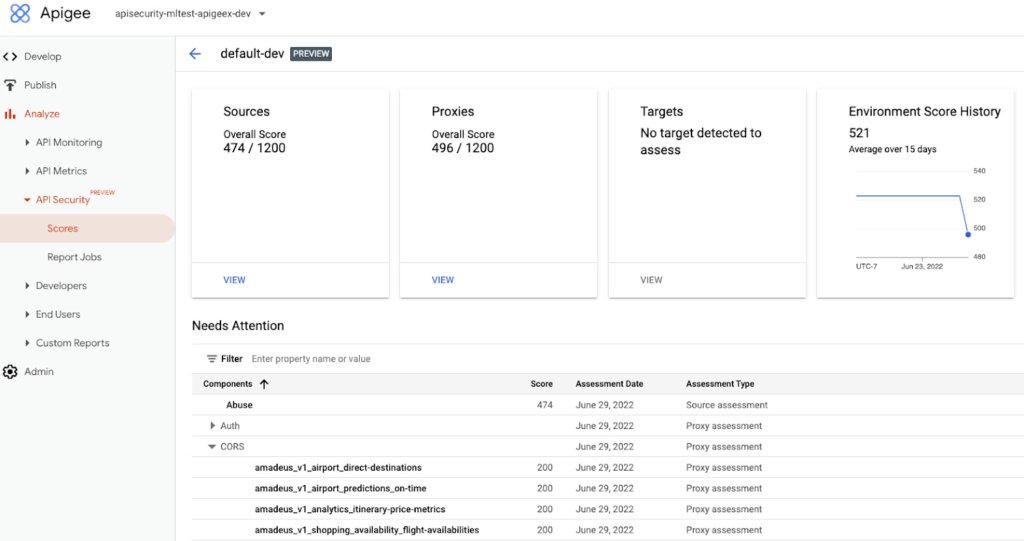
Advanced API Security identifies misconfigured API proxies, including the missing CORS policy.
APIs form an integral part of the digital connective tissue that make modern medicine run smoothly for patients and healthcare staff. One common healthcare API use case occurs when a healthcare organization inputs a patient’s medical coverage information into a system that works with insurance companies. Almost instantly, that system determines the patient’s coverage for a specific medication or procedure, a process which is enabled by APIs. Because of the often-sensitive personal healthcare data being transmitted, it is important that the required authentication and authorization policies are implemented so that only authorized users, such as an insurance company, can access the API.
Advanced API Security can detect if those required policies have not been applied, an alert which can help reduce the surface area of API security risks. By leveraging Advanced API Security, API teams at healthcare organizations can more easily detect misconfiguration issues and can reduce security risks to sensitive information.
Detect Bots
Because of the increasing volume of API traffic, there is also an increase in cybercrime in the form of API bot attacks—the automated software programs deployed over the Internet for malicious purposes like identity theft.
Advanced API Security uses pre-configured rules to help provide API teams an easier way to identify malicious bots within API traffic. Each rule represents a different type of unusual traffic from a single IP address. If an API traffic pattern meets any of the rules, Advanced API Security reports it as a bot.
Additionally, Advanced API Security can speed up the process of identifying data breaches by identifying bots that successfully resulted in the HTTP 200 OK success status response code.
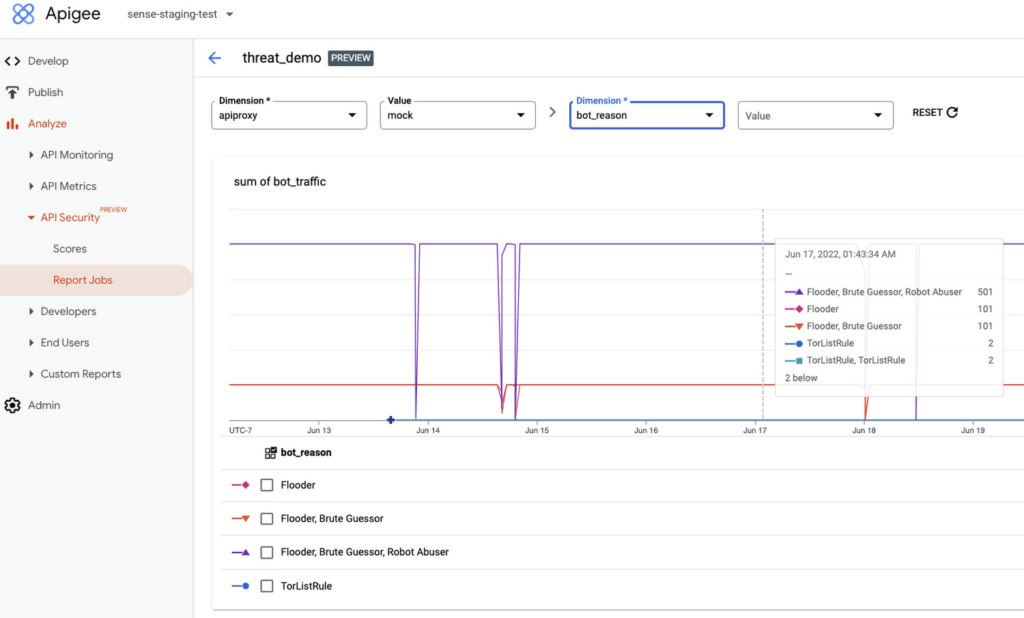
Financial services APIs are frequently the target of malicious bot attacks due to the high-value data that is processed. A bank that has adopted open banking standards by making APIs accessible to customers and partners can use Advanced API Security to make it easier to analyze traffic patterns and identify the sources of malicious traffic. You may experience this when your bank allows you to access your data with a third-party application. While a malicious hacker could try to use a bot to access this information, Advanced API Security can help the bank’s API team to identify and stop malicious bot activity in API traffic.
API Security at Equinix
Equinix powers the world’s digital leaders, bringing together and interconnecting infrastructure to fast-track digital advantage. Operating a global network of more than 240 data centers with a 99.999% or greater uptime, Equinix simplifies global interconnections for organizations, saving customers time and effort with the Apigee API management platform.
“A key enabler of our success is Google’s Apigee, delivering digital infrastructure services securely and quickly to our customers and partners,” said Yun Freund, senior vice president of Platform at Equinix. “Security is a key pillar to our API-first strategy and Apigee has been instrumental in enabling our customers to securely bridge the connections they need for their businesses to easily identify potential security risks and mitigate threats in a timely fashion. As our API traffic has grown, so has the amount of time and effort required to secure our APIs. Having a bundled solution in one managed platform gives us a differentiated high-performing solution.”
Getting started
To learn more, check out the documentation or contact us to request access to get started with Advanced API Security.
To learn more about API security best practices, please register to attend our Cloud OnAir webcast on Thursday, July 28th, 2:00 pm PT.
End Security Risks with the Unattended Projects Recommender Feature

6122
Of your peers have already read this article.
3:00 Minutes
The most insightful time you'll spend today!
In fast-moving organizations, it’s not uncommon for cloud resources, including entire projects, to occasionally be forgotten about. Not only such unattended resources can be difficult to identify, but they also tend to create a lot of headaches for product teams down the road, including unnecessary waste and security risks.
To help you prune your idle cloud resources, we’re excited to introduce Unattended Project Recommender. It’s a new feature of Active Assist that provides you with a one-stop shop for discovering, reclaiming, and shutting down unattended projects. With actionable and automatic recommendations, you no longer have to worry about wasting money or mitigating security risks presented by your idle resources. Unattended Project Recommender uses machine learning to identify, with a high degree of confidence, projects that are likely abandoned based on API and networking activity, billing, usage of cloud services, and other signals. This feature is available via the Recommender API today, making it easy for you to integrate with your company’s existing workflow management and communication tools, or export results to a BigQuery table for custom analysis.
Thousands of projects can be unattended in large organizations, presenting major security risks
Your cloud projects can go abandoned or unattended for a number of reasons — ranging from a test environment that’s no longer needed, to project cancellation, to project owner switching jobs, and more. Not only can such projects contribute to your cloud bill (waste) but they may contain security issues such as open firewalls or privileged service account keys that attackers can exploit to get a hold of your cloud resources for cryptocurrency mining or, worse, compromise your company’s sensitive data. These security risks tend to grow over time because the latest best practices and patches are usually not applied to unattended projects.
We experience this issue here at Google, too… In fact, it has been on Google’s internal security team’s radar for some time now, so we joined forces and looked into this problem together, starting with our very own “google.com” organization cloud projects. We quickly found some projects that were unattended, but remediating this issue was easier said than done due to challenges in several areas:
- Detection: With lots of signals available to you via sources like Cloud Monitoring, what are the right ones you should look at (e.g. API, networking, user activity)? How can you tell the difference between an unattended project and a project that has a low level of activity by design (e.g. a “shell” project that holds an auth token)?
- Remediation: Once you have identified a project that seems abandoned, how do you go about ensuring that it’s indeed an unattended project? How do you reduce the risk of deleting something that might be essential to a production workload, causing irreversible data loss? How do you solve this at the scale of your entire organization, beyond a one-time cleanup?
Over the course of 2021 we built and tested a Google-internal prototype first, cleaning up many of our internal unattended projects, and then worked with a number of Google Cloud customers to build and tune this feature based on real-life data (thank you to all of our early adopters for working with us and your generous feedback that helped us shape this feature!) It was not uncommon for us to come across organizations with thousands of unattended projects, and we’re very excited to bring Unattended Project Recommender to all customers, in public preview.
Discovering and acting on unattended project recommendations
Unattended Project Recommender analyzes usage activity across all projects under your organization, including the following data:
- API activity (e.g. service accounts with authentication activity, API calls consumed)
- Networking activity (ingress and egress)
- Billing activity (e.g. services with billable usage)
- User activity (e.g. active project owners)
- Cloud services usage (e.g. number of active VMs, BigQuery jobs, storage requests)
Based on these signals, it can generate recommendations to clean up projects that have low usage activity (where “low usage” is defined using a machine learning model that ranks projects in your organization by level of usage), or recommendations to reclaim projects that have high usage activity but no active project owners. Here’s what an example post-processed summary list of recommendations can look like for the “foobar” organization that has 3 projects:
Project ID: demo-project-307815Recommendation: CLEANUP_PROJECTProject ID: new-projectRecommendation: N/AProject ID: bobs-playground-projectRecommendation: RECLAIM_PROJECT
In addition to the recommendations, you can also examine the underlying project activity insights that the recommendations are based upon. The insights provide additional information that can be useful for integration with your organization’s existing workflows and automation (e.g. send an auto-generated email or chat message to project owners based on the list provided by the owners field). Here’s an example insight payload:
content:activeAppengineInstanceDailyCount: 0activeCloudsqlInstanceDailyCount: 0activeGceInstanceDailyCount: 3activeServiceAccountDailyCount: 1apiClientDailyCount: 18922 // Daily average API calls producedbigqueryInflightJobDailyCount: 0bigqueryInflightQueryDailyCount: 0bigqueryStorageDailyBytes: 0bigqueryTableDailyCount: 0consumedApiDailyCount: 0 // Daily average API calls consumeddatastoreApiDailyCount: 0gcsObjectDailyCount: 11gcsRequestDailyCount: 0gcsStorageDailyBytes: 2663548hasActiveOauthTokens: false // OAuth tokens used in the last 180 dayshasBillingAccount: truenumActiveUserOwners: 1owners: // List of project owners- activeOnProject: falsemember: user:user1@example.com- activeOnProject: truemember: user:user2@example.comserviceWithBillableUsage:– Cloud Storage- Compute EnginevpcEgressDailyBytes: 264456938 // Daily average VPC egress bytesvpcIngressDailyBytes: 392435047 // Daily average VPC ingress bytesusagePercentile: 20 // Level of usage relative to other projects
GCP projects are used in many different ways and for many different purposes. In case you get a recommendation to delete a project that’s being used in a way that’s out of the scope for this feature, you can dismiss the recommendation and it will stop showing up for the given project.
Restoring deleted projects
When you choose to shut down a project using the projects.delete() method, it gets marked for deletion. After a project is marked for deletion, it becomes unusable, all resources within that project are shut down, and a 30-day wait period for the project and all of its data to get fully deleted begins.
In case a useful project is accidentally shut down, you have the option to restore the project within that 30-day wait period. Since restoring allows you to recover most but not necessarily all of your project data and resources, we recommend carefully examining the utilization insights associated with a project and considering any additional utilization signals that may not be captured by the Unattended Project Recommender before taking the cleanup action.
Early customer success stories
A number of enterprise customers are already using Unattended Project Recommender to keep their organizations clean of unattended projects and resources.
Decathlon, a French sporting goods retailer, is excited for the insight Unattended Project Recommender will bring to their environment, and are already deploying it as a part of their latest cloud security initiatives.
“After a thorough test of this feature and the validation of our CISO, we ended up deleting our first 775 projects, and no one complained! A great help to improve our security. The next step for us will be to operationalize it at scale, and implement a company wide policy for unattended resource management.” —Adeline Villette, Cloud Security Officer
For Veolia, one of the world’s largest water, waste and energy management companies, not only does this feature reduce security risks and waste, but also helps drive cultural shift and alignment with its ecological transformation strategy.
“This feature allows us to reduce our costs and security debt on assets that are no longer in use, and is also fully in line with Veolia’s philosophy of limiting its carbon footprint. After having tested Unattended Project Recommender on more than 3,000 projects throughout our organization, we are looking to bring it as proactive alerts to our project owners at scale.”—Thomas Meriadec, Product Manager
Box, a secure cloud content management provider, views it as a foundation for building a repeatable process to remediate unused resources.
“Unattended Project Recommender is a great fit for us. It gives us a unified view of project usage across our entire organization and enables us to address security risks of legacy projects in a systematic and organized manner, ensuring an even safer environment.” —Matt Bowes, Staff Security Engineer
Getting started with the Unattended Project Recommender
To help you get started, we’ve prepared a Cloud Shell tutorial (source code) that you can use to find unattended project recommendations within your own Projects/Folders/Organization. Click this button to clone the tutorial from GitHub and run in your Cloud Shell environment:

As you can see, listing recommendations for your projects only takes a few clicks with the tutorial (special thanks to Lanre Ogunmola, Security & Compliance Specialist, for making this look so easy)! For additional detail on using the gcloud CLI or API to discover unattended project recommendations, please refer to the documentation page.
You can also automatically export all recommendations from your Organization to BigQuery and then investigate the recommendations with DataStudio or Looker, or use Connected Sheets that let you use Google Workspace Sheets to interact with the data stored in BigQuery without having to write SQL queries.
As with any other Recommender, you can choose to opt out of data processing at any time by disabling the appropriate data groups in the Transparency & control tab under Privacy & Security settings.
We hope that you can leverage Unattended Project Recommender to improve your cloud security posture and reduce cost, and can’t wait to hear your feedback and thoughts about this feature! Please feel free to reach us at active-assist-feedback@google.com and we also invite you to sign up for our Active Assist Trusted Tester Group if you would like to get early access to the newest features as they are developed.
How to Detect and Eliminate New Cloud Security Threats: Tips for Your Security Teams

4053
Of your peers have already read this article.
4:30 Minutes
The most insightful time you'll spend today!
Why do we keep talking about security all the time? Why hasn’t anyone just gone and fixed it?
You’ve probably heard these questions, whether from your leadership, or a board member or just from friends. Then you labor at explaining why security in the cloud is so complex and challenging, the constant arms race, and eventually, their eyes glaze over. But you’re right: It is complex, and it can be hard.
As a security leader today, you likely spend a lot of your time focused on getting information: what’s going on, what new vulnerability just surfaced, what threats are present in your environment, and how to remediate them. And you probably already have a few dozen tools in place to measure, analyze, collect, and search through your data.
Right now, with your set of existing tools, you hopefully have a good sense of your on-prem systems and your overall attack surface. But across all those datasets, you’re juggling incongruous access patterns, stale data, and cluttered information coming from disparate tools—it’s not organized by topic, risk, or project. So unifying and rectifying the data sources, to really give you a full picture, just doesn’t happen.
Then you add cloud systems to the mix, and it’s a whole ‘nother ball of wax. We wanted to detail a few security features we’ve developed—most recently Event Threat Detection, available today in beta—and highlight some information that can help you reduce the complexity of your organization’s security, and improve your security posture.
Gain visibility and control, and prevent threats
With Cloud Security Command Center (Cloud SCC), Google brings a flexible platform to give you wide visibility and rapid response capabilities. Beyond just risk and vulnerability management, Cloud SCC focuses on active defense, showing you threats that have been detected and the path to greater holistic security in your cloud resources.
It integrates with existing partner security solutions you already use and Google Cloud security tools. And its API is accessible to you and your vendors, so any additional data is easy to integrate.
The model above is a centralized dashboard for threat prevention, detection, and response, with views of your current state that you can change based on your needs. For example, you can focus on assets to get a comprehensive list of every firewall, network, disk, bucket, and so on in your organization.
You can also orient your view based on findings (results) of what’s wrong in your Google Cloud Platform (GCP) environment. We recently launched the Vulnerabilities dashboard to show findings from Security Health Analytics. It’s an integrated security product that helps you identify misconfigurations and compliance violations in your GCP resources and take action.
Reduce threat exposure with Event Threat Detection
Reducing your exposure to threats goes hand-in-hand with being able to respond quickly to those threats that are present in your environment. Today, we’re excited to announce the beta of Event Threat Detection, a security product that integrates into Cloud SCC, and was inspired by how Google protects itself. We wanted to extend our scale and threat intelligence to help you protect your environment and improve your security posture.
Event Threat Detection helps you detect threats in your logs and send high-risk threats to your SIEM (Security Information and Event Management system) for further investigation. It also can help you save time and money by focusing your attention on the most worrisome cloud-based threats.
Due to the growth in cloud computing, we’ve seen an increase in the number of customers running VPC Flow logs, Cloud DNS logs, Cloud Audit logs, and syslog delivered via the fluentd agent on GCP. Event Threat Detection uses Google’s threat intelligence to surface threats present in these logs, including anomalous IAM grants, malware, cryptomining, outgoing DDoS, and brute-force SSH.
When Event Threat Detection finds a threat in your logs, it shows up as a finding on the Cloud SCC dashboard. If you need to further analyze any of these threats, you can send them to your SIEM, saving time and money because Event Threat Detection has already determined the high-risk logs you need to investigate further.
Event Threat Detection integrates with Cloud Functions to make it easier for you to export findings to your SIEM of choice. You can also use Cloud Functions to automate responses and changes to Event Threat Detection findings. See the video below for more information.
Respond to threats
Once threats have been detected, the final step is, obviously, responding to them. To help speed up your response game, you can set up automated actions for when threats are detected. When Cloud SCC detects an anomaly, or an active threat, you can have it change a VM configuration, perhaps cutting the VM off from other parts of your network.
You can also change firewall rules automatically. Using these events to trigger Cloud Functions, you can set up any response you like, fully automated. At the same time, you can send incident metrics and data to Stackdriver or your own SIEM to make sure your incident response team has everything they need.
Together, these features give you the power to structure and organize the data you gather, which is key to making cloud security work for large, mature organizations. Cloud SCC lets you create tags for items to assist with incident response or project-based inquiry, and to aid in custom dashboard creation. The constant goal: give you the information you need quickly, so you can take the necessary action.
Cloud SCC details
Now that you have a high-level view of how Cloud SCC and Event Threat Detection can help your organization become more secure, here are some other resources highlighting Google security features that integrate into Cloud Security Command Center, how they work, and how they can help you improve your security posture:
- Find and fix misconfigurations in your Google Cloud resources with Security Health Analytics
- Stop data exfiltration with Cloud Data Loss Prevention
- Detect and remediate security anomalies with Cloud Anomaly Detection
- Catch web app vulnerabilities before they hit production with Cloud Web Security Scanner
These blogs feature step-by-step instructions with screenshots, and each has a companion video. Check them out, and let us know if there are any other issues and solutions you’d like us to detail.

6561
Of your peers have already downloaded this article
5:30 Minutes
The most insightful time you'll spend today!
What’s behind the rising confidence in cloud security? First hand experience, and careful, systematic assessments that tap multiple sources such as detailed audits and comparisons. The most frequent driver of increased confidence was the direct experience of the quality of security in the cloud versus on-premises.
As a result, the use of Cloud is expected to rise to 65 percent of workloads by 2019, according to a recent survey of more than 500 global CIOs conducted on behalf of Google Cloud in association with MIT SMR Custom Studio. Increased confidence in cloud security along with the increased need for agility and speed are driving this growth in cloud adoption.
Download this exclusive report and understand why CIOs have a growing confidence in cloud security, how they are basing their hosting decisions on the flexibility and integration offered by the cloud, and their plans to use the cloud for future workloads.
New ML-Powered API Abuse Detection

1575
Of your peers have already read this article.
3:30 Minutes
The most insightful time you'll spend today!
API security incidents are increasingly common and disruptive. With the growth of API traffic, enterprises across the world are also experiencing an uptick in malicious API attacks, making API security a heightened priority. According to our latest API Security Research Report, 50% of organizations surveyed have experienced an API security incident in the past 12 months and of those, 77% delayed the rollout of a new service or application.
At the RSA Conference 2023 today, we’re making it faster and easier to help detect API abuse incidents with the introduction of Advanced API Security Machine Learning powered abuse-detection dashboards. Our newly introduced Machine Learning models are trained to detect business logic attacks.
These types of attacks are notoriously hard to identify, and target APIs tied to intellectual property, business processes, or sensitive information, such as user data, listing of goods, or crediting accounts. These APIs must be accessible to provide business value, but have also become targets for attackers.
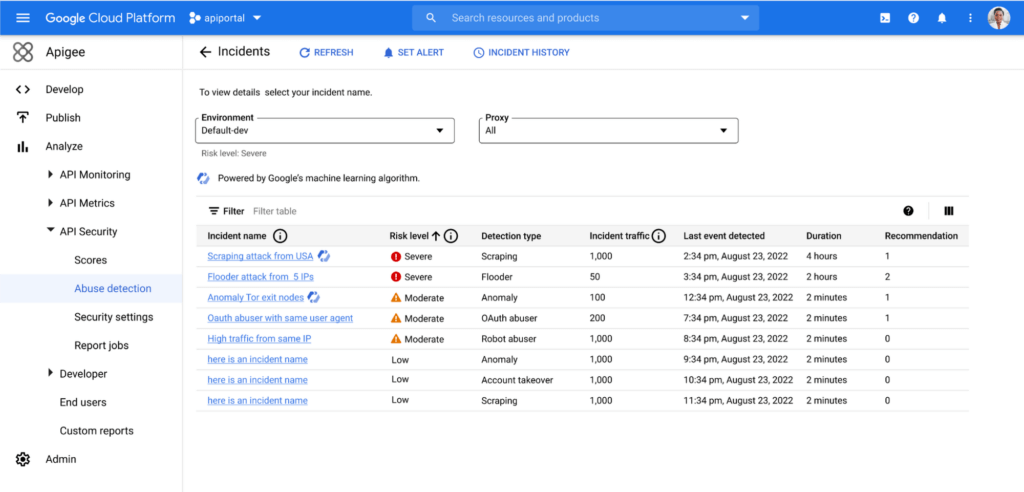
API security incidents can have a considerable impact on an organization’s operations and its bottom line. In June 2022, Imperva released a report titled Quantifying the Cost of API Insecurity, which estimates that lack of secure APIs could result in an average annual API-related total global cyber loss of between $41 billion to $75 billion annually. Furthermore, according to IBM’s 2022 Cost of a Data Breach Report, the average cost of a data breach is $4.35 million. It’s vital that organizations detect and mitigate API abuse incidents early to prevent prolonged fiscal and reputational damage to the business.
However, business logic attacks are harder to detect using static security policies, which allows attackers to manipulate legitimate functionality to achieve a malicious goal without triggering any static security alerts. For example, if a malicious actor gains control of a server and makes subtle changes, the shift in activity patterns of the server is generally undetectable to most monitoring tools. However, in this scenario, the Advanced API Security’s ML-powered API abuse detection model can help differentiate between legitimate and deviant traffic and immediately notify key stakeholders to act quickly and minimize blast radius of the problem.
The ML models that power API abuse detection have been trained and used by Google’s internal teams to help protect our public-facing APIs. The models rely on years of learning and best practices and are now available to all Apigee Advanced API Security customers.
Another challenge in detecting API abuse incidents is the volume of alerts. To reduce the risk of missing key security incidents, many static rules that detect less sophisticated attacks are incredibly sensitive: They generate a high volume of alerts. This makes finding the critical incidents within API traffic and acting to resolve them like “finding a needle in a haystack” for many IT teams. Apigee Advanced Security’s ML-powered dashboards more accurately identify critical API abuses and find similar patterns within the large number of bot alerts to help reduce the time to find and act on most important incidents.
With the help of Apigee Advanced API Security’s ML-powered abuse detection dashboards, customers can uncover critical API abuse incidents, including business logic attacks, scraping, and anomalies, faster. Critical threats are surfaced with clear and concise descriptions to capture the essence of the attack along with the most important characteristics such as the source of the attack, the number of API calls, and the duration of the attack, to help resolve the incident more rapidly.
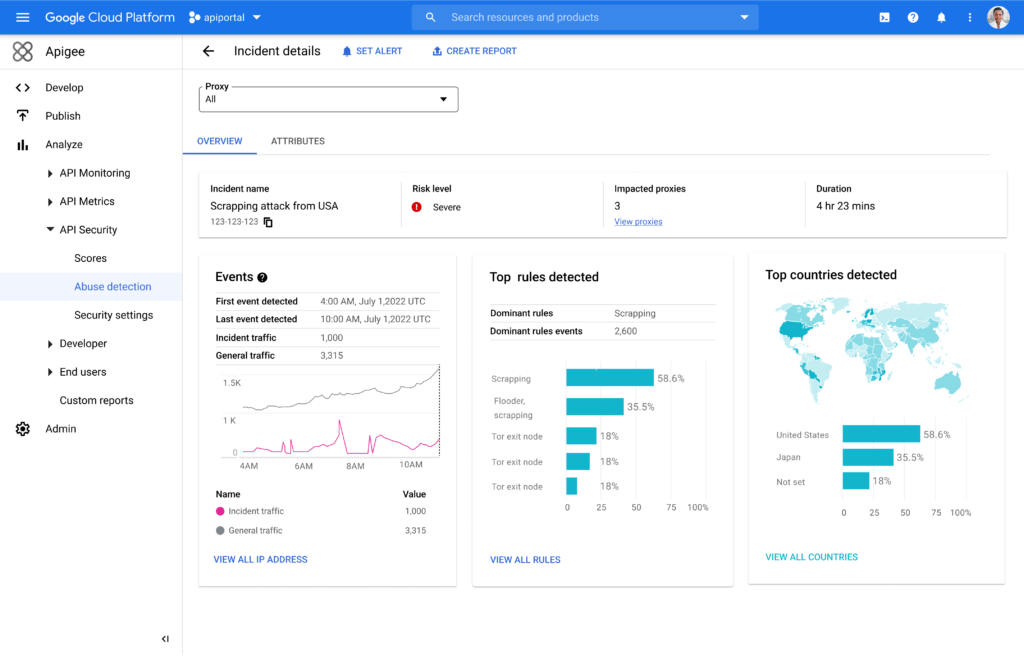
Machine Learning powered abuse-detection dashboards are available in Advanced API Security, a feature of Apigee API management that enables you to more easily detect API security misconfigurations, bad bots, and malicious activities.
To get started with Advanced API Security’s ML-powered dashboards, start your free Apigee trial now.
More Relevant Stories for Your Company

Manage IAM permissions with the Google Cloud mobile app
What’s new with Permissions Management on the Cloud Mobile App Identity and Access Management (IAM) is the foundation of a strong cloud security posture, ensuring that the right access and permissions for cloud resources are granted across your organization. The Google Cloud mobile app gives cloud administrators the ability to quickly and easily

Announcing reCAPTCHA Enterprise’s Mobile SDK to Help Protect iOS, Android apps
reCAPTCHA Enterprise is Google’s online fraud detection service that leverages more than a decade of experience defending the internet. reCAPTCHA Enterprise can be used to prevent fraud and attacks perpetrated by scripts, bot software, and humans. When installed inside a mobile app at the point of action, such as login,

Investing for Future: Why Shifting Security Left Helps Your Bottom Line
The concept of "shifting left" has been widely promoted in the software development lifecycle. The concept is that introducing security earlier, or leftwards, in the development process will lead to fewer software-related security defects later, or rightwards, in production. Shifting cloud security left can help identify potential misconfigurations earlier in

How AI-powered ML Models Helps Run Unemployment Claims Verification at Scale
With unemployment application submissions reaching record numbers over the past year, state and local agencies in the United States have faced the challenge of processing unprecedented numbers of claims per week. The digital infrastructure most agencies have in place is unable to handle this volume, resulting in constituents waiting longer,
