





Announcing reCAPTCHA Enterprise’s Mobile SDK to Help Protect iOS, Android apps

4208
Of your peers have already read this article.
2:30 Minutes
The most insightful time you'll spend today!
reCAPTCHA Enterprise is Google’s online fraud detection service that leverages more than a decade of experience defending the internet. reCAPTCHA Enterprise can be used to prevent fraud and attacks perpetrated by scripts, bot software, and humans. When installed inside a mobile app at the point of action, such as login, purchase, or account creation, reCAPTCHA Enterprise can block fake users and bots while allowing legitimate users to proceed.
To provide more complete coverage for native mobile iOS and Android applications, we’re announcing the general availability of the reCAPTCHA Enterprise Mobile SDK. Designed with digital-first and mobile-first organizations in mind, the new Mobile SDK fully integrates reCAPTCHA Enterprise’s frictionless experience on end-users’ mobile devices.
Why should I use the Mobile SDK?
Unlike most web applications, iOS and Android apps run on physical devices that can provide a wealth of device telemetry to help identify fraud and bot activity. By combining both device and network signals, the new mobile SDK can better protect native mobile applications from bot attacks while unlocking the full potential of reCAPTCHA Enterprise. It provides:
- Frictionless customer experience — no picking fire hydrants from a grid
- Easy integration to your native mobile app with support for popular frameworks like Cocoa Pods and Swift Package Manager
- A regularly-updated device threat model to help stay ahead of attack evolution
Protecting against fraud across all your channels
Customers will be able to leverage the new mobile SDK to implement native iOS and Android protection against the OWASP Top 10 automated attacks common on the internet, which include fraudulent account creation, financial hijacking, and credential stuffing. This is particularly important for mobile workforces and end users who use a mobile app to access products and services. Since mobile traffic surpasses web traffic in many industries, it’s even more important to implement a comprehensive mobile app protection strategy to protect against the most prevalent attacks.
Integrating the new Mobile SDK
If you’re interested in learning more about how to integrate the new Mobile SDK, check out the documentation for iOS and Android. Mobile and Web integrations leverage the same easy to understand pricing for Assessments, found here.
Building Unique Customer Experiences with Speed & Scale: Sprinklr & Google Cloud

8216
Of your peers have already read this article.
2:00 Minutes
The most insightful time you'll spend today!
Enterprises are increasingly seeking out technologies that help them create unique experiences for customers with speed and at scale. At the same time, customers want flexibility when deciding where to manage their enterprise data, particularly when it comes to business-critical applications.
That’s why I’m thrilled that Sprinklr, the unified customer experience management (Unified-CXM) platform for modern enterprises, has partnered with Google Cloud to accelerate its go-to-market strategy and grow awareness among our joint customers. Sprinklr will work closely with our global salesforce, benefitting from our deep relationships with enterprises that have chosen to build on Google Cloud.
Akin to Google Cloud’s mission to accelerate every organization’s ability to digitally transform their business through data-powered innovation, Sprinklr’s primary objective is to empower the world’s largest and most loved brands to make their customers happier by listening, learning, and taking action through insights. With this strategic partnership now in place, Sprinklr and Google Cloud will go-to-market together with the end-customer as our sole focus.
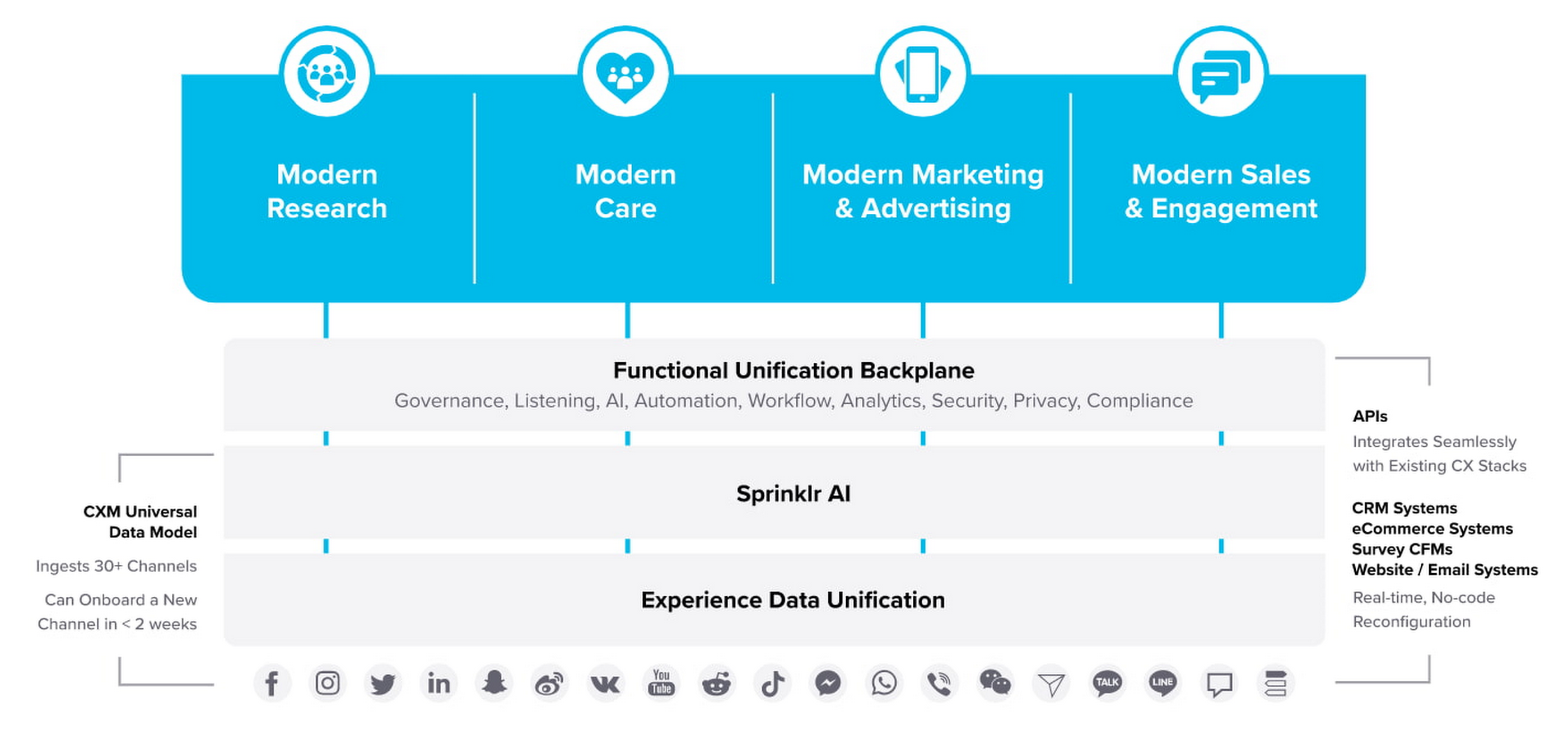
Traditionally, brands have adopted point solutions to manage segments of the customer journey. In isolation, these may work — but they rarely work collaboratively, even when vendors build “Frankenstacks” of disconnected products. These solutions can’t deliver a 360° view of the customer, and often reinforce departmental silos. All of which creates point-solution chaos.
Sprinklr’s approach is fundamentally different and is the way out of the aforementioned point-solution chaos. As the first platform purpose-built for unified customer experience management (Unified-CXM) and trusted by the enterprise, Sprinklr’s industry-leading AI and powerful Care, Marketing, Research, and Engagement solutions enable the world’s top brands to learn about their customers, understand the marketplace, and reach, engage, and serve customers on all channels to drive business growth.
Sprinklr was built from the ground up as a platform-first solution, designed to evolve and grow with the rapid expansion of digital channels and applications. The results? Faster innovation. Stronger performance. And a future-proof strategy for customer engagement on an enterprise scale.
“Sprinklr works with large, global companies that want flexibility when deciding where to manage their enterprise data and consider our platform a business-critical application,” said Doug Balut, Senior Vice President of Global Alliances, Sprinklr. “Giving our customers the opportunity to manage Sprinklr on Google Cloud empowers them to create engaging customer experiences while maintaining the high security, scalability, and performance they need to run their business.”
To learn more about this exciting partnership and the challenges we jointly solve for customers, check out the recent conversation between Google Cloud’s VP of Marketing, Sarah Kennedy, and Sprinklr’s Chief Experience Officer, Grad Conn. Or read the press release on the partnership.
Conversations on Government Security with Dmitri Alperovitch, CrowdStrike’s Founder and Former CTO

4832
Of your peers have already read this article.
2:00 Minutes
The most insightful time you'll spend today!
As I was preparing for my fireside chat with Dmitri Alperovitch, Founder and Former CTO of CrowdStrike and Executive Chairman of the Silverado Policy Accelerator, for the Google Cloud Government Security Summit taking place on Tuesday, July 20th, I was reflecting about recent developments in cybersecurity, Zero Trust best practices – including aspects of Google’s journey – and the benefits that this approach to cybersecurity brings to the public sector.
As Dmitri and I discussed what we wanted to share during our session at the Government Security Summit, I quickly realized how pertinent the information was to our public sector audience. For that reason, ahead of Tuesday’s event, I wanted to give you a glimpse of what is to come in our fireside chat. Read below for an exclusive preview of what we plan to discuss. If you are planning to attend on Tuesday, we encourage you to ask questions through our interactive chat function and sign up for 1:1 time with our Ask the Expert program.
Check out my chat with Dmitri below…
Heather: What do you see as the most significant changes in both the attack surface and cybercriminal tactics in recent years? And why do these changes present unprecedented challenges for public sector?
Dmitri: In terms of the threat landscape, the more things change, the more they stay the same. The adversaries haven’t changed that much. It’s actually striking. Not all threats are emanating from governments or state actors – either directly or by providing safe harbor to criminals – but a large portion are. That has not changed. The volume and scale of attacks have grown, however, and become massive. And now, the greatest challenge is that everyone is a target. Before, only top-end institutions and government organizations were facing nation state threats. That has changed either through targeted attacks or accidental ones, such as WannaCry. The question now is “How do we protect the most vulnerable and extend much-needed protection to smaller organizations that do not have deep security expertise or resources?”
Heather: Earlier this year, the Biden Administration released its Cybersecurity Executive Order (EO). What do you see as the most important takeaways and potential impact of the EO?
Dmitri: The Cybersecurity EO is set to have a significant impact. The biggest change is a shift in strategy. For many decades, we all had the mentality that we have to keep attackers out of the network. That is great in theory, but we all know that it is a virtual impossibility with a network of any significant size. Adversaries will find a way in. And, we used to think it was game over once they were in the network.
Then about 10 years ago, we began to see a change. Google led the way with its BeyondCorp strategy as did Lockheed Martin with its sentinel Kill Chain framework. Now, when an adversary penetrates a network, it’s not the end of the game, but the beginning. That is the case if the organization is prepared with a network architecture built around Zero Trust principles. The adversary now has to move laterally, steal credentials, and elevate privileges to get to the resources they want. A Zero Trust architecture can slow them down and give organizations time to detect and eject adversaries from the network. The EO recognizes the power of this approach and has made Zero Trust its fundamental tenet.
Heather: Federal agencies have spent the last 60 days looking at Zero Trust and developing their plans. What do you hope to see? What is critical to accelerating implementation?
Dmitri: The EO establishes a very ambitious timeline, and the US government is not known to move rapidly due to a number of restrictions and considerations. That said, the EO recognizes the idea that logging has to be at the center of modern architecture. Agencies need full visibility into what is going on at endpoints and across the network, have to hunt continuously across networks for adversaries, and must work to rapidly eject them. That is at the core of the EO, and it is a great shift. The private sector should be watching and learning as well.
Heather: What pitfalls should the Federal government look out for in moving forward to implement the EO?
Dmitri: One of the main challenges is the limited authority of the President. Congress is the only branch with the power to change the laws. While the establishment of the Cybersecurity and Infrastructure Security Agency (CISA) a few years ago allows for hunting across agency networks, CISA still has limited authority. It cannot manage the cybersecurity of more than 120 civilian agencies.
Some agencies are performing well when it comes to security, but we have to recognize that this is not the norm. Not all agencies have the capacity to recruit the best cybersecurity talent, but their needs may be just as great. We need to centralize capabilities and leverage the cloud, like Google, to provide all agencies with the best cyber talent and resources.
Join us at the Google Cloud Government Security Summit to hear the rest of our conversation. The event is complimentary. Register today to reserve your spot on July 20th. If you have any questions about the event, please reach out to us at cloudsummitsupport@google.com.
Google Products Helps HMH’s Healthcare Staff Work from Anywhere Efficiently and Securely!

10219
Of your peers have already read this article.
3:00 Minutes
The most insightful time you'll spend today!
Hackensack Meridian Health (HMH) executive Mark Eimer explains how an ambitiously-timed rollout of a comprehensive suite of Google products helped the entire organization—from doctors to IT staff—achieve better security, cultivate a more equitable work environment, and ultimately, improve patient outcomes.
How does a recently merged, 17-hospital healthcare system fast-track a platform migration and hardware rollout securely and in a way that improves work for everyone, regardless of location or role? These are the questions that kept me up at night in early 2020, when the pandemic demanded a “big bang”—something our legacy laptops and operating systems couldn’t handle.
We began our work with Google in 2020 with the adoption of Chrome as our default browser. As we migrated platforms, keeping patient data safe was of the utmost importance to us, along with providing every staff member with the tools they needed to work virtually. Our staff often experienced issues accessing our web-based applications using Internet Explorer or Edge Browser, a problem that went away when we switched to Chrome. Chrome’s versatile compatibility also made it easier for my team to migrate all of our web-based operations, and Chrome’s security and manageability were key components to making this switch a huge win for the organization.
The success of this migration led us to extend our Google partnership to patient care applications—where Google’s expertise in AI and ML helps scale the use of diagnostics tools and improve other aspects of the patient journey.

Achieving security at every step
Like so many other healthcare organizations, we’ve been concerned about ransomware attacks. This is part of why we moved to Google Workspace and distributed over 3,000 Chrome OS devices in kiosk mode in March of 2020, when many of us went remote due to the pandemic. We were very concerned about team members accessing corporate applications through home devices that were running EOL operating systems (WIN7), as well as a general lack of antivirus and encryption measures.
We were protected by the fact that Google’s software and hardware both had built-in security features that we needed to stave off sophisticated attackers. For example, Chrome OS automatically updates to the latest security update and encrypts data living outside the cloud on the hardware. These features protected us from security-related disruptions, letting us securely move a huge library of file shares and emails across thousands of accounts to Google Chrome OS in just four months.
A year later, in March 2021, we migrated the enterprise over to Google Workspace and saw an immediate reduction in spam by 30% from the inherent built-in AI/ML. This meant staff were less likely to receive (and click through) phishing attempts. My team could connect, create, and collaborate easily and securely—even as more of us were working from home and needed to access sensitive data remotely.
Leveling the playing field
As an organization, we were surprised by how many team members didn’t have personal computers at home. We quickly decided that if we needed team members to work from home, the health network would have to supply hardware. Chromebooks’ lower price tag compared to PCs—on top of their built-in security controls—allowed us to purchase, deploy, and support that initial distribution of 3,000 Chromebooks to team members in less than three weeks, providing devices to every eligible remote employee instead of just a select few. This was vital to reaching our equitable technology goal as part of our diversity and inclusion initiative: everybody has the same tools to do good work.
When all employees have what they need to do their jobs well, we get better patient outcomes. Before we began this cloud adoption journey, patient and staff experiences were different within the hospitals and outside of them.
Now it’s the same wherever our staff is, and we’ve seen efficiency and accessibility benefits extend to the patient side. For example, we built a web-based contact center that supports 80 locations that use Workspace and Chrome OS devices. Since customer service, admin, and providers are all on the same system, it has become a one-stop shop for patients.
Furthermore, through the Grow with Google program, we were able to provide another benefit to employees that drove our equity goals. Google trained 50 non-IT staff members—from environmental services, food and nutrition, and other non-tech areas who were interested in making a career change to IT—on the Google products we were using. They may not have thought about switching to a career in IT before the Grow with Google program came to our organization, but through this partnership, they now have that opportunity.
A strategic, long-term partner
With any large-scale rollout, the work doesn’t end once laptops are in employee hands. Google has shown their commitment to long-term collaboration as they continuously optimize their products for the unique needs of healthcare providers and go the extra mile in tailoring tools to our staff’s workflows.
For example, on the Chrome OS side, the Google team has helped our registration desks and document centers with device integration for hardware like credit card readers and e-signature pads. They’ve also helped us meet security and privacy requirements mandated by state and federal governments around HIPAA, Medicaid, and Medicare reimbursements. Over this next year, we’ll look at a feature roadmap with Google Cloud to deliver further enhancements, iterating on the product itself to meet our needs for the present and the future.

Delivering the future of healthcare
The benefits we’ve seen around security and usability—and the ability to provide all staff with equal access to Google’s technology—are why we’re expanding our partnership with Google to both the administrative and clinical sides of HMH. In addition to further Google rollouts with corporate, next year we’re distributing Chromebooks to all 350 of our ambulatory clinics.
We’re also working with the Google professional services team to create a custom AI model that analyzes 3D mammogram images. This AI model will enable two providers to read mammograms—which adheres to international best practices but is currently rare in the US—without requiring additional time. Conducting double readings of mammograms will yield better health outcomes for our patients, such as a lower patient recall rate and an increased accuracy in detecting breast cancer.
We’re currently building the model using a variety of Google Cloud products, including Cloud Healthcare API. Once complete, this model is expected to be trained, deployed, and maintained in Google’s Vertex AI, allowing our providers to be more productive as they make clinical decisions with AI support. As the model is proven over time, we plan to make the predictive services accessible to other healthcare organizations.
With Google, we’re able to achieve a unified architecture for storing data as well as training and deploying AI models, which enable our staff to work more efficiently and securely from anywhere. While I may not be able to predict the future as accurately as AI can, I foresee our continued partnership with Google as a key part of HMH’s improved provider and patient outcomes.
Manage IAM permissions with the Google Cloud mobile app

1209
Of your peers have already read this article.
2:00 Minutes
The most insightful time you'll spend today!
What’s new with Permissions Management on the Cloud Mobile App
Identity and Access Management (IAM) is the foundation of a strong cloud security posture, ensuring that the right access and permissions for cloud resources are granted across your organization. The Google Cloud mobile app gives cloud administrators the ability to quickly and easily manage their organization’s cloud identities and access from the mobile platform of their choice.
Permissions management is one of the top user-requested features for the Cloud mobile app based on feedback we’ve received. The Permissions tab is used by more than half of our mobile users every month, highlighting the importance of easily managing permissions on-the-go.
We are excited to announce the availability of enhanced permissions management on the Google Cloud mobile app. This new capability enables you to easily view, assign and search for all the roles in your organization.
Manage permissions easily on-the-go
The Cloud mobile app has expanded beyond supporting the three basic roles of Owner, Editor, and Reader, to supporting all the roles in your organization. Administrators are not only able to see all the roles but also assign these roles across their organization:
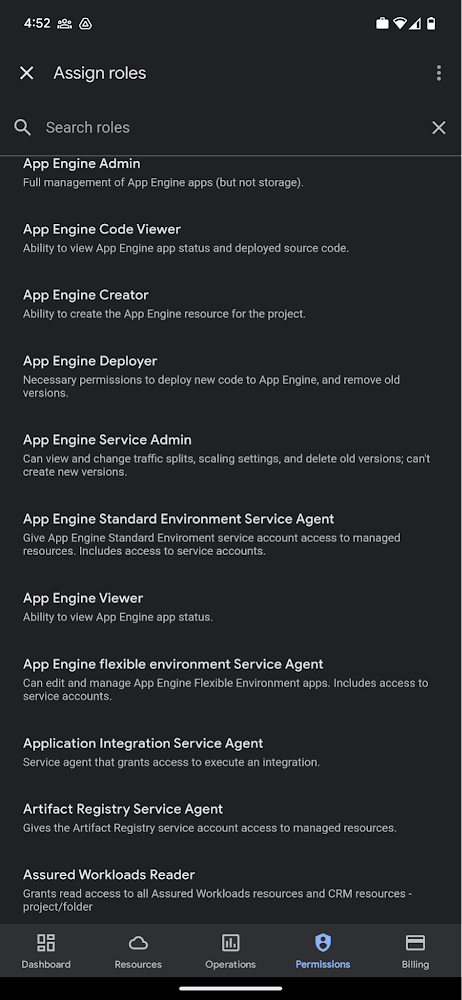
Administrators can also easily view a list of users, and click into each to see all the roles assigned to each user. On top of that, you can easily leverage the search capability to check if a role is assigned and modify its assignment. You can even assign multiple roles at the same time for easy editing. The app will show you a summary of changes before you will proceed.
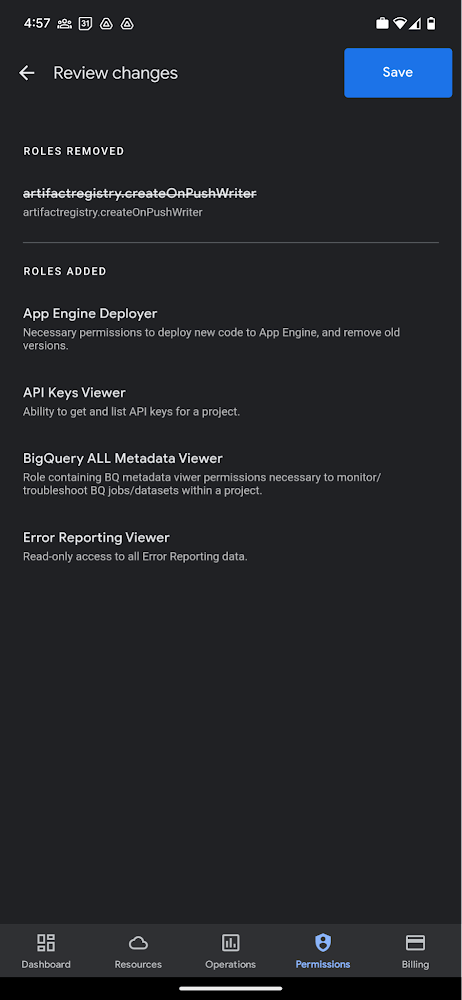
The layout is optimized for mobile, with the categories of information organized for easy viewing. Currently assigned roles are always displayed on the top of the screen so they are easily accessible. Basic roles appear below, followed by all other roles grouped by Google Cloud products.
Get started on the Google Cloud app today
To summarize we’ve enhanced permissions management on the Google Cloud mobile app with:
- Smoother navigation
- Support for all the roles in your organization
- Easy search for assigned roles
- Ability to review changes before applying
Give enhanced permission management a try and explore the possibilities by downloading the app today from Google Play or the Apple App Store. If you have any feedback, we would love to hear from you – simply click on the “send feedback” button in the app to share your experience.

3440
Of your peers have already downloaded this article
14:30 Minutes
The most insightful time you'll spend today!
Security analytics and operations can be complex, requiring highly skilled professionals and detailed processes. To overcome these issues, security teams tend to deploy an array of security analytics tools and technologies to collect, process, analyze, and act upon growing volumes of security telemetry.
Despite this investment, however, many organizations continue to find it difficult to manage cyber risk or detect and respond to cyber incidents.
How can CISOs address these issues and develop effective security analytics and operations processes? In order to get more insight into these trends, ESG surveyed 406 IT and cybersecurity professionals at organizations involved with the planning, implementation, and/or operations of their organization’s information security policies, processes (including purchase decisions), or technical safeguards and familiar with their organization’s collection and/or analysis of security data in support of information security management strategy.
This study sought to:
- Determine current strategies used for security analytics and operations.
- Understand the impact of using public cloud resources for processing and storing data on security analytics and operations technology decisions.
- Identify how security analytics and operations challenges are affecting organizations’ ability to monitor cyber risks and detect/respond to cyber-attacks
- Uncover future enterprise security analytics and operations strategies and plans.
Download your copy today!
More Relevant Stories for Your Company

Redefining Network Security with Google Cloud’s Secure Web Proxy
Google Cloud provides multiple layers of security to help customers stay ahead of evolving threats and keep their cloud workloads safe. Today at our annual Security Summit, we are excited to announce the general availability of Secure Web Proxy, a new cloud-first network security offering that provides web egress traffic inspection, protection,

Case Study: How Exabeam Unlocked its Ability to Scale for Storage & Ingest Data from More Than 500 Security Vendors
Editor’s note: The post is part of a series highlighting our awesome partners, and their solutions, that are Built with BigQuery. Exabeam, a leader in SIEM and XDR, provides security operations teams with end-to-end Threat Detection, Investigation, and Response (TDIR) by leveraging a combination of user and entity behavioral analytics (UEBA)



Chronicle Security Analytics: Key to Address Security Data Overload
Google Cloud's Chronicle is a security analytics platform built for modern use cases to combat modern threats. In today's world, enterprises have undergone significant changes in all aspects, and must adapt to their security needs to counter threats and attacks. Watch the video to learn Google Cloud's initiative to help

New Certificate Manager Helps Leverage Google’s Network Security and Performance
We’re excited to announce the public preview of Certificate Manager and its integration with External HTTPS Load Balancing. Certificate Manager enables you to use External HTTPS Load Balancing with as many certificates or domains as you need. You can bring your own TLS certificates and keys if you have an
