





CCAI Platform goes GA: Deliver World-class CX and Accelerating Time-to-value with AI

2786
Of your peers have already read this article.
2:30 Minutes
The most insightful time you'll spend today!
Customers reach out to contact centers for help in moments of urgent need, but due to increasing demands, new channels, peak times, and operational pressures, contact centers often struggle to provide timely help. To bridge this gap, enterprises are increasingly investing in AI-driven solutions that balance addressing customer expectations with operational efficiency.
But building and generating value from such solutions can be complicated and challenging. Google Cloud built Contact Center AI (CCAI) to streamline and shorten this time to value, and CCAI Platform, our newest addition, takes a crucial step in this effort by introducing end-to-end call center capabilities. After debuting these new capabilities in March, we are excited to announce that CCAI Platform is now generally available across the US, Canada, UK, Germany, France, Italy and Spain—with more markets soon to come.
Delivering world-class customer experiences and accelerating time-to-value with CCAI
CCAI encompasses a comprehensive set of offerings to address the top pain points of the three main user groups in the contact center: contact center owners, their agents, and the customers they serve.
Dialogflow lets the contact center manager scale their operations while balancing cost and customer satisfaction, including reducing painful, long waiting times endured by end users. Using Dialogflow, contact center managers can build complex chat and voice virtual agents—a proven, cost-effective way to scale contact centers while continuing to provide great customer experiences. Available 24/7, without any waiting queue, these virtual agents can converse naturally with customers, identify their issues, and address them effectively.
Agent Assist reduces overall handling time and coaches human agents to become more effective and helpful. The service uses AI to “listen” to the voice and chat conversations between the human representative and the customer, then provides real-time guidance and recommendations to the agent, based on historical conversations, knowledge bases, and best practices of experienced agents. It also automates post-call actions such as transcription and call summarization, saving significant time and overhead at the end of every call.
CCAI Insights stores and analyzes all the customer conversations in the contact center, whether with human or virtual agents, to provide leaders with real-time, actionable data points on customer queries, agent performance, sentiment trends, and opportunities for automation.
At the heart of these technologies is our conversational AI brain. It uses Google Research’s technology to talk, understand, and interact, enabling and orchestrating high-quality conversational experiences at scale.
CCAI Platform: a modern CCaaS and the shortest path to CCAI value
While the value of the CCAI offerings is clear to our customers, we also hear from them that integrating these solutions with legacy infrastructure takes too long.
To minimize these integration difficulties, accelerate time-to-value using the CCAI offerings, and help businesses provide outstanding customer experiences, we’re pleased to announce the general availability of CCAI Platform, the Contact Center as a Service (CCaaS) solution from Google Cloud built in partnership with UJET.
CCAI Platform is a modern, turnkey Contact Center as a service solution, designed with user-first, AI-first, and mobile-first principles. It offers:
- Turnkey core Contact Center capabilities out-of-the-box, for faster time to production, lower implementation overhead, and custom development needed
- AI-powered experiences, from routing to better handling customer interactions
- Deep integration with CCAI’s offerings, to provide a unified end-to-end experience for contact center transformation
- Mobile-first design that enables interactions in line with the way people expect to communicate across channels
- CRM-centered design with automated updates, so agents can focus on the customer
- Deployment flexibility, with customer data residing in their CRM and the flexibility to bring their own telephony carrier to minimize cost
All of this is available without the typical need to integrate complex technologies from multiple providers.
“With Google Cloud and CCAI Platform, we will quickly move our contact center to the cloud, supporting both our customers and agents with industry-leading CX innovations, all while streamlining operations through more efficient customer care operations,” said Dean Kontul, Division CIO of KeyBank.
For customers looking to change platforms for a cloud-native CCaaS with deep Google AI integrations, CCAI Platform offers end-to-end capabilities that accelerate call center transformations. We also remain strongly committed to customer choice, and customers will continue to have the option to integrate our latest and greatest CCAI offerings through our existing OEM partners.
The Contact Center conversation is just beginning
This launch is part of a broader effort to deliver more value, faster, to more CCAI customers. As companies replace interactive voice response (IVR) with intelligent virtual agents (IVA) and begin to collect and analyze data, use cases are likely to grow more sophisticated—which is one reason Google Cloud is continuing to invest in technologies to make our CCAI offerings even more useful, as well as best practices like the following:
- CCAI Agent Assist and Insights are a great first step in AI transformation. They let contact center owners enable call transcription and use Topic Modeling to identify conversation themes that demand attention. Human agents can automatically generate high-quality conversation summaries to reduce call wrap-up time, and the associated costs, while improving business insights. We are working to make these features available both in CCAI Platform and with our partner ISVs.
- Chat and call steering are the first step for IVA automation. Another area of broad impact is conversational chat or call steering, in which friction is reduced by routing customers to the correct virtual or live agent experience. Many call centers rely on IVR systems in which customers have to use a keypad to select an option. Enterprise leaders tell us that attrition is very high throughout this process: some customers angrily hang up without resolution and, just as bad, many simply pound a single key in hopes of reaching a human agent, leading to the customer reaching the wrong person because their issue was never correctly identified or routed. Using Dialogflow’s natural language understanding (NLU) capabilities can sweep away such problems, with the customer more likely to not only reach the appropriate resources, but also share conversational data from which insights can be gleaned. It’s an approach that can pay dividends right away, and a quick first step to IVA automation.
In coming months, we will continue to work on these and other capabilities that are targeted to deliver higher and quicker value to our customers. We plan to release pre-built components to help companies tackle call center use cases in specific industries, for example. We’ll also continue to partner with companies that share our vision of transforming customer experiences with AI, such as TTEC, a provider of customer experience technology and software.
“TTEC Digital and Google Cloud have a shared vision for transforming global CX delivery through artificial intelligence, digital innovation, and operational excellence,” said Sam Thepvongs, VP of TTEC Digital. “With CCAI Platform, we can offer our largest enterprise customers a strategic blueprint for moving to the cloud while adopting a leading, AI-powered contact center platform. We couldn’t be more excited about this evolution of Google Cloud’s groundbreaking CCAI portfolio, and the opportunity to help our customers digitally transform their CX through this partnership.”
To get started with CCAI Platform, visit our solutions page or checkout our new omni channel demo video—and don’t forget to join us at Google Cloud Next ’22, where I’ll be sharing exciting new updates for CCAI in my session, “Delight customers in every interaction with Contact Center AI.”
Smart Reply: How the AI-augmented Chat Helps Scale Google’s Tech Support Operations

2905
Of your peers have already read this article.
3:00 Minutes
The most insightful time you'll spend today!
As Googlers transitioned to working from home during the pandemic, more and more turned to chat-based support to help them fix technical problems. Google’s IT support team looked at many options to help us meet the increased demand for tech support quickly and efficiently.
More staff? Not easy during a pandemic.
Let service levels drop? Definitely not.
Outsource? Not possible with our IT requirements.
Automation? Maybe, just maybe…
How could we use AI to scale up our support operations, making our team more efficient?
The answer: Smart Reply, a technology developed by a Google Research team with expertise in machine learning, natural language understanding, and conversation modeling. This product provided us with an opportunity to improve our agents’ ability to respond to queries from Googlers by using our corpus of chat data. Smart Reply trains a model that provides suggestions to techs in real time. This reduces the cognitive load when multi-chatting and helps a tech drive sessions towards resolution.
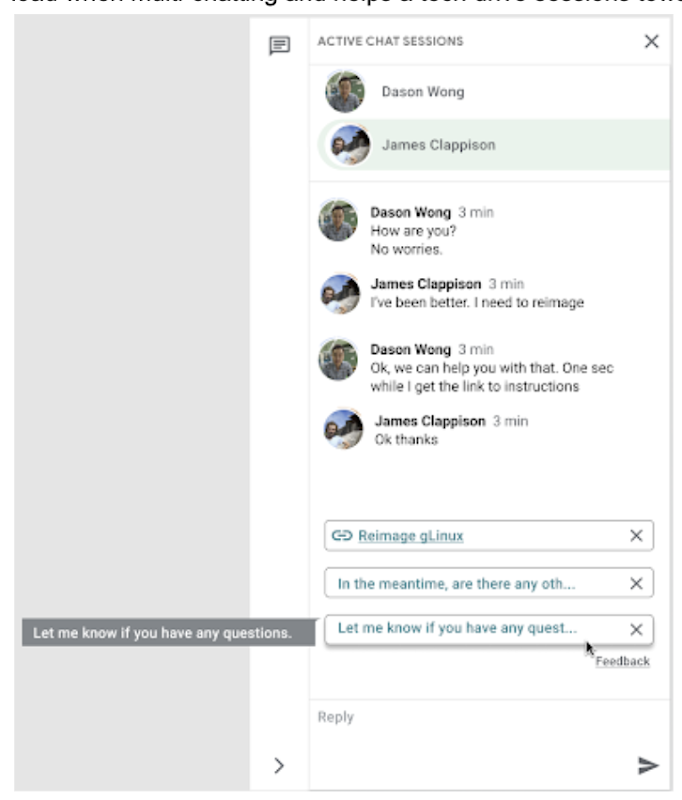
In the solution detailed below, our hope is that IT teams in a similar situation can find best practices and a few shortcuts to implementing the same kind of time saving solutions. Let’s get into it!
Challenges in preparing our data
Our tech support service for Google employees—Techstop—provides a complex service, offering support for a range of products and technology stacks through chat, email, and other channels.
Techstop has a lot of data. We receive hundreds of thousands of requests for help per year. As Google has evolved we’ve used a single database for all internal support data, storing it as text, rather than as protocol buffers. Not so good for model training. To protect user privacy, we want to ensure no PII (personal identifiable information – e.g. usernames, real names, addresses, or phone numbers) makes it into the model.
To address these challenges we built a FlumeJava pipeline that takes our text and splits each message sent by agent and requester into individual lines, stored as repeated fields in a protocol buffer. As our pipe is executing this task, it also sends text to the Google Cloud DLP API, removing personal information from the session text, replacing it with a redaction that we can later use on our frontend.
With the data prepared in the correct format, we are able to begin our model training. The model provides next message suggestions for techs based on the overall context of the conversation. To train the model we implemented tokenization, encoding, and dialogue attributes.
Splitting it up
The messages between the agent and customer are tokenized: broken up into discrete chunks for easier use. This splitting of text into tokens must be carefully considered for several reasons:
- Tokenization determines the size of the vocabulary needed to cover the text.
- Tokens should attempt to split along logical boundaries, aiming to extract the meaning of the text.
- Tradeoffs can be made between the size of each token, with smaller tokens increasing processing requirements but enabling easier correlation between different spans of text.
There are many ways to tokenize text (SAFT, splitting on white spaces, etc.), here we chose sentence piece tokenization, with each token referring to a word segment.
Prediction with encoders
Training the neural network with tokenized values has gone through several iterations. The team used an Encoder-Decoder architecture that took a given vector along with a token and used a softmax function to predict the probability that the token was likely to be the next token in the sentence/conversation. Below, a diagram represents this method using LSTM-based recurrent networks. The power of this type of encoding comes from the ability of the encoder to effectively predict not just the next token, but the next series of tokens.
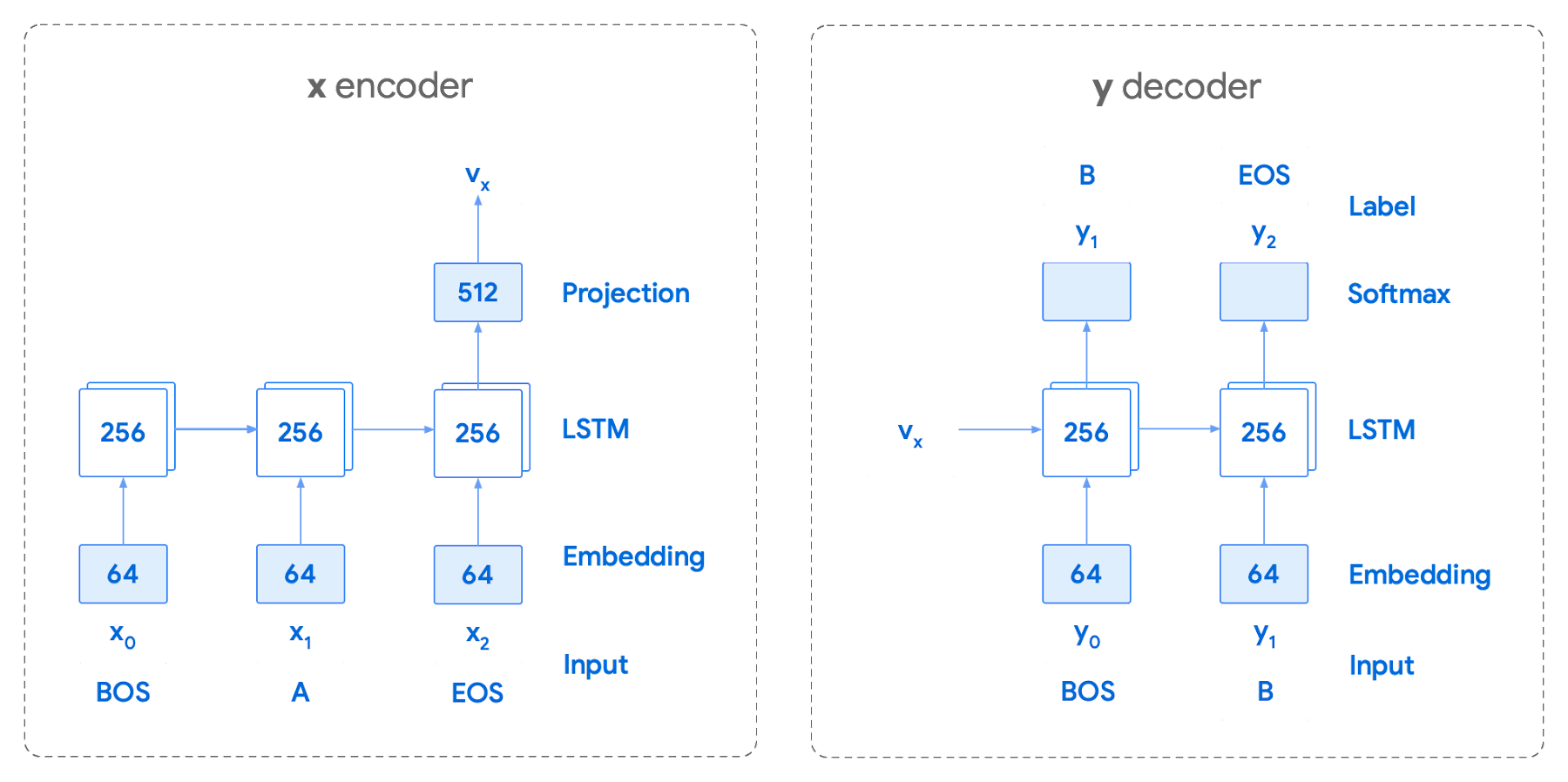
This has proven very useful for Smart Reply. In order to find the optimal sequence, an exponential search over each tree of possible future tokens is required. For this we opted to use beam search over a fixed-size list of best candidates, aiming to avoid increasing the overall memory use and run time for returning a list of suggestions. To do this we arranged tokens in a trie, and used a number of post processing techniques, as well as calculating a heuristic max score for a given candidate, to reduce the time it takes to iterate through the entire token list. While this improves the run time, the model tends to prefer shorter sequences.
In order to help reduce latency and improve control we decided to move to an Encoder-Encoder architecture. Instead of predicting a single next token and decoding a sequence of following predictions with multiple calls to the model, it instead encodes a candidate sequence with the neural network.
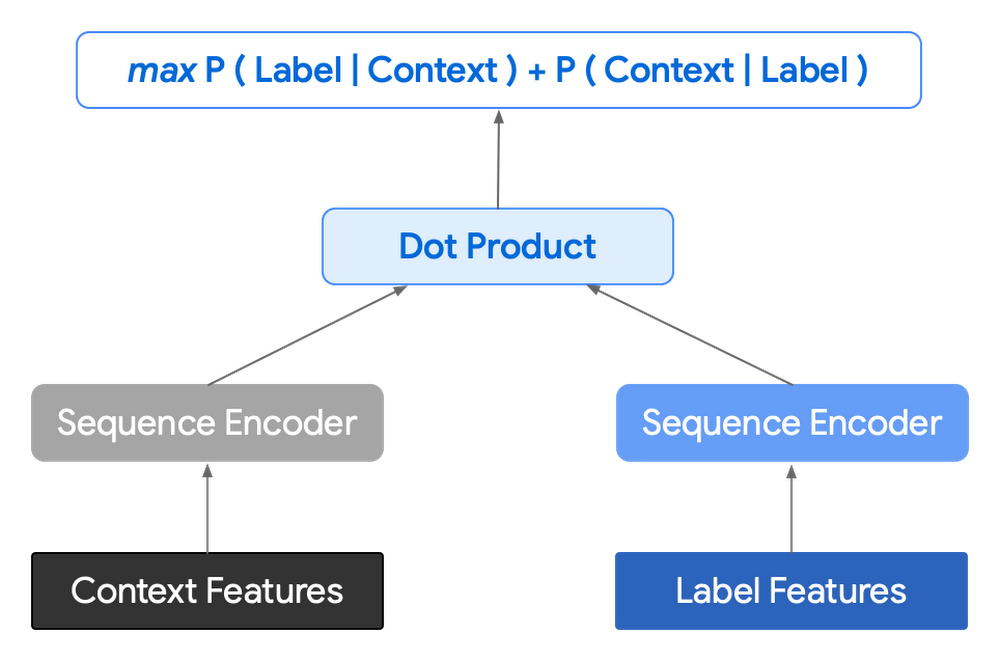
In practice, the two vectors – the context encoding and the encoding of a single candidate output – are combined with dot product to arrive at a score for the given candidate. The goal of this network is to maximize the score for true candidates – e.g. candidates that did appear in the training set – and minimize false candidates.
Choosing how to sample negatives affects the model training greatly. Below are some strategies that can be employed:
- Using positive labels from other training examples in the batch.
- Drawing randomly from a set of common messages. This assumes that the empirical probability of each message is sampled correctly.
- Using messages from context.
- Generating negatives from another model.
As this encoding generates a fixed list of candidates that can be precomputed and stored, each time a prediction is needed, only the context encoding needs to be computed, then multiplied by the matrix of candidate embeddings. This reduces both the time from the beam search method and the inherent bias towards shorter responses.
Dialogue Attributes
Conversations are more than simple text modeling. The overall flow of the conversation between participants provides important information, changing the attributes of each message. The context, such as who said what to whom and when, offers useful bits of input for the model when making a prediction. To that end the model uses the following attributes during its prediction:
- Local User ID’s – we set a finite number of participants for a given conversation to represent the turn taking between messages, assigning values to those participants. In most cases for support sessions there are 2 participants, requiring ID 0, and 1.
- Replies vs continuations – initially modeling focused only on replies. However, in practice conversations also include instances where participants are following up on the previously sent message. Given this, the model is trained for both same-user suggestions and “other” user suggestions.
- Timestamps – gaps in conversation can indicate a number of different things. From a support perspective, gaps may indicate that the user has disconnected. The model takes this information and focuses on the time elapsed between messages, providing different predictions based on the values.
Post processing
Suggestions can then be manipulated to get a more desirable final ranking. Such post-processing includes:
- Preferring longer suggestions by adding a token factor, generated by multiplying the number of tokens in the current candidate.
- Demoting suggestions with a high level of overlap with previously sent messages.
- Promoting more diverse suggestions based on embedding distance similarities.
To help us tune and focus on the best responses the team created a priority list. This gives us the opportunity to influence the model’s output, ensuring that responses that are incorrect can be de-prioritized. Abstractly it can be thought of as a filter that can be calibrated to best suit the client’s needs.
Getting suggestions to agents
With our model ready we now needed to get it in the hands of our techs. We wanted our solution to be as agnostic to our chat platform as possible, allowing us to be agile when facing tooling changes and speeding up our ability to deploy other efficiency features. To this end we wanted an API that we could query either via gRPC or via HTTPs. We designed a Google Cloud API, responsible for logging usage as well as acting as a bridge between our model and a Chrome Extension we would be using as a frontend.
The hidden step, measurement
Once we had our model, infrastructure, and extension in place we were left with the big question for any IT project. What was our impact? One of the great things about working in IT at Google is that it’s never dull. We have constant changes, be it planned or unplanned. However, this does complicate measuring the success of a deployment like this. Did we improve our service or was it just a quiet month?
In order to be satisfied with our results we conducted an A/B experiment, with some of our techs using our extension, and the others not. The groups were chosen at random with a distribution of techs across our global team, including a mix of techs with varying levels of experience ranging from 3 to 26 months.
Our primary goal was to measure tech support efficiency when using the tool. We looked at two key metrics as proxies for tech efficiency:
- The overall length of the chat.
- The number of messages sent by the tech.
Evaluating our experiment
To evaluate our data we used a two-sample permutation test. We had a null hypothesis that techs using the extension would not have a lower time-to-resolution, or be able to send more messages, than those without the extension. The alternative hypothesis was that techs using the extension would be able to resolve sessions quicker or send more messages in approximately the same time.
We took the mid mean of our data, using pandas to trim outliers greater than 3 standard deviations away. As the distribution of our chat lengths is not normal, with significant right skew caused by a long tail of longer issues, we opted to measure the difference in means, relying on central limit theorem (CLT) to provide us with our significance values. Any result with a p-value between 1.0 and 9.0 would be rejected.
Across the entire pool we saw a decrease in chat lengths of 36 seconds.
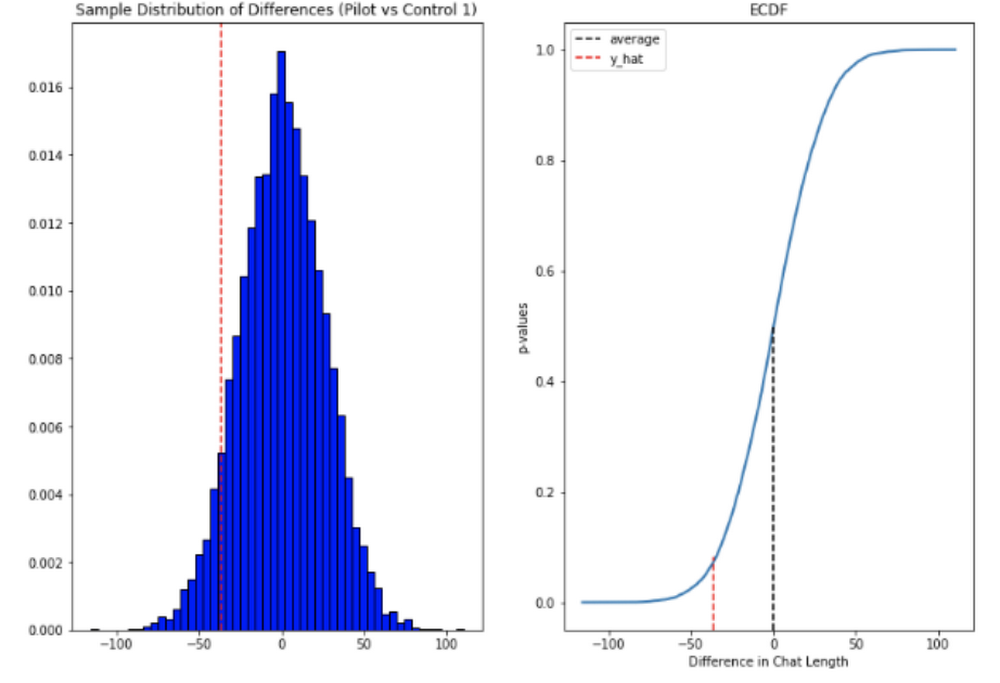
In reference to the number of chat messages we saw techs on average being able to send 5-6 messages more in less time.
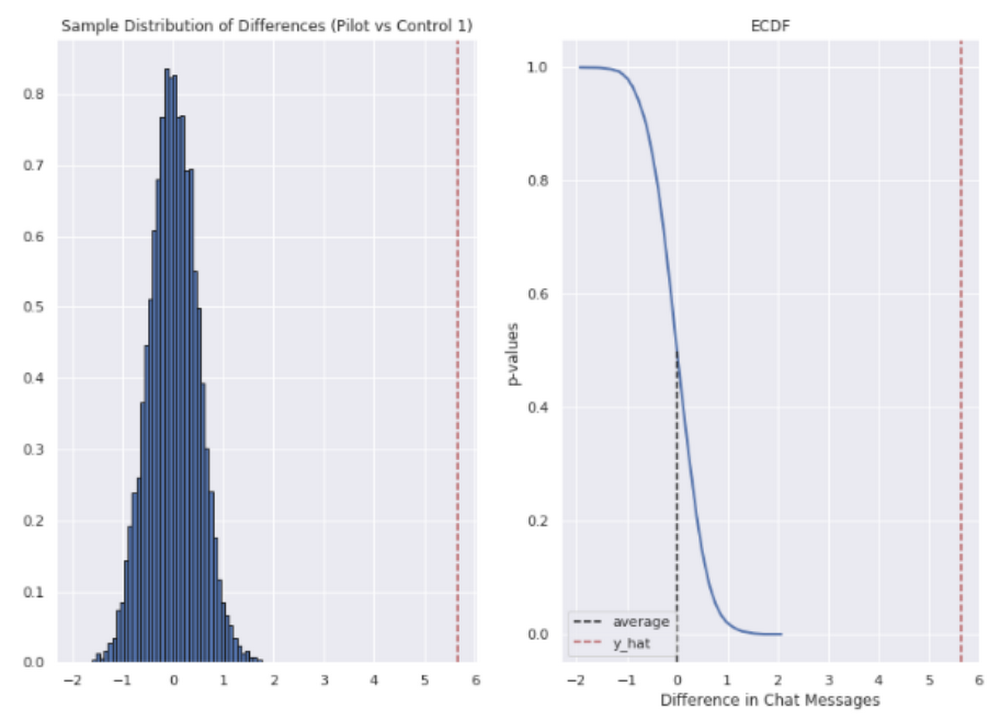
In short, we saw techs were able to send more messages in a shorter period of time. Our results also showed that these improvements increased with support agent tenure, and our more senior techs were able to save an average of ~4 minutes per support interaction.
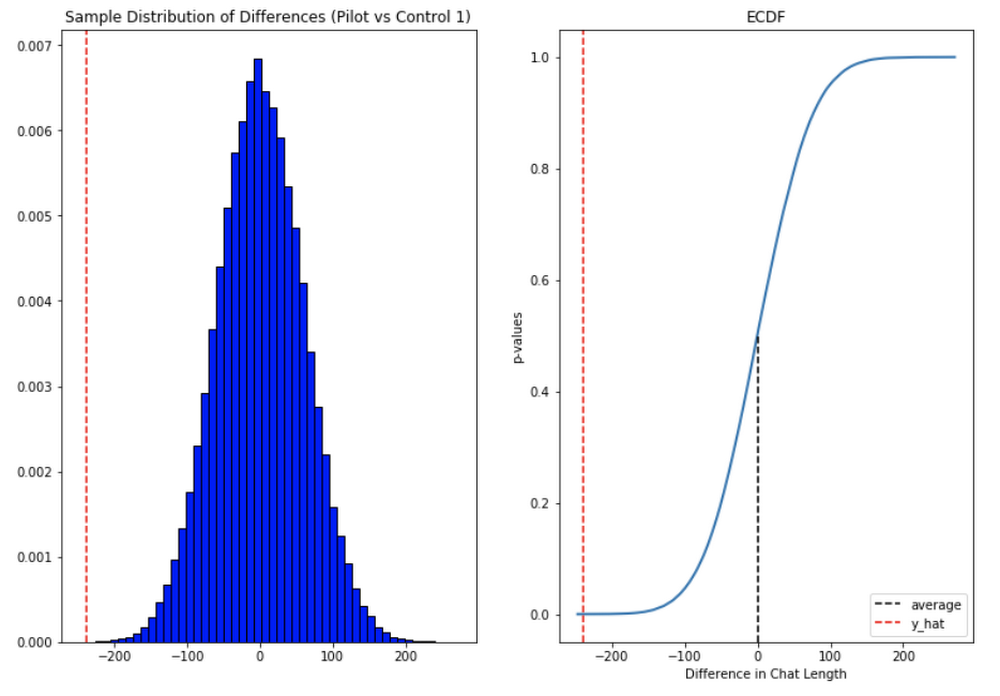
Overall we were pleased with the results. While things weren’t perfect, it looked like we were onto a good thing.
So what’s next for us?
Like any ML project, the better the data the better the result. We’ll be spending time looking into how to provide canonical suggestions to our support agents by clustering results coming from our allow list. We also want to investigate ways of making improvements to the support articles provided by the model, as anything that helps our techs, particularly the junior ones, with discoverability will be a huge win for us.
How can you do this?
A successful applied AI project always starts with data. Begin by gathering the information you have, segmenting it up, and then starting to process it. The interaction data you feed in will determine the quality of the suggestions you get, so make sure you select for the patterns you want to reinforce.
Our Contact Center AI allows tokenization, encoding and reporting, without you needing to design or train your own model, or create your own measurements. It handles all the training for you, once your data is formatted properly.
You’ll still need to determine how best to integrate its suggestions to your support system’s front-end. We also recommend doing statistical modeling to find out if the suggestions are making your support experience better.
As we gave our technicians ready-made replies to chat interactions, we saved time for our support team. We hope you’ll try using these methods to help your support team scale.
Delivering 10X Improvement to Risk and Regulatory Reporting Through Cloud and AI
5001
Of your peers have already read this article.
2:30 Minutes
The most insightful time you'll spend today!
Enterprise agility and the ability to innovate, adapt and respond quickly to the ever-changing risk and regulatory landscape is no longer a choice, but the cornerstone of successful digital transformation and commercial growth. Traditional access to and ways of managing data invariably create challenges in dealing with multiple data repositories, reconciliations, fire-drills, etc.
In response, the move to cloud is increasing significantly. It enables risk analytics and regulatory reporting at scale in a secure environment with data storage, management and encryption capabilities as a standard. In addition, as regulatory reporting requirements become more granular, machine learning can help facilitate new insights and allow for risk management to become more embedded into operational processes.
This webinar will address the day-to-day challenges in risk management and regulatory compliance, while also exploring how technological innovations can provide massive improvements and potential.
Key themes
- Real-life data challenges in the eyes of risk managers: can compliance, fraud detection and identifying liquidity positions be improved through the use of AI?
- Innovative approaches to streamline regulatory reporting to derive deeper customer insights from data at the moment of truth.
- Reimagining operations: how to modernise the data infrastructure to accommodate data explosion, drive flexibility and deliver a more cost effective outcome.
An Expert’s Opinion on What Early-stage Startups Must Know

6469
Of your peers have already read this article.
3:00 Minutes
The most insightful time you'll spend today!
As lead for analytics and AI solutions at Google Cloud, my team works with startups building on Google Cloud. This puts us in the fortunate position to learn from founders and engineers about how early-stage startups’ investments can either constrain them or position them for success, even at the seed level. In this post, I want to share a few of the best practices to keep in mind as you’re building.
Understand your value proposition before diving into a technology stack
If you’re launching a startup in the cloud, you’re no doubt thinking about a technology stack, but it’s important to step back a bit and think carefully about the major value proposition that your startup offers to your customers. That value proposition is going to fundamentally drive the kind of technology that you should pick.
For example, does your system need processing in real time, or can it be done in a batch mode? Can you rely on once-a-day insights or do the insights have to come in as events happen?
Additionally, what kind of latency will your customers face? That latency makes your value proposition either usable or unusable. Early on in Google’s development, leaders realized that no one was going to wait more than a few hundred milliseconds for a web page to show them their results, and that realization drove the technology decisions that have allowed Google to scale from being a startup in a garage to being a trillion dollar company. Your startup needs to define its value to customers with this level of specificity before it can build a technology stack suited to its needs.
Focus on customer interactions
A few companies have gracefully pulled off big IT pivots that reshaped their value proposition. Netflix, for example, moved from mostly sending DVDs through the mail to becoming a streaming service and major content producer. That’s a huge shift in the user experience and the technology stack necessary to support it, even if the underlying value proposition (i.e., get content to customers) was broadly the same. But it’s also an outlier. If you’re planning for potential changes of this magnitude, rather than focused on getting your value proposition to users, you probably need to sharpen what that value proposition is.
Specifically, you need a clear vision of how customers will access and interact with your business. Typically, they’ll do so over a website or a mobile app, but there are still so many variables.
Are customers going to transmit documents? If so, in what format? Is handwriting supported or is input limited to typing? Can they use images for optical character recognition? Will it mostly be forms? Will the data be structured or unstructured? If all that sounds a little overwhelming, don’t worry, it’ll seem simpler by the end of this article—but also be aware: we’re just getting warmed up.
Imagine that most of your customers will access your business via voice, so you know you’ll want to prioritize conversational workflows. That’s a start—but dig deeper. Even if we suppose you’re usingDialogflow, a Google Cloud conversational AI platform that lets you build and deploy virtual agents, we’re still not really seeing the value proposition. How will all this work, from the beginning of a typical full customer interaction to the resolution? How many interactions will have to be facilitated over low-bandwidth connections, for example? When it comes to user interactions, make sure you can see an end-to-end use case.
Another example: you’re building a retail website, and one of your end-to-end use cases involves the customer asking if a certain amount of a given product is in stock, whether it’s one unit of the product, ten or hundreds. If the product is not sufficiently stocked, you want your app to offer similar items that are. Will your technology stack support this end-to-end use case?
These considerations are not an argument for premature optimization. There’s value in moving fast, getting minimum viable products to users, and then iterating. But in the early stages, you only get one chance to start on the right foot—and how you navigate that chance will influence a lot of dollars and effort down the road. You need to make sure you have business use cases, not just an idea, before you can start designing a technology stack.
Here’s how to get in the right frame of mind. Pick three use cases: two that are “bread and butter” and one that is technologically complex. Make sure your proposed technology stack can support all three, end to end.
Default toward higher levels of abstraction
Now that we’re in the right frame of mind, we’re ready to think about the technology stack more directly.
As a startup, you’ll need to conserve resources, and to do that, you’ll want to build at the highest level of abstraction possible for your value proposition. For example, you probably don’t want your people setting up clusters. You don’t want them configuring things if they can use a fully managed service. You want them focused on building your prototype, not managing infrastructure.
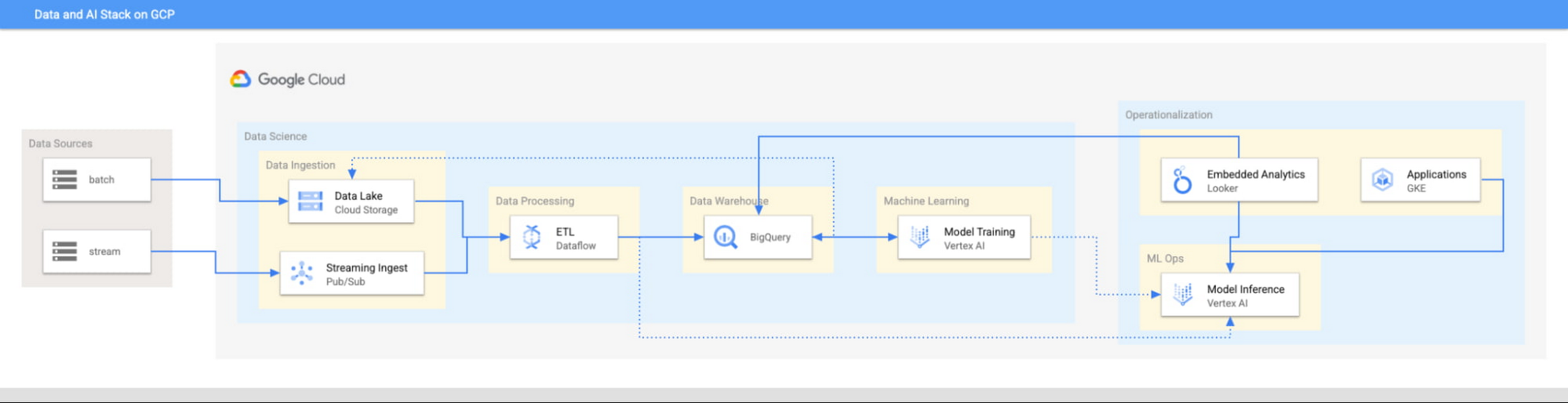
This focus has definitely informed how we create products at Google Cloud, as our canonical data stack—Pub/Sub, Dataflow, BigQuery, and Vertex AI—consists of auto-scaling and serverless products.
But management of infrastructure is not the only place where you should err toward a less-is-more philosophy.
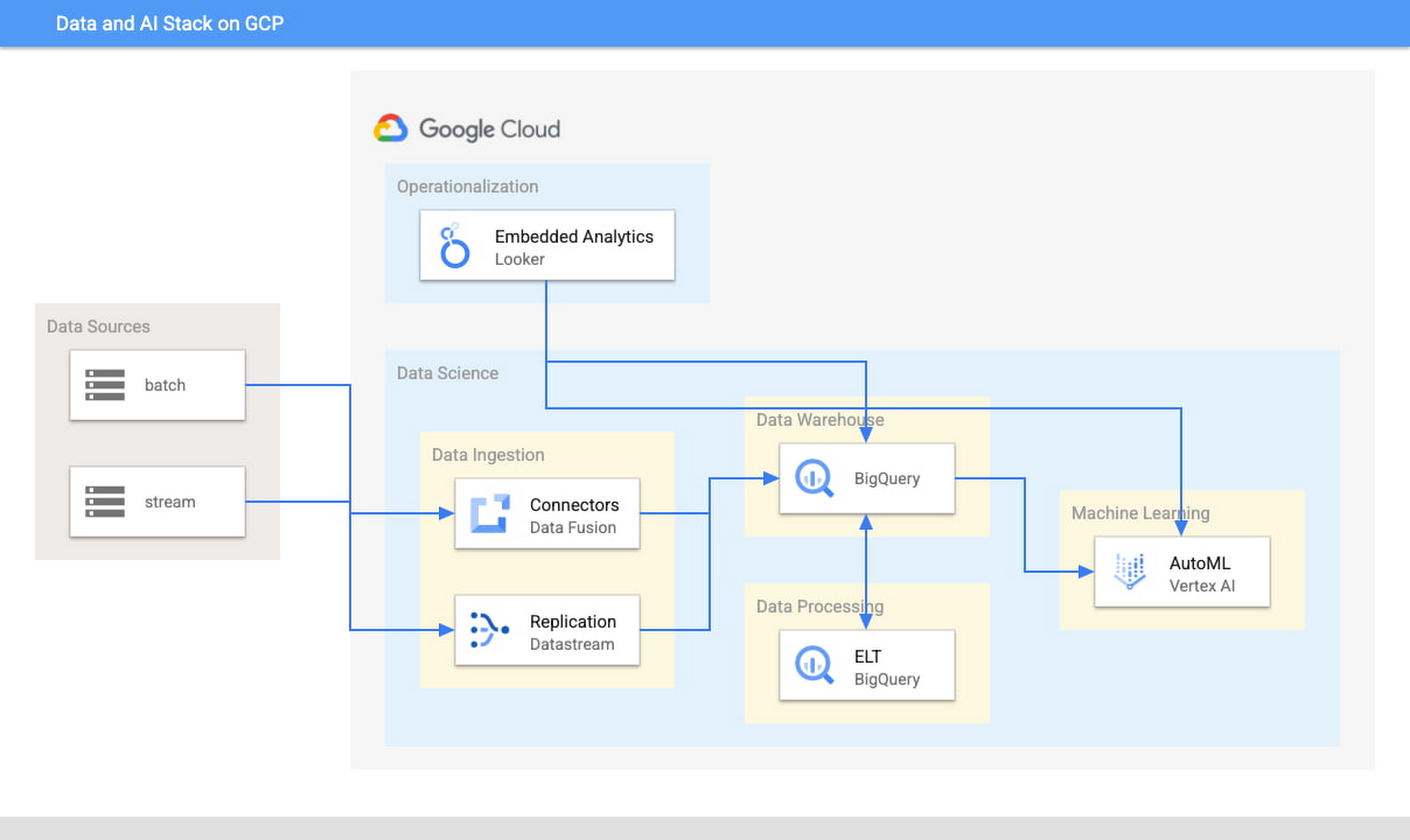
When it comes to architecture, choose no-code over low-code and low-code over writing custom code. For example, rather than writing ETL pipelines to transform the data you need before you land it into BigQuery, you could use pre-built connectors to directly land the raw data into BigQuery. That’s no code right there. Then, transform the data into the form you need using SQL views directly in the data warehouse. This is called ELT, and it is low code. You will be a lot more agile if you choose an ELT approach over an ETL approach.
Another place is when you choose your ML modeling framework. Don’t start with custom TensorFlow models. Start with AutoML. That’s no-code. You can invoke AutoML directly from BigQuery, avoiding the need to build complex data and ML pipelines. If necessary, move on to pre-built models from TensorFlow Hub, HuggingFace, etc. That’s low-code. Build your own custom ML models only as a last resort.
Focus on getting your vision to market, not chasing technology hype
The goal is to pick the right technology stack for bringing your vision to market, generating value for customers, conserving resources, and maintaining flexibility for growth. Early IT investments should usually gravitate toward things that preserve flexibility, such as managed services built on standard protocols or open APIs, but they needn’t always rush to the flashiest technologies. The answer isn’t always ML, for example. The answer might be heuristics to start, with a path to ML once you have collected enough data. You want to make sure that your intelligence layer has enough abstraction so you can mark it up with simple rules at first, but then replace it with a more robust system as you go along.
Launch and iterate fast with these principles
The preceding discussion is a reminder that your most expensive resource is your people—and that you really want them to be focused on building your prototype, minimum viable product or production app You want to launch fast and iterate fast, and the only way you can do that is by focusing on the things that differentiate you.
But regardless of the technologies you use, the bottom line is the same: follow these four principles.
- Figure out your major value proposition and design your tech stack around it.
- Be very careful about user interactions. User experience is super important; you need to make sure you deliver the kind of experience that your customers have grown to expect.
- When you’re building, pick the highest possible level of abstraction possible—the most fully managed tools and no-code/low-code frameworks that give you the functionality that you need.
- Instead of choosing new or flashy technologies, consider if you can build a “good enough” minimum viable product quickly and come back to a better implementation later.
To learn more about why startups are choosing Google Cloud, click here.
2998
Of your peers have already watched this video.
26:30 Minutes
The most insightful time you'll spend today!
What’s Next for Personalization on Google Cloud
Customer shopping behavior has changed for good. With fewer in-store shopping visits retailers have had to shore up their digital storefronts and explore new ways to meaningfully engage with their customers.
Delivering a superior customer experience has become even more of a differentiator for the early movers and personalized recommendations have emerged as one of the strongest potential drivers of revenue lift.
But as many retailers have discovered delivering recommendations at scale can actually be quite complex and time consuming.
Learn how to deliver highly-personalized product recommendations with Google Cloud Recommendations AI.
Recommendations AI is now fully open access and self-serve, with more built-in integrations with Google Shopping Merchant Center and Google Analytics, as well as more controls over how you create recommendation pipelines and manage your costs.
You will also hear how Google Cloud partners like Qubit and BigCommerce have successfully deployed Recommendations AI for their customers and made us an integral part of their solution offerings.
6897
Of your peers have already watched this video.
14:21 Minutes
The most insightful time you'll spend today!
How Anthos Helps Organizations Implement Multi and Hybrid Cloud Strategy
Organizations have become increasingly focused on using modernization solutions to build competitive advantage, for faster time to market, serve customers better and seamlessly operate in hybrid and multi-cloud environments. Anthos by Google Cloud, a managed application platform plays an important role in application modernization and also in empowering customers to deploy a hybrid or multi-cloud strategy with opensource technologies and platforms like Kubernetes.
Watch the video to refer to the real use-cases of Anthos for application modernization and hybrid/multi cloud deployment across retail, digital natives, banking and manufacturing space.
Also, explore the latest tool, Migrate for Anthos if you are a traditional enterprise looking to skip rewriting of applications and lift-and-shift process!
More Relevant Stories for Your Company

Streamlining Business Processes with Google’s Document AI: Invoices, Contracts, and Beyond
Editor's note: In this post, I'll be showing some amazing ways Document AI can help you extract meaning from your documents - keep reading, or jump directly into a tutorial using the Cloud Console! Documents are a crucial part of most businesses, used to store and communicate important information. The variety
Cloud as an Innovation Platform in Capital Markets
Public cloud, big data, and AI technologies offer competitive advantages and cost savings for capital markets firms ready to make the transition. This paper discusses the three phases capital markets firms go through in transitioning to public cloud, and the workloads, benefits, and cultural changes that characterize the three phases:

KLM’s Doubles Bookings With the Same Spend With Machine Learning
GOALS Develop smarter, more effective media buying models through dataDrive relevant advertisingScale predictive modelling across all touchpoints in the customer journey APPROACH Combined contextual data to create a predictive model with granular layers Activated data in real-time RESULTS 40% lower cost per bookingMore than twice as many bookings at same

Southwire Completes SAP Migration to Google Cloud as a First Step of its Tech Evolution
“Talk about tough times, right?” That’s how Dan Stuart, Senior Vice President of IT Services at Southwire Company, refers to the months following a December 2019 ransomware event, and the COVID crisis that began in spring of 2020. Those events hit just as the company was preparing for an overhaul
