





Google Leads the Pack in Cloud Data Warehouse: Forrester Research
READ FULL INTRODOWNLOAD AGAIN3950
Of your peers have already downloaded this article
3:30 Minutes
The most insightful time you'll spend today!
HarbourBridge Schema Assistant Allows Quick, Bulk Migration to Cloud Spanner

5475
Of your peers have already read this article.
1:30 Minutes
The most insightful time you'll spend today!
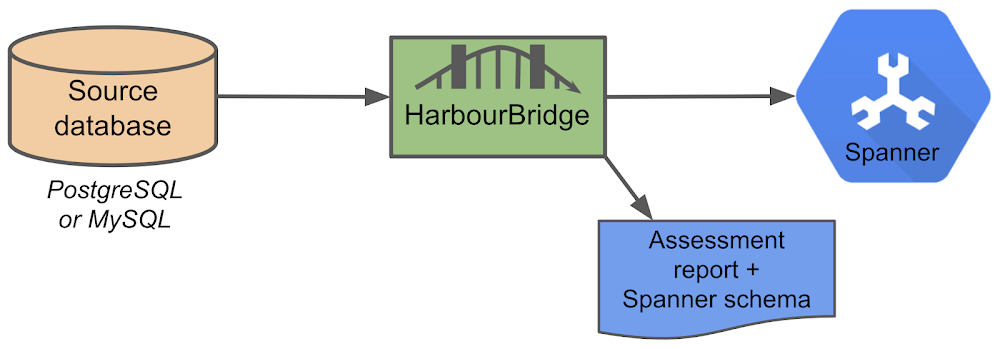
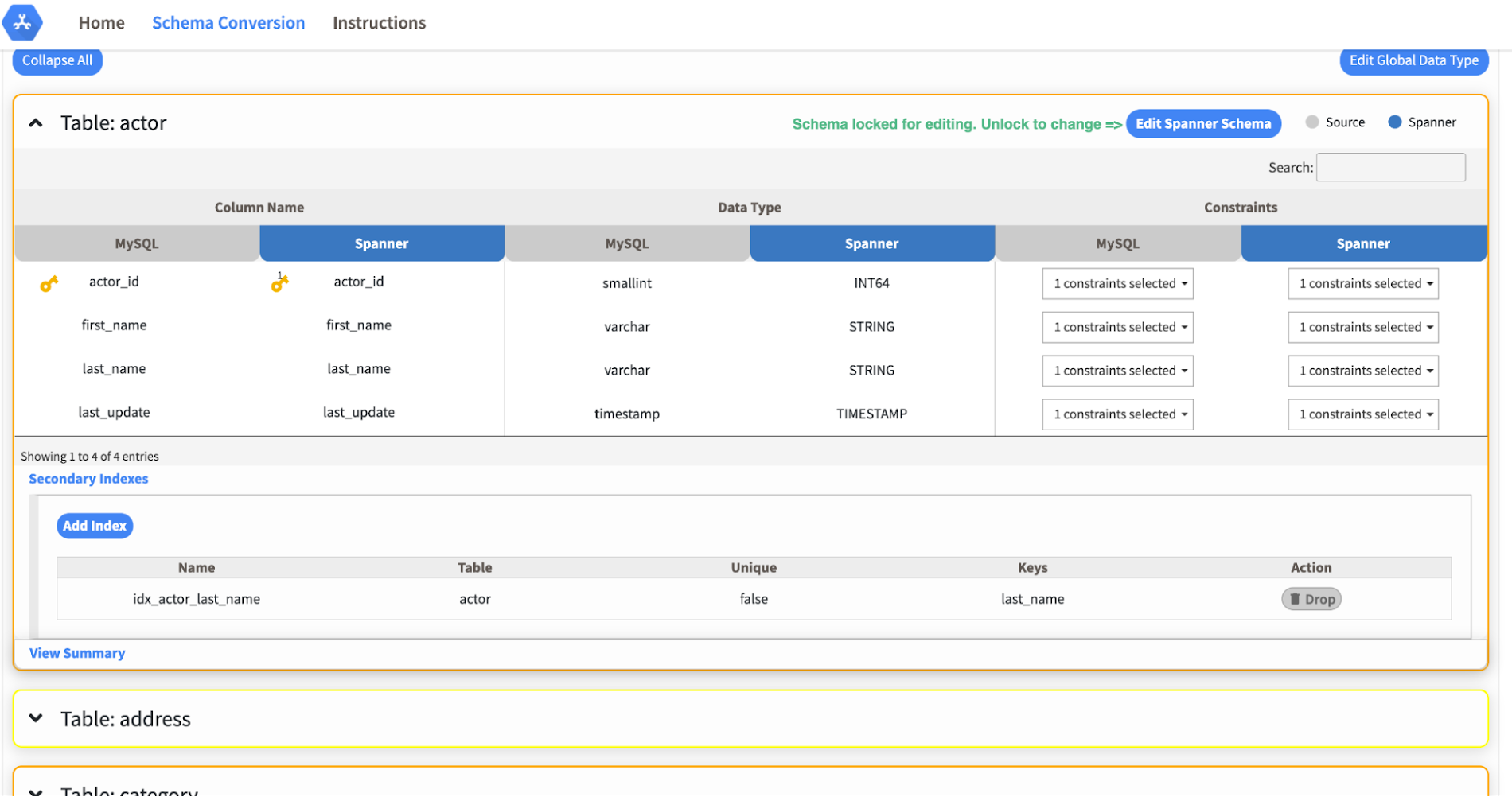
Today we’re announcing the HarbourBridge Schema Assistant, which provides a guided schema-design workflow for migrating from MySQL or PostgreSQL to Spanner. HarbourBridge imports dump files (from mysqldump or pg_dump) or directly connects to your source database, and converts the source database schema to an equivalent Spanner schema. The new Schema Assistant capability displays the source schema and Spanner schema side-by-side, highlights errors and walks you through a series of steps to validate and optimize your Spanner schema. It also produces a browsable assessment report with an overall migration-fitness score for Spanner, a table-by-table detailed analysis of type mappings and a list of features used in the source database that aren’t supported by Spanner. It supports editing of table and column names, column types, primary keys and constraints, as well as dropping of tables, columns, foreign keys and secondary indexes.
The new Schema Assistant complements HarbourBridge’s existing data and schema migration capabilities and is a critical step towards our goal of building a complete open-source migration toolkit. HarbourBridge continues to support command-line schema and data migration and turn-key Spanner evaluation.
Complementing the bulk data migration capabilities of HarbourBridge, we are also announcing the ability to migrate change events from MySQL to Cloud Spanner.
Supported Features in Schema Assistant
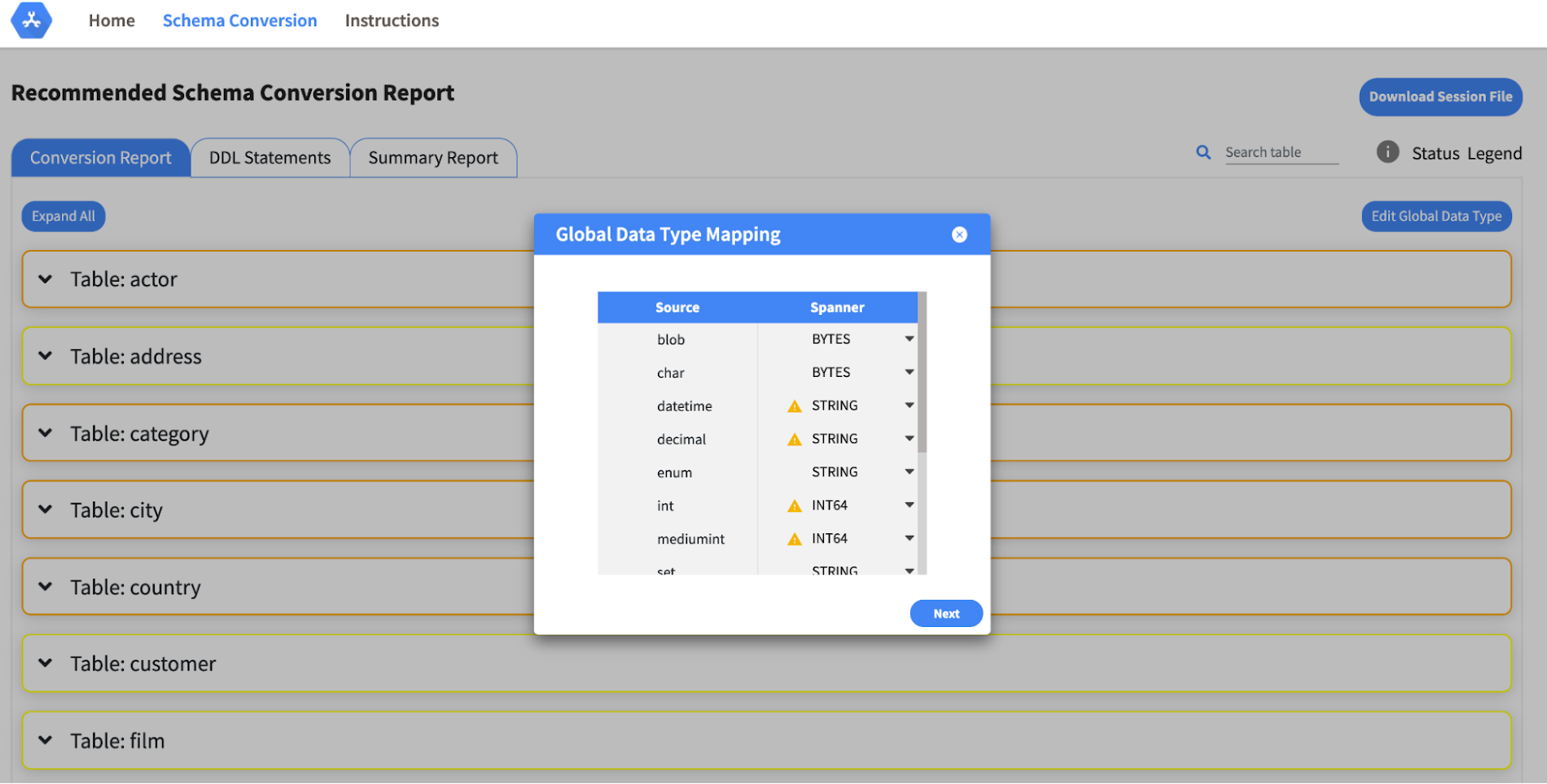
- Global type mapping. Users can customize the global mapping for how types should be mapped to Spanner consistently across the schema. For example, mapping large integers in source schema to Spanner’s NUMERIC.
- Local type mapping. Users can override the custom type mapping for a given table/column.
- Session management. A session keeps track of all the changes made to the schema mapping.
- Customization of secondary indexes. Users can add, edit and delete secondary indexes to optimize their Spanner performance.
- Customization of foreign keys and interleaved tables. Table interleaving is an important design consideration when migrating to Cloud Spanner as explained in more detail in this blog post.
Features in the pipeline
We are already working to further expand the supported set of schema editing features and welcome your feedback. We are particularly excited to expand the Schema Assistant’s design recommendations for optimizing Spanner schemas e.g. in-depth recommendations for primary key design.
HarbourBridge is open source and we gladly accept contributions from the wider community.
You Can Now ‘Listen’ to Over 50 Tech Blogs on Google Cloud Reader

4881
Of your peers have already read this article.
1:30 Minutes
The most insightful time you'll spend today!
🎧 Prefer to listen? Check out this episode on the Google Cloud Reader podcast
If you’re anything like me, you love reading, but also appreciate that sometimes your eyes need to be doing other things; whether it’s finding your exit off the highway, or keeping your puppy from destroying the couch.
And sometimes the thought of sitting down to read something just feels like it’s going to take valuable multi-tasking time away from my day. I know, I know, multitasking can be frowned upon, but it’s the way I live a good chunk of my life, and it’s working out so far. And while I’m not alone in my multitasking, I’m also not alone in my desire for a non-visual way to get this content, or any content.
*Google Cloud Reader enters the chat*
Google Cloud Reader is a podcast that lets you listen to the Google Cloud Blog posts that aren’t as dependent on visuals. This means they’re articles that are, or are adapted to be, less focused on graphs, or code samples, and instead describe the meaning behind those visual aids.
It’s an easy, audible way to absorb content around all things new in Cloud, while still being able to make sure Ruthie doesn’t eat my work from home equipment.

So by now you’re probably thinking “OK, so you started a podcast during the pandemic, even though you definitely seemed like the type to start making sourdough”—and you’re right. My 53 plants agree with you. But rest assured, one can listen to an episode of this podcast *while* creating a macramé plant hanger, or waiting for bread to rise—multitasking, am I right?
We’re a little over 50 episodes/macrame plant hangers in, so you should check it out (Ruth and I would appreciate it).
Some of my personal favorites
- Beginners Guide to Painless Machine Learning – Learn how to get started with Google Cloud AI tools
- Introducing GKE Autopilot: A Revolution in Managed Kubernetes – Learn more about GKE Autopilot, a revolutionary mode of operations for managed Kubernetes that lets you focus on your software, while GKE Autopilot manages the infrastructure.
- Cook up your own ML recipes with AI Platform – Learn about Mars Wrigley’s new ML-inspired recipe experiment on Google Cloud and how you can get started with your own.
- Recovering Global Wildlife Populations using ML – Review Google’s Wildlife Insight’s ML project and help users create an image classification model for motion-sensor cameras (called camera traps) used to help protect wildlife in an non-invasive way by collecting and tagging species via pictures.
Let me know your favorite episodes, and what other articles you’d like to hear on Twitter @jbrojbrojbro!
No matter why you prefer an audio format, we’ve got you covered; Google Cloud Reader, where we read the tech blog for you, and to you.
Get all the Google Cloud Reader on your favorite podcast platform, including Google Podcasts, Apple Podcasts, and Spotify.
3608
Of your peers have already watched this video.
10:42 Minutes
The most insightful time you'll spend today!
The Inside Story of How PayPal Became an Innovator in a Competitive Market
PayPal is an American company operating a worldwide online payment system that supports online money transfers and serves as an electronic alternative to traditional paper methods like checks and money orders. The company enables over 29 million payments or transactions on a peak day. in over 200 markets around the world.
PayPal wanted to scale its business. It had achieved a 25% payment growth across the world. It wanted to ensure it’s available wherever its customers are and enable seamless transactions. PayPal also wanted to ensure flexibility. “There are huge variations in the amounts of payment that happen every day of the week or every week of the year. We wanted to ensure our systems are capable of keeping up with these variations,” says Sri Shivananda, SVP and CTO, PayPal.
The company also had to meet regulatory compliance needs across its 200 markets and increase its efficiency. It wanted to get rid of hardware on-premises which it wasn’t using on a regular basis. And above all, the company wanted to innovate quickly to beat the competition.
This is why PayPal turned to Google Cloud. Watch how it made the transition and reaped the benefits.

1127
Of your peers have already downloaded this article
5:30 Minutes
The most insightful time you'll spend today!
This comprehensive guide provides a detailed process for migrating archival workloads from Amazon Glacier to Google Cloud Storage Nearline in the Indian context. The process involves carefully planning data retrieval and staging strategies to ensure an efficient and cost-effective migration.
The whitepaper includes:
- Different storage methods on Amazon Glacier and their respective retrieval processes.
- Recommendations on managing retrieval costs to avoid high charges from Amazon Web Services.
- The recommended rate for data availability and download to prevent unnecessary repetition of the process.
- Utilization of Google Compute Engine for data staging, if stored directly in Amazon Glacier.
- Use of command-line utility, gsutil, or the Storage Transfer Service for transferring data from the staging location to Google Cloud Storage Nearline.
- Insights to achieve a streamlined and economical migration process from Amazon Glacier to Google Cloud Storage Nearline.
Qlik and Google Cloud Combo: Extending Integration of SAP Data on BigQuery

5469
Of your peers have already read this article.
2:00 Minutes
The most insightful time you'll spend today!
If your organization is one of the 52% of SAP customers whose top analytics pain point is data integration1, Google Cloud has got you covered. By working with partners like Qlik, we are expanding our integration options and bringing real-time replication capability for SAP to BigQuery.
Integrated data for accelerated insights
BigQuery—our fully managed, enterprise data warehouse that can scale up to petabytes on demand and execute queries in seconds—allows SAP customers to consolidate enterprise data silos and confidently derive more use and value from their data. Customers can accelerate and simplify the delivery of SAP data on BigQuery with the latest Qlik Data Integration platform offering for Google Cloud which allows data integration using an automated, near real-time data pipeline through Qlik Replicate, whether data originates from legacy SAP environments, SAP HANA, or SAP application servers. Additionally, Qlik Compose for Data Warehouses can be used to easily generate and automate logical data models from SAP directly in BigQuery freeing up more time for data analysts to leverage advanced built-in capabilities such as BigQuery ML to derive greater value and insights using standard SQL without the need for advanced programming expertise.
Delivering faster results with real-time
Traditional extract-transform-load (ETL) solutions operate on a batch basis, pulling data sets from SAP daily, hourly, or every minute. These tools often require manual mapping of multiple data fields so that data flows accurately. Given SAP’s highly complex table relationships, in which a single transaction can result in multiple changes, this can be a time consuming and tedious process. ETL can also increase the burden on your SAP systems.
Qlik Replicate simplifies this with its intuitive user interface where you can set up real-time data replication between SAP and BigQuery, eliminating the need for manual coding. And, to prevent system overhead, as soon as a new transaction is entered into SAP, the resulting data is replicated into BigQuery in a process known as change data capture (CDC) from SAP’s log layer. This means that data transfer can benefit from high performance with minimal impact on the source system’s resources. Read our latest white paper to learn how to extract SAP data into BigQuery leveraging Qlik Replicate.
Solution expertise for all core SAP workloads
It doesn’t matter what database your SAP system runs on, Qlik Replicate supports all core SAP systems. It automates real-time data replication and decodes SAP’s complex, application-specific data structures into formats that flow smoothly into BigQuery. This ensures that anyone who depends on data analytics has the most current and relevant SAP data they need. For its robust solution capabilities Qlik has received a new “SAP on Google Cloud Expertise” designation for supporting:
- Fast onboarding and accelerated replication of SAP data into Google Cloud
- Real-time and continuous data replication from SAP applications to BigQuery
- Support for all core SAP modules and a broad set of data sources
- Automated data integration, which cuts resource requirements for initial delivery and ongoing maintenance
Proven customer results
Many SAP customers have experienced the benefits of leveraging Qlik alongside BigQuery for data analytics and AI at scale, including German luxury department store chain Breuninger. In order to meet its customers’ growing and changing expectations,Breuninger needed to accelerate its time to insight from data sources across a highly dispersed landscape of on-premises databases and systems, including SAP. The company uses Qlik Replicate to feed corporate data from modules in its SAP system into BigQuery and integrate its varying on-premises databases with the Google Cloud environment. This has yielded game-changing, real-time customer insights for the retailer.
What could your business do with faster, more integrated insights? Learn more about BigQuery for SAP customers and also how Qlik and Google Cloud can help you modernize and automate data integration and analytics.
More Relevant Stories for Your Company

BigQuery’s User-friendly SQL is Like a Cool Drink for Hot Summer
With summer just around the corner, things are really heating up. But you’re in luck because this month BigQuery is supplying a cooler full of ice cold refreshments with this release of user-friendly SQL capabilities. We are pleased to announce three categories of BigQuery user-friendly SQL launches: Powerful Analytics Features,

Public Cloud’s Zero Trust Architecture Keeps Enterprise Data Safe
Over the past decade, cybersecurity has posed an increasing risk for organizations. In fact, cyber incidents topped the recent Allianz Risk Barometer for only the second time in the survey’s history. The challenges in combating these risks only continue to grow. Adversaries tend to be agile and are consistently looking

How a Mid-Sized Firm is Shrinking Inventory Carryovers 50% with AI
For more than 10 years, NMK Textile Mills has manufactured bed linens for major retailers in the United States and Canada. As e-commerce exploded, the company’s co-founder saw an opportunity to grow the business. So, in addition to manufacturing bed linens wholesale for retail customers, NMK Textile Mills reworked its complete supply

Google is named a Leader in 2020 Magic Quadrant for Cloud Infrastructure and Platform Services
The capability gap between hyperscale cloud providers has begun to narrow; however, fierce competition for enterprise workloads extends to secondary markets worldwide. Infrastructure and operations leaders should evaluate cloud providers with a broad range of use cases and a wide market presence. Market Definition/Description Cloud computing is a style of
