





Develop for Compute Engine in your IDE with Cloud Code

2819
Of your peers have already read this article.
2:30 Minutes
The most insightful time you'll spend today!
When developing services with Compute Engine, our customizable compute service that lets you create and run virtual machines on Google’s infrastructure, you’ll likely find yourself frequently switching between your code editor, terminal, and the Google Cloud Console.
Cloud Code is a set of IDE plugins for popular IDEs like VS Code and IntelliJ that make it easier to develop applications that use Google Cloud services. And now, Cloud Code makes it easy to develop with Compute Engine by incorporating common workflows with your favorite IDE’s user interface.
Specifically, this new integration between Compute Engine and Cloud Code makes it easier to manage your commonly used virtual machines in the IDE, view details about them, connect to them over SSH, upload your application files to them, and view their logs.
Before you begin
Let’s demonstrate how the new integration works in Cloud Code for VS Code. Install Cloud Code for VS Code, and once installed, open its icon on the activity bar on the left and find “Compute Engine”:
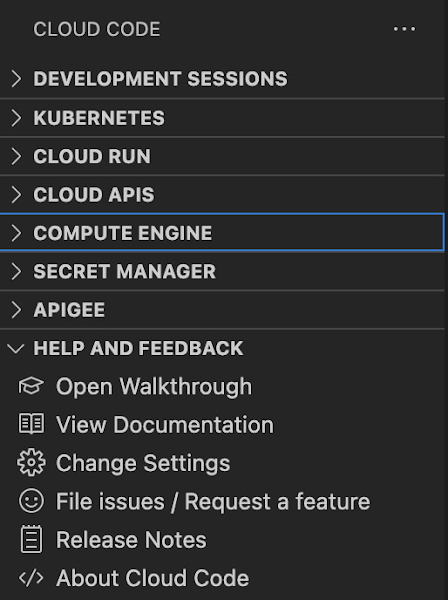
Cloud Code for Jetbrains IDEs (such as IntelliJ) could be installed similarly, and you will find Compute Engine in the list of your IDE tool windows.
View your VMs
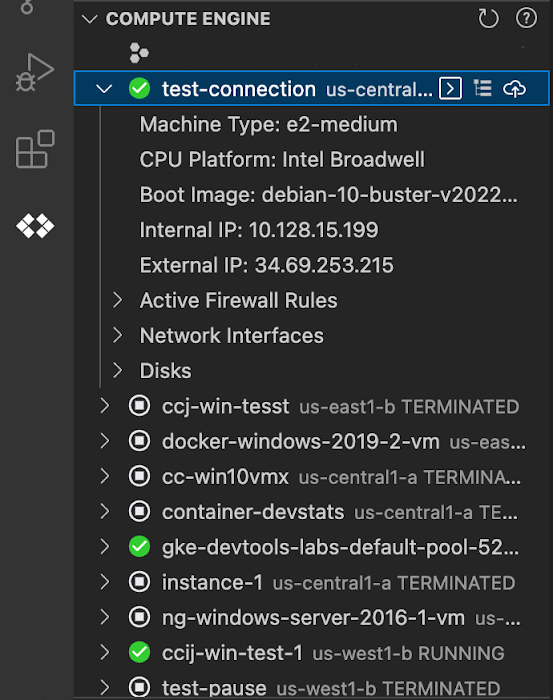
Cloud Code makes it easy to see all relevant VMs in your GCP project and view details needed to effectively work with the VM from the IDE. To start working with a Compute Engine VM in the IDE, navigate to Cloud Code’s new Compute Engine explorer. From there, you can see all the VMs in your current Cloud project. Clicking on a VM will display details such as machine type, boot image, IP address and more. You can also right click on a VM for a quick link to the Google Cloud Console where you can take additional action.
Connect to your VMs over SSH
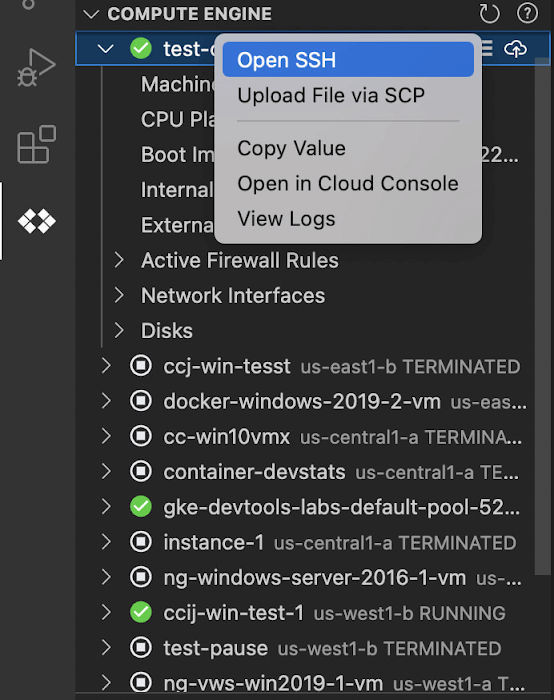
Once you’ve found the VM you want to work with, Cloud Code makes it easy to connect to that VM over SSH. Again, find the VM you want to connect to in Cloud Code’s Compute Engine explorer, right click it, and select “Open SSH”. Cloud Code will then establish an SSH connection from your IDEs terminal into the VM. If there’s any difficulty establishing a connection, Cloud Code can run a troubleshooting diagnostic to help resolve the issue.
Many organizations maintain VMs that don’t have a public IP address, making it difficult to establish an SSH connection to them. For those VMs that use Identity-Aware Proxy, Cloud Code can still securely connect to them over SSH, even without a public IP address.
Upload files to your VMs
You might want to try a debug version of your application, run a script, or try a new code in an environment identical to production, in this case on a development VM instance which might not have access to full source code or is not a part of your CI/CD pipeline. Cloud Code provides an easy way to upload your code files into a VM instance.
Find the VM you want to connect to in Cloud Code’s Compute Engine explorer, right click it, and select “Upload File via SCP”. Choose a file from your local system and Cloud Code will upload it to a VM instance using SCP. Once upload completes, Cloud Code offers to open a new SSH connection to access the files and work with them on a remote VM instance. Again, if there’s any difficulty establishing a connection, Cloud Code can run a troubleshooting diagnostic to help resolve the issue.
View your VM logs
As you’re working with your VM, you can right click it and select to view the VM instance logs. From Visual Studio Code this will open a logs viewer in the IDE. From IntelliJ, the logs viewer in the Cloud Console will be opened. If you’ve configured application logs to be collected with Cloud Logging, you can also view those in these logs viewers as well.
Get Started
We invite you to try out Compute Engine with Cloud Code to better streamline your development workflow. To learn more, check out the Compute Engine documentation for Visual Studio Code and JetBrains IDEs. If you’re new to development with IDEs, you can take the first step by installing Visual Studio Code or IntelliJ.

Le Figaro Uses Google Firebase to Personalize Experiences and Generates 3X Revenue Results
DOWNLOAD CASE STUDY8311
Of your peers have already downloaded this article
1:45 Minutes
The most insightful time you'll spend today!
Le Figaro, established in 1826, is France’s oldest and largest daily morning newspaper. The company’s mission is to provide timely, digestible and engaging news to their readers. As one of the first in the industry to offer digital content, Le Figaro engages their subscribers across 11 Android, iOS and web apps that cover news, sports, lifestyle and games. Le Figaro has about 22M monthly active users on their mobile and web apps and 120K paid digital subscribers.
The Challenge
In a saturated news app market, Le Figaro was looking to increase paying customers and to retain existing paid subscribers. To do this, Le Figaro’s development team needed to engage readers with personalized content at the right price point, but how could they pull it off with limited time and resources?
The Solution
Le Figaro used a number of Firebase products to retain existing users and increase paid subscriptions. They sent targeted notifications through Firebase Cloud Messaging reminding customers to follow topics and journalists they found interesting. This helped reduce churn by keeping subscribers engaged in content they valued. They also tested different subscription amounts using Firebase A/B testing, which helped Le Figaro identify the price points that led to the highest number of conversions among both Android and iOS users.
“Using Firebase has completely transformed Le Figaro’s digital business by making it easy to rapidly innovate and personalize content for our readers. With Firebase we have seen continuous increases in retention, downloads and screen time in our apps!”
Valentin Paquot, Mobile CTO, Le Figaro
Le Figaro found their biggest increase in paid subscriptions came from embedding real time interactive infographics into their mobile and web app articles. When a user added information into the infographic, it triggered a Cloud Function that accessed data stored in Cloud Firestore and returned a personalized infographic to the user in real time.
For example, in the article “Are you rich?” readers could input their income into the infographic and compare it against different income groups in Paris instantaneously. The infographics was behind a paywall and users had to subscribe to gain access.
According to Le Figaro, this infographic saw 3X the rate of paid subscription sign-ups compared to their other infographics. The team built this interactive infographic system in 3 days instead of their average time of 2-3 weeks using a traditional backend service. Using Cloud Functions and Cloud Firestore, they estimate they were able to reduce development time by 86%.
Develop for Compute Engine in your IDE with Cloud Code
2820
Of your peers have already read this article.
2:30 Minutes
The most insightful time you'll spend today!
When developing services with Compute Engine, our customizable compute service that lets you create and run virtual machines on Google’s infrastructure, you’ll likely find yourself frequently switching between your code editor, terminal, and the Google Cloud Console.
Cloud Code is a set of IDE plugins for popular IDEs like VS Code and IntelliJ that make it easier to develop applications that use Google Cloud services. And now, Cloud Code makes it easy to develop with Compute Engine by incorporating common workflows with your favorite IDE’s user interface.
Specifically, this new integration between Compute Engine and Cloud Code makes it easier to manage your commonly used virtual machines in the IDE, view details about them, connect to them over SSH, upload your application files to them, and view their logs.
Before you begin
Let’s demonstrate how the new integration works in Cloud Code for VS Code. Install Cloud Code for VS Code, and once installed, open its icon on the activity bar on the left and find “Compute Engine”:
Cloud Code for Jetbrains IDEs (such as IntelliJ) could be installed similarly, and you will find Compute Engine in the list of your IDE tool windows.
View your VMs
Cloud Code makes it easy to see all relevant VMs in your GCP project and view details needed to effectively work with the VM from the IDE. To start working with a Compute Engine VM in the IDE, navigate to Cloud Code’s new Compute Engine explorer. From there, you can see all the VMs in your current Cloud project. Clicking on a VM will display details such as machine type, boot image, IP address and more. You can also right click on a VM for a quick link to the Google Cloud Console where you can take additional action.
Connect to your VMs over SSH
Once you’ve found the VM you want to work with, Cloud Code makes it easy to connect to that VM over SSH. Again, find the VM you want to connect to in Cloud Code’s Compute Engine explorer, right click it, and select “Open SSH”. Cloud Code will then establish an SSH connection from your IDEs terminal into the VM. If there’s any difficulty establishing a connection, Cloud Code can run a troubleshooting diagnostic to help resolve the issue.
Many organizations maintain VMs that don’t have a public IP address, making it difficult to establish an SSH connection to them. For those VMs that use Identity-Aware Proxy, Cloud Code can still securely connect to them over SSH, even without a public IP address.
Upload files to your VMs
You might want to try a debug version of your application, run a script, or try a new code in an environment identical to production, in this case on a development VM instance which might not have access to full source code or is not a part of your CI/CD pipeline. Cloud Code provides an easy way to upload your code files into a VM instance.
Find the VM you want to connect to in Cloud Code’s Compute Engine explorer, right click it, and select “Upload File via SCP”. Choose a file from your local system and Cloud Code will upload it to a VM instance using SCP. Once upload completes, Cloud Code offers to open a new SSH connection to access the files and work with them on a remote VM instance. Again, if there’s any difficulty establishing a connection, Cloud Code can run a troubleshooting diagnostic to help resolve the issue.
View your VM logs
As you’re working with your VM, you can right click it and select to view the VM instance logs. From Visual Studio Code this will open a logs viewer in the IDE. From IntelliJ, the logs viewer in the Cloud Console will be opened. If you’ve configured application logs to be collected with Cloud Logging, you can also view those in these logs viewers as well.
Get Started
We invite you to try out Compute Engine with Cloud Code to better streamline your development workflow. To learn more, check out the Compute Engine documentation for Visual Studio Code and JetBrains IDEs. If you’re new to development with IDEs, you can take the first step by installing Visual Studio Code or IntelliJ.
Managed containers: An enterprise standard at Colgate-Palmolive
931
Of your peers have already read this article.
3:30 Minutes
The most insightful time you'll spend today!
Kubernetes is an increasingly key part of the application deployment strategies at large organizations, and one of the most recommended options for the teams we work with. An idea brought to life at Google, organizations throughout the world use containers and Kubernetes on-premises, in Google Cloud, or in a multi-cloud scenario, and it has emerged as a leading application deployment platform. And because it’s open source, anyone can pop the hood, so to speak, to see how each component of it works, creating a trusted, verifiable framework that users can rely on.
Customers begin their Kubernetes and containerization journeys using various offerings in our product portfolio. Some, like Colgate, started their modernization journey with Kubernetes. Colgate is an $18B global consumer products company with ~34,000 diverse and dedicated people serving over 200 countries and territories. Through science-led innovation, they drive growth and reimagine a healthier future for all people, their pets, and our planet.
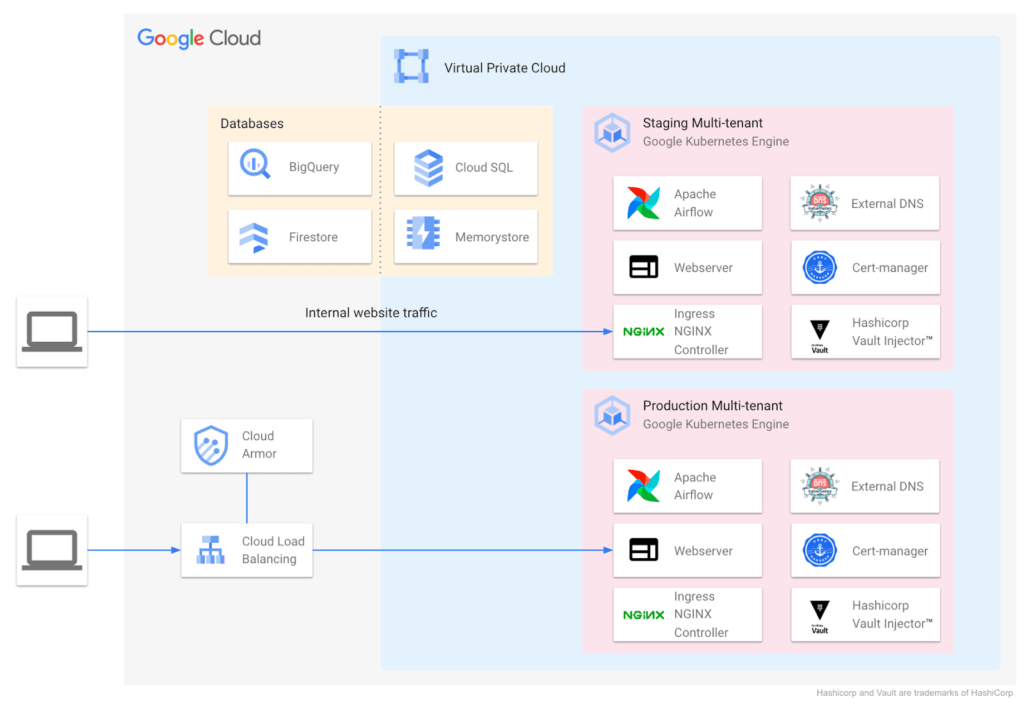
During ideation, they talked through various considerations: What technology strengths does their organization have? What skills do their teams need? What will this initiative look like a decade from now? They implemented the following Kubernetes-focused architecture:
Supporting a variety of use cases and teams
Google Cloud also helped Colgate break new ground over the years, especially in the areas of cloud-native networking, security, monitoring, pub/sub, managed containerization, and multi-tenant environments.
Over time Colgate began to leverage Google’s managed container portfolio, which includes Cloud Run. Cloud Run lets you run containers on top of a serverless platform, unlocking workload possibilities for public websites, private services, APIs and batch jobs and eliminating a lot of the time spent on infrastructure management. Cloud Run also requires no prior knowledge of Kubernetes or containers.
Simplified enterprise-level management
Many teams have found that they prefer the serverless, hands-off approach that Cloud Run provides, and Colgate now evaluates Google Cloud’s serverless solutions alongside GKE for any applications destined for the cloud. At the same time, Cloud Run lets them continue to leverage their investment in workloads based on the Open Container Initiative.
For example, Cloud Run is designed for Kubernetes compatibility with consistent management capabilities such as the ability to manage resources using kubectl via the config controller, and the ability to browse logs and metrics from both platforms in Cloud Logging and Monitoring. Cloud Run and GKE data planes are also interoperable, allowing Cloud Run and GKE services to be exposed behind a VPC behind private IPs using an internal load balancer. Cloud Run as an option has contributed to faster innovation, allowing Colgate to bring smiles to many more faces globally.
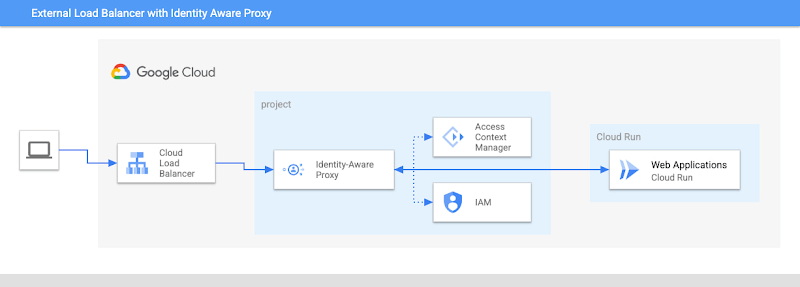
Google’s managed container offerings provide a composable and comprehensive set of solutions for customers’ applications. At Colgate, container-based managed services are used across the stack: on the front-end, where they use Identity-Aware Proxy to manage authentication and External Load Balancers to handle incoming traffic with high availability and low latency; at the application layer, where they can choose from Cloud Functions, Cloud Run, or GKE, depending on the level of control they need over the application; and at the internal load balancing level where NGINX® controllers serve internal applications. Together, these managed services ensure that Colgate has the flexibility to choose the right toolchain and maximize their goals for each use case.
Colgate wanted to build internal applications on Cloud Run in a way that complied with their organization’s policies while maximizing developer productivity. They were able to use new features like the Cloud Run Identity Aware Proxy GA to build a secure, serverless deployment for their applications.
A great partnership with Google Cloud
Colgate and Google Cloud have enjoyed a deep partnership for many years, engaging across many technologies, teams, and design patterns.
They’ve engaged with Product and Engineering across compute, networking, Kubernetes, and serverless as they brought this new way of thinking to their users.
For Colgate and many of our customers looking to address the needs of the modern user, Google’s managed container offerings are a breath of fresh air. Its reliability, scalability, and control offer the flexibility to build applications that meet the demands of both internal and external consumers. In addition, the variety of container offerings available on Google Cloud — GKE and Cloud Run — allow customers to make app deployment decisions based on the amount of Day 2 operations the users are willing to take on. Platform administrators appreciate the reduced management effort, users enjoy reduced downtime, and developers can simply deploy.
Google Cloud contributors: Rex Orioko, Rachel Tsao
Colgate-Palmolive contributors: Matthew Tattoli, Nicholas Farley, and David Wiser
Held Back by Database Scalability, This Financial Services Company Switches to Google Cloud and Cloud Spanner

11594
Of your peers have already read this article.
4:30 Minutes
The most insightful time you'll spend today!
Azimut Group operates an international network of companies handling investment and asset management, mutual funds, hedge funds, and insurance. Founded in Milan, Italy in 1988, Azimut Group today has branches in fifteen countries, including Brazil, China, and the USA.
“We have subsidiaries and manage funds all over the world,” explains Simone Bertolotti, IT Manager at Azimut Holding S.p.a. “That means that any technology that we put in place has to cover needs from many different countries.”
“When complicated analysis has to be executed, we have to increase our table space in a couple of minutes so that the AI can drill down into the data and deliver the information we need.”
—Simone Bertolotti, IT Manager, Azimut Holding S.p.a.
Azimut manages its funds with investment advisors who use information sourced from Bloomberg, Reuters and others. “They use a huge amount of data,” says Simone. “They work with spreadsheets, algorithms, formulae and they analyse data in minutes.” In finance, every second is crucial, which is why Azimut decided to develop a risk management dashboard that can process information even more quickly, then distribute it worldwide.
“When an advisor manages data, that data is used to make immediate decisions on funds, capital movements or whether to sell stock,” says Simone. “They have to be ready to make recommendations for any amount of data that comes to them. For our dashboard, that means that when additional information arrives or complicated analysis has to be executed, we have to increase our table space in a couple of minutes so that the AI can drill down into the data and deliver the information we need.”
Generating insights at speed
Investors and investment managers make decisions based on the most accurate, up-to-date information possible. For Azimut Group, information sourced through financial data vendors such as Bloomberg and Reuters provided only part of the data that the group required.
“We looked to collect information from a range of different providers,” explains Simone, “then analyse it to develop a predictive algorithm that could work faster than an advisor stationed at the terminal. We set ourselves the challenge to try to manipulate that data to add new insights into our matrix, so that every one of our branches across the world can see risk information about the funds in real-time.”
“We compared Google Cloud Platform’s performance with our previous cloud provider, and saw huge benefits of switching to Google. For me, the key performance issue is scaling. With Google Cloud Platform I know that I can increase and decrease my infrastructure quickly, when I need it.
—Simone Bertolotti, IT Manager, Azimut Holding S.p.a.
The first cloud provider Azimut used to build its system struggled to scale quickly to meet different kinds of data challenges. “If we wanted to add more cores, that was fine,” says Simone. “But the previous cloud provider made it complicated to raise the amount of space in a database infrastructure and scale up to demand. Scaling up for more in-depth analysis would take a day, and our need was immediate.”
That’s why Azimut switched one year ago to Google Cloud Platform to run the 150 VMs on its risk analysis platform. “We compared Google Cloud Platform’s performance with our previous cloud provider, and saw huge benefits of switching to Google. For me, the key performance issue is scaling,” says Simone. “With Google Cloud Platform I know that I can increase and decrease my infrastructure quickly, when I need it. Instead of waiting a day to scale up infrastructure, we can request and add space to our database in a couple of minutes.”
The infrastructure of Azimut’s solution handles around 800TB of data per month, and Google’s global network of servers and high-speed connections ensure that it gets to where it’s most needed by the most direct route. Impressed by the speed, security and availability of Google Cloud Platform, Azimut has moved its intranet on to Google Cloud Platform, too, eliminating the need for staff to login with VPNs.
“Instead of waiting a day to scale up infrastructure, we can request and add space to our database in a couple of minutes.”
—Simone Bertolotti, IT Manager, Azimut Holding S.p.a.
Driving ahead with Noovle
For Azimut, migrating the risk management dashboard is the latest of many Google product collaborations with cloud consultancy Noovle. “Everything started five years ago,” says Simone, “when Noovle assisted us in migrating to Gmail from our on-premise email solution. From G Suite to Google Cloud Platform, we’ve had a great relationship. Noovle provides consultancy services, support for mobility, and external advisors who work on our premises, such as when they trained us how to broadcast our meetings on Google Hangouts. As an independent company, we know we can trust them for transparent advice. All they care about is the best way to get a job done and to help us reach our goals.”
New app, new customers
In a business case comparison, Google Cloud Platform cost Azimut 35% less to run than the previous cloud provider. Now the group is building a major new mobile application on Google App Engine to be released in 2018.
“The new mobile application will allow customers to trade directly, without human advisors, by proposing different investment solutions depending on targets the customers set,” says Simone. “So if a customer aims to make money with investments, they enter their relevant personal information and we carry out the necessary regulatory checks and suggest what they could buy. The entire project will be based on Google Cloud Platform, so customers can control their investments through the app while we manage the fund, using Google Cloud Spanner on the backend.”

4767
Of your peers have already downloaded this article
8:30 Minutes
The most insightful time you'll spend today!
Anthos is a modern app management platform from Google Cloud that aims to deliver a consistent development, operations, and security experience across cloud environments.
Anthos is designed for enterprise organizations that want to accelerate the development and deployment of dynamic apps and who value service automation, cost governance, and security controls.
Anthos enables you to build apps once and run anywhere. With Anthos, as an enterprise organization you can modernize apps in place, automate at scale, and manage consistently across hybrid- and multi-cloud environments.
With Anthos, you can modernize your approach to app security. As much as possible, Anthos aims to provide security by default and can help you automate the following security operations:
• Enforcing consistent policy across environments.
• Isolating workloads with different risk profiles.
• Deploying only trusted workloads.
Download Anthos: An Opportunity to Modernize Application Security
More Relevant Stories for Your Company



How Anthos Helps Organizations Implement Multi and Hybrid Cloud Strategy
Organizations have become increasingly focused on using modernization solutions to build competitive advantage, for faster time to market, serve customers better and seamlessly operate in hybrid and multi-cloud environments. Anthos by Google Cloud, a managed application platform plays an important role in application modernization and also in empowering customers to

Transport Platform’s Richly-detailed Geospatial Data Allows Commuters to Track Buses in Real-time!
Vinayak Bhavnani, Co-Founder and CTO of India-based bus transport technology company Chalo, shares how Google Maps Platform is used to improve visibility for commuters and bus operators across India by visualizing geospatial data. Effective public transport networks contribute to the local economy and help make cities safe, pleasant, and sustainable.

Google Named a Leader in the 2019 Gartner Magic Quadrant for Full Life Cycle API Management
The number of APIs within organizations is growing very rapidly not only in IT departments, but also within lines of business (LOBs). Every connected mobile app, every website that tracks users or provides a rich user experience, and every application deployed on a cloud service uses APIs. LOBs see them

Google Extends Support for Windows Server Containers on Anthos for Faster App Modernization and Consistent Dev Experience
Today, many applications in organizations’ data centers run on Windows Server. Modernizing these traditional Windows apps onto Kubernetes promises a host of benefits: a consistent platform across environments, better portability, scalability, availability, simplified management and speed of deployment, just to name a few. But how? Rewriting traditional .NET applications to
