





Aiming for successful cloud security transformations to help CISOs prepare for future threats

2950
Of your peers have already read this article.
3:30 Minutes
The most insightful time you'll spend today!
Many security leaders head into the cloud armed mostly with tools, practices, skills and ultimately the mental models for how security works that were developed on premise. This leads to cost and efficiency problems that can be solved by mapping their existing mental models to those of the cloud.
When it comes to understanding the differences between on-premises cybersecurity mental models and their cloud cybersecurity counterparts, a helpful place to start is by looking at the kinds of threats each one is attempting to block, detect, or investigate.
Traditional on-premise threats focused on stealing data from databases, file storage, and other corporate resources. The most common defenses of these resources rely on layers of network, endpoint, and sometimes application security controls. The proverbial “crown jewels” of corporate data were not made accessible with an API to the outside world or stored in publicly accessible storage buckets. Other threats aimed to disrupt operations or deploy malware for various purposes, ranging from outright data theft to holding data for ransom.
There are some threats that are specifically aimed at the cloud. Bad actors are always trying to take advantage of the ubiquitous nature of the cloud. One common cloud-centered attack vector that they pursue is constantly scanning IP address space for open storage buckets or internet-exposed compute resources.
As Gartner points out, securing the cloud requires significant changes in strategy from the approach we take to protect on-prem data centers. Processes, tools, and architectures need to be designed using cloud-native approaches to protect critical cloud deployments. And when you are in the early stages of cloud adoption, it’s critical for you to be aware of the division of security responsibilities between your cloud service provider and your organization to make sure you are less vulnerable to attacks targeting cloud resources.
Successful cloud security transformations can help better prepare CISOs for threats today, tomorrow, and beyond, but they require more than just a blueprint and a set of projects. CISOs and cybersecurity team leaders need to envision a new set of mental models for thinking about security, one that will require you to map your current security knowledge to cloud realities.
As a way to set the groundwork for this discussion, the cloud security transformation can start with a meaningful definition of what “cloud native” means. Cloud native is really an architecture that takes full advantage of the distributed, scalable, and flexible nature of the public cloud. (To be fair, the term implies that you need to be born in the cloud to be a native, but we’re not trying to be elitist about it. Perhaps a better term would be “cloud-focused” or doing the security “the cloudy way.”)
However we define it, adopting cloud is a way to maximize your focus on writing code, creating business value, and keeping your customers happy while taking advantage of cloud-native inherent properties—including security. One sure way to import legacy mistakes, some predating cloud by decades, into the future would be to merely lift-and-shift your current security tools and practices into the public cloud environment.
Going cloud-native means abstracting away many layers of infrastructure, whether it’s network servers, security appliances, or operating systems. It’s about using modern tools built for the cloud and built in the cloud. Another way to think about it: You’ll worry less about all these things because you’re going to build code on top of that to help you move more quickly. Abandoning legacy security hardware maintenance requirements is part of the win here. To put another way, security will follow in the steps of IT that has been transformed by the SRE and DevOps revolution.
You can extend this thinking to cloud native security, where some of your familiar tools combine with solutions provided by cloud service providers to take advantage of cloud native architecture to secure what’s built and launched in the cloud. While we talked about the differences between on-prem targeted threats compared to threats targeting cloud infrastructure, here are other vital areas to re-evaluate in terms of a cloud security mental model.
Network security
Some organizations practice network security in the cloud as if it were a rented data center. While many traditional practices that worked reasonably well on-premise for decades, along with many traditional network architectures, are either not applicable in the cloud or not optimal for cloud computing.
However, concepts like a demilitarized zone (DMZ) can be adapted to today’s cloud environments. For example, a more modern approach to DMZ would use microsegmentation and govern access by identity in context. Making sure that the right identity, in the right context, has access to the correct resource gives you strong control. Even if you get it wrong, microsegmentation can limit a breach blast radius.
Becoming cloud native also drives the adoption of new approaches to enterprise network security, such as BeyondProd. It also benefits organizations because it gets them away from traditional network perimeter security to focus on who and what can access your services—rather than where requests for access originated.
Although network security changes driven by cloud adoption can be enormous and transformational, not all areas shift in the same way.
Endpoint security
In the cloud, the concept of a security endpoint changes. Think of it this way: A virtual server is a server. But what about a container? What about microservices and SaaS? With software as a service cloud model, there’s no real endpoint there. All along your cloud security path, users only need to know what happens where.
Here is a helpful mental model translation: An API can be seen as sort of an endpoint. Some of the security thinking developed for endpoints applies to cloud APIs as well. Securing access, permissions, privileged access thinking can be carried over, but the concept of endpoint operating system maintenance does not.
Even with automation of service agents on virtual machines in the cloud, insecure agents may increase risks because they are operating at scale in the cloud. Case in point: This major Microsoft Azure cross-tenant vulnerability highlighted a new type of risk that wasn’t even on the radar of many of its customers.
In light of this, across the spectrum of endpoint security approaches, some disappear (such as patching operating systems for SaaS and PaaS), some survive (such as the need to secure privileged access,) and yet others are transformed.
Detection and response
With a move to the cloud comes changes to the threats you’ll face, and changes to how you detect and respond to them. This means that using on-prem detection technology and approaches as a foundation for future development may not work well. Copying all your on-premises detection tools and their threat detection content won’t reduce risks in the way that most cloud-first organizations will need..
Moving to the cloud provides the opportunity to rethink how you can achieve your security goals of confidentiality, integrity, availability, and reliability with the new opportunities created by cloud process and technology.
Cloud is distributed, often immutable, API-driven, automatically scalable, and centered on the identity layer and often contains ephemeral workloads created for a particular task. All these things combine to affect how you handle threat detection for the cloud environment and necessitate new detection methods and mechanisms.
There are six key domains where threats in the cloud can be best detected: identify, API, managed services, network, compute, and Kubernetes. These provide the coverage needed related to network, identity, compute, and container infrastructure. They also provide specific detection mechanisms for API access logs and network traffic captures.
As with endpoint security, some approaches become less important (such as network IDS on encrypted links), others can grow in importance (such as detecting access anomalies,) while others transform (such as detecting threats from the provider backplane).
Data security
The cloud is changing data security in significant ways, and that includes new ways of looking at data loss prevention, data encryption, data governance, and data access.
Cloud adoption sets you on a path to what we at Google call “autonomic data security.” Autonomic data security means security has been integrated throughout the data lifecycle and is improving over time. At the same time, it makes things easier on users, freeing them from having to define and redefine myriad rules about who can do what, when, and with which data. It lets you keep pace with constantly evolving cyberthreats and business changes, so you can keep your IT assets more secure and make your business decisions faster.
Similar to other categories, some data security approaches wane in importance or disappear (such as manual data classification at cloud scale), some retain their importance from on-prem to cloud unchanged, while others transform (such as pervasive encryption with effective and secure key management).
Identity and access management
The context for identity and access management (IAM) in the cloud is obviously different from your on-premise data center. In the cloud, every person and service has its own identity and you want to be able to control access.
Within the cloud, IAM gives you fine-grained access control and visibility for centrally managing cloud resources. Your administrators authorize who can act on specific resources, giving you full control and visibility to manage cloud resources centrally. What’s more, if you have complex organizational structures, hundreds of workgroups, and a multitude of projects, IAM gives you a unified view into security policy across your entire organization.
With identity and access management tools, you’re able to grant access to cloud resources at fine-grained levels, well beyond project-level access. You can create more granular access control policies to resources based on attributes like device security status, IP address, resource type, and date and time. These policies help ensure that the appropriate security controls are in place when granting access to cloud resources.
The concept of Zero Trust is strongly in play here. It’s the idea that implicit trust in any single component of a complex, interconnected system can create significant security risks. Instead, trust needs to be established via multiple mechanisms and continuously verified. To protect a cloud-native environment, a zero trust security framework requires all users to be authenticated, authorized, and validated for security configuration and posture before being granted or keeping access to cloud-based applications and data.
This means that IAM mental models from on premise security mostly survive, but a lot of underlying technology changes dramatically, and the importance of IAM in security grows significantly as well.
Shared fate for greater trust in cloud security
Clearly, cloud is much more than “someone else’s computer.” That’s why trust is such a critical component of your relationship with your chosen cloud service providers. Many cloud service providers acknowledge shared responsibility, meaning that they supply the underlying infrastructure but leave you responsible for many seemingly inscrutable security tasks.
With Google Cloud, we operate in a shared fate model for risk management in conjunction with our customers. We believe that it’s our responsibility to be active partners as our customers deploy securely on our platform, not delineators of where our responsibility ends. We stand with you from day one, helping you implement best practices for safely migrating to and operating in a trusted cloud.
Get ready to go cloud native
We offer you several great resources to help you prepare for cloud migration, and guide you as you review your current security approaches for signs of on-prem thinking.
Listen to our podcast series where Phil Venables, Vice President, CISO at Google Cloud, and
Nick Godfrey, Director, Financial Services Security & Compliance and member of Office of the CISO at Google Cloud, join me in a discussion on preparing for cloud migration (Podcast 1, Podcast 2). You can deepen your cloud native skills by earning a Professional Cloud Security Engineer certification from Google.
Public Cloud’s Zero Trust Architecture Keeps Enterprise Data Safe

4622
Of your peers have already read this article.
5:00 Minutes
The most insightful time you'll spend today!
Over the past decade, cybersecurity has posed an increasing risk for organizations. In fact, cyber incidents topped the recent Allianz Risk Barometer for only the second time in the survey’s history. The challenges in combating these risks only continue to grow. Adversaries tend to be agile and are consistently looking for new ways to land within your digital environments. They also drive attack vectors that work, which means enterprise risk leaders are now forced to look for new ways of securing infrastructure and data.
Cloud comes of age in the modern day cybersecurity threat landscape
When cloud, in its various delivery models, was first introduced, it didn’t fit neatly into the security frameworks that had seemingly protected networks for many decades. Public cloud was the answer to ongoing IT challenges: scale, resources, security capabilities, and budget cycle limitations. Now, public cloud is meeting the increasing challenge of implementing cybersecurity controls and frameworks that are capable of protecting today’s global enterprise.
Cloud adoption – with all its scale and redistribution of longstanding security paradigms – is the optimal choice for infrastructure and security, particularly as organizations grapple with the need to engage in digital transformation. We assert that successful digital transformation is impossible without incorporating the use of the scale, security architecture, and resiliency of the cloud.
Consequently, cloud adoption becomes a necessary component of roadmap discussions and planning as your organization looks to reduce overall risk. Risk leaders and enterprise cybersecurity leaders must consider that moving data, digital processes, and priority workloads to the public cloud is a crucial step for meeting the current and future digital needs of the enterprise. Going forward, this digital transformation increasingly will include hybrid infrastructure environments composed of a combination of on-premises and cloud solutions.
Pinpointing where threats thrive
As digital environments become more complex within a given organization, proactively countering adversaries becomes all the more difficult. It’s harder to implement, scale, and adhere to existing security and control frameworks. It’s also increasingly challenging to apply framework guidance to new applications, build and support infrastructure within a secure foundation, and maintain good cyber hygiene through the digital lifecycle.
As reported by TechTarget, the 2020 hack of the SolarWinds Orion IT performance monitoring system is a prime example. It grabbed headlines “not because a single company was breached, but because it triggered a much larger software supply chain incident.” This vulnerability in popular, commercially available, and widely utilized software compromised the data, networks, and systems of thousands of companies when a routine software update turned out to be backdoor malware.
A close look at the root problems behind high-profile security breaches reveals that it’s a lack of agility and an inability to scale resources that prohibit the modern security organization’s ability to respond quickly enough to counter new challenges. Look even closer and you’ll often find an insufficient implementation of best practices and ineffective solutions, leaving an organization continually chasing the next tool or solution and scrambling to stay ahead of emerging threats.
While the cost to individual businesses is high, most organizations struggle with the needed skills and resources to rigorously maintain data security basics and ensure readiness for inevitable attacks. The previous sentence is especially true when you consider that maintaining an effective state of cybersecurity readiness is a costly practice that requires the continual development of expertise, the evaluation of new tools, and an ongoing element of vigilance.
Threat visibility is a big part of the problem. You can’t protect your company from what you can’t see. For individual enterprises – with critical data workloads housed in a combination of on-premises servers, a variety of endpoints, and both private and public cloud instances – staying ahead in the ongoing battle requires a new approach.
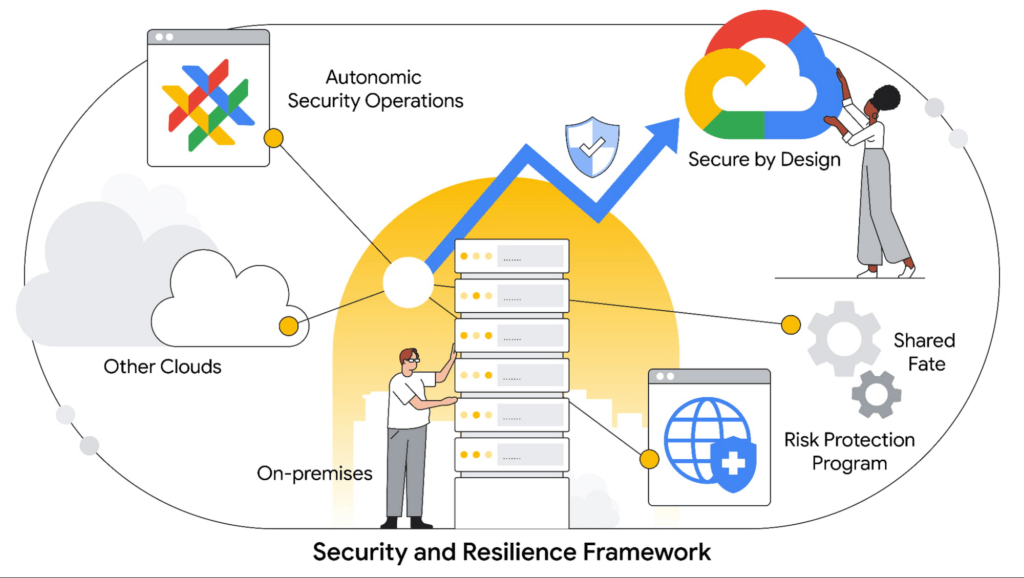
The identification of actionable alerts and other data contributes to a better overall state of readiness. Thought leadership and discussions related to Autonomic Security Operations provide a promising outlook for security organizations willing to lean into the changing technology landscape – a landscape that now benefits from leveraging automation and machine learning currently used in security stacks. Reducing the chance of introducing vulnerabilities or missing-critical alerts starts with ensuring full visibility into an increasingly expanding and complex environment.
The evolution of a shared responsibility to a shared fate
Industry megatrends are driving cloud adoption and with it a path to improved cybersecurity. Among these trends is the concept of shared fate as an evolution of the historical shared-responsibility model. Shared fate drives a flywheel of increasing trust which develops as more enterprises transition to the cloud. This compels an even higher security investment and a more vested interest from cloud service providers.
At Google Cloud, shared fate means we take an active stake in our customers’ security posture, offering capabilities and defaults that help ensure secure deployments and configurations in the public cloud. We also offer experience-based guidance on how to configure cloud workloads for security, and can assist with risk management, reduction, and transfer.
The Google Cloud Risk Protection Program represents the continuing evolution of the shared-fate model. The program offers a practical solution that provides the modern enterprise a snapshot comparison of its current security state against well-adopted cloud-security frameworks. It also give you an opportunity to explore cyber insurance designed to meet your needs from our partners Allianz and Munich Re.
When performed with diligence, cloud adoption can help increase your overall cybersecurity effectiveness. Using a hybrid approach – and steadily reducing which data assets remain on premises – can strengthen your overall security posture and reduce risks to the organization.
Cloud security and the ability to reduce risk
In comparison to the enterprise-by-enterprise security scramble to protect data and workloads in individual private clouds, global public cloud solutions like Google Cloud can be a force multiplier when adhering to established best practices. By that, we mean, quite literally, that you get more security at every touchpoint – from infrastructure and software to access and data security.
Strong security in the public cloud starts with the foundational pieces: the hardware and design elements. At Google, for example, we take a security-by-design approach within both the data center and purpose-built components themselves. Within Google Cloud, data is encrypted by default – both at rest and in transit. Google’s baseline security architecture adheres to the zero trust principles, meaning that every network, device, person, or service initially cannot be trusted.
Embarking on a zero trust architecture journey gives modern security practitioners the ability to methodically shut down traditional attack vectors. Zero trust also provides more granular visibility and control of rapidly expanding environments. The recent emphasis of its benefits, as the U.S. White House set forth through an executive order on increasing cybersecurity resilience, is an example of the wide-scale recognition by both government and industry on the benefits of this approach.
Since adopting a zero trust approach more than a decade ago, Google has achieved a recognizable level of maturity, reflected by our internal infrastructure and multiple enterprise offerings, enabling different aspects of the zero trust security journey.
Compliance and privacy drive critical elements of the cloud adoption cycle
Privacy frameworks, regulatory compliance, and data sovereignty are driving critical elements of the cloud adoption cycle. Cloud providers must ensure they have the necessary controls, attestations, and abilities to audit in order to provide organizations with the tools to preemptively satisfy regulatory and compliance mandates across the globe.
Now consistently expected to be part of a design feature that’s built into the cloud journey, it cannot simply be an add-on capability. The direction of this evolution promises to play more of a role in the future of cloud adoption, not less. Because this is an ongoing component of enterprise risk evaluation, your business must consider cloud providers that can partner on this critical aspect of the journey – and not leave you without the resources to respond to this growing critical need.
Building trust into your digital transformation journey
Digital transformation is difficult because the modern enterprise must build and design for both today and tomorrow. From a security perspective, the challenge has often been that security industry practitioners cannot always predict what the future will look like. That said, there are clear steps you can take to mitigate all-around risk throughout the process.
How you approach the cloud is, of course, integral to your journey, but it doesn’t need to be an all-or-nothing proposition. And although technology debt continues to persist with legacy systems, that doesn’t mean you shouldn’t begin to move forward.
Google Cloud enables you to modernize at your own pace and understand what’s realistic. We recommend you move what data you can to a more secure public cloud today, followed by a phased approach to move more in the months and years that follow. The key tenets of our approach to security in the public cloud include:
- The security-by-design posture of Google Cloud can help modern-day enterprises scale security capabilities and reduce risk with an architecture built on zero trust principles.
- The Google Cloud approach to security and resiliency includes a framework to help you protect against adverse cyber events by using our comprehensive suite of solutions.
- Google Cloud can help ensure your organization adheres to the requirements of a growing and increasingly complex regulatory and compliance environment.
- The ideal model of a future organization is one where cloud plays a major role in infrastructure design and architecture. Your organization should begin to view public cloud as an enabler of the business and a core component of digital transformation.
As you transition more data to the public cloud, it’s paramount that trust is ingrained in every step you take with your cloud service provider. Many service providers readily take on a shared responsibility with your organization when it comes to security. At Google, we take it several steps further with our shared fate model to help ensure data security in the public cloud. Your future and our’s are part of the same data security journey.
Stop Cribbing About Shadow IT and Start Taking Charge Now

3661
Of your peers have already read this article.
2:20 Minutes
The most insightful time you'll spend today!
Employees use tools at their disposal to get work done, but if these tools (often legacy) hamper collaboration or are inflexible, they’ll turn to less secure options for the sake of convenience. According to Gartner, a third of successful attacks experienced by enterprises will come from Shadow IT usage by 2020.
And this problem is not unknown. Eighty-three percent of IT professionals reported that employees stored company data in unsanctioned cloud services, a challenge especially apparent with file sync and share tools. When people work around their legacy systems to use tools like Google Drive, it’s often because they find their current systems to be clunky or that they can’t collaborate with others as easily. They’re unable to do three key things in legacy file sync and share systems (like Microsoft SharePoint):
1. Unable to work on their phones. By now, people expect to be able to work on the go—and this means not just opening an attachment, but actually making edits to and comments on work. It gives them freedom to work when it’s convenient for them and to help teammates anytime.
2. Unable to create workspaces independently and easily. This might sound counterintuitive, but if an employee needs to contact IT to have a new project folder made on a drive, the bar is too high. Employees need to be able to quickly, and independently, create documents that can be shared simply because of the changing nature of collaboration. Work happens ad-hoc, on the go (like we mentioned above), and with people inside and outside of your organization. If someone has to contact IT to create a new folder, they’re more likely to neglect the request or use a different tool altogether to get started.
3. Unable to make the data work for them. Traditional file storage is just that, storage. Like an attic, we store things in these systems, but at some point stuff gets stale and it’s hard to tell what we should keep or pitch. People need their storage systems to not only house their data, but to help them categorize and find information quicker so that they can make this data work better for them.
You have two choices when it comes to making a decision on file sync and share systems:
Option 1: Continue to let your employees work on unsanctioned products, some of which may open your business up to unintended security issues (and, in some instances, scary terms of service).
Option 2: Buy the tools that your users want to use because these tools are making them more productive.
If you want to create a more productive workforce, take cues from your employees. Your tools should not only meet the highest security standards for IT, but let people work the way they want to (and be intelligent enough to guide them along the way).
Imagine if your technology could flag that a file contains confidential information before an employee accidentally shares it. Or surface files as they’re needed to help people work faster. Google Drive does this.
Remember, if the technology doesn’t suit your employees, they’re just going to work around it anyway. Instead of investing time and resources on routine maintenance, shift this energy toward helping your employees stay productive in ways that work for both you and them.
VCP Peering and Private Endpoints on Vertex AI to Better Security and Predictions in Near Real-time
4489
Of your peers have already read this article.
2:00 Minutes
The most insightful time you'll spend today!
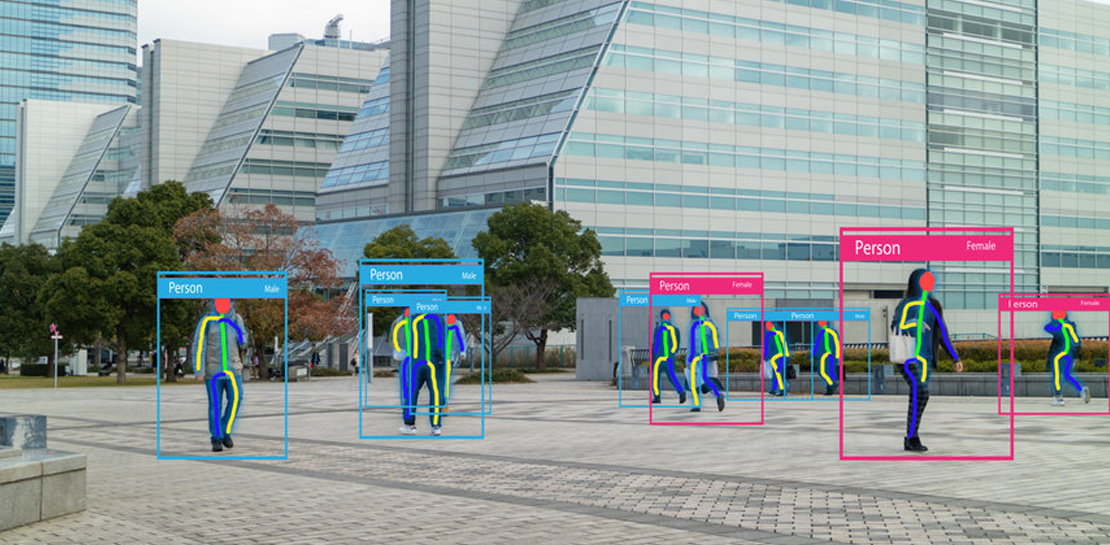
One of the biggest challenges when serving machine learning models is delivering predictions in near real-time. Whether you’re a retailer generating recommendations for users shopping on your site, or a food service company estimating delivery time, being able to serve results with low latency is crucial. That’s why we’re excited to announce Private Endpoints on Vertex AI, a new feature in Vertex Predictions. Through VPC Peering, you can set up a private connection to talk to your endpoint without your data ever traversing the public internet, resulting in increased security and lower latency for online predictions.
Configuring VPC Network Peering
Before you make use of a Private Endpoint, you’ll first need to create connections between your VPC (Virtual Private Cloud) network and Vertex AI. A VPC network is a global resource that consists of regional virtual subnetworks, known as subnets, in data centers, all connected by a global network. You can think of a VPC network the same way you’d think of a physical network, except that it’s virtualized within GCP. If you’re new to cloud networking and would like to learn more, check out this introductory video on VPCs.
With VPC Network Peering, you can connect internal IP addresses across two VPC networks, regardless of whether they belong to the same project or the same organization. As a result, all traffic stays within Google’s network.
Deploying Models with Vertex Predictions
Vertex Predictions is a serverless way to serve machine learning models. You can host your model in the cloud and make predictions through a REST API. If your use case requires online predictions, you’ll need to deploy your model to an endpoint. Deploying a model to an endpoint associates physical resources with the model so it can serve predictions with low latency.
When deploying a model to an endpoint, you can specify details such as the machine type, and parameters for autoscaling. Additionally, you now have the option to create a Private Endpoint. Because your data never traverses the public internet, Private Endpoints offer security benefits in addition to reducing the time your system takes to serve the prediction when it receives the request. The overhead introduced by Private Endpoints is minimal, achieving performance nearly identical to DIY serving on GKE or GCE. There is also no payload size limit for models deployed on the private endpoint.
Creating a Private Endpoint on Vertex AI is simple.
In the Models section of the Cloud console, select the model resource you want to deploy.
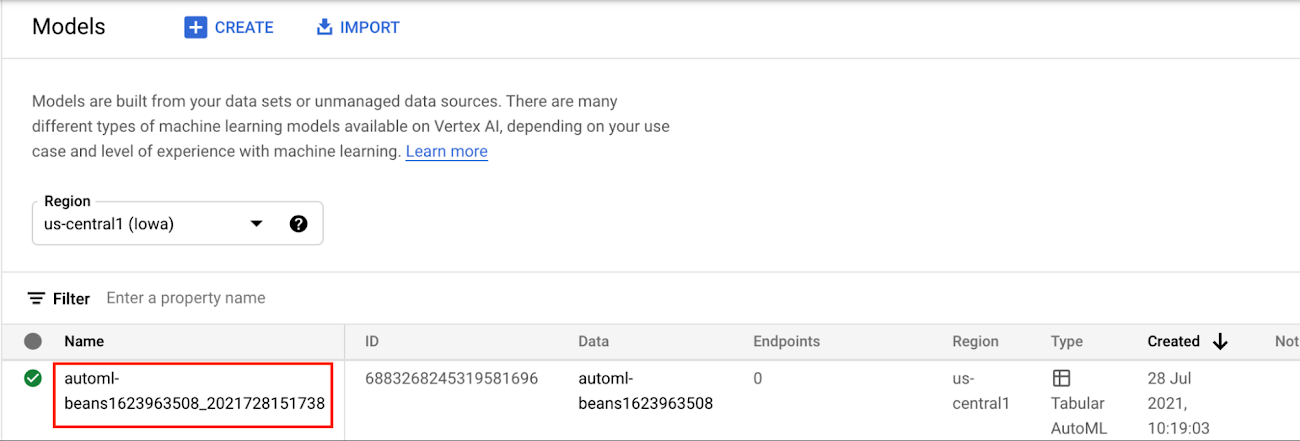
Next, select DEPLOY TO ENDPOINT
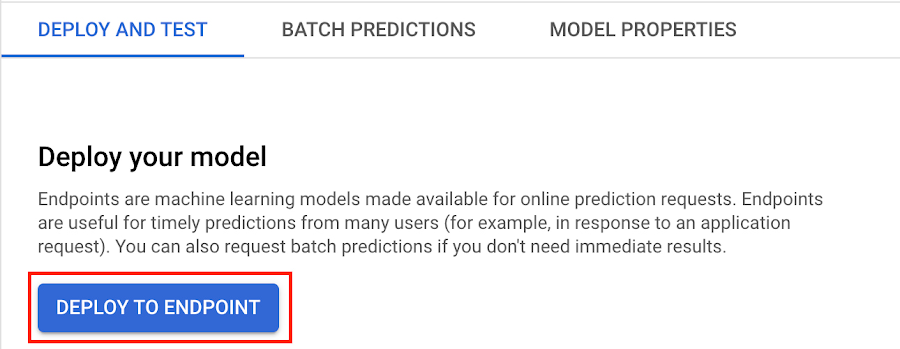
In the window on the right hand side of the console, navigate to the Access section and select Private. You’ll need to add the full name of the VPC network for which your deployment should be peered.
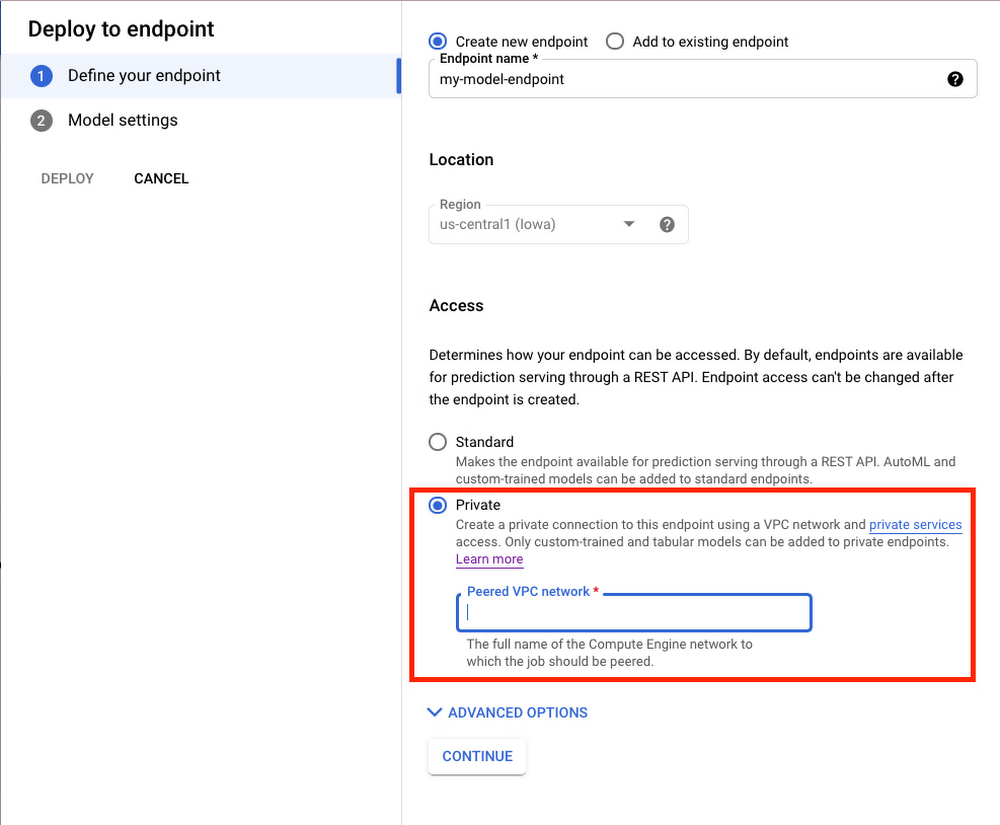
Note that many other managed services on GCP support VPC peering, such as Vertex Training, Cloud SQL, and Firestore. Endpoints is the latest to join that list.
What’s Next?
Now you know the basics of VPC Peering and how to use Private Endpoints on Vertex AI. If you want to learn more about configuring VPCs, check out this overview guide. And if you’re interested to learn more about how to use Vertex AI to support your ML workflow, check out this introductory video. Now it’s time for you to deploy your own ML model to a Private Endpoint for super speedy predictions!
Datashare for Financial Services: Securing the Publishers and Consumers’ Access to Market Data

8571
Of your peers have already read this article.
4:30 Minutes
The most insightful time you'll spend today!
Access to the cloud has advanced the distribution and consumption of financial information on a global scale. In parallel, the global financial data landscape has been transformed by an influx of alternative data sources, including social media, meteorological data, satellite imagery, and other data. Exchanges and market data providers now find they need to include these new datasets to enrich their products and compete, which has meant they now must consider cloud-based models to keep up with the demands of their customers who expect easy, quick, flexible and cost-efficient ways to consume market data.
To address these needs, today we’re announcing the general availability of Datashare for financial services, a new Google Cloud solution that brings together the entire capital markets ecosystem—data publishers, and data consumers—to exchange market data securely and easily.
Datashare helps organize third-party financial information, making it accessible and useful to market data publishers and data consumers. We open-sourced the entire Datashare solution so market data publishers can now onboard their licensed datasets to Google Cloud securely, quickly and easily, while data consumers can consume that data as a service in tools of their preference, such as BigQuery.
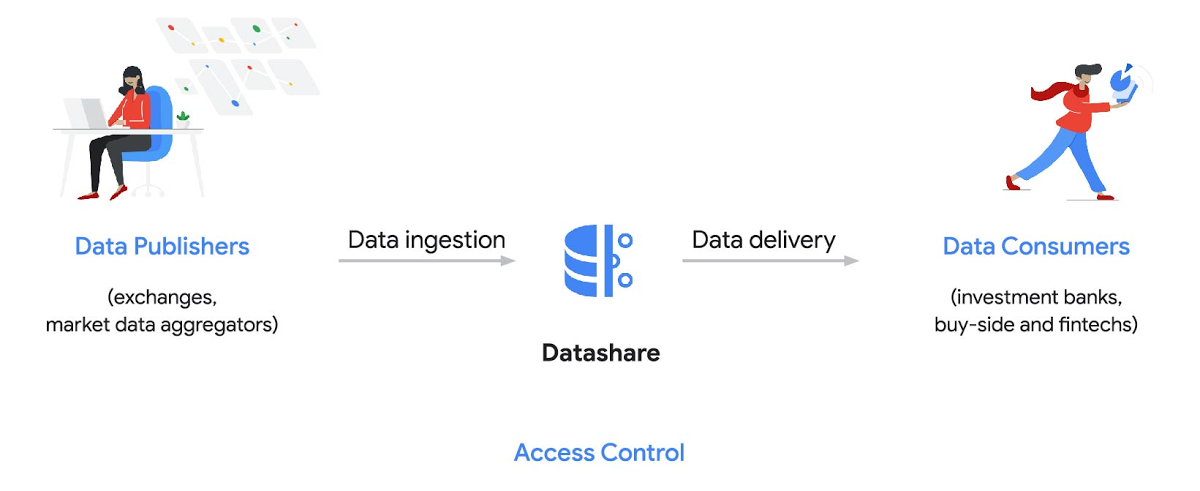
Three ways to distribute and consume your data
Batch data delivery
Datashare provides a batch data delivery mechanism for data publishers to deliver their reference data, historical tick data, alternative market data sources and more via BigQuery, reducing the administrative burden on data consumers to extract insights from data.
Real-time data streaming delivery
By using this event-based data delivery channel for rapidly changing instrument prices, tick data, orders, news and others via Pub/Sub, data consumers can reliably process individual messages or rewind to a point in time to replay a prior market scenario and test model changes.
Monetizing licensed datasets
Market data publishers can onboard their licensed datasets to Google Cloud and make them available via a one-stop-shop on Google Cloud Marketplace, enabling a new sales channel to expand market reach.
Reference architecture
Check out the diagram below to see how you can share your batch and real-time data directly to your Google Cloud customers with BigQuery and Pub/Sub.

As you can see in the above reference architecture, both publishers and consumers can derive several benefits from the solution:
Benefits for data publishers
- You no longer have to maintain your own delivery and licensing infrastructure.
- You can easily package and deliver granular data products and experiments with SQL.
- You can have a solution that scales with your business as data volumes and number of customers grow.
Benefits for data consumers
- Your data is ready for analysis and machine learning (ML)— you no longer have to maintain extract, transform, and load (ETL) pipelines to load files and transform data.
- You can avoid the expense and burden of maintaining multiple copies of large data files.
- You can be more targeted with consumption of data using BigQuery queries, improving performance, and compliance, and reducing cost.
Accessing the datasets
Google Cloud has been working with multiple industry firms on innovating in the market data space. By using Datashare for publishing, data publishers can make their entire datasets available on Google Cloud. Early adopters of Datashare include firms such as OneTick and Accern. OneTick’s datasets include reference and historical futures data (that can be accessed in our console with your login). Accern’s datasets include alternative data such as market sentiment and credit analysis data (that can be accessed in our console with your login).
To make it more helpful, we partnered with Accern to create a hypothetical scenario to describe the data acquisition and analytics process step-by-step.
Accern use case
As a sustainability analyst, you require an economic, social and governance (ESG) dataset to determine which sector is the most widely covered ESG sector by analysts, and to also identify the sector with the lowest ESG sentiment score. Now, you can discover and acquire an ESG dataset in Google Cloud.
Step 1. Navigate to the Financial Services solutions page in the Google Cloud console:

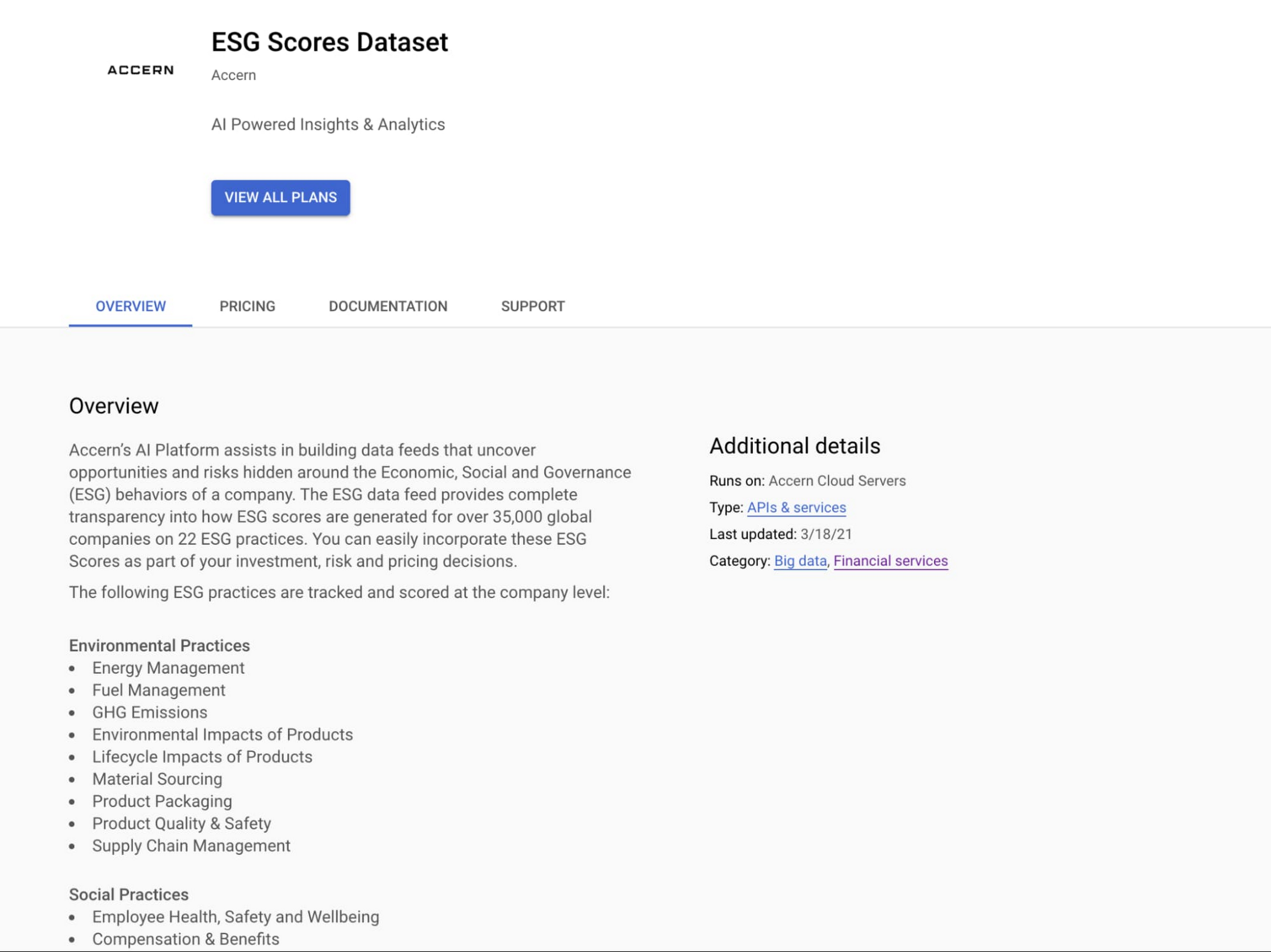
Step 2. Click a dataset, for example Accern AI-Generated ESG Insights, then review the overview details, plans and pricing, documentation and support information. To view the available pricing tiers, click ‘View All Plans’. Once you’ve decided on a tier that you would like to subscribe to, click ‘Select’, choose a billing account and review and accept the terms of service to complete the subscription. Once the steps are complete, click ‘Subscribe’ at the bottom. An overlay window will appear, click ‘Register with Accern’ to activate and complete the subscription.

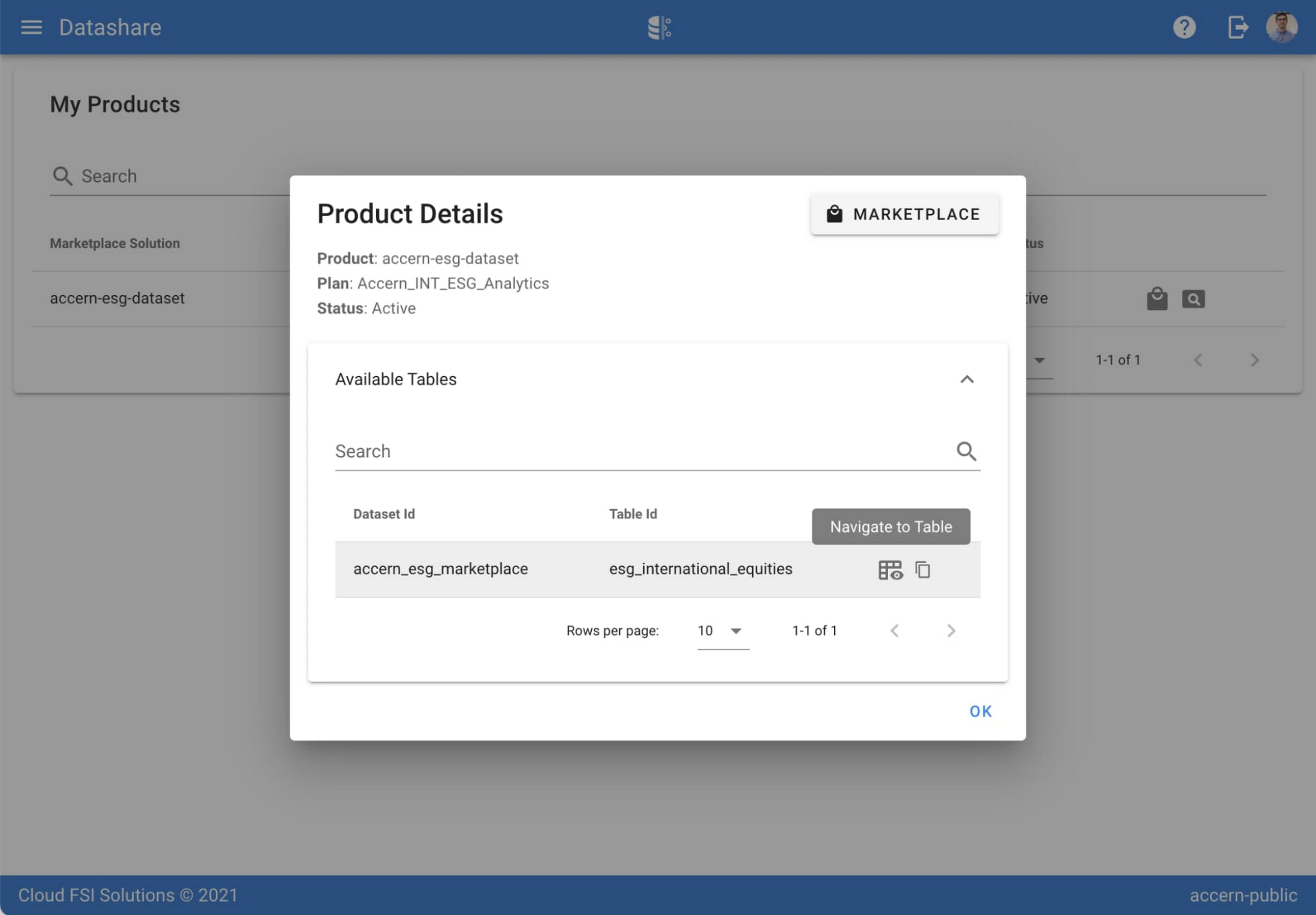
Step 3. Once activation is complete, you’ll be directed to the Datashare ‘My Products’ screen. Voila! You are now subscribed to Accern’s ESG Scores dataset and can access it in your Google Cloud instance using BigQuery. To access the data, click the hour glass icon on the corresponding ‘My Products’ record that you just purchased. An overlay will present you with the details on the dataset and/or table. Click the ‘Navigate to Table’ button to navigate through to the BigQuery console.


Step 4. Now that you have access and are in the BigQuery console, it’s time to generate data insights.
For this example, we’ve eliminated the company identifying information that is included as part of the subscription and aggregated company ESG in a view where each row represents a day, an industry sector, a specific identified ‘ESG Issues’ (event_group and event) and the respective ‘ESG Sentiment’ per issue.

For example, row 1 indicates that within the ‘Healthcare’ sector, there was a ‘Social – Civil Society’ issue identified and it had a negative ESG sentiment score of -15.35.
Step 5. Generate a report by exporting it to Data Studio to build visualizations and conduct additional analysis on the ESG data.
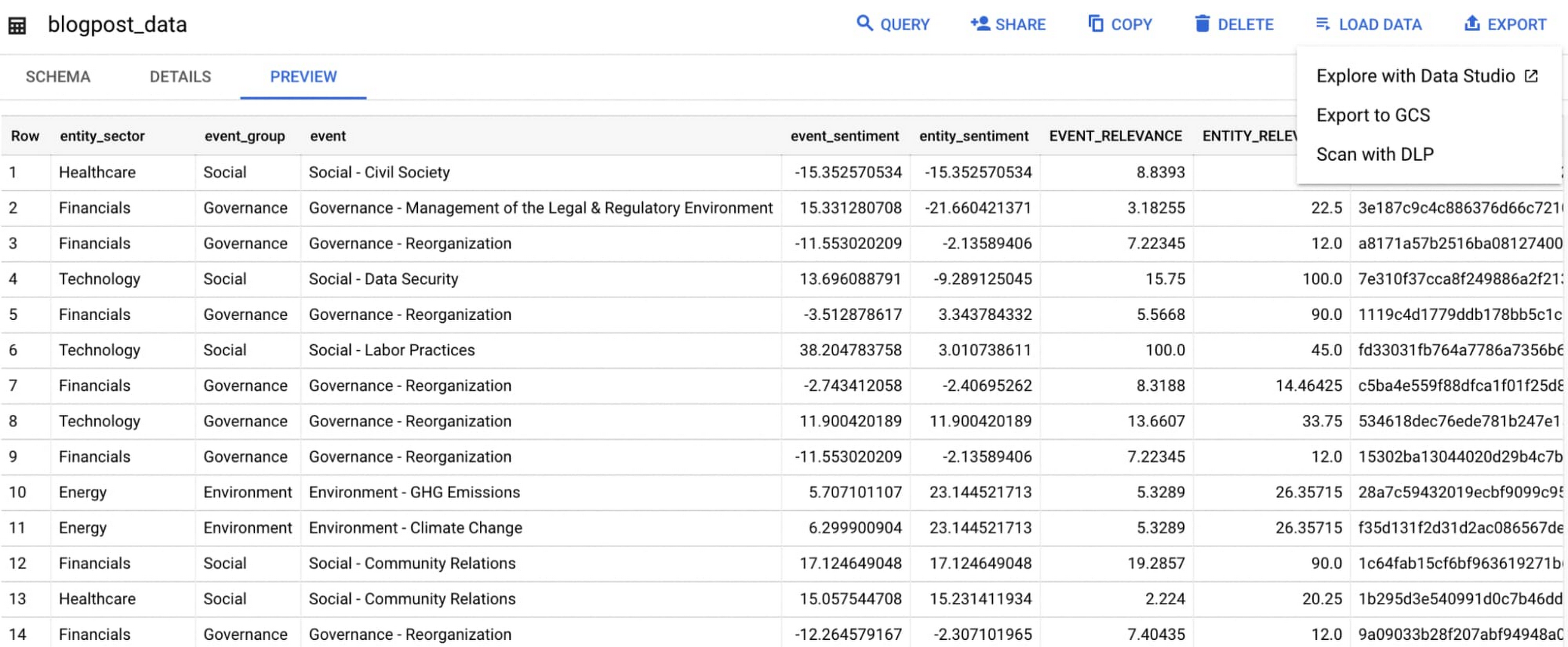
Select ‘Export’ and ‘Explore with Data Studio’.
Step 6. Build a simple/basic report.
Now that the ESG data appears in Data Studio, you can start by building a simple chart to help you understand which industry sectors have the highest volume of discussions around ESG and the overall ESG Sentiment per industry sector.
To build the chart:
- Select the chart type ‘Table’.
- Include
Entity_Sectoras your dimension to aggregate results by ‘Industry Sector.’ - Include
Signal_IDas a measure to count the number of ESG passages identified per ‘Industry Sector.’ - Include
AVG(Event_Sentiment)as a measure to display the overall ESG Sentiment per ‘Industry Sector’ across ESG Issues.

You can see sectors that are most discussed when it comes to ESG related topics and their corresponding ‘ESG Sentiment’ scores.
Step 7. Build your final report in Data Studio.
As a next step you can further drill into the data to understand ESG data specific to each ‘Industry Sector’ and identify positive and negative ESG practices.
Accern has built a more complex sample dashboard and made it available publicly here. You can interact with this report and play around with the data. The dashboard can help to identify material ESG insights for each sector to inform your investment and risk processes. If you have additional questions, you can reach out to Accern directly.

Discovering, accessing and analyzing licensed datasets is quick and easy. Stay tuned for more updates on new licensed datasets.
Publishing your data via Datashare
If you are a publisher of market data, alternative, or exotic data, you can use Datashare to get it published on Google Cloud Marketplace.
Start by joining the Partner Advantage program by registering for the Partner Advantage Portal and applying for the Partner Advantage Build Model engagement. Visit our getting started guide for information to get started on publishing licensed datasets in the Marketplace. Stay tuned for a future blog post about using Datashare to publish datasets in the Marketplace.
More solutions for capital markets
Check out other Google Cloud solutions for capital markets.
Utilizing Google Cloud’s PII Security Features

2615
Of your peers have already read this article.
2:30 Minutes
The most insightful time you'll spend today!
BigQuery is a leading data warehouse solution in the market today, and is valued by customers who need to gather insights and advanced analytics on their data. Many common BigQuery use cases involve the storage and processing of Personal Identifiable Information (PII)—data that needs to be protected within Google Cloud from unauthorized and malicious access.
Too often, the process of finding and identifying PII in BigQuery data relies on manual PII discovery and duplication of that data. One common way to do this is by taking an extract of columns used for PII and copying them into a separate table with restricted access. However, creating unnecessary copies of this data and processing it manually to identify PII increases the risks of failure and subsequent security events.
In addition, the security of PII data is often mandated by multiple regulations and failure to apply appropriate safeguards may result in heavy penalties. To address this issue, customers need solutions that 1) identify PII in BigQuery and 2) automatically implement access control on that data to prevent unauthorized access and misuse, all without having to duplicate it.
This blog will discuss a solution developed by Google Professional Services for leveraging Google Cloud DLP to inspect and classify sensitive data and suggest a solution for using these insights to automatically tag and protect data in BigQuery tables.
BigQuery Auto Tagging solution overview
Automatic DLP can help to identify sensitive data, such as PII, in BigQuery. Organizations can leverage Automatic DLP to automatically search across their entire BigQuery data warehouse for tables that contain sensitive data fields and report detailed findings in the console (see Figure 1 below,) in Data Studio, and in a structured format (such as a BigQuery results table.) Newly created and updated tables can be discovered, scanned, and classified automatically in the background without a user needing to invoke or schedule it. This way you have an ongoing view into your sensitive data.
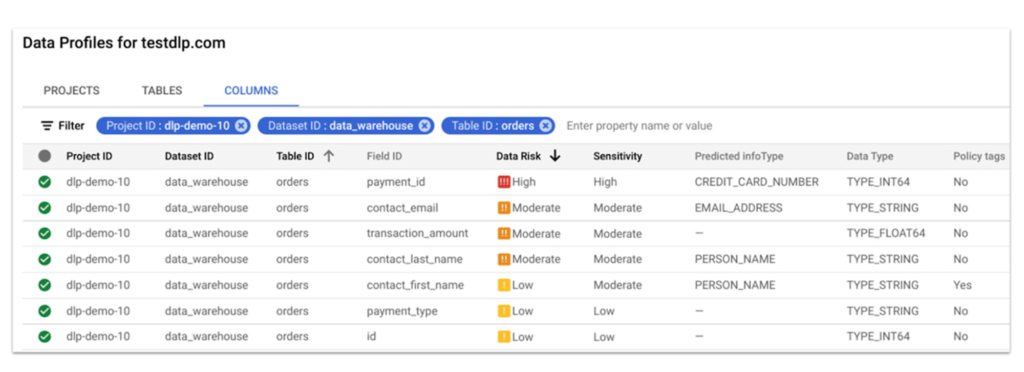
In this blog, we show how a new open source solution called BigQuery Auto Tagging Solution solves our second goal—automating access control on data. This solution sits as a layer on top of Automatic DLP and automatically enforces column-level access controls to restrict access to specific sensitive data types based on user-defined data classification taxonomies (such as high confidentiality or low confidentiality) and domains (such as Marketing, Finance, or ERP System.) This solution minimizes the risk of unrestricted access to PII and ensures that there is only one copy of data maintained with appropriate access control applied down to the column level.
The code for this solution is available on Github at GoogleCloudPlatform/bq-pii-classifier. Please note that while Google does not maintain this code, you can reach out to your Sales Representative to get in contact with our Professional Services team for guidance on how to implement it.
BigQuery and Data Catalog Policy Tags (now Dataplex) have some limitations that you should be aware of before implementing this solution to ensure that it will work for your organization:
- Taxonomies and Policy Tags are not shared across regions: If you have data in multiple regions you will need to create or replicate your taxonomy in each region that you want to apply policy tags.
- Maximum number of 40 taxonomies per project: If you require different taxonomies for different business domains or have replications to support multiple Cloud regions those will count against this quota.
- Maximum number of 100 policy tags per taxonomy: Cloud DLP supports up to 150 infoTypes for classification, however, a single policy taxonomy can only support up to 100 including any nested categories. If you need to support more than 100 data types, you may need to split these across more than one taxonomy.
High-level overview of the solution
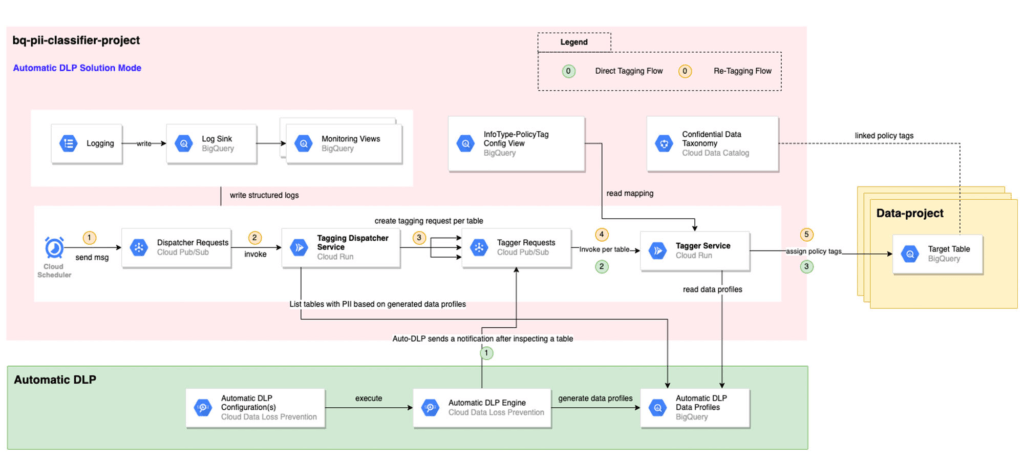
The solution is composed mainly of the following components: Dispatcher Requests topic, Dispatcher service, BigQuery Policy Tagger Requests topic, and BigQuery Policy Tagger service and logging components.
The Dispatcher Service is a Cloud Run service that expects a BigQuery scope to be expressed as inclusion and exclusion lists of projects, datasets, and tables. This Dispatcher service will query Automatic DLP Data Profiles to check if the tables in-scope have data profiles generated. For these tables, it will publish one request per table to the “BigQuery Policy Tagger Requests” PubSub topic. This topic enables rate limiting of BigQuery column tagging operations and apply auto-retries with backoffs.
The “BigQuery Policy Tagger” Service is also a Cloud Run service that receives the information of the DLP scan results of a BigQuery table. This service will determine the final InfoType of each column and apply the appropriate Policy Tags as defined in the InfoType – Policy Tags mapping. Only-one INFO_TYPE is selected and the function assigns the associated policy tag.
Lastly, all Cloud Run services maintain structured logs that are exported by a log sink to BigQuery. There are multiple BigQuery views that help with monitoring and debugging Cloud Run call chains and tagging actions on columns.
Deployment options
After deploying the solution, it can be used in two different ways:
[Option 1] Automatic DLP-triggered immediate tagging:
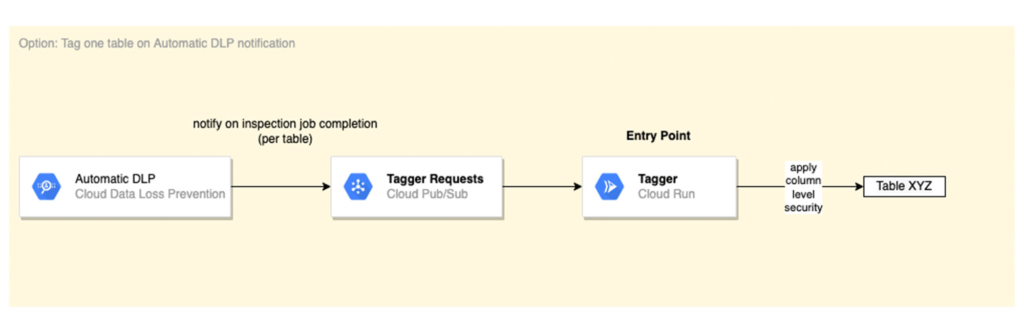
Automatic DLP is configured to send a Pub/Sub notification on each inspection job completion. The Pub/Sub notification includes the resource name and it triggers the Tagger service directly
[Option 2] Scheduled tagging:
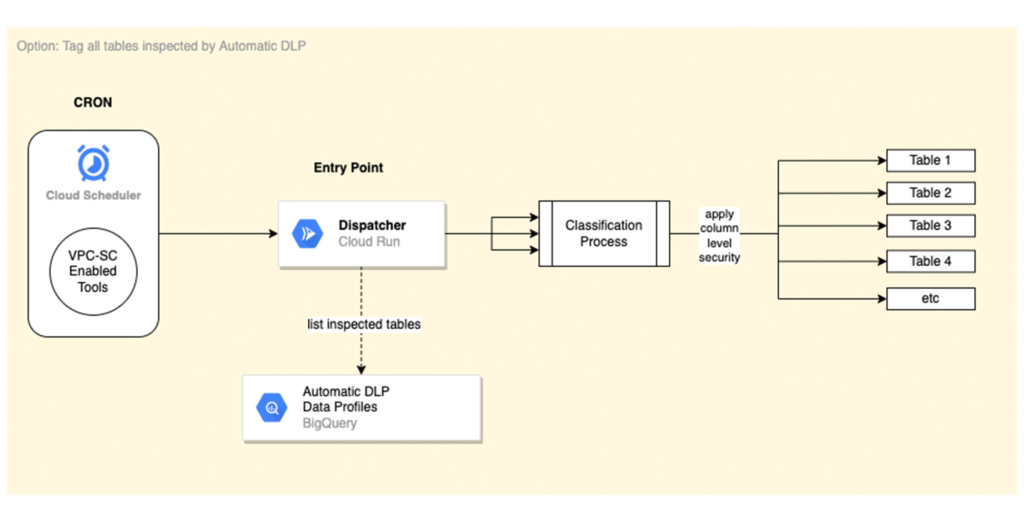
In this scenario, the Dispatcher service is invoked on a schedule with a payload representing a BigQuery scope to list inspected tables by Automatic DLP and create a tagging request per table. You could use Cloud Scheduler (or any Orchestration tool) to invoke the Dispatcher service. If the solution is deployed within a VPC-SC perimeter, other schedulers that support VPC-SC should be used (such as Composer or Custom App.)
In addition, more than one Cloud Scheduler/Trigger could be defined to group projects/datasets/tables that have the same tagging schedule (such as daily or monthly.)
To learn more about Automatic DLP, see our webpage. To learn more about the BQ classifier, see the open source project on Github: GoogleCloudPlatform/bq-pii-classifier and get started today!
More Relevant Stories for Your Company


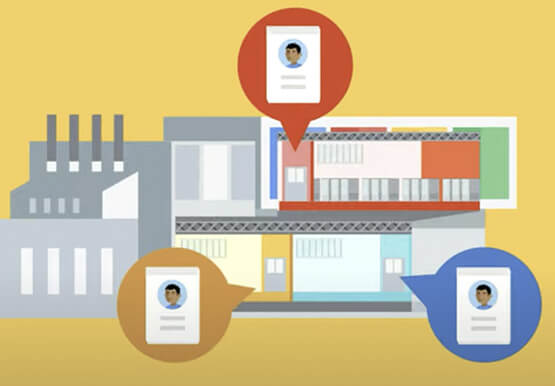

How Google Secures its Data Centers: Watch Video
Security is in the DNA of Google Cloud's dozens of data centers, complex network and workloads scattered the globe. Take a tour to the nucleus of data center's six layers of physical security designed to keep unauthorized access at bay, and also learn about Google Cloud's security fundamentals to leverage

Ahead of the Curve: 5 Data and AI Trends Set to Shape 2023
How will your organization manage this year's data growth and business requirements? Your actions and strategies involving data and AI will improve or undermine your organization's competitiveness in the months and years to come. Our teams at Google Cloud have an eye on the future as we evolve our strategies

Chronicle Security Analytics: Key to Address Security Data Overload
Google Cloud's Chronicle is a security analytics platform built for modern use cases to combat modern threats. In today's world, enterprises have undergone significant changes in all aspects, and must adapt to their security needs to counter threats and attacks. Watch the video to learn Google Cloud's initiative to help

Vodafone Leverages Google Cloud to Aid COVID-19 Frontline with Anonymized Insights on Population Mobility
Editor’s note: When Europe’s largest mobile communications company, Vodafone, was asked by the European Commission to help understand population movement across the European Union and the UK to help fight COVID-19, it was able to provide anonymized mobile network-based insights to answer the call. Here’s how Vodafone, with the support
