





5 ways a SOAR solution improves SOC analyst onboarding

3030
Of your peers have already read this article.
2:30 Minutes
The most insightful time you'll spend today!
Editor’s note: This blog was originally published by Siemplify on Feb. 19, 2021.
The number of unfilled cybersecurity jobs stretches into the millions, and a critical part of the problem is the length of time it takes to backfill a position.
Industry group ISACA has found that the average cybersecurity position lies vacant for up to six months. Some positions, like security analyst, are difficult to find suitable candidates for thanks to workplace challenges such as lack of management support and burnout.
As the old phrase goes, time is money. So when organizations are fortunate enough to fill a position with the appropriate talent, they want to be able to make up for lost time as quickly as possible. This is especially true for roles in the security operations center, a setting notorious for needing staff to field never-ending alerts generated by an often-disparate collection of security tools.
Training new analysts can be a daunting task. They need time to get acquainted with the SOC’s technology stack and processes. Without documentation, they often ask senior analysts for guidance. This can create distractions and consume time.
A reliance on community knowledge—undocumented, not widely-known information within an organization—creates inconsistency within the SOC that contributes to longer ramp-up times for new analysts. Undocumented processes, combined with security tools that don’t talk to each other, typically mean a SOC will need to spend nearly 100 hours—the equivalent of 2 1/2 weeks—getting a single new analyst up to speed.
Enter automation. Throughout an analyst’s career in the SOC, a security orchestration, automation, and response (SOAR) solution can be their best friend, helping expedite routine tasks and liberating them to perform more exciting work. But the technology can also allow even the most junior analysts to have an auspicious onboarding experience—hitting the ground running on day one, acclimated to their new environment, and feeling comfortable about and confident in their future.
Here are five ways a SOAR solution can, among many other activities, aid in analyst onboarding
1) The SOAR solution deploys automated playbooks
The average SOC receives large numbers of alerts per day, and many will be false positives. That amounts to a lot of dead-ends for analysts to chase and leaves little time to investigate legitimate anomalous network activity. The sheer volume of alerts has even prompted some analysts to turn off high-alert features on detection tools, potentially causing teams to miss something important.
SOAR helps analysts hurdle these roadblocks by allowing teams to create custom, automated playbooks, workflows that equalize resources and knowledge across the SOC, and help maintain consistency in the face of new hires and staff turnover. And if analysts should need to create or edit any of the steps in these playbooks, the optimal SOAR solution will enable them to do this without knowledge of specific coding or query languages, acumen that a novice analyst may lack.
2) The SOAR solution groups related alerts
As multiple alerts from different security tools are generated, some SOAR solutions allow you to automatically consolidate and group these alerts into one cohesive interface. This is what is known as taking a threat-centric approach to investigations, with the SOAR looking for contextual relationships in the alerts and, if identified, grouping these alerts into a single case. Having the ability to work more manageable and focused cases right off the bat will help ensure a smoother transition for new analysts.
3) The SOAR solution pieces together the security stack
https://www.siemplify.co/getstartedFrom next-generation firewalls to SIEM to endpoint detection and response, the security stack in any given organization can be vast and complex. No incoming analyst has reasonable time to familiarize themselves with every tool living within the stack—or to manually tap into these different tools to obtain the appropriate context to apply to alerts. A SOAR solution alleviates this challenge by delivering context-rich data that can be analyzed in one central platform, eliminating the need for multiple consoles for alert triage, investigation and remediation. Plus, with a SOAR solution, there is no need for the SOC to directly touch a detection tool that another group may manage.
4) The SOAR solution streamlines collaboration to enable easy escalation and information sharing
Often the SOC is not capable of responding to every threat, meaning other departments, such as networking, critical ops, or change management need to be involved. In addition, executive personnel are likely interested in security trends happening within the organization. Because not every group communicates in the same way—or consumes information in the same way—breakdowns can occur, and frustrations can mount, especially for a new analyst. A SOAR solution can even the playing field by automatically generating instructions, updates, or reports from the SOC to other teams, and vice versa. SOAR is also a useful solution for collaborating within the SOC team as well, especially in the age of remote and hybrid work.
5) The SOAR solution prevents analysts from quickly burning out.
There is a reason why the SOC has obtained the dubious acronym of “sleeping on chair.” Life in this environment can be a tedious, mental grind, prompting certain inhabitants to literally fall asleep from boredom.
SOAR solutions can counter this tedium in two notable ways. They can prevent analysts from having to stare at a multitude of monitors while working long shifts. They can also free analysts to work on more strategic and thought-provoking assignments, which can help improve the company’s overall security posture—and ensure a new entrant to the SOC doesn’t lose steam immediately.
To learn more about SOAR from Siemplify, now part of Google Cloud SecOps suite, including how to download the free community edition, visit siemplify.co/GetStarted.
New Capabilities in Cloud Asset Inventory Allow Better Visibility into Google Cloud Environments

4704
Of your peers have already read this article.
2:00 Minutes
The most insightful time you'll spend today!
Businesses that operate in complex cloud environments, large fleets, or sophisticated security operations all require visibility into their cloud assets in order to keep their teams nimble and their data secure. Cloud Asset Inventory (CAI) helps these teams understand their Google Cloud and Anthos environments by providing complete visibility, real-time monitoring, and powerful asset analysis capabilities. Today, Cloud Asset Inventory gets four new capabilities that help you understand your environment more clearly and easily than ever before.
New user interface eases asset and insight discovery
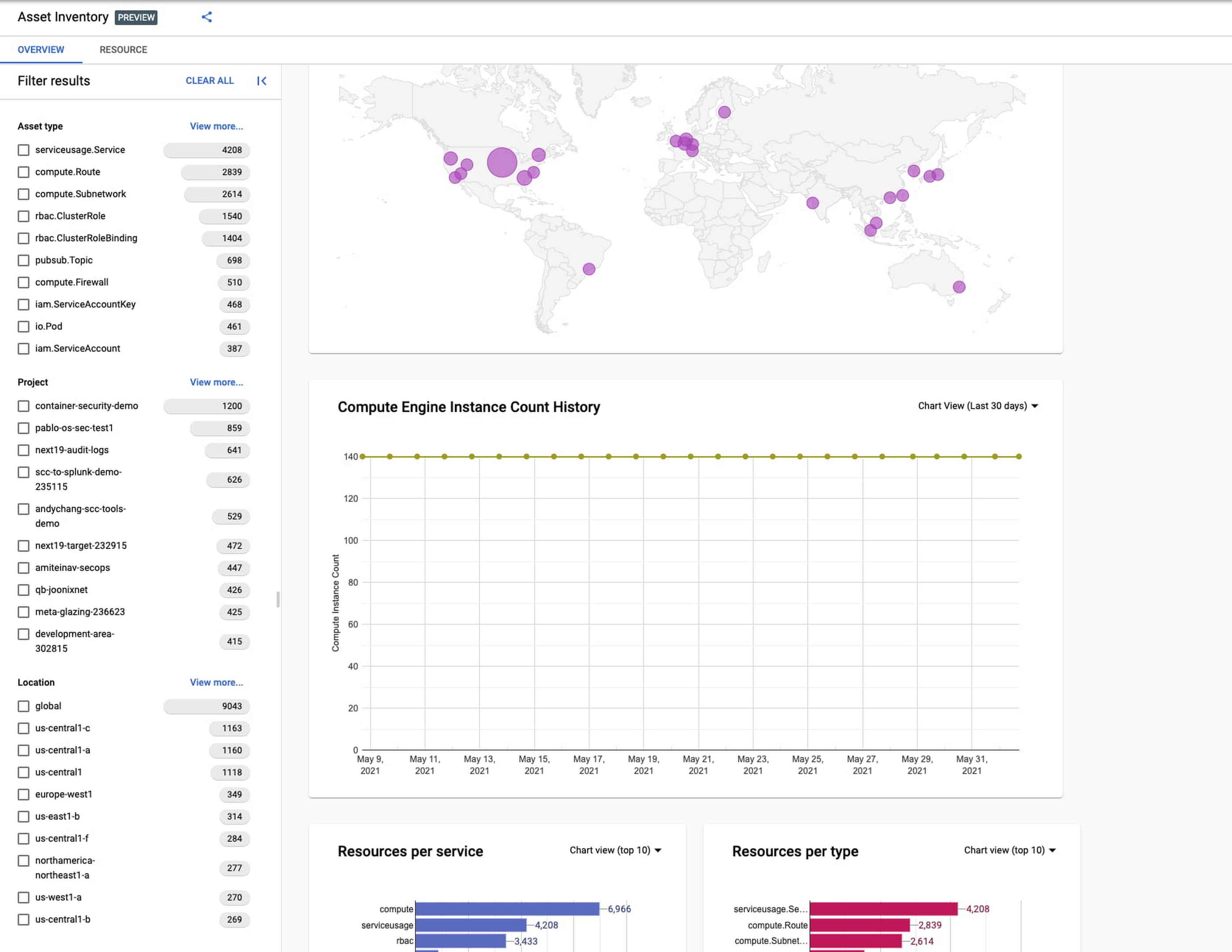
Cloud Asset Inventory console preview is now publicly available for GCP and Anthos customers. This preview provides insights into your cloud footprint, history and details of resource usage with powerful filtering and search capabilities. For example, you can view your global distribution of resources and policies, how your GCE VM footprint has been changing over time, as well as full metadata and change history for all your assets. The CAI console can be filtered at the organization, folder, or project-level, so each user can view the resources they have permissions for down to project level granularity.
Asset discovery and Datadog integration
A new asset list service in CAI provides quick and comprehensive asset discovery, including asset history, without needing to export the data to a storage destination. Datadog, a leading multi-cloud monitoring and security service provider, relies on deep integration with CAI for service and asset discovery. Datadog has been piloting and taking full advantage of the newly released asset list service. Datadog Product Manager, Steve Harrington, commented:
“Google’s new Cloud Asset Inventory API provides us with an immensely valuable, single source of truth for determining the resources present in a given GCP environment. Along with its rich metadata, this enables us to enhance multiple aspects of our integration with GCP, including streamlined metric collection and ingestion of custom labels. We plan to continue building around Cloud Asset Inventory in the future to improve existing features, and are envisioning ways it could help us provide entirely new insights to our customers.”
Answer “who can access what resources?”
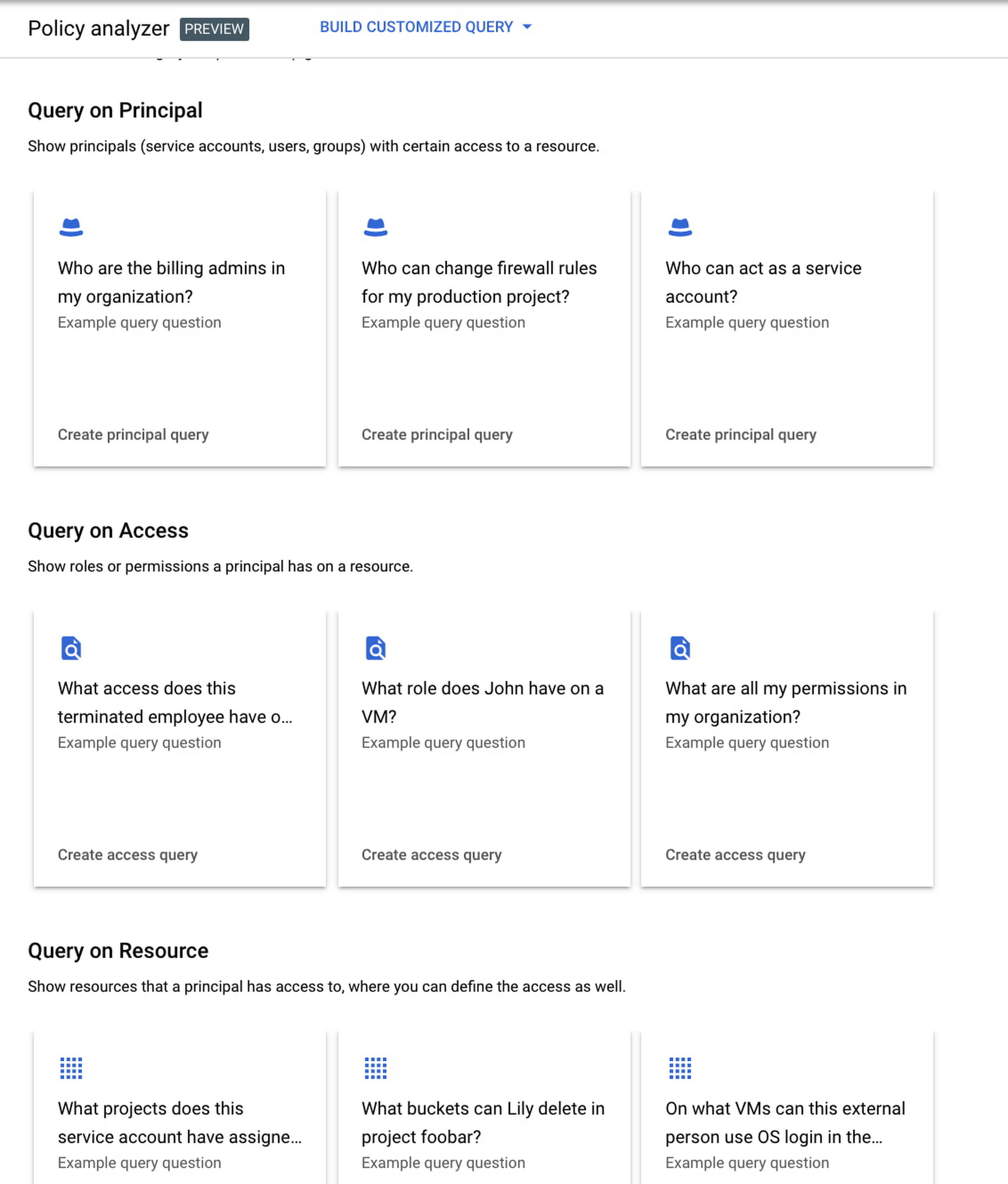
Determining authoritative answers to security-related questions like “Who can read data from my storage bucket that contains PII?” or “Does a terminated employee still have any remaining access to my system?” can be difficult and time consuming. This is why access management and identity certification is one of the top security priorities for enterprises running workloads in the cloud. To help alleviate this challenge, the new Policy Analyzer capability in CAI thoroughly analyzes the relationship between IAM policies and resources. The analysis includes powerful and efficient group expansion, service account impersonation, conditional access analysis, resource expansion, and more. You can even export the results to a BigQuery table or Cloud Storage bucket for further analysis and record keeping. CAI’s enhanced UI makes it even easier for you to build your own flexible queries and quickly get to a comprehensive answer.
Create asset posture visibility
Cloud Asset Inventory now provides seven types of Asset Insights through the Active Assist platform. These new asset insights help proactively detect anomalies within your organization’s IAM policies, which may be opportunities to improve your security posture. The insights can be aggregated at the Organization, Folder or Project level.
The seven new Asset Insights include:
- External members in IAM policies.
- External users that impersonate your service accounts.
- External members as policy editors.
- External users who can view cloud storage buckets.
- Terminated users/groups that are still in IAM policies
- IAM policies containing all users or all authenticated users.
- Projects with only terminated users as owners.
As a Google Cloud customer you can get started and use all the recently released capabilities and features immediately; check out our documentation to see how. We’d love to hear your feedback; email us with any questions or concerns!
Stop Cribbing About Shadow IT and Start Taking Charge Now

3654
Of your peers have already read this article.
2:20 Minutes
The most insightful time you'll spend today!
Employees use tools at their disposal to get work done, but if these tools (often legacy) hamper collaboration or are inflexible, they’ll turn to less secure options for the sake of convenience. According to Gartner, a third of successful attacks experienced by enterprises will come from Shadow IT usage by 2020.
And this problem is not unknown. Eighty-three percent of IT professionals reported that employees stored company data in unsanctioned cloud services, a challenge especially apparent with file sync and share tools. When people work around their legacy systems to use tools like Google Drive, it’s often because they find their current systems to be clunky or that they can’t collaborate with others as easily. They’re unable to do three key things in legacy file sync and share systems (like Microsoft SharePoint):
1. Unable to work on their phones. By now, people expect to be able to work on the go—and this means not just opening an attachment, but actually making edits to and comments on work. It gives them freedom to work when it’s convenient for them and to help teammates anytime.
2. Unable to create workspaces independently and easily. This might sound counterintuitive, but if an employee needs to contact IT to have a new project folder made on a drive, the bar is too high. Employees need to be able to quickly, and independently, create documents that can be shared simply because of the changing nature of collaboration. Work happens ad-hoc, on the go (like we mentioned above), and with people inside and outside of your organization. If someone has to contact IT to create a new folder, they’re more likely to neglect the request or use a different tool altogether to get started.
3. Unable to make the data work for them. Traditional file storage is just that, storage. Like an attic, we store things in these systems, but at some point stuff gets stale and it’s hard to tell what we should keep or pitch. People need their storage systems to not only house their data, but to help them categorize and find information quicker so that they can make this data work better for them.
You have two choices when it comes to making a decision on file sync and share systems:
Option 1: Continue to let your employees work on unsanctioned products, some of which may open your business up to unintended security issues (and, in some instances, scary terms of service).
Option 2: Buy the tools that your users want to use because these tools are making them more productive.
If you want to create a more productive workforce, take cues from your employees. Your tools should not only meet the highest security standards for IT, but let people work the way they want to (and be intelligent enough to guide them along the way).
Imagine if your technology could flag that a file contains confidential information before an employee accidentally shares it. Or surface files as they’re needed to help people work faster. Google Drive does this.
Remember, if the technology doesn’t suit your employees, they’re just going to work around it anyway. Instead of investing time and resources on routine maintenance, shift this energy toward helping your employees stay productive in ways that work for both you and them.
Improving Your Security Posture: Integrating Cloud DLP with Security Command Center

1197
Of your peers have already read this article.
4:00 Minutes
The most insightful time you'll spend today!
Our Cloud Data Loss Prevention (Cloud DLP) discovery service can monitor and profile your data warehouse to bring awareness of where sensitive data is stored and processed. Profiling is also useful for confirming that data is not being stored and processed where you don’t want it.
But how can you make use of this intelligence within your existing security and governance workflows so you can reduce risk? Starting today, we have integrated Cloud DLP’s sensitive-data discovery service with Security Command Center, our platform-native security and risk management solution. By bringing together sensitive data intelligence with your security controls, security teams can identify and act quickly on the vulnerabilities and help address threats that matter for your organization.
Data sensitivity and risk prioritization
Not all security threats, vulnerabilities, and misconfigurations generate an equal degree of risk. Some affect only test data or development environments. But others can place your organization’s sensitive information at risk of exposure or misuse. Understanding what to prioritize is often a big challenge for security professionals.
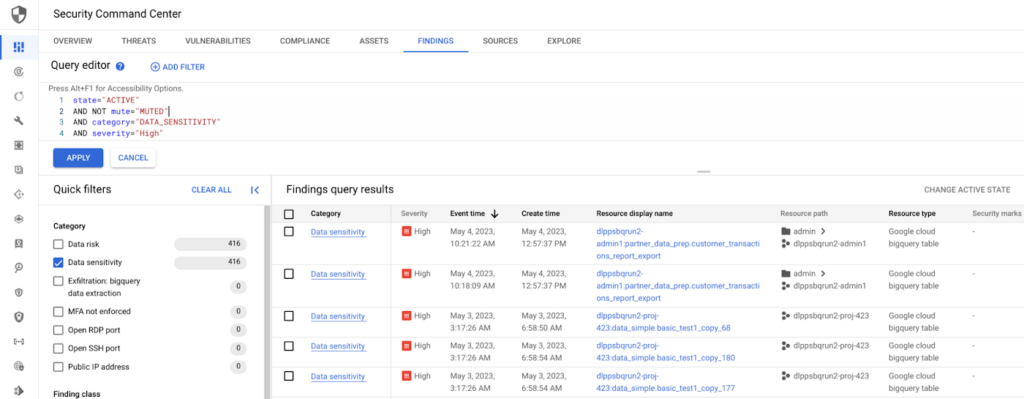
When this awareness is fed into Security Command Center, it allows your team to prioritize the Security Command Center findings that are driving greater security and compliance risk, and to help make informed decisions as to how to address those issues.
Understanding BigQuery data exfiltration threats
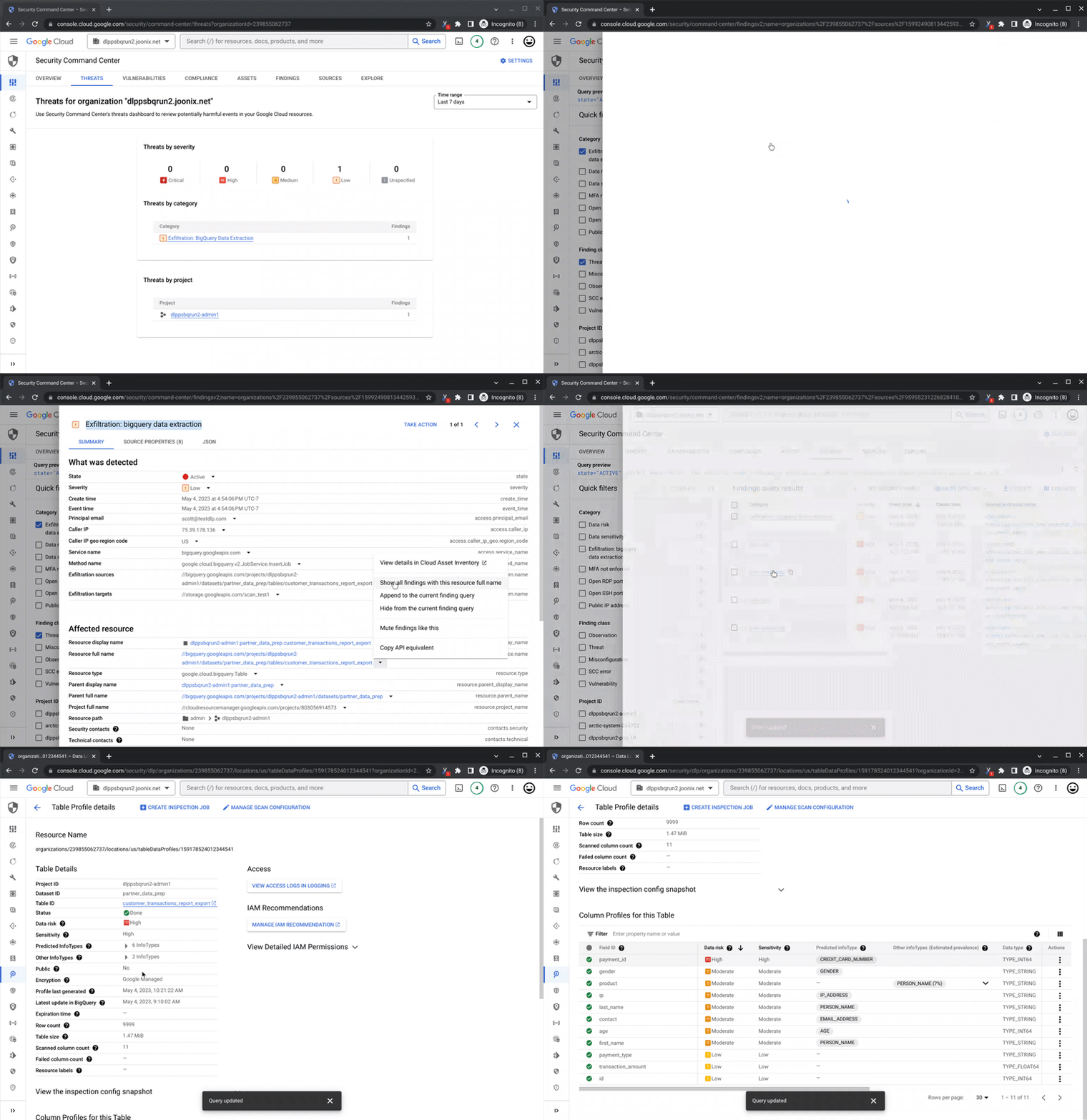
Security Command Center’s threat detection capability can analyze access and copy behavior of BigQuery data to help detect potential risk of exfiltration. With Cloud DLP intelligence on where sensitive data lives in BigQuery tables and datasets, you can now focus and prioritize on the exfiltration findings tied to your sensitive assets.
Remediation and data security posture management
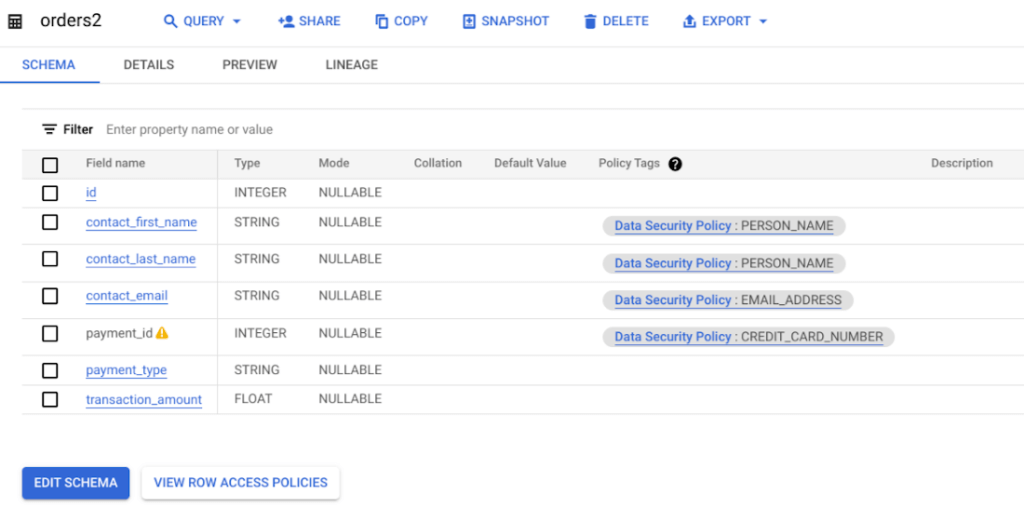
The intelligence from Cloud DLP’s sensitive-data discovery service helps you take a data-first approach to securing your assets. Use insights like Cloud DLP’s predicted infoType to apply column-level, fine-grained access or dynamic masking policies and consider de-identification to further help reduce the risk of data use operations and improve your overall security, privacy, and compliance posture.
Get started
To get started with richer sensitive data intelligence, enable the connection between Cloud DLP’s discovery service and Security Command Center. There is no additional cost to enable the integration for users of both products.
As soon as it’s enabled, you can begin to use your sensitive data intelligence to supercharge your security and support your compliance teams’ work.
Read more about how the sensitive data discovery service can meet your organization’s needs, and how you can get started managing your security posture with Security Command Center.

5253
Of your peers have already downloaded this article
10:30 Minutes
The most insightful time you'll spend today!
The age of unthinking fears about cloud security is over. Not only is cloud adoption rising steadily across geographies, industries and job functions, but confidence in cloud security is rising as well — to the point where increased security is a major reason enterprises opt for cloud solutions.
Gone are the days when organizations accessed applications and infrastructure over the internet only because it was the least expensive way to scale compute, storage and networking resources as business needs changed. The cloud today is a strategic necessity, with increased agility, integration and speed (as well as security) being the prime drivers of its increased adoption.
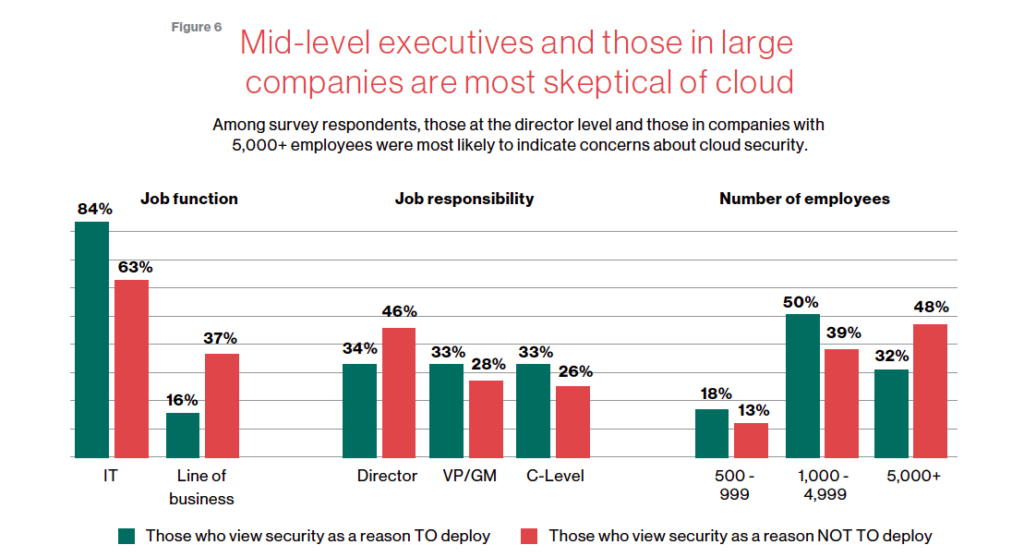
This MIT SMR survey of security professionals studies trends in security, which workloads are seeing the highest cloud utilization, the steady growth of comfort with cloud security–and interestingly paints a picture of the executives who are holding out with regards to cloud security.
Download the report now!
Assuring Compliance in the Cloud: Paper by Google Cloud’s Office of the CISO
4905
Of your peers have already read this article.
1:30 Minutes
The most insightful time you'll spend today!
Cloud transformation and the adoption of modern DevOps technology presents both opportunities and challenges for IT compliance functions. With DevOps style application development, the feedback loop for developers and engineers is much tighter than with traditional application development pipelines, enabling speed and agility of application release cycles. While speedy CI/CD is a critical advantage of DevOps, it also shifts compliance left in the development timeline, and therefore puts pressure on the IT risk & compliance organization to modernize their approach to regulatory compliance as well. With the ongoing shift towards cloud technologies and DevOps, modernization of regulatory compliance is no longer optional for an IT compliance function
Compliance modernization is a broad mandate that spans the way the function is governed; the tools, technology, and analytics it uses; the number and nature of its connections to other parts of the business; verifiability and auditability of the controls’ evidence, the expectations assigned to it; and more.
Public cloud technology is becoming a core part of many industries today, and with this comes some potential risks such as cloud misconfigurations exposing intellectual property, loss of physical control of assets, skillset scarcity around cloud based security and compliance.
Given the constantly changing risk landscape, it is critical that regulations more closely align to address these risks. As regulations and risks evolve, the aim of a modern compliance function is to help an organization stay compliant as it goes through a digital transformation. As organizations go through digital transformation, IT compliance also needs to transform — via upgrading the technology stack, modifying the business processes and most importantly re-skilling people to become cloud aware.
Today we are releasing the new paper by Google Cloud’s Office of the CISO. In the paper we reveal a new approach for modernizing your compliance approach using modern approaches and Google Cloud toolsets. Your team can leverage the paper to add value to enterprises, both by charting a course to the safe use of cloud technology and by reducing risk through the use of the public cloud.
Read the paper “Assuring Compliance in the Cloud.”
Also, review these related resources:
- “Risk Governance of Digital Transformation in the Cloud“ paper
- “Making Compliance Cloud-native” (episode 14) with Zeal Somani
- Google Cloud Compliance resource center
- Our compliance blueprints: PCI DSS on GKE and GCP FedRAMP Blueprint
- Google Cloud security best practices center
More Relevant Stories for Your Company

The Rise of Cloud-Based Security Analytics and Operations Technologies
Security analytics and operations can be complex, requiring highly skilled professionals and detailed processes. To overcome these issues, security teams tend to deploy an array of security analytics tools and technologies to collect, process, analyze, and act upon growing volumes of security telemetry. Despite this investment, however, many organizations continue

Google Cloud Content Protection: Unlock the Power of CSAP for Security
Content production is increasingly happening in the cloud. While moving a creative process that spans three centuries into the modern era brings challenges and risks, MovieLabs is one organization that takes digital transformation seriously. A nonprofit research and development group founded by a consortium of the major Hollywood studios, MovieLabs describes their mission as

New ML-Powered API Abuse Detection
API security incidents are increasingly common and disruptive. With the growth of API traffic, enterprises across the world are also experiencing an uptick in malicious API attacks, making API security a heightened priority. According to our latest API Security Research Report, 50% of organizations surveyed have experienced an API security incident

Ensuring Ironclad Security: Our Validation Process for the Confidential Space
We’re pleased to announce that Confidential Space, our new solution that allows you to control access to your sensitive data and securely collaborate in ways not previously possible, is now available in public Preview. First announced at Google Cloud Next, Confidential Space can offer many benefits to securely manage data
