





Cohere uses Google Cloud’s new TPU v4 Pods on its quest to create larger and more powerful language models

2822
Of your peers have already read this article.
3:30 Minutes
The most insightful time you'll spend today!
Over the past few years, advances in training large language models (LLMs) have moved natural language processing (NLP) from a bleeding-edge technology that few companies could access, to a powerful component of many common applications. From chatbots to content moderation to categorization, a general rule for NLP is that the larger the model, the greater the accuracy it’s able to achieve in understanding and generating language.
But in the quest to create larger and more powerful language models, scale has become a major challenge. Once a model becomes too large to fit on a single device, it requires distributed training strategies, which in turn require extensive compute resources with vast memory capacity and fast interconnects. You also need specialized algorithms to optimize the hardware and time resources.
Cohere engineers are working on solutions to this scaling challenge that have already yielded results. Cohere provides developers a platform for working with powerful LLMs without the infrastructure or deep ML expertise that such projects typically require. In a new technical paper, Scalable Training of Language Models using JAX pjit and TPUv4, engineers at Cohere demonstrate how their new FAX framework deployed on Google Cloud’s recently announced Cloud TPU v4 Pods addresses the challenges of scaling LLMs to hundreds of billions of parameters. Specifically, the report reveals breakthroughs in training efficiency that Cohere was able to achieve through tensor and data parallelism.
This framework aims to accelerate the research, development, and production of large language models with two significant improvements: scalability and rapid prototyping. Cohere will be able to improve its models by training larger ones more quickly, delivering better models to its customers faster. The framework also supports rapid prototyping of models that address specific objectives — for example, creating a generative model that powers customer-service chatbot — by experimenting and testing new ideas. The ability to switch back and forth among model types and optimize for different objectives will ultimately allow Cohere to offer models optimized for particular use cases.
The FAX framework relies heavily on the partitioned just-in-time compilation (pjit) feature of JAX, which abstracts the relationship between device and workload. This allows Cohere engineers to optimize efficiency, and performance by aligning devices and processes in the ideal configuration for the task at hand. Pjit works by compiling an arbitrary function into a single program (an XLA computation), that runs on multiple devices — even those residing on different hosts.
Cohere’s new solution also takes advantage of Google Cloud’s new TPU v4 Pods to perform tensor parallelism. which is more efficient than the earlier pipeline parallelism implementation. As the name suggests, the pipeline parallel approach uses accelerators in a linear fashion to scale a workload, like a single long assembly line. Accelerators must process each micro-batch of data before passing it along to the next one, and then run the backward pass in reverse order.
Tensor parallelism eliminates the accelerator idle time of pipeline parallelism, also known as the pipeline bubble. Tensor parallelism involves partitioning large tensors (mathematical arrays that define the relationship among multiple objects such as the words in a paragraph) across accelerators to perform computations at the same time on multiple devices. If pipeline parallelism is an ever-lengthening assembly line, tensor parallelism is a series of parallel assembly lines — one making the engine, the other the body, etc. — that simultaneously come together to form a complete car in a fraction of the time.
These computations are then collated, a process made practical thanks to Google Cloud TPU v4 VMs, which more than double the computational power. The superior performance of v4 chips has enabled Cohere to iterate on ideas and validate them 1.7X faster in computation than before.
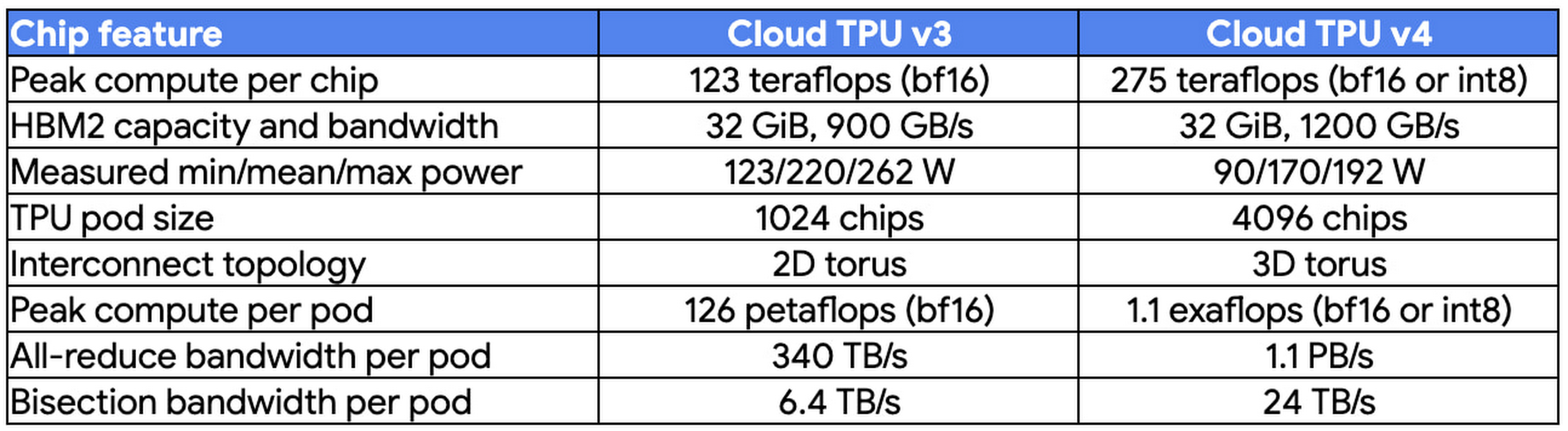
At Cohere, we build cutting-edge natural language processing (NLP) services, including APIs for language generation, classification, and search. These tools are built on top of a set of language models that Cohere trains from scratch on Cloud TPUs using JAX. We saw a 70% improvement in training time for our largest model when moving from Cloud TPU v3 Pods to Cloud TPU v4 Pods, allowing faster iterations for our researchers and higher quality results for our customers. The exceptionally low carbon footprint of Cloud TPU v4 Pods was another key factor for us.
Aidan Gomez
CEO and co-founder, Cohere
Why Google Cloud for LLM training?
As part of a multiyear technology partnership, Cohere leverages Google Cloud’s advanced AI and ML infrastructure to power its platform. Cohere develops and deploys its products on Cloud TPUs, Google Cloud’s custom-designed machine learning chips that are optimized for large-scale ML. Cohere’s recently announced their new model improvements and scalability by training an LLM using FAX on Google Cloud TPUs, and this model has demonstrated that transitioning from TPU v3 to TPU v4 has so far enabled them to achieve a total speedup of 1.7x. In addition to a significant performance boost, TPUs provide an excellent user experience with the new TPU VM architecture. Importantly, Google Cloud ensures that Cohere’s state-of-the-art ML training is achieved with the highest standards of sustainability, powered by 90% carbon-free energy in the world’s largest publicly available ML hub.
By adopting Cloud TPUs, Cohere is making LLM training faster, more economical, and more agile. This helps them provide larger and more accurate LLMs to developers, and put NLP technology in the hands of developers and businesses of all sizes.
To learn more about these LLM training advances, you can read the full paper, Scalable Training of Language Models using JAX pjit and TPUv4. To learn more about Cohere’s best practices and AI principles, you can check this article co-authored with Open AI and AI 21 Labs.
Google Cloud Helps Northwell Health to Boost Caregiver Productivity and Access to Right Care Using AI

7995
Of your peers have already read this article.
2:00 Minutes
The most insightful time you'll spend today!
Lung cancer is the leading cause of cancer death in the United States and like any cancer, early detection is crucial to survival. Screening at-risk populations is an important part of reducing mortality, and if concerning nodules are found on imaging, further testing may be required. Today, we’ll share how Northwell Health uses Google Cloud products such as Cloud Healthcare APIs and BigQuery to increase caregiver productivity and deliver better care for patients with findings that indicate potential development of lung cancer.
Northwell is New York’s largest healthcare provider
Northwell Health is New York’s largest healthcare provider with 23 hospitals and nearly 800 outpatient facilities. Northwell’s nearly 4,000 doctors care for millions of patients each year, and at this scale, there is an immense amount of healthcare data to manage. To better manage and leverage this data, Northwell Health partnered with Google Cloud starting in 2018.
Enabling caregivers to spend more time with patients
Nic Lorenzen, the lead developer of Northwell Emerging Technology and Innovation team, has a mission to put together data for caregivers in a way that makes sense. It is no secret that inefficient electronic health records systems have a negative impact on a physician’s ability to deliver quality care. Traditional EHRs have information distributed across many tabs, which forces caregivers to spend considerable time at the computer trying to find information. Moreover, speed of care matters. If care is delayed, patients may have to spend more time in the hospital and may suffer worse health outcomes.
To solve this problem, Nic’s team focused on giving caregivers the most relevant pieces of data at the right time by developing an intelligent clinician rounding app. The data needed to derive these insights can depend on the caregiver’s role–a nurse cares about different things than a cardiologist. This system aggregates multiple data sources, and provides patient-specific insights to caregivers.
This system would not have been possible before with traditional EHRs and data warehouses that have proprietary data models and rarely sync data in real time. Now with data easily accessible through Google Cloud’s Healthcare solutions, Nic’s team can deliver the right clinical information to the right people instantly. These days, Nic says, “instead of spending 75% of our time dealing with architecting the underlying platforms, we spend 75% of our time focused on higher value use cases for clinicians and patients. Google Cloud’s Healthcare solutions have greatly improved our developer productivity and time to value.”
Caregivers have found this new system to be a game changer.Before the implementation of this system, caregivers would spend, on average, seven to nine minutes finding the data needed to make medical decisions for one patient. Now, that aggregated information is delivered to a caregiver’s mobile device in less than a second.
Ensuring patients get the right care with the power of AI
There are a number of reasons why patients might not get the care that they need. For example, patients today can go to multiple hospitals and clinics settings, and coordinating care across multiple facilities is complex. Regional hospitals and clinics have their own siloed view of their data, so pertinent information gathered by one clinic might not be seen by another. These gaps in clinical data lead to gaps in patient care.
When a patient gets radiologic imaging, they may have findings unrelated to the reason they initially got the imaging. For example, a chest CT for a car accident might reveal an incidental lung nodule that could be cancerous. Unfortunately, research shows that a large portion of patients do not get follow up for these incidental findings because it isn’t the primary reason why the patient is seeing a doctor. Moreover, social determinants of health are a factor that affects which patients receive follow-up care. Identifying these patients and providing the necessary follow up care prevents adverse events related to delayed detection of cancer.

With Cloud Healthcare solutions, Northwell built an AI model to identify these patients so that oncologists can appropriately follow up with patients who have findings suspicious for lung cancer. The AI model detects incidental pulmonary nodules in radiology reports so that doctors can then contact the patients that need follow-up care. Nic says his team was able to build this system in a week: “Google Cloud did a lot of heavy-lifting for us and allowed us to get to the AI applications much faster. It allowed us to build a platform that just works.”
Healthcare systems can now rapidly generate healthcare insights with one end-to-end solution, Google Cloud Healthcare Data Engine. It builds on and extends the core capabilities of the Google Cloud Healthcare API to make healthcare data more immediately useful by enabling an interoperable, longitudinal record of patient data. Northwell Health uses Google Cloud as the core of their platform, enabling their developers to create solutions to the most pressing healthcare problems.
Special thanks to Kalyan Pamarthy, Product Management Lead on Cloud Healthcare and Natural Language APIs for contributing to this blog post.
Case Study: Twitter is Taking Their CX to The Next Level with AutoML

2785
Of your peers have already read this article.
2:00 Minutes
The most insightful time you'll spend today!
Editor’s note: Since launching its Spaces feature, Twitter has demonstrated that hearing people’s voices can bring conversations on Twitter to life in a completely new way. Next, it aimed to make it easier for customers to join and listen to live conversations they personally care about. In this blog, we learn how the Twitter Spaces Engineering team is bringing this vision to life with AutoML, powering a new ML heuristic which serves personalized recommendations to Twitter customers. The authors would like to thank Chuan Lu, Joe Balistreri, Chen-Rui Chou, Pablo Jablonski, Alberto Parrella, Pradip Thachile and Sam Lee from Twitter, as well as Helin Wang from Google, for contributions to this blog.
Since Twitter introduced Spaces in 2020 to enable live audio conversations on its platform, the Twitter Spaces Engineering team has been continually testing, building, and updating this feature in the open. Today, anyone can join, listen, and speak in a Space on Twitter, and the feature’s popularity has taken off. But this success also poses a challenge: with millions of people creating and joining Spaces at any time, how can they find the Spaces to engage with while they’re happening? Taking this as an opportunity to further improve the experience of its customers, Twitter has turned to machine learning (ML) and cloud technology for answers.
“ML fits into the natural progression of Twitter consumer and revenue product building, especially for a product feature such as Spaces,” explains Diem Nguyen, Senior Machine Learning Engineer and Data Scientist at Twitter. “We launched Spaces with a base-line algorithm using the ‘most popular’ heuristic which assumes that if a Space is popular, there’s a good chance you’d like it too. But our aim is to leverage ML to surface the most interesting and relevant Spaces to a particular Twitter customer, making it easier for them to find and join the conversations they personally care about. This is a complex functionality that Google Cloud ML capabilities help us to enable.”
Setting the stage for building new features with limited ML resources
While looking for the right tools to power this vision, Nguyen and her team started evaluating in December 2021 whether the Vertex AI platform and AutoML in particular could solve challenges observed when they first started building Spaces. These included a lack of dedicated ML resources to build and deploy the product feature, and the need to work on a multi-cloud environment.
“We had three key questions in mind during our assessment,” Nguyen explains. “Can we realistically deploy the AutoML model off-platform? Once deployed, can it solve for the request load that we get from the service we’re serving (in this case, the Spaces tab)? And finally, can we develop and maintain such a solution without a dedicated team of ML experts for this project?” The answer to all three questions was yes.
Positive answers motivated the Spaces Engineering team to take the solution to production in February 2022. “We started using AutoML Tables to train high-accuracy models with minimal ML expertise or effort, alleviating our resource constraint,” says Nguyen of the results. “Soon AutoML also stood out for its high performance and for supporting easy deployment beyond the Google Cloud Platform, making it ideal for this project hosted in a multi-cloud environment.”
Increasing customer engagement at speed with accurate ML predictions
With a classification model in place to predict the probability of user engagement in a particular Space, Twitter now aims to optimize its model with aggregated data around Twitter features that can help it better understand customer preferences. For example, if a customer has historically engaged with a particular topic and a new Space matches that topic, the ML model increases the score of that Space being served to that user on the Spaces tab.
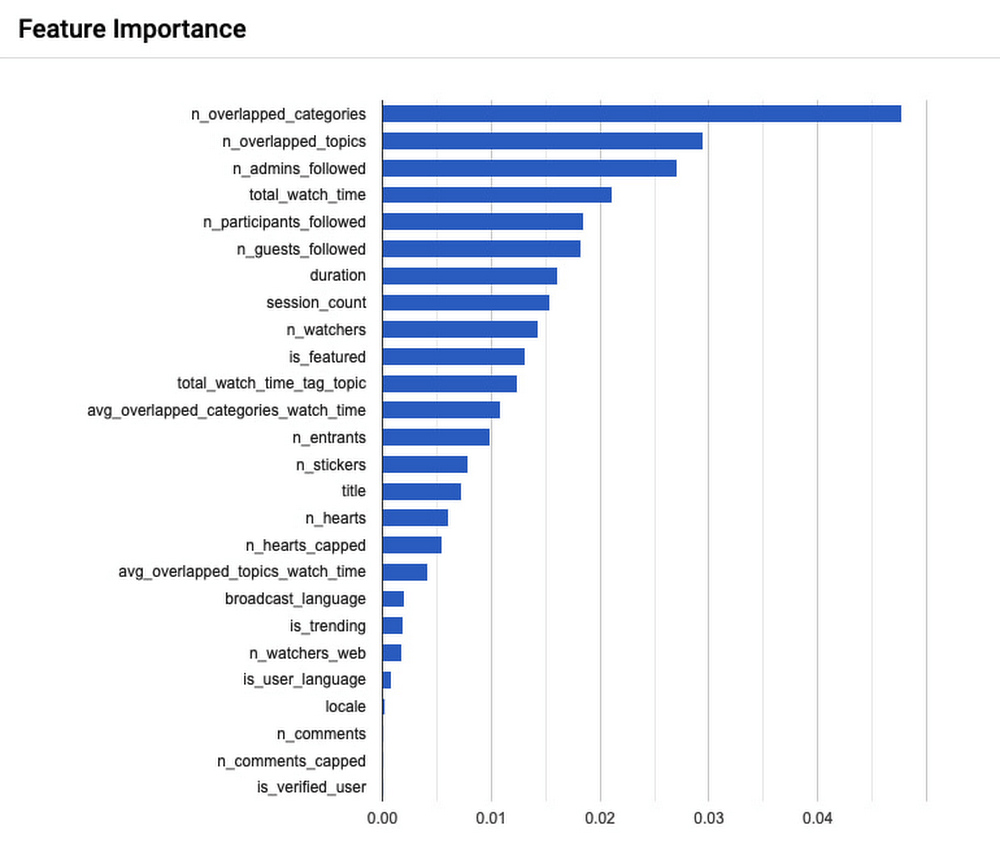
Because Spaces are live audio conversations, the Spaces tab needs to be ranked to customers in near real time so they don’t miss out. With this in mind, Twitter’s model currently performs 900 queries per second on the Spaces tab, and evaluates 50,000 candidates per second. Meanwhile, 99% of these requests are faster than 100 milliseconds, and 90% of requests are faster than 50 milliseconds.
To measure the success of this project, Nguyen’s team conducted A/B experiments around key customer engagement metrics–A stands for the ‘most popular’ heuristic previously in production, and B is the new AutoML model which seeks to personalize Spaces recommendations to the interests of individual Twitter users. Three months into the project, the numbers were encouraging. “After deploying our AutoML Tables solution we saw an increase of 1.96% in Spaces daily active customers, which is one of our key metrics. We also noticed an increase of 1.99% in Spaces join in rates, and an increase of 8.42% in user clicks to explore a Space,” Nguyen shares. “These are positive signals that users are now engaging more with the Spaces tab service on the Twitter app, which is exactly what we set out to do with this project.”
Powering new use cases with hands-off ML frameworks
With this first solution running in production to improve the performance of the Spaces tab, Nguyen starts to ask how else it might support the experience of Twitter users moving forward. “The Spaces tab is a small surface on the Twitter app. With our current ML solution we’re some distance away from serving our home tab traffic, which is where a lot of our traffic happens and therefore would involve a much bigger-scale operation. Getting there will take some work but we’re evaluating the possibility of optimizing our model performance for this in collaboration with Google Cloud,” says Nguyen.
“As a product-led company, we focus on continually improving the customer experience and we want to iterate faster to get to that point. AutoML brings that value to our product teams because it is so hands-off. You don’t need to write any model code in order to reap the benefits from this machine learning framework; AutoML automatically experiments with many different model architectures and comes up with a state-of-the-art model that addresses your needs. So while it is not a one-size-fits-all solution, it is a great solution with the potential to power many more Twitter use cases,” she concludes.
ML Workflow Made Simple: How to Automate ML Experiment Tracking with Vertex AI Experiments Autologging

1275
Of your peers have already read this article.
3:30 Minutes
The most insightful time you'll spend today!
Practical machine learning (ML) is a trial and error process. ML practitioners compare different performance metrics by running ML experiments till you find the best model with a given set of parameters. Because of the experimental nature of ML, there are many reasons for tracking ML experiments and making them reproducible including debugging and compliance.
But tracking experiments is challenging: you need to organize experiments so that other team members can quickly understand, reproduce and compare them. That adds overhead that you don’t need.
We are happy to announce Vertex AI Experiments autologging, a solution which provides automated experiment tracking for your models, which streamlines your ML experimentation
With Vertex AI Experiments autologging, you can now log parameters, performance metrics and lineage artifacts by adding one line of code to your training script without needing to explicitly call any other logging methods.
How to use Vertex AI autologging
As a data scientist or ML practitioner, you conduct your experiment in a notebook environment such as Colab or Vertex AI Workbench. To enable Vertex AI Experiments autologging, you call aiplatform.autolog() in your Vertex AI Experiment session. After that call, any parameters, metrics and artifacts associated with model training are automatically logged and then accessible within the Vertex AI Experiment console.
Here’s how to enable autologging in your training session with a Scikit-learn model.
# Enable autologging
aiplatform.autolog()

# Build training pipeline
ml_pipeline = Pipeline(...)

# Train model
ml_pipeline.fit(x_train, y_train)
This video shows parameters and training/post-training metrics in the Vertex AI Experiment console.
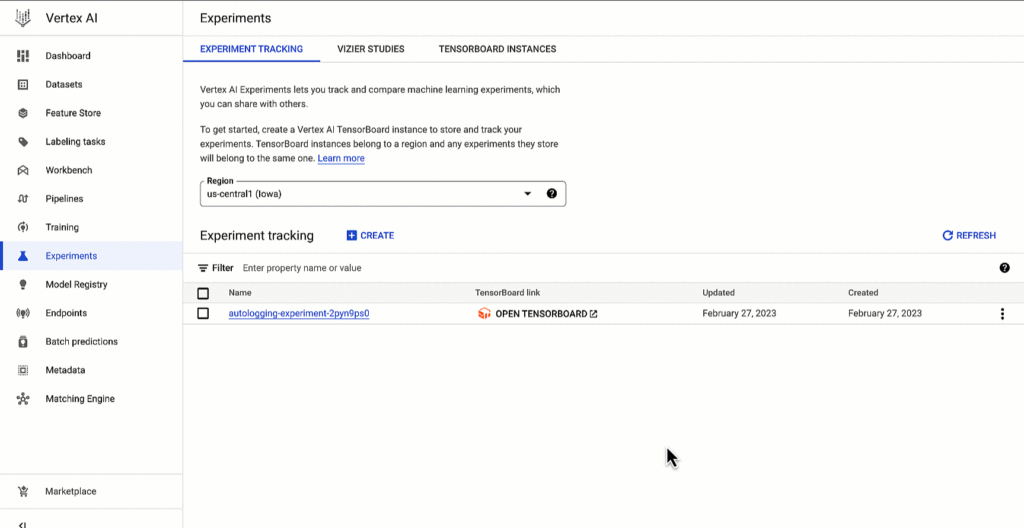
Vertex AI SDK autologging uses MLFlow’s autologging in its implementation and it supports several frameworks including XGBoost, Keras and Pytorch Lighting. See documentation for all supported frameworks.
Vertex AI Experiments autologging automatically logs model time series metrics when you train models along multiple epochs. That’s because of the integration between Vertex AI Experiments autologging and Vertex AI Tensorboard.
Furthermore, you can adapt Vertex AI Experiments autologging to your needs. For example, let’s say your team has a specific experiment naming convention. By default, Vertex AI Experiments autologging automatically creates Experiment Runs for you without requiring you to call `aiplatform.start_run()` or `aiplatform.end_run()`. If you’d like to specify your own Experiment Run names for autologging, you can manually initialize a specific run within the experiment using aiplatform.start_run() and aiplatform.end_run() after autologging has been enabled.
What’s next
You can access Vertex AI Experiments autologging with the latest version of Vertex AI SDK for Python. To learn more, check out these resources :
- Documentation: Autolog data to an experiment run
- Github: Get started with Vertex AI Experiments autologging
While I’m thinking about the next blog post, let me know if there is Vertex AI content you’d like to see on Linkedin or Twitter.
4 Methods How AI/ML Boosts Innovation and Reduces Costs

2938
Of your peers have already read this article.
2:30 Minutes
The most insightful time you'll spend today!
“Cloud Wisdom Weekly: for tech companies and startups” is a new blog series we’re running this fall to answer common questions our tech and startup customers ask us about how to build apps faster, smarter, and cheaper. In this installment, we explore how to leverage artificial intelligence (AI) and machine learning (ML) for faster innovation and efficient operational growth.
Whether they’re trying to extract insights from data, create faster and more efficient workflows via intelligent automation, or build innovative customer experiences, leaders at today’s tech companies and startups know that proficiency in AI and ML is more important than ever.
AI and ML technologies are often expensive and time-consuming to develop, and the demand for AI and ML experts still largely outpaces the existing talent pool. These factors put pressure on tech companies and startups to allocate resources carefully when considering bringing AI/ML into their business strategy. In this article, we’ll explore four tips to help tech companies and startups accelerate innovation and reduce costs with AI and ML.
4 tips to accelerate innovation and reduces costs with AI and ML
Many of today’s most innovative companies are creating services or products that couldn’t exist without AI—but that doesn’t mean they’re building their AI and ML infrastructure and pipelines from scratch. Even for startups whose businesses don’t directly revolve around AI, injecting AI into operational processes can help manage costs as the company grows. By relying on a cloud provider for AI services, organizations can unlock opportunities to energize development, automate processes, and reduce costs.
1. Leverage pre-trained ML APIs to jumpstart product development
Tech companies and startups want their technical talent focused on proprietary projects that will make a difference to the business. This often involves the development of new applications for an AI technology, but not necessarily the development of the AI technology itself. In such scenarios, pre-trained APIs help organizations quickly and cost-effectively establish a foundation on which higher-value, more differentiated work can be layered.
For example, many companies building conversational AI into their products and services leverage Google Cloud APIs such as Speech-to-Text and Natural Language. With these APIs, developers can easily integrate capabilities like transcription, sentiment analysis, content classification, profanity filtering, speaker diarization, and more. These powerful technologies help organizations focus on creating products rather than having to build the base technologies.
See this article for examples of why tech companies and startups have chosen Google Cloud’s Speech APIs for use cases that range from deriving customer insights to giving robots empathetic personalities. For an even deeper dive, see
- our AI product page to explore other APIs, including Translation, Vision, and more;
- and the Google Cloud Skills Boost for ML APIs.
2. Use managed services to scale ML development and accelerate deployment of models to production
Pre-trained models are extremely useful, but in many cases, tech companies and startups need to create custom models to either derive insights from their own data or to apply new use cases to public data. Regardless of whether they’re building data-driven products or generating forecasting models from customer data, companies need ways to accelerate the building and deployment of models into their production environments.
A data scientist typically starts a new ML project in a notebook, experimenting with data stored on the local machine. Moving these efforts into a production environment requires additional tooling and resources, including more complicated infrastructure management. This is one reason many organizations struggle to bring models into production and burn through time and resources without moving the revenue needle.
Managed cloud platforms can help organizations transition from projects to automated experimentation at scale or the routine deployment and retraining of production models. Strong platforms offer flexible frameworks, fewer lines of code required for model training, unified environments across tools and datasets, and user-friendly infrastructure management and deployment pipelines.
At Google Cloud, we’ve seen customers with these needs embrace Vertex AI, our platform for accelerating ML development, in increasing numbers since it launched last year. Accelerating time to production by up to 80% compared to competing approaches, Vertex AI provides advanced end-to-end ML Ops capabilities so that data scientists, ML engineers, and developers can contribute to ML acceleration. It includes low-code features, like AutoML, that make it possible to train high performing models without ML expertise.
Over the first half of 2022, our performance tests found that the number of customers utilizing AI Workbench increased by 25x. It’s exciting to see the impact and value customers are gaining with Vertex AI Workbench, including seeing it help companies speed up large model training jobs by 10x and helping data science teams improve modeling precision from the 70-80% range to 98%.
If you are new to Vertex AI, check out this video series to learn how to take models from prototype to production. For deeper dives, see
- this article about Vertex AI’s role in an ambitious project to measure climate change with AI;
- BigQuery has built-in Machine Learning (ML) and Analytics that you can use to create no-code predictions using just SQL queries.
- this blog about how Vertex AI and BigQuery work together to make data analysis easier and more powerful;
- and this blog about Example-based explanations, one of our most recent updates to make model iteration more intuitive and efficient.
3. Harness the cloud to match hardware to use cases while minimizing costs and management overhead
ML infrastructure is generally expensive to build, and depending on the use case, specific hardware requirements and software integrations can make projects costly and complicated at scale. To solve for this, many tech companies and startups look to cloud services for compute and storage needs, attracted by the ability to pay only for resources they use while scaling up and down according to changing business needs.
At Google Cloud, customers share that they need the ability to optimize around a variety of infrastructure approaches for diverse ML workloads. Some use Central Processing Units (CPUs) for flexible prototyping. Others leverage our support for NVIDIA Graphics Processing Units (GPUs) for image-oriented projects and larger models, especially those with custom TensorFlow operations that must run partially on CPUs. Some choose to run on the same custom ML processors that power Google applications—Tensor Processing Units (TPUs). And many use different combinations of all of the preceding.
Beyond matching use cases to the right hardware and benefiting from the scale and operational simplicity of a managed service, tech companies and startups should explore configuration features that help further control costs. For example, Google Cloud features like time-sharing and multi-instance capabilities for GPUs — as well as features like Vertex AI Training Reduction Server — are built to optimize GPU costs and usage.
Vertex AI Workbench also integrates with the NVIDIA NGC catalog for deploying frameworks, software development kits and Jupyter Notebooks with a single click—another feature that, like Reduction Server, speaks to the ways organizations can make AI more efficient and less costly via managed services.
4. Implement AI for operations
Besides using pre-trained APIs and ML model development to develop and deliver products, startup and tech companies can improve operational efficiency, especially as they scale, by leveraging AI solutions built for specific business and operational needs, like contract processing or customer service.
Google Cloud’s DocumentAI products, for instance, apply ML to text for use cases ranging from contract lifecycle management to mortgage processing. For businesses whose customer support needs are growing, there’s Contact Center AI, which helps organizations build intelligent virtual agents, facilitate handoffs as appropriate between virtual agents and human agents, and generate insights from call center interactions. By leveraging AI to help manage operational processes, startups and tech companies can allocate more resources to innovation and growth.
Next steps toward an intelligent future
The tips in this article can help any tech company or startup find ways to save money and boost efficiency with AI and ML. You can learn more about these topics by registering for Google Cloud Next, kicking off October 11, where you’ll hear Google Cloud’s latest AI news, discussions, and perspectives—in the meantime, you can also dive into our Vertex AI quickstarts and BigQuery ML tutorials. And for the latest on our work with tech companies and startups, be sure to visit our Startups page.
Measuring Deforestation in Extractive Supply Chains With ML

2571
Of your peers have already read this article.
2:30 Minutes
The most insightful time you'll spend today!
Introduction
In my experience, I have observed that it’s common in machine learning to surrender to the process of experimenting with many different algorithms in a trial and error fashion, until you get the desired result. My peers and I at Google have a People and Planet AI YouTube series where we talk about how to train and host a model for environmental purposes using Google Cloud and Google Earth Engine. Our focus is inspiring people to use deep learning, and if we could rename the series, we would call it AI for Minimalists since we would recommend artificial neural networks for most of our use cases. And so in this episode we give an overview of what deep learning is and how you can use it for tracking deforestation in supply chains. I also included a summary of the architecture and products you can use in this blog that I presented at the 2022 Geo For Good Summit. For those of you interested in diving even deeper into code, please visit our end-to-end sample (click “open in colab” at the bottom of the screen to view this tutorial in a notebook format).
What’s included in this article
- What is Deep Learning?
- Measuring deforestation in extractive supply chains with ML
- When to build a custom model outside of Earth Engine?
- How to build a model with Google Cloud & Earth Engine?
- Try it out!
What is Deep Learning?
Out of the many ML algorithms out there, I’m happy to share that deep learning or artificial neural networks is a technique that can be used for almost any supervised learning job.
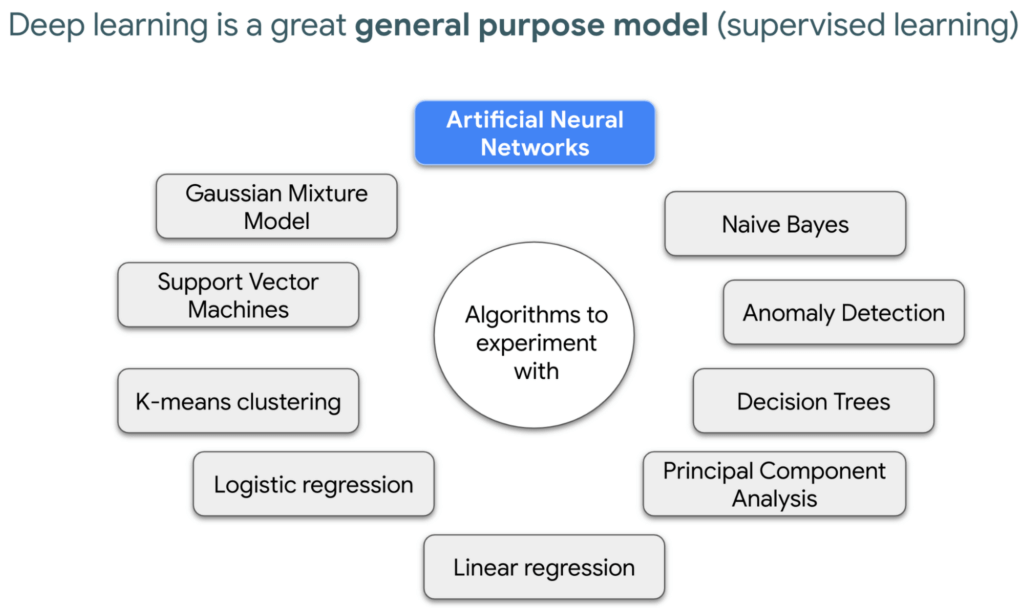
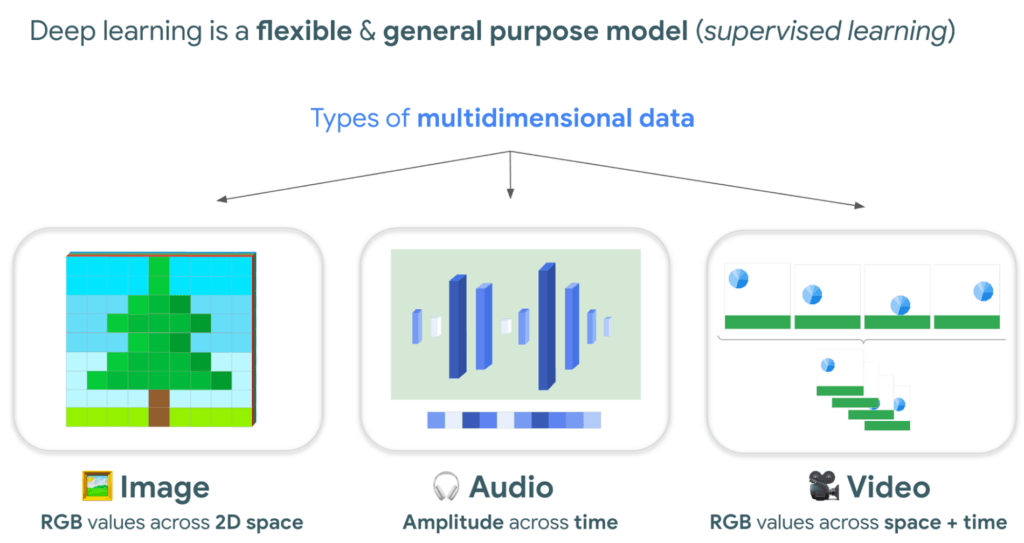
In supervised learning, you tell a computer the right answers to look for, through examples. Deep learning is very flexible, and is a great go-to algorithm. Especially for images, audio, or video files which are types of multidimensional data. This is because each of these data types have one or more dimensions with specific values for each point.
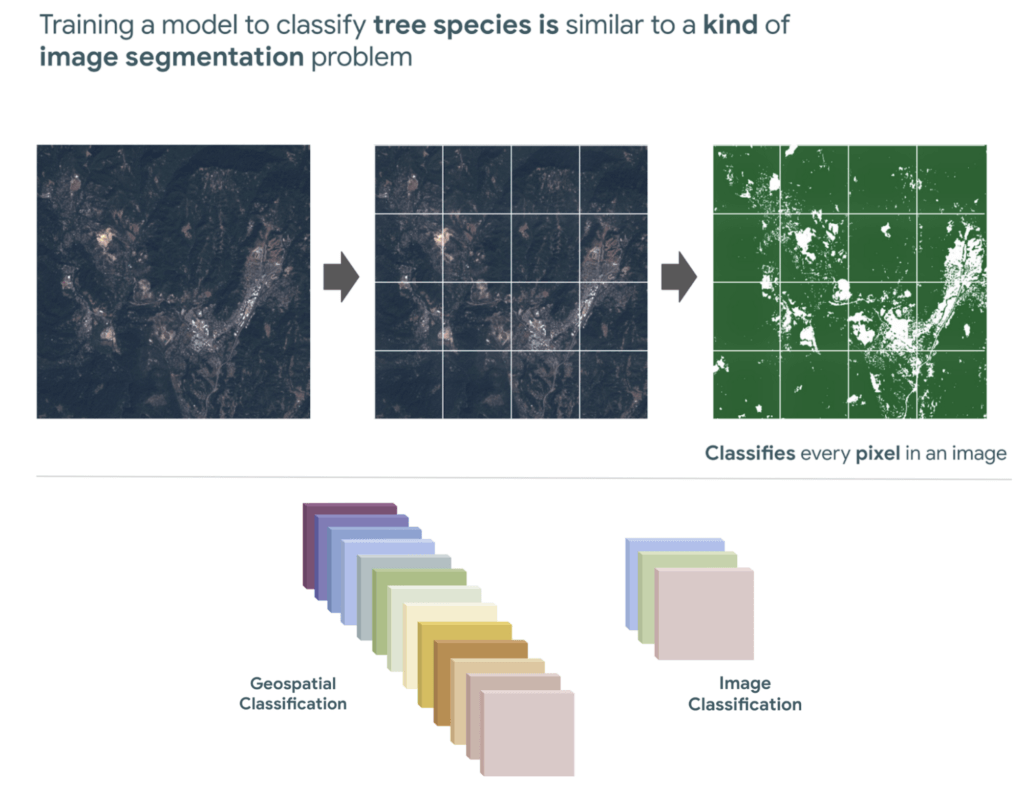
And training a model to classify tree species using satellite images is kind of like an image segmentation problem, where every pixel in the image is classified.
“Deep learning approaches problems differently”
David Cavazos, Developer Programs Engineer
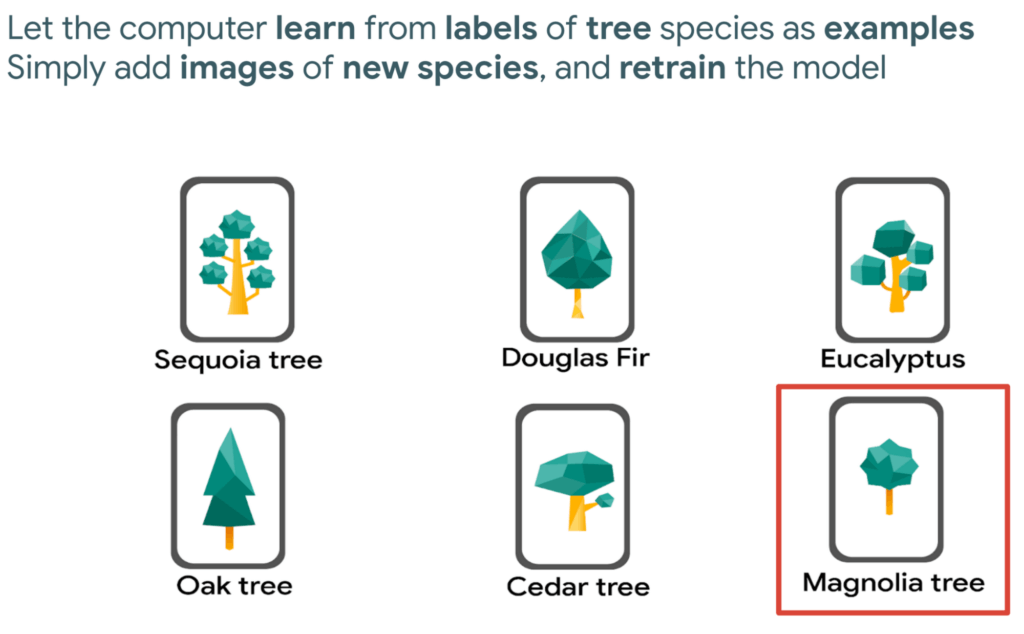
There’s no writing a function with explicit & sequential steps that reviews every single pixel one by one for every image, as traditional software development does. Let’s say you wish to build a model that classifies tree species. You don’t spend time coding all the instructions, but instead give a computer examples of images with tree species labels, and let it learn from these examples. And when you want to add more species, it’s as simple as adding new images of that species to retrain the model.
Measuring deforestation in extractive supply chains with ML
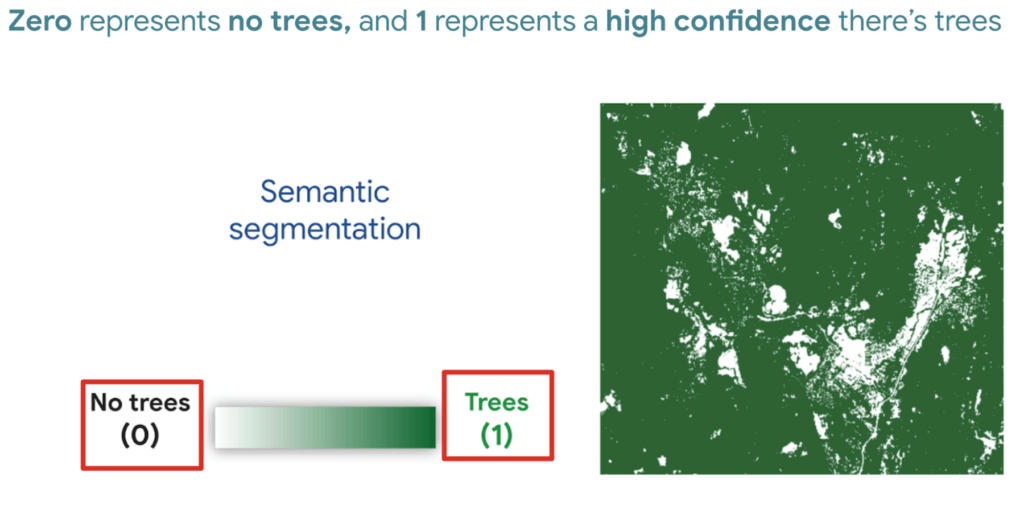
So let’s say we would like to measure deforestation using deep learning; to get started with building a model we first need a dataset that includes satellite images with an even amount of labels marking where there are trees and where there aren’t. Next, we choose a goal, here are a few common ones. In our case, we simply want to know if there are trees or not for every pixel, and so this would be a binary semantic segmentation problem.
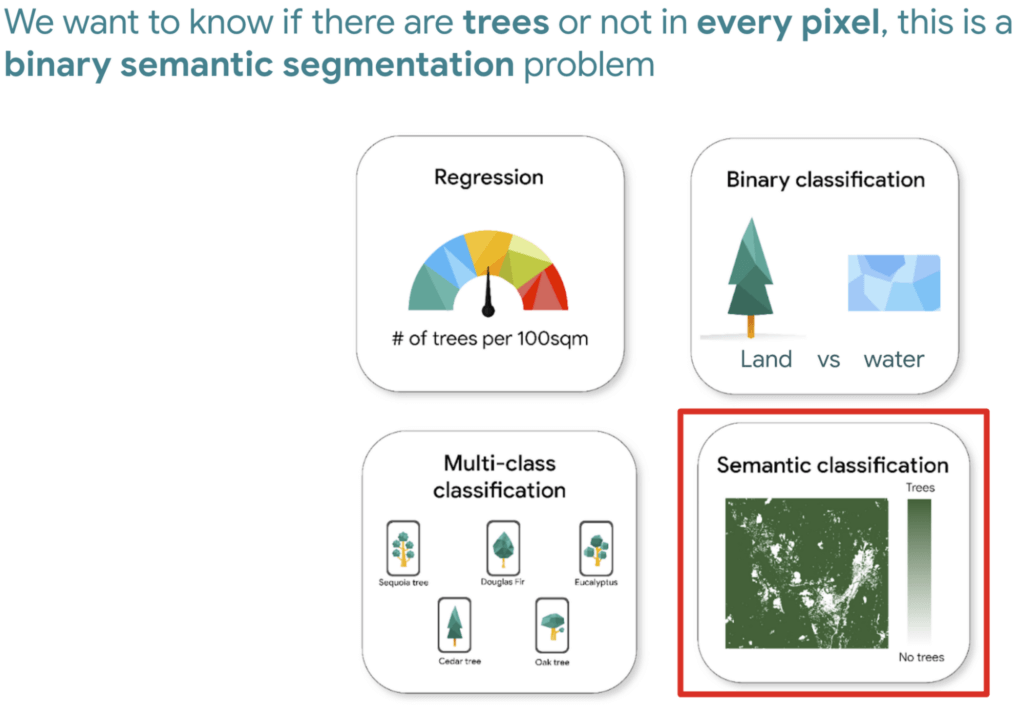
And based on this goal, we expect the outputs to be the percentage of trees for every pixel; as a number between 0 and 1. Zero represents no trees, and one represents a high confidence there are trees.
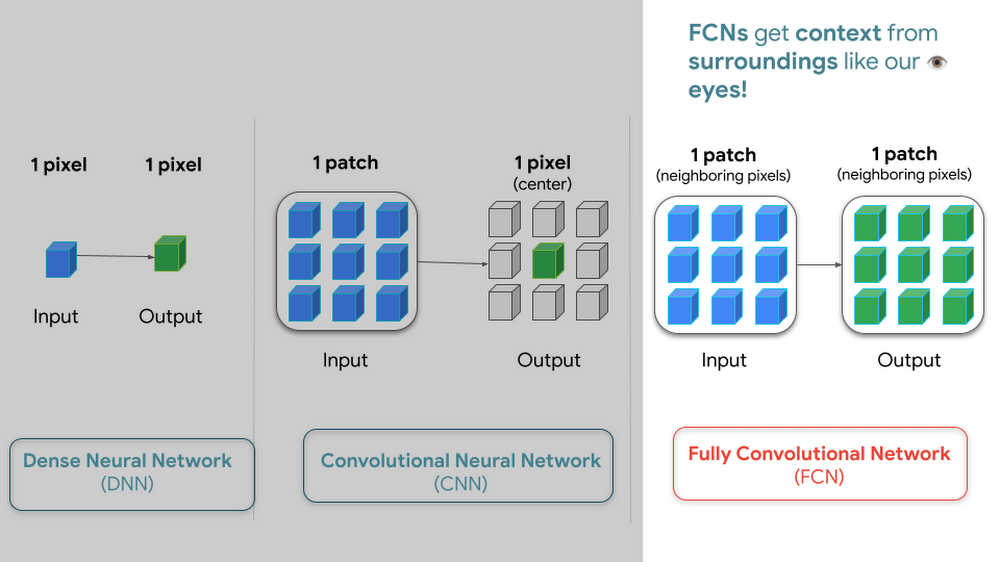
But how do we go from input images into probabilities of trees? Well think about it this way…there are many ways to approach this problem, here are 3 common ways of doing so. My peers and I prefer using Fully convolutional networks when building a map with ML predictions
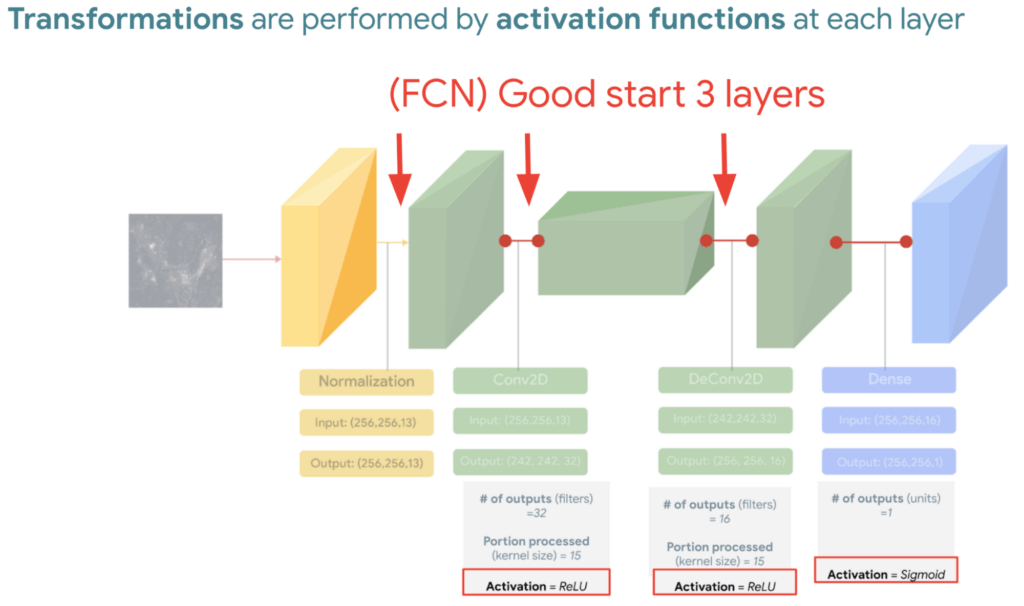
And since a model is a collection of interconnected layers, we must come up with an arrangement of layers that transforms our data inputs based on our desired outputs. Each layer by the way has something called an activation function, which performs the transformations of each layer before it passes them to the next layer.
FYI Below is a handy dandy table, with our recommended activation and loss functions to choose from based on your goal. We hope this saves you time.
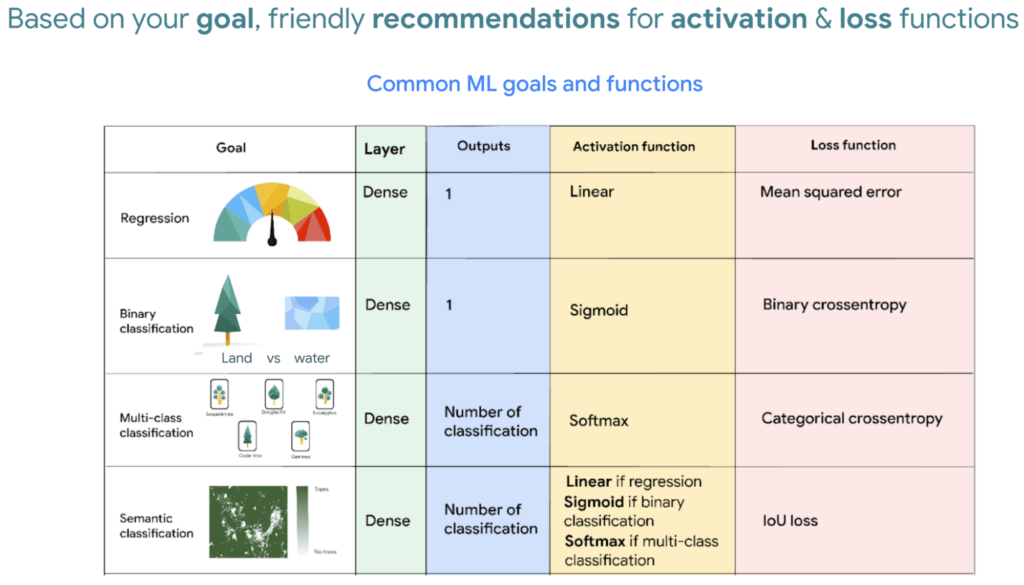
We then reach the fourth and last layer. Depending on our goals at the beginning, we also choose an appropriate loss function that helps us score how well the model did during training.
After choosing layers and functions you will split your data into training and validation datasets. Just remember that all of this work is about experimenting repeatedly until you reach desired results. Our 8min episode gives this overview more in detail.
When to build a custom model outside of Earth Engine
So now that we covered what is deep learning, the next step is understanding which tools to use to build our deforestation model. For starters it’s important to call out that Google Earth Engine is a wonderful tool that helps organizations of all sizes find insights about changes on the planet, in order to make a climate positive impact. It has built-in machine learning algorithms (classifiers) that let users quickly spin them up, with just a basic machine learning background. This is fantastic place to start when using ML on geospatial data, however there are multiple situations where you will want to opt to build a custom model such as:
- You want to use a popular ML library such as TensorFlow Keras.
- You wish to build a state of the art model to build a global and accurate land cover map product such as Google’s Dynamic World.
- Or because you generally have too much data to process that you can’t execute it in just one task in Earth Engine (and are trying to figure out hacky ways to export your data).
Whenever you identify with any of these options, you will want to roll up your sleeves and dive into building a custom model, which does require expertise and of course working with multiple products. But I have good news, using deep learning is a great go-to algorithm.
How to build a model with Google Cloud & Earth Engine?
To get started, you will need an account with Google Earth Engine which is free for non-commercial entities and Google Cloud account which has a free tier if you are just getting started for all users. I have broken up the products you would use by function.
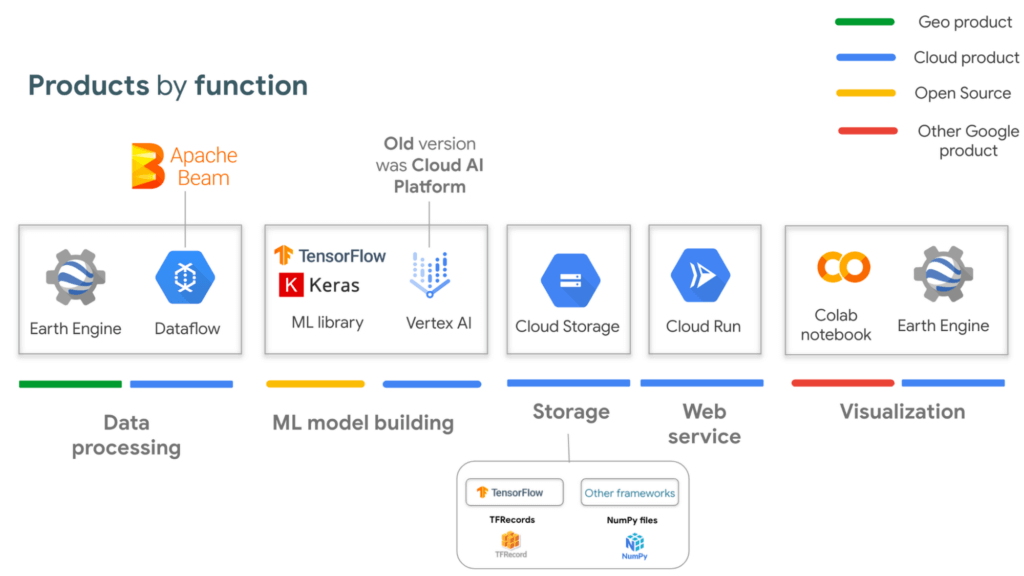
If you are interested in looking deeper into this overview, visit our slides here starting from slide 53 and read the speaker notes. Our code sample also walks through how to integrate with all of these projects end to end (just scroll down and click “open in colab”). But here is a quick visual summary. The main place to start is to identify which are the inputs and which are the outputs.
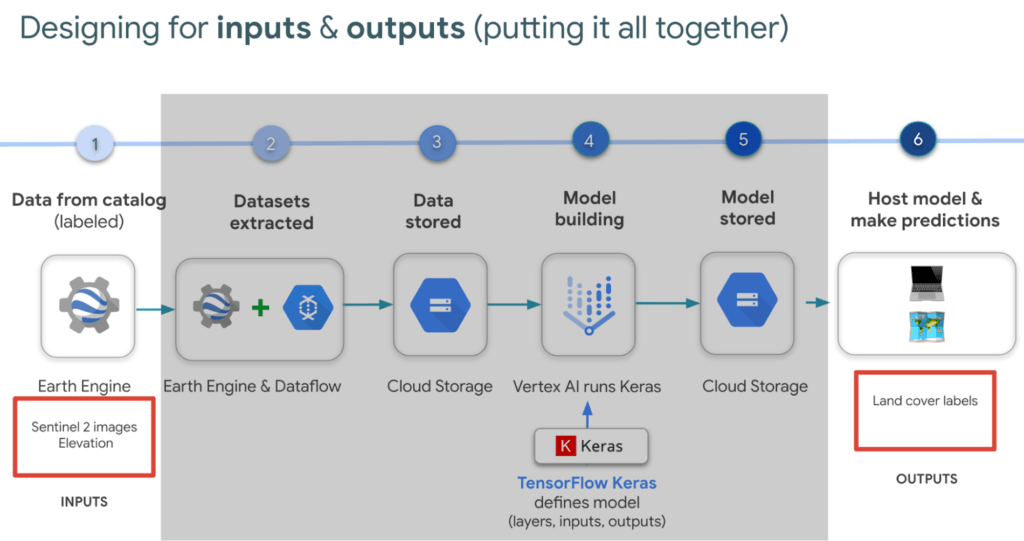
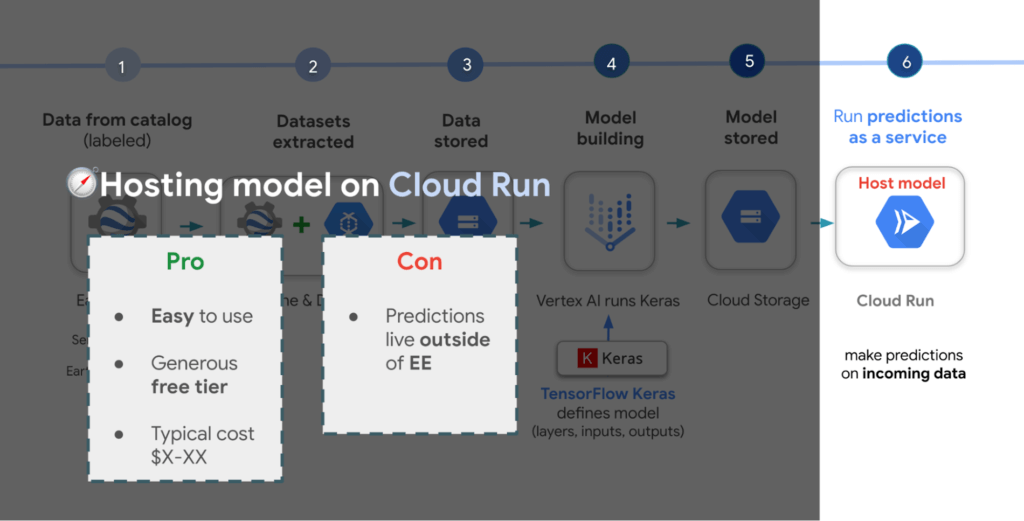
In our latest episodes for our People and Planet AI YouTube series, we walk through how to train a model and then host it in a relatively inexpensive web hosting platform called Cloud Run in episodes of less than 10mins.
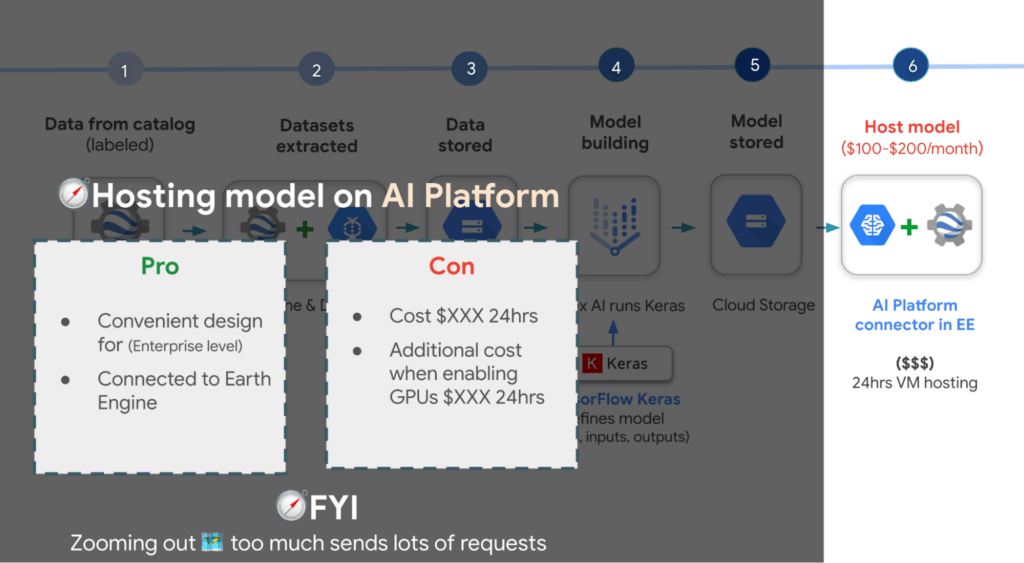
There are a few options presented in the slides, however the current best practice is to train a model using Vertex AI. Do note though that Google Earth Engine is currently not integrated with Vertex AI (we are working on this), but it is with the older (ML predecessor) called Cloud AI Platform (which is the recommended ML platform to use moving forward). As such, if you would like to import your model for detecting deforestation back into Earth Engine after training it in Vertex AI for example, you can host the model in Cloud AI Platform and get predictions. Just note that it’s a 24 hour paid service and so it can cost upwards of $100 or more a month to host your model to stream predictions. It also currently supports the following model building platforms if you don’t wish to use TensorFlow.
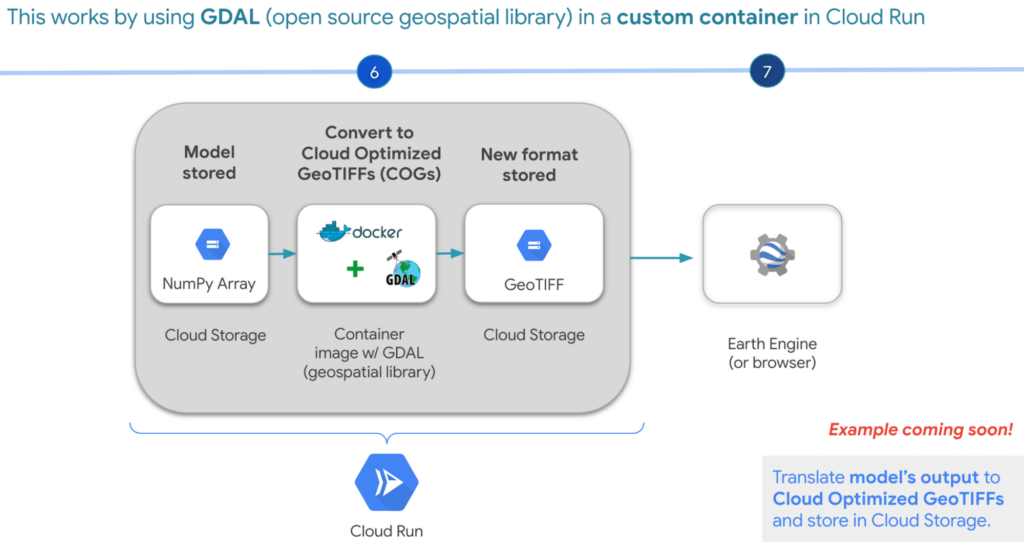
A cheaper alternative but without the convenience AI Platform offers is to manually translate the model’s output, which is NumPy Arrays into Cloud Optimized GeoTIFFs in order to load it back into Earth Engine using Cloud Run. Within this web service you would store the NumPy arrays into a Cloud Storage bucket, then spin up a container image with GDAL, an open source geospatial library in order to convert them into Cloud Optimized GeoTIFF files into Cloud Storage. This way you can view predictions from your browser or Earth Engine.
Try it out
This was a quick overview of deep learning and what Cloud products you can use to solve meaningful environmental challenges like detecting deforestation in extractive supply chains. If you would like to try it out, check out our code sample here (click “open in colab” at the bottom of the screen to view the tutorial in our notebook format or click this shortcut here).
More Relevant Stories for Your Company

Advance Your Cloud Career: Seven New No-Cost Generative AI Training Courses
Editor's note: This blog has been updated since it originally published to reflect the total number of generative AI courses that have become available since the publish date. An AI/ML (artificial intelligence/machine learning) career path can be a great specialty area within the cloud—and one of the most accessible! Because this

A CIO’s Guide to Data Analytics and Machine Learning
Breakthroughs in artificial intelligence (AI) have captured the imaginations of business and technical leaders alike. The AI techniques underlying these breakthroughs are finding diverse application across every industry. Early adopters are seeing results, particularly encouraging is that AI is starting to transform processes in established industries, from retail to financial


Measuring and Improving Speech-to-Text Accuracy
Google Cloud’s Speech-to-Text API has a large number of uses including making customer service teams more effective and increasing their ability to improve customer experience. Google Cloud’s Speech-to-Text API provides incredible accuracy out of the box. What many might not know is that it also has new tools for enhancing

What Interests Baseball Fans? Unravel with Google’s Data Science Tools and ML
The game of baseball has no shortage of statistics -- from batting average to exit velocity, strikeouts to wins above replacement. Among all sports, Major League Baseball (MLB) arguably contains the most analytical and data-driven participants and fan base. Subconsciously or viscerally, players and managers on the field and those
