





Investing for Future: Why Shifting Security Left Helps Your Bottom Line

4489
Of your peers have already read this article.
3:30 Minutes
The most insightful time you'll spend today!
The concept of “shifting left” has been widely promoted in the software development lifecycle. The concept is that introducing security earlier, or leftwards, in the development process will lead to fewer software-related security defects later, or rightwards, in production.
Shifting cloud security left can help identify potential misconfigurations earlier in the development cycle, which if unresolved can lead to security defects. Catching those misconfigurations early can improve the security posture of production deployments.
Why shifting security left matters
Google’s DevOps Research and Assessment (DORA) highlights the importance of integrating security into DevOps in the 2016 State of DevOps Report. The report discussed the placement of security testing in the software development lifecycle. The survey found that most security testing and tool usage happened after the development of a release, rather than continuously throughout the development lifecycle. This led to increased costs and friction because remediating problems found in testing may involve big architectural changes and additional integration testing, as shown in Figure 1. For example, security defects in production can lead to GDPR violations, which can carry fines up to 4% of global annual revenue.
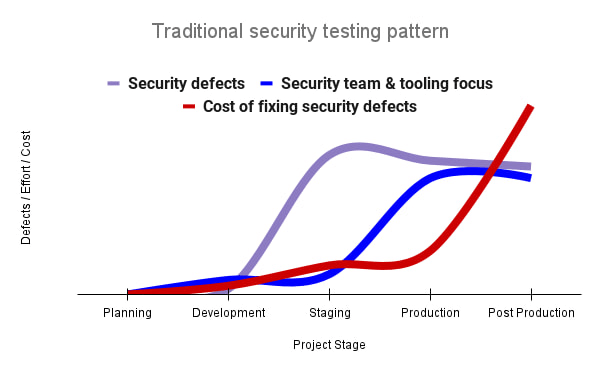
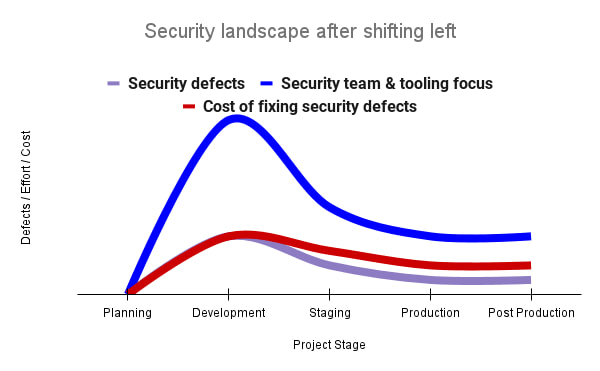
By inserting security testing into the development phase, we can identify security defects earlier and perform the appropriate remediation sooner. This results in fewer defects post-production and reduces remediation efforts and architectural changes. Figure 2 shows us that integrating security earlier in the SDLC results in overall decreases in security defects and associated remediation costs.
The 2021 State of DevOps Report expands the work of the 2016 report and advocates for integrating automated testing throughout the software development lifecycle. Automated testing is useful for continuously testing development code without the need for additional skills or intervention by the developer. Developers can continue to iterate quickly while other stakeholders can be confident that common defects are being identified and remediated.
From code to cloud
The DORA findings with regard to code security can also be applied to cloud infrastructure security. As more organizations deploy their workloads to the cloud, it’s important to test the security and configurations of cloud infrastructure. Misconfigurations in cloud resources can lead toward security incidents that could lead to data theft. Examples of such misconfigurations include overly permissive firewall rules, public IP addresses for VMs, or excessive Identity and Access Management (IAM) permissions on service accounts and storage buckets.
We can and should leverage different Google Cloud services to identify these misconfigurations early in the development process and prevent such errors from emerging in production to reduce the costs of future remediation, potential legal fines, and compromised customer trust.
The key tools in our toolshed are Security Command Center and Cloud Build. Security Command Center provides visibility into misconfigurations, vulnerabilities, and threats within a Google Cloud organization. This information is critical when protecting your cloud infrastructure (such as virtual machines, containers, web applications) against threats, or identifying potential gaps from compliance frameworks (such as CIS Benchmarks, PCI-DSS, NIST 800-53, or ISO 27001.
Security Command Center further supports shifting security left by allowing visibility of security findings at the cloud project level for individual developers, while still allowing global visibility for Security Operations. Cloud Build provides for the creation of cloud-native CI/CD pipelines. You can insert custom health checks into a pipeline to evaluate certain conditions (such as security metrics) and fail the pipeline when irregularities are detected. We will now explore two use cases that take advantage of these tools.
Security Health Checker
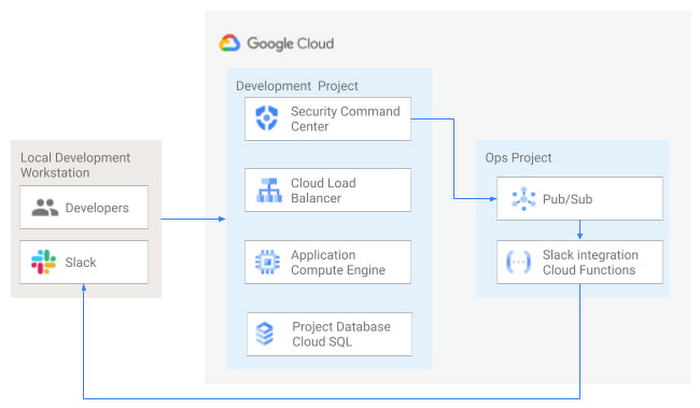
Security Health Checker continuously monitors the security health of a Google Cloud project and promptly notifies project members of security findings. Figure 3 shows developers interacting with a Google Cloud environment with network, compute, and database components. Security Command Center is configured to monitor the health of the project.
When Security Command Center identifies findings, it sends them to a Cloud Pub/Sub topic. A Cloud Function then takes the findings published to that topic and sends them to a Slack channel monitored by infrastructure developers. Just like a spell checker providing quick feedback on misspellings, Security Health Checker provides prompt feedback on security misconfigurations in a Google Cloud project that could lead to deployment failures or post-production compromises. No additional effort is required on the part of developers.
Security Pipeline Checker
In addition to using Security Command Center for timely notification of security concerns during the development process, we can also integrate security checks into the CI/CD pipeline by using Security Command Center along with Cloud Build as shown in Figure 4.
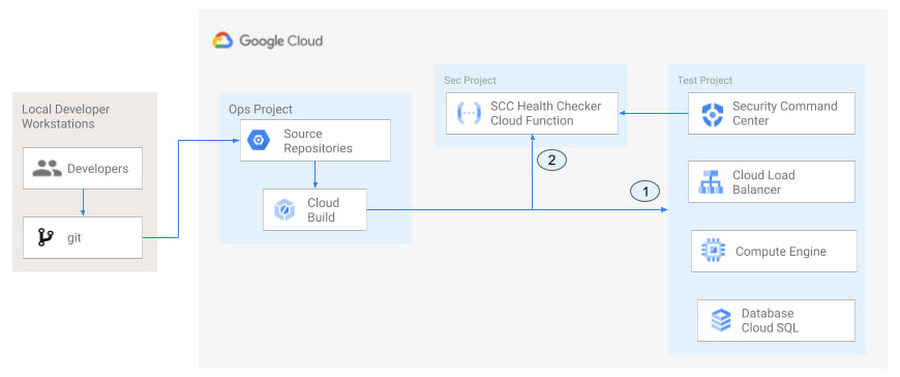
The pipeline begins with a developer checking code into a git repository. This repository is mirrored to Cloud Source Repositories. A build trigger will begin the build process. The build pipeline will include a short waiting period of a few minutes to give Security Command Center a chance to identify security vulnerabilities. A brief delay may appear undesirable at first, but the analysis that takes place during that interval can result in the reduction of security defects post-production.
At the end of the waiting period, a Cloud Function serving as a Security Health Checker will evaluate the findings from Security Command Center (Connector 1 in Figure 4). If the validator determines that unacceptable security findings exist, the validator will inject a failure indication into the pipeline to terminate the build process (Connector 2 in Figure 4). Developers have visibility into the failure triggers and remediate them before successfully deploying code to production. This is in contrast to the findings in the 2016 State of DevOps Report wherein organizations that didn’t integrate security into their DevOps processes spent 50% more time remediating security issues than those who “shifted left” on security.
Closing thoughts
DORA’s 2016 State of DevOps report called out the need for “shifting left” with security, introducing security earlier in the development process to identify security vulnerabilities early to reduce mitigation efforts post-production. The report also advocated for automated testing throughout the software development lifecycle.
We looked at two ways of achieving these objectives in Google Cloud. The Security Health Checker provides feedback to developers using Security Command Center and Slack to notify developers of security findings as they pursue their development activities. The Security Pipeline Checker uses Security Command Center as part of a Cloud Build pipeline to terminate a build pipeline if vulnerabilities are identified during the build process. To implement the Security Heath Checker and the Security Pipeline Checker, check out the GitHub repository. We hope these examples will help you to “shift left” using Google Cloud services. Happy coding!
This article was co-authored with Jason Bisson, Bakh Inamov, Jeff Levne, Lanre Ogunmola, Luis Urena, and Holly Willey, Security & Compliance Specialists at Google Cloud.
Google Announces New Cloud Region in Israel to Meet Growing Customer Demands

4857
Of your peers have already read this article.
2:00 Minutes
The most insightful time you'll spend today!
Google has long looked to Israel for globally impactful technologies including popular Search features, Waze, Live Caption, Duplex and flood forecasting. At our Decode with Google 15RAEL event last week, we celebrated 15 years of Google innovation in Israel and our longstanding support of the country’s vibrant startup ecosystem.
Over the years, we’ve expanded our enterprise investments in the country, too. In addition to our over a decade long investment in the space, Google has acquired Israeli-based companies like Alooma, Elastifile and Velostrata, and Uri Frank joined Google Cloud last month to lead our server chip design team from our offices in Tel Aviv and Haifa.
As we continue to meet growing demand for cloud services in Israel, we’re excited to announce that a new Google Cloud region is coming to Israel to make it easier for customers to serve their own users faster, more reliably and securely.
Our global network of Google Cloud regions are the foundation of the cloud infrastructure we’re building to support our customers. With cloud’s 25 regions and 76 zones around the world, we deliver high-performance, low-latency services and products for Google Cloud’s enterprise and public sector customers. With each new Google Cloud region, customers get access to secure infrastructure, smarter analytics tools, an open platform and the cleanest cloud in the industry.
Having a region in Israel will help accelerate innovation for customers of all sizes, including PayBox, a digital wallet application owned by Discount Bank, one of Israel’s largest banks. “When we acquired PayBox, our goal was to improve the security and the user experience for its products, but we also wanted to keep the startup’s agility and innovation. Google Cloud has enabled us to do just that,” said Sarit Beck-Barkai, Managing Director of PayBox at Discount Bank.
“We are very excited that leading vendors like Google are investing and launching a local cloud region in Israel. This will make a significant change in the technology landscape of the public-sector, enterprise and SMB markets in Israel. Matrix is proud to be a major part of the transition to the cloud,” said Moti Gutman, CEO at Matrix, technology services company and Google Cloud partner.
“In the last year, Panorays more than tripled its customer base and scaled its infrastructure, practically at the click of a button. Google Cloud made it easy for us to scale without worrying about DevOps, which meant that our engineers could focus on developing new and better features for our customers. The new region launching in Israel will allow us to serve our local customer base even better, as we’ll be able to experience higher availability and deploy resources in specific regions, thus reducing latency.” said Demi Ben-Ari, Co-founder and CTO, Panorays, a third-party security platform and Google Cloud customer.
“This new cloud region will provide even better access and growth potential for our mutual customers with tech hubs in the region. We are serving hyper growth companies who need Google Cloud’s services and will benefit greatly from this regional presence,” said Yoav Toussia-Cohen, CEO of DoiT International.
When it launches, the Israel region will deliver a comprehensive portfolio of Google Cloud products to private and public sector organizations locally. We look forward to welcoming you to the Israel region, and we’re excited to support your growing business on our platform.
Learn more about our global cloud infrastructure, including new and upcoming regions, here.
How to Detect and Eliminate New Cloud Security Threats: Tips for Your Security Teams

4058
Of your peers have already read this article.
4:30 Minutes
The most insightful time you'll spend today!
Why do we keep talking about security all the time? Why hasn’t anyone just gone and fixed it?
You’ve probably heard these questions, whether from your leadership, or a board member or just from friends. Then you labor at explaining why security in the cloud is so complex and challenging, the constant arms race, and eventually, their eyes glaze over. But you’re right: It is complex, and it can be hard.
As a security leader today, you likely spend a lot of your time focused on getting information: what’s going on, what new vulnerability just surfaced, what threats are present in your environment, and how to remediate them. And you probably already have a few dozen tools in place to measure, analyze, collect, and search through your data.
Right now, with your set of existing tools, you hopefully have a good sense of your on-prem systems and your overall attack surface. But across all those datasets, you’re juggling incongruous access patterns, stale data, and cluttered information coming from disparate tools—it’s not organized by topic, risk, or project. So unifying and rectifying the data sources, to really give you a full picture, just doesn’t happen.
Then you add cloud systems to the mix, and it’s a whole ‘nother ball of wax. We wanted to detail a few security features we’ve developed—most recently Event Threat Detection, available today in beta—and highlight some information that can help you reduce the complexity of your organization’s security, and improve your security posture.
Gain visibility and control, and prevent threats
With Cloud Security Command Center (Cloud SCC), Google brings a flexible platform to give you wide visibility and rapid response capabilities. Beyond just risk and vulnerability management, Cloud SCC focuses on active defense, showing you threats that have been detected and the path to greater holistic security in your cloud resources.
It integrates with existing partner security solutions you already use and Google Cloud security tools. And its API is accessible to you and your vendors, so any additional data is easy to integrate.
The model above is a centralized dashboard for threat prevention, detection, and response, with views of your current state that you can change based on your needs. For example, you can focus on assets to get a comprehensive list of every firewall, network, disk, bucket, and so on in your organization.
You can also orient your view based on findings (results) of what’s wrong in your Google Cloud Platform (GCP) environment. We recently launched the Vulnerabilities dashboard to show findings from Security Health Analytics. It’s an integrated security product that helps you identify misconfigurations and compliance violations in your GCP resources and take action.
Reduce threat exposure with Event Threat Detection
Reducing your exposure to threats goes hand-in-hand with being able to respond quickly to those threats that are present in your environment. Today, we’re excited to announce the beta of Event Threat Detection, a security product that integrates into Cloud SCC, and was inspired by how Google protects itself. We wanted to extend our scale and threat intelligence to help you protect your environment and improve your security posture.
Event Threat Detection helps you detect threats in your logs and send high-risk threats to your SIEM (Security Information and Event Management system) for further investigation. It also can help you save time and money by focusing your attention on the most worrisome cloud-based threats.
Due to the growth in cloud computing, we’ve seen an increase in the number of customers running VPC Flow logs, Cloud DNS logs, Cloud Audit logs, and syslog delivered via the fluentd agent on GCP. Event Threat Detection uses Google’s threat intelligence to surface threats present in these logs, including anomalous IAM grants, malware, cryptomining, outgoing DDoS, and brute-force SSH.
When Event Threat Detection finds a threat in your logs, it shows up as a finding on the Cloud SCC dashboard. If you need to further analyze any of these threats, you can send them to your SIEM, saving time and money because Event Threat Detection has already determined the high-risk logs you need to investigate further.
Event Threat Detection integrates with Cloud Functions to make it easier for you to export findings to your SIEM of choice. You can also use Cloud Functions to automate responses and changes to Event Threat Detection findings. See the video below for more information.
Respond to threats
Once threats have been detected, the final step is, obviously, responding to them. To help speed up your response game, you can set up automated actions for when threats are detected. When Cloud SCC detects an anomaly, or an active threat, you can have it change a VM configuration, perhaps cutting the VM off from other parts of your network.
You can also change firewall rules automatically. Using these events to trigger Cloud Functions, you can set up any response you like, fully automated. At the same time, you can send incident metrics and data to Stackdriver or your own SIEM to make sure your incident response team has everything they need.
Together, these features give you the power to structure and organize the data you gather, which is key to making cloud security work for large, mature organizations. Cloud SCC lets you create tags for items to assist with incident response or project-based inquiry, and to aid in custom dashboard creation. The constant goal: give you the information you need quickly, so you can take the necessary action.
Cloud SCC details
Now that you have a high-level view of how Cloud SCC and Event Threat Detection can help your organization become more secure, here are some other resources highlighting Google security features that integrate into Cloud Security Command Center, how they work, and how they can help you improve your security posture:
- Find and fix misconfigurations in your Google Cloud resources with Security Health Analytics
- Stop data exfiltration with Cloud Data Loss Prevention
- Detect and remediate security anomalies with Cloud Anomaly Detection
- Catch web app vulnerabilities before they hit production with Cloud Web Security Scanner
These blogs feature step-by-step instructions with screenshots, and each has a companion video. Check them out, and let us know if there are any other issues and solutions you’d like us to detail.
Efficient, Safe and Dynamic Gaming Experience: Aristocrat’s Digital Journey on Google Cloud

4775
Of your peers have already read this article.
2:00 Minutes
The most insightful time you'll spend today!
Since Aristocrat’s founding in 1953, technology has constantly transformed gaming and the digital demands on our gaming business are a far cry from challenges we faced when we started. As we continue to expand globally, security and compliance are top priorities.
Managing IT security for several gaming subsidiaries and our core business became more complex as we entered into new markets and scaled up our number of users. We needed a centralized platform that could give us full visibility into all of our systems and efficient monitoring capabilities to keep data and applications secure. We also needed the ability to secure our systems without compromising user experiences.
We turned to Google Cloud and Splunk to better manage complexity and support highly efficient, secure, and more dynamic gaming experiences for everyone. We are committed to using today’s modern technologies to give players more optimal experiences.
Bringing our digital footprint into the cloud
When we set out on our digital transformation, we looked to address many business requirements.
These requirements included:
- Regulation: We wanted a platform that could efficiently address our industry’s stringent and global regulatory compliance requirements.
- Player experience: Our IT environment must support smooth gaming experiences to keep users engaged and satisfied.
- Scalability: As we grow and diversify, meeting the changing demands of an increasingly global gaming community, we need an easily scalable platform to align with our current and future needs.
Google Cloud offered us the perfect foundation through solutions such as Compute Engine, Google Kubernetes Engine, BigQuery, and Google Cloud Storage. These acted as the right infrastructure components for us for the following reasons:
- Google Cloud is globally accessible and supports compliance, helping to streamline security and regulatory processes for our team.
- With Google Cloud, we can manage our entire development and delivery processes globally with fast and efficient reconciliation of regional compliance requirements.
- When we need to adjust existing infrastructure or deliver new capabilities, Google Cloud accelerates the process and takes the heavy lifting off of our team.
- Google Cloud allows us to support tens of thousands of players on each of our apps while experiencing minimal downtime and low latency. The importance of this support can’t be underestimated in an industry where players have little to no patience if lags in games occur.
We migrated our back-office IT stack alongside our consumer-facing production applications to Google Cloud given our positive experiences with compliance, security, scalability, and process management. This migration has significantly accelerated our digital transformation while streamlining our infrastructure for faster and more cost-effective performance.
In many ways, Google Cloud has been, with maybe a pun intended, a game-changer for us. For instance, when we suddenly had to support a lot of remote work during the COVID-19 pandemic, native identity and access management tools in Google Cloud allowed us to retire costly VPNs used for backend access and quickly adopt a more easily managed, cost-effective zero-trust security posture.
Accessing vital third-party partners and managed services
Aristocrat has many IT needs best addressed in a multi-cloud environment. Google Cloud is particularly attractive given its strong cloud interoperability, as well as the many products and services available on Google Cloud Marketplace. The marketplace accelerated our deployment of key third-party apps including Splunk and Qualys.
Given the personal information we store and the global regulatory compliance statutes we must oblige, security lies at the heart of our business. Splunk is a critical component of our digital transformation because it offers solutions that provide the enhanced monitoring capabilities and visibility we need. The integration between Splunk and Google Cloud gives us confidence that our data is secure. We know our data can be secure in Google Cloud, while simplified billing through Google Cloud Marketplace makes payments and license tracking easier for our procurement team.
As part of our protected environment, we use the Splunk platform as our security information and event management system, leveraging the InfoSec app for Splunk that provides continuous monitoring and advanced threat detection to significantly improve our security.
We can manipulate and present data in Splunk in a way that provides us with a single pane-of-glass for our hybrid, multi-cloud environment and our third-party apps and systems. Splunk observability tools have likewise helped us to track browser-based applications like our online gaming apps to monitor details related to security and performance.
Splunk and Google Cloud have transformed how we operate. We can now quickly ingest and analyze data at scale within our refined approach to security management by offloading software management to Splunk and Google Cloud. This ability enables us to approach security more strategically, and positions us to integrate more AI/ML capabilities into our products for even greater governance and performance.
This is just the beginning of our journey with Splunk and Google Cloud. We’re excited to see the innovation we can continue bringing to the gaming community worldwide.
Create and Protect Admin Accounts

4870
Of your peers have already read this article.
1:30 Minutes
The most insightful time you'll spend today!
Setting up your new cloud infrastructure is scary. Extra scary when you realize that someone (is it gonna be you?) gets to have phenomenal cosmic power over the whole thing.
Yes, I’m talking about the admin account, and today we’ll dig into why they are important, dangerous and different.
When the team at pistach.io got their nuts-as-a-service business growing fruitfully, they knew they needed to think carefully about admin accounts. These people would have tremendous control over their use of Google Cloud, and they could potentially cause very big problems if any were compromised. Definitely resources that require a protective shell.

Early in pistach.io’s development, an employee named Walter Nutt wanted to play a prank by changing his co-worker’s profile photo from an almond to a peanut (pretty devious, since a peanut is actually a legume). He didn’t have access to his friend’s computer, but he did have access to the company’s Cloud Storage bucket. While searching for the profile photo in question, Wally inadvertently deleted the entire contents of the bucket!
As he searched for ways to restore its contents, Wally modified access to two other pistach.io buckets. The company was ground to a halt for a week while teams worked to crack through the permissions issues.
Time to rethink permissions a bit, so this couldn’t spoil their buttery smooth operations in the future.
Following the resource manager guide, the team made a super admin email address that wasn’t tied to a particular individual or Workspace account, and secured it with strong multi-factor authentication. This would be their backup in case an admin account were to be compromised, so they could recover and repair.
The team already uses Google Workspace, so they have an organization set up already. That creation process established initial super administrators, allowing them to create and modify all other resources inside the organization. As they looked toward using Google Cloud, the super administrators could:
- Give the admin role to people, for Cloud
- Act as a point of contact for account recovery
- Modify or delete the organization if needed
Making admin users for the organization allows other people to then flesh out the resources and policies for pistach.io, before they go nuts and give everyone all the permissions. While that would speed things up, it would make it easy for an attacker to crack through the security shell because any account compromise could give ousize access. Yikes!

Instead, the IT leads specified certain people to act as organization admins, and then gave them permissions to:
- Define Identity and Access Management policies
- Structure the Resource Hierarchy
- Delegate control of specific Cloud elements to others on the team
Once those organization admins were set up, they could give management and oversight of Compute, Storage, Networking and other resource types to the relevant leads, making sure each person had just the right amount of permission for the role they needed to perform. The organization admins don’t have permissions themselves to make these resources. They just delegate.
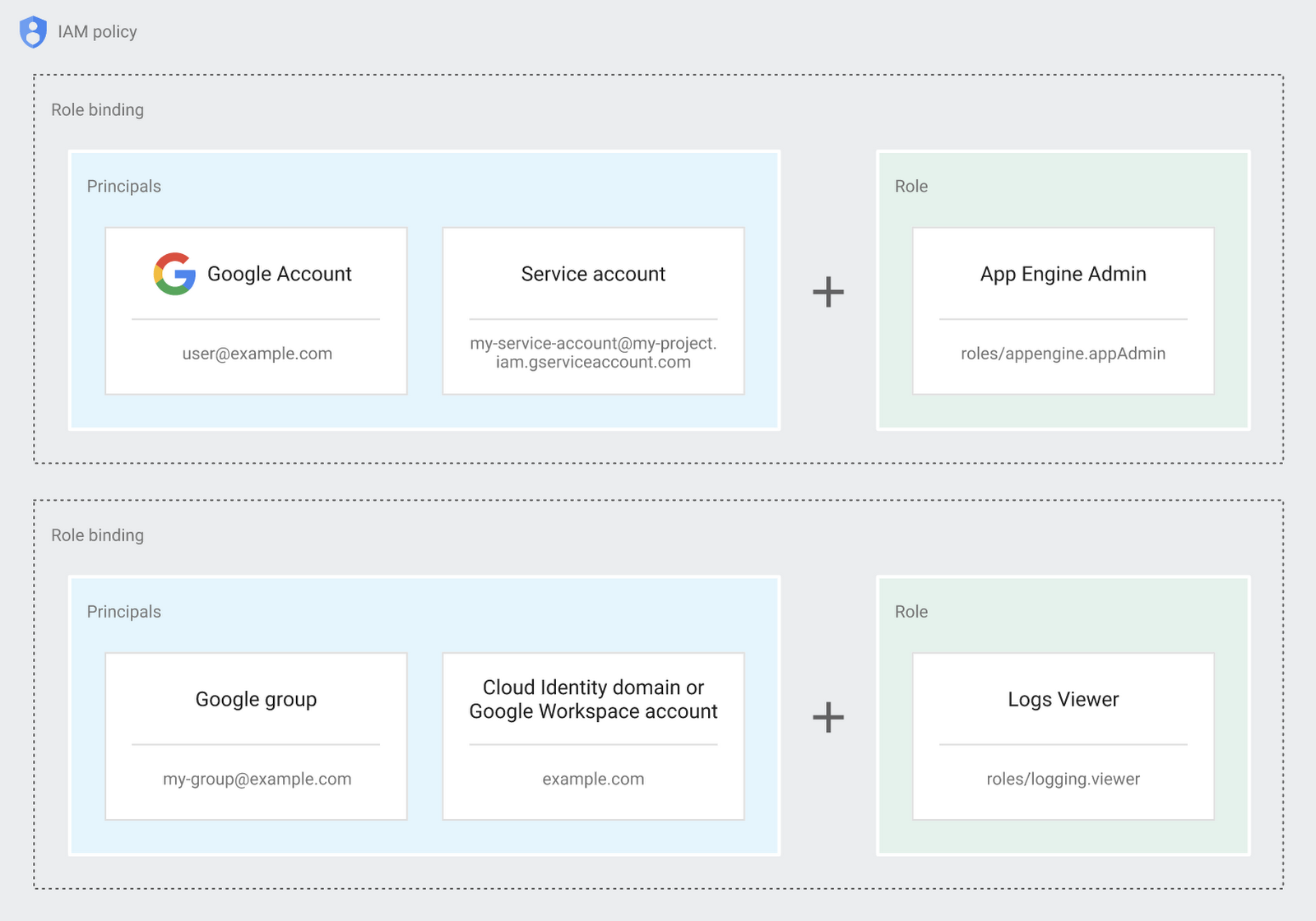
Now each person can accomplish the job they’re responsible for, but doesn’t have overly permissive access. Delegating like this keeps the entire organization safer, and limits the blast radius if someone does manage to break in.
You can go through these steps yourself with this tutorial.
By default the creation of an organization resource for the domain gives everyone the ability to create projects and billing accounts. Once they set up their Organization Admin at pistach.io they decided to remove some of these wide permissions and, in a nutshell, bring everything down to a much finer control. So people could get permissions for a folder or a project, but not the entire organization!
Remember to take care of your admin roles, as they have the power, and responsibility, to cause serious harm if not used safely. Be safe with your Identity and Access Management. And keep your data yours!
Next time we join you we’ll take a crack at creating and provisioning an app to run inside the policies and resource management frameworks created today.
Announcing New, Faster Search and Investigative Experience in Chronicle Security Operations

2937
Of your peers have already read this article.
1:30 Minutes
The most insightful time you'll spend today!
In cybersecurity, speed matters. Whether a security analyst is trying to understand the details of an alert that was triggered by an indicator of compromise (IoC), or find additional context for a suspicious asset, speed is often the critical factor that will help thwart a cyberattack before threat actors are able to inflict damage.
With speed in mind, we are pleased to announce the general availability of our new investigative experience in Chronicle Security Operations. We are continuing to deliver on our mission to bring the power of Google to security operations and are raising the bar for search and the investigative experience in the SOC.
With this release, SecOps teams will be able to harness Chronicle’s lightning-fast search across any form of structured data. Additionally, the new investigation experience can provide greater flexibility to pivot and drill-down when conducting complex, open-ended threat investigations and surface insights quickly and easily.
Our Unified Data Model (UDM) schema, with its built-in flexibility that can effectively handle a wide variety of security related events, is at the heart of Chronicle’s powerful search. We have scaled this capability by optimizing query responses across structured data. Additionally, analysts can investigate large datasets and build complex queries with a new and intuitive user experience. With user personalization enhancements, analysts can quickly access saved searches and top queries in their environment to improve routine SOC workflows.
With the new investigative experience, security teams can:
- Drive faster threat understanding with an interactive event results timeline that helps eliminate unnecessary long wait times by streaming results as they are processed to quickly begin threat analysis
- Use enhanced context and operationalize relevant data for threat analysis with one-click filter-to-query conversion
- Personalize the analyst experience with saved search and search history functions for quicker analyst knowledge recall
- Power threat investigation and hunting with a new, improved, highly performant UDM search
Let’s look at an example of how to use the reimagined investigative experience and our new broader, faster search.
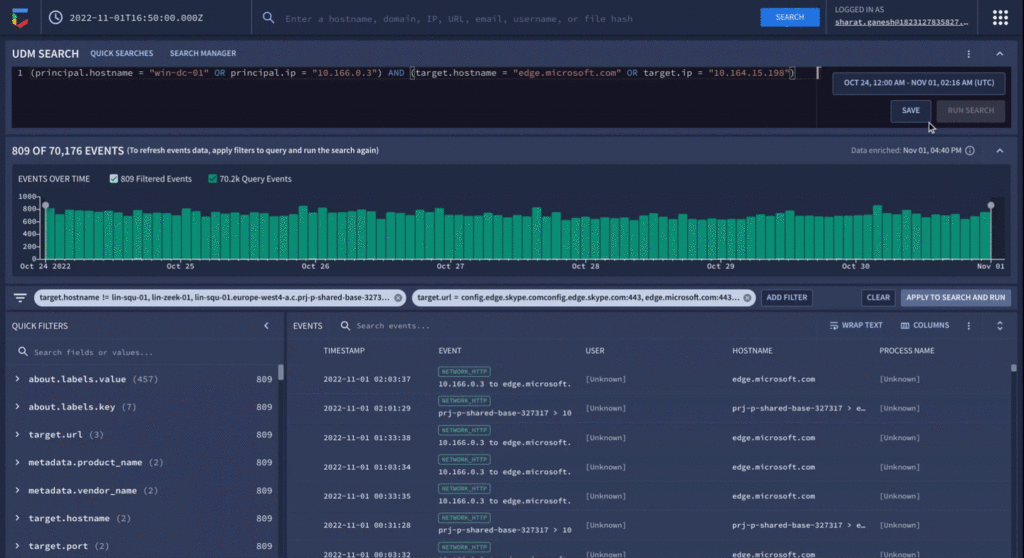
In our use-case, a security analyst is investigating a curated detection alert for potentially suspicious behavior on a Windows environment. Additionally, there is a low prevalence domain from host “win-dc-01” with ip “10.166.0.3”. To investigate further, let’s open the UDM Search page and construct a query containing the host and IP information along with destination information of the domain the host was contacting (edge.microsoft.com). Over 70,000 events stream into the investigation interface providing the analyst an immediate picture of data surrounding their alert.
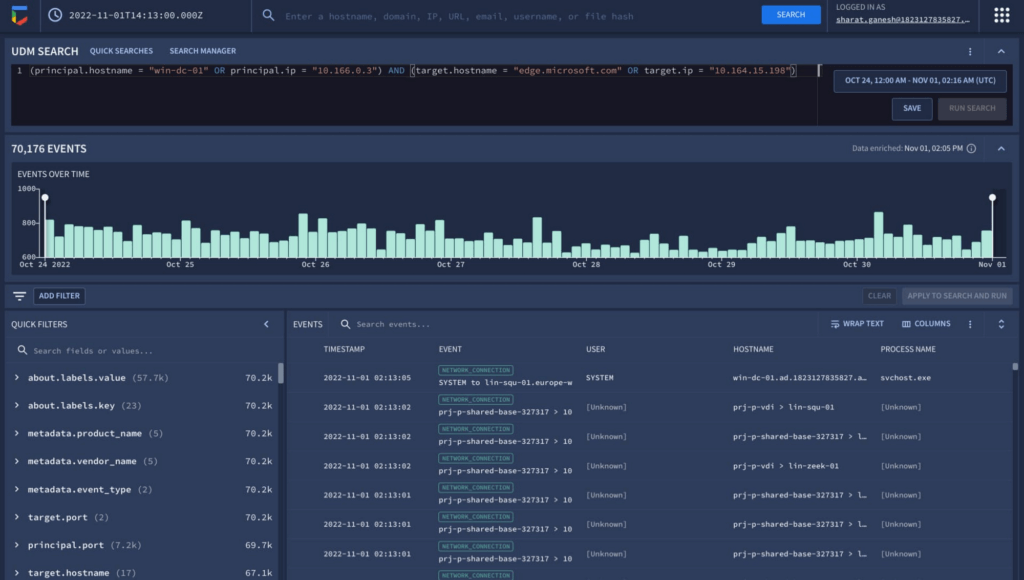
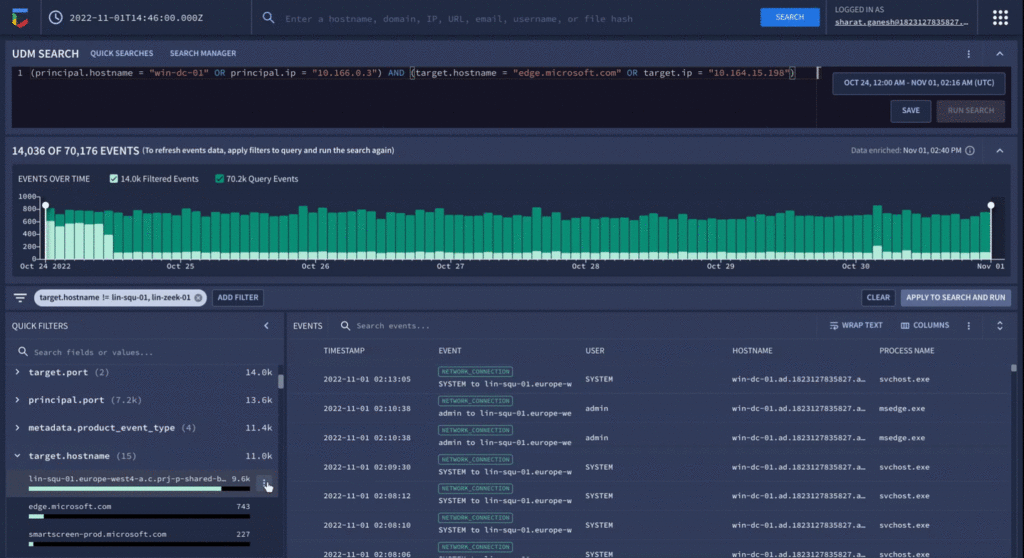
The new interactive events timeline can provide a clear picture of event trends over time with key statistical data which can be easily filtered. Additionally, with the new quick filters, the analyst is able to easily filter out hosts that are known-good to get pertinent information about the domain.
Analyzing value aggregations present in the filter panel, automatically generated by Chronicle, enables analysts to domain values of highest interest, and quickly determine that approximately 800 events were present in the last week that related to edge.microsoft.com URL. Since Microsoft Edge is disallowed in the organization, there should not be any outbound traffic to this type of destination.
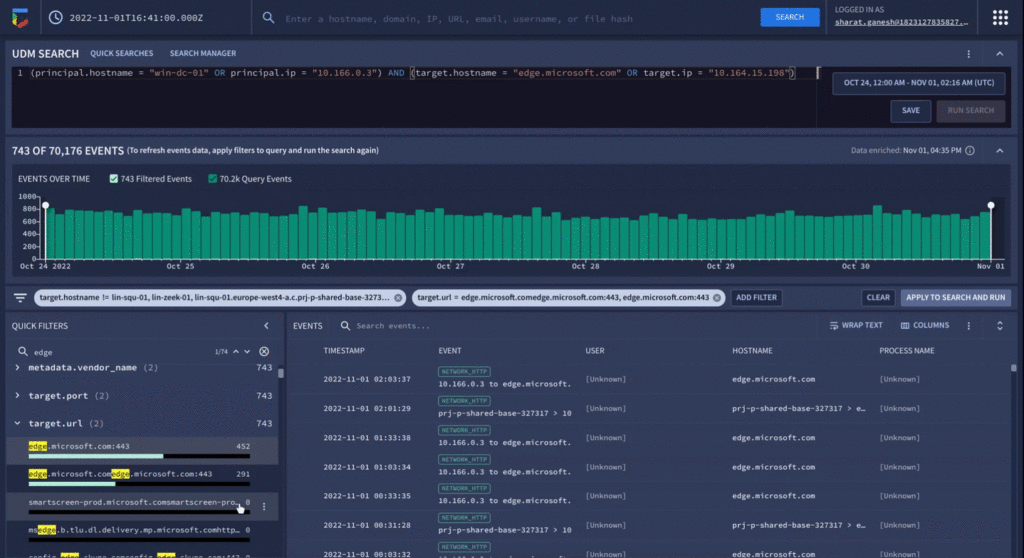
As a final step before orchestrating a response in Chronicle SOAR’s case management, the analyst can save their search to quickly recall the steps they took in the future for related investigations.
We have already seen our customers use these new capabilities in preview to build new use cases, accelerate existing threat hunting workflows, and drive faster threat response. We will continue our mission to bring Google speed, scale, and intelligence to the investigative experience, expediting “time to aha” for security analysts, and driving better, faster responses.
Ready to put Chronicle to work in your Security Operations Center? Contact Google Cloud sales or your customer success CSM team. You can also learn more about all these new capabilities in Google Chronicle in our product documentation.
More Relevant Stories for Your Company

Know the Leaders of Google Cloud Public Sector Community
At Google Cloud, being a strategic partner is part of our DNA. Whether it’s listening closely to our customers, helping to build team skills for innovation or simply being there (since we know the cloud is 24/7), we get excited about working hands-on with customers to deliver new solutions. As

Towards Superior Cybersecurity: How SLSA and SBOM Help Build a Resilient Healthcare Industry
Taking prescription medication at the direction of anyone other than a trained physician is very risky—and the same could be said for selecting technology used to run a hospital, to manage a drug manufacturing facility and, increasingly, to treat a patient for a medical condition. To pick the right medication,

Latest Enhancements in reCAPTCHA Enterprise Helps Govts Sites Protect against Digital Frauds
Download our guidebook to learn how reCAPTCHA Enterprise can help strengthen your website security quickly. Cyber threats on the rise In 2021, the United States saw 40.5% of website attacks committed through “bad bots” on the internet, with 37.2% of government website traffic being bad bots, according to research by

Cloud Bigtable Helps Fraud-detection Company Meet Scalability Demands and Secure Customer Data
Editor’s note: Today we are hearing from Jono MacDougall , Principal Software Engineer at Ravelin. Ravelin delivers market-leading online fraud detection and payment acceptance solutions for online retailers. To help us meet the scaling, throughput, and latency demands of our growing roster of large-scale clients, we migrated to Google Cloud and its
