





4864
Of your peers have already watched this video.
3:00 Minutes
The most insightful time you'll spend today!
A Winner’s Story of Optimizing IT Operations for Informed Business Decisions with Google Cloud
An award-winning leader in the enterprise software industry, Broadcom Software is known for modernizing, securing and optimizing the most complex and largest hybrid environments. It’s broad portfolio of industry-leading, enterprise infrastructure and security software built on different tech stack and vision of tech leaders, are run on on-prem, private and public cloud and operated differently. To have a unified standard platform to run their wide range of products, Broadcom Software needed infrastructure as a service and Kubernetes orchestration layer, standard DevOps and security practices as well as common set of DevSecOps tools. Although the company knew there was no common ground to run all their products, migrating products into container-based architecture, they discovered many common strands that they could leverage for efficiency. Watch to learn the role played by Google Cloud in the Broadcom’s transformation!

3804
Of your peers have already downloaded this article
10:30 Minutes
The most insightful time you'll spend today!
Digital transformation is about how digital technologies can connect people and processes to solve challenges that traditional methodologies could not.
While this transformation is imperative for businesses of all sizes, the Frost & Sullivan Enterprise Cloud Maturity Index (ECMI) assessment indicates that around 85% of CXOs want to digitally transform their enterprises, but only 39% of them have a clear plan to achieve this transformation.
Most business leaders are exploring new business ideas around cloud to extract better outcomes, increase productivity, create opportunities and redefine customer engagement processes as part of their internal strategies.
It has been proved time and again that enterprises need to bank on emerging technologies like cloud that provide ‘do more with less’ approach. Cloud has the potential to transform IT departments through infrastructure consolidation and optimization.
To understand the interest and level of cloud adoption in enterprises, Google Cloud partnered with Frost & Sullivan to recognize the unique business drivers and key challenges in Cloud adoption that come the enterprise way during their business transformation journey.
Read the report to find out the challenges, solutions and benefits of digital transformation and the cloud.
Google Cloud Leads the Landscape for Unstructured Data Security Platform: Forrester

7062
Of your peers have already read this article.
1:30 Minutes
The most insightful time you'll spend today!
As organizations expand their use of cloud computing services, more of their sensitive data inevitably moves to and lives in the cloud. Much of this sensitive data is unstructured and can be challenging to secure. Despite this potential challenge, the usefulness of cloud for data storage and processing is too big for most organizations to ignore and has in turn led to data sprawl, where their sensitive data is spread over many resources, both in the cloud and on-premise. Addressing data sprawl requires solutions that can discover, manage, and secure sensitive data, especially unstructured data, as it spreads.
To help organizations confidently move their sensitive data to the cloud, Google Cloud works diligently to earn and maintain customer trust. Control and transparency are pillars of our approach to offering a trusted cloud. Therefore, we’ve been expanding our capabilities to act on unstructured data as sprawl increases.
Given the importance of these capabilities to our strategy, we are happy to announce today that Forrester Research has named Google Cloud a Leader in The Forrester Wave™: Unstructured Data Security Platforms, Q2 2021 report, and rated Google Cloud highest in the current offering category among the providers evaluated.

The report evaluates the 11 most significant providers with platform solutions to secure and protect unstructured data, spanning from cloud providers to data security-focused vendors. The report notes that “Google offers breadth and depth with built-in data security in the cloud. Google Cloud Platform, Google Workspace, and BeyondCorp Enterprise have underlying data security products and features for protecting customer data.”
Google Cloud tools focused on protecting unstructured data were developed and battle-tested internally at Google to alleviate some of our own data security challenges. This brings the best of Google security to the organizations utilizing Google Cloud and our security tools. The report highlights that “Google productizes capabilities originally developed to secure its own business, and brings a disciplined approach to product enhancements for enterprise requirements. It serves a wide range of enterprise and mid-market, with a focus on emphasizing data protection needs by industry. ”
Google Cloud’s data security strategy focuses on meeting customers wherever they are in their cloud migration journey. The report highlights that “Google further enables a Zero Trust approach with third-party integrations through its BeyondCorp Alliance of partners in device management, endpoint security and gateways.”
Google Cloud received the highest possible score in sixteen criteria, in total receiving the most 5 out of 5 ratings among all vendors assessed. These criteria include: Data Intelligence, Access Control, Deletion, Obfuscation-Scope, Obfuscation-Key Management, Deployment, Security and Risk, APIs and Integration, Data Security Platform Vision, Data Security Execution Roadmap, Performance, Planned Enhancements, Zero Trust Enabling Partner Ecosystem, Diversity, Equity and Inclusion, Installed Base, and Revenue.
Notably, Google Cloud received the highest possible score in the Obfuscation criteria. Obfuscation can help protect sensitive data, like personally identifiable information (PII), which is critical to many enterprise workflows. Cloud DLP helps customers inspect and mask this sensitive data with techniques like redaction, bucketing, and tokenization, which help strike the balance between risk and utility. This is especially crucial when dealing with unstructured or free-text workloads, in which it can be challenging to know what data to redact. More than 150 detectors combine to power Cloud DLP’s masking, which can be deployed in data migrations and business workloads like real-time data collection and processing. For Obfuscation specifically, the report mentioned that Google “takes a broad view of DLP, which includes in-line redaction of sensitive elements in unstructured data and DLP APIs that extend support to additional data types like images or other media.”
We are honored to be a Leader in The Forrester Wave™ Unstructured Data Security Platforms Q2 2021 report, and look forward to continuing to innovate and partner with you on ways to make your digital transformation journey safer as we work to become your most trusted Cloud.
A copy of the full report can be viewed here.
3 Important Factors to Consider for Moving Large-scale On-prem Data to Cloud with Storage Transfer Service

3528
Of your peers have already read this article.
1:30 Minutes
The most insightful time you'll spend today!
Organizations have been moving their on-premises data and applications to the cloud for the past several years, driven by reasons as varied as application modernization and content delivery to archival. In particular, we have seen migration momentum pick up in sectors like media and entertainment, where customers are rethinking how they monetize and store their valuable historical content, often while exploring Google Cloud’s many analytical and AI solutions.
Many of these customers are interested in moving their unstructured data from on-premises appliances to Google’s Cloud Storage. Over the past year, we’ve noticed an uptick in larger migrations, where customers move tens of petabytes or more of on-premises file data to Google’s flexible, secure object storage.
For customers like Telecom Italia/TIM Brasil, Google’s fully managed Storage Transfer Service played a key role in making this transformation possible by moving data from on-premises filesystems to extensible, low-cost Cloud Storage over the network.
“Storage Transfer Service helped us move petabyte-scale data from on-premises filesystem to Google Cloud in a highly performant and fully-managed way,” said Auana Mattar, CIO at Telecom Italia/TIM Brasil. “Setting up the transfer pipeline required performing some tests to figure out the ideal number of agents and networking settings in our on-prem environment. Once the initial setup was done, transferring data was seamless, and the service was able to saturate a 20 Gbps Partner Interconnect link.”
While large-scale cloud migrations can be intimidating, there are a number of actions that customers can take to ensure that a multi-petabyte data transfer goes as smoothly as possible. In the past, we’ve shared general architectural guidance for customers new to their cloud journey. And for customers looking for options, Google has multiple paths to move on-premises file data to the cloud, including our fully offline Transfer Appliance.
In this blog post, we’ll provide an updated perspective focused on how to use Storage Transfer Service to move data from on-prem to the cloud. Specifically, we’ll look at three different factors to consider prior to moving large amounts of data from your on-premises filesystem to Cloud Storage with our Storage Transfer Service.
Understanding the source files and filesystem
If you are moving data from an on-premises filesystem, you should be aware of how your source files, and your source filesystem, can impact transfer performance.
Each copy you make to Cloud Storage incurs some overhead from associated operations like metadata transfer, checksumming, and encryption. This means that, for a given amount of storage, transferring large numbers of very small files will take longer. As a rule of thumb, Storage Transfer Service will be most performant when moving files that are 16 MB or larger.
If you have a large number of smaller files, you may choose to batch them using tools like tar and upload as a single object. This will improve transfer performance but will limit how you can use those files in Cloud Storage. It’s an option best considered for use cases like archival storage, where the data transferred to Google Cloud may not be managed or accessed regularly. Our Nearline, Coldline, and Archive archival tiers offer excellent performance should you ever need to retrieve the archived data.
The source filesystem may also slow down transfer performance, particularly if the filesystem has limited read throughput. Tools like Fio can be used to test read throughput. We’ve included a command below to run a series of 1MB sequential read operations in Fio and to generate a report:
#Install fio> sudo apt install -y fio#Create a new directory fiotest> TEST_DIR=/mnt/mnt_dir/fiotest> sudo mkdir -p $TEST_DIR#Test read throughput> sudo fio --directory=$TEST_DIR --direct=1 --rw=randread --randrepeat=0 --ioengine=libaio --bs=1M --iodepth=8 --time_based=1 --runtime=180 --name=read_test --size=1G
Fio will then generate a report. The final line labeled ‘bw’ represents the total aggregate bandwidth of all threads, and it can be used as a proxy for read throughput. In general, you should strive for read throughput (‘bw’) that is 1.5x of your desired upload throughput or speed. (And one easy way to increase read throughput is to ensure that the filesystem itself is not imposing any limits on maximum throughput.)
Optimizing Storage Transfer Service resources
Within the Storage Transfer Service, there are a few settings that we can adjust ahead of time to ensure optimal performance for a larger workload.
First, we should ensure that we have the right number of transfer agents for our source data. We would advise that, for any transfer job larger than 1 GB, you start with at least three agents in separate VMs, with each agent assigned at least 4 vCPU and 8 GB of RAM. In addition to providing a foundation for performant data transfer, this architecture also ensures that the transfer is fault tolerant should one agent machine become unavailable.
Google Cloud supports up to 100 concurrent agents for a given Google Cloud project. To help you identify the right number of agents to support your workload, you should start your larger transfer first, then wait three minutes after adding each agent to ensure that throughput has stabilized.
In general, each agent can facilitate roughly 1 Gbps of throughput for up to 10 agents, at which point it may be necessary to add more agents for a very large amount of network bandwidth. For example, in one larger migration, a customer with 20 Gbps of dedicated network capacity ran ~30 agents at once. These numbers illustrate what was required at one enterprise data center. Across all of your environments, it is important to test and monitor your throughput via Cloud Monitoring to ensure you have the right configuration for your transfer goals.
Another area to optimize is where and how you install your agents. As we mentioned earlier, agents should be installed in separate VMs, and each host machine should dedicate at least 4 vCPUs and 8 GB of memory per agent. This is a starting off point, and larger, long-running transfers may require additional CPU or memory. For those longer jobs, we advise that you monitor CPU utilization and unused memory closely to ensure optimal performance. You should provision more CPUs when utilization exceeds 70%. Similarly, you should be ready to provision additional memory when the agent has less than 1GB of unused memory.
Preparing your network for large-scale data transfer
The third and final area to consider is your network connectivity. While it can be easy to reduce this to the bandwidth between the source filesystem and the Google Cloud bucket, the network includes two other components that can be easier to configure: first, the network interface from the on-premises agents to the WAN; and second, the agents’ connection to the on-premises filesystem.
For the first component, the network interface from the on-premises agents to the WAN, the general guidance is to not let this become a bottleneck. Specifically, you should ensure that this interface is greater than or equal to the bandwidth you require to read from the filesystem, plus the upload bandwidth to write to Google Cloud. In other words, if you plan on moving 10 Gbps of data from on-premises to Google Cloud, you will need 20 Gbps of bandwidth between the on-premises agents to the WAN: 10 Gbps to read from the networked filesystem, and 10 Gbps to transfer and write to Google Cloud.
On-premises filesystems, and on-premises networks, come in many flavors. For the second component, how the agents connect to an on-premises filesystem, our general rule is to be mindful of latency and to test regularly. It is essential to ensure that agents run on machines that can access a networked filesystem with very low latency.
Finally, if you are trying to maximize transfer performance, make sure you’ve configured your network to avoid bandwidth restrictions between on-premises filesystem and Google Cloud that might impact transfer speed. Storage Transfer Service will allow you to cap the bandwidth used by transfer, making it easy to minimize any impact on other production applications. Consider using tools like lperf3, tcpdump, and gsutil to measure the network bandwidth available to upload to Cloud Storage.
In particular, gsutil is worth some additional detail. Gsutil is a Python tool that can help you perform a number of object storage management tasks in Google Cloud, including checking your agent’s connection to the Cloud Storage APIs. It can be installed via the Google Cloud SDK, or separately. In this case, you should also ensure that gsutil is available in the same on-premises VM as the Storage Transfer Service agent.
If you’d like to use gsutil to test connectivity to Google Cloud, here’s the command:
gsutil cp test.txt gs://my-bucketReplace:my-bucket with the name of your Cloud Storage bucket.
CP is a copy command that lets you copy data from on-premises to the cloud. In this case, gsutil is copying a test document, test.txt, to ensure that you have a connection with the Google Cloud APIs. You will need to create a test document before running this command.
Test twice, transfer once
One overarching theme across all factors is that testing can help you understand performance. For many customers, a large-scale data transfer from an on-premises filesystem to Google Cloud is an unusual event. And as with any unusual event in enterprise IT, it is a great idea to make sure that each party – from network administrators to filesystem and storage experts to cloud architects – is able to test their domain multiple times, to ensure the event will proceed seamlessly.
As you fine tune your testing in advance of a data transfer, you may want to learn more about your options for obtaining more network bandwidth, orchestrating transfer from SMB filesystems, or even how to make the right choices to save money on object storage. And we plan to share more in our blog about how customers have used our transfer offerings in the months ahead. Advanced agent setup | Cloud Storage Transfer Service Documentation
For more information about Storage Transfer Service and how to get started, please take a look at our documentation or get started via the Google Cloud console.
6467
Of your peers have already watched this video.
1:30 Minutes
The most insightful time you'll spend today!
Value Realization with Google Cloud for Retail SAP Data
Retail engagements have changed drastically over the last few years, and by the virtue of COVID-19 pandemic, retail data and customers’ expectations plummeted. To drive value and transformation across the entire value-chain retailers can make most of Google Cloud’s secure, reliable IaaS by migrating their SAP systems and taking advantage of integrations, insights and innovations. In times of change retail companies can gain maximum visibility of SAP data unlocking Google Cloud’s infrastructure modernization and Big Data and analytics capabilities. Watch the video to understand how Google Cloud and SAP partnership is a golden handshake for retail businesses’ future.
Recapping Google Cloud VMware Engine’s Latest Milestones

3473
Of your peers have already read this article.
3:00 Minutes
The most insightful time you'll spend today!
We’ve made several updates to Google Cloud VMware Engine in recent weeks—today’s post provides a recap of our latest milestones. Google Cloud VMware Engine delivers an enterprise-grade VMware stack running natively in Google Cloud. This cloud service is one of the fastest paths to the cloud for VMware workloads without making changes to existing applications or operating models across a variety of use-cases. These include rapid data center exit, application lift and shift, disaster recovery, virtual desktop infrastructure, or modernization at your own pace.
In fact, Mitel, a global provider of unified communications-as-a-service to 70 million business users across 100 countries, migrated 1,000 VMware instances to Google Cloud VMware Engine in less than 90 days and improved its monthly operational output four times.
In our last update, we focused on several innovative capabilities around networking, reach, and scale. Let us take a look at the highlights we released since our last installment.
Fast provisioning of a dedicated, intrinsically secure VMware private cloud
With Google Cloud VMware Engine, you can spin up a VMware private cloud in about 30 minutes. You can also scale your VMware-based infrastructure on-demand with dedicated hosts located in secure Google data centers. Let us look at what’s new:
Autoscale: The ability to elastically and programmatically manage infrastructure resources to align with business needs or what is called “right-sizing” is a core capability of an IaaS platform. With autoscale, Google Cloud VMware Engine users can leverage policy-driven automation to scale the nodes needed to meet the compute demands of the VMware infrastructure.
Autoscale:
- Addresses seasonal spikes in demand, gradual increases of utilization, or new projects being onboarded or expanded due to disaster recovery events.
- Analyzes the CPU, memory, and storage utilization to give you the controls to scale Google Cloud VMware Engine nodes up or down.
- Ensures that storage consumption does not exceed the recommended limits for maintaining the Google Cloud VMware Engine service-level agreement.
- Reduces overhead on IT teams by automating capacity monitoring and enabling sufficient availability of resources based on thresholds. Note that safeguards for maintaining minimum capacity and maximum capacity can be configured to ensure there are boundaries to the automation.
Learn how to set up Autoscale.

Mumbai region availability
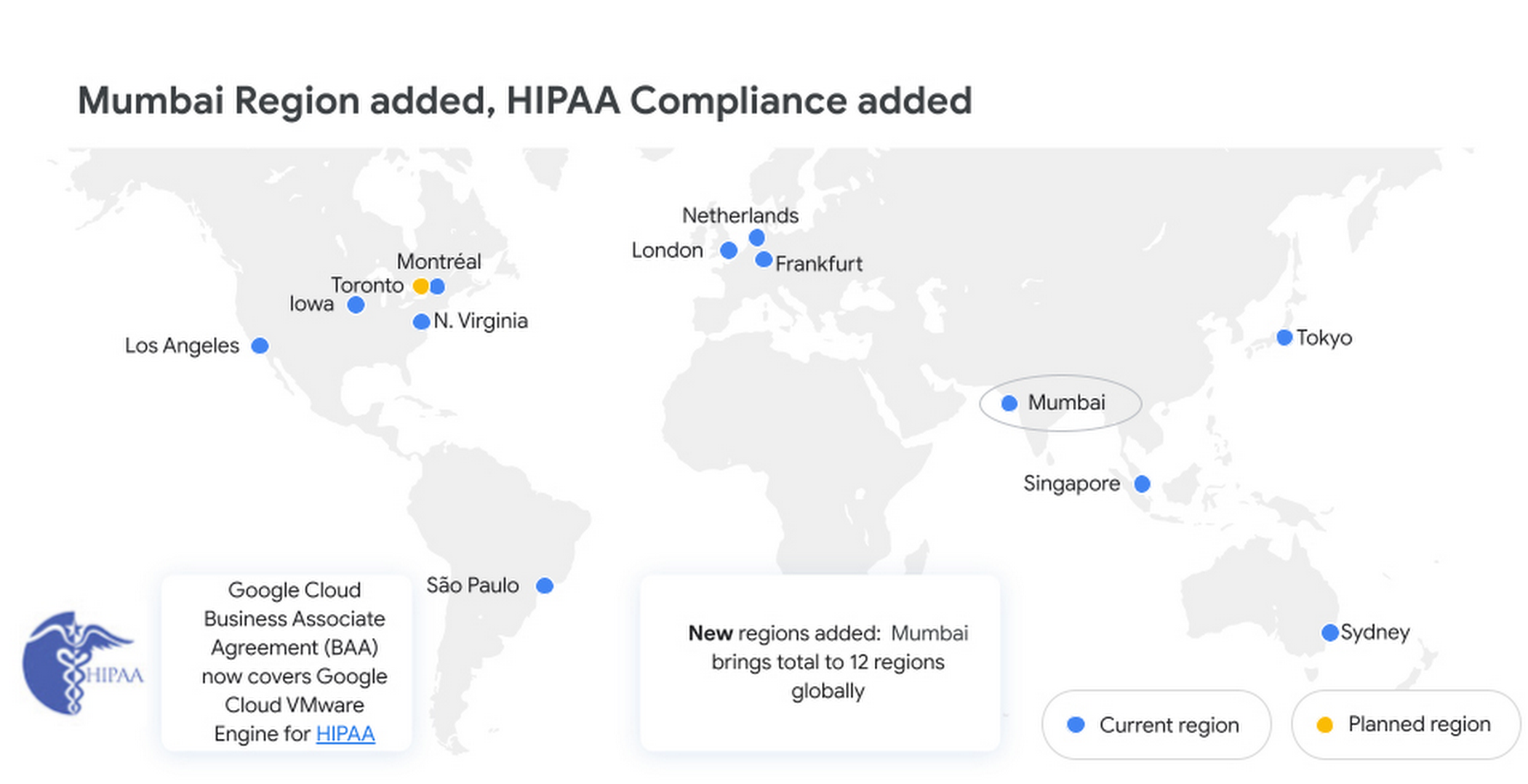
Google Cloud VMware Engine is now available in the Mumbai region. This brings the availability of the service to 12 regions globally, enabling our multi-national and regional customers to leverage a VMware-compatible infrastructure-as-a-service platform on Google Cloud. For more details, please read the press release.
Enterprise-grade infrastructure
With 99.99% availability for a cluster in a single zone, fully dedicated 100 Gbps east-west networking with no oversubscription, and all nonvolatile memory express storage, Google Cloud VMware Engine provides the highest performance required for the most demanding workloads. Let us look at what’s new:
Preview – Google Cloud KMS integration: You already have the ability to bring your own keys to encrypt your vSAN datastores. With this new capability, organizations that want to eliminate the overhead of managing external key providers can leverage a Google managed key provider, using Cloud KMS. This brings increased flexibility in securing workloads and data by enabling vSAN encryption by default for newly instantiated VMware Private Clouds. This feature is currently in Preview.
HIPAA compliance: Since April, Google Cloud VMware Engine is Health Insurance Portability and Accountability Act (HIPAA) compliant. This opens the service up to healthcare organizations, that can now migrate and run their HIPAA-compliant VMware workloads in a fully compatible VMware Cloud Verified stack running natively in Google Cloud with Google Cloud VMware Engine, without changes or re-architecture to tools, processes, or applications. Read more in this blog.
NSX-T support for Active Directory: With NSX-T support for Active Directory, you can now leverage your on-premises Active Directory as one of the lightweight directory access protocol identity sources for user authentication into NSX-T manager. This extends the theme of being able to leverage your on-premises tools with Google Cloud VMware Engine. For more information, read the documentation on how to set up identity sources.
vSAN TRIM/UNMAP support: For space-efficiency, vSAN allows creating thin-provisioned disks that grow gradually as they are filled with data. However, files that are deleted within the guest operating system (OS) do not result in vSAN freeing up space allocated. To increase space efficiency, guest OS file systems have the ability to reclaim capacity that is no longer used, using TRIM/UNMAP commands. vSAN is fully aware of these commands that are sent from the guest OS and enables reclamation of previously allocated storage as free space. We have enabled TRIM/UNMAP for vSan by default in Google Cloud VMware Engine.
Simplicity in experience and operations
With Google Cloud VMware Engine, you only need to worry about your workloads—not patching, upgrading, and updating the solution layer, for fewer interoperability issues and infrastructure maintenance. IIn addition, we have pre-built service accounts to enable your third-party VMware-supported tools and solutions to work seamlessly in VMware Engine. Access to Google services privately over local connections is also natively supported, enabling enrichment of existing applications and modernization over time. Finally, this service brings the power of Google Cloud Virtual Private Cloud (VPC) design by natively providing multi-VPC, multi-region networking that’s unique. Let’s look at what’s new:
Dashboards for Day 2 operations: To speed up cloud transformation and enable efficiency, Google Cloud VMware Engine administrators can take advantage of Cloud Operations dashboards for the solution. In addition, administrators can create custom policies through cloud alerting and enable notifications via channels of their choice (SMS, email, Slack, and more). For more details on how to set up cloud monitoring, please refer to Setting up Cloud Monitoring.
For the latest updates, bookmark Google Cloud VMware Engine release notes.
Thanks to Manish Lohani, Product Management, Google Cloud; Nargis Sakhibova, Product Management, Google Cloud; and Wade Holmes, Solutions Management, Google Cloud; for their contributions to this blog post.
More Relevant Stories for Your Company

TELUS and Google Cloud Partner to Move Towards a More Sustainable Future
Environmental sustainability is a key priority for TELUS, a world-leading communications technology company. It continues to rank in the top 100 most sustainably managed companies in the world, and seeks to make a healthier planet for all by leveraging its global-leading technology, compassion to drive social change and reduce our

Southwire Completes SAP Migration to Google Cloud as a First Step of its Tech Evolution
“Talk about tough times, right?” That’s how Dan Stuart, Senior Vice President of IT Services at Southwire Company, refers to the months following a December 2019 ransomware event, and the COVID crisis that began in spring of 2020. Those events hit just as the company was preparing for an overhaul

Vizrt’s Story of ‘Lift and Shift’ and Delivering Phenomenal Performance with Google Cloud
When moving software applications from on-premise hardware to the cloud, it often "just works," but it's never guaranteed. This is especially the case for applications that are hardware intensive. This blog post examines what happened when a media company took software for real-time video broadcasts into the cloud. We'll share

Bushel: Empowering Agribusinesses One Step at a Time with Google Cloud
Working to put food on all of our tables, today’s farmers are facing a higher amount of instability from input supply chain issues to weather patterns. Adding to this challenge are problems farmers face when trying to correctly time grain purchases, sales and transport. Farmers have always been stewards of
