





Built on Google Cloud, Enexor’s Bio-CHP Unit Powers 100 Homes with Renewable Energy!

4783
Of your peers have already read this article.
2:00 Minutes
The most insightful time you'll spend today!
Editor’s note: Earth Day reminds us that we all can contribute to creating a cleaner, healthier, and more sustainable future. Google Cloud is excited to celebrate innovative startup companies developing new technology and driving sustainable change. On this year’s Earth Day we’re highlighting Enexor BioEnergy and their initiative to produce clean, sustainable energy from plastic and agro-waste with the help of Google Cloud solutions.
Picture a world without electricity where billions of people burn dangerous fuels and trash from landfills to cook meals and heat their homes. Children constantly cough, choking on toxic smoke that lingers in houses and sickens entire families. Because there are no pumps or purification plants, contaminated water is hauled in buckets from dirty rivers and polluted wells. Without power or lights, hospitals and emergency medical clinics can only provide basic services during the day.
Although it is 2022, this harsh life is a reality for billions of people living in developing countries around the world.
Producing clean energy from plastics and organic-waste
This Earth Day, let’s imagine what life would be like in these countries if people had access to safe and inexpensive bioenergy. In this world, indoor air is fresher. Clean water runs from faucets, while homes, businesses, and schools have electricity. Doctors and nurses have the power to treat patients 24 hours a day and save lives with advanced medical equipment. Local economies boom and entrepreneurs thrive.
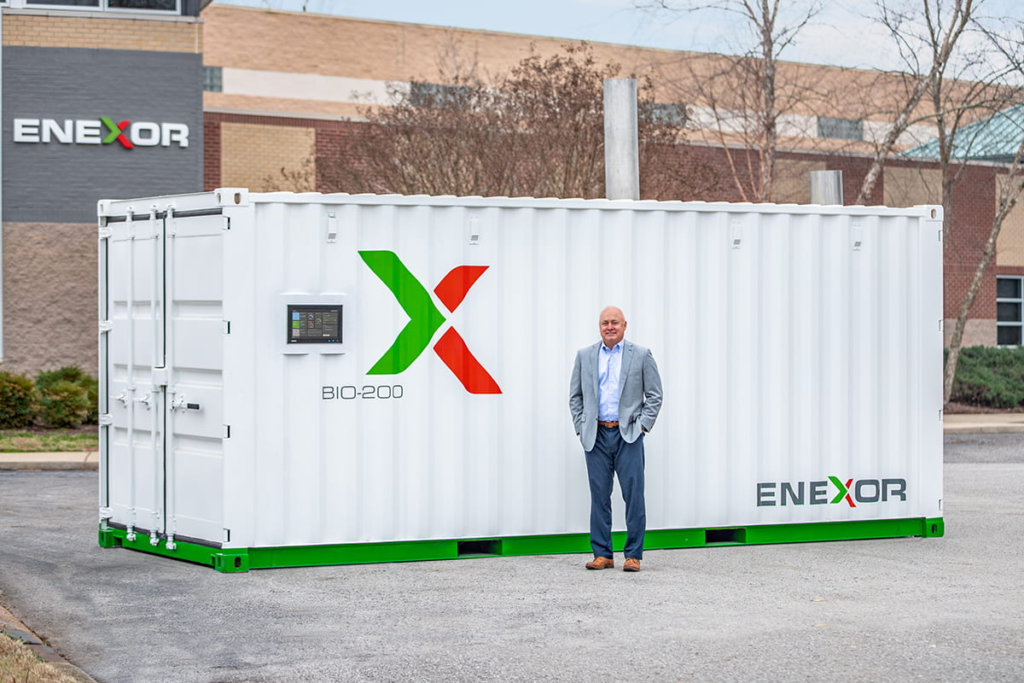
This is the sustainable future Enexor BioEnergy and its partners are building—one village at a time. With the Enexor Bio-CHP™ system, we produce clean and sustainable energy from discarded plastics, organic, and biomass-waste such as rice and corn husks, seaweed, coconuts, and other biomatter while offsetting significant Carbon emissions. The Bio-CHP can be commissioned and easily installed in just a single day, with multiple systems installed side-by-side when more power is needed. By being offered under its novel Energy-as-a-Service business model, Enexor ensures that the Bio-CHP can generate immediate environmental positive impact and customer adoption.
Each Bio-CHP unit generates enough energy to power over 100 homes—and provides much-needed renewable electricity and thermal power for schools, businesses, manufacturing facilities, water pumps, Wi-Fi systems, and telecommunications towers. The Bio-CHP creates clean energy by safely oxidizing plastics and biomatter in a secure container using a high-temperature system to power a micro-turbine. This produces bioenergy, significantly reducing harmful greenhouse gas emissions.
By solving a community’s waste issues while providing more affordable renewable energy, the Bio-CHP also creates new economic opportunities and improved outcomes where it is installed. This includes using its inexpensive power to expand local services and offerings, and empowering local community clean up efforts by incentivizing waste collection via blockchain-enabled digital currencies and services such as PayGo. Additionally, the Bio-CHP is an ideal solution for businesses who desire to maximize their own sustainability efforts, gain greater energy resiliency, and save money on their current energy and waste costs.
Engaging in Google for Startups Accelerator: Climate Change
When developing the Bio-CHP, we realized we needed a reliable and experienced partner to help us incorporate the best in class machine learning and artificial intelligence into our technology. That’s why we joined the Google for Startups Accelerator and participated in the Google for Startups Accelerator: Climate Change.
The accelerator introduced us to other companies working to create a sustainable future and opened new opportunities for collaboration and partnerships. The accelerator also continues to give our small team access to the best of Google Cloud’s people, programs, and solutions. We especially want to highlight Google Cloud’s dedicated startup experts and the incredible technical support they provide, as well as the Google Cloud research credits we used to explore new solutions.
As an example, Enexor is developing a predictive maintenance tool that automatically adjusts Bio-CHP operations to match fuel composition. Another tool in development proactively identifies and flags potential Bio-CHP system and component failures—before they occur.
Google Cloud’s dedicated startup experts work closely with Enexor to develop predictive models for these tools and Enexor also used the Google Cloud research credits that were provided to build these advanced models on TensorFlow, Vertex AI, Cloud CDN and AutoML. Since each system is remotely monitored from Enexor’s global headquarters in Tennessee, predictive maintenance tools also increase the safety, reliability, and efficiency of Bio-CHP in off-grid locations.
Generating 13 billion kWh of clean power by 2040
In the future, Enexor plans to explore additional Google Cloud solutions such as BigQuery to crunch larger datasets, Google Data Studio to build dashboards, and perhaps even Google Cloud Tensor Processing Units (TPUs) to more efficiently process machine learning (ML) workloads.
These solutions will help Enexor to achieve three primary goals by 2040: to generate 13 billion kWh of clean power, reduce 120 million tons of CO₂, and provide one million people with access to clean and sustainable energy. With each Bio-CHP system, Enexor annually reduces up to 2,000 metric tons of CO₂ equivalent emissions by decreasing methane emissions released from landfills, offsetting fossil fuel-based power generation with carbon credits and minimizing waste disposal transportation emissions.
Enexor is now preparing to deploy the Bio-CHP in Accra, Ghana where it will convert organic and plastic manufacturing waste into sustainable energy. Enexor is also looking forward to working with the local Accra community and NGOs to collect discarded plastics and organic waste diverting it from ending in the rivers and oceans and instead using them as renewable fuel sources. We can’t wait to see what we accomplish next as we celebrate Earth Day 2022 and think about the sustainable future Enexor is helping to empower.
If you want to learn more about how Google Cloud can help your startup, visit our page here to get more information about our program, and sign up for our communications to get a look at our community activities, digital events, special offers, and more.
IT Team Figures Out Easiest Way to Build Data Pipelines and Create ML Models

14079
Of your peers have already read this article.
5:15 Minutes
The most insightful time you'll spend today!
Building a strong brand in today’s hyper-competitive business environment takes vision. It also requires a flexible, easily managed approach to digital asset management (DAM), so marketing professionals and other stakeholders can easily share, store, track, and manipulate assets to build the brand.
Many of today’s leading companies, including JetBlue, Slack, TripAdvisor, Lyft, and HealthONE, rely on Brandfolder to deliver consistent, organized, and efficient brand experiences. Brandfolder provides an easy-to-use platform that can scale across an entire company with little end-user training, empowering customers to distribute digital assets wherever they are needed. Customers also gain much greater insight into how those assets are used, and how to use them more effectively in marketing campaigns and brand messaging.
“Google Cloud made it easy to build an ML platform to quickly iterate through different brand intelligence use cases and release data-driven product features into the Brandfolder platform.”
—Ajay Rajasekharan, Head of Data Science, Brandfolder
Brandfolder is constantly advancing its development efforts to introduce new data-driven features without complicating the user experience. Big data, artificial intelligence (AI), and machine learning (ML) are key to meeting customers’ unique business needs, and essential for Brandfolder to compete in the fast-moving DAM industry. To enhance these capabilities, Brandfolder sought a public cloud provider that could help it scale its data pipeline cost effectively while providing access to advanced AI technologies.
After graduating from the Techstars startup accelerator program in 2013, Brandfolder tried two other cloud providers before standardizing on Google Cloud Platform (GCP).
“We saw a difference with Google Cloud from the very beginning because the interactions felt like a strategic relationship,” says Jim Hanifen, Head of Product at Brandfolder. “Google gave us startup credits and a lot of face-to-face support, which we hadn’t experienced with other cloud providers. We decided to move our entire infrastructure to Google Cloud Platform.”
Building an ML platform for brand intelligence
After performing an initial lift-and-shift migration of virtual machines (VMs) onto Compute Engine, Brandfolder built an ML platform using GCP managed services to seamlessly deliver its data products. The platform leverages Cloud SQL, Cloud Storage as the data lake, Cloud Dataproc for cloud-native Apache Spark computing clusters, Cloud Composer as the batch job scheduler, Cloud Pub/Sub as the backbone data pipeline, Container Registry to store Docker images, and Google Kubernetes Engine (GKE) as the application orchestrator. Cloud Dataflow brings data into the data lake and into BigQuery for analysis.
“Google Cloud made it easy to build an ML platform to quickly iterate through different brand intelligence use cases and release data-driven product features into the Brandfolder platform,” says Ajay Rajasekharan, Head of Data Science at Brandfolder, who describes the architecture in a detailed blog. “We simply ingest raw application and event data on one end and output an ML service on the other.”
“Moving to Google Cloud Platform allows us to complete more sophisticated data analysis and ML models much faster, and at a much lower cost. We can create brand-specific ML models 12x faster and get them into production quickly to address our customers’ unique business needs.”
—Brett Nekolny, Head of Engineering, Brandfolder
For many general use cases, Brandfolder does not need to build custom ML models, and instead relies on pre-trained API models from GCP. For example, it uses Vision API and Video Intelligence API to auto-tag creative assets on import to enable fast, intuitive searches across images and videos. When more product- and brand-specific modeling is required to address unique customer use cases, Brandfolder builds and trains custom ML models using its GCP pipeline or Cloud AutoML, a suite of products built on Google transfer learning and neural architecture search technology. For example, if a Brandfolder customer makes different types of grills, Brandfolder can use AutoML Vision to train a model to recognize the different grills.
“Moving to Google Cloud Platform allows us to complete more sophisticated data analysis and ML models much faster, and at a much lower cost,” explains Brett Nekolny, Head of Engineering at Brandfolder. “We can create brand-specific ML models 12x faster and get them into production quickly to address our customers’ unique business needs.”
Industry-leading security and performance
Google Cloud’s security model helps Brandfolder give existing and prospective customers peace of mind that their data will be protected. Cloud Identity & Access Management (Cloud IAM) provides enterprise-grade access control, while Cloud Identity-Aware Proxy (Cloud IAP) enables remote users to work more securely without the hassles of a VPN client. GCP also isolates cloud resources into projects, making it easy to assign permissions and keep data and VMs organized and segregated.
“With Google Cloud, everything begins and ends with security, which makes things very easy for us,” says Jim. “If we’re under a security review, we can submit a Google security white paper. If a potential customer has security concerns, we tell them we are hosted on GCP, and those concerns go away.”
To give customers even better application performance for accessing their brand assets, Brandfolder uses Cloud Memorystore, an in-memory data store service for Redis, to cache data and provide sub-millisecond data access for production applications.
“It was much easier for us to use Cloud Memorystore versus running Redis on our compute instances,” says Brett. “The high availability, replication across zones, and automatic failover with no data loss are big for us.”
Global private network interconnects between Google Cloud and the Fastly content delivery network (CDN) dramatically reduce latency, allowing Brandfolder’s customers to deliver and update even very large creative assets quickly around the world.
“What’s beautiful about the relationship between Google and Fastly is that if one of our customers uploads a new version of an asset, we can propagate that out to Fastly, and the new version will automatically show up in all the places where it’s referenced,” says Brett.
“The ability to quickly solve problems with AI has a substantial impact on our revenue, and that’s more apparent every quarter. Few of our competitors are doing product- or brand-specific modeling because it takes a lot of time and resources. We overcame those hurdles with Google Cloud.”
—Jim Hanifen, Head of Product, Brandfolder
Improving employee and customer productivity
Brandfolder also uses Google solutions for real-time collaboration and productivity, using G Suite to connect employees with intuitive, cloud-based apps. Teams use Gmail, Calendar, Docs, Drive, Sheets, Slides, and Hangouts Meet every day to move the business forward. Many of Brandfolder’s customers are also G Suite users, and Brandfolder offers a plug-in that allows them to view their creative assets inside of Docs and pull images in as needed. Customers can also log into Brandfolder with their G Suite credentials, making the solution even easier to use.
“We’ve been using G Suite since the beginning, and it’s helped us collaborate efficiently to build a successful, growing company,” says Jim. “Our teams expect to have that kind of close collaboration, and everyone here enjoys the G Suite experience.”
Driving 99 percent annual business growth
With automated tagging and other innovative AI-based features, Brandfolder is helping customers locate and distribute assets faster. As a result, Brandfolder is building customer loyalty and increasing sales, growing its business by 99 percent year-over-year. Since moving to GCP, Brandfolder has been able to scale its analytics and data pipeline 50x without a corresponding increase in costs and has not had to expand its development team.
“The ability to quickly solve problems with AI has a substantial impact on our revenue, and that’s more apparent every quarter,” says Jim. “Few of our competitors are doing product- or brand-specific modeling because it takes a lot of time and resources. We overcame those hurdles with Google Cloud.”
5 Features IT Departments Love About Google Cloud

3657
Of your peers have already read this article.
5:30 Minutes
The most insightful time you'll spend today!
Throughout the past couple of years, I have helped a good number of companies, big and small, migrate their systems to the Google Cloud Platform (aka GCP). During the course of these migrations, there are always a few of those moments where people look at a specific Google Cloud feature and say, “now, that’s cool!”.
More often than not, it is because, coming from other platforms, they have gotten used to some features requiring multiple steps, or some operations being complicated, etc. And often they find out that in GCP you can do this specific operation in a couple of clicks, or by setting up a simple text-based configuration. Then you see that light bulb turning on in their head, and there you go… happy customer.
A few of these happen so often that I compiled them in a list to share with others who might also benefit from these “aha!” moments. You could say these are the five things I wish they told me when I started using Google Cloud.
Projects: Naturally Group Resources Together
A project is a namespace where resources live. Every resource you instantiate in GCP, from load balancers to Kubernetes clusters to virtual machines, belongs to a single project, and has no access (by default) to resources in other projects. User roles and authorisations can be defined per-project and trickle down to everything in it. This has two immediate benefits: you can group things that belong together in neat logical units, and things that don’t belong together are isolated from each other (and isolation is a Good Thing)
This is powerful and quite simple, but it often takes new users off-guard. I’ve had many clients call me and ask me “How can I make sure my developers cannot access the production machines? What’s the best way to create access policies? ”
The answer to this is actually super-simple:
- have a project for development where your developers have rights,
- have a project for production where they don’t.
- That’s it.
Every machine/other resource in the production project won’t be accessible to developers.
Of course there is a lot more to it, and you can refine roles and permissions to a much greater degree using Organizations, Folders, etc. Not to mention all the crazy things you can do with per-project billing. But at least you can say “hey, if it’s a machine in the staging environment then it can be found in the “staging” project”.
Global Virtual Networks Are *Truly* Global
Imagine you are using a Cloud provider and that you have servers in the US, and servers in Singapore, and that they need to communicate.
So you create a VPC (Virtual Private Cloud) network in the US data center, another one in the Singapore data center, and then you will connect them by setting up inter-region VPC peering or a VPN (Virtual Private Network) or a transit VPC or other routing magic.
Lots of work, right? And many moving parts, so lots of opportunities for things to break.
With GCP, however, what makes my clients go “aha!” is when they realize that in GCP a single VPC network covers the entire planet. Only subnets are attached to a geographic location, and virtual machines communicate between subnets on private IPs (good old RFC1918 addresses) — no extra routing needed.
So, to make your server communicate across continents on GCP, here are the steps:
- create a VPC network
- create a subnet in the US, put your US servers in it
- create a subnet in Singapore, put your Singapore servers in it
That’s all there is to it. Your VPC network spanning 2 continents is ready to use. Below is a screenshot of how it looks on my account, for a VPC network called ‘my-global-network’ with 2 subnets. The first column (“us-central1” and “asia-southeast1”) contains the name of the GCP regions (read: data centers). The second column is the subnet name that I picked when I created them.

A machine in the US (on the “us-central” subnet) with IP 10.0.0.5 can communicate directly with a machine in Singapore (on the “singapore”) subnet with IP 10.10.0.8.
Nothing else to set up.
And thanks to the way these networks work, the Google Cloud Load Balancer can present a single IP to the world, and forward traffic to the instances that are the closest to you geographically without having to setup a tedious DNS-based load balancing. But that’s worth an entire blog. I’ll save it for another day.
Firewalls with Tags and (Almost) No IP Addresses
There is no network security without a firewall so unsurprisingly GCP comes with one built-in.
Now, I don’t know about you, but nothing makes my brain hurt like a list of firewall rules displaying IP ranges and addresses and ‘Allow/Deny’ directives. It looks a bit like this:

If you imagine a normal network with a few dozen (hundred?) servers, you can quickly see how this can get out of control. You’d better have a solid printout of your network layout to refer to when you start adding and changing rules. And good luck debugging things!
Wouldn’t it be nice if, instead, you could just tell the firewall: “the HTTP traffic from outside can only reach the HTTP servers and the MySQL database is only reachable by the HTTP server(s) on the same network?”
Turns out it’s pretty simple on GCP by using a little thing called network tags. As the documentation says:
“Network tags are text attributes you can add to Compute Engine virtual machine (VM) instances. Tags allow you to make firewall rules and routes applicable to specific VM instances.”
So let’s see how it works. Firewall rules in GCP are defined in terms of source and target (the traffic flows from the source to the target). You can define filtering rules that apply to the source or the target, and in both cases you can use tags.
This is simpler shown with an example. The rule below states that on the default network, the traffic to the VMs with the tag mysql-server can come from the VMs with the tag http-appserver. Any other traffic is “Deny”-ed by default.

All you have to do is to tag your machines properly, and they will automatically be covered by the rule. You don’t need to enter their IP range.
That’s neat if you ask me. It makes it a lot simpler to grasp what’s happening.
Of course, there’s a TON more to firewalls in GCP. Tags also apply to routes and you can mix and match IP-based rules with tag-based rules. Not to mention that thing called service accounts, but I’ll leave those for another day.
The bottom line is that you can create most rules by just expressing a business need and not having to remember complicated network layouts. I have no hard stats, but I’m pretty sure this has saved me hours of work.
Console Access to VMs from the Browser
Easily access virtual machines (VMs) from the Google Cloud console was one of my first “aha!” moments when I started using GCP.
This is a screen capture of my Google Cloud console, with a virtual machine and its internal IP.

The last column has a header that says “Connect” and when you click on the word “SSH” a separate windows pops up. You wait for a few seconds, and… this is what you get. Your personal shell access — in a browser popup no less.

You are connected through ssh to the virtual machine of your choice. You did not have to download ssh keys and put them in the ~/.ssh directory, do the correct chmod command and run a long-winded ssh -i ~/.ssh/somekey me@<it-took-me-forever-to-copy-paste-the-address-here>
In addition, you have access to a few nifty features such as uploading and downloading files, changing the user etc. Just use the menu behind the cog icon at the top right.
In truth, you should not need to connect directly that often, but when you have to, this is a godsend.
Your Personal Jumphost from the Google Cloud Console
The Google Cloud console has a cool trick: you can actually connect to a virtual environment that is managed by the Google Cloud console itself. It serves a bit as a jump host. You can access most resources from the projects from it, and you can activate it directly from the top menu with, no particular setup on your side. It’s called the Cloud Shell.
This is how it looks at the top right of the console:

When you activate the Cloud Shell, the session opens at the bottom of the console. You get a command line prompt and it’s fully configured with the gcloud command line tool (the jack-of-all-trades of Google Cloud scripting).

You can do a great many things from there, and this even includes uploading and downloading files, editing code or deploying it, a web preview for your AppEngine application, and more.
So you can get access to a fully configured shell environment in your project from any laptop where you can connect with your credentials. On top of this, it persists between connections so you can fine-tune it to your needs and have these changes available the next time you re-connect.
This has saved me many times during my previous life as a traveling consultant!
Live migration
Did I say 5 “Aha!” moments ? Well, you’ve been patient reading all the way to here, so here’s one more for free.
Google Cloud has an amazing way to literally “teleport” a running virtual machine between physical hosts without stopping it. It’s called Live Migration. It allows Google to move your virtual machine away from a defective host, or a host that needs a patch or an upgrade, or for any other infrastructure related reason.
It’s all done in the background, and is totally transparent, so you never really see it happening. Unless you look VERY closely. I once did a demo to a client, where a machine was live migrated while he was simulating a solid network load — and we did not lose a single packet, with no noticeable degradation in latency.
And that’s a wrap!
So there you go. These are 5+1 things that made me go “Aha!” when I became more familiar with the Google Cloud Platform, and that still make my clients do the same.
There is a lot of depth to the platform, and my examples above only scratch the surface of our features. I encourage you to try it yourself. There is a generous free tier, and when you are ready to take the plunge and create that new company, please contact us at Google Cloud for Startups. We’ll get you up and running in no time.
Jerome is a Startup Architect at Google Cloud. Based in Singapore, he helps startups make the most of the Google Cloud Platform.
Rethinking retail with Google Cloud Retail Search

2808
Of your peers have already read this article.
3:30 Minutes
The most insightful time you'll spend today!
Cloud Retail Search, part of Discovery Solutions For Retail portfolio, helps retailers significantly improve the shopping experience on their digital platform with ‘Google-quality’ search. Cloud Retail Search offers advanced search capabilities such as better understanding user intent and self-learning ranking models that help retailers unlock the full potential of their online experience.
Google Cloud’s Discovery Solutions For Retail are a set of services that can help retailers improve their digital engagement and are offered as part of our industry solutions.
Executive Summary
Retailers are always working on trying to keep up with the ever changing consumer expectations and trying to forecast the next trend that can impact sales and revenue.
The pandemic brought its own (and largely new) set of challenges which further complicated the issue over the last two years. The retailers were forced to adapt to the new consumer (low physical touch) behavior in which the browsing and product research was largely digital (endless aisle) and accelerated other trends such as buy online and pick up in stores (BOPIS), curbside pick up and pick up lockers. According to a McKinsey Global Survey from early last year, the pandemic has accelerated the pace of digital transformation by several years.
The National Retail Federation (NRF) estimates that retail sales are expected to grow between 6% and 8% in 2022 (slower growth rate than in 2021), as consumers spend more on services instead of goods, deal with inflation and higher food & gas prices due to geopolitical disruptions in the world.
And the competition continues to be fierce as ever. Amazon continues its dominance in the U.S. retail world and new PYMNTS data shows that Amazon’s share of US Ecommerce sales hit an all-time high of 56.7% in 2021.
Customers now have more choices than ever on how they want to engage with the retailers, where they want to spend the money and make their purchase. They also have increased expectations from the retailers around providing a high quality product discovery experience, which is forcing the retailers to invest heavily on improving customer engagement on their digital platforms to boost conversion rate and overall customer loyalty.
This is where Retail Search can help by providing an enhanced search experience that uses Google-quality search models to understand the customer intent and takes into account the retailer’s first party data (such as promotions, available inventory and price) for ranking results.
How is Google Cloud Retail Search Different
The Ecommerce platform on-site search use case is not new and retailers have been trying to solve it effectively for the last two decades. Most retailers recognize that search is a critical service on the platform and have spent countless resources to improve and fine tune it over the years. Yet the challenge remains. According to a Baymard Institute study in late as 2019, 61% of sites still required their users to search by the exact product type jargon the site uses.
However, users now expect the same robust and intuitive search features as is offered by Google.com and other popular web platforms, who seem to have the uncanny ability to intelligently interpret and yield relevant results to complex search queries.
Google’s decades of experience and research in search technology benefits Cloud Retail Search solution and that is what differentiates it from the competition.
- Advanced Query Understanding: Retail Search can provide more relevant results for the same query due to better query understanding features and knowing when to broaden or narrow the query results. While most search engines still rely largely on keyword based or matching tokens results, Retail Search has the advantage of being able to leverage Google search algorithms to return highly relevant results for product listings and category pages.
- Semantic Search: Intent recognition is a key requirement for semantic search and identifying what the customers mean when they enter the query is a key strength of Retail Search. This is critical for retailers since this has a direct impact on Clickthrough rate, Conversion rate and the Bounce Rate.
- Personalized Search Results: Another key differentiator for Retail Search is its ability to leverage user interaction data and ranking models to provide hyper personalized search results. Retailers are able to optimize search performance to deliver desired outcomes: better engagement, revenue, or conversions.
- Self-Learning and Self-Managed Solution: Retail Search models get better over time because of the self-learning capabilities built into the solution. In addition, the service is fully managed, which saves precious resources needed to keep it running and managing its set up.
- Strong Security Controls: The service runs on Google Cloud and follows security best practices to keep our customers’ data secure. Google never shares model weights or customer data across customers using the Retail API or other Discovery Solution products. For more details about this data use, see a description of Retail API data use.
High Level Conceptual View
Here is a simplified high-level view of Retail Search API. Retailers can call the API for the given search query and get back the results which can then be displayed on their digital properties.
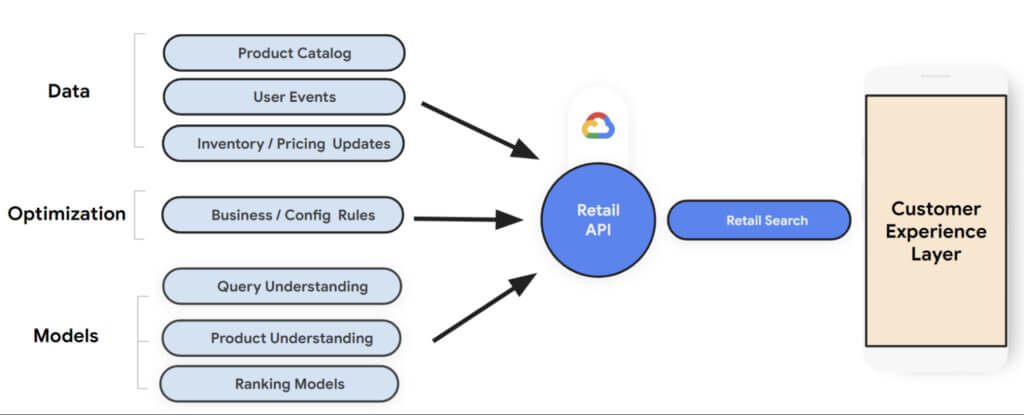
The returned results contains two types of information:
- Search results: Query search results including product listings and category pages based on advanced query understanding and semantic search.
- Dynamic faceted search attributes: Faceted Search is a feature that allows further refinement of the search by providing ways to apply additional filters while returning results.
Retail Search needs the following datasets as input to train its machine learning models for search:
- Product Catalog: Information about the available products including product categories, product description, in-stock availability, and pricing.
- User Events: This is the clickstream data that contains user interaction information such as clicks and purchases.
- Inventory / Pricing Updates: Incremental updates to in-stock availability and pricing as that information is updated.
(Keeping the product catalog up to date and recording user events successfully is crucial for getting high-quality results. Set up Cloud Monitoring alerts to take prompt action in case any issues arise).
Retailers also have the ability to set up business/config rules to customize their search results and optimize for business revenue goals such as Clickthrough rate, Conversion rate, Average size order etc.
How to get started
Retail Search is generally available now and anyone with a Google cloud account can access it. If you don’t already have an account, you can start with a trial account for free here.
Establish a Success Criteria: It’s important to establish a success criteria for measuring the effectiveness of Retail search. Get a consensus on which factor(s) you want to include in scope for measuring the effectiveness of Retail Search. This could include one or two from the following: Search Conversion Rate, Search Average Order Value, Search Revenue Per Visit and Null Search Rate (No Results Found).
- Initial Set Up: Create a Google Cloud Project and set up the Retail API. When you set up the Retail API for a new project, the Google Cloud Console displays the following three panels to help you configure your Retail API project:
- Catalog: displays product catalog and a link to import catalog.
- Event: displays user events and a link to import historical user events.
- Serving configs: contains details on serving configuration and a link to create a new serving configuration.
- Measuring Performance: Retail dashboards provide metrics to help you determine how incorporating the Retail API is affecting the results. You can view summary metrics for your project on the Analytics tab of the Monitoring & Analytics page in Cloud Console.
- Set up A/B Experiments: To measure the performance of Retail Search with another search solution, you can set up A/B tests using a third-party experiment platform such as Google Optimize.
Summary:
As retailers try to navigate through the post-pandemic world where supply chain failures and digital transformation acceleration are major focus areas, they now also have to keep a close eye on the recent geopolitical challenges resulting in rising inflation and costs.
While we can all agree that in-store shopping will continue to be a major source of revenue, it is also important for retailers to tweak the in-store experience for the digital world. Trends such as buy online and pick up in stores (BOPIS), curbside pick up and pick up lockers are here to stay.
Given all the above, consumer engagement and digital experience is more important now than ever before. The cost of search abandonment is way too high and has both short and longer term impact. Retail Search is a great solution to help reduce churn, improve conversion and retention. It provides Google-quality search models to help understand customer intent and the retailers have the ability to set up business/config rules to optimize search results for business revenue goals such as Clickthrough rate, Conversion rate and Average size order.
Telehealth Improves Patient and Clinical Experiences across Continuum of Care

4903
Of your peers have already read this article.
1:30 Minutes
The most insightful time you'll spend today!
According to a National Academy of Medicine discussion paper, social determinants of health (SDoH) account for upwards of 80% of a population’s health outcomes. Breaking this down further, 50% come just from socioeconomic and physical environment factors such as education, employment, income, family and social support, community safety, air and water quality, and access to housing and transit. SDoH determine access to and quality of healthcare, and are contributors to a system of disparate access to care.

We believe that to more efficiently provide comprehensive healthcare access to more people, providers will leverage technology to blend in-person and virtual modes of care delivery.
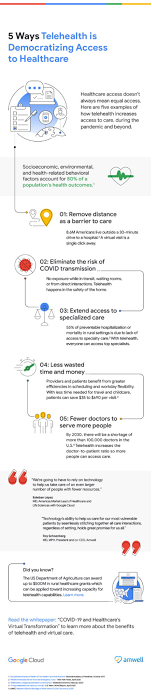
In this article, Amwell and Google Cloud examine five ways telehealth – as part of a provider’s overall care model – can help democratize access to healthcare. (graphic url)
Remove distance as a barrier to care
8.6 million Americans live more than 30 minutes from their nearest hospital. Long drives can deter patients from seeking care or maintaining routine visits. On the flip side, 92% of Americans nationwide have access to wired broadband in the home or through mobile broadband. Therefore, having a virtual visit just a click away can help remove barriers to care, like distance.
Eliminate the risk of unnecessary exposure
Virtual care means that patients don’t have to worry about potential exposure in transit, while sitting in waiting rooms, or from direct interactions during in-person health visits. This is particularly relevant when it comes to those with chronic diseases or underlying conditions. Telehealth provides patients who may be more susceptible to diseases with access to continuous healthcare without putting them at higher risk for developing more severe symptoms. Virtual visits can occur in the comfort –and safety– of patients’ homes.
Extend access to specialized care
55% of preventable hospitalization or mortality in rural settings is due to lack of access to specialty care. With telehealth, physical proximity to specialized services–typically in urban areas–can be reduced as a limiting factor. Virtual solutions grant everyone access to top specialists, regardless of location.
Save time and money
By augmenting in-person visits with telehealth applications, providers can benefit from greater efficiencies in scheduling, helping to improve their bottom line, and add more flexibility to their workday. Meanwhile, patients can spend less on travel and childcare, limit time taken off work, and save on other costs associated with in-person visits — for a savings of $35 to $690 per visit. In a survey by the COVID-19 Healthcare Coalition, 76% of the 2,000+ patients surveyed across the US responded that transportation was removed as a barrier, 65% reported they no longer had to take time off from work for an appointment, and 67 percent reporting lower costs than an in-person visit.
Combat physician shortage and fatigue
Research shows there will be a shortage of more than 100,000 doctors by 2030. In the midst of a physician shortage, telehealth can help improve care delivery and make it more efficient, ensuring more people can still have their healthcare needs addressed. Additionally, by integrating intelligence such as case triaging along with telehealth into a virtual care model, providers can help reduce clinician burnout.
Amwell and Google Cloud are partnering to deliver transformative telehealth solutions that will make it easier for more patients to receive care and improve patient and clinician experiences across the continuum of care. One example includes embedding real-time captioning and translation services powered by Google Cloud’s AI and NLP technologies within the Amwell platform to increase health access and understanding for more people.
As physicians, we are excited that the future of healthcare will continue to blend cloud technologies like EHR-integrated telehealth platforms, AI, healthcare-trained virtual agents along with in-person care to create an integrated hybrid care model that will improve patient outcomes and unburden providers, all while expanding access to broader patient populations.
To learn more, download the whitepaper “Healthcare’s Virtual Transformation,” written in conjunction with Becker’s Hospital Review.
1: “Social Determinants of Health 101 for Health Care: Five Plus Five,” National Academy of Medicine, October 2017
Autonom8: Achieving growth and profits for businesses with Google Cloud

3024
Of your peers have already read this article.
3:30 Minutes
The most insightful time you'll spend today!
With Google Cloud, Autonom8 can run a platform that accelerates and streamlines customer journeys in a scalable, reliable, cost-effective infrastructure, while using advanced optical character recognition to enable intelligent document processing.
About Autonom8
Headquartered in the United States and India, Autonom8 has built a low-code SaaS platform that allows businesses to digitize customer-facing workflows. The business aims to help clients reduce costs and improve interactions with their customers through automation and enablement of customer journeys.

Google Cloud results:
- Increased margins by up to 30% by switching from a home-grown OCR system to Cloud Vision AI
- Enables one DevOps team member to manage up to 30 customers
- Provides real-time information about customer journeys to enable businesses to respond quickly and accurately
- Ensures use of its platform with containerization in customers’ private data centers
- Reduced operating costs by up to 20% with localized scalability and architecture through GKE
Just as cars are evolving to become autonomous, smart and self-driving, enterprises can gain self-awareness, an ability to learn and an ability to adapt. This is the value proposition put forward by Autonom8, an India- and United States-based enterprise workflow management software business. “We provide a low-code, high-intelligence customer journey automation SaaS platform,” explains Ranjit Padmanabhan, Co-founder and Chief Technology Officer (CTO), Autonom8.
The Autonom8 platform includes components, such as A8Studio, a drag and drop location from which clients can create customer journeys, a chat platform that enables clients to create chatbots, and an analytics module. “With our platform and services, businesses can reduce costs and improve interactions with their customers by applying automation to accelerate and provide better customer journeys,” adds Padmanabhan.
Demand for Autonom8 is being driven by the changing customer demands of enterprises, including the expectation to interact with them over multiple channels, and the rising cost of building software with experienced developers. These trends place enterprises under growing pressure to increase the productivity of the people they do have, particularly those who are less technically inclined. In addition, changing consumer habits, regulations and the emergence of new technologies mean customer journeys cannot remain static and need to evolve.
Developing a microservices-based SaaS platform
From the start, Autonom8 planned to deliver a SaaS platform and initially deployed on a multinational cloud service, chosen due to the team’s familiarity with its products and the availability of credits. However, the company’s decision to opt for a microservices architecture that enables individual services to scale independently while running in a containerized environment, demanded high-quality container orchestration. To optimize cost, scalability and performance, Autonom8 began evaluating Google Kubernetes Engine (GKE).
The business then completed a side-by-side comparison between Google Cloud and its incumbent provider of compute, storage and other services. Google Cloud fared favorably, with Vision AI in particular providing powerful machine learning and optical character recognition (OCR) functionality, supporting a key use case for Autonom8.
In addition, many of Autonom8’s clients at the time are financial institutions in India, and legally required to retain data within the country’s borders. Google Cloud’s global network and local presence means the business could fulfill this requirement easily.
“We decided to evaluate Google Cloud, particularly GKE, from two perspectives. One, from a security perspective, as we sell to banks that audit our platform, and two, as a failover between regions because downtime costs money. We found it a compelling solution.”
— Ranjit Padmanabhan, Co-founder and Chief Technology Officer (CTO), Autonom8
A seamless move to Google Cloud
Autonom8 began deploying on Google Cloud in 2018, with its architecture comprising storage, compute, serverless, container management and orchestration, and Vision AI. “We looked at our scripting with the previous provider, and using the Google Cloud documentation available online, educated ourselves over a few weeks before moving pieces of our architecture step by step to Google Cloud,” says Padmanabhan. “We did not run into any major issues. It was pretty simple, with our experienced engineers training others in the product.”
According to the CTO, the business had two options when moving to Google Cloud. Autonom8 could either install raw virtual machines and effectively create its own virtualized data center, or rely on managed services for functions such as memory store, registration and authentication to save time and resources over the long term. Autonom8 opted for the latter and has transitioned fully to Google Cloud, with the number of cloud products and services in its architecture rising from five to about 15. While each product and service performs a key role in the delivery of Autonom8’s products and services, Padmanabhan nominates GKE, Vision AI and Cloud SQL as providing the greatest value to the business.
Scalability, real-time monitoring and intelligent document processing at low cost
With GKE, the business can now scale the nodes or containers specific to each microservice in the event traffic to a particular client surges, due to a rebate or promotion. “Through the combination of the architecture and localized scalability we achieve with GKE, we are reducing our operating costs by up to 20%,” says Padmanabhan.
Running an open source TimescaleDB on Postgres in Cloud SQL enables Autonom8 to give its clients the ability to monitor customer journey information in real time. An example of a journey is applying for a bank loan. The customer must take steps including providing income, tax and other financial details that the bank then appraises to help make a decision on the application. “The moment someone applies for a loan, for example, a bank knows about it and can monitor for fraud, bottlenecks, or other abnormalities, and immediately route to a remediation workflow,” explains Padmanabhan. “Cloud SQL enables us to maintain transactional logging and provide real-time data to our dashboards.”
After evaluating alternative services, including developing a home-grown OCR engine, the business turned to Cloud Vision AI to manage the intelligent document processing that comprises much of its transactional volume. “Vision AI is significantly better than the alternatives and the cost of maintaining our version did not make sense, because Google Cloud continues to make improvements over time that enable us to deliver more and more accurate results to our customers,” says Padmanabhan. “Switching from our home-grown service to Vision AI has enabled us to increase our profit margins by up to 30%.”
“Through the combination of the architecture and localized scalability we achieve with Google Kubernetes Engine, we are reducing our operating costs by up to 20%.”
—Ranjit Padmanabhan, Co-founder and Chief Technology Officer (CTO), Autonom8
Supporting client demands and improving developer efficiency
Google Cloud also enables Autonom8 to meet the demands of businesses that want to run its platform within their own private data centers. “We can undertake the build within Google Cloud and ship our containers to compatible hosts within those clients’ data centers,” explains Padmanabhan. “With our previous provider, we could create containers, but these would not run properly within those data centers.”
Furthermore, Google Cloud documentation and online resources help Autonom8 reduce the training needed for new developers to become productive, with the Google Cloud learning curve taking up just 10% of the overall onboarding cycle.
The organization spends the equivalent of just 3% of its overall annual revenue on DevOps, measured as DevOps Utility Ratio, while the cloud cost of revenue is about USD 1 for every USD 6 in annual recurring revenue, measured as Cloud Utility Ratio. “These two metrics are about what we can do with the people we have,” explains Padmanabhan. “Our current ratio implies that one DevOps person can handle approximately 30 customers. This is made possible by the tools we have, and the comprehensive support from Google Cloud in terms of security patches, intelligent alerts, resource overloading, and more.”
Google Cloud also provides the flexibility for Autonom8 to accommodate the varying service levels required by individual customers based on factors, such as the impact of downtime, as the business can failover seamlessly between regions to mitigate the impact of any issues that may occur.
“Our current ratio implies that one DevOps person can handle approximately 30 customers. This is made possible by the tools we have, and the comprehensive support from Google Cloud in terms of security patches, intelligent alerts, resource overloading, and more.”
—Ranjit Padmanabhan, Co-founder and Chief Technology Officer (CTO), Autonom8
Integrating Google Workspace with Autonom8 to deliver new capabilities
Autonom8 relies on Google Workspace for communication, collaboration and other workplace productivity requirements, growing its footprint from Gmail when the employee population was four or five, to a range of products including Sheets and Drive as the business grew. “It became natural to use the capabilities in Google Workspace as we matured,” says Padmanabhan. “One of the most interesting capabilities was our ability to integrate Google Workspace into our platform. For example, when someone is running a workflow, they can add data from a Sheet. We’ve added Google Workspace authentication capabilities into our products as well.”
“Everyone is using shared links to Drive and I really like the granular permissions structure,” he adds. “I can open up folders to clients while keeping an internal space within the business to ensure security and privacy.”
With Google Cloud, Autonom8 is now poised to continue growing its business and adding new features and capabilities for clients. “We are extremely excited at the opportunity to step up our offering to clients with Google Cloud,” concludes Padmanabhan.
More Relevant Stories for Your Company

Bushel: Empowering Agribusinesses One Step at a Time with Google Cloud
Working to put food on all of our tables, today’s farmers are facing a higher amount of instability from input supply chain issues to weather patterns. Adding to this challenge are problems farmers face when trying to correctly time grain purchases, sales and transport. Farmers have always been stewards of

Beany’s Cloud-Based Accounting Solutions Transform Small Business Finance
Many people start a small business that aligns with their passions, but soon discover the day-to-day running of a business is very different than anticipated. Dealing with accounting, finance, and other daily activities can quickly overwhelm even the most promising of new businesses. Recognizing the unique challenges facing small businesses,

Takeaways from the Google Cloud Public Sector Summit on Prioritizing Tech Investments
Editor’s note: Today’s post highlights five takeaways from our session at the first ever Google Cloud Public Sector Summit. To watch the full session, check out All the Right Moves: Prioritizing Investments in Technology. Now more than ever, government agencies need to invest in digital services to fulfill their missions and better

10 Reasons that Make Google Cloud the Champion of IaaS
When you choose to run your business on Google Cloud you benefit from the same planet-scale infrastructure that powers Google’s products such as Maps, YouTube, and Workspace. We have picked 10 ways in which Google Cloud Infrastructure services outshine alternatives in the market in how they simplify your operations, save
