






How Machine Learning in G Suite Helps Employees of Dalmia Bharat Discover the Next Big Idea
READ FULL INTRODOWNLOAD AGAIN5535
Of your peers have already downloaded this article
5:30 Minutes
The most insightful time you'll spend today!
How This Sri Lankan Bank is Striving to Make Banking Accessible to All

4645
Of your peers have already read this article.
1:30 Minutes
The most insightful time you'll spend today!
Headquartered in the Sri Lankan capital of Colombo, Cargills Bank is not short on ambition or vision: it plans to make banking services accessible to all Sri Lankans and become a financial services leader at home and internationally. Founded in 2014 and licensed by the Central Bank of Sri Lanka to provide domestic and offshore banking services, Cargills Bank provides Retail, Credit and Debit Cards, Corporate, SME, Agri, Micro Finance, Treasury, and Trade banking products to customers.
The bank delivers these products from a network that includes 19 branches, the internet, mobile applications, and a partnership with supermarket chain Cargills Food City that enables customers to transact at more than 370 service points across Sri Lanka.
Cargills Bank initially deployed productivity and communications applications running in an on-premises data center. However, these applications could not support the bank’s growing need to operate as an agile, collaborative, technology-enabled institution. “We wanted to minimize the time and resources dedicated to administration and give our employees the ability to engage and collaborate more effectively. This naturally led us to the cloud and to G Suite,” says Indika Fernando, Senior Manager IT, Applications and Development, Cargills Bank.
Accelerating workflows
The bank also wanted to use scripts to accelerate and automate workflows that incorporated its productivity applications. “The limitations of our previous platform meant it took us three weeks to complete a simple workflow. We wanted to accelerate this process for simple and complex workflows,” explains Fernando.
A technology review by the Cargills Bank IT team found G Suite could meet all of the company’s business and technical requirements. “Employees could meet using voice and video connections from their desktops, mobile devices, and meeting rooms, and collaborate in real time on documents,” says Fernando.
This was a considerable improvement compared to the previous platform that required each stakeholder to wait until other people provided their input, or people providing input into different copies of the same document, forcing a document author to spend time consolidating all feedback into a final version.
“With G Suite, we can be sure that all stakeholders provide detailed and timely input into the documents we rely on to make critical business decisions,” says Fernando.
Augmenting G Suite
G Suite also supported an initiative by Cargills Bank to provide single sign-on for all business applications, while cost effectively giving workers access to cloud-based spreadsheet, document, slide, information collection, web, and wiki creation tools. Furthermore, Apps Script enables the bank’s developers to perform tasks including building add-ons for G Suite products such as Sheets, Docs, Slides, and Forms; writing custom functions for Sheets; publishing web apps embedded in Google Sites; and interacting with services such as AdSense, Analytics, Calendar, Drive, Gmail, and Maps.
Cargills Bank completed migrating its workforce to G Suite a couple of years ago. To help ensure the project was completed on time, within budget, and delivered access to the full range of G Suite tools, the bank engaged Google Partner Finetech Consultancy, which is also headquartered in Colombo.
“The partner oversaw creation of our architecture and undertook training and change management,” says Fernando. “It provided expert consultancy and troubleshooting throughout the three-month deployment and played an integral role in enabling us to launch on schedule.”
The bank has established a Google based social network to create and run internal communities and give its employees the freedom to create communities. “The communities effectively operate as internal social networks that our departments and staff can use to disseminate day-to-day information and announcements,” says Fernando. “For example, leaders of a training and development community use the forum to publish details of upcoming training programs and celebrate people who have completed training exercises.”
Cargills Bank has also established Hangouts Meet as a key communication tool. Employees use voice, video, and chat services to collaborate, with an audit trail that is a requirement in a regulated industry.
Using Apps Script to increase the power of G Suite has delivered a range of benefits to Cargills Bank and enabled the institution to pass on valuable insights to the Sri Lankan Google user community. “Our work with Google has made us a source of expert knowledge that can be accessed by the wider business community” says Fernando.
Workflows increased from 25 to 40
With G Suite and Apps Script, Cargills Bank teams are working more efficiently and the number of streamlined processes has increased from 25 to 40. The bank is using Forms to support simple applications, and a combination of Forms, Apps Script, and HTML code to run complex workflows encompassing validation, documentation, and authorization, and that require sandboxes for code testing and experimentation.
Key workflows supported by Forms and Apps Script include credit card and bank account applications. These workflows automate the process of helping ensure relevant teams review and accept or reject customer applications based on KYC rules. For example, when a customer applies for a new account, a bank employee will scan the request document and supporting information, which is then sent electronically to another team for verification. That team may reject, request more information, or approve the application for escalation to another team for authorization. The authorization team can then approve, reject, or request more information. Each step is automated and associated documentation stored on Drive.
For a credit card application, the Cargills Bank risk department uses a Forms and Apps Script powered workflow to evaluate risk factors such as an applicant’s age, credit history, income, and assets.
Other workflows powered by G Suite manage vehicle reservations, loan origination, customer complaints, incident management, system access requests, lead generation, and e-learning.
“All requests and requirements for vehicles for occasions such as official visits are submitted and authorized through a process supported by Apps Script,” says Fernando. “An approved reservation is sent to the calendar of the person who made the request and pops up in a person’s mobile phone or computer when it is scheduled. This is much simpler than our previous system that required us to send text messages to people to advise them their vehicles were ready.”
E-learning a key process
E-learning is a particularly important activity Cargills Bank has implemented using G Suite. Employees complete learning modules online that help them perform their roles effectively and to pass exams set either by the bank or based on content regulated by the Central Bank of Sri Lanka. Most of the learning material is created in Forms, while Google workflows and dashboards enable managers to track when employees have completed various e-learning modules.
Automation through Google has enabled Cargills Bank to complete backend processes associated with workflows from two days to just two minutes. Uptime is over 99 percent, helping ensure the bank can meet regulatory and internal business requirements.
With workflows powered by G Suite and Apps Script well established within the bank, the institution is continuing to invest in Google Cloud Platform services. A Cloud SQL database manages retail and housing loan information captured and used by Cargills Bank’s loan origination system and workflows. The bank has also started using Google Data Studio to create dashboards that enable it to visualize critical information.
Furthermore, Fernando and his team are exploring the potential of Google machine learning services to help develop chatbots. “Whenever our development team sees a powerful new product from Google, we conduct a deep dive to determine what application it may have for the bank,” Fernando says.
Upgraded G Suite and added new workflows
In January 2019, Cargills Bank elected to upgrade to G Suite Business to take advantage of features such as unlimited storage to archive all its files in digital formats on Drive.
The institution had also used Apps Script to develop complex new workflows across several modules to automate and streamline credit risk scoring, and track and audit hardware movement. In addition, Cargills Bank has developed and deployed new applications using App Maker, available through G Suite Business, and connected them to Cloud SQL to enhance the security of workflow data.
Cargills Bank is now using Google Data Studio, through connectivity to Sheets, to create dashboards for its previously-developed workflow applications.
The institution has also stepped up its collaboration activities through the use of the Jamboard digital whiteboard, available through G Suite. Initially used to exchange ideas between members of the Cargills Bank technology department, the service is due to launch to all users in the coming months.
Reduced friction
Cargills Bank Chief Operating Officer Rohan Muttiah welcomes the role G Suite plays in enabling the business to realize its objectives. “Cloud-based productivity tools such as G Suite reduce friction within our business processes, enabling us to operate more efficiently and effectively in bringing banking to the people of Sri Lanka,” he says.
“Deploying G Suite has given us an agile, dynamic platform to achieve growth based on increased use of fintech and digital technologies,” Fernando says. “Ultimately we want all Sri Lankans to access financial services wherever and whenever they need to and we see G Suite as providing many of the capabilities that enable us to do that.”
Google Workspace Now has Adobe Add-on!
3869
Of your peers have already read this article.
2:00 Minutes
The most insightful time you'll spend today!
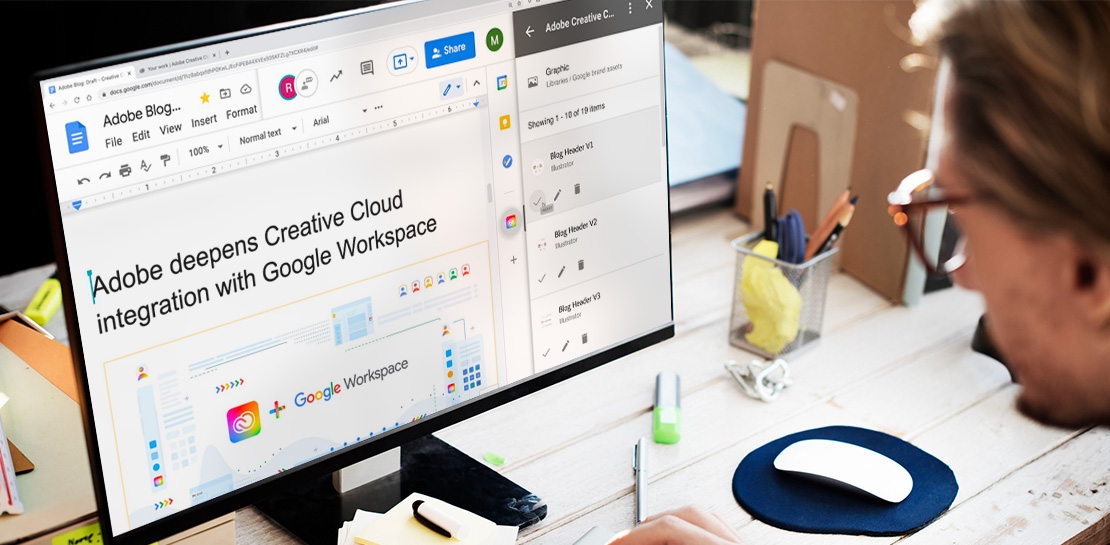
Every day, individual people and creative teams combine Google Workspace with Adobe Creative Cloud to bring their best ideas to life and delight their customers or friends, across photography, design, video, 3D design, and more. In fact, Adobe’s add-on for Google Workspace has had over a million installs and counting. By partnering with Adobe, we’re helping people boost creative collaboration wherever and however they work together. And they can benefit from a potential tenfold increase in productivity that results from things like shared libraries and styles across all the apps they use.
We started integrating Adobe apps with Google Workspace last year by introducing Adobe XD integration into Flutter, enabling developers to simplify the design-to-development workflow, and letting creative teams design apps in XD and convert those designs into Flutter code with the click of a button.
Next, we brought together Adobe Creative Cloud and Gmail to make it easier to share links to your creative assets with external teams and stakeholders through email. With this integration, you can search for your Creative Cloud assets and attach public links to synced files, libraries, and creations made on mobile devices without leaving Gmail. You can also save any attachments received in Gmail directly to Creative Cloud in a few clicks.
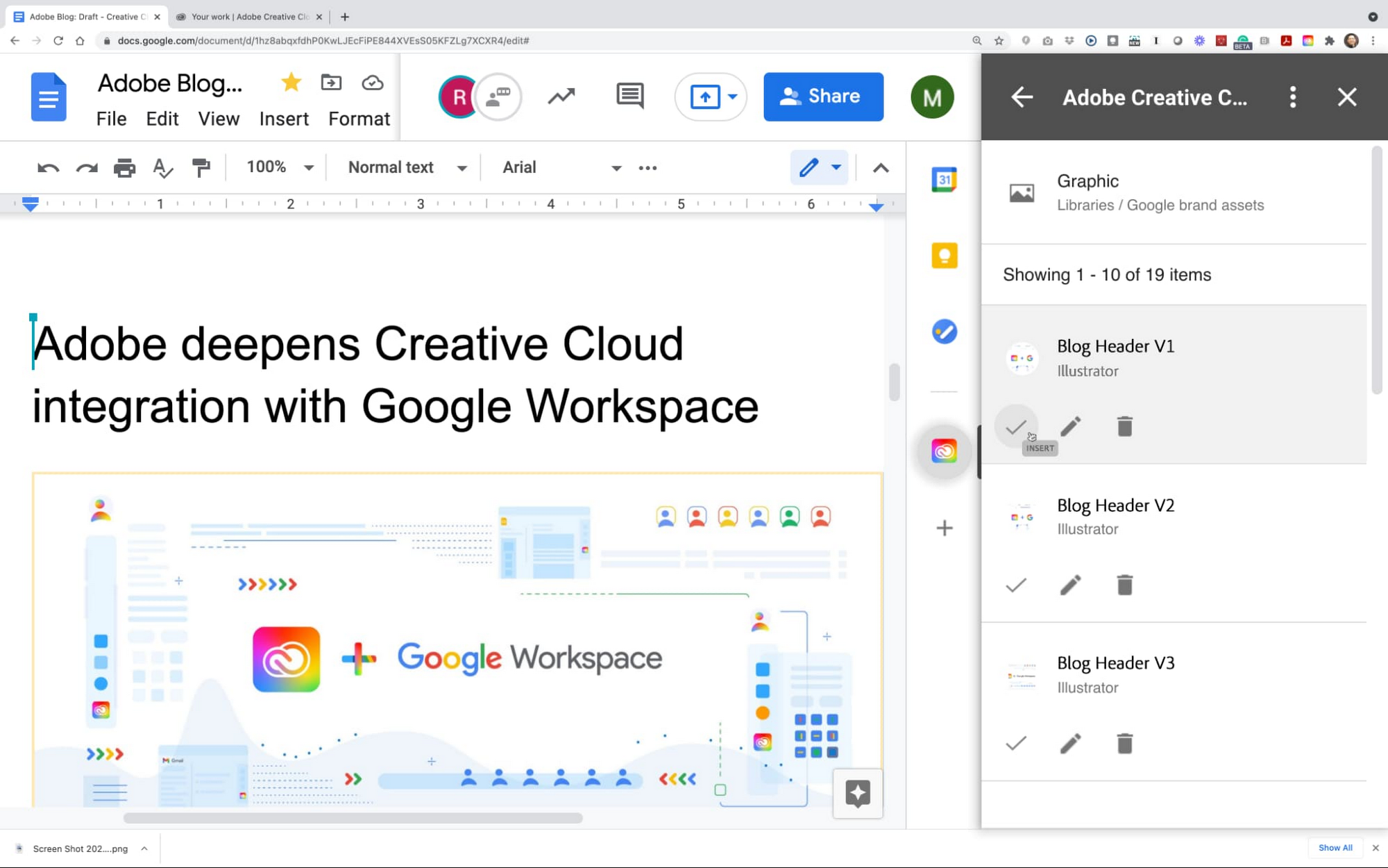
This year we are furthering our collaboration with Adobe with some exciting new capabilities. We’re integrating Adobe Creative Cloud with Docs and Slides, and launching Adobe Creative Cloud for Chrome.
The integration of Adobe Creative Cloud with Docs and Slides will give creative and business stakeholders a single source of truth and a powerful new way to manage brand assets. With easy access to Creative Cloud Libraries inside both Adobe Creative Cloud (with apps like Photoshop, Illustrator, InDesign, XD, and more) and inside Google Workspace (with apps like Gmail, Docs, and Slides), marketing and product design teams can seamlessly share work, get feedback, and stay connected along the way. Learn more about this integration.
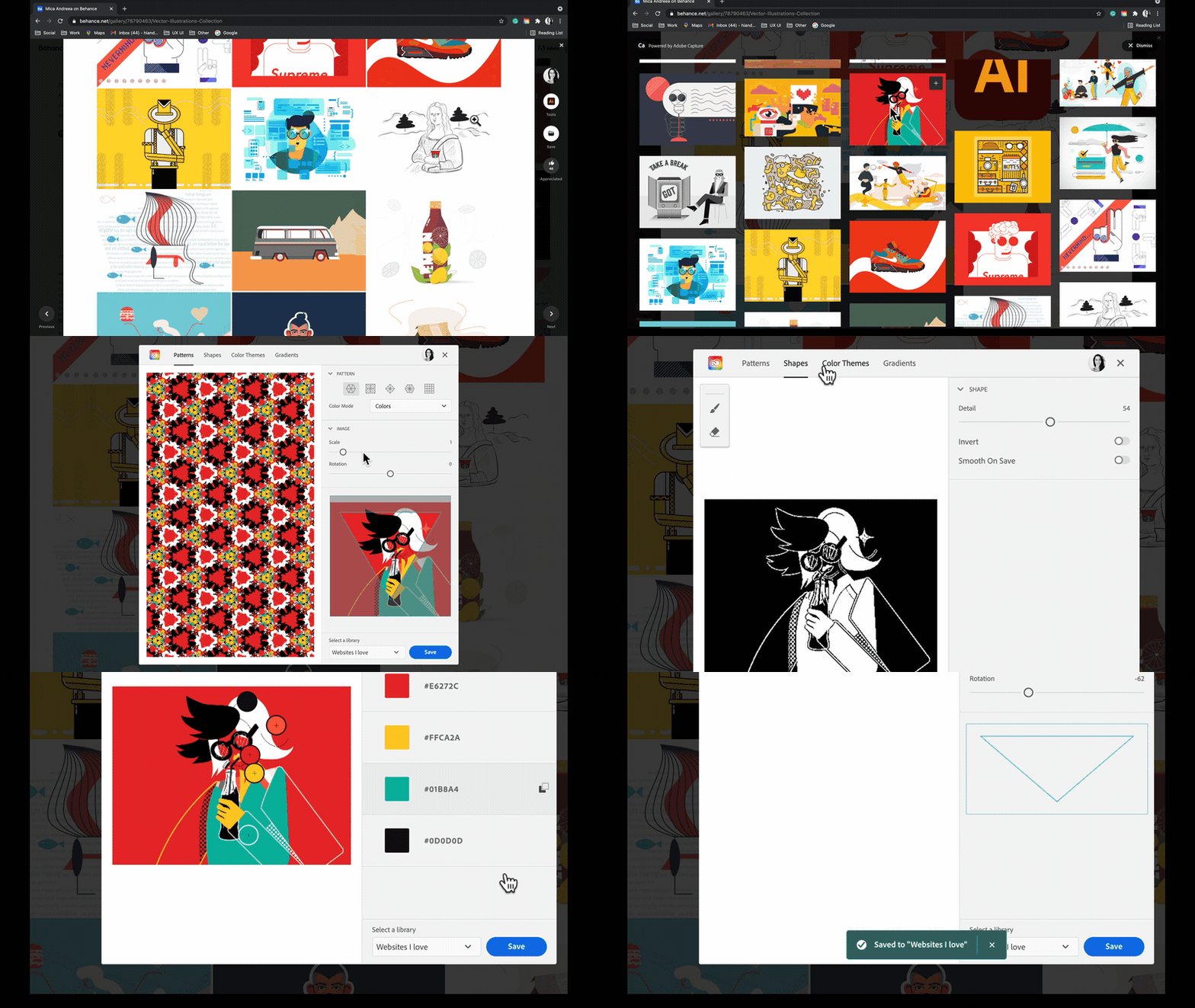
Adobe Creative Cloud for Chrome is a new extension that lets designers draw inspiration from the web’s most beautiful designs and artwork. Whether you’re looking for color combinations, patterns, vector shapes, or gradients extracted from images, the new Chrome extension helps you capture them from the source and apply them to your own design work. Adobe Capture features are available on mobile, on desktop for Photoshop and Creative Cloud Libraries, and now on the web, so wherever and whenever inspiration strikes, you’ll be ready to capture the moment. This feature became available in May. Learn more
These new integrations between Adobe Creative Cloud and Google Workspace and Google Chrome let creatives focus on what they do best: ideate, create, and innovate. Creative teams of 1 or 100 have fast, seamless access to the digital assets and editor tools that bring their work to life. And they’re ready to capture inspiration from the web whenever and wherever it strikes using Google Chrome. We’re committed to boosting creative collaboration in Google Workspace with Adobe as a trusted partner. Start using Google Workspace and Creative Cloud today.
4584
Of your peers have already watched this video.
41:00 Minutes
The most insightful time you'll spend today!
What IT Managers Really Need to Know About G Suite and Google Cloud Platform
Today, some of the world’s largest organizations are using Google technology to innovate. They are leveraging Google APIs and platform services to find new ways to transform their organizations.
They are also leveraging Google Cloud to empower their G Suite users. But what does the Google Cloud Platform (GCP) really offer?
For starters, GCP brings to the table some of the same capabilities as the G Suite like building globally distributed storage systems and collaboration. GCP has a deep and broad portfolio from moving entire datacenters or providing access to Google APIs so you can build those into your applications and services.
You can also make use of business platforms like Apigee or Orbitera or leverage Google APIs to integrate with your applications. Most organizations today are want don’t want to move any of their infrastructure. And GCP helps organizations achieve exactly that.
Vincent Wienczorkowski, Cloud Sales Manager, Google Cloud, and Nick Pan, Cloud Customer Engineer, Google Cloud, share how IT managers, like you, can help their organizations make the most of Google Cloud Platform.
3851
Of your peers have already watched this video.
1:06 Minutes
The most insightful time you'll spend today!
PwC uses Connected Sheets to scale data insights
It’s important for teams across the business to understand customer adoption of products and services, whether it’s the product team tracking usage of a newly released feature or the support team trying to anticipate incoming service requests. Similarly, IT teams need to analyze the adoption of an organization’s internal applications and systems, so they know what tools employees are using and how they are being used. But product adoption datasets are often too large for traditional spreadsheets to handle, and new data is continuously being added.
Connected Sheets can provide teams access to large, powerful, and up-to-date usage datasets, in the familiar Sheets interface. PwC, a global professional services organization, uses Connected Sheets as part of its efforts to make technology and data more accessible across its workforce. One way PwC uses Connected Sheets is to monitor and analyze the internal adoption of tools like G Suite.
Says Peter Van Nieuwerburgh, Global Change Manager at PwC, “If you look at our own adoption dashboarding, it’s more than three terabytes of data—good luck putting that in any spreadsheet. With Connected Sheets, we’re not really pulling the data into the spreadsheet, rather it lives in the database where it belongs. The ability to so easily analyze and visualize the data is really powerful.”
Connected Sheets helps to scale data-driven decision-making at your organization, by making powerful data easily accessible across your sales, finance, product, and IT teams.
3767
Of your peers have already watched this video.
11:30 Minutes
The most insightful time you'll spend today!
Sneak peek: What’s to come in Chrome Browser for the enterprise
The Chrome Browser Cloud Management accomplishes three goals. First, it is a single destination for applying Chrome Browser policies across Windows, Mac, and Linux from one pane of glass.
Second, admins can gain easy insight into their deployment, including getting a list of extensions installed in their fleet. And third, for admins that have large organizations, it offers an easy way to delegate management to specific organizational units. We’ve also added a memory limit policy, an M79, which is super useful for admins that manage a lot of virtual machines.
This policy allows admins to limit the amount of memory that Chrome can use before tabs start being discarded. If you have large VMware or Citrix environments, we highly recommend trying out this policy.
Admins will now have more granular controls over update behavior. In addition to the version controls that already exist today, Chrome now has a policy to configure Chrome variations. Watch this video to find out what more you can do with the Chrome Browser Cloud Management solution.
More Relevant Stories for Your Company

Google Cloud’s Virtual Appointment Scheduling Tool (VAST) Helps State of Arizona Recover from Unemployment Situation
When the world was forced to go primarily online, state governments also faced the reality of needing to provide community services without the health risk of meeting in person. Old systems that relied on interpersonal contact could not keep up. An unprecedented number of displaced workers swamped every unemployment system.

ShareChat Builds its Diverse, Hyperlocal Social Network. Thanks to Google Cloud
Editor’s note: Today’s guest post comes from Indian social media platform ShareChat. Here’s the story of how they improved performance, app development, and analytics for serving regional content to millions of users using Google Cloud. How do you create a social network when your country has 22 major official languages and

Maximize your downtime with these 12 cost-effective Google Cloud learning opportunities
The holiday season is upon us! If you are making your list and checking it twice, we’ve got a few learning gifts you can tick off the list and share with others too. For the season of giving, we’ve wrapped up some of our most popular training and certification opportunities

Beyond Traditional Learning: AI-based Online Learning Platform and Google Cloud Solutions Push Learners to Get Ahead
The combination of a vital need for IT experts among businesses and a digital skills gap is making lifelong learning increasingly critical. Beyond professional development, learning new skills offers additional rewards from building peer connections to boosting your creativity. That’s why in 2020 Krishna Deepak Nallamilli and I launched KIMO.ai to reimagine how people
