





Learning Should be Your Resolution for 2022: Register for Google Cloud Skills Boost

3270
Of your peers have already read this article.
1:30 Minutes
The most insightful time you'll spend today!
Start your 2022 New Year’s resolutions by learning at no cost how to use Google Cloud with the following training opportunities:
30 day access to Google Cloud Skills Boost
Register by January 31, 2022 and claim 30 days free access to Google Cloud Skills Boost to complete the Getting Started with Google Cloud learning path.
Google Cloud Skills Boost is the definitive destination for skills development where you can personalize learning paths, track progress, and validate your newly-earned expertise with skill badges.
The Getting Started with Google Cloud learning path will give you the opportunity to earn three skill badges after you complete hands-on labs and courses designed for aspiring cloud engineers and architects. It covers the fundamentals of Google Cloud including core infrastructure, big data and ML, writing gcloud commands, using Cloud Shell, deploying virtual machines, and running containerized applications on GKE.
Cloud OnBoard: half day training on getting started with Google Cloud fundamentals
Attend the Getting Started Cloud OnBoard on January 20 for a comprehensive Google Cloud orientation. Google Cloud experts will show you how to execute your compute, available storage options, how to secure your data, and available Google Cloud managed services.
Cloud Study Jam: expert-guided hands-on lab
Google Cloud experts will walk you through a hands-on lab included in Google Cloud Skill Boost’s Getting Started with Google Cloud learning path when you join our Cloud Study Jam on January 27. Google Cloud experts will also answer questions live via chat during this event.
Customer Search Experience that Takes Advantage of Enterprise Edge Capabilities!

3422
Of your peers have already read this article.
4:00 Minutes
The most insightful time you'll spend today!
Every year at CES, people from around the world experience the latest and greatest that consumer tech has to offer. In 2021, CES will be in an all-digital format for the first time.
So how can a virtual show like CES create immersive experiences for attendees tuning in remotely? That’s an interesting challenge for the cloud, and of course, every challenge presents an opportunity.
Google Cloud and 5G help enterprises deliver new experiences
Earlier in 2020, we announced our enterprise telecommunications strategy to deliver workloads to the network edge on Google Cloud, and during our SearchOn event last October, we announced how cloud streaming technology can power augmented reality (AR) in consumer search results.
Now, we’re merging the best of both worlds: Technology built for consumer search can take advantage of our enterprise edge capabilities. In light of the COVID-19 pandemic, this past year accelerated our support for enhanced consumer experiences across the board in novel ways. For example, we attempted to address questions such as how potential buyers can make a purchasing decision when they can’t see the product up close. This question becomes even more critical when considering a large purchase such as a new car.
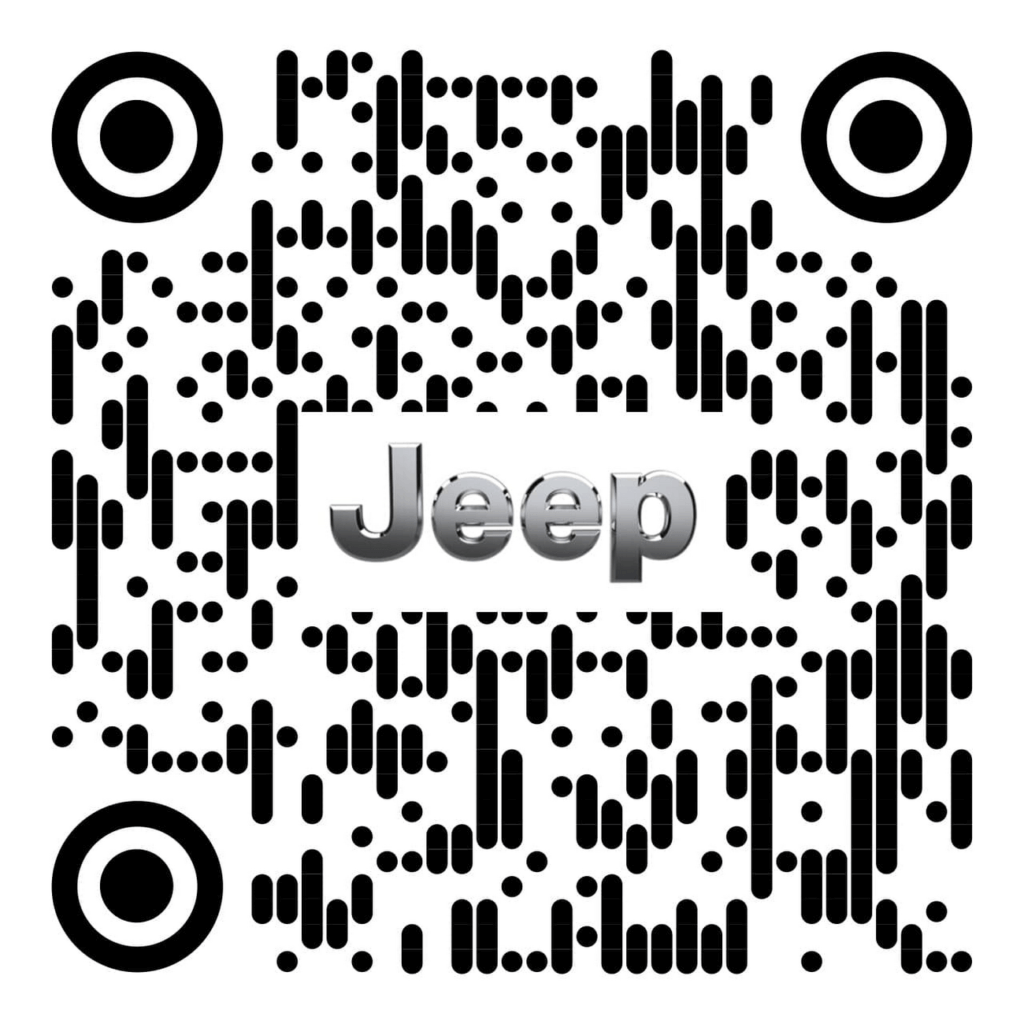
That’s exactly what Fiat Chrysler Automobiles (FCA) and Google Cloud are working together to solve. As part of FCA’s Virtual Showroom CES event, you can experience the new innovative 2021 Jeep Wrangler 4xe by scanning a QR code with your phone. You can then see an Augmented Reality (AR) model of the Wrangler right in front of you—conveniently in your own driveway or in any open space. Check out what the car looks like from any angle, in different colors, and even step inside to see the interior with incredible details.
“As we continue our journey towards becoming a customer-centric mobility company, FCA is adopting emerging technologies that enable us to accelerate and deliver at the speed of our customers’ expectations,” said Mamatha Chamarthi, Chief Information Officer, FCA – North America and Asia Pacific. “Through our collaborative partnership with Google, we are able to expand our efforts to provide an immersive customer experience.”
Harnessing the power of edge with 5G
In order to create a mixed-reality experience with a 3D car model, computer-aided design (CAD)-based data sources that represent a 3D vehicle with highly detailed geometry, depth, texture, and lighting were used. High-fidelity models, such as cars with full interiors, often mean large files (GBs in size). Traditionally, depending on your connection, this can result in long waiting times as assets are downloaded onto your phone. In addition, while mobile phones are more powerful than the Apollo Guidance Computer, they are no match for the power we have in the cloud. We still want to bring these high end experiences to everyone, regardless of their respective device or geographical location.
We solve this problem by rendering the model in Google Cloud, then streaming it to the devices.
Specifically, the Cloud AR tech uses a combination of edge computing and AR technology to offload the computing power needed to display large 3D files, rendered by Unreal Engine, and stream them down to AR-enabled devices using Google’s Scene Viewer. Using powerful rendering servers with gaming console grade GPUs, memory, and processors located geographically near the user, we’re able to deliver a powerful but low friction, low latency experience. This rendering hardware allows us to load models with tens of millions of triangles and textures up to 4k, allowing the content we serve to be orders of magnitude larger than what’s served on mobile devices (i.e., on-device rendered assets). Doing so leverages high-speed 5G connectivity and streams directly from Google Cloud’s distributed edge, delivering a rich, photorealist immersive experience. Customers like FCA benefit from Google’s years of investment and expertise in streaming technology (have you tried playing Cyberpunk2077 on Stadia yet?). With the expansion of 5G networks, not only will streaming enable the experience for anyone anywhere, but it will also cut the wait time of downloading large assets required for detailed AR/VR experiences, ultimately providing instant gratification.
Applications and experiences are at the core of a winning edge proposition
We’re working to make these capabilities available to all enterprise customers to enable innovative use cases such as leveraging AR to help design teams collaborate, technicians perform machine diagnostics, creating next-generation, live video experiences for sports events, enabling new customer experiences across many industries, and supporting our customers in their digital transformation. Stay tuned!
To see the Jeep Wrangler 4xe come to life whether you’re attending CES or not, scan the QR code below, or check out the FCA CES website. Depending on your OS, device, and network strength, you will see either a photorealistic, cloud-streamed AR model or an on-device 3D car model, both of which can then be placed in your physical environment.

Gartner Names Google Cloud a Leader in the 2019 Cloud Infrastructure as a Service Market
DOWNLOAD WHITEPAPER3533
Of your peers have already downloaded this article
2:30 Minutes
The most insightful time you'll spend today!
As increasing amount of cloud IaaS is being bought for traditional IT, with an emphasis on cost reduction, safety and security, service providers are offering a high-quality service, with excellent availability, good performance, high security and good customer support.
In its Magic Quadrant for Cloud Infrastructure as a Service (IaaS), Gartner notes that the distinctions among providers are apparent in the market for cloud IaaS in terms of worldwide enterprise adoption, capabilities and service availability. Infrastructure and operations leaders should evaluate providers with broad capabilities and a positive track record for customer success.
Download the Gartner Magic Quadrant to understand why Google is a leader in the market.
4681
Of your peers have already watched this video.
10:30 Minutes
The most insightful time you'll spend today!
How Google’s Customer Data Platform Helps Retail Brands Offer Data-driven , Personalized CX
Retail companies need customer insights to deliver personalized experiences that impact revenue generation and cost savings. Watch how Google Cloud’s customer data platform helps brands integrate and build holistic view of data in silos to drive marketing and customer service success.
5 Features IT Departments Love About Google Cloud

3648
Of your peers have already read this article.
5:30 Minutes
The most insightful time you'll spend today!
Throughout the past couple of years, I have helped a good number of companies, big and small, migrate their systems to the Google Cloud Platform (aka GCP). During the course of these migrations, there are always a few of those moments where people look at a specific Google Cloud feature and say, “now, that’s cool!”.
More often than not, it is because, coming from other platforms, they have gotten used to some features requiring multiple steps, or some operations being complicated, etc. And often they find out that in GCP you can do this specific operation in a couple of clicks, or by setting up a simple text-based configuration. Then you see that light bulb turning on in their head, and there you go… happy customer.
A few of these happen so often that I compiled them in a list to share with others who might also benefit from these “aha!” moments. You could say these are the five things I wish they told me when I started using Google Cloud.
Projects: Naturally Group Resources Together
A project is a namespace where resources live. Every resource you instantiate in GCP, from load balancers to Kubernetes clusters to virtual machines, belongs to a single project, and has no access (by default) to resources in other projects. User roles and authorisations can be defined per-project and trickle down to everything in it. This has two immediate benefits: you can group things that belong together in neat logical units, and things that don’t belong together are isolated from each other (and isolation is a Good Thing)
This is powerful and quite simple, but it often takes new users off-guard. I’ve had many clients call me and ask me “How can I make sure my developers cannot access the production machines? What’s the best way to create access policies? ”
The answer to this is actually super-simple:
- have a project for development where your developers have rights,
- have a project for production where they don’t.
- That’s it.
Every machine/other resource in the production project won’t be accessible to developers.
Of course there is a lot more to it, and you can refine roles and permissions to a much greater degree using Organizations, Folders, etc. Not to mention all the crazy things you can do with per-project billing. But at least you can say “hey, if it’s a machine in the staging environment then it can be found in the “staging” project”.
Global Virtual Networks Are *Truly* Global
Imagine you are using a Cloud provider and that you have servers in the US, and servers in Singapore, and that they need to communicate.
So you create a VPC (Virtual Private Cloud) network in the US data center, another one in the Singapore data center, and then you will connect them by setting up inter-region VPC peering or a VPN (Virtual Private Network) or a transit VPC or other routing magic.
Lots of work, right? And many moving parts, so lots of opportunities for things to break.
With GCP, however, what makes my clients go “aha!” is when they realize that in GCP a single VPC network covers the entire planet. Only subnets are attached to a geographic location, and virtual machines communicate between subnets on private IPs (good old RFC1918 addresses) — no extra routing needed.
So, to make your server communicate across continents on GCP, here are the steps:
- create a VPC network
- create a subnet in the US, put your US servers in it
- create a subnet in Singapore, put your Singapore servers in it
That’s all there is to it. Your VPC network spanning 2 continents is ready to use. Below is a screenshot of how it looks on my account, for a VPC network called ‘my-global-network’ with 2 subnets. The first column (“us-central1” and “asia-southeast1”) contains the name of the GCP regions (read: data centers). The second column is the subnet name that I picked when I created them.

A machine in the US (on the “us-central” subnet) with IP 10.0.0.5 can communicate directly with a machine in Singapore (on the “singapore”) subnet with IP 10.10.0.8.
Nothing else to set up.
And thanks to the way these networks work, the Google Cloud Load Balancer can present a single IP to the world, and forward traffic to the instances that are the closest to you geographically without having to setup a tedious DNS-based load balancing. But that’s worth an entire blog. I’ll save it for another day.
Firewalls with Tags and (Almost) No IP Addresses
There is no network security without a firewall so unsurprisingly GCP comes with one built-in.
Now, I don’t know about you, but nothing makes my brain hurt like a list of firewall rules displaying IP ranges and addresses and ‘Allow/Deny’ directives. It looks a bit like this:

If you imagine a normal network with a few dozen (hundred?) servers, you can quickly see how this can get out of control. You’d better have a solid printout of your network layout to refer to when you start adding and changing rules. And good luck debugging things!
Wouldn’t it be nice if, instead, you could just tell the firewall: “the HTTP traffic from outside can only reach the HTTP servers and the MySQL database is only reachable by the HTTP server(s) on the same network?”
Turns out it’s pretty simple on GCP by using a little thing called network tags. As the documentation says:
“Network tags are text attributes you can add to Compute Engine virtual machine (VM) instances. Tags allow you to make firewall rules and routes applicable to specific VM instances.”
So let’s see how it works. Firewall rules in GCP are defined in terms of source and target (the traffic flows from the source to the target). You can define filtering rules that apply to the source or the target, and in both cases you can use tags.
This is simpler shown with an example. The rule below states that on the default network, the traffic to the VMs with the tag mysql-server can come from the VMs with the tag http-appserver. Any other traffic is “Deny”-ed by default.

All you have to do is to tag your machines properly, and they will automatically be covered by the rule. You don’t need to enter their IP range.
That’s neat if you ask me. It makes it a lot simpler to grasp what’s happening.
Of course, there’s a TON more to firewalls in GCP. Tags also apply to routes and you can mix and match IP-based rules with tag-based rules. Not to mention that thing called service accounts, but I’ll leave those for another day.
The bottom line is that you can create most rules by just expressing a business need and not having to remember complicated network layouts. I have no hard stats, but I’m pretty sure this has saved me hours of work.
Console Access to VMs from the Browser
Easily access virtual machines (VMs) from the Google Cloud console was one of my first “aha!” moments when I started using GCP.
This is a screen capture of my Google Cloud console, with a virtual machine and its internal IP.

The last column has a header that says “Connect” and when you click on the word “SSH” a separate windows pops up. You wait for a few seconds, and… this is what you get. Your personal shell access — in a browser popup no less.

You are connected through ssh to the virtual machine of your choice. You did not have to download ssh keys and put them in the ~/.ssh directory, do the correct chmod command and run a long-winded ssh -i ~/.ssh/somekey me@<it-took-me-forever-to-copy-paste-the-address-here>
In addition, you have access to a few nifty features such as uploading and downloading files, changing the user etc. Just use the menu behind the cog icon at the top right.
In truth, you should not need to connect directly that often, but when you have to, this is a godsend.
Your Personal Jumphost from the Google Cloud Console
The Google Cloud console has a cool trick: you can actually connect to a virtual environment that is managed by the Google Cloud console itself. It serves a bit as a jump host. You can access most resources from the projects from it, and you can activate it directly from the top menu with, no particular setup on your side. It’s called the Cloud Shell.
This is how it looks at the top right of the console:

When you activate the Cloud Shell, the session opens at the bottom of the console. You get a command line prompt and it’s fully configured with the gcloud command line tool (the jack-of-all-trades of Google Cloud scripting).

You can do a great many things from there, and this even includes uploading and downloading files, editing code or deploying it, a web preview for your AppEngine application, and more.
So you can get access to a fully configured shell environment in your project from any laptop where you can connect with your credentials. On top of this, it persists between connections so you can fine-tune it to your needs and have these changes available the next time you re-connect.
This has saved me many times during my previous life as a traveling consultant!
Live migration
Did I say 5 “Aha!” moments ? Well, you’ve been patient reading all the way to here, so here’s one more for free.
Google Cloud has an amazing way to literally “teleport” a running virtual machine between physical hosts without stopping it. It’s called Live Migration. It allows Google to move your virtual machine away from a defective host, or a host that needs a patch or an upgrade, or for any other infrastructure related reason.
It’s all done in the background, and is totally transparent, so you never really see it happening. Unless you look VERY closely. I once did a demo to a client, where a machine was live migrated while he was simulating a solid network load — and we did not lose a single packet, with no noticeable degradation in latency.
And that’s a wrap!
So there you go. These are 5+1 things that made me go “Aha!” when I became more familiar with the Google Cloud Platform, and that still make my clients do the same.
There is a lot of depth to the platform, and my examples above only scratch the surface of our features. I encourage you to try it yourself. There is a generous free tier, and when you are ready to take the plunge and create that new company, please contact us at Google Cloud for Startups. We’ll get you up and running in no time.
Jerome is a Startup Architect at Google Cloud. Based in Singapore, he helps startups make the most of the Google Cloud Platform.
Beany’s Cloud-Based Accounting Solutions Transform Small Business Finance

1806
Of your peers have already read this article.
2:30 Minutes
The most insightful time you'll spend today!
Many people start a small business that aligns with their passions, but soon discover the day-to-day running of a business is very different than anticipated. Dealing with accounting, finance, and other daily activities can quickly overwhelm even the most promising of new businesses.
Recognizing the unique challenges facing small businesses, we founded Beany. With our personalized accounting platform, small business owners can relax knowing that we will look after all their compliance and advisory needs. Business owners who use Beany also benefit because they end up freeing more time to focus on what they enjoy and do best—likely the main reasons they started their business in the first place. We prepare financial statements, minimize tax and keep an eye that our clients are paying the right amount at the right time. We also advise on business purchase and sale, valuations and forecasting for banks. In fact, we do everything that a business owner needs from their accountant, including a help desk filled with domain experts to provide free & unlimited advice and support.
As we expand our team, we’ll continue to introduce new solutions, services, and integrations that make it even easier for small businesses to prioritize business planning, balance budgets, and keep up with ever-changing tax laws. We also plan to launch Beany in new markets and extend our global footprint beyond New Zealand, Australia, and the UK.
Migrating and scaling Beany
Beany was initially developed and hosted on a virtual private server (VPS) with limited capabilities. As our subscriber base grew, we realized we needed a more scalable, secure solution to eliminate downtime and deliver a reliable customer experience. We also understood it would be challenging for our small engineering team to cost-effectively test and deploy new features without a more agile development environment.
With that in mind, we chose the secure-by-design infrastructure of Google Cloud to power Beany and help us scale our innovative accounting platform. We now use Compute Engine to cost-effectively create virtual machines (VMs) that automatically select optimal amounts of processing and memory.
In addition, we encrypt, store, and archive everything on highly secure Cloud Storage, leveraging a combination of solid-state drives (SSDs) and hard disk drives (HDDs) for hot, nearline, and coldline data. With Cloud Storage, we can replicate data between regions in under 15 minutes to enable rapid recovery and business continuity. This has been really useful moving images to data centers on the other side of the planet quickly as we primarily operate out of Sydney and London.
We also connect, create, and collaborate on Google Workspace using Google Gmail, Docs, Calendar, and Meet. Beany smoothly integrates with Google Sheets to provide live reporting from our application direct to our sales, marketing and support staff. It also makes sharing account data with our accounting clients easy and secure.
Analyzing financial data with Google Cloud AI and machine learning
Joining the Google for Startups Cloud Program gave us immediate access to Google Cloud credits which we use to cost-effectively trial and deploy additional Google Cloud solutions. We continue to evaluate Cloud Code which will help our developers more efficiently create, deploy, and integrate applications directly on Google Cloud. We’re also exploring how Google Cloud AI and machine learning products such as Vertex AI and AutoML can further revolutionize accounting with advanced financial analyses and end-to-end automation of business processes.
We can’t wait to see what we accomplish next as we grow our team and introduce new services and solutions that enable small businesses to streamline operations, lower costs, and increase profits. It’s exciting to help small business owners manage accounting and financial planning so they can spend more time doing what they love and realize their business vision.

Beany team members
If you want to learn more about how Google Cloud can help your startup, visit our page here to get more information about our program, and sign up for our communications to get a look at our community activities, digital events, special offers, and more.
More Relevant Stories for Your Company

HSBC Looks to Google Cloud to Transform Banking
HSBC, a global bank that is a central part of global commerce with a presence in 67 countries, serving 38 million customers ranging from individuals to small businesses to corporations and governments, and having over $2.5 trillion assets in its balance sheet, had a vision of being a cloud first



HSBC Leverages Google Cloud to Deliver Exceptional Cx for 37 Million Customers
HSBC is the world's largest international bank that has been in existence for 150 years. HSBC is present in 70 countries, has 37 million customers and is the number one bank in trade finance or cross-border finance. HSBC is a systemically important financial institution that is heavily regulated. Rapid growth

Analyze and Evaluate Migration Strategies with Google
In this whitepaper, we outline migration frameworks that we built based on conversations we’ve had with CIOs, CTOs, and their technical staff. The goal of these frameworks is to help you devise a migration strategy that empowers both IT and the business. Learn how to analyze migration strategies for your

Recent Updates on Google Cloud EKM to Meet Customers’ Cloud Data Security
Google Cloud External Key Manager (Cloud EKM) lets you protect your cloud data with encryption keys that are stored and managed in a third-party key management system outside Google Cloud’s infrastructure. This allows you to achieve full separation between your encryption keys and your data stored in the cloud, making
