





Vizrt’s Story of ‘Lift and Shift’ and Delivering Phenomenal Performance with Google Cloud

3227
Of your peers have already read this article.
3:00 Minutes
The most insightful time you'll spend today!
When moving software applications from on-premise hardware to the cloud, it often “just works,” but it’s never guaranteed. This is especially the case for applications that are hardware intensive. This blog post examines what happened when a media company took software for real-time video broadcasts into the cloud. We’ll share how we, Google Cloud, collaborated with media software provider Vizrt to meet the demanding requirements of an eSports broadcaster. Together, we delivered a solution that not only met but exceeded the expected performance from a cloud-based deployment.
Video broadcasting in the cloud
Video broadcasts are a very hardware-intensive workflow. By needing to process and store data streams in near-real-time, broadcasts stress GPU, memory, disk, and CPU. In addition, the performance requirements quickly increase as producers add additional video streams into the mix, such as in this case, an eSports broadcast.
Vizrt’s customer wanted to increase their broadcast production by doubling the amount of camera feeds from 8 to 16, to have a more compelling and elaborate production.
At the heart of the eSports broadcasters’ production was Viz Vectar Plus, Vizrt’s software-based 4K switcher. While the client wanted to move more of its production into the cloud, Viz Vectar Plus was designed initially for on-premise hardware. So, when they tried a straightforward “lift and shift ” to the cloud, it surprised no one that the software didn’t run as well. They turned to Google Cloud and Vizrt to make it run the way they needed it to.
Troubleshooting lift and shift
Initially, we suspected that the issue could be in the design of the cloud deployment, i.e., the configuration of the VM hosting the software. So the focus of our troubleshooting was to find a cloud configuration that 1) made sure the software worked to spec and 2) did so optimally considering costs, robustness, and performance. Furthermore, we wanted to ensure that all components met performance specifications, particularly throughput, IOPS, and network bandwidth, as this was a video media application. Only after we validated the cloud deployment would we ask Vizrt to investigate the code itself. We would:
- Set up a test environment.
- Benchmark the environment.
- Test various configurations.
- Validate that the vendor software was optimally using the configuration.
This high-level methodology is straightforward. However, we approached the details in a particular order, considering we were optimizing for broadcast video. We honed in on the optimal cloud configuration by testing the following elements, prioritized in order of expected impact:
- VM type: The VM type largely dictates the available memory and CPU configurations. However, because this was a VM workflow, we had to pick N1’s. Today, they are the only VM type that can be attached to GPUs, which are practically a requirement for broadcast video.
- Disk type: Video broadcasts require high I/O speeds to handle high-quality video streams. We went from an HDD to a much-faster SSD.
- CPU size: We increased the VM CPU cores from 16 in increments up to 32. Increasing CPU size indeed increased performance, but did not return the level of performance we needed.
- SSD size: We increased the SSD size (and the accompanying higher IOPS and throughput that comes with increasing the size) enabling more simultaneous recordings. Again, this only partially worked.
- Disk count. We noticed read/write problems when the application was reading/writing with a single drive. There are two typical ways to approach this: 1) Separate read/writes tasks among two discs and 2) striping the data streams across discs. Implementing these had improved but marginal improvements in performances.
After our testing, we arrived at the following optimal configuration:
- VM: n1-standard-32 instance w/ 500Gb boot drive
- GPU: 1 T4 GPU
- SSD: 1 persistent disk with 1TB*
* We would later determine that two SSDs for separate read and write operations would be more optimal
This configuration was able to produce between 6 – 12 streams. Compared to the on-premise target of 8 streams, this was about as good but was not the customer’s target of 16. So we would need Vizrt to take the ball from here to optimize the software itself.
Optimizing media applications for cloud
We provided Vizrt our recommended configuration, performance notes, and the following best practices that are generally applicable to cloud-based video workloads:
- Separate read and write operations to two different disks to enable higher performance for both operations.
- A second 1 TB SSD persistent disk can be attached to the VM instance to increase performance.
With this information, Vizrt engineers worked their magic, providing daily patches to test; with each daily iteration the overall solution was found quickly. Not only were they able to meet the broadcaster’s request of 16 feeds, but they were also able to go even further to 44. Over a 5x improvement by optimizing for the cloud!
Teamwork in troubleshooting
Because of the specialized nature of media and entertainment, workflow situations across multiple companies are common as specialized applications hand their work from one to another.
“By working in partnership with Google Cloud we managed to build a system that can scale in ways that probably none of us thought would be possible. This allowed Viz Vectar Plus to run fully in the cloud using NDI and opened up amazing possibilities for making shows,” Dr. Andrew Cross, President R&D, Vizrt Group. “We ended up with great feedback from the customer, who were appreciative of how Google Cloud and Vizrt collaborated on a solution.”
The results speak for themselves: A satisfied customer with over a 5x improvement in results. That’s what we call a good game.
Five Ways Cloud Computing Helps Companies Optimize Operations and Lower IT Costs

4815
Of your peers have already read this article.
1:30 Minutes
The most insightful time you'll spend today!
There is no one way to recover. The past year has seen unprecedented challenges for business across the world, with social distancing and quarantine measures forcing many organizations to quickly adapt to remote working. A new report from BCG Platinion, titled “Finding a New Normal in the Cloud”, points out that while companies have done well to survive so far, the overall business environment is still a tough one with contracted economies and lowered revenues. CIOs have to find the right balance between technological innovation and lowering their cash burn rate.
The report identifies five key ways in which companies can use cloud computing to optimize their operations and reduce overall IT costs by as much as 10%.
1. Go beyond VPN
The BCG Platinion report states that companies need “rapid, efficient, highly scalable, and device agnostic solutions”. Traditionally, when employees had to work offsite, companies provided them with VPNs. But the sheer scale of the COVID-19 pandemic has shown these solutions to be expensive, slow, inconvenient, and hard to manage when entire workforces are working remotely.
Instead, BCG Platinion emphasizes the need for cloud-based solutions such as BeyondCorp Enterprise for more secure, more effective, lower cost remote access at scale. BeyondCorp Enterprise offers customers a zero trust platform for simple and secure access with continuous end-to-end protection that can be used on any device at any time. Deliveroo, a global food delivery company headquartered in the UK, uses BeyondCorp Enterprise to bring the zero trust model to its distributed workforce.
“Having secure access to applications and associated data is critical for our business,” says Vaughn Washington, VP of Engineering at Deliveroo. “With BeyondCorp Enterprise, we manage security at the app level, which removes the need for traditional VPNs and associated risks.”1
With a low cost cloud subscription model, BeyondCorp Enterprise eliminates the need for hardware, operating, and maintenance costs that come with VPN solutions and can also enable organizations to offer protection to the extended workforce at a fraction of the cost. BCG Platinion estimates that solutions like BeyondCorp Enterprise can save companies as much as 50% versus the cost of a traditional VPN.
2. Use SaaS to keep productivity up
With so much of the workforce fragmented due to social distancing measures, the need for seamless, efficient collaboration is greater than ever. According to BCG Platinion, a fully functional Software-as-a-Service productivity solution such as Google Workspace helps to “alleviate the traditional costs and burdens around availability, backup, and maintenance of on-premise collaboration infrastructure.” BCG Platinion analysts estimate that adopting a SaaS solution can lower computing costs for end users by up to 35%.
But working in the cloud does more than lower costs. The BCG Platinion report cites a 2020 study from Forrester that found adopting Google Workspace boosted revenue growth by 1.5%, reduced the need for on-demand tech support by 20%, and cut the risk of data breaches by more than 95%. Over the last year, companies of all sizes have looked on the conditions of the pandemic as an opportunity to change the way they work.
“Airbus has spent the past year thinking about what it actually means to return to work and we’re looking to support greater flexibility with Google Workspace in a leading role,” says Andrew Plunkett, Airbus Vice President Digital Workplace. “In 2020, we held 5.6M Google Meet sessions and we now have more than 70,000 shared Drives where people collaborate. Google Workspace has changed the way people work at Airbus and that will continue as the solution empowers the hybrid work reality.”2
3. Reduce IT overhead and management costs with cloud-first devices
Working in the cloud can be made even more effective with devices specifically designed for the cloud, says the BCG Platinion report. “Cloud-native devices such as Google’s Chromebooks and Chromeboxes are cost-effective, easy to deploy, simple to use, and highly secure,” says BCG Platinion. Additionally, with “thin client” devices, companies can save on hardware costs compared with traditional laptops and desktops.The report suggests that a thin client approach can produce savings of up to 25% in end-user technology and support.
Organizations and businesses of all sizes have found that Chrome OS and devices have greatly enhanced their capacity to work together in even the most challenging circumstances. Chrome OS provides employees with a modern experience and devices that stay fast, have built-in security, deploy quickly, and reduce the total cost of ownership. “Chromebooks are simple-to-use and cost-effective devices that do everything that our staff need them to do, which is mainly accessing Google Workspace online,” says Henry Lewis, Head of Platform for the London Borough of Hackney. “As soon as the Grab and Go Chromebooks were available, they were well used every day.”3
4. Lift and shift for easier transitions
While migrating to the cloud is a priority for many organizations to succeed, it does not have to happen all at once and in the same way. A total cloud migration can be a huge undertaking, involving redesigns of architecture and refactoring of applications. For many organizations, this process can take several months, even years.
But in times like these, CIOs need to make decisions quickly and reduce cash burn as much as possible. When resources are stretched and time is tight, BCG Platinion recommends a “lift-and-shift” approach for minimal disruption. With Google Compute Engine, for example, organizations can simply rehost their existing workloads on virtual machines without transformation. BCG Platinion reports that moving non-critical workloads to the cloud with lift-and-shift approaches can reduce IT spend by as much as 4% in just three months. Additionally, a quick, effective migration paves the way for more advanced IT infrastructure changes, creating effects that ripple long into the future.
5. Make data work for you with the cloud
Data is central to any industry and making the most out of it is more important now than ever before. With business as usual upended by the pandemic, organizations have turned to data for urgent tasks like demand forecasting or predicting supply-chain disruptions. A McKinsey report from last year points out that while many organisations had already started to engage with analytics and AI technologies, their progress was dramatically accelerated by the urgency of the pandemic: “Analytics capabilities that once might have taken these organizations months or years to build came to life in a matter of weeks.”
With the right setup a company can use data to drive efficiencies, respond quickly to its customers and open new markets. But big wins require huge amounts of information and powerful analytics, which means that effective data handling can be very difficult and expensive to do with on-premises architecture.
Moving to a cloud-based infrastructure minimizes infrastructure costs while opening up cutting edge techniques like machine learning for greater insight. The BCG Platinion report found that using a cloud-based data platform was not only cheaper and more efficient for businesses, but could result in a 70% increase in “effectiveness” which it defined as increased sales, lower costs of procured goods, and reduced inventory holding costs. “Moving to cloud provides competitive advantage as you scale innovation, accelerating the creation of new services to keep ahead of the competition,” explains Norbert Faure, Managing Director, Platinion Western Europe at Boston Consulting Group (BCG).
The key mission of any data platform is to make sure that the right people have access to the right information at the right time. Google Cloud helps to unify data across the entire business, increase agility, and innovate faster with a range of products. BigQuery runs complex analytics at infinite scale while helping organizations save up to 34% on the total cost of ownership compared with alternative cloud-based data warehouse solutions.4 Cloud Spanner provides a fully managed relational database that operates at 99.999% availability. Meanwhile, with Vertex AI, businesses can access the same groundbreaking machine learning tools that Google uses itself for unprecedented insight on a unified AI platform. “The whole Google Cloud suite of products accelerates the process of getting established and up and running, so we can perform the ‘bread-and-butter’ work of data science,” says David Herberich, VP, Head of Data at fintech startup Branch.5
Minimize costs today, innovate for tomorrow
As the world recovers from the pandemic, continued success depends on staying nimble and adaptive, argues the BCG Platinion report. Cloud computing can make companies more resilient by helping them to keep costs low, reducing overall IT spend by as much as 10% overall according to BCG Platinion. “For CIOs, cloud migrations can offer important near-term savings and benefits, while also reinvigorating progress toward the long-term goal of digital transformation.“
To learn more, read the full report from BCG Platinion.
1. BeyondCorp Enterprise: Introducing a safer era of computing
2. Building the future of work with Google Workspace
3. Hackney Council: Empowering 4,000 staff to keep serving their community from home
4. The Economic Advantages of Google BigQuery versus Alternative Cloud-based EDW Solutions
5. Fintech startup, Branch makes data analytics easy with BigQuery
LearningMate & Google Cloud Partnership to Aid Equitable Educational Opportunities

3453
Of your peers have already read this article.
1:30 Minutes
The most insightful time you'll spend today!
A “one size fits all” approach to education no longer works in today’s classrooms. Using cloud-based technologies, schools and educators can take a more personalized approach to education–one that suits each student’s unique learning style, abilities, and needs.
Taking the lead toward more equitable educational opportunities worldwide, education technology pioneer, LearningMate, is partnering with Google Cloud to offer intelligent, personalized learning via Google Cloud’s Student Success Services.
In a student survey by EDUCAUSE, a nonprofit association whose mission is to advance higher education through the use of information technology, nearly all respondents asked for more digital learning and study options. Given a list of educational material types, such as study guides and recorded lessons, 93 percent said they would like to have online access to at least two options and more than half (56 percent) chose seven or more.
The trend towards student choice challenges educators to reconsider how they teach and support learners. Students expect the same qualities in their lessons as they encounter in their other, non-school related digital experiences: personalization; user-friendliness; and engagement. Educators who are used to a more top-down education model can struggle to meet these new expectations.
Google Cloud created Student Success Services to help education institutions meet learners where they are—in the digital age. This suite of tools and services uses Google’s advanced artificial intelligence (AI) and analytic tools to:
- Engage with students via an AI-powered learning platform and interactive tutor
- Help educators and learners collaborate more effectively
- Provide current, actionable data on student progress
To bring our Student Success Services to more schools and organizations worldwide, we’re partnering with LearningMate — a global leader in digital learning infrastructure. LearningMate is a key go-to-market partner, helping schools design, launch, and maintain their own learning infrastructure. To start, LearningMate is adding Google’s AI-powered learning platform to its Frost platform, a popular content management for education.
As the education model continues to change and digital learning becomes the norm, disadvantaged students risk getting left behind. For these learners, the “digital divide” is very real, and stands to hinder them further–not only in school, but in society and the workplace in later life.
“The gap will only widen between those with digital advantages and those who struggle to gain access to devices and network necessities,” EDUCAUSE states. To meet all these challenges, schools need a diverse mix of tools, methods, and partnerships.
To help close the digital divide among students, digital tools need to be able to scale up or down so institutions and districts of any size and budget can use them. Google Cloud designed Student Success Services with this ability in mind. By offering these services, LearningMate aims to ensure that even schools with smaller teams and fewer resources can offer individualized learning experiences to their students.
With LearningMate and Google’s nearly 40 years of combined experience in education, this partnership aims to help educators better understand their students’ engagement, performance, and preferences. To learn more about Student Success Services and our collaboration with LearningMate, watch this session from our Government and Education Summit.
The Future of Cloud Computing: Choose Your Own Services and Payment Options

2119
Of your peers have already read this article.
1:30 Minutes
The most insightful time you'll spend today!
As the saying goes, “it’s hard to make predictions, especially about the future.” Some organizations find it challenging to predict what cloud resources they’ll need in months or years ahead. Every organization is on its own unique cloud journey. To help, we’re developing new ways for customers to consume and pay for Google Cloud services. We’re doing this by removing barriers to entry, aligning cost to consumption and providing contractual and product flexibility. Read on to learn how we’re rolling out several new go-to-market programs across these key areas to help our customers purchase and consume Google Cloud services more easily.
Removing barriers to entry with Google Cloud Flex Agreements
Many customers choose multi-year commitments because they provide better line-of-sight into IT spend and budgeting. However, these commitments can create difficulty for those who don’t have clear visibility into their future cloud consumption needs. That’s why today we’re launching Flex Agreements, which enable customers to migrate their workloads to the cloud with no up-front commitments. As part of this new licensing option, Google Cloud customers still get access to unique incentives, such as monthly spend discounts1, committed use discounts, cloud credits, and access to professional services, based on monthly spend and workloads migrated to Google Cloud.
Flex Agreements are just one example of how we are removing barriers to help customers start using Google Cloud. In 2022, we launched the Innovators Plus annual subscription, which gives developers a curated toolkit to accelerate their expertise, including access to live and on-demand training through Google Cloud Skills Boost, Google Cloud credits, and more.
We also recently expanded trials for Google Cloud products. For example, the new Spanner free trial instance is good for 90 days, allowing developers to create Google Standard SQL or PostgreSQL databases, explore Spanner capabilities, and prototype applications—with no commitment or contract needed.
Contractual and feature flexibility
Contractual flexibility has always been one of our core principles. Committed Use Discounts (CUDs), for example, provide discounted prices in exchange for a commitment to use a minimum level of resources for a specified term. Last year, we introduced Flexible CUD, spend-based commitments that offer predictable and simple flat-rate discounts that apply across multiple virtual machine families and regions.
In addition to contractual flexibility, our customers also need the flexibility to choose features and functionality based on their stages of cloud adoption and the complexity of their business requirements. Therefore, over the next few quarters, we will launch new product pricing editions—Standard, Enterprise, and Enterprise Plus—in parts of our cloud portfolio. This new commercial packaging model will help give customers more choice and flexibility to optimize their cloud spend.
For customers running workloads such as those in regulated industries like banking and public sector, the higher-end Enterprise Plus tier will offer compute, storage, networking and analytics services with high availability, multi-region support, regional failover and disaster recovery, advanced security, and a broad range of regulatory compliance support. The Enterprise pricing tier will include a broad range of features designed for customers with workloads that demand a high level of scalability, flexibility, and reliability. The Standard pricing tier will offer cost-efficient and easy-to-use managed services that include all essential capabilities such as autoscaling to meet the core workload requirements of customers.
Align costs to consumption with autoscaling
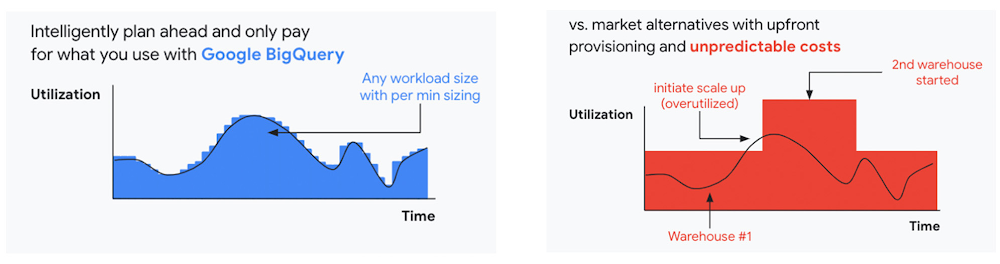
At Google Cloud, a core requirement for the products we build is providing customers industry-leading capabilities to automatically scale (autoscale) services up and down to match capacity with real-time demand. Autoscaling improves uptime, reduces infrastructure costs, and removes the operational burden of managing resources.
Many Google Cloud products include autoscaling capabilities to help customers manage unplanned variations in demand. For example, Dataflow vertical and horizontal autoscaling, in combination with granular adaptive resource configuration (aka “right-fitting”), has resulted in up to 50% saving in infrastructure costs for streaming by automatically choosing the right number of instances required to run the jobs and dynamically re-allocating more or fewer instances during the runtime of jobs. Bigtable also provides native autoscaling capabilities, and Spanner’s autoscale is an open source tool that works across regional and multi-regional Spanner deployments.
Similarly, we added multiple features such as Cluster Autoscaler, Horizontal Pod Autoscaling, Vertical Pod Autoscaling, and Node Auto-Provisioning to GKE for elasticity and cost efficiency.
For L.L.Bean, the ability to quickly scale capacity to meet changing usage patterns (e.g., during the holidays), as well as to rapidly perform load tests to test capacity, are “night and day” with Google Cloud compared to L.L.Bean’s legacy on-premises IT system.
“We won’t have to pay for peak capacity to have it available during peak shopping times. We just scale capacity up or down as needed.” — Randy Dyer, Enterprise Architect, L.L.Bean
We are now taking these capabilities to the next level by enabling autoscaling in BigQuery at a more granular level so you never pay more than what you use. This allows you to provision additional capacity in smaller increments, so you never overprovision and overpay for underutilized capacity. BigQuery customers can now try the new BigQuery autoscaler (currently in public preview) in their Google Cloud console.
A commitment to flexibility and choice
At Google Cloud, we remain deeply committed to the success of our customers and partners, and we are uniquely positioned to help organizations transform their business. By providing you with more flexibility and choice in how to purchase our products, we are empowering you to be more efficient and resilient.
Join Google Data Cloud & AI Summit to hear the latest announcements around innovations in Google Data Cloud for databases, data analytics, business intelligence, and AI. Gain expert insights, new solutions, and strategies that can help you transform customer experiences with modern apps, boost revenue, and reduce costs.
1. Not available for customers buying through Partner Advantage.
5902
Of your peers have already watched this video.
1:30 Minutes
The most insightful time you'll spend today!
FFF Enterprises See 80% Improvements in Speed at Lower Cost by Moving SAP Data to Google Cloud
FFF Enterprises, a pharmaceutical distributor of lifesaving biopharma products, vaccines and plasma products deployed SAP on Google Cloud to leverage its ability to scale server demands, reduce costs and improve speed and performance. Learn how the migration helps FFF empower healthcare to care!
Google Cloud Platform Gives Us 5x the Processing Power to Analyze Physician Performance at 75% Lower Cost

6750
Of your peers have already read this article.
6:30 Minutes
The most insightful time you'll spend today!
Patients about to undergo a healthcare procedure understandably want the best medical professionals they can get. But how can they know which doctors have had the most experience and the best outcomes with that particular procedure? How can they make an informed decision about which doctor to select when the information they have is limited to the doctor’s practice area and subjective reviews from other patients?
MD Insider is working to solve that problem using machine learning (ML) to objectively analyze doctor performance. By analyzing data from thousands of institutions and millions of doctor-patient interactions and medical events, MD Insider identifies physician performance insights based on their experience and outcomes. Insights are then integrated into a triage engine, that enables consumers to search for and schedule appointments with providers who meet their clinical criteria and convenience preferences, such as insurances accepted, office hours, locations, and language.
MD Insider also offers robust data APIs to help health systems, health plans, and employers reduce costs and improve quality of care. Payers use the APIs to curate high-quality provider networks and manage provider directories. Examples of MD Insider’s data APIs include Provider Experience and Share of Practice metrics, Provider Quality and Outcomes, Network Modeling, Expert Clinical Search Taxonomy, Find a Provider, Acute-Care Hospital Quality, and Provider and Facility Metadata.
“We use Google Cloud Platform the way the cloud was supposed to be used. By comparison, other cloud providers feel like you’re renting somebody else’s data center.”
—Ed Holsinger, Lead Data Engineer and Head of Data Science, MD Insider
MD Insider is continuously ingesting the latest performance data about physicians and analyzing billions of rows of data. Requiring constant scalability, the company was born in the cloud; however, it had difficulty configuring server instances for the optimal balance of memory and CPU, and its Hadoop cluster had to be kept running 24/7. Network performance was often slow for no apparent reason. As a result, failure rates from node timeouts increased, and costs grew along with the data. MD Insider had to estimate its usage and pay up front, and received little financial benefit from sustained use commitments.
Knowing that data would continue to grow, MD Insider decided to move its data services — the most demanding and complex portion of its infrastructure — to Google Cloud Platform (GCP), and took advantage of GCP managed services for container management and big data analytics.
“One of the reasons we decided to move to Google Cloud Platform is because it feels like a unified, well-designed cloud architecture and pricing model,” says Ed Holsinger, Lead Data Engineer and Head of Data Science at MD Insider. “We use Google Cloud Platform the way the cloud was supposed to be used. By comparison, other cloud providers feel like you’re renting somebody else’s data center.”
“Moving to Google Cloud Platform and using Kubernetes Engine gave us 5x the processing power for analyzing physician performance at 75% less cost. Our data scientists have more power than ever before to generate insights for our customers.”
—Ed Holsinger, Lead Data Engineer and Head of Data Science, MD Insider
5x the performance, 75% less cost
MD Insider now uses Kubernetes Engine to automate container management and deploy clusters in minutes with just a few clicks. When hundreds of machines are required to analyze a large dataset, automation in Kubernetes Engine deploys ML models as containers, each of which manages the full lifecycle of its task, including scaling up resources, deploying results, and scaling back down when the task is finished. It’s easy for MD Insider to specify exactly how much CPU and memory each container needs, helping maximize performance while reducing costs.
“Moving to Google Cloud Platform and Kubernetes Engine gave us 5x the processing power for analyzing physician performance at 75% less cost,” says Ed. “Our data scientists have more power than ever before to generate insights for our customers. Data scoring jobs that used to take three business days now take four hours.”
Adds Galen Meurer, Senior Software Engineer at MD Insider: “Even if all Google Cloud Platform had to offer was Kubernetes Engine, I would still want to use it. Previously we spent up to 30% of our time managing our container infrastructure, which we can now use for product development.”
A foundation for data science
MD Insider was happy to find that GCP offers a wide variety of managed services. For example, the company is supplementing its Kubernetes Engine clusters with BigQuery for its big data masters and selection jobs, enabling scientists to analyze new and different types of data as well as analyze larger datasets in less time. MD Insider also uses Cloud Storage for big data staging and Cloud Dataproc to run managed Apache Spark clusters for data processing.
“Google Cloud Platform gives us an incredibly powerful cloud architecture for data engineering and data science,” says Eric Wilson, CEO of MD Insider. “That gives our scientists independence, they can do what they need to do without waiting and with no contention between them.”
A developer-friendly platform
Migrating its data services was such a success that MD Insider decided to move the rest of its infrastructure to GCP, including the front end for its web application. Since the migration, MD Insider has experienced no unplanned downtime on GCP, allowing it to easily meet the 99.5% uptime SLA it promises to customers. It’s also taking advantage of Build Triggers in Kubernetes Engine to automate container builds and reduce build times by more than 40%. Production code can be updated in seconds, with no impact to end users other than making new features available.
“GCP has simplified our workflow in so many ways, from intelligent load balancing to content delivery and automating builds,” says Matthew Frey, Software Engineer. “Everything on GCP is cohesive and developer friendly, with a superior UI and better network performance than other cloud providers.”
Ryan Beaini, Senior Software Engineer at MD Insider, agrees: “Since we moved to GCP, our developers are definitely happier. The pain and the headaches we experienced because of the limitations of our previous toolset all went away.”
“We’re a small company, but what we’re doing is incredibly important. We’re helping people make decisions about healthcare providers that could impact their lives and even be life-saving. Google Cloud Platform is helping us make our mission bigger, better, and brighter.”
—Eric Wilson, CEO, MD Insider
Securing billions of rows of clinical and non-clinical healthcare data
As a healthcare technology company, MD Insider processes billions of rows of clinical and non-clinical healthcare data. To control user access to GCP, it uses Identity & Access Management (IAM) along with Yubico YubiKeys for hardware-based two-factor authentication when logging into Google Workspace. MD Insider takes comfort that GCP encrypts data at rest by default, and encrypts and authenticates data in transit when data moves outside physical boundaries not controlled by Google or on behalf of Google.
“On GCP, everything that we need to be encrypted for compliance purposes is encrypted, which is fantastic,” says Eric. “When I tell our potential clients and partners about the resources that Google has dedicated to security, it gives them the confidence that their data will be protected.”
Transforming how teams work
As a growing company, MD Insider must collaborate seamlessly between offices in California, Colorado, and Illinois. It relies on Google Workspace for communication and productivity, using Docs, Sheets, and Slides to drive the business. Employee and team files are stored in Drive, and meetings are conducted via Google Meet with Chromebox for Meetings videoconferencing hardware kits. Google Workspace also helps MD Insider maintain information security by authenticating email domains with digital signatures in Gmail and scanning outgoing email using Gmail Data Loss Prevention (DLP).
“I use Google Workspace every day, and everyone else here does too,” says Eric. “Team Drives are a big time saver for us. We’ve let our previous office software expire, because there’s no need to pay for those licenses anymore.”
Promoting healthcare transparency
With GCP helping MD Insider increase velocity and momentum, the company is making exciting progress. For example, it has entered into a strategic partnership with Zelis Healthcare, which will use MD Insider’s API to provide insights for a next-gen analytics platform that will give health plans unprecedented transparency around physician performance.
“We’re a small company, but what we’re doing is incredibly important,” says Eric. “We’re helping people make decisions about healthcare providers that could impact their lives and even be life-saving. Google Cloud Platform is helping us make our mission bigger, better, and brighter.”
*Google Workspace was formerly known as G Suite prior to Oct. 6, 2020.
More Relevant Stories for Your Company

Media CDN to Intelligently Deliver Streaming Experiences to Viewers around the World!
The digital media and entertainment industry is experiencing dramatic growth, as audiences migrate to online experiences and content providers seek to deliver new and innovative content. According to The Global Internet Phenomena Report, streaming video accounted for 53.7% of internet bandwidth traffic, up by 4.8% from a year ago. This

A CIO’s Guide to Application Migration
A well-executed digital transformation should do much more than keep you competitive… it should also position you to excel by untethering IT staff from low value, labor-intensive tasks, allowing them to focus on innovation and high-impact projects. Also, replacing (or supplementing) legacy systems with modern technologies can reduce complexity and

What Swiggy and You Can Learn From This Company’s Use of ML to Engage Customers
The app economy has enabled a huge range of unique business models to flourish. One such model is online food ordering and delivery services, in which apps leverage geo-location data to aggregate local food choices and offer personalized options to consumers. A leading company in this space is Just Eat.




Skincare Firm Scales 4X in Minutes with SAP on Google Cloud
As the number one skincare brand in the United States, Rodan + Fields must support its team of over 300,000 of independent contractors as well as work to ensure a really personalized experience for customers. To keep pace with the company’s growth, Rodan + Fields realized it needed a more
