





Gmail Turns 18, Has 3 Billion Users! A Product Lead Breaks Down How Gmail Stays Interesting

3807
Of your peers have already read this article.
1:30 Minutes
The most insightful time you'll spend today!
This April, Gmail will be 18 years old. That’s a big milestone, given that email as a medium just turned 50.
Launched in 2004—with its 1 GB free storage, conversation based grouping, and enhanced search capabilities—Gmail quickly became one of the most popular email services in the world.
What started off as Paul Buchheit’s side project is now part of Google Workspace, a solution that’s used by over 3 billion users.
Yet despite this growth and Gmail’s long history, the product continues to find new ways to delight its users with great experiences, new features, and constant innovation.
How does the product team do it?
To help us unpack this question, I interviewed Matthew Izatt, Product Lead for Gmail.
Matthew has been building and growing Gmail for the last 10+ years. He started off in mobile where he built the Android and iOS apps for Gmail, and eventually he became the lead product owner for all of Gmail’s front end. He also led the development of the new Gmail in 2018, which was a complex rebuild of the technical architecture and visual design, along with the addition of multiple enterprise focused features. Since then, he has been leading Google’s charge on redefining how we work as the product lead for the Workspace Platform and Partnerships efforts with a team of over 100.
What follows is an edited version of our interview.
Mustafa Kapadia: Matt, thank you for joining us. Now, before we jump into how your team does its magic, can you please share with me some of the challenges you face when you build a new feature or experience on Gmail?
Matthew Izatt: Thanks Mustafa. And I think this is a great place to start.
One of the biggest challenges is that Google Workspace is used by over 3 billion users, and while that is great, there are many different ways of using our product. It’s not like a doorbell, where there is only one way of using it. With Gmail, it’s like an infinite Swiss army knife, where everyone has their own favorite way of using the product.
Second, Gmail is a critical product for many of our users. Yes, it’s fun to use, but people use it to get important work done—sending job proposals, emailing with their kids’ teachers, or booking medical appointments. This is why we have to be careful about what we experiment with and what we roll out. We can’t just throw things out there and see what works. We have to do our homework.
Third, we have to constantly innovate and think outside the box. Email is an old product, but it continues to evolve. Every day we have new startups reinventing email and challenging the big players. If we are to remain a market leader, we literally have to rethink the product every few years. Which is why creating the new Gmail was so much fun.
Mustafa: I don’t envy you. This is not an easy product to build. Going back to something you touched on: Given these hurdles, how do you build these great experiences? Is there an example that you can share with us?
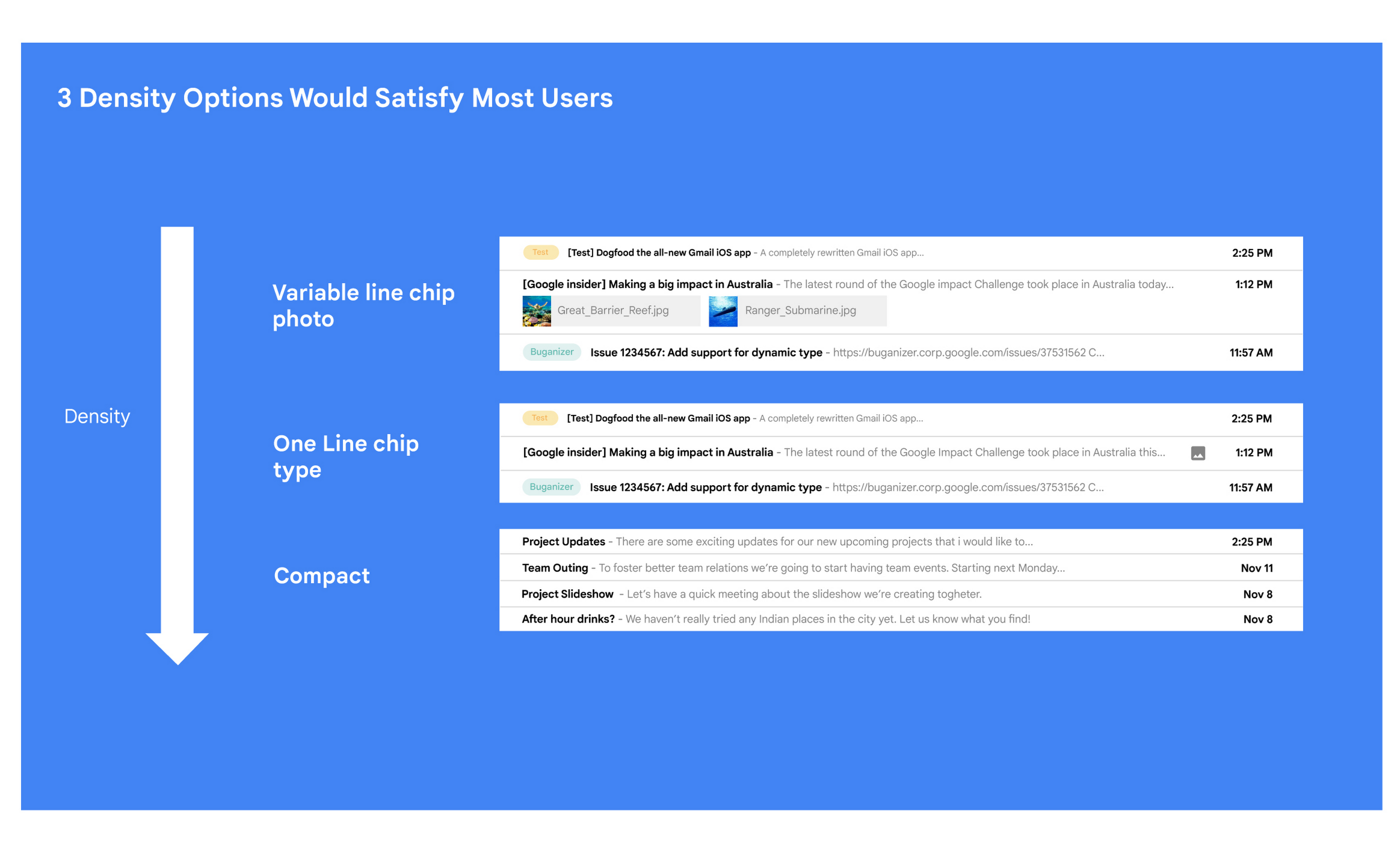
Matt: A specific example I always like to share is the story of how we came up with the right display density on our thread list. The thread list is your inbox; it’s the list of all the messages that you have. The display density is how that information is presented to you.
In Gmail you can choose to have fewer messages with a lot of information about each message. Or you can choose to see a larger number of messages with much less information about each message.
It really comes down to your preferences. And it’s one of the reasons why so many users like using Gmail. In fact, being able to set inbox display preferences is actually one of the top 10 most used settings within Gmail.
Mustafa: So you were really trying to give users choice on how they would like their information presented?
Matt: Exactly. Now, we could have added 100 different levers so that every user could customize their email feed to an infinite degree. While that is possible from a coding perspective, it’s not practical for three reasons.
First, infinite choice sounds good on paper, but in reality, too many options creates a confusing user experience. Second, development would take many months—maybe even a year. And third, it would be a long-term maintenance nightmare.
Mustafa: So how did you go about doing it? Share with me the inner workings of Gmail in Google Workspace. How is the sausage made?
Matt: Well, it came down to four key steps, working closely with our amazing UX Research team.
First came the primary research to find out if building this experience was worth doing. After all, what is the point of building it if no one wants it? For this we actually sat down with real users inside and outside of Google to understand their needs.
Second, we brainstormed 100 potential solutions and narrowed them down to 8 options. Then we mocked up each of the 8 options to see how they looked.

While it would have been easy to just pick the option we liked the most and build it, we wanted to create what our users want, not what we like the most. So we took those options and surveyed the users from step 1 again. We specifically asked them to rank their preferences across three dimensions: Love It, Hate It, or Meh!
Based on the user responses, we realized that 3 configurations would meet the needs of most users. These were the three options we developed and deployed to Google Workplace.
Mustafa: I love how you used data to guide your decision of what to build. This really is Google’s secret sauce—first-hand data collected from users.
Matt: Absolutely. Without their feedback, we would have never been able to narrow down to the 3 options that would satisfy most of our users.
Mustafa: Talking about risks: Getting user feedback and validating before you build is one way to de-risk your product, but you even de-risked your product launch strategy, correct?
Matt: Yes. Sometimes we launch features individually. Sometimes we launch them as a group. In this particular case, we had a lot of moving parts. We had a complete UI redesign, 10 or 12 new features, and architecture changes.
So to de-risk this, we put in place—I kid you not—a 26-stage launch process. We started off with the technical architecture changes—stuff that the user would not notice—to make sure that it was working. And we did it in small increments.
Then we rolled out a few features at a time, launching it first to our early access program—where users have opted in to receive updates. We measured their reaction and satisfaction first, and then moved on to the next group.
At every stage, we kept our blast radius small and put in these checks and balances where we could launch, measure reaction, and then reassess our strategy. And that worked out pretty well for us for this massive launch.
Mustafa: Agreed! Thank you for taking the time to talk to me. And good luck with building the next version of Gmail.
Matt: Thanks for having me.
How to sustainably transform while minimizing risk

940
Of your peers have already read this article.
3:30 Minutes
The most insightful time you'll spend today!
In previous blog posts, we’ve discussed the benefits that organizations can reap by measuring and then optimizing their overall ESG impact. In this post, we’ll look at the endgame: sustainable transformation into an organization that continually adapts to maximize its resilience while reducing risk. Where will my customers be with the evolving global community landscape? How can I design communities and products with sustainability in mind? Are my assets exposed to physical climate risk — drought, flood, wildfire? Adaptation and resilience are the board and legislative focus areas that the ambition loops created by Google Cloud Ready – Sustainability seek to accelerate.
This is especially important due to the scrutiny of governments and financial institutions as they evaluate the viability of physical asset investments. These organizations want assurances that their investments will not be under undue environmental risk. Similarly, companies embarking on net-zero transitions can realize interest expense savings by providing the measurable, accountable assurances their financiers demand.
Leveraging analytics for climate and business resilience
We’ve said it before, but it bears repeating: The Google Cloud Ready – Sustainability program challenges the notion that sustainability is just a nice-to-have or merely good PR. Rather, we designed the program to help organizations adapt to a net-zero future with solutions that reduce risk, support growth, provide competitive advantages, and positively impact the bottom line. The following partners provide data and analytics that offer deep insights into the environment, natural resources, and social trends that point the way toward sustainable, profitable growth.
Atlas AI has built a geospatial artificial intelligence platform that helps every organization anticipate changing societal conditions — where people live, where wealth and poverty are concentrated, how the physical makeup of communities is evolving, and more — to determine where to invest today to prepare for the world of tomorrow. Atlas AI customers, which range from the World Bank and global NGOs to multinational corporations, use the platform to accelerate growth, future-proof supply chains, target resources to vulnerable populations, and build greater resilience to climate change.
Climate Engine’s SpatiaFi solution, powered by Google Cloud, helps financial services organizations connect economic assets to the world of Earth observation data supporting regulatory reporting, climate risk reduction, and new innovative sustainable finance offerings. Combining billions of planetary observations with peer-reviewed scientific methods, SpatiaFi is connecting Earth science to operational systems offering new levels of accuracy, transparency, scalability, and trust in climate and sustainability data in the context of financial decision-making.
Kumi Analytics‘ KACSAT solution was approved by OxCarbon as a methodology for the calculation and verification of voluntary carbon offsets in support of nature-based solutions. KACSAT leverages multiple satellite platforms and Google Earth Engine‘s state-of-the-art processing tools to enable science-based carbon assessment aligned to the Oxford Offsetting Principles of environmental integrity, additionality, permanence, and achieving net-zero emissions. Environmental organizations, financial institutions, and corporations can now offset their carbon footprints through the reforestation and conservation of millions of hectares of forests — something that was previously limited due to the cost and time of validating high-quality forest projects.
Tensorflight revolutionizes property underwriting with AI. Its cutting-edge tool provides underwriters and insurers with access to rich and highly accurate datasets for commercial and residential properties, enabling them to create superior insurance products. As pioneers of the first property-inspection platform based on convolutional neural networks, Tensorflight’s advanced technology connects seamlessly via API and utilizes ground-level imagery, satellite, and aerial data. This unique approach enables the company to generate precise replacement costs and conduct more comprehensive risk assessments. By automating property inspections and enhancing underwriting accuracy, Tensorflight empowers insurance providers to plan for the future with pragmatic decision-making. With Tensorflight, the future of property underwriting is transformed, offering unparalleled insights, efficiency, and sustainability.
Are you ready for sustainability transformation?
Transforming into a net-zero organization means much more than building resilience to climate change, as important as that is. It also means finding the customers of the future, achieving ongoing energy savings, more sustainable resource usage, and improved transparency to regulatory institutions and consumers. Google Cloud Ready – Sustainability partners offer certified solutions that can help organizations get there.
Look for Google Cloud Ready – Sustainability validated solutions on the Google Cloud Partner Directory Listing, Google Cloud Ready Sustainability Partner Advantage page, and — if applicable — via the Google Cloud Marketplace. We hope to help customers better understand how these technologies can help them meet their ESG goals, find the right solutions for their particular challenges, and implement solutions faster.
Learn more about the Google Cloud Ready – Sustainability validation initiative and explore all our partners in sustainability transformation.
Stay on Top of Your Cloud Monitoring with Google’s Mobile App

1536
Of your peers have already read this article.
3:30 Minutes
The most insightful time you'll spend today!
We are pleased to announce the availability of Google Cloud Monitoring uptime checks in the Google Cloud mobile app.
The uptime check capability offered by Cloud Monitoring is a simple yet powerful observability tool to monitor an application’s availability and performance on URLs provided by customers. The primary purpose of an uptime check is to track resource availability on an on-going basis. It’s essentially a pulse check for a system and is often the first to detect impending issues. Using uptime checks can proactively detect availability and latency issues with an application and reduce the time and severity your users are impacted by an outage. Uptime check can validate if the response code from your application is as expected, and also the latency of your service from different regions. Uptime checks can further inform your SLAs and SLOs, and track your service’s health over time. SREs at Google use uptime checks as an important part of their daily routine.
Given the critical role served by uptime checks, we heard your feedback on having the ability to track these checks in the Google Cloud mobile app. With this launch SRE’s, operators or administrators can do exactly that, in addition to easily accessing their cloud resources (App Engine, Compute, Databases, Storage), managing permissions using IAM, viewing logs, incidents, errors, and billing.
To access uptime checks, simply tap the “Operations” tab in the Google Cloud mobile app on your iOS or Android device.
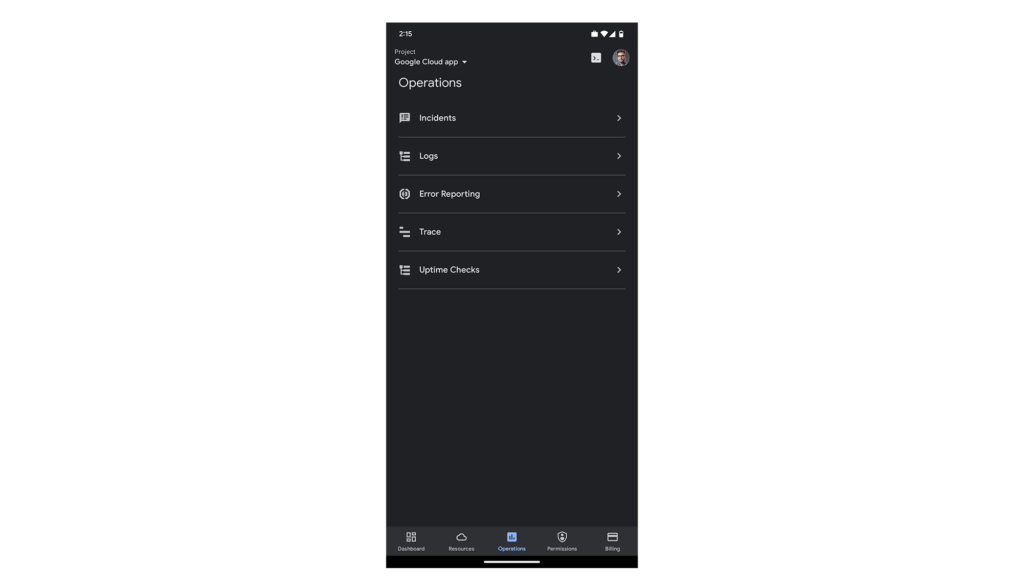
After navigating to “Uptime Checks”, you will see a list of all the services you have previously added using the Create public uptime check documentation.
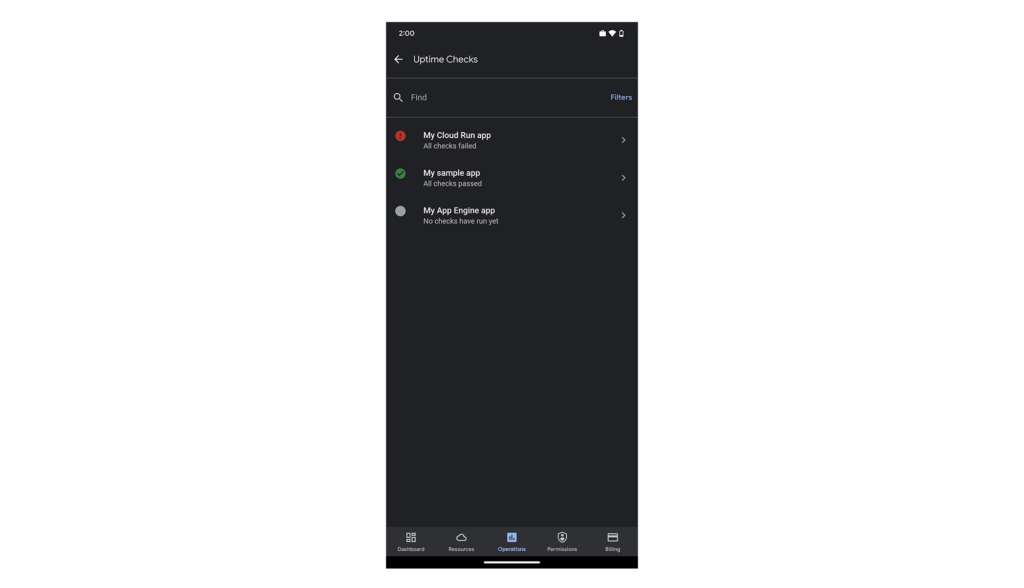
The list is sorted by status, so all failing checks are at the top. You can easily filter by status using the “Filters” option in the top-right corner of the screen.
Tapping any of the uptime checks will take you to the “details”-screen.
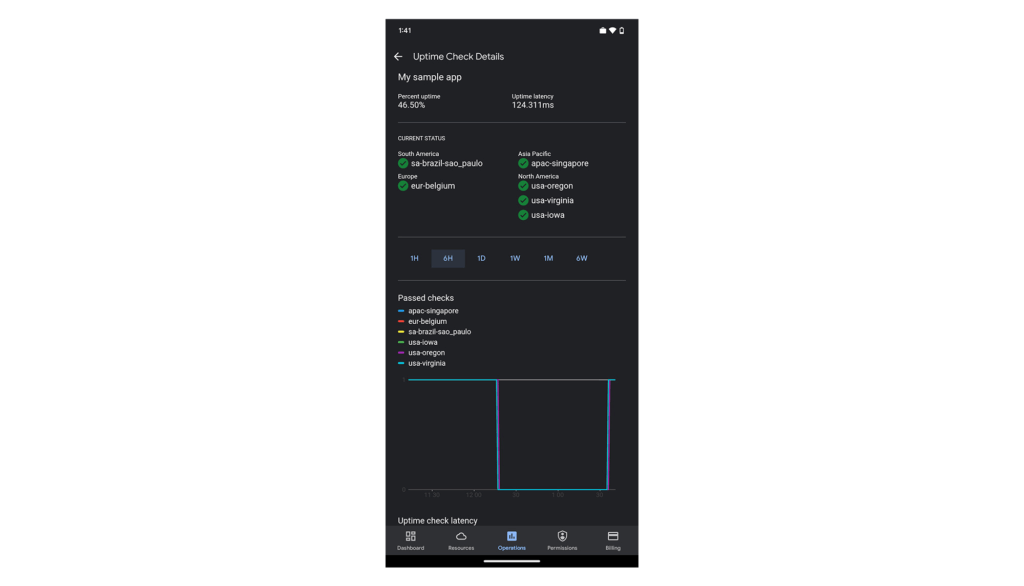
Here you’ll see your application’s uptime, latency, status per region (if you’re monitoring your application from more than one cloud region) and graphs to give you a sneak preview. The “passed check”-graph is showing how many checks passed in the last hour up to 6 weeks. You can easily change the interval using the scale above the graphs.

Scroll down the page to see more data. At the bottom of the screen, we’ve included some configuration details for this uptime check, so you can check the above data against this specific setting.
We hope you find this new uptime check feature useful in your daily work. To create new uptime checks, start here: Create public uptime check.
We’re working hard to make the Google Cloud app your companion for monitoring and managing your Google Cloud resources on the go.
For pricing information on uptime checks, please see the Cloud Monitoring pricing summary.
This new feature is available for you to use today. If you have any feedback, we would love to hear from you — just click the “Send feedback” button in the app. And if you don’t have the app – go ahead and download the app today from Google Play or the Apple App Store.
From operations to planning, G Suite customers scale data insights with Connected Sheets

4068
Of your peers have already read this article.
4:30 Minutes
The most insightful time you'll spend today!
We recently announced the general availability of Connected Sheets, which brings you the power and scale of a BigQuery data warehouse in the familiar context of Google Sheets. With Connected Sheets, you can analyze billions of rows and petabytes of data in Sheets without specialized knowledge of computer languages like SQL. This makes it easy for anyone, not just data analysts, to apply pivot tables, charts, and formulas to massive datasets and unlock insights.
Our customers use Connected Sheets to enable data-driven decision-making across their organizations. We’ve heard many stories about how Connected Sheets has enabled them to achieve operational efficiencies and new ways of unlocking the power of their data; we’d like to share a few here.
Operate with agility
Now more than ever, it’s critical for organizations to react with flexibility and agility to new realities. Connected Sheets helps organizations harness and collaborate on massive amounts of data, making it easier to understand and quickly respond to today’s dynamic landscape.
The United Nations Office for Project Services (UNOPS) helps the UN and its partners deliver peace and security, humanitarian, and development solutions. As COVID-19 emerged, UNOPS used Connected Sheets to help coordinate a swift global response. Says Tushar Dighe, Chief Information Officer at UNOPS, “When the COVID-19 pandemic started, we needed to quickly assess the status of our operational capacity in order to assist governments with the response. We used a Connected Sheet with data from our BigQuery data warehouse combined with manual status inputs on the same Sheet, where colleagues in more than 80 countries were able to collaboratively provide inputs. The results in the form of pivots and charts were instantly available live. It took less than three hours to design and implement the solution, and we had status information from more than 80 countries within the first 24 hours.”
Improve business and financial reporting
Reports and dashboards displaying business metrics, like revenue figures or operational KPIs, play a critical role in organizations. These reports help sales teams track performance, enable finance teams to make projections, and provide business leaders with a picture of their organization’s health. Especially now, as businesses adapt their planning to reflect the new normal and employees remain dispersed, it’s doubly important that teams can quickly access and collaborate on business and financial dashboards, from wherever they are. But building and maintaining these reports can be time consuming and error-prone, and requests for changes or new views result in manual work for data analysts. All of this just extends the time to insight and action.
Connected Sheets helps automate report creation, while maintaining a single source of truth for data in BigQuery. The live connection between BigQuery and Sheets also means that data stays fresh, minimizing the risk that people make decisions based on outdated information and avoiding the data integrity risks of manual data pulls.
Says Alexander Danilowicz, a Software Engineer at data connectivity company LiveRamp, “Our Finance team uses Connected Sheets to automate reports that are shared with other stakeholders to run the business. This enables our business partners to analyze and create pivot tables on massive datasets, which is not possible in a traditional spreadsheet.”
“Now that it’s all integrated, there’s no human error involved. Changes can be made at the click of a button, resulting in 10 hours saved per month,” he adds.
Track product adoption
It’s important for teams across the business to understand customer adoption of products and services, whether it’s the product team tracking usage of a newly released feature or the support team trying to anticipate incoming service requests. Similarly, IT teams need to analyze adoption of an organization’s internal applications and systems, so they know what tools employees are using and how they are being used. But product adoption datasets are often too large for traditional spreadsheets to handle, and new data is continuously being added.
Connected Sheets can provide teams access to large, powerful, and up-to-date usage datasets, in the familiar Sheets interface. PwC, a global professional services organization, uses Connected Sheets as part of its efforts to make technology and data more accessible across its workforce. One way PwC uses Connected Sheets is to monitor and analyze internal adoption of tools like G Suite.
Says Peter Van Nieuwerburgh, Global Change Manager at PwC, “If you look at our own adoption dashboarding, it’s more than three terabytes of data—good luck putting that in any spreadsheet. With Connected Sheets, we’re not really pulling the data into the spreadsheet, rather it lives in the database where it belongs. The ability to go and so easily analyze and visualize the data is really powerful.”
We hope Connected Sheets helps to scale data-driven decision making at your organization, by making powerful data easily accessible across your sales, finance, product, and IT teams.
Eight Steps to Align Hybrid Work with Diversity, Equity and Inclusion (DEI) Principles

3795
Of your peers have already read this article.
2:00 Minutes
The most insightful time you'll spend today!
Many executives across the globe are feeling the effects of a recent pivot to hybrid work models. This massive transition represents a significant departure from existing office culture. As business leaders look to operationalize their flexible work model infrastructure, they’re also evaluating what it takes to attract and retain employees in this new landscape. Instead of seeing these as separate initiatives, business leaders have a unique opportunity to collectively overhaul corporate culture, focusing on hybrid work and diversity, equity, and inclusion (DEI) strategies in tandem.
Combining DEI and hybrid work strategies provides a more inclusive culture
Focusing on diversity, equity, and inclusion doesn’t mean business leaders are offering an underrepresented individual a specific role or platform because they fit a certain demographic category. Lack of job quality criteria leads to animosity and cultural inequality. Here, diversity means creating a meritocracy with equal pay and equal opportunity for all.
Organizations that thoughtfully combine DEI and hybrid work strategies will produce cultures that improve employee experience and business agility. Integrated DEI and hybrid workplace support better business outcomes by:
Increasing the total available talent pool. A business must cast a wide net for candidates by expanding how and where it searches. Adding a flexible work schedule policy expands potential talent by allowing parents, caregivers, and others to select the hours that work best for their family obligations. Remote work also holds a higher priority in job seekers’ desires. For example, a FlexJobs survey revealed that 24% of workers say the ability to work from home is so important to them that they are willing to take a 10-20% pay cut to work remotely, and 21% would give up some vacation time.
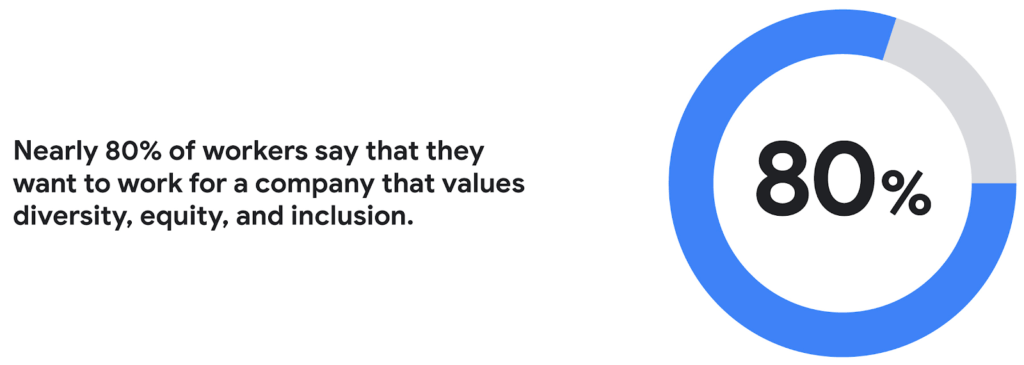
Creating a more inclusive culture. Job seekers want to work for companies that prioritize DEI. According to a recent CNBC and SurveyMonkey Workforce survey, nearly 80% of workers say that they want to work for a company that values diversity, equity, and inclusion. A DEI-centric work culture allows job seekers to feel like there’s a place for them.
Fostering innovation and profitability with broader perspectives. In general, diversity and inclusion promotes the expression of ideas from people with different backgrounds, leading to breakthroughs in creativity, innovation, and attracting new customers. Workplace DEI programs create an employee base that closely mirrors a customer base. A diverse team is less likely to miss potential market opportunities if representative of a broad range of ethnicity, race, age, assigned sex, and socioeconomic backgrounds. A 2020 McKinsey analysis found that companies in the top quartile for ethnic and cultural diversity on executive teams were 36% more likely to have above-average profitability than companies in the fourth quartile.
Hybrid work should not derail DEI efforts
While there are numerous benefits to integrating DEI and hybrid work strategies, it would be naive to think it won’t bring challenges. Businesses run the risk of creating new inequities and exacerbating existing ones as they move to hybrid models. One potential issue lies in which employees can work remotely. An HBR article shared how pre-Covid less than 30% of all workers could work from home; only 16% of Latinx workers and 19% of Black workers had remote flexibility, compared to 37% of Asian workers and 30% of white workers.
Even for employees who can work remotely, it’s essential to eliminate “proximity bias.” A study by SHRM found that 67% of surveyed supervisors admitted to considering remote workers more easily replaceable than onsite workers at their organization. Additionally, 72% said they would prefer all of their teams to be working in the office.
A successful hybrid environment strikes a balance between flexibility and inclusivity where individuals feel valued, and everyone has equal opportunities for advancement. In another study, researchers concluded that remote workers and office workers were promoted at the same rate, but found that remote workers’ salaries grew more slowly. Leading companies recognize that physically being at the office full-time isn’t necessary to produce great results.
8 steps to creating a diverse hybrid work culture
As DEI becomes a new business imperative, organizations must work to minimize unconscious bias, creating market-based salaries for all workers, and introducing educational programs that support talent development. Here are some concrete steps you can take to get started.
- Educate current and future leaders on DEI and hybrid work issues. As you build hybrid work strategies, it’s crucial to discover and understand unconscious biases. According to Deloitte, companies need a holistic DEI learning strategy, including unconscious bias training and developing the conditions for long-term behavior changes.
- Embrace tools that support DEI and hybrid workplaces. Organizations can leverage technology and AI-enabled HR software to support their efforts. Collaboration tools provide everyone with a voice regardless of where they are (for example, using Spaces for team chats in Google Workspace so that everyone has access to the same information). Video call features such as transcriptions and translation can help the hearing-and-vision-impaired and employees who speak different languages. It’s also possible to purchase recruiting solutions with AI technology to reduce the chance of bias or discrimination when reviewing candidates.
- Strengthen culture by marrying DEI with meritocracy. There should also be explicit guidelines to ensure the systems and processes for hiring and promoting individuals are both transparent and equitable. One method for accomplishing this goal is to define detailed job requirements and metrics per role to understand what skills are associated with specific functions. It’s also essential to ensure you’ve designed these processes in a way that screens out bias. Leading companies will deploy analytics tools to evaluate the systems’ fairness and track if the systems are progressing against diversity targets.
- Create upskilling programs to train employees. Many organizations struggle to find talent with the right skill sets. One solution to this problem is to invest in educating existing employees. Companies must develop diverse talent at every level to create a pipeline of candidates that progresses into senior management. Similar to the way companies offered management training programs to college graduates, organizations should design programs that provide skills enhancement for entry and mid-level employees. Almost every job will require a certain level of technical skill—organizations must upskill existing talent.
- Restructure compensation before employees leave. It’s easier to retain an employee than to onboard and train a new hire. According to the Atlanta Federal Reserve Bank’s wage growth tracker, wages for people who have switched jobs have outpaced those who’ve stayed at one employer since 2011. One way to retain talent is to right-size salaries to a competitive market rate.
- Remember that money isn’t everything. While individuals may switch jobs for money, they often stay in a position for the culture. Creating a leading employee experience helps organizations keep talent. Work from home programs, flexible work schedules, and advanced programs such as childcare benefits help build the foundation. But increasingly, individuals are looking for a sense of belonging. According to research from McKinsey, employees who feel included are three times more likely to report being excited about working for their organization and committed to its success. Another McKinsey report focusing on attrition shows that employees primarily leave companies because they don’t feel valued or don’t have a sense of belonging.
- Don’t forget to commit the resources. Most organizations built their cultures before DEI and hybrid work were requirements. These companies must invest in new work tools and educational programs, and create new hiring and talent management practices. A business can make a more significant impact with fewer resources by ensuring purchases and processes support flexible and inclusive work cultures.
- Make sure actions are backed up with DEI transparency measurements. The pressure to support DEI could lead to situations where activities are celebrated over results. While it’s not easy to be vulnerable and transparent about where the problems exist, employers should take stock of where they are today. They should present this authentically, create goals for the future, and design a measurable action plan to track its progress. With so many variables and unknowns, it’s crucial for talent leaders to track the way that hybrid work and DEI efforts advance.
Diversity should be part of your efforts because it’s the culture you want to create. However, ignoring diversity efforts can also come with ramifications. For example, Goldman Sachs announced in 2021 that the firm would only underwrite IPOs in the United States and Europe for companies with at least two diverse board members. Meanwhile, the U.S. Securities and Exchange Commission adopted new rules this summer that require Nasdaq-listed companies to have at least two diverse directors – including one woman and at least one member of an underrepresented community.
In order for the benefits of diversity to emerge in the workplace, companies need to enact cultural and behavioral change. As stated in the ICSM report, “Never become too comfortable with your efforts, as there is always room for improvement with diversity at your organization, whether you see it or not.” It’s clear that what organizations have done to attract talent in the past isn’t resonating the same way today. A diverse workforce delivers better ideas and stronger communities, building deeper relationships with customers along the way. Moving forward, it’s expected that a company’s investment in a diverse, inclusive, and hybrid work culture will set it apart from its competition, leading to increased business agility and better financial outcomes.
3853
Of your peers have already watched this video.
21:30 Minutes
The most insightful time you'll spend today!
The future of meetings in G Suite: Vision and roadmap
A study from MIT Sloan school in early April showed that 47% of US workers were already working from home. Compare that to just 13% before the pandemic. And these numbers are likely to be even greater today.
Video meetings help us connect in a human way, whether it’s for work, a personal commitment, or for education. We have seen Meet’s day-over-day growth surpass 60%. Meet daily usage is more than 30 times what it was in January 2020. And we have been able to scale to this demand easily. Scalability, security, reliability, come naturally to Google Cloud and are in-built into all our services. Our customers have been reaching out to tell us how much this has helped them shift to remote work rapidly during the pandemic.
G Suite continues to innovate on how teams communicate effectively, regardless of whether they are located in the same office or thousands of miles apart. In this video, we share our vision for the future of meetings, small and large, and how these innovations will help build human connections in a video-first world. We’ll also provide a sneak peek into what we’re doing to transform the overall life cycle of a meeting, from scheduling to follow-up.
More Relevant Stories for Your Company

How to Use Data to Tell Compelling Stories and Win New Deals
A picture is worth a thousand words--especially at work. The data we present every day is what helps us drive decision-making in the workplace. But understanding how to visualize a story can be difficult if you’re left staring at numbers sitting stagnant in rows or columns within a spreadsheet. This

Quick Recap on Google Cloud: Latest News, Launches, Updates, Events and More
Want to know the latest from Google Cloud? Find it here in one handy location. Check back regularly for our newest updates, announcements, resources, events, learning opportunities, and more. Tip: Not sure where to find what you’re looking for on the Google Cloud blog? Start here: Google Cloud blog 101: Full list
The Incredible Story of How Hero MotoCorp Moved 6,000 Users to the Cloud in 45 Days
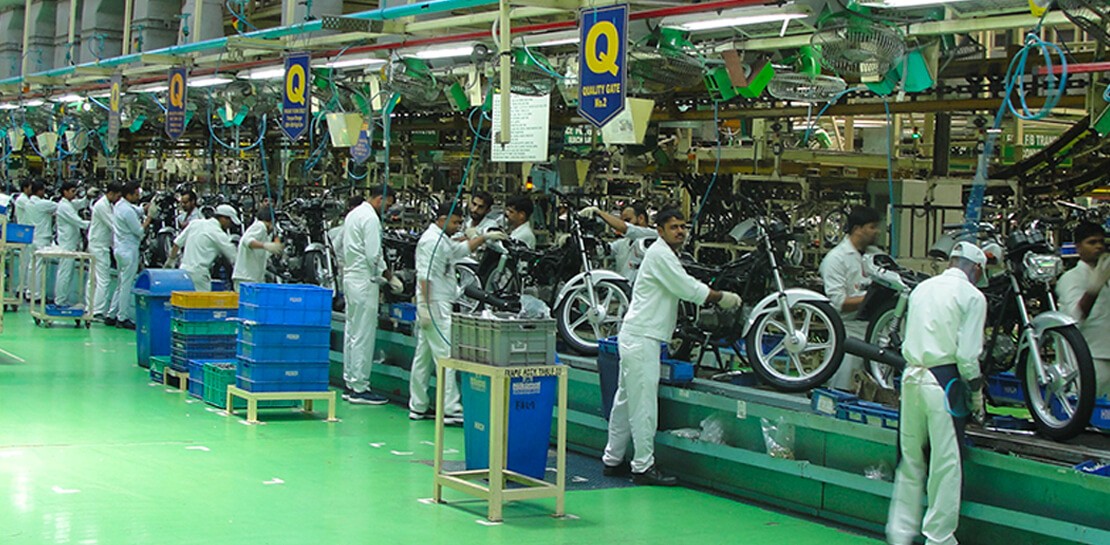
Assembling thousands of parts into one motorbike or scooter every 17 seconds is a complex task requiring accuracy and precision. For Hero MotoCorp — an India-headquartered manufacturer of two-wheeler vehicles — workforce collaboration, security, and mobility complement these processes and provide the cornerstone of the organization's global operations. Based in New Delhi,




Are You Suffering from Spreadsheet Paralysis?
Today, within the four walls of your office there’s just one concern everyone has: What do the numbers say? The answer to that question almost always rests with you. If they get it wrong, everybody gets it wrong. But does it have to be so hard to get it right?
