





Google Cloud Named Leader of AI Infrastructure: Forrester Research

4393
Of your peers have already read this article.
3:00 Minutes
The most insightful time you'll spend today!
Forrester Research has named Google Cloud a Leader in The Forrester Wave™: AI Infrastructure, Q4 2021 report authored by Mike Gualtieri and Tracy Woo. In the report, Forrester evaluated dimensions of AI architecture, training, inference and management against a set of pre-defined criteria. Forrester’s analysis and recognition gives customers the confidence they need to make important platform choices that will have lasting business impact.
Google received the highest possible score in 16 Forrester Wave evaluation criteria: architecture design, architecture components, training software, training data, training throughput, training latency, inferencing throughput, inferencing latency, management operations, management external, deployment efficiency, execution roadmap, innovation roadmap, partner ecosystem, commercial model, and number of customers.
We believe that Google’s vision to be a unified data and AI solution provider for the end-to-end data science experience is recognized by Forrester, through high scores in the areas of architecture and innovation. We are focused on building the most robust yet cohesive experience to enable our customers to leverage the best of Google every step of the way. Here are four key areas where Google excels, among the many highlighted in this report.
AI Infrastructure: Leverage the building blocks of innovation
When an organization chooses to run its business on Google Cloud, it benefits from innovative infrastructure available globally. Google offers users a rich set of building blocks such as Deep Learning VMs and containers, the latest GPUs/TPUs and a marketplace of curated ISV offerings to help architect your own custom software stack on VMs and/or Google Kubernetes Engine (GKE).
Google provides a range of GPU & TPU accelerators for various use cases, including high performance training, low cost inferencing and large-scale accelerated data processing. Google is the only public cloud provider to offer up to 16 NVIDIA A100 GPUs in a single VM, making it possible to train very large AI models on a single node. Users can start with one NVIDIA A100 GPU and scale to 16 GPUs without configuring multiple VMs for single-node ML training. Google also provides TPU pods for large-scale AI research with PyTorch, TensorFlow, and JAX. The new fourth generation TPU pods deliver exaflop-scale peak performance with leading results in recent MLPerf benchmarks which included a 480 billion parameter language model.
Google Kubernetes Engine provides the most advanced Kubernetes services with unique capabilities like Autopilot, highly automated cluster version upgrades, and cluster backup/restore. GKE is a good choice for a scalable multi-node bespoke platform for training, inference and Kubeflow pipelines, given its support for 15,000 nodes per cluster, auto-provisioning, auto-scaling and various machine types (e.g. CPU, GPU, TPU and on-demand, spot). ML workloads also benefit from GKE’s support for dynamic scheduling, orchestrated maintenance, high availability, job API, customizability, fault tolerance and ML frameworks. When a company’s footprint grows to a fleet of GKE clusters, its data teams can leverage Anthos Config Management to enforce consistent configurations and security policy compliance.
Comprehensive MLOps: Build models faster and more easily without skimping on governance
Google’s fully managed Vertex AI platform provides services for ML lifecycle management, from data ingestion and preparation all the way up to model deployment, monitoring, and management. Vertex AI requires nearly 80% fewer lines of code to train a model versus competitive platforms1, enabling data scientists and ML engineers across all levels of expertise to implement Machine Learning Operations (MLOps) so they can efficiently build and manage ML projects throughout the entire development lifecycle.
Vertex AI Workbench provides data scientists with a single environment for the entire data-to-ML workflow, enabling data scientists to build and train models 5x faster than traditional notebooks. This is enabled by integrations across data services (like Dataproc, BigQuery, Dataplex, and Looker), which significantly reduce context switching. Users are also able to access NVIDIA GPUs, modify hardware on the fly, and set up idle shutdown to optimize infrastructure costs.
Organizations can then build and deploy models built on any framework (including TensorFlow, PyTorch, Scikit learn or XGBoost) with Vertex AI, with built-in tooling to track a model’s performance. Vertex Training also provides various approaches for developing large models including Reduction Server to optimize bandwidth and latency of multi-node distributed training on NVIDIA GPUs for synchronous data parallel algorithms. Vertex AI Prediction is serverless, and performs automatic provisioning and deprovisioning of nodes behind the scenes to provide low latency online predictions. It also provides the capability to split traffic between multiple models behind an endpoint. Models trained in Vertex AI can also be exported to be deployed in private or other public clouds.Google’s strengths in its current offering are in architecture, training, data throughput, and latency. Its sweet spot is in its product offering, Vertex AI, which has core AI compute capabilities and MLOps services for end-to-end AI lifecycle management.
The Forrester Wave:™ AI Infrastructure, Q4 2021
In addition to building models, it is important to deploy tools for governance, security, and auditability. These tools are crucial for compliance in regulated industries, and they help teams to protect data, understand why given models fail, and determine how models can be improved.
For orchestration and auditability, Vertex Pipelines and Vertex ML Metadata tracks the inputs and outputs of an ML pipeline and the lineage of artifacts. Once models are in production, Vertex AI Model Monitoring supports feature skew and drift detection, alerting data scientists. These capabilities speed up debugging and create the visibility required for regulatory compliance and good data hygiene in general.For explainability, Vertex Explainable AI helps teams understand their model’s outputs for classification and regression tasks. Vertex AI tells how much each feature in the data contributed to the predicted result. Data teams can then use this information to verify that the model is behaving as expected, recognize bias in the model, and get ideas for ways to improve the model and training data.
These services together aim to simplify MLOps for data scientists and ML engineers, so that businesses can accelerate time to value for ML initiatives.
Security: Protect data while keeping ML pipelines flowing
The Google stack builds security through progressive layers that deliver defense in depth. To accomplish data protection, authentication, authorization and non-repudiation, we have measures such as boot-level signature and chain-of-trust validation.
Ubiquitous data encryption delivers unified control over data at-rest, in-use, and in-transit, with keys that are held by customers themselves.
We offer options to run in fully encrypted confidential environments utilizing managed Hadoop or Spark with Confidential Dataproc or Confidential VMs.
Partner Ecosystem: Work with world-class AI specialists
Google works with certified partners globally to help our customers design, implement and manage complex AI systems. We have a growing list of partners with Machine Learning specializations on Google who have demonstrated customer success across industries, including deep partnerships with the largest Global System Integrators. The Google Cloud Marketplace also provides a list of technology partners who allow enterprises to deploy machine learning applications on Google’s AI infrastructure.
Our dedication to being your partner of choice for ML Needs
Leading organizations like OTOY, Allen Institute for AI and DeepMind (an Alphabet subsidiary) choose Google for ML, and enterprises like Twitter, Wayfair and The Home Depot shared more about their partnership with Google in their recent sessions at Google Next 2021.
Establishing well-tuned and appropriately managed ML systems has historically been challenging, even for highly skilled data scientists with sophisticated systems. With the key pillars of Google’s investments above, organizations can build, deploy, and scale ML models faster, with pre-trained and custom tooling, within a unified AI platform.
We look forward to continuing to innovate and to helping customers on their digital transformation journey. To download the full report, click here. Get started on Vertex AI, learn what’s upcoming with infrastructure for AI and ML at Google here, and talk with our sales team.
Gyfted: Finding the Right Man for the Job Using Google Cloud AI/ML Tools

2553
Of your peers have already read this article.
2:00 Minutes
The most insightful time you'll spend today!
It’s no secret that many organizations and job seekers find the hiring process exhausting. It can be time consuming, costly, and somewhat risky for both parties. Those are just some of the experiences we wanted to change when we started Gyfted, a pre-vetted talent marketplace for people who complete tech training or degree programs and are looking for the right career move. At the same time, we’re helping businesses save time and improve recruiting outcomes with our automated candidate screening and sourcing tools.
Our vision is clear: To take a candidate through one structured hiring process, and then put them in front of thousands of companies. It’s similar to the common app system in higher education. Sounds simple, but it is a herculean technical and UX task. To succeed we had to combine advanced psychometric testing, machine learning, the latest in behavioral design, and develop the highest quality structured, relational dataset to represent candidate and manager profiles and preferences on our network. Fortunately, we were cofounded by world-leading experts in these areas including Dr. Michal Kosinski, one of the world’s top computational psychologists, and Adam Szefer, a gifted young technologist. We’ve been joined by a group of equally talented employees, most of whom work remotely in Poland, US, Switzerland, UK, Israel, and Ukraine.
The influence of dating platforms and matching
When seeking inspiration, we were influenced by the success of dating platforms, especially Bumble with its focus on commitment. These platforms have done a great job using design to match people together.
We like to think we’re doing the same for recruiters and candidates in terms of not only role and culture fit matching, but also through a fundamental feature of Gyfted, which is that our job-seekers are anonymous. This helps recruiters meet one of their goals today, which is to minimize bias in the hiring process and enable objective, diversity-oriented recruiting.
Another of our unique selling points is that we conduct candidate screening that is gamified and automated, with a structured interview, where the interview remains with the candidate’s profile. We roughly estimate that just for the 15 million open jobs on LinkedIn, if companies fill in 50% of those via external recruiting, and conduct a screening interview with 10 candidates per job filled at $50/hour paid to an employee to do the screening, that’s $3.75 billion and 75 million hours in direct costs. This is on top of applying for jobs, selecting CVs, and coordinating the process, which takes an even bigger financial and time toll on both applicants and recruiters. Instead, it would be better to take one interview for 1000 companies. The impact of what we want to achieve with our vision is enormous.
We also offer career discovery and career search tools for job candidates. This includes free, personalized feedback for every job-seeker. Right now, we’re aiming the service at students, bootcamp graduates and juniors, helping them to land jobs in tech and the creative industry at large. Next, we’ll expand into mid and senior roles. In the long run we want to reshape how recruiting happens through a common app that saves everyone in the market significant time and resources, helping people find jobs not only faster, but jobs that truly fit them.
Developing advanced AI applications with Google Cloud
We obtained our original funding from angel and institutional investors, and we were selected into the Fall 2021 batch of StartX, the non-profit start-up accelerator and founder community associated with Stanford University. But like most startups our budgets are tight, and we need to find ways to operate as efficiently as possible, especially when building out our technology stack and developer environment.
That’s where Google Cloud comes in. It’s a lot more affordable and flexible than competing solutions, and our developers love it. We use Google App Engine for the hosting and development of our applications giving us enormous flexibility. Vertex AI enables us to build, deploy, and scale machine learning models faster, within a unified artificial intelligence platform. On top of that we use Google Vertex AI Workbench as the development environment for the data science workflow, which allows us to have everything that we need to host and develop innovative AI-based applications.
BigQuery, Google Cloud’s serverless data warehouse, is another stand-out solution for us. We use it to crunch big data from all our systems and the UX is very intuitive and easy to use, allowing us to use it across the business and get insights from a wide range of employees, not just technical experts.
Above all, Google Cloud helps us solve the main platform challenges facing Gyfted including scalability and identity management, so we are perfectly positioned for growth. Right now, we handle about 2 million candidate interactions, a volume we expect to grow exponentially. As that number grows, we rely on Google Cloud to help us scale securely and with reliability.
Eliminating bias from the hiring process
Our technology partners have also been integral to helping us get to an advanced stage of our beta program. MongoDB on Google Cloud takes the data burden off our teams and reduces time to value of our applications. We can stay nimble and can scale database capacity at the push of a button.
Our collaboration with the Google team has been fantastic. Our Startup Success Manager is an expert when it comes to Google Cloud solutions, and he also understands our business from his own experience as an entrepreneur and an investor. It’s great to have an internal point of contact who can help us navigate all of Google’s resources.
I’d also stress the extent to which Google Cloud values align with ours. For example, a key benefit for our customers is the ability to strip unconscious bias out of the hiring process. Google Cloud tools support this commitment to diversity, especially when we are building out our AI models.
On a team level, we also appreciate the support that Google Cloud has shown through its Google Support Fund for Start-ups in Ukraine. This has helped many Ukrainian businesses to continue to operate at a very challenging time, including startups with remote, distributed teams in Poland where most of us stem from.
If I had to sum up Google Cloud and our collaboration with Google for Startups in a phrase, I’d say that it adds enormous value to our business while removing much of the risk when scaling up a start-up. We’ve seen the addition of many new tools and features in the past two years and our Google mentors are always looking at the best way these can be integrated with Gyfted’s own roadmap. That means that we can continue to transform recruiting and hiring processes with the support of one of the world’s most advanced tech companies as a strategic growth partner.

If you want to learn more about how Google Cloud can help your startup, visit our page here to get more information about our program, and sign up for our communications to get a look at our community activities, digital events, special offers, and more.

3394
Of your peers have already listened to this podcast
30:54 Minutes
The most insightful time you'll spend today!
AI-as-a-Service is Here. It’s Really Almost Plug-and-Play
Forrester Research has named Google Cloud a Leader in The Forrester Wave™: AI Infrastructure, Q4 2021 report authored by Mike Gualtieri and Tracy Woo. In the report, Forrester evaluated dimensions of AI architecture, training, inference and management against a set of pre-defined criteria. Forrester’s analysis and recognition gives customers the confidence they need to make important platform choices that will have lasting business impact.
Google received the highest possible score in 16 Forrester Wave evaluation criteria: architecture design, architecture components, training software, training data, training throughput, training latency, inferencing throughput, inferencing latency, management operations, management external, deployment efficiency, execution roadmap, innovation roadmap, partner ecosystem, commercial model, and number of customers.
We believe that Google’s vision to be a unified data and AI solution provider for the end-to-end data science experience is recognized by Forrester, through high scores in the areas of architecture and innovation. We are focused on building the most robust yet cohesive experience to enable our customers to leverage the best of Google every step of the way. Here are four key areas where Google excels, among the many highlighted in this report.
AI Infrastructure: Leverage the building blocks of innovation
When an organization chooses to run its business on Google Cloud, it benefits from innovative infrastructure available globally. Google offers users a rich set of building blocks such as Deep Learning VMs and containers, the latest GPUs/TPUs and a marketplace of curated ISV offerings to help architect your own custom software stack on VMs and/or Google Kubernetes Engine (GKE).
Google provides a range of GPU & TPU accelerators for various use cases, including high performance training, low cost inferencing and large-scale accelerated data processing. Google is the only public cloud provider to offer up to 16 NVIDIA A100 GPUs in a single VM, making it possible to train very large AI models on a single node. Users can start with one NVIDIA A100 GPU and scale to 16 GPUs without configuring multiple VMs for single-node ML training. Google also provides TPU pods for large-scale AI research with PyTorch, TensorFlow, and JAX. The new fourth generation TPU pods deliver exaflop-scale peak performance with leading results in recent MLPerf benchmarks which included a 480 billion parameter language model.
Google Kubernetes Engine provides the most advanced Kubernetes services with unique capabilities like Autopilot, highly automated cluster version upgrades, and cluster backup/restore. GKE is a good choice for a scalable multi-node bespoke platform for training, inference and Kubeflow pipelines, given its support for 15,000 nodes per cluster, auto-provisioning, auto-scaling and various machine types (e.g. CPU, GPU, TPU and on-demand, spot). ML workloads also benefit from GKE’s support for dynamic scheduling, orchestrated maintenance, high availability, job API, customizability, fault tolerance and ML frameworks. When a company’s footprint grows to a fleet of GKE clusters, its data teams can leverage Anthos Config Management to enforce consistent configurations and security policy compliance.
Comprehensive MLOps: Build models faster and more easily without skimping on governance
Google’s fully managed Vertex AI platform provides services for ML lifecycle management, from data ingestion and preparation all the way up to model deployment, monitoring, and management. Vertex AI requires nearly 80% fewer lines of code to train a model versus competitive platforms1, enabling data scientists and ML engineers across all levels of expertise to implement Machine Learning Operations (MLOps) so they can efficiently build and manage ML projects throughout the entire development lifecycle.
Vertex AI Workbench provides data scientists with a single environment for the entire data-to-ML workflow, enabling data scientists to build and train models 5x faster than traditional notebooks. This is enabled by integrations across data services (like Dataproc, BigQuery, Dataplex, and Looker), which significantly reduce context switching. Users are also able to access NVIDIA GPUs, modify hardware on the fly, and set up idle shutdown to optimize infrastructure costs.
Organizations can then build and deploy models built on any framework (including TensorFlow, PyTorch, Scikit learn or XGBoost) with Vertex AI, with built-in tooling to track a model’s performance. Vertex Training also provides various approaches for developing large models including Reduction Server to optimize bandwidth and latency of multi-node distributed training on NVIDIA GPUs for synchronous data parallel algorithms. Vertex AI Prediction is serverless, and performs automatic provisioning and deprovisioning of nodes behind the scenes to provide low latency online predictions. It also provides the capability to split traffic between multiple models behind an endpoint. Models trained in Vertex AI can also be exported to be deployed in private or other public clouds.Google’s strengths in its current offering are in architecture, training, data throughput, and latency. Its sweet spot is in its product offering, Vertex AI, which has core AI compute capabilities and MLOps services for end-to-end AI lifecycle management.
The Forrester Wave:™ AI Infrastructure, Q4 2021
In addition to building models, it is important to deploy tools for governance, security, and auditability. These tools are crucial for compliance in regulated industries, and they help teams to protect data, understand why given models fail, and determine how models can be improved.
For orchestration and auditability, Vertex Pipelines and Vertex ML Metadata tracks the inputs and outputs of an ML pipeline and the lineage of artifacts. Once models are in production, Vertex AI Model Monitoring supports feature skew and drift detection, alerting data scientists. These capabilities speed up debugging and create the visibility required for regulatory compliance and good data hygiene in general.For explainability, Vertex Explainable AI helps teams understand their model’s outputs for classification and regression tasks. Vertex AI tells how much each feature in the data contributed to the predicted result. Data teams can then use this information to verify that the model is behaving as expected, recognize bias in the model, and get ideas for ways to improve the model and training data.
These services together aim to simplify MLOps for data scientists and ML engineers, so that businesses can accelerate time to value for ML initiatives.
Security: Protect data while keeping ML pipelines flowing
The Google stack builds security through progressive layers that deliver defense in depth. To accomplish data protection, authentication, authorization and non-repudiation, we have measures such as boot-level signature and chain-of-trust validation.
Ubiquitous data encryption delivers unified control over data at-rest, in-use, and in-transit, with keys that are held by customers themselves.
We offer options to run in fully encrypted confidential environments utilizing managed Hadoop or Spark with Confidential Dataproc or Confidential VMs.
Partner Ecosystem: Work with world-class AI specialists
Google works with certified partners globally to help our customers design, implement and manage complex AI systems. We have a growing list of partners with Machine Learning specializations on Google who have demonstrated customer success across industries, including deep partnerships with the largest Global System Integrators. The Google Cloud Marketplace also provides a list of technology partners who allow enterprises to deploy machine learning applications on Google’s AI infrastructure.
Our dedication to being your partner of choice for ML Needs
Leading organizations like OTOY, Allen Institute for AI and DeepMind (an Alphabet subsidiary) choose Google for ML, and enterprises like Twitter, Wayfair and The Home Depot shared more about their partnership with Google in their recent sessions at Google Next 2021.
Establishing well-tuned and appropriately managed ML systems has historically been challenging, even for highly skilled data scientists with sophisticated systems. With the key pillars of Google’s investments above, organizations can build, deploy, and scale ML models faster, with pre-trained and custom tooling, within a unified AI platform.
We look forward to continuing to innovate and to helping customers on their digital transformation journey. To download the full report, click here. Get started on Vertex AI, learn what’s upcoming with infrastructure for AI and ML at Google here, and talk with our sales team.
Make Meaningful Analysis with Geo Boundary Public Datasets on BigQuery

6331
Of your peers have already read this article.
4:00 Minutes
The most insightful time you'll spend today!
Geospatial data is a critical component for a comprehensive analytics strategy. Whether you are trying to visualize data using geospatial parameters or do deeper analysis or modeling on customer distribution or proximity, most organizations have some type of geospatial data they would like to use – whether it be customer zipcodes, store locations, or shipping addresses. However, converting geographic data into the correct format for analysis and aggregation at different levels can be difficult. In this post, we’ll walk through some examples of how you can leverage the Google Cloud platform alongside Google Cloud Public Datasets to perform robust analytics on geographic data. The full queries can be accessed from this notebook here.
Public US Geo Boundaries dataset
BigQuery hosts a slew of public datasets for you to access and integrate into your analytics. Google pays for the storage of these datasets and provides public access to the data via the bigquery-public-data project. You only pay for queries against the data. Plus, the first 1 TB per month is free! These public datasets are valuable on their own, but when joined against your own data they can unlock new analytics use cases and save the team a lot of time.
Within the Google Cloud Public Datasets Program there are several geographic datasets. Here, we’ll work with the geo_us_boundaries dataset, which contains a set of tables that have the boundaries of different geospatial areas as polygons and coordinates based on the center point (GEOGRAPHY column type in BigQuery), published by the US Census Bureau.
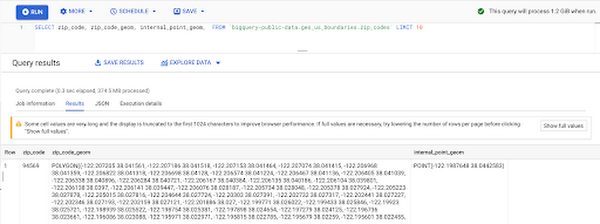
Mapping geospatial points to hierarchical areas
Many times you will find yourself in situations where you have a string representing an address. However, most tools require lat/long coordinates to actually plot points. Using the Google Maps Geocoding API we can convert an address into a lat/long and then store the results in the BigQuery table.
With a lat/long representation of our point, we can join our initial dataset back onto any of the tables here using the ST_WITHIN function. This allows us to check and see if a point is within the specified polygon.
ST_WITHIN(geography_1, geography_2)
This can be helpful for ensuring standard nomenclature; for example, metropolitan areas that might be named differently. The query below maps each customers’ address to a given metropolitan area name.
SELECTcust.id as customer_id,metro.name as metro_nameFROM `looker-private-demo.retail.customers` as cust,`bigquery-public-data.geo_us_boundaries.metropolitan_divisions` as metroWHERE ST_WITHIN(ST_GEOGPOINT(cust.longitude, cust.latitude),metro.metdiv_geom)
It can also be useful for converting to designated market area (DMA), which is often used in creating targeted digital marketing campaigns.
SELECTcust.id as customer_id,dma.dma_nameFROM `looker-private-demo.retail.customers` as cust,`bigquery-public-data.geo_us_boundaries.designated_market_area` as dmaWHERE ST_WITHIN(ST_GEOGPOINT(cust.longitude, cust.latitude),dma.dma_geom)
Or for filling in missing information; for example, some addresses may be missing zip code which results in incorrect calculations when aggregating up to the zipcode level. By joining onto the zip_codes table we can ensure all coordinates are mapped appropriately and aggregate up from there.
SELECTzip.zip_code,count(distinct cust.id) as unique_customersFROM `looker-private-demo.retail.customers` as cust,`bigquery-public-data.geo_us_boundaries.zip_codes` as zipWHERE ST_WITHIN(ST_GEOGPOINT(cust.longitude, cust.latitude),zip.zip_code_geom)GROUP BY 1
Note that the zip code table isn’t a comprehensive list of all US zip codes, they are zip code tabulation areas (ZCTAs). Details about the differences can be found here. Additionally, the zip code table gives us hierarchical information, which allows us to perform more meaningful analytics. One example is leveraging hierarchical drilling in Looker. I can aggregate my total sales up to the country level, and then drill down to state, city and zipcode to identify where sales are highest. You can also use the BigQuery GeoViz tool to visualize geospatial data!
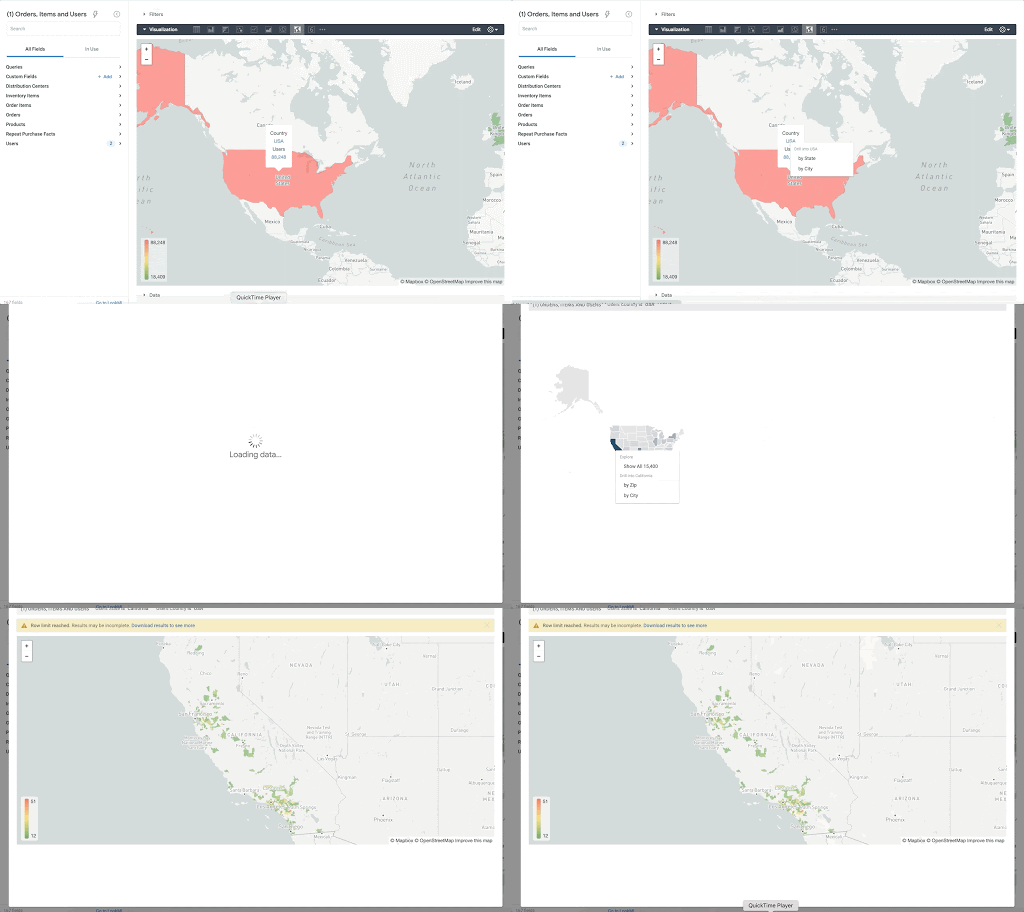
Aside from simply checking if a point is within an area, we can also use ST_DISTANCE to do something like find the closest city using the centerpoint for the metropolitan area table.
SELECTcust.id as customer_id,ARRAY_AGG(metro.name order by ST_DISTANCE(ST_GEOGPOINT(cust.longitude, cust.latitude),metro.internal_point_geom) asc limit 1)[offset(0)] as metro_nameFROM`looker-private-demo.retail.customers` as cust,`bigquery-public-data.geo_us_boundaries.metropolitan_divisions` as metroGROUP BY cust.id
This concept doesn’t just hold true for points, we can also leverage other GIS functions to see if a geospatial area is contained within areas that are listed in the boundaries datasets. If your data comes into BigQuery as a GeoJSON string, we can convert it to a GEOGRAPHY type using the ST_GEOGFROMGEOJSON function. Once our data is in a GEOGRAPHY type we can do things like check to see what urban area the geo is within – using either ST_WITHIN or ST_INTERSECTS to account for partial coverage. Here, I am using the customer’s zip code to find all metropolitan divisions where the zip code polygon and the metropolitan polygon intersect. I am then selecting the metropolitan area that has the most overlap (or the intersection has the largest area) to be the customer’s metro that we use for reporting.
SELECTcust.id as customer_id,ARRAY_AGG(metro.name order by ST_AREA(ST_INTERSECTION(zip.zip_code_geom,metro.metdiv_geom)) desc limit 1)[offset(0)] as metro_nameFROM`looker-private-demo.retail.customers` as custJOIN `bigquery-public-data.geo_us_boundaries.zip_codes` as zip on cust.zip=zip.zip_code,`bigquery-public-data.geo_us_boundaries.metropolitan_divisions` as metroWHERE ST_INTERSECTS(zip.zip_code_geom,metro.metdiv_geom)GROUP BY cust.id
The same ideas can be applied to the other tables in the dataset including the county, urban areas and National Weather Service forecast regions (which can also be useful if you want to join your datasets onto weather data).
Correcting for data discrepancy
One problem that we may run into when working with geospatial data is that different data sources may have different representations of the same information. For example, you might have one system that records state as a two letter abbreviation and another using the full name. Here, we can use the state table to join the different datasets.
SELECTst.state_name,sum(ab.sales+fn.sales) as total_salesFROM `bigquery-public-data.geo_us_boundaries.states` as stLEFT JOIN abbreviated_table as ab on ab.state = st.stateLEFT JOIN fullname_table as fn on fn.state = st.state_nameWHERE COALESCE(ab.state, fn.state) IS NOT NULLGROUP BY 1
Another example might be using the tables as a source of truth for fuzzy matching. If the address is a manually entered field somewhere in your application, there is a good chance that things will be misspelled. Different representations of the same name may prevent tables from joining with each other or lead to duplicate entries when performing aggregations. Here, I use a simple Soundex algorithm to generate a code for each county name, using helper functions from this blog post. We can see that even though some are misspelled they have the same Soundex code.
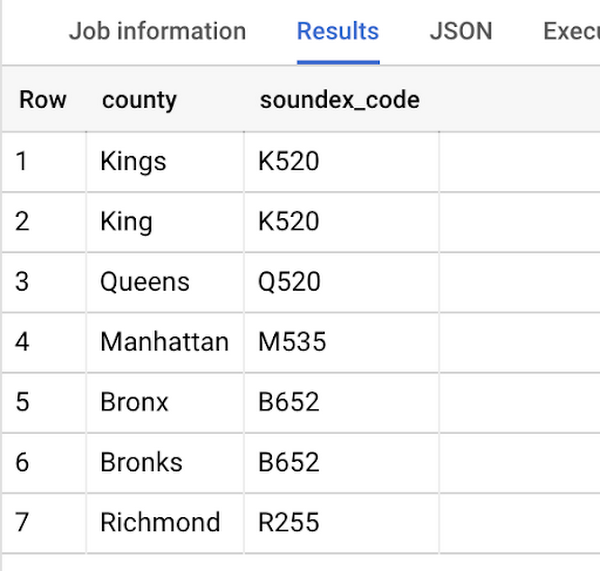
Next, we can join back onto our counties table so we make sure to use the correct spelling of the county name. Then, we can simply aggregate our data for more accurate reporting.
SELECTc.county_name,sum(sales) as total_salesFROMtableJOIN `bigquery-public-data.geo_us_boundaries.counties` as con testing.dq_fm_Soundex(table.county) = testing.dq_fm_Soundex(c.county_name)WHERE c.state_fips_code = cast(36 as string)GROUP BY 1
Note that fuzzy matching definitely isn’t perfect and you might need to try different methods or apply certain filters for it to work best depending on the specifics of your data.
The US Geo Boundary datasets allow you to perform meaningful geographic analysis without needing to worry about extracting, transforming or loading additional datasets into BigQuery. These datasets, along with all the other Google Cloud Public Datasets, will be available in the Analytics Hub. Please sign up for the Analytics Hub preview, which is scheduled to be available in the third quarter of 2021, by going to g.co/cloud/analytics-hub.
New Capabilities in BigQuery to Ease Anomalies Detection in the Absence of Labeled Data

6324
Of your peers have already read this article.
4:00 Minutes
The most insightful time you'll spend today!
When it comes to anomaly detection, one of the key challenges that many organizations face is that it can be difficult to know how to define what an anomaly is. How do you define and anticipate unusual network intrusions, manufacturing defects, or insurance fraud? If you have labeled data with known anomalies, then you can choose from a variety of supervised machine learning model types that are already supported in BigQuery ML. But what can you do if you don’t know what kind of anomaly to expect, and you don’t have labeled data? Unlike typical predictive techniques that leverage supervised learning, organizations may need to be able to detect anomalies in the absence of labeled data.
Today we are announcing the public preview of new anomaly detection capabilities in BigQuery ML that leverage unsupervised machine learning to help you detect anomalies without needing labeled data. Depending on whether or not the training data is time series, users can now detect anomalies in training data or on new input data using a new ML.DETECT_ANOMALIES function (documentation), with the following models:
- Autoencoder model, now in Public Preview (documentation)
- K-means model, already GA (documentation)
- ARIMA_PLUS time series model, already GA (documentation)
How does anomaly detection with ML.DETECT_ANOMALIES work?
To detect anomalies in non-time-series data, you can use:
- K-means clustering models: When you use
ML.DETECT_ANOMALIESwith a k-means model, anomalies are identified based on the value of each input data point’s normalized distance to its nearest cluster. If that distance exceeds a threshold determined by the contamination value provided by the user, the data point is identified as an anomaly. - Autoencoder models: When you use
ML.DETECT_ANOMALIESwith an autoencoder model, anomalies are identified based on the reconstruction error for each data point. If the error exceeds a threshold determined by the contamination value, it is identified as an anomaly.
To detect anomalies in time-series data, you can use:
- ARIMA_PLUS time series models: When you use
ML.DETECT_ANOMALIESwith an ARIMA_PLUS model, anomalies are identified based on the confidence interval for that timestamp. If the probability that the data point at that timestamp occurs outside of the prediction interval exceeds a probability threshold provided by the user, the datapoint is identified as an anomaly.
Below we show code examples of anomaly detection in BigQuery ML for each of the above scenarios.
Anomaly detection with a k-means clustering model
You can now detect anomalies using k-means clustering models, by running ML.DETECT_ANOMALIES to detect anomalies in the training data or in new input data. Begin by creating a k-means clustering model:
Language: SQL
CREATE MODEL `mydataset.my_kmeans_model`OPTIONS(MODEL_TYPE = 'kmeans',NUM_CLUSTERS = 8,KMEANS_INIT_METHOD = 'kmeans++') ASSELECT* EXCEPT(Time, Class)FROM`bigquery-public-data.ml_datasets.ulb_fraud_detection`;
With the k-means clustering model trained, you can now run ML.DETECT_ANOMALIES to detect anomalies in the training data or in new input data.
To detect anomalies in the training data, use ML.DETECT_ANOMALIES with the same data used during training:
Language: SQL
SELECT*FROMML.DETECT_ANOMALIES(MODEL `mydataset.my_kmeans_model`,STRUCT(0.02 AS contamination),TABLE `bigquery-public-data.ml_datasets.ulb_fraud_detection`);
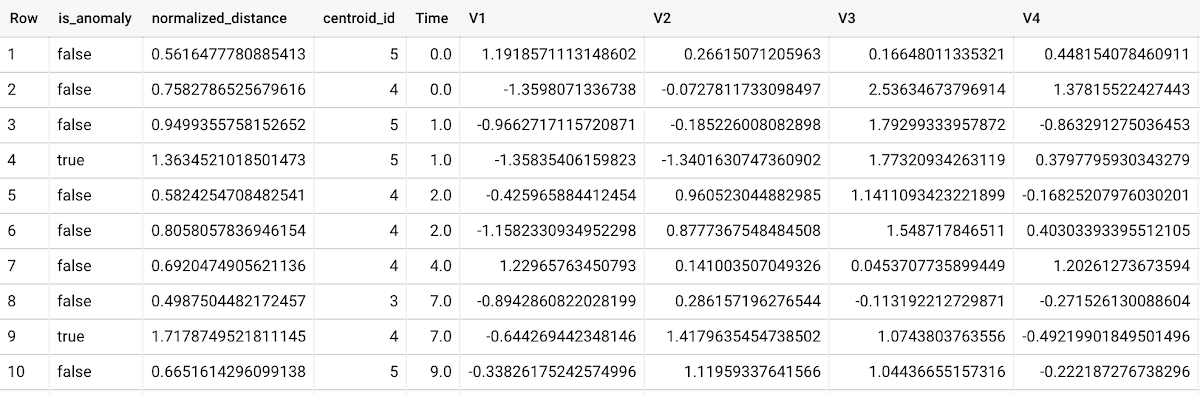
To detect anomalies in new data, use ML.DETECT_ANOMALIES and provide new data as input:
Language: SQL
SELECT*FROMML.DETECT_ANOMALIES(MODEL `mydataset.my_kmeans_model`,STRUCT(0.02 AS contamination),(SELECT * FROM `mydataset.newdata`));

How does anomaly detection work for k-means clustering models?
Anomalies are identified based on the value of each input data point’s normalized distance to its nearest cluster, which, if exceeds a threshold determined by the contamination value, is identified as an anomaly. How does this work exactly? With a k-means model and data as inputs, ML.DETECT_ANOMALIES first computes the absolute distance for each input data point to all cluster centroids in the model, then normalizes each distance by the respective cluster radius (which is defined as the standard deviation of the absolute distances of all points in this cluster to the centroid). For each data point, ML.DETECT_ANOMALIES returns the nearest centroid_id based on normalized_distance, as seen in the screenshot above. The contamination value, specified by the user, determines the threshold of whether a data point is considered an anomaly. For example, a contamination value of 0.1 means that the top 10% of descending normalized distance from the training data will be used as the cut-off threshold. If the normalized distance for a datapoint exceeds the threshold, then it is identified as an anomaly. Setting an appropriate contamination will be highly dependent on the requirements of the user or business.
For more information on anomaly detection with k-means clustering, please see the documentation here.
Anomaly detection with an autoencoder model
You can now detect anomalies using autoencoder models, by running ML.DETECT_ANOMALIES to detect anomalies in the training data or in new input data.
Begin by creating an autoencoder model:
Language: SQL
CREATE MODEL `mydataset.my_autoencoder_model`OPTIONS(model_type='autoencoder',activation_fn='relu',batch_size=8,dropout=0.2,hidden_units=[32, 16, 4, 16, 32],learn_rate=0.001,l1_reg_activation=0.0001,max_iterations=10,optimizer='adam') ASSELECT* EXCEPT(Time, Class)FROM`bigquery-public-data.ml_datasets.ulb_fraud_detection`;
To detect anomalies in the training data, use ML.DETECT_ANOMALIES with the same data used during training:
Language: SQL
SELECT*FROMML.DETECT_ANOMALIES(MODEL `mydataset.my_autoencoder_model`,STRUCT(0.02 AS contamination),TABLE `bigquery-public-data.ml_datasets.ulb_fraud_detection`);
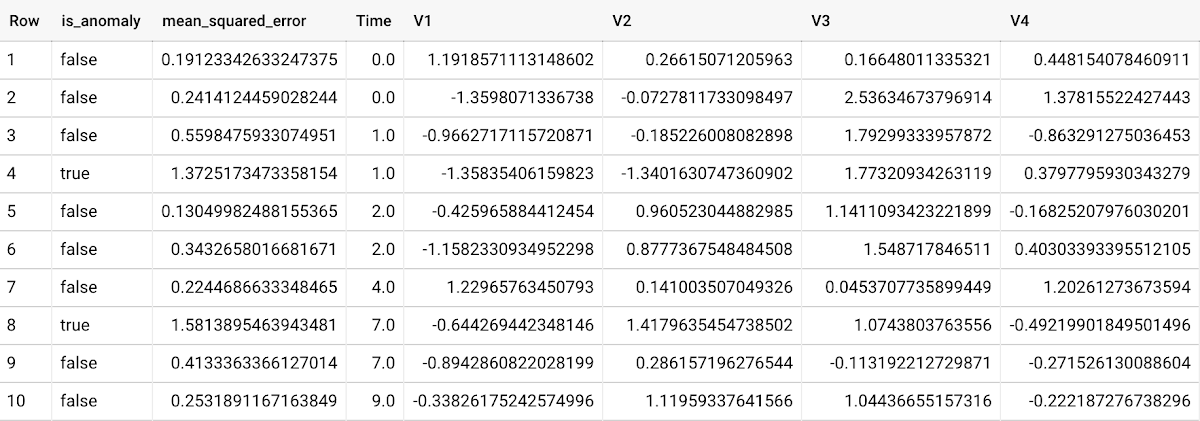
To detect anomalies in new data, use ML.DETECT_ANOMALIES and provide new data as input:
Language: SQL
SELECT*FROMML.DETECT_ANOMALIES(MODEL `mydataset.my_autoencoder_model`,STRUCT(0.02 AS contamination),(SELECT * FROM `mydataset.newdata`));

How does anomaly detection work for autoencoder models?
Anomalies are identified based on the value of each input data point’s reconstructed error, which, if exceeds a threshold determined by the contamination value, is identified as an anomaly. How does this work exactly? With an autoencoder model and data as inputs, ML.DETECT_ANOMALIES first computes the mean_squared_error for each data point between its original values and its reconstructed values. The contamination value, specified by the user, determines the threshold of whether a data point is considered an anomaly. For example, a contamination value of 0.1 means that the top 10% of descending error from the training data will be used as the cut-off threshold. Setting an appropriate contamination will be highly dependent on the requirements of the user or business.
For more information on anomaly detection with autoencoder models, please see the documentation here.
Anomaly detection with an ARIMA_PLUS time-series model
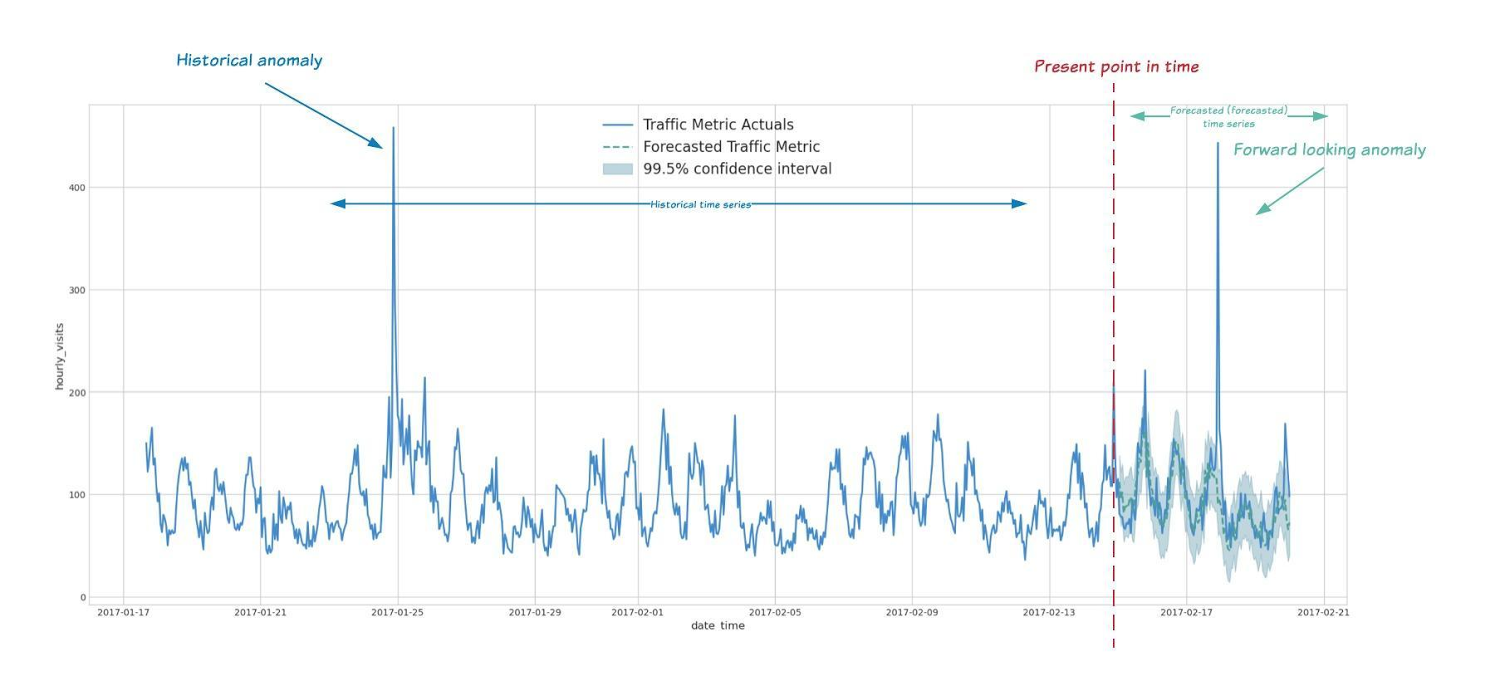
With ML.DETECT_ANOMALIES, you can now detect anomalies using ARIMA_PLUS time series models in the (historical) training data or in new input data. Here are some examples of when might you want to detect anomalies with time-series data:
Detecting anomalies in historical data:
- Cleaning up data for forecasting and modeling purposes, e.g. preprocessing historical time series before using them to train an ML model.
- When you have a large number of retail demand time series (thousands of products across hundreds of stores or zip codes), you may want to quickly identify which stores and product categories had anomalous sales patterns, and then perform a deeper analysis of why that was the case.
Forward looking anomaly detection:
- Detecting consumer behavior and pricing anomalies as early as possible: e.g. if traffic to a specific product page suddenly and unexpectedly spikes, it might be because of an error in the pricing process that leads to an unusually low price.
- When you have a large number of retail demand time series (thousands of products across hundreds of stores or zip codes), you would like to identify which stores and product categories had anomalous sales patterns based on your forecasts, so you can quickly respond to any unexpected spikes or dips.
How do you detect anomalies using ARIMA_PLUS? Begin by creating an ARIMA_PLUS time series model:
Language: SQL
CREATE OR REPLACE MODEL mydataset.my_arima_plus_modelOPTIONS(MODEL_TYPE='ARIMA_PLUS',TIME_SERIES_TIMESTAMP_COL='date',TIME_SERIES_DATA_COL='total_amount_sold',TIME_SERIES_ID_COL='item_name',HOLIDAY_REGION='US') ASSELECTdate,item_description AS item_name,SUM(bottles_sold) AS total_amount_soldFROM`bigquery-public-data.iowa_liquor_sales.sales`GROUP BYdate,item_nameHAVINGdate BETWEEN DATE('2016-01-04') AND DATE('2017-06-01')AND item_name IN ("Black Velvet", "Captain Morgan Spiced Rum","Hawkeye Vodka", "Five O'Clock Vodka", "Fireball Cinnamon Whiskey");
To detect anomalies in the training data, use ML.DETECT_ANOMALIES with the model obtained above:
Language: SQL
SELECT*FROMML.DETECT_ANOMALIES(MODEL `mydataset.my_arima_plus_model`,STRUCT(0.8 AS anomaly_prob_threshold));
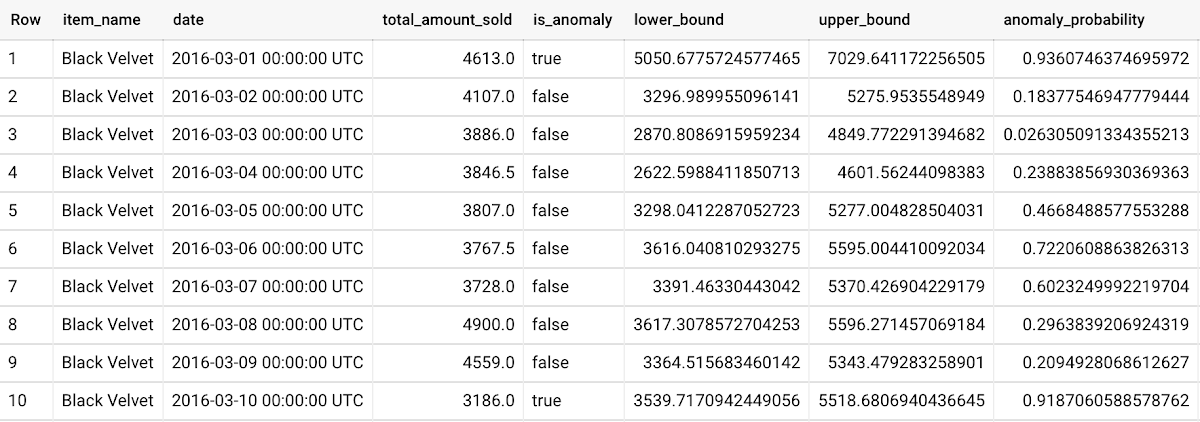
To detect anomalies in new data, use ML.DETECT_ANOMALIES and provide new data as input:
Language: SQL
WITHnew_data AS (SELECTdate,item_description AS item_name,SUM(bottles_sold) AS total_amount_soldFROM`bigquery-public-data.iowa_liquor_sales.sales`GROUP BYdate,item_nameHAVINGdate BETWEEN DATE('2017-06-02')AND DATE('2017-10-01')AND item_name IN ('Black Velvet','Captain Morgan Spiced Rum','Hawkeye Vodka',"Five O'Clock Vodka",'Fireball Cinnamon Whiskey') )SELECT*FROMML.DETECT_ANOMALIES(MODEL `mydataset.my_arima_plus_model`,STRUCT(0.8 AS anomaly_prob_threshold),(SELECT*FROMnew_data));
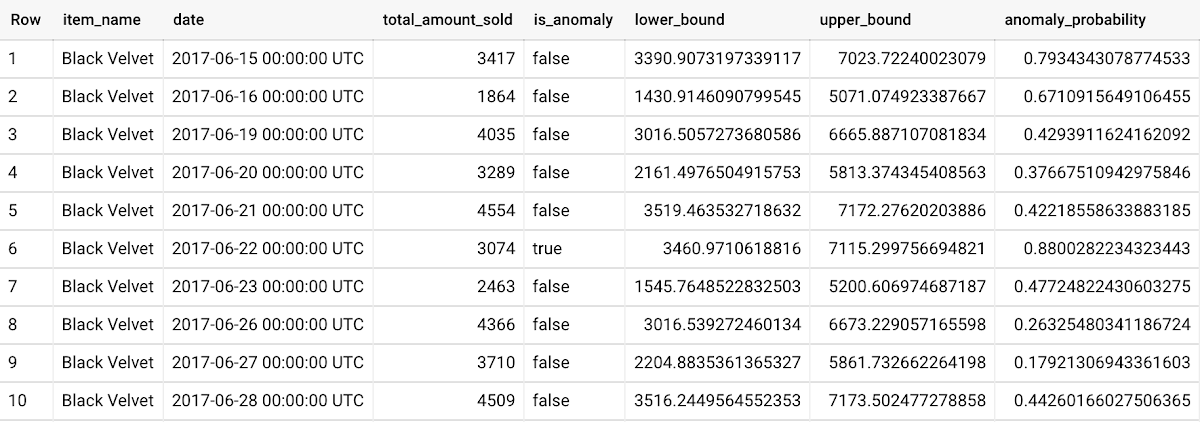
For more information on anomaly detection with ARIMA_PLUS time series models, please see the documentation here.
Thanks to the BigQuery ML team, especially Abhinav Khushraj, Abhishek Kashyap, Amir Hormati, Jerry Ye, Xi Cheng, Skander Hannachi, Steve Walker, and Stephanie Wang.
Gen App Builder: Create Next-Level AI Search & Conversational Experiences

1258
Of your peers have already read this article.
3:00 Minutes
The most insightful time you'll spend today!
If you’ve been exploring recently-launched consumer generative AI tools like Bard and thinking about how to build similar experiences for your business, Generative AI App Builder, or Gen App Builder for short, is here to get you started.
Gen App Builder is part of Google Cloud’s recently announced generative AI offerings and lets developers, even those with limited machine learning skills, quickly and easily tap into the power of Google’s foundation models, search expertise, and conversational AI technologies to create enterprise-grade generative AI applications.
“Google Cloud’s leading AI technology enables STARZ customers to discover more relevant content, increasing engagement with, and the likelihood of completing the content served to them,” says Robin Chacko, EVP Direct-to-Consumer, STARZ. “We’re excited about how generative AI-powered search will help users find the most relevant content even easier and faster.”
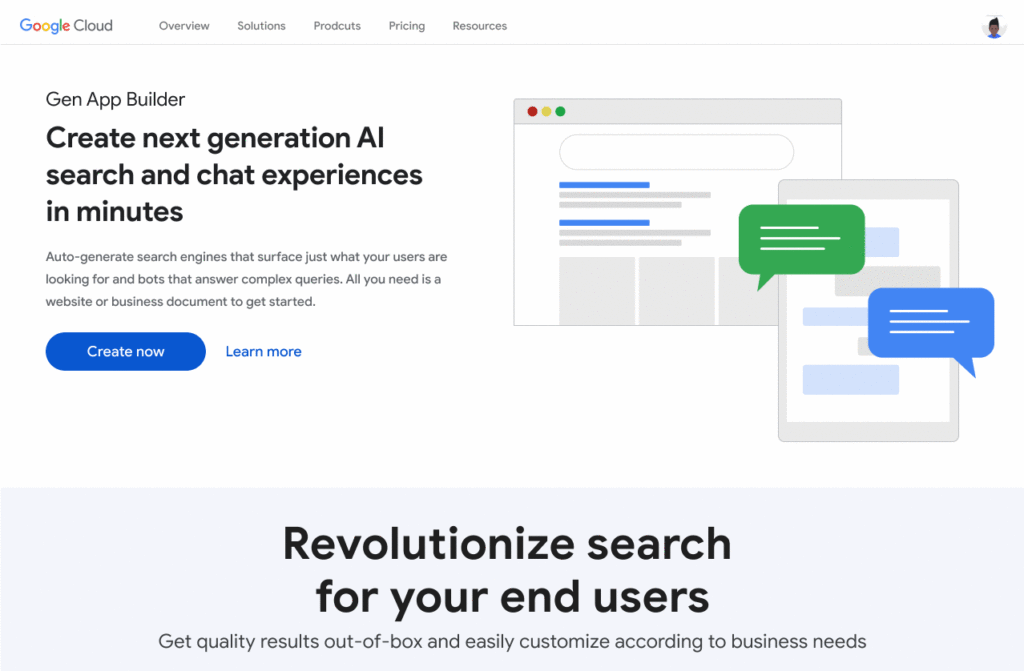
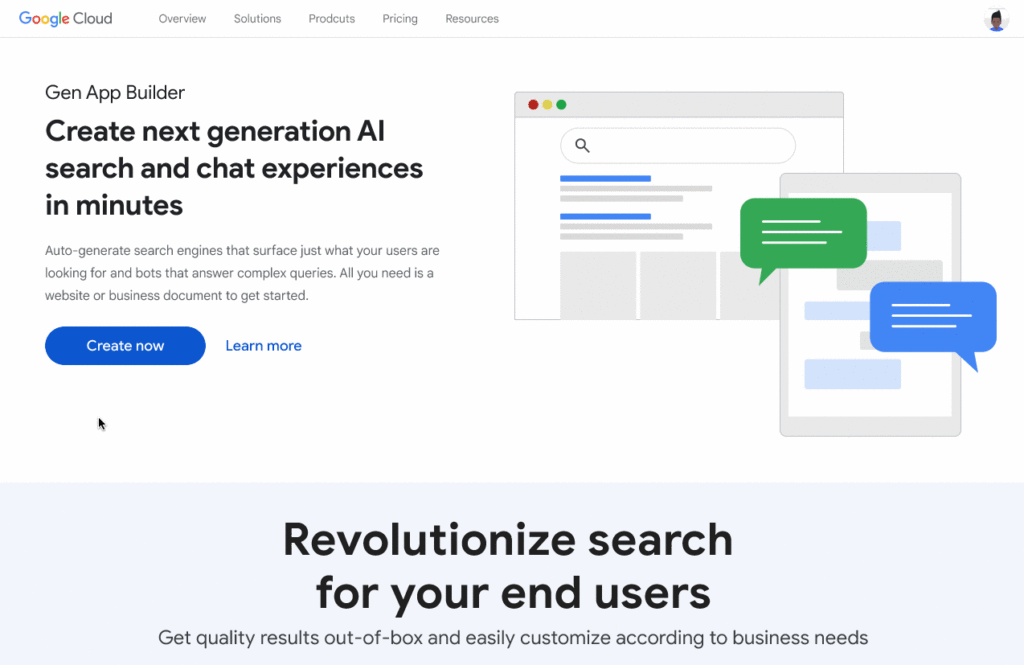
Gen App Builder is exciting because unlike most existing generative AI offerings for developers, it offers an orchestration layer that abstracts the complexity of combining various enterprise systems with generative AI tools to create a smooth, helpful user experience. Gen App Builder provides step-by-step orchestration of search and conversational applications with pre-built workflows for common tasks like onboarding, data ingestion, and customization, making it easy for developers to set up and deploy their apps. With Gen App Builder developers can:
- Build in minutes or hours. With access to Google’s no-code conversational and search tools powered by foundation models, organizations can get started with a few clicks and quickly build high-quality experiences that can be integrated into their applications and websites.
- Combine the power of foundation models with information retrieval to find relevant, personalized information. Enterprises can build apps that understand user intent via natural language, and surface the right information with associated citations and attributions from a company’s public and private data. They can also fully control what data their applications access and the content or topics they want to address.
- Build multimodal apps that can respond with text, images, and other media. Gen App Builder supports not just text, but also other modalities such as images and videos. It allows developers to build apps using a combination of text and images as inputs to find information across documents, photos, and video content, enabling richer customer interactions.
- Combine natural conversations with structured flows. Developers can granularly blend the output of foundation models with controls to ground answers in enterprise content, and step-by-step conversation orchestration to guide customers to the right answers.
- Provide the ability to transact and connect to third party apps and services. Gen App Builder makes it simple to create digital assistants and bots that not only serve content, but also connect to purchasing and provisioning systems to enable transactions from the conversational UI, and escalate customer conversations to a human agent when the context demands.
A new generation of conversational AI experiences and assistants
Consumers of enterprise applications expect to interact with technology in a seamless, conversational way to quickly find the information they need and act on it. Gen App Builder can help reinvent these customer and employee experiences by ingesting large, complex datasets that are specific to your company–from websites, documents, and transactional systems like billing and inventory, to emails, chat conversations, and more. These AI-powered apps can synthesize information across all of these sources to provide specific, actionable responses, using only the data you have provided.
Some of the most popular uses are in customer service, where generative apps can contribute to increasing revenue, customer satisfaction, and customer loyalty. For example, if a retail customer reaches out to modify an order, a virtual agent can help them change it to another product. The customer doesn’t even need to provide the new product name—they can just upload an image and let the agent guide them through the rest. Watch this demo to see how a retail chatbot can use multimodal capabilities to help a consumer navigate various options on the website, including giving the customer ideas on how to use the product and even helping them complete the purchase with the ability to transact within the conversational UI. This scenario could apply to multiple industries and use cases, ranging from consumer goods and public services, to finance and internal corporate systems like intranets.
Combining the power of Google-quality search with foundation models
Finding the right information from data across the organization is a critical requirement within any enterprise. Yet it can be challenging to build high-quality enterprise search experiences with existing tools. Current systems struggle to understand user intent, are difficult to implement and customize, and don’t provide a high-quality user experience.
One of the most exciting features of Gen App Builder is the ability to combine the power of Google-quality search with generative AI to help enterprises find the most relevant and personalized information when they need it. With Gen App Builder, enterprises can build conversational search experiences across their public and private data in minutes or hours with no coding experience.
Enabling multimodal search across text, images and video within the enterprise is a key aspect of the search experiences in Gen App Builder. In addition to providing high-quality search results, Gen App Builder can conveniently summarize the results and provide corresponding citations in a natural, human-like fashion. Gen App Builder also automatically extracts key information from the data and enables personalized results for users. Watch this demo to see how these capabilities can come together to transform the search experience for employees at a financial services firm. The ability to integrate Google-quality search within the enterprise’s applications means they can enjoy a new level of data utilization, drive increased process efficiencies, and provide delightful experiences to their employees and customers.
“Customers have been shopping at Macy’s for generations. Being able to deliver 360° personalization and contextual recommendations will help ensure that Macy’s is still providing future generations of shoppers with a seamless, exceptional experience,” said Bennett Fox-Glassman, Senior Vice-President, Customer Journey, Macy’s. “We’ve already realized an increase in revenue per visit and conversion rates had great success using Google Cloud’s AI technology and are looking forward to exploring how these latest announcements bring together Natural Language Processing and Generative AI capabilities to deliver next-gen search and conversational experiences for our customers.”
The ability to intuitively interact with complex data across a variety of sources allows organizations to better serve their customers and deliver more relevant offerings. Combined with conversational and fulfillment abilities, the potential for improving customer engagement and employee productivity is immense. We’re excited to see how developers and enterprises use a mix of these capabilities to power new experiences and revenue opportunities.
If you’re interested in a closer look at the Gen App Builder, tune into this session at the Data Cloud & AI Summit. Take a step forward to getting hands-on and join the waitlist for our trusted tester program. And finally, bookmark our generative AI landing page to keep abreast of the latest news, updates and possibilities from this exciting new world of Gen Apps.
More Relevant Stories for Your Company

Google Cloud and Univision Partnership to Up the Ante in UX for Spanish-speaking Audience
The past year has given everyone lots to think about—about our priorities as people and as businesses. As the world retreated behind closed doors, we saw how shared interests and experiences can bring us together. As the world grappled with a common enemy, we witnessed just how differently individuals, communities


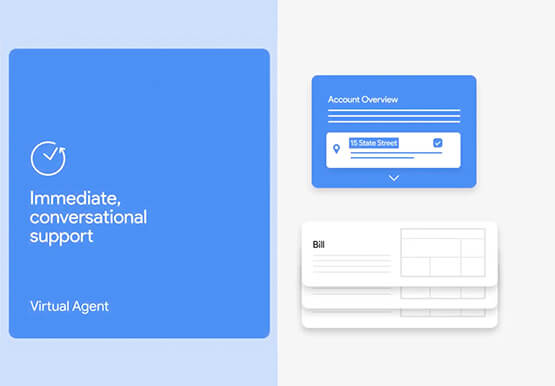

90-Sec Demos of Truly Incredible Customer Care Calls Powered By AI
How real, fast, and easy do you think an AI-powered call center experience is for customers today? It's likely you have seen AI-powered chatbots and are deeply unimpressed with the static nature of the interaction between customers and service representatives. But that's not how Google Cloud's AI-powered contact centers are.

What Interests Baseball Fans? Unravel with Google’s Data Science Tools and ML
The game of baseball has no shortage of statistics -- from batting average to exit velocity, strikeouts to wins above replacement. Among all sports, Major League Baseball (MLB) arguably contains the most analytical and data-driven participants and fan base. Subconsciously or viscerally, players and managers on the field and those

How Constellation Brands’ Direct-to-Customer Tech Delivers Economic Impact across Business Portfolio
Editor’s note: Today we’re hearing from Ryan Mason, Director, Head of DTC Growth & Strategy, at alcoholic beverage firm, Constellation Brands on the company’s shift to Direct-to-Consumer (DTC) sales and how Google Cloud’s powerful technology stack helped with this transformation. It’s no secret that consumer businesses have been up-ended in
