





Quick Migration, Zero Outages and Cost Savings: Rossi Residencial’s SAP to Google Cloud Journey!

3794
Of your peers have already read this article.
2:30 Minutes
The most insightful time you'll spend today!
After three migrations to different cloud providers, the company managed to migrate with no system outages for the first time, supported by partner Sky.One.
Results
- Migrated four SAP environments and four servers in just one month with no system outages
- Zero unavailability periods since migrating
- Less time spent worrying about operational issues increases the focus on business
50% savings on monthly cloud costs
Rossi Residencial, one of Brazil’s largest construction companies and real-estate developers, with around 150 employees, hundreds of business and engineering partners, and nationwide service, has used SAP solutions for financial management since 1999. Taxes, accessory obligations, accounting requirements, and other processes are managed through the system in an integrated and automated manner, which provides the business with crucial support.
Over the past few years, the company has begun to promote independent, sustainable business units to focus on strategic locations and products. This prompted its technology team to adapt as well, and they saw the cloud as an opportunity to add flexibility to SAP’s management.
“If I need to open a new branch or break ground on a project, the entire system core is already in the cloud and I don’t have to worry about local infrastructure,” explains Eduardo Araújo, Rossi’s IT Manager. “It also means our operational costs are significantly reduced.”
A few years ago, the company started working with the ECC component in the EHP 8 version, using modules such as FI (financial accounting), CO (controlling), MM (materials management) and TRM (treasury and risk management). But the dollar’s high exchange rate in 2020 increased costs with their then provider too much. The team was also not satisfied with the provider’s service, leading it to look for a new provider and a partner to support migration.
An essential requirement the new provider had to offer was high availability and scalability. Potential partners had to perform migration in a short time window (as the contract with the other service was about to expire) and be familiar with the previous provider to ensure the operation’s success. After spending some time searching, the company chose Google Cloud and Sky.One for the project.
“Out of the cloud options we researched, Google Cloud offered us the best financial conditions and a solution that truly catered to us. And out of the many partners we contacted, Sky.One offered the best work planning and service.”—Eduardo Araújo, IT Manager, Rossi Residencial
First migration with no system outages
The tight migration deadline meant the company would not have the time to install every app in Google Cloud from scratch, so Rossi asked the Sky.One team to mirror its entire previous architecture, that is, migrate the virtual machines from the company’s four SAP environments and four servers from other apps directly to Google Cloud.
After mapping the source structure in detail along with Rossi, the partner was able to complete migration planning in a month. “If you map before migrating and thus understand the customer’s environment well, you are able to prepare the destination so it has every integration and its respective access,” says Ricardo Nunes, Solution Expert at Sky.One.
The tool chosen to move the environments was Migrate for Compute Engine (previously known as Velostrata), which streamlines, facilitates and reduces risks for app migration to Google Cloud. Sky.One selected an expert in this solution to conduct the process, which was also supported by Google Cloud experts to make any needed adjustments.
The process took just a month to complete. The environments were successfully migrated with zero impact on operations, an unprecedented feat for the company. Now SAP environments run in a new infrastructure consisting of Compute Engine, a service for creating and running VMs, and Cloud Storage for data storage.
“This is the first time, after three previous migrations to private and public clouds, that our users have not felt any impact and we didn’t have system outages. It was a six-hands project that worked very well.”—Eduardo Araújo, IT Manager, Rossi Residencial
Flexibility to deal with every business need
Since the migration, Rossi has not suffered system outages or handled related user requests and incidents. Performance has remained high even after the team resized the VMs. The flexibility to add or subtract resources based on the company’s demands proved crucial. “Rossi operates in a segment with elasticity. In any given year, we can have two/three projects or ten. That’s why it’s important to have that resource in the cloud,” says Araújo.
Since the company does not operate 24/7, another benefit from migrating was the ability to schedule when to switch on and off servers, bringing cost savings. Furthermore, billing in reais at a fixed exchange rate with dollars led to a 50% cost reduction versus the previous provider.
The ease of integration between Google Cloud and SAP’s tools pleasantly surprised the team. “We were worried about potential incompatibilities, and we didn’t know if we would be able to work like before. Today we can work even better than before,” says the IT manager. According to Sky.One, the fine adaptation between the solutions becomes noticeable right after migration.
“Google Cloud’s solutions support all SAP migration steps, but after migrating we noticed that daily operations had become even more tightly integrated.”—Ricardo Nunes, Solution Expert, Sky.One
The cloud’s stability and security have streamlined the IT team’s daily routine. They no longer have to go to the company outside business hours to perform updates or repairs. Currently, employees can work remotely with peace of mind and maintain business continuity throughout Brazil.
With more time to focus on business needs instead of operational issues, the team is contemplating the addition of new Google Cloud tools. Rossi’s next challenge is to bolster its business operations and customer service even further using data analytics and AI solutions, making the most of its broad database.
Sainsbury’s Uses AI to Figure Out How the World Eats

8985
Of your peers have already read this article.
4:45 Minutes
The most insightful time you'll spend today!
Retail will forever be an industry that must constantly reinvent itself in response to, and anticipation of, ever-changing consumer demands.
Digital transformation is fueling these changes and we’ve previously spoken about how businesses including Ulta Beauty and Kohl’s are taking advantage of Google Cloud to put data at the center of what they do and deliver the best possible shopping experience and product offerings for their customers.
Leveraging Google Cloud machine learning platform, Sainsbury is able to develop predictive analytics models to spot trends and adjust inventory, providing shoppers with a better experience.
Sainsbury’s, one of Britain’s best-known supermarkets, is another great example of a business transforming the way it engages with its customers with the cloud.
With over 150 years of service, Sainsbury’s vision is to be the most trusted retailer, where people love to work and shop. It makes customers’ lives easier, by offering great quality and service at fair prices.
The food industry and the way that customers shop is rapidly changing. From foodie hashtags on Instagram, to the latest cooking fads, customers want to stay connected to the latest trends and Sainsbury’s is empowering them do that.
To help Sainsbury’s achieve this goal, its Commercial and Technology teams, in partnership with Accenture, are building cutting-edge machine learning solutions on Google Cloud Platform (GCP) to provide new insights on what customers want and the trends driving their eating habits.
With the help of Google Cloud Platform, we are generating new insights into how the world eats and lives, to help us stay ahead of market trends and provide an even better shopping experience for our customers.
–Phil Jordan, Group CIO, Sainsbury’s
Sainsbury’s solution relies on data from multiple structured and unstructured sources. Using Google Cloud’s powerful cloud-based analytics tools to ingest, clean and classify that data, and a custom-built front-end interface for internal users to seamlessly navigate through a variety of filters and categories, Sainsbury’s is able to gain advanced insights in real time.
As a result, Sainsbury’s has been able to develop predictive analytics models to spot trends and adjust inventory, providing shoppers with a better experience.
Phil Jordan, Group CIO of Sainsbury’s believes this project will have a big impact.
“The grocery market continues to change rapidly. We know our customers want high quality at great value and that finding innovative and distinctive products is increasingly important to them. With the help of Google Cloud Platform, we are generating new insights into how the world eats and lives, to help us stay ahead of market trends and provide an even better shopping experience for our customers.”
This project is also a great example of the successes Google Cloud customers have when they work with the company’s partners.
“We’re delighted to partner with Google Cloud to help the Sainsbury’s Commercial team apply predictive analytics to the identification of new and emerging trends in grocery,” says Adrian Bertschinger, Managing Director for Retail, Accenture.
“The food sector is experiencing significant, rapid disruption, and this new, cloud-based insights platform will help Sainsbury’s identify trends much earlier and adapt their product assortment in a faster, more informed way—all for the benefit of customers.”
Whatever the next food or shopping trend may be, Sainsbury’s is looking to the cloud to help them stay a step ahead.
10168
Of your peers have already watched this video.
1:00 Minutes
The most insightful time you'll spend today!
Predict User Churn on Gaming Apps with Google Analytics Data using BigQuery ML
User retention can be a major challenge for mobile game developers. According to the Mobile Gaming Industry Analysis in 2019, most mobile games only see a 25% retention rate for users after the first day. To retain a larger percentage of users after their first use of an app, developers can take steps to motivate and incentivize certain users to return. But to do so, developers need to identify the propensity of any specific user returning after the first 24 hours.
In this blog post, we will discuss how you can use BigQuery ML to run propensity models on Google Analytics 4 data from your gaming app to determine the likelihood of specific users returning to your app.
You can also use the same end-to-end solution approach in other types of apps using Google Analytics for Firebase as well as apps and websites using Google Analytics 4. To try out the steps in this blogpost or to implement the solution for your own data, you can use this Jupyter Notebook.
Using this blog post and the accompanying Jupyter Notebook, you’ll learn how to:
- Explore the BigQuery export dataset for Google Analytics 4
- Prepare the training data using demographic and behavioural attributes
- Train propensity models using BigQuery ML
- Evaluate BigQuery ML models
- Make predictions using the BigQuery ML models
- Implement model insights in practical implementations
Google Analytics 4 (GA4) properties unify app and website measurement on a single platform and are now default in Google Analytics. Any business that wants to measure their website, app, or both, can use GA4 for a more complete view of how customers engage with their business. With the launch of Google Analytics 4, BigQuery export of Google Analytics data is now available to all users. If you are already using a Google Analytics 4 property, you can follow this guide to set up exporting your GA data to BigQuery.
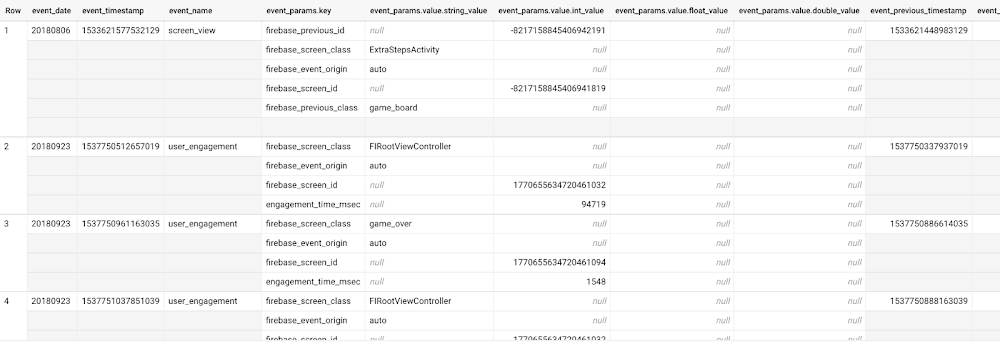
Once you have set up the BigQuery export, you can explore the data in BigQuery. Google Analytics 4 uses an event-based measurement model. Each row in the data is an event with additional parameters and properties. The Schema for BigQuery Export can help you to understand the structure of the data.
In this blogpost, we use the public sample export data from an actual mobile game app called “Flood It!” (Android, iOS) to build a churn prediction model. But you can use data from your own app or website.
Here’s what the data looks like. Each row in the dataset is a unique event, which can contain nested fields for event parameters.
SELECT *FROM `firebase-public-project.analytics_153293282.events_*`TABLESAMPLE SYSTEM (1 PERCENT)
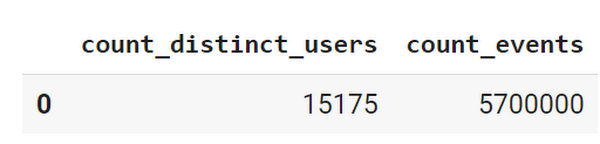
This dataset contains 5.7M events from over 15k users.
SELECTCOUNT(DISTINCT user_pseudo_id) as count_distinct_users,COUNT(event_timestamp) as count_eventsFROM`firebase-public-project.analytics_153293282.events_*
Our goal is to use BigQuery ML on the sample app dataset to predict propensity to user churn or not churn based on users’ demographics and activities within the first 24 hours of app installation.
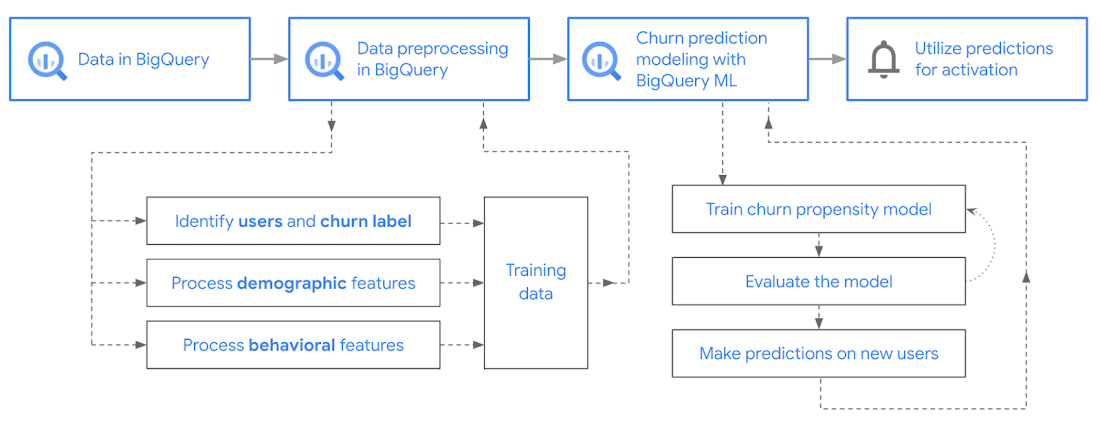
In the following sections, we’ll cover how to:
- Pre-process the raw event data from GA4
- Identify users & the label feature
- Process demographic features
- Process behavioral features
- Train classification model using BigQuery ML
- Evaluate the model using BigQueryML
- Make predictions using BigQuery ML
- Utilize predictions for activation
Pre-process the raw event data
You cannot simply use raw event data to train a machine learning model as it would not be in the right shape and format to use as training data. So in this section, we’ll go through how to pre-process the raw data into an appropriate format to use as training data for classification models.
This is what the training data should look like for our use case at the end of this section:
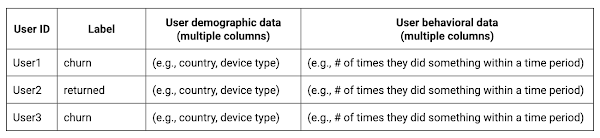
Notice that in this training data, each row represents a unique user with a distinct user ID (user_pseudo_id).
Identify users & the label feature
We first filtered the dataset to remove users who were unlikely to return the app anyway. We defined these ‘bounced’ users as ones who spent less than 10 mins with the app. Then we labeled all remaining users:
- churned: No event data for the user after 24 hours of first engaging with the app.
- returned: The user has at least one event record after 24 hours of first engaging with the app.
For your use case, you can have a different definition of bounce and churning. Also you can even try to predict something else other than churning, e.g.:
- whether a user is likely to spend money on in-game currency
- likelihood of completing n-number of game levels
- likelihood of spending n amount of time in-game etc.
In such cases, label each record accordingly so that whatever you are trying to predict can be identified from the label column.
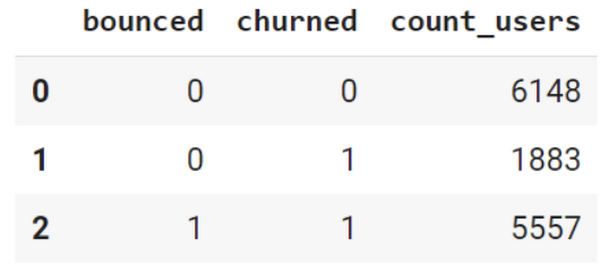
From our dataset, we found that ~41% users (5,557) bounced. However, from the remaining users (8,031), ~23% (1,883) churned after 24 hours:
SELECTbounced,churned,COUNT(churned) as count_usersFROMbqmlga4.returningusersGROUP BY 1,2ORDER BY bounced
To create these bounced and churned columns, we used the following snippet of SQL code.
...#churned = 1 if last_touch within 24 hr of app installation, else 0IF (user_last_engagement < TIMESTAMP_ADD(user_first_engagement,INTERVAL 24 HOUR),1,0 ) AS churned,#bounced = 1 if last_touch within 10 min, else 0IF (user_last_engagement <= TIMESTAMP_ADD(user_first_engagement,INTERVAL 10 MINUTE),1,0 ) AS bounced,...
You can view the Jupyter Notebook for the full query used for materializing the bounced and churned labels.
Process demographic features
Next, we added features both for demographic data and for behavioral data spanning across multiple columns. Having a combination of both demographic data and behavioral data helps to create a more predictive model.
We used the following fields for each user as demographic features:
geo.countrydevice.operating_systemdevice.language
A user might have multiple unique values in these fields — for example if a user uses the app from two different devices. To simplify, we used the values from the very first user engagement event.
CREATE OR REPLACE VIEW bqmlga4.user_demographics AS (WITH first_values AS (SELECTuser_pseudo_id,geo.country as country,device.operating_system as operating_system,device.language as language,ROW_NUMBER() OVER (PARTITION BY user_pseudo_id ORDER BY event_timestamp DESC) AS row_numFROM `firebase-public-project.analytics_153293282.events_*`WHERE event_name="user_engagement")SELECT * EXCEPT (row_num)FROM first_valuesWHERE row_num = 1 #first engagement);
Process behavioral features
There is additional demographic information present in the GA4 export dataset, e.g. app_info, device, event_params, geo etc. You may also send demographic information to Google Analytics through each hit via user_properties. Furthermore, if you have first-party data on your own system, you can join that with the GA4 export data based on user_ids.
To extract user behavior from the data, we looked into the user’s activities within the first 24 hours of first user engagement. In addition to the events automatically collected by Google Analytics, there are also the recommended events for games that can be explored to analyze user behavior. For our use case, to predict user churn, we counted the number of times the follow events were collected for a user within 24 hours of first user engagement:
user_engagementlevel_start_quickplaylevel_end_quickplaylevel_complete_quickplaylevel_reset_quickplaypost_scorespend_virtual_currencyad_rewardchallenge_a_friendcompleted_5_levelsuse_extra_steps
The following query shows how these features were calculated:
WITHevents_first24hr AS (SELECTe.*FROM`firebase-public-project.analytics_153293282.events_*` eJOINbqmlga4.returningusers rONe.user_pseudo_id = r.user_pseudo_idWHERETIMESTAMP_MICROS(e.event_timestamp) <= r.ts_24hr_after_first_engagement)SELECTuser_pseudo_id,SUM(IF(event_name = 'user_engagement', 1, 0)) AS cnt_user_engagement,# ... repeated for all behavior data ...SUM(IF(event_name = 'use_extra_steps', 1, 0)) AS cnt_use_extra_steps,FROMevents_first24hrGROUP BY1
View the notebook for the query used to aggregate and extract the behavioral data. You can use different sets of events for your use case. To view the complete list of events, use the following query:
SELECTevent_name,COUNT(event_name) as event_countFROM`firebase-public-project.analytics_153293282.events_*`GROUP BY 1ORDER BYevent_count DESC
After this we combined the features to ensure our training dataset reflects the intended structure. We had the following columns in our table:
- User ID:
user_pseudo_id
- Label:
churned
- Demographic features
countrydevice_osdevice_language
- Behavioral features
cnt_user_engagementcnt_level_start_quickplaycnt_level_end_quickplaycnt_level_complete_quickplaycnt_level_reset_quickplaycnt_post_scorecnt_spend_virtual_currencycnt_ad_rewardcnt_challenge_a_friendcnt_completed_5_levelscnt_use_extra_stepsuser_first_engagement
At this point, the dataset was ready to train the classification machine learning model in BigQuery ML. Once trained, the model will output a propensity score between churn (churned=1) or return (churned=0) indicating the probability of a user churning based on the training data.
Train classification model
When using the CREATE MODEL statement, BigQuery ML automatically splits the data between training and test. Thus the model can be evaluated immediately after training (see the documentation for more information).
For the ML model, we can choose among the following classification algorithms where each type has its own pros and cons:
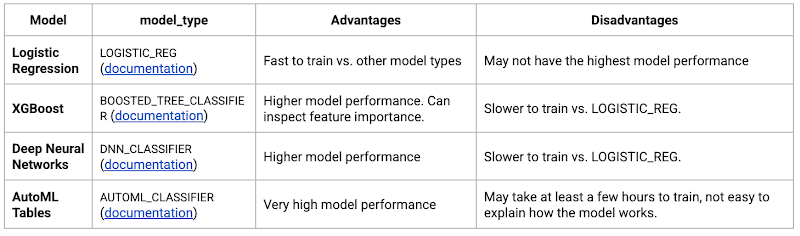
Often logistic regression is used as a starting point because it is the fastest to train. The query below shows how we trained the logistic regression classification models in BigQuery ML.
CREATE OR REPLACE MODEL bqmlga4.churn_logregTRANSFORM(EXTRACT(MONTH from user_first_engagement) as month,EXTRACT(DAYOFYEAR from user_first_engagement) as julianday,EXTRACT(DAYOFWEEK from user_first_engagement) as dayofweek,EXTRACT(HOUR from user_first_engagement) as hour,* EXCEPT(user_first_engagement, user_pseudo_id))OPTIONS(MODEL_TYPE="LOGISTIC_REG",INPUT_LABEL_COLS=["churned"]) ASSELECT*FROMbqmlga4.train
We extracted month, julianday, and dayofweek from datetimes/timestamps as one simple example of additional feature preprocessing before training. Using TRANSFORM() in your CREATE MODEL query allows the model to remember the extracted values. Thus, when making predictions using the model later on, these values won’t have to be extracted again. View the notebook for the example queries to train other types of models (XGBoost, deep neural network, AutoML Tables).
Evaluate model
Once the model finished training, we ran ML.EVALUATE to generate precision, recall, accuracy and f1_score for the model:
SELECT*FROMML.EVALUATE(MODEL bqmlga4.churn_logreg)

The optional THRESHOLD parameter can be used to modify the default classification threshold of 0.5. For more information on these metrics, you can read through the definitions on precision and recall, accuracy, f1-score, log_loss and roc_auc. Comparing the resulting evaluation metrics can help to decide among multiple models.Furthermore, we used a confusion matrix to inspect how well the model predicted the labels, compared to the actual labels. The confusion matrix is created using the default threshold of 0.5, which you may want to adjust to optimize for recall, precision, or a balance (more information here).
SELECTexpected_label,_0 AS predicted_0,_1 AS predicted_1FROMML.CONFUSION_MATRIX(MODEL bqmlga4.churn_logreg)
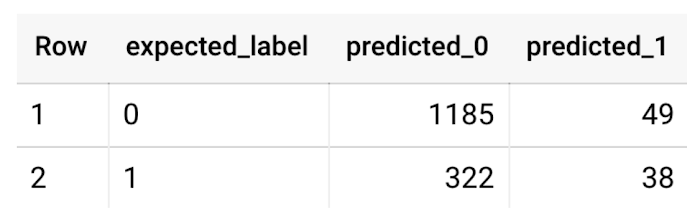
This table can be interpreted in the following way:

Make predictions using BigQuery ML
Once the ideal model was available, we ran ML.PREDICT to make predictions. For propensity modeling, the most important output is the probability of a behavior occurring. The following query returns the probability that the user will return after 24 hrs. The higher the probability and closer it is to 1, the more likely the user is predicted to return, and the closer it is to 0, the more likely the user is predicted to churn.
SELECTuser_pseudo_id,returned,predicted_returned,predicted_returned_probs[OFFSET(0)].prob as probability_returnedFROMML.PREDICT(MODEL bqmlga4.churn_logreg,(SELECT * FROM bqmlga4.train)) #can be replaced with a proper test dataset
Utilize predictions for activation
Once the model predictions are available for your users, you can activate this insight in different ways. In our analysis, we used user_pseudo_id as the user identifier. However, ideally, your app should send back the user_id from your app to Google Analytics. In addition to using first-party data for model predictions, this will also let you join back the predictions from the model into your own data.
- You can import the model predictions back into Google Analytics as a user attribute. This can be done using the Data Import feature for Google Analytics 4. Based on the prediction values you can Create and edit audiences and also do Audience targeting. For example, an audience can be users with prediction probability between 0.4 and 0.7, to represent users who are predicted to be “on the fence” between churning and returning.
- For Firebase Apps, you can use the Import segments feature. You can tailor user experience by targeting your identified users through Firebase services such as Remote Config, Cloud Messaging, and In-App Messaging. This will involve importing the segment data from BigQuery into Firebase. After that you can send notifications to the users, configure the app for them, or follow the user journeys across devices.
- Run targeted marketing campaigns via CRMs like Salesforce, e.g. send out reminder emails.
You can find all of the code used in this blogpost in the Github repository:
What’s next?
Continuous model evaluation and re-training
As you collect more data from your users, you may want to regularly evaluate your model on fresh data and re-train the model if you notice that the model quality is decaying.
Continuous evaluation—the process of ensuring a production machine learning model is still performing well on new data—is an essential part in any ML workflow. Performing continuous evaluation can help you catch model drift, a phenomenon that occurs when the data used to train your model no longer reflects the current environment.
To learn more about how to do continuous model evaluation and re-train models, you can read the blogpost: Continuous model evaluation with BigQuery ML, Stored Procedures, and Cloud Scheduler
More resources
If you’d like to learn more about any of the topics covered in this post, check out these resources:
- BigQuery export of Google Analytics data
- BigQuery ML quickstart
- Events automatically collected by Google Analytics 4
- Qwiklabs: Create ML models with BigQuery ML
Or learn more about how you can use BigQuery ML to easily build other machine learning solutions:
- How to build demand forecasting models with BigQuery ML
- How to build a recommendation system on e-commerce data using BigQuery ML
Let us know what you thought of this post, and if you have topics you’d like to see covered in the future! You can find us on Twitter at @polonglin and @_mkazi_.Thanks to reviewers: Abhishek Kashyap, Breen Baker, David Sabater Dinter.
Southwire Completes SAP Migration to Google Cloud as a First Step of its Tech Evolution

4941
Of your peers have already read this article.
1:30 Minutes
The most insightful time you'll spend today!
“Talk about tough times, right?”
That’s how Dan Stuart, Senior Vice President of IT Services at Southwire Company, refers to the months following a December 2019 ransomware event, and the COVID crisis that began in spring of 2020. Those events hit just as the company was preparing for an overhaul of their SAP environment. This comprehensive plan included three key elements. First, the company wanted to upgrade their SAP ECC environment to take advantage of the latest functionality available for this critical ERP system. Second, Southwire aimed to deploy SAP Business Warehouse on SAP HANA to accelerate vital reporting for all business users. Third, the company wanted to upgrade to the latest version of SAP Process Orchestration—an essential component that touches key manufacturing interfaces in all Southwire facilities.
Southwire had looked at multiple options for the upgrades, including remaining entirely on-premises, colocation, and full cloud migration. “Going to the cloud seemed a lot more compelling,” says Joe Schleupner, Southwire’s Senior Director of PMO & ITS planning and implementation. “We were going to the cloud eventually, so why take these intermediary steps? Let’s just get it done.”
After looking at several options, Southwire decided to migrate to Google Cloud. “We wanted to be on a platform for SAP that was flexible, scalable, and secure; that we could count on to get up and running quickly,” says Stuart. “We chose Google Cloud not only for those reasons, but also because we recognize that Google has other assets that we may be able to take advantage of down the line, such as technologies like artificial intelligence (AI).”
More stability, less worry
As one of the leading manufacturers of wire and cable used in the transmission and distribution of electricity, Southwire aids the delivery of power to millions of people worldwide. They have more than 30 manufacturing facilities across the United States running 24/7. Any downtime directly affects productivity and revenue. With help from Google Cloud and their implementation partner NIMBL, Southwire completed the SAP migration to Google Cloud over a planned maintenance weekend on July 4th.
The migration itself, while complex, went quickly and smoothly. “Just moving to the cloud was quite a feat because we were dealing with so much data, but in total the SAP system was down for only ~16 hours,” says Schleupner.
“As a project manager, I always felt that Google Cloud had my back” Schleupner says. The Process Orchestration (PO) migration was of particular concern, considering that it controlled all of Southwire’s manufacturing interfaces across the entire company. “Every critical piece of information that goes from SAP down to the manufacturing system goes through that system,” says Schleupner.
Even after migrating, Southwire discovered that making changes to the system was fast, easy, and resulted in no downtime. Normally, certain types of changes would have involved taking down SAP for at least an hour.
The Southwire team also appreciates the fact that the modern cloud architecture means spending less time on routine infrastructure maintenance. “It’s one less thing for me to worry about,” Stuart says, “I can focus on the business side of the house and move the technology and responsibilities to what we do within the Google Cloud Platform.”
What comes next?
While the cloud migration will increase stability, uptime, performance, and security, there is much more to come. Southwire is currently working on a disaster recovery implementation for their SAP environment on Google Cloud. Stuart and Schleupner are excited about where Google Cloud can further take Southwire. They are considering an SAP Hybris e-commerce implementation as well as connected factory and/or factory automation initiatives that can take advantage of artificial intelligence and machine learning.
To Stuart and Schleupner, the migration of Southwire’s SAP environment to Google Cloud, as important as it was, really represents the first step in the company’s tech evolution. Now that much of the heavy lifting is complete, Southwire’s digital transformation can begin in earnest. “There’s no shortage of areas where I think Google Cloud will come into play,” Stuart says, “and we intend to look at these things with an open mind to understand how we can leverage current investments to take our organization where we want to go.”
Learn more about Southwire’s SAP on Google Cloud deployment and how Google Cloud can transform the way you work with your SAP enterprise applications. Visit cloud.google.com/solutions/sap.
Autonom8: Achieving growth and profits for businesses with Google Cloud

3029
Of your peers have already read this article.
3:30 Minutes
The most insightful time you'll spend today!
With Google Cloud, Autonom8 can run a platform that accelerates and streamlines customer journeys in a scalable, reliable, cost-effective infrastructure, while using advanced optical character recognition to enable intelligent document processing.
About Autonom8
Headquartered in the United States and India, Autonom8 has built a low-code SaaS platform that allows businesses to digitize customer-facing workflows. The business aims to help clients reduce costs and improve interactions with their customers through automation and enablement of customer journeys.

Google Cloud results:
- Increased margins by up to 30% by switching from a home-grown OCR system to Cloud Vision AI
- Enables one DevOps team member to manage up to 30 customers
- Provides real-time information about customer journeys to enable businesses to respond quickly and accurately
- Ensures use of its platform with containerization in customers’ private data centers
- Reduced operating costs by up to 20% with localized scalability and architecture through GKE
Just as cars are evolving to become autonomous, smart and self-driving, enterprises can gain self-awareness, an ability to learn and an ability to adapt. This is the value proposition put forward by Autonom8, an India- and United States-based enterprise workflow management software business. “We provide a low-code, high-intelligence customer journey automation SaaS platform,” explains Ranjit Padmanabhan, Co-founder and Chief Technology Officer (CTO), Autonom8.
The Autonom8 platform includes components, such as A8Studio, a drag and drop location from which clients can create customer journeys, a chat platform that enables clients to create chatbots, and an analytics module. “With our platform and services, businesses can reduce costs and improve interactions with their customers by applying automation to accelerate and provide better customer journeys,” adds Padmanabhan.
Demand for Autonom8 is being driven by the changing customer demands of enterprises, including the expectation to interact with them over multiple channels, and the rising cost of building software with experienced developers. These trends place enterprises under growing pressure to increase the productivity of the people they do have, particularly those who are less technically inclined. In addition, changing consumer habits, regulations and the emergence of new technologies mean customer journeys cannot remain static and need to evolve.
Developing a microservices-based SaaS platform
From the start, Autonom8 planned to deliver a SaaS platform and initially deployed on a multinational cloud service, chosen due to the team’s familiarity with its products and the availability of credits. However, the company’s decision to opt for a microservices architecture that enables individual services to scale independently while running in a containerized environment, demanded high-quality container orchestration. To optimize cost, scalability and performance, Autonom8 began evaluating Google Kubernetes Engine (GKE).
The business then completed a side-by-side comparison between Google Cloud and its incumbent provider of compute, storage and other services. Google Cloud fared favorably, with Vision AI in particular providing powerful machine learning and optical character recognition (OCR) functionality, supporting a key use case for Autonom8.
In addition, many of Autonom8’s clients at the time are financial institutions in India, and legally required to retain data within the country’s borders. Google Cloud’s global network and local presence means the business could fulfill this requirement easily.
“We decided to evaluate Google Cloud, particularly GKE, from two perspectives. One, from a security perspective, as we sell to banks that audit our platform, and two, as a failover between regions because downtime costs money. We found it a compelling solution.”
— Ranjit Padmanabhan, Co-founder and Chief Technology Officer (CTO), Autonom8
A seamless move to Google Cloud
Autonom8 began deploying on Google Cloud in 2018, with its architecture comprising storage, compute, serverless, container management and orchestration, and Vision AI. “We looked at our scripting with the previous provider, and using the Google Cloud documentation available online, educated ourselves over a few weeks before moving pieces of our architecture step by step to Google Cloud,” says Padmanabhan. “We did not run into any major issues. It was pretty simple, with our experienced engineers training others in the product.”
According to the CTO, the business had two options when moving to Google Cloud. Autonom8 could either install raw virtual machines and effectively create its own virtualized data center, or rely on managed services for functions such as memory store, registration and authentication to save time and resources over the long term. Autonom8 opted for the latter and has transitioned fully to Google Cloud, with the number of cloud products and services in its architecture rising from five to about 15. While each product and service performs a key role in the delivery of Autonom8’s products and services, Padmanabhan nominates GKE, Vision AI and Cloud SQL as providing the greatest value to the business.
Scalability, real-time monitoring and intelligent document processing at low cost
With GKE, the business can now scale the nodes or containers specific to each microservice in the event traffic to a particular client surges, due to a rebate or promotion. “Through the combination of the architecture and localized scalability we achieve with GKE, we are reducing our operating costs by up to 20%,” says Padmanabhan.
Running an open source TimescaleDB on Postgres in Cloud SQL enables Autonom8 to give its clients the ability to monitor customer journey information in real time. An example of a journey is applying for a bank loan. The customer must take steps including providing income, tax and other financial details that the bank then appraises to help make a decision on the application. “The moment someone applies for a loan, for example, a bank knows about it and can monitor for fraud, bottlenecks, or other abnormalities, and immediately route to a remediation workflow,” explains Padmanabhan. “Cloud SQL enables us to maintain transactional logging and provide real-time data to our dashboards.”
After evaluating alternative services, including developing a home-grown OCR engine, the business turned to Cloud Vision AI to manage the intelligent document processing that comprises much of its transactional volume. “Vision AI is significantly better than the alternatives and the cost of maintaining our version did not make sense, because Google Cloud continues to make improvements over time that enable us to deliver more and more accurate results to our customers,” says Padmanabhan. “Switching from our home-grown service to Vision AI has enabled us to increase our profit margins by up to 30%.”
“Through the combination of the architecture and localized scalability we achieve with Google Kubernetes Engine, we are reducing our operating costs by up to 20%.”
—Ranjit Padmanabhan, Co-founder and Chief Technology Officer (CTO), Autonom8
Supporting client demands and improving developer efficiency
Google Cloud also enables Autonom8 to meet the demands of businesses that want to run its platform within their own private data centers. “We can undertake the build within Google Cloud and ship our containers to compatible hosts within those clients’ data centers,” explains Padmanabhan. “With our previous provider, we could create containers, but these would not run properly within those data centers.”
Furthermore, Google Cloud documentation and online resources help Autonom8 reduce the training needed for new developers to become productive, with the Google Cloud learning curve taking up just 10% of the overall onboarding cycle.
The organization spends the equivalent of just 3% of its overall annual revenue on DevOps, measured as DevOps Utility Ratio, while the cloud cost of revenue is about USD 1 for every USD 6 in annual recurring revenue, measured as Cloud Utility Ratio. “These two metrics are about what we can do with the people we have,” explains Padmanabhan. “Our current ratio implies that one DevOps person can handle approximately 30 customers. This is made possible by the tools we have, and the comprehensive support from Google Cloud in terms of security patches, intelligent alerts, resource overloading, and more.”
Google Cloud also provides the flexibility for Autonom8 to accommodate the varying service levels required by individual customers based on factors, such as the impact of downtime, as the business can failover seamlessly between regions to mitigate the impact of any issues that may occur.
“Our current ratio implies that one DevOps person can handle approximately 30 customers. This is made possible by the tools we have, and the comprehensive support from Google Cloud in terms of security patches, intelligent alerts, resource overloading, and more.”
—Ranjit Padmanabhan, Co-founder and Chief Technology Officer (CTO), Autonom8
Integrating Google Workspace with Autonom8 to deliver new capabilities
Autonom8 relies on Google Workspace for communication, collaboration and other workplace productivity requirements, growing its footprint from Gmail when the employee population was four or five, to a range of products including Sheets and Drive as the business grew. “It became natural to use the capabilities in Google Workspace as we matured,” says Padmanabhan. “One of the most interesting capabilities was our ability to integrate Google Workspace into our platform. For example, when someone is running a workflow, they can add data from a Sheet. We’ve added Google Workspace authentication capabilities into our products as well.”
“Everyone is using shared links to Drive and I really like the granular permissions structure,” he adds. “I can open up folders to clients while keeping an internal space within the business to ensure security and privacy.”
With Google Cloud, Autonom8 is now poised to continue growing its business and adding new features and capabilities for clients. “We are extremely excited at the opportunity to step up our offering to clients with Google Cloud,” concludes Padmanabhan.
Thinking of a Multicloud Journey? Here’s What Our Experts Want You to Consider
4799
Of your peers have already read this article.
3:00 Minutes
The most insightful time you'll spend today!
Do you want to fire up a bunch of techies? Talk about multicloud! There is no shortage of opinions. I figured we should tackle this hot topic head-on, so I recently talked to four smart folks—Corey Quinn of Duckbill Group, Armon Dadgar of Hashicorp, Tammy Bryant Butow of Gremlin, and James Watters of VMware—about what multicloud is all about, key considerations, and why you should (or shouldn’t!) do it.
Five important insights came out of these discussions. If you’re on a multicloud journey or considering one, keep reading.
Do: Choose to do multicloud for the right reasons
Don’t do multicloud because Gartner says so, implores Corey Quinn. Before embarking on a multicloud, define a “why” focused on business value journey, says Armon Dadger. For example, you might want to use services from each public cloud because of their differentiated services, according to Tammy Bryant Butow. Armon also calls out regulatory reasons, existing business relationships, and accommodating mergers and acquisitions. On the topic of M&A, Corey points out that if you acquire a company that uses another cloud, it’s usually expensive and difficult to consolidate. It can be smarter to stay put.
https://youtube.com/watch?v=xFSDexQhCUY%3Fenablejsapi%3D1%26
Don’t: Over-engineer for workload or data portability
Thinking that you’ll build a system that moves seamlessly among the various cloud providers? Hold up, says our group of experts. Armon points out that aspects of your toolchain or architecture may be multicloud—think of some of your workflows or global network routing—but that shifting workloads or data is far from simple. Corey says that trying to engineer for “write once, run anywhere” can slow you down, and ignores the inherent uniqueness that’s part of each platform. Specifically, Corey calls out the per-cloud stickiness of identity management, security features, and even network functionality. And data gravity is still a thing, says James, that causes some to dismiss multicloud outright.
If you’re using multiple public clouds, you take advantage of the distinct value each offers, Armon says. Use native cloud services where possible so that you see the benefits from useful innovations, built-in resilience, and baked-in best practices. The value from that cloud-infused workload may outweigh the benefits of seamless portability.
https://youtube.com/watch?v=B1VH56_L8f8%3Fenablejsapi%3D1%26
Do: Recognize different stakeholder interests and needs
James smartly points out that many multicloud debates happen because people are arguing from different perspectives. Context matters. If you’re an infrastructure engineer who invests heavily in a given cloud’s identity and access management model, multicloud looks tricky. Or if you’re a data engineer with petabytes of data homed in a particular cloud, multicloud may look unrealistic. James highlights that many developers default to multicloud because their local tools—where all the work happens—are multicloud. A developer’s IDE and preferred code framework(s) aren’t tied to any given cloud. Be aware that groups within your organization will come at multicloud from distinct directions. And this may impact your approach!
https://youtube.com/watch?v=I9sqXDqkKBM%3Fenablejsapi%3D1%26
Don’t: Go it alone
Corey talks about the importance of asking others what worked, and what didn’t. Tammy offers her best practices around sharing results from experiments. It’s about sharing knowledge and tapping into it for community benefit. Others have probably tried what you’re trying, and can help you avoid common pitfalls. If you’ve just made an architectural choice that didn’t work out, share it, and help others avoid the pain.
Read research from analysts, go to conferences or watch videos to observe case studies, and join online communities that offer a safe place to share mistakes and learn from others.
https://youtube.com/watch?v=mrSb5vqOfuI%3Fenablejsapi%3D1%26
Do: Experiment first using techniques like multi-region deployments
If you think you can operate systems across clouds, how about you first try doing it across regions in a specific cloud, suggests Corey. Getting a system to properly work across cloud regions isn’t trivial, he says, and that experience can help you uncover where you have architectural or operational constraints that will be even worse across cloud providers.
This is great guidance if your multicloud aspirations involve using multiple clouds to power one application—versus the more standard definition of multicloud where you use different clouds for different applications—but can also surface issues in your support process or toolchain that fail when faced with distributed systems. Start with muti-region deployments and chaos engineering experiments before aggressively jumping into multicloud architectures.
The Google Cloud take
Do the things above. It’s great advice. I’ll add three more things that we’ve learned from our customers.
- Don’t fear multicloud. You’re already doing it. You don’t single-source everything. As Corey mentioned, you probably already have one cloud for productivity tools, another for source code, another for cloud infrastructure. You’ll use software and application services from a mix of providers for a single app. You have that experience in your team and have been doing that for decades. What people do rightly worry about is using more than one infrastructure service beneath an application, as that can introduce latency, security, and logistical hurdles. Make sure you know which model your team is considering.
- Embrace the right foundational components, including Kubernetes. Will everything run on Kubernetes? Of course not. Don’t try to do that. But it also represents the closest thing we have to a multicloud API. Companies are using Kubernetes to stripe a consistent experience across clouds. And this isn’t just to orchestrate containers, but also to manage infrastructure and cloud-native services. Also, consider where you need other fundamental consistency across clouds, including areas like provisioning and identity federation.
- Use Google Cloud as your anchor. Here’s a fundamental question you have to decide for yourself: Are you going to bring your on-premises technology and practices to the cloud, or bring cloud technology and practices on-prem? We sincerely believe in the latter. Anchor to where you’re trying to get to. We offer Anthos as a way to build and run distributed Kubernetes fleets in Google Cloud and across clouds. By using a cloud-based backplane instead of an on-prem one, you’re offloading toil, leveraging managed services for scale and security, and introducing modern practices to the rest of your team.
We learned a lot about multicloud through these discussions, and it seems like others did too. That’s why we’re going to do a second round of interviews with a new crop of experts so that we can keep digging deeper into this topic. Stay tuned!
More Relevant Stories for Your Company

How Cloud Networks Enable CSPs to Deliver 5G
Communication services providers (CSPs) are experiencing a period of disruption. Overall revenue growth is decelerating and is projected to remain below 1 percent per year, following a trend that started even before the pandemic.1 At the same time, driven by the pandemic, data consumption in 2020 increased by 30 percent relative

Google Cloud Launches Digital Assets Team to Power the Emerging Blockchain Space
Blockchain technology is yielding tremendous innovation and value creation for consumers and businesses around the world. As the technology becomes more mainstream, companies need scalable, secure, and sustainable infrastructure on which to grow their businesses and support their networks. We believe Google Cloud can play an important role in this

Telus Ensures Workers’ Safety Using Edge and 5G
Editor’s note: In February 2021, Google Cloud and TELUS announced a 10-year strategic alliance to drive innovation of new services and solutions across data analytics, machine learning, and go-to-market strategies that support digital transformation within key industries, including communications technology, healthcare, agriculture, and connected home. By December 2021, TELUS had

Learning Should be Your Resolution for 2022: Register for Google Cloud Skills Boost
Start your 2022 New Year’s resolutions by learning at no cost how to use Google Cloud with the following training opportunities: 30 day access to Google Cloud Skills Boost Register by January 31, 2022 and claim 30 days free access to Google Cloud Skills Boost to complete the Getting Started with
