





Sopra Steria’s Next-gen Virtual Voice Assistants Powered by Google’s AI and Cisco Contact Center by Activeo

3069
Of your peers have already read this article.
1:30 Minutes
The most insightful time you'll spend today!
With people expecting to access products and services through easy, always-on experiences delivered across channels, transforming approaches to digital services is a must for every business. As a result, business leaders have to strive to provide employees with these same frictionless experiences.
Sopra Steria is a European leader in consulting, digital services and software development, with 46,000 employees in 25 countries that generated revenue of €4.3 billion in 2020. It provides end-to-end solutions that help customers drive their digital transformation to obtain tangible and sustainable benefits, by combining in-depth knowledge of a wide range of business sectors and innovative technologies.
To accomplish its goals, Sopra Steria planned to use conversational artificial intelligence as part of their strategy and began working closely with Google Cloud, Cisco, and Activeo. It believed that, by building out more advanced Virtual Agents for its customers to use to serve them, it could usher in a new era of frictionless experiences in the End-User support services.
“To address customer demands for office and business applications support services, we looked to integrate a new generation of virtual voice assistant into our platform,” says Xavier Leroux, CTO End User Services at Sopra Steria. “We did this using Google’s proven AI and integrated it with our Cisco Contact Center by Activeo.”
As many companies have learned, the need to provide customers with advanced experiences is directly attached to the services offered to their employees. By providing more contextual information and other forms of digital support to staff, those same team members will be better positioned to serve customers.
Solving a complex problem with ease
Sopra Steria sought to solve several challenges for its customers, enabling them to:
- Provide all their employees with seamless, quick access to IT and business support,
- Offer 24/7 phone support capabilities for employees,
- Make services easily deployable, flexible, agile, and available in multiple languages,
- Reduce costs associated with delivering better support services.
Sopra Steria chose Google Cloud Contact Center AI (CCAI), built by Google Cloud and Cisco, as the best option to achieve its vision. Google Cloud CCAI is currently used in some of the world’s largest call centers, building on Google’s expertise in natural language processing.
Sopra Steria implemented CCAI as its new Virtual Assistant on phone channels managed by a Cisco telephony solution, and used Activeo for its integration and implementation support.
The new Virtual Assistant allows Sopra Steria clients to qualify employee requests and direct them to the right agent based on Natural Language Understanding while offering self-service options for basic requests such as password resets. These Virtual Assistants also fully automate complex incident tickets creation in synchronization within the IT service management system.
Google Cloud CCAI covers three main use cases:
- Autonomously handles full-length conversations using natural language,
- Augments operator support through contextual assistance through a desktop application based on live conversation analysis,
- Semantic analysis of all audio and text conversations processed by customer service through Google Cloud machine learning.
Cisco provides native integration of CCAI within its Cisco Contact Center solution as a part of its global partnership with Google Cloud.
“The work we have done with Google Cloud has allowed Sopra Steria to create innovative and personalized conversational services to enhance both employee satisfaction and operator productivity without sacrificing security,” says Christian Laloy, EMEA Contact Center Sales Specialist at Cisco.
Unlocking new, more powerful contact center experiences
Since standing up the new CCAI solution, Sopra Steria has been able to enhance its service catalog through Virtual Assistants. The offering has generated immense interest among existing and new Sopra Steria clients because it can simultaneously reduce average waiting and handling and resolution times while dramatically decreasing service costs.
“The Virtual Assistant serves both the user and operator alike,” says Xavier Leroux. “The user gets a conversational experience like no other and a seamless journey to resolve their requests. With Google Cloud, Cisco and Activeo, we have increased operator efficiency, so they can focus more on adding value to every business interaction.”
8406
Of your peers have already watched this video.
21:00 Minutes
The most insightful time you'll spend today!
Journey to Transformation and Modernization with Google’s Distributed Cloud
Google Cloud has been leading the way of helping businesses make most from their cloud investments to drive digital transformation through modern application platforms that cater to today’s customer needs. Watch the video from the Next ’21 to explore three areas where companies are supported by Google Cloud throughout their cloud evolution journey–cloud migration and modernization, extension of services and engineering practices to hybrid and multicloud environments, and delivery of high performance with planet scale distributed infrastructure. Also, learn how Google Cloud is equipped for more complex and unique use cases, from datacenter to the edge. Hear the strategies and customer stories that can help your business modernize people, processes, and applications to fully leverage Google’s distributed cloud!
3313
Of your peers have already watched this video.
44:14 Minutes
The most insightful time you'll spend today!
Supercharge Marketing with Ready-Made, Centralized Smart Analytics
Your company has lots of valuable marketing data, but it’s spread across many systems and teams. That’s a problem. In fact, only 13% of organisations feel like they’re making the most out of their available customer data today.
And the reason is that data–marketing and customer data–is spread across many different places.
With Cloud, you can bring this data together in one place so you can better analyze and activate it.
Find out how new GCP tools for marketers and hear directly from brands, including Rituals and Waitrose, who are using them to solve use cases like audience segmentation, purchase prediction, and measuring lifetime value.
You’ll learn how Google Cloud is helping IT and marketing teams accelerate digital transformation within their organizations, to be data-driven, and customer-centric.
You’ll walk away with an understanding of how to adopt technology that transforms the way your company delivers marketing campaigns and customer experiences.
Leave the Tax Filing to ML: Lending Doc AI’s Automation Classifying and Parsing IT Documents

2988
Of your peers have already read this article.
3:00 Minutes
The most insightful time you'll spend today!
In the United States, Tax Season descends upon the country every April, requiring millions of Americans to spend hours deciphering cryptic documents and performing complex math just to figure out what they owe. Wouldn’t it be grand if there was a way for a computer to take all the relevant documents and extract out exactly what the IRS is looking for? Lending Document AI from Google Cloud supports common document types used for Income Tax Filing, such as W-2s and 1099s. These advancements in machine learning technology now makes it possible to alleviate some anxiety leading up to April 15th.
Lending Document AI is a Document Understanding solution that allows for classification and parsing of documents commonly used in the mortgage lending industry. The data in these unstructured files is then converted into a structured format, which can be stored in a database or used for analysis and calculations. You can read more about the product in the announcement blog post. For this tax filing use case, we will focus on automatically classifying and parsing the 2020 editions of the following forms:
W-2
1099-DIV
1099-INT
1099-MISC
1099-NEC
This sample application creates an automated pipeline where the user can bulk upload a collection of PDFs, the Lending Document Splitter & Classifier will classify each document and send each PDF to the appropriate specialized parser to extract the data, which can then be used to calculate an individual tax return and fill out a 1040 Form.
Overview
Let’s explore how this application works. You can check out the sample code in this GitHub Repository.
Here is an outline of the architecture of this application. As you can see, it utilizes Cloud Run and Firestore in Native Mode for the web application in addition to Document AI.
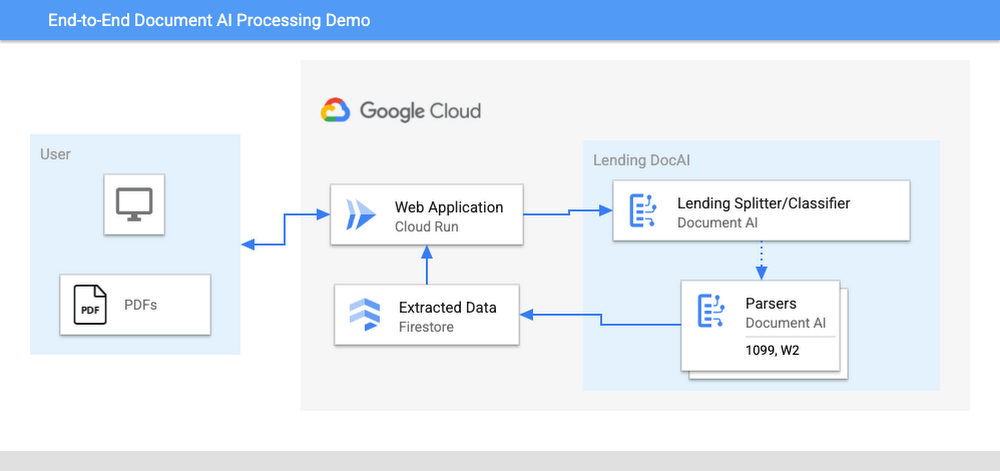
The User uploads multiple PDF files to the web application, hosted on Cloud Run.
An API call is made to the Lending Document Splitter & Classifier for each PDF file.
The output of the classifier (e.g. W-2, 1099-MISC, etc.) is then mapped to an appropriate specialized parser in the Google Cloud Project.
Each document file is sent to the appropriate specialized parser that matches the document type.
The entities are extracted by the parser processor and the data is written to Firestore.
The raw data is now retrieved from Firestore and displayed to the User showing the file classification and extracted values from each form.
The data values from all the forms are used together to calculate an individual income tax return.
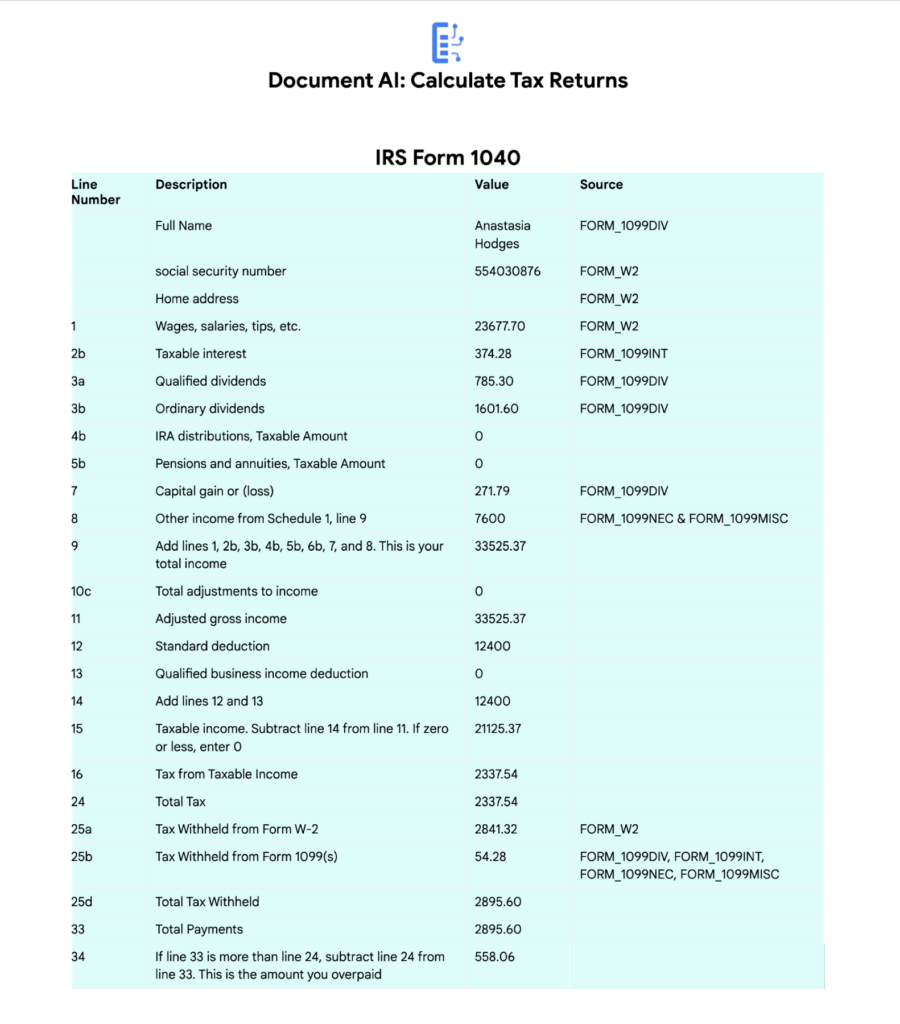
The Calculated Tax Rates/Incomes/Deductions are displayed to the User in a Tabular Format matching the IRS Form 1040. The app also displays which form data was used for each field. (Some output fields use values from multiple forms, such as line 25b.)
Step-by-Step directions
Want to try this out for yourself? Here’s how you can deploy and run this application using a Google Cloud Project. You can run this in Cloud Shell (Quickstart) or on your local machine.
NOTE: The Lending Processors in this Demo are in Limited GA as of March 2022. If you have a business use case for these processors, you can fill out and submit the Document AI limited access customer request form.
Install dependencies
- Clone the GitHub Repository to get the sample code.
git clone https://github.com/GoogleCloudPlatform/document-ai-samples.git
- Enter the directory for the tax pipeline demo
cd document-ai-samples/tax-processing-pipeline-python
- Install Python and the Google Cloud SDK if they aren’t already installed.
- Install the python libraries:
pip install -r requirements.txt
- Create a new Google Cloud project, and enable billing if you don’t already have one.
- Enable the Document AI API:
gcloud services enable documentai.googleapis.com
- Setup application default credentials:
gcloud auth application-default login
Deploy demo application
- Edit the config.yaml file, adding your own Project Details docai_processor_location: us # Document AI Processor Location (us OR eu)
docai_project_id: YOUR_PROJECT_ID # Project ID for Document AI Processors
firestore:
collection: tax_demo_documents # Set with your preferred Firestore Collection Name
project_id: YOUR_PROJECT_ID # Project ID for Firestore Database - Run setup scripts to create the processors and Cloud Run app in your project. python3 setup.py
gcloud run deploy tax-demo –source . - Visit the Deployed Web Page (You should get a link from the deployment command)
Calculate Tax Returns Homepage
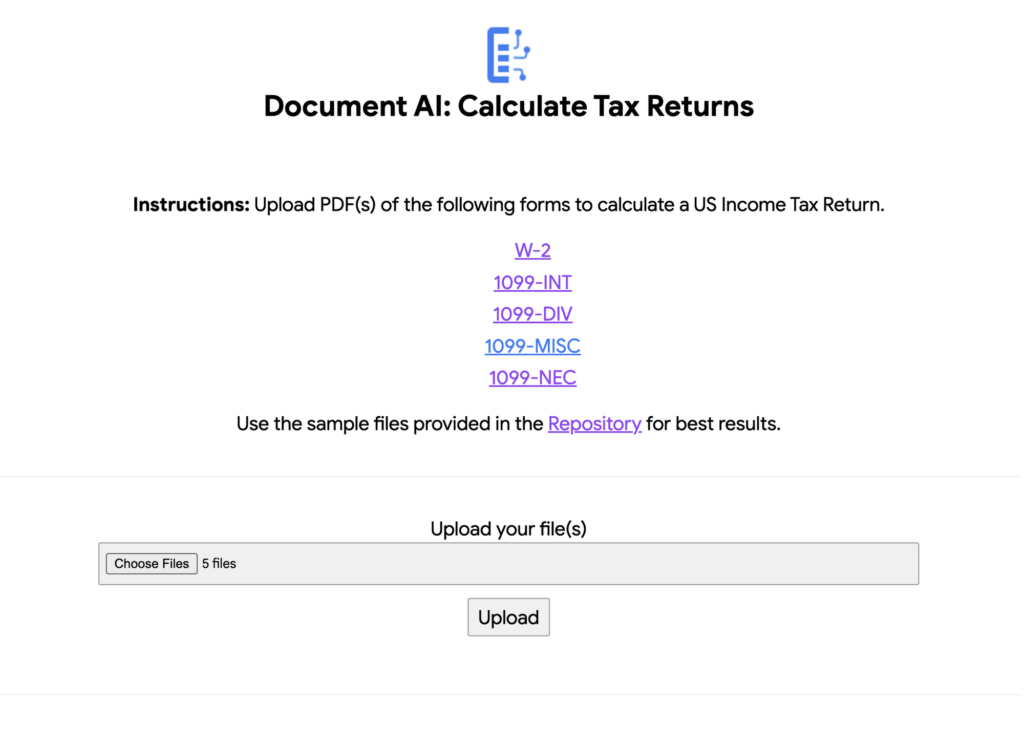
- Upload Documents. I created some sample documents you can download from the sample-docs folder of the repository.
This demo currently supports the following Document Types (2020 Editions)
W-2
1099-DIV
1099-INT
1099-MISC
1099-NEC
- Click “Upload” Button, wait for processing to complete.
The page will display the steps completed for each document file. These are also written to stdout for troubleshooting purposes.
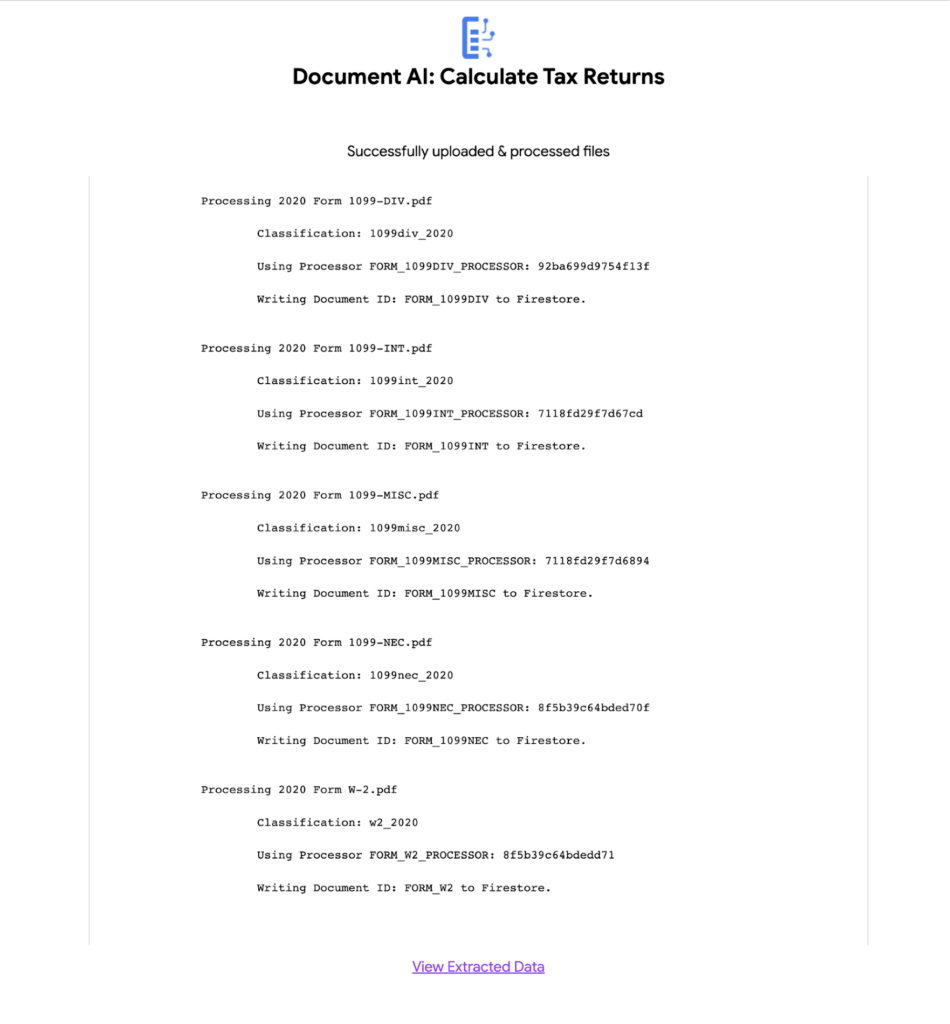
6. View the extracted values from each file.
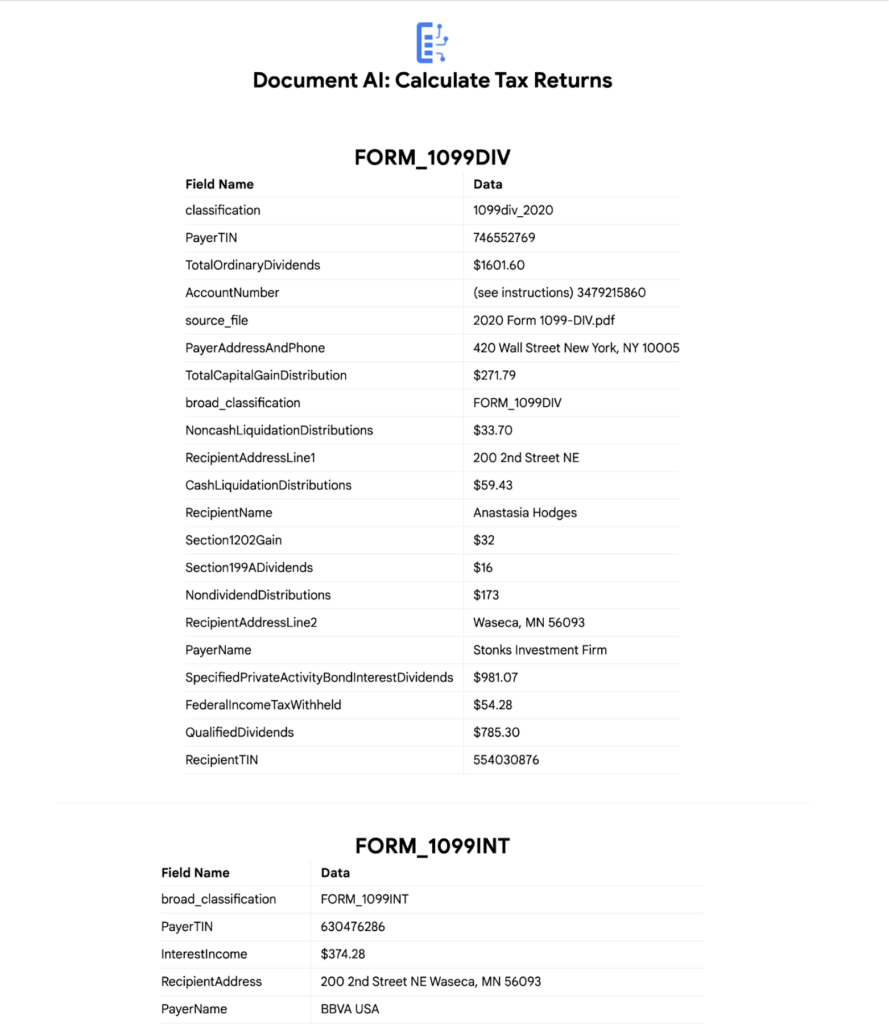
7. Click “Calculate Taxes” to see the tax calculation output
Conclusion
Warning: This is NOT financial advice, for educational purposes only.
Congratulations! You now have a fully functional tax processing application that can also be modified for use with other workflows that require data from multiple specialized documents.
The Document AI API is flexible and modular enough that most of the code in this example can be reused for any specialized processor.
Now tax returns can be filed with minimal manual effort!
If you want to learn more about Document AI, check out the Cloud Documentation and these videos:
- Getting started with the Document AI platform
- Process billions of pages and cut operational costs with DocAI
And if you want more hands-on experience, I recommend following these step-by-step codelabs to get started with the key features of Document AI:
UKG Ready: Meeting the Needs of Complex Machine Learning Models and Distributed Data Sets

3971
Of your peers have already read this article.
2:30 Minutes
The most insightful time you'll spend today!
Business Problem
UKG Ready primarily operates in the Small and Medium Business (SMB) space, so inherently many customers are forced to operate and make key business decisions with less Workforce Management (WFM) / Human Capital Management (HCM) data. In addition to volume, SMB lacks the variety of data needed to create a dynamic and agile organization. This puts SMB at a major disadvantage compared to larger segments.
Project Goals
People Insights module is committed to surfacing insights to customers in the context of their day-to-day duties and aid in decision making. With the SMB customer data limitations mentioned above, the goal of this project was to create a global dataset that augments individual customer data to bring light to less obvious, yet important information.
Challenges
UKG Ready is a highly configurable application that gives customers the opportunity to build solutions on a platform that meets their specific business needs. High configurability gives high flexibility to customers in their usage of the software. However, it becomes nearly impossible to create a global dataset for machine learning and data insights. UKG Ready manages just under 4 million of the US workforce and some 30,000+ customers. Despite the large employee dataset size, machine learning models that are specific to customers are starved for data because the individual customers have a relatively small employee population. Does that mean we cannot support our SMB customers’ decision making with ML?
Result
Partnering with Google, we were able to develop an approach that allowed us to standardize various domain entities (pay categories, time off codes, job titles, etc.) so that we could build a global dataset to augment SMB customer data. Using machine learning we were able to build a common vocabulary across our customer base. This common vocabulary encapsulates the nuances of how our customers manage their business and yet is generalized and standardized such that the data can be aggregated over the variety of customer configurations. This allows us to serve up practical insights to customers through various use cases. Our partnership allowed us to leverage Google Cloud Services to meet the needs of our complex machine learning models, distributed data sets and CI/CD processes.
How
UKG Ready decided to partner with Google for an end-to-end solution for the analytics offering. This allowed us to focus on our core business logic without having to worry about the platform, environment configurations, performance and scalability of the entire solution. We make use of various Google Cloud services such as Cloud Triggers, Cloud Storage, Cloud Functions, Cloud Composer, Cloud Dataflow, Big Query, Vertex AI, Cloud Pub/Sub… to host our analytics solution. Jenkins manages the entire CI/CD pipelines and cloud environments are configured and deployed using Terraform.
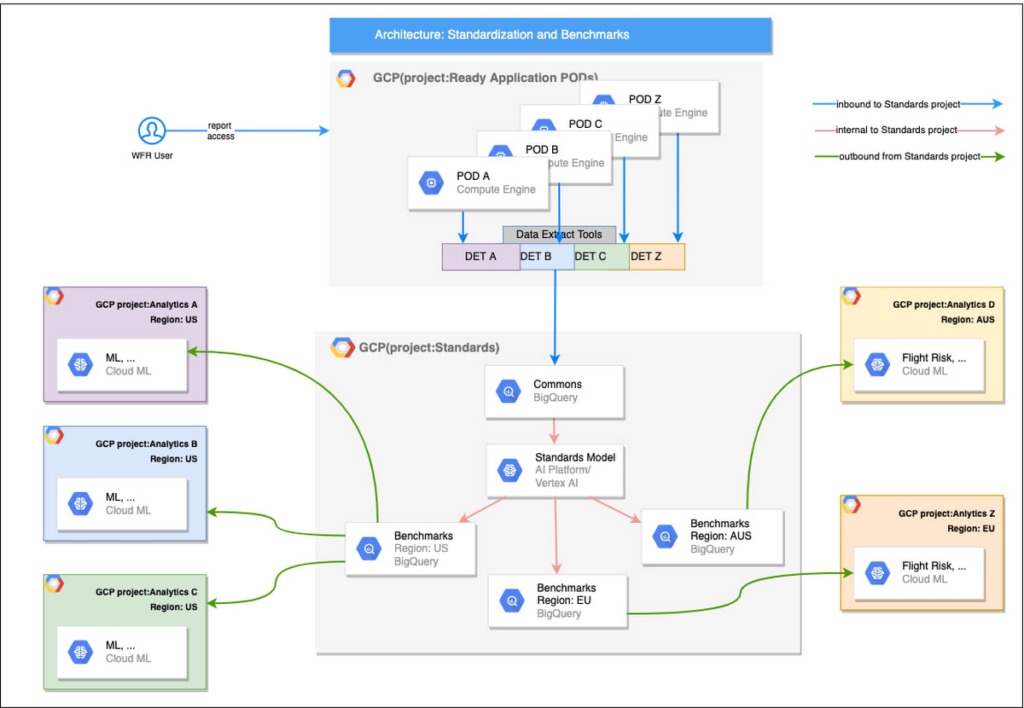
The standardization of business entities problem was solved in three distinct steps:
Step 1: Collecting aggregated data
We needed an approach to collect aggregated data from our highly distributed, sharded, multi-tenant data sources. We developed a custom solution that allows us to extract data aggregated at source for PII and GDPR considerations and transfer to Google Cloud Storage in the fastest manner possible. Data is then transformed and stored in Big Query. Services used: GCS, Cloud Functions, DataFlow, Cloud Composer and Big Query. All processes are orchestrated using Cloud Composer and detailed logging is available in Cloud Logging (Stackdriver).
Step 2: Applying NLP (Natural Language Processing)
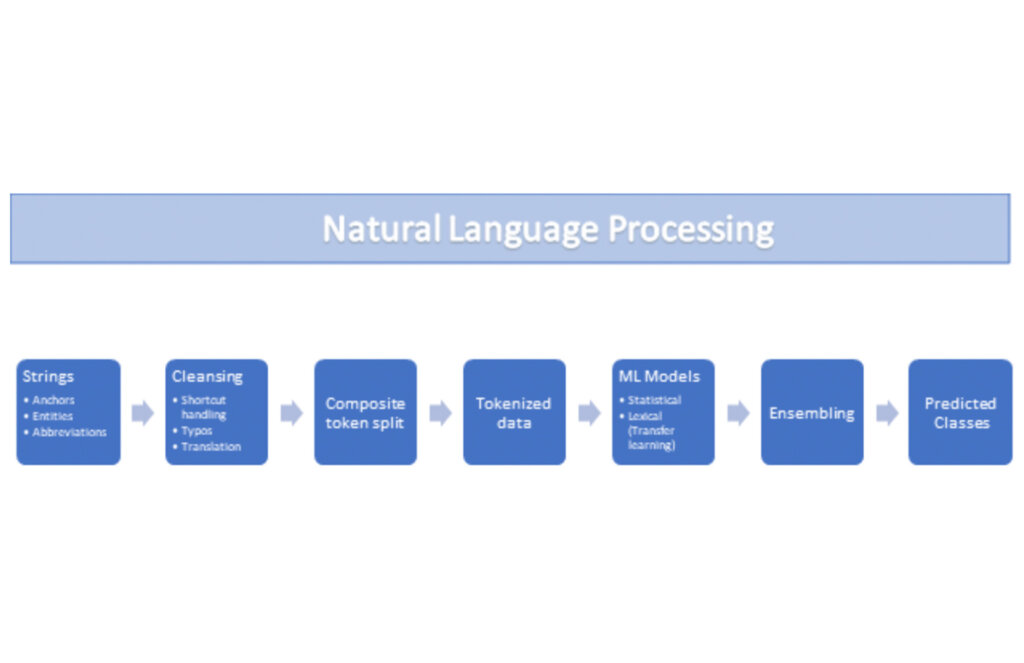
Once we had the variety of customer configurations or the business entities available, we then applied NLP algorithms to categorize and standardize these in buckets. This approach assumes that customers use natural language for configurations like job titles, pay codes etc.
String Preparation
The input data for string preparation process is an entity string or several strings, that describe one entity object (like name-description pair or code-name pair). The output represents set of tokens that may be used to run a classification/clustering model. The process of string preparation tokenizes strings, replaces shortcuts, handles abbreviations, translates tokens, handles grammatical errors and mistypes
ML Models
Statistical
The idea of the model is to use defined target classes (clusters) and assign several tokens (anchors) to each of them an entity that has any of those tokens would be “attracted” to appropriate class. All other tokens are weighted according to frequencies of usage of theses tokens in the entities with anchor tokens:
Using anchor tokens, we are building kind-of Word2Vec - dimensionality of vector is equal to number of target classes. The higher the specific dimension (cluster) value, the higher the probability of entity to be included in appropriate cluster. Final prediction for entity tokens list for specific class is sum of weights of all the tokens included. Predicted cluster is a cluster that has maximal prediction score.
Lexical Model
We managed to generate reasonable amount of labeled data during statistical model implementation and testing. That opens a possibility to build “classical” NLP model that uses labeled data to train classification neural network using pretrained layers to produce token embeddings or even string embeddings. We started experimentation with pre-trained models like GloVe and got good results with single words and bi-grams but started getting issues in handling of n-grams. Our Google account team came to our rescue and recommended some white papers that helped formulate our strategy. We now use Tensorflow nnlm-en-dim128 model to produce string embeddings – it was trained on 200B records English Google News corpus and produces for each input string 128-dimensional vector. After that we use several Dense and Dropout layers to build a classification model.
Ensembling
To perform ensembling all the model results for each class are cast to probabilities using softmax transformation with scale normalization. Final predicted probability is maximal average score of both models among all the classes scores – appropriate class is predicted class.
The machine learning models are deployed on Vertex AI and are used in batch predictions. Model performance is captured at every prediction boundary and monitored for quality in production.
Step 3: Making available common vocabulary
Having the standardized vocabulary, we then needed a mechanism to have the results be available in UKG Ready reports and customer specific models like Flight Risk and Fatigue. For this we again used Google Services for orchestration, data transformation and data storage.
Once the modeling is complete, we made the customer specific models leveraging the above architecture be available in Reports. We utilized our proven existing technology choices in GCP for orchestration, data transformation and data storage
Results
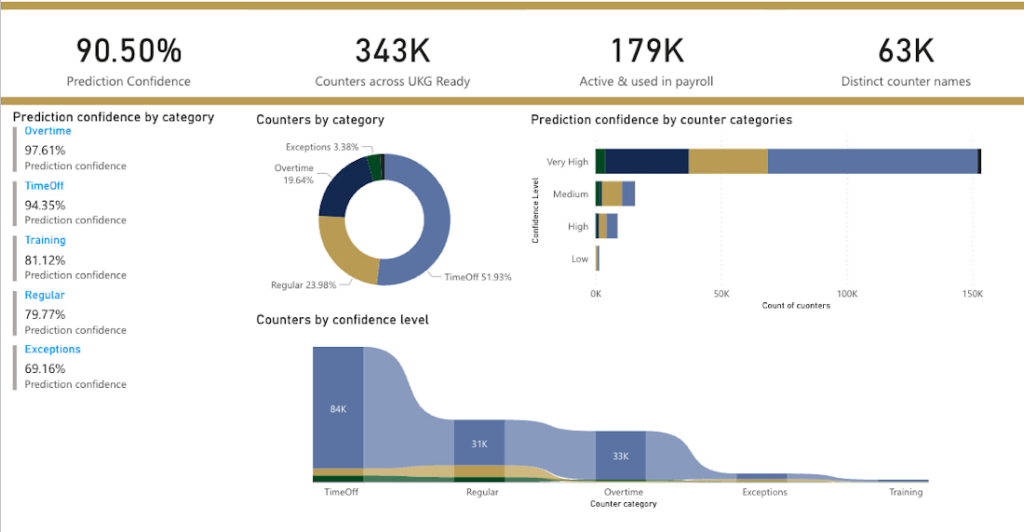
We are able to build a common vocabulary of our customers’ business entities with good confidence. And be an expert advisor to our SMB customers in their decision-making using machine learning. With the advice of our Google account team and using Google services we can add value to our product in a relatively short amount of time. And we are not done! We continue to use this platform for new use cases, complex business problems and innovative machine learning solutions.
Sample result:
Special thanks to Kanchana Patlolla , AI Specialist, Google for the collaboration in bringing this to light
Latest Features and Updates to Globally Bolster Translation Services

5293
Of your peers have already read this article.
2:00 Minutes
The most insightful time you'll spend today!
Let’s face it: in the globalized world, which is now more than ever a digital demand world, you need to scale and reach your customers right where they’re at. Translation is a critical piece of that, whether you’re translating a website in multiple languages or releasing a document, a piece of software, or training materials.
Manual translation does not scale, which is why machine translation, powered by machine learning (ML), is becoming more important to our customers. Machine translation has historically been challenging because of the sheer volume and breadth of content that can add value when translated into multiple languages. Companies acquire and share content in many languages and formats, and scaling translation to meet needs is a tall order due to multiple document formats, integrations with optical character recognition (OCR), and the need to correct for domain-specific terminology.
Our goal is to simplify translation services, while enabling flexibility and control for our customers’ unique needs across industries. Read on to learn more about recent features and updates.
Formatting matters: Document Translation is now GA
In many cases, the layout of a document dictates how it should be interpreted—e.g., readers navigate text and discern meaning based on formatting, like bold or italicized text, or markups for headers, paragraphs, and columns. Previously, to automate translation of documents, text needed to be separated from these layout attributes, meaning the document’s structure was either lost or needed to be recreated later in the developer pipeline, after the text had been translated. This required translation teams to do a lot of extra work and maintain a lot of additional code. But now, those steps are unnecessary. Formatting can be retained throughout the translation process, handled directly by the Translation API Advanced.
This feature lets customers translate documents in 100+ languages and supports document types such as Docx, PPTx, XLSx, and PDF while preserving document formatting.
And if your needs go beyond Document Translation, we can help you translate audio as well. For real-time streaming translation, check out the Media Translation API, and for offline transcription translation, combine the Translation API with the Video Intelligence API.
Real-Time translation when you need it, Batch when you don’t
One of the biggest differentiators for Translation API Advanced’s document translation capabilities is the ability to do real-time, synchronous processing for a single file.
For example, if you are translating a business document such as HR documentation, online translation provides flexibility for smaller files and provides faster results. You can easily integrate with our APIs via REST or gRPC with mobile or browser applications, with instant access to 100+ language pairs so that content can be understandable in any supported language.
Meanwhile, batch translation allows customers to translate multiple files into multiple languages in a single request. For each request, customers can send up to 100 files with a total content size of up to 1 GB or 100 million Unicode codepoints, whichever limit is hit first.
State of the Art (SOTA) accuracy, with flexibility for customization
In order to achieve the highest level of accuracy for your translation, we now support multiple options:
- Use Google’s SOTA translation models: Each year, Google heavily invests to improve the quality of our translations across Apps, Cloud APIs, and Chrome, as well to enable multilanguage answers in Search. A popular metric for automatic quality evaluation of Machine translation systems is the BLEU score, which is based on the similarity between machine translation and the reference translations that were generated by people. While we push out incremental improvements for individual models on a monthly cadence, there are also times where we make significant leaps. In the releases since 2019, we have improved our average BLEU score by 5pts on average across 100+ languages and 7pts on low resource languages.
- Leverage glossaries for specific terms and phrases: Glossary is our terminology control feature. It allows you to import source content to define preferred translations, such as product names or department names. Then, when calling the glossary in the API request, your preferred translations will be enforced. This will work for words as well as phrase translation.
- Pick a pre-trained model with model selection: If you create custom models for machine translation, we don’t think you should have multiple client libraries and multiple APIs to maintain in order for you to use the best model for your needs. Translation API Advanced now supports Model Selection. Pick your pretrained model or pick your custom ML model built on AutoML for any language pair you’ve created and use the same API and the same client library.
- Build custom translation models with AutoML: AutoML Translation is a suite of ML products that enable you to build high quality models for your own use case or data, with limited-to-no ML expertise or coding required. Bring your past human-validated translations to improve translation specificity for your domain.
Keep localization local with Regional Endpoints
If you are a customer operating in the EU, we recently launched an endpoint specifically for EU regionalization. This is a configurable endpoint for customers to store and perform machine translation processing of customer data only in the EU multi region. For now, this only supports our pretrained translation models and glossary, but batch translations will be coming soon.
How Eli Lilly uses Cloud Translation to translate content globally
Historically, translations at Eli Lilly have been complicated: numerous translation vendors have been needed for different languages and organizations, all with their own processes and expectations. On top of that, translations have been costly and slow.
To solve this, Eli Lilly took a codified approach to enable users and systems to spend less time and resources to safely generate quality translations.
Learn more, and even catch a demo, from Thomas Griffin, Translation Tech Lead & Global Regulatory Architect for Eli Lilly.
Learn more
- To get started using Cloud Translation – Advanced, complete the setup and then try the Translate text (Advanced edition) quickstart.
- Document Translation is priced per page. For more information, see pricing.
More Relevant Stories for Your Company

New Visual Interface for Google Cloud’s Speech-to-Text API Makes API Easy to Use !
At Google Cloud, we’re committed to making artificial intelligence (AI) accessible to everyone and easier to harness for new use cases. That’s why we’re excited to announce the general availability of our intuitive, new visual user interface for Google Cloud’s Speech-to-Text (STT) API, right in Google Cloud Console, which makes the API



90-Sec Demos of Truly Incredible Customer Care Calls Powered By AI
How real, fast, and easy do you think an AI-powered call center experience is for customers today? It's likely you have seen AI-powered chatbots and are deeply unimpressed with the static nature of the interaction between customers and service representatives. But that's not how Google Cloud's AI-powered contact centers are.


Google’s AutoML Vision Helps AES Fight Climate Change
Global warming is one of the big challenges of our times; if not the biggest challenge of our times, says Andres Gluski, President and CEO, AES, a Fortune 500 company that generates and distributes renewable energy in 15 countries to help end climate change. AES relies on Google's AutoML Vision

A Look Back on Google Cloud’s Data Analytics Development Efforts from June
June is the month that holds the summer solstice, and some of us in the northern hemisphere get to enjoy the longest days of sunshine out of the entire year. We used all the hours we could in June to deliver a flurry of new features across BigQuery, Dataflow, Data
