





Answering the 4 Common FAQs on Compute Engine

3870
Of your peers have already read this article.
1:30 Minutes
The most insightful time you'll spend today!
Compute Engine lets you create and run virtual machines (VMs) on Google’s infrastructure, allowing you to launch large compute clusters with ease. When it comes to getting started with Compute Engine, our customers have lots of questions—but some questions come up more often than others.
We looked at an internal list of the most popular Compute Engine documentation pages over a 30-day period to find out what topics were explored by users again and again. Here are the top four questions users have about Compute Engine, in order.
1. What are the different machine families
Compute Engine lets you select the right machine for your needs. You can choose from a curated set of predefined virtual machine (VM) configurations optimized for specific workloads, ranging from small-level purpose to large-scale use cases or create a machine type customized to your needs with our custom machine type feature.
Compute Engine machines are categorized by machine family, including:
- General-purpose: Best price-performance ratio for a variety of standard and cloud-native workloads
- Compute-optimized: Highest performance per core for compute-intensive workloads, such as ad serving or media transcoding
- Memory-optimized: More compute and memory per core than any other family for memory-intensive workloads, such as SAP HANA or in-memory data analytics
- Accelerator-optimized: Designed for your most demanding workloads, such as machine learning (ML) or high performance computing (HPC)
Read the documentation to learn more about each machine family category.
2. How to connect to VMs using advanced methods
In general, we recommend using the Google Cloud Console and the gcloud command-line tool to connect to Linux VM instances. However, some of our customers want to use third-party tools, or require alternative connection configurations.
In these cases, there are several methods that might fit your needs better than the standard connection options:
- Connecting to instances using third-party tools (e.g. Windows PuTTY, Chrome OS Secure Shell app), or MacOS or Linux local terminal)
- Connecting to instances without external IP addresses
- Connecting to instances as the root user Manually connecting between instances and running commands as a service account
Read the documentation to learn about advanced methods for connecting Linux VMs.
3. How to set up OS Login
OS Login lets you use IAM roles and permissions to manage access and permissions to VMs.
OS Login is the recommended way to manage users across multiple instances or projects. OS Login provides:
- Automatic Linux account lifecycle management
- Fine-grained authorization using Google IAM without having to grant broader privileges
- Automatic permissions updates to prevent unwanted access
- Ability to import existing Linux accounts from Active Directory (AD) and Lightweight Directory Access Protocol (LDAP)
You can also add an extra layer of security by setting up OS Login with two-factor authentication or manage organization access by setting up organization policies.
Read the documentation to learn how to configure OS login and connect to your instances.
4. How to manage SSH keys in metadata
Compute Engine allows you to manually manage SSH keys and local user accounts by editing public SSH key metadata.
You can add public SSH keys to instance and project metadata using:
- The Google Cloud Console The gcloud command-line tool
- API methods from the Google Cloud Client Libraries
Read the documentation to learn how to manually manage SSH keys and local user accounts in metadata.
Don’t see your question here? Check out the Compute Engine documentation for all of our recommended guides, tutorials, and resources.
2022 is a Big Year for the Gaming Industry!

3866
Of your peers have already read this article.
2:00 Minutes
The most insightful time you'll spend today!
Editor’s note: This post was originally published in TechPulse Belgium, where Jack Buser, Google Cloud’s Director of Game Industry Solutions, shared his trends for the industry this year.
The year 2022 will hold many surprises (with a few already dropping!), but there’s one near certainty: By this time next year there will be millions more gamers worldwide. It’s thanks to the industry’s little-noted technology growth drivers, which are getting stronger.
Games are no longer a niche hobby; it’s global, mainstream entertainment. There were 3.1 billion gamers worldwide in 2020. It’s estimated that by 2024 there will be another 500 million. With a global population of 7.7 billion, that’s nearly half the planet. Revenues in 2021 may reach $175 billion—likely more than movies, music, and books combined.
It’s a strength unique to the games industry, driven by the way its creators deploy new technology. Advances we see in everything from pricing and emerging markets, to backend computing and delivery suggests it will grow from here, on things like artificial intelligence and planet-scale networks.
Games forever, game better
It’s no surprise that videogames have become a huge business. Playing games is one of our deepest human expressions. There is a 4,500 year old board game that people still play, a testimony to the human love of testing cleverness, honing reactions, building trust, or just enlivening a day.
Video games do all that and for decades game makers have taken the most cutting-edge computing tech to make things better. We’ve seen electronic ping pong become shooting asteroids, to simple (yet iconic) 2D sprites evolve into believable, expressive 3D characters, all leading to today’s immersive worlds hosting tens of millions of players worldwide.
There’s more to come. I work at technology’s cutting edge for games, offering the world’s leading game creators access to powerful cloud computing, a low-latency global network, Machine Learning and AI, and much more. As usual, game innovators are taking up all these tools, building new narratives, new ways to play, new markets, and new jaw-dropping moments.
And game creators aren’t just thinking about players; they’re also thinking about viewers. More and more people are watching eSports, and creators are using the games medium to engage their viewers in increasingly immersive ways.
Streaming like never before
AI and ML are sharpening games and attracting new players in other ways. These technologies increasingly power everything from network performance to global player matching. The delicate but essential work of encouraging newcomers and discouraging bad actors, optimizing monetization, or building and scaling up new player environments.
Another important area we’re seeing cloud tools being put to use is in coordinating the workflows of global teams of developers. It’s not just a question of building faster anymore, but of collaborating and responding more effectively. The distributed work trends that featured so strongly during the pandemic had already featured in much of the game industry, increasingly it’s an industry standard. This will likely mean even faster and more diverse game development, addressing the needs of new markets where we’re seeing double-digit growth.
Tools like cloud streaming, 5G, and edge computing are likely to accelerate the use of Game Streaming, Augmented Reality, and other types of immersive gameplay. If my metaverse doesn’t have games, count me out! We’re looking at some exciting new developments in coming months with some major industry players. Stay tuned.
A big year for the games industry
As a premier provider of solutions, tools and services to games companies, our engineering job is complex and global. Fortunately, our mission is simple: Help game companies transform to meet new global opportunities with planet scale solutions. Technology has brought the gaming industry to astonishing heights, and is the perfect compliment to great storytelling and creative ingenuity.
As a decades-long industry veteran, I’ve never been more impressed with what technology can do for our industry. Looking past 2022, when we’ll see more compute, more AI, more AR, and more innovation around healthy and exciting game play, there is just one near certainty: More growth.
Rethinking retail with Google Cloud Retail Search

2812
Of your peers have already read this article.
3:30 Minutes
The most insightful time you'll spend today!
Cloud Retail Search, part of Discovery Solutions For Retail portfolio, helps retailers significantly improve the shopping experience on their digital platform with ‘Google-quality’ search. Cloud Retail Search offers advanced search capabilities such as better understanding user intent and self-learning ranking models that help retailers unlock the full potential of their online experience.
Google Cloud’s Discovery Solutions For Retail are a set of services that can help retailers improve their digital engagement and are offered as part of our industry solutions.
Executive Summary
Retailers are always working on trying to keep up with the ever changing consumer expectations and trying to forecast the next trend that can impact sales and revenue.
The pandemic brought its own (and largely new) set of challenges which further complicated the issue over the last two years. The retailers were forced to adapt to the new consumer (low physical touch) behavior in which the browsing and product research was largely digital (endless aisle) and accelerated other trends such as buy online and pick up in stores (BOPIS), curbside pick up and pick up lockers. According to a McKinsey Global Survey from early last year, the pandemic has accelerated the pace of digital transformation by several years.
The National Retail Federation (NRF) estimates that retail sales are expected to grow between 6% and 8% in 2022 (slower growth rate than in 2021), as consumers spend more on services instead of goods, deal with inflation and higher food & gas prices due to geopolitical disruptions in the world.
And the competition continues to be fierce as ever. Amazon continues its dominance in the U.S. retail world and new PYMNTS data shows that Amazon’s share of US Ecommerce sales hit an all-time high of 56.7% in 2021.
Customers now have more choices than ever on how they want to engage with the retailers, where they want to spend the money and make their purchase. They also have increased expectations from the retailers around providing a high quality product discovery experience, which is forcing the retailers to invest heavily on improving customer engagement on their digital platforms to boost conversion rate and overall customer loyalty.
This is where Retail Search can help by providing an enhanced search experience that uses Google-quality search models to understand the customer intent and takes into account the retailer’s first party data (such as promotions, available inventory and price) for ranking results.
How is Google Cloud Retail Search Different
The Ecommerce platform on-site search use case is not new and retailers have been trying to solve it effectively for the last two decades. Most retailers recognize that search is a critical service on the platform and have spent countless resources to improve and fine tune it over the years. Yet the challenge remains. According to a Baymard Institute study in late as 2019, 61% of sites still required their users to search by the exact product type jargon the site uses.
However, users now expect the same robust and intuitive search features as is offered by Google.com and other popular web platforms, who seem to have the uncanny ability to intelligently interpret and yield relevant results to complex search queries.
Google’s decades of experience and research in search technology benefits Cloud Retail Search solution and that is what differentiates it from the competition.
- Advanced Query Understanding: Retail Search can provide more relevant results for the same query due to better query understanding features and knowing when to broaden or narrow the query results. While most search engines still rely largely on keyword based or matching tokens results, Retail Search has the advantage of being able to leverage Google search algorithms to return highly relevant results for product listings and category pages.
- Semantic Search: Intent recognition is a key requirement for semantic search and identifying what the customers mean when they enter the query is a key strength of Retail Search. This is critical for retailers since this has a direct impact on Clickthrough rate, Conversion rate and the Bounce Rate.
- Personalized Search Results: Another key differentiator for Retail Search is its ability to leverage user interaction data and ranking models to provide hyper personalized search results. Retailers are able to optimize search performance to deliver desired outcomes: better engagement, revenue, or conversions.
- Self-Learning and Self-Managed Solution: Retail Search models get better over time because of the self-learning capabilities built into the solution. In addition, the service is fully managed, which saves precious resources needed to keep it running and managing its set up.
- Strong Security Controls: The service runs on Google Cloud and follows security best practices to keep our customers’ data secure. Google never shares model weights or customer data across customers using the Retail API or other Discovery Solution products. For more details about this data use, see a description of Retail API data use.
High Level Conceptual View
Here is a simplified high-level view of Retail Search API. Retailers can call the API for the given search query and get back the results which can then be displayed on their digital properties.
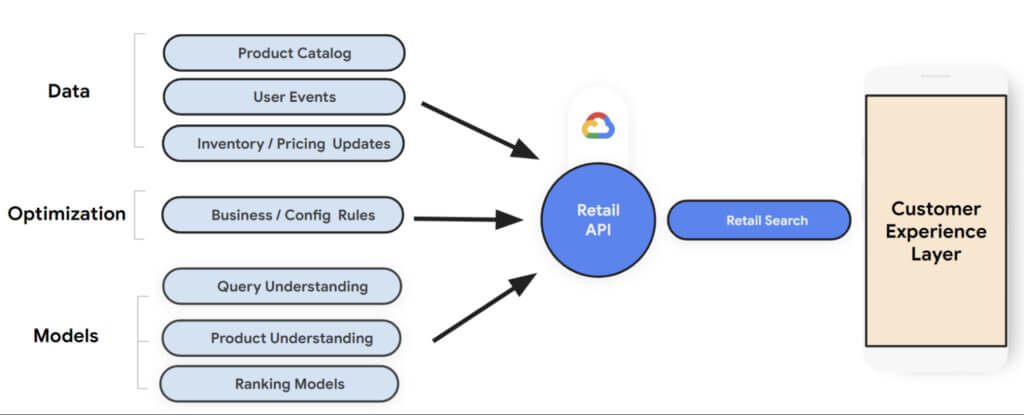
The returned results contains two types of information:
- Search results: Query search results including product listings and category pages based on advanced query understanding and semantic search.
- Dynamic faceted search attributes: Faceted Search is a feature that allows further refinement of the search by providing ways to apply additional filters while returning results.
Retail Search needs the following datasets as input to train its machine learning models for search:
- Product Catalog: Information about the available products including product categories, product description, in-stock availability, and pricing.
- User Events: This is the clickstream data that contains user interaction information such as clicks and purchases.
- Inventory / Pricing Updates: Incremental updates to in-stock availability and pricing as that information is updated.
(Keeping the product catalog up to date and recording user events successfully is crucial for getting high-quality results. Set up Cloud Monitoring alerts to take prompt action in case any issues arise).
Retailers also have the ability to set up business/config rules to customize their search results and optimize for business revenue goals such as Clickthrough rate, Conversion rate, Average size order etc.
How to get started
Retail Search is generally available now and anyone with a Google cloud account can access it. If you don’t already have an account, you can start with a trial account for free here.
Establish a Success Criteria: It’s important to establish a success criteria for measuring the effectiveness of Retail search. Get a consensus on which factor(s) you want to include in scope for measuring the effectiveness of Retail Search. This could include one or two from the following: Search Conversion Rate, Search Average Order Value, Search Revenue Per Visit and Null Search Rate (No Results Found).
- Initial Set Up: Create a Google Cloud Project and set up the Retail API. When you set up the Retail API for a new project, the Google Cloud Console displays the following three panels to help you configure your Retail API project:
- Catalog: displays product catalog and a link to import catalog.
- Event: displays user events and a link to import historical user events.
- Serving configs: contains details on serving configuration and a link to create a new serving configuration.
- Measuring Performance: Retail dashboards provide metrics to help you determine how incorporating the Retail API is affecting the results. You can view summary metrics for your project on the Analytics tab of the Monitoring & Analytics page in Cloud Console.
- Set up A/B Experiments: To measure the performance of Retail Search with another search solution, you can set up A/B tests using a third-party experiment platform such as Google Optimize.
Summary:
As retailers try to navigate through the post-pandemic world where supply chain failures and digital transformation acceleration are major focus areas, they now also have to keep a close eye on the recent geopolitical challenges resulting in rising inflation and costs.
While we can all agree that in-store shopping will continue to be a major source of revenue, it is also important for retailers to tweak the in-store experience for the digital world. Trends such as buy online and pick up in stores (BOPIS), curbside pick up and pick up lockers are here to stay.
Given all the above, consumer engagement and digital experience is more important now than ever before. The cost of search abandonment is way too high and has both short and longer term impact. Retail Search is a great solution to help reduce churn, improve conversion and retention. It provides Google-quality search models to help understand customer intent and the retailers have the ability to set up business/config rules to optimize search results for business revenue goals such as Clickthrough rate, Conversion rate and Average size order.
4885
Of your peers have already watched this video.
1:30 Minutes
The most insightful time you'll spend today!
How does Google Pick its Data Center ?
Google is well known for its sustainable tech and hardware initiatives. Did you know alongside its environmental friendly designs of its data centers, it takes into account various factors such as redundant power supplies, data replication, network connectivity, etc. Watch the video to learn more.
12032
Of your peers have already watched this video.
3:26 Minutes
The most insightful time you'll spend today!
How L&T Financial Services Processes 95% of Motorcycle Loans in Less Than Two Minutes
L&T Financial Services is one of the largest lenders in India. India’s demonetization policy in recent years has led to a shift from cash transactions to digital payments. In 2016, the government withdrew 500 and 1000 rupee notes from circulation and encouraged a heavily cash-based population to deposit their canceled notes in banks. Financial institutions needed to pivot to a new way of doing business to stay competitive. L&T Financial Services modernized its IT infrastructure to keep up with changes and capture digital opportunities.
“Working capital is crucial to stimulate growth in rural communities. Our role as a lender is to provide access to funds. We don’t want to burden borrowers with the complexities of getting a loan. Towards this end, digitization is an important step,” says Dinanath Dubhashi, Managing Director and CEO at L&T Financial Services. “Google Cloud helps us streamline service delivery and identify the right customers. By offering the fastest processing time in the industry, we want to be the go-to lender for all customers.”
L&T Financial Services considered multiple cloud providers before choosing Google Cloud. According to Dinanath, Google Cloud understands both the need for businesses to move fast and the need for IT to modernize at different speeds. “We weren’t forced to abandon existing IT systems and migrate lock, stock, and barrel to Google Cloud on day one.”
L&T Financial Services engaged Google Cloud Professional Services to guide its digital transformation journey. The smooth migration from proof of concept to full-scale deployment on Google Cloud took a matter of months.
“Collaboration: a small idea with big opportunities. G Suite helps us connect remote branches with the head office, easily access shared files to submit and track approvals, and conduct face-to-face discussions to accelerate approval processes.”
—Dinanath Dubhashi, MD and CEO, L&T Financial Services
Digitizing the workforce with G Suite
The move to the cloud at L&T Financial Services started in 2017 when the company introduced G Suite to its 14,500 employees. The legacy email system was cumbersome to use, especially for frontline staff who need email access while they are on the road. Using Gmail, employees can connect with customers and co-workers from anywhere, on any device. Employees save time by scheduling meetings with Calendar, collaborating on Docs, and conducting video calls using Hangouts Meet.
Converting data into credit insights using BigQuery
Taking data intelligence one step further, L&T Financial Services adopts a responsible lending approach by applying algorithm-based data analytics to improve credit standards. Beyond traditional data such as credit score and credit payment history, the company also considers macro-economic indicators for risk audits. For example, a farmer’s ability to pay off the loan of his new tractor depends on a successful planting and harvest. So L&T Financial Services feeds long-term data into BigQuery and runs queries to predict loan defaults based on rainfall and crop yield.
FAQs: Everything Your Need to Know About Cloud Computing
6619
Of your peers have already read this article.
1:30 Minutes
The most insightful time you'll spend today!
There are a number of terms and concepts in cloud computing, and not everyone is familiar with all of them. To help, we’ve put together a list of common questions, and the meanings of a few of those acronyms. You can find all these, and many more, in our learning resources.
What are containers?
Containers are packages of software that contain all of the necessary elements to run in any environment. In this way, containers virtualize the operating system and run anywhere, from a private data center to the public cloud or even on a developer’s personal laptop. Containerization allows development teams to move fast, deploy software efficiently, and operate at an unprecedented scale. Read more.
Containers vs. VMs: What’s the difference?
You might already be familiar with VMs: a guest operating system such as Linux or Windows runs on top of a host operating system with access to the underlying hardware. Containers are often compared to virtual machines (VMs). Like virtual machines, containers allow you to package your application together with libraries and other dependencies, providing isolated environments for running your software services. However, the similarities end here as containers offer a far more lightweight unit for developers and IT Ops teams to work with, carrying a myriad of benefits. Containers are much more lightweight than VMs, virtualize at the OS level while VMs virtualize at the hardware level, and share the OS kernel and use a fraction of the memory VMs require. Read more.
What is Kubernetes?
With the widespread adoption of containers among organizations, Kubernetes, the container-centric management software, has become the de facto standard to deploy and operate containerized applications. Google Cloud is the birthplace of Kubernetes—originally developed at Google and released as open source in 2014. Kubernetes builds on 15 years of running Google’s containerized workloads and the valuable contributions from the open source community. Inspired by Google’s internal cluster management system, Borg, Kubernetes makes everything associated with deploying and managing your application easier. Providing automated container orchestration, Kubernetes improves your reliability and reduces the time and resources attributed to daily operations. Read more.
What is microservices architecture?
Microservices architecture (often shortened to microservices) refers to an architectural style for developing applications. Microservices allow a large application to be separated into smaller independent parts, with each part having its own realm of responsibility. To serve a single user request, a microservices-based application can call on many internal microservices to compose its response. Containers are a well-suited microservices architecture example, since they let you focus on developing the services without worrying about the dependencies. Modern cloud-native applications are usually built as microservices using containers. Read more.
What is ETL?
ETL stands for extract, transform, and load and is a traditionally accepted way for organizations to combine data from multiple systems into a single database, data store, data warehouse, or data lake. ETL can be used to store legacy data, or—as is more typical today—aggregate data to analyze and drive business decisions. Organizations have been using ETL for decades. But what’s new is that both the sources of data, as well as the target databases, are now moving to the cloud. Additionally, we’re seeing the emergence of streaming ETL pipelines, which are now unified alongside batch pipelines—that is, pipelines handling continuous streams of data in real time versus data handled in aggregate batches. Some enterprises run continuous streaming processes with batch backfill or reprocessing pipelines woven into the mix. Read more.
What is a data lake?
A data lake is a centralized repository designed to store, process, and secure large amounts of structured, semistructured, and unstructured data. It can store data in its native format and process any variety of it, ignoring size limits. Read more.
What is a data warehouse?
Data-driven companies require robust solutions for managing and analyzing large quantities of data across their organizations. These systems must be scalable, reliable, and secure enough for regulated industries, as well as flexible enough to support a wide variety of data types and use cases. The requirements go way beyond the capabilities of any traditional database. That’s where the data warehouse comes in. A data warehouse is an enterprise system used for the analysis and reporting of structured and semi-structured data from multiple sources, such as point-of-sale transactions, marketing automation, customer relationship management, and more. A data warehouse is suited for ad hoc analysis as well custom reporting and can store both current and historical data in one place. It is designed to give a long-range view of data over time, making it a primary component of business intelligence. Read more.
What is streaming analytics?
Streaming analytics is the processing and analyzing of data records continuously rather than in batches. Generally, streaming analytics is useful for the types of data sources that send data in small sizes (often in kilobytes) in a continuous flow as the data is generated. Read more.
What is machine learning (ML)?
Today’s enterprises are bombarded with data. To drive better business decisions, they have to make sense of it. But the sheer volume coupled with complexity makes data difficult to analyze using traditional tools. Building, testing, iterating, and deploying analytical models for identifying patterns and insights in data eats up employees’ time. Then after being deployed, such models also have to be monitored and continually adjusted as the market situation or the data itself changes. Machine learning is the solution. Machine learning allows businesses to enable the data to teach the system how to solve the problem at hand with machine learning algorithms—and how to get better over time. Read more.
What is natural language processing (NLP)?
Natural language processing (NLP) uses machine learning to reveal the structure and meaning of text. With natural language processing applications, organizations can analyze text and extract information about people, places, and events to better understand social media sentiment and customer conversations. Read more.
Learn more
This is just a sampling of frequently asked questions about cloud computing. To learn more, visit our resources page at cloud.google.com/learn.
More Relevant Stories for Your Company

Google’s Research and Data Insights Solutions to Power Drug Development and Clinical Research
In order to be successful, research needs to be replicable, so scientists can build on past work and insights. However, an article in Nature warned that as much as 50% of published drug development research could not be reproduced in subsequent trials. As a result, promising drug candidates sometimes led to disappointment,

Google Cloud and Univision Partnership to Up the Ante in UX for Spanish-speaking Audience
The past year has given everyone lots to think about—about our priorities as people and as businesses. As the world retreated behind closed doors, we saw how shared interests and experiences can bring us together. As the world grappled with a common enemy, we witnessed just how differently individuals, communities

Cloud Bigtable Helps Fraud-detection Company Meet Scalability Demands and Secure Customer Data
Editor’s note: Today we are hearing from Jono MacDougall , Principal Software Engineer at Ravelin. Ravelin delivers market-leading online fraud detection and payment acceptance solutions for online retailers. To help us meet the scaling, throughput, and latency demands of our growing roster of large-scale clients, we migrated to Google Cloud and its

Explore The New Era of Flexibility: Streamlined AWS-to-Google Cloud Migration
As an IT leader, you’re asked to do it all: innovate and optimize your tech stack for business outcomes — all while being secure and compliant. It takes heroic efforts to achieve innovation and progress while also tightening budgets and teams. This is why many of you are considering migrating applications
