





End Security Risks with the Unattended Projects Recommender Feature

6113
Of your peers have already read this article.
3:00 Minutes
The most insightful time you'll spend today!
In fast-moving organizations, it’s not uncommon for cloud resources, including entire projects, to occasionally be forgotten about. Not only such unattended resources can be difficult to identify, but they also tend to create a lot of headaches for product teams down the road, including unnecessary waste and security risks.
To help you prune your idle cloud resources, we’re excited to introduce Unattended Project Recommender. It’s a new feature of Active Assist that provides you with a one-stop shop for discovering, reclaiming, and shutting down unattended projects. With actionable and automatic recommendations, you no longer have to worry about wasting money or mitigating security risks presented by your idle resources. Unattended Project Recommender uses machine learning to identify, with a high degree of confidence, projects that are likely abandoned based on API and networking activity, billing, usage of cloud services, and other signals. This feature is available via the Recommender API today, making it easy for you to integrate with your company’s existing workflow management and communication tools, or export results to a BigQuery table for custom analysis.
Thousands of projects can be unattended in large organizations, presenting major security risks
Your cloud projects can go abandoned or unattended for a number of reasons — ranging from a test environment that’s no longer needed, to project cancellation, to project owner switching jobs, and more. Not only can such projects contribute to your cloud bill (waste) but they may contain security issues such as open firewalls or privileged service account keys that attackers can exploit to get a hold of your cloud resources for cryptocurrency mining or, worse, compromise your company’s sensitive data. These security risks tend to grow over time because the latest best practices and patches are usually not applied to unattended projects.
We experience this issue here at Google, too… In fact, it has been on Google’s internal security team’s radar for some time now, so we joined forces and looked into this problem together, starting with our very own “google.com” organization cloud projects. We quickly found some projects that were unattended, but remediating this issue was easier said than done due to challenges in several areas:
- Detection: With lots of signals available to you via sources like Cloud Monitoring, what are the right ones you should look at (e.g. API, networking, user activity)? How can you tell the difference between an unattended project and a project that has a low level of activity by design (e.g. a “shell” project that holds an auth token)?
- Remediation: Once you have identified a project that seems abandoned, how do you go about ensuring that it’s indeed an unattended project? How do you reduce the risk of deleting something that might be essential to a production workload, causing irreversible data loss? How do you solve this at the scale of your entire organization, beyond a one-time cleanup?
Over the course of 2021 we built and tested a Google-internal prototype first, cleaning up many of our internal unattended projects, and then worked with a number of Google Cloud customers to build and tune this feature based on real-life data (thank you to all of our early adopters for working with us and your generous feedback that helped us shape this feature!) It was not uncommon for us to come across organizations with thousands of unattended projects, and we’re very excited to bring Unattended Project Recommender to all customers, in public preview.
Discovering and acting on unattended project recommendations
Unattended Project Recommender analyzes usage activity across all projects under your organization, including the following data:
- API activity (e.g. service accounts with authentication activity, API calls consumed)
- Networking activity (ingress and egress)
- Billing activity (e.g. services with billable usage)
- User activity (e.g. active project owners)
- Cloud services usage (e.g. number of active VMs, BigQuery jobs, storage requests)
Based on these signals, it can generate recommendations to clean up projects that have low usage activity (where “low usage” is defined using a machine learning model that ranks projects in your organization by level of usage), or recommendations to reclaim projects that have high usage activity but no active project owners. Here’s what an example post-processed summary list of recommendations can look like for the “foobar” organization that has 3 projects:
Project ID: demo-project-307815Recommendation: CLEANUP_PROJECTProject ID: new-projectRecommendation: N/AProject ID: bobs-playground-projectRecommendation: RECLAIM_PROJECT
In addition to the recommendations, you can also examine the underlying project activity insights that the recommendations are based upon. The insights provide additional information that can be useful for integration with your organization’s existing workflows and automation (e.g. send an auto-generated email or chat message to project owners based on the list provided by the owners field). Here’s an example insight payload:
content:activeAppengineInstanceDailyCount: 0activeCloudsqlInstanceDailyCount: 0activeGceInstanceDailyCount: 3activeServiceAccountDailyCount: 1apiClientDailyCount: 18922 // Daily average API calls producedbigqueryInflightJobDailyCount: 0bigqueryInflightQueryDailyCount: 0bigqueryStorageDailyBytes: 0bigqueryTableDailyCount: 0consumedApiDailyCount: 0 // Daily average API calls consumeddatastoreApiDailyCount: 0gcsObjectDailyCount: 11gcsRequestDailyCount: 0gcsStorageDailyBytes: 2663548hasActiveOauthTokens: false // OAuth tokens used in the last 180 dayshasBillingAccount: truenumActiveUserOwners: 1owners: // List of project owners- activeOnProject: falsemember: user:user1@example.com- activeOnProject: truemember: user:user2@example.comserviceWithBillableUsage:– Cloud Storage- Compute EnginevpcEgressDailyBytes: 264456938 // Daily average VPC egress bytesvpcIngressDailyBytes: 392435047 // Daily average VPC ingress bytesusagePercentile: 20 // Level of usage relative to other projects
GCP projects are used in many different ways and for many different purposes. In case you get a recommendation to delete a project that’s being used in a way that’s out of the scope for this feature, you can dismiss the recommendation and it will stop showing up for the given project.
Restoring deleted projects
When you choose to shut down a project using the projects.delete() method, it gets marked for deletion. After a project is marked for deletion, it becomes unusable, all resources within that project are shut down, and a 30-day wait period for the project and all of its data to get fully deleted begins.
In case a useful project is accidentally shut down, you have the option to restore the project within that 30-day wait period. Since restoring allows you to recover most but not necessarily all of your project data and resources, we recommend carefully examining the utilization insights associated with a project and considering any additional utilization signals that may not be captured by the Unattended Project Recommender before taking the cleanup action.
Early customer success stories
A number of enterprise customers are already using Unattended Project Recommender to keep their organizations clean of unattended projects and resources.
Decathlon, a French sporting goods retailer, is excited for the insight Unattended Project Recommender will bring to their environment, and are already deploying it as a part of their latest cloud security initiatives.
“After a thorough test of this feature and the validation of our CISO, we ended up deleting our first 775 projects, and no one complained! A great help to improve our security. The next step for us will be to operationalize it at scale, and implement a company wide policy for unattended resource management.” —Adeline Villette, Cloud Security Officer
For Veolia, one of the world’s largest water, waste and energy management companies, not only does this feature reduce security risks and waste, but also helps drive cultural shift and alignment with its ecological transformation strategy.
“This feature allows us to reduce our costs and security debt on assets that are no longer in use, and is also fully in line with Veolia’s philosophy of limiting its carbon footprint. After having tested Unattended Project Recommender on more than 3,000 projects throughout our organization, we are looking to bring it as proactive alerts to our project owners at scale.”—Thomas Meriadec, Product Manager
Box, a secure cloud content management provider, views it as a foundation for building a repeatable process to remediate unused resources.
“Unattended Project Recommender is a great fit for us. It gives us a unified view of project usage across our entire organization and enables us to address security risks of legacy projects in a systematic and organized manner, ensuring an even safer environment.” —Matt Bowes, Staff Security Engineer
Getting started with the Unattended Project Recommender
To help you get started, we’ve prepared a Cloud Shell tutorial (source code) that you can use to find unattended project recommendations within your own Projects/Folders/Organization. Click this button to clone the tutorial from GitHub and run in your Cloud Shell environment:

As you can see, listing recommendations for your projects only takes a few clicks with the tutorial (special thanks to Lanre Ogunmola, Security & Compliance Specialist, for making this look so easy)! For additional detail on using the gcloud CLI or API to discover unattended project recommendations, please refer to the documentation page.
You can also automatically export all recommendations from your Organization to BigQuery and then investigate the recommendations with DataStudio or Looker, or use Connected Sheets that let you use Google Workspace Sheets to interact with the data stored in BigQuery without having to write SQL queries.
As with any other Recommender, you can choose to opt out of data processing at any time by disabling the appropriate data groups in the Transparency & control tab under Privacy & Security settings.
We hope that you can leverage Unattended Project Recommender to improve your cloud security posture and reduce cost, and can’t wait to hear your feedback and thoughts about this feature! Please feel free to reach us at active-assist-feedback@google.com and we also invite you to sign up for our Active Assist Trusted Tester Group if you would like to get early access to the newest features as they are developed.
How to overcome the 5 most common SecOps challenges

3017
Of your peers have already read this article.
3:00 Minutes
The most insightful time you'll spend today!
The success of the modern security operations center, despite the infusion of automation, machine learning, and artificial intelligence, remains heavily dependent on people. This is largely due to the vast amounts of data a security operations center must ingest—a product of an ever-expanding attack surface and the borderless enterprise brought on by the rapid rise of cloud adoption.
All those alerts coming in mean proactive and reactive human decision making remains critical.
Perhaps it should come as no surprise that the information security analyst now ranks as No. 1 News’ 100 Best Jobs Rankings, “determined by identifying careers with the largest projected number and percentage of openings through 2030, according to the U.S. Bureau of Labor Statistics.” Security, and specifically detection and response, is not only a business imperative—it is arguably the top worry on the minds of CEOs.
However, the security analyst is also one of the most likely professionals to want to leave their jobs, according to a newly released “Voice of the SOC Analyst” study conducted by Tines.
What gives? Turnover woes are attributable to several key SecOps challenges that never seem to budge.
1) Alert fatigue and false positives: Have you ever received so much spam or junk mail that you end up ignoring your new messages entirely, leading you to miss an important one? The same can happen for alerts. Too much noise is unsustainable and can lead to the real threats being missed, especially as perimeters expand and cloud adoption increases.
2) Disparate tools: Already in the company of too many point-detection tools, security operations professionals are saying hello to a few more in the era of remote work and increased cloud demands. The latest count is north of 75 security tools that need to be managed by the average enterprise.
3) Manual processes: Use case procedures that result in inconsistent, unrepeatable processes can bottleneck response times and frustrate SecOps teams. Not everything in the SOC needs to—or should be—automated, but much can be, which then frees up analysts and engineers to concentrate on higher-order tasks and be able to more easily train new employees.
4) Talent shortage: Death, taxes, and the cybersecurity skills shortage. As sure as the sun will rise tomorrow, so will the need for skilled individuals to wage the cybersecurity fight. But what happens when not enough talent is filling the seats? Teams must compensate to fill the gap.
5) Lack of visibility: Security operations metrics are critical for improving productivity and attracting executive buy-in and support, but SecOps success can be difficult to track, as reports can require a significant amount of work to pull together.
The caveat of course is that it would be rare to find a SecOps team working without the above challenges. As such, some of the immediate steps you can take to push back against these constraints focus on people-powered processes and technologies to remedy the issues.
According to a recent paper co-authored by Google Cloud and Deloitte:
Humans are—and will be—needed to both perform final triage on the most obtuse security signals (similar to conventional SOC Level 3+) and to conduct a form of threat hunting (i.e. looking for what didn’t trigger that alert).
Machines will be needed to deliver better data to humans, both in a more organized form (stories made of alerts) and in improved quality detections using rules and algorithms— all while covering more emerging IT environments.
Both humans and machines will need to work together on mixed manual and automated workflows.
So, what does this ultimately mean you must do to improve your security operations? Here are five practical suggestions:
Detect Threats More Efficiently
Efficiencies within the SOC can be realized from a SIEM solution that automatically detects threats in real-time and at scale. The right platform will support massive data ingestion and storage, relieve traditional cost and scaling limitations, and broaden the lens for anomaly and machine learning/AI-based detection. With data stored and analyzed in one place, security teams can investigate and detect threats more effectively.
Respond to Threats Automatically
SOAR can be a game-changer in terms of caseload reduction and faster (and smarter, especially when integrated with threat intelligence) response times. But before rushing headfirst into automation, you should consider your processes, review outcomes you are trying to achieve (such as reduced MTTD)–and then decide exactly what you want to automate (which can be a lot with SOAR). Once clear processes are determined where automation can contribute, SOC personnel are freed up to be more creative in their work.
Prioritize Logs
Many teams lack a strategy for collecting, analyzing and prioritizing logs, despite the fact that these sources of insight often hold the clues of an ongoing attack. To help, here are two cheat sheets featuring essential logs to monitor.
Outsource What You Can’t Do Yourself
Process improvements may help you compensate for perceived personnel shortages (for example, perhaps fixing a misconfigured monitoring tool will reduce alert noise). Of course, many organizations need additional human hands to help them perform tasks like round-the-clock monitoring and more specialized functions like threat hunting. Here is where a managed security services provider or managed detection provider can be helpful. Be realistic about your budget, however, as you may be able to introduce some solutions in-house.
Institute Career Models
Lack of management support is cited as the fourth-biggest obstacle to a fully functioning SOC model, according to the 2022 SANS Security Operations Center Survey. To overcome this, SecOps leaders must help improve workflow processes, protect innovation, keep teams absorbed in inspiring and impactful work versus mundane tasks, remain flexible with staff, and endorse training and career development. Because at the end of the day, the SOC is still distinctly human–and that is who will be the difference maker between success and failure.
Google Workspace to Extend Digital Sovereignity for EU Organizations in Later Part of 2022

4799
Of your peers have already read this article.
2:00 Minutes
The most insightful time you'll spend today!
European organizations are moving their operations and data to the cloud in increasing numbers to enable collaboration, drive business value, and transition to hybrid work. However, the cloud solutions that underpin these powerful capabilities must meet an organization’s critical requirements for security, privacy, and digital sovereignty. We often hear from European Union policymakers and business leaders that ensuring the sovereignty of their cloud data, through regionalization and additional controls over administrative access, is crucial in this evolving landscape.
Today, we’re announcing Sovereign Controls for Google Workspace, which will provide digital sovereignty capabilities for organizations, both in the public and private sector, to control, limit, and monitor transfers of data to and from the EU starting at the end of 2022, with additional capabilities delivered throughout 2023. This commitment builds on our existing Client-side encryption, Data regions, and Access Controls capabilities.
Offering enhanced customer controls, including Client-side encryption
Encryption is an important technical control that limits a cloud provider’s access to customer data. Google Workspace already uses the latest cryptographic standards to encrypt all data at rest and in transit between our facilities. The European Data Protection Board recommendations include encryption as part of the supplementary measures to protect data. Google Workspace is leading the way on such measures with our Client-side encryption feature that allows customers to continue benefiting from the powerful innovations of Google Cloud while retaining complete confidentiality and control over their data.
Google Workspace’s unique approach to client-side encryption provides our customers with authoritative privacy control over their data through encryption keys that they can hold on site, within a nation’s borders, or within any other boundary they define. Google never has access to the keys or key holders, which means the data is indecipherable to us and we have no technical ability to access it. We deliver this level of encryption without the need for legacy desktop clients, while maintaining the same high-quality experience for your users such as online co-authoring.
Organizations can choose to use Client-side encryption pervasively across all their users, or create rules that apply to specific users, organizational units, or shared drives. Client-side encryption is now generally available for Google Drive, Docs, Sheets, and Slides, with plans to extend the functionality to Gmail, Google Calendar, and Meet by the end of 2022.
Expanding data location controls
Data regions already allow our customers to control the storage location of their covered data at-rest. We will enhance this capability by the end of 2023 through expanded coverage of data storage and processing in-region along with an in-country copy.
As employees and organizations adopt new ways of working in a hybrid world, they need secure access to data to drive key business outcomes. But this trend, combined with complex technical architectures, presents significant challenges to retaining control over where data resides.
Our cloud-native architecture means that Google Workspace functions fully within a browser, without requiring caches or installed software on employee devices. We adopt a zero-trust approach, with built-in security that provides controls to geo-fence devices and users through Context Aware Access. Moreover, admins can set sharing boundaries and define rules that govern user communication.
In short, we empower admins with critical capabilities that can give them granular control over the flow of their data without hindering the modern collaboration capabilities that form the foundation of Google Workspace. We are enabling organizations to strike the right balance between data location and collaboration across teams, partners, and customers.
Control and transparency for administrative access
When moving to a cloud-based service, organizations need greater visibility and control over all forms of administrative access to their systems, including who has access, the nature and circumstances of that access, and the ability to specify that only certain personnel—in designated countries or regions—have access. These capabilities are core to our approach for meeting evolving digital sovereignty standards.
Building on this approach, we will implement a series of new Access Controls by the end of 2023 that will enable customers to:
- Restrict and/or approve Google support access through Access Approvals.
- Limit customer support to EU-based support staff through Access Management.
- Ensure round-the-clock support from Google Engineering staff, when needed, with remote-in virtual desktop infrastructure .
- Generate comprehensive log reports on data access and actions through Access Transparency, which is already available in GA.
Sovereign Controls for Google Workspace will deliver digital sovereignty through a comprehensive set of capabilities for organizations working in and across EU regions. In parallel, Google Cloud will continue to provide customers with legal mechanisms for international data transfer, which will include making the protections offered by the new EU data transfer framework available once it is implemented.
We remain committed to equipping our customers in Europe and across the globe with powerful technical solutions that help them adapt to, and stay on top of, a rapidly evolving regulatory landscape. We’ve designed and built Google Workspace to operate on a secure foundation, providing capabilities to keep our users safe, their data secure, and their information private. Digital sovereignty is core to our ongoing mission in Europe and elsewhere, and a guiding principle that customers can rely on now and into the future.
4537
Of your peers have already watched this video.
31:00 Minutes
The most insightful time you'll spend today!
How Google Secures its Data Centers: Watch Video
Security is in the DNA of Google Cloud’s dozens of data centers, complex network and workloads scattered the globe. Take a tour to the nucleus of data center’s six layers of physical security designed to keep unauthorized access at bay, and also learn about Google Cloud’s security fundamentals to leverage the same philosophy on Google Cloud. Watch now!
Five Ways Cloud Computing Helps Companies Optimize Operations and Lower IT Costs

4795
Of your peers have already read this article.
1:30 Minutes
The most insightful time you'll spend today!
There is no one way to recover. The past year has seen unprecedented challenges for business across the world, with social distancing and quarantine measures forcing many organizations to quickly adapt to remote working. A new report from BCG Platinion, titled “Finding a New Normal in the Cloud”, points out that while companies have done well to survive so far, the overall business environment is still a tough one with contracted economies and lowered revenues. CIOs have to find the right balance between technological innovation and lowering their cash burn rate.
The report identifies five key ways in which companies can use cloud computing to optimize their operations and reduce overall IT costs by as much as 10%.
1. Go beyond VPN
The BCG Platinion report states that companies need “rapid, efficient, highly scalable, and device agnostic solutions”. Traditionally, when employees had to work offsite, companies provided them with VPNs. But the sheer scale of the COVID-19 pandemic has shown these solutions to be expensive, slow, inconvenient, and hard to manage when entire workforces are working remotely.
Instead, BCG Platinion emphasizes the need for cloud-based solutions such as BeyondCorp Enterprise for more secure, more effective, lower cost remote access at scale. BeyondCorp Enterprise offers customers a zero trust platform for simple and secure access with continuous end-to-end protection that can be used on any device at any time. Deliveroo, a global food delivery company headquartered in the UK, uses BeyondCorp Enterprise to bring the zero trust model to its distributed workforce.
“Having secure access to applications and associated data is critical for our business,” says Vaughn Washington, VP of Engineering at Deliveroo. “With BeyondCorp Enterprise, we manage security at the app level, which removes the need for traditional VPNs and associated risks.”1
With a low cost cloud subscription model, BeyondCorp Enterprise eliminates the need for hardware, operating, and maintenance costs that come with VPN solutions and can also enable organizations to offer protection to the extended workforce at a fraction of the cost. BCG Platinion estimates that solutions like BeyondCorp Enterprise can save companies as much as 50% versus the cost of a traditional VPN.
2. Use SaaS to keep productivity up
With so much of the workforce fragmented due to social distancing measures, the need for seamless, efficient collaboration is greater than ever. According to BCG Platinion, a fully functional Software-as-a-Service productivity solution such as Google Workspace helps to “alleviate the traditional costs and burdens around availability, backup, and maintenance of on-premise collaboration infrastructure.” BCG Platinion analysts estimate that adopting a SaaS solution can lower computing costs for end users by up to 35%.
But working in the cloud does more than lower costs. The BCG Platinion report cites a 2020 study from Forrester that found adopting Google Workspace boosted revenue growth by 1.5%, reduced the need for on-demand tech support by 20%, and cut the risk of data breaches by more than 95%. Over the last year, companies of all sizes have looked on the conditions of the pandemic as an opportunity to change the way they work.
“Airbus has spent the past year thinking about what it actually means to return to work and we’re looking to support greater flexibility with Google Workspace in a leading role,” says Andrew Plunkett, Airbus Vice President Digital Workplace. “In 2020, we held 5.6M Google Meet sessions and we now have more than 70,000 shared Drives where people collaborate. Google Workspace has changed the way people work at Airbus and that will continue as the solution empowers the hybrid work reality.”2
3. Reduce IT overhead and management costs with cloud-first devices
Working in the cloud can be made even more effective with devices specifically designed for the cloud, says the BCG Platinion report. “Cloud-native devices such as Google’s Chromebooks and Chromeboxes are cost-effective, easy to deploy, simple to use, and highly secure,” says BCG Platinion. Additionally, with “thin client” devices, companies can save on hardware costs compared with traditional laptops and desktops.The report suggests that a thin client approach can produce savings of up to 25% in end-user technology and support.
Organizations and businesses of all sizes have found that Chrome OS and devices have greatly enhanced their capacity to work together in even the most challenging circumstances. Chrome OS provides employees with a modern experience and devices that stay fast, have built-in security, deploy quickly, and reduce the total cost of ownership. “Chromebooks are simple-to-use and cost-effective devices that do everything that our staff need them to do, which is mainly accessing Google Workspace online,” says Henry Lewis, Head of Platform for the London Borough of Hackney. “As soon as the Grab and Go Chromebooks were available, they were well used every day.”3
4. Lift and shift for easier transitions
While migrating to the cloud is a priority for many organizations to succeed, it does not have to happen all at once and in the same way. A total cloud migration can be a huge undertaking, involving redesigns of architecture and refactoring of applications. For many organizations, this process can take several months, even years.
But in times like these, CIOs need to make decisions quickly and reduce cash burn as much as possible. When resources are stretched and time is tight, BCG Platinion recommends a “lift-and-shift” approach for minimal disruption. With Google Compute Engine, for example, organizations can simply rehost their existing workloads on virtual machines without transformation. BCG Platinion reports that moving non-critical workloads to the cloud with lift-and-shift approaches can reduce IT spend by as much as 4% in just three months. Additionally, a quick, effective migration paves the way for more advanced IT infrastructure changes, creating effects that ripple long into the future.
5. Make data work for you with the cloud
Data is central to any industry and making the most out of it is more important now than ever before. With business as usual upended by the pandemic, organizations have turned to data for urgent tasks like demand forecasting or predicting supply-chain disruptions. A McKinsey report from last year points out that while many organisations had already started to engage with analytics and AI technologies, their progress was dramatically accelerated by the urgency of the pandemic: “Analytics capabilities that once might have taken these organizations months or years to build came to life in a matter of weeks.”
With the right setup a company can use data to drive efficiencies, respond quickly to its customers and open new markets. But big wins require huge amounts of information and powerful analytics, which means that effective data handling can be very difficult and expensive to do with on-premises architecture.
Moving to a cloud-based infrastructure minimizes infrastructure costs while opening up cutting edge techniques like machine learning for greater insight. The BCG Platinion report found that using a cloud-based data platform was not only cheaper and more efficient for businesses, but could result in a 70% increase in “effectiveness” which it defined as increased sales, lower costs of procured goods, and reduced inventory holding costs. “Moving to cloud provides competitive advantage as you scale innovation, accelerating the creation of new services to keep ahead of the competition,” explains Norbert Faure, Managing Director, Platinion Western Europe at Boston Consulting Group (BCG).
The key mission of any data platform is to make sure that the right people have access to the right information at the right time. Google Cloud helps to unify data across the entire business, increase agility, and innovate faster with a range of products. BigQuery runs complex analytics at infinite scale while helping organizations save up to 34% on the total cost of ownership compared with alternative cloud-based data warehouse solutions.4 Cloud Spanner provides a fully managed relational database that operates at 99.999% availability. Meanwhile, with Vertex AI, businesses can access the same groundbreaking machine learning tools that Google uses itself for unprecedented insight on a unified AI platform. “The whole Google Cloud suite of products accelerates the process of getting established and up and running, so we can perform the ‘bread-and-butter’ work of data science,” says David Herberich, VP, Head of Data at fintech startup Branch.5
Minimize costs today, innovate for tomorrow
As the world recovers from the pandemic, continued success depends on staying nimble and adaptive, argues the BCG Platinion report. Cloud computing can make companies more resilient by helping them to keep costs low, reducing overall IT spend by as much as 10% overall according to BCG Platinion. “For CIOs, cloud migrations can offer important near-term savings and benefits, while also reinvigorating progress toward the long-term goal of digital transformation.“
To learn more, read the full report from BCG Platinion.
1. BeyondCorp Enterprise: Introducing a safer era of computing
2. Building the future of work with Google Workspace
3. Hackney Council: Empowering 4,000 staff to keep serving their community from home
4. The Economic Advantages of Google BigQuery versus Alternative Cloud-based EDW Solutions
5. Fintech startup, Branch makes data analytics easy with BigQuery
VCP Peering and Private Endpoints on Vertex AI to Better Security and Predictions in Near Real-time

4477
Of your peers have already read this article.
2:00 Minutes
The most insightful time you'll spend today!
One of the biggest challenges when serving machine learning models is delivering predictions in near real-time. Whether you’re a retailer generating recommendations for users shopping on your site, or a food service company estimating delivery time, being able to serve results with low latency is crucial. That’s why we’re excited to announce Private Endpoints on Vertex AI, a new feature in Vertex Predictions. Through VPC Peering, you can set up a private connection to talk to your endpoint without your data ever traversing the public internet, resulting in increased security and lower latency for online predictions.
Configuring VPC Network Peering
Before you make use of a Private Endpoint, you’ll first need to create connections between your VPC (Virtual Private Cloud) network and Vertex AI. A VPC network is a global resource that consists of regional virtual subnetworks, known as subnets, in data centers, all connected by a global network. You can think of a VPC network the same way you’d think of a physical network, except that it’s virtualized within GCP. If you’re new to cloud networking and would like to learn more, check out this introductory video on VPCs.
With VPC Network Peering, you can connect internal IP addresses across two VPC networks, regardless of whether they belong to the same project or the same organization. As a result, all traffic stays within Google’s network.
Deploying Models with Vertex Predictions
Vertex Predictions is a serverless way to serve machine learning models. You can host your model in the cloud and make predictions through a REST API. If your use case requires online predictions, you’ll need to deploy your model to an endpoint. Deploying a model to an endpoint associates physical resources with the model so it can serve predictions with low latency.
When deploying a model to an endpoint, you can specify details such as the machine type, and parameters for autoscaling. Additionally, you now have the option to create a Private Endpoint. Because your data never traverses the public internet, Private Endpoints offer security benefits in addition to reducing the time your system takes to serve the prediction when it receives the request. The overhead introduced by Private Endpoints is minimal, achieving performance nearly identical to DIY serving on GKE or GCE. There is also no payload size limit for models deployed on the private endpoint.
Creating a Private Endpoint on Vertex AI is simple.
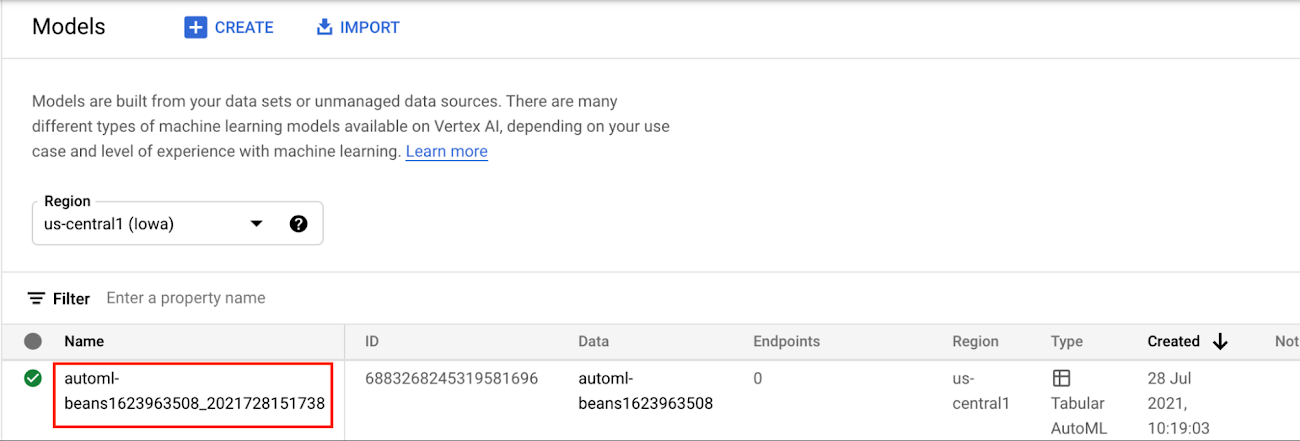
In the Models section of the Cloud console, select the model resource you want to deploy.
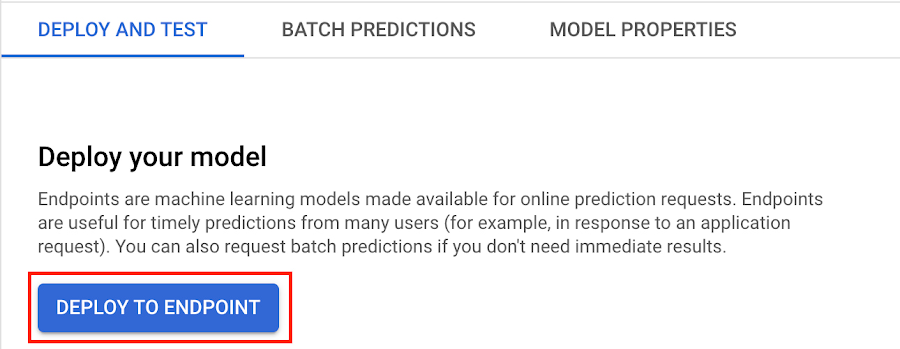
Next, select DEPLOY TO ENDPOINT
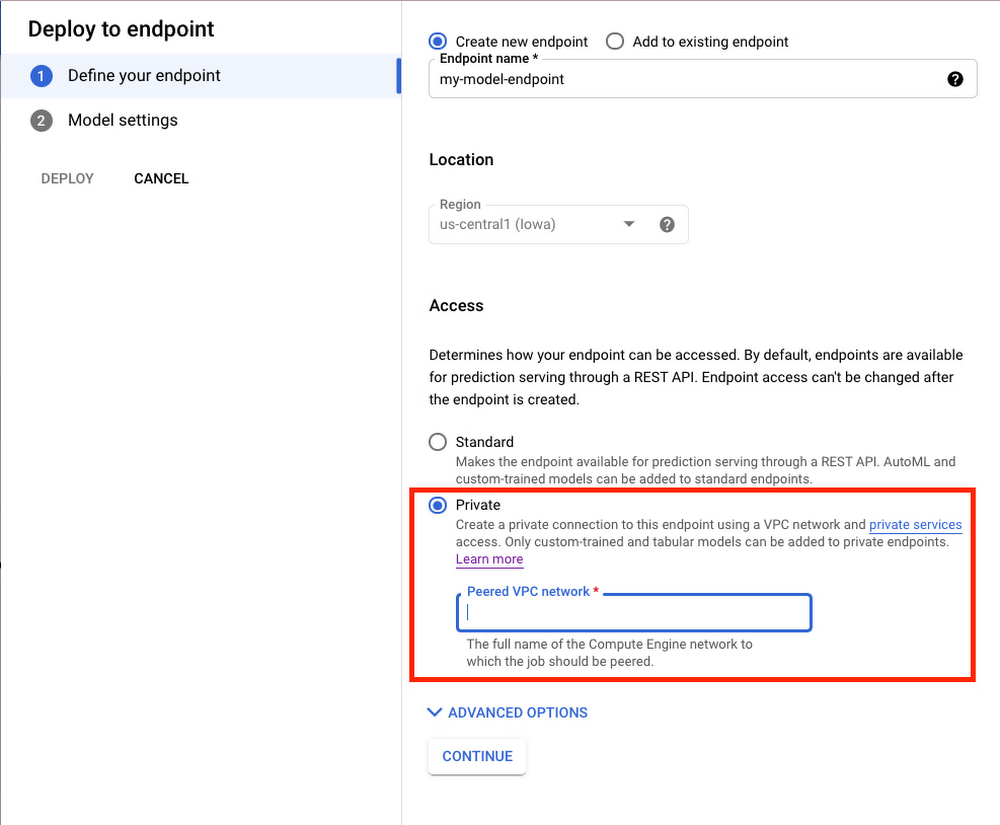
In the window on the right hand side of the console, navigate to the Access section and select Private. You’ll need to add the full name of the VPC network for which your deployment should be peered.
Note that many other managed services on GCP support VPC peering, such as Vertex Training, Cloud SQL, and Firestore. Endpoints is the latest to join that list.
What’s Next?
Now you know the basics of VPC Peering and how to use Private Endpoints on Vertex AI. If you want to learn more about configuring VPCs, check out this overview guide. And if you’re interested to learn more about how to use Vertex AI to support your ML workflow, check out this introductory video. Now it’s time for you to deploy your own ML model to a Private Endpoint for super speedy predictions!
More Relevant Stories for Your Company

Latest News: Secure Digital Infrastructure Services with Apigee Advanced API Security for Google Cloud
Organizations in every region and industry are developing APIs to enable easier and more standardized delivery of services and data for digital experiences. This increasing shift to digital experiences has grown API usage and traffic volumes. However, as malicious API attacks also have grown, API security has become an important

A Look Back on Google Cloud’s Data Analytics Development Efforts from June
June is the month that holds the summer solstice, and some of us in the northern hemisphere get to enjoy the longest days of sunshine out of the entire year. We used all the hours we could in June to deliver a flurry of new features across BigQuery, Dataflow, Data

Google Unveils New Cloud Region in Delhi NCR to Power India’s Digitization
In the past year, Google has worked to surface timely and reliable health information, amplify public health campaigns, and help nonprofits get urgent support to Indians in need. Now, we are continuing to focus on helping India’s businesses accelerate their digital transformation, deepening our commitment to India’s digitization and economic recovery.

Nine Interesting Google Cloud Identity and Environment Features to Know About!
I’ve been at Google Cloud just a few weeks, following years of experience as an AWS Hero and building on other clouds. So last week’s Google Cloud Next–my first!—was a bit of a culture shock. On the GCP podcast, I used the word “intentionality” to describe what I’m seeing: a thoughtful,
