





BigQuery Admin Reference Guide Series: How to Optimize Data in Your Native Storage
3735
Of your peers have already read this article.
4:00 Minutes
The most insightful time you'll spend today!
So far on the BigQuery Admin Reference Guide series, we’ve talked about the different logical resources available inside of BigQuery. Now, we’re going to begin talking about BigQuery’s architecture. In this post we’re diving into how BigQuery stores your data in native storage, and what levers you can pull to optimize how your data is stored.
Columnar storage format
BigQuery offers fully managed storage, meaning you don’t have to provision servers. Sizing is done automatically and you only pay for what you use. Because BigQuery was designed for large scale data analytics data is stored in columnar format.
Traditional relational databases, like Postgres and MySQL, store data row-by-row in record-oriented storage. This makes them great for transactional updates and OLTP (Online Transaction Processing) use cases because they only need to open up a single row to read or write data. However, if you want to perform an aggregation like a sum of an entire column, you would need to read the entire table into memory.
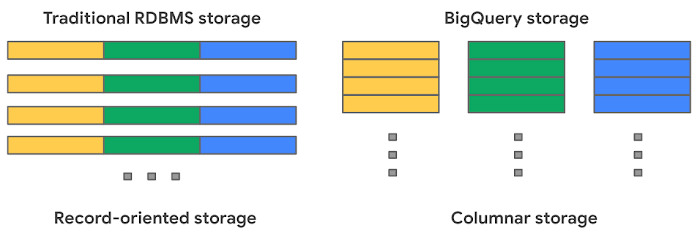
BigQuery uses columnar storage where each column is stored in a separate file block. This makes BigQuery an ideal solution for OLAP (Online Analytical Processing) use cases. When you want to perform aggregations you only need to read the column that you are aggregating over.
Optimized storage format
Internally, BigQuery stores data in a proprietary columnar format called Capacitor. We know Capacitor is a column-oriented format as discussed above. This means that the values of each field, or column, are stored separately so the overhead of reading the file is proportional to the number of fields you actually read. This doesn’t necessarily mean that each column is in its own file, it just means that each column is stored in a file block, which is actually compressed independently for increased optimization.
What’s really cool is that Capacitor builds an approximation model that takes in relevant factors like the type of data (e.g. a really long string vs. an integer) and usage of the data (e.g. some columns are more likely to be used as filters in WHERE clauses) in order to reshuffle rows and encode columns. While every column is being encoded, BigQuery also collects various statistics about the data — which are persisted and used later during query execution.
If you want to learn more about Capacitor, check out this blog post from Google’s own Chief BigQuery Officer.
Encryption and managed durability
Now that we understand how the data is saved in specific files, we can talk about where these files actually live. BigQuery’s persistence layer is provided by Google’s distributed file system, Colossus, where data is automatically compressed, encrypted, replicated, and distributed.
There are many levels of defense against unauthorized access in Google Cloud Platform, one of them being that 100% of data is encrypted at rest. Plus, if you want to control encryption yourself, you can use customer-managed encryption keys.
Colossus also ensures durability by using something called erasure encoding – which breaks data into fragments and saves redundant pieces across a set of different disks. However, to ensure the data is both durable and available, the data is also replicated to another availability zone within the same region that was designated when you created your dataset.
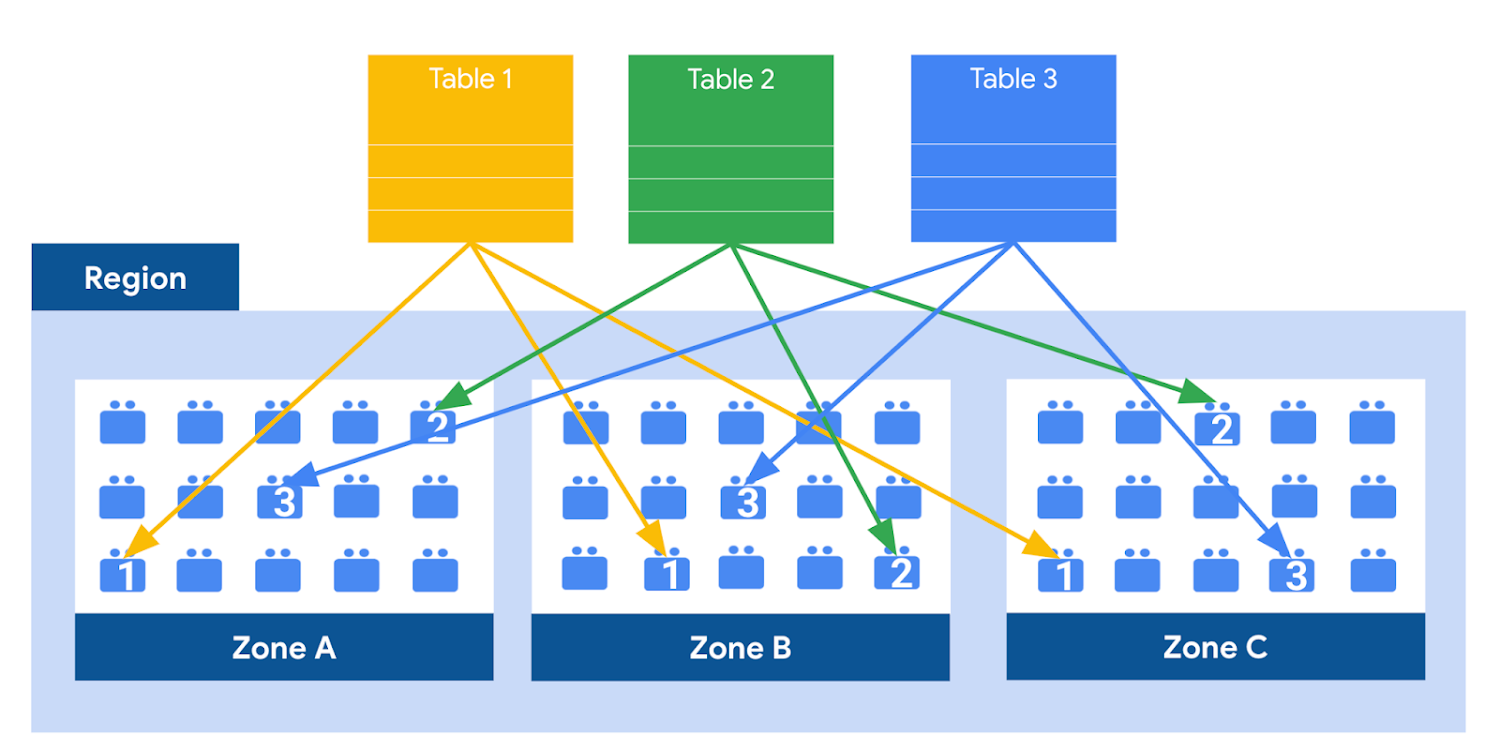
This means data is saved in a different building that has a different power system and network. The chances of multiple availability zones going offline at once is very small. But if you use “Multi-Region” locations – like the US or EU – BigQuery stores another copy of the data in an off-region replica. That way, the data is recoverable in the event of a major disaster.
This is all accomplished without impacting the compute resources available for your queries. Plus encoding, encryption and replication are included in the price of BigQuery storage – no hidden costs!
Optimizing storage for query performance
BigQuery has a built-in storage optimizer that helps arrange data into the optimal shape for querying, by periodically rewriting files. Files may be written first in a format that is fast to write but later BigQuery will format them in a way that is fast to query. Aside from the optimization happening behind the scenes, there are also a few things you can do to further enhance storage.
Partitioning
A partitioned table is a special table that is divided into segments, called partitions. BigQuery leverages partitioning to minimize the amount of data that workers read from disk. Queries that contain filters on the partitioning column can dramatically reduce the overall data scanned, which can yield improved performance and reduced query cost for on-demand queries. New data written to a partitioned table is automatically delivered to the appropriate partition.
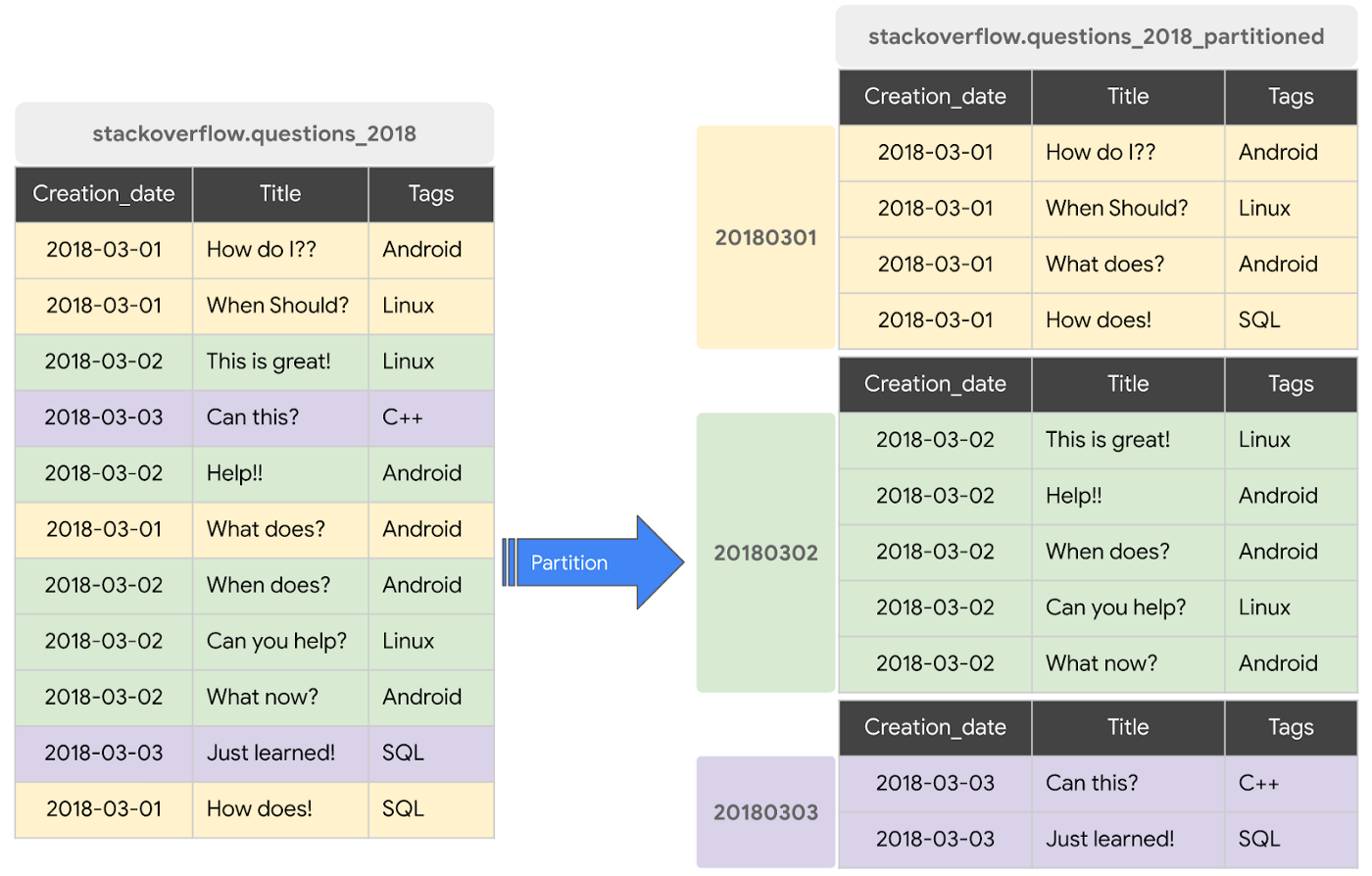
BigQuery supports the following ways to create partitioned tables:
- Ingestion time partitioned tables: daily partitions reflecting the time the data was ingested into BigQuery. This option is useful if you’ll be filtering data based on when new data was added. For example, the new Google Trends Dataset is refreshed each day, you might only be interested in the latest trends.
- Time-unit column partitioned tables: BigQuery routes data to the appropriate partition based on date value in the partitioning column. You can create partitions with granularity starting from hourly partitioning. This option is useful if you’ll be filtering data based on the date value in the table, for example looking at the most recent transactions by including a WHERE clause for transaction_created_date
- INTEGER range partitioned tables: Partitioned based on an integer column that can be bucketed. This option is useful if you’ll be filtering data based on an integer column in the table, for example focusing on specific customers using customer_id. You can bucket the integer values to create appropriately sized partitions, like having all customers with IDs from 0-100 in the same partition.
Partitioning is a great way to optimize query performance, especially for large tables that are often filtered down during analytics. When deciding on the appropriate partition key, make sure to consider how everyone in your organization is leveraging the table. For large tables that could cause some expensive queries, you might want to require partitions to be used.
Partitions are designed for places where there is a large amount of data and a low number of distinct values. A good rule of thumb is making sure partitions are greater than 1 GB. If you over partition your tables, you’ll create a lot of metadata – which means that reading in lots of partitions may actually slow down your query.
Clustering
When a table is clustered in BigQuery, the data is automatically sorted based on the contents of one or more columns (up to 4, that you specify). Usually high cardinality and non-temporal columns are preferred for clustering, as opposed to partitioning which is better for fields with lower cardinality. You’re not limited to choosing just one, you can have a single table that is both partitioned and clustered!
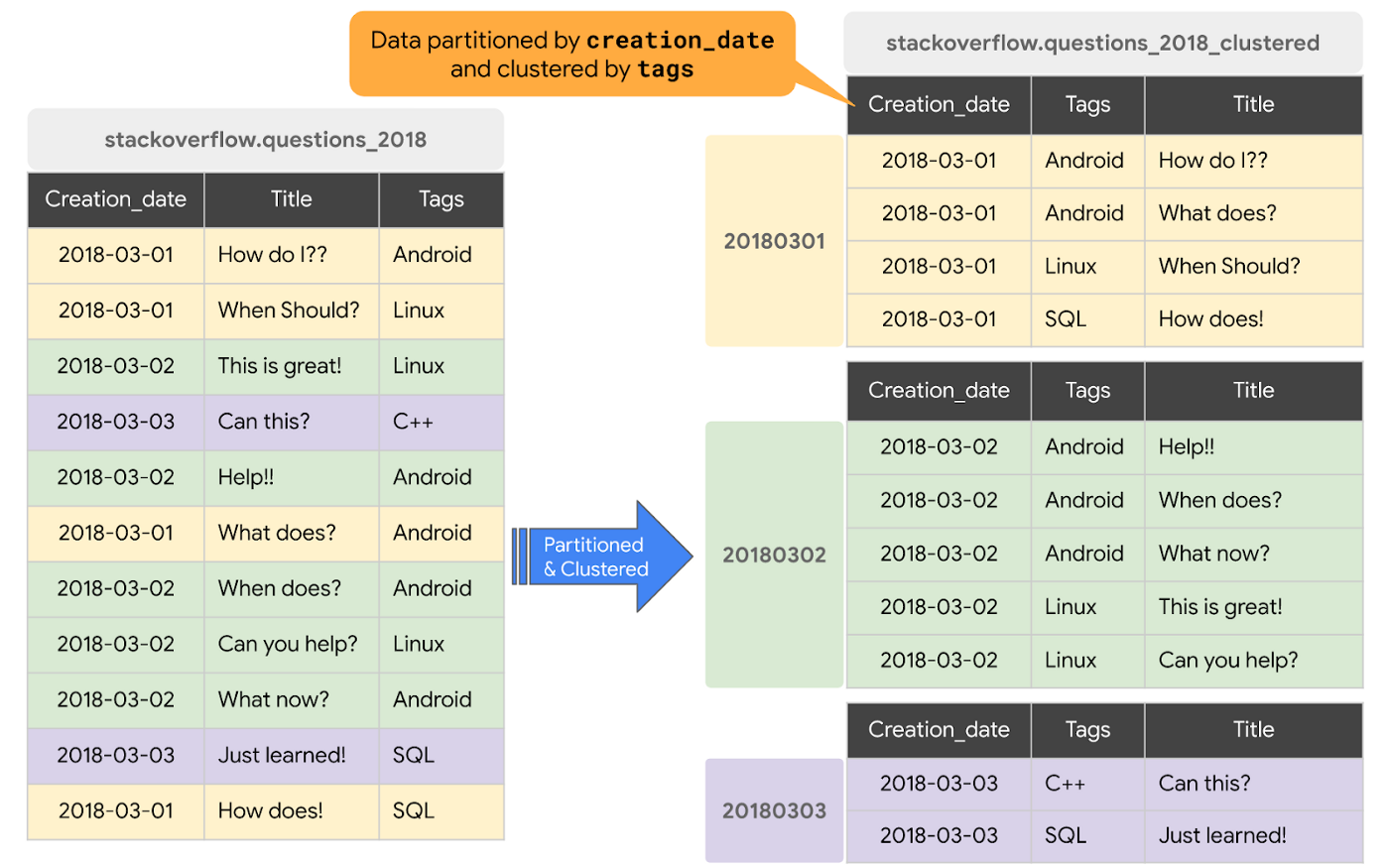
The order of clustered columns determines the sort order of the data. When new data is added to a table or a specific partition, BigQuery performs free, automatic re-clustering in the background. Specifically, clustering can improve the performance for queries:
- Containing where clauses with a clustered column: BigQuery uses the sorted blocks to eliminate scans of unnecessary data. The order of the filters in the where clause matters, so use filters that leverage clustering first
- That aggregate data based on values in a clustered column: performance is improved because the sorted blocks collocate rows with similar values
- With joins where the join key is used to cluster the table: less data is scanned, for some queries this offers a performance boost over partitioning!
Looking for some more information and example queries? Check out this blog post!
Denormalizing
If you come from a traditional database background, you’re probably used to creating normalized schemas – where you optimize your structure so that data is not repeated. This is important for OLTP workloads (as we discussed earlier) because you’re often making updates to the data. If your customer’s address is stored every place they have made a purchase, then it might be cumbersome to update their address if it changes.
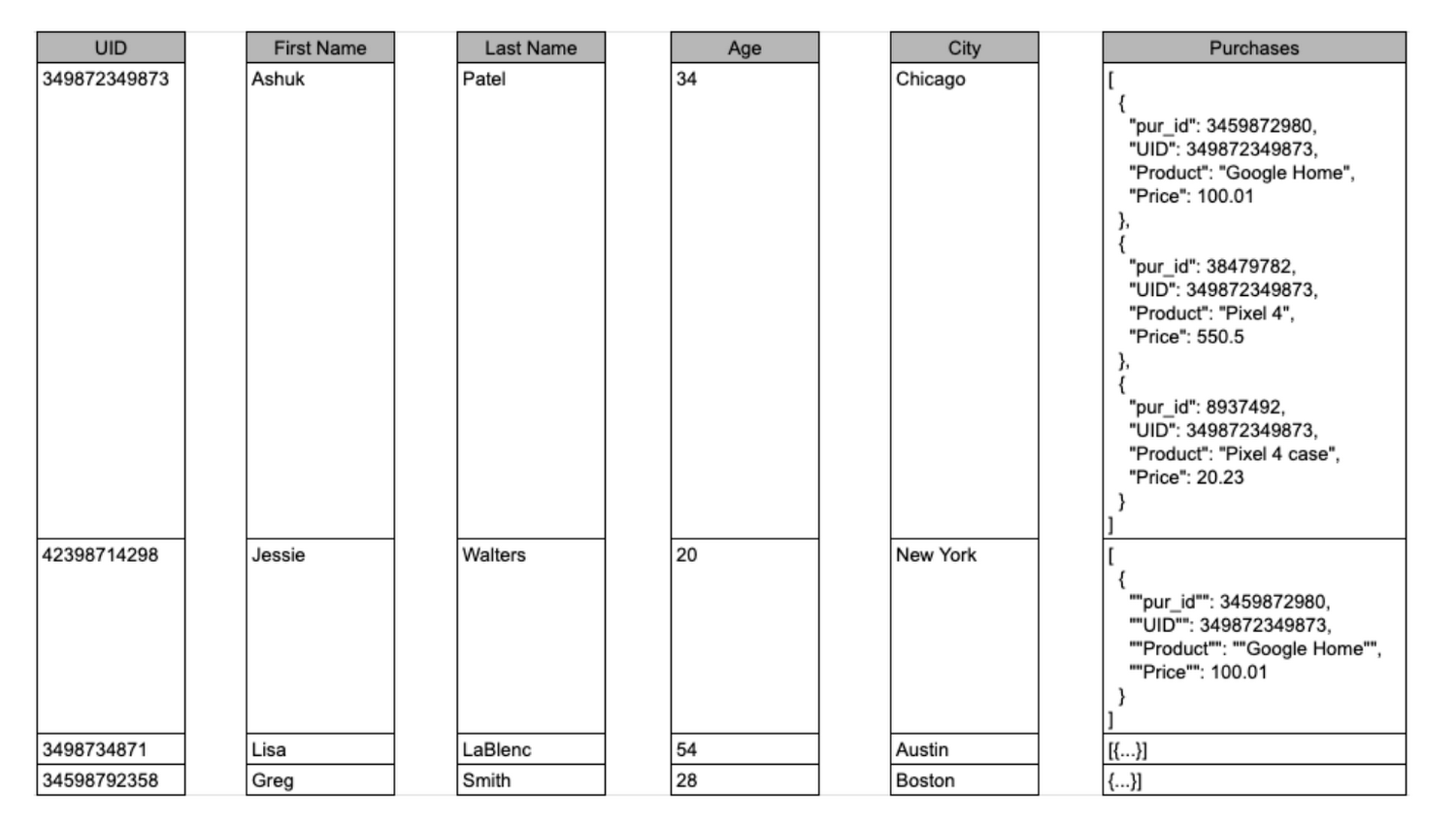
However, when performing analytical operations on normalized schemas, usually multiple tables need to be joined together. If we instead denormalize our data, so that information (like the customer address) is repeated and stored in the same table, then we can eliminate the need to have a JOIN in our query. For BigQuery specifically, we can also take advantage of support for nested and repeated structures. Expressing records using STRUCTs and ARRAYs can not only provide a more natural representation of the underlying data, but in some cases it can also eliminate the need to use a GROUP BY statement. For example, using ARRAY_LENGTH instead of COUNT.
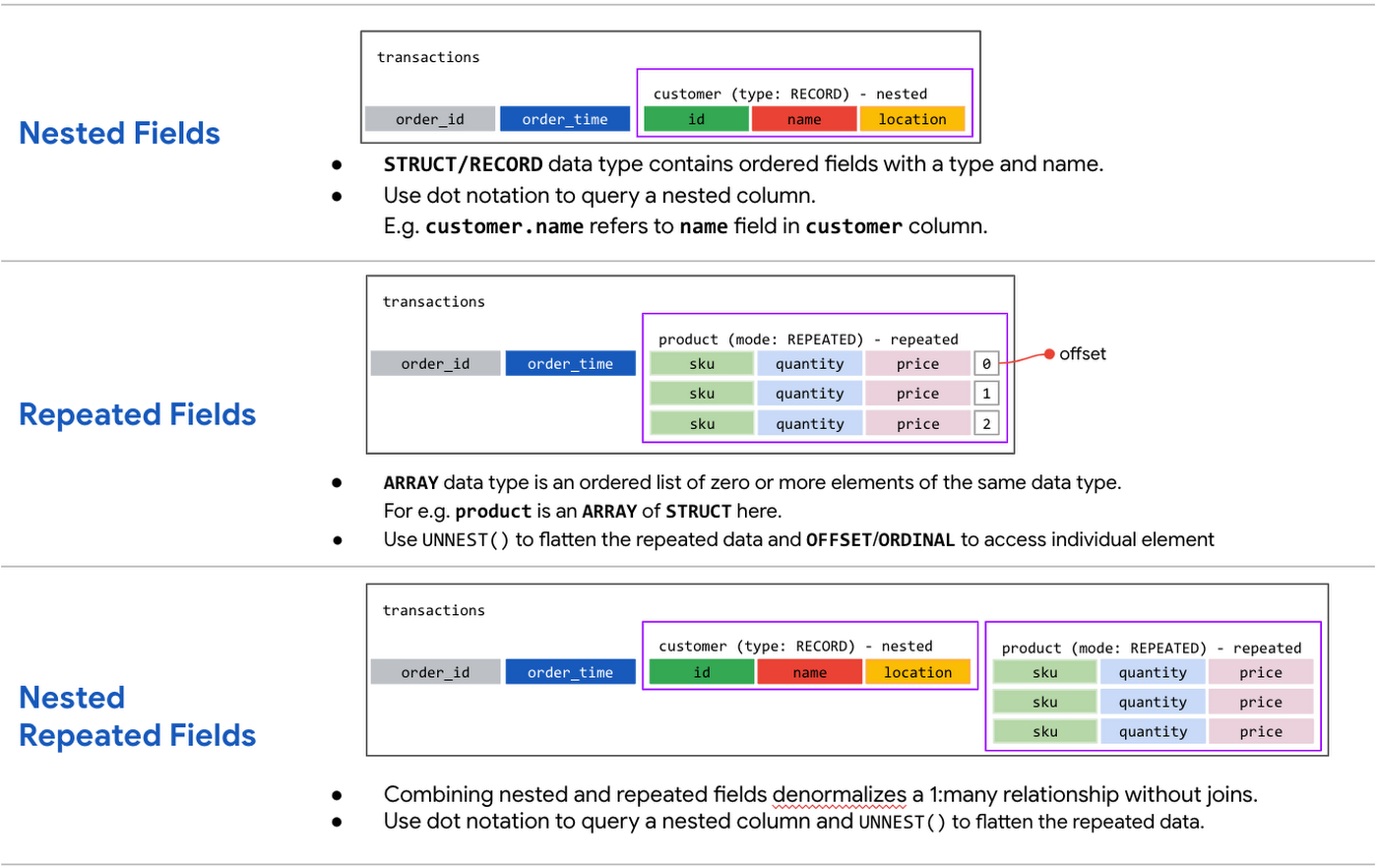
Keep in mind that denormalization has some disadvantages. First off, they aren’t storage-optimal. Although, many times the low cost of BigQuery storage addresses this concern. Second, maintaining data integrity can require increased machine time and sometimes human time for testing and verification. We recommend that you prioritize partitioning and clustering before denormalization, and then focus on data that rarely requires updates.
Optimizing for storage costs
When it comes to optimizing storage costs in BigQuery, you may want to focus on removing unneeded tables and partitions. You can configure the default table expiration for your datasets, configure the expiration time for your tables, and configure the partition expiration for partitioned tables. This can be especially useful if you’re creating materialized views or tables for ad-hoc workflows, or if you only need access to the most recent data.
Additionally, you can take advantage of BigQuery’s long term storage. If you have a table that is not used for 90 consecutive days, the price of storage for that table automatically drops by 50 percent to $0.01 per GB, per month. This is the same cost as Cloud Storage Nearline, so it might make sense to keep older, unused data in BigQuery as opposed to exporting it to Cloud Storage.Thanks for tuning in this week! Next week, we’re talking about query processing – a precursor to some query optimization techniques that will help you troubleshoot and cut costs. Be sure to stay up-to-date on this series by following me on LinkedIn and Twitter!
What Differences in Functionalities Can I Expect Between Google Cloud’s SQL Database and Standard MySQL?
3969
Of your peers have already read this article.
5:30 Minutes
The most insightful time you'll spend today!
In general, the MySQL functionality provided by a Google Cloud’s SQL Database (Cloud SQL) instance is the same as the functionality provided by a locally-hosted MySQL instance.
However, there are a few differences between a standard MySQL instance and a Cloud SQL for MySQL instance.
Unsupported Features
Unsupported Statements
Sending any of the following types of SQL statements will generate an error with the message “Error 1290: The MySQL server is running with the google option so it cannot execute this statement”:
- LOAD DATA INFILE
- Note that LOAD DATA LOCALINFILE is supported.
- SELECT … INTO OUTFILE
- SELECT … INTO DUMPFILE
- INSTALL PLUGIN …
- UNINSTALL PLUGIN
- CREATE FUNCTION … SONAME …
Unsupported Statements for Second Generation Instances
The following statements are not supported because Second Generation instances use GTID replication:
- CREATE TABLE … SELECT statements
- CREATE TEMPORARY TABLE statements inside transactions
- Transactions or statements that update both transactional and nontransactional tables
For more information, see the MySQL documentation.
Unsupported Functions
- LOAD_FILE()
Unsupported Client Program Features
- mysqlimport without using the –local option. This is because of the LOAD DATA INFILE restriction. If you need to load data remotely, use the Cloud SQL import function.
- mysqldump using the –tab option or options that are used with –tab. This is because the FILE privilege is not granted for instance users. All other mysqldump options are supported.
- If you want to import databases with binary data into your Cloud SQL for MySQL instance, you must use the –hex-blob option with mysqldump.
- Although hex-blob is not a required flag when you are using a local MySQL server instance and the mysql client, it is required if you want to import any databases with binary data into your Cloud SQL instance. For more information about importing data, see Importing Data.
- Not all MySQL options and parameters are enabled for editing as Cloud SQL flags.
- To request the addition of a configurable Cloud SQL flag, use the Cloud SQL Discussion group.
- For Second Generation instances, InnoDB is the only supported storage engine. For help with converting tables from MyISAM to InnoDB, see the MySQL documentation.
- You cannot import or export triggers, functions, stored procedures, or views into Cloud SQL. However, you can create and use these elements on a Cloud SQL instance.
Notable MySQL Options
Cloud SQL runs MySQL with a specific set of options. If an option might impact how your applications work, we note it here for your information.
skip-name-resolve
This flag impacts how hostnames are resolved for client connections. Learn more.
Cloud SQL for PostgreSQL
Features
- Fully managed PostgreSQL databases in the cloud, based on the Cloud SQL Second Generation platform.
- Custom machine types with up to 416 GB of RAM and 64 CPUs.
- Up to 10TB of storage available, with the ability to automatically increase storage size as needed.
- Create and manage instances in the Google Cloud Platform Console.
- Instances available in US, EU, or Asia.
- Customer data encrypted on Google’s internal networks and in database tables, temporary files, and backups.
- Support for secure external connections with the Cloud SQL Proxy or with the SSL/TLS protocol.
- Data replication between multiple zones with automatic failover.
- Import and export databases using SQL dump files.
- Support for PostgreSQL client-server protocol and standard PostgreSQL connectors.
- Automated and on-demand backups.
- Instance cloning.
- Integration with Stackdriver logging and monitoring.
Some features are not yet available for Cloud SQL for PostgreSQL:
- Point-in-time recovery (PITR)
- Import/export in CSV format using GCP Console or the gcloud command-line tool.
Supported Extensions
Cloud SQL for PostgreSQL supports many PostgreSQL extensions. For a complete list, see PostgreSQL Extensions.
Supported Procedural Languages
Cloud SQL for PostgreSQL supports the PL/pgSQL SQL procedural language.
Supported Languages
You can use Cloud SQL for PostgreSQL with App Engine applications running in the flexible environment that are written in Java, Python, PHP, Node.js, Go, and Ruby. You can also use Cloud SQL for PostgreSQL with external applications using the standard PostgreSQL client-server protocol.
Differences between Cloud SQL and standard PostgreSQL functionality
In general, the PostgreSQL functionality provided by a Cloud SQL instance is the same as the functionality provided by a locally-hosted PostgreSQL instance. However, there are a few differences between a standard PostgreSQL instance and a Cloud SQL for PostgreSQL instance.
Unsupported Features
- Any features that require SUPERUSER privileges. An exception to this rule is made for the CREATE EXTENSION statement, but only for supported extensions.
- Custom background workers
- The psql client in Cloud Shell does not support operations that require a reconnection, such as connecting to a different database using the \c command.
Notable Differences
There are a number of PostgreSQL options and parameters that are not enabled for editing as Cloud SQL flags.
To request the addition of a configurable Cloud SQL flag, use the Cloud SQL Discussion group.
5050
Of your peers have already watched this video.
21:00 Minutes
The most insightful time you'll spend today!
Uber’s Story of Scaling Their App with Millions of Concurrent Requests
Uber has millions of concurrent customers who use the platform to book rides and place food delivery orders, generating billions of database transactions per day. In just a click of a button, Uber captures users’ intent which bases their fulfillment model to meet the customers’ demand, and match it to active providers that address their demand with supply.
Uber’s fulfillment platform capability is the lifeline powering every line of business and also allows rapid scaling of new verticals. Hundreds of microservices at Uber depend on this fulfillment platform as a source of truth for all their active booking, delivery or order session. The events generated by this platform are used by hundreds of offline data sets to power business decisions. Additionally over hundreds of developers at Uber extend the platform with APIs, events and codes to build 120+ unique fulfillment flows!
Watch the video to learn about Uber’s decision to move from on-prem to Google Cloud’s Cloud Spanner while still taking live orders at scale and meeting customers’ expectations.
MerPay Platform Scales its Reach to Millions of Users using Cloud Spanner

5295
Of your peers have already read this article.
2:00 Minutes
The most insightful time you'll spend today!
Editor’s note: To launch a new mobile payment platform, Mercari needed a database solution strong on scalability, availability, and performance. Here’s how Cloud Spanner delivered those results.
E-commerce companies need to connect customers to their services securely, reliably, with zero downtime. When Mercari, Inc. launched a new mobile payment platform, we chose Cloud Spanner as part of our data portfolio, which provided us with easy scalability to handle millions of new users, a fully managed service that minimized overhead costs, and deep integration with other Google Cloud services.
Mercari, Inc., Japan’s largest C2C marketplace, launched its app in 2013, which allows 18.2million monthly users to easily and securely buy new and used items. Mercari expanded into the United States and in 2014 and launched Merpay, a mobile payment service that can be used through Mercari in Japan in 2017. With more than 85 million users, Merpay is now accepted at 1.8 million merchants and e-commerce sites in Japan, supporting payments via the DOCOMO ID contactless system and QR code.
Prioritizing availability and scalability
When we started building Merpay, we were looking for a new database. In the past, Mercari had used MySQL with bare metal hardware. Because of the amount of data, we required additional expertise to manage and maintain the hardware, software and MySQL implementation. Having built much of the microservices architecture for our Mercari app using Google Kubernetes Engine (GKE), it was natural to look at Google Cloud’s managed services when deciding upon our new database infrastructure for Merpay.
For the database, we were focusing especially on requirements around availability, scalability, and performance. To do a single payment transaction, there were multiple steps each with writes, requiring high-write-throughput and low-latency from the database. Needing a solution that would support reliable payment processing 24/7/365, we chose Spanner, which offers up to 99.999% availability with zero downtime for planned maintenance and schema changes.
We worked closely with Google Cloud’s Premium Support, Technical Account Management (TAM), and Strategic Cloud Engineer and Cloud Consultant teams to implement Spanner, including separating the payment processing— originally one of the functions in Mercari—as a microservice.
A nod to easier nodes and better scale
After launch, the number of Merpay users reached 2 million in only a few months. We had 45 Spanner nodes at the time of launch of Merpay and about 50 nodes four months later. Because we’d optimized the application side during those four months, we didn’t have to add many nodes to keep up with the growing traffic.
Whenever we needed to scale up the serving and storage resources in our instances, Spanner made it easy to increase nodes as needed in the Cloud Console. To optimize costs, it’s easy to add nodes during a marketing campaign and remove them afterward. Even if the traffic count is different from expected, we can change the number of nodes immediately. That’s one incredible convenience of Cloud Spanner.
Building powerful pipelines
Our data pipelines are used for KPI analytics, fraud detection, credit scoring, and customer support use cases. Because Cloud Spanner integrates so easily with other Google Cloud data services, the data in Spanner is easily accessible for analytics. From the Spanner database for each microservice, we create both batch and streaming data pipelines using Pub/Sub and Dataflow, as well as Apache Flink, and load the data into BigQuery and Google Cloud Storage. We’re able to quickly aggregate the data required for data platforms such as BigQuery and Cloud Storage. The original data is stored in Spanner and managed by microservices, but analysis through BigQuery is centrally managed by the Data Platform team. This team determines the confidentiality level of data and centrally manages BigQuery permissions using Terraform. By centrally managing data access permissions on the data platform rather than on individual microservices, we’re able to set appropriate security for individual users.
Our full data portfolio also includes Looker, which we use for product analysis, accounting analysis, test performance visualization, operation monitoring, development efficiency analysis, and HR analysis. We also use Dataproc, Cloud Composer, Data Catalog, and Data Studio. The Dataflow template created for the pipeline is also published as OSS.
With Spanner and other Google Cloud services, our Merpay platform is flexible, secure, scalable and highly available. As Spanner eliminates overhead, we can devote engineering resources to developing new tools and solutions for our customers. We’re looking ahead at providing cryptocurrency service, for example, and are now working on a project to migrate Mercari’s monolithic system that is still on premises entirely over to Google Cloud.
Read more about Mercari and Merpay. Or check out our recent blog: three reasons to consider Cloud Spanner for your next project.
4568
Of your peers have already watched this video.
43:30 Minutes
The most insightful time you'll spend today!
What is Cloud Spanner and Is It the Right Database for You?
You’ve probably heard about Cloud Spanner, but what exactly does it do that is so different from other databases out there?
How do you know if it’s worth spending your valuable time trying out?
Cloud Spanner is the first enterprise-grade, globally distributed, and strongly consistent database service built for the cloud specifically to combine the benefits of relational database structure with non-relational database scale.
Phew! That was a mouthful.
So, what really differentiates it? It’s unique in the marketplace in that it combines transactions, SQL query, and relational structure with the scalability you typically associate with non-relational or NoSQL databases.
Databases are part of every application. So it’s very important to pick the right database for your application.
With Cloud Spanner, you enjoy all the traditional benefits of a SQL database; transactions, high availability, schema changes without downtime, and SQL queries. But unlike many relational databases, Cloud Spanner scales horizontally from one to thousands of servers, an arbitrarily large number.
With fully automatic data replication and server redundancy, Cloud Spanner delivers up to five nines of availability in multi-region instances and four nines of availability in regional instances.
In fact, Google’s internal Spanner instance has been handling millions of queries per second from many Google services for years.
In this video, you’ll find out what Cloud Spanner is, what it’s useful for, why it’s unique, and the challenges it solves.
Move over Myths! Here’s What You Need to Know about Cloud Spanner

3537
Of your peers have already read this article.
3:00 Minutes
The most insightful time you'll spend today!
Intro to Cloud Spanner
Cloud Spanner is an enterprise-grade, globally distributed, externally consistent database that offers unlimited scalability and industry-leading 99.999% availability. It requires no maintenance windows and offers a familiar PostgreSQL interface. It combines the benefits of relational databases with the unmatched scalability and availability of non-relational databases.
As organizations modernize and simplify their tech stack, Spanner provides a unique opportunity to transform the way they think about and use databases as part of building new applications and customer experiences.
But choosing a database for your workload can be challenging; there are so many options in the market and each one has a different onboarding and operating experience. At Google Cloud we know it’s hard to navigate this choice and are here to help you. In this blog post, I want to bust the seven most common misconceptions that I regularly hear about Spanner so that you can confidently make your decision.
Myth #1 Only use Spanner if you have a massive workload
The truth is that Spanner powers Google’s most popular, globally available products, like YouTube, Drive, and Gmail, and has enabled many large scale transformations including that of Uber, Niantic and Sharechat. It is also true that Spanner processes more than 1 Billion queries per second at peak.
At the same time, many customers also use Spanner for their smaller workloads (both in terms of transactions per second and storage size) for availability and scalability reasons. For example, Google Password Manager has small workloads that run on Spanner. These customers cannot tolerate downtime, require high availability to power their applications and seek scale insurance for future growth scenarios.
Limitless scalability with the highest availability is critical in many industry verticals such as gaming and retail, especially when a newly launched game goes viral and becomes an overnight success or when a retailer has to handle a sudden surge in traffic due to a Black Friday/Cyber Monday sale.
Regardless of workload size, every customer on the journey to the cloud wants the benefits of scalability and availability while reducing the operational burden and the costs associated with patching, upgrades and other maintenance.
Myth #2 Spanner is too expensive
The truth is, when looking at the cost of a database, it is better to consider Total Cost of Ownership (TCO) and the value it offers rather than the raw list price. We deliver significant value to our customers starting at this price including critical things like availability, price performance, and reduced operational costs.
- Availability: Spanner provides high availability and reliability by synchronously replicating data. When it comes to Disaster Recovery, Spanner offers 0-RPO and 0-RTO for zonal failures in case of a regional instance and regional failure in case of multi-regional instances. Less downtime, more revenue!
- Price-performance: Spanner offers one of the industry’s leading price-performance ratios which makes it a great choice if you are running a demanding, performance sensitive application. Great customer experiences require consistent, optimal latencies!
- Reduced operational cost: With Spanner, customers enjoy zero downtime upgrades and schema changes, and no maintenance windows. Sharding is automatically handled so the challenges associated with scaling up traditional databases don’t exist. Spend more time innovating, and less time administering!
- Security & Compliance: By default, Spanner already offers encryption for data-in-transit via its client libraries and for data-at-rest using Google-managed encryption keys. CMEK support for Spanner lets you now have complete control of the encryption keys. Spanner also provides VPC Service Controls support and has compliance certifications and necessary approvals so that it can be used for workloads requiring ISO 27001, 27017, 27018, PCI DSS, SOC1|2|3, HIPAA and FedRAMP.
With Spanner, you have peace of mind knowing that your data’s security, availability and reliability won’t be compromised.
And best of all, with the introduction of Granular Instance Sizing, you can now get started for as little as $65/month and unlock the tremendous value spanner offers.
Pro tip : Use the auto-scaler to right size your Spanner instances. Take advantage of TTL to reduce the amount of data stored.
Myth #3 You have to make a trade off between scale, consistency, and latency
The truth is, depending on the use case and instance configuration, users can use Spanner such that they don’t have to pick between consistency, latency and scale.
To provide strong data consistency, Spanner uses a synchronous, Paxos-based replication scheme, in which replicas acknowledge every write request. A write is committed when a majority of the replicas (e.g 2 out of 3), called a quorum, agree to commit the write. In the case of regional instances, the replicas are within the region and hence the writes are faster than in the case of multi-region instances, where the replicas are distributed across multiple regions. In the latter case, forming a quorum on writes can result in slightly higher latency. Nevertheless, Spanner multi-regions are carefully designed in geographical configurations that ensure that the replicas can communicate fast enough and write latencies are acceptably low.
A read can be served strong (by default) or stale. A strong read is a read at a current timestamp and is guaranteed to see all the data that has been committed up until the start of the read. A stale read is a read executed at a timestamp in the past. In case of a strong read, the serving replica will guarantee that you will see all data that has been committed up until the start of the read. In some cases, this means that the serving replica has to contact the leader to ensure that it has the latest data. In case of a multi-region instance where the read is served from a non-leader replica, this would mean that read latency can be slightly higher than if it was served from a leader region. Stale reads are performed over data that was committed at a timestamp in the past and can, therefore, be served at very low latencies by the closest replica that is caught up until that timestamp. If your application is latency sensitive, stale reads may be a good option and we recommend using a stale read value of 15 seconds.
Myth #4 Spanner does not have a familiar interface
The truth is that Spanner offers the flexibility to interact with the database via a SQL dialect based on ANSI 2011 standard as well as via a REST or gRPC API interface, which are optimized for performance and ease-of-use. In addition to Spanner’s interface, we recently introduced a PostgreSQL interface for Spanner, that leverages the ubiquity of PostgreSQL to meet development teams using an interface that they are familiar with. The PostgreSQL interface provides a rich subset of the open-source PostgreSQL SQL dialect, including common query syntax, functions, and operators. It supports a core collection of open-source PostgreSQL data types, DDL syntax, and information schema views. You get the PostgreSQL familiarity, and relational semantics at Spanner scale.
Learn more about our PostgreSQL interface here.
Myth #5 The only way to get observability data is via the Spanner Console
The truth is that Spanner client libraries support OpenCensus Tracing and Metrics, which gives insight into the client internals and aids in debugging production issues. For instance, client-side traces and metrics include sessions and transactions related information.
Spanner also supports the OpenTelemetery receiver, which provides an easy way for you to process and visualize metrics from Cloud Spanner System tables, and export these to the Application Monitoring (APM) tool of your choice. This could be either an open source combination of a time-series database like Prometheus coupled with a Grafana dashboard, or it could be a commercial offering like Splunk, Datadog, Dynatrace, NewRelic or AppDynamics. We’ve also published reference Grafana dashboards, so that you can debug the most common user journeys such as “Why is my tail latency high” or “Why do I see a CPU spike when my workload did not change”. Here is a sample docker service, to show how the Cloud Spanner receiver can work with Prometheus exporter and Grafana dashboards.
We are continuing to embrace open standards, and continuing to integrate with our partner ecosystem. We also continue to evolve the observability experience offered by the Google console so that our customers get the best experience wherever they are.
Myth #6 Spanner is only for global workloads requiring copies in multiple regions
The truth is that, while Spanner offers a range of multi-region instance configurations, it also offers regional configuration in each GCP region. Each regional node is replicated in 3 zones within the region, while a multi-regional node is replicated at least 5 times across multiple regions. A regional configuration offers 4 nines of availability and protection against zonal failures.
Typically, multi-regional instance configurations are indicated if your application runs workloads in multiple geographical locations or your business needs 99.999% of availability and protection against regional failures. Learn more here.
Myth #7 Spanner schema changes require expensive locks
The truth is that Spanner never has table level locks. Spanner uses a multi-version concurrency control architecture to manage concurrent versions of schema and data allowing ad-hoc and online qualified schema changes that do not require any downtime, additional tools, migration pipelines or complex rollback/backup plans. When issuing a schema update you can continue writing and reading from the database without interruption while Spanner backfills the update, whether you have 10 rows or 10 billion rows in your table.
The same mechanism can be used for Point-in-time recovery (PITR) and snapshot queries using stale reads to restore both schema and the state of data at a given query-condition and timestamp up to a maximum of seven days.
Now that we’ve learned the truth about Cloud Spanner, I invite you to get started – visit our website.
More Relevant Stories for Your Company
A Recap on Google Cloud Databases and Storage Options- Part 2
Isaac Newton said, “If I have seen farther than others it is because I have stood on the shoulders of giants.” He meant that in order to explain the Law of Gravity, he used the work of major thinkers who came before him in order to make intellectual progress (as-in

Quick Recap on Google Cloud: Latest News, Launches, Updates, Events and More
Want to know the latest from Google Cloud? Find it here in one handy location. Check back regularly for our newest updates, announcements, resources, events, learning opportunities, and more. Tip: Not sure where to find what you’re looking for on the Google Cloud blog? Start here: Google Cloud blog 101: Full list

How Google Cloud Solutions Help Retail Firms to ABP(Always Be Pivoting)
For years, retailers have been told that they must embrace a litany of new technologies, trends, and imperatives like online shopping, mobile apps, omnichannel, and digital transformation. In search of growth and stability, retailers adopted many of these, only to realize that for every box they ticked, there was another

HarbourBridge Schema Assistant Allows Quick, Bulk Migration to Cloud Spanner
Today we’re announcing the HarbourBridge Schema Assistant, which provides a guided schema-design workflow for migrating from MySQL or PostgreSQL to Spanner. HarbourBridge imports dump files (from mysqldump or pg_dump) or directly connects to your source database, and converts the source database schema to an equivalent Spanner schema. The new Schema Assistant
