






3700
Of your peers have already downloaded this article
8:45 Minutes
The most insightful time you'll spend today!
Google Maps Platform Can Elevate FinTech Experience with Less Risks and Higher Security

4743
Of your peers have already read this article.
3:00 Minutes
The most insightful time you'll spend today!
The financial services industry is changing—an estimated $68 trillion in wealth transferring from baby boomers to millennials.1 This means financial service providers will have to deliver the speed, ease-of-use, technological sophistication, and tailored services that millennials have come to expect. In fact, half of all millennials are willing to switch to a competing institution if it offers a better digital experience.2 This and many other trends are driving unprecedented growth for mobile Fintech experiences in banking, digital payments, financial management and insurance.3
Google Maps Platform financial services solutions
To help you respond to customer’s changing demands, we’re launching financial services solutions that can help you improve your customer experience, security and operations. We’ve outlined the technical guidance and APIs you need to build out three financial services solutions: Enriched Transactions, Quick and Verified Sign-up, and Branch and ATM Locator Plus. We’ve also highlighted two use cases that customers are using our APIs to solve: Contextual Experiences and Fraud Detection.
Clarify financial statements with Enriched Transactions solution
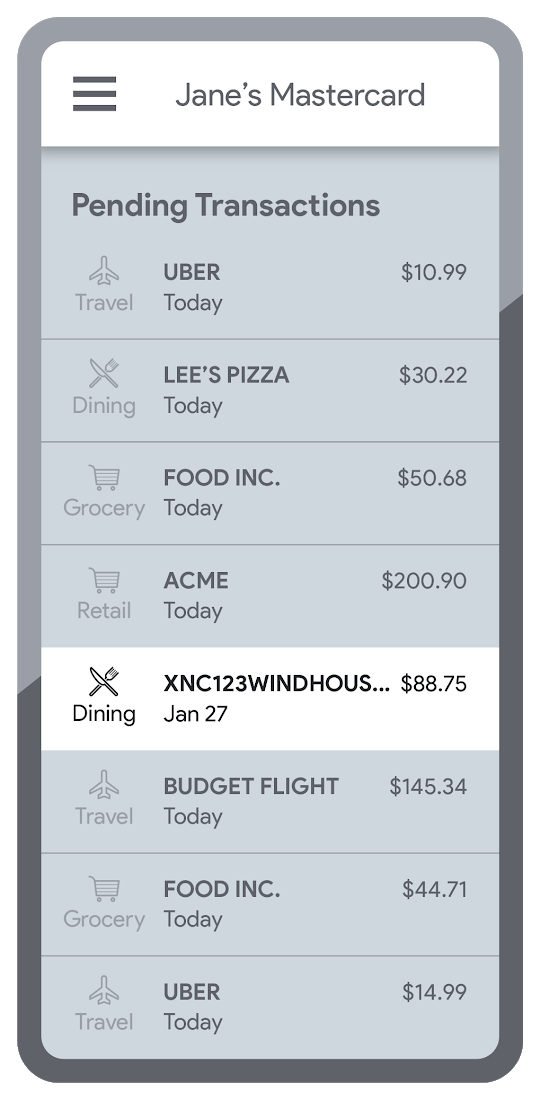
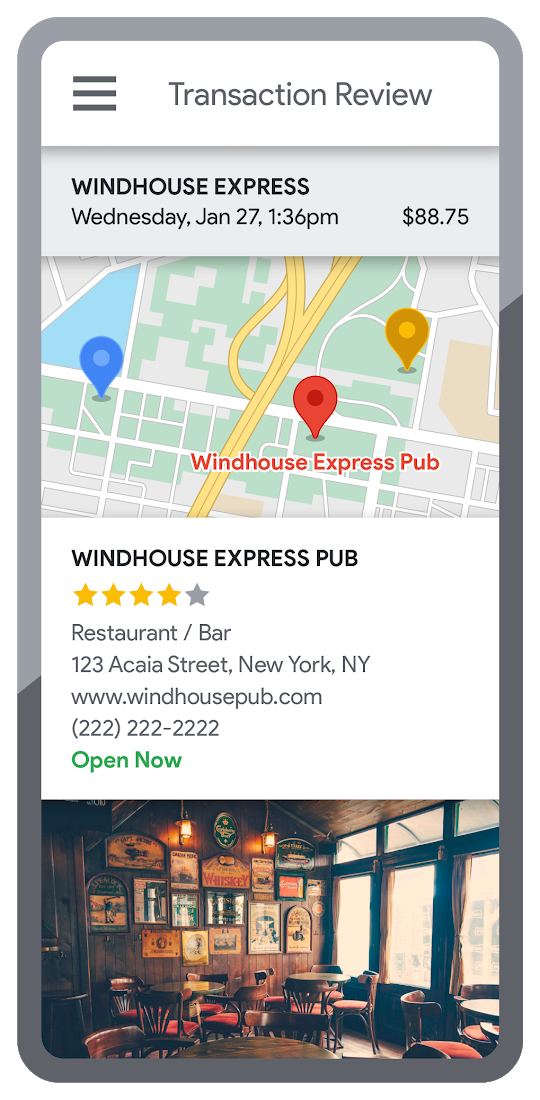
Transaction statements are often hard for customers to understand, using abbreviations like “ACMEHCORP” instead of customer-facing names like “Acme Houseware”. Our Enriched Transactions solution clarifies these transactions and makes them instantly recognizable by adding the merchant name and business category, a photo of the storefront, its location on a map, and full contact info. Making transactions easier to recognize not only boosts consumer confidence, with reported increases in NPS of 15% or higher, but decreases costly support calls by approximately 67%.4
In addition, you can help customers easily visualize a series of transactions by adding the merchant name to the transaction amount and date, and displaying their transactions on a Google map. This enables you to give customers insights about where and how they spend money. See the guide to implement Enriched Transactions today.
Enable faster sign-up with Quick and Verified Sign-up solution
Manually entered addresses can lead to lowered conversions, erroneous customer data, and costly delivery mistakes. Our Quick and Verified Sign-up solution makes sign-up faster, suggesting nearby addresses with just a few thumb taps—cutting sign-up time by up to 64% and increasing conversion rates by up to 15%.5
The solution also provides one additional level of address verification that helps reduce the risk of fraudulent account sign-ups—and companies have decreased fraudulent account setups by approximately 30% through using geospatial data to verify customer identities.4 See the Quick and Verified Sign-up solution guide to get started today.
- Faster sign-ups 1An application form requires an address
- Faster sign-ups 2Autocomplete quickly suggests addresses
- Faster sign-ups 3Select the address with visual confirmation
- Faster sign-ups 4Address verification options are presented
- Faster sign-ups 5Location permission is granted by the user
- Faster sign-ups 6The address is verified
Help customers visit you with Branch and ATM Locator Plus solution
74% of customers now search for specific details prior to their visit, which makes detailed, accurate profiles for each location a must.5 Our Branch and ATM Locator Plus solution enhances your own websites and apps with the same information shown about your branches and ATMs on Google Maps. Include hours of operation, available services, user reviews, photos of the location, driving directions and more.
Financial services companies using geospatial data to provide additional information (e.g. opening hours, available services, etc.) on branch and ATM services have seen a 14% increase in Net Promoter Score (NPS), and a 7% decrease in customer support calls.4 Implement Branch and ATM Locator Plus today using the guide or build it in minutes with Quick Builder.
- ATM locator 1Customers can enable location permissions, or enter their address
- ATM locator 2Quickly enter the address with Autocomplete
- ATM locator 3Nearby location listings, ranked by distance and ETA
- ATM locator 4Map view and directions
Enable offers and rewards with Contextual Experiences
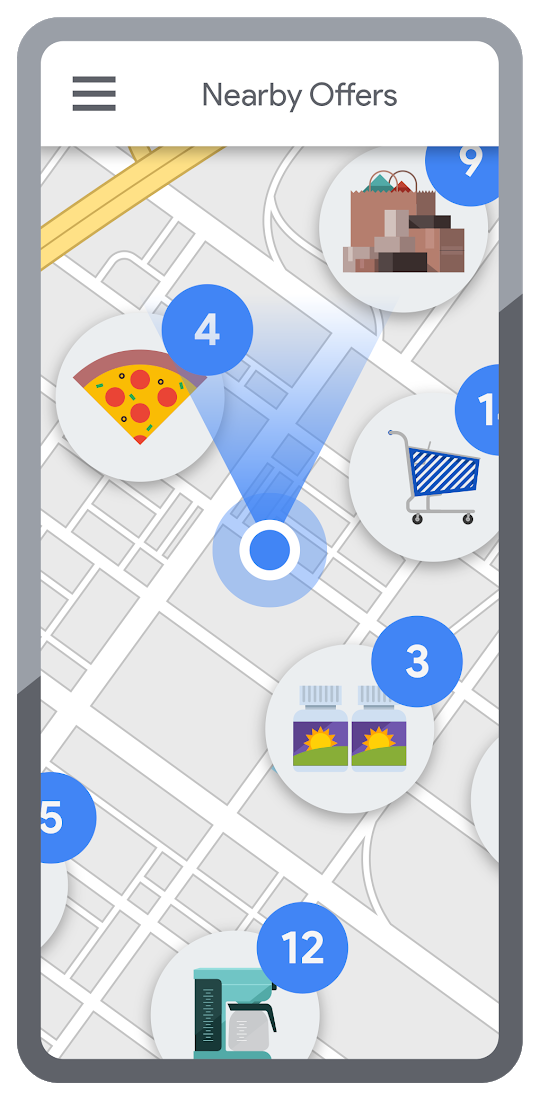
Real-time, geo-targeted offers can power deals, rewards, and cash-back programs—all visualized with rich Google Maps. By combining the insights of purchase histories with customer opt-in to location-based features, companies can implement the Contextual Experiences use case to enable personalized offers and rewards programs that drive engagement with brands while putting money in customers’ pockets at the same time.This is a win for banks and their customers, validated by encouraging metrics like NPS rating boosts of 8% or higher, and an increase of 8% or more time spent in-app.4 Learn how Current uses Google Maps Platform to create innovative customer rewards programs with location intelligence.

Detect suspicious transactions with Fraud Detection
With the Fraud Detection use case, companies can use customer opted-in mobile device location to flag suspicious activity based on geographic distance, such as an ATM withdrawal that is far from the customer’s phone. Our APIs can also help companies recognize suspicious transaction patterns such as a purchase made at a location that is physically distant from a recent transaction.
Financial services companies that use geospatial data to verify customers’ identities have reduced fraudulent transactions by approximately 70%, and false positives in fraud detection by 45%, on average.4 Learn how Starling Bank uses Google Maps Platform to enable real-time notification of transactions and their locations, and enhance data-driven decision-making.
Start elevating customer experiences, reducing risk and increasing efficiency today with our financial services offerings. Visit our financial services solutions page to learn more about how to start implementing these solutions.
For more information on Google Maps Platform, visit our website.
Scaling with Breaking News: BBC’s Serverless Infrastructure on Google Cloud

1276
Of your peers have already read this article.
3:30 Minutes
The most insightful time you'll spend today!
Editors note: Today’s post is from Neil Craig at the British Broadcasting Corporation (BBC), the national broadcaster of the United Kingdom. Neil is part of the BBC’s Digital Distribution team which is responsible for building the services such as the public-facing www bbc.co.uk and .com websites and ensuring they are able to scale and operate reliably.
The BBC’s public-facing websites inform, educate, and entertain over 498 million adults per week across the world. Because breaking news is so unpredictable, we need a core content delivery platform that can easily scale in response to surges in traffic, which can be quite unpredictable.
To this end, we recently rebuilt our log-processing infrastructure on a Google Cloud serverless platform. We’ve found that the new system, based on Cloud Storage, Eventarc, Cloud Run and BigQuery, enables us to provide a reliable and stable service without us having to worry about scaling up during busy times. We’re also able to save license fee payers money by operating the service more cost effectively than our previous architecture. Not having to manually manage the scale of major components of the stack has freed up our time, allowing us to spend it on using, rather than creating the data.
A log in time
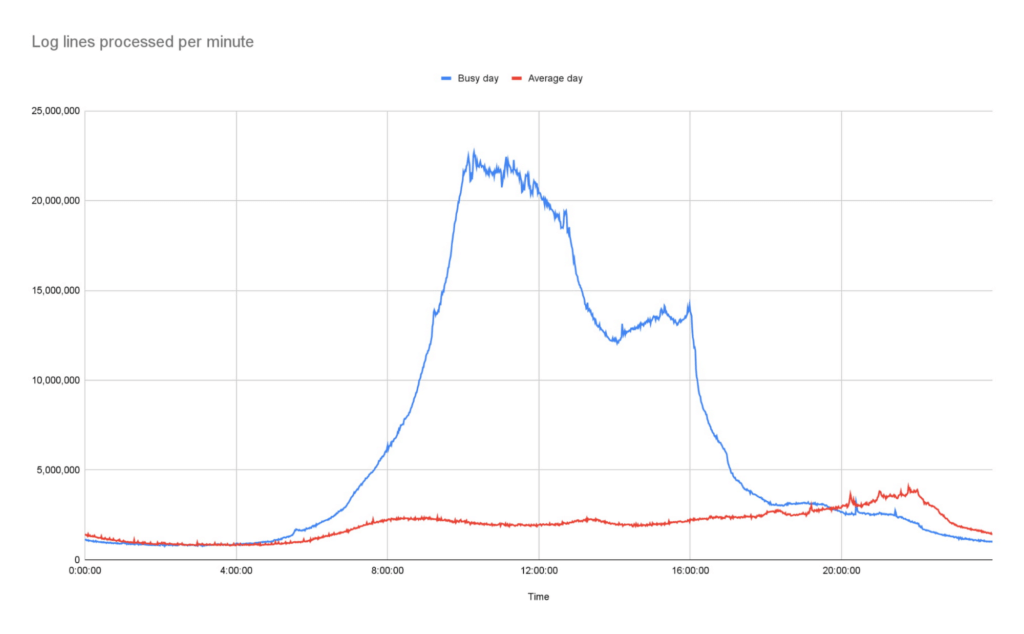
To operate the site and ensure our services run smoothly we continually monitor Traffic Manager and CDN access logs. Our websites generate more than 3B log lines per day, and handle large data bursts during major news events; on a busy day our system supports over 26B log lines in a single day.
As initially designed, we stored log data in a Cloud Storage bucket. But every time we needed to access that data, we had to download terabytes of logs down to a virtual machine (VM) with a large amount of attached storage, and use the ‘grep’ tool to search and analyze them. From beginning to end, this took us several hours. On heavy news days, the time lag made it difficult for the engineering team to do their jobs.
We needed a more efficient way to make this log data available, so we designed and deployed a new system that deals with logs and reacts to spikes more efficiently as they arrive, improving the timeliness of critical information significantly.
In this new system, we still leverage Cloud Storage buckets, but on arrival, each log generates an event using EventArc. That event triggers Cloud Run to validate, transform and enrich various pieces of information about the log file such as filename, prefix, and type, then processes it and outputs the processed data as a stream into BigQuery. This event-driven design allows us to process files quickly and frequently — processing a single log file typically takes less than a second. Most of the files that we feed into the system are small, fewer than 100 Megabytes, but for larger files, we automatically split those into multiple files and Cloud Run automatically creates additional parallel instances very quickly, helping the system scale almost instantly.
The nature of running a global website which provides news coverage means we see frequent, unpredictable large spikes of traffic. We learn from these and optimize our systems where necessary so we’re confident in the system’s ability to handle significant traffic. For example, around the time of the announcement of the Queen’s passing in September, we saw some huge traffic spikes. During the largest, within one minute, we went from running 150 – 200 container instances to over 1000…. and the infrastructure just worked. Because we engineered the log processing system to rely on the elasticity of a serverless architecture, we knew from the get-go that it would be able to handle this type of scaling.
Around the time of the announcement of the Queen’s passing in September, we saw some huge traffic spikes. During the largest, within one minute, we went from running 150 – 200 container instances to over 1000…. and the infrastructure just worked
Our initial concern about choosing serverless was cost. It turns out that using Cloud Run is significantly more cost-effective than running the number of VMs we would need for a system that could survive reasonable traffic spikes with a similar level of confidence.
Switching to Cloud Run also allows us to use our time more efficiently, as we no longer need to spend time managing and monitoring VM scaling or resource usage. We picked Cloud Run intentionally because we wanted a system that could scale well without manual intervention. As the digital distribution team, our job is not to do ops work on the underlying components of this system — we leave that to the specialist ops teams at Google.
Another conscious choice we made whilst rebuilding the system was to use the built-in service-to-service authentication in Google Cloud. Rather than implementing and maintaining the authentication mechanism ourselves, we add some simple configuration which instructs the client side to create and send a OIDC token for a service account we define and the server side to authenticate and authorize the client. Another example is pushing events into Cloud Run, where we can configure Cloud Run authorization to only accept events from specific EventArc triggers, so it is fully private.
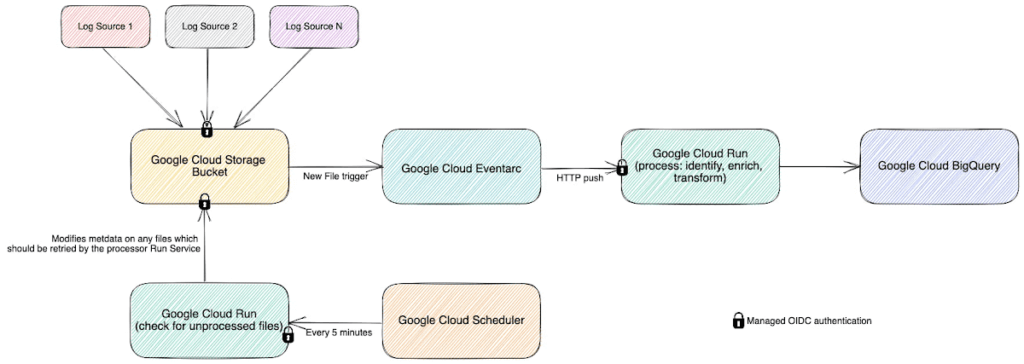
Going forward, the new system has allowed us to make better use of our data safely. For example, BigQuery’s per-column permissions allow us to open up access to our logs to other engineering teams around the organization, without having to worry about sharing PII that’s restricted to approved users.
The goal of our team is to empower all teams within the BBC to get the content they want on the web when they want it, make it reliable, secure, and make sure it can scale. Google Cloud serverless products helped us to achieve these goals with relatively little effort and require significantly less management than previous generations of technology.
Consent is a Key Component for a Successful Embedded Financial Solution: Read Why

3239
Of your peers have already read this article.
5:00 Minutes
The most insightful time you'll spend today!
When banks and other financial institutions make their products available via non-banks, we call that Embedded Finance. Think, for example, of a retailer offering financing for people buying goods; or a budgeting app gathering bank transactions to help you categorize and understand your spending patterns. The finance – the money management – has been embedded into the retailer or the budgeting experience.
This last example falls under the Data Exchange category of Embedded Finance , and it’s often also called Open Banking. In many countries this active data exchange is actually mandated by law, with specific Open Banking standards encoded into law for all financial institutions. As of this blog post, there are approximately 37 countries with such laws already in place or currently being worked on.
In an Embedded Finance scheme there are three main players: The financial institution offering their products and services, a third party provider (TPP) making use of those products or services, and an end user who is a customer of the financial institution and is interacting with the TPP.
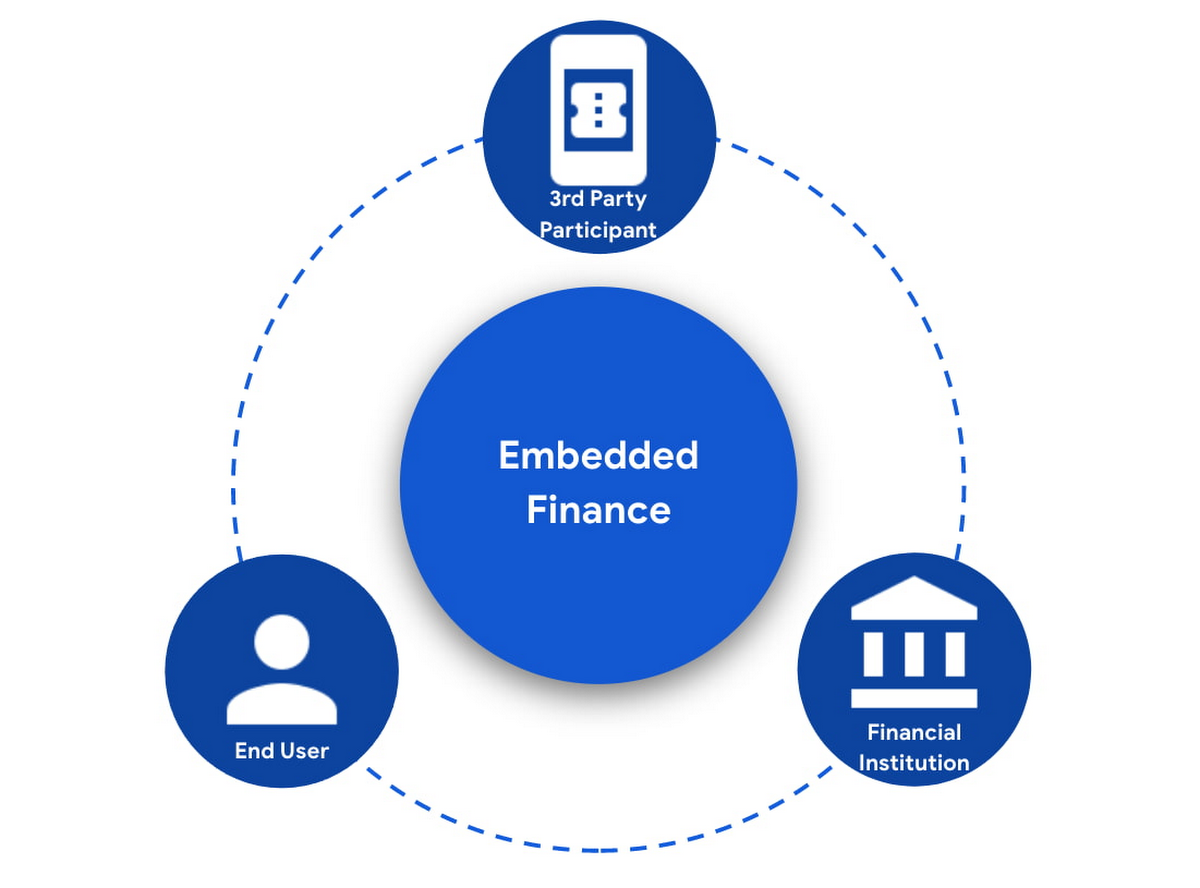
The most important ingredient for these schemes is consumer trust. If a consumer does not trust that their data will be safely shared with a third party, and that they can easily understand the terms they have agreed to and stop sharing their data whenever they want to, consumers will simply not participate. When a consumer agrees for their data to be shared, this is called consent.
What components do I need for a successful Embedded Finance solution?
Banks’ products and services are made available to other parties via APIs, thus a fundamental component is an API Management platform. An API Management Platform lets you design, secure, analyze, and scale APIs anywhere with visibility and control.
Also, we need a component to manage consents given by end users. Consent Management refers not only to the capability of checking whether a certain action by a third party (eg: access an end user’s account balance) is valid according to the consent granted by the end user to that TPP, but also the availability of tools for end users to check existing consents, modify them or revoke them, as well as tools for financial institutions to perform similar actions on behalf of their customers.
Finally, we need an Identity Platform capable of authenticating an end user and establishing their identity.

A Google Cloud based embedded finance solution uses Apigee as the API management platform, Identity Platform or your own identity platform of choice, and a consent management service (CMS). Google Cloud has partnered with two leading providers in the consent management space: Clarip and CloudEntity.

How do these components work together?
The main roles and responsibilities of each of the three components are quite clear, but there is a certain degree of flexibility on how to orchestrate the interactions between the components, and which component performs which function when there is an overlap of functionality between them.
Google Cloud has tested the following interaction patterns:
- Interaction Pattern #1: Apigee as the main orchestrator
In this interaction pattern, Apigee interacts with both the consent management service and the identity platform, coordinating end user authentication with the identity platform, and authorization and consent with the consent management service. Apigee acts as the “broker” between users, their identity, and their consent.
- Interaction Pattern #2: The consent management service abstracts the identity platform.
In this case, the consent management service manages all the interactions with the identity management platform, and the identity platform acts as the “broker”. Apigee only interacts with the consent service.
The three components share a common pool of client apps and end users. One of the components is typically designated as the source of truth for these entities, while the other components that need to know about these entities synchronize that information from the source of truth.
The identity platform is typically the source of truth for end user identities and the consent management component will synchronize that information by pulling it from the identity platform.
The consent management service is the source of truth for user opt-in and current consent status. Apigee will either check with the service the validity of a consent every time a request comes through, or to make it more efficient, it will validate the main attributes of the consent based on information stored in Apigee. To maintain consistency, the consent management service should tell Apigee to invalidate any tokens associated with a consent when it is revoked via other means (for example, if an end user revoked consent from a consent dashboard).
For client apps, either Apigee or the consent management component can act as the source of truth, with the other component synchronizing the information. In the context of Open Banking in particular, standards often mandate that financial institutions support Dynamic Client Registration. This means having endpoints that new clients can use to register themselves as clients for the Open Banking APIs. In this case, the synchronization of clients can easily be incorporated into Dynamic Client Registration.
Let’s look now into more detail about how the three components interact. There are two user journeys that are particularly relevant:
Authentication/Authorization/Consent
This is the beginning of the typical consumer client journey, when an end user starts using a third party app that requires access to that user’s data. The third party app needs to authenticate itself, and request authorization to access the user’s data. This will trigger the authentication of the end user and consent granting: Consent granting being the process of, the user authorizing the operations the app will execute on their behalf, and establishing the list of accounts on which these operations will be performed. The authorization is represented by an access token, which the app will need to include in all subsequent requests.
This is quite a complex journey with many steps involved in order to make this as secure as possible. To make it easier to understand, we will simplify some of the steps (apologies in advance to you OIDC/FAPI experts out there!).
At a high level, these are the steps involved in this user journey:
- End user starts using an app
- The app requests permission to access user’s data
- The identity platform (IdP) authenticates the end user
- The consent management service obtains consent from end user
- An access token is issued for the app, encapsulating the authorized permissions, accounts, etc. A refresh token is also issued – the access token normally has a short life (measured in minutes), but the app can use the refresh token, which typically lasts much longer (days or months), in order to obtain a new access token without the need of going through the end user authentication/authorization/consent process again.
The way these steps are orchestrated varies depending on the interaction pattern among the components.
Pattern #1: Apigee orchestrates all interactions
When the client requests permission, Apigee will record the request and then redirect the client app to the IdP login page. Once the end user logs in, the IdP will return an authorization code to the callback URL that Apigee registered in the IdP configuration.
Apigee will then redirect the client app to the Consent Management service, so that the consent form is displayed. Once the user grants consent, selects the desired permissions, and selects the accounts it will apply to, the Consent Management Service will update Apigee with the status of the consent, via a callback Apigee registered in the consent configuration.
Now that the end user has authenticated and granted consent, Apigee can now issue an authorization code, and associate all the necessary information, for instance, details about the consent, the authorization code issued by the Identity Platform (IdP), the identification of the end user in the IdP, etc. Apigee will return this authorization code to the client app via a callback endpoint that the app provided when registering with Apigee.
The app will then exchange the authorization code for an access token. Apigee will obtain an access token from the IdP, abd update the status of the consent before issuing an access token to the client.
Pattern #2: The Consent Management Service is the center of the Architecture
In Pattern #2, Apigee will only communicate with the Consent Management Service, which acts as an authorization server for the app and will also coordinate all interaction with the IdP.
When the client requests permission, Apigee will forward the request to the CMS. The CMS will record the request and then redirect the client app to the IdP login page. Once the end user logs in, the IdP will return an authorization code to the callback the CMS registered in the IdP configuration.
The CMS then displays the consent form. Once the user approves the consent and selects the desired permissions and accounts it will apply to, the Consent Management Service will return an authorization code to Apigee, via a callback Apigee registered in the CMS configuration.
From now on, the flow is the same as explained above. Apigee will issue an authorization code, associate all the necessary information and will return this authorization code to the client app via a callback endpoint. The app will then exchange the authorization code for an access token. Apigee will obtain an access token from the CMS, before issuing an access token to the client.
Let’s now look at the other relevant user journey:
Access shared data
Once the third party app has been authorized, it will then start requesting that end user’s data. For instance, it may request the list of accounts or the balance of a particular account.
When that request goes through, a series of checks need to be performed: Is this third party app still authorized? Has it been granted the right permission for the operation being requested? Is the account involved included in the list of accounts authorized by the end user? Apigee can perform all these checks by inspecting the access token presented by the third party app.
There is, however, one other check which cannot be done simply by inspecting the token. Imagine for a moment that in-between the user granting consent and the app requesting the user’s data, the end user decided to revoke that consent. This could be done by other means than the app itself, for instance by checking all consents granted to all apps in a consent dashboard accessible via other channels such as an “Internet Banking” site. When the app requests the user data, the token is still valid, however the consent has already been revoked. Therefore, in this user journey, Apigee will check with the Consent Management service to check if the consent is still valid. This adds a bit of overhead, which can be minimized by other means. For instance, one popular optimization is to make sure that the Consent Management service asks Apigee to revoke any access or refresh tokens associated with a given consent when that consent is revoked via other channels. If that guardrail is in place, then Apigee can determine if a request should be allowed simply by validating the access token and using the consent information stored alongside the token.
The following diagram summarizes the interactions required between Apigee and the Consent Management component. The interaction is essentially the same in both interaction patterns.

What’s next?
In this article we have described how Apigee, a Consent Management service, and an Identity Platform are the fundamental ingredients of a successful and secure Embedded Finance solution. We have also looked at how these components interact with each other to keep user consent consistent and available. Both interaction patterns described are valid and have been proven to work. So which one may be right for you? The answer ultimately depends on your particular requirements, the choice of consent management service, and your choice of identity platform. As a rule of thumb, if you have multiple application experiences, identity systems, and sources of consent, an Apigee-centric architecture is a great solution. If you are looking at a Consent Management service in the context of an Open Banking implementation mandated by a centralized authority (eg: Open Banking Brazil, Consumer Data Standards in Australia), CloudEntity is a good choice for consent management, as their product is also Certified Financial-grade API (FAPI) OpenID Provider, with profiles for the various Open Banking standards. CloudEntity integrates with Apigee using Pattern #2.
For more details on both Clarip and CloudEntity’s offerings and how their particular solution works with GCP please check:
- Clarip: Universal Consent Management Platform – GDPR
- CloudEntity: Certified OpenBanking & Consent (UK, Brazil and Australia) at scale
For more details on Apigee API Management, see https://cloud.google.com/apigee
You can also learn about our solutions for retail banking or contact sales.
Announcing Apigee’s Pay-as-you-go pricing to provide flexibility and scale seamlessly

3167
Of your peers have already read this article.
2:30 Minutes
The most insightful time you'll spend today!
Apigee is Google Cloud’s API management platform that enables organizations to build, operate, manage and monetize their APIs. Customers from industries around the world trust Apigee to build and scale their API programs.
While some organizations operate with mature API-first strategies, others might still be working on a modernization strategy. Even within an organization, different teams often end up with diverse use cases and choices for API management. From our conversations with customers, we are increasingly hearing the need to align our capabilities and pricing with such varied workloads.
We’re excited to introduce a Pay-as-you-go pricing model to enable customers to unlock Apigee’s API management capabilities whilst retaining the flexibility to manage their own costs. Starting today, customers will have the option to use Apigee by paying only for what they are using. This new pricing model is offered as a complement to the existing Subscription plans (or) the ability to evaluate it for free.
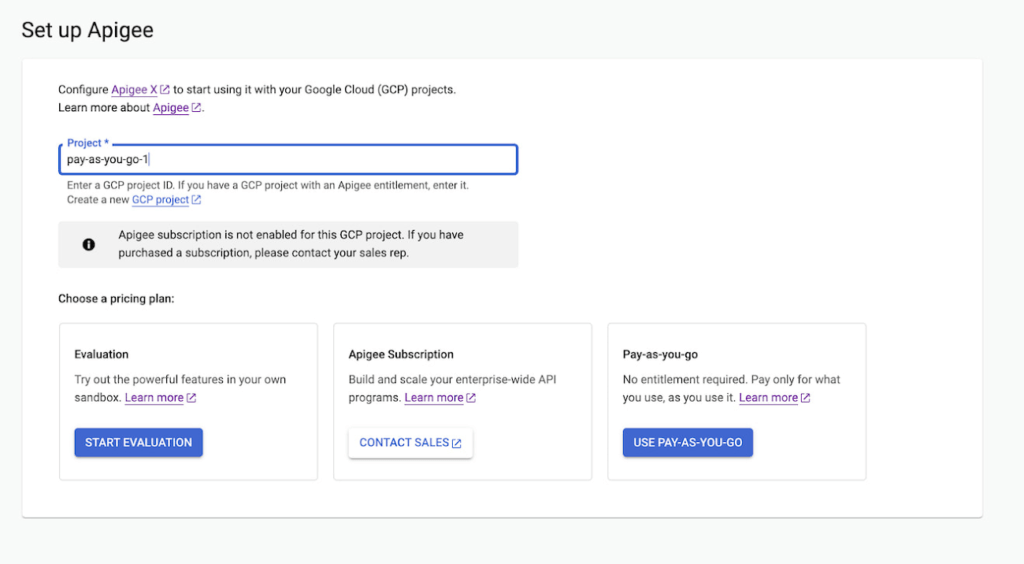
Start small, but powerful with Pay-as-you-go pricing
The new Pay-as-you-go pricing model offers flexibility for organizations to:
- Unlock the value of Apigee with no upfront commitment: Get up and running quickly without any upfront purchasing or commitment
- Maintain flexibility and control in costs: Adapt to ever-changing needs whilst maintaining low costs. You can continue to automatically scale with Pay-as-you-go or switch to Subscription tiers based on your usage
- Provide freedom to experiment: Every API management use case is different and with Pay-as-you-go you can experiment with new use cases by unlocking value provided by Apigee without a long term commitment
Pay-as-you-go pricing works just like the rest of your Google Cloud bills, allowing you to get started without any license commitment or upfront purchasing. As part of the Pay-as-you-go pricing model, you will only be charged based on your consumption of
- Apigee gateway nodes: You will be charged on your API traffic based on the number of Apigee gateway nodes (a unit of environment that processes API traffic) used per minute. Any nodes that you provision would be charged every minute and billed for a minimum of one minute.
- API analytics: You will be charged for the total number of API requests analyzed per month. API requests, whether they are successful or not, are processed by Apigee analytics. Analytics data is preserved for three months.
- Networking usage: You will be charged on the networking (such as IP address, network egress, forwarding rules etc.,) based on usage
When is Pay-as-you-go pricing right for me?
Apigee offers three different pricing models
- Evaluation plan to access Apigee’s capabilities at no cost for 60 days
- Subscription plans across Standard, Enterprise or Enterprise plus based on your predictable but high volume API needs
- Pay-as-you-go without any startup costs
Subscription plans are ideal for use cases with predictable workloads for a given time period, whereas Pay-as-you-go pricing is ideal if you are starting small with a high value workload. Here are a few use cases where organizations would choose Pay-as-you-go if they want to:
- Establish usage patterns before choosing a Subscription model
- Evolve their API program by starting with high value and low volume API use cases
- Manage and protect your applications build on Google cloud infrastructure
- Migrate or modernize your services gradually without disruption
Next steps
Every organization is increasingly relying on APIs to build new applications, adopt modern architectures or create new experiences. In such transformation journeys, Apigee’s Pay-as-you-go pricing will provide flexibility for organizations to start small and scale seamlessly with their API management needs.
- To get started with Apigee’s Pay-as-you-go pricing go to console or try it for free here
Check out our documentation and pricing calculator for further details on Apigee’s Pay-as-you-go pricing for API management. For comparison and other information, take a look at our pricing page.
How to Pick a Database that is Suitable for Your Application

7045
Of your peers have already read this article.
2:30 Minutes
The most insightful time you'll spend today!
Picking the right database for your application is not easy. The choice depends heavily on your use case—transactional processing, analytical processing, in-memory database, and so on—but it also depends on other factors. This post covers the different database options available within Google Cloud across relational (SQL) and non-relational (NoSQL) databases and explains which use cases are best suited for each database option.

Relational databases
In relational databases information is stored in tables, rows and columns, which typically works best for structured data. As a result they are used for applications in which the structure of the data does not change often. SQL (Structured Query Language) is used when interacting with most relational databases. They offer ACID consistency mode for the data, which means:
- Atomic: All operations in a transaction succeed or the operation is rolled back.
- Consistent: On the completion of a transaction, the database is structurally sound.
- Isolated: Transactions do not contend with one another. Contentious access to data is moderated by the database so that transactions appear to run sequentially.
- Durable: The results of applying a transaction are permanent, even in the presence of failures.
Because of these properties, relational databases are used in applications that require high accuracy and for transactional queries such as financial and retail transactions. For example: In banking when a customer makes a funds transfer request, you want to make sure the transaction is possible and it actually happens on the most up-to-date account balance, in this case an error or resubmit request is likely fine.
There are three relational database options in Google Cloud: Cloud SQL, Cloud Spanner, and Bare Metal Solution.
Cloud SQL: Provides managed MySQL, PostgreSQL and SQL Server databases on Google Cloud. It reduces maintenance cost and automates database provisioning, storage capacity management, back ups, and out-of-the-box high availability and disaster recovery/failover. For these reasons it is best for general-purpose web frameworks, CRM, ERP, SaaS and e-commerce applications.
Cloud Spanner: Cloud Spanner is an enterprise-grade, globally-distributed, and strongly-consistent database that offers up to 99.999% availability, built specifically to combine the benefits of relational database structure with non-relational horizontal scale. It is a unique database that combines ACID transactions, SQL queries, and relational structure with the scalability that you typically associate with non-relational or NoSQL databases. As a result, Spanner is best used for applications such as gaming, payment solutions, global financial ledgers, retail banking and inventory management that require ability to scale limitlessly with strong-consistency and high-availability.
Bare Metal Solution: Provides hardware to run specialized workloads with low latency on Google Cloud. This is specifically useful if there is an Oracle database that you want to lift and shift into Google Cloud. This enables data center retirements and paves a path to modernize legacy applications.
Non-relational databases
Non-relational databases (or NoSQL databases) store compex, unstructured data in a non-tabular form such as documents. Non-relational databases are often used when large quantities of complex and diverse data need to be organized. Unlike relational databases, they perform faster because a query doesn’t have to access several tables to deliver an answer, making them ideal for storing data that may change frequently or for applications that handle many different kinds of data.
For example, an apparel store might have a database in which shirts have their own document containing all of their information, including size, brand, and color with room for adding more parameters later such as sleeve size, collars, and so on.
Qualities that make NoSQL databases fast:
- Eventual consistency: stores usually exhibit consistency at some later point (e.g., lazily at read time)
- Horizontal scaling, usually using hashed distributions
- Typically, they are optimized for a specific workload pattern (i.e., key-value, graph, wide-column)
- Typically, they don’t support cross shard transactions or flexible isolation modes.
Because of these properties, non-relational databases are used in applications that require large scale, reliability, availability, and frequent data changes.They can easily scale horizontally by adding more servers, unlike some relational databases, which scale vertically by increasing the machine size as the data grows. Although, some relations databases such as Cloud Spanner support scale-out and strict consistency.
Non-relational databases can store a variety of unstructured data such as documents, key-value, graphs, wide columns, and more. Here are your non-relational database options in Google Cloud:
- Document databases: Store information as documents (in formats such as JSON and XML). For example: Firestore
- Key-value stores: Group associated data in collections with records that are identified with unique keys for easy retrieval. Key-value stores have just enough structure to mirror the value of relational databases while still preserving the benefits of NoSQL. For example: Datastore, Bigtable, Memorystore
- In-memory database: Purpose-built database that relies primarily on memory for data storage. These are designed to attain minimal response time by eliminating the need to access disks. They are ideal for applications that require microsecond response times and can have large spikes in traffic. For example: Memorystore
- Wide-column databases: Use the tabular format but allow a wide variance in how data is named and formatted in each row, even in the same table. They have some basic structure while preserving a lot of flexibility. For example: Bigtable
- Graph databases: Use graph structures to define the relationships between stored data points; useful for identifying patterns in unstructured and semi-structured information. For example: JanusGraph
There are three non-relational databases in Google Cloud:
- Firestore: Is a serverless document database which scales on demand and acts as a backend-as-a-service. It is DBaaS that increases the speed of building applications. It is perfect for all general purpose uses cases such as ecommerce, gaming, IoT and real time dashboards. With Firestore users can interact with and collaborate on live and offline data making it great for real-time application and mobile apps.
- Cloud Bigtable: Cloud Bigtable is a sparsely populated table that can scale to billions of rows and thousands of columns, enabling you to store terabytes or even petabytes of data. It is ideal for storing very large amounts of single-keyed data with very low latency. It supports high read and write throughput at sub-millisecond latency, and it is an ideal data source for MapReduce operations. It also supports the open-source HBase API standard to easily integrate with the Apache ecosystem including HBase, Beam, Hadoop and Spark along with Google Cloud ecosystem.
- Memorystore: Memorystore is a fully managed in-memory data store service for Redis and Memcached at Google Cloud. It is best for in-memory and transient data stores and automates the complex tasks of provisioning, replication, failover, and patching so you can spend more time coding. Because it offers extremely low latency and high performance, Memorystore is great for web and mobile, gaming, leaderboard, social, chat, and news feed applications.
Conclusion
Choosing a relational or a non-relational database largely depends on the use case. Broadly, if your application requires ACID transactions and your data structure is not going to change much, select a relational database.
In Google Cloud use Cloud SQL for any general-purpose SQL database and Cloud Spanner for large-scale globally scalable, strongly consistent use cases. In general, if your data structure may change later and if scale and availability is a bigger requirement than consistency then a non-relational database is a preferable choice. Google Cloud offers Firestore, Memorystore, and Cloud Bigtable to support a variety of use cases across the document, key-value, and wide column database spectrum.
For more comparison resources on each database check out the overview. For more hands-on experience with Bigtable, check out our on-demand training here and learn about migrating databases to managed services check out this whitepaper.
https://youtube.com/watch?v=2TZXSnCTd7E%3Fenablejsapi%3D1%26
For more #GCPSketchnote, follow the GitHub repo. For similar cloud content follow me on Twitter @pvergadia and keep an eye out on thecloudgirl.dev.
More Relevant Stories for Your Company

Secret Manager: Keeping Your Organization’s Secrets Safer!
Secret Manager is a Google Cloud service that provides a secure and convenient way to store API keys, passwords, certificates, and other sensitive data. It is the central place and single source of truth to manage, access, and audit secrets across Google Cloud. Since its launch, Secret Manager has helped secure

MerPay Platform Scales its Reach to Millions of Users using Cloud Spanner
Editor’s note: To launch a new mobile payment platform, Mercari needed a database solution strong on scalability, availability, and performance. Here’s how Cloud Spanner delivered those results. E-commerce companies need to connect customers to their services securely, reliably, with zero downtime. When Mercari, Inc. launched a new mobile payment platform, we chose Cloud

DueDil Chooses Apigee to Leverage APIs for Customers’ Risk Monitoring with Better Insights
As their name reflects, DueDil provides due diligence services ranging from customer-specific risk evaluations and selections to customer onboarding and real-time risk monitoring for leading financial services, high-growth tech and insurance companies. Founded in 2009, the company helps more than 3,000 enterprise users from over 400 clients to not only understand with


Simplified Document Processing with AppSheet Automation
Move over legacy, time-consuming systems and processes to update data from documents and invoices into disparate data systems. AppSheet integrates no-code development with Google Cloud's state-of-the-art Document AI to automate the data extraction and validation from invoices, documents, receipts, etc. You can end all 'guesstimates' and rely on the accuracy
