





8002
Of your peers have already watched this video.
2:51 Minutes
The most insightful time you'll spend today!
Video: How Did GANT Get Products to Market in Just Three Months?
It was in 1949 that a Ukranian immigrant Berl Gantmacher launched–what was going to be an iconic shirt-making company–GANT in Connecticut, America.
Since then, the company has reinvented shirts every single day. Headquartered in Stockholm, Sweden, GANT operates in 70 countries.
In 2017, GANT wanted to launch a flagship store in London. It takes most companies a year to open a store, considering the amount of cross country collaboration and planning that’s needed for a store to take off.
In order to open the store in London, teams from three countries—Sweden, Portugal and the UK—needed to work together.
“Right away through the process, we moved forward as one team with one goal. With G Suite we have access to all information in one place and we collaborate on Hangout. A flagship store could be well over a year. Regent Street (London) was three months. A very, very different timeline. It’s been an amazing success for the company,” says Matthew Wood, Creative Director, GANT.
G Suite made it possible for the various teams from different countries to collaborate on a single platform and launch a flagship store in just three months—instead of a year.
The Incredible Story of How Hero MotoCorp Moved 6,000 Users to the Cloud in 45 Days

7809
Of your peers have already read this article.
5:00 Minutes
The most insightful time you'll spend today!
Assembling thousands of parts into one motorbike or scooter every 17 seconds is a complex task requiring accuracy and precision. For Hero MotoCorp — an India-headquartered manufacturer of two-wheeler vehicles — workforce collaboration, security, and mobility complement these processes and provide the cornerstone of the organization’s global operations.
Based in New Delhi, Hero MotoCorp is one of the world’s largest makers of two-wheeler vehicles, with a production capacity of 9 million units from five manufacturing plants in India and one each in Colombia and Bangladesh. The business has more than 90 million customers and operates in 37 countries across Asia, Africa, and South and Central America. In its home market, HeroMotoCorp sells one in every two two-wheelers.
Innovation and agility
Innovation and agility are deeply embedded in Hero MotoCorp’s culture and operations. Its Center of Innovation and Technology at Jaipur in Rajasthan, northern India, undertakes extensive product design and development, testing, and validation.
Hero MotoCorp has also established a technology center at Stephanskirchen, near Munich in Germany, to develop new vehicle concepts and technologies.
For several years, Hero MotoCorp relied on a traditional email solution to enable its employees to communicate and complete tasks. However, this solution could not provide the functionality, performance, ease of use, and security the business needed to maintain its market leadership.
“Our Chief Information Officer, Mr. Vijay Sethi, was the first to migrate to and embrace the features of G Suite and set an example to our workforce.”
Sujoy Brahmachari, Sr. GM and CISO, Hero MotoCorp
“Security, in particular, is extremely important — we don’t want our product design and development details falling into the wrong hands,” says Sujoy Brahmachari, Sr. GM and CISO, Hero MotoCorp. “We needed a solution that would allow us to control and monitor the distribution of sensitive information within and outside our organization.”
In early 2015, Hero MotoCorp’s technology team began evaluating email and workplace collaboration applications that could help the business realize its longer-term ambitions.
Collaboration key to success
“We were focused on a product that could drive greater collaboration among our workforce,” says Brahmachari. “In addition, we wanted to use the product on our desktops, laptops, mobile devices, and other devices. Finally, we needed to ensure email, other applications, and data were secure and available as and when we needed them.”
Hero MotoCorp’s evaluation found G Suite met all these requirements while being intuitive and easy to use. Furthermore, the cloud-based suite of intelligent applications provided a lower total cost of ownership than the business’s existing email solution and potential alternatives.
A 45-day migration
The business completed its review and completed the migration in just 45 days in 2015. “We worked closely with Google and our partners to complete the process in an innovative way that prioritized speed,” says Brahmachari. “For example, we migrated only three months’ worth of emails from our incumbent solution to G Suite, rather than the entire data repository.”
“Our teams are very happy and collaborative – employees can use Gmail through G Suite without being concerned about storage limits and can connect with colleagues, partners, customers, and other stakeholders through the chat, video, and audio call capabilities of Hangouts Meet.”
Sujoy Brahmachari, Sr. GM and CISO, Hero MotoCorp
Hero MotoCorp started the migration with a function-wise approach, creating batches and moving them overnight to G Suite. It created an internal video for employees to learn how to work using G Suite. It also created intranet posts to provide easy reference to all employees and established a service desk to respond to questions.
“Our Chief Information Officer, Mr. Vijay Sethi, was the first to migrate to and embrace the features of G Suite and set an example to our workforce,” says Brahmachari.
Deployed to 6,000 users
Hero MotoCorp has deployed G Suite to about 6,000 users in its core business and many users in affiliate companies. The company’s user-focused approach to the deployment, and the intuitive, easy-to-use nature of the product, has prompted the business’s workforce to embrace the full potential of G Suite.
“Our teams are very happy and collaborative — employees can use Gmail through G Suite without being concerned about storage limits and can connect with colleagues, partners, customers, and other stakeholders through the chat, video, and audio call capabilities of Hangouts Meet,” says Brahmachari.
Employees can also create, store, and access Docs, Sheets, Slides, and other file types on Drive — helping to ensure new product development, delivery schedules, budgeting, and other activities needed to keep a leading multinational manufacturer ahead of its competitors can be completed quickly and collaboratively.
Deployed to mobile devices
“With G Suite, information is available in the cloud to any employee at any time. The collaboration this enables plays a vital role in sustaining our leadership position.”
Sujoy Brahmachari, Sr. GM and CISO, Hero MotoCorp
Hero MotoCorp has also been able to give employees access to G Suite on a range of mobile devices — with administrators using mobile management to secure access applications and data on iOS and Android devices. The business is using the feature to require devices to have a screen lock or password; remote-wipe information from lost or stolen devices; and monitor from a central console the devices that access corporate data.
Further, Hero MotoCorp can use G Suite features to set and enforce policies and control system configuration and administration, while taking advantage of independently verified security, privacy, and compliance controls to meet business requirements.
With G Suite deployed and delivering value, Hero MotoCorp is now implementing or evaluating a range of Google technologies. For example, the business is using Google Maps Platform to power navigation for owners of new Hero MotoCorp two-wheelers and use Cloud Vision AI to enable immediate recognition of spare parts. “We are also evaluating Google Cloud data search and management technologies for potential application within the organization,” says Brahmachari.
The business is now well-positioned to accelerate into new markets and product development. “With G Suite, information is available in the cloud to any employee at any time,” says Brahmachari. “The collaboration this enables plays a vital role in sustaining our leadership position.”
How Google Meet Keeps Your Video Conferences Secure

6810
Of your peers have already read this article.
4:30 Minutes
The most insightful time you'll spend today!
All over the world, businesses, schools and users depend on G Suite to help them stay connected and get work done. Google designs, builds, and operates our products on a secure foundation, aimed at thwarting attacks and providing the protections needed to keep you safe. G Suite and Google Meet are no exception.
Google Meet’s security controls are turned on by default, so that in most cases, organizations and users won’t have to do a thing to ensure the right protections are in place. Here, we’ll summarize the key capabilities of Google Meet that help protect you.
Proactive protections to combat abuse and block hijacking attempts
Google Meet employs an array of counter-abuse protections to keep your meetings safe. These include anti-hijacking measures for both web meetings and dial-ins.
Google Meet makes it difficult to programatically brute force meeting IDs (this is when a malicious individual attempts to guess the ID of a meeting and make an unauthorized attempt to join it) by using codes that are 10 characters long, with 25 characters in the set. We limit the ability of external participants to join a meeting more than 15 minutes in advance, reducing the window in which a brute force attack can even be attempted. External participants cannot join meetings unless they’re on the calendar invite or have been invited by in-domain participants. Otherwise, they must request to join the meeting, and their request must be accepted by a member of the host organization.
In addition, we’re rolling out several features to help schools keep meetings safe and improve the remote learning experiences for teachers and students, including:
- Only meeting creators and calendar owners can mute or remove other participants. This ensures that instructors can’t be removed or muted by student participants.
- Only meeting creators and calendar owners can approve requests to join made by external participants. This means that students can’t allow external participants to join via video, and that external participants can’t join before the instructor.
- Meeting participants can’t rejoin nicknamed meetings once the final participant has left. This means if the instructor is the last person to leave a nicknamed meeting, students can’t join later without the instructor present.

Secure deployment and access controls for admins and end-users
To limit the attack surface and eliminate the need to push out frequent security patches, Google Meet works entirely in your browser. This means we do not require or ask for any plugins or software to be installed if you use Chrome, Firefox, Safari, or Microsoft Edge. On mobile, we recommend that you install the Google Meet app.
To help ensure that only authorized users administer and access Meet services, we support multiple 2-Step Verification options for accounts that are secure and convenient. These include hardware and phone-based security keys and Google prompt. Additionally, Google Meet users can enroll their account in our Advanced Protection Program (APP), which provides our strongest protections available against phishing and account hijacking and is specifically designed for the highest-risk accounts.
For G Suite Enterprise and G Suite for Education customers, we offer Access Transparency, which logs any Google access to Google Meet recordings stored in Drive, along with the reason for the access (support team actions that you might have requested, for example). Customers can also use data regions functionality to store select/covered data of Google Meet recordings in specific regions (i.e. US or Europe).
Secure, compliant, and reliable meeting infrastructure
In Google Meet, all data is encrypted in transit by default between the client and Google for video meetings on a web browser, on the Android and iOS apps, and in meeting rooms with Google meeting room hardware. Meet adheres to IETF security standards for Datagram Transport Layer Security (DTLS) and Secure Real-time Transport Protocol (SRTP). For every person and for every meeting, Meet generates a unique encryption key, which only lives as long as the meeting, is never stored to disk, and is transmitted in an encrypted and secured RPC (remote procedure call) during the meeting setup.
Security is an integral part of all our operations at Google. Our team of full-time security and privacy professionals supports our software engineering and operations to ensure that security is always a part of how we build and run our services. All of our Google Cloud and G Suite customers benefit from these capabilities, including:
- Secure-by-design infrastructure: Google Meet benefits from Google Cloud’s defense-in-depth approach to security, which utilizes the built-in protections and global-private network that Google uses to secure your information and safeguard your privacy.
- Compliance certifications: Our Google Cloud products, including Google Meet, regularly undergo independent verification of their security, privacy, and compliance controls, including validation against standards such as SOC, ISO/IEC 27001/17/18, HITRUST, and FedRAMP. We support your compliance requirements around regulations such as GDPR and HIPAA, as well as COPPA and FERPA for education.
- Incident management: We have a rigorous process for managing data and security incidents that specifies actions, escalations, mitigation, resolution, and notification of any potential incidents impacting customer data.
- Reliability: Google’s network is engineered to accommodate peak demand and handle future growth. Our network is resilient and engineered to accommodate the increased activity we’ve seen on Google Meet.
- Transparency: At Google Cloud, we’re clear about our commitments regarding customer data: we process customer data according to your instructions; we never use customer data for advertising purposes; and we publish the locations of our Google data centers, which are highly available, resilient, and secure.
During COVID-19 and beyond, we will continue to protect Google Meet users and their data, and keep innovating with new features to make our tools helpful, secure, and safe.
Now on Mobile: Manage Your Google Cloud Support Cases Anywhere, Anytime
939
Of your peers have already read this article.
2:30 Minutes
The most insightful time you'll spend today!
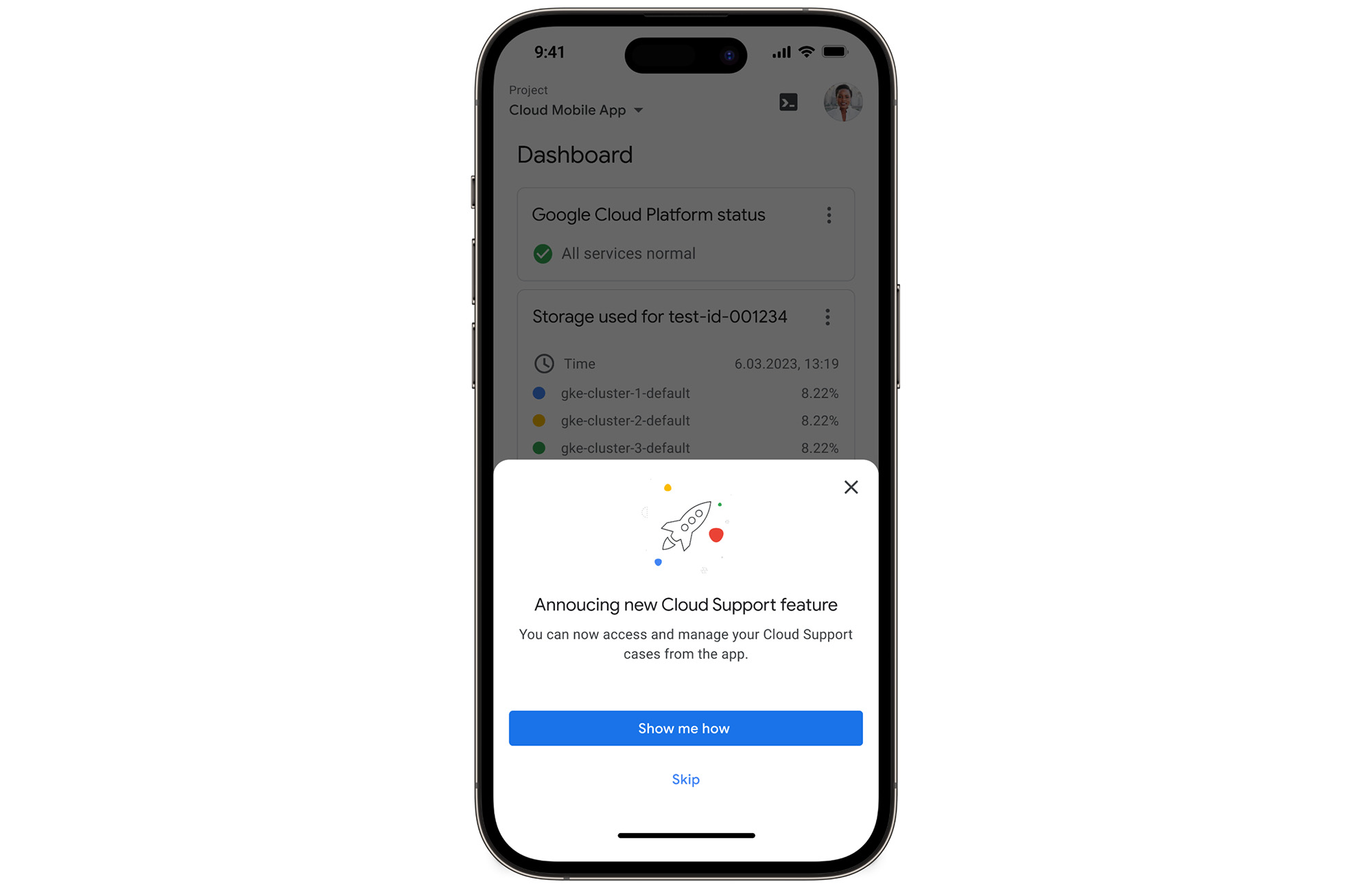
We’re excited to announce that Google Cloud Support is now available as Public Preview* in the Google Cloud mobile app.
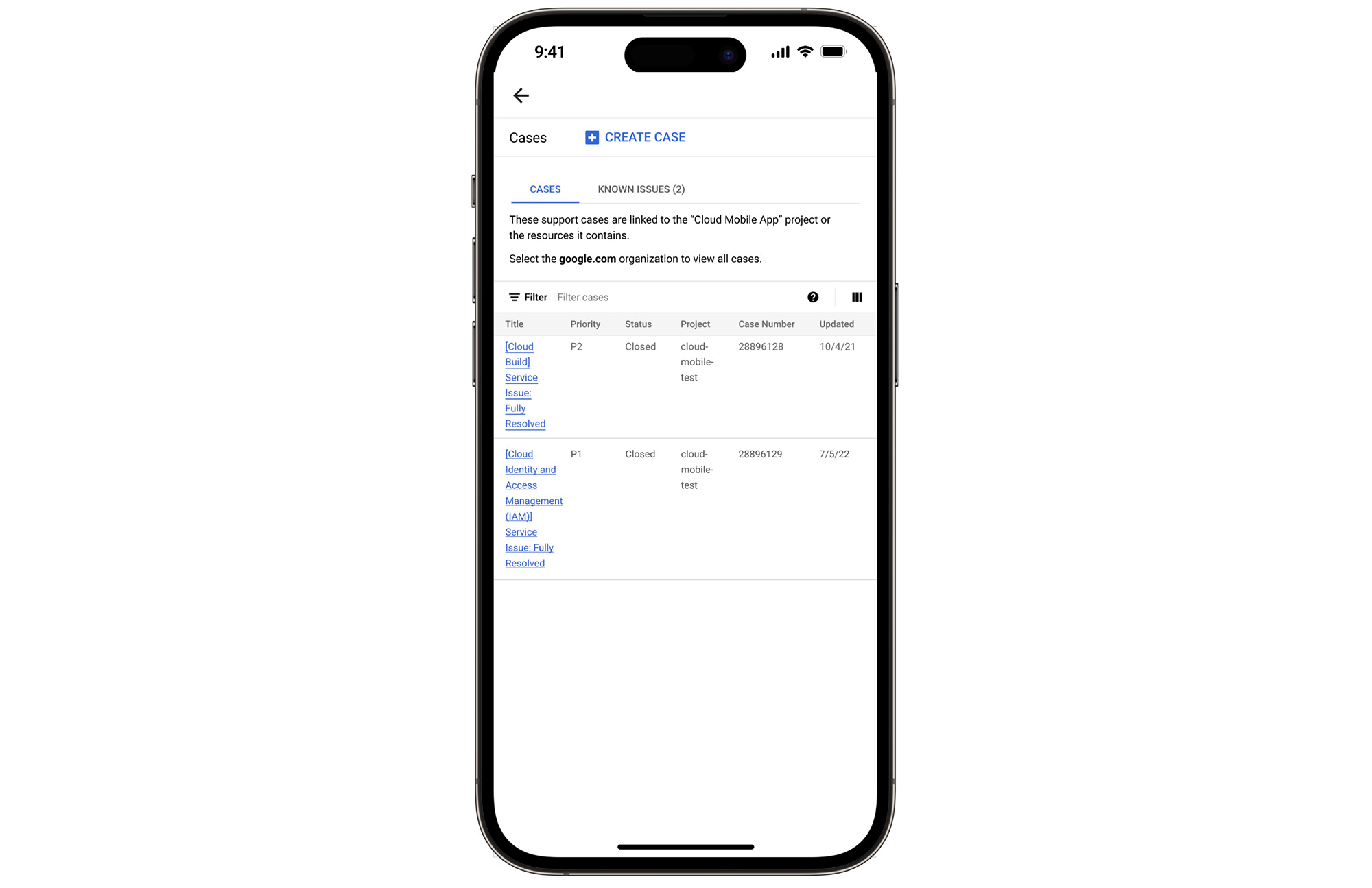
View and manage Google Cloud Support cases
We understand how important it is to be able to access and collaborate on Cloud Support cases. As such, we’ve made it easy for you to manage your cases via the mobile app. There is no need to log in to the mobile browser, search for a proper website, and navigate to the place where you need to be. Your Cloud Support cases are now available at your fingertips.
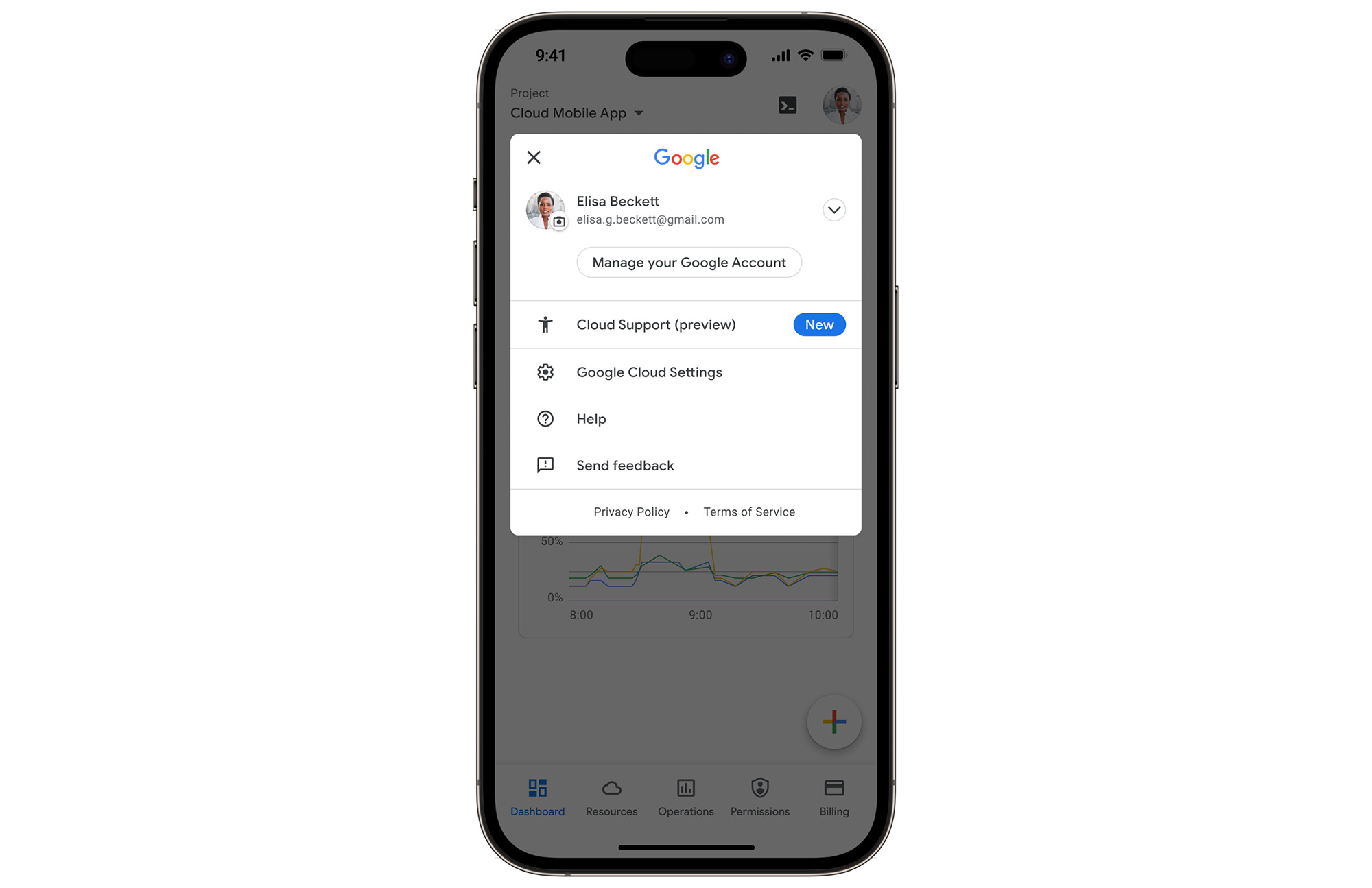
In the Google Cloud mobile app, simply navigate to “Cloud Support (preview)” from any screen by touching your profile picture.
With just one touch you can see the list of all your support cases and easily dive into their important details.
Create Google Cloud Support cases and take action
Not only can you easily view and manage your existing Cloud Support cases, you can also create new ones on the fly with the Google Cloud mobile app.
Seamlessly browse case comments to see the full history of the support case, and respond to the case with new comments.
Download the Google Cloud app today
The Google Cloud app is a powerful tool for managing your Google Cloud environment on the go, and it just got better. To summarize, we’ve added Cloud Support cases to our mobile app, which lets you:
- Read existing conversations with the Google Cloud Support Team
- Respond to Google Cloud Support cases
- Create new Google Cloud Support cases
These new features are available for you to use today in Public Preview. Download the Google Cloud mobile app from Google Play or the Apple App Store to try it out. Check out the Google Cloud app documentation to learn more about what you can do on-the-go. If you have any feedback, we would love to hear from you — simply click on the “send feedback” button in the app to share your experience.
*Preview – This product or feature is covered by the Pre-GA Offerings Terms of the Google Cloud Terms of Service. Pre-GA products and features might have limited support, and changes to pre-GA products and features might not be compatible with other pre-GA versions. For more information, see the launch stage descriptions.
4207
Of your peers have already watched this video.
18:40 Minutes
The most insightful time you'll spend today!
Enabling a Remote Workforce with Chrome Enterprise
The recent COVID-19 pandemic has mandated that organizations take unprecedented efforts to enable their employees to work remotely. This recent Gartner survey indicated that 88% of organizations have encouraged or required employees to work from home.
Even before this year’s events, remote working has been a growing consideration for employees and employers alike. In fact, since 2005, working from home has grown by 173% amongst the non-self-employed population. And the desire to work remotely continues to increase.
As more businesses consider how to enable their teams to work remotely, business and IT leaders are increasingly thinking about how to best support a distributed workforce.
In this video, learn how Chrome Enterprise can help keep your employees productive and data secure while allowing IT to remotely manage devices and find out how other companies are doing it too.
AI-powered Business Messages for Timely, Engaging and Helpful Conversations with Customers

9372
Of your peers have already read this article.
2:00 Minutes
The most insightful time you'll spend today!
Over the last two years, we’ve seen a significant uptick in the number of people using messaging to connect with businesses. Whether it was checking hours of operation, verifying what was in stock, or scheduling a pick-up, the pandemic caused a significant shift in consumer behavior.
- 45% of users are spending more time on messaging services because of the pandemic
- 85% of consumers would like to message brands directly
With the rise in demand for messaging, consumers expect communication with businesses to be speedy, simple, and convenient. For businesses, keeping up with customer inquiries can be a labor-intensive process, and offering 24/7 support outside of store hours can be costly.
To help businesses seamlessly deliver helpful, timely, and engaging conversations with customers when and where they need help, we introduced AI-powered Business Messages.
https://youtube.com/watch?v=fcgP3RHjBLY%3Fenablejsapi%3D1%26
What is AI-powered Business Messages?
With AI-powered Business Messages, you can connect with your customers in their moment of need, in the places they’re looking for answers—such as Google Search, Google Maps, or any brand-owned channel. For instance, check out how Walmart customers in the US are able to receive real-time information on product availability, straight from a search results page.
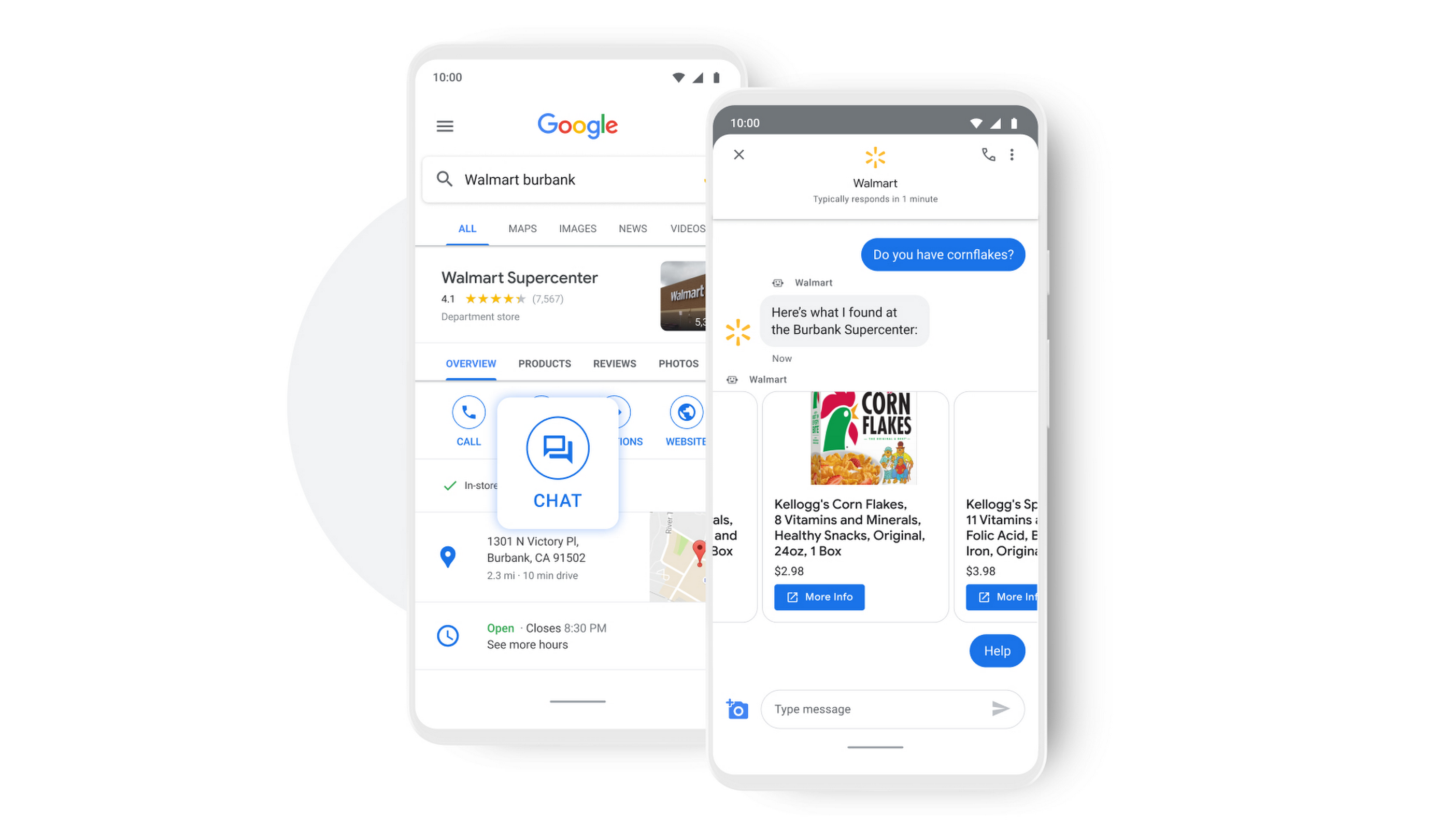
People turn to Google when they are searching for answers to their questions, looking to buy something, or trying to accomplish a particular task with one of our many tools. In fact, 68% of all online experiences begin with a search engine.
At Google, we know how important it is for interactions with a brand to be personalized, helpful, and simple. With AI-powered Business Messages, customers are able to chat with virtual agents that understand, interact, and respond in natural ways.
We are also combining smart automation with the ability for customers to chat with live agents when it’s really needed. This approach saves your customers precious time, while also saving you money. And with Business Messages automatically handling many customer inquiries in the background, businesses have the option to distribute their human customer service agents to address other needs.
Getting started with conversational AI is easy with Bot-in-a-Box
We know it can be difficult to get started with AI. That’s why we are utilizing existing Google AI tools like Dialogflow—part of Google Cloud Contact Center AI—to create the capability within Google’s Business Messages called Bot-in-a-Box, which makes getting started with Conversational AI easy. Bot-in-a-Box allows for fast and effective adoption of automation for businesses of all sizes.
Enabling Business Messages with Bot-in-a-Box can be as simple as leveraging an existing customer FAQ document you already have, whether it’s from a web page or an internal document. And since the conversational AI is powered by Business Messages and Dialogflow working together, your chat bot is able to understand and respond to customer questions automatically without the need to write code.
Bot-in-a-Box also supports other critical journeys like “Custom Intents.” That means that your bot is able to understand the different ways customers express a similar question and respond accurately by using machine learning capabilities.

Finding success
In April 2021, Wake County courthouses in North Carolina partnered with Tango Technology to implement Business Messages when it became apparent that being able to provide the public and attorneys with around-the-clock access to information would significantly reduce the pressure on courthouse staff. Using Bot-in-a-Box, Tango Technology was able to customize a solution for Wake County Courthouse, Justice Center, and Clerk of Superior Court in just four days.
“With the combination of Google’s Business Messages, GCP, and Dialogflow, we were able to spin up an AI-driven bot for the courts in days. And the technology stack allows us to continually improve by adding functionality in an agile process.”— Mike Lotz, Co-Founder, Tango Technology
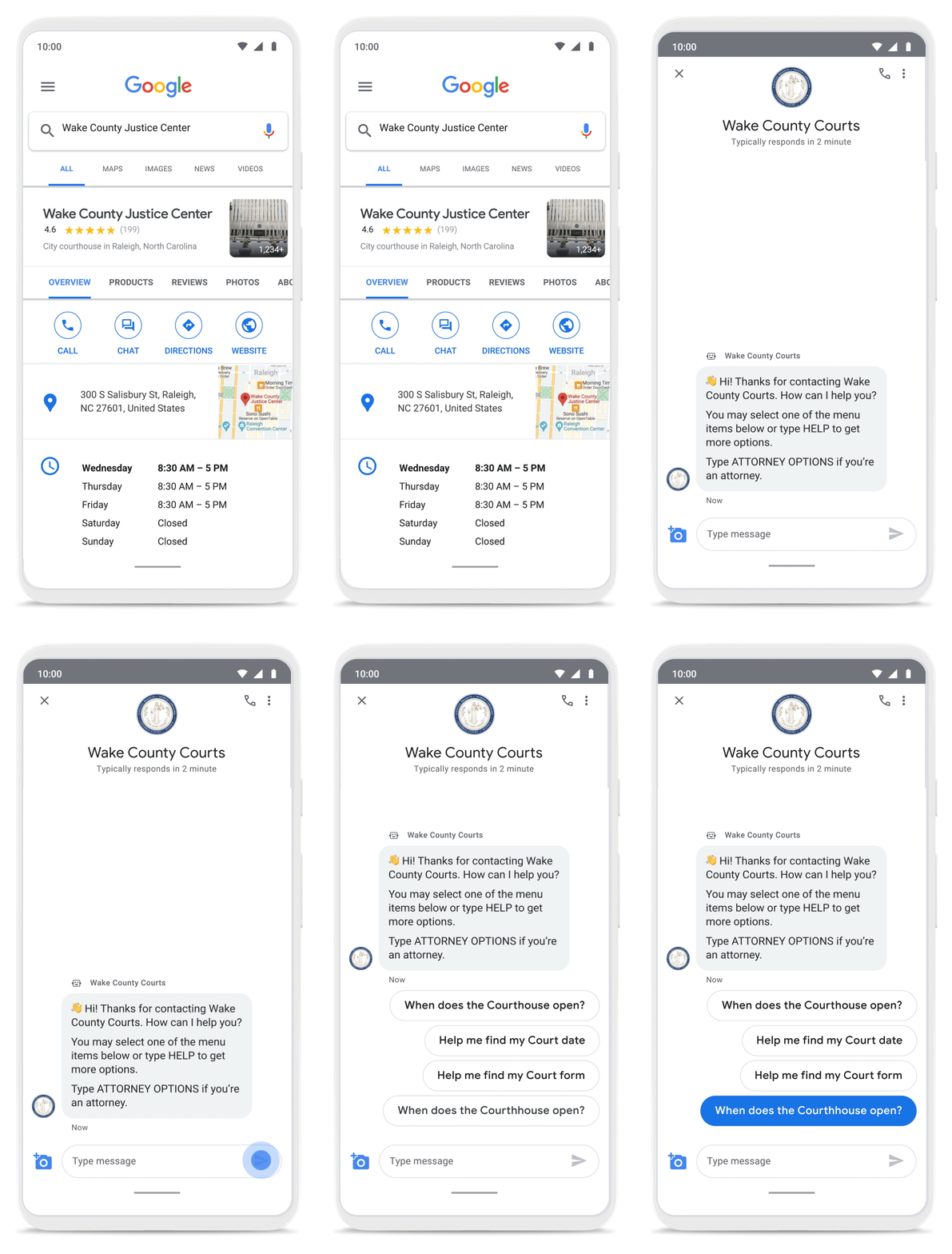
With Business Messages, North Carolina courthouses saw a 37% decrease in the call volume handled by courthouse staff. With 398,298 fewer phone calls during the first year of operation, the AI-based messages helped Wake County Courthouse work more efficiently and productively.
We’ve seen many brands benefiting from AI-powered Business Messages. For instance, Levi’s saw a 30% increase in off-hours shoppers and surpassed 85% customer satisfaction scores after implementing Business Messages. They also drove 30x more store-related questions than Levi’s website chat.
Bring Google’s conversational AI to your storefront with Business Messages
Google’s Business Messages makes it easier for businesses of all sizes to engage their existing or potential customers in a virtual conversation, when and where they need it.
To learn more, watch our Cloud Next session here or visit us at g.co/businessmessages. We have specialized services to help you get started and can share the wisdom of our channel partners and dedicated experts who specialize in unleashing the potential of conversational AI.
More Relevant Stories for Your Company


On-Demand Webinar: How Technology is Creating a Smaller World to Help Businesses Grow Big
Consider this: In a pre-cloud world, it took the telephone 75 years, automobiles 62 years, and TVs 14 years to reach 50 million customers. But today’s innovations have narrowed that gap. In comparison, it took Netflix only 7 years to reach 50 million customers, while Twitter got there in just

Workspace’s Collaboration Equity Integral for Delivering the ‘Promise of Hybrid Workplace’
Like many businesses around the world, Google is trying to combine on-site and off-site work into an efficient hybrid model. And like most businesses, we’re also figuring out how to get it right. As we grow our vision for the best possible hybrid workplace, one theme consistently emerges: the need for

Groupe Dauphinoise Grows it Customer Base with G Suite and Google Cloud Platform
As a leading French agricultural cooperative, Groupe Dauphinoise places collaboration at the heart of its philosophy. Working with farmers in the Rhone-Alpes region, Groupe Dauphinoise takes on a diverse range of activities from agricultural production to research and development to running retail outlets. As its operations expanded and strained its

Vodafone Turns to Google Maps Platform to Expand and Improve its Network
Vodafone India had a manual, labor-intensive process for determining network capabilities and reach. The company sent field operatives to every customer location to conduct a feasibility study. These feasibility studies help Vodafone determine whether they can provide connectivity and services to customers based on the infrastructure at that location. Everyone
