





How Kinguin Notched Up Shopping Experience with Google Recommendations AI

6449
Of your peers have already read this article.
3:00 Minutes
The most insightful time you'll spend today!
Over 2.14 billion people worldwide are expected to buy online this year, according to Statista. Online retail sales will account for 22% of all purchases by 2023. But in a competitive retail landscape, positive interactions can mean the difference between a sale and an abandoned shopping cart.
One of the leading global marketplaces – Kinguin.net is a haven for gamers. Their bustling ecommerce business conducts over 500,000 new transactions monthly. Users will encounter over 50,000 unique digital products, from video games, gift cards, in-game items to computer software and services. With over 10 million registered users, Kinguin improved their experience by helping users find items quickly and deliver service at scale.
Helping customers find what they want, fast
Because of Kinguin’s high volume of users—both buyers and sellers—and breadth of digital products, browsing and shopping can be challenging. “Customers shop online for choice and convenience, but it can sometimes be overwhelming. We want anyone who shops at Kinguin to find what they are looking for quickly and easily,” says Viktor Romaniuk Wanli, Kinguin CEO and Founder.
Today’s retailers know that creating personalized shopping experiences is crucial for establishing and maintaining customer loyalty. Kinguin discovered their users were getting a rather standard retail experience. They wondered how they could offer them a more tailored, personalized experience.
They knew product recommendations were a great way to personalize experiences because they help customers discover products that match their tastes and preferences. But it’s not that easy to recommend products. Various shifting factors make recommendations much more complex:
- Customer behavior. Understanding customers is tough. How do you recommend something to a cold start user who’s never been to your site before? What happens when their behavior changes?
- Omnichannel context. According to Harvard Business Review, 73% of all customers use many channels when they buy. What happens when they go from desktop to mobile or from social media shopping to a proprietary app?
- Product data challenges. How do you recommend new products within a large catalog of items? What if your product data has sparse labeling or unstructured metadata?
Data wasn’t a problem for Kinguin. They had data orders, history, wishlists, and could collect events based on their platform interactions. It was the machine learning model expertise they lacked. So rather than building their own solution, they determined it was more cost effective for them to find a reliable partner. It was also essential that the solution integrated easily with Kubernetes, which enabled their global network.
With these considerations in mind, they applied for the Google Recommendations AI beta program. Kinguin became the first gaming e-commerce platform in Europe to use Recommendations AI when it launched in 2020.
Pro gamer move: using a fully managed AI service
Google Recommendations AI uses algorithms to deliver highly personalized suggestions tailored to a customer’s preferences. Google Cloud based these algorithms on the same research that powers models by YouTube search and Google Shopping. Algorithms are always being tuned and adjusted to focus on individuals themselves—not just items.
Many shopping AIs rely on manually provisioning infrastructure and training machine learning models. Instead, Recommendations AI’s deep learning models use item and user metadata to gain insights. It processes Kinguin’s thousands of products at scale, iterating in real time. First, Kinguin pieces together a customer’s history and shopping journey. Then, using Recommendations AI, they can serve up personalized products—even for long-tail products and cold-start users.
By leveraging internal tools, Kinguin didn’t need to start implementation from scratch. After a few trial sessions with Google Cloud engineers, they got started right away. Due to the fast-paced nature of a marketplace—i.e., price changes, out-of-stock items—Kinguin needed their recommendations to be as close to real time as possible. They used internal event buses to stream events and their product catalog directly to the recommendations API.
Kinguin rolled out in high-traffic areas, including their home page, product page, and category pages. They analyzed heat maps and scroll maps to figure out where to test placements. They also experimented with different recommendation models such as “recently bought together” and “you may like.” Engineers also factored in where they were implementing the models. For example, the “others you might like” model would fit best on the homepage, while “frequently bought together” made sense at checkout.
Understanding how product recommendations influence financials is critical for demonstrating the impact of personalization. Using BigQuery, Kinguin could analyze different cost projection models. BigQuery helped them dig into specific financial data to understand their margins and revenue gains.
Playing to win: enhanced customer experience
Since adopting Recommendations AI, Kinguin has improved both customer experience and satisfaction. Search times have shortened by 20 seconds. Additionally, their average cart value has increased by 5 EUR. Conversion rates have quadrupled since the outset. Click-thru rates have doubled, increasing by 2.16 on product pages and 2.8 times on recommendations pages.
“Google Recommendations AI has helped us evolve our service, increase customer loyalty and satisfaction. It has also contributed to a significant rise in sales,” says Wanli. Kinguin is already thinking about other ways of enhancing user experiences with recommendations. Ideas include their checkout process, other landing pages, and email marketing.
Kinguin’s journey with Google Cloud shows how companies can leverage AI to optimize sales and deliver high-performing, low-latency recommendations to any customer touchpoint.
Learn more about Recommendations AI and Google Cloud AI and machine learning solutions.
Transforming the Contact Center Experience with Artificial Intelligence

2499
Of your peers have already read this article.
1:30 Minutes
The most insightful time you'll spend today!
We meet daily with contact center owners and customer experience (CX) execs across all industries, geographies, and business sizes. Looking back at these conversations, it’s crystal clear that 2022 was a high-stakes year for call centers, with three primary challenges trending across all customers and continuing in 2023:
- Many organizations feel pressure to rapidly scale up their call center operations in response to macroeconomic changes. Uncertain conditions are forcing Contact Centers to be ever more cost-effective, and to find ways to generate revenue for the business.
- End users are increasingly demanding and less forgiving when it comes to CX. Users have a choice, and they expect brands to meet them where they are with superior experiences. Connecting with customers where they engage is one of the key components of superior CX—customers should not have to go through elaborate processes or unhelpful phone trees to get help but should rather have service available quickly and easily in their preferred channels. Consumers demand more intimate ways of connecting with brands and Conversational AI can create that critical interaction medium.
- Organizations understand that AI can help address these challenges. However, many business leaders remain unsure how to successfully make the journey. A growing number of offerings are on the market, but many don’t deliver on their promise, with long and expensive integration requirements and unpredictable and underwhelming outcomes.
Helping our customers successfully address these challenges and opportunities was one of our top priorities last year and will continue to be a significant focus in coming months. In this blog post, we’ll review our Contact Center AI (CCAI) news from last year, as a primer for 2023.
Looking back: Why 2022 was a big year for Contact Center AI
In 2022, we increased our strategic investment in CCAI, including expanding it to include a comprehensive, end-to-end contact center solution suite that is user-first, AI-first, and cloud-first. We launched Contact Center AI Platform, our Contact Center as a Service (CCaaS) offering, as part of the CCAI product suite that offers a modern, turnkey solution, designed with user-first, AI-first, and cloud-first design. During Google Cloud Next ‘22, we shared lots of great content on how organizations can use CCAI to improve customer experiences, including these breakout sessions:
- Delight customers in every interaction with Contact Center AI
- Power new voice enabled interfaces with applications with Google Cloud’s speech solutions
We also got a chance to hear how customers are using CCAI to better reach their own customers, including Wells Fargo and TIAA. We partnered with CDW to discuss Providing Better Customer Experiences and with Quantiphi in a webinar called “Elevating the Banking Experience with CCAI Platform.” Just recently, our customer Segra shared their success story.
Through these customer interactions, three key priorities have surfaced as we look forward to 2023: Elevate the customer experience, bring new forms of AI to drive new automation and accelerate time to value.
Looking forward: Elevate CX, integrate new forms of AI, accelerate time to value
1. User-first: Meet them where they are with elevated Customer Experience.
As we have learned, users expect that brands meet them where they are and on their own terms and expectations. To do that, brands must integrate with and adopt the latest user-centric technologies and product best practices from consumer mobile and web apps. Enterprise B2C can’t exist anymore in a parallel world of different and often inferior user experience. Google has over 20 years of experience in building such consumer experiences, with multiple products successfully serving billions of users. Bringing these capabilities and experiences from our consumer products and research teams to our cloud offerings was a key component for our product offerings in 2022 and is a big part of our key investments in 2023. Moreover, a vast majority of CX user journeys start with a query on Google Search or YouTube. Connecting with the users at that point, even before they reach out directly to the contact center is a win-win, saving money for the brand and delivering immediate value to the user. By focusing on the user we created a superior integrated omnichannel experience.
2. AI-first and cloud-first: Quality contact center growth depends on transforming to modern, Cloud, AI solutions.
For contact centers to evolve, they need to transform from cost centers to revenue generators. That requires modern Cloud and AI solutions. Conversational data spans across all parts of the contact center, opening new ways to generate value. Cloud capabilities of privacy, security and scale can enable personalized CX across channels, enabling key omnichannel experiences. From a study by McKinsey: “Cross-channel integration and migration issues continue to hamper progress. For example, 77 percent of survey respondents report that their organizations have built digital platforms, but only 10 percent report that those platforms are fully scaled and adopted by customers. Only 12 percent of digital platforms are highly integrated, and, for most organizations, only 20 percent of digital contacts are unassisted.” Traditional telephony technologies are becoming commoditized and struggle to keep up with ever more complex rule based systems. Leaders in applicative AI and Cloud technology are stepping up as the new partners for brands who understand they need to take the leap to the next generation CX solutions. .
3. Accelerating time to value while future proofing investments with predictable and measurable value
Reducing upfront implementation investment and accelerating time to value can be a challenge for contact center solutions. Scaling Cloud and AI can provide a faster path advanced conversational AI, can help address these challenges. Let’s look at three examples:
- Out of the Box(OOTB) integrated transcription, chat and voice summarization, and topic modeling — This saves customers money by reducing agent handling time for every chat and call, as well as providing valuable insights that can be used for quality management, contact center optimization and automation, agent and user churn prediction, business insights, and revenue opportunities.
- AI based chat and voice calls steering paired with info-seeking virtual agents — Together these deliver higher Customer Satisfaction at scale while reducing cost – by significantly reducing waiting queues and being routed to the wrong agent, as well as automating away total handling time.
- Reduced time to full automation — Reduce the complexity of conversation modeling, prebuilt components and APIs for shorter time to value and more predictable outcomes, and metrics driven ML-Dev & QA tools and playbooks.
With these new capabilities, our customers can now see results as soon as they implement CCAI. We’re excited to get our customers to where they want to be faster!
And there you have it: a quick overview of CCAI and its progress in 2022 and what’s coming in 2023. For more details, check out the documentation or our CCAI solutions page.
1171
Of your peers have already watched this video.
5:30 Minutes
The most insightful time you'll spend today!
Prototyping Language Applications Made Easy with Generative AI
Did you know generative AI allows developers to prototype applications quickly? With Generative AI Studio on Google Cloud, developers can quickly explore and customize AI models that can be leveraged in Google Cloud applications. Watch along and see how developers, with the right tools, can experiment with new ideas in minutes instead of months.
Chapters:
0:00 – Intro
0:29 – Get started with Vertex Generative AI Studio
1:06 – Write your first prompt in Generative AI Studio
1:47 – Prototyping Q&A systems from background text
3:00 – How to save prompts
4:05 – How do LLMs produce output text?
4:41 – Wrap up
Check out more Generative AI for Developers videos → https://goo.gle/GenAIforDevs
Subscribe to Google Cloud Tech → https://goo.gle/GoogleCloudTech
VertexAI #GenerativeAI
Case Study: Twitter is Taking Their CX to The Next Level with AutoML

2778
Of your peers have already read this article.
2:00 Minutes
The most insightful time you'll spend today!
Editor’s note: Since launching its Spaces feature, Twitter has demonstrated that hearing people’s voices can bring conversations on Twitter to life in a completely new way. Next, it aimed to make it easier for customers to join and listen to live conversations they personally care about. In this blog, we learn how the Twitter Spaces Engineering team is bringing this vision to life with AutoML, powering a new ML heuristic which serves personalized recommendations to Twitter customers. The authors would like to thank Chuan Lu, Joe Balistreri, Chen-Rui Chou, Pablo Jablonski, Alberto Parrella, Pradip Thachile and Sam Lee from Twitter, as well as Helin Wang from Google, for contributions to this blog.
Since Twitter introduced Spaces in 2020 to enable live audio conversations on its platform, the Twitter Spaces Engineering team has been continually testing, building, and updating this feature in the open. Today, anyone can join, listen, and speak in a Space on Twitter, and the feature’s popularity has taken off. But this success also poses a challenge: with millions of people creating and joining Spaces at any time, how can they find the Spaces to engage with while they’re happening? Taking this as an opportunity to further improve the experience of its customers, Twitter has turned to machine learning (ML) and cloud technology for answers.
“ML fits into the natural progression of Twitter consumer and revenue product building, especially for a product feature such as Spaces,” explains Diem Nguyen, Senior Machine Learning Engineer and Data Scientist at Twitter. “We launched Spaces with a base-line algorithm using the ‘most popular’ heuristic which assumes that if a Space is popular, there’s a good chance you’d like it too. But our aim is to leverage ML to surface the most interesting and relevant Spaces to a particular Twitter customer, making it easier for them to find and join the conversations they personally care about. This is a complex functionality that Google Cloud ML capabilities help us to enable.”
Setting the stage for building new features with limited ML resources
While looking for the right tools to power this vision, Nguyen and her team started evaluating in December 2021 whether the Vertex AI platform and AutoML in particular could solve challenges observed when they first started building Spaces. These included a lack of dedicated ML resources to build and deploy the product feature, and the need to work on a multi-cloud environment.
“We had three key questions in mind during our assessment,” Nguyen explains. “Can we realistically deploy the AutoML model off-platform? Once deployed, can it solve for the request load that we get from the service we’re serving (in this case, the Spaces tab)? And finally, can we develop and maintain such a solution without a dedicated team of ML experts for this project?” The answer to all three questions was yes.
Positive answers motivated the Spaces Engineering team to take the solution to production in February 2022. “We started using AutoML Tables to train high-accuracy models with minimal ML expertise or effort, alleviating our resource constraint,” says Nguyen of the results. “Soon AutoML also stood out for its high performance and for supporting easy deployment beyond the Google Cloud Platform, making it ideal for this project hosted in a multi-cloud environment.”
Increasing customer engagement at speed with accurate ML predictions
With a classification model in place to predict the probability of user engagement in a particular Space, Twitter now aims to optimize its model with aggregated data around Twitter features that can help it better understand customer preferences. For example, if a customer has historically engaged with a particular topic and a new Space matches that topic, the ML model increases the score of that Space being served to that user on the Spaces tab.
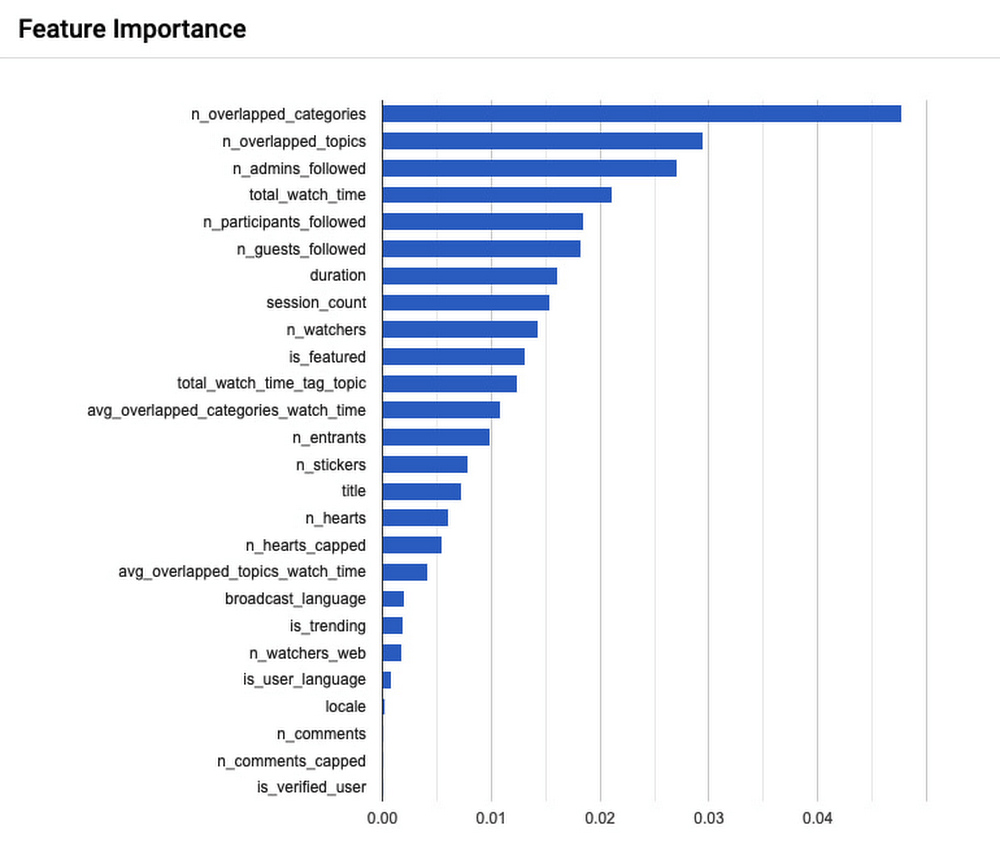
Because Spaces are live audio conversations, the Spaces tab needs to be ranked to customers in near real time so they don’t miss out. With this in mind, Twitter’s model currently performs 900 queries per second on the Spaces tab, and evaluates 50,000 candidates per second. Meanwhile, 99% of these requests are faster than 100 milliseconds, and 90% of requests are faster than 50 milliseconds.
To measure the success of this project, Nguyen’s team conducted A/B experiments around key customer engagement metrics–A stands for the ‘most popular’ heuristic previously in production, and B is the new AutoML model which seeks to personalize Spaces recommendations to the interests of individual Twitter users. Three months into the project, the numbers were encouraging. “After deploying our AutoML Tables solution we saw an increase of 1.96% in Spaces daily active customers, which is one of our key metrics. We also noticed an increase of 1.99% in Spaces join in rates, and an increase of 8.42% in user clicks to explore a Space,” Nguyen shares. “These are positive signals that users are now engaging more with the Spaces tab service on the Twitter app, which is exactly what we set out to do with this project.”
Powering new use cases with hands-off ML frameworks
With this first solution running in production to improve the performance of the Spaces tab, Nguyen starts to ask how else it might support the experience of Twitter users moving forward. “The Spaces tab is a small surface on the Twitter app. With our current ML solution we’re some distance away from serving our home tab traffic, which is where a lot of our traffic happens and therefore would involve a much bigger-scale operation. Getting there will take some work but we’re evaluating the possibility of optimizing our model performance for this in collaboration with Google Cloud,” says Nguyen.
“As a product-led company, we focus on continually improving the customer experience and we want to iterate faster to get to that point. AutoML brings that value to our product teams because it is so hands-off. You don’t need to write any model code in order to reap the benefits from this machine learning framework; AutoML automatically experiments with many different model architectures and comes up with a state-of-the-art model that addresses your needs. So while it is not a one-size-fits-all solution, it is a great solution with the potential to power many more Twitter use cases,” she concludes.
Leverage ML to Spot Anomalies in Real-time Forex Data

3104
Of your peers have already read this article.
6:00 Minutes
The most insightful time you'll spend today!
Let’s say you are a quantitative trader with access to real-time foreign exchange (forex) price data from your favorite market data provider. Perhaps you have a data partner subscription, or you’re using a synthetic data generator to prove value first. You know there must be thousands of other quants out there with your same goal. How will you differentiate your anomaly detector?
What if, instead of training an anomaly detector on raw forex price data, you detected anomalies in an indicator that already provides generally agreed buy and sell signals? Relative Strength Index (RSI) is one such indicator; it is often said that RSI going above 70 is a sell signal, and RSI going below 30 is a buy signal. As this is just a simplified rule, it means there could be times when the signal is inaccurate, such as a currency market correction, making it a prime opportunity for an anomaly detector.
This gives us the following high level components:

Of course, we want each of these components to handle data in real time, and scale elastically as needed. Dataflow pipelines and Pub/Sub are the perfect services for this. All we need to do is write our components on top of the Apache Beam sdk, and they’ll have the benefit of distributed, resilient and scalable compute.
Luckily for us, there are some great existing Google plugins for Apache Beam. Namely, a Dataflow time-series sample library that includes RSI calculations, and a lot of other useful time series metrics; and a connector for using AI Platform or Vertex AI inference within a Dataflow pipeline. Let’s update our diagram to match, where the solid arrows represent Pub/Sub topics.
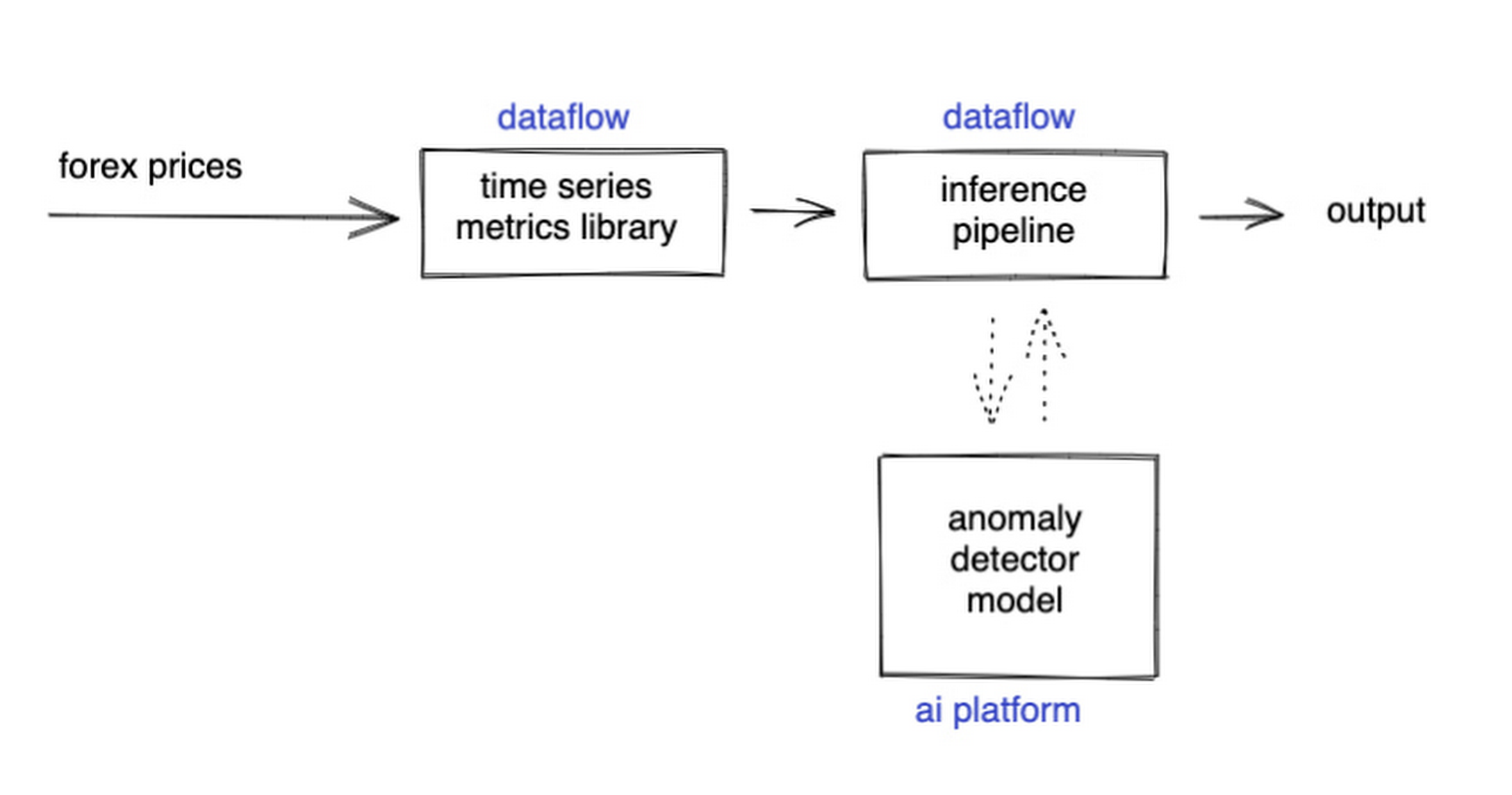
The Dataflow time-series sample library also provides us with gap-filling capabilities, which means we can rely on having contiguous data once the flow reaches our machine learning (ML) model. This lets us implement quite complex ML models, and means we have one less edge case to worry about.
So far we’ve only talked about the real time data flow, but for visualization and continuous retraining of our ML model, we’re going to want historical data as well. Let’s use BigQuery as our data warehouse, and Dataflow to plumb Pub/Sub into it. As this plumbing job is embarrassingly parallelizable, we wrote our pipeline to be generic across data types and share the same Dataflow job, such that compute resources can be shared. This results in efficiencies of scale both in cost savings and time required to scale-up.

Data Modeling
Let’s discuss data formats a bit further here. An important aspect of running any data engineering project at scale is flexibility, interoperability and ease of debugging. As such, we opted to use flat JSON structures for each of our data types, because they are human readable and ubiquitously understood by tooling. As BigQuery understands them too, it’s easy to jump into the BigQuery console and confirm each component of the project is working as expected.
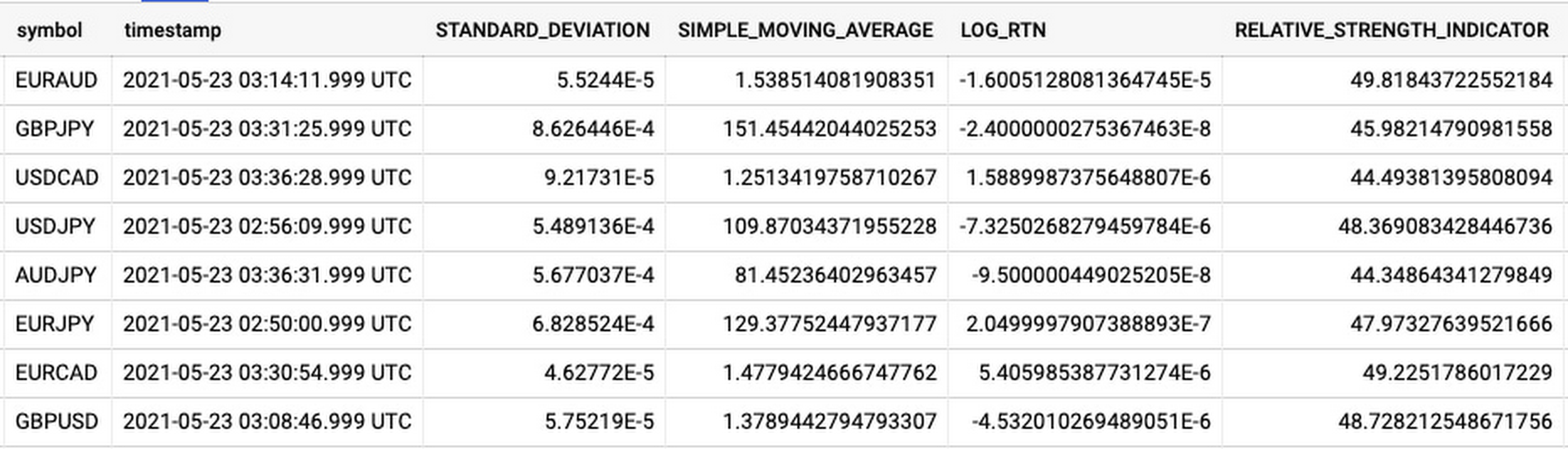
As you can see, the Dataflow sample library is able to generate many more metrics than RSI. It supports generating two types of metrics across time series windows, metrics which can be calculated on unordered windows, and metrics which require ordered windows, which the library refers to as Type 1 metrics and Type 2 metrics, respectively. Unordered metrics have a many-to-one relationship, which can help reduce the size of your data by reducing the frequency of points through time. Ordered metrics run on the outputs of the unordered metrics, and help to spread information through the time domain without loss in resolution. Be sure to check out the Dataflow sample library documentation for a comprehensive list of metrics supported out of the box.
As our output is going to be interpreted by our human quant, let’s use the unordered metrics to reduce the time resolution of our flow of real time data to one per second, or one hertz. If our output was being passed into an automated trading algorithm, we might choose a higher frequency. The decision for the size of our ordered metrics window is a little more difficult, but broadly determines the amount of time-steps our ML model will have for context, and therefore the window of time for which our anomaly detection will be relevant. We at least need it to be larger than our end-to-end latency, to ensure our quant will have time to act. Let’s set it to five minutes.
Data Visualization
Before we dive into our ML model, let’s work on visualization to give us a more intuitive feel for what’s happening with the metrics, and confirm everything we’ve got so far is working. We use the Grafana helm chart with the BigQuery plugin on a Google Kubernetes Engine (GKE) Autopilot cluster. The visualisation setup is entirely config-driven and provides out-of-the-box scaling, and GKE gives us a place to host some other components later on.
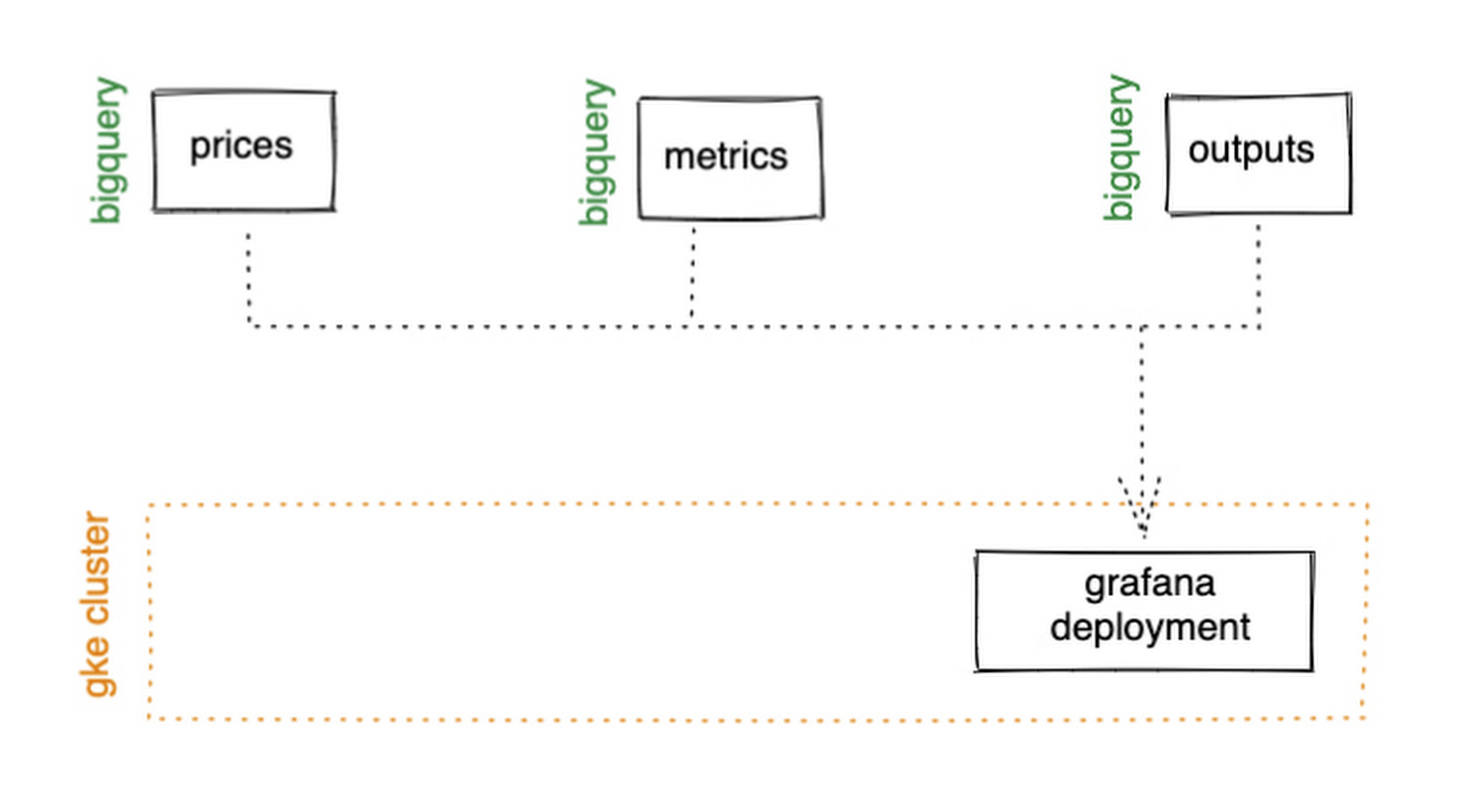
GKE Autopilot has Workload Identity enabled by default, which means we don’t need to worry about passing around secrets for BigQuery access, and can instead just create a GCP service account that has read access to BigQuery and assign it to our deployment through the linked Kubernetes service account.
That’s it! We can now create some panels in a Grafana dashboard and see the gap filling and metrics working in real time.

Building and deploying the Machine Learning Model
Ok, ML time. As we alluded to earlier, we want to continuously retrain our ML model as new data becomes available, to ensure it remains up to date with the current trend of the market. TensorFlow Extended (TFX) is a platform for creating end-to-end machine learning pipelines in production, and eases the process around building a reusable training pipeline. It also has extensions for publishing to AI Platform or Vertex AI, and it can use Dataflow runners, which makes it a good fit for our architecture. The TFX pipeline still needs an orchestrator, so we can host that in a Kubernetes job, and if we wrap it in a scheduled job, then our retraining happens on a schedule too!

TFX requires our data be in the tf.Example format. The Dataflow sample library can output tf.Examples directly, but this tightly couples our two pipelines together. If we want to be able to run multiple ML models in parallel, or train new models on existing historical data, we need our pipelines to only be loosely coupled. Another option is to use the default TFX BigQuery adaptor, but this restricts us to each row in BigQuery mapping to exactly one ML sample, meaning we can’t use recurrent networks.
As neither of the out-of-the-box solutions met our requirements, we decided to write a custom TFX component that did what we needed. Our custom TFX BigQuery adaptor enables us to keep our standard JSON data format in BigQuery and train recurrent networks, and it keeps our pipelines loosely coupled! We need the windowing logic to be the same for both training and inference time, so we built our custom TFX component using standard Beam components, such that the same code can be imported in both pipelines.
def window_elements(pipeline: beam.Pipeline,window_length: int,drop_irregular_windows: bool = True,sort_windows_by: str = "timestamp",):"""Window elements into regular windows of a given size.Assumes elements flow at a fixed rate of 1Hz."""def _sort_windows(window: Iterable[Dict[Text, Any]]) -> List[Dict[Text, Any]]:sorted_window = sorted(window, key=lambda e: e[sort_windows_by])return sorted_windowwindowed_elements = (pipeline| "AddConstantKey" >> beam.Map(lambda item: (0, item))| "WithSlidingWindow">> beam.WindowInto(beam.transforms.window.SlidingWindows(window_length, 1),trigger=beam.transforms.trigger.AfterCount(window_length),accumulation_mode=beam.transforms.trigger.AccumulationMode.DISCARDING,)| "CombineWindow" >> beam.GroupByKey()| "GetValues" >> beam.Values())if drop_irregular_windows:windowed_elements = windowed_elements | "EnforceWindowLengths" >> beam.Filter(lambda w: len(w) == window_length).with_output_types(List[Dict[Text, Any]])if sort_windows_by is not None:windowed_elements = windowed_elements | "Sort" >> beam.Map(_sort_windows).with_output_types(List[Dict[Text, Any]])return windowed_elements
With our custom generator done, we can start designing our anomaly detection model. An autoencoder utilising long-short-term-memory (LSTM) is a good fit for our time-series use case. The autoencoder will try to reconstruct the sample input data, and we can then measure how close it gets. That difference is known as the reconstruction error. If there is a large enough error, we call that sample an anomaly. To learn more about autoencoders, please consider reading chapter 14 from Deep Learning by Ian Goodfellow, Yoshua Bengio, and Aaron Courville.
Our model uses simple moving average, exponential moving average, standard deviation, and log returns as input and output features. For both the encoder and decoder subnetworks, we have 2 layers of 30 time step LSTMs, with 32 and 16 neurons, respectively.
In our training pipeline, we include z score scaling as a preprocessing transformer – which is usually a good idea when it comes to ML. However, there’s a nuance to using an autoencoder for anomaly detection. We need not only the output of the model, but also the input, in order to calculate the reconstruction error. We’re able to do this by using model serving functions to ensure our model returns both the output and preprocessed input as part of its response. As TFX has out-of-the-box support for pushing trained models to AI Platform, all we need to do is configure the pusher, and our (re)training component is complete.
Detecting Anomalies in real time
Now that we have our model in Google Cloud AI Platform, we need our inference pipeline to call to it in real time. As our data is using standard JSON, we can easily apply our RSI rule of thumb inline, ensuring our model only runs when needed. Using the reconstructed output from AI Platform, we are then able to calculate the reconstruction error. We choose to stream this directly into Pub/Sub to enable us to dynamically apply an anomaly threshold when visualising, but if you had a static threshold you could apply it here too.
with beam.Pipeline(options=pipeline_options) as pipeline:(pipeline| "ReadFromPubSub">> beam.io.ReadFromPubSub(topic=input_metrics,timestamp_attribute=timestamp_key,)| "DeserialiseJSON" >> beam.Map(pubsub_serialiser.to_json)| "FilterSymbol" >> beam.Filter(lambda m: m["symbol"] == symbol)| "FilterRSIThreshold">> beam.Filter(lambda m: m["RELATIVE_STRENGTH_INDICATOR"] > rsi_upper_thresholdor m["RELATIVE_STRENGTH_INDICATOR"] < rsi_lower_threshold)| "WindowElements" >> window_elements(window_length)| "RunAutoencoder">> run_windowed_inference(gcp_project_id,model_name,window_length,{f: "FLOAT" for f in feature_metrics},)| "CalcReconError" >> beam.Map(calc_reconstruction_err)| "ToJSON">> beam.Map(lambda re: {"symbol": symbol, "reconstruction_error": re})| "SerialiseJSON" >> beam.Map(pubsub_serialiser.from_json)| "WriteToPubSub">> beam.io.WriteToPubSub(topic=output_alerts,timestamp_attribute=timestamp_key,))
Summary
Here’s what the wider architecture looks like now:

More importantly though, does it fit for our use case? We can plot the reconstruction error of our anomaly detector against the standard RSI buy/sell signal, and see when our model is telling us that perhaps we shouldn’t blindly trust our rule of thumb. Go get ‘em, quant!
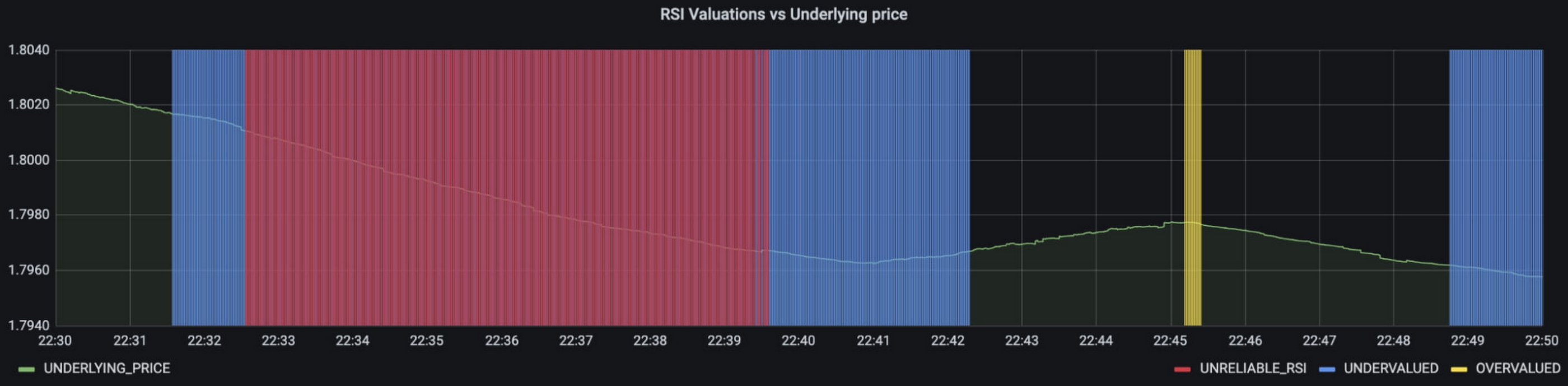
In terms of next steps, there are many things you could do to extend or adapt what we’ve covered. You might want to explore with multi-currency models, where you could detect when the price action of correlated currencies is unexpected, or you could connect all of the Pub/Sub topics to a visualization tool to provide a real-time dashboard.
Give it a try
To finish it all off, and to enable you to clone the repo and set everything up in your own environment, we include a data synthesizer to generate forex data without needing access to a real exchange. As you might have guessed, we host this on our GKE cluster as well. There are a lot of other moving parts – TFX uses a SQL database and all of the application code is packaged into a docker image and deployed along with the infra using Terraform and cloud build. But if you’re interested in those nitty gritty details, head over to the repo and get cloning!
Feel free to reach out to our teams at Google Cloud and Kasna for help in making this pattern work best for your company.
This Diagnostic Company is Revolutionising Healthcare Delivery with AI
5402
Of your peers have already read this article.
5:30 Minutes
The most insightful time you'll spend today!
Dr. Elliot Smith cannot be accused of lacking ambition. A high achiever with a Ph.D. in Electrical Engineering and a specialist in magnetic resonance imaging (MRI) systems, Smith aims to deliver top quality healthcare to anyone in the world — regardless of their location or wealth.
Dr. Smith has already made strides on this journey with his Brisbane, Queensland-headquartered business, Maxwell MRI. “I saw there was a big gap in the market around automating the diagnosis of health conditions,” he says. “Existing processes were typically manual and involved a lot of people.”
Artificial intelligence (AI) and machine learning can remove a key obstacle to scaling out medicine and improve the efficiency and accuracy of diagnosing conditions, the healthcare entrepreneur believes.
“Our grand vision is to build an AI doctor that anyone can receive affordable support from and connect to in order to obtain results,” explains Dr. Smith.
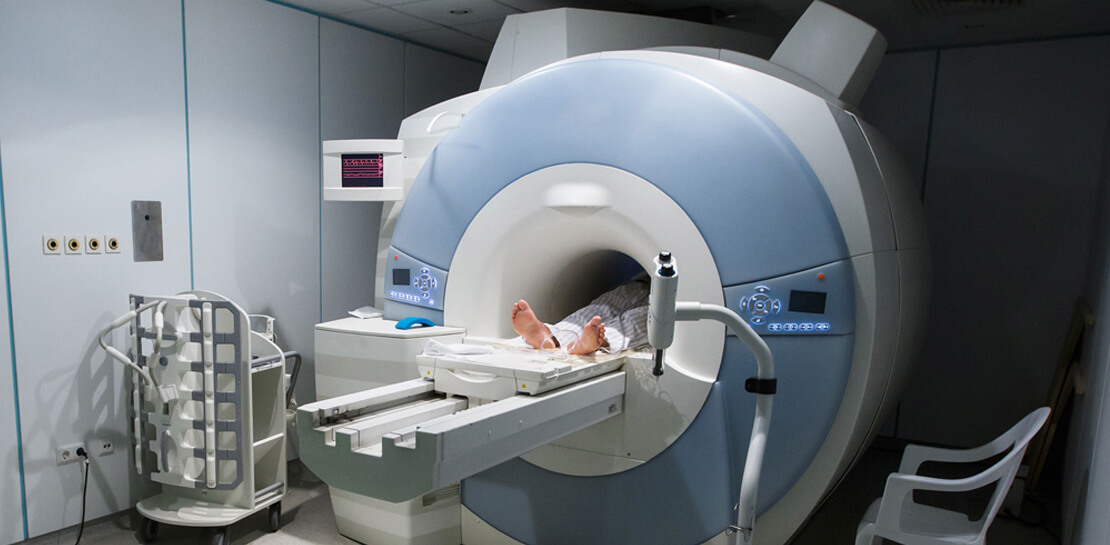
Maxwell MRI presently enables clinicians to submit anonymised MRI scans to a machine learning enabled AI platform to help diagnose prostate cancer. The service is sold to clinicians who can then charge a per-session fee to clients. As well as obtaining results for individual cases, the MRI scans and associated information is used to ‘train’ the platform to deliver accurate diagnoses faster and in a more affordable way than existing systems do.
Dr. Smith and his team started by running a number of functions and processes on a single server with graphics processing units (GPUs) and sizable hard disk capacity. However, this infrastructure could not scale to support the planned growth of the business. Each case Maxwell MRI processes involves about 200MB of data in MRI scans alone. Once supplementary data, blood test result, pathology results and genetic information is included, this load can reach more than 1GB of data per patient.
The business aimed to process 150,000 cases by the end of 2018. This required a service that could deliver massive scale in data storage and compute, and could easily be accessed from any location. “We wanted to move from three GPUs to 30 GPUs without having to buy more servers or other associated equipment, so the cloud was the natural next step,” says Dr. Smith.
Maxwell MRI evaluated Google Cloud Platform (GCP) and determined that the managed services component of GCP would remove the burden of infrastructure deployment and administration. In addition, Google Cloud Machine Learning Engine would enable the business to scale to as many GPUs as needed to meet demand.
Maxwell MRI started with some small experiments to determine that GCP met all its requirements and completed its migration to the platform in February 2017. “We really started to scale up the data we had and consequently our computing requirements at that time,” Dr. Smith says.
The Maxwell MRI platform features an upload service that enables clinicians to upload imaging and associated data. This service triggers several different upload pipelines that clean and standardise data. They then write imaging data to Google Cloud Storage, and more structured data to a combination of Google Cloud Datastore and Google Cloud Spanner.
The platform then converts the information into records that can be used to ‘train’ new machine learning configurations or run evaluations through existing machine learning pipelines.
“The tasks we perform including segmenting various anatomical regions for analysis and sending those results back into Google Cloud Storage,” says Dr. Smith. “This then commences that repeated process of running Google Cloud Dataflow pipelines and machine learning algorithms, and presenting those outcomes back to the clinicians.”
Existing Literature Validated
The data processed and analysed to date has, Dr Smith says, enabled Maxwell MRI to help validate existing literature that indicates clinicians lack confidence in existing early-stage testing procedures for prostate cancer. This prompts them to move quickly to the biopsy stage to assure themselves their diagnosis is valid. “New technologies have a lot of potential to rectify this situation and guide treatment to be more accurate, specific and cost-effective,” he says.
Results Delivered in 10-15 Minutes
More specifically, using GCP has enabled Maxwell MRI to guarantee to clinicians that results will be delivered within minutes. “Clinicians are used to getting results back in two days to a week,” says Dr. Smith. “We’re saying that with our platform running on GCP we’ll deliver you results in 10 to 15 minutes, regardless of the number of patients coming in.”
Running on GCP has enabled the business to accelerate its development cycles, test new ideas easily on a subset of data, test in parallel and deliver new services considerably faster than in another environment. In addition, the flexible GCP charging model aligned with the ability to scale compute capabilities quickly and easily has enabled the fledgling business to control its costs.
Google technologies are poised to play an integral role in the business’s future. “With Google available, it doesn’t make sense for us to use our own infrastructure,” Dr. Smith says. “Our expertise in AI, machine learning and clinical engagement complements cloud platform specialties of infrastructure, managed services and ease of use. We see a bright future ahead in helping to transform healthcare globally.”
More Relevant Stories for Your Company

Tyson Foods’ Story of Unlocking Opportunities by Integrating Real-time Analytics with AI and BI
As data environments become more complex, companies are turning to streaming analytics solutions that analyze data as it’s ingested and deliver immediate, high-value insights into what is happening now. These insights enable decision makers to act in real time to take advantage of opportunities or respond to issues as they

Discover Latest Resources on Google Cloud’s Datasets Solution
Editor’s note: With Google Cloud’s datasets solution, you can access an ever-expanding resource of the newest datasets to support and empower your analyses and ML models, as well as frequently updated best practices on how to get the most out of any of our datasets. We will be regularly updating this

Transform Your Marketing Strategy with Tinyclues and Google Cloud CDP
Editor’s note: The post is part of a series highlighting our awesome partners, and their solutions, that are Built with BigQuery. What are Customer Data Platforms (CDPs) and why do we need them? Today, customers utilize a wide array of devices when interacting with a brand. As an example, think

Introducing Duet AI on Google Cloud: AI-Powered Developer Productivity Unleashed
Last week we announced the private preview of Duet AI for Google Cloud, an always-on AI collaborator that uses generative AI to provide help to developers and cloud users. This article gives you a detailed look at Duet AI for developers, showing how Duet AI can help provide developers with real-time code
